
作者 | JiekeXu
来源 |公众号 JiekeXu DBA之路(ID: JiekeXu_IT)
大家好,我是JiekeXu,很高兴又和大家见面了,今天和大家一起来聊聊MongoDB 备份恢复,欢迎点击上方蓝字关注我,标星或置顶,更多干货第一时间到达!
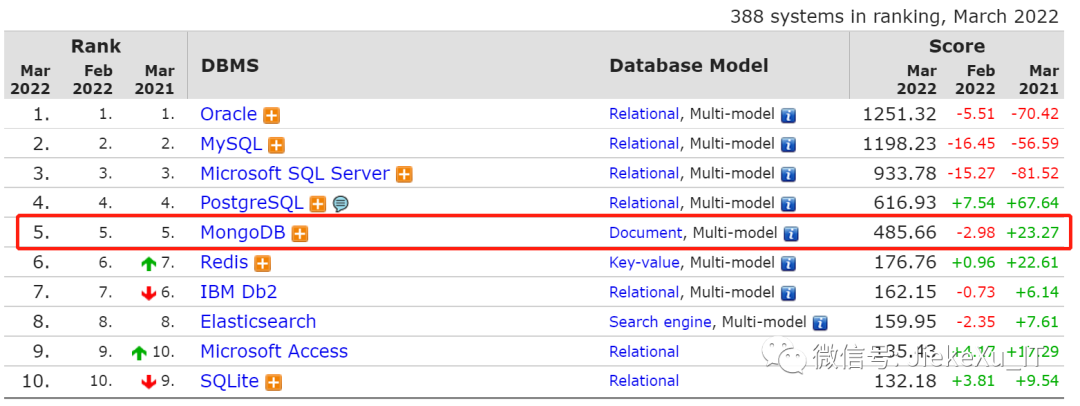
去年中旬安装过 MongoDB,没有怎么实操,本次将备份相关的操作做一个总结,后续有用到的地方可以回来查看,就比较方便了,有需要的小伙伴也可以收藏一波哦!来看一眼本月 MongoDB 在 DB-Engines 排行榜上霸榜第五依旧不变,如下所示,然后进入今天的正题吧。
MongoDB 在 bin 目录下提供了一系列有用的工具,这些工具提供了 MongoDB 在运维管理上 的方便。
| 工具 | 描述 |
|---|---|
| mongosniff | mongodb监测工具,作用类似于 tcpdump |
| mongodump | MongoDB数据备份工具 |
| mongoimport | Mongodb数据导入工具 |
| mongoexport | Mongodb数据导出工具 |
| bsondump | 将 bson 格式的文件转储为 json 格式的数据 |
| mongorestore | MongoDB数据恢复工具 |
| mongod | MongoDB服务启动工具 |
| mongostat | mongodb自带的状态检测工具 |
| mongofiles | GridFS 管理工具,可实现二制文件的存取 |
| mongooplog | |
| mongotop | 跟踪一个MongoDB的实例,查看哪些大量的时间花费在读取和写入数据 |
| mongos | 分片路由,如果使用了 sharding 功能,则应用程序连接的是 mongos 而不是 mongod |
| mongo | 客户端命令行工具,其实也是一个 js 解释器,支持 js 语法 |
MongoDB 备份恢复主要有以下两种组合工具:mongodump 和 mongorestore、mongoexport 和 mongoimport
1、mongodump 和 mongorestore
这两种工具在 MongoDB 4.4 以下随着数据库服务一起安装,不需要单独安装,但从 MongoDB 4.4 版本开始,mongodump 现在与 MongoDB Server 分开发布,并使用自己的版本控制,初始版本为 100.0.0。mongodump 从 MongoDB 数据库中读取数据并创建 BSON 文件,mongorestore 工具可以使用这些文件来还原 MongoDB 数据库。mongodump 和 mongorestore 是用于备份和恢复小型 MongoDB 的简单而高效的工具,但不适合捕获大型系统的备份。mongodump 和 mongorestore 针对正在运行的 mongod 进程运行,并且可以直接操作底层数据文件。默认情况下,mongodump 不捕获 local 本地数据库的内容。mongodump 仅捕获数据库中的文档。生成的备份是节省空间的,但 mongorestore 或 mongod 必须在还原数据后重新生成索引,故不会备份索引。当连接到 MongoDB 实例时,mongodump 可能会对 mongod 性能产生负面影响。如果数据大于系统内存,则查询会将工作集从内存中推出,从而导致页面错误。应用程序可以继续修改数据,而 mongodump 会捕获输出。对于副本集,mongodump 提供了 --oplog 选项,以在其输出 oplog 条目中包含 mongodump 操作期间发生的条目。这允许相应的 mongorestore 操作重播捕获的 oplog。要恢复使用 --oplog 创建的备份,请将 mongorestore 与 --oplogReplay 选项结合使用。
1.1、 mongodump 常用参数
--host <hostname><:port>, -h <hostname><:port> # 指定备份的主机ip和端口号,默认值localhost:27017--port # 指定端口号 默认27017--username <username>, -u <username> # 指定用户名--password <password>, -p <password> # 指定密码--authenticationDatabase <dbname> # 指定认证的数据库--authenticationMechanism <name> # 指定认证的算法 ,默认值 SCRAM-SHA-1--db <database>, -d <database> # 指定备份的数据库,未指定的话,备份所有的数据库,但不包含local库--collection <collection>, -c <collection> # 指定备份的集合,未指定则备份指定库中的所有集合。--query <json>, -q <json> # 指定 json 作为查询条件。来备份我们过滤后的数据。--queryFile <path> # 指定 json 文档路径,以该文档的内容作为查询条件,来备份我们过滤后的数据。--quit # 通过抑制 MongoDB的复制,连接等活动,来实现备份。--gzip # 开启压缩,3.2版本后可以使用,输出为文件的话会带有后缀.gz--out <path>, -o <path> # 输出的目录路径--repir # 修复数据时使用 下面有详细介绍--oplog # mongodump 会将 mongodump 执行期间的 oplog 日志 输出到文件 oplog.bson,这就意味着从备份开始到备份结束的数据操作我们都可以记录下来。--archive <file> # 输出到单个存档文件或者是直接输出。--dumpDbUsersAndRoles # 只有在 使用 --db 时才适用,备份数据库的包含的用户和角色。--excludeCollection string # 排除指定的集合,如果要排除多个,使用多个--excludeCollection--numParallelCollections int, -j int # 并行导出的集合数,默认为4--ssl # 指定 TLS/SSL 协议--sslCAFile filename # 指定认证文件名--sslPEMKeyFile <filename>--sslPEMKeyPassword <value>--sslCRLFile <filename>--sslAllowInvalidCertificates--sslAllowInvalidHostnames--sslFIPSMode
1.2、导出示例
全库备份mkdir mongodb/backupmongodump -uroot -proot123 --port 27017 --authenticationDatabase admin -o mongodb/backup备份world库$ mongodump -uroot -proot123 --port 27017 --authenticationDatabase admin -d world -o mongodb/backup/备份oldboy库下的log集合$ mongodump -uroot -proot123 --port 27017 --authenticationDatabase admin -d oldboy -c log -o mongodb/backup/压缩备份$ mongodump -uroot -proot123 --port 27017 --authenticationDatabase admin -d oldguo -o mongodb/backup/ --gzipmongodump -uroot -proot123 --port 27017 --authenticationDatabase admin -o mongodb/backup/ --gzip$ mongodump -uroot -proot123 --port 27017 --authenticationDatabase admin -d app -c vast -o mongodb/backup/ --gzip复制集全库压缩备份$mongodump --host jiektRS/192.168.75.30:37017,192.168.75.31:37017,192.168.75.32:37017 -uroot -p 'rootroot' --authenticationDatabase admin -o /home/mongo/dmp --gzip
1.3、mongorestore 常用参数
--help # 查看帮助--quiet # 通过抑制 MongoDB的复制,连接等活动,来实现数据恢复。--host <hostname><:port>, -h <hostname><:port> # 指定恢复的主机ip和端口号,默认值localhost:27017--port # 指定端口号 默认27017--username <username>, -u <username> # 指定用户名--password <password>, -p <password> # 指定密码--authenticationDatabase <dbname> # 指定认证的数据库--authenticationMechanism <name> # 指定认证的算法 ,默认值 SCRAM-SHA-1--objcheck # 开启验证,验证还原操作,确保没有无效的文档插入数据库。会有较小的性能影响--oplogReplay # 恢复备份数据并将 mongodump 执行期间的操作(记录在导出的日志)恢复。--oplogLimit # 指定恢复--oplogFile # 指定 Oplog 路径--keepIndexVersion # 阻止mongorestore在还原过程中将索引升级到最新版本。--restoreDbUsersAndRoles # 还原指定的数据库用户和角色。--maintainInsertionOrder # 默认值为False,如果为 True,mongorestore 将按照输入源的文档顺序插入,否则是 随机执行插入。--numParallelCollections int, -j int # 指定并行恢复的集合数。--numInsertionWorkersPerCollection int # 默认值为 1,指定每个集合恢复的并发数,大数据量导入增加该值可提高 恢复速度。--gzip # 从压缩文档中 恢复。--archive # 从归档文件中恢复。--dir # 指定还原数据储存目录。
1.4 恢复示例
恢复world库$ mongorestore -uroot -proot123 --port 27017 --authenticationDatabase admin -d world1 mongodb/backup/world恢复oldguo库下的t1集合[mongod@db03 oldboy]$ mongorestore -uroot -proot123 --port 27017 --authenticationDatabase admin -d world -c t1 --gzip mongodb/backup.bak/oldboy/log1.bson.gzdrop表示恢复的时候把之前的集合drop掉(危险)$ mongorestore -uroot -proot123 --port 27017 --authenticationDatabase admin -d oldboy --drop mongodb/backup/oldboy副本集备份恢复集合mongodump --host jiekeRS/192.168.75.30:37017,192.168.75.31:37017,192.168.75.32:37017 -uroot -p'rootroot' --authenticationDatabase admin -d jieke-biz-credit -c CreditDocDatumDirectTemp -o /home/mongo/mongodumpmongorestore --host jiekeRS/192.168.75.89:37017,192.168.75.89:37017,192.168.75.89:37017 -uroot -p'rootroot' --authenticationDatabase admin -d jieke_mps_certificate -c CreditDocDatumDirectTemp /home/mongo/dmp/jieke-biz-credit/CreditDocDatumDirectTemp.bson
注意:默认情况下 mongodump 不获取 local 数据库里面的内容mongodump 仅备份数据库中的文档,不备份索引,所以我们还原后,需要重新生成索引。--oplog # mongodump 会将 mongodump 执行期间的 oplog 日志 输出到文件 oplog.bson,这就意味着从备份开始到备份结束的数据操作我们都可以记录下来。
2、mongoexport 和 mongoimport
2.1、mongoexport
mongoexport 是一个命令行工具,可对存储在MongoDB实例中的数据进行JSON或CSV导出。
--常用参数mongoexport --helpExport MongoDB data to CSV, TSV or JSON files.options:--help produce help message-v [ --verbose ] be more verbose (include multiple times for moreverbosity e.g. -vvvvv)--version print the program's version and exit-h [ --host ] arg mongo host to connect to ( <set name>/s1,s2 forsets)--port arg server port. Can also use --host hostname:port--ipv6 enable IPv6 support (disabled by default)-u [ --username ] arg username-p [ --password ] arg password--dbpath arg directly access mongod database files in the givenpath, instead of connecting to a mongod server -needs to lock the data directory, so cannot be usedif a mongod is currently accessing the same path--directoryperdb if dbpath specified, each db is in a separatedirectory--journal enable journaling-d [ --db ] arg database to use-c [ --collection ] arg collection to use (some commands)-f [ --fields ] arg comma separated list of field names e.g. -fname,age--fieldFile arg file with fields names - 1 per line-q [ --query ] arg query filter, as a JSON string--csv export to csv instead of json-o [ --out ] arg output file; if not specified, stdout is used--jsonArray output to a json array rather than one object perline-k [ --slaveOk ] arg (=1) use secondaries for export if available, defaulttrue参数说明:-h:指明数据库宿主机的IP-u:指明数据库的用户名-p:指明数据库的密码-d:指明数据库的名字-c:指明collection的名字-f:指明要导出那些列-o:指明到要导出的文件名-q:指明导出数据的过滤条件
2.2 、mongoexport 示例
--连接到副本集要连接到副本集以导出其数据,您可以:指定副本集名称和成员:--uri connection stringmongoexport --uri="mongodb://mongodb0.example.com:27017,mongodb1.example.com:27017,mongodb2.example.com:27017/reporting?replicaSet=myReplicaSetName" --collection=events --out=events.json [additional options]如果使用,则将数据库指定为字符串的一部分。您不能将命令行选项与一起使用。--uri connection string--db--uri connection string在导出中指定副本集名称和成员--host:mongoexport --host="myReplicaSetName/mongodb0.example.com:27017,mongodb1.example.com:27017,mongodb2.example.com" --collection=events --db=reporting --out=events.json [additional options]默认情况下,mongoexport从副本集的主数据库读取。要覆盖默认值,可以指定读取首选项:您可以在 --uri connection stringmongoexport --uri="mongodb://mongodb0.example.com:27017,mongodb1.example.com:27017,mongodb2.example.com:27017/reporting?replicaSet=myReplicaSetName&readPreference=secondary" --collection=events --out=events.json [additional options]如果指定读取的首选项标签,请包括以下 readPreferenceTags选项:mongoexport --uri="mongodb://mongodb0.example.com:27017,mongodb1.example.com:27017,mongodb2.example.com:27017/reporting?replicaSet=myReplicaSetName&readPreference=secondary&readPreferenceTags=region:east" --collection=events --out=events.json [additional options]如果使用,则将数据库指定为字符串的一部分。您不能将命令行选项与一起使用。--uri connection string--db--uri connection string您可以使用--readPreference命令行选项指定读取首选项。如果仅指定读取首选项模式,则命令行选项采用字符串:mongoexport --host="myReplicaSetName/mongodb0.example.com:27017,mongodb1.example.com:27017,mongodb2.example.com:27017" --readPreference=secondary --collection=events --db=reporting --out=events.json [additional options]或者,命令行选项可以使用带引号的文档 来指定模式,可选的读取首选项标签集和可选的 maxStalenessSeconds:'{ mode: <mode>, tagSets: [ <tag1>, ... ], maxStalenessSeconds:<num>}'mongoexport --host="myReplicaSetName/mongodb0.example.com:27017,mongodb1.example.com:27017,mongodb2.example.com:27017" --readPreference='{mode: "secondary", tagSets: [ { "region": "east" } ]}' --collection=events --db=reporting --out=events.json [additional options]有关可用选项的更多信息,请参阅选项。连接到分片集群要连接到分片群集以导出其数据,您可以:在中指定mongos实例 的主机名--uri connection stringmongoexport --uri="mongodb://mongos0.example.com:27017/reporting" --collection=events --out=events.json [additional options]如果使用,则将数据库指定为字符串的一部分。您不能将命令行选项与一起使用。--uri connection string--db--uri connection string在中指定mongos实例的主机名和端口--hostmongoexport --host="mongos0.example.com:27017" --collection=events --db=reporting --out=events.json[additional options]默认情况下,mongoexport从分片副本集的主数据库读取。要覆盖默认值,可以指定读取首选项:您可以在 --uri connection stringmongoexport --uri="mongodb://mongos0.example.com:27017/reporting?readPreference=secondary" --collection=events --out=events.json [additional options]如果指定读取的首选项标签,请包括以下 readPreferenceTags选项:mongoexport --uri="mongodb://mongos0.example.com:27017/reporting?readPreference=secondary&readPreferenceTags=region:east" --collection=events --out=events.json [additional options]如果使用,则将数据库指定为字符串的一部分。您不能将命令行选项与一起使用。--uri connection string--db--uri connection string您可以使用--readPreference命令行选项指定读取首 选项。如果仅指定读取首选项模式,则命令行选项采用字符串:mongoexport --host="mongos0.example.com:27017" --readPreference=secondary --collection=events --db=reporting --out=events.json [additional options]或者,命令行选项可以使用带引号的文档 来指定模式,可选的读取首选项标签集和可选的 maxStalenessSeconds:'{ mode: <mode>, tagSets: [ <tag1>, ... ], maxStalenessSeconds:<num>}'mongoexport --host="mongos0.example.com:27017" --readPreference='{mode: "secondary", tagSets: [ { "region": "east" } ]}' --collection=events --db=reporting --out=events.json [additional options]
副本集示例mongoexport --host jiekeRS/192.168.75.76:37017,192.168.75.77:37017,192.168.75.78:37017 -u root -prootroot --authenticationDatabase admin -d jiekexu-message -c XMessageSms --type csv -q '' -f "_id,fkPublishMessageTaskData,fkTemplate,mobile,renderedContent,sendTime,templateId,ipSender" --out XMessageSms.csvmongoexport --host jiekeRS/192.168.75.76:37017,192.168.75.77:37017,192.168.75.78:37017 -u root -prootroot --authenticationDatabase admin -d jiekexu-message -c XMessageTemplateSms --type csv -q '' -f "_id,contentTemplate,templateId,renderedContent,sendChannel" --out XMessageTemplateSms.csvmongoexport --host jiekeRS/192.168.75.76:37017,192.168.75.77:37017,192.168.75.78:37017 -u root -prootroot --authenticationDatabase admin -d jiekexu-message -c XMessageSys --type csv -q '' -f "_id,fkPublishMessageTaskData,fkTemplate,renderedContent,sendTime" --out XMessageSys.csvmongoexport --host jiekeRS/192.168.75.76:37017,192.168.75.77:37017,192.168.75.78:37017 -u root -prootroot --authenticationDatabase admin -d jiekexu-message -c XMessageTemplateSys --type csv -q '' -f "_id,contentTemplate,titleTemplate,renderedContent" --out XMessageTemplateSys.csv
2.3、mongoimport
Mongodb 中的 mongoimport 工具可以把一个特定格式文件中的内容导入到指定的 collection 中。该工具可以导入 JSON 格式数据,也可以导入 CSV 格式数据。参数使用如下:
mongoimport --helpoptions:--help produce help message-v [ --verbose ] be more verbose (include multiple times for moreverbosity e.g. -vvvvv)--version print the program's version and exit-h [ --host ] arg mongo host to connect to ( <set name>/s1,s2 for sets)--port arg server port. Can also use --host hostname:port--ipv6 enable IPv6 support (disabled by default)-u [ --username ] arg username-p [ --password ] arg password--dbpath arg directly access mongod database files in the givenpath, instead of connecting to a mongod server -needs to lock the data directory, so cannot be usedif a mongod is currently accessing the same path--directoryperdb if dbpath specified, each db is in a separatedirectory--journal enable journaling-d [ --db ] arg database to use-c [ --collection ] arg collection to use (some commands)-f [ --fields ] arg comma separated list of field names e.g. -f name,age--fieldFile arg file with fields names - 1 per line--ignoreBlanks if given, empty fields in csv and tsv will be ignored--type arg type of file to import. default: json (json,csv,tsv)--file arg file to import from; if not specified stdin is used--drop drop collection first--headerline CSV,TSV only - use first line as headers--upsert insert or update objects that already exist--upsertFields arg comma-separated fields for the query part of theupsert. You should make sure this is indexed--stopOnError stop importing at first error rather than continuing--jsonArray load a json array, not one item per line. Currentlylimited to 4MB.参数说明:-h:指明数据库宿主机的IP-u:指明数据库的用户名-p:指明数据库的密码-d:指明数据库的名字-c:指明collection的名字-f:指明要导入那些列
2.4 mongoimport 导入示例
因生产环境使用的是一主两从的副本集数据库,数据库版本为 3.4.20 版本,这些工具不需要单独安装。
三节点副本集导入示例mongoimport --host jiekeRS/192.168.75.30:37017,192.168.75.31:37017,192.168.75.32:37017 -uroot -p 'rootroot' --authenticationDatabase admin -d jiekexu -c XMessageSms --type csv --fields "_id,fkPublishMessageTaskData,fkTemplate,mobile,renderedContent,sendTime,templateId,ipSender" --file ./XMessageSms.csvmongoimport --host jiekeRS/192.168.75.30:37017,192.168.75.31:37017,192.168.75.32:37017 -uroot -p 'rootroot' --authenticationDatabase admin -d jiekexu -c XMessageTemplateSms --type csv --fields "_id,contentTemplate,templateId,renderedContent,sendChannel" --file ./XMessageTemplateSms.csvmongoimport --host jiekeRS/192.168.75.30:37017,192.168.75.31:37017,192.168.75.32:37017 -uroot -p 'rootroot' --authenticationDatabase admin -d jiekexu -c XMessageSys --type csv --fields "_id,fkPublishMessageTaskData,fkTemplate,renderedContent,sendTime" --file ./XMessageSys.csvmongoimport --host jiekeRS/192.168.75.30:37017,192.168.75.31:37017,192.168.75.32:37017 -uroot -p 'rootroot' --authenticationDatabase admin -d jiekexu -c XMessageTemplateSys --type csv --fields "_id,contentTemplate,titleTemplate,renderedContent" --file ./XMessageTemplateSys.csv
3、所需的访问权限
mongodumpmongorestore
mongoexportmongoimport
需要对目标数据库的读取访问权限。确保连接用户至少具有read
目标数据库上的角色。当连接到mongod
或mongos
强制执行 身份验证时,请确保根据配置的身份验证机制使用必需的安全性参数 。
4 基本常用命令
数据库连接示例mongo 192.168.75.96:37018 -u root -p 'rootroot' --authenticationDatabase adminmongo --host 192.168.75.96 -uroot -p'rootroot' --port 37018 --authenticationDatabase adminmongo --host jiekeRS/192.168.75.30:37017,192.168.75.31:37017,192.168.75.32:37017 -uroot -p 'rootroot' --authenticationDatabase admin$ mongo --host jiekeRS/192.168.75.76:37017,192.168.75.77:37017,192.168.75.78:37017 -u root -proot123 --authenticationDatabase adminMongoDB shell version v3.4.20connecting to: mongodb://192.168.75.76:37017,192.168.75.77:37017,192.168.75.78:37017/?replicaSet=jiekeRS2022-03-31T14:17:35.591+0800 I NETWORK [thread1] Starting new replica set monitor for jiekeRS/192.168.75.76:37017,192.168.75.77:37017,192.168.75.78:370172022-03-31T14:17:35.591+0800 I NETWORK [thread1] Successfully connected to 192.168.75.76:37017 (1 connections now open to 192.168.75.76:37017 with a 5 second timeout)2022-03-31T14:17:35.592+0800 I NETWORK [ReplicaSetMonitor-TaskExecutor-0] Successfully connected to 192.168.75.78:37017 (1 connections now open to 192.168.75.78:37017 with a 5 second timeout)2022-03-31T14:17:35.592+0800 I NETWORK [thread1] Successfully connected to 192.168.75.77:37017 (1 connections now open to 192.168.75.77:37017 with a 5 second timeout)MongoDB server version: 3.4.20jiekeRS:PRIMARY>--查看数据库show databases;show dbs;db.adminCommand({listDatabases:1});> show databases;admin 0.000GBlocal 0.000GBjieke-api-partner 3.618GBjieke-api-partner-gateway 0.005GBjieke-bigdata-server 0.001GBjieke-biz-ci 0.001GBjieke-biz-voucher 0.001GBjieke-message-server 0.001GB--查看用户use admin;db.system.users.find().pretty();-----use adminshow users--创建用户use admin;db.createUser({user: "xxx",pwd: "xxx",roles: [{role: "readWrite", db: "peper_test"}]})--常用命令db.version(); 查看版本号rs.config(); 查看当前复制配直rs.status(); 获取状态 self 表示执行 rs.status 命令的节点 , stateStr 表示状态。db.isMaster(); :查看主库信息,主库查看 ismaster : true 或者 primary--查看用户权限db.getUser('debezium',{showPrivileges:true})db.updateUser("bjsxt",{roles : [{"role" : "userAdminAnyDatabase","db" : "admin"},{"role" : "dbAdminAnyDatabase","db" : "admin"}]})db.updateUser("jiekexu",{roles : [{"role" : "superRole","db" : "admin"}]})db.grantRolesToUser("jiekexu", [ { role: "superRole", db: "admin" } ])db.dropUser('jiekexu')--铲除数据库db.dropDatabase() 即可删除数据库mongo查看连接数> db.serverStatus().connections;{ "current" : 506, "available" : 50694, "totalCreated" : 11187616 }
5、备份脚本
5.1、mongodump 备份脚本分享
$ cat backup_full.sh#!/bin/bashecho ""START_TIME=`date`echo "############## full backup start at $START_TIME ##############"echo ""# Set envsource home/mongo/.bash_profilewhich mongodump# Database InfoDB_USER="root"DB_PASS="root123"RS_URI="jiekeRS/192.168.75.76:37017,192.168.75.77:37017,192.168.75.78:37017"# Databases to backup# DB_NAME=("db1" "db2" "db3")# Others#BAK_BASE="/nfs/mongo_bak"BAK_BASE="/arch"DATE=`date +%F`BAK_DIR=$BAK_BASE/$DATE# Create Directorymkdir $BAK_DIR# Full Backupmongodump --host $RS_URI -u $DB_USER -p $DB_PASS --authenticationDatabase admin --oplog -o $BAK_DIR --gzip# TODO#for var in ${DB_NAME[@]};#do# mongodump --host jiekeRS/Cent1:27017,Cent2:27017,Cent3:27017 -u root -p root --authenticationDatabase admin --oplog -o mongobak/full_gzip --gzip#doneecho ""END_TIME=`date`echo "############## full backup end at $END_TIME ##############"echo ""echo ""START_TIME=`date`echo "############## clean up start at $START_TIME ##############"echo ""#find nfs/mongo_bak/ -maxdepth 1 -type d -mtime +4#find nfs/mongo_bak/ -maxdepth 1 -type d -mtime +4 -exec rm -rf {} \;#find nfs/mongo_bak/mongo_archive/ -maxdepth 1 -type d -mtime +7#find nfs/mongo_bak/mongo_archive/ -maxdepth 1 -type d -mtime +7 -exec rm -rf {} \;find arch/ -maxdepth 1 -type d -mtime +0find arch/ -maxdepth 1 -type d -mtime +0 -exec rm -rf {} \;find arch/mongo_archive/ -maxdepth 1 -type d -mtime +6find arch/mongo_archive/ -maxdepth 1 -type d -mtime +6 -exec rm -rf {} \;echo ""END_TIME=`date`echo "############## clean up end at $END_TIME ##############"echo ""
crontab 计划任务
$ crontab -l#10 0 * * * home/mongo/scripts/cleanup.sh >> home/mongo/scripts/cleanup.log 2>&130 0 * * * /home/mongo/scripts/backup_full.sh >> /home/mongo/scripts/backup_full.log 2>&130 23 * * * /home/mongo/scripts/archive_partnerInteractiveLog.sh >> /home/mongo/scripts/archive_partnerInteractiveLog.log 2>&1
导出日志及删除前一天备份,显示日志
############## full backup start at Thu Mar 31 00:30:01 CST 2022 ##############/opt/mongodb-linux-x86_64-rhel70-3.4.20/bin/mongodump2022-03-31T00:30:01.940+0800 writing admin.system.users to2022-03-31T00:30:01.942+0800 done dumping admin.system.users (13 documents)2022-03-31T00:30:01.942+0800 writing admin.system.roles to2022-03-31T00:30:01.944+0800 done dumping admin.system.roles (2 documents)2022-03-31T00:30:01.944+0800 writing admin.system.version to2022-03-31T00:30:01.945+0800 done dumping admin.system.version (2 documents)2022-03-31T00:30:01.947+0800 writing jieke-api-partner-hub.aphMessageBO to2022-03-31T00:30:01.947+0800 writing jieke-biz-price.ForecasterBillExtension to2022-03-31T00:30:01.947+0800 writing jieke-message-server.XPublishMessageTaskData to2022-03-31T00:30:01.947+0800 writing jieke-bigdata-server.xyzgcorp to2022-03-31T00:30:04.635+0800 [........................] jieke-api-partner-hub.aphMessageBO 18756/20650620 (0.1%)2022-03-31T00:30:04.635+0800 [........................] jieke-biz-price.ForecasterBillExtension 3150/20023725 (0.0%)2022-03-31T00:30:04.635+0800 [........................] jieke-bigdata-server.xyzgcorp 4005/13938341 (0.0%)2022-03-31T00:30:04.635+0800 [........................] jieke-message-server.XPublishMessageTaskData 31322/18455243 (0.2%)===================================================2022-03-31T03:22:20.760+0800 done dumping jieke-biz-price.ForecasterBillExtension (20024155 documents)2022-03-31T03:22:20.764+0800 writing captured oplog to2022-03-31T03:22:28.635+0800 [#####################...] .oplog 52365/57903 (90.4%)2022-03-31T03:22:28.950+0800 [########################] .oplog 57903/57903 (100.0%)2022-03-31T03:22:28.950+0800 dumped 57903 oplog entries############## full backup end at Thu Mar 31 03:22:28 CST 2022 ############################ clean up start at Thu Mar 31 03:22:28 CST 2022 ##############/arch/2022-03-30/arch/mongo_archive/2022-03-23############## clean up end at Thu Mar 31 03:22:29 CST 2022 ##############
5.2、mongoexport 备份集合脚本分享
$ cat archive_partnerInteractiveLog.sh#!/bin/bashecho ""START_TIME=`date`echo "############## backup start at $START_TIME ##############"echo ""# Set envsource home/mongo/.bash_profilewhich mongoexport# Database InfoDB_USER="jiekexu_app"DB_PASS="mcsa2jtyu#"CONN_STR="jiekeRS/192.168.75.76:37017,192.168.75.77:37017,192.168.75.78:37017"#BAK_BASE="/nfs/mongo_bak/mongo_archive"BAK_BASE="/arch/mongo_archive"DATE=`date +%F`EXPIRE_DAY=`date +%F -d "-1 days"`DB_NAME="jiekexu-api-partner"COL_NAME="partnerInteractiveLog"mongoexport --host $CONN_STR -u $DB_USER -p $DB_PASS --authenticationDatabase admin -d $DB_NAME -c $COL_NAME -o $BAK_BASE/$DATE/$DB_NAME/$COL_NAME.json --type jsonif [ $? -ne 0 ]; thenecho "$DB_NAME.$COL_NAME export failed"elseJS1='db.getSiblingDB("'JS2='").'JS3='.deleteMany({$or:[{"requestDate":{$lt:new Date("'JS4='")}},{"responesDate":{$lt:new Date("'JS5='")}}]})'JS=$JS1$DB_NAME$JS2$COL_NAME$JS3$EXPIRE_DAY$JS4$EXPIRE_DAY$JS5echo $JSmongo --host $CONN_STR -u $DB_USER -p $DB_PASS --authenticationDatabase admin --eval "$JS"echo "$DB_NAME.$COL_NAME export succeed"fiDB_NAME="jiekexu-erp-dfnissan"COL_NAME="partnerInteractiveLog"mongoexport --host $CONN_STR -u $DB_USER -p $DB_PASS --authenticationDatabase admin -d $DB_NAME -c $COL_NAME -o $BAK_BASE/$DATE/$DB_NAME/$COL_NAME.json --type jsonif [ $? -ne 0 ]; thenecho "$DB_NAME.$COL_NAME export failed"elseJS1='db.getSiblingDB("'JS2='").'JS3='.deleteMany({"requestDate":{$lt:new Date("'JS4='")}})'JS=$JS1$DB_NAME$JS2$COL_NAME$JS3$EXPIRE_DAY$JS4echo $JSmongo --host $CONN_STR -u $DB_USER -p $DB_PASS --authenticationDatabase admin --eval "$JS"echo "$DB_NAME.$COL_NAME export succeed"fichmod 755 -R $BAK_BASE/$DATEecho ""END_TIME=`date`echo "############## backup end at $END_TIME ##############"echo ""
参考链接
https://www.mongodb.org.cn/manual/197.html
https://mongodb.net.cn/manual/reference/program/mongoexport/
全文完,希望可以帮到正在阅读的你,如果觉得有帮助,可以分享给你身边的朋友,你关心谁就分享给谁,一起学习共同进步~~~
❤️ 欢迎关注我的视频号,来一起玩耍吧!!!
————————————————————————————
公众号:JiekeXu DBA之路
墨天轮:https://www.modb.pro/u/4347
CSDN :https://blog.csdn.net/JiekeXu
腾讯云:https://cloud.tencent.com/developer/user/5645107
————————————————————————————

Oracle 表碎片检查及整理方案
2021 年公众号历史文章合集整理
2020 年公众号历史文章合集整理
我的 2021 年终总结和 2022 展望
Oracle 查询表空间使用率超慢问题一则
国产数据库|TiDB 5.4 单机快速安装初体验
Oracle ADG 备库停启维护流程及增量恢复
Oracle 19c 使用数据泵如何导入导出 PDB 用户