



首先学习下官方文档(25.3.5. 时间线):
将数据库恢复到一个之前的时间点的能力带来了一些复杂性,这和有关时间旅行和平行宇宙的科幻小说有些相似。例如,在数据库的最初历史中,假设你在周二晚上5:15时丢弃了一个关键表,但是一直到周三中午才意识到你的错误。不用苦恼,你取出你的备份,恢复到周二晚上5:14的时间点,并上线运行。在数据库宇宙的这个历史中,你从没有丢弃该表。但是假设你后来意识到这并非一个好主意,并且想回到最初历史中周三早上的某个时间。你没法这样做,在你的数据库在线运行期间,它重写了某些WAL段文件,而这些文件本来可以将你引向你希望回到的时间。因此,为了避免出现这种状况,你需要将完成时间点恢复后生成的WAL记录序列与初始数据库历史中产生的WAL记录序列区分开来。
要解决这个问题,PostgreSQL有一个时间线概念。无论何时当一次归档恢复完成,一个新的时间线被创建来标识恢复之后生成的WAL记录序列。时间线ID号是WAL段文件名的一部分,因此一个新的时间线不会重写由之前的时间线生成的WAL数据。实际上可以归档很多不同的时间线。虽然这可能看起来是一个无用的特性,但是它常常扮演救命稻草的角色。考虑到你不太确定需要恢复到哪个时间点的情况,你可能不得不做多次时间点恢复尝试和错误,直到最终找到从旧历史中分支出去的最佳位置。如果没有时间线,该处理将会很快生成一堆不可管理的混乱。而有了时间线,你可以恢复到任何之前的状态,包括早先被你放弃的时间线分支中的状态。
每次当一个新的时间线被创建,PostgreSQL会创建一个“时间线历史”文件,它显示了新时间线是什么时候从哪个时间线分支出来的。系统在从一个包含多个时间线的归档中恢复时,这些历史文件对于允许系统选取正确的WAL段文件非常必要。因此,和WAL段文件相似,它们也要被归档到WAL归档区域。历史文件是很小的文本文件,因此将它们无限期地保存起来的代价很小,而且也是很合适的(而段文件都很大)。如果你喜欢,你可以在一个历史文件中增加注释来记录如何和为什么要创建该时间线。当你由于试验的结果拥有了一大堆错综复杂的不同时间线时,这种注释将会特别有价值。
时间线历史文件,记录每个时间线是从哪个时间线的哪个位置开始的[pg12@bogon ~]$ ll archive/*.history-rw-------. 1 pg12 pg12 50 Mar 31 21:11 archive/00000002.history-rw-------. 1 pg12 pg12 49 Mar 31 21:25 archive/00000003.history[pg12@bogon ~]$ cat archive/00000002.history1 0/401AC30 before 2022-03-31 21:06:24.024082-04[pg12@bogon ~]$
恢复的默认行为是沿着相同的时间线进行恢复,该时间线是基础备份创建时的当前时间线。如果你希望恢复到某个子女时间线(即,你希望回到在一次恢复尝试后产生的某个状态),你需要在recovery_target_timeline中指定目标时间线ID。你不能恢复到早于该基础备份之前分支出去的时间线。
[pg12@bogon ~]$ cat archive/000000010000000000000003.00000028.backupSTART WAL LOCATION: 0/3000028 (file 000000010000000000000003)STOP WAL LOCATION: 0/3000138 (file 000000010000000000000003)CHECKPOINT LOCATION: 0/3000060BACKUP METHOD: streamedBACKUP FROM: masterSTART TIME: 2022-03-31 21:02:16 EDTLABEL: pg_basebackup base backupSTART TIMELINE: 1STOP TIME: 2022-03-31 21:02:16 EDTSTOP TIMELINE: 1[pg12@bogon ~]$
现在开始正式操作:
备份数据库,创建基础备份
查看数据库归档配置[pg12@bogon ~]$ psql -h 127.0.0.1psql (13.2)Type "help" for help.postgres=# show archive_mode ;archive_mode--------------on(1 row)postgres=# show archive_command ;archive_command-----------------------------cp %p home/pg12/archive/%f(1 row)postgres=# \q[pg12@bogon ~]$进行数据库基础备份,为了查看方便,没有使用数据库备份压缩功能[pg12@bogon ~]$ pg_basebackup -D backup/ -Pv -Fp -XsPassword:pg_basebackup: initiating base backup, waiting for checkpoint to complete2022-03-31 21:02:16.089 EDT [13270] WARNING: skipping special file "./.s.PGSQL.11016"WARNING: skipping special file "./.s.PGSQL.11016"pg_basebackup: checkpoint completedpg_basebackup: write-ahead log start point: 0/3000028 on timeline 1pg_basebackup: starting background WAL receiverpg_basebackup: created temporary replication slot "pg_basebackup_13272"2022-03-31 21:02:16.210 EDT [13270] WARNING: skipping special file "./.s.PGSQL.11016"WARNING: skipping special file "./.s.PGSQL.11016"24288/24288 kB (100%), 1/1 tablespacepg_basebackup: write-ahead log end point: 0/3000138pg_basebackup: waiting for background process to finish streaming ...pg_basebackup: syncing data to disk ...pg_basebackup: renaming backup_manifest.tmp to backup_manifestpg_basebackup: base backup completed[pg12@bogon ~]$backup_label记录备份信息[pg12@bogon ~]$ cat backup/backup_labelSTART WAL LOCATION: 0/3000028 (file 000000010000000000000003)CHECKPOINT LOCATION: 0/3000060BACKUP METHOD: streamedBACKUP FROM: masterSTART TIME: 2022-03-31 21:02:16 EDTLABEL: pg_basebackup base backupSTART TIMELINE: 1[pg12@bogon ~]$执行一次基础备份就会生成一个.backup文件,文件记录了备份开始结束时间,开始结束的wal日志文件和LSN号[pg12@bogon ~]$ cat archive/000000010000000000000003.00000028.backupSTART WAL LOCATION: 0/3000028 (file 000000010000000000000003)STOP WAL LOCATION: 0/3000138 (file 000000010000000000000003)CHECKPOINT LOCATION: 0/3000060BACKUP METHOD: streamedBACKUP FROM: masterSTART TIME: 2022-03-31 21:02:16 EDTLABEL: pg_basebackup base backupSTART TIMELINE: 1STOP TIME: 2022-03-31 21:02:16 EDTSTOP TIMELINE: 1[pg12@bogon ~]$
创建测试表和数据
postgres=# create table t_timeline (id int,l_timeline varchar,date timestamp default clock_timestamp());CREATE TABLEpostgres=# insert into t_timeline (id,l_timeline) values (1,'timeline 1');INSERT 0 1postgres=# insert into t_timeline (id,l_timeline) values (2,'timeline 1');INSERT 0 1postgres=# insert into t_timeline (id,l_timeline) values (3,'timeline 1');INSERT 0 1postgres=# select * from t_timeline ;id | l_timeline | date----+------------+----------------------------1 | timeline 1 | 2022-03-31 21:06:09.536432 | timeline 1 | 2022-03-31 21:06:24.0240413 | timeline 1 | 2022-03-31 21:06:33.847523(3 rows)postgres=# select pg_switch_wal();pg_switch_wal---------------0/401AD20(1 row)postgres=# select pg_switch_wal();pg_switch_wal---------------0/5000078(1 row)postgres=# select pg_switch_wal();pg_switch_wal---------------0/6000000(1 row)postgres=#
当前时间线为1
[pg12@bogon ~]$ cat archive/000000010000000000000003.00000028.backupSTART WAL LOCATION: 0/3000028 (file 000000010000000000000003)STOP WAL LOCATION: 0/3000138 (file 000000010000000000000003)CHECKPOINT LOCATION: 0/3000060BACKUP METHOD: streamedBACKUP FROM: masterSTART TIME: 2022-03-31 21:02:16 EDTLABEL: pg_basebackup base backupSTART TIMELINE: 1STOP TIME: 2022-03-31 21:02:16 EDTSTOP TIMELINE: 1[pg12@bogon ~]$

我们觉得第二第三条数据没有用,准备恢复数据到2022-03-31 21:06:24之前(当然也可以删除,这里只做测试)
[pg12@bogon ~]$ pg_ctl stop[pg12@bogon ~]$ rm -rf opt/pg12/pgdata/*[pg12@bogon ~]$ cp -r ~/backup/* $PGDATA/[pg12@bogon ~]$ touch $PGDATA/recovery.signal[pg12@bogon ~]$ cat opt/pg12/pgdata/postgresql.auto.conf# Do not edit this file manually!# It will be overwritten by the ALTER SYSTEM command.archive_mode = 'on'archive_command = 'cp %p home/pg12/archive/%f'restore_command = 'cp /home/pg12/archive/%f %p'recovery_target_time = '2022-03-31 21:06:24'[pg12@bogon ~]$ pg_ctl start[pg12@bogon ~]$ psqlpsql (13.2)Type "help" for help.postgres=# select * from t_timeline ;id | l_timeline | date----+------------+---------------------------1 | timeline 1 | 2022-03-31 21:06:09.53643(1 row)postgres=# select pg_wal_replay_resume();pg_wal_replay_resume----------------------(1 row)postgres=# \q[pg12@bogon ~]$
通过日志可以看到时间线变成了2
2022-03-31 21:11:55.002 EDT [13700] LOG: selected new timeline ID: 2
查看一下.history文件,可以看到时间线2是从哪里分支出来的
[pg12@bogon ~]$ cat archive/00000002.history1 0/401AC30 before 2022-03-31 21:06:24.024082-04[pg12@bogon ~]$
通过查看wal日志发现已经变成了00000002
[pg12@bogon ~]$ ll $PGDATA/pg_waltotal 49156-rw-------. 1 pg12 pg12 16777216 Mar 31 21:16 000000020000000000000005-rw-------. 1 pg12 pg12 16777216 Mar 31 21:10 000000020000000000000006-rw-------. 1 pg12 pg12 16777216 Mar 31 21:15 000000020000000000000007-rw-------. 1 pg12 pg12 50 Mar 31 21:11 00000002.historydrwx------. 2 pg12 pg12 35 Mar 31 21:16 archive_status[pg12@bogon ~]$
现在继续写入数据
postgres=# insert into t_timeline (id,l_timeline) values (4,'timeline 2');INSERT 0 1postgres=# insert into t_timeline (id,l_timeline) values (5,'timeline 2');INSERT 0 1postgres=# insert into t_timeline (id,l_timeline) values (6,'timeline 2');INSERT 0 1postgres=# select pg_switch_wal();pg_switch_wal---------------0/401FD40(1 row)postgres=# select pg_switch_wal();pg_switch_wal---------------0/5000000(1 row)postgres=# select * from t_timeline ;id | l_timeline | date----+------------+----------------------------1 | timeline 1 | 2022-03-31 21:06:09.536434 | timeline 2 | 2022-03-31 21:14:43.7980385 | timeline 2 | 2022-03-31 21:14:49.6359026 | timeline 2 | 2022-03-31 21:14:52.436956(4 rows)postgres=#
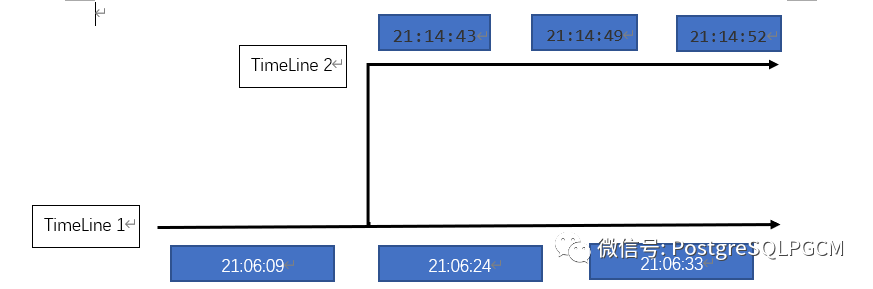
我们现在又觉得第二条数据有用,想要恢复回来,我们应该恢复到2022-03-31 21:06:33之前
恢复配置不重复(同上)启动数据库[pg12@bogon ~]$ pg_ctl start可以看到数据库数据无法恢复到该时间点,因为当前时间线是2,当前时间线对应的这个时间点是没有数据的[pg12@bogon ~]$ psqlpsql (13.2)Type "help" for help.postgres=# select * from t_timeline ;id | l_timeline | date----+------------+---------------------------1 | timeline 1 | 2022-03-31 21:06:09.53643(1 row)postgres=# \q[pg12@bogon ~]$我们要恢复的数据在时间线1,所以需要修改参数文件[pg12@bogon ~]$ cat opt/pg12/pgdata/postgresql.auto.conf# Do not edit this file manually!# It will be overwritten by the ALTER SYSTEM command.archive_mode = 'on'archive_command = 'cp %p home/pg12/archive/%f'restore_command = 'cp home/pg12/archive/%f %p'recovery_target_timeline = '1'recovery_target_time = '2022-03-31 21:06:33'[pg12@bogon ~]$再次启动数据库[pg12@bogon ~]$ pg_ctl start可以看到数据已经恢复,由于又一次进行了恢复,时间线变成了3[pg12@bogon ~]$ psqlpsql (13.2)Type "help" for help.postgres=# select * from t_timeline ;id | l_timeline | date----+------------+----------------------------1 | timeline 1 | 2022-03-31 21:06:09.536432 | timeline 1 | 2022-03-31 21:06:24.024041(2 rows)再次写入数据postgres=# insert into t_timeline (id,l_timeline) values (3,'timeline 3');INSERT 0 1postgres=# select * from t_timeline ;id | l_timeline | date----+------------+----------------------------1 | timeline 1 | 2022-03-31 21:06:09.536432 | timeline 1 | 2022-03-31 21:06:24.0240413 | timeline 3 | 2022-03-31 21:53:09.499776(3 rows)postgres=#
[pg12@bogon ~]$ cat archive/00000003.history1 0/401ACE0 before 2022-03-31 21:06:33.84758-04[pg12@bogon ~]$
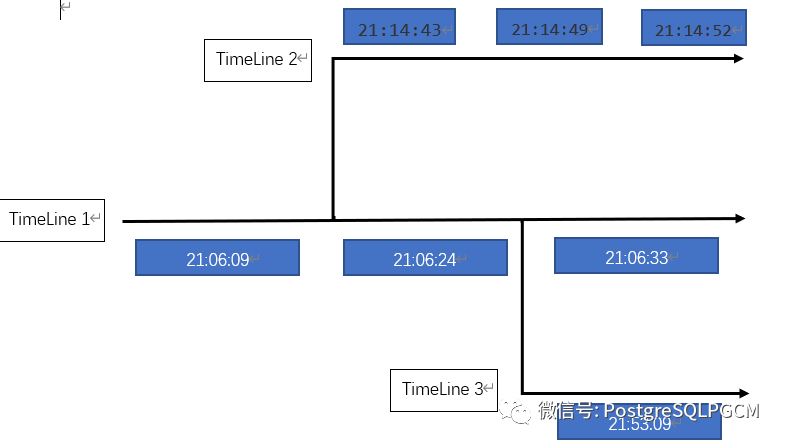
上面的测试都是在时间线1上分支新的时间线,当然也可以从时间线2进行分支新的时间线。
当有多个时间线时,我们可以按照时间线恢复到任意时间点,但是我们恢复数据时只能按照时间线进行恢复,不能通过恢复的方式把两个时间线的所有数据进行合并,如果想合并所有数据需要把其中一个时间线的所有数据导出来,然后把数据库恢复成另一个时间线,再导入已导出数据。
