本文系 OceanBase 第二届技术征文大赛一等奖文章,作者 瞿璐祎。
「瞿璐祎(笔名 Andrea):研究生期间在华东师范大学数据学院 DBHammer 组致力于事务型数据库评测工作,已经在面向应用的事务数据库评测场景模拟以及分布式事务型数据库的评测上取得了一定的成果,其本人将继续致力于为国产数据库的发展添砖加瓦。」
希望阅读完本文,你可以有所收获。有什么疑问也可以在底部留言探讨,作者本人会看到哦~(以下为投稿正文,公众号仅做分享)
分布式数据库的一大设计目标是通过增加分布式节点来提高数据库的性能,如吞吐。但是分布式环境给事务处理带来的优势有可能会由于分布式事务的产生而削弱,甚至会造成性能的恶化。接下来本文将 OceanBase 对分布式事务的支持能力进行评测,并详细阐述 OceanBase 提出的 tablegroup 技术对分布式事务执行性能产生的影响。

初探 TPC-C 中
NewOrder 事务
在 TPC-C 中,NewOrder 事务负责下订单任务,它会在 Stock 表中更新 5-15 个 items 的库存。NewOrder 事务平均 10 个操作,每个操作会有 1% 的概率更新远程的仓库的 Stock 信息,因此会产生 10% 的分布式事务。NewOrder 的事务模板如下所示。
TX[NewOrder]SELECT C_DISCOUNT, C_LAST, C_CREDIT FROM CUSTOMER WHERE C_W_ID = ? AND C_D_ID = ? AND C_ID = ?;SELECT W_TAX FROM WAREHOUSE WHERE W_ID = ?;SELECT D_NEXT_O_ID, D_TAX FROM DISTRICT WHERE D_W_ID = ? AND D_ID = ? FOR UPDATE;UPDATE DISTRICT SET D_NEXT_O_ID = D_NEXT_O_ID + 1 WHERE D_W_ID = ? AND D_ID = ?;INSERT INTO OORDER (O_ID, O_D_ID, O_W_ID, O_C_ID, O_ENTRY_D, O_OL_CNT, O_ALL_LOCAL) VALUES (?, ?, ?, ?, ?, ? , ?);INSERT INTO NEW_ORDER (NO_O_ID, NO_D_ID, NO_W_ID) VALUES ( ?, ?, ?);MultipleSELECT I_PRICE, I_NAME, I_DATA FROM ITEM WHERE I_ID = ?; C_DISCOUNTSELECT S_QUANTITY, S_DATA, S_DIST_01, S_DIST_02, S_DIST_03, S_DIST_04, S_DIST_05, S_DIST_06, S_DIST_07, S_DIST_08, S_DIST_09, S_DIST_10 FROM STOCK WHERE S_I_ID = ? AND S_W_ID = ? FOR UPDATE;//此处有1%的可能s_w_id != w_id,从而产生分布式事务UPDATE STOCK SET S_QUANTITY = ?, S_YTD = S_YTD + ?, S_ORDER_CNT = S_ORDER_CNT + 1, S_REMOTE_CNT = S_REMOTE_CNT + ? WHERE S_I_ID = ? AND S_W_ID = ?;INSERT INTO ORDER_LINE (OL_O_ID, OL_D_ID, OL_W_ID, OL_NUMBER, OL_I_ID, OL_SUPPLY_W_ID, OL_QUANTITY, OL_AMOUNT, OL_DIST_INFO) VALUES (?,?,?, ?,?,?,?,?,?);EndMultipleEndTX
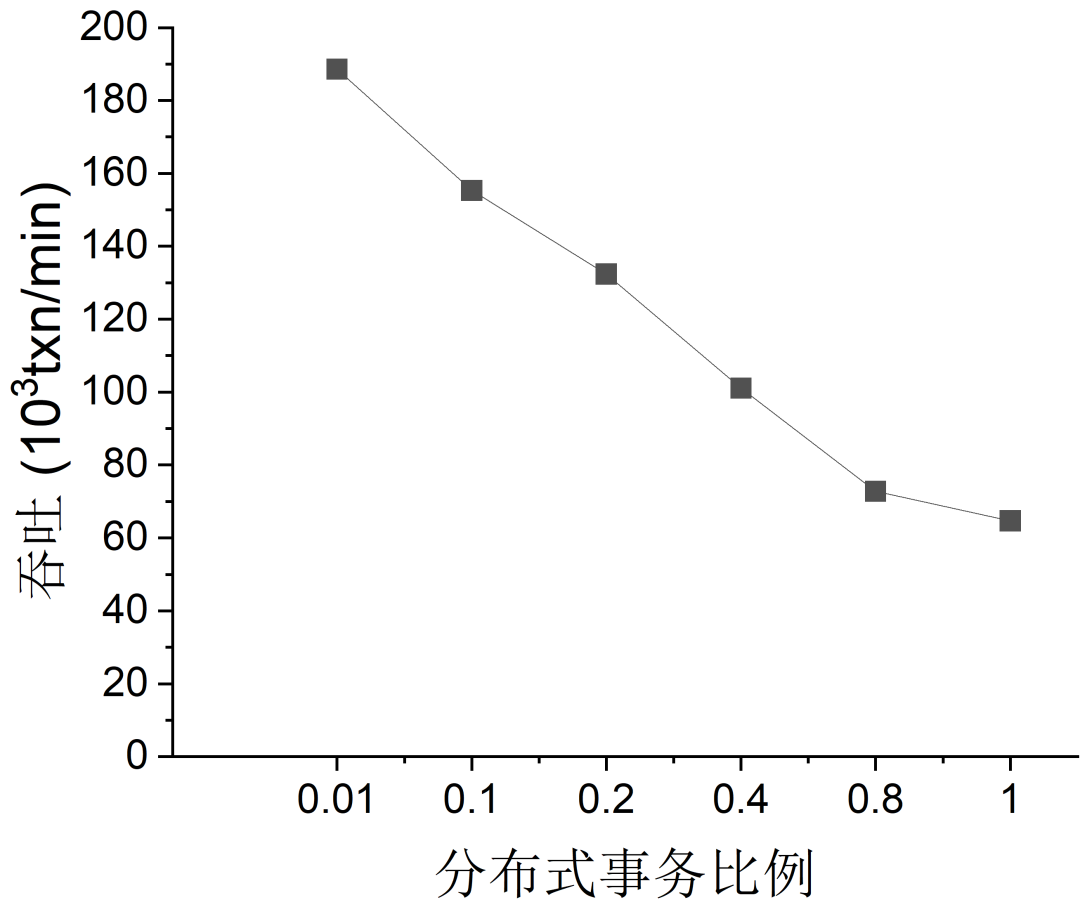
为了分析 OceanBase 对分布式事务的支持能力,我们将分布式事务比例进行参数化,将它分别设为 1%,10%,20%,40%,80%和100%。关于 BenchmarkSQL 的代码修改见实验配置。

实验准备及实验配置
BenchmarkSQL 运行 TPC-C 中的 NewOrder 事务,为了合理设置分布式事务比例,对 NewOrder 事务做了略微的改动,改动内容以及 benchmarkSQL 的配置参数在下方。(必选)
OceanBase v3.1.2版本(必须)
关于实验配置主要包括以下三个部分:
一、机器配置
为测试分布式事务的影响,本次实验将 OceanBase 部署在 10 台机器上。其中 9台机器的配置为:8 核 CPU,32G 内存,上面各部署了一个 OBServer;其中 1 台机器的配置为:16 核 CPU, 16G 内存,上面部署了一个 OBProxy,同时也作为实验的客户端。
下面介绍了我们的集群配置情况,对 BenchmarkSQL 修订的内容和配置文件。运行 BenchmarkSQL 对 OceanBase 的系统变量和用户变量的调整见官网。
本实验中使用的是 mysql mode,需要将 BenchmarkSQL 和 OceanBase 适配,可见官网。
二、OceanBase 集群配置
## Only need to configure when remote login is requireduser:username: xxxpassword: xxx#key_file: .ssh/authorized_keysoceanbase-ce:servers:- name: host1ip: 10.24.14.8- name: host2ip: 10.24.14.136- name: host3ip: 10.24.14.75- name: host4ip: 10.24.14.178- name: host5ip: 10.24.14.60- name: host6ip: 10.24.14.120- name: host7ip: 10.24.14.126- name: host8ip: 10.24.14.171- name: host9ip: 10.24.14.181global:devname: eth0cluster_id: 1memory_limit: 28Gsystem_memory: 8Gstack_size: 512Kcpu_count: 16cache_wash_threshold: 1G__min_full_resource_pool_memory: 268435456workers_per_cpu_quota: 10schema_history_expire_time: 1dnet_thread_count: 4major_freeze_duty_time: Disableminor_freeze_times: 10enable_separate_sys_clog: 0enable_merge_by_turn: FALSEdatafile_disk_percentage: 35syslog_level: WARNenable_syslog_recycle: truemax_syslog_file_count: 4appname: ob209host1:mysql_port: 2883rpc_port: 2882home_path: data/obdatazone: zone0host2:mysql_port: 2883rpc_port: 2882home_path: data/obdatazone: zone0host3:mysql_port: 2883rpc_port: 2882home_path: data/obdatazone: zone0host4:mysql_port: 2883rpc_port: 2882home_path: data/obdatazone: zone1host5:mysql_port: 2883rpc_port: 2882home_path: data/obdatazone: zone1host6:mysql_port: 2883rpc_port: 2882home_path: data1/obdatazone: zone1host7:mysql_port: 2883rpc_port: 2882home_path: data1/obdatazone: zone2host8:mysql_port: 2883rpc_port: 2882home_path: data1/obdatazone: zone2host9:mysql_port: 2883rpc_port: 2882home_path: data1/obdatazone: zone2obproxy:servers:- 10.24.14.215global:listen_port: 2883home_path: data/obproxyrs_list: 10.24.14.8:2883;10.24.14.136:2883;10.24.14.75:2883;10.24.14.178:2883;10.24.14.60:2883;10.24.14.120:2883;10.24.14.126:2883;10.24.14.171:2883;10.24.14.181:2883enable_cluster_checkout: falsecluster_name: ob209
三、BenchmarkSQL 修改内容和配置文件
戳文末“阅读原文”下载 BenchmarkSQL后,查看 BenchmarkSQL 修改内容,如下:
修改 benchmark-5.0/src/client/jTPCC.java 文件,增加分布式事务比例的参数化。
private double tpmC;private jTPCCRandom rnd;private OSCollector osCollector = null;//声明neworder事务中的分布式事务比例private static double newOrderDistributedRate;
String iWarehouses = getProp(ini,"warehouses");String iTerminals = getProp(ini,"terminals");//获取配置文件参数newOrderDistributedRate = Double.parseDouble(getProp(ini, "newOrderDistributedRate"));String iRunTxnsPerTerminal = ini.getProperty("runTxnsPerTerminal");String iRunMins = ini.getProperty("runMins");
private String getFileNameSuffix(){SimpleDateFormat dateFormat = new SimpleDateFormat("yyyyMMddHHmmss");return dateFormat.format(new java.util.Date());}//创建外部类的访问接口public static double getNewOrderDistributedRate() {return newOrderDistributedRate;}
修改 benchmark-5.0/src/client/jTPCCTData.java 文件,修改 NewOrder 的分布式事务比例。
while (i < o_ol_cnt) 2.4.1.5{newOrder.ol_i_id[i] = rnd.getItemID();更改分布式事务比例if (rnd.nextInt(1, 100) <= 100-jTPCC.getNewOrderDistributedRate()*100)newOrder.ol_supply_w_id[i] = terminalWarehouse;elsenewOrder.ol_supply_w_id[i] = rnd.nextInt(1, numWarehouses);newOrder.ol_quantity[i] = rnd.nextInt(1, 10);
修改benchmark-5.0/run/probs.ob文件
db=oracledriver=com.alipay.oceanbase.obproxy.mysql.jdbc.Driverconn=jdbc:oceanbase://10.24.14.188:2883/tpcc_100?useUnicode=true&characterEncoding=utf-8user=tpcc@testpassword=warehouses=100loadWorkers=30terminals=100//To run specified transactions per terminal- runMins must equal zerorunTxnsPerTerminal=0//To run for specified minutes- runTxnsPerTerminal must equal zerorunMins=5//Number of total transactions per minutelimitTxnsPerMin=0//将生成的数据放在该目录fileLocation=/data/ob/tpcc_100///Distributed Transaction Ratio For NewOrder TransactionnewOrderDistributedRate=0.01//Set to true to run in 4.x compatible mode. Set to false to use the//entire configured database evenly.terminalWarehouseFixed=false//The following five values must add up to 100newOrderWeight=100paymentWeight=0orderStatusWeight=0deliveryWeight=0stockLevelWeight=0// Directory name to create for collecting detailed result data.// Comment this out to suppress.resultDirectory=my_result_%tY-%tm-%td_%tH%tM%tSosCollectorScript=./misc/os_collector_linux.pyosCollectorInterval=1
修改benchmark-5.0/run/sql.oceanbase/tableCreates.sql 文件
create table bmsql_config (cfg_name varchar(30) primary key,cfg_value varchar(50));create tablegroup tpcc_group binding true partition by hash partitions 128;create table bmsql_warehouse (w_id integer not null,w_ytd decimal(12,2),w_tax decimal(4,4),w_name varchar(10),w_street_1 varchar(20),w_street_2 varchar(20),w_city varchar(20),w_state char(2),w_zip char(9),primary key(w_id))tablegroup='tpcc_group' partition by hash(w_id) partitions 128;create table bmsql_district (d_w_id integer not null,d_id integer not null,d_ytd decimal(12,2),d_tax decimal(4,4),d_next_o_id integer,d_name varchar(10),d_street_1 varchar(20),d_street_2 varchar(20),d_city varchar(20),d_state char(2),d_zip char(9),PRIMARY KEY (d_w_id, d_id))tablegroup='tpcc_group' partition by hash(d_w_id) partitions 128;create table bmsql_customer (c_w_id integer not null,c_d_id integer not null,c_id integer not null,c_discount decimal(4,4),c_credit char(2),c_last varchar(16),c_first varchar(16),c_credit_lim decimal(12,2),c_balance decimal(12,2),c_ytd_payment decimal(12,2),c_payment_cnt integer,c_delivery_cnt integer,c_street_1 varchar(20),c_street_2 varchar(20),c_city varchar(20),c_state char(2),c_zip char(9),c_phone char(16),c_since timestamp,c_middle char(2),c_data varchar(500),PRIMARY KEY (c_w_id, c_d_id, c_id))tablegroup='tpcc_group' partition by hash(c_w_id) partitions 128;create table bmsql_history (hist_id integer,h_c_id integer,h_c_d_id integer,h_c_w_id integer,h_d_id integer,h_w_id integer,h_date timestamp,h_amount decimal(6,2),h_data varchar(24))tablegroup='tpcc_group' partition by hash(h_w_id) partitions 128;create table bmsql_new_order (no_w_id integer not null ,no_d_id integer not null,no_o_id integer not null,PRIMARY KEY (no_w_id, no_d_id, no_o_id))tablegroup='tpcc_group' partition by hash(no_w_id) partitions 128;create table bmsql_oorder (o_w_id integer not null,o_d_id integer not null,o_id integer not null,o_c_id integer,o_carrier_id integer,o_ol_cnt integer,o_all_local integer,o_entry_d timestamp,PRIMARY KEY (o_w_id, o_d_id, o_id))tablegroup='tpcc_group' partition by hash(o_w_id) partitions 128;create table bmsql_order_line (ol_w_id integer not null,ol_d_id integer not null,ol_o_id integer not null,ol_number integer not null,ol_i_id integer not null,ol_delivery_d timestamp,ol_amount decimal(6,2),ol_supply_w_id integer,ol_quantity integer,ol_dist_info char(24),PRIMARY KEY (ol_w_id, ol_d_id, ol_o_id, ol_number))tablegroup='tpcc_group' partition by hash(ol_w_id) partitions 128;create table bmsql_item (i_id integer not null,i_name varchar(24),i_price decimal(5,2),i_data varchar(50),i_im_id integer,PRIMARY KEY (i_id)) locality='F,R{all_server}@zone0, F,R{all_server}@zone1, F,R{all_server}@zone2' duplicate_scope='cluster';-- );create table bmsql_stock (s_w_id integer not null,s_i_id integer not null,s_quantity integer,s_ytd integer,s_order_cnt integer,s_remote_cnt integer,s_data varchar(50),s_dist_01 char(24),s_dist_02 char(24),s_dist_03 char(24),s_dist_04 char(24),s_dist_05 char(24),s_dist_06 char(24),s_dist_07 char(24),s_dist_08 char(24),s_dist_09 char(24),s_dist_10 char(24),PRIMARY KEY (s_w_id, s_i_id))tablegroup='tpcc_group' partition by hash(s_w_id) partitions 128;

实验过程
一、创建schema并在本地生成数据文件
cd benchmark-5.0/run./runDatabaseBuild.sh props.ob
二、导入数据
这里采用的是外部 load infile 方式导入数据库,因为我们导入的数据量比较大,这种方式更加快速。首先,需要将生成的数据文件如 customer.csv 等移动到 rootserver 所在的机器上,我们这边放在 10.24.14.245(rootserver) 上的 data/ob/tpcc_100/ 目录。此外,schema 的创建方式
obclient -h10.24.14.245 -P2883 -uroot@test -c -D tpcc_100 -e "load data *+ parallel(80) */ infile '/data/ob/tpcc_100/warehouse.csv' into table bmsql_warehouse fields terminated by ',';"obclient -h10.24.14.245 -P2883 -uroot@test -c -D tpcc_100 -e "load data *+ parallel(80) */ infile '/data/ob/tpcc_100/district.csv' into table bmsql_district fields terminated by ',';"obclient -h10.24.14.245 -P2883 -uroot@test -c -D tpcc_100 -e "load data *+ parallel(80) */ infile '/data/ob/tpcc_100/config.csv' into table bmsql_config fields terminated by ',';"obclient -h10.24.14.245 -P2883 -uroot@test -c -D tpcc_100 -e "load data *+ parallel(80) */ infile '/data/ob/tpcc_100/item.csv' into table bmsql_item fields terminated by ',';"obclient -h10.24.14.245 -P2883 -uroot@test -c -D tpcc_100 -e "load data *+ parallel(80) */ infile '/data/ob/tpcc_100/order.csv' into table bmsql_oorder fields terminated by ',';"obclient -h10.24.14.245 -P2883 -uroot@test -c -D tpcc_100 -e "load data *+ parallel(80) */ infile '/data/ob/tpcc_100/stock.csv' into table bmsql_stock fields terminated by ',';"obclient -h10.24.14.245 -P2883 -uroot@test -c -D tpcc_100 -e "load data *+ parallel(80) */ infile '/data/ob/tpcc_100/cust-hist.csv' into table bmsql_history fields terminated by ',';"obclient -h10.24.14.245 -P2883 -uroot@test -c -D tpcc_100 -e "load data *+ parallel(80) */ infile '/data/ob/tpcc_100/new-order.csv' into table bmsql_new_order fields terminated by ',';"obclient -h10.24.14.245 -P2883 -uroot@test -c -D tpcc_100 -e "load data *+ parallel(80) */ infile '/data/ob/tpcc_100/order-line.csv' into table bmsql_order_line fields terminated by ',';"obclient -h10.24.14.245 -P2883 -uroot@test -c -D tpcc_100 -e "load data /*+ parallel(80) */ infile '/data/ob/tpcc_100/customer.csv' into table bmsql_customer fields terminated by ',';"
三、分布式事务比例实验的运行负载
实验中分别将 NewOrderDistributedRate 设为 0.01,0.1,0.2,0.4,0.6,0.8,1 分别代表不同的 NewOrder 事务的分布式事务比例。
./runBenchmark.sh probs.ob

实验结果展示与分析
我们将上方运行的分布式事务的实验结果列在下方,横坐标是不同的分布式事务比例,纵坐标是每分钟的吞吐数。我们可以观察到,分布式事务比例从 0.01 一直到 1,吞吐从 188639 下降到 64699,下降了 65.7%。实验结果符合我们的预期,分布式事务对分布式数据库的性能会造成比较大的影响。
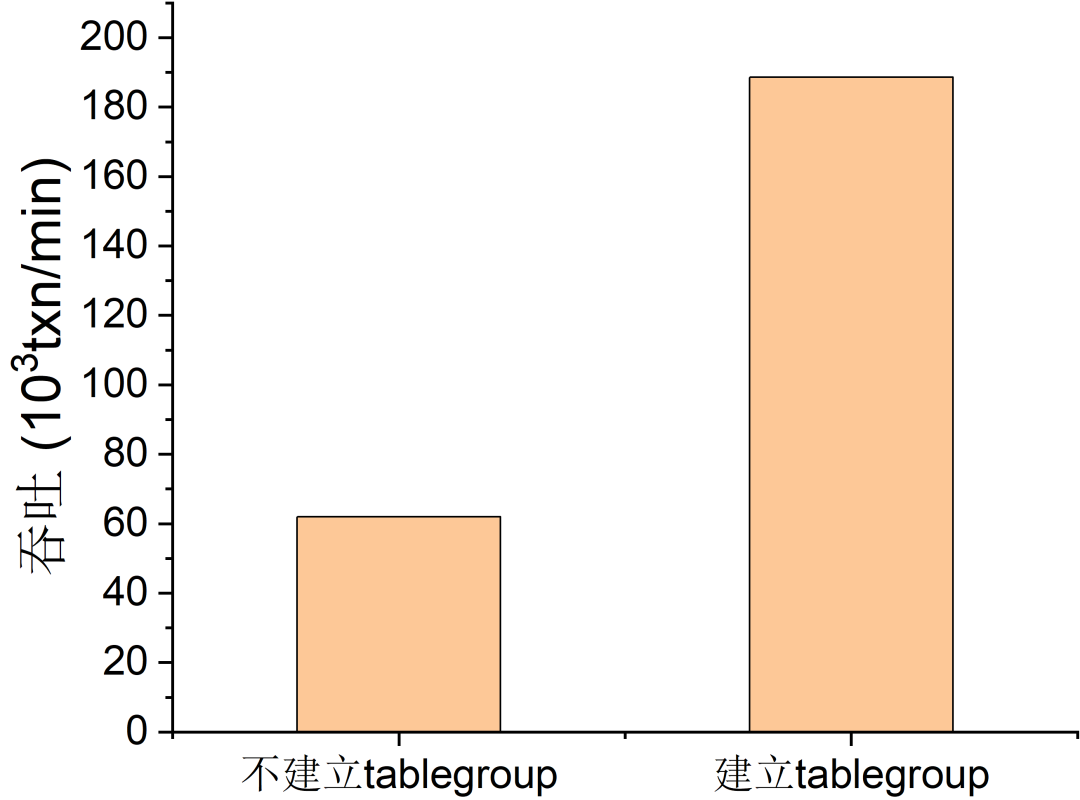
为了尽量减少分布式事务比例的影响,OceanBase 其实提出了 tablegroup 机制,它能让经常被一起访问的记录尽可能地放在用一个 partition 中。比如,一个歌手名下有多张唱片,如果一个事务更新歌手及其名下的唱片,那么将该歌手和其唱片放在一起,就可以减少分布式事务。OceanBase 中的 tablegroup 机制就是基于这样的想法创建出来的,为了验证 tablegroup 机制提升性能的效果,我们将去掉原始的 tablegroup 机制,来看性能下降了多少。

进一步实验
第一步,为了完成这个实验,需要修改 benchmark-5.0/run/sql.oceanbase/tableCreates.sql 文件。
create table bmsql_config (cfg_name varchar(30) primary key,cfg_value varchar(50));create table bmsql_warehouse (w_id integer not null,w_ytd decimal(12,2),w_tax decimal(4,4),w_name varchar(10),w_street_1 varchar(20),w_street_2 varchar(20),w_city varchar(20),w_state char(2),w_zip char(9),primary key(w_id))partition by hash(w_id) partitions 128;create table bmsql_district (d_w_id integer not null,d_id integer not null,d_ytd decimal(12,2),d_tax decimal(4,4),d_next_o_id integer,d_name varchar(10),d_street_1 varchar(20),d_street_2 varchar(20),d_city varchar(20),d_state char(2),d_zip char(9),PRIMARY KEY (d_w_id, d_id))partition by hash(d_w_id) partitions 128;create table bmsql_customer (c_w_id integer not null,c_d_id integer not null,c_id integer not null,c_discount decimal(4,4),c_credit char(2),c_last varchar(16),c_first varchar(16),c_credit_lim decimal(12,2),c_balance decimal(12,2),c_ytd_payment decimal(12,2),c_payment_cnt integer,c_delivery_cnt integer,c_street_1 varchar(20),c_street_2 varchar(20),c_city varchar(20),c_state char(2),c_zip char(9),c_phone char(16),c_since timestamp,c_middle char(2),c_data varchar(500),PRIMARY KEY (c_w_id, c_d_id, c_id))partition by hash(c_w_id) partitions 128;create table bmsql_history (hist_id integer,h_c_id integer,h_c_d_id integer,h_c_w_id integer,h_d_id integer,h_w_id integer,h_date timestamp,h_amount decimal(6,2),h_data varchar(24))partition by hash(h_w_id) partitions 128;create table bmsql_new_order (no_w_id integer not null ,no_d_id integer not null,no_o_id integer not null,PRIMARY KEY (no_w_id, no_d_id, no_o_id))partition by hash(no_w_id) partitions 128;create table bmsql_oorder (o_w_id integer not null,o_d_id integer not null,o_id integer not null,o_c_id integer,o_carrier_id integer,o_ol_cnt integer,o_all_local integer,o_entry_d timestamp,PRIMARY KEY (o_w_id, o_d_id, o_id))partition by hash(o_w_id) partitions 128;create table bmsql_order_line (ol_w_id integer not null,ol_d_id integer not null,ol_o_id integer not null,ol_number integer not null,ol_i_id integer not null,ol_delivery_d timestamp,ol_amount decimal(6,2),ol_supply_w_id integer,ol_quantity integer,ol_dist_info char(24),PRIMARY KEY (ol_w_id, ol_d_id, ol_o_id, ol_number))partition by hash(ol_w_id) partitions 128;create table bmsql_item (i_id integer not null,i_name varchar(24),i_price decimal(5,2),i_data varchar(50),i_im_id integer,PRIMARY KEY (i_id)) locality='F,R{all_server}@zone0, F,R{all_server}@zone1, F,R{all_server}@zone2' duplicate_scope='cluster';-- );create table bmsql_stock (s_w_id integer not null,s_i_id integer not null,s_quantity integer,s_ytd integer,s_order_cnt integer,s_remote_cnt integer,s_data varchar(50),s_dist_01 char(24),s_dist_02 char(24),s_dist_03 char(24),s_dist_04 char(24),s_dist_05 char(24),s_dist_06 char(24),s_dist_07 char(24),s_dist_08 char(24),s_dist_09 char(24),s_dist_10 char(24),PRIMARY KEY (s_w_id, s_i_id))partition by hash(s_w_id) partitions 128;
第二步,为了简化实验,这边将props.ob中的变量 newOrderDistributedRate=0.01 ;
第三步,加载数据和运行负载;
第四步,即为实验展示与分析。
我们将运行的实验结果列在下方,横坐标是两种不同的 schema 方法,纵坐标表是 NewOrder 事务的每分钟的吞吐。我们可以看到不建立 tablegroup 的时候,吞吐为 61977,而建立 tablegroup 之后,吞吐提高了 3 倍左右,为 188639。可见,OceanBase 提供的 tablegroup 机制能大大提升性能。

经过上方的实验,我们可以将 OceanBase 在分布式事务的支持能力上的实验表现总结为两点:
在良好分区下,OceanBase 能提供非常高的吞吐,表现十分优异。随着分布式事务比例的增长,OceanBase 的性能会呈现下降的趋势,这也是大多数分布式事务型数据库所面临的难题和挑战
*参考 Are Current Benchmarks Adequate to Evaluate Distributed Transactional Databases? https://doi.org/10.1016/j.tbench.2022.100031。
OceanBase 所提供的 tablegroup 技术能够迎合业务的需求,将数据和业务进行良好的绑定。在我们的实验中,加入 tablegroup 机制让整个吞吐上升了整整 3 倍。

惊喜预告!抢先报名中!

随着俄乌战争的持续发酵,Oracle等多家全球科技巨头对俄罗斯进行广泛制裁,作为三大基础软件中最重要的一环,此举对俄罗斯而言将是“致命一击”。
国产数据库的发展之路从探索逐渐到百花齐放。在愈演愈烈的形势下,国产数据库替代之路再次置于风口,究竟国产化之路发展如何?
《对话ACE》首期活动便以“Oracle停服俄罗斯“为背景,邀请到 OceanBase CTO杨传辉,Oracle MySQL ACE Diretor,腾讯云 TVP 叶金荣,共同探索“国产数据库替代与发展之路”,以此推动国产数据库技术、人才及生态建设的发展。