



点击上方“IT那活儿”,关注后了解更多内容,不管IT什么活儿,干就完了!!!
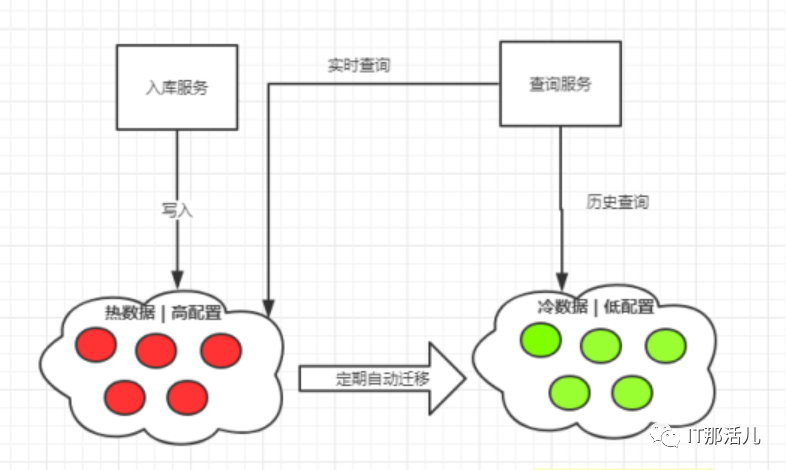 冷热架构架构图
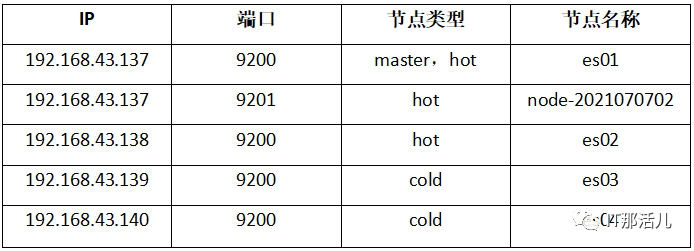
--hot节点参数配置:
cluster.name : es-clusternode.name : es01node.master : truenode.data : truenetwork.host : 192.168.43.137transport.tcp.port : 9300http.port : 9200http.cors.enabled : truehttp.cors.allow-origin : "*"bootstrap.memory_lock : truepath.data : /home/elasticsearch/datapath.logs : /home/elasticsearch/logsdiscovery.zen.ping.unicast.hosts : ["192.168.43.137:9300","192.168.43.137:9301", "192.168.43.138:9300", "192.168.43.139:9300", "192.148.43.140:9300"]discovery.zen.minimum_master_nodes : 1xpack.security.enabled : truexpack.security.transport.ssl.enabled : truexpack.security.transport.ssl.verification_mode: certificate xpack.ssl.key: elasticsearch-6.8.2/elasticsearch-6.8.2.keyxpack.ssl.certificate: elasticsearch-6.8.2/elasticsearch-6.8.2.crtxpack.ssl.certificate_authorities: ca/ca.crthttp.cors.allow-headers: Authorization,X-Requested-With,Content-Length,Content-Typenode.attr.box_type: hotcluster.name : es-clusternode.name : es02node.master : falsenode.data : truenetwork.host : 192.168.43.138transport.tcp.port : 9300http.port : 9200http.cors.enabled : truehttp.cors.allow-origin : "*"bootstrap.memory_lock : truepath.data : /home/elasticsearch/datapath.logs : /home/elasticsearch/logsdiscovery.zen.ping.unicast.hosts : ["192.168.43.137:9300","192.168.43.137:9301", "192.168.43.138:9300", "192.168.43.139:9300", "192.148.43.140:9300"]discovery.zen.minimum_master_nodes : 1xpack.security.enabled : truexpack.security.transport.ssl.enabled : truexpack.security.transport.ssl.verification_mode: certificate xpack.ssl.key: elasticsearch-6.8.2/elasticsearch-6.8.2.keyxpack.ssl.certificate: elasticsearch-6.8.2/elasticsearch-6.8.2.crtxpack.ssl.certificate_authorities: ca/ca.crthttp.cors.allow-headers: Authorization,X-Requested-With,Content-Length,Content-Typenode.attr.box_type: hotcluster.name : es-clusternode.name : node-2021070702node.master : falsenode.data : truenetwork.host : 192.168.43.137transport.tcp.port : 9300http.port : 9200http.cors.enabled : truehttp.cors.allow-origin : "*"bootstrap.memory_lock : truediscovery.zen.ping.unicast.hosts : ["192.168.43.137:9300","192.168.43.137:9301", "192.168.43.138:9300", "192.168.43.139:9300", "192.148.43.140:9300"]discovery.zen.minimum_master_nodes : 1xpack.security.enabled : truexpack.security.transport.ssl.enabled : truexpack.security.transport.ssl.verification_mode: certificate xpack.ssl.key: elasticsearch-6.8.2/elasticsearch-6.8.2.keyxpack.ssl.certificate: elasticsearch-6.8.2/elasticsearch-6.8.2.crtxpack.ssl.certificate_authorities: ca/ca.crthttp.cors.allow-headers: Authorization,X-Requested-With,Content-Length,Content-Typenode.attr.box_type: hotcluster.name : es-clusternode.name : es03node.master : falsenode.data : truenetwork.host : 192.168.43.139transport.tcp.port : 9300http.port : 9200http.cors.enabled : truehttp.cors.allow-origin : "*"bootstrap.memory_lock : truepath.data : /home/elasticsearch/datapath.logs : /home/elasticsearch/logsdiscovery.zen.ping.unicast.hosts : ["192.168.43.137:9300","192.168.43.137:9301", "192.168.43.138:9300", "192.168.43.139:9300", "192.148.43.140:9300"]discovery.zen.minimum_master_nodes : 1xpack.security.enabled : truexpack.security.transport.ssl.enabled : truexpack.security.transport.ssl.verification_mode: certificatexpack.ssl.key: elasticsearch-6.8.2/elasticsearch-6.8.2.keyxpack.ssl.certificate: elasticsearch-6.8.2/elasticsearch-6.8.2.crtxpack.ssl.certificate_authorities: ca/ca.crthttp.cors.allow-headers: Authorization,X-Requested-With,Content-Length,Content-Typenode.attr.box_type: cold
--cold节点参数配置:
cluster.name : es-clusternode.name : es04node.master : falsenode.data : truenetwork.host : 192.168.43.140transport.tcp.port : 9300http.port : 9200http.cors.enabled : truehttp.cors.allow-origin : "*"bootstrap.memory_lock : truepath.data : /home/elasticsearch/datapath.logs : /home/elasticsearch/logsdiscovery.zen.ping.unicast.hosts:["192.168.43.137:9300","192.168.43.137:9301","192.168.43.138:9300", "192.168.43.139:9300", "192.148.43.140:9300"]discovery.zen.minimum_master_nodes : 1xpack.security.enabled: truexpack.security.transport.ssl.enabled: truexpack.security.transport.ssl.verification_mode: certificatexpack.ssl.key: elasticsearch-6.8.2/elasticsearch-6.8.2.keyxpack.ssl.certificate: elasticsearch-6.8.2/elasticsearch-6.8.2.crtxpack.ssl.certificate_authorities: ca/ca.crthttp.cors.allow-headers: Authorization,X-Requested-With,Content-Length,Content-Typenode.attr.box_type: cold
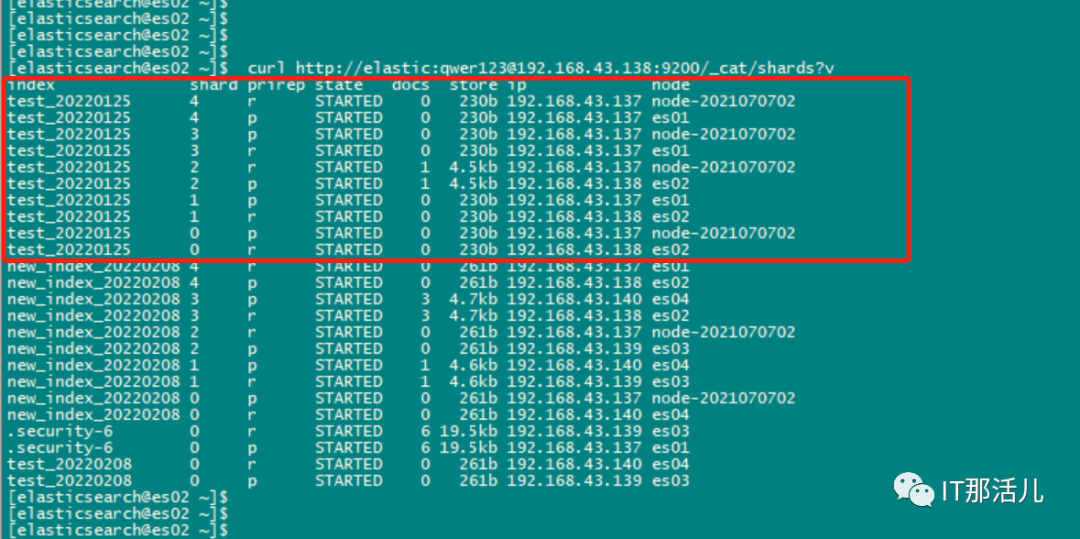
curl -XPUT -H "Content-Type: application/json" http://elastic:qwer123@192.168.43.138:9200/test_20220125 -d'{ "index":"test_20220125", "settings": { "number_of_shards" :5, "number_of_replicas" : 1, "refresh_interval" : "10s", "index.routing.allocation.require.box_type":"hot" }}'
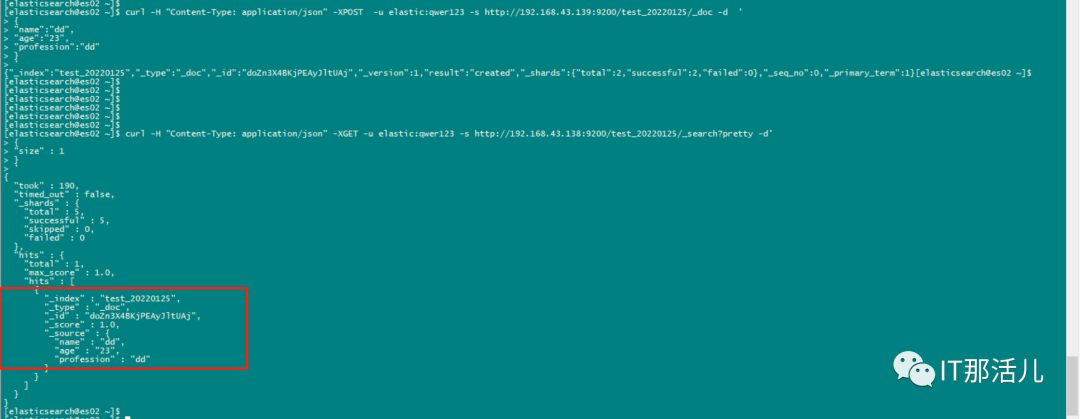
curl -H "Content-Type: application/json" -XPOST -u elastic:qwer123 -s http://192.168.43.139:9200/test_20220125/_doc -d '{"name":"dd","age":"23","profession":"dd"}'
curl -H "Content-Type: application/json" -XGET -u elastic:qwer123 -s http://192.168.43.138:9200/test_20220125/_search?pretty -d'{"size" : 1}'
curl -XPUT -H "Content-Type: application/json" http://elastic:qwer123@192.168.43.138:9200/test_20220125/_settings -d'{"index.routing.allocation.require.box_type":"cold"}'

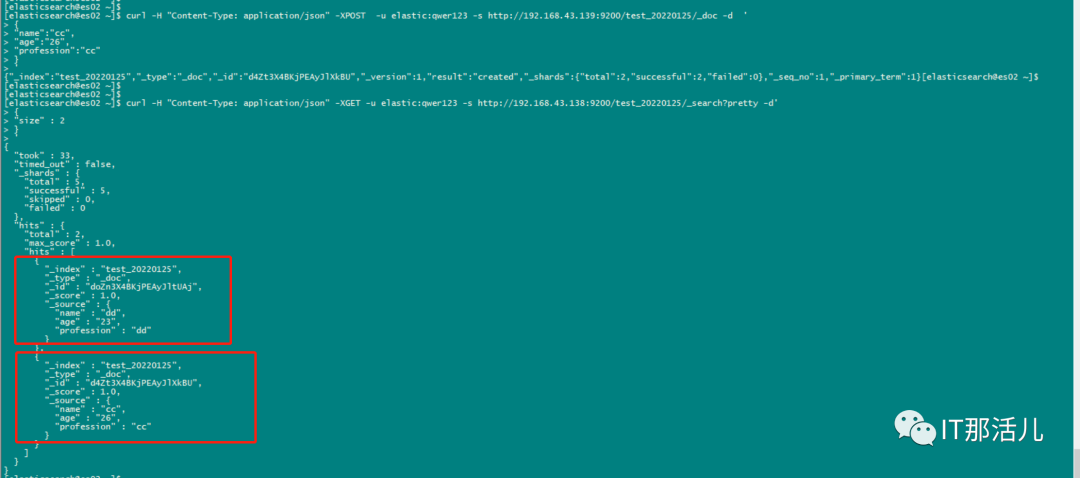
curl -H "Content-Type: application/json" -XPOST -u elastic:qwer123 -s http://192.168.43.139:9200/test_20220125/_doc -d '{"name":"cc","age":"26","profession":"cc"}'
curl -H "Content-Type: application/json" -XGET -u elastic:qwer123 -s http://192.168.43.138:9200/test_20220125/_search?pretty -d'{"size" : 2}'

本文作者:刘能
本文来源:IT那活儿(上海新炬王翦团队)

文章转载自IT那活儿,如果涉嫌侵权,请发送邮件至:contact@modb.pro进行举报,并提供相关证据,一经查实,墨天轮将立刻删除相关内容。
