



《Linux环境监控工具基础参考》提到了Linux监控工具,其实Linux有很多好用的小工具,不仅限监控,例如文件传输。这篇文章《技术分享 | 你通常选用什么工具在Linux中进行数据传输?》就介绍了几种常用的文件传输工具之间的效率比对,可以针对不同的场景,选择合适的工具。
刨除网络带宽等因素,我们就Linux服务器之间传输文件的几款工具做个对比,看看到底什么工具才是最快、最适合的场景。
我们针对ftp、sftp、scp、rsync、tftp这些传输工具在文件实际大小和文件数量多少的层次上分别做个速度和简便性对比。
首先准备环境,配置两个机器ssh互信,创建两个文件夹,以不同的方式创建一个50G左右的大文件和51200个1M的小文件。
创建一个50G大文件,
[root@bisal-01 big]# fallocate -l 50G 50g_file[root@bisal-01 big]# lltotal 52428856-rw-r--r-- 1 root root 53687091200 Apr 10 17:55 50g_file[root@bisal-01 big]# du -sh *51G 50g_file
创建一个51200个1M文件,
[root@bisal-01 many]# seq 51200 | xargs -i dd if=/dev/zero of=1m_file{} bs=1M count=11+0 records in1+0 records out1048576 bytes (1.0 MB) copied, 0.00468854 s, 224 MB/s······[root@bisal-01 many]# ls | wc -l51200[root@bisal-01 test]# du -sh many51G many
这里采用了两种方式制造大文件,生成文件确实是50G,字节数与之对应,至于为什么du工具计算出来是51G,其实他并不是计算机1024与1000的数值换算的原因,而是因为du命令计算的是该文件累计使用到文件系统的总块数,可能出现使用的部分块空间占用并不完整的情况,导致数值偏大。
1. 测试scp
通常Linux系统会安装这个工具。
1 * 50G文件测试,
[root@bisal-02 big]# scp /opt/test/big/50g_file root@bisal-01:/opt/test/re/50g_file 100% 50GB 135.5MB/s 06:17
51200 * 1M文件测试,
#######[root@bisal-02 many]# time scp /opt/test/many/1m_file* root@bisal-01:/opt/test/re/1m_file1 100% 1024KB 22.5MB/s 00:001m_file10 100% 1024KB 35.8MB/s 00:001m_file100 100% 1024KB 14.8MB/s 00:001m_file1000 100% 1024KB 32.9MB/s 00:001m_file10000 100% 1024KB 35.7MB/s 00:00······1m_file9998 100% 1024KB 113.4MB/s 00:001m_file9999 100% 1024KB 96.5MB/s 00:00real 20m43.875suser 4m2.448ssys 2m52.604s[root@bisal-01 re]# ls | wc -l51200
scp类似于cp命令,由于跨机器文件加密传输导致其速度稍慢于copy操作。如果存在生产环境中无法使用ssh协议的情况,可以采用nc文件传输。
优点:该工具对于机器的系统资源占用少、影响较小,使用方便。
2. 测试ftp
1 * 50G文件测试,
[root@bisal-01 re]# ftp bisal-02Connected to bisal-02 (x.x.x.x).220 (vsFTPd 3.0.2)Name (bisal-02:root): root331 Please specify the password.Password:230 Login successful.Remote system type is UNIX.Using binary mode to transfer files.ftp> get opt/test/big/50g_file opt/test/re/50g_filelocal: /opt/test/re/50g_file remote: opt/test/big/50g_file227 Entering Passive Mode (x,x,x,x,38,232).150 Opening BINARY mode data connection for opt/test/big/50g_file (53687091200 bytes).226 Transfer complete.53687091200 bytes received in 150 secs (359091.49 Kbytes/sec)ftp> quit221 Goodbye.
51200 * 1M文件测试,
[root@bisal-01 re]# time ftp bisal-02Connected to bisal-02 (x.x.x.x).220 (vsFTPd 3.0.2)Name (bisal-02:root):331 Please specify the password.Password:230 Login successful.Remote system type is UNIX.Using binary mode to transfer files.ftp> prompt offInteractive mode off.ftp> cd opt/test/many250 Directory successfully changed.ftp> mget * .*local: 1m_file1 remote: 1m_file1227 Entering Passive Mode (x,x,x,x,156,228).150 Opening BINARY mode data connection for 1m_file1 (1048576 bytes).226 Transfer complete.······1048576 bytes received in 0.00337 secs (311057.86 Kbytes/sec)local: . remote: .227 Entering Passive Mode (x,x,x,x,213,4).550 Failed to open file.Warning: embedded .. in .. (changing to !!)local: !! remote: !!227 Entering Passive Mode (x,x,x,x,223,91).550 Failed to open file.ftp> quit221 Goodbye.real 14m32.032suser 0m12.857ssys 3m21.131s[root@bisal-01 re]# ls | wc -l51200
基于TCP传输协议,ftp客户端发出命令到服务端进行文件下载、上传或者变更目录。适用于内网的文件归集以及公共文件的调阅。偶发性的文件传输,为了保障各主机之间的安全性,一般不会使用这种方式进行数据传输。
3. 测试sftp
sftp就是在ftp的基础上补充了加密/解密的技术,可以看下和ftp的传输速度差异。
1 * 50G文件测试,
[root@bisal-01 re]# sftp root@bisal-02Connected to bisal-02.sftp> get ./big/50g_file opt/test/re/50g_fileFetching ./big/50g_file to opt/test/re/50g_file/./big/50g_file 100% 50GB 128.7MB/s 06:37sftp> quit
51200 * 1M文件测试,
[root@bisal-01 re]# time sftp root@bisal-02Connected to bisal-02.sftp> get ./many/1m_file* /opt/test/re/Fetching ./many/1m_file1 to opt/test/re/1m_file1/./many/1m_file1 100% 1024KB 77.3MB/s 00:00······Fetching ./many/1m_file9999 to opt/test/re/1m_file9999/./many/1m_file9999 100% 1024KB 118.0MB/s 00:00real 19m43.154suser 4m52.309ssys 4m47.476s[root@bisal-01 re]# ls | wc -l51200
相比ftp工具,在提升安全等级的基础上对ssh传输进行加密,sftp的传输速率降低了70%左右。
使用sftp和ftp的使用需要搭建服务,使用麻烦,且sftp的传输速率类似于 scp。
4. 测试rsync
1 * 50G文件测试,
[root@bisal-02 big]# time rsync -av ./50g_file root@bisal-01:/opt/test/re/50g_filesending incremental file list50g_filesent 53,700,198,488 bytes received 35 bytes 107,940,097.53 bytes/sectotal size is 53,687,091,200 speedup is 1.00real 8m17.039suser 5m36.160ssys 2m41.196s
51200 * 1M文件测试,
[root@bisal-02 many]# time rsync -av ./1m_file* root@bisal-01:/opt/test/re/sending incremental file list1m_file11m_file101m_file100······1m_file99981m_file9999sent 53,702,886,375 bytes received 972,872 bytes 58,278,740.37 bytes/sectotal size is 53,687,091,200 speedup is 1.00real 15m21.548suser 5m46.497ssys 2m38.581s
rsync从比scp稍微快一点,Centos中默认安装。占用带宽少,因为rsync在两端服务器之间传输数据块时会进行解压缩处理。
优势:rsync只会同步发生变化的文件,如果没有变更,rsync不会进行覆盖处理,即rsync适合增量同步。
如果传输文件数量多的时候,rsync工具可能会导致磁盘的I/O偏高,如果文件系统中存在数据库会产生一定影响。
5. 测试tftp
类似于sftp,测一下tftp的速度怎么样。
1 * 50G文件测试,
[root@bisal-01 re]# time tftp bisal-02tftp> get ./big/50g_filereal 10m30.114suser 0m6.029ssys 1m16.888s[root@bisal-01 re]# lltotal 1805832-rw-r--r-- 1 root root 1849168384 Apr 11 17:54 50g_file[root@bisal-01 re]# du -sh *1.8G 50g_file
1 * 1G文件测试,
[root@bisal-01 re]# time tftp bisal-02tftp> get ./many/1g_file1tftp> quitreal 5m54.090suser 0m29.190ssys 2m58.866s[root@bisal-01 re]# lltotal 1048576-rw-r--r-- 1 root root 1073741824 Apr 11 18:09 1g_file1
tftp工具是基于UDP协议进行数据传输,同样需要配置相关服务,使用过于麻烦。测试50G大文件传输仅仅1.8G,发生超时中断,fail,且时间较长。测试1个1G文件传输时间为354s,推测50倍时间较长,放弃该工具的测试。
6. 补充nc
1 * 50G文件测试,
[root@bisal-02 big]# nc x.x.x.x 10086 < /opt/test/big/50g_file[root@bisal-01 re]# time nc -l 10086 > 50G_filereal 2m30.663suser 0m9.232ssys 2m16.370s
51200 * 1M文件测试,
[root@bisal-01 many]# tar cfz - *|nc 192.168.88.71 10086[root@bisal-01 re]# time nc -l 10086|tar xfvz -1m_file11m_file101m_file100···1m_file99971m_file99981m_file9999real 11m38.400suser 3m47.051ssys 2m33.923s
这个工具的功能很是强大,可以实现任意TCP/UDP端口的监听与扫描。
优势:速度比scp快很多,几乎没有网络协议的开销。
跨机器传输文件只是他的功能之一,其他功能等待大家探索,据说可以网络测速。
7. 补充Python工具
如果还有nc无法解决的场景,可以再试下使Python的SimpleHTTPServer模块。
1 * 50G 文件测试,
[root@bisal-02 big]# python -m SimpleHTTPServer 10086Serving HTTP on 0.0.0.0 port 10086 ...192.168.88.71 - - [13/Apr/2022 16:02:15] "GET /50g_file HTTP/1.1" 200 -[root@bisal-01 re]# wget http://x.x.x.x:10086/50g_file--2022-04-13 16:02:15-- http://x.x.x.x:10086/50g_fileConnecting to x.x.x.x:10086... connected.HTTP request sent, awaiting response... 200 OKLength: 53687091200 (50G) [application/octet-stream]Saving to: ‘50g_file’100%[========================================>] 53,687,091,200 358MB/s in 2m 35s2022-04-13 21:00:00 (330 MB/s) - ‘50g_file’ saved [53687091200/53687091200]
51200 * 1M文件测试,
[root@bisal-02 many]# python -m SimpleHTTPServer 10086Serving HTTP on 0.0.0.0 port 10086 ...x.x.x.x- - [13/Apr/2022 19:46:02] "GET /1m_file1 HTTP/1.1" 200 -x.x.x.x - - [13/Apr/2022 19:46:02] "GET /1m_file2 HTTP/1.1" 200 -······x.x.x.x - - [13/Apr/2022 19:55:21] "GET /1m_file51200 HTTP/1.1" 200 -[root@bisal-01 re]# cat test.sh#!/bin/bashfor ((i=1;i<=51200;i++))doecho "http://x.x.x.x:10086/1m_file$i"done[root@bisal-01 re]# bash test.sh > test.list[root@bisal-01 re]# cat test.list | wc -l51200[root@bisal-01 re]# wget -i liu.list--2022-04-13 21:00:00-- http://x.x.x.x:10086/1m_file1Connecting to x.x.x.x:10086... connected.HTTP request sent, awaiting response... 200 OKLength: 1048576 (1.0M) [application/octet-stream]Saving to: ‘1m_file1’100%[==========================================>] 1,025,576 --.-K/s in 0.05s2022-04-13 21:00:00 21:01:00 (19.9 MB/s) - ‘1m_file1’ saved [1025576/1025576]·······100%[==========================================>] 1,025,576 --.-K/s in 0.08s2022-04-13 21:01:00 21:02:00 (11.9 MB/s) - ‘1m_file51200’ saved [1025576/1025576]FINISHED --2022-04-13 21:02:00--Total wall clock time: 9m 19sDownloaded: 51200 files, 50G in 8m 11s (104 MB/s)
使用Python的SimpleHTTPServer模块或者python3的http.server模块实现了一个轻量级的HTTP协议的Web服务器。Linux发行版本几乎都内置有Python,所以该工具使用也较为方便。
正常情况下,多文件传输有些麻烦,文件名可能无规律,需要单文件挨个处理。
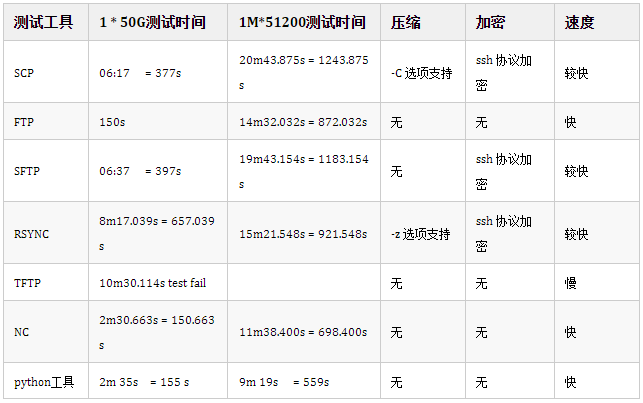
综上所述,
(1) 大文件传输速率:ftp > nc > Python工具 > scp > sftp > rsync。
(2) 小文件传输速率:Python工具 > nc > ftp > rsync > sftp > scp。
(3) 不同工具具有不同的应用场景,rsync在增量同步或定期归档的情况下优势很大。ftp工具搭建部署麻烦,适用于内网的文件归集以及公共文件的调阅,安全性低。
(4) 如果由于生产安全限制,关闭了SSH连接或22端口的使用,可以使用基于其他协议的连接访问,推荐nc工具。
(5) 对比每个工具可能同容量的文件数量测试,小文件会导致CPU多次读取匹配信息,增加CPU负担,IO的次数也会增多,存在一定的IO瓶颈,同容量的大文件和多个小文件传输对比会有一定的速度优势。
(6) 如果是大量文件传输,可根据文件名特点分批次设置多个传输进程,从而达到源端服务器并发传输的效果,更好的利用网络带宽。
备注,
(1) 由于操作限制,以上测试工具均忽略交互式登录的时间。
(2) 测试为虚拟机环境,不能保证变量绝对可控(网络带宽、吞吐、磁盘性能等影响因素),因此文中给出的时间节点仅供参考。
近期更新的文章:
《最近碰到的问题》
文章分类和索引:
