



ora2pg版本选择
https://github.com/darold/ora2pg/releases,
经测试:21.1-23.1版本均导gis类型表时报错。
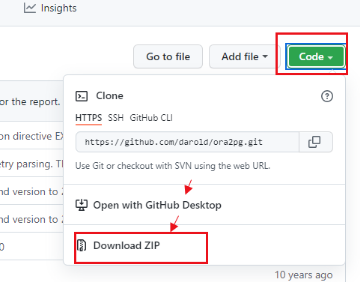
由于遇到2次bug,所有请不要在这个链接下载,而是从code去download zip最新的,参考如下截图:
ora2pg -p -c xxx.conf -t TABLE -o table.sql

FATAL: _column_info() ORA-00911: invalid character (DBD ERROR: error possibly near <> indicator at char 17 in 'SELECT ST_SRID(c.<>%s) FROM %s c')
DBI::db=HASH(0x2ec0bb8)->disconnect invalidates 1 active statement handle (either destroy statement handles or call finish on them before disconnecting) at /usr/local/share/perl5/Ora2Pg.pm line 14893.
Aborting export...

error in all the versions from 21.1-23.1
bug提交到github得到了回复:https://github.com/darold/ora2pg/commit/b3ef5a867d939d0bfe17d8bbb6a6ddb265c5599c
上述bug修复后,又遇到第2个bug:
the field type:ST_GEOMETRY, cannot copy??!!!!
when use ora2pg -p -c sde.conf -t COPY -a 'TABLE[BACK_SITE_LOCATION]' -o BACK_SITE_LOCATION.sql -j 1
the errors just look like :
[========================>] 1/1 tables (100.0%) end of scanning.
Can't use string ("POINT ( 116.52600000 39.8032500") as an ARRAY ref while "strict refs" in use at /usr/local/share/perl5/Ora2Pg/GEOM.pm line 163.
Issuing rollback() due to DESTROY without explicit disconnect() of DBD::Oracle::db handle (DESCRIPTION=(ADDRESS=(HOST=192.168.1.2)(PROTOCOL=tcp)(PORT=1521))(CONNECT_DATA=(SID=oradb))) at /usr/local/share/perl5/Ora2Pg/GEOM.pm line 163.
[========================>] 1/1 tables (100.0%) end of scanning.
Can't use string ("POLYGON (( 116.48583612 40.6728") as an ARRAY ref while "strict refs" in use at /usr/local/share/perl5/Ora2Pg/GEOM.pm line 163.
Issuing rollback() due to DESTROY without explicit disconnect() of DBD::Oracle::db handle (DESCRIPTION=(ADDRESS=(HOST=192.168.1.2)(PROTOCOL=tcp)(PORT=1521))(CONNECT_DATA=(SID=oradb))) at /usr/local/share/perl5/Ora2Pg/GEOM.pm line 163.
同样快速得到修复:
https://github.com/darold/ora2pg/commit/d5195d6ab659eaee964b9d66f8744f4f7df07bea
ora2pg -p -c xxx.conf -t TABLE -o table.sql

FATAL: _column_info() ORA-00911: invalid character (DBD ERROR: error possibly near <> indicator at char 17 in 'SELECT ST_SRID(c.<>%s) FROM %s c')
DBI::db=HASH(0x2ec0bb8)->disconnect invalidates 1 active statement handle (either destroy statement handles or call finish on them before disconnecting) at /usr/local/share/perl5/Ora2Pg.pm line 14893.
Aborting export...
最后使用最新下载源码:
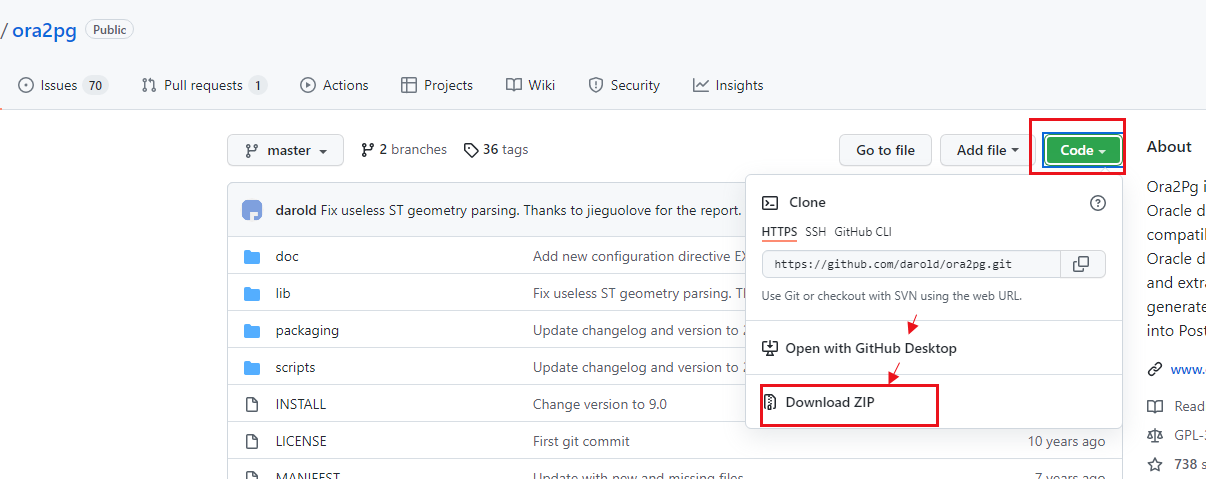 。
。
如下看到的版本是v23.1但其实最新的并没有发布。

关于版本更换步骤很简单:

1.下载zip源码https://github.com/darold/ora2pg下载,如上图。
2.上传到oracle服务器,unzip解压相应目录v.xx
3.编译安装即可
cd v.xx
perl Makefile.PL
make && make install
ora2pg -v
安装ora2pg可参考:https://blog.csdn.net/jycjyc/article/details/108466740
1.准备配置文件
db.conf主要修改ORACLE_DSN,ORACLE_USER,ORACLE_PWD,SCHEMA等参数即可。
PG_VERSION 12
ORACLE_HOME /oracle/app/oracle/product/11.2.0/dbhome_1
ORACLE_DSN  dbi:Oracle:host=192.168.226.177;sid=oradb;port=1521
ORACLE_USER orauser
ORACLE_PWD  password
SCHEMA orauser
PG_NUMERIC_TYPE    0
PG_INTEGER_TYPE    1
DEFAULT_NUMERIC float
NLS_LANG    AMERICAN_AMERICA.UTF8
#ALLOW TPR_* TSM_*
#ALLOW tpr_*,tsm_*,twf_*
#exclude *_20_* *_TSM_FUNCTION_*
#SKIP    fkeys pkeys ukeys indexes checks
#OUTPUT     table.sql
2.导表结构和索引等
ora2pg -p -c db.conf -t TABLE -o table.sql
排除特定名称加参数 -e 'TABLE[XXX.*,XXX.*]'
指定名称加参数 -a 'TABLE[XXX.*,XXX.*]'

注意模糊匹配的这个点符号 .*
3.导表数据
对于小库,可以输出导1个文件data.sql
[root@db]# vi data.sh
ora2pg -p -c db.conf -t COPY -o data.sql -j 4
[root@db]# chmod +x data.sh
[root@db]# nohup ./data.sh > ./data.out &
对于大库,建议每个表数据单独输出,更加灵活。
oracle拼接出导数据的脚本:脚本条件根据实际需要修改即可
select 'ora2pg -p -c db.conf -t COPY -a ''TABLE['|| table_name ||']'' -o '||table_name||'.sql -j 4' from user_tables where
 table_name not like '%LOG%' and table_name not like '%20%' and table_name not like '%19%' and table_name not like '%21%' and table_name not like '%0%' and table_name not like '%22%' and table_name not like '%_BAK%'
  and table_name not like '%ColumnMetadata%' and table_name not like '%AQ$%'
  order by 1 asc;
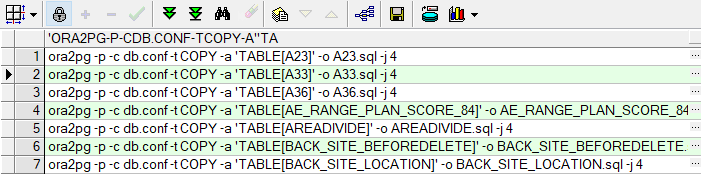
上述输出结果保持到文件data.sh赋执行权限chmod +x data.sh
然后执行nohup ./data.sh > ./data.out &即可
4.导视图、存储过程等其它对象
如下内容存放到other.sh中,然后执行即可。
# cat other.sh
ora2pg -p -c db.conf -t VIEW -o VIEW.sql
ora2pg -p -c db.conf -t SEQUENCE -o SEQUENCE.sql
ora2pg -p -c db.conf -t TRIGGER -o TRIGGER.sql
ora2pg -p -c db.conf -t FUNCTION -o FUNCTION.sql
ora2pg -p -c db.conf -t PROCEDURE -o PROCEDURE.sql
ora2pg -p -c db.conf -t PACKAGE -o PACKAGE.sql
ora2pg -p -c db.conf -t MVIEW -o MVIEW.sql
ora2pg -p -c db.conf -t DBLINK -o DBLINK.sql
ora2pg -p -c db.conf -t SYNONYM -o SYNONYM.sql
ora2pg -p -c db.conf -t TYPE -o TYPE.sql
# chmod +x other.sh
# nohup ./other.sh > ./other.out
# tail -f other.out
5.导入操作
export PGPASSWORD=xxx 省去每次提示输密码的麻烦
5.1导type类型,先导入:
psql --host=192.168.208.40 --port=5432 --username=pguser --echo-errors pgdb -f TYPE.sql -1
pg 导入的时候最后加上-1 参数,这样只要报错就会立即失败回滚抛错。后续发现改成-v ON_ERROR_STOP=1更准确。
5.2导表结构
psql --host=192.168.208.40 --port=5432 --username=pguser --echo-errors pgdb -f table.sql -1
5.3导序列
psql --host=192.168.208.40 --port=5432 --username=pguser --echo-errors pgdb -f SEQUENCE.sql
5.4导数据(类似第4步,可以考虑写到sh文件中,一次批量处理,再检查out日志,确认是否有问题需处理即可)
psql --host=192.168.208.40 --port=5432 --username=pguser --echo-errors pgdb -f data.sql -1

select 'psql --host=192.168.208.40 --port=5432 --username=pguser --echo-errors pgdb -f '|| table_name ||'.sql -1' from user_tables
where table_name not like '%LOG%' and table_name not like '%20%' and table_name not like '%19%' and table_name not like '%21%' and table_name not like '%0%' and table_name not like '%22%' and table_name not like '%_BAK%'
and table_name not like '%ColumnMetadata%' and table_name not like '%AQ$%'
order by 1 asc;
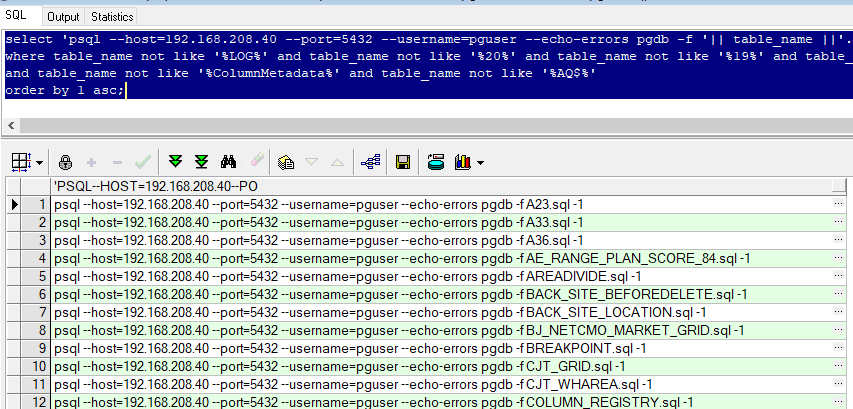
5.4导其它对象,同上
补充:关于gis导出的数据存在问题:临时在ora2pg导出的sql做两个替换,其中nan这块对于的具体值核查下源库数值。这样才顺利导入pg库
sed -i ‘s/SRID=;//g’ *.sql
sed -i ‘s/ nan/ -1.797693134862316e+308/g’ *.sql
对于字段类型ST_GEOMETRY替换为GEOMETRY:
sed -i ‘s/ ST_/ /g’ *.sql
