



备注:
Oracle 11.2.0.4
Table of Contents
一. 需求
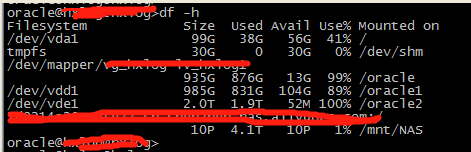
近期有一个日志库,占用了比较多的空间,需要将历史的清理,然后收缩空间。
如下图所示,4T的空间已经差不多用完。
二. 解决方案
首先想到的是清理掉超过半年的数据,然后resize 表空间。
2.1 清理过期数据
因为业务的表是 tablename_yearmonth格式,例如 log_202204,每个月一个表,所以直接进行truncate即可。
找到大表:
select t.segment_name,t.BYTES/1024/1024/1024 GB,t.segment_type
from user_segments t
where t.segment_type in ('TABLE','TABLE PARTITION')
order by nvl(t.BYTES/1024/1024/1024,0) desc;

truncate 大表:
select  'truncate table '|| t.TABLE_NAME ||';'
  from user_tables t
 where t.TABLE_NAME  like 'LOG%';
2.2 收缩表空间
select a.tablespace_name,
a.file_name,
a.totalsize as totalsize_MB,
b.freesize as freesize_MB,
'ALTER DATABASE DATAFILE ''' || a.file_name || ''' RESIZE ' ||
round((a.totalsize - b.freesize) + 200) || 'M;' as "alter datafile"
from (select a.file_name,
a.file_id,
a.tablespace_name,
a.bytes / 1024 / 1024 as totalsize
from dba_data_files a) a,
(select b.tablespace_name,
b.file_id,
sum(b.bytes / 1024 / 1024) as freesize
from dba_free_space b
group by b.tablespace_name, b.file_id) b
where a.file_id = b.file_id
and b.freesize > 100
and a.tablespace_name  in ('TBS_LOG_DATA')
order by a.tablespace_name

将上一步的 alter datafile语句拷贝出来执行:
有部分报错:
ORA-03297: file contains used data beyond requested RESIZE value

2.3 清理表碎片
因为我使用的是truncate,理论上不会受高水位的影响,在网上找了几个博客,也是说要降低表的高水位,清理表碎片。
select 'alter table '||t.TABLE_NAME||' enable row movement;',
       'alter table '||t.TABLE_NAME||' shrink space cascade;'
  from user_tables t
 where t.TABLE_NAME like 'LOG%';
清理完碎片之后,重新执行,依旧报错。
2.4 直接把相关的表drop掉
select  'drop table '|| t.TABLE_NAME ||'purge;'
  from user_tables t
 where t.TABLE_NAME  like 'LOG%';
drop掉表之后,重新执行,依旧报错。
2.5 把该表空间下其它的表移出此表空间
万能的itpub上有个博客:
http://blog.itpub.net/15747463/viewspace-767555/
如果空闲的extent如果在文件的中间,此时无法进行resize ,必须把尾部的object drop 然后重建 再resize datafile。
也就是说同时期该用户下其它表的写入,也在这个数据文件下,那么就不能进行resize。
把其它表移动到users表空间:
select 'alter index '||index_NAME||' rebuild tablespace users;' from user_indexes where TABLE_NAME not like 'LOG_%';
select 'alter table '||TABLE_NAME||' move tablespace users;' from user_tables where TABLE_NAME not like 'LOG_%';
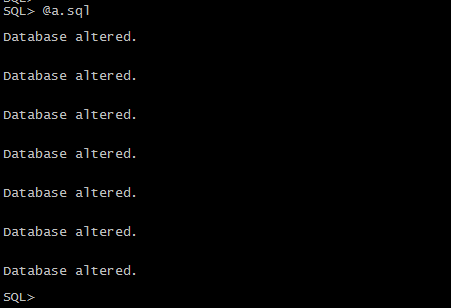
再次运行压缩空间,成功
2.6 查看压缩的空间
可以看到一下子多出了2.1T 的空间
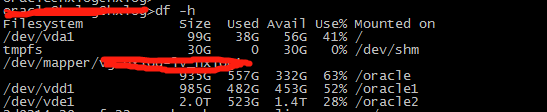
收缩空间运行速度还不错,50多个数据文件,几分钟就压缩完成。
「喜欢这篇文章,您的关注和赞赏是给作者最好的鼓励」
关注作者
【版权声明】本文为墨天轮用户原创内容,转载时必须标注文章的来源(墨天轮),文章链接,文章作者等基本信息,否则作者和墨天轮有权追究责任。如果您发现墨天轮中有涉嫌抄袭或者侵权的内容,欢迎发送邮件至:contact@modb.pro进行举报,并提供相关证据,一经查实,墨天轮将立刻删除相关内容。
