



实践练习一(必选):OceanBase Docker 体验
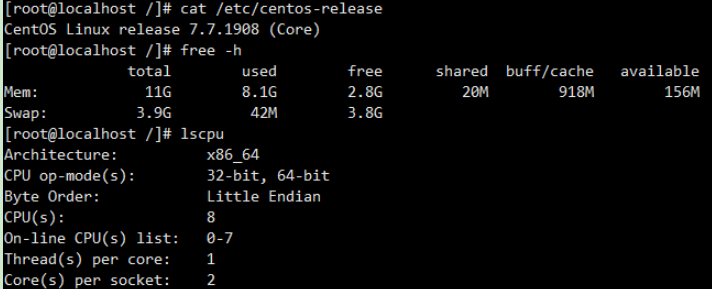
1. 环境准备
2. 安装docker环境
yum install -y yum-utils
sudo yum-config-manager --add-repo https://download.docker.com/linux/centos/docker-ce.repo
yum install docker-ce docker-ce-cli containerd.io
3. 启动 docker
systemctl start docker
systemctl enable docker
4. 安装oceanbase-ce
docker pull obpilot/oceanbase-ce:latest
docker run -itd -m 10G --name oceanbase-ce obpilot/oceanbase-ce:latest
docker ps
5. 登录启动
[root@orcl19c ~]# docker exec -it oceanbase-ce bash
5.1列出集群信息
[admin@ad7e651fab16 ~]$ obd cluster list
+------------------------------------------------------------+
| Cluster List |
+--------+---------------------------------+-----------------+
| Name | Configuration Path | Status (Cached) |
+--------+---------------------------------+-----------------+
| obdemo | /home/admin/.obd/cluster/obdemo | deployed |
+--------+---------------------------------+-----------------+
5.2 使用obd启动集群
[admin@ad7e651fab16 ~]$ obd cluster start obdemo
Get local repositories and plugins ok
Open ssh connection ok
Cluster param config check ok
Check before start observer ok
Check before start obproxy ok
Start observer ok
observer program health check ok
Connect to observer ok
Initialize cluster
Cluster bootstrap ok
Wait for observer init ok
+---------------------------------------------+
| observer |
+-----------+---------+------+-------+--------+
| ip | version | port | zone | status |
+-----------+---------+------+-------+--------+
| 127.0.0.1 | 3.1.1 | 2881 | zone1 | active |
+-----------+---------+------+-------+--------+
Start obproxy ok
obproxy program health check ok
Connect to obproxy ok
Initialize cluster
+---------------------------------------------+
| obproxy |
+-----------+------+-----------------+--------+
| ip | port | prometheus_port | status |
+-----------+------+-----------------+--------+
| 127.0.0.1 | 2883 | 2884 | active |
+-----------+------+-----------------+--------+
obdemo running
6. 创建租户
6.1登录ob
[admin@ad7e651fab16 ~]$ obclient -h127.1 -uroot@sys -P2881 -prootPWD123 -c -A oceanbase
Welcome to the OceanBase. Commands end with ; or \g.
Your MySQL connection id is 3221487678
Server version: 5.7.25 OceanBase 3.1.1 (r4-8c615943cbd25a6f7b8bdfd8677a13a21709a05e) (Built Oct 21 2021 10:52:05)
Copyright (c) 2000, 2018, Oracle, MariaDB Corporation Ab and others.
Type 'help;' or '\h' for help. Type '\c' to clear the current input statement.
MySQL [oceanbase]> show parameters like 'cluster';
+-------+----------+-----------+----------+---------+-----------+-------------+---------------------+----------+---------+---------+-------------------+
| zone | svr_type | svr_ip | svr_port | name | data_type | value | info | section | scope | source | edit_level |
+-------+----------+-----------+----------+---------+-----------+-------------+---------------------+----------+---------+---------+-------------------+
| zone1 | observer | 127.0.0.1 | 2882 | cluster | NULL | obce-single | Name of the cluster | OBSERVER | CLUSTER | DEFAULT | DYNAMIC_EFFECTIVE |
+-------+----------+-----------+----------+---------+-----------+-------------+---------------------+----------+---------+---------+-------------------+
1 row in set (0.034 sec)
MySQL [oceanbase]> exit
Bye
6.2登录集群,调cpu下限,创建资源单元规格、创建资源池、创建租户
[admin@ad7e651fab16 ~]$ obclient -h127.1 -uroot@sys#obce-single -P2883 -prootPWD123 -c -A oceanbase
Welcome to the OceanBase. Commands end with ; or \g.
Your MySQL connection id is 3
Server version: 5.6.25 OceanBase 3.1.1 (r4-8c615943cbd25a6f7b8bdfd8677a13a21709a05e) (Built Oct 21 2021 10:52:05)
Copyright (c) 2000, 2018, Oracle, MariaDB Corporation Ab and others.
Type 'help;' or '\h' for help. Type '\c' to clear the current input statement.
MySQL [oceanbase]> alter resource unit sys_unit_config min_cpu=5;
Query OK, 0 rows affected (0.032 sec)
MySQL [oceanbase]> CREATE resource unit S4C1G max_cpu=4, min_cpu=4, max_memory='1G', min_memory='1G', max_iops=10000, min_iops=1000, max_session_num=1000000, max_disk_size='1024G';
Query OK, 0 rows affected (0.014 sec)
MySQL [oceanbase]> CREATE resource pool my_pool unit = 'S4C1G', unit_num = 1;
Query OK, 0 rows affected (0.105 sec)
MySQL [oceanbase]> create tenant obmysql resource_pool_list=('my_pool'), primary_zone='RANDOM',comment 'mysql tenant/instance', charset='utf8' set ob_tcp_invited_nodes='%', ob_compatibility_mode='mysql';
Query OK, 0 rows affected (4.763 sec)
MySQL [oceanbase]> exit
Bye
7. 创建业务数据库和用户并授权
[admin@ad7e651fab16 ~]$ obclient -h 127.1 -uroot@obmysql#obce-single -P2883 -p -c -A test
Enter password:
Welcome to the OceanBase. Commands end with ; or \g.
Your MySQL connection id is 9
Server version: 5.6.25 OceanBase 3.1.1 (r4-8c615943cbd25a6f7b8bdfd8677a13a21709a05e) (Built Oct 21 2021 10:52:05)
Copyright (c) 2000, 2018, Oracle, MariaDB Corporation Ab and others.
Type 'help;' or '\h' for help. Type '\c' to clear the current input statement.
MySQL [test]> create database db1 ;
Query OK, 1 row affected (0.139 sec)
MySQL [test]> create user user1@'%' identified by 'user1' ;
Query OK, 0 rows affected (0.080 sec)
MySQL [test]> grant all privileges on *.* to user1@'%';
Query OK, 0 rows affected (0.310 sec)
8. 创建表
[admin@ad7e651fab16 ~]$ obclient -h 127.1 -uuser1@obmysql#obce-single -P2883 -puser1 -c -A db1
Welcome to the OceanBase. Commands end with ; or \g.
Your MySQL connection id is 10
Server version: 5.6.25 OceanBase 3.1.1 (r4-8c615943cbd25a6f7b8bdfd8677a13a21709a05e) (Built Oct 21 2021 10:52:05)
Copyright (c) 2000, 2018, Oracle, MariaDB Corporation Ab and others.
Type 'help;' or '\h' for help. Type '\c' to clear the current input statement.
MySQL [db1]> show databases;
+--------------------+
| Database |
+--------------------+
| oceanbase |
| information_schema |
| mysql |
| test |
| db1 |
+--------------------+
5 rows in set (0.005 sec)
MySQL [db1]> create table t1(id int) ;
Query OK, 0 rows affected (0.464 sec)
MySQL [db1]> insert into t1 values(1) ;
Query OK, 1 row affected (0.223 sec)
MySQL [db1]> commit;
Query OK, 0 rows affected (0.002 sec)
MySQL [db1]> select * from t1 ;
+------+
| id |
+------+
| 1 |
+------+
1 row in set (0.003 sec)
