



云筑网技术团队
助推建筑行业数字化
摘要
元数据分析
使用 Source generators 实现
使用 Source generators 实现程序集分析
使用方法
SourceCode && Nuget package
总结
1 摘要
Source generators 随着 .net5 推出,并在 .net6 中大量运用,它可以基于编译时分析,根据现有代码创建新的代码并添加进编译时。利用 SourceGenerator 可以将开发人员从一些模板化的重复的工作中解放出来,更多的投入创造力的工作,并且和原生代码一致的性能。 在这篇文章中,我们将演示如何使用 Source generators 根据 HTTP API 接口自动生成实现类,以及实现跨项目分析,并且添加进 DI 容器。
2 元数据分析
Source generators 可以根据编译时语法树(Syntax)或符号(Symbol)分析,来执行创建新代码,因此我们需要在编译前提供足够多的元数据,在本文中我们需要知道哪些接口需要生成实现类,并且接口中定义的方法该以 Get,Post 等哪种方法发送出去,在本文中我们通过注解(Attribute/Annotation)来提供这些元数据,当然您也可以通过接口约束,命名惯例来提供。
首先我们定义接口上的注解,这将决定我们需要扫描的接口以及如何创建 HttpClient:
/// <summary>/// Identity a Interface which will be implemented by SourceGenerators/// </summary>[AttributeUsage(AttributeTargets.Interface)]public class HttpClientAttribute : Attribute{/// <summary>/// HttpClient name/// </summary>public string Name { get; }/// <summary>/// Create a new <see cref="HttpClientAttribute"/>/// </summary>public HttpClientAttribute(){}/// <summary>/// Create a new <see cref="HttpClientAttribute"/> with given name/// </summary>/// <param name="name"></param>public HttpClientAttribute(string name){Name = name;}}
然后我们定义接口方法上的注解,表明以何种方式请求 API 以及请求的模板路径,这里以HttpGet方法为例:
/// <summary>/// Identity a method send HTTP Get request/// </summary>public class HttpGetAttribute : HttpMethodAttribute{/// <summary>/// Creates a new <see cref="HttpGetAttribute"/> with the given route template./// </summary>/// <param name="template">route template</param>public HttpGetAttribute(string template) : base(template){}}/// <summary>/// HTTP method abstract type for common encapsulation/// </summary>[AttributeUsage(AttributeTargets.Method)]public abstract class HttpMethodAttribute : Attribute{/// <summary>/// Route template/// </summary>private string Template { get; }/// <summary>/// Creates a new <see cref="HttpMethodAttribute"/> with the given route template./// </summary>/// <param name="template">route template</param>protected HttpMethodAttribute(string template){Template = template;}}
当然还提供RequiredServiceAttribute来注入服务,HeaderAttribute来添加头信息等注解这里不做展开,得益于 C# 的字符串插值(String interpolation)语法糖,要支持路由变量等功能,只需要用{}包裹变量就行 例如[HttpGet("/todos/{id}")],这样在运行时就会自动替换成对应的值。
3 使用Source Generator实现
新建 HttpClient.SourceGenerator 项目,SourceGenerator 需要引入 Microsoft.CodeAnalysis.Analyzers, Microsoft.CodeAnalysis.CSharp 包,并将 TargetFramework 设置成 netstandard2.0。
<Project Sdk="Microsoft.NET.Sdk"><PropertyGroup><TargetFramework>netstandard2.0</TargetFramework><IncludeBuildOutput>false</IncludeBuildOutput>...</PropertyGroup><ItemGroup><PackageReference Include="Microsoft.CodeAnalysis.Analyzers" Version="3.3.3" PrivateAssets="all" ><PackageReference Include="Microsoft.CodeAnalysis.CSharp" Version="4.0.1" PrivateAssets="all" ><None Include="$(OutputPath)\$(AssemblyName).dll" Pack="true" PackagePath="analyzers/dotnet/cs" Visible="false" >...</ItemGroup></Project>
要使用 SourceGenerator 需要实现 ISourceGenerator 接口,并添加 [Generator] 注解,一般情况下我们在 Initialize 注册 Syntax receiver,将需要的类添加到接收器中,在 Execute 丢弃掉不是该接收器的上下文,执行具体的代码生成逻辑。
public interface ISourceGenerator{void Initialize(GeneratorInitializationContext context);void Execute(GeneratorExecutionContext context);}
这里我们需要了解下 roslyn api 中的 语法树模型 (SyntaxTree model) 和 语义模型 (Semantic model),简单的讲, 语法树表示源代码的语法和词法结构,表明节点是接口声明还是类声明还是 using 指令块等等,这一部分信息来源于编译器的Parse阶段;语义来源于编译器的Declaration阶段,由一系列 Named symbol 构成,比如TypeSymbol,MethodSymbol等,类似于 CLR 类型系统, TypeSymbol 可以得到标记的注解信息,MethodSymbol 可以得到 ReturnType 等信息。
定义 HttpClient Syntax Receiver,这里我们处理节点信息是接口声明语法的节点,并且接口声明语法上有注解,然后再获取其语义模型,根据语义模型判断是否包含我们上边定义的 HttpClientAttribute。
class HttpClientSyntax : ISyntaxContextReceiver{public List<INamedTypeSymbol> TypeSymbols { get; set; } = new List<INamedTypeSymbol>();public void OnVisitSyntaxNode(GeneratorSyntaxContext context){if (context.Node is InterfaceDeclarationSyntax ids && ids.AttributeLists.Count > 0){var typeSymbol = ModelExtensions.GetDeclaredSymbol(context.SemanticModel, ids) as INamedTypeSymbol;if (typeSymbol!.GetAttributes().Any(x =>x.AttributeClass!.ToDisplayString() =="SourceGeneratorPower.HttpClient.HttpClientAttribute")){TypeSymbols.Add(typeSymbol);}}}}
private string GenerateGetMethod(ITypeSymbol typeSymbol, IMethodSymbol methodSymbol, string httpClientName,string requestUri){var returnType = (methodSymbol.ReturnType as INamedTypeSymbol).TypeArguments[0].ToDisplayString();var cancellationToken = methodSymbol.Parameters.Last().Name;var source = GenerateHttpClient(typeSymbol, methodSymbol, httpClientName);source.AppendLine($@"var response = await httpClient.GetAsync($""{requestUri}"", {cancellationToken});");source.AppendLine("response!.EnsureSuccessStatusCode();");source.AppendLine($@"return (await response.Content.ReadFromJsonAsync<{returnType}>(cancellationToken: {cancellationToken})!)!;");source.AppendLine("}");return source.ToString();}
var extensionSource = new StringBuilder($@"using SourceGeneratorPower.HttpClient;using Microsoft.Extensions.Configuration;namespace Microsoft.Extensions.DependencyInjection{{public static class ScanInjectOptions{{public static void AddGeneratedHttpClient(this IServiceCollection services){{");foreach (var typeSymbol in receiver.TypeSymbols){...extensionSource.AppendLine($@"services.AddScoped<global::{typeSymbol.ToDisplayString()}, global::{typeSymbol.ContainingNamespace.ToDisplayString()}.{typeSymbol.Name.Substring(1)}>();");}extensionSource.AppendLine("}}}");var extensionTextFormatted = CSharpSyntaxTree.ParseText(extensionSource.ToString(), new CSharpParseOptions(LanguageVersion.CSharp8)).GetRoot().NormalizeWhitespace().SyntaxTree.GetText().ToString();context.AddSource($"SourceGeneratorPower.HttpClientExtension.AutoGenerated.cs",SourceText.From(extensionTextFormatted, Encoding.UTF8));...
4 使用 Source generators 实现程序集分析
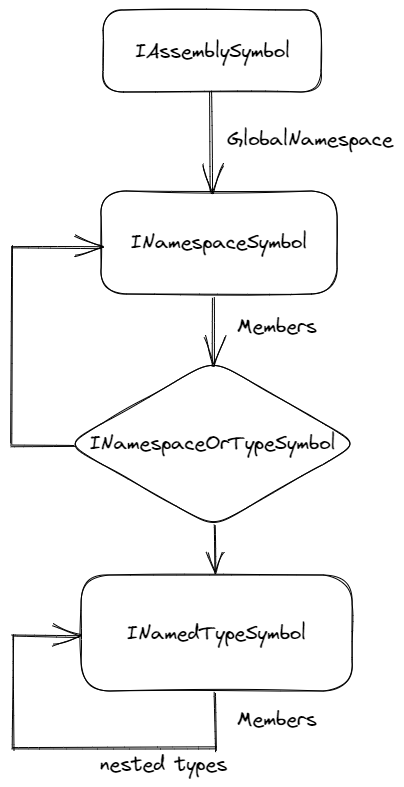
class HttpClientVisitor : SymbolVisitor{private readonly HashSet<INamedTypeSymbol> _httpClientTypeSymbols;public HttpClientVisitor(){_httpClientTypeSymbols = new HashSet<INamedTypeSymbol>(SymbolEqualityComparer.Default);}public ImmutableArray<INamedTypeSymbol> GetHttpClientTypes() => _httpClientTypeSymbols.ToImmutableArray();public override void VisitAssembly(IAssemblySymbol symbol){symbol.GlobalNamespace.Accept(this);}public override void VisitNamespace(INamespaceSymbol symbol){foreach (var namespaceOrTypeSymbol in symbol.GetMembers()){namespaceOrTypeSymbol.Accept(this);}}public override void VisitNamedType(INamedTypeSymbol symbol){if (symbol.DeclaredAccessibility != Accessibility.Public){return;}if (symbol.GetAttributes().Any(x =>x.AttributeClass!.ToDisplayString() == "SourceGeneratorPower.HttpClient.HttpClientAttribute")){_httpClientTypeSymbols.Add(symbol);}var nestedTypes = symbol.GetMembers();if (nestedTypes.IsDefaultOrEmpty){return;}foreach (var nestedType in nestedTypes){nestedType.Accept(this);}}}
public void Execute(GeneratorExecutionContext context){if (!(context.SyntaxContextReceiver is HttpClientSyntax receiver)){return;}var httpClientVisitor = new HttpClientVisitor();foreach (var assemblySymbol in context.Compilation.SourceModule.ReferencedAssemblySymbols.Where(x => x.Identity.PublicKey == ImmutableArray<byte>.Empty)){assemblySymbol.Accept(httpClientVisitor);}receiver.TypeSymbols.AddRange(httpClientVisitor.GetHttpClientTypes());...}
5 使用方法
[HttpClient("JsonServer")]public interface IJsonServerApi{[HttpGet("/todos/{id}")]Task<Todo> Get(int id, CancellationToken cancellationToken = default);[HttpPost(("/todos"))]Task<Todo> Post(CreateTodo createTodo, CancellationToken cancellationToken = default);[HttpPut("/todos/{todo.Id}")]Task<Todo> Put(Todo todo, CancellationToken cancellationToken);[HttpPatch("/todos/{id}")]Task<Todo> Patch(int id, Todo todo, CancellationToken cancellationToken);[HttpDelete("/todos/{id}")]Task<object> Delete(int id, CancellationToken cancellationToken);}
builder.Services.AddGeneratedHttpClient();builder.Services.AddHttpClient("JsonServer", options => options.BaseAddress = new Uri("https://jsonplaceholder.typicode.com"));
public class TodoController: ControllerBase{private readonly IJsonServerApi _jsonServerApi;public TodoController(IJsonServerApi jsonServerApi){_jsonServerApi = jsonServerApi;}[HttpGet("{id}")]public async Task<Todo> Get(int id, CancellationToken cancellationToken){return await _jsonServerApi.Get(id, cancellationToken);}...}
SourceCode: https://github.com/huiyuanai709/SourceGeneratorPower Nuget Package: https://www.nuget.org/packages/SourceGeneratorPower.HttpClient.Abstractions Nuget Package: https://www.nuget.org/packages/SourceGeneratorPower.HttpClient.SourceGenerator
7 总结

