



在《Greenplum备份恢复工具gpbackup》系列文章的上篇、和中篇,我们分别介绍了gpbackup概念、源码编译和所有参数的详细使用方法。在本系列的完结篇,我们将主要介绍 gprestore 的使用方法及一些其他的功能。
✦
✦
gprestore 是专门用来做gpdb数据恢复的并行恢复工具,配合 gpbackup 使用,编译安装方式与 gpbackup 一样,无论是官方下载的软件包还是自行编译的软件包,均会有gprestore这个命令。
下面我们仍然采用与中篇一样的套路来进行演示,首先把 gprestore 的详细命令给大家贴一下,然后通过实验的方式做几个具体场景的解释。在本文的最后,对整个工具进行一个总结,希望对大家日后使用有所帮助。
1
gprestore备份参数详解
如果要使用gprestore进行数据库恢复,那就要求您必须已经使用gpbackup进行了数据库备份,恢复时通过指定 --timestamp 参数把备份集传给gprestore。如果您指定的是一个增量备份的时间戳,那这个增量备份的base全量备份及其他增量文件必须均存在,恢复时会校验备份集合的完整性,防止恢复出错。
在恢复数据时,默认情况下会将数据恢复到gpbackup备份的数据库中,如果该数据库已经不存在了,需要通过指定 --create-db 参数来自动创建数据库;如果数据库存在但是模式不存在,也会自动创建模式,如果模式已经存在,则会告警提示并继续恢复数据;如果数据库中同名的表已经存在,则恢复会失败并立刻停止。
接下来首先还是我们通过命令行来看一下gprestore命令自带的帮助信息有哪些参数,具体含义直接在参数后面进行翻译:
[chris@gpt1 ~]$ gprestore --helpgprestore is the parallel restore utility for GreenplumUsage:gprestore [flags]Flags:--backup-dir string `可选参数`, 写入备份文件的绝对路径,不能采用相对路径,如果您指定了该路径,恢复操作会在所有机器上的这个目录下查找备份文件(包括元数据文件)。如果您不指定这个选项,元数据文件会从Master节点的 `$MASTER_DATA_DIRECTORY/backups/YYYYMMDD/YYYYMMDDhhmmss/` 目录下查找,数据文件会从segment主机的 `<seg_dir>/backups/YYYYMMDD/ YYYYMMDDhhmmss/`目录下查找。该选项不能与 `--plugin-config` 选项共同使用。--copy-queue-size int `可选参数`, 自行编译最新版本gpbackup带有的参数,该参数只能配合 `--single-data-file` 参数一起使用,当定义了 `--single-data-file` 参数以后,通过执行 `--copy-queue-size` 参数的值来指定gprestore命令使用COPY命令的个数,默认值为1。--create-db `可选参数`, 在执行数据库对象(metadata)恢复之前先创建数据库,该操作实际上通过复制标准模版数据库template0来实现;如果不指定该参数,默认不会创建数据库,此时就要求该数据库必须存在,否则恢复失败。--data-only `可选参数`, 仅恢复数据,不恢复表结构信息,这就要求要恢复的表必须已经在数据库中存在。需要特别注意的是,该表上SEQUENCE的值会被恢复成备份时的状态。--debug `可选参数`, 打印详细的调试信息。--exclude-schema stringArray `可选参数`, 指定恢复操作要排除的数据库模式(schema), 如果要排除多个模式,需要多次定义,不支持 `--exclude-schema=schema1,schema2` 的方式。另外该参数与 '--exclude-schema-file, exclude-table, --exclude-table-file, --include-schema, --include-schema-file, --include-table, --include-table-file' 这几个参数不能同时使用。--exclude-schema-file string `可选参数`, 包含恢复操作要排除的数据库模式的文件,每一行为一个模式名,该文件不能包含多余的符号,如果数据库中的模式包含除了:字母、数字和下划线以外的特殊符号,那么请在文件中用双引号进行包裹。该参数与 '--exclude-schema, --exclude-table, --exclude-table-file, --include-schema, --include-schema-file, --include-table, --include-table-file' 这几个参数不能同时使用。--exclude-table stringArray `可选参数`, 指定恢复操作中要排除的表名,该参数与 '--exclude-schema, --exclude-schema-file, --exclude-table-file, --include-schema, --include-schema-file, --include-table, --include-table-file' 这几个参数不能同时使用。指定表名时,必须使用 `<schema-name>.<table-name>` 的格式指定匹配到具体的模式,如果数据库中的模式包含除了:字母、数字和下划线以外的特殊符号,那么请在文件中用双引号进行包裹。另外该参数也支持多次指定。--exclude-table-file string `可选参数`, 指定文件包含恢复操作中要排除的表名,该参数与 '--exclude-schema, --exclude-schema-file, --exclude-table, --include-schema, --include-schema-file, --include-table, --include-table-file' 这几个参数不能同时使用。指定表名时,必须使用 `<schema-name>.<table-name>` 的格式指定匹配到具体的模式,如果数据库中的模式包含除了:字母、数字和下划线以外的特殊符号,那么请在文件中用双引号进行包裹。如果有多个表,需要在文件中分行多次指定。--help 显示命令行参数帮助信息,与具体的恢复操作无关。--include-schema stringArray `可选参数`, 指定恢复操作要包含的数据库模式(schema), 如果要包含多个模式,需要多次定义,不支持 `--include-schema=schema1,schema2` 的方式。另外该参数与 '--exclude-schema, --exclude-schema-file, exclude-table, --exclude-table-file, --include-schema-file, --include-table, --include-table-file' 这几个参数不能同时使用。--include-schema-file string `可选参数`, 包含恢复操作要包含的数据库模式的文件,每一行为一个模式名,该文件不能包含多余的符号,如果数据库中的模式包含除了:字母、数字和下划线以外的特殊符号,那么请在文件中用双引号进行包裹。该参数与 '--exclude-schema, --exclude-schema-file, --exclude-table, --exclude-table-file, --include-schema, --include-table, --include-table-file' 这几个参数不能同时使用。--include-table stringArray `可选参数`, 指定恢复操作中要包含的表名,该参数与 '--exclude-schema, --exclude-schema-file, --exclude-table, --exclude-table-file, --include-schema, --include-schema-file, --include-table-file' 这几个参数不能同时使用。指定表名时,必须使用 `<schema-name>.<table-name>` 的格式指定匹配到具体的模式,如果数据库中的模式包含除了:字母、数字和下划线以外的特殊符号,那么请在文件中用双引号进行包裹。另外该参数也支持多次指定。--include-table-file string `可选参数`, 指定文件包含恢复操作中要包含的表名,该参数与 '--exclude-schema, --exclude-schema-file, --exclude-table, --exclude-table-file, --include-schema, --include-schema-file, --include-table' 这几个参数不能同时使用。指定表名时,必须使用 `<schema-name>.<table-name>` 的格式指定匹配到具体的模式,如果数据库中的模式包含除了:字母、数字和下划线以外的特殊符号,那么请在文件中用双引号进行包裹。如果有多个表,需要在文件中分行多次指定。--incremental `可选参数`, `测试功能`: 该选项与 '--data-only' 必须一起使用,仅恢复 '--timestamp' 参数指定的时间戳备份的数据,不恢复之前的全量和增量备份。该功能只对AO表有效,恢复的数据包括Heap表全量数据、最新修改备份的AO表增量数据、最新修改备份的叶子分区增量数据。--jobs int `可选参数`, 指定进行表恢复过程中的并行任务数,如果不指定,该值默认为1,gprestore会使用一个任务(即一个数据库连接)进行备份。可以通过增加该值来提升备份速度,如果指定了大于1的值,备份操作会以表为单位进行并发操作,每个表开启一个单独的事务。需要特别注意的是,指定该参数进行并发备份时,不要进行外部程序操作,否则无法保证多表之间的事物一致性。该参数与 `-- single-data-file` 参数共同使用时,只能设置为1。--metadata-only `可选参数`, 只恢复数据库的模式信息,该操作假设数据库中不存在要恢复的表。可以同时配合 '--with- global' 参数恢复数据库全局对象。如果后期想恢复数据,可以配合 '--data-only' 参数一起使用。--on-error-continue `可选参数`, 指定该参数可以在出现恢复错误时,让恢复操作继续。默认情况下出错后马上退出恢复。在该操作模式下,错误信息会记录到备份目录的对应文件下,元数据恢复错误记录到日志文件 'gprestore_<backup-timestamp>_<restore- time>_error_tables_metadata' 中,生产数据恢复错误记录到日志文件 'gprestore_<backup-timestamp>_<restore- time>_error_tables_data' 中。--plugin-config string `可选参数`, 指定plugin配置文件位置,该文件是一个有效的YAML文件,用来指定在恢复过程中使用的plugin应用的配置信息。该参数通常对应gpbackup使用该参数的场景,从一些非本地存储设备上进行恢复。--quiet `可选参数`, 静默模式,除了warning和error信息都不打印。--redirect-db string `可选参数`, 将数据恢复到指定的数据库,而不是恢复到原来备份的数据库中。--redirect-schema string `可选参数`, 恢复数据到指定模式,而不是恢复到原来备份的模式中。即使原来的数据来自多个模式的多个表,也可以同时恢复到指定的模式和表中。这个参数必须与参数 '--include-table-file, --include-schema, 或 --include-schema- file' 一起使用以指定原来的表或者模式名称,当然这也决定了我们不能将它与参数 '-- exclude-schema 或 --exclude-table' 同时使用。该参数还可以配合 '--metadata-only 或 --data-only' 来恢复元数据或生产数据。--run-analyze `可选参数`, 在运行完表数据恢复后,执行 'ANALYZE' 操作,该参数不能与 '--with-stats' 参数同时使用;默认情况下,针对分区表,会ANALYZE根分区,如果您指定了 '--leaf-partition-data' 则只会去ANALYZE对应恢复了数据的子分区。--timestamp string `必选参数`, 指定要恢复的备份集的时间戳,格式为:'YYYYMMDDHHMMSS'。--truncate-table `必选参数`, 在恢复之前先把目标表清空,该参数主要为了避免数据重复问题。--verbose `可选参数`, 打印详细日志信息。--version 打印gpbackup的版本号并退出。--with-globals `可选参数`, 恢复全局对象。--with-stats `可选参数`, 恢复查询计划统计信息。
2
gprestore恢复实验及总结
在上面一部分,进行了详细的参数解释,下面我们通过一系列的实验来对一些特别的参数和场景进行演示。因为参数过多,不能一一列举,所以尽可能选用一些大家常用的场景,场景之间可能存在顺序关联关系,还请各位依次阅读。
本文所有实验都指定恢复目录: --backup-dir=/data/backups/,后面就不做赘述了。
2.1
常规恢复,只指定--timestamp参数
通过该试验让大家认识gprestore恢复操作都做了啥,方便大家对备份有一个整体的了解。实验语句:首先我们构造一个带有全量备份的增量备份:
[chris@gpt1 gp-1]$ gpbackup --dbname=db3 --backup-dir=/data/backups/ --leaf-partition-data日志省略~[chris@gpt1 gp-1]$ gpbackup --dbname=db3 --backup-dir=/data/backups/ --leaf-partition-data --incremental日志省略~[chris@gpt1 20220402]$ ls20220402190726(base backup) 20220402190737(incremental)[chris@gpt1 20220402]$ pwd/data/backups/gp-1/backups/20220402
[chris@gpt1 20220402]$ gprestore --backup-dir=/data/backups/ --timestamp=2022040219073720220402:19:12:55 gprestore:chris:gpt1:016572-[INFO]:-Restore Key = 2022040219073720220402:19:12:55 gprestore:chris:gpt1:016572-[INFO]:-gpbackup version = 1.23.0+dev.6.gabcfe1520220402:19:12:55 gprestore:chris:gpt1:016572-[INFO]:-gprestore version = 1.23.0+dev.6.gabcfe1520220402:19:12:55 gprestore:chris:gpt1:016572-[INFO]:-Greenplum Database Version = 6.15.0 build commit:4e6288c9e9fca634b007a978fba3ce25aae26aed20220402:19:12:56 gprestore:chris:gpt1:016572-[CRITICAL]:-Relation public.t2 already exists20220402:19:12:56 gprestore:chris:gpt1:016572-[INFO]:-Found neither usr/local/greenplum-db-6.15.0/bin/gp_email_contacts.yaml nor home/chris/gp_email_contacts.yaml20220402:19:12:56 gprestore:chris:gpt1:016572-[INFO]:-Email containing gprestore report /data/backups/gp-1/backups/20220402/20220402190737/gprestore_20220402190737_20220402191255_report will not be sent
[chris@gpt1 20220402]$ dropdb db3;[chris@gpt1 20220402]$ createdb -O dbuser3 db3[chris@gpt1 20220402]$ gprestore --backup-dir=/data/backups/ --timestamp=2022040219073720220402:19:16:05 gprestore:chris:gpt1:017192-[INFO]:-Restore Key = 2022040219073720220402:19:16:05 gprestore:chris:gpt1:017192-[INFO]:-gpbackup version = 1.23.0+dev.6.gabcfe1520220402:19:16:05 gprestore:chris:gpt1:017192-[INFO]:-gprestore version = 1.23.0+dev.6.gabcfe1520220402:19:16:05 gprestore:chris:gpt1:017192-[INFO]:-Greenplum Database Version = 6.15.0 build commit:4e6288c9e9fca634b007a978fba3ce25aae26aed20220402:19:16:06 gprestore:chris:gpt1:017192-[INFO]:-Restoring pre-data metadataPre-data objects restored: 14 14 [===================================================] 100.00% 0s20220402:19:16:06 gprestore:chris:gpt1:017192-[INFO]:-Pre-data metadata restore completeTables restored: 3 3 [===============================================================] 100.00% 0s20220402:19:16:06 gprestore:chris:gpt1:017192-[INFO]:-Data restore complete20220402:19:16:06 gprestore:chris:gpt1:017192-[INFO]:-Restoring post-data metadata20220402:19:16:06 gprestore:chris:gpt1:017192-[INFO]:-Post-data metadata restore complete20220402:19:16:06 gprestore:chris:gpt1:017192-[INFO]:-Found neither usr/local/greenplum-db-6.15.0/bin/gp_email_contacts.yaml nor home/chris/gp_email_contacts.yaml20220402:19:16:06 gprestore:chris:gpt1:017192-[INFO]:-Email containing gprestore report data/backups/gp-1/backups/20220402/20220402190737/gprestore_20220402190737_20220402191605_report will not be sent20220402:19:16:06 gprestore:chris:gpt1:017192-[INFO]:-Restore completed successfully
[chris@gpt1 20220402]$ psql -d db3psql (9.4.24)Type "help" for help.db3=# \dnList of schemasName | Owner------------+---------gp_toolkit | chrispublic | chriss1 | dbuser3s2 | dbuser3(4 rows)db3=# \dList of relationsSchema | Name | Type | Owner | Storage--------+------+-------+---------+-------------public | t1 | table | dbuser3 | heappublic | t2 | table | dbuser3 | heappublic | tao | table | dbuser3 | append only(3 rows)db3=# select count(*) from tao;count-------16(1 row)db3=#
2.2
指定--create-db参数,自动创建数据库
[chris@gpt1 20220402]$ dropdb db3;[chris@gpt1 20220402]$ gprestore --backup-dir=/data/backups/ --timestamp=20220402193416 --create-db20220402:19:42:29 gprestore:chris:gpt1:022371-[INFO]:-Restore Key = 2022040219341620220402:19:42:30 gprestore:chris:gpt1:022371-[INFO]:-gpbackup version = 1.23.0+dev.6.gabcfe1520220402:19:42:30 gprestore:chris:gpt1:022371-[INFO]:-gprestore version = 1.23.0+dev.6.gabcfe1520220402:19:42:30 gprestore:chris:gpt1:022371-[INFO]:-Greenplum Database Version = 6.15.0 build commit:4e6288c9e9fca634b007a978fba3ce25aae26aed20220402:19:42:30 gprestore:chris:gpt1:022371-[INFO]:-Creating database20220402:19:42:30 gprestore:chris:gpt1:022371-[INFO]:-Database creation complete for: db320220402:19:42:30 gprestore:chris:gpt1:022371-[INFO]:-Restoring pre-data metadataPre-data objects restored: 14 14 [===================================================] 100.00% 0s20220402:19:42:30 gprestore:chris:gpt1:022371-[INFO]:-Pre-data metadata restore completeTables restored: 3 3 [===============================================================] 100.00% 0s20220402:19:42:31 gprestore:chris:gpt1:022371-[INFO]:-Data restore complete20220402:19:42:31 gprestore:chris:gpt1:022371-[INFO]:-Restoring post-data metadata20220402:19:42:31 gprestore:chris:gpt1:022371-[INFO]:-Post-data metadata restore complete20220402:19:42:31 gprestore:chris:gpt1:022371-[INFO]:-Found neither usr/local/greenplum-db-6.15.0/bin/gp_email_contacts.yaml nor home/chris/gp_email_contacts.yaml20220402:19:42:31 gprestore:chris:gpt1:022371-[INFO]:-Email containing gprestore report data/backups/gp-1/backups/20220402/20220402193416/gprestore_20220402193416_20220402194229_report will not be sent20220402:19:42:31 gprestore:chris:gpt1:022371-[INFO]:-Restore completed successfully[chris@gpt1 20220402]$ psql -d db3psql (9.4.24)Type "help" for help.db3=# \dList of relationsSchema | Name | Type | Owner | Storage--------+------+-------+---------+-------------public | t1 | table | dbuser3 | heappublic | t2 | table | dbuser3 | heappublic | tao | table | dbuser3 | append only(3 rows)
2.3
指定--truncate-table参数,恢复前把表清空
只带有 --truncate-table 参数;
--truncate-table 参数和 --data-only 参数配合使用;
--truncate-table 参数和第一个小实验中提示的 --include-table or --include-table-file 参数配合使用(实验报错),因为使用了 --include-table or --include-table-file 参数时,必须配合 --data-only 参数一起使用。
[chris@gpt1 20220402]$ gprestore --backup-dir=/data/backups/ --timestamp=20220402193416 --truncate-table20220402:19:48:06 gprestore:chris:gpt1:023447-[CRITICAL]:-Cannot use --truncate-table without --include-table or --include-table-file and without --data-only[chris@gpt1 20220402]$ gprestore --backup-dir=/data/backups/ --timestamp=20220402193416 --truncate-table --data-only20220402:19:48:41 gprestore:chris:gpt1:023566-[INFO]:-Restore Key = 2022040219341620220402:19:48:41 gprestore:chris:gpt1:023566-[INFO]:-gpbackup version = 1.23.0+dev.6.gabcfe1520220402:19:48:41 gprestore:chris:gpt1:023566-[INFO]:-gprestore version = 1.23.0+dev.6.gabcfe1520220402:19:48:41 gprestore:chris:gpt1:023566-[INFO]:-Greenplum Database Version = 6.15.0 build commit:4e6288c9e9fca634b007a978fba3ce25aae26aed20220402:19:48:42 gprestore:chris:gpt1:023566-[INFO]:-Restoring sequence values20220402:19:48:42 gprestore:chris:gpt1:023566-[INFO]:-Sequence values restore completeTables restored: 3 3 [===============================================================] 100.00% 0s20220402:19:48:42 gprestore:chris:gpt1:023566-[INFO]:-Data restore complete20220402:19:48:42 gprestore:chris:gpt1:023566-[INFO]:-Found neither usr/local/greenplum-db-6.15.0/bin/gp_email_contacts.yaml nor home/chris/gp_email_contacts.yaml20220402:19:48:42 gprestore:chris:gpt1:023566-[INFO]:-Email containing gprestore report data/backups/gp-1/backups/20220402/20220402193416/gprestore_20220402193416_20220402194841_report will not be sent20220402:19:48:42 gprestore:chris:gpt1:023566-[INFO]:-Restore completed successfully[chris@gpt1 20220402]$ gprestore --backup-dir=/data/backups/ --timestamp=20220402193416 --truncate-table --include-table=public.t1 --include-table=public.t2 --include-table=public.tao20220402:19:49:46 gprestore:chris:gpt1:023805-[INFO]:-Restore Key = 2022040219341620220402:19:49:46 gprestore:chris:gpt1:023805-[INFO]:-gpbackup version = 1.23.0+dev.6.gabcfe1520220402:19:49:46 gprestore:chris:gpt1:023805-[INFO]:-gprestore version = 1.23.0+dev.6.gabcfe1520220402:19:49:46 gprestore:chris:gpt1:023805-[INFO]:-Greenplum Database Version = 6.15.0 build commit:4e6288c9e9fca634b007a978fba3ce25aae26aed20220402:19:49:46 gprestore:chris:gpt1:023805-[CRITICAL]:-Relation public.t2 already exists20220402:19:49:46 gprestore:chris:gpt1:023805-[INFO]:-Found neither usr/local/greenplum-db-6.15.0/bin/gp_email_contacts.yaml nor home/chris/gp_email_contacts.yaml20220402:19:49:46 gprestore:chris:gpt1:023805-[INFO]:-Email containing gprestore report /data/backups/gp-1/backups/20220402/20220402193416/gprestore_20220402193416_20220402194946_report will not be sent
2.4
指定--redirect-schema参数,恢复到指定的模式
细心的读者应该发现上面我其实已经创建了s1这个空模式,下面我们把public模式下的表恢复到s1模式试一下:
实验语句:
[chris@gpt1 20220402]$ gprestore --backup-dir=/data/backups/ --timestamp=20220402193416 --redirect-schema=s1 --include-schema=public20220402:19:59:27 gprestore:chris:gpt1:025709-[INFO]:-Restore Key = 2022040219341620220402:19:59:27 gprestore:chris:gpt1:025709-[INFO]:-gpbackup version = 1.23.0+dev.6.gabcfe1520220402:19:59:27 gprestore:chris:gpt1:025709-[INFO]:-gprestore version = 1.23.0+dev.6.gabcfe1520220402:19:59:27 gprestore:chris:gpt1:025709-[INFO]:-Greenplum Database Version = 6.15.0 build commit:4e6288c9e9fca634b007a978fba3ce25aae26aed20220402:19:59:27 gprestore:chris:gpt1:025709-[INFO]:-Restoring pre-data metadataPre-data objects restored: 6 6 [=====================================================] 100.00% 0s20220402:19:59:27 gprestore:chris:gpt1:025709-[INFO]:-Pre-data metadata restore completeTables restored: 3 3 [===============================================================] 100.00% 0s20220402:19:59:27 gprestore:chris:gpt1:025709-[INFO]:-Data restore complete20220402:19:59:27 gprestore:chris:gpt1:025709-[INFO]:-Restoring post-data metadata20220402:19:59:27 gprestore:chris:gpt1:025709-[INFO]:-Post-data metadata restore complete20220402:19:59:27 gprestore:chris:gpt1:025709-[INFO]:-Found neither usr/local/greenplum-db-6.15.0/bin/gp_email_contacts.yaml nor home/chris/gp_email_contacts.yaml20220402:19:59:27 gprestore:chris:gpt1:025709-[INFO]:-Email containing gprestore report data/backups/gp-1/backups/20220402/20220402193416/gprestore_20220402193416_20220402195927_report will not be sent20220402:19:59:27 gprestore:chris:gpt1:025709-[INFO]:-Restore completed successfully[chris@gpt1 20220402]$ psql -d db3psql (9.4.24)Type "help" for help.db3=# select count(*) from public.tao;count-------20(1 row)db3=# select count(*) from s1.tao;count-------20(1 row)
2.5
指定--on-error-continue参数,遇到问题并继续
db3=# drop table t1;DROP TABLEdb3=# select count(*) from t2;count-------800(1 row)db3=# \q[chris@gpt1 20220402]$ gprestore --backup-dir=/data/backups/ --timestamp=20220402200549 --on-error-continue20220402:20:11:29 gprestore:chris:gpt1:028340-[INFO]:-Restore Key = 2022040220054920220402:20:11:29 gprestore:chris:gpt1:028340-[INFO]:-gpbackup version = 1.23.0+dev.6.gabcfe1520220402:20:11:29 gprestore:chris:gpt1:028340-[INFO]:-gprestore version = 1.23.0+dev.6.gabcfe1520220402:20:11:29 gprestore:chris:gpt1:028340-[INFO]:-Greenplum Database Version = 6.15.0 build commit:4e6288c9e9fca634b007a978fba3ce25aae26aed20220402:20:11:29 gprestore:chris:gpt1:028340-[INFO]:-Restoring pre-data metadataPre-data objects restored: 0 24 [-------------------------------------------------------] 0.00%20220402:20:11:29 gprestore:chris:gpt1:028340-[WARNING]:-Schema s1 already exists20220402:20:11:29 gprestore:chris:gpt1:028340-[WARNING]:-Schema s2 already exists20220402:20:11:29 gprestore:chris:gpt1:028340-[ERROR]:-Encountered 7 errors during metadata restore; see log file home/chris/gpAdminLogs/gprestore_20220402.log for a list of failed statements.Pre-data objects restored: 24 24 [===================================================] 100.00% 0s20220402:20:11:29 gprestore:chris:gpt1:028340-[INFO]:-Pre-data metadata restore completed with failuresTables restored: 8 8 [===============================================================] 100.00% 0s20220402:20:11:29 gprestore:chris:gpt1:028340-[INFO]:-Data restore complete20220402:20:11:29 gprestore:chris:gpt1:028340-[INFO]:-Restoring post-data metadata20220402:20:11:29 gprestore:chris:gpt1:028340-[INFO]:-Post-data metadata restore complete20220402:20:11:29 gprestore:chris:gpt1:028340-[INFO]:-Found neither usr/local/greenplum-db-6.15.0/bin/gp_email_contacts.yaml nor home/chris/gp_email_contacts.yaml20220402:20:11:29 gprestore:chris:gpt1:028340-[INFO]:-Email containing gprestore report data/backups/gp-1/backups/20220402/20220402200549/gprestore_20220402200549_20220402201129_report will not be sent[chris@gpt1 20220402]$ psql -d db3psql (9.4.24)Type "help" for help.db3=# select count(*) from t2;count-------1200(1 row)
[chris@gpt1 20220402]$ ls 20220402200549gpbackup_20220402200549_config.yaml gprestore_20220402200549_20220402200636_report gprestore_20220402200549_20220402201046_reportgpbackup_20220402200549_metadata.sql gprestore_20220402200549_20220402200709_report gprestore_20220402200549_20220402201129_error_tables_metadatagpbackup_20220402200549_report gprestore_20220402200549_20220402200737_report gprestore_20220402200549_20220402201129_reportgpbackup_20220402200549_toc.yaml gprestore_20220402200549_20220402201046_error_tables_metadata[chris@gpt1 20220402]$ cat 20220402200549/gprestore_20220402200549_20220402201129_error_tables_metadatapublic.t2public.taos1.t2s1.t1s1.taos2.t2s2.t1[chris@gpt1 20220402]$ cat 20220402200549/gprestore_20220402200549_20220402201129_reportGreenplum Database Restore Reporttimestamp key: 20220402200549gpdb version: 6.15.0 build commit:4e6288c9e9fca634b007a978fba3ce25aae26aedgprestore version: 1.23.0+dev.6.gabcfe15database name: db3command line: gprestore --backup-dir=/data/backups/ --timestamp=20220402200549 --on-error-continuestart time: Sat Apr 02 2022 20:11:29end time: Sat Apr 02 2022 20:11:29duration: 0:00:00restore status: Success but non-fatal errors occurred. See log file /home/chris/gpAdminLogs/gprestore_20220402.log for details.[chris@gpt1 20220402]$ pwd/data/backups/gp-1/backups/20220402
/home/chris/gpAdminLogs/gprestore_20220402.log中查询。个人感觉这个参数还是要慎用,使用场景有限,在特别熟悉参数的前提下,可以配合一些其他的参数共同使用,特别要注意避免数据重复恢复问题。
2.6
指定--redirect-db参数,恢复到特定数据库
--redirect-db参数可以将
gpbackup原来备份的数据库数据恢复到新的数据库中,该参数指定的数据库可以存在也可以不存在,如果数据库不存在,就必须配合
--create-db参数一起使用。下面我分别执行一下新数据库不存在和存在两种场景:
实验语句:
[chris@gpt1 20220402]$ createdb -O dbuser3 db4[chris@gpt1 20220402]$ gprestore --backup-dir=/data/backups/ --timestamp=20220402200549 --redirect-db=db420220402:20:22:38 gprestore:chris:gpt1:030531-[INFO]:-Restore Key = 2022040220054920220402:20:22:38 gprestore:chris:gpt1:030531-[INFO]:-gpbackup version = 1.23.0+dev.6.gabcfe1520220402:20:22:38 gprestore:chris:gpt1:030531-[INFO]:-gprestore version = 1.23.0+dev.6.gabcfe1520220402:20:22:38 gprestore:chris:gpt1:030531-[INFO]:-Greenplum Database Version = 6.15.0 build commit:4e6288c9e9fca634b007a978fba3ce25aae26aed20220402:20:22:39 gprestore:chris:gpt1:030531-[INFO]:-Restoring pre-data metadataPre-data objects restored: 24 / 24 [===================================================] 100.00% 0s20220402:20:22:39 gprestore:chris:gpt1:030531-[INFO]:-Pre-data metadata restore completeTables restored: 8 / 8 [===============================================================] 100.00% 0s20220402:20:22:39 gprestore:chris:gpt1:030531-[INFO]:-Data restore complete20220402:20:22:39 gprestore:chris:gpt1:030531-[INFO]:-Restoring post-data metadata20220402:20:22:39 gprestore:chris:gpt1:030531-[INFO]:-Post-data metadata restore complete20220402:20:22:39 gprestore:chris:gpt1:030531-[INFO]:-Found neither /usr/local/greenplum-db-6.15.0/bin/gp_email_contacts.yaml nor /home/chris/gp_email_contacts.yaml20220402:20:22:39 gprestore:chris:gpt1:030531-[INFO]:-Email containing gprestore report /data/backups/gp-1/backups/20220402/20220402200549/gprestore_20220402200549_20220402202238_report will not be sent20220402:20:22:39 gprestore:chris:gpt1:030531-[INFO]:-Restore completed successfully[chris@gpt1 20220402]$ gprestore --backup-dir=/data/backups/ --timestamp=20220402200549 --redirect-db=db5 --create-db20220402:20:22:51 gprestore:chris:gpt1:030594-[INFO]:-Restore Key = 2022040220054920220402:20:22:51 gprestore:chris:gpt1:030594-[INFO]:-gpbackup version = 1.23.0+dev.6.gabcfe1520220402:20:22:51 gprestore:chris:gpt1:030594-[INFO]:-gprestore version = 1.23.0+dev.6.gabcfe1520220402:20:22:51 gprestore:chris:gpt1:030594-[INFO]:-Greenplum Database Version = 6.15.0 build commit:4e6288c9e9fca634b007a978fba3ce25aae26aed20220402:20:22:51 gprestore:chris:gpt1:030594-[INFO]:-Creating database20220402:20:22:52 gprestore:chris:gpt1:030594-[INFO]:-Database creation complete for: db520220402:20:22:52 gprestore:chris:gpt1:030594-[INFO]:-Restoring pre-data metadataPre-data objects restored: 24 / 24 [===================================================] 100.00% 0s20220402:20:22:52 gprestore:chris:gpt1:030594-[INFO]:-Pre-data metadata restore completeTables restored: 8 / 8 [===============================================================] 100.00% 0s20220402:20:22:52 gprestore:chris:gpt1:030594-[INFO]:-Data restore complete20220402:20:22:52 gprestore:chris:gpt1:030594-[INFO]:-Restoring post-data metadata20220402:20:22:52 gprestore:chris:gpt1:030594-[INFO]:-Post-data metadata restore complete20220402:20:22:52 gprestore:chris:gpt1:030594-[INFO]:-Found neither /usr/local/greenplum-db-6.15.0/bin/gp_email_contacts.yaml nor /home/chris/gp_email_contacts.yaml20220402:20:22:52 gprestore:chris:gpt1:030594-[INFO]:-Email containing gprestore report /data/backups/gp-1/backups/20220402/20220402200549/gprestore_20220402200549_20220402202251_report will not be sent20220402:20:22:52 gprestore:chris:gpt1:030594-[INFO]:-Restore completed successfully[chris@gpt1 20220402]$ psql -d db4psql (9.4.24)Type "help" for help.db4=# \dList of relationsSchema | Name | Type | Owner | Storage--------+------+-------+---------+-------------public | t1 | table | dbuser3 | heappublic | t2 | table | dbuser3 | heappublic | tao | table | dbuser3 | append only(3 rows)db4=# \q[chris@gpt1 20220402]$ psql -d db5psql (9.4.24)Type "help" for help.db5=# \dList of relationsSchema | Name | Type | Owner | Storage--------+------+-------+---------+-------------public | t1 | table | dbuser3 | heappublic | t2 | table | dbuser3 | heappublic | tao | table | dbuser3 | append only(3 rows)
3
备份恢复操作的状态码
为了方便大家在程序中调用gpbackup/gprestore命令后进行成功与否的判断,两个命令执行完成后,均会返回状态码,状态码几其代表的意义如下:
4
邮件告警配置
4.1
编写配置文件 gp_email_contacts.yaml
contacts:gpbackup:- address: yuanzefuwater@126.comstatus:success: truesuccess_with_errors: truefailure: truegprestore:- address: yuanzefuwater@126.comstatus:success: truesuccess_with_errors: truefailure: true
4.2
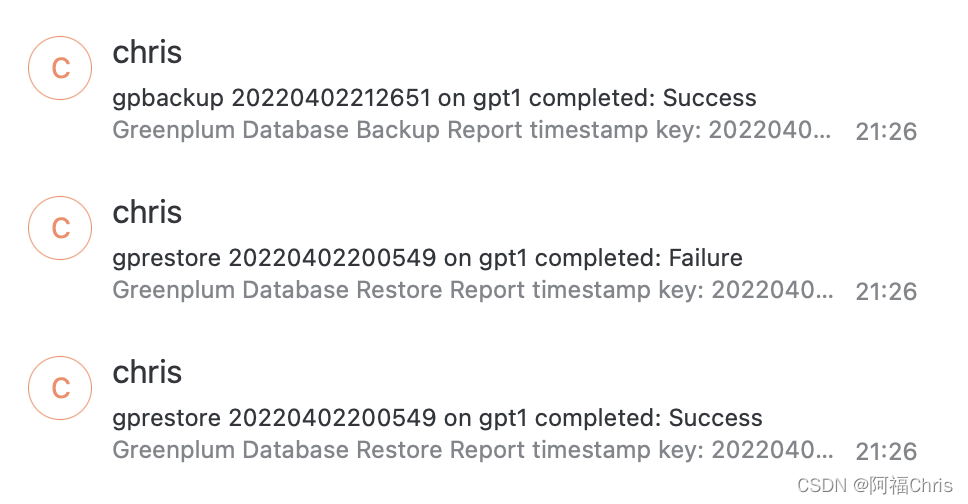
实验邮件发送功能
5
总结
作者简介
✦
苑泽福,Greenplum中文社区专家
曾供职于鼎兴达、瀚高,拥有丰富的数据库开发运维经验,近年来一直专注于Greenplum 数据库,完成了多个基于Greenplum的数据平台的落地
✦
✦


今晚活动,不容错过


 来一波 “在看”、“分享”和 “赞” 吧!
