



MapReduce
Hadoop中将数据切分成块存在HDFS不同的DataNode中,如果想汇总,按照常规想法就是,移动数据到统计程序:先把数据读取到一个程序中,再进行汇总。
但是HDFS存的数据量非常大时,对汇总程序所在的服务器将产生巨大压力,并且网络IO也十分消耗资源。
为了解决这种问题,MapReduce提出一种想法:将统计程序移动到DataNode,每台DataNode(就近)统计完再汇总,充分利用DataNode的计算资源。YARN的调度决定了MapReduce程序所在的Node。
MapReduce过程
确保数据存在HDFS上
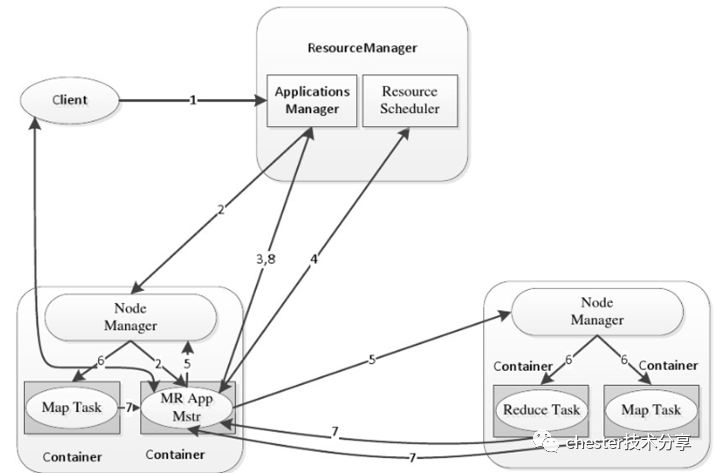
MapReduce提交给ResourceManager(RM),RM创建一个Job。
文件分片,默认将一个数据块作为一个分片。
Job提交给RM,RM根据Node状态选择一台合适的Node调度AM,AM向RM申请资源,RM调度合适的NM启动Container,Container执行Task。
Map的输出放入环形内存缓冲区,缓存溢出时,写入磁盘,写入磁盘有以下步骤
默认根据Hash分区,分区数取决于Reduce Task的数,相同Key的记录被送到相同Reduce处理
将Map输出的结果排序
将Map数据合并
MapTask处理后产生多个溢出文件,会将多个溢出文件合并,生成一个经过分区和排序的MapOutFile(MOF),这个过程称为Spill
MOF输出到3%时开始进行Reduce Task
MapTask与ReduceTask之间传输数据的过程称为Shuffle。
下面这个图描述了具体的流程
Hadoop Streaming
Hadoop中可以通过Java来编写MapReduce,针对不熟悉Java的开发者,Hadoop提供了通过可执行程序或者脚本的方式创建MapReduce的Hadoop Streaming。
Hadoop streaming处理步骤
hadoop streaming通过用户编写的map函数中标准输入读取数据(一行一行地读取),按照map函数的处理逻辑处理后,将处理后的数据由标准输出进行输出到下一个阶段。
reduce函数也是按行读取数据,按照函数的处理逻辑处理完数据后,将它们通过标准输出写到hdfs的指定目录中。
不管使用的是何种编程语言,在map函数中,原始数据会被处理成<key,value>的形式,但是key与value之间必须通过\t分隔符分隔,分隔符左边的是key,分隔符右边的是value,如果没有使用\t分隔符,那么整行都会被当作key
C#版MapReduce
首先,新增测试数据
vi mpdataI love BeijingI love ChinaBeijing is the capital of China
然后,将文件上传到hdfs
[root@localhost ~]# hadoop fs -put mrdata /chesterdata
新建dotnet6的console项目mapper,修改Program.cs
using System;using System.Text.RegularExpressions;namespace mapper{class Program{static void Main(string[] args){string line;//Hadoop passes data to the mapper on STDINwhile((line = Console.ReadLine()) != null){// We only want words, so strip out punctuation, numbers, etc.var onlyText = Regex.Replace(line, @"\.|;|:|,|[0-9]|'", "");// Split at whitespace.var words = Regex.Matches(onlyText, @"[\w]+");// Loop over the wordsforeach(var word in words){//Emit tab-delimited key/value pairs.//In this case, a word and a count of 1.Console.WriteLine("{0}\t1",word);}}}}}
发布mapper
cd demo/dotnet/mapper/dotnet publish -c Release -r linux-x64 /p:PublishSingleFile=true
新建dotnet6的console项目reducer,修改Program.cs
using System;using System.Collections.Generic;namespace reducer{class Program{static void Main(string[] args){//Dictionary for holding a count of wordsDictionary<string, int> words = new Dictionary<string, int>();string line;//Read from STDINwhile ((line = Console.ReadLine()) != null){// Data from Hadoop is tab-delimited key/value pairsvar sArr = line.Split('\t');// Get the wordstring word = sArr[0];// Get the countint count = Convert.ToInt32(sArr[1]);//Do we already have a count for the word?if(words.ContainsKey(word)){//If so, increment the countwords[word] += count;} else{//Add the key to the collectionwords.Add(word, count);}}//Finally, emit each word and countforeach (var word in words){//Emit tab-delimited key/value pairs.//In this case, a word and a count of 1.Console.WriteLine("{0}\t{1}", word.Key, word.Value);}}}}
发布reducer
/demo/dotnet/reducerdotnet publish -c Release -r linux-x64 /p:PublishSingleFile=true
执行mapepr reduce
hadoop jar /usr/local/hadoop323/hadoop-3.2.3/share/hadoop/tools/lib/hadoop-streaming-3.2.3.jar -input /chesterdata/mrdata -output /dotnetmroutput -mapper "./mapper" -reducer "./reducer" -file /demo/dotnet/mapper/bin/Release/net6.0/linux-x64/publish/mapper -f /demo/dotnet/reducer/bin/Release/net6.0/linux-x64/publish/reducer
查看mapreduce结果
[root@localhost reducer]# hadoop fs -ls dotnetmroutput-rw-r--r-- 1 root supergroup 0 2022-05-01 16:40 dotnetmroutput/_SUCCESS-rw-r--r-- 1 root supergroup 55 2022-05-01 16:40 /dotnetmroutput/part-00000
查看part-00000内容
[root@localhost reducer]# hadoop fs -cat dotnetmroutput/part-00000Beijing 2China 2I 2capital 1is 1love 2of 1the 1
可以看到dotnet模式的Hadoop Streaming已经执行成功。
Python版MapReduce
使用与dotnet模式下同样的测试数据,编写mapper
# mapper.pyimport sysimport rep = re.compile(r'\w+')for line in sys.stdin:words = line.strip().split(' ')for word in words:w = p.findall(word)if len(w) < 1:continues = w[0].strip().lower()if s != "":print("%s\t%s" % (s, 1))
编写reducer
# reducer.pyimport sysres = dict()for word_one in sys.stdin:word, one = word_one.strip().split('\t')if word in res.keys():res[word] = res[word] + 1else:res[word] = 1print(res)
执行mapreduce
hadoop jar /usr/local/hadoop323/hadoop-3.2.3/share/hadoop/tools/lib/hadoop-streaming-3.2.3.jar -input /chesterdata/mrdata -output /mroutput -mapper "python3 mapper.py" -reducer "python3 reducer.py" -file /root/mapper.py -file /root/reducer.py
查看mapreduce结果
[root@localhost lib]# hadoop fs -ls /mroutput-rw-r--r-- 1 root supergroup 0 2022-05-01 05:00 /mroutput/_SUCCESS-rw-r--r-- 1 root supergroup 89 2022-05-01 05:00 /mroutput/part-00000
查看part-00000内容
[root@localhost lib]# hadoop fs -cat /mroutput/part-00000{'beijing': 2, 'capital': 1, 'china': 2, 'i': 2, 'is': 1, 'love': 2, 'of': 1, 'the': 1}
可以看到python模式的Hadoop Streaming已经执行成功。
