




测试环境
- 启动测试环境
[root@docker ~]# cd /root/debezium-examples-main/tutorial
[root@docker tutorial]# cat docker-compose-postgres-apicurio.yaml
version: '2'
services:
  zookeeper:
    image: quay.io/debezium/zookeeper:${DEBEZIUM_VERSION}
    ports:
     - 2181:2181
     - 2888:2888
     - 3888:3888
  kafka:
    image: quay.io/debezium/kafka:${DEBEZIUM_VERSION}
    ports:
     - 9092:9092
    links:
     - zookeeper
    environment:
     - ZOOKEEPER_CONNECT=zookeeper:2181
  postgres:
    image: quay.io/debezium/example-postgres:${DEBEZIUM_VERSION}
    ports:
     - 5432:5432
    environment:
     - POSTGRES_USER=postgres
     - POSTGRES_PASSWORD=postgres
  apicurio:
    image: apicurio/apicurio-registry-mem:2.0.0.Final
    ports:
     - 8080:8080
  connect:
    image: quay.io/debezium/connect:${DEBEZIUM_VERSION}
    ports:
     - 8083:8083
    links:
     - kafka
     - postgres
     - apicurio
    environment:
     - BOOTSTRAP_SERVERS=kafka:9092
     - GROUP_ID=1
     - CONFIG_STORAGE_TOPIC=my_connect_configs
     - OFFSET_STORAGE_TOPIC=my_connect_offsets
     - STATUS_STORAGE_TOPIC=my_connect_statuses
     - ENABLE_APICURIO_CONVERTERS=true
  kafkaui:
    image: provectuslabs/kafka-ui:latest
    ports:
     - 8811:8080
    links:
     - kafka
    environment:
     - KAFKA_CLUSTERS_0_NAME=test
     - KAFKA_CLUSTERS_0_BOOTSTRAPSERVERS=kafka:9092
  efak:
    image: nnzbz/efak:latest
    ports:
      - 8813:8048
    links:
     - kafka
     - zookeeper
    environment:
     - ZK_HOSTS=zookeeper:2181
  debezium-ui:
    image: quay.io/debezium/debezium-ui:${DEBEZIUM_VERSION}
    ports:
     - 8812:8080
    links:
     - connect
    depends_on:
     - connect
    environment:
     - KAFKA_CONNECT_URIS=http://connect:8083

[root@docker tutorial]# export DEBEZIUM_VERSION=1.9
[root@docker tutorial]# /root/docker-compose -f docker-compose-postgres-apicurio.yaml up
- 创建测试分区表
-- psql 连接数据库
docker run -it --rm --name psql postgres:14.2 psql -h 192.168.0.40 -U postgres -p 5432
-- 创建测试数据库和 Schema
postgres=# create database tt_range;
postgres=# \c tt_range
tt_range=# create schema test;

-- 创建主表
CREATE TABLE test.emp_range
    ( empno        NUMERIC(4,0)
    , ename        VARCHAR(10)
    , job          VARCHAR(9)
    , mgr          NUMERIC(4,0)
    , hiredate     TIMESTAMP
    , sal          NUMERIC(7,2)
    , comm         NUMERIC(7,2)
    , deptno       NUMERIC(2,0)
    )
PARTITION BY RANGE (hiredate);
-- 创建子表
create table test.emp_range_hiredate_1979 PARTITION of test.emp_range FOR VALUES FROM ('1979-01-01 00:00:00+08') TO ('1980-01-01 00:00:00+08');
create table test.emp_range_hiredate_1980 PARTITION of test.emp_range FOR VALUES FROM ('1980-01-01 00:00:00+08') TO ('1981-01-01 00:00:00+08');
create table test.emp_range_hiredate_1981 PARTITION of test.emp_range FOR VALUES FROM ('1981-01-01 00:00:00+08') TO ('1982-01-01 00:00:00+08');
create table test.emp_range_hiredate_1982 PARTITION of test.emp_range FOR VALUES FROM ('1982-01-01 00:00:00+08') TO ('1983-01-01 00:00:00+08');
create table test.emp_range_hiredate_1983 PARTITION of test.emp_range FOR VALUES FROM ('1983-01-01 00:00:00+08') TO ('1984-01-01 00:00:00+08');
create table test.emp_range_hiredate_1974 PARTITION of test.emp_range FOR VALUES FROM ('1984-01-01 00:00:00+08') TO ('1985-01-01 00:00:00+08');
create table test.emp_range_hiredate_1985 PARTITION of test.emp_range FOR VALUES FROM ('1985-01-01 00:00:00+08') TO ('1986-01-01 00:00:00+08');
create table test.emp_range_hiredate_1986 PARTITION of test.emp_range FOR VALUES FROM ('1986-01-01 00:00:00+08') TO ('1987-01-01 00:00:00+08');
create table test.emp_range_hiredate_1987 PARTITION of test.emp_range FOR VALUES FROM ('1987-01-01 00:00:00+08') TO ('1988-01-01 00:00:00+08');
create table test.emp_range_hiredate_1988 PARTITION of test.emp_range FOR VALUES FROM ('1988-01-01 00:00:00+08') TO ('1989-01-01 00:00:00+08');
create table test.emp_range_hiredate_default partition of test.emp_range default;
-- 插入数据
INSERT INTO test.emp_range VALUES (7369,'SMITH','CLERK',7902,to_date('17-12-1980','dd-mm-yyyy'),800,NULL,20);
INSERT INTO test.emp_range VALUES (7499,'ALLEN','SALESMAN',7698,to_date('20-2-1981','dd-mm-yyyy'),1600,300,30);
INSERT INTO test.emp_range VALUES (7521,'WARD','SALESMAN',7698,to_date('22-2-1981','dd-mm-yyyy'),1250,500,30);
INSERT INTO test.emp_range VALUES (7566,'JONES','MANAGER',7839,to_date('2-4-1981','dd-mm-yyyy'),2975,NULL,20);
INSERT INTO test.emp_range VALUES (7654,'MARTIN','SALESMAN',7698,to_date('28-9-1981','dd-mm-yyyy'),1250,1400,30);
INSERT INTO test.emp_range VALUES (7698,'BLAKE','MANAGER',7839,to_date('1-5-1981','dd-mm-yyyy'),2850,NULL,30);
INSERT INTO test.emp_range VALUES (7782,'CLARK','MANAGER',7839,to_date('9-6-1981','dd-mm-yyyy'),2450,NULL,10);
INSERT INTO test.emp_range VALUES (7788,'SCOTT','ANALYST',7566,to_date('13-7-1987','dd-mm-yyyy'),3000,NULL,20);
INSERT INTO test.emp_range VALUES (7839,'KING','PRESIDENT',NULL,to_date('17-11-1981','dd-mm-yyyy'),5000,NULL,10);
INSERT INTO test.emp_range VALUES (7844,'TURNER','SALESMAN',7698,to_date('8-9-1981','dd-mm-yyyy'),1500,0,30);
INSERT INTO test.emp_range VALUES (7876,'ADAMS','CLERK',7788,to_date('13-7-1987', 'dd-mm-yyyy'),1100,NULL,20);
INSERT INTO test.emp_range VALUES (7900,'JAMES','CLERK',7698,to_date('3-12-1981','dd-mm-yyyy'),950,NULL,30);
INSERT INTO test.emp_range VALUES (7902,'FORD','ANALYST',7566,to_date('3-12-1981','dd-mm-yyyy'),3000,NULL,20);
INSERT INTO test.emp_range VALUES (7934,'MILLER','CLERK',7782,to_date('23-1-1982','dd-mm-yyyy'),1300,NULL,10);
-- 添加主键,必须包含分区列
alter table test.emp_range add constraint pk_emp_range_empno_hiredate primary key(empno,hiredate);
-- REPLICA IDENTITY FULL
ALTER TABLE ONLY test.emp_range REPLICA IDENTITY FULL;
-- 查看表结构
tt_range=# \d+ test.emp_range
                                              Partitioned table "test.emp_range"
  Column  |            Type             | Collation | Nullable | Default | Storage  | Compression | Stats target | Description
----------+-----------------------------+-----------+----------+---------+----------+-------------+--------------+-------------
 empno    | numeric(4,0)                |           | not null |         | main     |             |              |
 ename    | character varying(10)       |           |          |         | extended |             |              |
 job      | character varying(9)        |           |          |         | extended |             |              |
 mgr      | numeric(4,0)                |           |          |         | main     |             |              |
 hiredate | timestamp without time zone |           | not null |         | plain    |             |              |
 sal      | numeric(7,2)                |           |          |         | main     |             |              |
 comm     | numeric(7,2)                |           |          |         | main     |             |              |
 deptno   | numeric(2,0)                |           |          |         | main     |             |              |
Partition key: RANGE (hiredate)
Indexes:
    "pk_emp_range_empno_hiredate" PRIMARY KEY, btree (empno, hiredate)
Partitions: test.emp_range_hiredate_1974 FOR VALUES FROM ('1984-01-01 00:00:00') TO ('1985-01-01 00:00:00'),
            test.emp_range_hiredate_1979 FOR VALUES FROM ('1979-01-01 00:00:00') TO ('1980-01-01 00:00:00'),
            test.emp_range_hiredate_1980 FOR VALUES FROM ('1980-01-01 00:00:00') TO ('1981-01-01 00:00:00'),
            test.emp_range_hiredate_1981 FOR VALUES FROM ('1981-01-01 00:00:00') TO ('1982-01-01 00:00:00'),
            test.emp_range_hiredate_1982 FOR VALUES FROM ('1982-01-01 00:00:00') TO ('1983-01-01 00:00:00'),
            test.emp_range_hiredate_1983 FOR VALUES FROM ('1983-01-01 00:00:00') TO ('1984-01-01 00:00:00'),
            test.emp_range_hiredate_1985 FOR VALUES FROM ('1985-01-01 00:00:00') TO ('1986-01-01 00:00:00'),
            test.emp_range_hiredate_1986 FOR VALUES FROM ('1986-01-01 00:00:00') TO ('1987-01-01 00:00:00'),
            test.emp_range_hiredate_1987 FOR VALUES FROM ('1987-01-01 00:00:00') TO ('1988-01-01 00:00:00'),
            test.emp_range_hiredate_1988 FOR VALUES FROM ('1988-01-01 00:00:00') TO ('1989-01-01 00:00:00'),
            test.emp_range_hiredate_default DEFAULT
注册连接器,同步分区表
curl -i -X POST -H "Accept:application/json" -H  "Content-Type:application/json" http://localhost:8083/connectors/ -d '
{
    "name": "inventory-connector-range",
    "config": {
        "connector.class": "io.debezium.connector.postgresql.PostgresConnector",
        "tasks.max": "1",
        "database.hostname": "postgres",
        "database.port": "5432",
        "database.user": "postgres",
        "database.password": "postgres",
        "database.dbname" : "tt_range",
        "database.server.name": "range",
        "snapshot.mode": "always",
        "schema.include.list": "test",
        "decimal.handling.mode": "double",
        "time.precision.mode": "connect",
        "slot.name": "range_slot1",
        "key.converter": "io.apicurio.registry.utils.converter.AvroConverter",
        "key.converter.apicurio.registry.url": "http://apicurio:8080/apis/registry/v2",
        "key.converter.apicurio.registry.auto-register": "true",
        "key.converter.apicurio.registry.find-latest": "true",
        "value.converter": "io.apicurio.registry.utils.converter.AvroConverter",
        "value.converter.apicurio.registry.url": "http://apicurio:8080/apis/registry/v2",
        "value.converter.apicurio.registry.auto-register": "true",
        "value.converter.apicurio.registry.find-latest": "true"
    }
}'
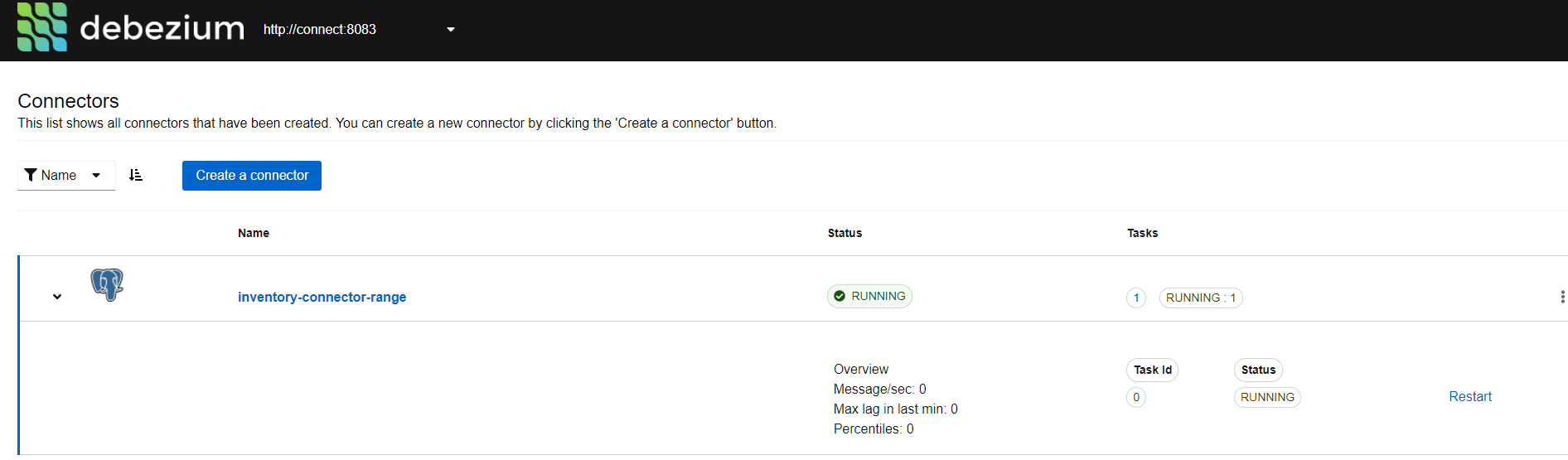
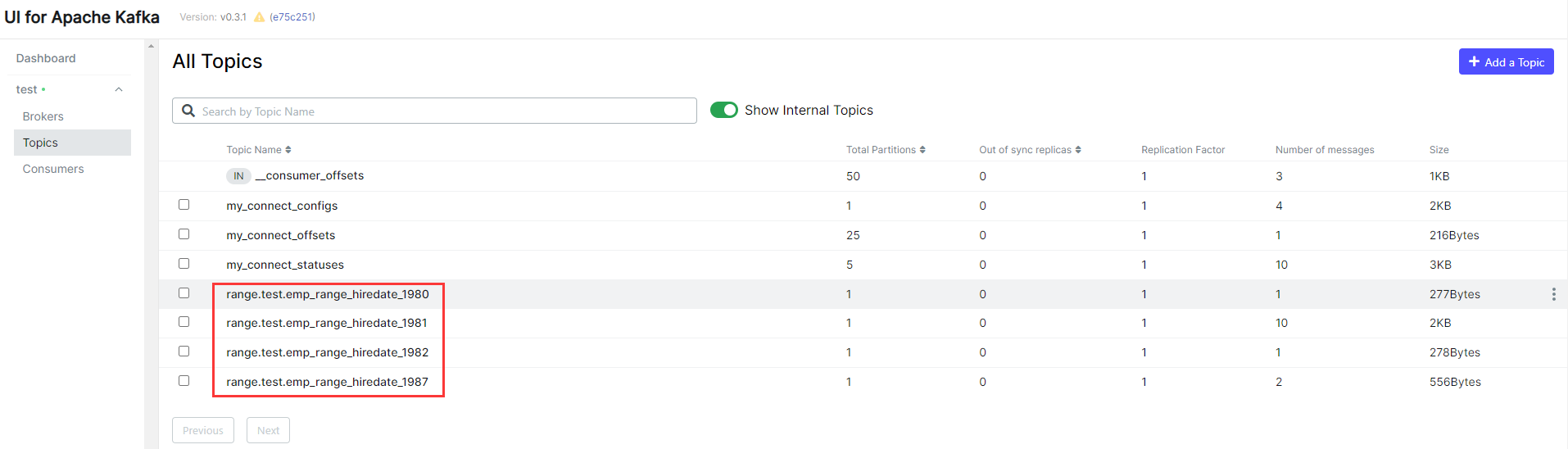
Kafka 为 PostgreSQL 的每个分区创建了一个主题
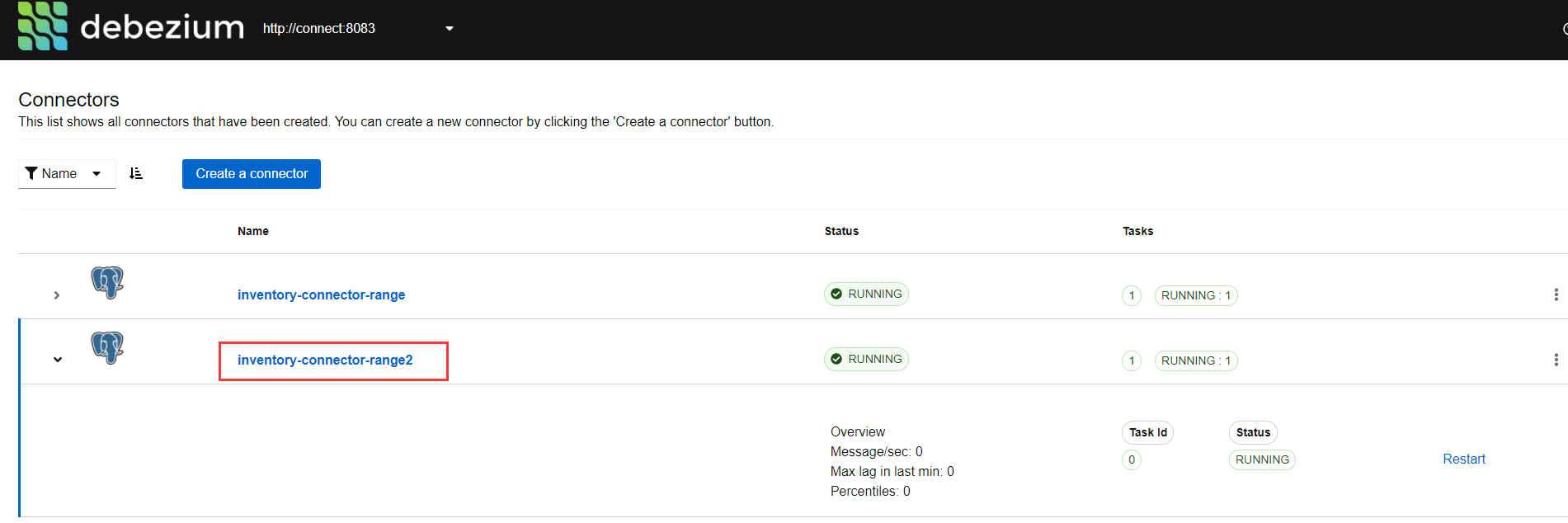
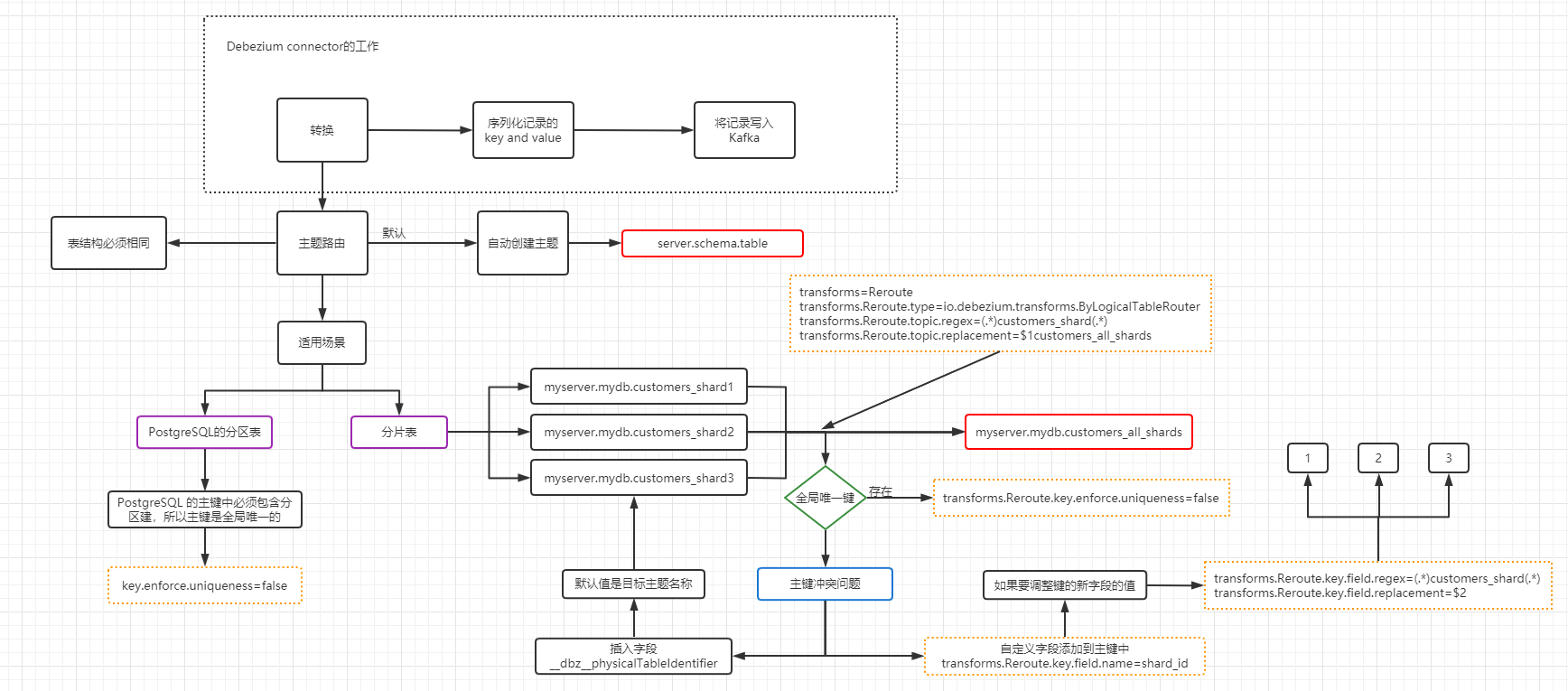
主题路由单消息转换 (SMT),将所有分区的数据同步到一个主题下
curl -i -X POST -H "Accept:application/json" -H  "Content-Type:application/json" http://localhost:8083/connectors/ -d '
{
    "name": "inventory-connector-range2",
    "config": {
        "connector.class": "io.debezium.connector.postgresql.PostgresConnector",
        "tasks.max": "1",
        "database.hostname": "postgres",
        "database.port": "5432",
        "database.user": "postgres",
        "database.password": "postgres",
        "database.dbname" : "tt_range",
        "database.server.name": "range2",
        "snapshot.mode": "always",
        "schema.include.list": "test",
        "decimal.handling.mode": "double",
        "time.precision.mode": "connect",
        "slot.name": "range_slot2",
        "transforms": "Reroute",
        "transforms.Reroute.type": "io.debezium.transforms.ByLogicalTableRouter",
        "transforms.Reroute.topic.regex": "(.*)emp_range_hiredate(.*)",
        "transforms.Reroute.topic.replacement": "$1emp_range",
        "transforms.Reroute.key.enforce.uniqueness": "false",
        "key.converter": "io.apicurio.registry.utils.converter.AvroConverter",
        "key.converter.apicurio.registry.url": "http://apicurio:8080/apis/registry/v2",
        "key.converter.apicurio.registry.auto-register": "true",
        "key.converter.apicurio.registry.find-latest": "true",
        "value.converter": "io.apicurio.registry.utils.converter.AvroConverter",
        "value.converter.apicurio.registry.url": "http://apicurio:8080/apis/registry/v2",
        "value.converter.apicurio.registry.auto-register": "true",
        "value.converter.apicurio.registry.find-latest": "true"
    }
}'
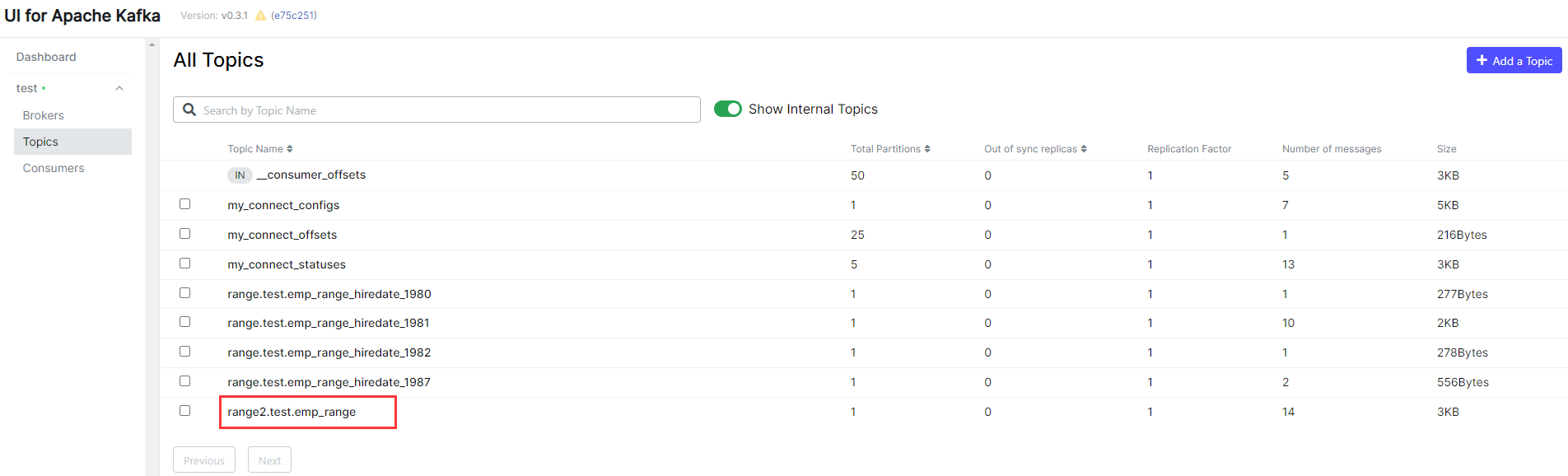
所有分区的数据同步到一个主题下
Debezium 主题路由的图示,自我理解,不保证正确性
目标端 JDBC Connector 的主题路由
创建目标端的测试环境
-- 登录目标数据库
# sqlplus sys/oracle@192.168.0.40:1521/pdbtt as sysdba

-- 创建用户并赋权
SQL> drop user test cascade;
create user test identified by test;
grant connect,resource,create view to test;
grant unlimited tablespace to test;

-- 目标端创建分区表
CREATE TABLE test.emp_range
    ( empno        NUMBER(4,0)
    , ename        VARCHAR2(10)
    , job          VARCHAR2(9)
    , mgr          NUMBER(4,0)
    , hiredate     DATE
    , sal          NUMBER(7,2)
    , comm         NUMBER(7,2)
    , deptno       NUMBER(2,0)
    )
PARTITION BY RANGE (hiredate)
  (PARTITION hiredate_1979 VALUES LESS THAN (TO_DATE('01-01-1980','DD-MM-YYYY')),
   PARTITION hiredate_1980 VALUES LESS THAN (TO_DATE('01-01-1981','DD-MM-YYYY')),
   PARTITION hiredate_1981 VALUES LESS THAN (TO_DATE('01-01-1982','DD-MM-YYYY')),
   PARTITION hiredate_1982 VALUES LESS THAN (TO_DATE('01-01-1983','DD-MM-YYYY')),
   PARTITION hiredate_1983 VALUES LESS THAN (TO_DATE('01-01-1984','DD-MM-YYYY')),
   PARTITION hiredate_1984 VALUES LESS THAN (TO_DATE('01-01-1985','DD-MM-YYYY')),
   PARTITION hiredate_1985 VALUES LESS THAN (TO_DATE('01-01-1986','DD-MM-YYYY')),
   PARTITION hiredate_1986 VALUES LESS THAN (TO_DATE('01-01-1987','DD-MM-YYYY')),
   PARTITION hiredate_1987 VALUES LESS THAN (TO_DATE('01-01-1988','DD-MM-YYYY')),
   PARTITION hiredate_max VALUES LESS THAN (MAXVALUE))
;

-- 创建主键索引
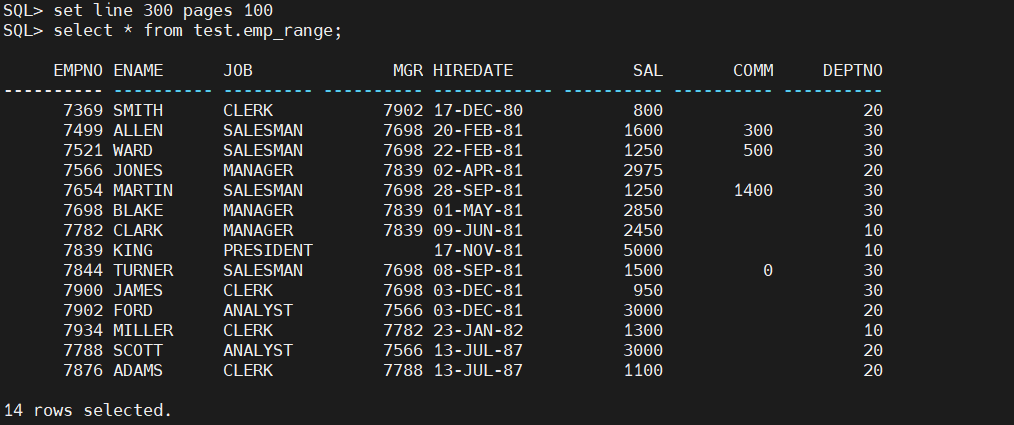
alter table test.emp_range add constraint pk_emp_range_empno primary key(empno);
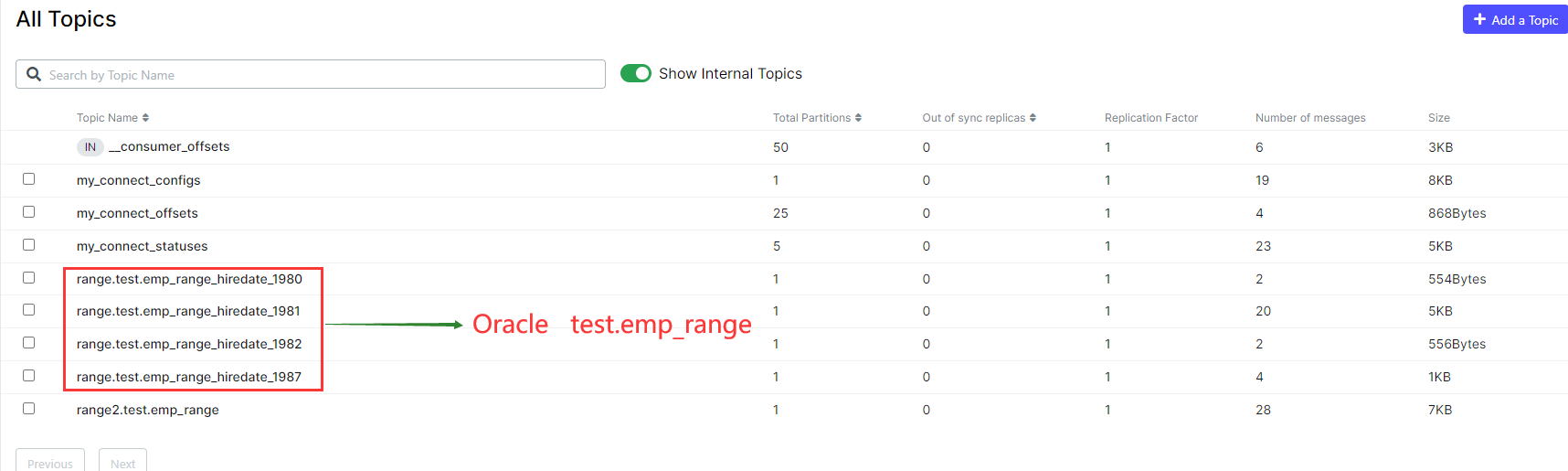
将多个主题同步到一个目标表中
curl -i -X POST -H "Accept:application/json" -H  "Content-Type:application/json" http://localhost:8083/connectors/ -d '
{
    "name": "oracle-range1-sink",
        "config": {
        "connector.class": "io.confluent.connect.jdbc.JdbcSinkConnector",
        "connection.url": "jdbc:oracle:thin:@//172.17.0.2:1521/pdbtt",
        "connection.user": "test",
        "connection.password": "test",
        "tasks.max": "1",
        "topics.regex": "range.test.(.*)_hiredate_(.*)",
        "table.name.format": "EMP_RANGE",
        "quote.sql.identifiers": "never",
        "insert.mode": "upsert",
        "pk.mode": "record_key",
        "transforms": "unwrap,dropPrefix",
        "transforms.unwrap.type": "io.debezium.transforms.ExtractNewRecordState",
        "transforms.unwrap.drop.tombstones": "false",
        "transforms.dropPrefix.type":"org.apache.kafka.connect.transforms.RegexRouter",
        "transforms.dropPrefix.regex":"range.test.(.*)_hiredate_(.*)",
        "transforms.dropPrefix.replacement":"$1",
        "key.converter": "io.apicurio.registry.utils.converter.AvroConverter",
        "key.converter.apicurio.registry.url": "http://apicurio:8080/apis/registry/v2",
        "key.converter.apicurio.registry.auto-register": "true",
        "key.converter.apicurio.registry.find-latest": "true",
        "value.converter": "io.apicurio.registry.utils.converter.AvroConverter",
        "value.converter.apicurio.registry.url": "http://apicurio:8080/apis/registry/v2",
        "value.converter.apicurio.registry.auto-register": "true",
        "value.converter.apicurio.registry.find-latest": "true"
        }
}'
「喜欢这篇文章,您的关注和赞赏是给作者最好的鼓励」
关注作者
【版权声明】本文为墨天轮用户原创内容,转载时必须标注文章的来源(墨天轮),文章链接,文章作者等基本信息,否则作者和墨天轮有权追究责任。如果您发现墨天轮中有涉嫌抄袭或者侵权的内容,欢迎发送邮件至:contact@modb.pro进行举报,并提供相关证据,一经查实,墨天轮将立刻删除相关内容。
