



PolarDB简介
PolarDB是阿里巴巴自主研发的下一代关系型分布式云原生数据库,目前兼容三种数据库引擎:MySQL、PostgreSQL、高度兼容Oracle语法。计算能力最高可扩展至1000核以上,存储容量最高可达 100T。经过阿里巴巴双十一活动的最佳实践,让用户既享受到开源的灵活性与价格,又享受到商业数据库的高性能和安全性。
PolarDB融合了商业数据库稳定、可靠、高性能的特征,同时具有开源数据库简单、可扩展、高速迭代的优势,适合各个行业公司的创新业务使用。
### 云原生分布式数据库 PolarDB MySQL版
云原生关系型数据库PolarDB是阿里巴巴自主研发的下一代云原生关系型数据库,100%兼容MySQL、PostgreSQL、高度兼容Oracle语法。计算能力最高可扩展至1000核以上,存储容量最高可达 100TB。经过阿里巴巴双十一活动的最佳实践,让用户既享受到开源的灵活性与价格的优惠,又享受到商业数据库的高性能和安全性。
### 云原生关系型数据库PolarDB O引擎
云原生关系型数据库PolarDB O引擎(兼容Oracle语法)是由阿里巴巴自主研发的,高度兼容Oracle的高性能企业级数据库。基于云原生存储计算分离架构实现高容量存储及分钟级弹性扩缩容能力。专注解决企业数字化转型中数据库系统的平滑迁移、安全合规和成本优化等问题。
### 云原生分布式数据库 PolarDB-X
PolarDB-X 是由阿里巴巴自主研发的云原生分布式数据库,具备水平扩容、金融级高可用、HTAP混合负载、兼容 MySQL 等重要特性,专注解决超高并发吞吐、海量数据存储、大表瓶颈等数据库瓶颈难题,历经各届天猫双11及阿里云各行业客户业务的考验,助力企业加速完成业务数字化转型。
相关资料
https://gitee.com/mirrors/PolarDB-for-PostgreSQL
https://github.com/ApsaraDB/PolarDB-for-PostgreSQL/blob/POLARDB_11_STABLE/README-CN.md
https://help.aliyun.com/document_detail/58764.html
https://github.com/ApsaraDB/PolarDB-for-PostgreSQL
https://apsaradb.github.io/PolarDB-for-PostgreSQL/zh/architecture/#%E7%89%B9%E6%80%A7%E6%80%BB%E8%A7%88
https://apsaradb.github.io/PolarDB-for-PostgreSQL/zh/
云原生关系型数据库PolarDB官网:https://cn.aliyun.com/product/polardb
云原生关系型数据库 PolarDB MySQL引擎官方文档:https://help.aliyun.com/product/58609.html
云原生分布式数据库 PolarDB-X 官方文档:https://www.aliyun.com/product/drds?spm=5176.22414175.J_8058803260.33.5cd266eaI2TLnD
云原生关系型数据库PolarDB O引擎官方文档:https://www.aliyun.com/product/ApsaraDB/polardb_o?spm=5176.155538.J_2161690660.1.3eb24e98Kv3wMu
PolarDB for PostgreSQL架构
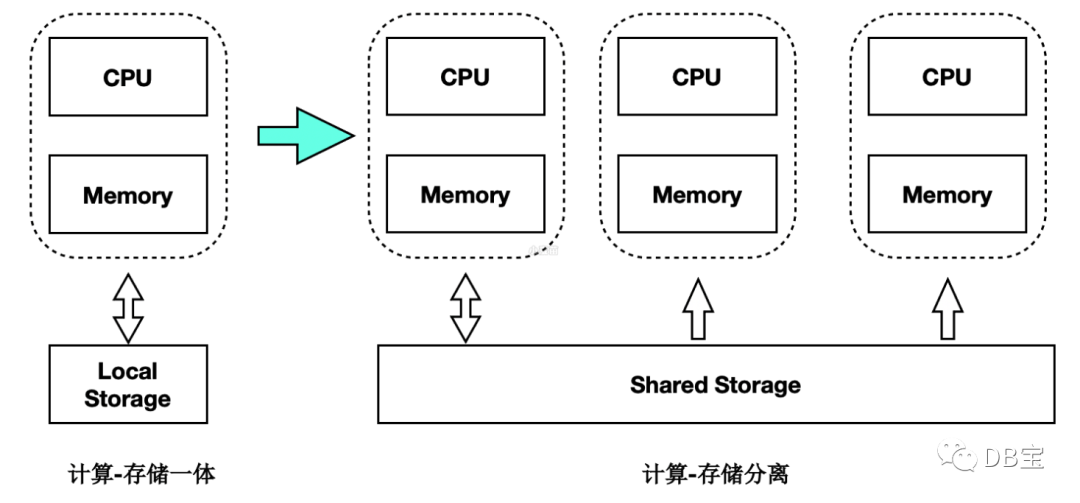
PolarDB for PostgreSQL(下文简称为 PolarDB)是一款阿里云自主研发的云原生数据库产品,100% 兼容 PostgreSQL,采用基于 Shared-Storage 的存储计算分离架构,具有极致弹性、毫秒级延迟、HTAP 的能力。
极致弹性:存储与计算能力均可独立地横向扩展。
当计算能力不够时,可以单独扩展计算集群,数据无需复制。
当存储容量或 I/O 不够时,可以单独扩展存储集群,而不中断业务。
毫秒级延迟:
WAL 日志存储在共享存储上,RW 到所有 RO 之间仅复制 WAL 的元数据。
独创的 LogIndex 技术,实现了 Lazy 回放和 Parallel 回放,理论上最大程度地缩小了 RW 和 RO 节点间的延迟。
HTAP 能力:基于 Shared-Storage 的分布式并行执行框架,加速在 OLTP 场景下的 OLAP 查询。一套 OLTP 型的数据,可支持 2 套计算引擎:
单机执行引擎:处理高并发的 TP 型负载。
分布式执行引擎:处理大查询的 AP 型负载。
PolarDB 还支持时空、GIS、图像、向量、搜索、图谱等多模创新特性,应对企业对数据处理日新月异的需求。
安装部署
https://apsaradb.github.io/PolarDB-for-PostgreSQL/zh/guide/deploy-on-local-storage.html#%E5%9F%BA%E4%BA%8E-polardb-docker-%E5%BC%80%E5%8F%91%E9%95%9C%E5%83%8F
1docker rm -f lhrpolardb 2docker run -d --name lhrpolardb -h lhrpolardb \ 3 -p 6432:5432 -p 33389:3389 \ 4 -v /sys/fs/cgroup:/sys/fs/cgroup \ 5 --privileged=true lhrbest/lhrcentos76:8.8 \ 6 /usr/sbin/init 7 8docker exec -it lhrpolardb bash 9 10 11# install sudo 12yum install -y sudo 13 14# create user and group 15groupadd -r postgres 16useradd -m -g postgres postgres -p '' 17usermod -aG wheel postgres 18 19# make postgres as sudoer 20chmod u+w /etc/sudoers 21echo 'postgres ALL=(ALL) NOPASSWD: ALL' >> /etc/sudoers 22chmod u-w /etc/sudoers 23 24# grant access to home directory 25chown -R postgres:postgres /home/postgres/ 26echo 'source /etc/bashrc' >> /home/postgres/.bashrc 27# for su postgres 28sed -i 's/4096/unlimited/g' /etc/security/limits.d/20-nproc.conf 29 30su - postgres 31source /etc/bashrc 32cd ~ 33 34 35-- 655MB 36sudo yum install -y git 37git clone -b POLARDB_11_STABLE https://gitee.com/mirrors/PolarDB-for-PostgreSQL 38cd PolarDB-for-PostgreSQL 39sudo ./install_dependencies.sh 40 41yum install -y devtoolset-9-gcc devtoolset-9-gcc-c++ \ 42 devtoolset-9-gdb devtoolset-9-make \ 43 llvm-toolset-7.0-llvm-devel \ 44 llvm-toolset-7.0-clang-devel \ 45 llvm-toolset-7.0-cmake 46 47# dependencies 48yum install -y libicu-devel pam-devel readline-devel libxml2-devel \ 49 libxslt-devel openldap-devel openldap-clients \ 50 openldap-servers libuuid-devel xerces-c-devel \ 51 bison flex gettext tcl-devel python-devel \ 52 perl-IPC-Run perl-Expect perl-Test-Simple perl-DBD-Pg \ 53 perl-ExtUtils-Embed perl-ExtUtils-MakeMaker zlib-devel \ 54 krb5-devel krb5-workstation krb5-server \ 55 git lcov psmisc sudo vim libaio-devel wget \ 56 protobuf-devel 57 58source /etc/bashrc 59./polardb_build.sh 60 61 62 63 64$HOME/tmp_basedir_polardb_pg_1100_bld/bin/psql \ 65 -p 5432 -h 127.0.0.1 -c 'select version();' 66> -p 5432 -h 127.0.0.1 -c 'select version();' 67 version 68-------------------------------- 69 PostgreSQL 11.9 (POLARDB 11.9) 70(1 row) 71postgres=# \l 72 List of databases 73 Name | Owner | Encoding | Collate | Ctype | Access privileges 74---------------+----------+----------+-------------+-------------+----------------------- 75 polardb_admin | postgres | UTF8 | en_US.UTF-8 | en_US.UTF-8 | =T/postgres + 76 | | | | | postgres=CTc/postgres 77 postgres | postgres | UTF8 | en_US.UTF-8 | en_US.UTF-8 | 78 template0 | postgres | UTF8 | en_US.UTF-8 | en_US.UTF-8 | =c/postgres + 79 | | | | | postgres=CTc/postgres 80 template1 | postgres | UTF8 | en_US.UTF-8 | en_US.UTF-8 | =c/postgres + 81 | | | | | postgres=CTc/postgres 82(4 rows) 83 84 85echo "export PATH=/home/postgres/tmp_basedir_polardb_pg_1100_bld/bin:$PATH" >> ~/.bashrc 86source ~/.bashrc 87 88echo "export PATH=/home/postgres/tmp_basedir_polardb_pg_1100_bld/bin:$PATH" >> /etc/profile 89source /etc/profile 90 91 92psql -p 5432 -h 127.0.0.1 -c 'select version();' 93 94 95 96echo "host all all 0.0.0.0/0 trust" >> /home/postgres/tmp_master_dir_polardb_pg_1100_bld/pg_hba.conf 97pg_ctl reload -D /home/postgres/tmp_master_dir_polardb_pg_1100_bld 98 99100psql -U postgres -h 192.168.66.35 -p 6432
编译实例类型
本地单节点实例
1 个主节点(运行于
5432
端口)
1./polardb_build.sh
本地多节点实例
1 个主节点(运行于
5432
端口)1 个只读节点(运行于
5433
端口)
1./polardb_build.sh --withrep --repnum=1
本地多节点带备库实例
1 个主节点(运行于
5432
端口)1 个只读节点(运行于
5433
端口)1 个备库节点(运行于
5434
端口)
1./polardb_build.sh --withrep --repnum=1 --withstandby
本地多节点 HTAP 实例
1 个主节点(运行于
5432
端口)2 个只读节点(运行于
5433
5434
端口)
1./polardb_build.sh --initpx
巡检脚本
参考:https://www.xmmup.com/polardb_for_pgshujukuxunjianjiaoben.html
