



点击上方“IT那活儿”,关注后了解更多内容,不管IT什么活儿,干就完了!!!
一
二
iastool --user admin --password B#2008_2108#es start --server
./iastool --user admin --passwordfile passwd_file --port 9999 get "*"
./iastool --user admin --passwordfile passwd_file --port 9999 get "*" |grep -i "JDBC"
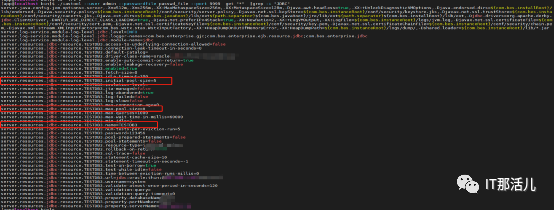
./iastool --user admin --passwordfile passwd_file --port 9999 set key=value
./iastool --user admin --passwordfile passwd_file --port 9999 set server.resources.jdbc-resource.TESTDB3.max-pool-size=9
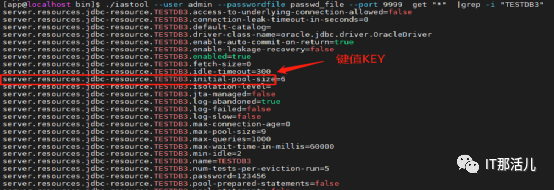
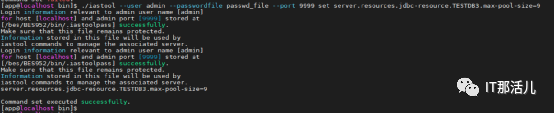
./iastool --user admin --passwordfile passwd_file --port 9999 get "*" |grep -i "TESTDB3.max-pool-size"

./iastool --user admin --passwordfile passwd_file --port 9999 set server.resources.jdbc-resource.TESTDB3.initial-pool-size=6
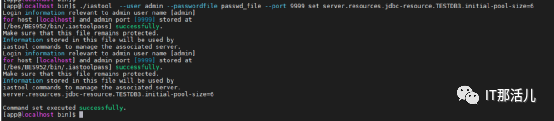

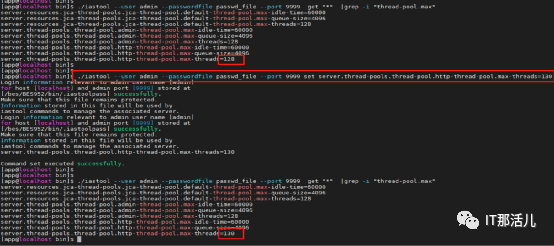
./iastool --user admin --passwordfile passwd_file --port 9999 get "*" |grep -i "thread-pool.max"
./iastool --user admin --passwordfile passwd_file --port 9999 set server.thread-pools.thread-pool.http-thread-pool.max-threads=130
./iastool --user admin --passwordfile admin_passwordfile --port 1900 set KEY=VALUE
END
本文作者:程 红
本文来源:IT那活儿(上海新炬王翦团队)

文章转载自IT那活儿,如果涉嫌侵权,请发送邮件至:contact@modb.pro进行举报,并提供相关证据,一经查实,墨天轮将立刻删除相关内容。
