




hello,大家好! 这次给大家分享的PG的分布式水平扩展方案:Citus.
通俗的说, Citus 就是 PG 版的分库分表的方案。 类似于 Mysql 的mycat, DBLE 这种的组件。 Citus 最大优势就是基于原生PG的方案,通过extension 的方式与PG集成。
同时, Citus 也是微软云 Arzue 上官方力推的PG的水平扩展的分布式方案。
https://docs.microsoft.com/zh-cn/azure/postgresql/hyperscale/overview
个人觉得 有微软这样的强大软件厂商的支持,Citus 在产品稳定和快速更新迭代性上是有保证的。
下面带大家来体验一下Citus的安装和使用过程。
安装篇
可以参考官方的安装方式:
https://docs.citusdata.com/en/stable/installation/multi_node_rhel.html#steps-to-be-executed-on-all-nodes
a) Yum 安装
这类值得注意的是 yum 安装会连同postgres 数据库软件一起安装:
yum 安装 postgres 软件的默认路径是 /usr/pgsql-{version}/lib/
sudo yum install -y citus102_14: 其中这里102是表示 citus的版本是 10.2 ,14表示的是pg的版本是14
INFRA [postgres@wqdcsrv3354 ~]# curl https://install.citusdata.com/community/rpm.sh > add-citus-repo.sh
 % Total    % Received % Xferd  Average Speed   Time    Time     Time  Current
                                Dload  Upload   Total   Spent    Left  Speed
100  8697  100  8697    0     0   8529      0  0:00:01  0:00:01 --:--:--  8534


INFRA [postgres@wqdcsrv3354 ~]# sudo bash add-citus-repo.sh
Detected operating system as ol/7.
Checking for curl...
Detected curl...
Checking for postgresql14-server...
Installing pgdg14 repo... done.
Checking for EPEL repositories...
Installing epel-release repo... done.
Downloading repository file: https://repos.citusdata.com/community/config_file.repo?os=ol&dist=7&source=script... done.
Installing pygpgme to verify GPG signatures... done.
Installing yum-utils... done.
Generating yum cache for citusdata_community... done.


The repository is set up! You can now install packages.

INFRA [postgres@wqdcsrv3354 ~]# sudo yum install -y citus102_14
...
...
Installed:
 citus102_14.x86_64 0:10.2.5.citus-1.el7


Dependency Installed:
 libpq5.x86_64 0:14.2-42PGDG.rhel7              postgresql14.x86_64 0:14.3-1PGDG.rhel7  postgresql14-libs.x86_64 0:14.3-1PGDG.rhel7
 postgresql14-server.x86_64 0:14.3-1PGDG.rhel7


Complete!
b) 源码编译
对于已经存在安装PG软件的机器来说, 只想安装 citus extension 的小伙伴来说, 我们可以通过源码安装
这里值得注意的是, citus 和 pg 之间是有版本兼容性的问题 。
版本不兼容的话,可能遇到如下的错误:Citus is not compatible with the detected PostgreSQL version 12.
INFRA [postgres@wqdcsrv3352 citus]# ./configure
checking for a sed that does not truncate output... /bin/sed
checking for gawk... gawk
checking for flex... /bin/flex
checking for pg_config... /opt/postgreSQL/pg12/bin/pg_config
configure: error: Citus is not compatible with the detected PostgreSQL version 12.
PG和citus 的兼容信息可以参考官网: https://www.citusdata.com/faq
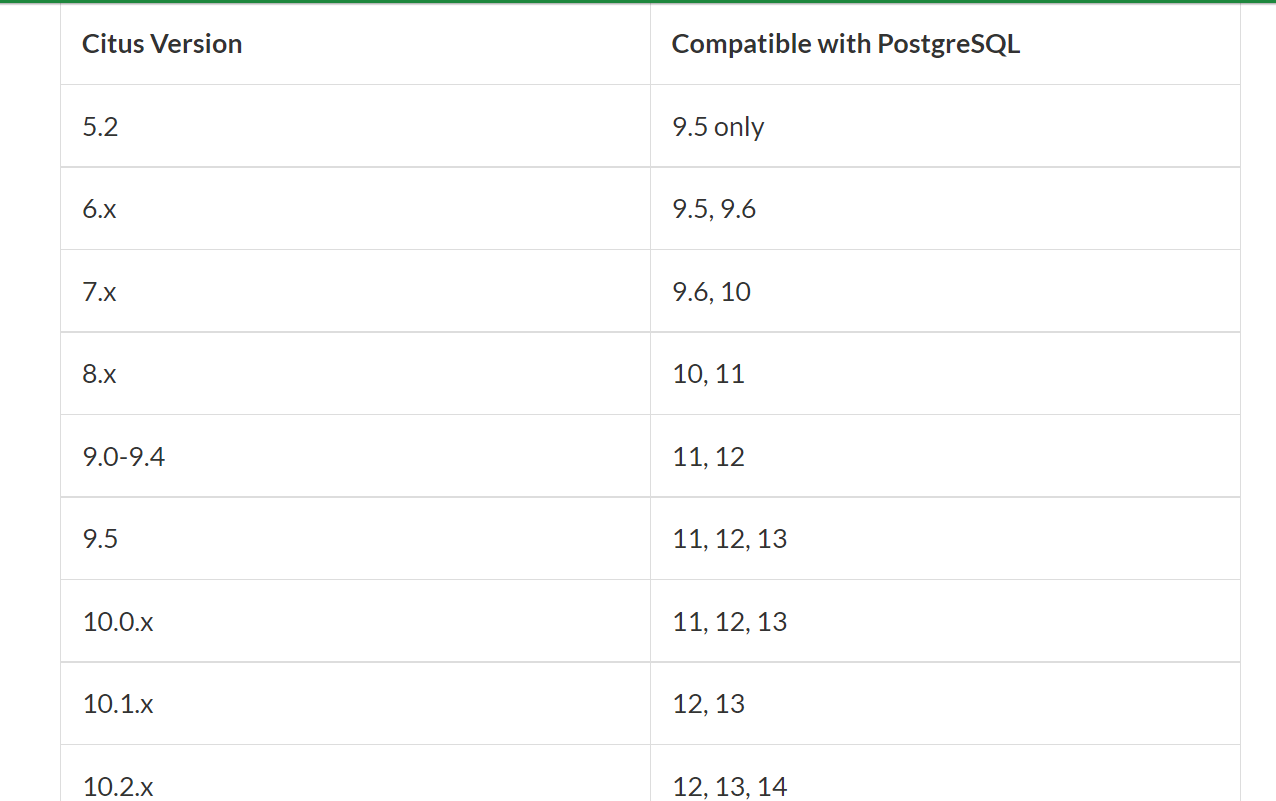
我们可以从github 上选择适合我们的源代码版本: 这里我们选择 10.1
https://github.com/citusdata/citus/releases
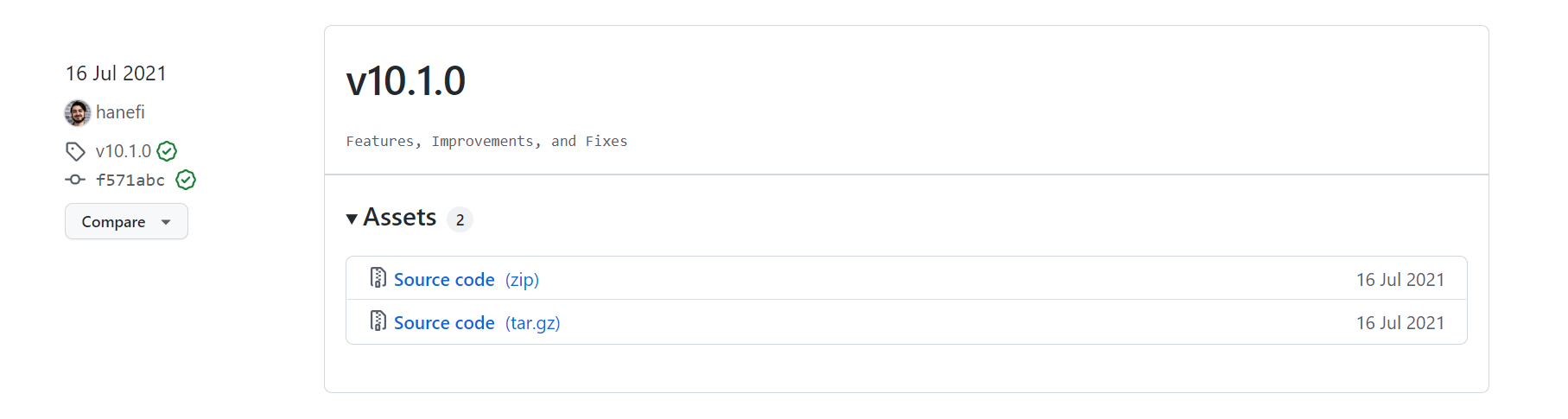
下载后,我们上传到服务器进行安装和编译: 这里说一下: 我们一定要设置PG_CONFIG的环境变量
INFRA [postgres@wqdcsrv3353 citus-10.1.0]# which pg_config
/opt/postgreSQL/pg12/bin/pg_config
INFRA [postgres@wqdcsrv3352 citus-10.1.0]# ./configure
INFRA [postgres@wqdcsrv3352 postgresql]# make
INFRA [postgres@wqdcsrv3352 postgresql]# make install
安装完成后我们可以到PG的软件目录下看到: citus.so
INFRA [postgres@wqdcsrv3352 lib]# ls -all $PG_HOME/lib/postgresql |grep citus.so
-rwxr-xr-x 1 postgres postgres 1515992 May 24 10:16 citus.so
初始化数据库:
INFRA [postgres@wqdcsrv3354 citus-10.1.0]# mkdir -p /data/postgreSQL/12/citus
INFRA [postgres@wqdcsrv3354 citus-10.1.0]# /opt/postgreSQL/pg12/bin/initdb -D /data/postgreSQL/12/citus
The files belonging to this database system will be owned by user "postgres".
This user must also own the server process.


The database cluster will be initialized with locale "en_US.UTF-8".
The default database encoding has accordingly been set to "UTF8".
The default text search configuration will be set to "english".


Data page checksums are disabled.


fixing permissions on existing directory /data/postgreSQL/12/citus ... ok
creating subdirectories ... ok
selecting dynamic shared memory implementation ... posix
selecting default max_connections ... 100
selecting default shared_buffers ... 128MB
selecting default time zone ... Asia/Shanghai
creating configuration files ... ok
running bootstrap script ... ok
performing post-bootstrap initialization ... ok
syncing data to disk ... ok


initdb: warning: enabling "trust" authentication for local connections
You can change this by editing pg_hba.conf or using the option -A, or
--auth-local and --auth-host, the next time you run initdb.


Success. You can now start the database server using:


   /opt/postgreSQL/pg12/bin/pg_ctl -D /data/postgreSQL/12/citus -l logfile start
修改必要的配置文件的参数:postgresql.conf 加入 shared_preload_libraries = ‘citus’
MAX_CONNECTIONS: 1000
PORT: 1985
SHARED_BUFFERS: "2GB"
WAL_LEVEL: "replica"
ARCHIVE_MODE: "ON"
ARCHIVE_COMMAND: "'test ! -f /data/postgreSQL/db12/archive_wals/%f && cp %p /data/postgreSQL/db12/archive_wals/%f'"
WAL_KEEP_SEGMENTS: 50
HOT_STANDBY: "ON"
LISTEN_ADDRESSES: "'*'"
shared_preload_libraries = 'citus'
启动PG实例:
INFRA [postgres@wqdcsrv3354 citus]#  /opt/postgreSQL/pg12/bin/pg_ctl -D /data/postgreSQL/12/citus -l logfile start
waiting for server to start.... done
server started
登录安装插件:
INFRA [postgres@wqdcsrv3354 citus]#  psql -h 127.0.0.1 -p 1943
psql (14.3, server 12.3)
Type "help" for help.


postgres=# select * from pg_available_extensions where name like '%citus%';
name  | default_version | installed_version |          comment
-------+-----------------+-------------------+----------------------------
citus | 10.1-1          |                   | Citus distributed database
(1 row)


postgres=# create extension citus;
CREATE EXTENSION
postgres=# select citus_version();
                                             citus_version
----------------------------------------------------------------------------------------------------------
Citus 10.1.0 on x86_64-pc-linux-gnu, compiled by gcc (GCC) 4.8.5 20150623 (Red Hat 4.8.5-44.0.3), 64-bit
(1 row)
查看后台的 Citus的进程:
INFRA [postgres@wqdcsrv3354 citus]# ps ax | grep Citus
53981 ?        Ss     0:00 postgres: Citus Maintenance Daemon: 13594/10
54019 pts/0    S+     0:00 grep --color=auto Citus
Citus 配置篇:
我们要搭建一套2个work 节点和一个 coordinator 的分布式数据库
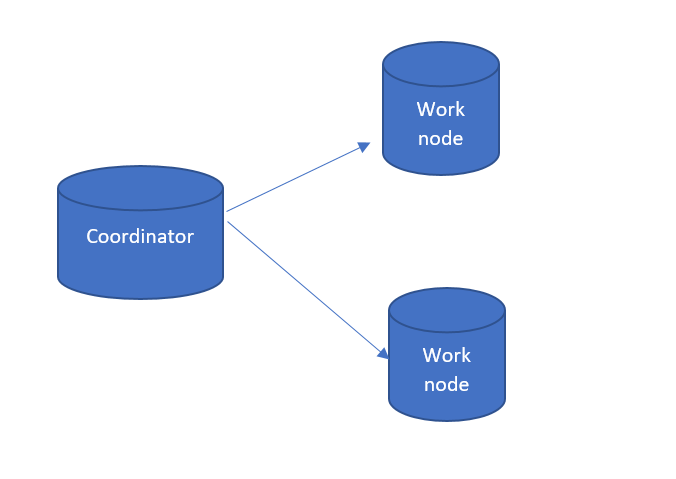
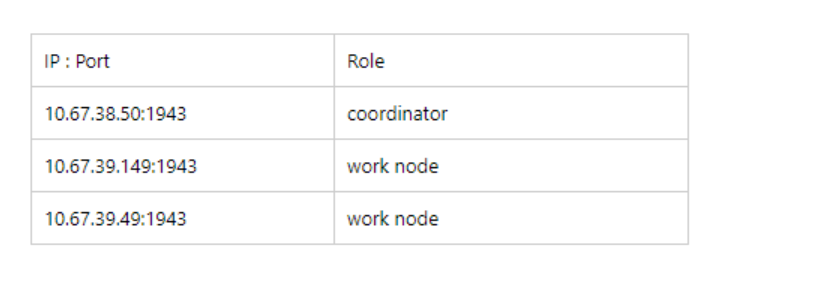
首先, 所有的节点需要安装citus, 可以参考上面安装篇的步骤。
下一步, 我们需要登录到 coordinator 的节点上, 添加work 节点
登录: psql -h 10.67.38.50 -p 1943
postgres=# SELECT * from citus_add_node('10.67.39.149', 1943);
 citus_add_node
----------------
              1
(1 row)

postgres=# SELECT * from citus_add_node('10.67.39.49', 1943);
 citus_add_node
----------------
              2
(1 row)

postgres=# SELECT * FROM citus_get_active_worker_nodes();
  node_name   | node_port
--------------+-----------
 10.67.39.149 |      1943
 10.67.39.49  |      1943
(2 rows)
查看默认分片数量:
postgres=# show citus.shard_count ;
 citus.shard_count
-------------------
 32
(1 row)

postgres=# SELECT rebalance_table_shards();
 rebalance_table_shards
------------------------

(1 row)
下一步,我们参考官方的案例,创建一张测试表:
postgres=# CREATE TABLE events (
postgres(#   device_id bigint,
postgres(#   event_id bigserial,
postgres(#   event_time timestamptz default now(),
postgres(#   data jsonb not null,
postgres(#   PRIMARY KEY (device_id, event_id)
postgres(# );
CREATE TABLE
将表events 设置为 分片表:
postgres=# SELECT create_distributed_table('events', 'device_id');
 create_distributed_table
--------------------------

(1 row)

postgres=# select * from citus_tables;
 table_name | citus_table_type | distribution_column | colocation_id | table_size | shard_count | table_owner | access_method
------------+------------------+---------------------+---------------+------------+-------------+-------------+---------------
 events     | distributed      | device_id           |             2 | 123 MB     |          32 | postgres    | heap
(1 row)
手动插入100万条信息:
postgres=# INSERT INTO events (device_id, data)
postgres-# SELECT s % 100, ('{"measurement":'||random()||'}')::jsonb FROM generate_series(1,1000000) s;
INSERT 0 1000000
postgres=# select count(1) from events;
  count
---------
 1000000
(1 row)
我们通过SQL的执行计划,可以看到数据分布在哪个worker节点上。
我们同样在 coordinator 节点上执行: select * from events where device_id = 8 and event_id = 8; 可以看到 work 节点的信息 : Node: host=10.67.39.149 port=1943 dbname=postgres
postgres=# explain (analyze) select * from events where device_id = 8 and event_id = 8;
                                                                      QUERY PLAN

--------------------------------------------------------------------------------------------------------------------------------------
----------------
 Custom Scan (Citus Adaptive)  (cost=0.00..0.00 rows=0 width=0) (actual time=8.703..8.705 rows=1 loops=1)
   Task Count: 1
   Tuple data received from nodes: 67 bytes
   Tasks Shown: All
   ->  Task
         Tuple data received from node: 67 bytes
         Node: host=10.67.39.149 port=1943 dbname=postgres
         ->  Index Scan using events_pkey_102008 on events_102008 events  (cost=0.29..8.31 rows=1 width=63) (actual time=0.036..0.037
rows=1 loops=1)
               Index Cond: ((device_id = 8) AND (event_id = 8))
             Planning Time: 0.328 ms
             Execution Time: 0.052 ms
 Planning Time: 2.580 ms
 Execution Time: 8.770 ms
(13 rows)
我们同样在 coordinator 节点上执行: select * from events where device_id = 1 and event_id = 1; 可以看到 work 节点的信息 : Node: host=10.67.39.49 port=1943 dbname=postgres
postgres=# explain (analyze) select * from events where device_id = 1 and event_id = 1;
                                                                      QUERY PLAN

--------------------------------------------------------------------------------------------------------------------------------------
----------------
 Custom Scan (Citus Adaptive)  (cost=0.00..0.00 rows=0 width=0) (actual time=5.435..5.436 rows=1 loops=1)
   Task Count: 1
   Tuple data received from nodes: 66 bytes
   Tasks Shown: All
   ->  Task
         Tuple data received from node: 66 bytes
         Node: host=10.67.39.49 port=1943 dbname=postgres
         ->  Index Scan using events_pkey_102009 on events_102009 events  (cost=0.29..8.31 rows=1 width=63) (actual time=0.035..0.035
rows=1 loops=1)
               Index Cond: ((device_id = 1) AND (event_id = 1))
             Planning Time: 0.283 ms
             Execution Time: 0.052 ms
 Planning Time: 0.170 ms
 Execution Time: 5.468 ms
(13 rows)
我们可以分别登录到2个worker 节点上去查看,每个节点上的表的分布。
psql -h 10.67.39.149 -p 1943
postgres=# \d+
                                         List of relations
 Schema |     Name      | Type  |  Owner   | Persistence | Access method |    Size    | Description
--------+---------------+-------+----------+-------------+---------------+------------+-------------
 public | citus_tables  | view  | postgres | permanent   |               | 0 bytes    |
 public | events_102008 | table | postgres | permanent   | heap          | 2832 kB    |
 public | events_102010 | table | postgres | permanent   | heap          | 1896 kB    |
 public | events_102012 | table | postgres | permanent   | heap          | 2824 kB    |
 public | events_102014 | table | postgres | permanent   | heap          | 1896 kB    |
 public | events_102016 | table | postgres | permanent   | heap          | 5624 kB    |
 public | events_102018 | table | postgres | permanent   | heap          | 1896 kB    |
 public | events_102020 | table | postgres | permanent   | heap          | 2824 kB    |
 public | events_102022 | table | postgres | permanent   | heap          | 4688 kB    |
 public | events_102024 | table | postgres | permanent   | heap          | 1896 kB    |
 public | events_102026 | table | postgres | permanent   | heap          | 8192 bytes |
 public | events_102028 | table | postgres | permanent   | heap          | 5616 kB    |
 public | events_102030 | table | postgres | permanent   | heap          | 2832 kB    |
 public | events_102032 | table | postgres | permanent   | heap          | 2832 kB    |
 public | events_102034 | table | postgres | permanent   | heap          | 968 kB     |
 public | events_102036 | table | postgres | permanent   | heap          | 6552 kB    |
 public | events_102038 | table | postgres | permanent   | heap          | 4688 kB    |
(17 rows)
psql -h 10.67.39.49 -p 1943
postgres=# \d+
                                        List of relations
 Schema |     Name      | Type  |  Owner   | Persistence | Access method |  Size   | Description
--------+---------------+-------+----------+-------------+---------------+---------+-------------
 public | citus_tables  | view  | postgres | permanent   |               | 0 bytes |
 public | events_102009 | table | postgres | permanent   | heap          | 4688 kB |
 public | events_102011 | table | postgres | permanent   | heap          | 5624 kB |
 public | events_102013 | table | postgres | permanent   | heap          | 968 kB  |
 public | events_102015 | table | postgres | permanent   | heap          | 1896 kB |
 public | events_102017 | table | postgres | permanent   | heap          | 1896 kB |
 public | events_102019 | table | postgres | permanent   | heap          | 1896 kB |
 public | events_102021 | table | postgres | permanent   | heap          | 3760 kB |
 public | events_102023 | table | postgres | permanent   | heap          | 1896 kB |
 public | events_102025 | table | postgres | permanent   | heap          | 1896 kB |
 public | events_102027 | table | postgres | permanent   | heap          | 2832 kB |
 public | events_102029 | table | postgres | permanent   | heap          | 2832 kB |
 public | events_102031 | table | postgres | permanent   | heap          | 2824 kB |
 public | events_102033 | table | postgres | permanent   | heap          | 1896 kB |
 public | events_102035 | table | postgres | permanent   | heap          | 1896 kB |
 public | events_102037 | table | postgres | permanent   | heap          | 2824 kB |
 public | events_102039 | table | postgres | permanent   | heap          | 4688 kB |
(17 rows)
我们可以看到 每个节点上 各自有命名 events_10xxx的表,每个节点是16张表,与之前我们查询的分片设置是相吻合的。
postgres=# show citus.shard_count ;
 citus.shard_count
-------------------
 32
(1 row)
今天就到这里了,未来的10年是数据库国产化的10年。 个人还是比较看好基于PG的产品,像是华为的gauss系列,包括开源的 openGauss,恩墨的Mog DB 等众多国产数据库厂商 无论是云上还是云下,都是传统行业这个领域数据库选型的备选方案。
