



1.MogHA介绍
MogHA是云和恩墨基于同步异步流复制技术自研的一款保障数据库主备集群高可用的企业级软件系统(适用于MogDB 和 openGauss 数据库)。
MogHA 能够自主探测故障实现故障转移,虚拟IP自动漂移等特性,使得数据库的故障持续时间从分钟级降到秒级(RPO=0,RTO<30s),确保数据库集群的高可用服务。
2.MogHA功能特征
- 自主发现数据库实例角色
- 自主故障转移
- 支持网络故障检测
- 支持磁盘故障检测
- 虚拟IP自动漂移
- 感知双主脑裂,自动选主
- 数据库进程和CPU绑定
- HA自身进程高可用
- 支持单机并行部署多套 MogHA
- 支持 x86_64 和 aarch64
3.MogHA系统架构
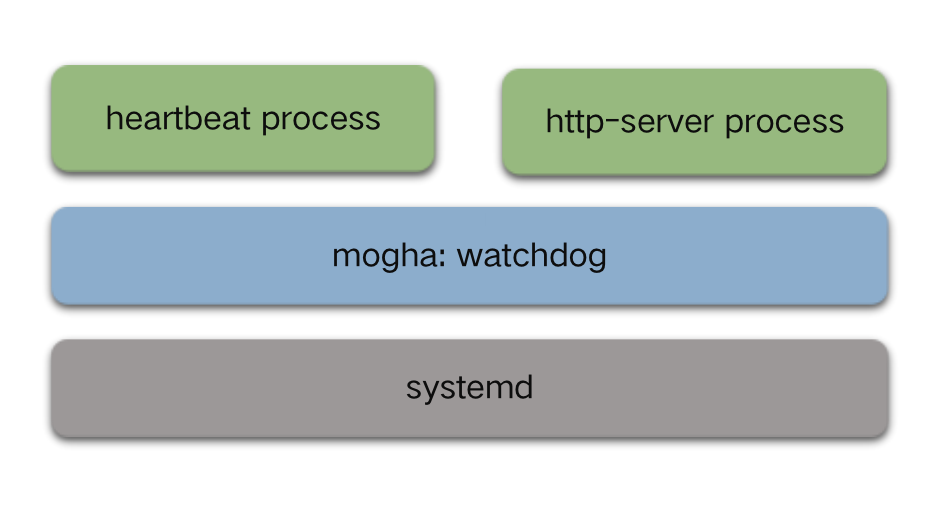
4.MogHA支持的模式
4.1.Lite 模式
Lite 模式,顾名思义即轻量级模式,该模式仅需在主库和一台同步备机器上启动 MogHA 服务,此时 MogHA 服务可以保证这两台机器上数据库实例的高可用,当主库发生不可修复的问题或者网络隔离时,MogHA 可以自主地进行故障切换和虚拟IP漂移。
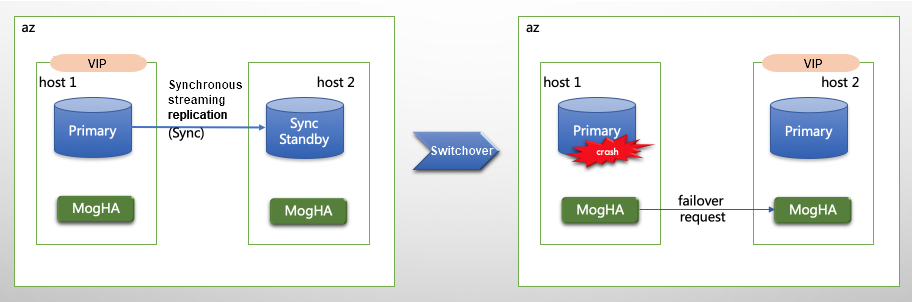
4.2.Full 模式
Full模式相较于 lite 模式,需要在所有实例机器上运行 MogHA 服务,且所有的实例有由 MogHA 来自动管理,当出现主库故障时,会优先选择本机房同步备进行切换,如果本机房同步备也是故障的情况,会选择同城备机房的同步备进行切换。为了达到RPO=0,MogHA 不会选择异步备库进行切换,以防止数据丢失。该模式会在主备切换时,会自动修改数据库的复制连接及同步备列表配置。
举例:两地三中心【1主6备】
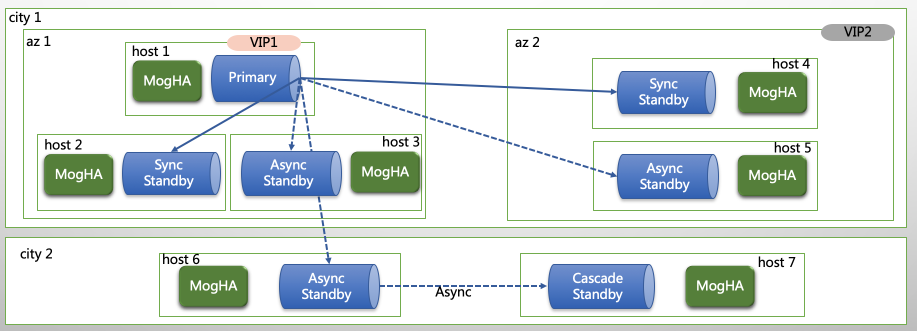
5.MogHA搭建(主备节点)
5.1.搭建MogDB集群
请参考 Mogdb 1主2备部署 进行搭建
5.2.配置sudo(搭建时已配置可以忽略)
# echo "omm     ALL=(ALL)       NOPASSWD: /usr/sbin/ifconfig
omm     ALL=(ALL)       NOPASSWD: /usr/bin/systemctl">>/etc/sudoers
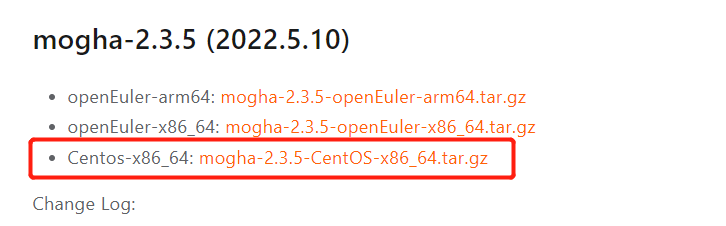
5.3.下载软件
https://docs.mogdb.io/zh/mogha/v2.3/release-notes
5.4.创建软件目录及解压
$ mkdir -p /opt/software/mogha
$ rz
$ cd /opt/software/mogha
$ tar -xvf mogha-2.3.5-CentOS-x86_64.tar.gz -C /dbdata/app
total 0
mogha/
mogha/install.sh
mogha/uninstall.sh
mogha/mogha.service.tmpl
mogha/version.txt
mogha/node.conf.tmpl
mogha/common.sh
mogha/README.md
mogha/mogha
5.5.安装MogHA
安装脚本:sudo ./install.sh USER PGDATA [SERVICE_NAME](注意替换参数)
- USER 是指数据库安装用户,在本例中指 omm 用户
- PGDATA 是指数据库数据目录,本例中假设 MogDB 的数据目录为 /dbdata/data
- SERVICE_NAME [可选参数] 注册 systemd 时的服务名,默认:mogha"
$ cd /dbdata/app/mogha
$ ./install.sh omm /dbdata/data
[2022-05-21 20:58:46]: MogHA installation directory: /dbdata/app/mogha
[2022-05-21 20:58:46]: runtime user: omm, user group: dbgrp
[2022-05-21 20:58:46]: PGDATA=/dbdata/data
[2022-05-21 20:58:46]: LD_LIBRARY_PATH=/dbdata/app/mogdb/lib:/dbdata/app/tools/lib:
[2022-05-21 20:58:46]: GAUSSHOME=/dbdata/app/mogdb
[2022-05-21 20:58:46]: database port: 51000
[2022-05-21 20:58:46]: architecture: x86_64
[2022-05-21 20:58:46]: modify owner for installation dir...
[2022-05-21 20:58:46]: generate mogha.service file...
[2022-05-21 20:58:46]: move mogha.service to /usr/lib/systemd/system/
[2022-05-21 20:58:46]: reload systemd
[2022-05-21 20:58:46]: mogha service register successful
[2022-05-21 20:58:46]: add sudo permissions to /etc/sudoers.d/omm for omm
[2022-05-21 20:58:46]: found node.conf already exists, skip
[2022-05-21 20:58:46]: MogHA install successfully!

Please edit /dbdata/data/mogha/node.conf first before start MogHA service!!!

Manage MogHA service by systemctl command:
    Start service:  sudo systemctl start mogha
    Stop service:   sudo systemctl stop mogha
    Restart service:sudo systemctl restart mogha

Uninstall MogHA service command:
    sudo ./uninstall.sh mogha
5.6.安装文件简介
$ cd /dbdata/app/mogha/
$ ll
total 42132
-rw-r--r--. 1 omm dbgrp      288 May 11 15:54 common.sh --安装\卸载脚本
-rwxr-xr-x. 1 omm dbgrp     3398 May 11 15:54 install.sh --安装脚本
-rwxr-xr-x. 1 omm dbgrp 16407992 May 11 15:54 mogha --二进制文件
-rw-r--r--. 1 omm dbgrp  5913269 May 23 12:34 mogha_heartbeat.log --HA心跳日志
-rw-r--r--. 1 omm dbgrp      699 May 11 15:54 mogha.service.tmpl --安装模板
-rw-r--r--. 1 omm dbgrp 20759656 May 23 12:34 mogha_web.log --web api接口的请求日志
-rwxr-xr-x. 1 omm dbgrp     3878 May 21 22:04 node.conf --配置文件,安装过程生成
-rw-r--r--. 1 omm dbgrp     3806 May 11 15:54 node.conf.tmpl --安装模板
-rw-------. 1 omm dbgrp      129 May 23 12:34 primary_info  --主库元数据
-rw-r--r--. 1 omm dbgrp     9834 May 11 15:54 README.md  --自述文件
-rw-------. 1 omm dbgrp        2 May 23 12:34 standby_info --备库元数据
-rwxr-xr-x. 1 omm dbgrp      482 May 11 15:54 uninstall.sh --卸载脚本
-rw-r--r--. 1 omm dbgrp       13 May 11 15:54 version.txt --查看版本号
5.7.修改node.conf(主)
使用Full模式,每个节点部署mogHA;没有专门的心跳IP,心跳直接通过公共IP进行节点间的探测
$ cd /dbdata/app/mogha
$ cat node.conf
[config]
# 数据库端口
db_port=51000

# 数据库的操作系统用户, 通常为omm
db_user=omm

# 数据库的数据目录
db_datadir=/dbdata/data

# 本地主库元数据存储路径
primary_info=/dbdata/app/mogha/primary_info

# 本地备库元数据存储路径
standby_info=/dbdata/app/mogha/standby_info

# 是否使用 lite 模式, 可选值: True / False
lite_mode=False

# HA节点之间心跳端口, 如果有防火墙, 需要配置互通
agent_port=51006

# 心跳间隔时间
heartbeat_interval=3

# 主库丢失的探测时间
primary_lost_timeout=10

# 主库的孤单时间
primary_lonely_timeout=10

# 双主确认超时时间
double_primary_timeout=10

# 本地元数据文件类型,支持 json/bin
# meta_file_type=json

# 是否为数据库实例进程限制cpu
# taskset=False

# 设置输出的日志格式
# logger_format=%(asctime)s %(levelname)s [%(filename)s:%(lineno)d]: %(message)s

# [2.3.0新增]设置日志存储目录
# log_dir=/dbdata/app/mogha

# [2.3.0新增] 日志文件最大字节数(接近该值时,将发生日志滚动)
# 支持的单位: KB, MB, GB (忽略大小写)
# log_max_size=512MB

# [2.3.0新增] 日志保留的文件个数
# log_backup_count=10

# 设置除了主备相关的机器, 允许可以访问到web接口的IP列表, 多个IP时逗号分隔
# allow_ips=

# [2.1新增] 主实例进程未启动时,是否需要 HA 进行拉起或切换
# 搭配 primary_down_handle_method 使用
# handle_down_primary=True

# [2.1新增] 备库进程未启动时,是否需要 HA 进行拉起
# handle_down_standby=True

# [2.1新增] 主库实例进程未启动时,如何处理
# 支持两种处理方式:
# - restart: 尝试重启,尝试次数在 restart_strategy 参数中设定
# - failover: 直接切换
# primary_down_handle_method=restart

# [2.1新增] 重启实例最大尝试条件: times/minutes
# 例如: 10/3 最多尝试10次或者3分钟, 任何一个条件先满足就不再尝试。
# restart_strategy=10/3

# [2.2.1新增]
# debug_mode=False

# [2.3.0新增]
# HA节点间HTTP API 心跳请求超时时间(秒)
# http_req_timeout=3

# (选填) 元数据库的连接参数 (openGauss类数据库)
# [meta]
# ha_name=            # HA集群的名称, 全局唯一, 禁止两套HA集群共用一个名字
# host=               # 机器IP
# port=               # 端口
# db=                 # 数据库名
# user=               # 用户名
# password=           # 密码
# connect_timeout=3   # 连接超时,单位秒


# host1-9, 每个代表一个机器(最多支持1主8备)
# (lite模式需仅配置 host1 和 host2 即可)
# - ip: 业务IP
# - heartbeat_ips: (选填)心跳网络ip, 允许配置多个心跳网络, 以逗号隔开
[host1]
ip=192.168.11.5
heartbeat_ips=

[host2]
ip=192.168.11.6
heartbeat_ips=

[host3]
ip=192.168.11.7
heartbeat_ips=

# [host4]
# ip=
# heartbeat_ips=

# [host5]
# ip=
# heartbeat_ips=

# [host6]
# ip=
# heartbeat_ips=

# [host7]
# ip=
# heartbeat_ips=

# [host8]
# ip=
# heartbeat_ips=

# [host9]
# ip=
# heartbeat_ips=


# zone1~3 用于定义机房, 不同机房配置独立虚拟IP,
# 切换不会切过去,作为异地保留项目
# - vip: 机房虚拟IP (没有不填)
# - hosts: 本机房内机器列表, 填写机器在配置文件中对应的配置模块名 host1~9, 示例: host1,host2
# - ping_list: 用于检查网络是否通畅的仲裁节点, 例如网关, 支持填写多个IP (逗号分隔)
# - cascades: 机房内的级联机器列表 (配置方式同 hosts, 没有不填)
# - arping: (选填) 机房的 arping 地址, 切换虚拟IP后通知该地址

[zone1]
vip=192.168.11.60
hosts=host1,host2,host3
ping_list=192.168.0.1
cascades=
arping=


# [zone2]
# vip=
# hosts=
# ping_list=
# cascades=
# arping=

# [zone3]
# vip=
# hosts=
# ping_list=
# cascades=
# arping=
5.8.拷贝到2个备节点
$ scp /dbdata/app/mogha/node.conf omm@192.168.11.6:/dbdata/app/mogha/
$ scp /dbdata/app/mogha/node.conf omm@192.168.11.7:/dbdata/app/mogha/
5.9.启动MogHA
$ sudo systemctl enable mogha
$ sudo systemctl start mogha
$ sudo systemctl status mogha
● mogha.service - MogHA High Available Service
   Loaded: loaded (/usr/lib/systemd/system/mogha.service; enabled; vendor preset: disabled)
   Active: active (running) since Wed 2022-05-25 14:38:27 CST; 39min ago
     Docs: https://docs.mogdb.io/zh/mogha/v2.0/installation-and-depolyment
 Main PID: 17605 (mogha)
    Tasks: 20
   Memory: 52.2M
   CGroup: /system.slice/mogha.service
           ├─ 3323 ping -c 3 -i 0.5 192.168.11.7
           ├─ 3325 ping -c 3 -i 0.5 192.168.0.1
           ├─ 3327 ping -c 3 -i 0.5 192.168.11.6
           ├─17605 /dbdata/app/mogha/mogha -c /dbdata/app/mogha/node.conf
           ├─17607 mogha: watchdog
           ├─17608 mogha: http-server
           └─17609 mogha: heartbeat

May 25 14:38:27 mogdb1 systemd[1]: Started MogHA High Available Service.
May 25 14:38:28 mogdb1 mogha[17605]: MogHA Version: Version: 2.3.5
May 25 14:38:28 mogdb1 mogha[17605]: GitHash: 0df6f1a
May 25 14:38:28 mogdb1 mogha[17605]: config loaded successfully
5.10.查看心跳IP
VIP为192.168.11.60,上面node.conf文件中进行配置
# ip -4 a
1: lo: <LOOPBACK,UP,LOWER_UP> mtu 65536 qdisc noqueue state UNKNOWN group default qlen 1000
    inet 127.0.0.1/8 scope host lo
       valid_lft forever preferred_lft forever
2: ens224: <BROADCAST,MULTICAST,UP,LOWER_UP> mtu 1500 qdisc mq state UP group default qlen 1000
    inet 192.168.11.5/16 brd 192.168.255.255 scope global ens224
       valid_lft forever preferred_lft forever
    inet 192.168.11.60/16 brd 192.168.255.255 scope global secondary ens224:1
       valid_lft forever preferred_lft forever
6.高可用测试
6.1.模拟主库异常,数据文件正常
预期结果:主库被MogHA探测到后拉起来,主备不进行切换
6.1.1.停止主库进程
$ ps -ef|grep -i mogdb
omm       2849     1  7 18:57 ?        00:02:27 /dbdata/app/mogdb/bin/mogdb -D /dbdata/data -M primary
omm      30773 32640  0 19:31 pts/3    00:00:00 grep --color=auto -i mogdb
$ kill -9 2849
6.1.2.查看主节点mogHA mogha_heartbeat.log日志
查看主库mogHA日志在探测到主库异常后,自动拉起主库。步骤为:
- 探测到主库shutdown
- 检查磁盘是否健康
- gs_ctl重启主节点
- 主库恢复
2022-05-25 19:33:26,528 ERROR [__init__.py:143]: detected local instance is shutdown

2022-05-25 19:33:26,712 INFO [__init__.py:192]: disk is health, try to restart
2022-05-25 19:33:26,713 INFO [__init__.py:240]: try to start local instance, count: 1
2022-05-25 19:33:29,025 INFO [__init__.py:242]: [2022-05-25 19:33:26.742][2532][][gs_ctl]: gs_ctl started,datadir is /dbdata/data
[2022-05-25 19:33:27.009][2532][][gs_ctl]: waiting for server to start...
.0 LOG:  [Alarm Module]can not read GAUSS_WARNING_TYPE env.

0 LOG:  [Alarm Module]Host Name: mogdb1

0 LOG:  [Alarm Module]Host IP: 192.168.11.5

0 LOG:  [Alarm Module]Get ENV GS_CLUSTER_NAME failed!

0 LOG:  bbox_dump_path is set to /dbdata/corefile/
2022-05-25 19:33:27.258 628e1407.1 [unknown] 140027150317120 [unknown] 0 dn_6001_6002_6003 DB010  0 [REDO] LOG:  Recovery parallelism, cpu count = 8, max = 4, actual = 4
2022-05-25 19:33:27.258 628e1407.1 [unknown] 140027150317120 [unknown] 0 dn_6001_6002_6003 DB010  0 [REDO] LOG:  ConfigRecoveryParallelism, true_max_recovery_parallelism:4, max_recovery_parallelism:4
2022-05-25 19:33:27.258 628e1407.1 [unknown] 140027150317120 [unknown] 0 dn_6001_6002_6003 00000  0 [BACKEND] LOG:  [Alarm Module]can not read GAUSS_WARNING_TYPE env.

2022-05-25 19:33:27.258 628e1407.1 [unknown] 140027150317120 [unknown] 0 dn_6001_6002_6003 00000  0 [BACKEND] LOG:  [Alarm Module]Host Name: mogdb1

2022-05-25 19:33:27.258 628e1407.1 [unknown] 140027150317120 [unknown] 0 dn_6001_6002_6003 00000  0 [BACKEND] LOG:  [Alarm Module]Host IP: 192.168.11.5

2022-05-25 19:33:27.258 628e1407.1 [unknown] 140027150317120 [unknown] 0 dn_6001_6002_6003 00000  0 [BACKEND] LOG:  [Alarm Module]Get ENV GS_CLUSTER_NAME failed!

2022-05-25 19:33:27.262 628e1407.1 [unknown] 140027150317120 [unknown] 0 dn_6001_6002_6003 00000  0 [BACKEND] LOG:  loaded library "security_plugin"
2022-05-25 19:33:27.265 628e1407.1 [unknown] 140027150317120 [unknown] 0 dn_6001_6002_6003 00000  0 [BACKEND] LOG:  InitNuma numaNodeNum: 1 numa_distribute_mode: none inheritThreadPool: 0.
2022-05-25 19:33:27.266 628e1407.1 [unknown] 140027150317120 [unknown] 0 dn_6001_6002_6003 00000  0 [BACKEND] LOG:  reserved memory for backend threads is: 340 MB
2022-05-25 19:33:27.266 628e1407.1 [unknown] 140027150317120 [unknown] 0 dn_6001_6002_6003 00000  0 [BACKEND] LOG:  reserved memory for WAL buffers is: 320 MB
2022-05-25 19:33:27.266 628e1407.1 [unknown] 140027150317120 [unknown] 0 dn_6001_6002_6003 00000  0 [BACKEND] LOG:  Set max backend reserve memory is: 660 MB, max dynamic memory is: 3170 MB
2022-05-25 19:33:27.266 628e1407.1 [unknown] 140027150317120 [unknown] 0 dn_6001_6002_6003 00000  0 [BACKEND] LOG:  shared memory 1273 Mbytes, memory context 3830 Mbytes, max process memory 5120 Mbytes
2022-05-25 19:33:27.345 628e1407.1 [unknown] 140027150317120 [unknown] 0 dn_6001_6002_6003 00000  0 [CACHE] LOG:  set data cache  size(12582912)
2022-05-25 19:33:27.346 628e1407.1 [unknown] 140027150317120 [unknown] 0 dn_6001_6002_6003 00000  0 [CACHE] LOG:  set metadata cache  size(4194304)
2022-05-25 19:33:27.582 628e1407.1 [unknown] 140027150317120 [unknown] 0 dn_6001_6002_6003 00000  0 [SEGMENT_PAGE] LOG:  Segment-page constants: DF_MAP_SIZE: 8156, DF_MAP_BIT_CNT: 65248, DF_MAP_GROUP_EXTENTS: 4175872, IPBLOCK_SIZE: 8168, EXTENTS_PER_IPBLOCK: 1021, IPBLOCK_GROUP_SIZE: 4090, BMT_HEADER_LEVEL0_TOTAL_PAGES: 8323072, BktMapEntryNumberPerBlock: 2038, BktMapBlockNumber: 25, BktBitMaxMapCnt: 512
2022-05-25 19:33:27.624 628e1407.1 [unknown] 140027150317120 [unknown] 0 dn_6001_6002_6003 00000  0 [BACKEND] LOG:  mogdb: fsync file "/dbdata/data/gaussdb.state.temp" success
2022-05-25 19:33:27.625 628e1407.1 [unknown] 140027150317120 [unknown] 0 dn_6001_6002_6003 00000  0 [BACKEND] LOG:  create gaussdb state file success: db state(STARTING_STATE), server mode(Primary)
2022-05-25 19:33:27.657 628e1407.1 [unknown] 140027150317120 [unknown] 0 dn_6001_6002_6003 00000  0 [BACKEND] LOG:  max_safe_fds = 975, usable_fds = 1000, already_open = 15
bbox_dump_path is set to /dbdata/corefile/
2022-05-25 19:33:27.698 628e1407.1 [unknown] 140027150317120 [unknown] 0 dn_6001_6002_6003 39000  0 [EXECUTOR] WARNING:  Failed to obtain environment value $GAUSSLOG!
2022-05-25 19:33:27.698 628e1407.1 [unknown] 140027150317120 [unknown] 0 dn_6001_6002_6003 39000  0 [EXECUTOR] DETAIL:  N/A
2022-05-25 19:33:27.698 628e1407.1 [unknown] 140027150317120 [unknown] 0 dn_6001_6002_6003 39000  0 [EXECUTOR] CAUSE:  Incorrect environment value.
2022-05-25 19:33:27.698 628e1407.1 [unknown] 140027150317120 [unknown] 0 dn_6001_6002_6003 39000  0 [EXECUTOR] ACTION:  Please refer to backend log for more details.
2022-05-25 19:33:27.699 628e1407.1 [unknown] 140027150317120 [unknown] 0 dn_6001_6002_6003 39000  0 [EXECUTOR] WARNING:  Failed to obtain environment value $GAUSSLOG!
2022-05-25 19:33:27.699 628e1407.1 [unknown] 140027150317120 [unknown] 0 dn_6001_6002_6003 39000  0 [EXECUTOR] DETAIL:  N/A
2022-05-25 19:33:27.699 628e1407.1 [unknown] 140027150317120 [unknown] 0 dn_6001_6002_6003 39000  0 [EXECUTOR] CAUSE:  Incorrect environment value.
2022-05-25 19:33:27.699 628e1407.1 [unknown] 140027150317120 [unknown] 0 dn_6001_6002_6003 39000  0 [EXECUTOR] ACTION:  Please refer to backend log for more details.
.
[2022-05-25 19:33:29.023][2532][][gs_ctl]:  done
[2022-05-25 19:33:29.023][2532][][gs_ctl]: server started (/dbdata/data)

2022-05-25 19:33:29,087 INFO [__init__.py:245]: restart local instance successfully
6.1.3.查看备节点MogHA mogha_heartbeart.log日志
备节点MogHA中可以查看到探测到主节点状态异常,几秒后恢复正常。
192.168.11.6日志:
2022-05-25 19:33:26,125 INFO [__init__.py:61]: ping result: {'192.168.0.1': True, '192.168.11.5': True, '192.168.11.7': True}
2022-05-25 19:33:26,233 INFO [__init__.py:86]: local instance is alive Standby, state: Need repair
2022-05-25 19:33:26,318 ERROR [standby.py:31]: not found primary in cluster
2022-05-25 19:33:32,415 INFO [__init__.py:61]: ping result: {'192.168.0.1': True, '192.168.11.5': True, '192.168.11.7': True}
192.168.11.7日志:
2022-05-25 19:33:27,218 INFO [__init__.py:61]: ping result: {'192.168.0.1': True, '192.168.11.5': True, '192.168.11.6': True}
2022-05-25 19:33:27,339 INFO [__init__.py:86]: local instance is alive Standby, state: Need repair
2022-05-25 19:33:27,402 ERROR [standby.py:31]: not found primary in cluster
2022-05-25 19:33:27,425 ERROR [standby.py:225]: get standbys failed from primary 192.168.11.5. err: request /db/standbys failed, errs: {'192.168.11.5': '[code:500] database is stopped'}
2022-05-25 19:33:27,450 INFO [__init__.py:61]: ping result: {'192.168.0.1': True, '192.168.11.5': True, '192.168.11.6': True}
2022-05-25 19:33:41,571 INFO [__init__.py:86]: local instance is alive Standby, state: Normal
6.1.4.主库进程正常及VIP未进行切换
$ ps -ef|grep -i mogdb
omm       2364 31205  0 20:25 pts/3    00:00:00 grep --color=auto -i mogdb
omm      10685     1  5 20:15 ?        00:00:31 /dbdata/app/mogdb/bin/mogdb -D /dbdata/data -M primary

$ ip -4 a
1: lo: <LOOPBACK,UP,LOWER_UP> mtu 65536 qdisc noqueue state UNKNOWN group default qlen 1000
    inet 127.0.0.1/8 scope host lo
       valid_lft forever preferred_lft forever
2: ens224: <BROADCAST,MULTICAST,UP,LOWER_UP> mtu 1500 qdisc mq state UP group default qlen 1000
    inet 192.168.11.5/16 brd 192.168.255.255 scope global ens224
       valid_lft forever preferred_lft forever
    inet 192.168.11.60/16 brd 192.168.255.255 scope global secondary ens224:2
       valid_lft forever preferred_lft forever
6.1.5.集群状态检查
$ gs_om -t status --detail
[   Cluster State   ]

cluster_state   : Normal
redistributing  : No
current_az      : AZ_ALL

[  Datanode State   ]

    node   node_ip         port      instance             state
-------------------------------------------------------------------------------
1  mogdb1 192.168.11.5    51000      6001 /dbdata/data   P Primary Normal
2  mogdb2 192.168.11.6    51000      6002 /dbdata/data   S Standby Normal
3  mogdb3 192.168.11.7    51000      6003 /dbdata/data   S Standby Normal
6.2.模拟主库异常,数据文件异常
预期结果:主库在MogHA拉起指定时间异常后,进行failover切换
6.2.1.停止主库进程,并且mv掉数据目录
$ cd /dbdata/
$ ps -ef|grep -i mogdb
omm       2364 31205  0 20:25 pts/3    00:00:00 grep --color=auto -i mogdb
omm      10685     1  5 20:15 ?        00:00:31 /dbdata/app/mogdb/bin/mogdb -D /dbdata/data -M primary
$ kill -9 10685;mv data data.bak
6.2.2.查看主节点mogHA mogha_heartbeat.log日志
查看主库mogHA日志在探测到主库异常后,自动拉起主库超过指定的次数后进行failover切换。步骤为:
- 探测到主库shutdown
- 检查磁盘是否健康
- gs_ctl重启主节点超过restart_strategy指定的次数或时间(restart_strategy超过10次或3min)
- 进行failover切换,192.168.11.7切换为主节点
- 虽然已经了failover切换,但是192.168.11.5上MogHA一直在尝试启动实例
2022-05-25 20:28:27,555 INFO [__init__.py:61]: ping result: {'192.168.0.1': True, '192.168.11.6': True, '192.168.11.7': True}
2022-05-25 20:28:27,678 INFO [__init__.py:86]: local instance is alive Primary, state: Normal
2022-05-25 20:28:32,880 INFO [__init__.py:61]: ping result: {'192.168.0.1': True, '192.168.11.6': True, '192.168.11.7': True}
2022-05-25 20:28:32,999 INFO [__init__.py:86]: local instance is alive Primary, state: Normal
2022-05-25 20:28:38,217 INFO [__init__.py:61]: ping result: {'192.168.0.1': True, '192.168.11.6': True, '192.168.11.7': True}
2022-05-25 20:28:38,237 ERROR [__init__.py:143]: detected local instance is shutdown
2022-05-25 20:28:38,435 INFO [__init__.py:192]: disk is health, try to restart
2022-05-25 20:28:38,435 INFO [__init__.py:240]: try to start local instance, count: 1
2022-05-25 20:28:38,478 ERROR [__init__.py:249]: failed to start db
[exitcode:1]
stdout:[2022-05-25 20:28:38.477][9180][][gs_ctl]: gs_ctl started,datadir is /dbdata/data
[2022-05-25 20:28:38.477][9180][][gs_ctl]: can't create lock file "/dbdata/data/pg_ctl.lock" : No such file or directory
stderr:
2022-05-25 20:28:39,478 INFO [__init__.py:240]: try to start local instance, count: 2
2022-05-25 20:28:39,519 ERROR [__init__.py:249]: failed to start db
[exitcode:1]
stdout:[2022-05-25 20:28:39.518][9196][][gs_ctl]: gs_ctl started,datadir is /dbdata/data
[2022-05-25 20:28:39.518][9196][][gs_ctl]: can't create lock file "/dbdata/data/pg_ctl.lock" : No such file or directory
stderr:
2022-05-25 20:28:40,520 INFO [__init__.py:240]: try to start local instance, count: 3
2022-05-25 20:28:40,553 ERROR [__init__.py:249]: failed to start db
[exitcode:1]
stdout:[2022-05-25 20:28:40.552][9218][][gs_ctl]: gs_ctl started,datadir is /dbdata/data
[2022-05-25 20:28:40.552][9218][][gs_ctl]: can't create lock file "/dbdata/data/pg_ctl.lock" : No such file or directory
stderr:
2022-05-25 20:28:41,554 INFO [__init__.py:240]: try to start local instance, count: 4
2022-05-25 20:28:41,590 ERROR [__init__.py:249]: failed to start db
[exitcode:1]
stdout:[2022-05-25 20:28:41.589][9226][][gs_ctl]: gs_ctl started,datadir is /dbdata/data
[2022-05-25 20:28:41.589][9226][][gs_ctl]: can't create lock file "/dbdata/data/pg_ctl.lock" : No such file or directory
stderr:
2022-05-25 20:28:42,591 INFO [__init__.py:240]: try to start local instance, count: 5
2022-05-25 20:28:42,622 ERROR [__init__.py:249]: failed to start db
[exitcode:1]
stdout:[2022-05-25 20:28:42.620][9230][][gs_ctl]: gs_ctl started,datadir is /dbdata/data
[2022-05-25 20:28:42.621][9230][][gs_ctl]: can't create lock file "/dbdata/data/pg_ctl.lock" : No such file or directory
stderr:
2022-05-25 20:28:43,622 INFO [__init__.py:240]: try to start local instance, count: 6
2022-05-25 20:28:43,653 ERROR [__init__.py:249]: failed to start db
[exitcode:1]
stdout:[2022-05-25 20:28:43.652][9241][][gs_ctl]: gs_ctl started,datadir is /dbdata/data
[2022-05-25 20:28:43.652][9241][][gs_ctl]: can't create lock file "/dbdata/data/pg_ctl.lock" : No such file or directory
stderr:
2022-05-25 20:28:44,655 INFO [__init__.py:240]: try to start local instance, count: 7
2022-05-25 20:28:44,687 ERROR [__init__.py:249]: failed to start db
[exitcode:1]
stdout:[2022-05-25 20:28:44.685][9246][][gs_ctl]: gs_ctl started,datadir is /dbdata/data
[2022-05-25 20:28:44.685][9246][][gs_ctl]: can't create lock file "/dbdata/data/pg_ctl.lock" : No such file or directory
stderr:
2022-05-25 20:28:45,688 INFO [__init__.py:240]: try to start local instance, count: 8
2022-05-25 20:28:45,723 ERROR [__init__.py:249]: failed to start db
[exitcode:1]
stdout:[2022-05-25 20:28:45.721][9251][][gs_ctl]: gs_ctl started,datadir is /dbdata/data
[2022-05-25 20:28:45.722][9251][][gs_ctl]: can't create lock file "/dbdata/data/pg_ctl.lock" : No such file or directory
stderr:
2022-05-25 20:28:46,725 INFO [__init__.py:240]: try to start local instance, count: 9
2022-05-25 20:28:46,756 ERROR [__init__.py:249]: failed to start db
[exitcode:1]
stdout:[2022-05-25 20:28:46.755][9283][][gs_ctl]: gs_ctl started,datadir is /dbdata/data
[2022-05-25 20:28:46.755][9283][][gs_ctl]: can't create lock file "/dbdata/data/pg_ctl.lock" : No such file or directory
stderr:
2022-05-25 20:28:47,757 INFO [__init__.py:240]: try to start local instance, count: 10
2022-05-25 20:28:47,800 ERROR [__init__.py:249]: failed to start db
[exitcode:1]
stdout:[2022-05-25 20:28:47.798][9296][][gs_ctl]: gs_ctl started,datadir is /dbdata/data
[2022-05-25 20:28:47.798][9296][][gs_ctl]: can't create lock file "/dbdata/data/pg_ctl.lock" : No such file or directory
stderr:
2022-05-25 20:28:48,801 ERROR [__init__.py:254]: restart 11 times, but still failure
2022-05-25 20:28:48,801 ERROR [__init__.py:202]: restart local instance failed, start failover
2022-05-25 20:28:48,856 INFO [__init__.py:221]: send failover request to host 192.168.11.6
2022-05-25 20:28:51,861 ERROR [__init__.py:71]: heartbeat failed: request /db/failover failed, errs: {'192.168.11.6': "HTTPConnectionPool(host='192.168.11.6', port=51006): Read timed out. (read timeout=3)"}
Traceback (most recent call last):
  File "node/__init__.py", line 63, in heartbeat_loop
  File "node/__init__.py", line 144, in dispatch
  File "node/__init__.py", line 105, in _dispatch_down_instance
  File "node/__init__.py", line 203, in process_primary_down
  File "node/__init__.py", line 222, in request_failover
  File "api/client.py", line 122, in failover_db
  File "api/client.py", line 89, in _request
Exception: request /db/failover failed, errs: {'192.168.11.6': "HTTPConnectionPool(host='192.168.11.6', port=51006): Read timed out. (read timeout=3)"}
2022-05-25 20:28:55,886 INFO [__init__.py:61]: ping result: {'192.168.0.1': True, '192.168.11.6': True, '192.168.11.7': True}
2022-05-25 20:28:55,903 ERROR [__init__.py:143]: detected local instance is shutdown
2022-05-25 20:28:55,904 INFO [__init__.py:192]: disk is health, try to restart
2022-05-25 20:28:55,905 INFO [__init__.py:240]: try to start local instance, count: 1
2022-05-25 20:28:55,941 ERROR [__init__.py:249]: failed to start db
[exitcode:1]
stdout:[2022-05-25 20:28:55.940][9661][][gs_ctl]: gs_ctl started,datadir is /dbdata/data
[2022-05-25 20:28:55.940][9661][][gs_ctl]: can't create lock file "/dbdata/data/pg_ctl.lock" : No such file or directory
stderr:
2022-05-25 20:28:56,942 INFO [__init__.py:240]: try to start local instance, count: 2
2022-05-25 20:28:56,978 ERROR [__init__.py:249]: failed to start db
[exitcode:1]
stdout:[2022-05-25 20:28:56.977][9703][][gs_ctl]: gs_ctl started,datadir is /dbdata/data
[2022-05-25 20:28:56.977][9703][][gs_ctl]: can't create lock file "/dbdata/data/pg_ctl.lock" : No such file or directory
stderr:
2022-05-25 20:28:57,978 INFO [__init__.py:240]: try to start local instance, count: 3
2022-05-25 20:28:58,017 ERROR [__init__.py:249]: failed to start db
[exitcode:1]
stdout:[2022-05-25 20:28:58.016][9707][][gs_ctl]: gs_ctl started,datadir is /dbdata/data
[2022-05-25 20:28:58.017][9707][][gs_ctl]: can't create lock file "/dbdata/data/pg_ctl.lock" : No such file or directory
stderr:
2022-05-25 20:28:59,019 INFO [__init__.py:240]: try to start local instance, count: 4
2022-05-25 20:28:59,051 ERROR [__init__.py:249]: failed to start db
[exitcode:1]
stdout:[2022-05-25 20:28:59.050][9709][][gs_ctl]: gs_ctl started,datadir is /dbdata/data
[2022-05-25 20:28:59.050][9709][][gs_ctl]: can't create lock file "/dbdata/data/pg_ctl.lock" : No such file or directory
stderr:
2022-05-25 20:29:00,052 INFO [__init__.py:240]: try to start local instance, count: 5
2022-05-25 20:29:00,086 ERROR [__init__.py:249]: failed to start db
[exitcode:1]
stdout:[2022-05-25 20:29:00.085][9755][][gs_ctl]: gs_ctl started,datadir is /dbdata/data
[2022-05-25 20:29:00.085][9755][][gs_ctl]: can't create lock file "/dbdata/data/pg_ctl.lock" : No such file or directory
stderr:
2022-05-25 20:29:01,087 INFO [__init__.py:240]: try to start local instance, count: 6
2022-05-25 20:29:01,122 ERROR [__init__.py:249]: failed to start db
[exitcode:1]
stdout:[2022-05-25 20:29:01.121][9811][][gs_ctl]: gs_ctl started,datadir is /dbdata/data
[2022-05-25 20:29:01.121][9811][][gs_ctl]: can't create lock file "/dbdata/data/pg_ctl.lock" : No such file or directory
stderr:
2022-05-25 20:29:02,123 INFO [__init__.py:240]: try to start local instance, count: 7
2022-05-25 20:29:02,155 ERROR [__init__.py:249]: failed to start db
[exitcode:1]
stdout:[2022-05-25 20:29:02.154][9845][][gs_ctl]: gs_ctl started,datadir is /dbdata/data
[2022-05-25 20:29:02.154][9845][][gs_ctl]: can't create lock file "/dbdata/data/pg_ctl.lock" : No such file or directory
stderr:
2022-05-25 20:29:03,156 INFO [__init__.py:240]: try to start local instance, count: 8
2022-05-25 20:29:03,191 ERROR [__init__.py:249]: failed to start db
[exitcode:1]
stdout:[2022-05-25 20:29:03.190][9881][][gs_ctl]: gs_ctl started,datadir is /dbdata/data
[2022-05-25 20:29:03.191][9881][][gs_ctl]: can't create lock file "/dbdata/data/pg_ctl.lock" : No such file or directory
stderr:
2022-05-25 20:29:04,193 INFO [__init__.py:240]: try to start local instance, count: 9
2022-05-25 20:29:04,229 ERROR [__init__.py:249]: failed to start db
[exitcode:1]
stdout:[2022-05-25 20:29:04.228][9895][][gs_ctl]: gs_ctl started,datadir is /dbdata/data
[2022-05-25 20:29:04.228][9895][][gs_ctl]: can't create lock file "/dbdata/data/pg_ctl.lock" : No such file or directory
stderr:
2022-05-25 20:29:05,230 INFO [__init__.py:240]: try to start local instance, count: 10
2022-05-25 20:29:05,270 ERROR [__init__.py:249]: failed to start db
[exitcode:1]
stdout:[2022-05-25 20:29:05.269][9900][][gs_ctl]: gs_ctl started,datadir is /dbdata/data
[2022-05-25 20:29:05.269][9900][][gs_ctl]: can't create lock file "/dbdata/data/pg_ctl.lock" : No such file or directory
stderr:
2022-05-25 20:29:06,272 ERROR [__init__.py:254]: restart 11 times, but still failure
2022-05-25 20:29:06,272 ERROR [__init__.py:202]: restart local instance failed, start failover
2022-05-25 20:29:06,317 INFO [__init__.py:221]: send failover request to host 192.168.11.6
2022-05-25 20:29:06,396 ERROR [__init__.py:71]: heartbeat failed: request /db/failover failed, errs: {'192.168.11.6': '[code:403] database is already primary'}
Traceback (most recent call last):
  File "node/__init__.py", line 63, in heartbeat_loop
  File "node/__init__.py", line 144, in dispatch
  File "node/__init__.py", line 105, in _dispatch_down_instance
  File "node/__init__.py", line 203, in process_primary_down
  File "node/__init__.py", line 222, in request_failover
  File "api/client.py", line 122, in failover_db
  File "api/client.py", line 89, in _request
6.2.3.查看备节点MogHA mogha_heartbeart.log日志
备节点MogHA中可以查看到探测到主节点状态异常,10几秒过后192.168.11.6切换为主节点。
192.168.11.6
2022-05-25 20:28:17,921 INFO [__init__.py:86]: local instance is alive Standby, state: Normal
2022-05-25 20:28:24,109 INFO [__init__.py:61]: ping result: {'192.168.0.1': True, '192.168.11.5': True, '192.168.11.7': True}
2022-05-25 20:28:24,230 INFO [__init__.py:86]: local instance is alive Standby, state: Normal
2022-05-25 20:28:30,392 INFO [__init__.py:61]: ping result: {'192.168.0.1': True, '192.168.11.5': True, '192.168.11.7': True}
2022-05-25 20:28:30,521 INFO [__init__.py:86]: local instance is alive Standby, state: Normal
2022-05-25 20:28:36,691 INFO [__init__.py:61]: ping result: {'192.168.0.1': True, '192.168.11.5': True, '192.168.11.7': True}
2022-05-25 20:28:36,801 INFO [__init__.py:86]: local instance is alive Standby, state: Need repair
2022-05-25 20:28:36,868 ERROR [standby.py:31]: not found primary in cluster
2022-05-25 20:28:38,898 ERROR [standby.py:225]: get standbys failed from primary 192.168.11.5. err: request /db/standbys failed, errs: {'192.168.11.5': '[code:500] database is stopped'}
2022-05-25 20:28:42,918 INFO [__init__.py:61]: ping result: {'192.168.0.1': True, '192.168.11.5': True, '192.168.11.7': True}
2022-05-25 20:28:43,053 INFO [__init__.py:86]: local instance is alive Standby, state: Need repair
2022-05-25 20:28:43,119 ERROR [standby.py:31]: not found primary in cluster
2022-05-25 20:28:45,146 ERROR [standby.py:225]: get standbys failed from primary 192.168.11.5. err: request /db/standbys failed, errs: {'192.168.11.5': '[code:500] database is stopped'}
2022-05-25 20:28:49,161 INFO [__init__.py:61]: ping result: {'192.168.0.1': True, '192.168.11.5': True, '192.168.11.7': True}
2022-05-25 20:28:49,285 INFO [__init__.py:86]: local instance is alive Standby, state: Need repair
2022-05-25 20:28:49,355 ERROR [standby.py:31]: not found primary in cluster
2022-05-25 20:28:51,391 ERROR [standby.py:225]: get standbys failed from primary 192.168.11.5. err: request /db/standbys failed, errs: {'192.168.11.5': '[code:500] database is stopped'}
2022-05-25 20:28:55,408 INFO [__init__.py:61]: ping result: {'192.168.0.1': True, '192.168.11.5': True, '192.168.11.7': True}
2022-05-25 20:28:55,528 INFO [__init__.py:86]: local instance is alive Primary, state: Normal
2022-05-25 20:29:00,747 INFO [__init__.py:61]: ping result: {'192.168.0.1': True, '192.168.11.5': True, '192.168.11.7': True}
2022-05-25 20:29:00,864 INFO [__init__.py:86]: local instance is alive Primary, state: Normal
2022-05-25 20:29:06,068 INFO [__init__.py:61]: ping result: {'192.168.0.1': True, '192.168.11.5': True, '192.168.11.7': True}
192.168.11.7
2022-05-25 20:28:53,132 INFO [__init__.py:61]: ping result: {'192.168.0.1': True, '192.168.11.5': True, '192.168.11.6': True}
2022-05-25 20:28:53,238 INFO [__init__.py:86]: local instance is alive Standby, state: Normal
2022-05-25 20:28:57,400 INFO [__init__.py:61]: ping result: {'192.168.0.1': True, '192.168.11.5': True, '192.168.11.6': True}
2022-05-25 20:28:57,501 INFO [__init__.py:86]: local instance is alive Standby, state: Need repair
2022-05-25 20:28:57,589 ERROR [standby.py:31]: not found primary in cluster
2022-05-25 20:28:57,615 ERROR [standby.py:225]: get standbys failed from primary 192.168.11.5. err: request /db/standbys failed, errs: {'192.168.11.5': '[code:500] database is stopped'}
2022-05-25 20:29:01,635 INFO [__init__.py:61]: ping result: {'192.168.0.1': True, '192.168.11.5': True, '192.168.11.6': True}
2022-05-25 20:29:01,752 INFO [__init__.py:86]: local instance is alive Standby, state: Need repair
2022-05-25 20:29:01,837 ERROR [standby.py:31]: not found primary in cluster
2022-05-25 20:29:01,858 ERROR [standby.py:225]: get standbys failed from primary 192.168.11.5. err: request /db/standbys failed, errs: {'192.168.11.5': '[code:500] database is stopped'}
2022-05-25 20:29:05,874 INFO [__init__.py:61]: ping result: {'192.168.0.1': True, '192.168.11.5': True, '192.168.11.6': True}
2022-05-25 20:29:05,988 INFO [__init__.py:86]: local instance is alive Standby, state: Need repair
2022-05-25 20:29:06,082 ERROR [standby.py:31]: not found primary in cluster
2022-05-25 20:29:06,105 ERROR [standby.py:225]: get standbys failed from primary 192.168.11.5. err: request /db/standbys failed, errs: {'192.168.11.5': '[code:500] database is stopped'}
2022-05-25 20:29:10,125 INFO [__init__.py:61]: ping result: {'192.168.0.1': True, '192.168.11.5': True, '192.168.11.6': True}
2022-05-25 20:29:10,240 INFO [__init__.py:86]: local instance is alive Standby, state: Normal
2022-05-25 20:29:10,351 ERROR [standby.py:225]: get standbys failed from primary 192.168.11.5. err: request /db/standbys failed, errs: {'192.168.11.5': '[code:500] database is stopped'}
2022-05-25 20:29:14,373 INFO [__init__.py:61]: ping result: {'192.168.0.1': True, '192.168.11.5': True, '192.168.11.6': True}
2022-05-25 20:29:14,492 INFO [__init__.py:86]: local instance is alive Standby, state: Normal
2022-05-25 20:29:14,587 ERROR [standby.py:225]: get standbys failed from primary 192.168.11.5. err: request /db/standbys failed, errs: {'192.168.11.5': '[code:500] database is stopped'}
2022-05-25 20:29:18,608 INFO [__init__.py:61]: ping result: {'192.168.0.1': True, '192.168.11.5': True, '192.168.11.6': True}
2022-05-25 20:29:18,727 INFO [__init__.py:86]: local instance is alive Standby, state: Normal
2022-05-25 20:29:22,885 INFO [__init__.py:61]: ping result: {'192.168.0.1': True, '192.168.11.5': True, '192.168.11.6': True}
2022-05-25 20:29:23,007 INFO [__init__.py:86]: local instance is alive Standby, state: Normal
2022-05-25 20:29:29,184 INFO [__init__.py:61]: ping result: {'192.168.0.1': True, '192.168.11.5': True, '192.168.11.6': True}
2022-05-25 20:29:29,309 INFO [__init__.py:86]: local instance is alive Standby, state: Normal
2022-05-25 20:29:35,472 INFO [__init__.py:61]: ping result: {'192.168.0.1': True, '192.168.11.5': True, '192.168.11.6': True}
2022-05-25 20:29:35,601 INFO [__init__.py:86]: local instance is alive Standby, state: Normal
6.2.4.主库进程异常及VIP发生切换
$ ps -ef|grep -i mogdb
omm       5127 31205  0 21:00 pts/3    00:00:00 grep --color=auto -i mogdb

$ ip -4 a
1: lo: <LOOPBACK,UP,LOWER_UP> mtu 65536 qdisc noqueue state UNKNOWN group default qlen 1000
    inet 127.0.0.1/8 scope host lo
       valid_lft forever preferred_lft forever
2: ens224: <BROADCAST,MULTICAST,UP,LOWER_UP> mtu 1500 qdisc mq state UP group default qlen 1000
    inet 192.168.11.5/16 brd 192.168.255.255 scope global ens224
       valid_lft forever preferred_lft forever

$ ip -4 a
1: lo: <LOOPBACK,UP,LOWER_UP> mtu 65536 qdisc noqueue state UNKNOWN group default qlen 1000
    inet 127.0.0.1/8 scope host lo
       valid_lft forever preferred_lft forever
2: ens224: <BROADCAST,MULTICAST,UP,LOWER_UP> mtu 1500 qdisc mq state UP group default qlen 1000
    inet 192.168.11.6/16 brd 192.168.255.255 scope global ens224
       valid_lft forever preferred_lft forever
    inet 191.168.11.60/16 brd 191.168.255.255 scope global ens224:1
       valid_lft forever preferred_lft forever
6.2.5.集群状态
$ gs_om -t status --detail
[   Cluster State   ]

cluster_state   : Degraded
redistributing  : No
current_az      : AZ_ALL

[  Datanode State   ]

    node   node_ip         port      instance             state
-------------------------------------------------------------------------------
1  mogdb1 192.168.11.5    51000      6001 /dbdata/data   P Down    Manually stopped
2  mogdb2 192.168.11.6    51000      6002 /dbdata/data   S Primary Normal
3  mogdb3 192.168.11.7    51000      6003 /dbdata/data   S Standby Normal
6.2.6.恢复源主库数据目录,并且作为新主库的备库
$ mv data.bak data
6.2.7.MogHA在探测到数据目录正常后进行启动,然后再次宕掉
由于目前192.168.11.6已经是主库,MogHA拉起192.168.11.5后仍为主库,此时出现多主的现象,MogHA探测出192.168.11.6上才是正常的主库,为防止数据不一致,MogDB把192.168.11.5宕掉
短暂出现双主现象后,然后192.168.11.5被宕掉
$ gs_om -t status --detail
[   Cluster State   ]

cluster_state   : Unavailable
redistributing  : No
current_az      : AZ_ALL

[  Datanode State   ]

    node   node_ip         port      instance             state
-------------------------------------------------------------------------------
1  mogdb1 192.168.11.5    51000      6001 /dbdata/data   P Primary Normal
2  mogdb2 192.168.11.6    51000      6002 /dbdata/data   S Primary Normal
3  mogdb3 192.168.11.7    51000      6003 /dbdata/data   S Standby Normal

$ gs_om -t status --detail
[   Cluster State   ]

cluster_state   : Degraded
redistributing  : No
current_az      : AZ_ALL

[  Datanode State   ]

    node   node_ip         port      instance             state
-------------------------------------------------------------------------------
1  mogdb1 192.168.11.5    51000      6001 /dbdata/data   P Down    Manually stopped
2  mogdb2 192.168.11.6    51000      6002 /dbdata/data   S Primary Normal
3  mogdb3 192.168.11.7    51000      6003 /dbdata/data   S Standby Normal
6.2.8. 192.168.11.5 MogHA mogdb_heartbeat.log日志
2022-05-25 21:06:56,764 INFO [__init__.py:61]: ping result: {'192.168.0.1': True, '192.168.11.5': True, '192.168.11.7': True}
2022-05-25 21:06:56,896 INFO [__init__.py:86]: local instance is alive Primary, state: Normal
2022-05-25 21:07:02,080 INFO [__init__.py:61]: ping result: {'192.168.0.1': True, '192.168.11.5': True, '192.168.11.7': True}
2022-05-25 21:07:02,200 INFO [__init__.py:86]: local instance is alive Primary, state: Normal
2022-05-25 21:07:07,386 INFO [__init__.py:61]: ping result: {'192.168.0.1': True, '192.168.11.5': True, '192.168.11.7': True}
2022-05-25 21:07:07,506 INFO [__init__.py:86]: local instance is alive Primary, state: Normal
2022-05-25 21:07:12,693 INFO [__init__.py:61]: ping result: {'192.168.0.1': True, '192.168.11.5': True, '192.168.11.7': True}
2022-05-25 21:07:12,814 INFO [__init__.py:86]: local instance is alive Primary, state: Normal
2022-05-25 21:07:18,026 INFO [__init__.py:61]: ping result: {'192.168.0.1': True, '192.168.11.5': True, '192.168.11.7': True}
2022-05-25 21:07:18,150 INFO [__init__.py:86]: local instance is alive Primary, state: Normal
2022-05-25 21:07:19,299 ERROR [primary.py:129]: other primaries found: ['192.168.11.5']
2022-05-25 21:07:20,420 ERROR [primary.py:129]: other primaries found: ['192.168.11.5']
2022-05-25 21:07:21,541 ERROR [primary.py:129]: other primaries found: ['192.168.11.5']
2022-05-25 21:07:22,660 ERROR [primary.py:129]: other primaries found: ['192.168.11.5']
2022-05-25 21:07:23,792 ERROR [primary.py:129]: other primaries found: ['192.168.11.5']
2022-05-25 21:07:24,931 ERROR [primary.py:129]: other primaries found: ['192.168.11.5']
2022-05-25 21:07:26,051 ERROR [primary.py:129]: other primaries found: ['192.168.11.5']
2022-05-25 21:07:27,175 ERROR [primary.py:129]: other primaries found: ['192.168.11.5']
2022-05-25 21:07:28,303 ERROR [primary.py:129]: other primaries found: ['192.168.11.5']
2022-05-25 21:07:29,527 INFO [primary.py:77]: votes: defaultdict(<class 'int'>, {'192.168.11.6': 2, '192.168.11.5': 1})
2022-05-25 21:07:29,528 INFO [primary.py:308]: real primary is me: 192.168.11.6
2022-05-25 21:07:38,761 INFO [__init__.py:61]: ping result: {'192.168.0.1': True, '192.168.11.5': True, '192.168.11.7': True}
2022-05-25 21:07:38,875 INFO [__init__.py:86]: local instance is alive Primary, state: Normal
2022-05-25 21:07:44,082 INFO [__init__.py:61]: ping result: {'192.168.0.1': True, '192.168.11.5': True, '192.168.11.7': True}
2022-05-25 21:07:44,209 INFO [__init__.py:86]: local instance is alive Primary, state: Normal
2022-05-25 21:07:49,423 INFO [__init__.py:61]: ping result: {'192.168.0.1': True, '192.168.11.5': True, '192.168.11.7': True}
2022-05-25 21:07:49,531 INFO [__init__.py:86]: local instance is alive Primary, state: Normal
2022-05-25 21:07:54,756 INFO [__init__.py:61]: ping result: {'192.168.0.1': True, '192.168.11.5': True, '192.168.11.7': True}
2022-05-25 21:07:54,892 INFO [__init__.py:86]: local instance is alive Primary, state: Normal
2022-05-25 21:08:00,109 INFO [__init__.py:61]: ping result: {'192.168.0.1': True, '192.168.11.5': True, '192.168.11.7': True}
2022-05-25 21:08:00,234 INFO [__init__.py:86]: local instance is alive Primary, state: Normal
2022-05-25 21:08:05,417 INFO [__init__.py:61]: ping result: {'192.168.0.1': True, '192.168.11.5': True, '192.168.11.7': True}
2022-05-25 21:08:05,530 INFO [__init__.py:86]: local instance is alive Primary, state: Normal
2022-05-25 21:08:10,763 INFO [__init__.py:61]: ping result: {'192.168.0.1': True, '192.168.11.5': True, '192.168.11.7': True}
2022-05-25 21:08:10,894 INFO [__init__.py:86]: local instance is alive Primary, state: Normal
2022-05-25 21:08:16,093 INFO [__init__.py:61]: ping result: {'192.168.0.1': True, '192.168.11.5': True, '192.168.11.7': True}
6.2.9.其他2个节点 MogHA mogdb_heartbeat.log日志
查看日志在192.168.11.5启动后出现双主现象,通过投票后192.168.11.6才是真正的主节点
192.168.11.6
2022-05-25 21:06:56,764 INFO [__init__.py:61]: ping result: {'192.168.0.1': True, '192.168.11.5': True, '192.168.11.7': True}
2022-05-25 21:06:56,896 INFO [__init__.py:86]: local instance is alive Primary, state: Normal
2022-05-25 21:07:02,080 INFO [__init__.py:61]: ping result: {'192.168.0.1': True, '192.168.11.5': True, '192.168.11.7': True}
2022-05-25 21:07:02,200 INFO [__init__.py:86]: local instance is alive Primary, state: Normal
2022-05-25 21:07:07,386 INFO [__init__.py:61]: ping result: {'192.168.0.1': True, '192.168.11.5': True, '192.168.11.7': True}
2022-05-25 21:07:07,506 INFO [__init__.py:86]: local instance is alive Primary, state: Normal
2022-05-25 21:07:12,693 INFO [__init__.py:61]: ping result: {'192.168.0.1': True, '192.168.11.5': True, '192.168.11.7': True}
2022-05-25 21:07:12,814 INFO [__init__.py:86]: local instance is alive Primary, state: Normal
2022-05-25 21:07:18,026 INFO [__init__.py:61]: ping result: {'192.168.0.1': True, '192.168.11.5': True, '192.168.11.7': True}
2022-05-25 21:07:18,150 INFO [__init__.py:86]: local instance is alive Primary, state: Normal
2022-05-25 21:07:19,299 ERROR [primary.py:129]: other primaries found: ['192.168.11.5']
2022-05-25 21:07:20,420 ERROR [primary.py:129]: other primaries found: ['192.168.11.5']
2022-05-25 21:07:21,541 ERROR [primary.py:129]: other primaries found: ['192.168.11.5']
2022-05-25 21:07:22,660 ERROR [primary.py:129]: other primaries found: ['192.168.11.5']
2022-05-25 21:07:23,792 ERROR [primary.py:129]: other primaries found: ['192.168.11.5']
2022-05-25 21:07:24,931 ERROR [primary.py:129]: other primaries found: ['192.168.11.5']
2022-05-25 21:07:26,051 ERROR [primary.py:129]: other primaries found: ['192.168.11.5']
2022-05-25 21:07:27,175 ERROR [primary.py:129]: other primaries found: ['192.168.11.5']
2022-05-25 21:07:28,303 ERROR [primary.py:129]: other primaries found: ['192.168.11.5']
2022-05-25 21:07:29,527 INFO [primary.py:77]: votes: defaultdict(<class 'int'>, {'192.168.11.6': 2, '192.168.11.5': 1})
2022-05-25 21:07:29,528 INFO [primary.py:308]: real primary is me: 192.168.11.6
2022-05-25 21:07:38,761 INFO [__init__.py:61]: ping result: {'192.168.0.1': True, '192.168.11.5': True, '192.168.11.7': True}
2022-05-25 21:07:38,875 INFO [__init__.py:86]: local instance is alive Primary, state: Normal
2022-05-25 21:07:44,082 INFO [__init__.py:61]: ping result: {'192.168.0.1': True, '192.168.11.5': True, '192.168.11.7': True}
2022-05-25 21:07:44,209 INFO [__init__.py:86]: local instance is alive Primary, state: Normal
2022-05-25 21:07:49,423 INFO [__init__.py:61]: ping result: {'192.168.0.1': True, '192.168.11.5': True, '192.168.11.7': True}
2022-05-25 21:07:49,531 INFO [__init__.py:86]: local instance is alive Primary, state: Normal
2022-05-25 21:07:54,756 INFO [__init__.py:61]: ping result: {'192.168.0.1': True, '192.168.11.5': True, '192.168.11.7': True}
2022-05-25 21:07:54,892 INFO [__init__.py:86]: local instance is alive Primary, state: Normal
2022-05-25 21:08:00,109 INFO [__init__.py:61]: ping result: {'192.168.0.1': True, '192.168.11.5': True, '192.168.11.7': True}
2022-05-25 21:08:00,234 INFO [__init__.py:86]: local instance is alive Primary, state: Normal
2022-05-25 21:08:05,417 INFO [__init__.py:61]: ping result: {'192.168.0.1': True, '192.168.11.5': True, '192.168.11.7': True}
2022-05-25 21:08:05,530 INFO [__init__.py:86]: local instance is alive Primary, state: Normal
2022-05-25 21:08:10,763 INFO [__init__.py:61]: ping result: {'192.168.0.1': True, '192.168.11.5': True, '192.168.11.7': True}
2022-05-25 21:08:10,894 INFO [__init__.py:86]: local instance is alive Primary, state: Normal
2022-05-25 21:08:16,093 INFO [__init__.py:61]: ping result: {'192.168.0.1': True, '192.168.11.5': True, '192.168.11.7': True}
192.168.11.7
2022-05-25 21:07:12,887 INFO [__init__.py:61]: ping result: {'192.168.0.1': True, '192.168.11.5': True, '192.168.11.6': True}
2022-05-25 21:07:12,999 INFO [__init__.py:86]: local instance is alive Standby, state: Normal
2022-05-25 21:07:19,158 INFO [__init__.py:61]: ping result: {'192.168.0.1': True, '192.168.11.5': True, '192.168.11.6': True}
2022-05-25 21:07:19,268 INFO [__init__.py:86]: local instance is alive Standby, state: Normal
2022-05-25 21:07:25,424 INFO [__init__.py:61]: ping result: {'192.168.0.1': True, '192.168.11.5': True, '192.168.11.6': True}
2022-05-25 21:07:25,561 INFO [__init__.py:86]: local instance is alive Standby, state: Normal
2022-05-25 21:07:31,716 INFO [__init__.py:61]: ping result: {'192.168.0.1': True, '192.168.11.5': True, '192.168.11.6': True}
2022-05-25 21:07:31,861 INFO [__init__.py:86]: local instance is alive Standby, state: Normal
2022-05-25 21:07:38,035 INFO [__init__.py:61]: ping result: {'192.168.0.1': True, '192.168.11.5': True, '192.168.11.6': True}
2022-05-25 21:07:38,155 INFO [__init__.py:86]: local instance is alive Standby, state: Normal
2022-05-25 21:07:38,228 ERROR [__init__.py:71]: heartbeat failed: multiple primaries found: [<config.Host object at 0x7f4c72ce1190>, <config.Host object at 0x7f4c746caa90>]
Traceback (most recent call last):
  File "node/__init__.py", line 63, in heartbeat_loop
  File "node/__init__.py", line 130, in dispatch
  File "node/__init__.py", line 91, in _dispatch_alive_instance
  File "heartbeat/standby.py", line 253, in __call__
  File "heartbeat/standby.py", line 35, in sync_primary_info
Exception: multiple primaries found: [<config.Host object at 0x7f4c72ce1190>, <config.Host object at 0x7f4c746caa90>]
2022-05-25 21:07:42,248 INFO [__init__.py:61]: ping result: {'192.168.0.1': True, '192.168.11.5': True, '192.168.11.6': True}
2022-05-25 21:07:42,375 INFO [__init__.py:86]: local instance is alive Standby, state: Normal
2022-05-25 21:07:42,448 ERROR [__init__.py:71]: heartbeat failed: multiple primaries found: [<config.Host object at 0x7f4c72ce1190>, <config.Host object at 0x7f4c746caa90>]
Traceback (most recent call last):
  File "node/__init__.py", line 63, in heartbeat_loop
  File "node/__init__.py", line 130, in dispatch
  File "node/__init__.py", line 91, in _dispatch_alive_instance
  File "heartbeat/standby.py", line 253, in __call__
  File "heartbeat/standby.py", line 35, in sync_primary_info
Exception: multiple primaries found: [<config.Host object at 0x7f4c72ce1190>, <config.Host object at 0x7f4c746caa90>]
2022-05-25 21:07:46,467 INFO [__init__.py:61]: ping result: {'192.168.0.1': True, '192.168.11.5': True, '192.168.11.6': True}
2022-05-25 21:07:46,582 INFO [__init__.py:86]: local instance is alive Standby, state: Normal
2022-05-25 21:07:46,653 ERROR [__init__.py:71]: heartbeat failed: multiple primaries found: [<config.Host object at 0x7f4c72ce1190>, <config.Host object at 0x7f4c746caa90>]
Traceback (most recent call last):
  File "node/__init__.py", line 63, in heartbeat_loop
  File "node/__init__.py", line 130, in dispatch
  File "node/__init__.py", line 91, in _dispatch_alive_instance
  File "heartbeat/standby.py", line 253, in __call__
  File "heartbeat/standby.py", line 35, in sync_primary_info
Exception: multiple primaries found: [<config.Host object at 0x7f4c72ce1190>, <config.Host object at 0x7f4c746caa90>]
2022-05-25 21:07:50,673 INFO [__init__.py:61]: ping result: {'192.168.0.1': True, '192.168.11.5': True, '192.168.11.6': True}
2022-05-25 21:07:50,804 INFO [__init__.py:86]: local instance is alive Standby, state: Normal
2022-05-25 21:07:50,878 ERROR [__init__.py:71]: heartbeat failed: multiple primaries found: [<config.Host object at 0x7f4c72ce1190>, <config.Host object at 0x7f4c746caa90>]
Traceback (most recent call last):
  File "node/__init__.py", line 63, in heartbeat_loop
  File "node/__init__.py", line 130, in dispatch
  File "node/__init__.py", line 91, in _dispatch_alive_instance
  File "heartbeat/standby.py", line 253, in __call__
  File "heartbeat/standby.py", line 35, in sync_primary_info
Exception: multiple primaries found: [<config.Host object at 0x7f4c72ce1190>, <config.Host object at 0x7f4c746caa90>]
2022-05-25 21:07:54,900 INFO [__init__.py:61]: ping result: {'192.168.0.1': True, '192.168.11.5': True, '192.168.11.6': True}
2022-05-25 21:07:55,014 INFO [__init__.py:86]: local instance is alive Standby, state: Normal
2022-05-25 21:07:55,080 ERROR [__init__.py:71]: heartbeat failed: multiple primaries found: [<config.Host object at 0x7f4c72ce1190>, <config.Host object at 0x7f4c746caa90>]
Traceback (most recent call last):
  File "node/__init__.py", line 63, in heartbeat_loop
  File "node/__init__.py", line 130, in dispatch
  File "node/__init__.py", line 91, in _dispatch_alive_instance
  File "heartbeat/standby.py", line 253, in __call__
  File "heartbeat/standby.py", line 35, in sync_primary_info
Exception: multiple primaries found: [<config.Host object at 0x7f4c72ce1190>, <config.Host object at 0x7f4c746caa90>]
2022-05-25 21:07:59,100 INFO [__init__.py:61]: ping result: {'192.168.0.1': True, '192.168.11.5': True, '192.168.11.6': True}
2022-05-25 21:07:59,205 INFO [__init__.py:86]: local instance is alive Standby, state: Normal
2022-05-25 21:08:05,400 INFO [__init__.py:61]: ping result: {'192.168.0.1': True, '192.168.11.5': True, '192.168.11.6': True}
2022-05-25 21:08:05,512 INFO [__init__.py:86]: local instance is alive Standby, state: Normal
2022-05-25 21:08:11,686 INFO [__init__.py:61]: ping result: {'192.168.0.1': True, '192.168.11.5': True, '192.168.11.6': True}
2022-05-25 21:08:11,805 INFO [__init__.py:86]: local instance is alive Standby, state: Normal
2022-05-25 21:08:17,994 INFO [__init__.py:61]: ping result: {'192.168.0.1': True, '192.168.11.5': True, '192.168.11.6': True}
2022-05-25 21:08:18,101 INFO [__init__.py:86]: local instance is alive Standby, state: Normal
2022-05-25 21:08:24,285 INFO [__init__.py:61]: ping result: {'192.168.0.1': True, '192.168.11.5': True, '192.168.11.6': True}
2022-05-25 21:08:24,387 INFO [__init__.py:86]: local instance is alive Standby, state: Normal
2022-05-25 21:08:30,553 INFO [__init__.py:61]: ping result: {'192.168.0.1': True, '192.168.11.5': True, '192.168.11.6': True}
6.2.10.恢复192.168.11.5为备节点
目前MogHA已经无法自动恢复192.168.11.5了,需要人工build全量拉取数据的方式完成后启动为备库
$ gs_ctl build -D /dbdata/data -b full -M standby
[2022-05-25 21:44:04.538][15299][][gs_ctl]: gs_ctl full build ,datadir is /dbdata/data
[2022-05-25 21:44:04.538][15299][][gs_ctl]: stop failed, killing mogdb by force ...
[2022-05-25 21:44:04.538][15299][][gs_ctl]: command [ps c -eo pid,euid,cmd | grep mogdb | grep -v grep | awk '{if($2 == curuid && $1!="-n") print "/proc/"$1"/cwd"}' curuid=`id -u`| xargs ls -l | awk '{if ($NF=="/dbdata/data")  print $(NF-2)}' | awk -F/ '{print $3 }' | xargs kill -9 >/dev/null 2>&1 ] path: [/dbdata/data]
[2022-05-25 21:44:04.575][15299][][gs_ctl]: server stopped
[2022-05-25 21:44:04.575][15299][][gs_ctl]: current workdir is (/dbdata).
[2022-05-25 21:44:04.576][15299][][gs_ctl]: fopen build pid file "/dbdata/data/gs_build.pid" success
[2022-05-25 21:44:04.576][15299][][gs_ctl]: fprintf build pid file "/dbdata/data/gs_build.pid" success
[2022-05-25 21:44:04.576][15299][][gs_ctl]: fsync build pid file "/dbdata/data/gs_build.pid" success
[2022-05-25 21:44:04.577][15299][][gs_ctl]: set gaussdb state file when full build:db state(BUILDING_STATE), server mode(STANDBY_MODE), build mode(FULL_BUILD).
[2022-05-25 21:44:04.589][15299][dn_6001_6002_6003][gs_ctl]: connect to server success, build started.
[2022-05-25 21:44:04.589][15299][dn_6001_6002_6003][gs_ctl]: create build tag file success
[2022-05-25 21:44:04.651][15299][dn_6001_6002_6003][gs_ctl]: clear old target dir success
[2022-05-25 21:44:04.651][15299][dn_6001_6002_6003][gs_ctl]: create build tag file again success
[2022-05-25 21:44:04.652][15299][dn_6001_6002_6003][gs_ctl]: get system identifier success
[2022-05-25 21:44:04.652][15299][dn_6001_6002_6003][gs_ctl]: receiving and unpacking files...
[2022-05-25 21:44:04.652][15299][dn_6001_6002_6003][gs_ctl]: create backup label success
[2022-05-25 21:44:04.839][15299][dn_6001_6002_6003][gs_ctl]: xlog start point: 0/1483D020
[2022-05-25 21:44:04.839][15299][dn_6001_6002_6003][gs_ctl]: begin build tablespace list
[2022-05-25 21:44:04.839][15299][dn_6001_6002_6003][gs_ctl]: finish build tablespace list
[2022-05-25 21:44:04.839][15299][dn_6001_6002_6003][gs_ctl]: begin get xlog by xlogstream
[2022-05-25 21:44:04.839][15299][dn_6001_6002_6003][gs_ctl]: starting background WAL receiver
[2022-05-25 21:44:04.839][15299][dn_6001_6002_6003][gs_ctl]: starting walreceiver
[2022-05-25 21:44:04.839][15299][dn_6001_6002_6003][gs_ctl]: begin receive tar files
[2022-05-25 21:44:04.840][15299][dn_6001_6002_6003][gs_ctl]: receiving and unpacking files...
[2022-05-25 21:44:04.845][15299][dn_6001_6002_6003][gs_ctl]: check identify system success
[2022-05-25 21:44:04.845][15299][dn_6001_6002_6003][gs_ctl]: send START_REPLICATION 0/14000000 success
[2022-05-25 21:44:06.361][15299][dn_6001_6002_6003][gs_ctl]: finish receive tar files
[2022-05-25 21:44:06.361][15299][dn_6001_6002_6003][gs_ctl]: xlog end point: 0/15000058
[2022-05-25 21:44:06.361][15299][dn_6001_6002_6003][gs_ctl]: fetching MOT checkpoint
[2022-05-25 21:44:06.363][15299][dn_6001_6002_6003][gs_ctl]: waiting for background process to finish streaming...
[2022-05-25 21:44:09.885][15299][dn_6001_6002_6003][gs_ctl]: starting fsync all files come from source.
[2022-05-25 21:44:09.904][15299][dn_6001_6002_6003][gs_ctl]: finish fsync all files.
[2022-05-25 21:44:09.904][15299][dn_6001_6002_6003][gs_ctl]: build dummy dw file success
[2022-05-25 21:44:09.905][15299][dn_6001_6002_6003][gs_ctl]: rename build status file success
[2022-05-25 21:44:09.908][15299][dn_6001_6002_6003][gs_ctl]: build completed(/dbdata/data).
[2022-05-25 21:44:10.018][15299][dn_6001_6002_6003][gs_ctl]: waiting for server to start...
.0 LOG:  [Alarm Module]can not read GAUSS_WARNING_TYPE env.

0 LOG:  [Alarm Module]Host Name: mogdb1

0 LOG:  [Alarm Module]Host IP: 192.168.11.5

0 LOG:  [Alarm Module]Cluster Name: testCluster

0 LOG:  bbox_dump_path is set to /dbdata/corefile/
2022-05-25 21:44:10.232 [unknown] [unknown] localhost 139837010368064 0[0:0#0] 0 [REDO] LOG:  Recovery parallelism, cpu count = 8, max = 4, actual = 4
2022-05-25 21:44:10.232 [unknown] [unknown] localhost 139837010368064 0[0:0#0] 0 [REDO] LOG:  ConfigRecoveryParallelism, true_max_recovery_parallelism:4, max_recovery_parallelism:4
2022-05-25 21:44:10.232 [unknown] [unknown] localhost 139837010368064 0[0:0#0] 0 [BACKEND] LOG:  [Alarm Module]can not read GAUSS_WARNING_TYPE env.

2022-05-25 21:44:10.232 [unknown] [unknown] localhost 139837010368064 0[0:0#0] 0 [BACKEND] LOG:  [Alarm Module]Host Name: mogdb1

2022-05-25 21:44:10.232 [unknown] [unknown] localhost 139837010368064 0[0:0#0] 0 [BACKEND] LOG:  [Alarm Module]Host IP: 192.168.11.5

2022-05-25 21:44:10.232 [unknown] [unknown] localhost 139837010368064 0[0:0#0] 0 [BACKEND] LOG:  [Alarm Module]Cluster Name: testCluster

2022-05-25 21:44:10.235 [unknown] [unknown] localhost 139837010368064 0[0:0#0] 0 [BACKEND] LOG:  loaded library "security_plugin"
2022-05-25 21:44:10.237 [unknown] [unknown] localhost 139837010368064 0[0:0#0] 0 [BACKEND] LOG:  InitNuma numaNodeNum: 1 numa_distribute_mode: none inheritThreadPool: 0.
2022-05-25 21:44:10.237 [unknown] [unknown] localhost 139837010368064 0[0:0#0] 0 [BACKEND] WARNING:  Failed to initialize the memory protect for g_instance.attr.attr_storage.cstore_buffers (16 Mbytes) or shared memory (1868 Mbytes) is larger.
2022-05-25 21:44:10.853 [unknown] [unknown] localhost 139837010368064 0[0:0#0] 0 [CACHE] LOG:  set data cache  size(12582912)
2022-05-25 21:44:10.853 [unknown] [unknown] localhost 139837010368064 0[0:0#0] 0 [CACHE] LOG:  set metadata cache  size(4194304)
2022-05-25 21:44:10.925 [unknown] [unknown] localhost 139837010368064 0[0:0#0] 0 [SEGMENT_PAGE] LOG:  Segment-page constants: DF_MAP_SIZE: 8156, DF_MAP_BIT_CNT: 65248, DF_MAP_GROUP_EXTENTS: 4175872, IPBLOCK_SIZE: 8168, EXTENTS_PER_IPBLOCK: 1021, IPBLOCK_GROUP_SIZE: 4090, BMT_HEADER_LEVEL0_TOTAL_PAGES: 8323072, BktMapEntryNumberPerBlock: 2038, BktMapBlockNumber: 25, BktBitMaxMapCnt: 512
2022-05-25 21:44:10.954 [unknown] [unknown] localhost 139837010368064 0[0:0#0] 0 [BACKEND] LOG:  mogdb: fsync file "/dbdata/data/gaussdb.state.temp" success
2022-05-25 21:44:10.954 [unknown] [unknown] localhost 139837010368064 0[0:0#0] 0 [BACKEND] LOG:  create gaussdb state file success: db state(STARTING_STATE), server mode(Standby)
2022-05-25 21:44:11.109 [unknown] [unknown] localhost 139837010368064 0[0:0#0] 0 [BACKEND] LOG:  max_safe_fds = 99975, usable_fds = 100000, already_open = 15
bbox_dump_path is set to /dbdata/corefile/
.
[2022-05-25 21:44:12.187][15299][dn_6001_6002_6003][gs_ctl]:  done
[2022-05-25 21:44:12.187][15299][dn_6001_6002_6003][gs_ctl]: server started (/dbdata/data)
[2022-05-25 21:44:12.187][15299][dn_6001_6002_6003][gs_ctl]: fopen build pid file "/dbdata/data/gs_build.pid" success
[2022-05-25 21:44:12.187][15299][dn_6001_6002_6003][gs_ctl]: fprintf build pid file "/dbdata/data/gs_build.pid" success
[2022-05-25 21:44:12.187][15299][dn_6001_6002_6003][gs_ctl]: fsync build pid file "/dbdata/data/gs_build.pid" success
6.2.11.查看MogHA mogdb_heartbeat.log日志
192.168.11.5
2022-05-25 21:43:54,085 INFO [__init__.py:61]: ping result: {'192.168.0.1': True, '192.168.11.6': True, '192.168.11.7': True}
2022-05-25 21:43:54,104 ERROR [__init__.py:135]: local instance is shutdown, reason: "double primary occurred, i am bad guy"
2022-05-25 21:43:58,124 INFO [__init__.py:61]: ping result: {'192.168.0.1': True, '192.168.11.6': True, '192.168.11.7': True}
2022-05-25 21:43:58,140 ERROR [__init__.py:135]: local instance is shutdown, reason: "double primary occurred, i am bad guy"
2022-05-25 21:44:02,158 INFO [__init__.py:61]: ping result: {'192.168.0.1': True, '192.168.11.6': True, '192.168.11.7': True}
2022-05-25 21:44:02,175 ERROR [__init__.py:135]: local instance is shutdown, reason: "double primary occurred, i am bad guy"
2022-05-25 21:44:06,203 INFO [__init__.py:61]: ping result: {'192.168.0.1': True, '192.168.11.6': True, '192.168.11.7': True}
2022-05-25 21:44:06,591 ERROR [__init__.py:135]: local instance is shutdown, reason: "double primary occurred, i am bad guy"
2022-05-25 21:44:10,611 INFO [__init__.py:61]: ping result: {'192.168.0.1': True, '192.168.11.6': True, '192.168.11.7': True}
2022-05-25 21:44:11,167 ERROR [__init__.py:127]: failed to get db role, err: failed to execute sql "SELECT local_role,db_state FROM pg_stat_get_stream_replications()", error: failed to connect /dbdata/tmp:51000.

2022-05-25 21:44:15,195 INFO [__init__.py:61]: ping result: {'192.168.0.1': True, '192.168.11.6': True, '192.168.11.7': True}
2022-05-25 21:44:15,297 INFO [__init__.py:86]: local instance is alive Standby, state: Normal
2022-05-25 21:44:21,460 INFO [__init__.py:61]: ping result: {'192.168.0.1': True, '192.168.11.6': True, '192.168.11.7': True}
2022-05-25 21:44:21,563 INFO [__init__.py:86]: local instance is alive Standby, state: Normal
2022-05-25 21:44:27,724 INFO [__init__.py:61]: ping result: {'192.168.0.1': True, '192.168.11.6': True, '192.168.11.7': True}
2022-05-25 21:44:27,837 INFO [__init__.py:86]: local instance is alive Standby, state: Normal
192.168.11.6
2022-05-25 21:44:00,135 INFO [__init__.py:61]: ping result: {'192.168.0.1': True, '192.168.11.5': True, '192.168.11.7': True}
2022-05-25 21:44:00,257 INFO [__init__.py:86]: local instance is alive Primary, state: Normal
2022-05-25 21:44:05,462 INFO [__init__.py:61]: ping result: {'192.168.0.1': True, '192.168.11.5': True, '192.168.11.7': True}
2022-05-25 21:44:05,580 INFO [__init__.py:86]: local instance is alive Primary, state: Normal
2022-05-25 21:44:06,854 ERROR [primary.py:206]: set synchronous_standby_names failed. err: sql: alter system set synchronous_standby_names=dn_6001, err: ERROR:  invalid value for parameter "synchronous_standby_names": "dn_6001"

2022-05-25 21:44:10,876 INFO [__init__.py:61]: ping result: {'192.168.0.1': True, '192.168.11.5': True, '192.168.11.7': True}
2022-05-25 21:44:10,991 INFO [__init__.py:86]: local instance is alive Primary, state: Normal
2022-05-25 21:44:16,264 INFO [__init__.py:61]: ping result: {'192.168.0.1': True, '192.168.11.5': True, '192.168.11.7': True}
2022-05-25 21:44:16,377 INFO [__init__.py:86]: local instance is alive Primary, state: Normal
2022-05-25 21:44:21,580 INFO [__init__.py:61]: ping result: {'192.168.0.1': True, '192.168.11.5': True, '192.168.11.7': True}
2022-05-25 21:44:21,708 INFO [__init__.py:86]: local instance is alive Primary, state: Normal
2022-05-25 21:44:26,908 INFO [__init__.py:61]: ping result: {'192.168.0.1': True, '192.168.11.5': True, '192.168.11.7': True}
2022-05-25 21:44:27,033 INFO [__init__.py:86]: local instance is alive Primary, state: Normal
2022-05-25 21:44:32,217 INFO [__init__.py:61]: ping result: {'192.168.0.1': True, '192.168.11.5': True, '192.168.11.7': True}
2022-05-25 21:44:32,336 INFO [__init__.py:86]: local instance is alive Primary, state: Normal
192.168.11.7
2022-05-25 21:44:15,921 INFO [__init__.py:61]: ping result: {'192.168.0.1': True, '192.168.11.5': True, '192.168.11.6': True}
2022-05-25 21:44:16,046 INFO [__init__.py:86]: local instance is alive Standby, state: Normal
2022-05-25 21:44:22,224 INFO [__init__.py:61]: ping result: {'192.168.0.1': True, '192.168.11.5': True, '192.168.11.6': True}
2022-05-25 21:44:22,351 INFO [__init__.py:86]: local instance is alive Standby, state: Normal
2022-05-25 21:44:28,515 INFO [__init__.py:61]: ping result: {'192.168.0.1': True, '192.168.11.5': True, '192.168.11.6': True}
2022-05-25 21:44:28,638 INFO [__init__.py:86]: local instance is alive Standby, state: Normal
2022-05-25 21:44:29,488 ERROR [thread.py:54]: failed to request get_db_role of 192.168.11.5, err: request /db/role failed, errs: {'192.168.11.5': '[code:500] failed to execute sql "SELECT local_role,db_state FROM pg_stat_get_stream_replications()", error: failed to connect /dbdata/tmp:51000.\n'}
2022-05-25 21:44:33,566 INFO [__init__.py:61]: ping result: {'192.168.0.1': True, '192.168.11.5': True, '192.168.11.6': True}
2022-05-25 21:44:33,675 INFO [__init__.py:86]: local instance is alive Standby, state: Normal
2022-05-25 21:44:37,854 INFO [__init__.py:61]: ping result: {'192.168.0.1': True, '192.168.11.5': True, '192.168.11.6': True}
2022-05-25 21:44:37,986 INFO [__init__.py:86]: local instance is alive Standby, state: Normal
2022-05-25 21:44:42,165 INFO [__init__.py:61]: ping result: {'192.168.0.1': True, '192.168.11.5': True, '192.168.11.6': True}
2022-05-25 21:44:42,272 INFO [__init__.py:86]: local instance is alive Standby, state: Normal
2022-05-25 21:44:46,432 INFO [__init__.py:61]: ping result: {'192.168.0.1': True, '192.168.11.5': True, '192.168.11.6': True}
6.2.12.查看集群状态
$ gs_om -t status --detail
[   Cluster State   ]

cluster_state   : Normal
redistributing  : No
current_az      : AZ_ALL

[  Datanode State   ]

    node   node_ip         port      instance             state
-------------------------------------------------------------------------------
1  mogdb1 192.168.11.5    51000      6001 /dbdata/data   P Standby Normal
2  mogdb2 192.168.11.6    51000      6002 /dbdata/data   S Primary Normal
3  mogdb3 192.168.11.7    51000      6003 /dbdata/data   S Standby Normal
7.MogHA卸载
$ cd /dbdata/app/mogha
$ ./uninstall.sh
请参考 MogHA官方文档 进行学习
