



使用 docker 可以快速搭建 mysql 环境,即搭即用,秒级部署。
一行命令即可执行
$ docker run -d --name mysql -p 3306:3306 -v /opt/data:/var/lib/mysql -e MYSQL_ROOT_PASSWORD=123456 mysql:5.7
分步执行
下载镜像
$ docker pull mysql:5.75.7: Pulling from library/mysqlc1ad9731b2c7: Pull complete54f6eb0ee84d: Pull completecffcf8691bc5: Pull complete89a783b5ac8a: Pull complete6a8393c7be5f: Pull completeaf768d0b181e: Pull complete810d6aaaf54a: Pull complete81fe6daf2395: Pull complete5ccf426818fd: Pull complete68b838b06054: Pull complete1b606c4f93df: Pull completeDigest: sha256:7e99b2b8d5bca914ef31059858210f57b009c40375d647f0d4d65ecd01d6b1d5Status: Downloaded newer image for mysql:5.7
查看下载的 image 大小,以及镜像生成时间
$ docker imagesREPOSITORY TAG IMAGE ID CREATED SIZEmysql 5.7 2a0961b7de03 2 days ago 462MB
在 docker 官网也可查询到 mysql 各版本的信息
https://hub.docker.com/_/mysql?tab=tags
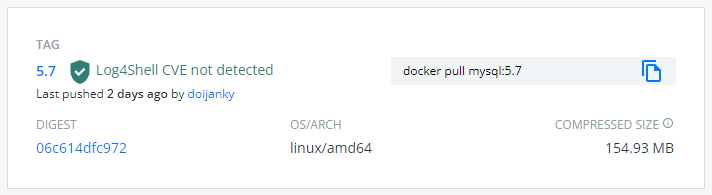
同样也可以从 docker 官网找到mysql 镜像的 dockerfile
https://github.com/docker-library/mysql/blob/275e9822858884a85434448cb6777683692365e6/5.7/Dockerfile.debian
从 dockerfile 中可以得知数据挂载点
VOLUME var/lib/mysql
关于镜像的使用,在docker hub上有文档描述
启动一个mysql实例,指定端口和数据挂载点,其中冒号左边是本地环境,冒号右边是容器环境
$ docker run -d --name mysql \-p 3306:3306 \-v opt/data:/var/lib/mysql \-e MYSQL_ROOT_PASSWORD=123456 \mysql:5.7
检查服务是否启动
$ docker psCONTAINER ID IMAGE COMMAND CREATED STATUS PORTS NAMEScb93fc99208c mysql:5.7 "docker-entrypoint.s…" 51 seconds ago Up 49 seconds 0.0.0.0:3306->3306/tcp, 33060/tcp mysql$ netstat -ltn| grep 3306tcp6 0 0 :::3306 :::* LISTEN
查看容器日志,因为已经给容器命了名,可以使用容器名指定容器,也可以使用容器ID来指定容器
$ docker logs mysql
进入到容器的交互环境
$ docker exec -it mysql bashroot@cb93fc99208c:/#
查看生成的数据文件
$ tree -L 1 opt/data/opt/data├── auto.cnf├── ca-key.pem├── ca.pem├── client-cert.pem├── client-key.pem├── ib_buffer_pool├── ibdata1├── ib_logfile0├── ib_logfile1├── ibtmp1├── mysql├── performance_schema├── private_key.pem├── public_key.pem├── server-cert.pem├── server-key.pem└── sys3 directories, 14 files
测试连接数据库
$ mysql -uroot -p123456mysql: [Warning] Using a password on the command line interface can be insecure.ERROR 2002 (HY000): Can't connect to local MySQL server through socket '/var/run/mysqld/mysqld.sock' (2)
此时报错,提示通过命令行输入密码不安全。查了一下,这是 mysql 5.6.6 之后的安全特性。不能直接通过密码连接,需要生成配置文件。
$ mysql_config_editor set \--login-path=db \--host=127.0.0.1 \--user=root \--password
生成了一个login-path,此时会让你以交互模式输入密码,最终配置文件在
$ ls ~/.mylogin.cnf
是个加密的文件,可以通过命令查看内容
$ mysql_config_editor print --all[db]user = rootpassword = *****host = 127.0.0.1
最后通过 login-path 方式连接数据库
$ mysql --login-path=dbWelcome to the MySQL monitor. Commands end with ; or \g.Your MySQL connection id is 3Server version: 5.7.38 MySQL Community Server (GPL)Copyright (c) 2000, 2019, Oracle and/or its affiliates. All rights reserved.mysql> show databases;+--------------------+| Database |+--------------------+| information_schema || mysql || performance_schema || sys |+--------------------+4 rows in set (0.01 sec)mysql>
停容器
$ docker ps$ docker stop mysql$ docker ps -a
重新启动容器
$ docker ps -a$ docker start mysql
删除容器
$ docker stop mysql$ docker rm mysql
删除镜像
$ docker images$ docker rmi 2a0961b7de03Untagged: mysql:5.7Untagged: mysql@sha256:7e99b2b8d5bca914ef31059858210f57b009c40375d647f0d4d65ecd01d6b1d5Deleted: sha256:2a0961b7de03c7b11afd13fec09d0d30992b6e0b4f947a4aba4273723778ed95Deleted: sha256:2fbd454d39f146da1c0747174089b983c1cf1da7a062384e5a71a94f540141abDeleted: sha256:60ce6f6a8d71e66bd7ca1dae1f84a5faedfb993c1a0f352b90597b73eb94d56eDeleted: sha256:226a653f6ee6b0184d7a6304f29976dc89b0e54e2eec2027d0e3cf87cbe8f2afDeleted: sha256:218468cc1e9e25a831221617115da837798856793eb7decb3b089c8a1b5bd98fDeleted: sha256:aea4fcaf4a44b4ce254718a5699557d5a278182a060683e9fcab117281c710c5Deleted: sha256:87e7690acc799fa14efd95056b81ca599d7587771add57bb73f9066e3a1a1d10Deleted: sha256:efb1655b4e285047d5fc78392e33a2f0b4156997e69b0833a6b78774674085d6Deleted: sha256:fabb64857683e1f35472debb5a12a6bf2e081b5766c69874c0528086737434fbDeleted: sha256:cf7b1ec7aec8704bd8369c4307ecf4931b0afd2d3f912c0a6066c2ac6443ac28Deleted: sha256:6c9d31c0820816a60a4320711febf8710a1d053f1f3a424e1f071b65263da7d1Deleted: sha256:10e6bc6fdee2d9a0d1ac5e78a031b5670f37d75599ba609cbd1d027af78f7bf4
参考:
https://www.cnblogs.com/bluecobra/archive/2012/01/11/2318922.html
https://shazi.info/mysql-%E5%9F%B7%E8%A1%8C-bash-script-%E5%87%BA%E7%8F%BE-warning-using-a-password-on-the-command-line-interface-can-be-insecure/
https://hertzbeat.com/docs/start/mysql-init/
