




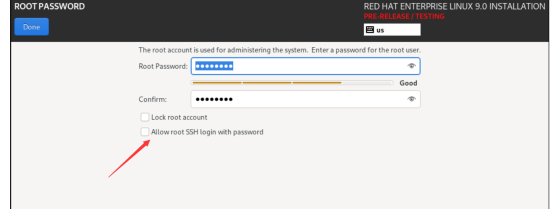
因此,想用root+密码通过远程登录,在上述安装界面上要做如下设置:
Allow root SSH login with password要打钩。
若是在安装过程中Allow root SSH login with password的复选框没有打钩,那么在安装完成之后,可以进行如下修改以便能root+密码进行远程登录:
[root@rhel90 ~]# cat /etc/ssh/sshd_config |grep -i permit |grep -v ^#
PermitRootLogin yes
[root@rhel90 ~]#
也就是修改成yes
插曲:
若是在RHEL9.0的安装过程中对Allow root SSH login with password的复选框进行了选中,那么该设置会体现在/etc/ssh/sshd_config.d/01-permitrootlogin.conf文件中,该文件的内容如下:
[root@localhost sshd_config.d]# cat 01-permitrootlogin.conf
# This file has been generated by the Anaconda Installer.
# Allow root to log in using ssh. Remove this file to opt-out.
PermitRootLogin yes
[root@localhost sshd_config.d]#
然后配置RHEL9.0的yum源,见下:
[root@rhel90 yum.repos.d]# ll
total 12
-rw-r--r--. 1 root root 172 May 21 10:56 AppStream.repo
-rw-r--r--. 1 root root 163 May 21 10:48 BaseOS.repo
-rw-r--r--. 1 root root 358 May 21 10:51 redhat.repo
[root@rhel90 yum.repos.d]# cat AppStream.repo
[AppStream]
name=Red Hat Enterprise Linux 9.0 AppStream
baseurl=file:///mnt/cdrom/AppStream/
enabled=1
gpgcheck=1
gpgkey=file:///etc/pki/rpm-gpg/RPM-GPG-KEY-redhat-release
[root@rhel90 yum.repos.d]# cat BaseOS.repo
[BaseOS]
name=Red Hat Enterprise Linux 9.0 BaseOS
baseurl=file:///mnt/cdrom/BaseOS/
enabled=1
gpgcheck=1
gpgkey=file:///etc/pki/rpm-gpg/RPM-GPG-KEY-redhat-release
[root@rhel90 yum.repos.d]#

# dnf clean all
# rm -rf /var/cache/yum/*
# dnf makecache
# dnf repolist
然后安装PostgreSQL 15所需要的rpm包
 dnf install systemtap-sdt-devel -y
 dnf install gcc -y
 dnf install libicu-devel -y
 dnf install bison -y
 dnf install flex -y
 dnf install perl -y
 dnf install readline-devel -y
 dnf install zlib-devel -y
 dnf install krb5-devel -y
 dnf install openssl-devel -y
 dnf install pam pam-devel -y
 dnf install libxml2-devel -y
 dnf install libxslt-devel -y
 dnf install openldap-devel -y
 dnf install libuuid libuuid-devel -y
 dnf install systemd-devel -y
 dnf install tcl tcl-devel -y
 dnf install python-devel -y
 dnf install lz4-devel -y
 dnf install python3 -y
 dnf install python3-devel -y
 dnf install libzstd-devel -y
然后执行PostgreSQL15Beta1的安装过程
./configure --prefix=/home/pg15beta1/soft
--includedir=/home/pg15beta1/soft/include
--libdir=/home/pg15beta1/soft/lib --mandir=/home/pg15beta1/soft/share/man
--datadir=/home/pg15beta1/soft/share  --with-icu  --with-perl
--with-python  --with-tcl  --with-tclconfig=/usr/lib64
--with-openssl  --with-pam  --with-gssapi --with-libraries=/usr/lib64
--enable-nls  --enable-dtrace  --with-uuid=e2fs --with-libxml
--with-libxslt --with-ldap  --with-selinux  --with-systemd
--with-system-tzdata=/usr/share/zoneinfo
--docdir=/home/pg15beta1/soft/doc
--htmldir=/home/pg15beta1/soft/doc/html --with-lz4 --with-zstd
注意:上述编译选项中带有--with-zstd,这也是PG15中新添加的编译选项。
make world
make install world

[pg15beta1@rhel90 bin]$ ./psql -d postgres -p 5432
psql (15beta1)
输入 "help" 来获取帮助信息.

postgres=# select version();
                                                   version
-------------------------------------------------------------------------------------------------------------
 PostgreSQL 15beta1 on x86_64-pc-linux-gnu, compiled by gcc (GCC) 11.2.1 20220127 (Red Hat 11.2.1-9), 64-bit
(1 行记录)

postgres=#
postgres=# \dconfig
              List of non-default configuration parameters
            Parameter             |                Value
----------------------------------+--------------------------------------
 TimeZone                         | Asia/Shanghai
 application_name                 | psql
 client_encoding                  | UTF8
 config_file                      | /home/pg15beta1/data/postgresql.conf
 data_directory                   | /home/pg15beta1/data
 default_text_search_config       | pg_catalog.english
 hba_file                         | /home/pg15beta1/data/pg_hba.conf
 ident_file                       | /home/pg15beta1/data/pg_ident.conf
 lc_messages                      | C
 log_timezone                     | Asia/Shanghai
 max_stack_depth                  | 2MB
 shared_memory_size               | 143MB
 shared_memory_size_in_huge_pages | 1
 wal_buffers                      | 4MB
(14 行记录)
postgres=#

文章转载自开源软件联盟PostgreSQL分会,如果涉嫌侵权,请发送邮件至:contact@modb.pro进行举报,并提供相关证据,一经查实,墨天轮将立刻删除相关内容。
