



接上文《Spark SQL 部署和测试(上)》分享 Spark SQL 里测试 TPC-H 以及查看执行计划的方法。
Spark SQL 执行计划不及传统关系数据库那么强大但基本的都有,原理很容易理解。学习后对理解新兴的分布式数据库执行计划也有帮助。
TPC-H 测试
数据文件初始化
修改 makefile
[root@sfx111188 dbgen]# cp makefile.suitemakefile[root@sfx111188 dbgen]# vim makefile100 ################101 ## CHANGE NAME OF ANSI COMPILER HERE102 ################103 CC = gcc104 # Current values for DATABASE are:INFORMIX, DB2, TDAT (Teradata)105 # SQLSERVER,SYBASE, ORACLE, VECTORWISE106 # Current values for MACHINE are: ATT, DOS, HP, IBM, ICL, MVS,107 # SGI, SUN,U2200, VMS, LINUX, WIN32108 # Current values for WORKLOAD are: TPCH109 DATABASE= SQLSERVER110 MACHINE = LINUX111 WORKLOAD = TPCH
修改头文件tpcd.h
[root@sfx111188 dbgen]# vim tpcd.h#ifdef SQLSERVER#define GEN_QUERY_PLAN "explain;"#define START_TRAN "starttransaction;\n"#define END_TRAN "commit;\n"#define SET_OUTPUT ""#define SET_ROWCOUNT "limit %d;\m"#define SET_DBASE "use%s;\n"#endif
初始化数据
[hadoop@sfx111188 dbgen]$ make[hadoop@sfx111188 dbgen]$ mkdir tpch_350[hadoop@sfx111188 dbgen]$ cp dbgen tpch_350/[hadoop@sfx111188 dbgen]$ cp qgen tpch_350/[hadoop@sfx111188 dbgen]$ cp dists.dss tpch_350/[hadoop@sfx111188 dbgen]$ cd tpch_350[hadoop@sfx111188 tpch_350]$ ./dbgen -s 350TPC-H Population Generator (Version 3.0.0)Copyright Transaction Processing Performance Council 1994 - 2010[hadoop@sfx111188 tpch_350]$ du -sh *.tbl8.1G customer.tbl263G lineitem.tbl4.0K nation.tbl59G orders.tbl41G partsupp.tbl8.1G part.tbl4.0K region.tbl480M supplier.tbl
TPC-H 建表
spark-sql> create database tpch;Time taken: 0.048 secondsspark-sql> use tpch;Time taken: 0.016 secondsspark-sql>
[hadoop@sfx111188 ~]$ hdfs dfs -mkdir -p /tpch/
use tpch;create external table lineitem (l_orderkey int,l_partkey int,l_suppkey int,l_linenumber int,l_quantity double,l_extendedprice double,l_discount double,l_tax double,l_returnflag string,l_linestatus string,l_shipdate string,l_commitdate string,l_receiptdate string,l_shipinstruct string,l_shipmode string,l_comment string)row format delimitedfields terminated by '|'stored as textfilelocation'/tpch/lineitem';create external table nation (n_nationkey int,n_name string,n_regionkey int,n_comment string)row format delimitedfields terminated by '|'stored as textfilelocation'/tpch/nation';create external table region (r_regionkey int,r_name string,r_comment string)row format delimitedfields terminated by '|'stored as textfilelocation '/tpch/region';create external table part (p_partkey int,p_name string,p_mfgr string,p_brand string,p_type string,p_size int,p_container string,p_retailprice double,p_comment string)row format delimitedfields terminated by '|'stored as textfilelocation '/tpch/part';create external table supplier (s_suppkey int,s_name string,s_address string,s_nationkey int,s_phone string,s_acctbal double,s_comment string)row format delimitedfields terminated by '|'stored as textfilelocation '/tpch/supplier';create external table partsupp (ps_partkey int,ps_suppkey int,ps_availqty int,ps_supplycost double,ps_comment string)row format delimitedfields terminated by '|'stored as textfilelocation '/tpch/partsupp';create external table customer (c_custkey int,c_name string,c_address string,c_nationkey int,c_phone string,c_acctbal double,c_mktsegment string,c_comment string)row format delimitedfields terminated by '|'stored as textfilelocation '/tpch/customer';create external table orders (o_orderkey int,o_custkey int,o_orderstatus string,o_totalprice double,o_orderdate date,o_orderpriority string,o_clerk string,o_shippriority int,o_comment string)row format delimitedfields terminated by '|'stored as textfilelocation '/tpch/orders';
load data localinpath '/data/sfdv1n1/tpch350/region.tbl' into table region;load data localinpath '/data/sfdv1n1/tpch350/customer.tbl' into table customer;load data localinpath '/data/sfdv1n1/tpch350/lineitem.tbl' into table lineitem;load data localinpath '/data/sfdv1n1/tpch350/nation.tbl' into table nation;load data localinpath '/data/sfdv1n1/tpch350/orders.tbl' into table orders;load data local inpath '/data/sfdv1n1/tpch350/part.tbl' into table part;load data localinpath '/data/sfdv1n1/tpch350/partsupp.tbl' into table partsupp;load data localinpath '/data/sfdv1n1/tpch350/supplier.tbl' into table supplier;
create database tpch_uncompressed;set spark.sql.parquet.compression.codec=uncompressed;Create table tpch_uncompressed.lineitem (L_ORDERKEY INT, L_PARTKEY INT, L_SUPPKEY INT,L_LINENUMBER INT, L_QUANTITY DOUBLE, L_EXTENDEDPRICE DOUBLE, L_DISCOUNT DOUBLE,L_TAX DOUBLE, L_RETURNFLAG STRING, L_LINESTATUS STRING, L_SHIPDATE STRING,L_COMMITDATE STRING, L_RECEIPTDATE STRING, L_SHIPINSTRUCT STRING, L_SHIPMODESTRING, L_COMMENT STRING) stored as parquet;create table tpch_uncompressed.part (P_PARTKEY INT, P_NAME STRING, P_MFGR STRING,P_BRAND STRING, P_TYPE STRING, P_SIZE INT, P_CONTAINER STRING, P_RETAILPRICEDOUBLE, P_COMMENT STRING) stored as parquet;create table tpch_uncompressed.supplier (S_SUPPKEY INT, S_NAME STRING, S_ADDRESSSTRING, S_NATIONKEY INT, S_PHONE STRING, S_ACCTBAL DOUBLE, S_COMMENT STRING)stored as parquet;create table tpch_uncompressed.partsupp (PS_PARTKEY INT, PS_SUPPKEY INT, PS_AVAILQTYINT, PS_SUPPLYCOST DOUBLE, PS_COMMENT STRING) stored as parquet;create table tpch_uncompressed.nation (N_NATIONKEY INT, N_NAME STRING, N_REGIONKEYINT, N_COMMENT STRING) stored as parquet;createtable tpch_uncompressed.region (R_REGIONKEY INT, R_NAME STRING, R_COMMENTSTRING) stored as parquet;create table tpch_uncompressed.orders (O_ORDERKEY INT, O_CUSTKEY INT, O_ORDERSTATUSSTRING, O_TOTALPRICE DOUBLE, O_ORDERDATE STRING, O_ORDERPRIORITY STRING,O_CLERK STRING, O_SHIPPRIORITY INT, O_COMMENT STRING) stored as parquet;create table tpch_uncompressed.customer (C_CUSTKEY INT, C_NAME STRING, C_ADDRESSSTRING, C_NATIONKEY INT, C_PHONE STRING, C_ACCTBAL DOUBLE, C_MKTSEGMENT STRING,C_COMMENT STRING) stored as parquet;use tpch_uncompressed;insert into customer select * from tpch.customer;insert into lineitem select * from tpch.lineitem;insert into part select * from tpch.part;insert into supplier select * from tpch.supplier;insert into partsupp select * from tpch.partsupp;insert into nation select * from tpch.nation;insert into region select * from tpch.region;insert into orders select * from tpch.orders;
谓词下推,可以跳过不符合条件的数据,只读取需要的数据,降低 IO 数据量。
使用更高效的存储编码,进一步压缩存储空间。
映射下推,只需读取需要的列,支持向量运算,能获得更好的扫描性能。
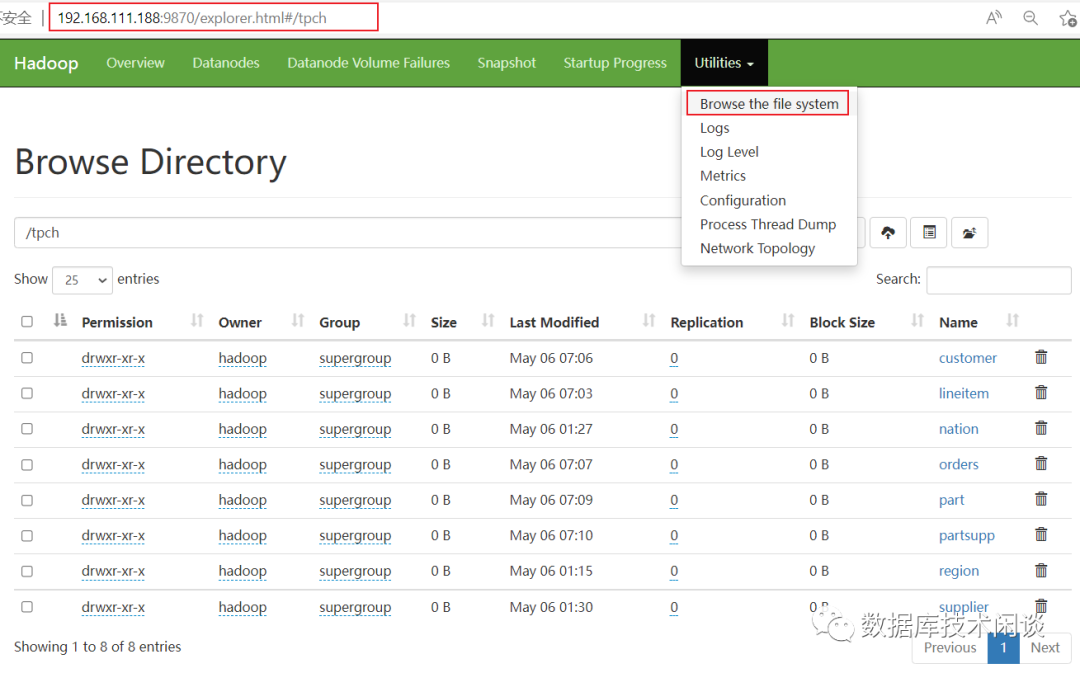
[hadoop@sfx111188bcache]$ hdfs dfs -du -s -h tpch/*8.1 G 8.1 G tpch/customer263.0 G 263.0 G tpch/lineitem2.2 K 2.2 K tpch/nation58.6 G 58.6 G tpch/orders8.0 G 8.0 G tpch/part48.1 G 48.1 G tpch/partsupp389 389 tpch/region479.6 M 479.6 M tpch/supplier[hadoop@sfx111188 ~]$ hdfs dfs -du -h user/hadoop/warehouse/tpch_uncompressed.db/7.8 G 7.8 G user/hadoop/warehouse/tpch_uncompressed.db/customer112.4 G 112.4 G user/hadoop/warehouse/tpch_uncompressed.db/lineitem3.8 K 3.8 K user/hadoop/warehouse/tpch_uncompressed.db/nation43.9 G 43.9 G user/hadoop/warehouse/tpch_uncompressed.db/orders4.2 G 4.2 G user/hadoop/warehouse/tpch_uncompressed.db/part37.7 G 37.7 G user/hadoop/warehouse/tpch_uncompressed.db/partsupp1.5 K 1.5 K user/hadoop/warehouse/tpch_uncompressed.db/region498.0 M 498.0 M user/hadoop/warehouse/tpch_uncompressed.db/supplier[hadoop@sfx111188 ~]$
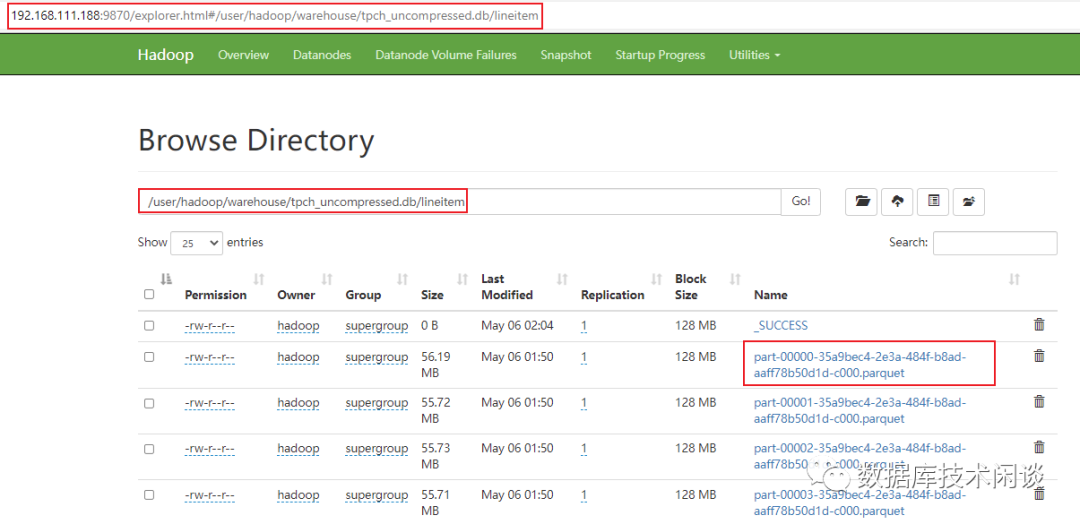
CSD 数据压缩比
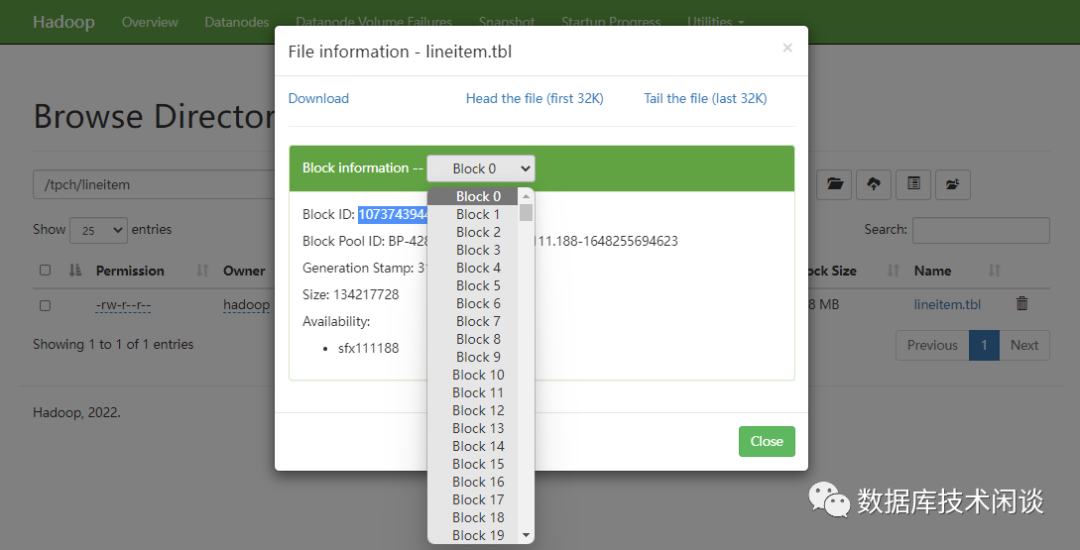
[hadoop@sfx111188subdir0]$ find . |grep 1073743944 |sudo xargs sfx-filesize -hLogical Alocated Physical Ratio File128M 128M 59.50M 2.15 ./subdir8/blk_1073743944Logical Alocated Physical Ratio File1.00M 1.00M 1.00M 1.00 ./subdir8/blk_1073743944_3121.meta
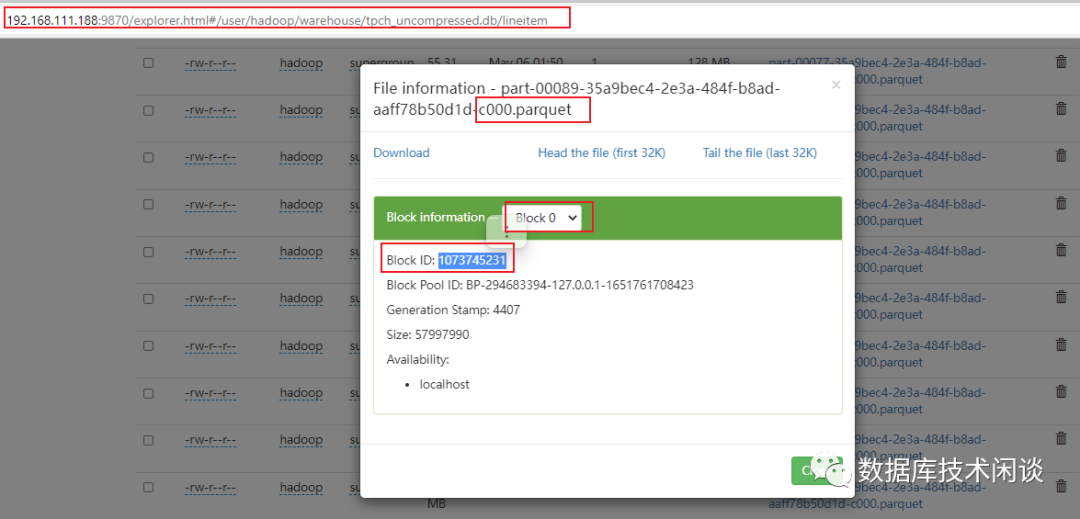
[hadoop@sfx111188 dfs]$ find . |grep 1073745231 |sudo xargs sfx-filesize -h |grep .Logical Alocated Physical Ratio File442.50K 444K 442.77K 1.00 ./data/current/BP-294683394-127.0.0.1-1651761708423/current/finalized/subdir0/subdir13/blk_1073745231_4407.metaLogical Alocated Physical Ratio File55.31M 55.31M 33.64M 1.64 ./data/current/BP-294683394-127.0.0.1-1651761708423/current/finalized/subdir0/subdir13/blk_1073745231
TPC-H 查询
Spark SQL 能满足 TPC-H 22个查询需求。下面给两个例子。
q1_pricing_summary_report.sql
SELECTL_RETURNFLAG, L_LINESTATUS, SUM(L_QUANTITY), SUM(L_EXTENDEDPRICE), SUM(L_EXTENDEDPRICE*(1-L_DISCOUNT)), SUM(L_EXTENDEDPRICE*(1-L_DISCOUNT)*(1+L_TAX)), AVG(L_QUANTITY), AVG(L_EXTENDEDPRICE), AVG(L_DISCOUNT), COUNT(1)FROMlineitemWHEREL_SHIPDATE<='1998-09-02'GROUP BY L_RETURNFLAG, L_LINESTATUSORDER BY L_RETURNFLAG, L_LINESTATUS;
q2_minimum_cost_supplier.sql
selects_acctbal,s_name,n_name,p_partkey,p_mfgr,s_address,s_phone,s_commentfrompart,supplier,partsupp,nation,regionwherep_partkey = ps_partkeyand s_suppkey = ps_suppkeyand p_size = 15and p_type like '%BRASS'and s_nationkey = n_nationkeyand n_regionkey = r_regionkeyand r_name = 'EUROPE'and ps_supplycost = (selectmin(ps_supplycost)frompartsupp,supplier,nation,regionwherep_partkey = ps_partkeyand s_suppkey = ps_suppkeyand s_nationkey = n_nationkeyand n_regionkey = r_regionkeyand r_name = 'EUROPE')order bys_acctbal desc,n_name,s_name,p_partkeylimit 100;
查询执行方式:
[hadoop@sfx111188 ~]$ spark-sql --database tpch_uncompressed -f tpch_queries/q1_pricing_summary_report.sqlSetting default log level to "WARN".To adjust logging level use sc.setLogLevel(newLevel). For SparkR, use setLogLevel(newLevel).2022-05-23 14:54:52,272 WARN util.NativeCodeLoader: Unable to load native-hadoop library for your platform... using builtin-java classes where applicableSpark master: local[*], Application Id: local-1653288893920A F 1.3214595889E10 1.981526484204869E13 1.8824474573410145E13 1.9577452155215535E13 25.500070938291696 38237.31451022952 0.05000213280898179 518218005N F 3.44841059E8 5.171030920476401E11 4.91243409840054E11 5.108955072236212E11 25.49886259627669 38236.57406246567 0.050010318859026945 13523782N O 2.6023136781E10 3.902133887866225E13 3.707025733533616E13 3.855306479917973E13 25.50024030295549 38237.26273749808 0.049999221336791196 1020505551R F 1.3214518093E10 1.9815185947287605E13 1.882442544492562E13 1.9577409002481715E13 25.50045772433984 38237.96736230632 0.05000015503457316 518207094Time taken: 52.726 seconds, Fetched 4 row(s)[hadoop@sfx111188 ~]$
Spark UI
spark-sql 运行时,会给出一个链接地址用于跟踪该作业的信息,默认端口通常是4040。如果被占用,会自动加1。通过web浏览器可以访问该地址。如果spark-sql 会话退出该监听会失效。

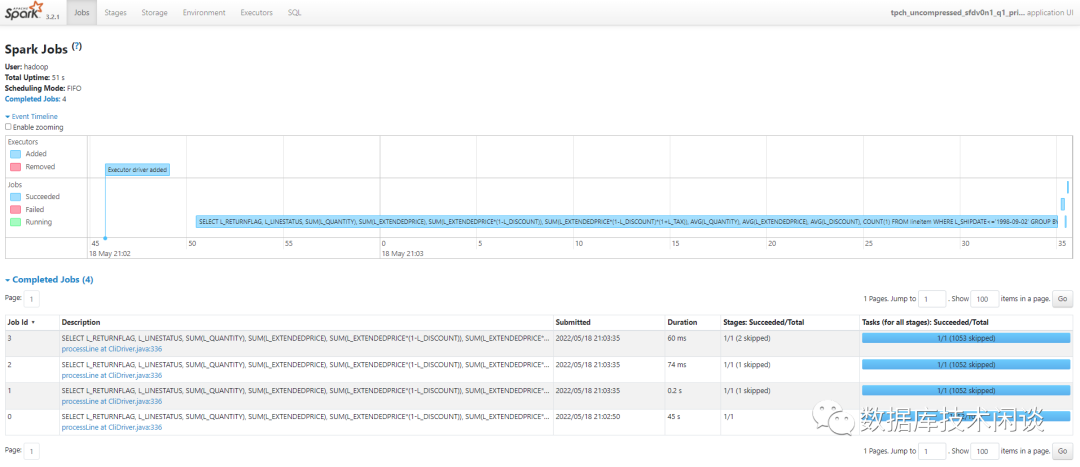
简单介绍一下。
Jobs 会展示这个应用运行的作业,有些作业会处于 skiped 状态。
Stages 是更细粒度的划分。
Storage 可以看到 Spark SQL 缓存的数据(只能看到明确调用 cache 或 persist 方法保存的数据)
Environments 可以看到这次运行时的Spark 环境参数。有些是参数文件指定的,有些可以在 spark-sql 会话里修改或者在命令行参数里指定。
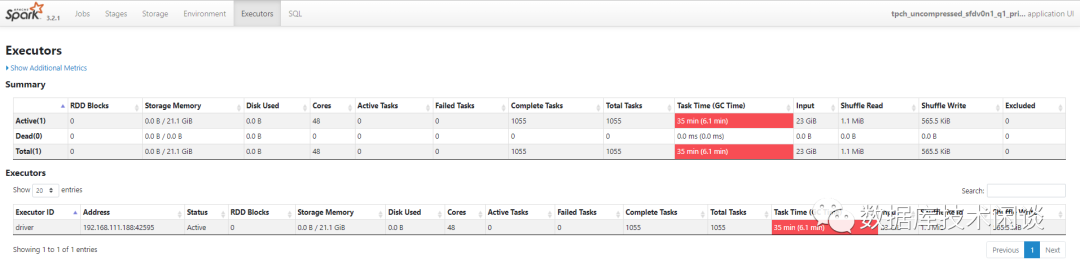
Executors 可以看到该节点 Executor 运行需要的资源数。
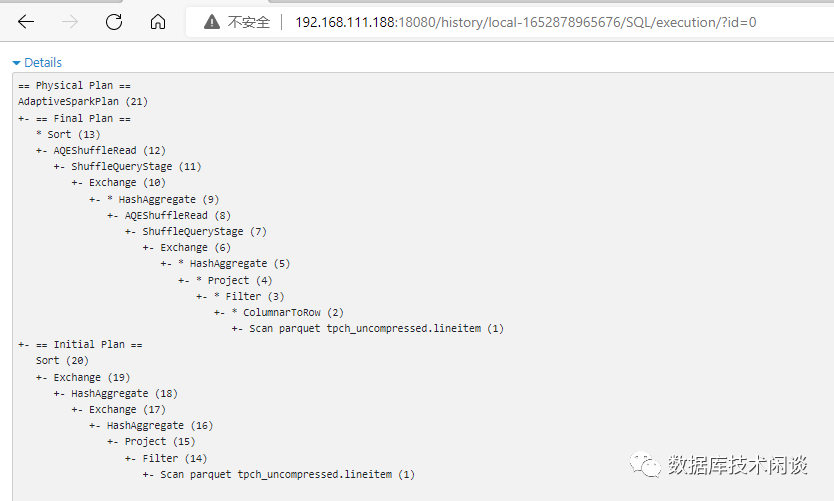
SQL 看到该应用运行过的 SQL。

Spark SQL 支持的 Join
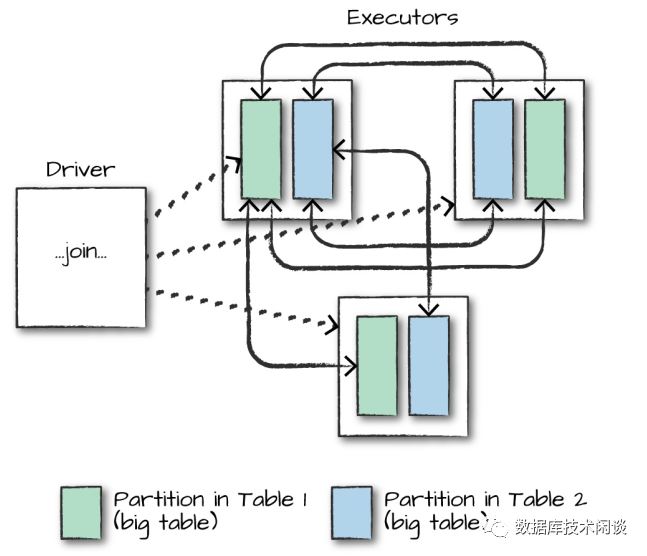
当其中一个表数据量小于 Worker 节点的工作内存,Spark SQL 可能会优化为将小表数据广播到所有 Worker 节点,实现某些连接在节点内部完成。这样做可以减少网络流量,但会增加一点 Worker 节点本地 CPU 消耗。
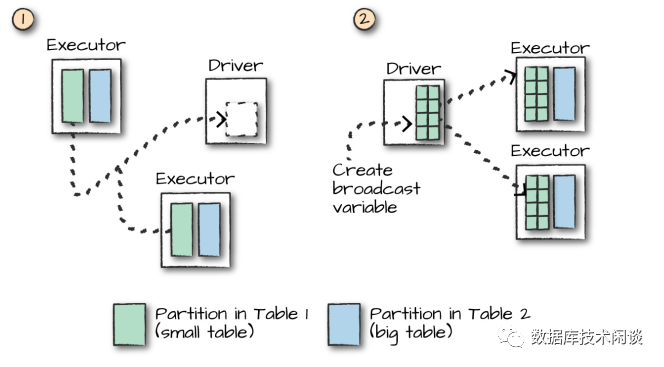
通过 Spark Web UI,在 TPC-H 查询的执行计划里,可以看到很多这样的广播(broadcast)操作。
更多关于排序、去重、分组统计原理可以看文末参考。
更多阅读
https://www.jianshu.com/p/59155803d67b
https://github.com/JerryLead/SparkInternals
