



一、数据库基本操作
1.新建数据库:
Win+R 命令窗口输入dbca,按照步骤完成创建
查看数据库端口:C:\oracle\product\10.2.0\db_1\install\portlist.ini
2.连接数据库
Win+R 命令窗口输入cmd,以管理员身份登录:>set oracle_sid=xsc(指定数据库)>sqlplus / as sysdba(以sysdba权限登录)用xx用户登录数据库hwddb>sqlplus system/hwd123456@hwddb3.查看数据库名称,创建日期select name,created from v$database;查看实例状态;select status from v$instance;
3.查看数据库监听器参数:
SQL>show parameter local_listener
4.配置监听器命令:
Win+R 命令窗口输入netca
(1)使用netca按照步骤添加一个监听器listener1
(2)修改C:\oracle\product\10.2.0\db_1\NETWORK\ADMIN\listener.ora配置文件增加一个监听器。
5.修改数据库监听参数:
alter system set local_listener='(ADDRESS = (PROTOCOL = TCP)(HOST = gwqhdl)(PORT = 1522))';alter system register;--手动注册,使注册生效
6.监听器状态查看:
Win+R 命令窗口输入cmd
再输入命令lsnrctl
LSNRCTL>
7.查看刚配置的监听器状态,启动,关闭监听器:
LSNRCTL>status listener1
监听器启停:
LANRCTL>stop listener1
LANRCTL>start listener1
8.远程连接新建数据库
前须在客户端进行netca
再在客户端进行远程连接数据库sqlplus system/qhxn-0971@sleep
9.关闭开启数据库
shundown -> nomount -> mount -> open
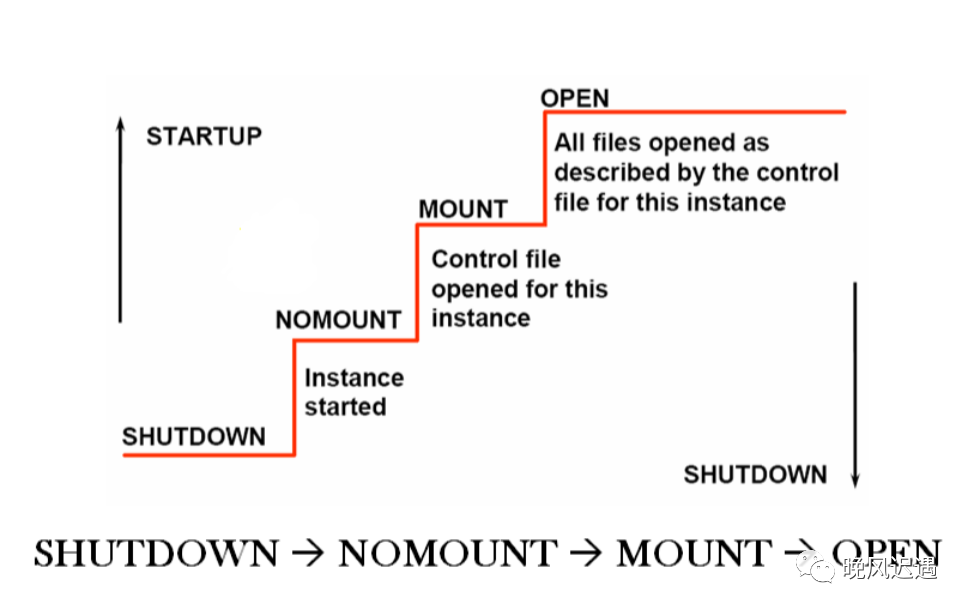
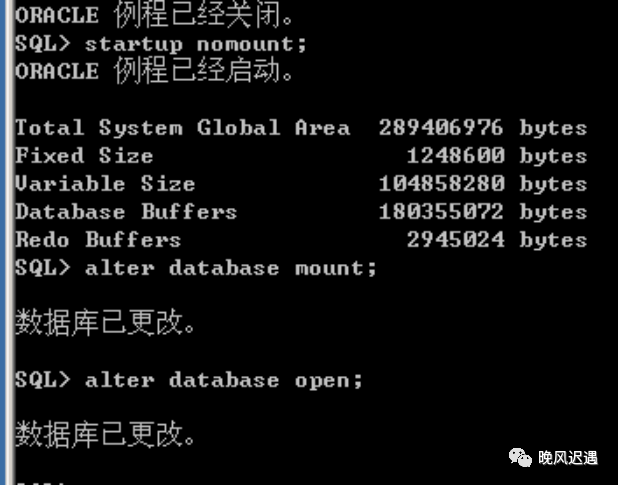
关闭数据库:shutdown immediate开启数据库命令startup nomount;alter database mount;alter database open;
10.查看修改日志归档类型:
archive log list;
在数据库未启动前更改存档模式和非存档模式;
alter database noarchivelog;(改为非存档模式)alter database archivelog;(改为存档模式)
使用PL/SQL登录数据库(注意使用sysdba登录时用户名须为sys)
查看日志组及成员添加结果
11.查看创建、数据库表空间、创建临时表空间:
select * from dba_tablespaces;--查看表空间创建表空间(空间大小50M,自动以10M扩容,最大为100M)create tablespace stu datafile 'd:\data\myspace.dbf' size 50mautoextend on next 10m maxsize 100m;select * from dba_data_files;--查看表空间文件select * from dba_temp_files;create temporary tablespace mytempspace ----创建临时表空间,自动扩展至无限.tempfile 'c:\data\mytempspace.dbf' size 50mautoextend on next 10m maxsize unlimited;drop tablespace testspace;--删除表空间drop dataspace xxx including cotents and datafiles;--彻底删除表空间:create user student identified by qazwsx default tablespacemyspace temporary tablespace mytempspace;--创建用户并定义表空间和临时表空间alter tablespace myspace adddatafile 'C:\DATA\MYSPACE1.DBF' size 50m;--给表空间增加datafile文件create tablespace testspace --创建表空间指定两个datafile 文件datafile 'c:\data\testspace01.dbf' size 50mautoextend on next 10mmaxsize 100m,'c:\data\testspace02.dbf' size 100m;
二、用户操作
1.查看数据库用户信息:select * from dba_users;2.新建一个用户create user hwd identified by hhhhhh;3.增加连接的角色:grant connect to hwd;grant resource to hwd;grant dba to hwd;--可以创建用户了4.删除角色revoke dba from hwd;--删除权限;drop user hwd --删除用户alter user juliet account unlock;5.用新建的用户登录Connect student/qazwsx@mymdb
三、数据库增删改查
(1)数据库查询
1.查询单表:
select JOB gongzuo from emp;--别名--连接符 ||为sql语句的字符连接符,select EMPNO|| 'dexinmin'||ENAME as xinxi from emp;select distinct JOB from emp;--去除重--单字段排序 desc降序 不写默认升序 或者 ascselect * from emp order by empno desc;select * from emp order by sal asc;--desc;select * from emp order by ename,sal asc;--多字段排序select empno,ename,job,sal from emp;--字段的逻辑运算select * from emp where comm is not null;--条件查询select * from emp where ename like '%S';--条件查询select * from emp where deptno=30;--条件查询select * from emp where(job = 'SALESMAN' or job='MANAGER')and sal>2500;--条件查select lower(ename) from emp;--小写;select count(*) from emp;select sysdate from dual;--查询系统时间
2.分组
select deptno,max(sal) from emp group by deptnoselect job,count(empno) from emp group by job;--分组筛选 关键字:having 针对分组后的数据筛选,允许使用多行函数。select deptno,job,count(*) from emp group by deptno,jobhaving count(*)>1 order by deptno;
3.多表联合查询
--SQL92
select * from emp,dept where emp.deptno=dept.deptno;--等值连接筛选select empno,ename,job,mgr,hiredate,sal,comm,dname,loc from emp,deptwhere emp.deptno=dept.deptno order by dept.dname;select * from emp e,dept d where e.deptno=d.deptno;--别名select * from BONUS;select * from emp,salgrade where emp.sal>=salgrade.losaland emp.sal<=salgrade.hisal order by emp.sal;select e.*,d.ename lingdao from emp e,emp d where e.mgr=d.empno;
--外连接-SQL99
select * from emp cross join dept;select * from emp natural join dept;--默认查找字段相同的 几乎不用--使用指定的字段对联合查询的结果进行筛选select * from emp inner join dept using(deptno);---等值筛选后条件筛选,普通筛选用where,等值用onselect * from emp inner join dept on emp.deptno=dept.deptnowhere sal>2000;--左外连接select * from emp left join dept on emp.deptno=dept.deptno;---右外连接 查无员工的部门信息select * from emp right join dept on emp.deptno=dept.deptno;--全外连接select * from emp full join dept on emp.deptno=dept.deptn
4.自连接
select emp.*,e2.ename lingdao fromemp inner join emp e2 on emp.mgr=e2.empno;
5.三表联合查询
select * from emp e,dept d,city c;--92select * from emp e,dept d,city cwhere e.deptno=d.deptno and d.loc=c.cid;--92select * from emp einner join dept don e.deptno=d.deptnoinner join city con d.loc=c.cidwhere e.sal>2000 or e.comm is not null;
6.子查询
单行子查询 多行子查询 查询的筛选条件不明确
select * from emp where sal>(select sal from emp where ename='CLARK') order by sal;select * from emp where deptno=(select deptno from emp where ename='SCOTT')and sal<(select sal from emp where ename='SCOTT');select * from emp where sal=(select max(sal) from emp);---多行子查询--查询工资高于任意一个CLERK的所有员工信息select * from emp where sal>(select min(sal) from emp where job='CLERK') order by sal;select * from emp where sal>any (select sal from emp where job='CLERK');--查询工资高于任意一个CLERK的所有员工信息select * from emp where sal>(select max(sal) from emp where job='CLERK') order by sal;select * from emp where sal >all(select sal from emp where job='CLERK');--查询部门20中同部门10的雇员工作一样的雇员信息;select * from emp where deptno=20 and job=any(select job from emp where deptno=10);select * from emp where job in(select job from emp where deptno=10) and deptno =20;
7.分页查询
当一个表中的数量特别大时,一次性显示页面太大,体验差。
注:rownum关键字只做<=,<判断,不能做>,>=判断
select rownum ,e.* from emp e,dept;--编号select rownum r,e.* from emp e where r<=5;;--可以理解为第一页select * from (select rownum r,e.* from emp e where rownum<=10) twhere r>5;--第二页select * from (select rownum r,e.* from emp e where rownum<=15) twhere r>10;--第三页--排序后分页select * from (select rownum r,t.* from(select * from emp order by sal) twhere rownum <15)where r>10;
规律总结:每页显示a行,第n页为:
select * from (select rownum r,e.* from 数据库名 e where rownum<=n*a) t
where r>(n-1)*a;
(2)数据库的增删改
1.数据库创建
create table deptbak as select * from dept;
2.主键约束
create table student (id number(4) ;-- primary keyname varchar2(100),age number(3),--not nullsex varchar2(10),fav varchar2(300),--unique 唯一约束birth date,tell varchar2(20),constraint pk_student_id primary key(id),constraint ck_student_name check(name is not null),--非空约束constraint ck_student_age check(age>0 and age<150),constraint un_student_tell);--增加约束alter table student add constraint pk_student_id primary key(id);alter table student drop constraint pk_student_id ;--删除约束alter table student add constraint ck_student_agecheck(age>0 and age<150);
3.外键约束 当在子表中插入数据在父表中不存在,则报错。
一般选父表的主键作为子表的外键。
select * from student;drop table clazz;select * from clazz;create table clazz (con number(4) primary key,cname varchar2(100) not null,cdesc varchar2(100));insert into clazz values(1,'wachuncaoban','jinnianzhengshiwan');insert into clazz values(2,'zhongdiban','fengshoudanian');create table student (id number(4),-- primary key,name varchar2(100),age number(3),sex varchar2(10),fav varchar2(300),birth date,cno number(5) reference clazz(cno); --外键约束constraint pk_student_id primary key(id),constraint ck_student_id check(name is not null)--constraint fk_student_cid foreign key(cid) reference clazz(cno));insert into student values(0001,'hwd',18,'nan','shuijiao',to_date('1998-03-04','yyyy-mm-dd'),1);insert into student values(0002,'tht',18,'nv','chirou',to_date('1996-05-04','yyyy-mm-dd'),1);insert into student values(0003,'lt',18,'nv','huaqian',to_date('1998-06-04','yyyy-mm-dd'),2);insert into student values(0005,'hhf',34,'nan','huaqian',to_date('1998-02-04','yyyy-mm-dd'),2);alter table student add constraint fk_student_cidforeign key(cid) reference clazz(cno);--增加外键约束alter table student drop constraint fk_student_cid ;--删除外键约束alter table student add constraint fk_student_cid foreign key(cid)--删除父表数据时,删除相关联的子表数据reference clazz(cno) delete on cascade;alter table student add constraint fk_student_cid foreign key(cid)--删除父表数据时,不会删除相关联的子表数据reference clazz(cno) delete on null;drop table student;
4.数据库更改
alter table student add sphone number(11);--表中添加新字段alter table student modify sphone varchar2(20);--修改字段类型alter table student rename column sphone to phone;--修改字段名alter table student drop column phone;--删除字段desc student;--查看表结构alter table STUDENT rename to STUDENT1;--修改表名drop table dept;--删除数据库Drop table cascade constraints;flashback table STUDENT to before drop;--回滚
5.数据库数据添加数据
--在部门表中新增部门信息内容insert into dept(deptno,dname,loc)values(50,'xianyu','beijing');insert into dept values(60,'tangping','xining');insert into student values(0001,'hwd',18,'nan','shuijiao',to_date('1998-03-04','yyyy-mm-dd'));insert into student values(0002,'tht',18,'nv','chirou',to_date('1996-05-04','yyyy-mm-dd'));
6.删除数据库中的数据
delete from dept where deptno=50;truncate table dept;--截断alter table t_student drop column join;--删除字段
7.更改数据库中的数据
update dept set dname='lanzhou',loc='lanzhou' where deptno=50;
四、oracle数据库序列、视图、索引
1.创建序列,开始没有值 可以作为主键使用
create sequence cc;--创建序列,开始没有值 可以作为主键使用--从5开始,步长为2 最大到1000;create sequence aa start with 5 increment by 2 max 1000;select cc.currval from dual;--查看当前序列状态select cc.nextval from dual;--执行一次自增一次,步长为1--试图、索引create table tea1 (tid number(10) primary key,tame varchar2(20) not null);insert into tea1 values(cc.nextval,'zhangsan');drop sequence cc;--删除序列
2.索引 查找更快
显示的创建,隐式执行
create index index_tea1_tname on tea1(tname);--创建索引
drop index index_tea1_tname;--删除索引
3.视图
对一张表权限分配,隐藏原始表中的核心字段的数据,但视图中的字段,可以通过视图 增删改查原始表。创建时需dba权限 。可以手动开启只读模式
create view stu as select sno,sname,sage from student;select * from stu;update stu set sname='hwd' where sno=1;--可以通过视图增删改查原始表--指定视图只读create view stu as select sno,sname,sage fromstudent with read only;drop view stu ;--删除视图
