



Orchestrator简介
Orchestrator是一个MySQL高可用性和复制管理工具,作为服务运行并提供命令行访问、HTTP API和Web界面。
Orchestrator可以主动发现当前的拓扑结构和主从复制状态,支持MySQL主从复制拓扑关系的调整、支持MySQL主库故障自动切换(failover)、手动主从切换(switchover)等功能。
Orchestrator自身也可以部署多个节点,通过raft分布式一致性协议,保证自身的高可用。
Orchestrator支持
1.检测和审查复制集群,可以主动发现当前的拓扑结构和主从复制状态,读取基本的MySQL信息如复制状态和配置。
2.安全拓扑重构:转移服务于另外一台计算机的系统拓扑,orchestrator了解复制规则,可以解析binlog文件中的position、GTID、Pseudo GTID、binlog服务器
整洁的拓扑可视化
复制问题可视化
通过简单的拖拽修改拓扑
3.故障修复,根据拓扑信息,可以识别各种故障,根据配置可以执行自动恢复。
Orchestrator原理
探测机制
Orchestrator默认每隔5秒(可以通过参数设置)去被监控的MySQL实例上拉取实例的状态,并将实例的状态信息存储至Orchestrator的后端元数据库,然后Orchestrator默认每隔5秒从元数据库中获取每个MySQL实例的状态,展示在Web界面。
故障检测
Orchestrator很好地利用了集群实例间的复制关系,不仅会探测主库,也会对从库进行探测,实际情况下,如果所有从库都联系不上主库,说明集群的复制关系已经被损坏,我们是有理由进行故障切换的。
在同时满足以下两个条件的前提下,Orchestrator才会判定主库故障:
1.联系主库失败。
2.可以联系到主库对应的从库,并且这些从库联系主库也失败。
选主过程
Orchestrator判定主库故障后会进入选新主库的阶段,整个阶段大致会经历:
故障发现-对所有主库副本进行排序-选择新主库-对其余主库副本进行划分-重新拓扑主从关系-新主选择完成-新集群恢复写入
副本排序
Orchestrator判定主库故障后,会停止故障主库的副本和故障主库的复制关系,然后对所有副本进行排序操作。排序规则包括很多,这里只介绍在我们实际应用场景中比较重要的几种规则,其余就不一一介绍了。其中副本排序规则的优先级从高到低依次为:副本对故障主库Binlog的实际执行位置、数据中心(地域)、提升规则。依据排序规则的优先级,Binlog执行位置最新的副本优先,如果副本Binlog执行位置相同,则数据中心和故障主库相同的副本优先,如果Binlog执行位置也相同,则提升规则对应数值小的副本优先。其中提升规则的制定对集群来说是比较灵活的,用户可以自定义每个实例的提升规则,提升规则的选项及其对应的数值如下:
1.must:0
2.prefer(比较喜欢):1
3.neutral(中立):2
4.prefer_not(比较不喜欢):3
5.must_not(禁止提升):4
新主选择
根据排序规则对故障主库的所有副本排序完成后,Orchestrator不会直接选择排序结果优先级比较高的副本作为新主库,除了考虑排序结果外,Orchestrator还会考虑副本的版本、副本的Binlog格式、以及副本的提升规则是否设置为must_not(禁止提升),以此来判定某个副本是否合适作为新的主库,综合考虑以上条件后,最终会选择出一个副本作为集群的新主库。
副本划分
新主库初步选择完成后,Orchestrator会对故障主库的其余副本进行划分,划分的规则是副本对故障主库Binlog的实际执行位置,Binlog的执行位置代表同步数据的新旧程度。因此将其余副本划分为三类,分别是:比新主库数据还要新的副本(ahead)、和新主库一样新的副本(equal)、比新主库落后的副本(later)。
重新拓扑
副本划分完成后,进入重构拓扑的步骤,其中重构拓扑包括两个步骤,分别是重置副本的复制关系、分离不可用副本。首先对equal、later副本进行重置,将它们的主库从之前的故障主库变为目前的新主库,并启动它们和新主库之间的复制关系,和新主库建立复制关系后,later副本缺失的数据也会自动得到补偿。除此之外,很关键的一点是在这个阶段新主库还没有进行重置,还保留着和故障主库的复制信息,并且在这一阶段新主库重新开启了了这段复制关系,也就是说,如果这个阶段故障主库被重新拉起来,恢复正常,业务继续向旧主库写入的数据也会同步到新的拓扑中。
在变更复制关系的过程中,可能有一些副本和新主库产生复制错误,这些副本会被Orchestrator从新集群中分离出去,除此之外,需要分离的副本还包括ahead副本,也就是比新主库数据还要新的副本,根据以上的选主策略,在我们实际的应用场景下,我们初次选出的新主库一般是所有副本中拥有最新数据的,除非最新副本被加入到了提升黑名单中被禁止提升。分离副本的方式是可逆的,通过修改副本的MasterHost实现(change master to “//master”)。
二次选主-理想主库替换新主
新集群拓扑产生后,选主过程并没有结束,Orchestrator会判断当前选出的新主库是否是一个理想的主库,如果不是,Orchestrator会继续尝试从当前新主库的所有副本中选择一个理想的主库来替换当前的新主库,替换的过程相当于两个实例互换角色,不会造成数据丢失。
对于理想主库的判定,不得不说Orchestrator是非常人性化的,它会从用户的角度出发,尊重用户对于新主库的选择意愿,理想主库的判定和选择包括以下几个规则,这些规则都是用户自定义的选项:
1.提升规则是否为must或者prefer
2.DataCenter是否和故障主库相同
3.PhysicalEnvironment是否和故障主库相同
Orchestrator两次选主的过程,不仅保证了新集群能够最大程度地拥有最新的数据,并且还保障了用户的实际提升意愿。假设故障主库是广州机房,用户希望提升的新主库也是在广州机房,如果在第一次选主的过程中不幸选中的最新主库是上海机房的,该新主库一定会判定为非理想新主库,在第二次选主的过程中新主库会被理想的广州机房的副本所替换。
新集群恢复写入
新主选择完成后,新集群拓扑还处于只读状态,所以需要恢复新集群的写入,使数据能够正常写入新主库,并且要避免继续写入旧主库。
这其中首先,在新主库上执行Reset操作来清除新旧主库间的复制关系,然后将新主库设置为可写状态,同时Orchestrator会尝试将故障主库设置为只读状态,防止故障主库重新被拉起造成脏数据的写入。该过程还定义了多个Hook,方便用户进行自定义开发。至此,关于Orchestrator的故障切换过程就完成了。
Orchestrator测试环境规划
| IP地址 | 操作系统 | MySQL版本 | 测试MySQL端口(被管理的MySQL) | 后端MySQL端口(OC自己的MySQL) | 备注 |
| 10.30.8.108 | CentOS 7.3 | 5.7.19 | 3306 | 3307 | |
| 10.30.8.109 | CentOS 7.3 | 5.7.19 | 3306 | 3307 | |
| 10.30.8.111 | CentOS 7.3 | 5.7.19 | 3306 | 3307 |
测试MySQL和后端MySQL部署过程
1.三台服务器安装MySQL软件(步骤略)
2.测试MySQL主从搭建(一主两从,搭建过程略)
my.cnf 配置文件如下:
[root@kvm_db_1_8_108 ~]# more /etc/my.cnf
[client]
port = 3306
socket = /tmp/mysql.sock
user = root
password = hhueP/Oku6xf

[mysql]
prompt = "\\u@\\h[\\d] \\R:\\m:\\s>"

[mysqld]
server-id = 10308108
user = mysql
port = 3306
socket = /tmp/mysql.sock
bind-address = 0.0.0.0
report-host = 10.30.8.108
report-port = 3306
net_read_timeout = 120
net_write_timeout = 900
#character#
character-set-server = utf8mb4
explicit_defaults_for_timestamp = OFF
skip-external-locking = ON
key_buffer_size = 384M
max_allowed_packet = 64M
table_open_cache = 4096
myisam_sort_buffer_size = 6M
query_cache_type = 0
query_cache_size = 0
#slaveDB
#####thread buffer
tmp_table_size = 100M  #不动
max_heap_table_size = 100M #不动
sql_mode =
thread_cache_size = 32
innodb_open_files = 65536
open_files_limit = 65535
table_definition_cache = 4096
table_open_cache_instances = 64
back_log = 500
max_connections = 4500
max_connect_errors = 100000
skip-name-resolve = ON
sysdate_is_now = 1
lower_case_table_names = 1
#thread-pool
thread_handling = one-thread-per-connection
thread_pool_high_prio_mode = statements
extra_port = 3307
#DATA STORAGE
datadir = /mysqldata/mysql3306/data
tmpdir = /mysqldata/mysql3306/tmp
#BINARY LOGGING
log_bin = /mysqldata/mysql3306/log/binlog
expire_logs_days = 14
sync_binlog = 1
binlog_format = row
binlog_row_image = full
binlog_direct_non_transactional_updates = 1
log_slave_updates = 1
max_binlog_cache_size = 8G
max_binlog_size = 1024M
binlog-rows-query-log-events = 1
log_bin_trust_function_creators = 1
# INNODB #
innodb_buffer_pool_size = 10G
innodb_buffer_pool_instances = 16
innodb_buffer_pool_dump_pct = 25
#BACKUP
#buffer recover
innodb_buffer_pool_load_at_startup = 1
innodb_buffer_pool_dump_at_shutdown = 1
innodb_flush_method = O_DIRECT
innodb_log_files_in_group = 3
innodb_log_buffer_size = 32M
innodb_log_file_size = 1G
innodb_log_group_home_dir = /mysqldata/mysql3306/data
innodb_page_cleaners = 8
innodb_flush_log_at_trx_commit = 1
innodb_file_per_table = 1
innodb_max_dirty_pages_pct = 75
innodb_io_capacity = 8000
innodb_io_capacity_max = 15000
innodb_use_native_aio = 1
innodb_read_io_threads = 8
innodb_write_io_threads = 8
innodb_purge_threads = 2
innodb_data_file_path = ibdata1:12M:autoextend
innodb_temp_data_file_path = ibtmp1:12M:autoextend:max:50G
innodb_undo_directory = /mysqldata/mysql3306/data
innodb_rollback_segments = 128
innodb_undo_tablespaces = 0
innodb_undo_log_truncate = 1
innodb_max_undo_log_size = 2G
innodb_purge_rseg_truncate_frequency = 128
innodb_sort_buffer_size = 64M
innodb_print_all_deadlocks = 1
innodb_strict_mode = 1
innodb_online_alter_log_max_size = 10G
innodb_autoinc_lock_mode = 2
# LOGGING #
log_error = /mysqldata/mysql3306/log/mysql-error.log
log_queries_not_using_indexes = 1
slow_query_log = 1
slow_query_log_file = /mysqldata/mysql3306/log/mysql-slow.log
long_query_time = 1
log_slow_sp_statements = 1
log_slow_verbosity = 'microtime,query_plan,innodb,profiling'
#log-queries-not-using-indexes
wait_timeout = 1814400
#stat
innodb_stats_persistent = 1
innodb_stats_auto_recalc = 1
#gtid and semi
#rpl_semi_sync_master_enabled  = 1
#rpl_semi_sync_slave_enabled   = 1
gtid_mode = on
enforce_gtid_consistency = on
master_info_repository = table
relay_log_recovery = 1
relay_log_info_repository = table
relay_log_purge = 1
relay_log = /mysqldata/mysql3306/log/relaylog
slave-rows-search-algorithms = 'INDEX_SCAN,HASH_SCAN'
#checksum
#innodb_checksum_algorithm    = crc32
binlog_checksum = crc32
#innodb_log_checksum_algorithm  = crc32
#slave
skip_slave_start = 0
log_timestamps = SYSTEM
slave_parallel_workers = 32
slave-parallel-type = LOGICAL_CLOCK
slave_preserve_commit_order = 1
sort_buffer_size = 16M
read_buffer_size = 8M
join_buffer_size = 64M
read_rnd_buffer_size = 16M
bulk_insert_buffer_size = 32M
binlog_cache_size = 4M
初始化MySQL
mysqld --defaults-file=/etc/my.cnf --initialize
主从库启动mysql
systemctl start mysqld
重置root用户密码和创建复制用户
alter user root@'localhost' identified by 'hhueP/Oku6xf';
create user 'repl'@'%' identified by 'hhueP/Oku6xf';
grant replication slave on *.* to  'repl'@'%';
3.后端MySQL搭建(三台没有主从关系)
my3316.cnf 配置文件如下:
[root@kvm_db_1_8_108 ~]# more /etc/my3316.cnf
[client]
port = 3316
socket = /tmp/mysql3316.sock
user = root
password = hhueP/Oku6xf

[mysql]
prompt = "\\u@\\h[\\d] \\R:\\m:\\s>"

[mysqld]
server-id = 103081082
user = mysql
port = 3316
socket = /tmp/mysql3316.sock
bind-address = 0.0.0.0
report-host = 10.30.8.108
report-port = 3316
net_read_timeout = 120
net_write_timeout = 900
#character#
character-set-server = utf8mb4
explicit_defaults_for_timestamp = OFF
skip-external-locking = ON
key_buffer_size = 384M
max_allowed_packet = 64M
table_open_cache = 4096
myisam_sort_buffer_size = 6M
query_cache_type = 0
query_cache_size = 0
#slaveDB
#####thread buffer
tmp_table_size = 100M  #不动
max_heap_table_size = 100M #不动
sql_mode =
thread_cache_size = 32
innodb_open_files = 65536
open_files_limit = 65535
table_definition_cache = 4096
table_open_cache_instances = 64
back_log = 500
max_connections = 4500
max_connect_errors = 100000
skip-name-resolve = ON
sysdate_is_now = 1
lower_case_table_names = 1
#thread-pool
thread_handling = one-thread-per-connection
thread_pool_high_prio_mode = statements
extra_port = 3317
#DATA STORAGE #
datadir = /mysqldata/mysql3316/data
tmpdir = /mysqldata/mysql3316/tmp
#BINARY LOGGING #
log_bin = /mysqldata/mysql3316/log/binlog
expire_logs_days = 14
sync_binlog = 1
binlog_format = row
binlog_row_image = full
binlog_direct_non_transactional_updates = 1
log_slave_updates = 1
max_binlog_cache_size = 8G
max_binlog_size = 1024M
binlog-rows-query-log-events = 1
log_bin_trust_function_creators = 1
# INNODB #
innodb_buffer_pool_size = 1G
innodb_buffer_pool_instances = 16
innodb_buffer_pool_dump_pct = 25
#BACKUP
#buffer recover
innodb_buffer_pool_load_at_startup = 1
innodb_buffer_pool_dump_at_shutdown = 1
innodb_flush_method = O_DIRECT
innodb_log_files_in_group = 3
innodb_log_buffer_size = 32M
innodb_log_file_size = 1G
innodb_log_group_home_dir = /mysqldata/mysql3316/data
innodb_page_cleaners = 8
innodb_flush_log_at_trx_commit = 1
innodb_file_per_table = 1
innodb_max_dirty_pages_pct = 75
innodb_io_capacity = 8000
innodb_io_capacity_max = 15000
innodb_use_native_aio = 1
innodb_read_io_threads = 8
innodb_write_io_threads = 8
innodb_purge_threads = 2
innodb_data_file_path = ibdata1:12M:autoextend
innodb_temp_data_file_path = ibtmp1:12M:autoextend:max:50G
innodb_undo_directory = /mysqldata/mysql3316/data
innodb_rollback_segments = 128
innodb_undo_tablespaces = 0
innodb_undo_log_truncate = 1
innodb_max_undo_log_size = 2G
innodb_purge_rseg_truncate_frequency = 128
innodb_sort_buffer_size = 64M
innodb_print_all_deadlocks = 1
innodb_strict_mode = 1
innodb_online_alter_log_max_size = 10G
innodb_autoinc_lock_mode = 2
# LOGGING #
log_error = /mysqldata/mysql3316/log/mysql-error.log
log_queries_not_using_indexes = 1
slow_query_log = 1
slow_query_log_file = /mysqldata/mysql3316/log/mysql-slow.log
long_query_time = 1
log_slow_sp_statements = 1
log_slow_verbosity = 'microtime,query_plan,innodb,profiling'
#log-queries-not-using-indexes
wait_timeout = 1814400
#stat
innodb_stats_persistent = 1
innodb_stats_auto_recalc = 1
#gtid and semi
#rpl_semi_sync_master_enabled  = 1
#rpl_semi_sync_slave_enabled   = 1
gtid_mode = on
enforce_gtid_consistency = on
master_info_repository = table
relay_log_recovery = 1
relay_log_info_repository = table
relay_log_purge = 1
relay_log = /mysqldata/mysql3316/log/relaylog
slave-rows-search-algorithms = 'INDEX_SCAN,HASH_SCAN'
#checksum
#innodb_checksum_algorithm    = crc32
binlog_checksum = crc32
#innodb_log_checksum_algorithm  = crc32
#slave
skip_slave_start = 0
log_timestamps = SYSTEM
slave_parallel_workers = 32
slave-parallel-type = LOGICAL_CLOCK
slave_preserve_commit_order = 1
sort_buffer_size = 16M
read_buffer_size = 8M
join_buffer_size = 64M
read_rnd_buffer_size = 16M
bulk_insert_buffer_size = 32M
binlog_cache_size = 4M
初始化MySQL
mysqld --defaults-file=/etc/my3316.cnf --initialize
启动MySQL
mysqld --defaults-file=/etc/my3316.cnf &
Orchestrator的搭建
Orchestrator 截止当前最新的版本是 V3.2.6,下载地址:
https://github.com/openark/orchestrator/releases
下载完成后解压
cd /bak/data/
tar -xvzf orchestrator-3.2.6-linux-amd64.tar.gz -C /
将/usr/local/orchestrator/orchestrator-sample.conf.json移动到/etc下,并命名为orchestrator.conf.json
cp /usr/local/orchestrator/orchestrator-sample.conf.json /etc/orchestrator.conf.json
配置文件 orchestrator.conf.json 的配置如下:
[root@kvm_db_1_8_108 etc]# more orchestrator.conf.json
{
  "Debug": true,
  "EnableSyslog": false,
  "ListenAddress": ":3000",
  "MySQLTopologyUser": "orc_client_user",
  "MySQLTopologyPassword": "orc_client_password",
  "MySQLTopologyCredentialsConfigFile": "",
  "MySQLTopologySSLPrivateKeyFile": "",
  "MySQLTopologySSLCertFile": "",
  "MySQLTopologySSLCAFile": "",
  "MySQLTopologySSLSkipVerify": true,
  "MySQLTopologyUseMutualTLS": false,
  "MySQLOrchestratorHost": "127.0.0.1",
  "MySQLOrchestratorPort": 3316,
  "MySQLOrchestratorDatabase": "orchestrator",
  "MySQLOrchestratorUser": "orc_server_user",
  "MySQLOrchestratorPassword": "orc_server_password",
  "MySQLOrchestratorCredentialsConfigFile": "",
  "MySQLOrchestratorSSLPrivateKeyFile": "",
  "MySQLOrchestratorSSLCertFile": "",
  "MySQLOrchestratorSSLCAFile": "",
  "MySQLOrchestratorSSLSkipVerify": true,
  "MySQLOrchestratorUseMutualTLS": false,
  "MySQLConnectTimeoutSeconds": 1,
  "DefaultInstancePort": 3306,
  "DiscoverByShowSlaveHosts": true,
  "InstancePollSeconds": 5,
  "BackendDB": "mysql",
  "DiscoveryIgnoreReplicaHostnameFilters": [
    "a_host_i_want_to_ignore[.]example[.]com",
    ".*[.]ignore_all_hosts_from_this_domain[.]example[.]com",
    "a_host_with_extra_port_i_want_to_ignore[.]example[.]com:3307"
  ],
  "UnseenInstanceForgetHours": 240,
  "SnapshotTopologiesIntervalHours": 0,
  "InstanceBulkOperationsWaitTimeoutSeconds": 10,
  "HostnameResolveMethod": "default",
  "MySQLHostnameResolveMethod": "",
  "SkipBinlogServerUnresolveCheck": true,
  "ExpiryHostnameResolvesMinutes": 60,
  "RejectHostnameResolvePattern": "",
  "ReasonableReplicationLagSeconds": 10,
  "ProblemIgnoreHostnameFilters": [],
  "VerifyReplicationFilters": false,
  "ReasonableMaintenanceReplicationLagSeconds": 20,
  "CandidateInstanceExpireMinutes": 60,
  "AuditLogFile": "",
  "AuditToSyslog": false,
  "RemoveTextFromHostnameDisplay": ".mydomain.com:3306",
  "ReadOnly": false,
  "AuthenticationMethod": "",
  "HTTPAuthUser": "",
  "HTTPAuthPassword": "",
  "AuthUserHeader": "",
  "PowerAuthUsers": [
    "*"
  ],
  "ClusterNameToAlias": {
    "127.0.0.1": "test suite"
  },
  "ReplicationLagQuery": "",
  "DetectClusterAliasQuery": "select ifnull(max(cluster_name), '') as cluster_alias from orch_meta.cluster where anchor=1",
  "DetectClusterDomainQuery": "",
  "DetectInstanceAliasQuery": "select @@hostname",
  "DetectPromotionRuleQuery": "",
  "DataCenterPattern": "[.]([^.]+)[.][^.]+[.]mydomain[.]com",
  "DetachLostReplicasAfterMasterFailover": true,
  "PhysicalEnvironmentPattern": "",
  "PromotionIgnoreHostnameFilters": [],
  "DetectSemiSyncEnforcedQuery": "",
  "ServeAgentsHttp": false,
  "AgentsServerPort": ":3001",
  "AgentsUseSSL": false,
  "AgentsUseMutualTLS": false,
  "AgentSSLSkipVerify": false,
  "AgentSSLPrivateKeyFile": "",
  "AgentSSLCertFile": "",
  "AgentSSLCAFile": "",
  "AgentSSLValidOUs": [],
  "UseSSL": false,
  "UseMutualTLS": false,
  "SSLSkipVerify": false,
  "SSLPrivateKeyFile": "",
  "SSLCertFile": "",
  "SSLCAFile": "",
  "SSLValidOUs": [],
  "URLPrefix": "",
  "StatusEndpoint": "/api/status",
  "StatusSimpleHealth": true,
  "StatusOUVerify": false,
  "AgentPollMinutes": 60,
  "UnseenAgentForgetHours": 6,
  "StaleSeedFailMinutes": 60,
  "SeedAcceptableBytesDiff": 8192,
  "PseudoGTIDPattern": "",
  "PseudoGTIDPatternIsFixedSubstring": false,
  "PseudoGTIDMonotonicHint": "asc:",
  "DetectPseudoGTIDQuery": "",
  "BinlogEventsChunkSize": 10000,
  "SkipBinlogEventsContaining": [],
  "ReduceReplicationAnalysisCount": true,
  "FailureDetectionPeriodBlockMinutes": 60,
  "FailMasterPromotionOnLagMinutes": 0,
  "RecoveryPeriodBlockSeconds": 30,
  "RecoveryIgnoreHostnameFilters": [],
  "RecoverMasterClusterFilters": ["*"],
  "RecoverIntermediateMasterClusterFilters": ["*"],
  "OnFailureDetectionProcesses": [
    "echo 'Detected {failureType} on {failureCluster}. Affected replicas: {countSlaves}' >> tmp/recovery.log"
  ],
  "PreGracefulTakeoverProcesses": [
    "echo 'Planned takeover about to take place on {failureCluster}. Master will switch to read_only' >> tmp/recovery.log"
  ],
  "PreFailoverProcesses": [
    "echo 'Will recover from {failureType} on {failureCluster}' >> tmp/recovery.log"
  ],
  "PostFailoverProcesses": [
    "echo '(for all types) Recovered from {failureType} on {failureCluster}. Failed: {failedHost}:{failedPort}; Successor: {successorHost}:{successorPort}' >> tmp/recovery.log"
  ],
  "PostUnsuccessfulFailoverProcesses": [],
  "PostMasterFailoverProcesses": [
    "echo 'Recovered from {failureType} on {failureCluster}. Failed: {failedHost}:{failedPort}; Promoted: {successorHost}:{successorPort}' >> tmp/recovery.log"
  ],
  "PostIntermediateMasterFailoverProcesses": [
    "echo 'Recovered from {failureType} on {failureCluster}. Failed: {failedHost}:{failedPort}; Successor: {successorHost}:{successorPort}' >> tmp/recovery.log"
  ],
  "PostGracefulTakeoverProcesses": [
    "echo 'Planned takeover complete' >> tmp/recovery.log"
  ],
  "CoMasterRecoveryMustPromoteOtherCoMaster": true,
  "DetachLostSlavesAfterMasterFailover": true,
  "ApplyMySQLPromotionAfterMasterFailover": true,
  "PreventCrossDataCenterMasterFailover": false,
  "PreventCrossRegionMasterFailover": false,
  "MasterFailoverDetachReplicaMasterHost": false,
  "MasterFailoverLostInstancesDowntimeMinutes": 0,
  "PostponeReplicaRecoveryOnLagMinutes": 0,
  "OSCIgnoreHostnameFilters": [],
  "GraphiteAddr": "",
  "GraphitePath": "",
  "GraphiteConvertHostnameDotsToUnderscores": true,
  "ConsulAddress": "",
  "ConsulAclToken": "",
  "ConsulKVStoreProvider": "consul",
  "RaftEnabled": true,
  "RaftBind": "10.30.8.108",
  "RaftDataDir": "/var/lib/orchestrator",
  "DefaultRaftPort": 10008,
  "RaftNodes": [
    "10.30.8.108",
    "10.30.8.109",
    "10.30.8.111"
    ]
}
主要参数的解释如下:
MySQLOrchestratorHost:orch后端数据库地址
MySQLOrchestratorPort:orch后端数据库端口
MySQLOrchestratorDatabase:orch后端数据库名
MySQLOrchestratorUser:orch后端数据库用户名(明文)
MySQLOrchestratorPassword:orch后端数据库密码(明文)
MySQLTopologyUser:被管理的MySQL的用户(明文)
MySQLTopologyPassword:被管理的MySQL的密码(密文)
InstancePollSeconds:orch探测MySQL的间隔秒数
MySQLConnectTimeoutSeconds:orch连接MySQL的超时时间
DefaultInstancePort:被管理MySQL的默认端口
DiscoverByShowSlaveHosts:通过show slave hosts 来发现拓扑结构
DetachLostReplicasAfterMasterFailover:是否强制分离在主恢复中不会丢失的从库
RecoveryPeriodBlockSeconds:在该时间内再次出现故障,不会进行迁移,避免出现并发恢复和不稳定
RecoverMasterClusterFilters:只对匹配这些正则表达式模式的集群进行主恢复(“*”模式匹配所有)。
RecoverIntermediateMasterClusterFilter:只对匹配这些正则表达式模式的集群进行主恢复(“*”模式匹配所有)
HostnameResolveMethod:解析主机名,使用主机名:default;不解析用none,直接用IP --
MySQLHostnameResolveMethod:解析主机名,发出select @@hostname;发出select @@report_host(需要配置report_host)。不解析用"",直接用IP。
InstanceBulkOperationsWaitTimeoutSeconds:进行批量操作时等待单个实例的时间
ReasonableReplicationLagSeconds:复制延迟高于该值表示异常
VerifyReplicationFilters:在拓扑重构之前检查复制筛选器
ReasonableMaintenanceReplicationLagSeconds:复制延迟高于该值会上下移动调整MySQL拓扑
CandidateInstanceExpireMinutes:该时间之后,使用实例作为候选从库(在主故障转移时提升)的建议到期
ReplicationLagQuery (SlaveLagQuery):使用SHOW SLAVE STATUS进行延迟判断,力度为秒。
DetectClusterAliasQuery:查询集群别名的query,信息放到每个被管理实例的meta库的cluster表中。--参考参数 DetectClusterAliasQuery
DetectClusterDomainQuery:查询集群Domain的query,信息放到每个被管理实例的meta库的cluster表中。
DetectInstanceAliasQuery:查询实例的别名。--
BackendDB:后端数据库类型。
RaftEnabled:是否开启Raft,保证orch的高可用。
RaftDataDir:Raft的数据目录。
RaftBind:Raft 的 bind地址。
DefaultRaftPort:Raft的端口。
RaftNodes:Raft的节点。
ConsulAddress:Consul的地址。
ConsulAclToken:Consul的token。
Orchestrator的调试
1.安装完成后创建 orchestrator 所需的库和用户(三个节点 3316)
mysql -S /tmp/mysql3316.sock -uroot -p123456

CREATE DATABASE IF NOT EXISTS orchestrator;
CREATE USER 'orc_server_user'@'127.0.0.1' IDENTIFIED BY 'orc_server_password';
GRANT ALL PRIVILEGES ON `orchestrator`.* TO 'orc_server_user'@'127.0.0.1';
2.被管理的数据库的授权(3306)
CREATE USER 'orc_client_user'@'10.30.8.%' IDENTIFIED BY 'orc_client_password';
GRANT SUPER, PROCESS, REPLICATION SLAVE, RELOAD ON *.* TO 'orc_client_user'@'10.30.8.%';
GRANT SELECT ON mysql.slave_master_info TO 'orc_client_user'@'10.30.8.%';
GRANT SELECT ON orch_meta.* TO 'orc_client_user'@'10.30.8.%';  --这个权限参考参数 DetectClusterAliasQuery,如果设置了参数,需要创建对应的库和表
GRANT SELECT ON ndbinfo.processes TO 'orc_client_user'@'10.30.8.%'; -- Only for NDB Cluster
如果启用 DetectClusterAliasQuery,需要建库和表
参考 https://github.com/Fanduzi/orchestrator-chn-doc/blob/master/Setup/%E9%85%8D%E7%BD%AE/Configuration%20%20Discovery%2C%20classifying%20servers.md#cluster-alias

create database orch_meta;
use orch_meta;
CREATE TABLE IF NOT EXISTS cluster (
  anchor TINYINT NOT NULL,
  cluster_name VARCHAR(128) CHARSET ascii NOT NULL DEFAULT '',
  cluster_domain VARCHAR(128) CHARSET ascii NOT NULL DEFAULT '',
  PRIMARY KEY (anchor)
) ENGINE=InnoDB DEFAULT CHARSET=utf8;
3.启动Orchestrator(OC这里测试的raft enable,所以三个节点都起,注意修改配置文件)
[root@kvm_db_1_8_108 ~]# scp etc/orchestrator.conf.json 10.30.8.109:/etc/
[root@kvm_db_1_8_108 ~]# scp etc/orchestrator.conf.json 10.30.8.111:/etc/
cd /usr/local/orchestrator && ./orchestrator --config=/etc/orchestrator.conf.json http &
web端访问地址 10.30.8.108:3000,下图是我做完测试后的截图,大家凑合看下效果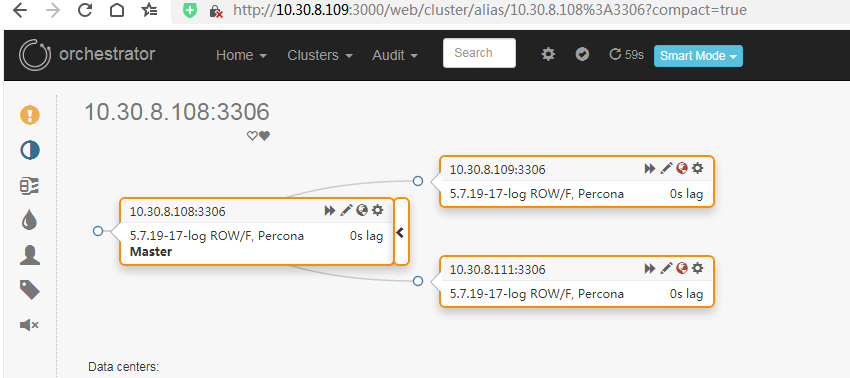
kill 掉 10.30.8.108 上的mysql主库后,10.30.8.111变成了新的主库,10.30.8.109自动变更成10.30.8.111的从库 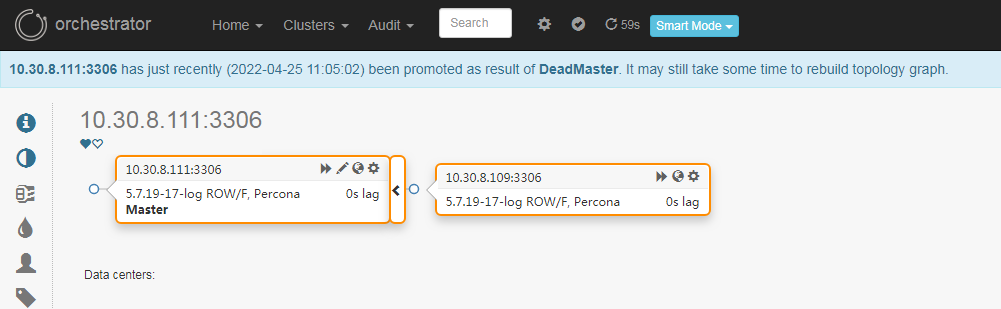
重新拉起 10.30.8.108上的测试mysql后,重置下主从关系,Orchestrator 会自动发现拓扑关系
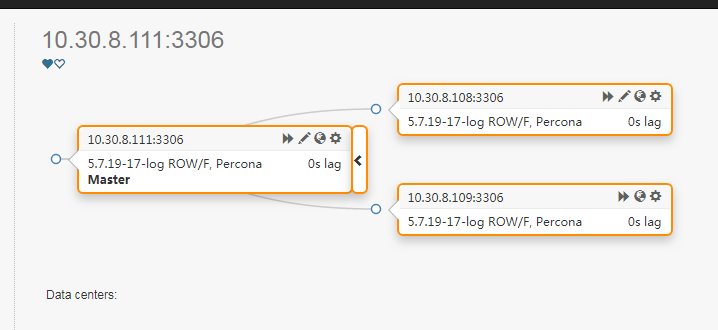
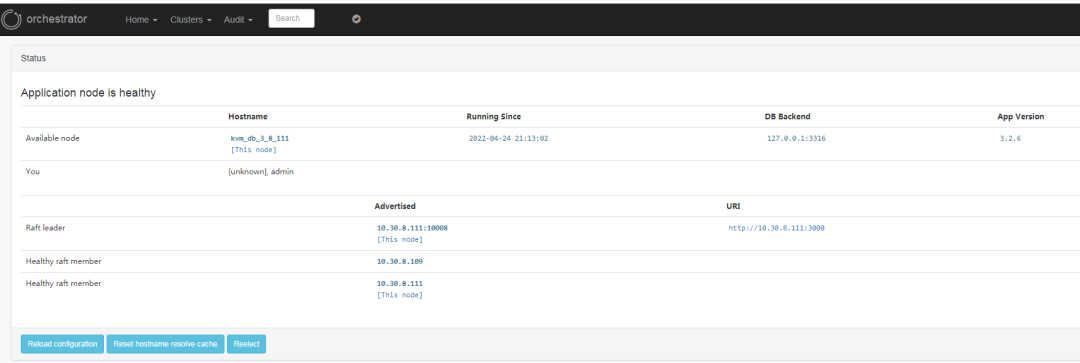
也可以在Home-Status下看到当前的 Orchestrator Raft 集群的节点情况
4.补充点: Orchestrator 的raft高可用
如果需要启动 RaftEnabled ,需要在 orchestrator 的各个几点上部署 orchestrator 进程,编辑 /etc/orchestrator.conf.json 下的参数 RaftBind 和 RaftEnabled
改完 RaftBind 和 RaftEnabled 之后,启动orchestrator进程,之后就可以看到日志中显示:
2022-04-18 20:35:44 DEBUG orchestrator/raft: applying command 74: request-health-report
2022-04-18 20:35:48 INFO auditType:forget-clustr-aliases instance::0 cluster: message:Forgotten aliases: 0
2022-04-18 20:35:48 INFO auditType:forget-unseen-differently-resolved instance::0 cluster: message:Forgotten instances: 0
2022-04-18 20:35:48 INFO auditType:forget-unseen instance::0 cluster: message:Forgotten instances: 0
2022-04-18 20:35:48 INFO auditType:review-unseen-instances instance::0 cluster: message:Operations: 0
2022-04-18 20:35:48 INFO auditType:inject-unseen-masters instance::0 cluster: message:Operations: 0
2022-04-18 20:35:48 INFO auditType:resolve-unknown-masters instance::0 cluster: message:Num resolved hostnames: 0
2022-04-18 20:35:48 DEBUG raft leader is 10.30.8.108:10008; state: Follower
2022-04-18 20:35:53 DEBUG raft leader is 10.30.8.108:10008; state: Follower
5.故障测试
(1).Orchestrator 一个节点挂掉
kill掉 orchestrator leader节点的进程,raft集群进行切换,有新的节点成为了leader
(2).mysql主库挂掉,从节点能不能变主库接管服务
kill 掉mysql主库后,其中一个从库变成主库
Orchestrator 的优缺点
需要明白的是 Orchestrator 的作用是仅仅是保证 MySQL数据库的高可用,在MySQL主库故障时能自动进行故障切换,选举出新的主库,恢复集群写入,保证业务正常访问。
MHA和Orchestrator的对比:
MHA和Orchestrator的对比
| 功能 | MHA | Orchestrator |
| 自身高可用 | 单点 | 基于Raft协议实现高可用 |
| 宕机判断 | 悲观检测 | 可靠的故障检测 |
| 数据补偿 | 支持 | 不支持 |
| 选主模式 | 选择最新从库 | 选择最合适的从库 |
| GTID模式 | 支持 | 支持 |
| 自动&手动切换 | 支持 | 支持 |
| 自定义Hook支持 | 支持 | 支持 |
在实际使用过程中,MySQL集群的上层需要部署一层代理如DBPorxy为业务和数据库之间的中间层,为业务访问数据库提供了独立、透明的高性能代理服务。
MHA架构单点自身不是高可用,有vip跨机房漂移的问题(这个问题比较严重),出现故障时如果vip漂移的有问题需要DBA进行干预,不需要业务进行整改,如果要改成 Orchestrator 的高可用架构,需要加代理解决的主要问题是到域名到主库ip的指向的问题,可以考虑Consul。
参考文档:
https://github.com/openark/orchestrator/tree/master/docs
