



说明
本文章旨在介绍EMCC13《通知–脚本和 SNMPv1 陷阱》的使用方法,在EMCC中,可以设置《意外事件–意外事件规则》,关联《通知–脚本和 SNMPv1 陷阱》,实现对EMCC警告信息的拦截,然后按照《脚本和 SNMPv1 陷阱》中定义的脚本格式进行输出,使监控变得更加灵活可控,可读性更强。
下面将用如下场景演示此功能:
监控目标主机代理进程运行状态
情况1:代理进程意外关闭,需要告警,输出相关告警信息;
情况2:代理进程在计划内进行维护重启,不告警,仅显示相关信息。
实验环境:
EMCC 13.5.0.0
实践过程
整个流程的实现需要以下4步:
1、编辑脚本,实现相关功能
2、将脚本放置到OMS主机,指定位置
3、在《通知–脚本和 SNMPv1 陷阱》定义方法
4、在《意外事件–意外事件规则》关联上述方法
编辑脚本
脚本如下,此脚本通过OMS主机执行,脚本中涉及到的变量是内置在EMCC中,可以参考
EMCC变量官方说明
脚本大体逻辑为,在检查目标主机相关端口,判断代理是异常关闭或者计划内重启
[root@em13c os_shell]# pwd
/backup/scripts/os_shell
[root@em13c os_shell]# cat itsm.sh
#!/bin/sh

TEST_AGENT=/backup/scripts/os_shell/log/test_agent.log
TJDATE=`date '+%Y-%m-%d %H:%M:%S'`
echo "$TJDATE itsm.sh RUN .....">> $TEST_AGENT
. /home/oracle/.bash_profile
echo "$TJDATE SEVERITY_CODE:$SEVERITY_CODE TARGET_TYPE:$TARGET_TYPE .....">>  $TEST_AGENT
if [ "$SEVERITY_CODE" = "FATAL" -o  "$SEVERITY_CODE" = "WARNING" -o "$SEVERITY_CODE" = "CRITICAL" ] && [ "$TARGET_TYPE" = "Agent" ]
then
            HOST_IP_1=`grep -w "$HOST_NAME$" /backup/scripts/os_shell/hosts.txt|awk '{gsub("","",$1)}{print $3}'`
            n=1
            TEL_OS_RESULT="0"
            TEL_DB_RESULT="0"
            while (( $n <= 15 ))
            do
                sleep 5
                wdate=`date '+%Y-%m-%d %H:%M:%S'`
                TEL_OS_RESULT=`/u01/app/oracle/product/19.0.0/db_1/jdk/bin/java Telnet $HOST_IP_1 22|grep "successful" |wc -l`
                TEL_DB_RESULT=`/u01/app/oracle/product/19.0.0/db_1/jdk/bin/java Telnet $HOST_IP_1 3872|grep "successful" |wc -l`
                echo "$wdate telnt $n times TEL_OS_RESULT:$TEL_OS_RESULT TEL_DB_RESULT:$TEL_DB_RESULT .....">> $TEST_AGENT
                    if [ "$TEL_OS_RESULT" = "1" -a "$TEL_DB_RESULT" = "1" ];then
                            break
                    fi
                    (( n++ ))
            done
            wdate=`date '+%Y-%m-%d %H:%M:%S'`
            echo "$wdate TEL_OS_RESULT:$TEL_OS_RESULT TEL_DB_RESULT:$TEL_DB_RESULT .....">> $TEST_AGENT
            if [ "$TEL_OS_RESULT" = "1" -a "$TEL_DB_RESULT" = "1" ]
            then
                    echo $TJDATE' '$TITLE' '$MESSAGE ', WRONG MESSAGE, OS and Agent is Running, EM Agent Restarted.'  >> $TEST_AGENT
            else
                    echo $TJDATE' '$TITLE' '$MESSAGE ', OS and Agent is Not Running'  >> $TEST_AGENT
            fi
    fi
fi

exit 0
脚本放置到OMS主机
脚本放置到OMS主机相关目录待用。
[root@em13c os_shell]# pwd
/backup/scripts/os_shell
[root@em13c os_shell]# ll
总用量 12
-rw-r--r-- 1 oracle oinstall 1497 6月  13 10:35 hosts.txt
-rwxr-xr-x 1 oracle oinstall 1810 6月  13 13:36 itsm.sh
-rwxr-xr-x 1 root   root     3445 6月  13 11:20 itsm.sh2022
drwxr-xr-x 2 oracle oinstall   88 6月  13 11:28 log
在《通知–脚本和 SNMPv1 陷阱》定义方法
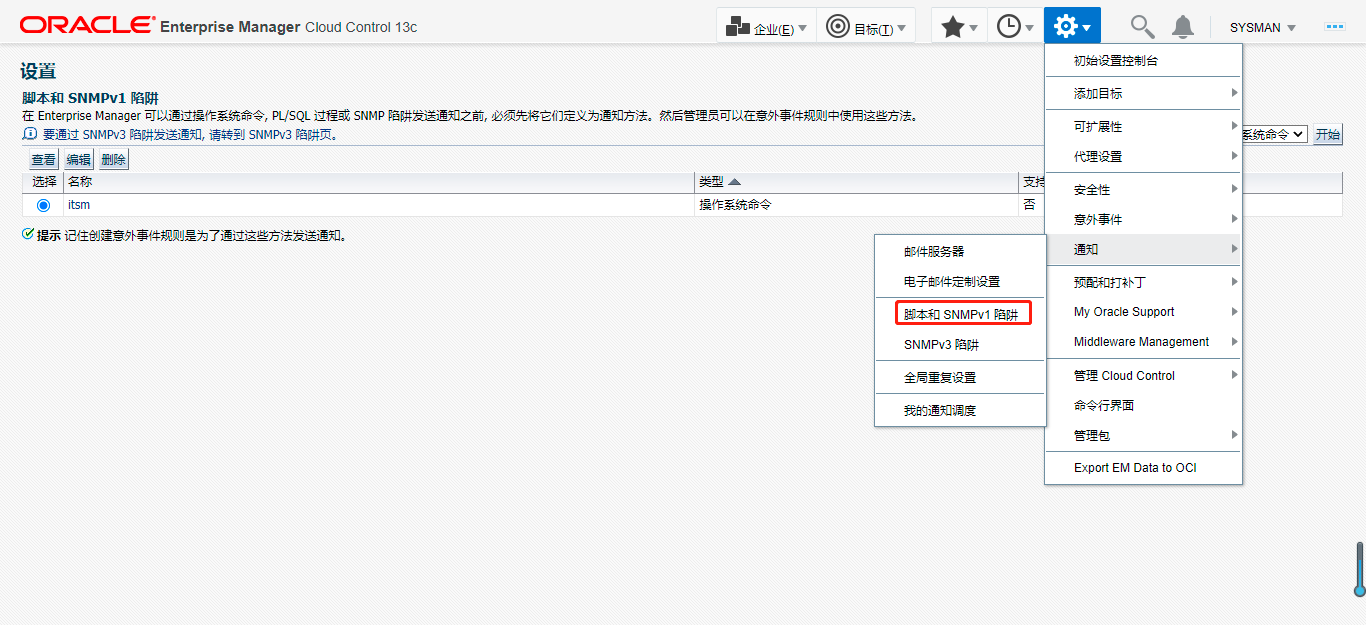
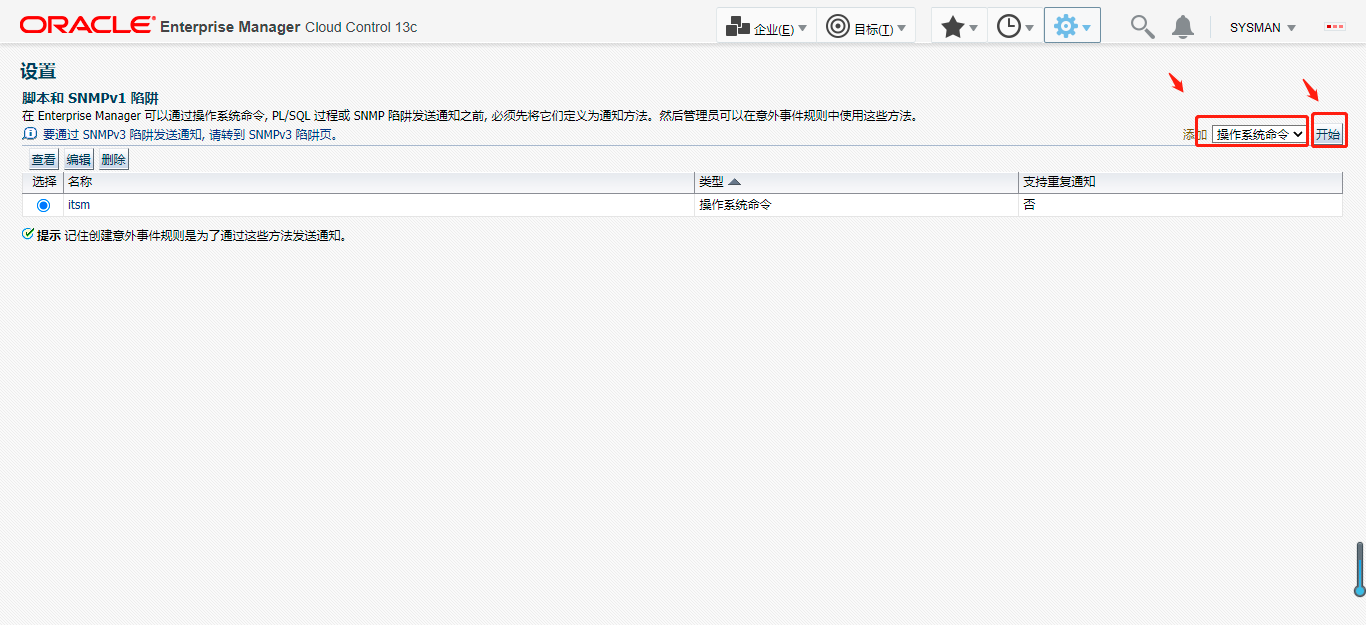
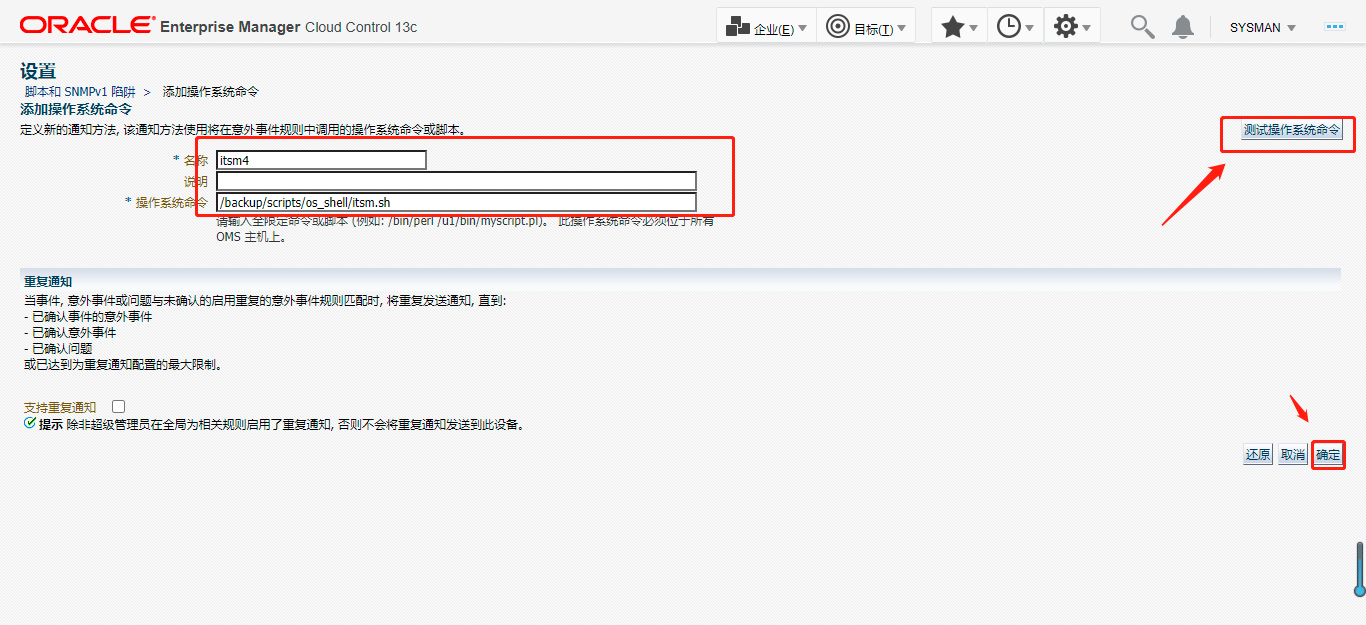
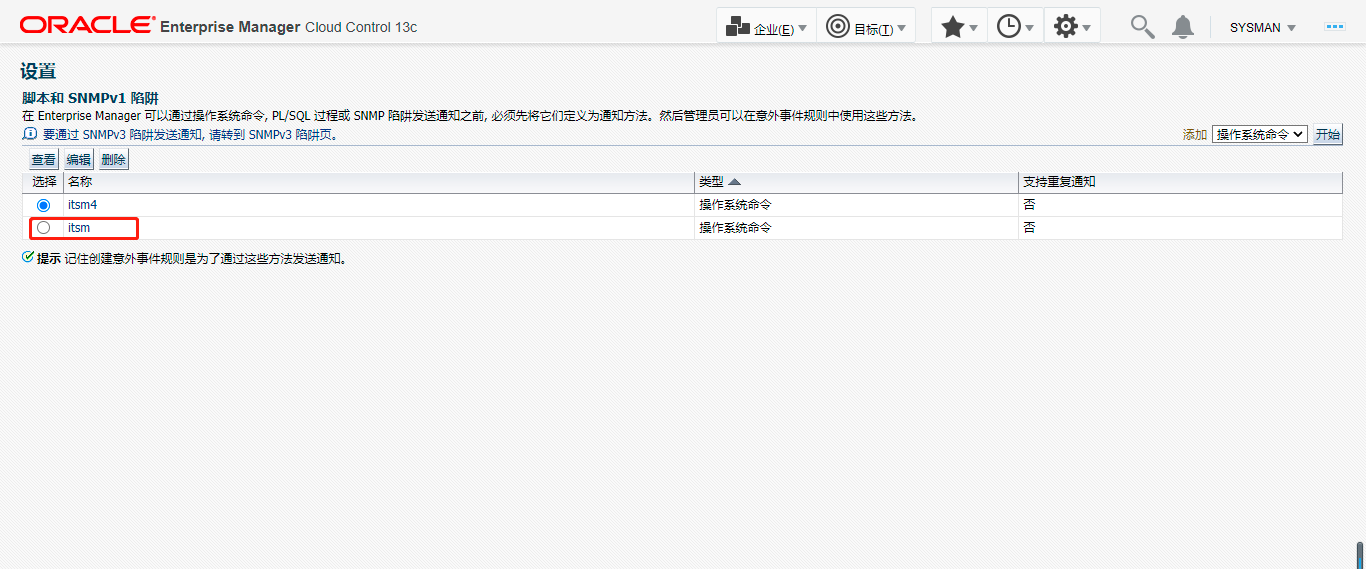
在《意外事件–意外事件规则》关联上述方法
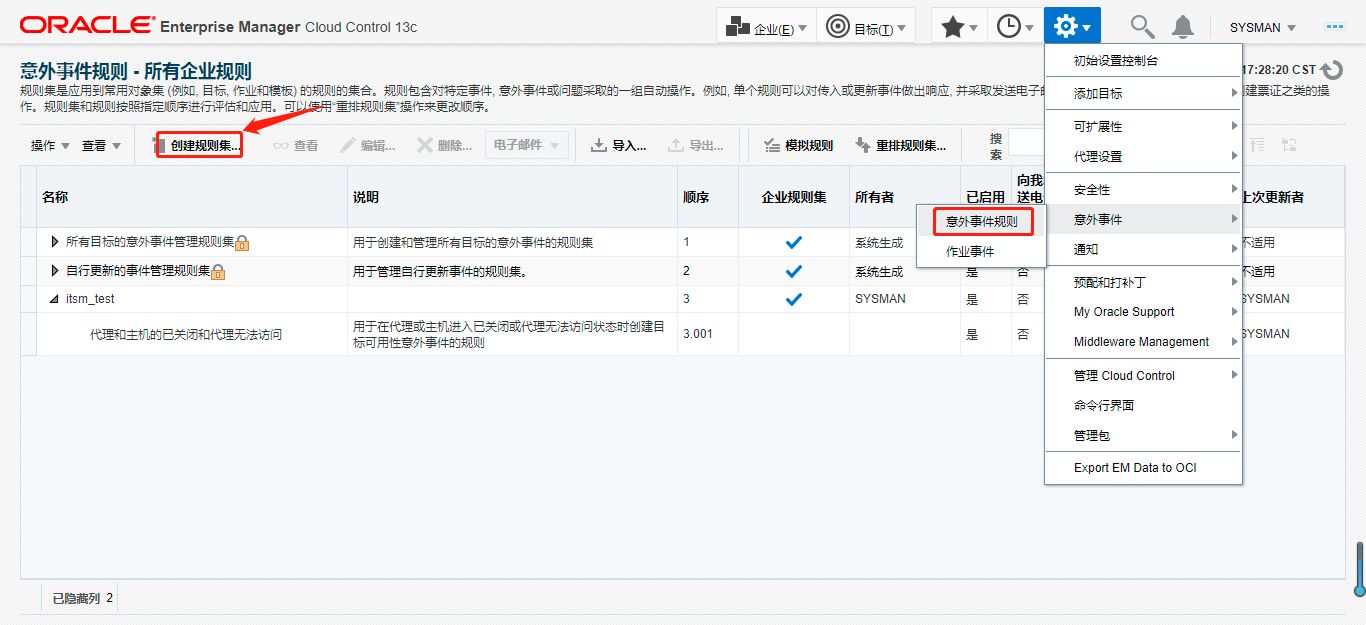
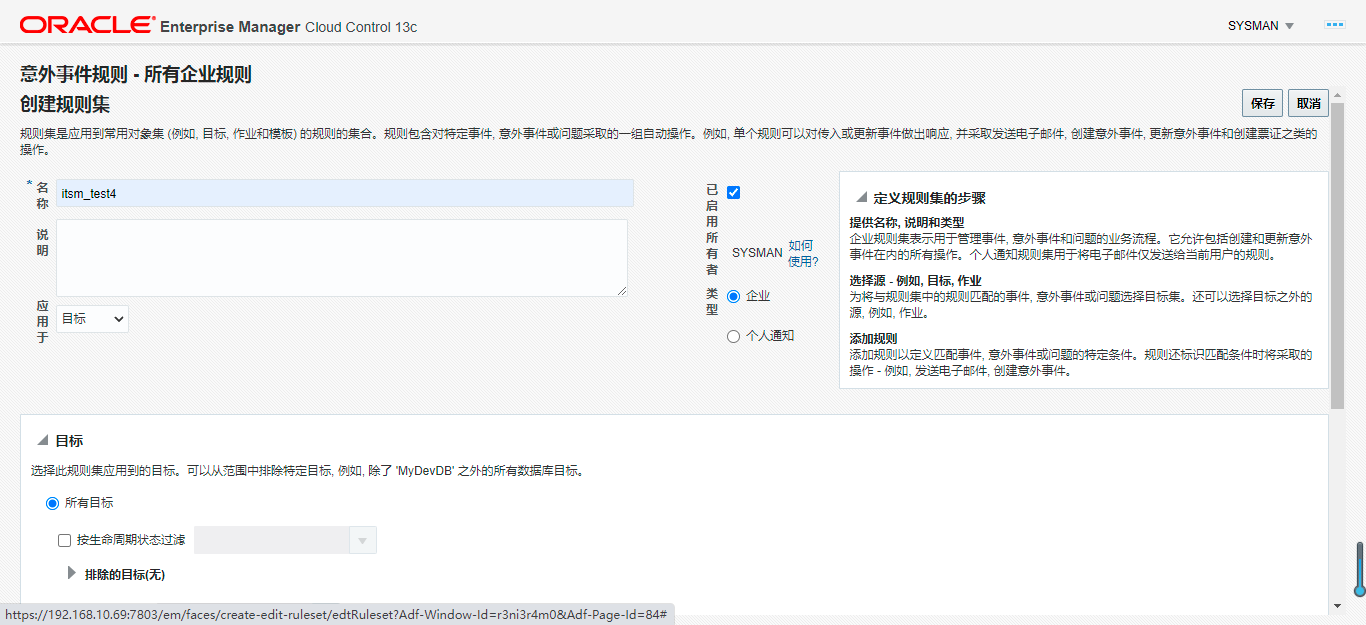
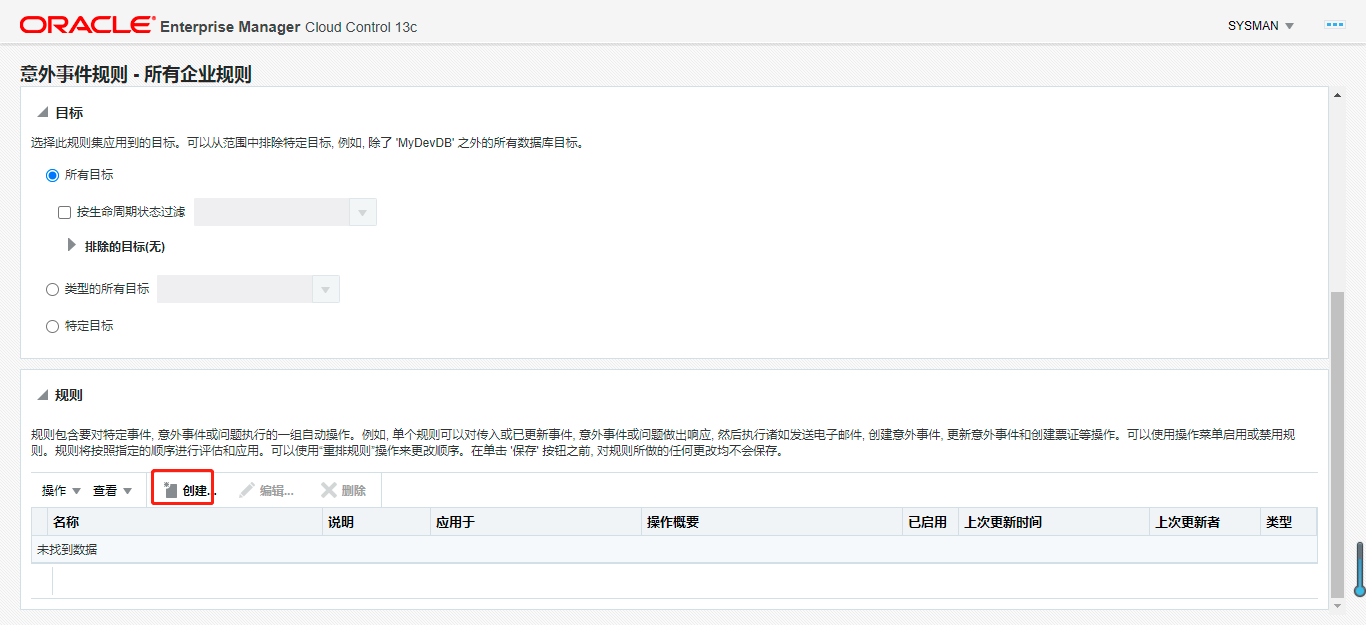
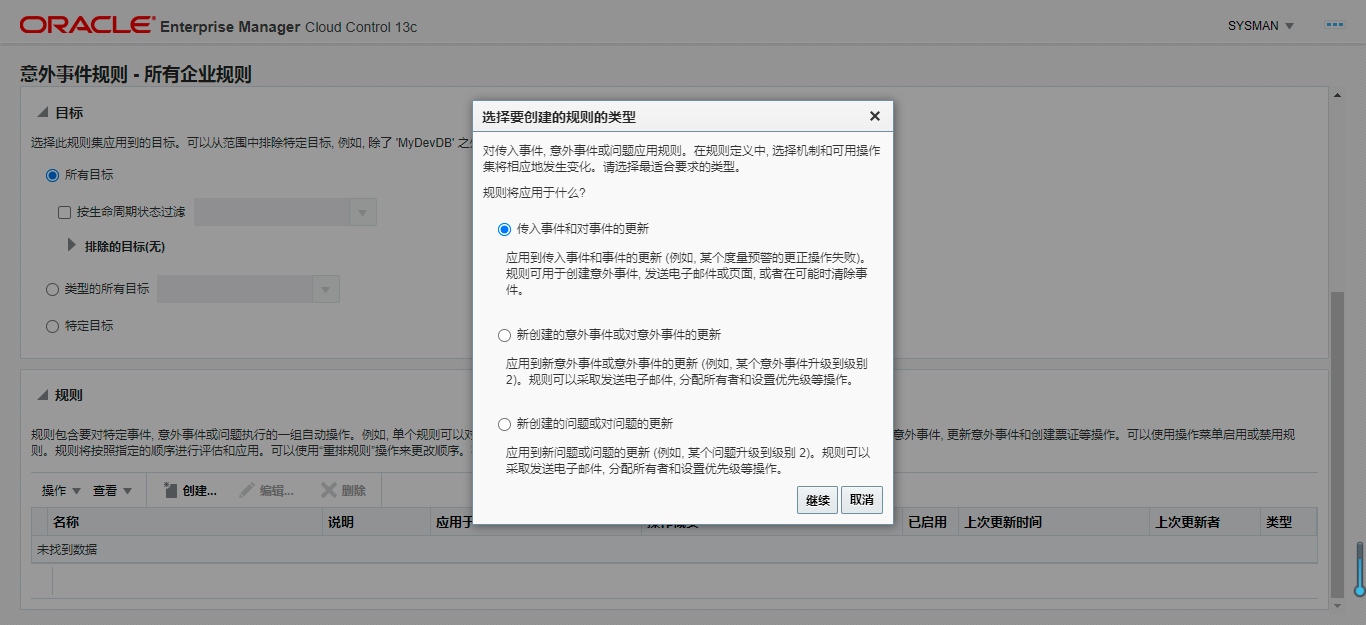
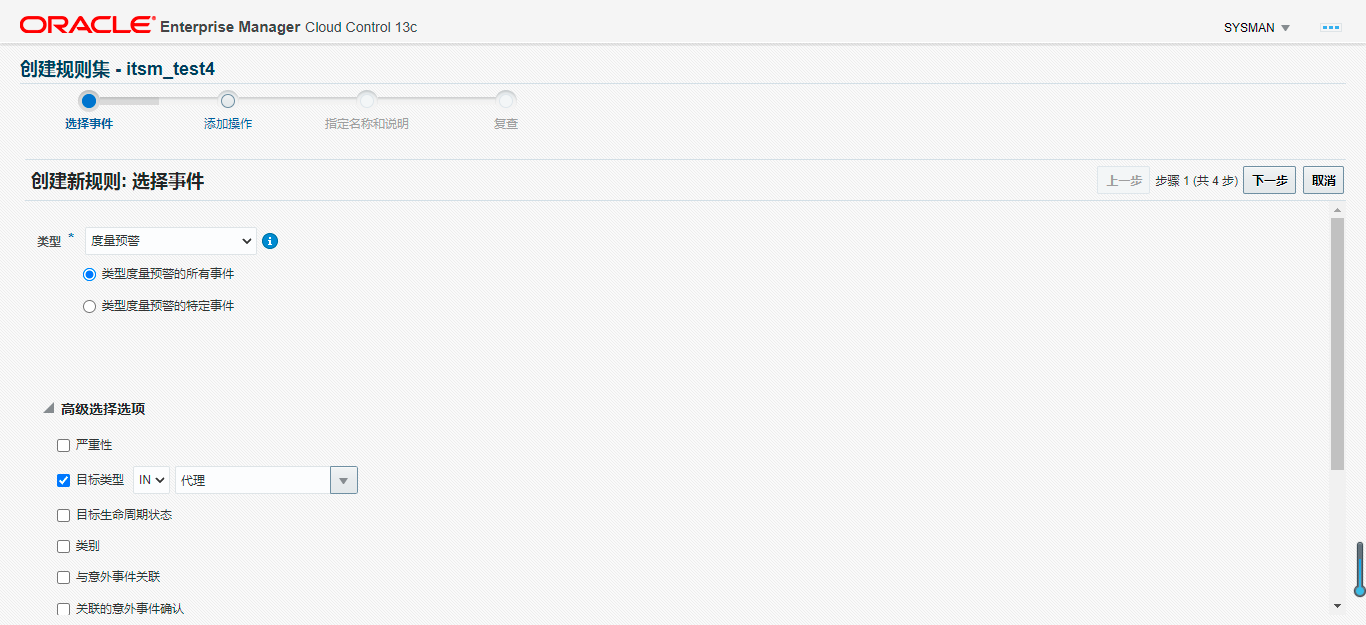
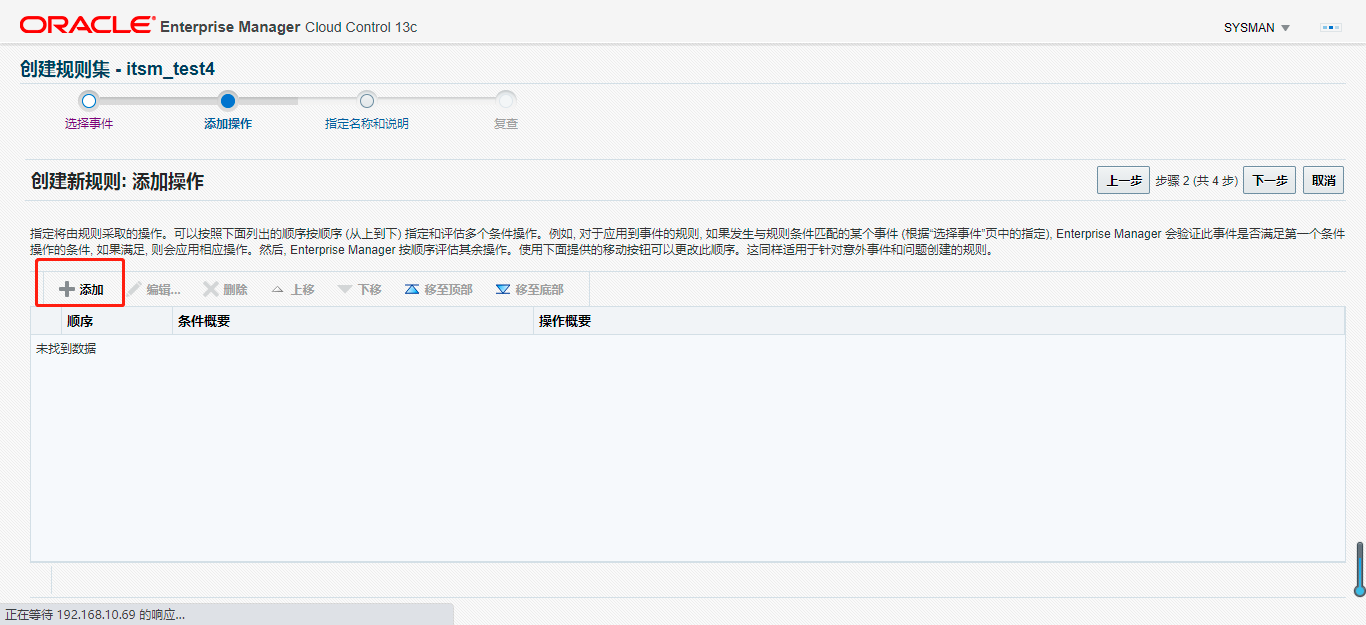
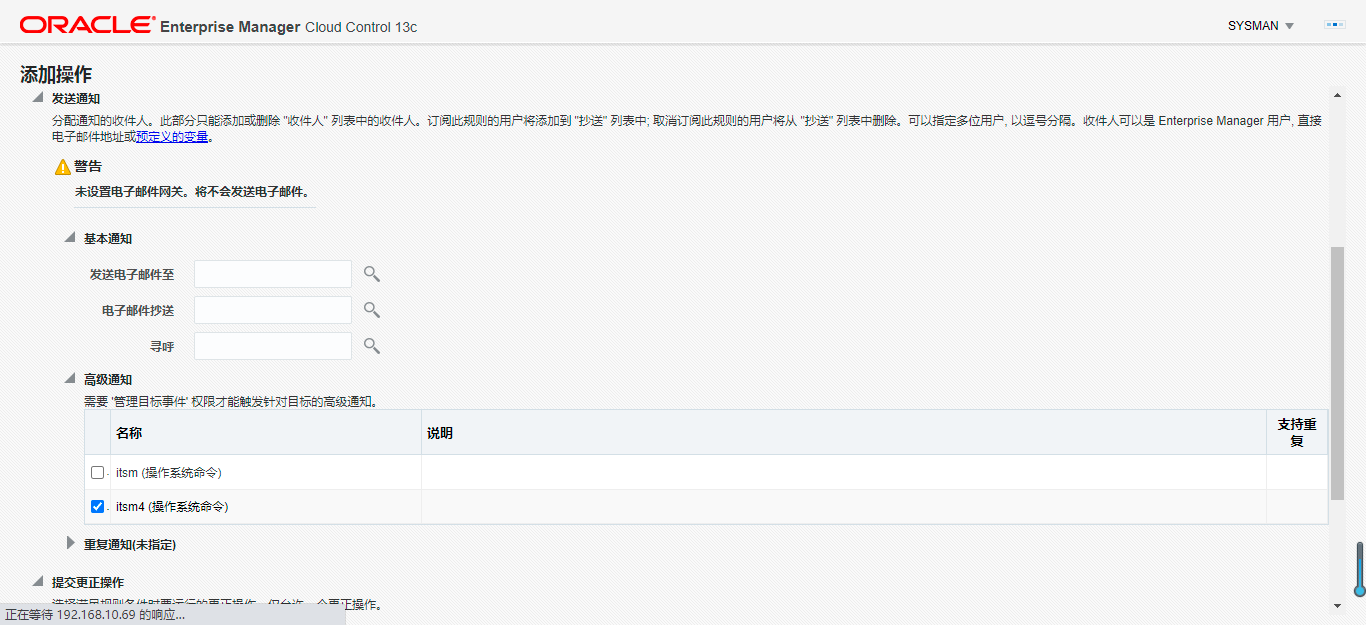
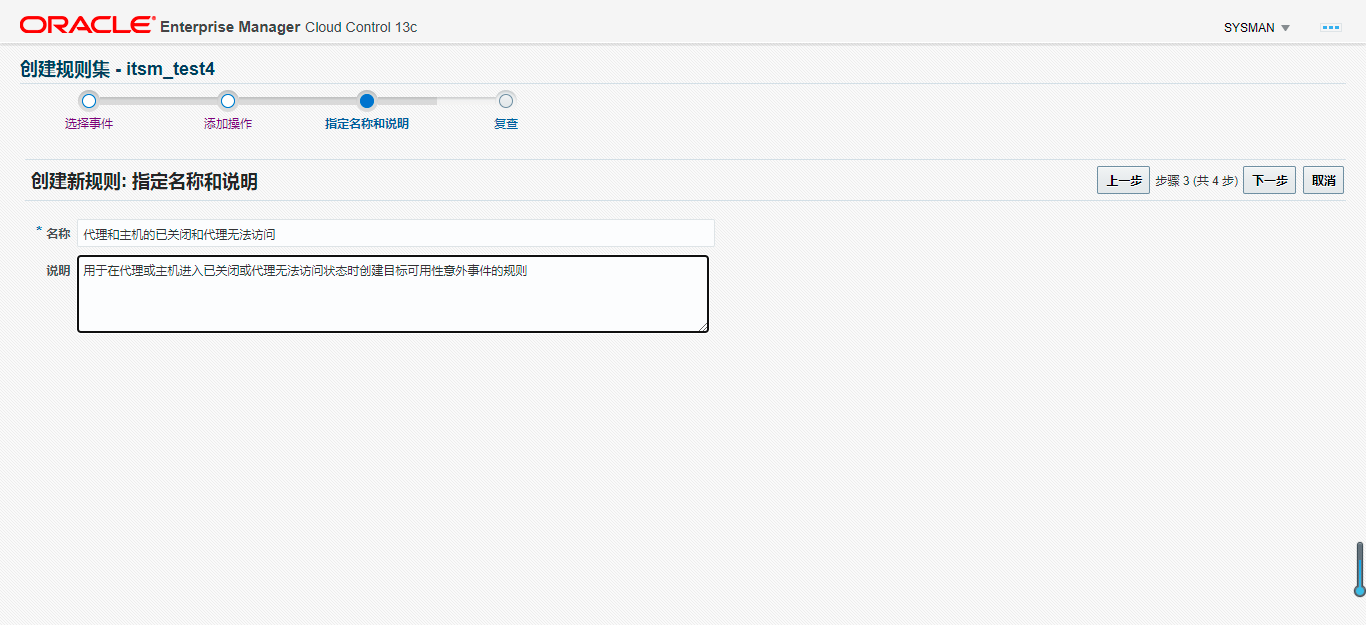
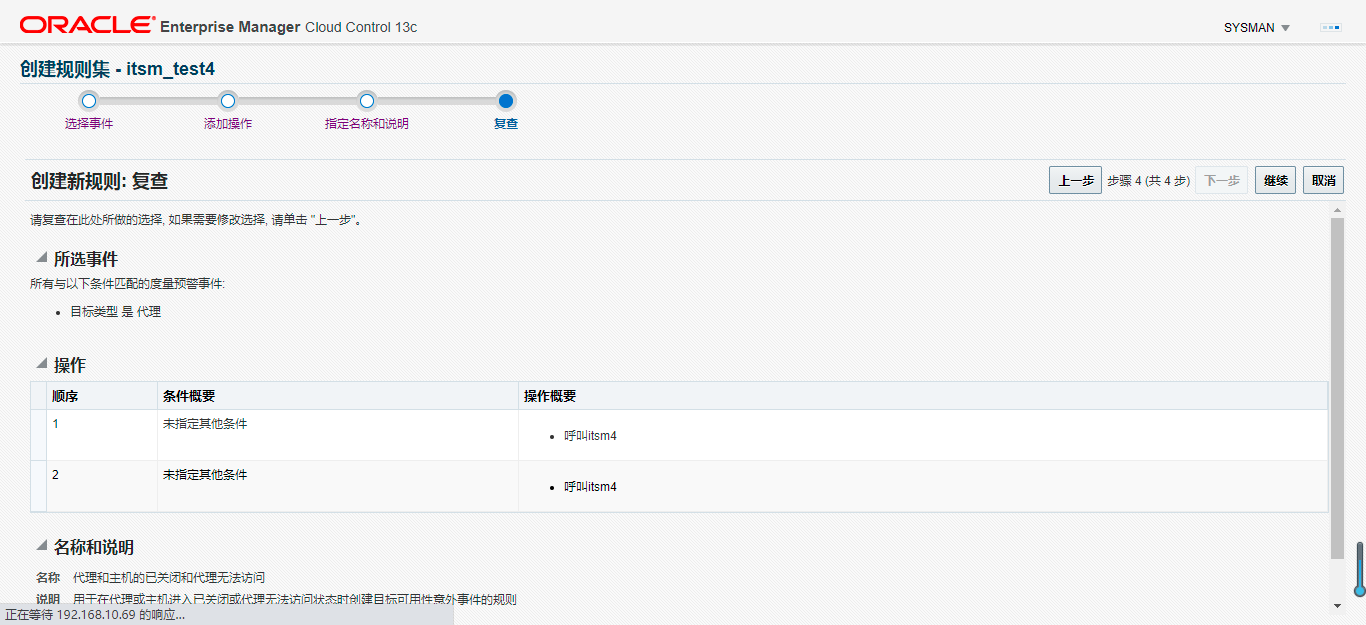
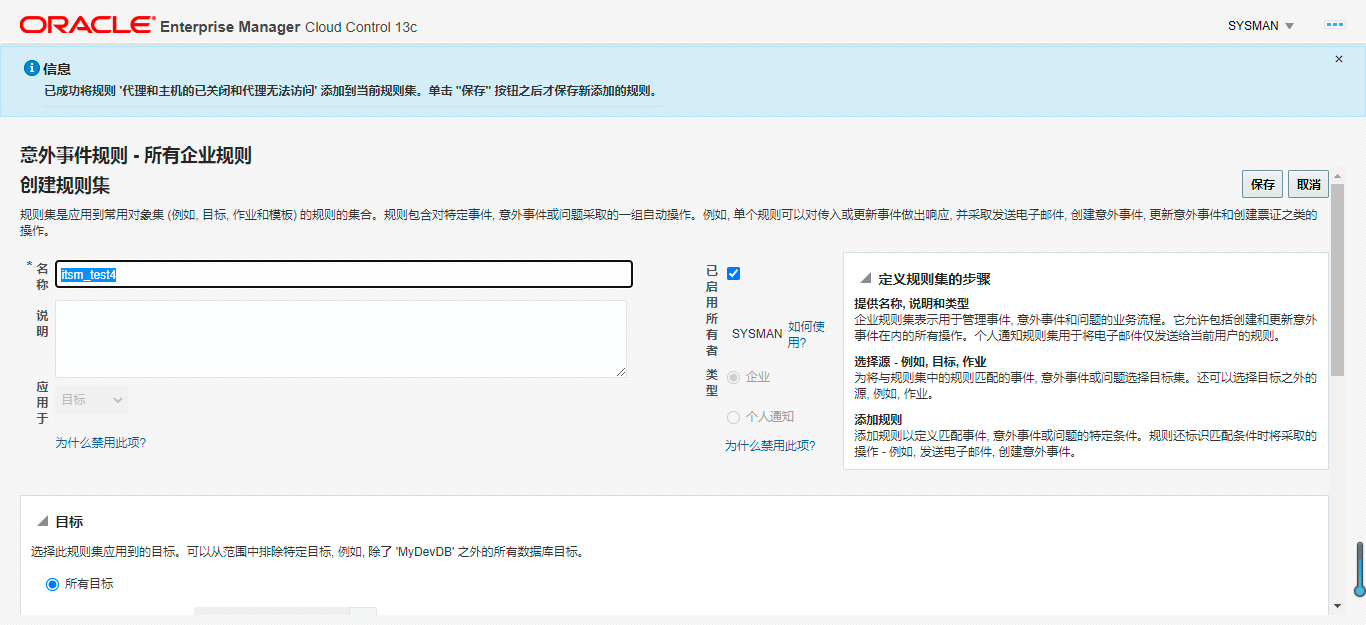
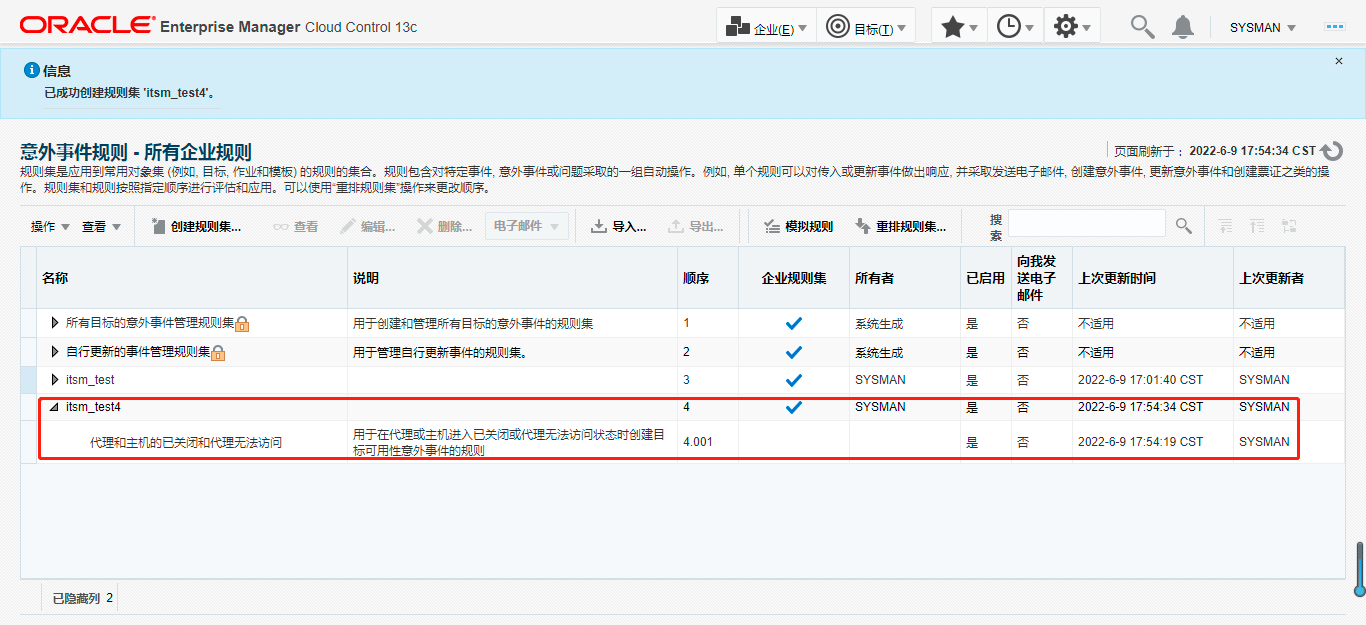
结果演示
情况1:代理进程意外关闭
在达到执行时间内,端口不通,判定为意外关闭
[oracle@zstest bin]$ ./emctl stop agent
Oracle Enterprise Manager Cloud Control 13c Release 5
Copyright (c) 1996, 2021 Oracle Corporation.  All rights reserved.
Stopping agent ... stopped.

--日志输出到OMS主机
2022-06-13 13:59:15 itsm.sh RUN .....
2022-06-13 13:59:15 SEVERITY_CODE:CRITICAL TARGET_TYPE:Agent .....
2022-06-13 13:59:20 telnt 1 times TEL_OS_RESULT:1 TEL_DB_RESULT:0 .....
2022-06-13 13:59:25 telnt 2 times TEL_OS_RESULT:1 TEL_DB_RESULT:0 .....
2022-06-13 13:59:30 telnt 3 times TEL_OS_RESULT:1 TEL_DB_RESULT:0 .....
2022-06-13 13:59:35 telnt 4 times TEL_OS_RESULT:1 TEL_DB_RESULT:0 .....
2022-06-13 13:59:41 telnt 5 times TEL_OS_RESULT:1 TEL_DB_RESULT:0 .....
2022-06-13 13:59:46 telnt 6 times TEL_OS_RESULT:1 TEL_DB_RESULT:0 .....
2022-06-13 13:59:51 telnt 7 times TEL_OS_RESULT:1 TEL_DB_RESULT:0 .....
2022-06-13 13:59:56 telnt 8 times TEL_OS_RESULT:1 TEL_DB_RESULT:0 .....
2022-06-13 14:00:01 telnt 9 times TEL_OS_RESULT:1 TEL_DB_RESULT:0 .....
2022-06-13 14:00:07 telnt 10 times TEL_OS_RESULT:1 TEL_DB_RESULT:0 .....
2022-06-13 14:00:12 telnt 11 times TEL_OS_RESULT:1 TEL_DB_RESULT:0 .....
2022-06-13 14:00:17 telnt 12 times TEL_OS_RESULT:1 TEL_DB_RESULT:0 .....
2022-06-13 14:00:22 telnt 13 times TEL_OS_RESULT:1 TEL_DB_RESULT:0 .....
2022-06-13 14:00:27 telnt 14 times TEL_OS_RESULT:1 TEL_DB_RESULT:0 .....
2022-06-13 14:00:33 telnt 15 times TEL_OS_RESULT:1 TEL_DB_RESULT:0 .....
2022-06-13 14:00:33 TEL_OS_RESULT:1 TEL_DB_RESULT:0 .....
2022-06-13 13:59:15  Agent Unreachable (REASON = Unable to connect to the agent at https://zstest:3872/emd/main/ [Connection refused (Connection refused)]). Host is reachable. , OS and Agent is Not Running
情况2:代理进程计划内重启
日志按照重启输出
[oracle@zstest bin]$ ./emctl stop agent
Oracle Enterprise Manager Cloud Control 13c Release 5
Copyright (c) 1996, 2021 Oracle Corporation.  All rights reserved.
Stopping agent ... stopped.

--停顿片刻

[oracle@zstest bin]$ ./emctl start agent
Oracle Enterprise Manager Cloud Control 13c Release 5
Copyright (c) 1996, 2021 Oracle Corporation.  All rights reserved.
Starting agent ............... started.

--日志输出到OMS主机
2022-06-13 13:53:51 itsm.sh RUN .....
2022-06-13 13:53:51 SEVERITY_CODE:FATAL TARGET_TYPE:Agent .....
2022-06-13 13:53:56 telnt 1 times TEL_OS_RESULT:1 TEL_DB_RESULT:0 .....
2022-06-13 13:54:02 telnt 2 times TEL_OS_RESULT:1 TEL_DB_RESULT:0 .....
2022-06-13 13:54:07 telnt 3 times TEL_OS_RESULT:1 TEL_DB_RESULT:0 .....
2022-06-13 13:54:12 telnt 4 times TEL_OS_RESULT:1 TEL_DB_RESULT:0 .....
2022-06-13 13:54:17 telnt 5 times TEL_OS_RESULT:1 TEL_DB_RESULT:0 .....
2022-06-13 13:54:22 telnt 6 times TEL_OS_RESULT:1 TEL_DB_RESULT:0 .....
2022-06-13 13:54:27 telnt 7 times TEL_OS_RESULT:1 TEL_DB_RESULT:0 .....
2022-06-13 13:54:32 telnt 8 times TEL_OS_RESULT:1 TEL_DB_RESULT:0 .....
2022-06-13 13:54:38 telnt 9 times TEL_OS_RESULT:1 TEL_DB_RESULT:1 .....
2022-06-13 13:54:38 TEL_OS_RESULT:1 TEL_DB_RESULT:1 .....
2022-06-13 13:53:51  Agent has stopped monitoring. The following errors are reported : agent shutdown. , WRONG MESSAGE, OS and Agent is Running, EM Agent Restarted.
关于EMCC之脚本和 SNMPv1 陷阱(OS Commands and Scripts)使用演示到此结束。
附加
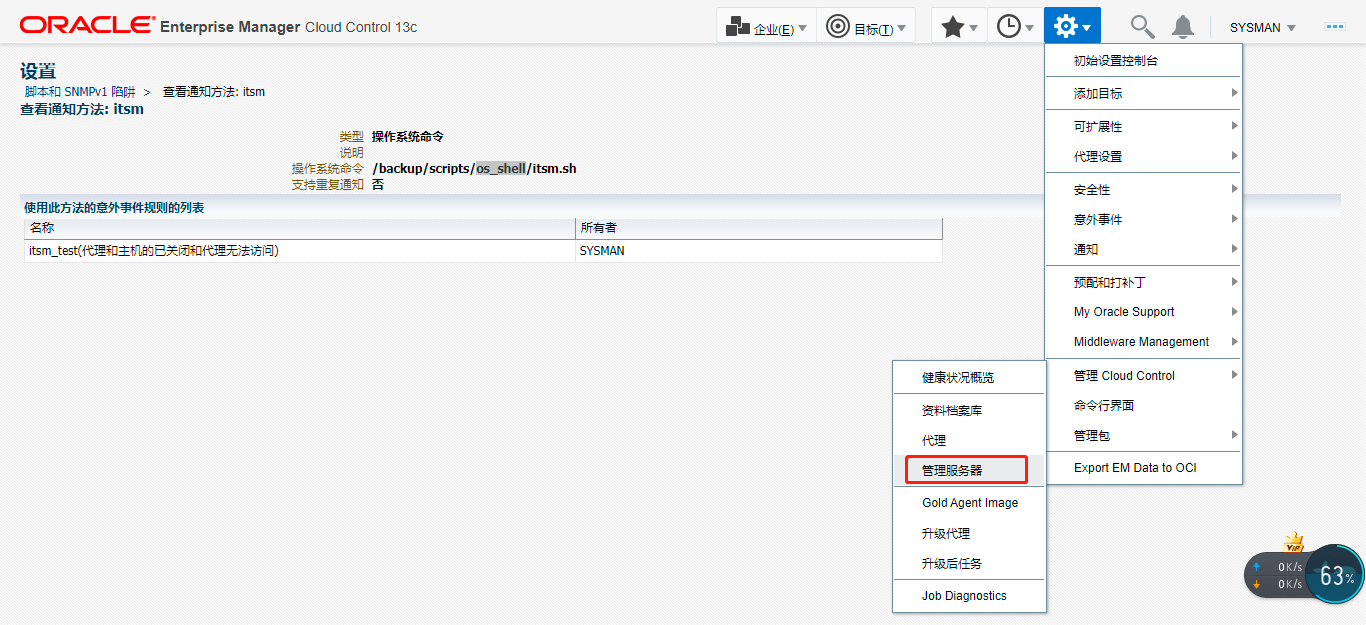
脚本超时参数
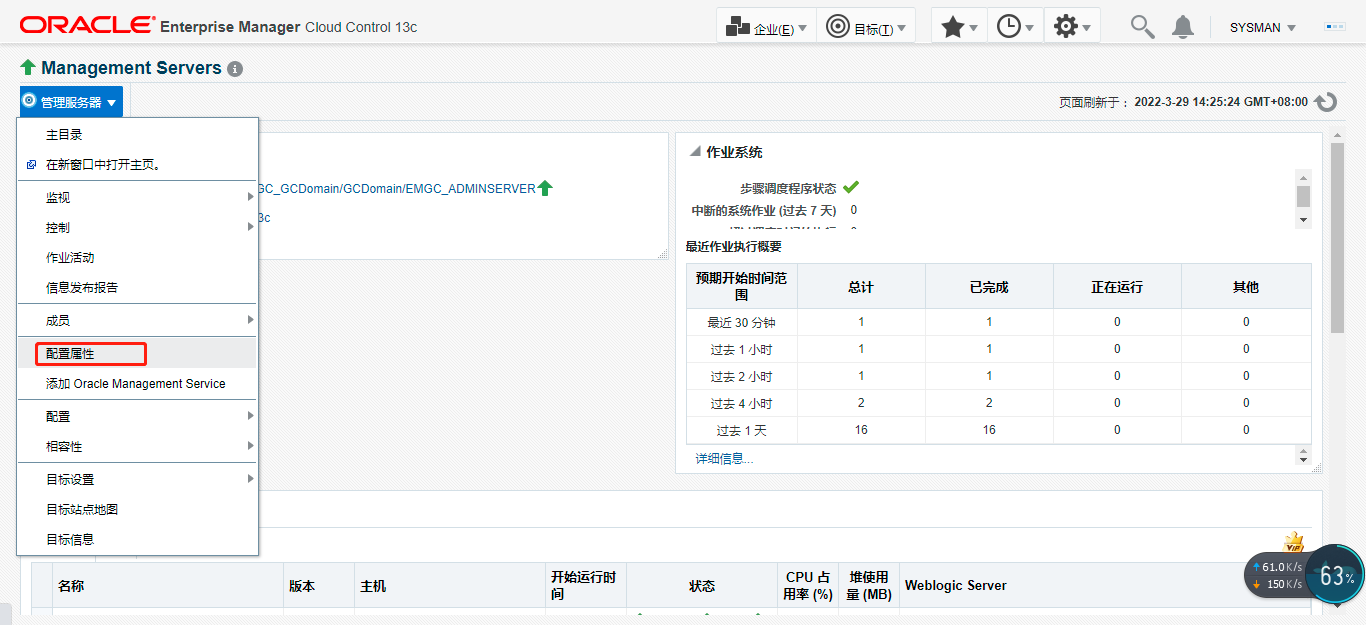
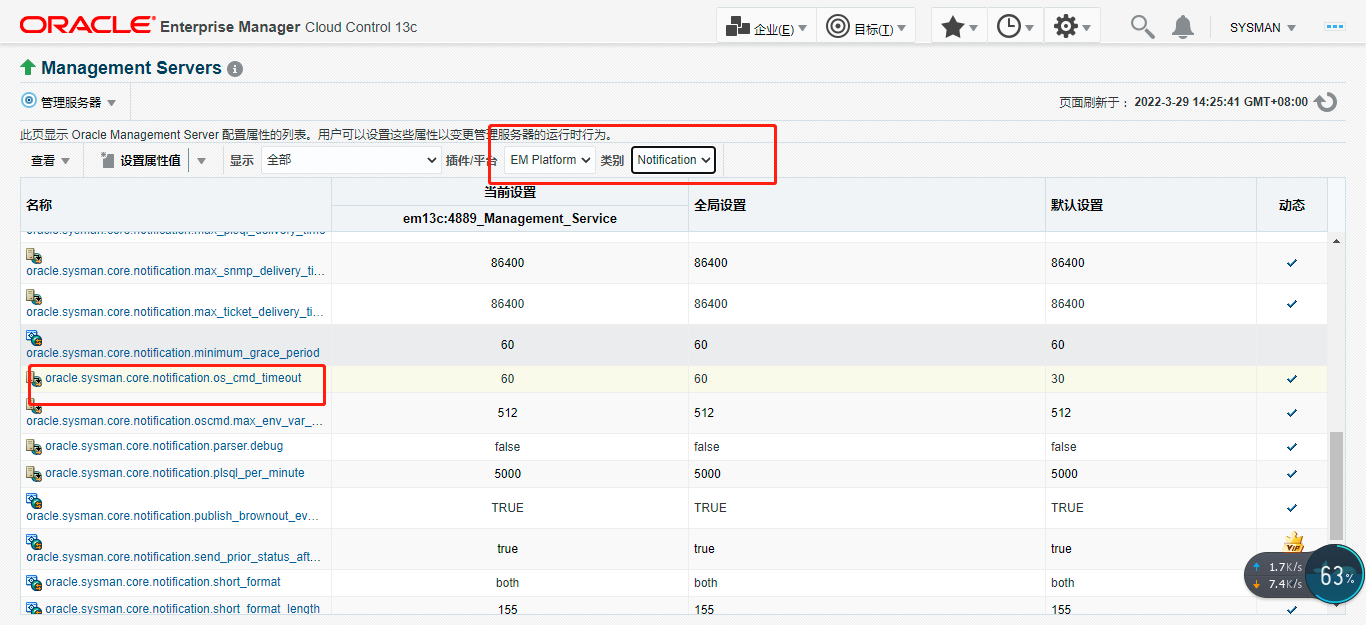
在脚本执行中用到了sleep 5,且循环了15次,整个脚本执行时间在75s以上,由于EMCC对脚本执行有默认超时限制30s,超过此值,脚本会被kill掉,所以需要根据实际情况调整此值。
命令行调整
在EMCC服务端主机执行如下命令即可。
[oracle@em13c bin]$ pwd
/u02/app/middleware/bin
[oracle@em13c bin]$ ./emctl get property -name  oracle.sysman.core.notification.os_cmd_timeout -sysman_pwd "weblogic123"
Oracle Enterprise Manager Cloud Control 13c Release 5
Copyright (c) 1996, 2021 Oracle Corporation.  All rights reserved.
Value for property oracle.sysman.core.notification.os_cmd_timeout at Global level is 30
[oracle@em13c bin]$ ./emctl set property -name oracle.sysman.core.notification.os_cmd_timeout -value 60 -sysman_pwd "weblogic123"
Oracle Enterprise Manager Cloud Control 13c Release 5
Copyright (c) 1996, 2021 Oracle Corporation.  All rights reserved.
Property oracle.sysman.core.notification.os_cmd_timeout has been set to value 60 for all Management Servers
OMS restart is not required to reflect the new property value
[oracle@em13c bin]$ ./emctl get property -name  oracle.sysman.core.notification.os_cmd_timeout -sysman_pwd "weblogic123"
Oracle Enterprise Manager Cloud Control 13c Release 5
Copyright (c) 1996, 2021 Oracle Corporation.  All rights reserved.
Value for property oracle.sysman.core.notification.os_cmd_timeout at Global level is 60
控制台调整
「喜欢这篇文章,您的关注和赞赏是给作者最好的鼓励」
关注作者
【版权声明】本文为墨天轮用户原创内容,转载时必须标注文章的来源(墨天轮),文章链接,文章作者等基本信息,否则作者和墨天轮有权追究责任。如果您发现墨天轮中有涉嫌抄袭或者侵权的内容,欢迎发送邮件至:contact@modb.pro进行举报,并提供相关证据,一经查实,墨天轮将立刻删除相关内容。
