



原文地址:Adding the Oracle 19.14.0 OCW / GI bundle patch to my database home
原文作者:Mike.Dietrich
实际上,我今天早上计划写一篇不同的博客文章。但由于我积压了大量未答复的评论,因此我从佩德罗那里遇到了这个有趣的问题。他想知道如何修补他的数据库主目录中的 OCW 组件。所以我想我会向您展示将 Oracle 19.14.0 OCW / GI 捆绑补丁添加到我的数据库主页的过程。
这是必要的吗?
这是一个星期一早上的好问题。我认为:不,对于没有或使用网格基础设施 (GI) 或集群件 (OCW) 的“仅数据库”家庭来说,这不是必需的。很久以前,我试图了解这个话题的原始事实。但我失败了。因此,让我们首先检查一下普通的 19c 数据库主目录中有什么。
我将从一个普通的“ opatch lsinventory ”开始:
$ ./opatch lsinventory
Oracle Interim Patch Installer version 12.2.0.1.28
Copyright (c) 2022, Oracle Corporation.  All rights reserved.


Oracle Home       : /u01/app/oracle/product/19
Central Inventory : /u01/app/oraInventory
   from           : /u01/app/oracle/product/19/oraInst.loc
OPatch version    : 12.2.0.1.28
OUI version       : 12.2.0.7.0
Log file location : /u01/app/oracle/product/19/cfgtoollogs/opatch/opatch2022-02-07_11-44-10AM_1.log

Lsinventory Output file location : /u01/app/oracle/product/19/cfgtoollogs/opatch/lsinv/lsinventory2022-02-07_11-44-10AM.txt
--------------------------------------------------------------------------------
Local Machine Information::
Hostname: hol
ARU platform id: 226
ARU platform description:: Linux x86-64

Installed Top-level Products (1):

Oracle Database 19c                                                  19.0.0.0.0
There are 1 products installed in this Oracle Home.


Interim patches (3) :

Patch  33561310     : applied on Wed Jan 19 22:12:28 CET 2022
Unique Patch ID:  24538862
Patch description:  "OJVM RELEASE UPDATE: 19.14.0.0.220118 (33561310)"
   Created on 5 Jan 2022, 08:13:10 hrs UTC
   Bugs fixed:
   ...

Patch  33515361     : applied on Wed Jan 19 21:37:55 CET 2022
Unique Patch ID:  24589353
Patch description:  "Database Release Update : 19.14.0.0.220118 (33515361)"
   Created on 13 Jan 2022, 06:14:07 hrs UTC
   Bugs fixed:
   ...

Patch  29585399     : applied on Thu Apr 18 09:21:33 CEST 2019
Unique Patch ID:  22840393
Patch description:  "OCW RELEASE UPDATE 19.3.0.0.0 (29585399)"
   Created on 9 Apr 2019, 19:12:47 hrs PST8PDT
   Bugs fixed:
     27222128, 27572040, 27604329, 27760043, 27877830, 28302580, 28470673
     28621543, 28642469, 28699321, 28710663, 28755846, 28772816, 28785321
     28800508, 28808652, 28815557, 28847541, 28847572, 28870496, 28871040
     28874416, 28877252, 28881191, 28881848, 28888083, 28911140, 28925250
     28925460, 28935956, 28940472, 3, 28942694, 28951332, 28963036, 28968779
     28980448, 28995287, 29003207, 29003617, 29016294, 29018680, 29024876
     29026154, 29027933, 29047127, 29052850, 29058476, 29111631, 29112455
     29117337, 29123444, 29125708, 29125786, 29129476, 29131772, 29132456
     29139727, 29146157, 29147849, 29149170, 29152603, 29152752, 29154631
     29154636, 29154829, 29159216, 29159661, 29160462, 29161923, 29169540
     29169739, 29170717, 29173618, 29181568, 29182920, 29183298, 29186091
     29191827, 29201143, 29201695, 29209545, 29210577, 29210610, 29210624
     29210683, 29213641, 29219627, 29224294, 29225861, 29229839, 29235934
     29242906, 29243749, 29244495, 29244766, 29244968, 29248723, 29249583
     29251564, 29255616, 29260224, 29261695, 29271019, 29273360, 29282090
     29282666, 29285453, 29285621, 29290235, 29292232, 29293806, 29294753
     29299830, 29307090, 29307109, 29311336, 29329675, 29330791, 29339299
     29357821, 29360467, 29360775, 29367971, 29368725, 29379299, 29379381
     29380527, 29381000, 29382296, 29391301, 29393649, 29402110, 29411931
     29413360, 29457319, 29465047


--------------------------------------------------------------------------------

OPatch succeeded.
我从输出中剪掉了一些部分,以使其更易于阅读。但是您会看到大多数人已经知道的:即使在开箱即用的 vanilla 19c Oracle 数据库主目录中,也安装了一个 OCW 组件。就像我的情况一样,由于我从来没有照顾过,几年后,当我的 DB 主页现在是 19.14.0 时,它的 OCW 部分保持在一年前的 19.3.0。
- 补丁说明:“OCW 发布更新 19.3.0.0.0 (29585399)”
我应该担心吗?
我不这么认为,因为我不使用任何组件。但是,如果您认为我绝对应该这样做,请发表评论。我会快乐地学习。在我的季度博客文章中,例如 2022 年 1 月的一篇,我以前从未修补过 OCW。
您应该/会下载哪个补丁?
下一个问题是我需要下载哪个补丁。但它应该是来自MOS 的 19.14.0 Grid Infrastructure 捆绑补丁注:2118136.2 – 助手:Oracle 数据库/GI 更新、修订、PSU、SPU(CPU)、捆绑补丁、补丁集和基本版本的下载参考。
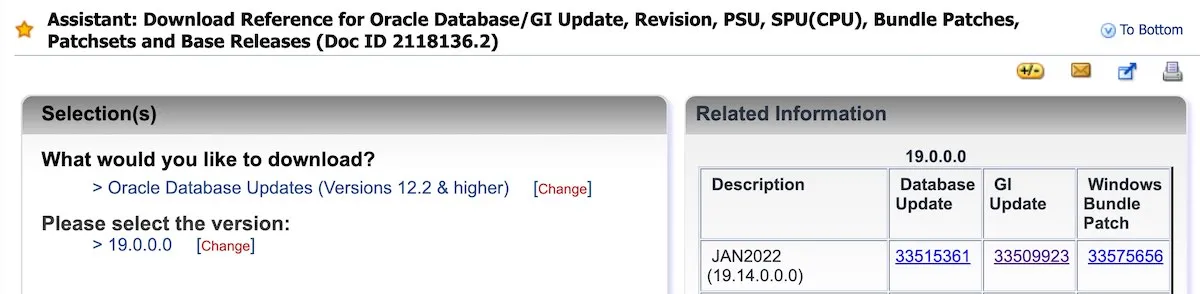
同时,下载进度很快,我检查了README。
它包含这张表,告诉我应该将补丁 33529556 应用到我的“Oracle Home 和 Grid Home”,我读作“Oracle Home”可能是我的“Database Home”?
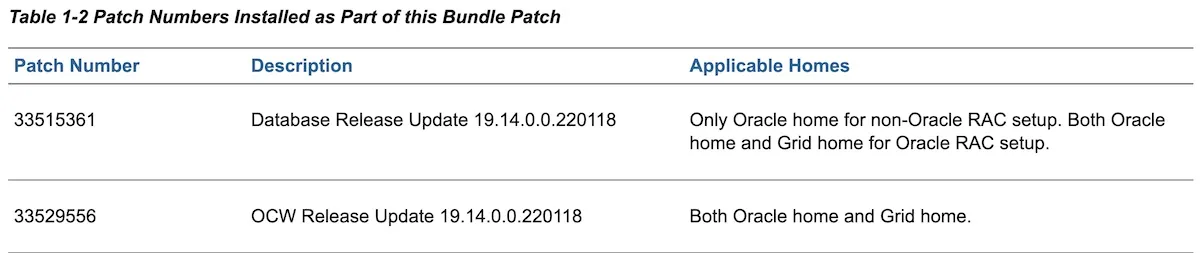
在自述文件的下方,我找到了这一部分:
- 案例 3:不由 Oracle Grid Infrastructure 管理的单实例住宅
我被要求应用这个补丁的地方:
cd <UNZIPPED_PATCH_LOCATION>/33509923/33515361
opatch apply
但不要在家里尝试这个,专家可能会立即认识到这是标准的数据库19.14.0 RU,我已经应用到我的家里。但也许失败是在我这边,因为我确实已经下载并应用了独立的数据库19.14.0 RU,而不是下载更大的33509923 GI 19.14.0捆绑包。因此,我不怪README。
因此,我再次检查了上面的表格,它说我应该将33529556应用于Oracle主页和Grid主页。
让我们在下一个步骤中这样做。
将补丁包 33529556 应用到我的数据库主页
我通过不发布预检查来节省您的阅读时间。特别是当我调用opatch apply时,这些检查会再次执行。
$ $OH19/OPatch/opatch apply
Oracle Interim Patch Installer version 12.2.0.1.28
Copyright (c) 2022, Oracle Corporation.  All rights reserved.


Oracle Home       : /u01/app/oracle/product/19
Central Inventory : /u01/app/oraInventory
   from           : /u01/app/oracle/product/19/oraInst.loc
OPatch version    : 12.2.0.1.28
OUI version       : 12.2.0.7.0
Log file location : /u01/app/oracle/product/19/cfgtoollogs/opatch/opatch2022-02-07_09-04-02AM_1.log

Verifying environment and performing prerequisite checks...
Skip patch 33515361 from list of patches to apply: This patch is not needed.

After skipping patches with missing components, there are no patches to apply.
OPatch Session completed with warnings.
Log file location: /u01/app/oracle/product/19/cfgtoollogs/opatch/opatch2022-02-07_09-04-02AM_1.log

OPatch completed with warnings.
[CDB2] oracle@hol:~/33509923/33515361
$ cd ..
[CDB2] oracle@hol:~/33509923
$ cd 33529556
[CDB2] oracle@hol:~/33509923/33529556
$ $OH19/OPatch/opatch apply
Oracle Interim Patch Installer version 12.2.0.1.28
Copyright (c) 2022, Oracle Corporation.  All rights reserved.


Oracle Home       : /u01/app/oracle/product/19
Central Inventory : /u01/app/oraInventory
   from           : /u01/app/oracle/product/19/oraInst.loc
OPatch version    : 12.2.0.1.28
OUI version       : 12.2.0.7.0
Log file location : /u01/app/oracle/product/19/cfgtoollogs/opatch/opatch2022-02-07_09-10-47AM_1.log

Verifying environment and performing prerequisite checks...

--------------------------------------------------------------------------------
Start OOP by Prereq process.
Launch OOP...

Oracle Interim Patch Installer version 12.2.0.1.28
Copyright (c) 2022, Oracle Corporation.  All rights reserved.


Oracle Home       : /u01/app/oracle/product/19
Central Inventory : /u01/app/oraInventory
   from           : /u01/app/oracle/product/19/oraInst.loc
OPatch version    : 12.2.0.1.28
OUI version       : 12.2.0.7.0
Log file location : /u01/app/oracle/product/19/cfgtoollogs/opatch/opatch2022-02-07_09-17-02AM_1.log

Verifying environment and performing prerequisite checks...
OPatch continues with these patches:   33529556

Do you want to proceed? [y|n]
y
User Responded with: Y
All checks passed.

Please shutdown Oracle instances running out of this ORACLE_HOME on the local system.
(Oracle Home = '/u01/app/oracle/product/19')


Is the local system ready for patching? [y|n]
y
User Responded with: Y
Backing up files...
Applying interim patch '33529556' to OH '/u01/app/oracle/product/19'
ApplySession: Optional component(s) [ oracle.has.crs.cvu, 19.0.0.0.0 ] , [ oracle.has.cvu, 19.0.0.0.0 ] , [ oracle.rhp.crs, 19.0.0.0.0 ] , [ oracle.has.crs, 19.0.0.0.0 ] , [ oracle.xag, 19.0.0.0.0 ]  not present in the Oracle Home or a higher version is found.

Patching component oracle.rdbms, 19.0.0.0.0...

Patching component oracle.has.db.cvu, 19.0.0.0.0...

Patching component oracle.has.db, 19.0.0.0.0...

Patching component oracle.has.common, 19.0.0.0.0...

Patching component oracle.has.rsf, 19.0.0.0.0...

Patching component oracle.rhp.db, 19.0.0.0.0...

Patching component oracle.rhp.common, 19.0.0.0.0...

Patching component oracle.has.common.cvu, 19.0.0.0.0...
Patch 33529556 successfully applied.
Sub-set patch [29585399] has become inactive due to the application of a super-set patch [33529556].
Please refer to Doc ID 2161861.1 for any possible further required actions.
Log file location: /u01/app/oracle/product/19/cfgtoollogs/opatch/opatch2022-02-07_09-17-02AM_1.log

OPatch succeeded.
哇!开箱即用。
但让我们也检查一下哪些组件已被修补:
关系型数据库管理系统
HAS(高可用性层)
RHP(Fleet Patching and Provisioning,以前称为 Rapid Home Provisioning)
我想知道哪些补丁进入了oracle.rdbms组件……
修补后的 OPatch 检查
当然,我会再次调用opatch lsinventory。
$ $OH19/OPatch/opatch lsinventory
Oracle Interim Patch Installer version 12.2.0.1.28
Copyright (c) 2022, Oracle Corporation.  All rights reserved.


Oracle Home       : /u01/app/oracle/product/19
Central Inventory : /u01/app/oraInventory
   from           : /u01/app/oracle/product/19/oraInst.loc
OPatch version    : 12.2.0.1.28
OUI version       : 12.2.0.7.0
Log file location : /u01/app/oracle/product/19/cfgtoollogs/opatch/opatch2022-02-07_09-56-38AM_1.log

Lsinventory Output file location : /u01/app/oracle/product/19/cfgtoollogs/opatch/lsinv/lsinventory2022-02-07_09-56-38AM.txt
--------------------------------------------------------------------------------
Local Machine Information::
Hostname: hol
ARU platform id: 226
ARU platform description:: Linux x86-64

Installed Top-level Products (1):

Oracle Database 19c                                                  19.0.0.0.0
There are 1 products installed in this Oracle Home.


Interim patches (3) :

Patch  33529556     : applied on Mon Feb 07 09:25:18 CET 2022
Unique Patch ID:  24583351
Patch description:  "OCW RELEASE UPDATE 19.14.0.0.0 (33529556)"
   Created on 9 Jan 2022, 21:15:36 hrs PST8PDT
   Bugs fixed:
     13742922, 17787434, 24611963, 24677421, 24943214, 25642320, 25736599
     26305045, 26496292, 26615554, 26675491, 26813848, 26898787, 27092095
     27148384, 27222128, 27262781, 27341142, 27505699, 27526265, 27572040
     27604329, 27663388, 27760043, 27877830, 27912364, 27935374, 28107050

     [.. hundreds of patch numbers cut out here ..]
     33077135, 33083394, 33093153, 33114825, 33122355, 33123407, 33123522
     33128879, 33129533, 33132334, 33141699, 33144621, 33145535, 33148406
     33153370, 33161292, 33163031, 33168374, 33172512, 33174232, 33181968
     33190595, 33196778, 33208212, 33213078, 33232179, 33300332, 33315862
     33326399, 33330594, 33345311, 33360086, 33383972, 33406951, 33412603
     33415331, 33446942, 33531173, 33545483, 33563477, 33731331, 3

Patch  33561310     : applied on Wed Jan 19 22:12:28 CET 2022
Unique Patch ID:  24538862
Patch description:  "OJVM RELEASE UPDATE: 19.14.0.0.220118 (33561310)"
   Created on 5 Jan 2022, 08:13:10 hrs UTC
   Bugs fixed:
...

Patch  33515361     : applied on Wed Jan 19 21:37:55 CET 2022
Unique Patch ID:  24589353
Patch description:  "Database Release Update : 19.14.0.0.220118 (33515361)"
   Created on 13 Jan 2022, 06:14:07 hrs UTC
   Bugs fixed:
...


--------------------------------------------------------------------------------

OPatch succeeded.
因此,通过比较“之前”和“之后”的 OCW 组件,您很快就会发现,您家中现在还有大量的数百个额外的 OCW 补丁。
不过,问题仍然是,当您只运行一个标准的 Oracle 主页时是否需要这些。
最后的想法
当我与丹尼尔讨论这个话题时,我想分享的最后想法出现了。
如果您假设您必须不仅使用数据库 RU 并且始终使用集群件 RU 修补您的数据库主目录,那么为什么还有一个单独的数据库 RU 可供下载?如果是这种情况,为什么 opatch 不能一次性将两者都安装在非 GI 家庭中?
你看,还有一些悬而未决的问题。
再后来的想法
好吧,我想用我昨天检查的内容来更新这篇博文。当您将 OCW RU 应用于 DB 主页时,我真的很感兴趣在rdbms层中哪些文件会被更改和调整。所以我再次运行了补丁应用程序,然后检查了日志文件:
[Feb 7, 2022 8:17:31 PM] [INFO]     Patching component oracle.rdbms, 19.0.0.0.0...
[Feb 7, 2022 8:17:31 PM] [INFO]     Copying file to "/u01/app/oracle/product/19/oui/jlib/srvm.jar"
[Feb 7, 2022 8:17:31 PM] [INFO]     Copying file to "/u01/app/oracle/product/19/oui/jlib/srvmasm.jar"
[Feb 7, 2022 8:17:31 PM] [INFO]     Entering OPatchUtilHelper::saveNewDirPS()
[Feb 7, 2022 8:17:31 PM] [INFO]     Entering OPatchUtilHelper::saveNewDirPsRecursive()
[Feb 7, 2022 8:17:31 PM] [INFO]     Just wrote: /u01/app/oracle/product/19/oui/lib/linux
                                     to file: /u01/app/oracle/product/19/.patch_storage/newdirs.txt
[Feb 7, 2022 8:17:31 PM] [INFO]     Entering OPatchUtilHelper::saveNewDirPsRecursive()
[Feb 7, 2022 8:17:31 PM] [INFO]     Exiting OPatchUtilHelper::saveNewDirPsRecursive()
[Feb 7, 2022 8:17:31 PM] [INFO]     Exiting OPatchUtilHelper::saveNewDirPS()
[Feb 7, 2022 8:17:31 PM] [INFO]     Copying file to "/u01/app/oracle/product/19/oui/lib/linux/libsrvm19.so"
但是什么是 SRVM?
在RAC Admin and Deploy Guide’s Glossary中,我找到了这个部分:
服务器控制实用程序 (SRVCTL)
服务器管理 (SRVM) 包含在 Oracle RAC 中运行 Oracle Enterprise Manager 所需的组件。SRVM 组件(例如智能代理、全局服务守护程序和 SRVCTL)使您能够使用 Oracle Enterprise Manager 通过开放的客户端/服务器体系结构来管理在异构环境中运行的集群数据库。
由于我在我的小型实验室环境中既不使用 RHP/FPP 或任何 HA 组件也不使用 EM,我很确定我不需要 OCW 捆绑包。但这在您的环境中可能会有所不同。当然,应用它并没有害处。
因此,您可以决定是否需要应用 OCW 捆绑补丁。
