



ClickHouse 中文文档下载:https://www.modb.pro/doc/37395
什么是ClickHouse?
ClickHouse是一个用于联机分析(OLAP)的列式数据库管理系统(DBMS)。在传统的行式数据库系统中,数据按如下顺序存储:
Row | WatchID | JavaEnable | Title | GoodEvent | EventTime | |
#0 | 89354350662 | 1 | Investor Relations | 1 | 2016-05-18 | 05:19:20 |
#1 | 90329509958 | 0 | Contact us | 1 | 2016-05-18 | 08:10:20 |
#2 | 89953706054 | 1 | Mission | 1 | 2016-05-18 | 07:38:00 |
#N | … | … | … | … | … | |
处于同一行中的数据总是被物理的存储在一起。
常见的行式数据库系统有:MySQL、Postgres和MS SQL Server。在列式数据库系统中,数据按如下的顺序存储:
Row: | #0 | #1 | #2 | #N | |||
WatchID: | 89354350662 | 90329509958 | 89953706054 | … | |||
JavaEnable: | 1 | 0 | 1 | … | |||
Title: | Investor Relations | Contact us | Mission | … | |||
GoodEvent: | 1 | 1 | 1 | … | |||
EventTime: | 2016-05-18 | 05:19:20 | 2016-05-18 | 08:10:20 | 2016-05-18 | 07:38:00 | … |
这些示例只显示了数据的排列顺序。来自不同列的值被单独存储,来自同一列的数据被存储在一起。
常见的列式数据库有: Vertica、 Paraccel (Actian Matrix,Amazon Redshift)、 Sybase IQ、 Exasol、 Infobright、 InfiniDB、 MonetDB (VectorWise, Actian Vector)、 LucidDB、 SAP HANA、 Google Dremel、 Google PowerDrill、 Druid、 kdb+。
不同的数据存储方式适用不同的业务场景,数据访问的场景包括:进行了何种查询、多久查询一次以及各类查询的比例;每种类型的查询(行、列和字节)读取多少数据;读取数据 和更新之间的关系;使用的数据集大小以及如何使用本地的数据集;是否使用事务,以及它们是如何进行隔离的;数据的复制机制与数据的完整性要求;每种类型的查询要求的延 迟与吞吐量等等。
系统负载越高,依据使用场景进行定制化就越重要,并且定制将会变的越精细。没有一个系统能够同时适用所有不同的业务场景。如果系统适用于广泛的场景,在负载高的情况 下,要兼顾所有的场景,那么将不得不做出选择。是要平衡还是要效率?
OLAP场景的关键特征
绝大多数是读请求
数据以相当大的批次(> 1000行)更新,而不是单行更新;或者根本没有更新。已添加到数据库的数据不能修改。
对于读取,从数据库中提取相当多的行,但只提取列的一小部分。 宽表,即每个表包含着大量的列
查询相对较少(通常每台服务器每秒查询数百次或更少) 对于简单查询,允许延迟大约50毫秒
列中的数据相对较小:数字和短字符串(例如,每个URL 60个字节)
处理单个查询时需要高吞吐量(每台服务器每秒可达数十亿行) 事务不是必须的
对数据一致性要求低
每个查询有一个大表。除了他以外,其他的都很小。
查询结果明显小于源数据。换句话说,数据经过过滤或聚合,因此结果适合于单个服务器的RAM中
很容易可以看出,OLAP场景与其他通常业务场景(例如,OLTP或K/V)有很大的不同, 因此想要使用OLTP或Key-Value数据库去高效的处理分析查询场景,并不是非常完美的适用方案。例如,使用OLAP数据库去处理分析请求通常要优于使用MongoDB或Redis去处理分析请求。
列式数据库更适合OLAP场景的原因
列式数据库更适合于OLAP场景(对于大多数查询而言,处理速度至少提高了100倍),下面详细解释了原因(通过图片更有利于直观理解): 行式
列式
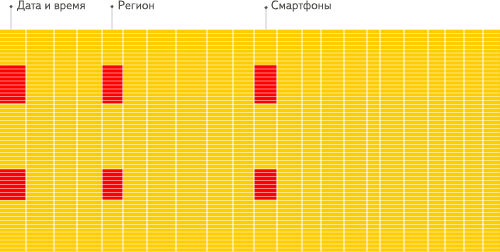
看到差别了么?下面将详细介绍为什么会发生这种情况。 输入/输出
- 针对分析类查询,通常只需要读取表的一小部分列。在列式数据库中你可以只读取你需要的数据。例如,如果只需要读取100列中的5列,这将帮助你最少减少20倍的I/O消耗。
- 由于数据总是打包成批量读取的,所以压缩是非常容易的。同时数据按列分别存储这也更容易压缩。这进一步降低了I/O的体积。
- 由于I/O的降低,这将帮助更多的数据被系统缓存。
例如,查询«统计每个广告平台的记录数量»需要读取«广告平台ID»这一列,它在未压缩的情况下需要1个字节进行存储。如果大部分流量不是来自广告平台,那么这一列至少可以以十倍的压缩率被压缩。当采用快速压缩算法,它的解压速度最少在十亿字节(未压缩数据)每秒。换句话说,这个查询可以在单个服务器上以每秒大约几十亿行的速度进行处理。 这实际上是当前实现的速度。
CPU
由于执行一个查询需要处理大量的行,因此在整个向量上执行所有操作将比在每一行上执行所有操作更加高效。同时这将有助于实现一个几乎没有调用成本的查询引擎。如果你不 这样做,使用任何一个机械硬盘,查询引擎都不可避免的停止CPU进行等待。所以,在数据按列存储并且按列执行是很有意义的。
有两种方法可以做到这一点:
- 向量引擎:所有的操作都是为向量而不是为单个值编写的。这意味着多个操作之间的不再需要频繁的调用,并且调用的成本基本可以忽略不计。操作代码包含一个优化的内 部循环。
- 代码生成:生成一段代码,包含查询中的所有操作。
这是不应该在一个通用数据库中实现的,因为这在运行简单查询时是没有意义的。但是也有例外,例如,MemSQL使用代码生成来减少处理SQL查询的延迟(只是为了比较,分析型数据库通常需要优化的是吞吐而不是延迟)。
请注意,为了提高CPU效率,查询语言必须是声明型的(SQL或MDX), 或者至少一个向量(J,K)。 查询应该只包含隐式循环,允许进行优化。来源文章
ClickHouse的特性
真正的列式数据库管理系统
在一个真正的列式数据库管理系统中,除了数据本身外不应该存在其他额外的数据。这意味着为了避免在值旁边存储它们的长度«number»,你必须支持固定长度数值类型。例 如,10亿个UInt8类型的数据在未压缩的情况下大约消耗1GB左右的空间,如果不是这样的话,这将对CPU的使用产生强烈影响。即使是在未压缩的情况下,紧凑的存储数据也是非常重要的,因为解压缩的速度主要取决于未压缩数据的大小。
这是非常值得注意的,因为在一些其他系统中也可以将不同的列分别进行存储,但由于对其他场景进行的优化,使其无法有效的处理分析查询。例如:
HBase,BigTable,Cassandra,HyperTable。在这些系统中,你可以得到每秒数十万的吞吐能力,但是无法得到每秒几亿行的吞吐能力。
需要说明的是,ClickHouse不单单是一个数据库, 它是一个数据库管理系统。因为它允许在运行时创建表和数据库、加载数据和运行查询,而无需重新配置或重启服务。
数据压缩
在一些列式数据库管理系统中(例如:InfiniDB CE 和 MonetDB) 并没有使用数据压缩。但是, 若想达到比较优异的性能,数据压缩确实起到了至关重要的作用。
除了在磁盘空间和CPU消耗之间进行不同权衡的高效通用压缩编解码器之外,ClickHouse还提供针对特定类型数据的专用编解码器,这使得ClickHouse能够与更小的数据库(如时间序列数据库)竞争并超越它们。
数据的磁盘存储
许多的列式数据库(如 SAP HANA, Google PowerDrill)只能在内存中工作,这种方式会造成比实际更多的设备预算。
ClickHouse被设计用于工作在传统磁盘上的系统,它提供每GB更低的存储成本,但如果可以使用SSD和内存,它也会合理的利用这些资源。
多核心并行处理
ClickHouse会使用服务器上一切可用的资源,从而以最自然的方式并行处理大型查询。
多服务器分布式处理
上面提到的列式数据库管理系统中,几乎没有一个支持分布式的查询处理。
在ClickHouse中,数据可以保存在不同的shard上,每一个shard都由一组用于容错的replica组成,查询可以并行地在所有shard上进行处理。这些对用户来说是透明的
支持SQL
ClickHouse支持一种基于SQL的声明式查询语言,它在许多情况下与ANSI SQL标准相同。支持的查询GROUP BY, ORDER BY, FROM, JOIN, IN以及非相关子查询。
相关(依赖性)子查询和窗口函数暂不受支持,但将来会被实现。
向量引擎
为了高效的使用CPU,数据不仅仅按列存储,同时还按向量(列的一部分)进行处理,这样可以更加高效地使用CPU。
实时的数据更新
ClickHouse支持在表中定义主键。为了使查询能够快速在主键中进行范围查找,数据总是以增量的方式有序的存储在MergeTree中。因此,数据可以持续不断地高效的写入到表中,并且写入的过程中不会存在任何加锁的行为。
索引
按照主键对数据进行排序,这将帮助ClickHouse在几十毫秒以内完成对数据特定值或范围的查找。
适合在线查询
在线查询意味着在没有对数据做任何预处理的情况下以极低的延迟处理查询并将结果加载到用户的页面中。
支持近似计算
ClickHouse提供各种各样在允许牺牲数据精度的情况下对查询进行加速的方法:
- 用于近似计算的各类聚合函数,如:distinct values, medians, quantiles
- 基于数据的部分样本进行近似查询。这时,仅会从磁盘检索少部分比例的数据。
- 不使用全部的聚合条件,通过随机选择有限个数据聚合条件进行聚合。这在数据聚合条件满足某些分布条件下,在提供相当准确的聚合结果的同时降低了计算资源的使用。
Adaptive Join Algorithm
ClickHouse支持自定义JOIN多个表,它更倾向于散列连接算法,如果有多个大表,则使用合并-连接算法
支持数据复制和数据完整性
ClickHouse使用异步的多主复制技术。当数据被写入任何一个可用副本后,系统会在后台将数据分发给其他副本,以保证系统在不同副本上保持相同的数据。在大多数情况下 ClickHouse能在故障后自动恢复,在一些少数的复杂情况下需要手动恢复。
更多信息,参见 数据复制。
角色的访问控制
ClickHouse使用SQL查询实现用户帐户管理,并允许角色的访问控制,类似于ANSI SQL标准和流行的关系数据库管理系统。
限制
性能
根据Yandex的内部测试结果,ClickHouse表现出了比同类可比较产品更优的性能。你可以在 这里 查看具体的测试结果。许多其他的测试也证实这一点。你可以使用互联网搜索到它们,或者你也可以从 我们收集的部分相关连接 中查看。
单个大查询的吞吐量
吞吐量可以使用每秒处理的行数或每秒处理的字节数来衡量。如果数据被放置在page cache中,则一个不太复杂的查询在单个服务器上大约能够以2-10GB/s(未压缩)的速度进行处理(对于简单的查询,速度可以达到30GB/s)。如果数据没有在page cache中的话,那么速度将取决于你的磁盘系统和数据的压缩率。例如,如果一个磁盘允许以400MB/s的速度读取数据,并且数据压缩率是3,则数据的处理速度为1.2GB/s。这意味着,如果你是在提取一个10字节的列,那么它的处理速度大约是1-2亿行每秒。
对于分布式处理,处理速度几乎是线性扩展的,但这受限于聚合或排序的结果不是那么大的情况下。
处理短查询的延迟时间
如果一个查询使用主键并且没有太多行(几十万)进行处理,并且没有查询太多的列,那么在数据被page cache缓存的情况下,它的延迟应该小于50毫秒(在最佳的情况下应该小于10毫秒)。 否则,延迟取决于数据的查找次数。如果你当前使用的是HDD,在数据没有加载的情况下,查询所需要的延迟可以通过以下公式计算得知: 查找时间(10 ms) * 查询的列的数量 * 查询的数据块的数量。
处理大量短查询的吞吐量
在相同的情况下,ClickHouse可以在单个服务器上每秒处理数百个查询(在最佳的情况下最多可以处理数千个)。但是由于这不适用于分析型场景。因此我们建议每秒最多查询
100次。
数据的写入性能
我们建议每次写入不少于1000行的批量写入,或每秒不超过一个写入请求。当使用tab-separated格式将一份数据写入到MergeTree表中时,写入速度大约为50到200MB/s。如果您写入的数据每行为1Kb,那么写入的速度为50,000到200,000行每秒。如果您的行更小,那么写入速度将更高。为了提高写入性能,您可以使用多个INSERT进行并行写入,这将带来线性的性能提升。
ClickHouse历史
ClickHouse最初是为 YandexMetrica 世界第二大Web分析平台 而开发的。多年来一直作为该系统的核心组件被该系统持续使用着。目前为止,该系统在ClickHouse中有超过
13万亿条记录,并且每天超过200多亿个事件被处理。它允许直接从原始数据中动态查询并生成报告。本文简要介绍了ClickHouse在其早期发展阶段的目标。
Yandex.Metrica基于用户定义的字段,对实时访问、连接会话,生成实时的统计报表。这种需求往往需要复杂聚合方式,比如对访问用户进行去重。构建报表的数据,是实时接收存储的新数据。
截至2014年4月,Yandex.Metrica每天跟踪大约120亿个事件(用户的点击和浏览)。为了可以创建自定义的报表,我们必须存储全部这些事件。同时,这些查询可能需要在几百毫秒内扫描数百万行的数据,或在几秒内扫描数亿行的数据。
Yandex.Metrica以及其他Yandex服务的使用案例
在Yandex.Metrica中,ClickHouse被用于多个场景中。
它的主要任务是使用原始数据在线的提供各种数据报告。它使用374台服务器的集群,存储了20.3万亿行的数据。在去除重复与副本数据的情况下,压缩后的数据达到了2PB。未压缩前(TSV格式)它大概有17PB。
ClickHouse还被使用在:
存储来自Yandex.Metrica的会话重放数据。处理中间数据
与Analytics一起构建全球报表。
为调试Yandex.Metrica引擎运行查询分析来自API和用户界面的日志数据
ClickHouse在其他Yandex服务中至少有12个安装:search verticals, Market, Direct, business analytics, mobile development, AdFox, personal services等。
聚合与非聚合数据
有一种流行的观点认为,想要有效的计算统计数据,必须要聚合数据,因为聚合将降低数据量。 但是数据聚合是一个有诸多限制的解决方案,例如:
你必须提前知道用户定义的报表的字段列表用户无法自定义报表
当聚合条件过多时,可能不会减少数据,聚合是无用的。 存在大量报表时,有太多的聚合变化(组合爆炸)
当聚合条件有非常大的基数时(如:url),数据量没有太大减少(少于两倍)聚合的数据量可能会增长而不是收缩
用户不会查看我们为他生成的所有报告,大部分计算将是无用的 各种聚合可能违背了数据的逻辑完整性
如果我们直接使用非聚合数据而不进行任何聚合时,我们的计算量可能是减少的。
然而,相对于聚合中很大一部分工作被离线完成,在线计算需要尽快的完成计算,因为用户在等待结果。
Yandex.Metrica 有一个专门用于聚合数据的系统,称为Metrage,它可以用作大部分报表。
从2009年开始,Yandex.Metrica还为非聚合数据使用专门的OLAP数据库,称为OLAPServer,它以前用于报表构建系统。
OLAPServer可以很好的工作在非聚合数据上,但是它有诸多限制,导致无法根据需要将其用于所有报表中。如,缺少对数据类型的支持(只支持数据),无法实时增量的更新数据(只能通过每天重写数据完成)。OLAPServer不是一个数据库管理系统,它只是一个数据库。
为了消除OLAPServer的这些局限性,解决所有报表使用非聚合数据的问题,我们开发了ClickHouse数据库管理系统。来源文章
ClickHouse用户

免责声明
公司简介 | 行业 | 用例 | 群集大小 | (Un)压缩数据大小* (of single replica) | 参考资料 |
2gis | 地图 | 监测 | — | — | |
移动应用程序 | 浏览器后端 | — | — | ||
旅行 | 分析 | — | — | ||
移动分析 | 主要产品 | — | — | ||
数据平台 | 主要产品 | — | — | ||
Badoo | 约会 | 时间序列 | — | — | |
网络遥测和分析 | 主要产品 | — | — |
公司简介 | 行业 | 用例 | 群集大小 | (Un)压缩数据大小 (of single replica) | 参考资料 |
金融、媒体 | 监测 | 102个服务器 | — | ||
Bloxy | 区块链 | 分析 | — | — | |
Dataliance/UltraPower | 电信 | 分析 | — | — | |
商业智能 | 地理分析 | — | — | ||
CERN | 研究 | 实验 | — | — | |
网络 | 流量分析 | — | — | ||
金融 | — | — | — | ||
出租车 | 分析 | — | — | ||
网站分析 | 主要产品 | — | — | ||
CDN | 流量分析 | 36服务器 | — | ||
分析 | 主要产品 | — | — | ||
金融AI | 分析 | — | — | ||
零售 | 主要产品 | — | — | ||
金融 | 商业智能分析 | — | — | ||
数字咨询 | 主要产品 | — | — | ||
交易 | 指标,日志记录 | — | — | ||
广告网络 | 主要产品 | — | — | ||
视频流 | 分析 | — | — | ||
房地产 | 分析 | — | — | ||
网络 | 分析 | — | — | ||
游戏 | 指标,日志记录 | — | — | ||
视频服务平台 | 分析 | — | — | ||
云 | 主要产品 | — | — | ||
软件开发 | 指标 | — | — | ||
广告网络 | 主要产品 | 75台服务器(3个副本) | 5.27PiB | ||
云服务 | 主要产品 | — | — | ||
电信 | 统计 | — | — | ||
广告网络 | 网络分析 | — | — | ||
监测和数据分析 | 主要产品 | — | — | ||
遥测和大数据分析 | 主要产品 | — | — | ||
云服务 | 主要产品 | — | — | ||
DDoS保护 | 主要产品 | — | — |
公司简介 | 行业 | 用例 | 群集大小 | (Un)压缩数据大小 (of single replica) | 参考资料 |
分析 | 主要产品 | — | — | ||
互联网服务 | 分析 | — | — | ||
通讯软件 | 日志记录 | — | — | ||
广告网络 | — | — | — | ||
航空公司 | 指标,日志记录 | — | — | ||
营销 | 主要产品 | — | — | ||
电子商务 | 主要产品 | — | — | ||
软件开发 | 产品后端 | — | — | ||
SGK | 政府社会保障 | 分析 | — | — | |
分析 | 主要产品 | — | — | ||
新闻 | — | — | — | ||
新闻 | 分析 | — | — | ||
业务分析 | 主要产品 | — | — | ||
音乐 | 实验 | — | — | ||
大数据 | 数据处理 | — | — | ||
大数据 | 数据处理 | — | — | ||
出租车 | 日志记录 | — | — | ||
社交网络 | 统计,日志记录 | — | — | ||
IT解决方案 | 分析 | — | — | ||
教育 | 共同目的 | — | — | ||
音频共享 | OLAP | — | — | ||
公有云 | 主要产品 | — | — | ||
商业智能 | 主要产品 | — | — | ||
电子商务 | 指标,日志记录 | — | — | ||
网站分析 | 主要产品 | 一个集群中的360台服务器,一个部门中的1862台服务器 | 66.41PiB/5.68PiB | ||
ЦВТ | 软件开发 | 指标,日志记录 | — | — | |
银行 | 网络系统监控 | — | — | ||
商业智能分析 | 主要产品 | — | — | ||
APM 平台 | 主要产品 | — | — | ||
游戏 | — | — | |||
游戏 | — | — | ClickHouse 社区会议 | ||
游戏 | — | — |
入门
如果您是ClickHouse的新手,并希望亲身体验它的性能。首先需要完成 安装与部署.
之后,您可以通过教程与示例数据完成自己的入门第一步:
QuickStart教程 快速了解Clickhouse的操作流程
示例数据集-航班飞行数据 示例数据,提供了常用的SQL查询场景来源文章
安装
系统要求
ClickHouse可以在任何具有x86_64,AArch64或PowerPC64LE CPU架构的Linux,FreeBSD或Mac OS X上运行。
官方预构建的二进制文件通常针对x86_64进行编译,并利用SSE 4.2指令集,因此,除非另有说明,支持它的CPU使用将成为额外的系统需求。下面是检查当前CPU是否支持SSE 4.2的命令:
$ grep -q sse4_2 /proc/cpuinfo && echo "SSE 4.2 supported" || echo "SSE 4.2 not supported"
要在不支持SSE 4.2或AArch64,PowerPC64LE架构的处理器上运行ClickHouse,您应该通过适当的配置调整从源代码构建ClickHouse。
可用安装包
DEB安装包
建议使用Debian或Ubuntu的官方预编译deb软件包。运行以下命令来安装包:
sudo apt-get install apt-transport-https ca-certificates dirmngr
sudo apt-key adv --keyserver hkp://keyserver.ubuntu.com:80 --recv E0C56BD4
echo "deb https://repo.clickhouse.tech/deb/stable/ main/" | sudo tee \
/etc/apt/sources.list.d/clickhouse.list sudo apt-get update
sudo apt-get install -y clickhouse-server clickhouse-client sudo service clickhouse-server start
clickhouse-client
如果您想使用最新的版本,请用testing替代stable(我们只推荐您用于测试环境)。你也可以从这里手动下载安装包:下载。
安装包列表:
clickhouse-common-static — ClickHouse编译的二进制文件。
clickhouse-server — 创建clickhouse-server软连接,并安装默认配置服务
clickhouse-client — 创建clickhouse-client客户端工具软连接,并安装客户端配置文件。
clickhouse-common-static-dbg — 带有调试信息的ClickHouse二进制文件。
RPM安装包
推荐使用CentOS、RedHat和所有其他基于rpm的Linux发行版的官方预编译rpm包。首先,您需要添加官方存储库:
sudo yum install yum-utils
sudo rpm --import https://repo.clickhouse.tech/CLICKHOUSE-KEY.GPG
sudo yum-config-manager --add-repo https://repo.clickhouse.tech/rpm/stable/x86_64
如果您想使用最新的版本,请用testing替代stable(我们只推荐您用于测试环境)。prestable有时也可用。然后运行命令安装:
sudo yum install clickhouse-server clickhouse-client
你也可以从这里手动下载安装包:下载。
Tgz安装包
如果您的操作系统不支持安装deb或rpm包,建议使用官方预编译的tgz软件包。所需的版本可以通过curl或wget从存储库https://repo.clickhouse.tech/tgz/下载。
下载后解压缩下载资源文件并使用安装脚本进行安装。以下是一个最新版本的安装示例:
export LATEST_VERSION=`curl https://api.github.com/repos/ClickHouse/ClickHouse/tags 2>/dev/null | grep -Eo '[0-9]+\.[0-9]+\.[0-9]+\.[0-9]+' | head -n 1` curl -O https://repo.clickhouse.tech/tgz/clickhouse-common-static-$LATEST_VERSION.tgz
curl -O https://repo.clickhouse.tech/tgz/clickhouse-common-static-dbg-$LATEST_VERSION.tgz curl -O https://repo.clickhouse.tech/tgz/clickhouse-server-$LATEST_VERSION.tgz
curl -O https://repo.clickhouse.tech/tgz/clickhouse-client-$LATEST_VERSION.tgz
tar -xzvf clickhouse-common-static-$LATEST_VERSION.tgz
sudo clickhouse-common-static-$LATEST_VERSION/install/doinst.sh
tar -xzvf clickhouse-common-static-dbg-$LATEST_VERSION.tgz
sudo clickhouse-common-static-dbg-$LATEST_VERSION/install/doinst.sh
tar -xzvf clickhouse-server-$LATEST_VERSION.tgz
sudo clickhouse-server-$LATEST_VERSION/install/doinst.sh sudo /etc/init.d/clickhouse-server start
tar -xzvf clickhouse-client-$LATEST_VERSION.tgz
sudo clickhouse-client-$LATEST_VERSION/install/doinst.sh
对于生产环境,建议使用最新的stable版本。你可以在GitHub页面https://github.com/ClickHouse/ClickHouse/tags找到它,它以后缀-stable标志。
Docker安装包
要在Docker中运行ClickHouse,请遵循Docker Hub上的指南。它是官方的deb安装包。
其他环境安装包
对于非linux操作系统和Arch64 CPU架构,ClickHouse将会以master分支的最新提交的进行编译提供(它将会有几小时的延迟)。
macOS — curl -O 'https://builds.clickhouse.tech/master/macos/clickhouse' && chmod a+x ./clickhouse FreeBSD — curl -O 'https://builds.clickhouse.tech/master/freebsd/clickhouse' && chmod a+x ./clickhouse AArch64 — curl -O 'https://builds.clickhouse.tech/master/aarch64/clickhouse' && chmod a+x ./clickhouse
下载后,您可以使用clickhouse client连接服务,或者使用clickhouse local模式处理数据,不过您必须要额外在GitHub下载server和users配置文件。
不建议在生产环境中使用这些构建版本,因为它们没有经过充分的测试,但是您可以自行承担这样做的风险。它们只是ClickHouse功能的一个部分。使用源码安装
要手动编译ClickHouse, 请遵循Linux或Mac OS X说明。
您可以编译并安装它们,也可以使用不安装包的程序。通过手动构建,您可以禁用SSE 4.2或AArch64 cpu。
Client: programs/clickhouse-client Server: programs/clickhouse-server
您需要创建一个数据和元数据文件夹,并为所需的用户chown授权。它们的路径可以在服务器配置(src/programs/server/config.xml)中改变,默认情况下它们是:
/opt/clickhouse/data/default/
/opt/clickhouse/metadata/default/
在Gentoo上,你可以使用emerge clickhouse从源代码安装ClickHouse。
启动
如果没有service,可以运行如下命令在后台启动服务:
$ sudo /etc/init.d/clickhouse-server start
日志文件将输出在/var/log/clickhouse-server/文件夹。
如果服务器没有启动,检查/etc/clickhouse-server/config.xml中的配置。您也可以手动从控制台启动服务器:
$ clickhouse-server --config-file=/etc/clickhouse-server/config.xml
在这种情况下,日志将被打印到控制台,这在开发过程中很方便。
如果配置文件在当前目录中,则不需要指定——config-file参数。默认情况下,它的路径为./config.xml。
ClickHouse支持访问限制设置。它们位于users.xml文件(与config.xml同级目录)。
默认情况下,允许default用户从任何地方访问,不需要密码。可查看user/default/networks。更多信息,请参见Configuration Files。
启动服务后,您可以使用命令行客户端连接到它:
$ clickhouse-client
默认情况下,使用default用户并不携带密码连接到localhost:9000。还可以使用--host参数连接到指定服务器。
终端必须使用UTF-8编码。
更多信息,请参阅Command-line client。示例:
$ ./clickhouse-client
ClickHouse client version 0.0.18749. Connecting to localhost:9000.
Connected to ClickHouse server version 0.0.18749.
:) SELECT 1
SELECT 1
┌─1─┐
│ 1 │
└───┘
1 rows in set. Elapsed: 0.003 sec.
:)
恭喜,系统已经工作了!
为了继续进行实验,你可以尝试下载测试数据集或查看教程。 原始文章
ClickHouse教程
从本教程中可以获得什么?
通过学习本教程,您将了解如何设置一个简单的ClickHouse集群。它会很小,但是可以容错和扩展。然后,我们将使用其中一个示例数据集来填充数据并执行一些演示查询。
单节点设置
为了延迟演示分布式环境的复杂性,我们将首先在单个服务器或虚拟机上部署ClickHouse。ClickHouse通常是从deb或rpm包安装,但对于不支持它们的操作系统也有其他方法。
例如,您选择deb安装包,执行:
sudo apt-get install apt-transport-https ca-certificates dirmngr
sudo apt-key adv --keyserver hkp://keyserver.ubuntu.com:80 --recv E0C56BD4
echo "deb https://repo.clickhouse.tech/deb/stable/ main/" | sudo tee \
/etc/apt/sources.list.d/clickhouse.list sudo apt-get update
sudo apt-get install -y clickhouse-server clickhouse-client sudo service clickhouse-server start
clickhouse-client
在我们安装的软件中包含这些包:
clickhouse-client 包,包含clickhouse-client客户端,它是交互式ClickHouse控制台客户端。
clickhouse-common 包,包含一个ClickHouse可执行文件。
clickhouse-server 包,包含要作为服务端运行的ClickHouse配置文件。
服务器配置文件位于/etc/clickhouse-server/。在继续之前,请注意config.xml中的<path>元素。它决定了数据存储的位置,因此它应该位于磁盘容量的卷上;默认值
是/var/lib/clickhouse/。如果你想调整配置,直接编辑config是不方便的。考虑到它可能会在将来的包更新中被重写。建议重写配置元素的方法是在配置中创建config.d文件夹,作为config.xml的重写方式。
你可能已经注意到了,clickhouse-server安装后不会自动启动。 它也不会在更新后自动重新启动。 您启动服务端的方式取决于您的初始系统,通常情况下是这样:
sudo service clickhouse-server start
或
sudo /etc/init.d/clickhouse-server start
服务端日志的默认位置是/var/log/clickhouse-server/。当服务端在日志中记录Ready for connections消息,即表示服务端已准备好处理客户端连接。一旦clickhouse-server启动并运行,我们可以利用clickhouse-client连接到服务端,并运行一些测试查询,如SELECT "Hello, world!";.
Clickhouse-client的快速提示
导入示例数据集
现在是时候用一些示例数据填充我们的ClickHouse服务端。 在本教程中,我们将使用Yandex.Metrica的匿名数据,它是在ClickHouse成为开源之前作为生产环境运行的第一个服务(关于这一点的更多内容请参阅ClickHouse历史)。多种导入Yandex.Metrica数据集方法,为了本教程,我们将使用最现实的一个。
下载并提取表数据
curl https://datasets.clickhouse.tech/hits/tsv/hits_v1.tsv.xz | unxz --threads=`nproc` > hits_v1.tsv
curl https://datasets.clickhouse.tech/visits/tsv/visits_v1.tsv.xz | unxz --threads=`nproc` > visits_v1.tsv
提取的文件大小约为10GB。
创建表
与大多数数据库管理系统一样,ClickHouse在逻辑上将表分组为数据库。包含一个default数据库,但我们将创建一个新的数据库tutorial:
clickhouse-client --query "CREATE DATABASE IF NOT EXISTS tutorial"
与创建数据库相比,创建表的语法要复杂得多(请参阅参考资料. 一般CREATE TABLE声明必须指定三个关键的事情:
- 要创建的表的名称。
- 表结构,例如:列名和对应的数据类型。
- 表引擎及其设置,这决定了对此表的查询操作是如何在物理层面执行的所有细节。
Yandex.Metrica是一个网络分析服务,样本数据集不包括其全部功能,因此只有两个表可以创建:
hits 表包含所有用户在服务所涵盖的所有网站上完成的每个操作。
visits 表包含预先构建的会话,而不是单个操作。让我们看看并执行这些表的实际创建表查询:
CREATE TABLE tutorial.hits_v1 (
`WatchID` UInt64,
`JavaEnable` UInt8,
`Title` String,
`GoodEvent` Int16,
`EventTime` DateTime,
`EventDate` Date,
`CounterID` UInt32,
`ClientIP` UInt32,
`ClientIP6` FixedString(16),
`RegionID` UInt32,
`UserID` UInt64,
`CounterClass` Int8,
`OS` UInt8,
`UserAgent` UInt8,
`URL` String,
`Referer` String,
`URLDomain` String,
`RefererDomain` String,
`Refresh` UInt8,
`IsRobot` UInt8,
`RefererCategories` Array(UInt16),
`URLCategories` Array(UInt16),
`URLRegions` Array(UInt32),
`RefererRegions` Array(UInt32),
`ResolutionWidth` UInt16,
`ResolutionHeight` UInt16,
`ResolutionDepth` UInt8,
`FlashMajor` UInt8,
`FlashMinor` UInt8,
`FlashMinor2` String,
`NetMajor` UInt8,
`NetMinor` UInt8,
`UserAgentMajor` UInt16,
`UserAgentMinor` FixedString(2),
`CookieEnable` UInt8,
`JavascriptEnable` UInt8,
`IsMobile` UInt8,
`MobilePhone` UInt8,
`MobilePhoneModel` String,
`Params` String,
`IPNetworkID` UInt32,
`TraficSourceID` Int8,
`SearchEngineID` UInt16,
`SearchPhrase` String,
`AdvEngineID` UInt8,
`IsArtifical` UInt8,
`WindowClientWidth` UInt16,
`WindowClientHeight` UInt16,
`ClientTimeZone` Int16,
`ClientEventTime` DateTime,
`SilverlightVersion1` UInt8,
`SilverlightVersion2` UInt8,
`SilverlightVersion3` UInt32,
`SilverlightVersion4` UInt16,
`PageCharset` String,
`CodeVersion` UInt32,
`IsLink` UInt8,
`IsDownload` UInt8,
`IsNotBounce` UInt8,
`FUniqID` UInt64,
`HID` UInt32,
`IsOldCounter` UInt8,
`IsEvent` UInt8,
`IsParameter` UInt8,
`DontCountHits` UInt8,
`WithHash` UInt8,
`HitColor` FixedString(1),
`UTCEventTime` DateTime,
`Age` UInt8,
`Sex` UInt8,
`Income` UInt8,
`Interests` UInt16,
`Robotness` UInt8,
`GeneralInterests` Array(UInt16),
`RemoteIP` UInt32,
`RemoteIP6` FixedString(16),
`WindowName` Int32,
`OpenerName` Int32,
`HistoryLength` Int16,
`BrowserLanguage` FixedString(2),
`BrowserCountry` FixedString(2),
`SocialNetwork` String,
`SocialAction` String,
`HTTPError` UInt16,
`SendTiming` Int32,
`DNSTiming` Int32,
CREATE TABLE tutorial.visits_v1 (
`CounterID` UInt32,
`StartDate` Date,
`Sign` Int8,
`IsNew` UInt8,
`VisitID` UInt64,
`UserID` UInt64,
`StartTime` DateTime,
`Duration` UInt32,
`UTCStartTime` DateTime,
`PageViews` Int32,
`Hits` Int32,
`IsBounce` UInt8,
`Referer` String,
`StartURL` String,
`RefererDomain` String,
`StartURLDomain` String,
`EndURL` String,
`LinkURL` String,
`IsDownload` UInt8,
`TraficSourceID` Int8,
`SearchEngineID` UInt16,
`SearchPhrase` String,
`AdvEngineID` UInt8,
`PlaceID` Int32,
`RefererCategories` Array(UInt16),
`URLCategories` Array(UInt16),
`URLRegions` Array(UInt32),
`RefererRegions` Array(UInt32),
`IsYandex` UInt8,
`GoalReachesDepth` Int32,
`GoalReachesURL` Int32,
`GoalReachesAny` Int32,
`SocialSourceNetworkID` UInt8,
`SocialSourcePage` String,
`MobilePhoneModel` String,
`ClientEventTime` DateTime,
`RegionID` UInt32,
`ClientIP` UInt32,
`ClientIP6` FixedString(16),
`RemoteIP` UInt32,
`RemoteIP6` FixedString(16),
`IPNetworkID` UInt32,
`SilverlightVersion3` UInt32,
`CodeVersion` UInt32,
`ResolutionWidth` UInt16,
`ResolutionHeight` UInt16,
`UserAgentMajor` UInt16,
`UserAgentMinor` UInt16,
`WindowClientWidth` UInt16,
`WindowClientHeight` UInt16,
`SilverlightVersion2` UInt8,
`ConnectTiming` Int32,
`ResponseStartTiming` Int32,
`ResponseEndTiming` Int32,
`FetchTiming` Int32,
`RedirectTiming` Int32,
`DOMInteractiveTiming` Int32,
`DOMContentLoadedTiming` Int32,
`DOMCompleteTiming` Int32,
`LoadEventStartTiming` Int32,
`LoadEventEndTiming` Int32,
`NSToDOMContentLoadedTiming` Int32,
`FirstPaintTiming` Int32,
`RedirectCount` Int8,
`SocialSourceNetworkID` UInt8,
`SocialSourcePage` String,
`ParamPrice` Int64,
`ParamOrderID` String,
`ParamCurrency` FixedString(3),
`ParamCurrencyID` UInt16,
`GoalsReached` Array(UInt32),
`OpenstatServiceName` String,
`OpenstatCampaignID` String,
`OpenstatAdID` String,
`OpenstatSourceID` String,
`UTMSource` String,
`UTMMedium` String,
`UTMCampaign` String,
`UTMContent` String,
`UTMTerm` String,
`FromTag` String,
`HasGCLID` UInt8,
`RefererHash` UInt64,
`URLHash` UInt64,
`CLID` UInt32,
`YCLID` UInt64,
`ShareService` String,
`ShareURL` String,
`ShareTitle` String,
`ParsedParams` Nested( Key1 String,
Key2 String, Key3 String, Key4 String, Key5 String,
ValueDouble Float64),
`IslandID` FixedString(16),
`RequestNum` UInt32,
`RequestTry` UInt8
)
ENGINE = MergeTree()
PARTITION BY toYYYYMM(EventDate)
ORDER BY (CounterID, EventDate, intHash32(UserID)) SAMPLE BY intHash32(UserID)
`SilverlightVersion4` UInt16,
`FlashVersion3` UInt16,
`FlashVersion4` UInt16,
`ClientTimeZone` Int16,
`OS` UInt8,
`UserAgent` UInt8,
`ResolutionDepth` UInt8,
`FlashMajor` UInt8,
`FlashMinor` UInt8,
`NetMajor` UInt8,
`NetMinor` UInt8,
`MobilePhone` UInt8,
`SilverlightVersion1` UInt8,
`Age` UInt8,
`Sex` UInt8,
`Income` UInt8,
`JavaEnable` UInt8,
`CookieEnable` UInt8,
`JavascriptEnable` UInt8,
`IsMobile` UInt8,
`BrowserLanguage` UInt16,
`BrowserCountry` UInt16,
`Interests` UInt16,
`Robotness` UInt8,
`GeneralInterests` Array(UInt16),
`Params` Array(String),
`Goals` Nested( ID UInt32,
Serial UInt32, EventTime DateTime, Price Int64,
OrderID String, CurrencyID UInt32),
`WatchIDs` Array(UInt64),
`ParamSumPrice` Int64,
`ParamCurrency` FixedString(3),
`ParamCurrencyID` UInt16,
`ClickLogID` UInt64,
`ClickEventID` Int32,
`ClickGoodEvent` Int32,
`ClickEventTime` DateTime,
`ClickPriorityID` Int32,
`ClickPhraseID` Int32,
`ClickPageID` Int32,
`ClickPlaceID` Int32,
`ClickTypeID` Int32,
`ClickResourceID` Int32,
`ClickCost` UInt32,
`ClickClientIP` UInt32,
`ClickDomainID` UInt32,
`ClickURL` String,
`ClickAttempt` UInt8,
`ClickOrderID` UInt32,
`ClickBannerID` UInt32,
`ClickMarketCategoryID` UInt32,
`ClickMarketPP` UInt32,
`ClickMarketCategoryName` String,
`ClickMarketPPName` String,
`ClickAWAPSCampaignName` String,
`ClickPageName` String,
`ClickTargetType` UInt16,
`ClickTargetPhraseID` UInt64,
`ClickContextType` UInt8,
`ClickSelectType` Int8,
`ClickOptions` String,
`ClickGroupBannerID` Int32,
`OpenstatServiceName` String,
`OpenstatCampaignID` String,
`OpenstatAdID` String,
`OpenstatSourceID` String,
`UTMSource` String,
`UTMMedium` String,
`UTMCampaign` String,
`UTMContent` String,
`UTMTerm` String,
`FromTag` String,
`HasGCLID` UInt8,
`FirstVisit` DateTime,
`PredLastVisit` Date,
`LastVisit` Date,
`TotalVisits` UInt32,
`TraficSource` Nested( ID Int8,
SearchEngineID UInt16, AdvEngineID UInt8, PlaceID UInt16,
SocialSourceNetworkID UInt8, Domain String, SearchPhrase String, SocialSourcePage String),
`Attendance` FixedString(16),
`CLID` UInt32,
`YCLID` UInt64,
`NormalizedRefererHash` UInt64,
`SearchPhraseHash` UInt64,
`RefererDomainHash` UInt64,
`NormalizedStartURLHash` UInt64,
`StartURLDomainHash` UInt64,
`NormalizedEndURLHash` UInt64,
`TopLevelDomain` UInt64,
`URLScheme` UInt64,
`OpenstatServiceNameHash` UInt64,
`OpenstatCampaignIDHash` UInt64,
`OpenstatAdIDHash` UInt64,
`OpenstatSourceIDHash` UInt64,
`UTMSourceHash` UInt64,
`UTMMediumHash` UInt64,
`UTMCampaignHash` UInt64,
`UTMContentHash` UInt64,
`UTMTermHash` UInt64,
`FromHash` UInt64,
`WebVisorEnabled` UInt8,
`WebVisorActivity` UInt32,
`ParsedParams` Nested( Key1 String,
Key2 String, Key3 String, Key4 String, Key5 String,
ValueDouble Float64),
`Market` Nested( Type UInt8, GoalID UInt32, OrderID String, OrderPrice Int64, PP UInt32,
DirectPlaceID UInt32, DirectOrderID UInt32, DirectBannerID UInt32, GoodID String, GoodName String, GoodQuantity Int32, GoodPrice Int64),
`IslandID` FixedString(16)
)
ENGINE = CollapsingMergeTree(Sign) PARTITION BY toYYYYMM(StartDate)
ORDER BY (CounterID, StartDate, intHash32(UserID), VisitID) SAMPLE BY intHash32(UserID)
您可以使用clickhouse-client的交互模式执行这些查询(只需在终端中启动它,而不需要提前指定查询)。或者如果你愿意,可以尝试一些替代接口。正如我们所看到的, hits_v1使用 MergeTree引擎,而visits_v1使用 Collapsing引擎。
导入数据
数据导入到ClickHouse是通过INSERT INTO方式完成的,查询类似许多SQL数据库。然而,数据通常是在一个提供支持序列化格式而不是VALUES子句(也支持)。我们之前下载的文件是以制表符分隔的格式,所以这里是如何通过控制台客户端导入它们:
clickhouse-client --query "INSERT INTO tutorial.hits_v1 FORMAT TSV" --max_insert_block_size=100000 < hits_v1.tsv clickhouse-client --query "INSERT INTO tutorial.visits_v1 FORMAT TSV" --max_insert_block_size=100000 < visits_v1.tsv
ClickHouse有很多要调整的设置在控制台客户端中指定它们的一种方法是通过参数,就像我们看到上面语句中的--max_insert_block_size。找出可用的设置、含义及其默认值的最简单方法是查询system.settings 表:
SELECT name, value, changed, description
FROM system.settings
WHERE name LIKE '%max_insert_b%' FORMAT TSV
max_insert_block_size 1048576 0 "The maximum block size for insertion, if we control the creation of blocks for insertion."
您也可以OPTIMIZE导入后的表。使用MergeTree-family引擎配置的表总是在后台合并数据部分以优化数据存储(或至少检查是否有意义)。 这些查询强制表引擎🖂即进行存储优化,而不是稍后一段时间执行:
clickhouse-client --query "OPTIMIZE TABLE tutorial.hits_v1 FINAL" clickhouse-client --query "OPTIMIZE TABLE tutorial.visits_v1 FINAL"
这些查询开始I/O和CPU密集型操作,所以如果表一直接收到新数据,最好不要管它,让合并在后台运行。现在我们可以检查表导入是否成功:
clickhouse-client --query "SELECT COUNT(*) FROM tutorial.hits_v1" clickhouse-client --query "SELECT COUNT(*) FROM tutorial.visits_v1"
查询示例
SELECT
StartURL AS URL,
AVG(Duration) AS AvgDuration
FROM tutorial.visits_v1
WHERE StartDate BETWEEN '2014-03-23' AND '2014-03-30'
GROUP BY URL
ORDER BY AvgDuration DESC LIMIT 10
SELECT
sum(Sign) AS visits,
sumIf(Sign, has(Goals.ID, 1105530)) AS goal_visits, (100. * goal_visits) / visits AS goal_percent
FROM tutorial.visits_v1
WHERE (CounterID = 912887) AND (toYYYYMM(StartDate) = 201403) AND (domain(StartURL) = 'yandex.ru')
集群部署
ClickHouse集群是一个同质集群。 设置步骤:
- 在群集的所有机器上安装ClickHouse服务端
- 在配置文件中设置群集配置
- 在每个实例上创建本地表
- 创建一个分布式表
分布式表实际上是一种view,映射到ClickHouse集群的本地表。 从分布式表中执行SELECT查询会使用集群所有分片的资源。 您可以为多个集群指定configs,并创建多个分布式表,为不同的集群提供视图。
具有三个分片,每个分片一个副本的集群的示例配置:
<remote_servers>
<perftest_3shards_1replicas>
<shard>
<replica>
<host>example-perftest01j.yandex.ru</host>
<port>9000</port>
</replica>
</shard>
<shard>
<replica>
<host>example-perftest02j.yandex.ru</host>
<port>9000</port>
</replica>
</shard>
<shard>
<replica>
<host>example-perftest03j.yandex.ru</host>
<port>9000</port>
</replica>
</shard>
</perftest_3shards_1replicas>
</remote_servers>
为了进一步演示,让我们使用和创建hits_v1表相同的CREATE TABLE语句创建一个新的本地表,但表名不同:
CREATE TABLE tutorial.hits_local (...) ENGINE = MergeTree() ...
创建提供集群本地表视图的分布式表:
CREATE TABLE tutorial.hits_all AS tutorial.hits_local
ENGINE = Distributed(perftest_3shards_1replicas, tutorial, hits_local, rand());
常见的做法是在集群的所有计算机上创建类似的分布式表。 它允许在群集的任何计算机上运行分布式查询。 还有一个替代选项可以使用以下方法为给定的SELECT查询创建临时分布式表远程表功能。
让我们运行INSERT SELECT将该表传播到多个服务器。
INSERT INTO tutorial.hits_all SELECT * FROM tutorial.hits_v1;

注意:
这种方法不适合大型表的分片。 有一个单独的工具 clickhouse-copier 这可以重新分片任意大表。
正如您所期望的那样,如果计算量大的查询使用3台服务器而不是一个,则运行速度快N倍。在这种情况下,我们使用了具有3个分片的集群,每个分片都包含一个副本。
为了在生产环境中提供弹性,我们建议每个分片应包含分布在多个可用区或数据中心(或至少机架)之间的2-3个副本。 请注意,ClickHouse支持无限数量的副本。包含三个副本的一个分片集群的示例配置:
<remote_servers>
...
<perftest_1shards_3replicas>
<shard>
<replica>
<host>example-perftest01j.yandex.ru</host>
<port>9000</port>
</replica>
<replica>
<host>example-perftest02j.yandex.ru</host>
<port>9000</port>
</replica>
<replica>
<host>example-perftest03j.yandex.ru</host>
<port>9000</port>
</replica>
</shard>
</perftest_1shards_3replicas>
</remote_servers>
启用本机复制Zookeeper是必需的。 ClickHouse负责所有副本的数据一致性,并在失败后自动运行恢复过程。建议将ZooKeeper集群部署在单独的服务器上(其中没有其他进程,包括运行的ClickHouse)。

注意
ZooKeeper不是一个严格的要求:在某些简单的情况下,您可以通过将数据写入应用程序代码中的所有副本来复制数据。 这种方法是不建议的,在这种情况下,ClickHouse将无法保证所有副本上的数据一致性。 因此需要由您的应用来保证这一点。
ZooKeeper位置在配置文件中指定:
<zookeeper>
<node>
<host>zoo01.yandex.ru</host>
<port>2181</port>
</node>
<node>
<host>zoo02.yandex.ru</host>
<port>2181</port>
</node>
<node>
<host>zoo03.yandex.ru</host>
<port>2181</port>
</node>
</zookeeper>
此外,我们需要设置宏来识别每个用于创建表的分片和副本:
<macros>
<shard>01</shard>
<replica>01</replica>
</macros>
如果在创建复制表时没有副本,则会实例化新的第一个副本。 如果已有实时副本,则新副本将克隆现有副本中的数据。 您可以选择首先创建所有复制的表,然后向其中插入数据。 另一种选择是创建一些副本,并在数据插入之后或期间添加其他副本。
CREATE TABLE tutorial.hits_replica (...) ENGINE = ReplcatedMergeTree(
'/clickhouse_perftest/tables/{shard}/hits', '{replica}'
)
...
在这里,我们使用ReplicatedMergeTree表引擎。 在参数中,我们指定包含分片和副本标识符的ZooKeeper路径。
INSERT INTO tutorial.hits_replica SELECT * FROM tutorial.hits_local;
复制在多主机模式下运行。数据可以加载到任何副本中,然后系统自动将其与其他实例同步。复制是异步的,因此在给定时刻,并非所有副本都可能包含最近插入的数据。至少应 该有一个副本允许数据摄入。另一些则会在重新激活后同步数据并修复一致性。请注意,这种方法允许最近插入的数据丢失的可能性很低。
示例数据集
本节介绍如何获取示例数据集并将其导入ClickHouse。对于某些数据集,还可以使用示例查询。对于某些数据集示例查询也可用。
Anonymized Yandex.Metrica Dataset Star Schema Benchmark
WikiStat
Terabyte of Click Logs from Criteo AMPLab Big Data Benchmark
New York Taxi Data OnTime
Anonymized Yandex.Metrica Data
数据集由两个表组成,包含关于Yandex.Metrica的hits(hits_v1)和visit(visits_v1)的匿名数据。你可以阅读更多关于Yandex的信息。在ClickHouse历史的Metrica部分。
数据集由两个表组成,他们中的任何一个都可以下载作为一个压缩tsv.xz的文件或准备的分区。除此之外,一个扩展版的hits表包含1亿行TSV在 https://datasets.clickhouse.tech/hits/tsv/hits_100m_obfuscated_v1.tsv.xz,准备分区在 https://datasets.clickhouse.tech/hits/partitions/hits_100m_obfuscated_v1.tar.xz。
从准备好的分区获取表
下载和导入hits表:
curl -O https://datasets.clickhouse.tech/hits/partitions/hits_v1.tar
tar xvf hits_v1.tar -C /var/lib/clickhouse # path to ClickHouse data directory ## check permissions on unpacked data, fix if required
sudo service clickhouse-server restart
clickhouse-client --query "SELECT COUNT(*) FROM datasets.hits_v1"
下载和导入visits表:
curl -O https://datasets.clickhouse.tech/visits/partitions/visits_v1.tar
tar xvf visits_v1.tar -C /var/lib/clickhouse # path to ClickHouse data directory ## check permissions on unpacked data, fix if required
sudo service clickhouse-server restart
clickhouse-client --query "SELECT COUNT(*) FROM datasets.visits_v1"
从TSV压缩文件获取表
从TSV压缩文件下载并导入hits:
curl https://datasets.clickhouse.tech/hits/tsv/hits_v1.tsv.xz | unxz --threads=`nproc` > hits_v1.tsv ## now create table clickhouse-client --query "CREATE DATABASE IF NOT EXISTS datasets" clickhouse-client --query "CREATE TABLE datasets.hits_v1 ( WatchID UInt64, JavaEnable UInt8, Title String, GoodEvent Int16, EventTime DateTime, EventDate Date, CounterID UInt32, ClientIP UInt32, ClientIP6 FixedString(16), RegionID UInt32, UserID UInt64, CounterClass Int8, OS UInt8, UserAgent UInt8, URL String, Referer String, URLDomain String, RefererDomain String, Refresh UInt8, IsRobot UInt8, RefererCategories Array(UInt16), URLCategories Array(UInt16), URLRegions Array(UInt32), RefererRegions Array(UInt32), ResolutionWidth UInt16, ResolutionHeight UInt16, ResolutionDepth UInt8, FlashMajor UInt8, FlashMinor UInt8, FlashMinor2 String, NetMajor UInt8, NetMinor UInt8, UserAgentMajor UInt16, UserAgentMinor FixedString(2), CookieEnable UInt8, JavascriptEnable UInt8, IsMobile UInt8, MobilePhone UInt8, MobilePhoneModel String, Params String, IPNetworkID UInt32, TraficSourceID Int8, SearchEngineID UInt16, SearchPhrase String, AdvEngineID UInt8, IsArtifical UInt8, WindowClientWidth UInt16, WindowClientHeight UInt16, ClientTimeZone Int16, ClientEventTime DateTime, SilverlightVersion1 UInt8, SilverlightVersion2 UInt8, SilverlightVersion3 UInt32, SilverlightVersion4 UInt16, PageCharset String, CodeVersion UInt32, IsLink UInt8, IsDownload UInt8, IsNotBounce UInt8, FUniqID UInt64, HID UInt32, IsOldCounter UInt8, IsEvent UInt8, IsParameter UInt8, DontCountHits UInt8, WithHash UInt8, HitColor FixedString(1), UTCEventTime DateTime, Age UInt8, Sex UInt8, Income UInt8, Interests UInt16, Robotness UInt8, GeneralInterests Array(UInt16), RemoteIP UInt32, RemoteIP6 FixedString(16), WindowName Int32, OpenerName Int32, HistoryLength Int16, BrowserLanguage FixedString(2), BrowserCountry FixedString(2), SocialNetwork String, SocialAction String, HTTPError UInt16, SendTiming Int32, DNSTiming Int32, ConnectTiming Int32, ResponseStartTiming Int32, ResponseEndTiming Int32, FetchTiming Int32, RedirectTiming Int32, DOMInteractiveTiming Int32, DOMContentLoadedTiming Int32, DOMCompleteTiming Int32, LoadEventStartTiming Int32, LoadEventEndTiming Int32, NSToDOMContentLoadedTiming Int32, FirstPaintTiming Int32, RedirectCount Int8, SocialSourceNetworkID UInt8, SocialSourcePage String, ParamPrice Int64, ParamOrderID String, ParamCurrency FixedString(3), ParamCurrencyID UInt16, GoalsReached Array(UInt32), OpenstatServiceName String, OpenstatCampaignID String, OpenstatAdID String, OpenstatSourceID String, UTMSource String, UTMMedium String, UTMCampaign String, UTMContent String, UTMTerm String, FromTag String, HasGCLID UInt8, RefererHash UInt64, URLHash UInt64, CLID UInt32, YCLID UInt64, ShareService String, ShareURL String, ShareTitle String, ParsedParams Nested(Key1 String, Key2 String, Key3 String, Key4 String, Key5 String, ValueDouble Float64), IslandID FixedString(16), RequestNum UInt32, RequestTry UInt8) ENGINE = MergeTree() PARTITION BY toYYYYMM(EventDate) ORDER BY (CounterID, EventDate, intHash32(UserID)) SAMPLE BY intHash32(UserID) SETTINGS index_granularity = 8192" ## import data cat hits_v1.tsv | clickhouse-client --query "INSERT INTO datasets.hits_v1 FORMAT TSV" --max_insert_block_size=100000 ## optionally you can optimize table clickhouse-client --query "OPTIMIZE TABLE datasets.hits_v1 FINAL" clickhouse-client --query "SELECT COUNT(*) FROM datasets.hits_v1" | ||


从压缩tsv文件下载和导入visits:
curl https://datasets.clickhouse.tech/visits/tsv/visits_v1.tsv.xz | unxz --threads=`nproc` > visits_v1.tsv ## now create table clickhouse-client --query "CREATE DATABASE IF NOT EXISTS datasets" clickhouse-client --query "CREATE TABLE datasets.visits_v1 ( CounterID UInt32, StartDate Date, Sign Int8, IsNew UInt8, VisitID UInt64, UserID UInt64, StartTime DateTime, Duration UInt32, UTCStartTime DateTime, PageViews Int32, Hits Int32, IsBounce UInt8, Referer String, StartURL String, RefererDomain String, StartURLDomain String, EndURL String, LinkURL String, IsDownload UInt8, TraficSourceID Int8, SearchEngineID UInt16, SearchPhrase String, AdvEngineID UInt8, PlaceID Int32, RefererCategories Array(UInt16), URLCategories Array(UInt16), URLRegions Array(UInt32), RefererRegions Array(UInt32), IsYandex UInt8, GoalReachesDepth Int32, GoalReachesURL Int32, GoalReachesAny Int32, SocialSourceNetworkID UInt8, SocialSourcePage String, MobilePhoneModel String, ClientEventTime DateTime, RegionID UInt32, ClientIP UInt32, ClientIP6 FixedString(16), RemoteIP UInt32, RemoteIP6 FixedString(16), IPNetworkID UInt32, SilverlightVersion3 UInt32, CodeVersion UInt32, ResolutionWidth UInt16, ResolutionHeight UInt16, UserAgentMajor UInt16, UserAgentMinor UInt16, WindowClientWidth UInt16, WindowClientHeight UInt16, SilverlightVersion2 UInt8, SilverlightVersion4 UInt16, FlashVersion3 UInt16, FlashVersion4 UInt16, ClientTimeZone Int16, OS UInt8, UserAgent UInt8, ResolutionDepth UInt8, FlashMajor UInt8, FlashMinor UInt8, NetMajor UInt8, NetMinor UInt8, MobilePhone UInt8, SilverlightVersion1 UInt8, Age UInt8, Sex UInt8, Income UInt8, JavaEnable UInt8, CookieEnable UInt8, JavascriptEnable UInt8, IsMobile UInt8, BrowserLanguage UInt16, BrowserCountry UInt16, Interests UInt16, Robotness UInt8, GeneralInterests Array(UInt16), Params Array(String), Goals Nested(ID UInt32, Serial UInt32, EventTime DateTime, Price Int64, OrderID String, CurrencyID UInt32), WatchIDs Array(UInt64), ParamSumPrice Int64, ParamCurrency FixedString(3), ParamCurrencyID UInt16, ClickLogID UInt64, ClickEventID Int32, ClickGoodEvent Int32, ClickEventTime DateTime, ClickPriorityID Int32, ClickPhraseID Int32, ClickPageID Int32, ClickPlaceID Int32, ClickTypeID Int32, ClickResourceID Int32, ClickCost UInt32, ClickClientIP UInt32, ClickDomainID UInt32, ClickURL String, ClickAttempt UInt8, ClickOrderID UInt32, ClickBannerID UInt32, ClickMarketCategoryID UInt32, ClickMarketPP UInt32, ClickMarketCategoryName String, ClickMarketPPName String, ClickAWAPSCampaignName String, ClickPageName String, ClickTargetType UInt16, ClickTargetPhraseID UInt64, ClickContextType UInt8, ClickSelectType Int8, ClickOptions String, ClickGroupBannerID Int32, OpenstatServiceName String, OpenstatCampaignID String, OpenstatAdID String, OpenstatSourceID String, UTMSource String, UTMMedium String, UTMCampaign String, UTMContent String, UTMTerm String, FromTag String, HasGCLID UInt8, FirstVisit DateTime, PredLastVisit Date, LastVisit Date, TotalVisits UInt32, TraficSource Nested(ID Int8, SearchEngineID UInt16, AdvEngineID UInt8, PlaceID UInt16, SocialSourceNetworkID UInt8, Domain String, SearchPhrase String, SocialSourcePage String), Attendance FixedString(16), CLID UInt32, YCLID UInt64, NormalizedRefererHash UInt64, SearchPhraseHash UInt64, RefererDomainHash UInt64, NormalizedStartURLHash UInt64, StartURLDomainHash UInt64, NormalizedEndURLHash UInt64, TopLevelDomain UInt64, URLScheme UInt64, OpenstatServiceNameHash UInt64, OpenstatCampaignIDHash UInt64, OpenstatAdIDHash UInt64, OpenstatSourceIDHash UInt64, UTMSourceHash UInt64, UTMMediumHash UInt64, UTMCampaignHash UInt64, UTMContentHash UInt64, UTMTermHash UInt64, FromHash UInt64, WebVisorEnabled UInt8, WebVisorActivity UInt32, ParsedParams Nested(Key1 String, Key2 String, Key3 String, Key4 String, Key5 String, ValueDouble Float64), Market Nested(Type UInt8, GoalID UInt32, OrderID String, OrderPrice Int64, PP UInt32, DirectPlaceID UInt32, DirectOrderID UInt32, DirectBannerID UInt32, GoodID String, GoodName String, GoodQuantity Int32, GoodPrice Int64), IslandID FixedString(16)) ENGINE = CollapsingMergeTree(Sign) PARTITION BY toYYYYMM(StartDate) ORDER BY (CounterID, StartDate, intHash32(UserID), VisitID) SAMPLE BY intHash32(UserID) SETTINGS index_granularity = 8192" ## import data cat visits_v1.tsv | clickhouse-client --query "INSERT INTO datasets.visits_v1 FORMAT TSV" --max_insert_block_size=100000 ## optionally you can optimize table clickhouse-client --query "OPTIMIZE TABLE datasets.visits_v1 FINAL" clickhouse-client --query "SELECT COUNT(*) FROM datasets.visits_v1" | |||


查询示例
使用教程是以Yandex.Metrica数据集开始教程。
可以在ClickHouse的stateful tests 中找到对这些表的查询的其他示例(它们被命名为test.hists和test.visits)。
Star Schema Benchmark
编译 dbgen:
$ git clone git@github.com:vadimtk/ssb-dbgen.git
$ cd ssb-dbgen
$ make
开始生成数据:

注意
使用-s 100dbgen将生成6亿行数据(67GB), 如果使用-s 1000它会生成60亿行数据(这需要很多时间))
$ ./dbgen -s 1000 -T c
$ ./dbgen -s 1000 -T l
$ ./dbgen -s 1000 -T p
$ ./dbgen -s 1000 -T s
$ ./dbgen -s 1000 -T d
在ClickHouse中创建数据表:
CREATE TABLE customer (
C_CUSTKEY UInt32,
C_NAME String, C_ADDRESS String,
C_CITY LowCardinality(String), C_NATION LowCardinality(String), C_REGION LowCardinality(String), C_PHONE String,
C_MKTSEGMENT LowCardinality(String)
)
ENGINE = MergeTree ORDER BY (C_CUSTKEY);
CREATE TABLE lineorder (
LO_ORDERKEY UInt32,
LO_LINENUMBER UInt8,
LO_CUSTKEY UInt32,
LO_PARTKEY UInt32,
LO_SUPPKEY UInt32,
LO_ORDERDATE Date,
LO_ORDERPRIORITY LowCardinality(String), LO_SHIPPRIORITY UInt8,
LO_QUANTITY UInt8, LO_EXTENDEDPRICE UInt32, LO_ORDTOTALPRICE UInt32, LO_DISCOUNT UInt8,
LO_REVENUE UInt32,
LO_SUPPLYCOST UInt32, LO_TAX UInt8, LO_COMMITDATE Date,
LO_SHIPMODE LowCardinality(String)
)
ENGINE = MergeTree PARTITION BY toYear(LO_ORDERDATE) ORDER BY (LO_ORDERDATE, LO_ORDERKEY);
CREATE TABLE part (
P_PARTKEY UInt32,
P_NAME String,
P_MFGR LowCardinality(String), P_CATEGORY LowCardinality(String), P_BRAND LowCardinality(String), P_COLOR LowCardinality(String), P_TYPE LowCardinality(String), P_SIZE UInt8,
P_CONTAINER LowCardinality(String)
)
ENGINE = MergeTree ORDER BY P_PARTKEY;
CREATE TABLE supplier (
S_SUPPKEY UInt32,
S_NAME String, S_ADDRESS String,
S_CITY LowCardinality(String), S_NATION LowCardinality(String), S_REGION LowCardinality(String), S_PHONE String
)
ENGINE = MergeTree ORDER BY S_SUPPKEY;
写入数据:
$ clickhouse-client --query "INSERT INTO customer FORMAT CSV" < customer.tbl
$ clickhouse-client --query "INSERT INTO part FORMAT CSV" < part.tbl
$ clickhouse-client --query "INSERT INTO supplier FORMAT CSV" < supplier.tbl
$ clickhouse-client --query "INSERT INTO lineorder FORMAT CSV" < lineorder.tbl
将star schema转换为flat schema:
SET max_memory_usage = 20000000000, allow_experimental_multiple_joins_emulation = 1;
CREATE TABLE lineorder_flat ENGINE = MergeTree
PARTITION BY toYear(LO_ORDERDATE)
ORDER BY (LO_ORDERDATE, LO_ORDERKEY) AS
SELECT l.*, c.*, s.*, p.*
FROM lineorder l
ANY INNER JOIN customer c ON (c.C_CUSTKEY = l.LO_CUSTKEY) ANY INNER JOIN supplier s ON (s.S_SUPPKEY = l.LO_SUPPKEY) ANY INNER JOIN part p ON (p.P_PARTKEY = l.LO_PARTKEY);
ALTER TABLE lineorder_flat DROP COLUMN C_CUSTKEY, DROP COLUMN S_SUPPKEY, DROP COLUMN P_PARTKEY;
运行查询: Q1.1
SELECT sum(LO_EXTENDEDPRICE * LO_DISCOUNT) AS revenue FROM lineorder_flat WHERE toYear(LO_ORDERDATE) = 1993 AND LO_DISCOUNT BETWEEN 1 AND 3 AND
LO_QUANTITY < 25;
Q1.2
SELECT sum(LO_EXTENDEDPRICE * LO_DISCOUNT) AS revenue FROM lineorder_flat WHERE toYYYYMM(LO_ORDERDATE) = 199401 AND LO_DISCOUNT BETWEEN 4 AND 6
AND LO_QUANTITY BETWEEN 26 AND 35;
Q1.3
SELECT sum(LO_EXTENDEDPRICE * LO_DISCOUNT) AS revenue FROM lineorder_flat WHERE toISOWeek(LO_ORDERDATE) = 6 AND toYear(LO_ORDERDATE) = 1994 AND
LO_DISCOUNT BETWEEN 5 AND 7 AND LO_QUANTITY BETWEEN 26 AND 35;
Q2.1
SELECT sum(LO_REVENUE), toYear(LO_ORDERDATE) AS year, P_BRAND FROM lineorder_flat WHERE P_CATEGORY = 'MFGR#12' AND S_REGION = 'AMERICA' GROUP BY
year, P_BRAND ORDER BY year, P_BRAND;
Q2.2
SELECT sum(LO_REVENUE), toYear(LO_ORDERDATE) AS year, P_BRAND FROM lineorder_flat WHERE P_BRAND BETWEEN 'MFGR#2221' AND 'MFGR#2228' AND
S_REGION = 'ASIA' GROUP BY year, P_BRAND ORDER BY year, P_BRAND;
Q2.3
SELECT sum(LO_REVENUE), toYear(LO_ORDERDATE) AS year, P_BRAND FROM lineorder_flat WHERE P_BRAND = 'MFGR#2239' AND S_REGION = 'EUROPE' GROUP BY
year, P_BRAND ORDER BY year, P_BRAND;
Q3.1
SELECT C_NATION, S_NATION, toYear(LO_ORDERDATE) AS year, sum(LO_REVENUE) AS revenue FROM lineorder_flat WHERE C_REGION = 'ASIA' AND S_REGION = 'ASIA'
AND year >= 1992 AND year <= 1997 GROUP BY C_NATION, S_NATION, year ORDER BY year asc, revenue desc;
Q3.2
SELECT C_CITY, S_CITY, toYear(LO_ORDERDATE) AS year, sum(LO_REVENUE) AS revenue FROM lineorder_flat WHERE C_NATION = 'UNITED STATES' AND S_NATION = 'UNITED STATES' AND year >= 1992 AND year <= 1997 GROUP BY C_CITY, S_CITY, year ORDER BY year asc, revenue desc;
Q3.3
SELECT C_CITY, S_CITY, toYear(LO_ORDERDATE) AS year, sum(LO_REVENUE) AS revenue FROM lineorder_flat WHERE (C_CITY = 'UNITED KI1' OR C_CITY = 'UNITED KI5')
AND (S_CITY = 'UNITED KI1' OR S_CITY = 'UNITED KI5') AND year >= 1992 AND year <= 1997 GROUP BY C_CITY, S_CITY, year ORDER BY year asc, revenue desc;
Q3.4
SELECT C_CITY, S_CITY, toYear(LO_ORDERDATE) AS year, sum(LO_REVENUE) AS revenue FROM lineorder_flat WHERE (C_CITY = 'UNITED KI1' OR C_CITY = 'UNITED KI5')
AND (S_CITY = 'UNITED KI1' OR S_CITY = 'UNITED KI5') AND toYYYYMM(LO_ORDERDATE) = '199712' GROUP BY C_CITY, S_CITY, year ORDER BY year asc, revenue desc;
Q4.1
SELECT toYear(LO_ORDERDATE) AS year, C_NATION, sum(LO_REVENUE - LO_SUPPLYCOST) AS profit FROM lineorder_flat WHERE C_REGION = 'AMERICA' AND S_REGION = 'AMERICA' AND (P_MFGR = 'MFGR#1' OR P_MFGR = 'MFGR#2') GROUP BY year, C_NATION ORDER BY year, C_NATION;
Q4.2
SELECT toYear(LO_ORDERDATE) AS year, S_NATION, P_CATEGORY, sum(LO_REVENUE - LO_SUPPLYCOST) AS profit FROM lineorder_flat WHERE C_REGION = 'AMERICA' AND S_REGION = 'AMERICA' AND (year = 1997 OR year = 1998) AND (P_MFGR = 'MFGR#1' OR P_MFGR = 'MFGR#2') GROUP BY year, S_NATION, P_CATEGORY ORDER BY year, S_NATION, P_CATEGORY;
Q4.3
SELECT toYear(LO_ORDERDATE) AS year, S_CITY, P_BRAND, sum(LO_REVENUE - LO_SUPPLYCOST) AS profit FROM lineorder_flat WHERE S_NATION = 'UNITED STATES'
AND (year = 1997 OR year = 1998) AND P_CATEGORY = 'MFGR#14' GROUP BY year, S_CITY, P_BRAND ORDER BY year, S_CITY, P_BRAND;
WikiStat
参考: http://dumps.wikimedia.org/other/pagecounts-raw/
创建表结构:
CREATE TABLE wikistat (
date Date, time DateTime, project String,
subproject String, path String,
hits UInt64,
size UInt64
) ENGINE = MergeTree(date, (path, time), 8192);
加载数据:
$ for i in {2007..2016}; do for j in {01..12}; do echo $i-$j >&2; curl -sSL "http://dumps.wikimedia.org/other/pagecounts-raw/$i/$i-$j/" | grep -oE 'pagecounts-[0-9]+-[0- 9]+\.gz'; done; done | sort | uniq | tee links.txt
$ cat links.txt | while read link; do wget http://dumps.wikimedia.org/other/pagecounts-raw/$(echo $link | sed -r 's/pagecounts-([0-9]{4})([0-9]{2})[0-9]{2}-[0- 9]+\.gz/\1/')/$(echo $link | sed -r 's/pagecounts-([0-9]{4})([0-9]{2})[0-9]{2}-[0-9]+\.gz/\1-\2/')/$link; done
$ ls -1 /opt/wikistat/ | grep gz | while read i; do echo $i; gzip -cd /opt/wikistat/$i | ./wikistat-loader --time="$(echo -n $i | sed -r 's/pagecounts-([0-9]{4})([0-9]{2})([0-9]{2})- ([0-9]{2})([0-9]{2})([0-9]{2})\.gz/\1-\2-\3 \4-00-00/')" | clickhouse-client --query="INSERT INTO wikistat FORMAT TabSeparated"; done
Terabyte of Click Logs from Criteo
可以从 http://labs.criteo.com/downloads/download-terabyte-click-logs/ 上下载数据创建原始数据对应的表结构:
CREATE TABLE criteo_log (date Date, clicked UInt8, int1 Int32, int2 Int32, int3 Int32, int4 Int32, int5 Int32, int6 Int32, int7 Int32, int8 Int32, int9 Int32, int10 Int32, int11 Int32, int12 Int32, int13 Int32, cat1 String, cat2 String, cat3 String, cat4 String, cat5 String, cat6 String, cat7 String, cat8 String, cat9 String, cat10 String, cat11 String, cat12 String, cat13 String, cat14 String, cat15 String, cat16 String, cat17 String, cat18 String, cat19 String, cat20 String, cat21 String, cat22 String, cat23 String, cat24 String, cat25 String, cat26 String) ENGINE = Log
下载数据:
$ for i in {00..23}; do echo $i; zcat datasets/criteo/day_${i#0}.gz | sed -r 's/^/2000-01-'${i/00/24}'\t/' | clickhouse-client --host=example-perftest01j --query="INSERT INTO criteo_log FORMAT TabSeparated"; done
创建转换后的数据对应的表结构:
CREATE TABLE criteo (
date Date, clicked UInt8, int1 Int32, int2 Int32, int3 Int32, int4 Int32, int5 Int32, int6 Int32, int7 Int32, int8 Int32, int9 Int32, int10 Int32, int11 Int32, int12 Int32, int13 Int32, icat1 UInt32, icat2 UInt32, icat3 UInt32, icat4 UInt32, icat5 UInt32, icat6 UInt32, icat7 UInt32, icat8 UInt32, icat9 UInt32, icat10 UInt32, icat11 UInt32, icat12 UInt32, icat13 UInt32, icat14 UInt32, icat15 UInt32, icat16 UInt32, icat17 UInt32, icat18 UInt32, icat19 UInt32, icat20 UInt32, icat21 UInt32, icat22 UInt32, icat23 UInt32, icat24 UInt32, icat25 UInt32, icat26 UInt32
) ENGINE = MergeTree(date, intHash32(icat1), (date, intHash32(icat1)), 8192)
将第一张表中的原始数据转化写入到第二张表中去:
INSERT INTO criteo SELECT date, clicked, int1, int2, int3, int4, int5, int6, int7, int8, int9, int10, int11, int12, int13, reinterpretAsUInt32(unhex(cat1)) AS icat1, reinterpretAsUInt32(unhex(cat2)) AS icat2, reinterpretAsUInt32(unhex(cat3)) AS icat3, reinterpretAsUInt32(unhex(cat4)) AS icat4, reinterpretAsUInt32(unhex(cat5)) AS icat5, reinterpretAsUInt32(unhex(cat6)) AS icat6, reinterpretAsUInt32(unhex(cat7)) AS icat7, reinterpretAsUInt32(unhex(cat8)) AS icat8, reinterpretAsUInt32(unhex(cat9)) AS icat9, reinterpretAsUInt32(unhex(cat10)) AS icat10, reinterpretAsUInt32(unhex(cat11)) AS icat11, reinterpretAsUInt32(unhex(cat12)) AS icat12, reinterpretAsUInt32(unhex(cat13)) AS icat13, reinterpretAsUInt32(unhex(cat14)) AS icat14, reinterpretAsUInt32(unhex(cat15)) AS icat15, reinterpretAsUInt32(unhex(cat16)) AS icat16, reinterpretAsUInt32(unhex(cat17)) AS icat17, reinterpretAsUInt32(unhex(cat18)) AS icat18, reinterpretAsUInt32(unhex(cat19)) AS icat19, reinterpretAsUInt32(unhex(cat20)) AS icat20, reinterpretAsUInt32(unhex(cat21)) AS icat21, reinterpretAsUInt32(unhex(cat22)) AS icat22, reinterpretAsUInt32(unhex(cat23)) AS icat23, reinterpretAsUInt32(unhex(cat24)) AS icat24, reinterpretAsUInt32(unhex(cat25)) AS icat25, reinterpretAsUInt32(unhex(cat26)) AS icat26 FROM criteo_log;
DROP TABLE criteo_log;
AMPLab Big Data Benchmark
参考 https://amplab.cs.berkeley.edu/benchmark/
需要您在Amazon注册一个免费的账号。注册时需要您提供信用卡、邮箱、电话等信息。之后可以在Amazon AWS Console获取新的访问密钥在控制台运行以下命令:
$ sudo apt-get install s3cmd
$ mkdir tiny; cd tiny;
$ s3cmd sync s3://big-data-benchmark/pavlo/text-deflate/tiny/ .
$ cd ..
$ mkdir 1node; cd 1node;
$ s3cmd sync s3://big-data-benchmark/pavlo/text-deflate/1node/ .
$ cd ..
$ mkdir 5nodes; cd 5nodes;
$ s3cmd sync s3://big-data-benchmark/pavlo/text-deflate/5nodes/ .
$ cd ..
在ClickHouse运行如下查询:
CREATE TABLE rankings_tiny (
pageURL String, pageRank UInt32, avgDuration UInt32
) ENGINE = Log;
CREATE TABLE uservisits_tiny (
sourceIP String, destinationURL String, visitDate Date, adRevenue Float32, UserAgent String, cCode FixedString(3), lCode FixedString(6), searchWord String, duration UInt32
) ENGINE = MergeTree(visitDate, visitDate, 8192);
CREATE TABLE rankings_1node (
pageURL String, pageRank UInt32, avgDuration UInt32
) ENGINE = Log;
CREATE TABLE uservisits_1node (
sourceIP String, destinationURL String, visitDate Date, adRevenue Float32, UserAgent String, cCode FixedString(3), lCode FixedString(6), searchWord String, duration UInt32
) ENGINE = MergeTree(visitDate, visitDate, 8192);
CREATE TABLE rankings_5nodes_on_single (
pageURL String, pageRank UInt32, avgDuration UInt32
) ENGINE = Log;
CREATE TABLE uservisits_5nodes_on_single (
sourceIP String, destinationURL String, visitDate Date, adRevenue Float32, UserAgent String, cCode FixedString(3), lCode FixedString(6), searchWord String, duration UInt32
) ENGINE = MergeTree(visitDate, visitDate, 8192);
回到控制台运行如下命令:
$ for i in tiny/rankings/*.deflate; do echo $i; zlib-flate -uncompress < $i | clickhouse-client --host=example-perftest01j --query="INSERT INTO rankings_tiny FORMAT CSV"; done $ for i in tiny/uservisits/*.deflate; do echo $i; zlib-flate -uncompress < $i | clickhouse-client --host=example-perftest01j --query="INSERT INTO uservisits_tiny FORMAT CSV"; done $ for i in 1node/rankings/*.deflate; do echo $i; zlib-flate -uncompress < $i | clickhouse-client --host=example-perftest01j --query="INSERT INTO rankings_1node FORMAT CSV"; done $ for i in 1node/uservisits/*.deflate; do echo $i; zlib-flate -uncompress < $i | clickhouse-client --host=example-perftest01j --query="INSERT INTO uservisits_1node FORMAT CSV"; done $ for i in 5nodes/rankings/*.deflate; do echo $i; zlib-flate -uncompress < $i | clickhouse-client --host=example-perftest01j --query="INSERT INTO rankings_5nodes_on_single FORMAT CSV"; done $ for i in 5nodes/uservisits/*.deflate; do echo $i; zlib-flate -uncompress < $i | clickhouse-client --host=example-perftest01j --query="INSERT INTO uservisits_5nodes_on_single FORMAT CSV"; done | ||


简单的查询示例:
SELECT pageURL, pageRank FROM rankings_1node WHERE pageRank > 1000
SELECT substring(sourceIP, 1, 8), sum(adRevenue) FROM uservisits_1node GROUP BY substring(sourceIP, 1, 8)
SELECT
sourceIP,
sum(adRevenue) AS totalRevenue,
avg(pageRank) AS pageRank
FROM rankings_1node ALL INNER JOIN
(
SELECT
sourceIP,
destinationURL AS pageURL, adRevenue
FROM uservisits_1node
WHERE (visitDate > '1980-01-01') AND (visitDate < '1980-04-01')
) USING pageURL
GROUP BY sourceIP
ORDER BY totalRevenue DESC LIMIT 1
纽约出租车数据
纽约市出租车数据有以下两个方式获取:
从原始数据导入 下载处理好的数据
怎样导入原始数据
可以参考 https://github.com/toddwschneider/nyc-taxi-data 和 http://tech.marksblogg.com/billion-nyc-taxi-rides-redshift.html 中的关于数据集结构描述与数据下载指令说明。
数据集包含227GB的CSV文件。在1Gbig的带宽下,下载大约需要一个小时这大约需要一个小时的下载时间(从s3.amazonaws.com并行下载时间至少可以缩减一半)。下载时注意损坏的文件。可以检查文件大小并重新下载损坏的文件。
有些文件中包含一些无效的行,您可以使用如下语句修复他们:
sed -E '/(.*,){18,}/d' data/yellow_tripdata_2010-02.csv > data/yellow_tripdata_2010-02.csv_ sed -E '/(.*,){18,}/d' data/yellow_tripdata_2010-03.csv > data/yellow_tripdata_2010-03.csv_ mv data/yellow_tripdata_2010-02.csv_ data/yellow_tripdata_2010-02.csv
mv data/yellow_tripdata_2010-03.csv_ data/yellow_tripdata_2010-03.csv
然后必须在PostgreSQL中对数据进行预处理。这将创建多边形中选择的点(将地图上的点与纽约市的行政区相匹配),并使用连接将所有数据合并到一个非规范化的平面表中。为此,您需要安装支持PostGIS的PostgreSQL。
运行initialize_database.sh时要小心,并手动重新检查是否正确创建了所有表。
在PostgreSQL中处理每个月的数据大约需要20-30分钟,总共大约需要48小时。您可以按如下方式检查下载的行数:
$ time psql nyc-taxi-data -c "SELECT count(*) FROM trips;" ### Count
1298979494
(1 row)
real 7m9.164s
(根据Mark Litwintschik的系列博客报道数据略多余11亿行)
PostgreSQL处理这些数据大概需要370GB的磁盘空间。从PostgreSQL中导出数据:
COPY
(
SELECT trips.id, trips.vendor_id, trips.pickup_datetime, trips.dropoff_datetime, trips.store_and_fwd_flag, trips.rate_code_id, trips.pickup_longitude, trips.pickup_latitude, trips.dropoff_longitude, trips.dropoff_latitude, trips.passenger_count, trips.trip_distance, trips.fare_amount, trips.extra, trips.mta_tax, trips.tip_amount, trips.tolls_amount, trips.ehail_fee,
trips.improvement_surcharge, trips.total_amount, trips.payment_type, trips.trip_type,
trips.pickup, trips.dropoff,
cab_types.type cab_type,
weather.precipitation_tenths_of_mm rain, weather.snow_depth_mm, weather.snowfall_mm,
weather.max_temperature_tenths_degrees_celsius max_temp, weather.min_temperature_tenths_degrees_celsius min_temp, weather.average_wind_speed_tenths_of_meters_per_second wind,
pick_up.gid pickup_nyct2010_gid, pick_up.ctlabel pickup_ctlabel, pick_up.borocode pickup_borocode, pick_up.boroname pickup_boroname, pick_up.ct2010 pickup_ct2010, pick_up.boroct2010 pickup_boroct2010, pick_up.cdeligibil pickup_cdeligibil, pick_up.ntacode pickup_ntacode, pick_up.ntaname pickup_ntaname, pick_up.puma pickup_puma,
drop_off.gid dropoff_nyct2010_gid, drop_off.ctlabel dropoff_ctlabel, drop_off.borocode dropoff_borocode, drop_off.boroname dropoff_boroname, drop_off.ct2010 dropoff_ct2010, drop_off.boroct2010 dropoff_boroct2010, drop_off.cdeligibil dropoff_cdeligibil, drop_off.ntacode dropoff_ntacode, drop_off.ntaname dropoff_ntaname, drop_off.puma dropoff_puma
FROM trips
LEFT JOIN cab_types
ON trips.cab_type_id = cab_types.id
LEFT JOIN central_park_weather_observations_raw weather
ON weather.date = trips.pickup_datetime::date
LEFT JOIN nyct2010 pick_up
ON pick_up.gid = trips.pickup_nyct2010_gid
LEFT JOIN nyct2010 drop_off
ON drop_off.gid = trips.dropoff_nyct2010_gid
) TO '/opt/milovidov/nyc-taxi-data/trips.tsv';
数据快照的创建速度约为每秒50MB。 在创建快照时,PostgreSQL以每秒约28MB的速度从磁盘读取数据。这大约需要5个小时。 最终生成的TSV文件为590612904969 bytes。
在ClickHouse中创建临时表:
CREATE TABLE trips (
trip_id UInt32,
vendor_id String, pickup_datetime DateTime,
dropoff_datetime Nullable(DateTime), store_and_fwd_flag Nullable(FixedString(1)), rate_code_id Nullable(UInt8), pickup_longitude Nullable(Float64), pickup_latitude Nullable(Float64), dropoff_longitude Nullable(Float64), dropoff_latitude Nullable(Float64), passenger_count Nullable(UInt8), trip_distance Nullable(Float64), fare_amount Nullable(Float32),
extra Nullable(Float32),
mta_tax Nullable(Float32),
tip_amount Nullable(Float32), tolls_amount Nullable(Float32), ehail_fee Nullable(Float32), improvement_surcharge Nullable(Float32), total_amount Nullable(Float32), payment_type Nullable(String), trip_type Nullable(UInt8),
pickup Nullable(String),
dropoff Nullable(String),
cab_type Nullable(String), precipitation Nullable(UInt8), snow_depth Nullable(UInt8),
snowfall Nullable(UInt8), max_temperature Nullable(UInt8), min_temperature Nullable(UInt8), average_wind_speed Nullable(UInt8), pickup_nyct2010_gid Nullable(UInt8), pickup_ctlabel Nullable(String), pickup_borocode Nullable(UInt8), pickup_boroname Nullable(String), pickup_ct2010 Nullable(String), pickup_boroct2010 Nullable(String), pickup_cdeligibil Nullable(FixedString(1)), pickup_ntacode Nullable(String), pickup_ntaname Nullable(String), pickup_puma Nullable(String), dropoff_nyct2010_gid Nullable(UInt8), dropoff_ctlabel Nullable(String), dropoff_borocode Nullable(UInt8), dropoff_boroname Nullable(String), dropoff_ct2010 Nullable(String), dropoff_boroct2010 Nullable(String), dropoff_cdeligibil Nullable(String), dropoff_ntacode Nullable(String), dropoff_ntaname Nullable(String), dropoff_puma Nullable(String)
) ENGINE = Log;
接下来,需要将字段转换为更正确的数据类型,并且在可能的情况下,消除NULL。
$ time clickhouse-client --query="INSERT INTO trips FORMAT TabSeparated" < trips.tsv real 75m56.214s
数据的读取速度为112-140 Mb/秒。
通过这种方式将数据加载到Log表中需要76分钟。这个表中的数据需要使用142GB的磁盘空间.
(也可以直接使用COPY ... TO PROGRAM从Postgres中导入数据)
数据中所有与天气相关的字段(precipitation……average_wind_speed)都填充了NULL。 所以,我们将从最终数据集中删除它们首先,我们使用单台服务器创建表,后面我们将在多台节点上创建这些表。
创建表结构并写入数据:
CREATE TABLE trips_mergetree
ENGINE = MergeTree(pickup_date, pickup_datetime, 8192)
AS SELECT
trip_id,
CAST(vendor_id AS Enum8('1' = 1, '2' = 2, 'CMT' = 3, 'VTS' = 4, 'DDS' = 5, 'B02512' = 10, 'B02598' = 11, 'B02617' = 12, 'B02682' = 13, 'B02764' = 14)) AS vendor_id,
toDate(pickup_datetime) AS pickup_date, ifNull(pickup_datetime, toDateTime(0)) AS pickup_datetime, toDate(dropoff_datetime) AS dropoff_date, ifNull(dropoff_datetime, toDateTime(0)) AS dropoff_datetime,
assumeNotNull(store_and_fwd_flag) IN ('Y', '1', '2') AS store_and_fwd_flag, assumeNotNull(rate_code_id) AS rate_code_id, assumeNotNull(pickup_longitude) AS pickup_longitude, assumeNotNull(pickup_latitude) AS pickup_latitude, assumeNotNull(dropoff_longitude) AS dropoff_longitude, assumeNotNull(dropoff_latitude) AS dropoff_latitude, assumeNotNull(passenger_count) AS passenger_count, assumeNotNull(trip_distance) AS trip_distance, assumeNotNull(fare_amount) AS fare_amount,
assumeNotNull(extra) AS extra, assumeNotNull(mta_tax) AS mta_tax, assumeNotNull(tip_amount) AS tip_amount, assumeNotNull(tolls_amount) AS tolls_amount, assumeNotNull(ehail_fee) AS ehail_fee,
assumeNotNull(improvement_surcharge) AS improvement_surcharge, assumeNotNull(total_amount) AS total_amount,
CAST((assumeNotNull(payment_type) AS pt) IN ('CSH', 'CASH', 'Cash', 'CAS', 'Cas', '1') ? 'CSH' : (pt IN ('CRD', 'Credit', 'Cre', 'CRE', 'CREDIT', '2') ? 'CRE' : (pt IN ('NOC', 'No
Charge', 'No', '3') ? 'NOC' : (pt IN ('DIS', 'Dispute', 'Dis', '4') ? 'DIS' : 'UNK'))) AS Enum8('CSH' = 1, 'CRE' = 2, 'UNK' = 0, 'NOC' = 3, 'DIS' = 4)) AS payment_type_,
assumeNotNull(trip_type) AS trip_type, ifNull(toFixedString(unhex(pickup), 25), toFixedString('', 25)) AS pickup,
ifNull(toFixedString(unhex(dropoff), 25), toFixedString('', 25)) AS dropoff,
CAST(assumeNotNull(cab_type) AS Enum8('yellow' = 1, 'green' = 2, 'uber' = 3)) AS cab_type,
assumeNotNull(pickup_nyct2010_gid) AS pickup_nyct2010_gid, toFloat32(ifNull(pickup_ctlabel, '0')) AS pickup_ctlabel, assumeNotNull(pickup_borocode) AS pickup_borocode,
CAST(assumeNotNull(pickup_boroname) AS Enum8('Manhattan' = 1, 'Queens' = 4, 'Brooklyn' = 3, '' = 0, 'Bronx' = 2, 'Staten Island' = 5)) AS pickup_boroname, toFixedString(ifNull(pickup_ct2010, '000000'), 6) AS pickup_ct2010,
toFixedString(ifNull(pickup_boroct2010, '0000000'), 7) AS pickup_boroct2010, CAST(assumeNotNull(ifNull(pickup_cdeligibil, ' ')) AS Enum8(' ' = 0, 'E' = 1, 'I' = 2)) AS pickup_cdeligibil, toFixedString(ifNull(pickup_ntacode, '0000'), 4) AS pickup_ntacode,
CAST(assumeNotNull(pickup_ntaname) AS Enum16('' = 0, 'Airport' = 1, 'Allerton-Pelham Gardens' = 2, 'Annadale-Huguenot-Prince\'s Bay-Eltingville' = 3, 'Arden Heights' = 4, 'Astoria' = 5, 'Auburndale' = 6, 'Baisley Park' = 7, 'Bath Beach' = 8, 'Battery Park City-Lower Manhattan' = 9, 'Bay Ridge' = 10, 'Bayside-Bayside Hills' = 11, 'Bedford' = 12, 'Bedford Park-Fordham North' = 13, 'Bellerose' = 14, 'Belmont' = 15, 'Bensonhurst East' = 16, 'Bensonhurst West' = 17, 'Borough Park' = 18, 'Breezy Point-Belle
Harbor-Rockaway Park-Broad Channel' = 19, 'Briarwood-Jamaica Hills' = 20, 'Brighton Beach' = 21, 'Bronxdale' = 22, 'Brooklyn Heights-Cobble Hill' = 23, 'Brownsville' = 24, 'Bushwick North' = 25, 'Bushwick South' = 26, 'Cambria Heights' = 27, 'Canarsie' = 28, 'Carroll Gardens-Columbia Street-Red Hook' = 29, 'Central Harlem North-Polo Grounds' = 30, 'Central Harlem South' = 31, 'Charleston-Richmond Valley-Tottenville' = 32, 'Chinatown' = 33, 'Claremont-Bathgate' = 34, 'Clinton' = 35, 'Clinton Hill' = 36, 'Co-op City' = 37, 'College Point' = 38, 'Corona' = 39, 'Crotona Park East' = 40, 'Crown Heights North' = 41, 'Crown Heights South' = 42, 'Cypress Hills-City Line' = 43, 'DUMBO-Vinegar Hill-Downtown Brooklyn-Boerum Hill' = 44, 'Douglas Manor-Douglaston-Little Neck' = 45, 'Dyker Heights' = 46, 'East Concourse-Concourse Village' = 47, 'East Elmhurst' = 48, 'East Flatbush-Farragut' = 49, 'East Flushing' = 50, 'East Harlem North' = 51, 'East Harlem South' = 52, 'East New York' = 53, 'East New York (Pennsylvania Ave)' = 54, 'East Tremont' = 55, 'East Village' = 56, 'East Williamsburg' = 57, 'Eastchester-Edenwald-Baychester' = 58, 'Elmhurst' = 59, 'Elmhurst-Maspeth' = 60, 'Erasmus' = 61, 'Far Rockaway-Bayswater' = 62, 'Flatbush' = 63, 'Flatlands' = 64, 'Flushing' = 65, 'Fordham South' = 66, 'Forest Hills' = 67, 'Fort Greene' = 68, 'Fresh Meadows-Utopia' = 69, 'Ft. Totten-Bay Terrace-Clearview' = 70, 'Georgetown-Marine Park-Bergen Beach-Mill Basin' = 71, 'Glen Oaks-Floral Park-New Hyde Park' = 72, 'Glendale' = 73, 'Gramercy' = 74, 'Grasmere-Arrochar-Ft. Wadsworth' = 75, 'Gravesend' = 76, 'Great Kills' = 77, 'Greenpoint' = 78, 'Grymes Hill-Clifton-Fox Hills' = 79, 'Hamilton Heights' = 80, 'Hammels-Arverne-Edgemere' = 81, 'Highbridge' = 82, 'Hollis' = 83, 'Homecrest' = 84, 'Hudson Yards-Chelsea-Flatiron-Union Square' = 85, 'Hunters Point-Sunnyside-West Maspeth' = 86, 'Hunts Point' = 87, 'Jackson Heights' = 88, 'Jamaica' = 89, 'Jamaica Estates-Holliswood' = 90, 'Kensington-Ocean Parkway' = 91, 'Kew Gardens' = 92, 'Kew Gardens Hills' = 93, 'Kingsbridge Heights' = 94, 'Laurelton' = 95, 'Lenox Hill-Roosevelt Island' = 96, 'Lincoln Square' = 97,
'Lindenwood-Howard Beach' = 98, 'Longwood' = 99, 'Lower East Side' = 100, 'Madison' = 101, 'Manhattanville' = 102, 'Marble Hill-Inwood' = 103, 'Mariner\'s Harbor- Arlington-Port Ivory-Graniteville' = 104, 'Maspeth' = 105, 'Melrose South-Mott Haven North' = 106, 'Middle Village' = 107, 'Midtown-Midtown South' = 108, 'Midwood' = 109, 'Morningside Heights' = 110, 'Morrisania-Melrose' = 111, 'Mott Haven-Port Morris' = 112, 'Mount Hope' = 113, 'Murray Hill' = 114, 'Murray Hill-Kips Bay' = 115, 'New Brighton-Silver Lake' = 116, 'New Dorp-Midland Beach' = 117, 'New Springville-Bloomfield-Travis' = 118, 'North Corona' = 119, 'North Riverdale-Fieldston-Riverdale' = 120, 'North Side-South Side' = 121, 'Norwood' = 122, 'Oakland Gardens' = 123, 'Oakwood-Oakwood Beach' = 124, 'Ocean Hill' = 125, 'Ocean Parkway South' = 126, 'Old Astoria'
= 127, 'Old Town-Dongan Hills-South Beach' = 128, 'Ozone Park' = 129, 'Park Slope-Gowanus' = 130, 'Parkchester' = 131, 'Pelham Bay-Country Club-City Island' = 132, 'Pelham Parkway' = 133, 'Pomonok-Flushing Heights-Hillcrest' = 134, 'Port Richmond' = 135, 'Prospect Heights' = 136, 'Prospect Lefferts Gardens-Wingate' = 137, 'Queens Village' = 138, 'Queensboro Hill' = 139, 'Queensbridge-Ravenswood-Long Island City' = 140, 'Rego Park' = 141, 'Richmond Hill' = 142, 'Ridgewood' = 143, 'Rikers Island' = 144, 'Rosedale' = 145, 'Rossville-Woodrow' = 146, 'Rugby-Remsen Village' = 147, 'Schuylerville-Throgs Neck-Edgewater Park' = 148, 'Seagate-Coney Island' = 149, 'Sheepshead Bay-Gerritsen Beach-Manhattan Beach' = 150, 'SoHo-TriBeCa-Civic Center-Little Italy' = 151, 'Soundview-Bruckner' = 152, 'Soundview-Castle Hill-Clason Point- Harding Park' = 153, 'South Jamaica' = 154, 'South Ozone Park' = 155, 'Springfield Gardens North' = 156, 'Springfield Gardens South-Brookville' = 157, 'Spuyten Duyvil- Kingsbridge' = 158, 'St. Albans' = 159, 'Stapleton-Rosebank' = 160, 'Starrett City' = 161, 'Steinway' = 162, 'Stuyvesant Heights' = 163, 'Stuyvesant Town-Cooper Village' = 164, 'Sunset Park East' = 165, 'Sunset Park West' = 166, 'Todt Hill-Emerson Hill-Heartland Village-Lighthouse Hill' = 167, 'Turtle Bay-East Midtown' = 168, 'University Heights-Morris Heights' = 169, 'Upper East Side-Carnegie Hill' = 170, 'Upper West Side' = 171, 'Van Cortlandt Village' = 172, 'Van Nest-Morris Park-Westchester Square' = 173, 'Washington Heights North' = 174, 'Washington Heights South' = 175, 'West Brighton' = 176, 'West Concourse' = 177, 'West Farms-Bronx River' = 178, 'West New Brighton-New Brighton-St. George' = 179, 'West Village' = 180, 'Westchester-Unionport' = 181, 'Westerleigh' = 182, 'Whitestone' = 183, 'Williamsbridge-Olinville' = 184, 'Williamsburg' = 185, 'Windsor Terrace' = 186, 'Woodhaven' = 187, 'Woodlawn-Wakefield' = 188, 'Woodside' = 189, 'Yorkville' = 190, 'park-cemetery-etc-Bronx' = 191, 'park-cemetery-etc-Brooklyn' = 192, 'park-cemetery-etc-Manhattan' = 193, 'park-cemetery-etc-Queens' = 194, 'park-cemetery-etc-Staten Island' = 195)) AS pickup_ntaname,
toUInt16(ifNull(pickup_puma, '0')) AS pickup_puma,
assumeNotNull(dropoff_nyct2010_gid) AS dropoff_nyct2010_gid, toFloat32(ifNull(dropoff_ctlabel, '0')) AS dropoff_ctlabel, assumeNotNull(dropoff_borocode) AS dropoff_borocode,
CAST(assumeNotNull(dropoff_boroname) AS Enum8('Manhattan' = 1, 'Queens' = 4, 'Brooklyn' = 3, '' = 0, 'Bronx' = 2, 'Staten Island' = 5)) AS dropoff_boroname, toFixedString(ifNull(dropoff_ct2010, '000000'), 6) AS dropoff_ct2010,
toFixedString(ifNull(dropoff_boroct2010, '0000000'), 7) AS dropoff_boroct2010, CAST(assumeNotNull(ifNull(dropoff_cdeligibil, ' ')) AS Enum8(' ' = 0, 'E' = 1, 'I' = 2)) AS dropoff_cdeligibil, toFixedString(ifNull(dropoff_ntacode, '0000'), 4) AS dropoff_ntacode,
CAST(assumeNotNull(dropoff_ntaname) AS Enum16('' = 0, 'Airport' = 1, 'Allerton-Pelham Gardens' = 2, 'Annadale-Huguenot-Prince\'s Bay-Eltingville' = 3, 'Arden Heights' = 4, 'Astoria' = 5, 'Auburndale' = 6, 'Baisley Park' = 7, 'Bath Beach' = 8, 'Battery Park City-Lower Manhattan' = 9, 'Bay Ridge' = 10, 'Bayside-Bayside Hills' = 11, 'Bedford' = 12, 'Bedford Park-Fordham North' = 13, 'Bellerose' = 14, 'Belmont' = 15, 'Bensonhurst East' = 16, 'Bensonhurst West' = 17, 'Borough Park' = 18, 'Breezy Point-Belle
Harbor-Rockaway Park-Broad Channel' = 19, 'Briarwood-Jamaica Hills' = 20, 'Brighton Beach' = 21, 'Bronxdale' = 22, 'Brooklyn Heights-Cobble Hill' = 23, 'Brownsville' = 24, 'Bushwick North' = 25, 'Bushwick South' = 26, 'Cambria Heights' = 27, 'Canarsie' = 28, 'Carroll Gardens-Columbia Street-Red Hook' = 29, 'Central Harlem North-Polo Grounds' = 30, 'Central Harlem South' = 31, 'Charleston-Richmond Valley-Tottenville' = 32, 'Chinatown' = 33, 'Claremont-Bathgate' = 34, 'Clinton' = 35, 'Clinton Hill' = 36, 'Co-op City' = 37, 'College Point' = 38, 'Corona' = 39, 'Crotona Park East' = 40, 'Crown Heights North' = 41, 'Crown Heights South' = 42, 'Cypress Hills-City Line' = 43, 'DUMBO-Vinegar Hill-Downtown Brooklyn-Boerum Hill' = 44, 'Douglas Manor-Douglaston-Little Neck' = 45, 'Dyker Heights' = 46, 'East Concourse-Concourse Village' = 47, 'East Elmhurst' = 48, 'East Flatbush-Farragut' = 49, 'East Flushing' = 50, 'East Harlem North' = 51, 'East Harlem South' = 52, 'East New York' = 53, 'East New York (Pennsylvania Ave)' = 54, 'East Tremont' = 55, 'East Village' = 56, 'East Williamsburg' = 57, 'Eastchester-Edenwald-Baychester' = 58, 'Elmhurst' = 59, 'Elmhurst-Maspeth' = 60, 'Erasmus' = 61, 'Far Rockaway-Bayswater' = 62, 'Flatbush' = 63, 'Flatlands' = 64, 'Flushing' = 65, 'Fordham South' = 66, 'Forest Hills' = 67, 'Fort Greene' = 68, 'Fresh Meadows-Utopia' = 69, 'Ft. Totten-Bay Terrace-Clearview' = 70, 'Georgetown-Marine Park-Bergen Beach-Mill Basin' = 71, 'Glen Oaks-Floral Park-New Hyde Park' = 72, 'Glendale' = 73, 'Gramercy' = 74, 'Grasmere-Arrochar-Ft. Wadsworth' = 75, 'Gravesend' = 76, 'Great Kills' = 77, 'Greenpoint' = 78, 'Grymes Hill-Clifton-Fox Hills' = 79, 'Hamilton Heights' = 80, 'Hammels-Arverne-Edgemere' = 81, 'Highbridge' = 82, 'Hollis' = 83, 'Homecrest' = 84, 'Hudson Yards-Chelsea-Flatiron-Union Square' = 85, 'Hunters Point-Sunnyside-West Maspeth' = 86, 'Hunts Point' = 87, 'Jackson Heights' = 88, 'Jamaica' = 89, 'Jamaica Estates-Holliswood' = 90, 'Kensington-Ocean Parkway' = 91, 'Kew Gardens' = 92, 'Kew Gardens Hills' = 93, 'Kingsbridge Heights' = 94, 'Laurelton' = 95, 'Lenox Hill-Roosevelt Island' = 96, 'Lincoln Square' = 97,
'Lindenwood-Howard Beach' = 98, 'Longwood' = 99, 'Lower East Side' = 100, 'Madison' = 101, 'Manhattanville' = 102, 'Marble Hill-Inwood' = 103, 'Mariner\'s Harbor- Arlington-Port Ivory-Graniteville' = 104, 'Maspeth' = 105, 'Melrose South-Mott Haven North' = 106, 'Middle Village' = 107, 'Midtown-Midtown South' = 108, 'Midwood' = 109, 'Morningside Heights' = 110, 'Morrisania-Melrose' = 111, 'Mott Haven-Port Morris' = 112, 'Mount Hope' = 113, 'Murray Hill' = 114, 'Murray Hill-Kips Bay' = 115, 'New Brighton-Silver Lake' = 116, 'New Dorp-Midland Beach' = 117, 'New Springville-Bloomfield-Travis' = 118, 'North Corona' = 119, 'North Riverdale-Fieldston-Riverdale' = 120, 'North Side-South Side' = 121, 'Norwood' = 122, 'Oakland Gardens' = 123, 'Oakwood-Oakwood Beach' = 124, 'Ocean Hill' = 125, 'Ocean Parkway South' = 126, 'Old Astoria'
= 127, 'Old Town-Dongan Hills-South Beach' = 128, 'Ozone Park' = 129, 'Park Slope-Gowanus' = 130, 'Parkchester' = 131, 'Pelham Bay-Country Club-City Island' = 132, 'Pelham Parkway' = 133, 'Pomonok-Flushing Heights-Hillcrest' = 134, 'Port Richmond' = 135, 'Prospect Heights' = 136, 'Prospect Lefferts Gardens-Wingate' = 137, 'Queens Village' = 138, 'Queensboro Hill' = 139, 'Queensbridge-Ravenswood-Long Island City' = 140, 'Rego Park' = 141, 'Richmond Hill' = 142, 'Ridgewood' = 143, 'Rikers Island' = 144, 'Rosedale' = 145, 'Rossville-Woodrow' = 146, 'Rugby-Remsen Village' = 147, 'Schuylerville-Throgs Neck-Edgewater Park' = 148, 'Seagate-Coney Island' = 149, 'Sheepshead Bay-Gerritsen Beach-Manhattan Beach' = 150, 'SoHo-TriBeCa-Civic Center-Little Italy' = 151, 'Soundview-Bruckner' = 152, 'Soundview-Castle Hill-Clason Point- Harding Park' = 153, 'South Jamaica' = 154, 'South Ozone Park' = 155, 'Springfield Gardens North' = 156, 'Springfield Gardens South-Brookville' = 157, 'Spuyten Duyvil- Kingsbridge' = 158, 'St. Albans' = 159, 'Stapleton-Rosebank' = 160, 'Starrett City' = 161, 'Steinway' = 162, 'Stuyvesant Heights' = 163, 'Stuyvesant Town-Cooper Village' = 164, 'Sunset Park East' = 165, 'Sunset Park West' = 166, 'Todt Hill-Emerson Hill-Heartland Village-Lighthouse Hill' = 167, 'Turtle Bay-East Midtown' = 168, 'University Heights-Morris Heights' = 169, 'Upper East Side-Carnegie Hill' = 170, 'Upper West Side' = 171, 'Van Cortlandt Village' = 172, 'Van Nest-Morris Park-Westchester Square' = 173, 'Washington Heights North' = 174, 'Washington Heights South' = 175, 'West Brighton' = 176, 'West Concourse' = 177, 'West Farms-Bronx River' = 178, 'West New Brighton-New Brighton-St. George' = 179, 'West Village' = 180, 'Westchester-Unionport' = 181, 'Westerleigh' = 182, 'Whitestone' = 183, 'Williamsbridge-Olinville' = 184, 'Williamsburg' = 185, 'Windsor Terrace' = 186, 'Woodhaven' = 187, 'Woodlawn-Wakefield' = 188, 'Woodside' = 189, 'Yorkville' = 190, 'park-cemetery-etc-Bronx' = 191, 'park-cemetery-etc-Brooklyn' = 192, 'park-cemetery-etc-Manhattan' = 193, 'park-cemetery-etc-Queens' = 194, 'park-cemetery-etc-Staten Island' = 195)) AS dropoff_ntaname,
toUInt16(ifNull(dropoff_puma, '0')) AS dropoff_puma
FROM trips
这需要3030秒,速度约为每秒428,000行。
要加快速度,可以使用Log引擎替换MergeTree引擎来创建表。 在这种情况下,下载速度超过200秒。这个表需要使用126GB的磁盘空间。
SELECT formatReadableSize(sum(bytes)) FROM system.parts WHERE table = 'trips_mergetree' AND active
┌─formatReadableSize(sum(bytes))─┐
│ 126.18 GiB │
└────────────────────────────────┘
除此之外,你还可以在MergeTree上运行OPTIMIZE查询来进行优化。但这不是必须的,因为即使在没有进行优化的情况下它的表现依然是很好的。
下载预处理好的分区数据
$ curl -O https://datasets.clickhouse.tech/trips_mergetree/partitions/trips_mergetree.tar
$ tar xvf trips_mergetree.tar -C /var/lib/clickhouse # path to ClickHouse data directory
$ # check permissions of unpacked data, fix if required
$ sudo service clickhouse-server restart
$ clickhouse-client --query "select count(*) from datasets.trips_mergetree"

信息
如果要运行下面的SQL查询,必须使用完整的表名,datasets.trips_mergetree。
单台服务器运行结果
Q1:
SELECT cab_type, count(*) FROM trips_mergetree GROUP BY cab_type
0.490秒 Q2:
SELECT passenger_count, avg(total_amount) FROM trips_mergetree GROUP BY passenger_count
1.224秒 Q3:
SELECT passenger_count, toYear(pickup_date) AS year, count(*) FROM trips_mergetree GROUP BY passenger_count, year
2.104秒 Q4:
SELECT passenger_count, toYear(pickup_date) AS year, round(trip_distance) AS distance, count(*) FROM trips_mergetree
GROUP BY passenger_count, year, distance
ORDER BY year, count(*) DESC
3.593秒
我们使用的是如下配置的服务器:
两个Intel(R) Xeon(R) CPU E5-2650 v2 @ 2.60GHz,总共有16个物理内核,128GiB RAM,8X6TB HD,RAID-5
执行时间是取三次运行中最好的值,但是从第二次查询开始,查询就将从文件系统的缓存中读取数据。同时在每次读取和处理后不在进行缓存。 在三台服务器中创建表结构:
在每台服务器中运行:
CREATE TABLE default.trips_mergetree_third ( trip_id UInt32, vendor_id Enum8('1' = 1, '2' = 2, 'CMT' = 3, 'VTS' = 4, 'DDS' = 5, 'B02512' = 10, 'B02598' = 11, 'B02617' = 12, 'B02682' = 13, 'B02764' = 14), pickup_date Date, pickup_datetime DateTime, dropoff_date Date, dropoff_datetime DateTime, store_and_fwd_flag UInt8, rate_code_id UInt8, pickup_longitude Float64, pickup_latitude Float64, dropoff_longitude Float64, dropoff_latitude Float64, passenger_count UInt8, trip_distance Float64, fare_amount Float32, extra Float32, mta_tax Float32, tip_amount Float32, tolls_amount Float32, ehail_fee Float32, improvement_surcharge Float32, total_amount Float32, payment_type_ Enum8('UNK' = 0, 'CSH' = 1, 'CRE' = 2, 'NOC' = 3, 'DIS' = 4), trip_type UInt8, pickup FixedString(25), dropoff FixedString(25), cab_type Enum8('yellow' = 1, 'green' = 2, 'uber' = 3), pickup_nyct2010_gid UInt8, pickup_ctlabel Float32, pickup_borocode UInt8, pickup_boroname Enum8('' = 0, 'Manhattan' = 1, 'Bronx' = 2, 'Brooklyn' = 3, 'Queens' = 4, 'Staten Island' = 5), pickup_ct2010 FixedString(6), pickup_boroct2010 FixedString(7), pickup_cdeligibil Enum8(' ' = 0, 'E' = 1, 'I' = 2), pickup_ntacode FixedString(4), pickup_ntaname Enum16('' = 0, 'Airport' = 1, 'Allerton-Pelham Gardens' = 2, 'Annadale-Huguenot-Prince\'s Bay-Eltingville' = 3, 'Arden Heights' = 4, 'Astoria' = 5, 'Auburndale' = 6, 'Baisley Park' = 7, 'Bath Beach' = 8, 'Battery Park City-Lower Manhattan' = 9, 'Bay Ridge' = 10, 'Bayside-Bayside Hills' = 11, 'Bedford' = 12, 'Bedford Park-Fordham North' = 13, 'Bellerose' = 14, 'Belmont' = 15, 'Bensonhurst East' = 16, 'Bensonhurst West' = 17, 'Borough Park' = 18, 'Breezy Point-Belle Harbor-Rockaway Park-Broad Channel' = 19, 'Briarwood-Jamaica Hills' = 20, 'Brighton Beach' = 21, 'Bronxdale' = 22, 'Brooklyn Heights-Cobble Hill' = 23, 'Brownsville' = 24, 'Bushwick North' = 25, 'Bushwick South' = 26, 'Cambria Heights' = 27, 'Canarsie' = 28, 'Carroll Gardens-Columbia Street-Red Hook' = 29, 'Central Harlem North-Polo Grounds' = 30, 'Central Harlem South' = 31, 'Charleston-Richmond Valley-Tottenville' = 32, 'Chinatown' = 33, 'Claremont-Bathgate' = 34, 'Clinton' = 35, 'Clinton Hill' = 36, 'Co-op City' = 37, 'College Point' = 38, 'Corona' = 39, 'Crotona Park East' = 40, 'Crown Heights North' = 41, 'Crown Heights South' = 42, 'Cypress Hills-City Line' = 43, 'DUMBO-Vinegar Hill-Downtown Brooklyn-Boerum Hill' = 44, 'Douglas Manor-Douglaston-Little Neck' = 45, 'Dyker Heights' = 46, 'East Concourse-Concourse Village' = 47, 'East Elmhurst' = 48, 'East Flatbush-Farragut' = 49, 'East Flushing' = 50, 'East Harlem North' = 51, 'East Harlem South' = 52, 'East New York' = 53, 'East New York (Pennsylvania Ave)' = 54, 'East Tremont' = 55, 'East Village' = 56, 'East Williamsburg' = 57, 'Eastchester-Edenwald-Baychester' = 58, 'Elmhurst' = 59, 'Elmhurst-Maspeth' = 60, 'Erasmus' = 61, 'Far Rockaway-Bayswater' = 62, 'Flatbush' = 63, 'Flatlands' = 64, 'Flushing' = 65, 'Fordham South' = 66, 'Forest Hills' = 67, 'Fort Greene' = 68, 'Fresh Meadows-Utopia' = 69, 'Ft. Totten-Bay Terrace-Clearview' = 70, 'Georgetown-Marine Park-Bergen Beach-Mill Basin' = 71, 'Glen Oaks-Floral Park-New Hyde Park' = 72, 'Glendale' = 73, 'Gramercy' = 74, 'Grasmere-Arrochar-Ft. Wadsworth' = 75, 'Gravesend' = 76, 'Great Kills' = 77, 'Greenpoint' = 78, 'Grymes Hill-Clifton-Fox Hills' = 79, 'Hamilton Heights' = 80, 'Hammels-Arverne-Edgemere' = 81, 'Highbridge' = 82, 'Hollis' = 83, 'Homecrest' = 84, 'Hudson Yards-Chelsea-Flatiron-Union Square' = 85, 'Hunters Point-Sunnyside-West Maspeth' = 86, 'Hunts Point' = 87, 'Jackson Heights' = 88, 'Jamaica' = 89, 'Jamaica Estates-Holliswood' = 90, 'Kensington-Ocean Parkway' = 91, 'Kew Gardens' = 92, 'Kew Gardens Hills' = 93, 'Kingsbridge Heights' = 94, 'Laurelton' = 95, 'Lenox Hill-Roosevelt Island' = 96, 'Lincoln Square' = 97, 'Lindenwood-Howard Beach' = 98, 'Longwood' = 99, 'Lower East Side' = 100, 'Madison' = 101, 'Manhattanville' = 102, 'Marble Hill-Inwood' = 103, 'Mariner\'s Harbor-Arlington-Port Ivory-Graniteville' = 104, 'Maspeth' = 105, 'Melrose South-Mott Haven North' = 106, 'Middle Village' = 107, 'Midtown-Midtown South' = 108, 'Midwood' = 109, 'Morningside Heights' = 110, 'Morrisania-Melrose' = 111, 'Mott Haven-Port Morris' = 112, 'Mount Hope' = 113, 'Murray Hill' = 114, 'Murray Hill-Kips Bay' = 115, 'New Brighton-Silver Lake' = 116, 'New Dorp-Midland Beach' = 117, 'New Springville-Bloomfield-Travis' = 118, 'North Corona' = 119, 'North Riverdale-Fieldston-Riverdale' = 120, 'North Side-South Side' = 121, 'Norwood' = 122, 'Oakland Gardens' = 123, 'Oakwood-Oakwood Beach' = 124, 'Ocean Hill' = 125, 'Ocean Parkway South' = 126, 'Old Astoria' = 127, 'Old Town-Dongan Hills-South Beach' = 128, 'Ozone Park' = 129, 'Park Slope-Gowanus' = 130, 'Parkchester' = 131, 'Pelham Bay-Country Club-City Island' = 132, 'Pelham Parkway' = 133, 'Pomonok-Flushing Heights- Hillcrest' = 134, 'Port Richmond' = 135, 'Prospect Heights' = 136, 'Prospect Lefferts Gardens-Wingate' = 137, 'Queens Village' = 138, 'Queensboro Hill' = 139, 'Queensbridge-Ravenswood-Long Island City' = 140, 'Rego Park' = 141, 'Richmond Hill' = 142, 'Ridgewood' = 143, 'Rikers Island' = 144, 'Rosedale' = 145, 'Rossville- Woodrow' = 146, 'Rugby-Remsen Village' = 147, 'Schuylerville-Throgs Neck-Edgewater Park' = 148, 'Seagate-Coney Island' = 149, 'Sheepshead Bay-Gerritsen Beach- Manhattan Beach' = 150, 'SoHo-TriBeCa-Civic Center-Little Italy' = 151, 'Soundview-Bruckner' = 152, 'Soundview-Castle Hill-Clason Point-Harding Park' = 153, 'South Jamaica' = 154, 'South Ozone Park' = 155, 'Springfield Gardens North' = 156, 'Springfield Gardens South-Brookville' = 157, 'Spuyten Duyvil-Kingsbridge' = 158, 'St. Albans' = 159, 'Stapleton-Rosebank' = 160, 'Starrett City' = 161, 'Steinway' = 162, 'Stuyvesant Heights' = 163, 'Stuyvesant Town-Cooper Village' = 164, 'Sunset Park East' = 165, 'Sunset Park West' = 166, 'Todt Hill-Emerson Hill-Heartland Village-Lighthouse Hill' = 167, 'Turtle Bay-East Midtown' = 168, 'University Heights-Morris Heights' = 169, 'Upper East Side-Carnegie Hill' = 170, 'Upper West Side' = 171, 'Van Cortlandt Village' = 172, 'Van Nest-Morris Park-Westchester Square' = 173, 'Washington Heights North' = 174, 'Washington Heights South' = 175, 'West Brighton' = 176, 'West Concourse' = 177, 'West Farms-Bronx River' = 178, 'West New Brighton-New Brighton-St. George' = 179, 'West Village' = 180, 'Westchester-Unionport' = 181, 'Westerleigh' = 182, 'Whitestone' = 183, 'Williamsbridge-Olinville' = 184, 'Williamsburg' = 185, 'Windsor Terrace' = 186, 'Woodhaven' = 187, 'Woodlawn-Wakefield' = 188, 'Woodside' = 189, 'Yorkville' = 190, 'park-cemetery-etc-Bronx' = 191, 'park-cemetery-etc-Brooklyn' = 192, 'park-cemetery- etc-Manhattan' = 193, 'park-cemetery-etc-Queens' = 194, 'park-cemetery-etc-Staten Island' = 195), pickup_puma UInt16, dropoff_nyct2010_gid UInt8, dropoff_ctlabel Float32, dropoff_borocode UInt8, dropoff_boroname Enum8('' = 0, 'Manhattan' = 1, 'Bronx' = 2, 'Brooklyn' = 3, 'Queens' = 4, 'Staten Island' = 5), dropoff_ct2010 FixedString(6), dropoff_boroct2010 FixedString(7), dropoff_cdeligibil Enum8(' ' = 0, 'E' = 1, 'I' = 2), dropoff_ntacode FixedString(4), dropoff_ntaname Enum16('' = 0, 'Airport' = 1, 'Allerton-Pelham Gardens' = 2, 'Annadale-Huguenot-Prince\'s Bay-Eltingville' = 3, 'Arden Heights' = 4, 'Astoria' = 5, 'Auburndale' = 6, 'Baisley Park' = 7, 'Bath Beach' = 8, 'Battery Park City-Lower Manhattan' = 9, 'Bay Ridge' = 10, 'Bayside-Bayside Hills' = 11, 'Bedford' = 12, 'Bedford Park-Fordham North' = 13, 'Bellerose' = 14, 'Belmont' = 15, 'Bensonhurst East' = 16, 'Bensonhurst West' = 17, 'Borough Park' = 18, 'Breezy Point-Belle Harbor-Rockaway Park-Broad Channel' = 19, 'Briarwood-Jamaica Hills' = 20, 'Brighton Beach' = 21, 'Bronxdale' = 22, 'Brooklyn Heights-Cobble Hill' = 23, 'Brownsville' = 24, 'Bushwick North' = 25, 'Bushwick South' = 26, 'Cambria Heights' = 27, 'Canarsie' = 28, 'Carroll Gardens-Columbia Street-Red Hook' = 29, 'Central Harlem North-Polo Grounds' = 30, 'Central Harlem South' = 31, 'Charleston-Richmond Valley-Tottenville' = 32, 'Chinatown' = 33, 'Claremont-Bathgate' = 34, 'Clinton' = 35, 'Clinton Hill' = 36, 'Co-op City' = 37, 'College Point' = 38, 'Corona' = 39, 'Crotona Park East' = 40, 'Crown Heights North' = 41, 'Crown Heights South' = 42, 'Cypress Hills-City Line' = 43, 'DUMBO-Vinegar Hill-Downtown Brooklyn-Boerum Hill' = 44, 'Douglas Manor-Douglaston-Little Neck' = 45, 'Dyker Heights' = 46, 'East Concourse-Concourse Village' = 47, 'East Elmhurst' = 48, 'East Flatbush-Farragut' = 49, 'East Flushing' = 50, 'East Harlem North' = 51, 'East Harlem South' = 52, 'East New York' = 53, 'East New York (Pennsylvania Ave)' = 54, 'East Tremont' = 55, 'East Village' = 56, 'East Williamsburg' = 57, 'Eastchester-Edenwald-Baychester' = 58, 'Elmhurst' = 59, 'Elmhurst-Maspeth' = 60, 'Erasmus' = 61, 'Far Rockaway-Bayswater' = 62, 'Flatbush' = 63, 'Flatlands' = 64, 'Flushing' = 65, 'Fordham South' = 66, 'Forest Hills' = 67, 'Fort Greene' = 68, 'Fresh Meadows-Utopia' = 69, 'Ft. Totten-Bay Terrace-Clearview' = 70, 'Georgetown-Marine Park-Bergen Beach-Mill Basin' = 71, 'Glen Oaks-Floral Park-New Hyde Park' = 72, 'Glendale' = 73, 'Gramercy' = 74, 'Grasmere-Arrochar-Ft. Wadsworth' = 75, 'Gravesend' = 76, 'Great Kills' = 77, 'Greenpoint' = 78, 'Grymes Hill-Clifton-Fox Hills' = 79, 'Hamilton Heights' = 80, 'Hammels-Arverne-Edgemere' = 81, 'Highbridge' = 82, 'Hollis' = 83, 'Homecrest' = 84, 'Hudson Yards-Chelsea-Flatiron-Union Square' = 85, 'Hunters Point-Sunnyside-West Maspeth' = 86, 'Hunts Point' = 87, 'Jackson Heights' = 88, 'Jamaica' = 89, 'Jamaica Estates-Holliswood' = 90, 'Kensington-Ocean Parkway' = 91, 'Kew Gardens' = 92, 'Kew Gardens Hills' = 93, 'Kingsbridge Heights' = 94, 'Laurelton' = 95, 'Lenox Hill-Roosevelt Island' = 96, 'Lincoln Square' = 97, 'Lindenwood-Howard Beach' = 98, 'Longwood' = 99, 'Lower East Side' = 100, 'Madison' = 101, 'Manhattanville' = 102, 'Marble Hill-Inwood' = 103, 'Mariner\'s Harbor-Arlington-Port Ivory-Graniteville' = 104, 'Maspeth' = 105, 'Melrose South-Mott Haven North' = 106, 'Middle Village' = 107, 'Midtown-Midtown South' = 108, 'Midwood' = 109, 'Morningside Heights' = 110, 'Morrisania-Melrose' = 111, 'Mott Haven-Port Morris' = 112, 'Mount Hope' = 113, 'Murray Hill' = 114, 'Murray Hill-Kips Bay' = 115, 'New Brighton-Silver Lake' = 116, 'New Dorp-Midland Beach' = 117, 'New Springville-Bloomfield-Travis' = 118, 'North Corona' = 119, 'North Riverdale-Fieldston-Riverdale' = 120, 'North Side-South Side' = 121, 'Norwood' = 122, 'Oakland Gardens' = 123, 'Oakwood-Oakwood Beach' = 124, 'Ocean Hill' = 125, 'Ocean Parkway South' = 126, 'Old Astoria' = 127, 'Old Town-Dongan Hills-South Beach' = 128, 'Ozone Park' = 129, 'Park Slope-Gowanus' = 130, 'Parkchester' = 131, 'Pelham Bay-Country Club-City Island' = 132, 'Pelham Parkway' = 133, 'Pomonok-Flushing Heights-Hillcrest' = 134, 'Port Richmond' = 135, 'Prospect Heights' = 136, 'Prospect Lefferts Gardens-Wingate' = 137, 'Queens Village' = 138, 'Queensboro Hill' = 139, 'Queensbridge-Ravenswood-Long Island City' = 140, 'Rego Park' = 141, 'Richmond Hill' = 142, 'Ridgewood' = 143, 'Rikers Island' = 144, 'Rosedale' = 145, 'Rossville-Woodrow' = 146, 'Rugby-Remsen Village' = 147, 'Schuylerville-Throgs Neck-Edgewater Park' = 148, 'Seagate-Coney Island' = 149, 'Sheepshead Bay-Gerritsen Beach-Manhattan Beach' = 150, 'SoHo-TriBeCa-Civic Center-Little Italy' = 151, 'Soundview-Bruckner' = 152, 'Soundview-Castle Hill-Clason Point-Harding Park' = 153, 'South Jamaica' = 154, 'South Ozone Park' = 155, 'Springfield Gardens North' = 156, 'Springfield Gardens South-Brookville' = 157, 'Spuyten Duyvil-Kingsbridge' = 158, 'St. Albans' = 159, 'Stapleton-Rosebank' = 160, 'Starrett City' = 161, 'Steinway' = 162, 'Stuyvesant Heights' = 163, 'Stuyvesant Town-Cooper Village' = 164, 'Sunset Park East' = 165, 'Sunset Park West' = 166, 'Todt Hill-Emerson Hill-Heartland Village-Lighthouse Hill' = 167, 'Turtle Bay-East Midtown' = 168, 'University Heights-Morris Heights' = 169, 'Upper East Side-Carnegie Hill' = 170, 'Upper West Side' = 171, 'Van Cortlandt Village' = 172, 'Van Nest-Morris Park-Westchester Square' = 173, 'Washington Heights North' = 174, 'Washington Heights South' = 175, 'West Brighton' = 176, 'West Concourse' = 177, 'West Farms-Bronx River' = 178, 'West New Brighton-New Brighton-St. George' = 179, 'West Village' = 180, 'Westchester-Unionport' = 181, 'Westerleigh' = 182, 'Whitestone' = 183, 'Williamsbridge-Olinville' = 184, 'Williamsburg' = 185, 'Windsor Terrace' = 186, 'Woodhaven' = 187, 'Woodlawn-Wakefield' = 188, 'Woodside' = 189, 'Yorkville' = 190, 'park-cemetery-etc-Bronx' = 191, 'park-cemetery-etc-Brooklyn' = 192, 'park-cemetery-etc-Manhattan' = 193, 'park-cemetery-etc-Queens' = 194, 'park- cemetery-etc-Staten Island' = 195), dropoff_puma UInt16) ENGINE = MergeTree(pickup_date, pickup_datetime, 8192) | ||


在之前的服务器中运行:
CREATE TABLE trips_mergetree_x3 AS trips_mergetree_third ENGINE = Distributed(perftest, default, trips_mergetree_third, rand())
运行如下查询重新分布数据:
INSERT INTO trips_mergetree_x3 SELECT * FROM trips_mergetree
这个查询需要运行2454秒。
在三台服务器集群中运行的结果:
Q1: 0.212秒. Q2:0.438秒。 Q3:0.733秒。 Q4: 1.241秒.
这并不奇怪,因为查询是线性扩展的。
我们同时在140台服务器的集群中运行的结果:
Q1:0.028秒。 Q2:0.043秒。 Q3:0.051秒。 Q4:0.072秒。
在这种情况下,查询处理时间首先由网络延迟确定。
我们使用位于芬兰Yandex数据中心的客户机在俄罗斯的一个集群上运行查询,这增加了大约20毫秒的延迟。
总结
服务器 | Q1 | Q2 | Q3 | Q4 |
1 | 0.490 | 1.224 | 2.104 | 3.593 |
3 | 0.212 | 0.438 | 0.733 | 1.241 |
140 | 0.028 | 0.043 | 0.051 | 0.072 |
OnTime
航班飞行数据有以下两个方式获取:
从原始数据导入
下载预处理好的数据
从原始数据导入
下载数据:
for s in `seq 1987 2018`
do
for m in `seq 1 12`
do
wget https://transtats.bts.gov/PREZIP/On_Time_Reporting_Carrier_On_Time_Performance_1987_present_${s}_${m}.zip
done done
(参考 https://github.com/Percona-Lab/ontime-airline-performance/blob/master/download.sh )
创建表结构:
CREATE TABLE `ontime` (
`Year` UInt16,
`Quarter` UInt8,
`Month` UInt8,
`DayofMonth` UInt8,
`DayOfWeek` UInt8,
`FlightDate` Date,
`Reporting_Airline` String,
`DOT_ID_Reporting_Airline` Int32,
`IATA_CODE_Reporting_Airline` String,
`Tail_Number` Int32,
`Flight_Number_Reporting_Airline` String,
`OriginAirportID` Int32,
`OriginAirportSeqID` Int32,
`OriginCityMarketID` Int32,
`Origin` FixedString(5),
`OriginCityName` String,
`OriginState` FixedString(2),
`OriginStateFips` String,
`OriginStateName` String,
`OriginWac` Int32,
`DestAirportID` Int32,
`DestAirportSeqID` Int32,
`DestCityMarketID` Int32,
`Dest` FixedString(5),
`DestCityName` String,
`DestState` FixedString(2),
`DestStateFips` String,
`DestStateName` String,
`DestWac` Int32,
`CRSDepTime` Int32,
`DepTime` Int32,
`DepDelay` Int32,
`DepDelayMinutes` Int32,
`DepDel15` Int32,
`DepartureDelayGroups` String,
`DepTimeBlk` String,
`TaxiOut` Int32,
`WheelsOff` Int32,
`WheelsOn` Int32,
`TaxiIn` Int32,
`CRSArrTime` Int32,
`ArrTime` Int32,
`ArrDelay` Int32,
`ArrDelayMinutes` Int32,
`ArrDel15` Int32,
`ArrivalDelayGroups` Int32,
`ArrTimeBlk` String,
`Cancelled` UInt8,
`CancellationCode` FixedString(1),
`Diverted` UInt8,
`CRSElapsedTime` Int32,
`ActualElapsedTime` Int32,
`AirTime` Nullable(Int32),
`Flights` Int32,
`Distance` Int32,
`DistanceGroup` UInt8,
`CarrierDelay` Int32,
`WeatherDelay` Int32,
`NASDelay` Int32,
`SecurityDelay` Int32,
`LateAircraftDelay` Int32,
`FirstDepTime` String,
`TotalAddGTime` String,
`LongestAddGTime` String,
`DivAirportLandings` String,
`DivReachedDest` String,
`DivActualElapsedTime` String,
`DivArrDelay` String,
`DivDistance` String,
`Div1Airport` String,
`Div1AirportID` Int32,
`Div1AirportSeqID` Int32,
`Div1WheelsOn` String,
`Div1TotalGTime` String,
`Div1LongestGTime` String,
`Div1WheelsOff` String,
`Div1TailNum` String,
`Div2Airport` String,
`Div2AirportID` Int32,
`Div2AirportSeqID` Int32,
`Div2WheelsOn` String,
`Div2TotalGTime` String,
`Div2LongestGTime` String,
`Div2WheelsOff` String,
`Div2TailNum` String,
`Div3Airport` String,
`Div3AirportID` Int32,
`Div3AirportSeqID` Int32,
`Div3WheelsOn` String,
`Div3TotalGTime` String,
`Div3LongestGTime` String,
`Div3WheelsOff` String,
`Div3TailNum` String,
`Div4Airport` String,
`Div4AirportID` Int32,
`Div4AirportSeqID` Int32,
`Div4WheelsOn` String,
`Div4TotalGTime` String,
`Div4LongestGTime` String,
`Div4WheelsOff` String,
`Div4TailNum` String,
`Div5Airport` String,
`Div5AirportID` Int32,
`Div5AirportSeqID` Int32,
`Div5WheelsOn` String,
`Div5TotalGTime` String,
`Div5LongestGTime` String,
`Div5WheelsOff` String,
`Div5TailNum` String
) ENGINE = MergeTree PARTITION BY Year
ORDER BY (IATA_CODE_Reporting_Airline, FlightDate) SETTINGS index_granularity = 8192;
加载数据:
ls -1 *.zip | xargs -I{} -P $(nproc) bash -c "echo {}; unzip -cq {} '*.csv' | sed 's/\.00//g' | clickhouse-client --input_format_with_names_use_header=0 --query='INSERT INTO ontime FORMAT CSVWithNames'"
下载预处理好的分区数据
$ curl -O https://datasets.clickhouse.tech/ontime/partitions/ontime.tar
$ tar xvf ontime.tar -C /var/lib/clickhouse # path to ClickHouse data directory
$ # check permissions of unpacked data, fix if required
$ sudo service clickhouse-server restart
$ clickhouse-client --query "select count(*) from datasets.ontime"

信息
如果要运行下面的SQL查询,必须使用完整的表名,datasets.ontime。
查询:
Q0.
SELECT avg(c1) FROM
(
SELECT Year, Month, count(*) AS c1
FROM ontime
GROUP BY Year, Month
);
Q1. 查询从2000年到2008年每天的航班数
SELECT DayOfWeek, count(*) AS c FROM ontime
WHERE Year>=2000 AND Year<=2008
GROUP BY DayOfWeek
ORDER BY c DESC;
Q2. 查询从2000年到2008年每周延误超过10分钟的航班数。
SELECT DayOfWeek, count(*) AS c FROM ontime
WHERE DepDelay>10 AND Year>=2000 AND Year<=2008
GROUP BY DayOfWeek
ORDER BY c DESC;
Q3. 查询2000年到2008年每个机场延误超过10分钟以上的次数
SELECT Origin, count(*) AS c FROM ontime
WHERE DepDelay>10 AND Year>=2000 AND Year<=2008
GROUP BY Origin ORDER BY c DESC LIMIT 10;
Q4. 查询2007年各航空公司延误超过10分钟以上的次数
SELECT IATA_CODE_Reporting_Airline AS Carrier, count(*) FROM ontime
WHERE DepDelay>10 AND Year=2007 GROUP BY Carrier
ORDER BY count(*) DESC;
Q5. 查询2007年各航空公司延误超过10分钟以上的百分比
SELECT Carrier, c, c2, c*100/c2 as c3
FROM
(
SELECT
IATA_CODE_Reporting_Airline AS Carrier,
count(*) AS c FROM ontime WHERE DepDelay>10
AND Year=2007
GROUP BY Carrier
) q JOIN (
SELECT
IATA_CODE_Reporting_Airline AS Carrier,
count(*) AS c2 FROM ontime WHERE Year=2007
GROUP BY Carrier
) qq USING Carrier
ORDER BY c3 DESC;
更好的查询版本:
SELECT IATA_CODE_Reporting_Airline AS Carrier, avg(DepDelay>10)*100 AS c3
FROM ontime
WHERE Year=2007
GROUP BY Carrier
ORDER BY c3 DESC
Q6. 同上一个查询一致,只是查询范围扩大到2000年到2008年
SELECT Carrier, c, c2, c*100/c2 as c3
FROM
(
SELECT
IATA_CODE_Reporting_Airline AS Carrier,
count(*) AS c FROM ontime WHERE DepDelay>10
AND Year>=2000 AND Year<=2008
GROUP BY Carrier
) q JOIN (
SELECT
IATA_CODE_Reporting_Airline AS Carrier,
count(*) AS c2
FROM ontime
WHERE Year>=2000 AND Year<=2008
GROUP BY Carrier
) qq USING Carrier
ORDER BY c3 DESC;
更好的查询版本:
SELECT IATA_CODE_Reporting_Airline AS Carrier, avg(DepDelay>10)*100 AS c3
FROM ontime
WHERE Year>=2000 AND Year<=2008
GROUP BY Carrier
ORDER BY c3 DESC;
Q7. 每年航班延误超过10分钟的百分比
SELECT Year, c1/c2
FROM
(
select
Year, count(*)*100 as c1
from ontime
WHERE DepDelay>10
GROUP BY Year
) q JOIN (
select
Year, count(*) as c2
from ontime
GROUP BY Year
) qq USING (Year)
ORDER BY Year;
更好的查询版本:
SELECT Year, avg(DepDelay>10)*100 FROM ontime
GROUP BY Year ORDER BY Year;
Q8. 每年更受人们喜爱的目的地
SELECT DestCityName, uniqExact(OriginCityName) AS u
FROM ontime
WHERE Year >= 2000 and Year <= 2010
GROUP BY DestCityName
ORDER BY u DESC LIMIT 10;
Q9.
SELECT Year, count(*) AS c1
FROM ontime
GROUP BY Year;
Q10.
SELECT
min(Year), max(Year), IATA_CODE_Reporting_Airline AS Carrier, count(*) AS cnt, sum(ArrDelayMinutes>30) AS flights_delayed, round(sum(ArrDelayMinutes>30)/count(*),2) AS rate
FROM ontime
WHERE
DayOfWeek NOT IN (6,7) AND OriginState NOT IN ('AK', 'HI', 'PR', 'VI')
AND DestState NOT IN ('AK', 'HI', 'PR', 'VI')
AND FlightDate < '2010-01-01'
GROUP by Carrier
HAVING cnt>100000 and max(Year)>1990 ORDER by rate DESC
LIMIT 1000;
Bonus:
SELECT avg(cnt) FROM
(
SELECT Year,Month,count(*) AS cnt
FROM ontime
WHERE DepDel15=1
GROUP BY Year,Month
);
SELECT avg(c1) FROM
(
SELECT Year,Month,count(*) AS c1
FROM ontime
GROUP BY Year,Month
);
SELECT DestCityName, uniqExact(OriginCityName) AS u
FROM ontime
GROUP BY DestCityName ORDER BY u DESC LIMIT 10;
SELECT OriginCityName, DestCityName, count() AS c FROM ontime
GROUP BY OriginCityName, DestCityName
ORDER BY c DESC LIMIT 10;
SELECT OriginCityName, count() AS c FROM ontime
GROUP BY OriginCityName
ORDER BY c DESC LIMIT 10;
这个性能测试由Vadim Tkachenko提供。参考:
https://www.percona.com/blog/2009/10/02/analyzing-air-traffic-performance-with-infobright-and-monetdb/ https://www.percona.com/blog/2009/10/26/air-traffic-queries-in-luciddb/ https://www.percona.com/blog/2009/11/02/air-traffic-queries-in-infinidb-early-alpha/ https://www.percona.com/blog/2014/04/21/using-apache-hadoop-and-impala-together-with-mysql-for-data-analysis/ https://www.percona.com/blog/2016/01/07/apache-spark-with-air-ontime-performance-data/ http://nickmakos.blogspot.ru/2012/08/analyzing-air-traffic-performance-with.html
ClickHouse体验平台
ClickHouse体验平台 允许人们通过即时运行查询来尝试ClickHouse,而无需设置他们的服务器或集群。
体验平台中提供几个示例数据集以及显示ClickHouse特性的示例查询。还有一些ClickHouse LTS版本可供尝试。
ClickHouse体验平台提供了小型集群Managed Service for ClickHouse实例配置(4 vCPU, 32 GB RAM)它们托管在Yandex.Cloud. 更多信息查询cloud providers.
您可以使用任何HTTP客户端对ClickHouse体验平台进行查询,例如curl或者wget,或使用JDBC或者ODBC驱动连接。关于支持ClickHouse的软件产品的更多信息详见here.
Credentials
参数 值 | |
HTTPS端点 | https://play-api.clickhouse.tech:8443 |
TCP端点 | play-api.clickhouse.tech:9440 |
用户 | playground |
密码 | clickhouse |
还有一些带有特定ClickHouse版本的附加信息来试验它们之间的差异(端口和用户/密码与上面相同):
20.3 LTS: play-api-v20-3.clickhouse.tech
19.14 LTS: play-api-v19-14.clickhouse.tech

注意
所有这些端点都需要安全的TLS连接。
查询限制
查询以只读用户身份执行。 这意味着一些局限性:
不允许DDL查询不允许插入查询
还强制执行以下设置:
- max_result_bytes=10485760
- max_result_rows=2000
- result_overflow_mode=break
- max_execution_time=60000
ClickHouse体验还有如下: ClickHouse管理服务
实例托管 Yandex云。更多信息 云提供商。
示例
使用curl连接Https服务:
curl "https://play-api.clickhouse.tech:8443/?query=SELECT+'Play+ClickHouse\!';&user=playground&password=clickhouse&database=datasets"
TCP连接示例CLI:
clickhouse client --secure -h play-api.clickhouse.tech --port 9440 -u playground --password clickhouse -q "SELECT 'Play ClickHouse\!'"
Implementation Details
ClickHouse体验平台界面实际上是通过ClickHouse HTTP API接口实现的。
ClickHouse体验平台是一个ClickHouse集群,没有任何附加的服务器端应用程序。如上所述,ClickHouse的HTTPS和TCP/TLS端点也可以作为体验平台的一部分公开使用, 代理通过Cloudflare Spectrum增加一层额外的保护和改善连接。

注意
强烈不推荐在任何其他情况下将ClickHouse服务器暴露给公共互联网。确保它只在私有网络上侦听,并由正确配置的防火墙监控。
客户端
ClickHouse提供了两个网络接口(两个都可以选择包装在TLS中以增加安全性):
HTTP, 包含文档,易于使用。
Native TCP,简单,方便使用。
在大多数情况下,建议使用适当的工具或库,而不是直接与它们交互。Yandex官方支持的项目有:
命令行客户端JDBC驱动 ODBC驱动C++客户端
还有一些广泛的第三方库可供ClickHouse使用:
客户端库
第三方集成库可视化UI
命令行客户端
ClickHouse提供了一个原生命令行客户端clickhouse-client客户端支持命令行支持的更多信息详见Configuring。安装部署后,系统默认会安装clickhouse-client(同时它属于clickhouse-client安装包中)。
$ clickhouse-client
ClickHouse client version 19.17.1.1579 (official build). Connecting to localhost:9000 as user default.
Connected to ClickHouse server version 19.17.1 revision 54428.
:)
不同的客户端和服务器版本彼此兼容,但是一些特性可能在旧客户机中不可用。我们建议使用与服务器应用相同版本的客户端。当你尝试使用旧版本的客户端时,服务器上 的clickhouse-client会显示如下信息:
ClickHouse client version is older than ClickHouse server. It may lack support for new features.
使用方式
客户端可以在交互和非交互(批处理)模式下使用。要使用批处理模式,请指定query参数,或将数据发送到stdin(它会验证stdin是否是终端),或两者同时进行。与HTTP接口类似,当使用query参数并向stdin发送数据时,客户端请求就是一行一行的stdin输入作为query的参数。这种方式在大规模的插入请求中非常方便。
使用客户端插入数据的示例:
$ echo -ne "1, 'some text', '2016-08-14 00:00:00'\n2, 'some more text', '2016-08-14 00:00:01'" | clickhouse-client --database=test --query="INSERT INTO test FORMAT CSV";
$ cat <<_EOF | clickhouse-client --database=test --query="INSERT INTO test FORMAT CSV"; 3, 'some text', '2016-08-14 00:00:00'
4, 'some more text', '2016-08-14 00:00:01'
_EOF
$ cat file.csv | clickhouse-client --database=test --query="INSERT INTO test FORMAT CSV";
在批量模式中,默认的数据格式是TabSeparated分隔的。您可以根据查询来灵活设置FORMAT格式。
默认情况下,在批量模式中只能执行单个查询。为了从一个Script中执行多个查询,可以使用--multiquery参数。除了INSERT请求外,这种方式在任何地方都有用。查询的结果会连续且不含分隔符地输出。
同样的,为了执行大规模的查询,您可以为每个查询执行一次clickhouse-client。但注意到每次启动clickhouse-client程序都需要消耗几十毫秒时间。在交互模式下,每条查询过后,你可以直接输入下一条查询命令。
如果multiline没有指定(默认没指定):为了执行查询,按下Enter即可。查询语句不是必须使用分号结尾。如果需要写一个多行的查询语句,可以在换行之前输入一个反斜杠\,然后在您按下Enter键后,您就可以输入当前语句的下一行查询了。
如果指定了multiline:为了执行查询,需要以分号结尾并且按下Enter键。如果行末没有分号,将认为当前语句并没有输入完而要求继续输入下一行。若只运行单个查询,分号后面的所有内容都会被忽略。
您可以指定\G来替代分号或者在分号后面,这表示使用Vertical的格式。在这种格式下,每一个值都会打印在不同的行中,这种方式对于宽表来说很方便。这个不常见的特性是为了兼容MySQL命令而加的。
命令行客户端是基于replxx(类似于readline)。换句话说,它可以使用我们熟悉的快捷键方式来操作以及保留历史命令。历史命令会写入在~/.clickhouse-client-history中。
默认情况下,输出的格式是PrettyCompact。您可以通过FORMAT设置根据不同查询来修改格式,或者通过在查询末尾指定\G字符,或通过在命令行中使用--format或--vertical参数,或使用客户端的配置文件。
若要退出客户端,使用Ctrl+D(或Ctrl+C),或者输入以下其中一个命令:exit, quit, logout, учше, йгше, дщпщге, exit;, quit;, logout;, q, Q, :q
当执行一个查询的时候,客户端会显示:
- 进度, 进度会每秒更新十次(默认情况下)。对于很快的查询,进度可能没有时间显示。
- 为了调试会显示解析且格式化后的查询语句。
- 指定格式的输出结果。
- 输出结果的行数的行数,经过的时间,以及查询处理的速度。
您可以通过Ctrl+C来取消一个长时间的查询。然而,您依然需要等待服务端来中止请求。在某个阶段去取消查询是不可能的。如果您不等待并再次按下Ctrl + C,客户端将会退出。
命令行客户端允许通过外部数据(外部临时表)来查询。更多相关信息,请参考 «外部数据查询处理».
查询参数
您可以创建带有参数的查询,并将值从客户端传递给服务器。这允许避免在客户端使用特定的动态值格式化查询。例如:
$ clickhouse-client --param_parName="[1, 2]" -q "SELECT * FROM table WHERE a = {parName:Array(UInt16)}"
查询语法
像平常一样格式化一个查询,然后把你想要从app参数传递到查询的值用大括号格式化,格式如下:
{<name>:<data type>}
name — 占位符标识符。在控制台客户端,使用--param_<name> = value来指定
data type — 数据类型参数值。例如,一个数据结构(integer, ('string', integer))拥有Tuple(UInt8, Tuple(String, UInt8))数据类型(你也可以用另一个integer类型)。
示例
$ clickhouse-client --param_tuple_in_tuple="(10, ('dt', 10))" -q "SELECT * FROM table WHERE val = {tuple_in_tuple:Tuple(UInt8, Tuple(String, UInt8))}"
配置
您可以通过以下方式传入参数到clickhouse-client中(所有的参数都有默认值):
通过命令行
命令行参数会覆盖默认值和配置文件的配置。
配置文件
配置文件的配置会覆盖默认值命令行参数
--host, -h -– 服务端的host名称, 默认是localhost。您可以选择使用host名称或者IPv4或IPv6地址。
--port – 连接的端口,默认值:9000。注意HTTP接口以及TCP原生接口使用的是不同端口。
--user, -u – 用户名。 默认值:default。
--password – 密码。 默认值:空字符串。
--query, -q – 使用非交互模式查询。
--database, -d – 默认当前操作的数据库. 默认值:服务端默认的配置(默认是default)。
--multiline, -m – 如果指定,允许多行语句查询(Enter仅代表换行,不代表查询语句完结)。
--multiquery, -n – 如果指定, 允许处理用;号分隔的多个查询,只在非交互模式下生效。
--format, -f – 使用指定的默认格式输出结果。
--vertical, -E – 如果指定,默认情况下使用垂直格式输出结果。这与–format=Vertical相同。在这种格式中,每个值都在单独的行上打印,这种方式对显示宽表很有帮助。
--time, -t – 如果指定,非交互模式下会打印查询执行的时间到stderr中。
--stacktrace – 如果指定,如果出现异常,会打印堆栈跟踪信息。
--config-file – 配置文件的名称。
--secure – 如果指定,将通过安全连接连接到服务器。
--history_file — 存放命令历史的文件的路径。
--param_<name> — 查询参数配置查询参数.
配置文件
clickhouse-client使用以下第一个配置文件:
通过--config-file参数指定。
./clickhouse-client.xml
~/.clickhouse-client/config.xml
/etc/clickhouse-client/config.xml
配置文件示例:
<config>
<user>username</user>
<password>password</password>
<secure>False</secure>
</config>
原生接口(TCP){#native-interface-tcp}
HTTP客户端
HTTP接口允许您在任何编程语言的任何平台上使用ClickHouse。我们使用它在Java和Perl以及shell脚本中工作。在其他部门中,HTTP接口用于Perl、Python和Go。HTTP接口比原生接口受到更多的限制,但它具有更好的兼容性。
默认情况下,clickhouse-server会在8123端口上监控HTTP请求(这可以在配置中修改)。
如果你发送了一个未携带任何参数的GET /请求,它会返回一个字符串 «Ok.»(结尾有换行)。可以将它用在健康检查脚本中。
如果你发送了一个未携带任何参数的GET /请求,它返回响应码200和OK字符串定义,可在Http服务响应配置定义(在末尾添加换行)
$ curl 'http://localhost:8123/' Ok.
通过URL中的 query 参数来发送请求,或者发送POST请求,或者将查询的开头部分放在URL的query参数中,其他部分放在POST中(我们会在后面解释为什么这样做是有必要的)。URL的大小会限制在16KB,所以发送大型查询时要时刻记住这点。
如果请求成功,将会收到200的响应状态码和响应主体中的结果。
如果发生了某个异常,将会收到500的响应状态码和响应主体中的异常描述信息。
当使用GET方法请求时,readonly会被设置。换句话说,若要作修改数据的查询,只能发送POST方法的请求。可以将查询通过POST主体发送,也可以通过URL参数发送。示例:
$ curl 'http://localhost:8123/?query=SELECT%201' 1
$ wget -nv -O- 'http://localhost:8123/?query=SELECT 1' 1
$ echo -ne 'GET /?query=SELECT%201 HTTP/1.0\r\n\r\n' | nc localhost 8123 HTTP/1.0 200 OK
Date: Wed, 27 Nov 2019 10:30:18 GMT
Connection: Close
Content-Type: text/tab-separated-values; charset=UTF-8
X-ClickHouse-Server-Display-Name: clickhouse.ru-central1.internal X-ClickHouse-Query-Id: 5abe861c-239c-467f-b955-8a201abb8b7f
X-ClickHouse-Summary: {"read_rows":"0","read_bytes":"0","written_rows":"0","written_bytes":"0","total_rows_to_read":"0"}
1
可以看到,curl 命令由于空格需要 URL 转义,所以不是很方便。尽管 wget 命令对url做了 URL 转义,但我们并不推荐使用他,因为在 HTTP 1.1 协议下使用 keep-alive 和
Transfer-Encoding: chunked 头部设置它并不能很好的工作。
$ echo 'SELECT 1' | curl 'http://localhost:8123/' --data-binary @- 1
$ echo 'SELECT 1' | curl 'http://localhost:8123/?query=' --data-binary @- 1
$ echo '1' | curl 'http://localhost:8123/?query=SELECT' --data-binary @- 1
如您所见,curl有些不方便,因为空格必须进行URL转义。
尽管wget本身会对所有内容进行转义,但我们不推荐使用它,因为在使用keepalive和传输编码chunked时,它在HTTP 1.1上不能很好地工作。
$ echo 'SELECT 1' | curl 'http://localhost:8123/' --data-binary @- 1
$ echo 'SELECT 1' | curl 'http://localhost:8123/?query=' --data-binary @- 1
$ echo '1' | curl 'http://localhost:8123/?query=SELECT' --data-binary @- 1
如果部分查询是在参数中发送的,部分是在POST中发送的,则在这两个数据部分之间插入换行。错误示例:
$ echo 'ECT 1' | curl 'http://localhost:8123/?query=SEL' --data-binary @-
Code: 59, e.displayText() = DB::Exception: Syntax error: failed at position 0: SEL ECT 1
, expected One of: SHOW TABLES, SHOW DATABASES, SELECT, INSERT, CREATE, ATTACH, RENAME, DROP, DETACH, USE, SET, OPTIMIZE., e.what() = DB::Exception
默认情况下,返回的数据是TabSeparated格式的,更多信息,见Formats部分。您可以使用查询的FORMAT子句来设置其他格式。
另外,还可以使用default_formatURL参数或X-ClickHouse-Format头来指定TabSeparated之外的默认格式。
$ echo 'SELECT 1 FORMAT Pretty' | curl 'http://localhost:8123/?' --data-binary @-
┏━━━┓
┃ 1 ┃
┡━━━┩
│ 1 │
└───┘
INSERT必须通过POST方法来插入数据。在这种情况下,您可以在URL参数中编写查询的开始部分,并使用POST传递要插入的数据。例如,要插入的数据可以是来自MySQL的一个以tab分隔的存储。通过这种方式,INSERT查询替换了从MySQL查询的LOAD DATA LOCAL INFILE。
示例: 创建一个表:
$ echo 'CREATE TABLE t (a UInt8) ENGINE = Memory' | curl 'http://localhost:8123/' --data-binary @-
使用类似INSERT的查询来插入数据:
$ echo 'INSERT INTO t VALUES (1),(2),(3)' | curl 'http://localhost:8123/' --data-binary @-
数据可以从查询中单独发送:
$ echo '(4),(5),(6)' | curl 'http://localhost:8123/?query=INSERT%20INTO%20t%20VALUES' --data-binary @-
您可以指定任何数据格式。Values格式与将INSERT写入t值时使用的格式相同:
$ echo '(7),(8),(9)' | curl 'http://localhost:8123/?query=INSERT%20INTO%20t%20FORMAT%20Values' --data-binary @-
若要插入tab分割的数据,需要指定对应的格式:
$ echo -ne '10\n11\n12\n' | curl 'http://localhost:8123/?query=INSERT%20INTO%20t%20FORMAT%20TabSeparated' --data-binary @-
从表中读取内容。由于查询处理是并行的,数据以随机顺序输出。
$ curl 'http://localhost:8123/?query=SELECT%20a%20FROM%20t' 7
8
9
10
11
12
1
2
3
4
5
6
删除表:
$ echo 'DROP TABLE t' | curl 'http://localhost:8123/' --data-binary @-
成功请求后并不会返回数据,返回一个空的响应体。
在传输数据时,可以使用ClickHouse内部压缩格式。压缩的数据具有非标准格式,您需要使用特殊的clickhouse-compressor程序来处理它(它是与clickhouse-client包一起安装的)。为了提高数据插入的效率,您可以通过使用http_native_compression_disable_checksumming_on_decompress设置禁用服务器端校验。
如果在URL中指定了compress=1,服务会返回压缩的数据。
如果在URL中指定了decompress=1,服务会解压通过POST方法发送的数据。
您也可以选择使用HTTP compression。发送一个压缩的POST请求,附加请求头Content-Encoding: compression_method。为了使ClickHouse响应,您必须附加Accept- Encoding: compression_method。ClickHouse支持gzip,br和deflate compression methods。要启用HTTP压缩,必须使用ClickHouse启用Http压缩配置。您可以在Http zlib压缩级别设置中为所有压缩方法配置数据压缩级别。
您可以使用它在传输大量数据时减少网络流量,或者创建🖂即压缩的转储。 通过压缩发送数据的例子:
##Sending data to the server:
$ curl -vsS "http://localhost:8123/?enable_http_compression=1" -d 'SELECT number FROM system.numbers LIMIT 10' -H 'Accept-Encoding: gzip'
##Sending data to the client:
$ echo "SELECT 1" | gzip -c | curl -sS --data-binary @- -H 'Content-Encoding: gzip' 'http://localhost:8123/'

警告
一些HTTP客户端可能会在默认情况下从服务器解压数据(使用gzip和deflate),即使您未正确地使用了压缩设置,您也可能会得到解压数据。
您可以使用databaseURL参数或X-ClickHouse-Database头来指定默认数据库。
$ echo 'SELECT number FROM numbers LIMIT 10' | curl 'http://localhost:8123/?database=system' --data-binary @- 0
1
2
3
4
5
6
7
8
9
默认情况下,在服务器设置中注册的数据库被用作默认数据库。默认情况下,它是名为default的数据库。或者,您可以始终在表名之前使用点来指定数据库。用户名和密码可以通过以下三种方式指定:
1. 通过HTTP Basic Authentication。示例:
$ echo 'SELECT 1' | curl 'http://user:password@localhost:8123/' -d @-
1. 通过URL参数中的user和password。示例:
$ echo 'SELECT 1' | curl 'http://localhost:8123/?user=user&password=password' -d @-
1. 使用X-ClickHouse-User或X-ClickHouse-Key头指定,示例:
$ echo 'SELECT 1' | curl -H 'X-ClickHouse-User: user' -H 'X-ClickHouse-Key: password' 'http://localhost:8123/' -d @-
如果未指定用户名,则使用default。如果未指定密码,则使用空密码。
您还可以使用URL参数来指定处理单个查询或整个设置配置文件的任何设置。例子:http://localhost:8123/?profile=web&max_rows_to_read=1000000000&query=SELECT+1更多信息,详见设置部分。
$ echo 'SELECT number FROM system.numbers LIMIT 10' | curl 'http://localhost:8123/?' --data-binary @- 0
1
2
3
4
5
6
7
8
9
有关其他参数的信息,请参考SET一节。
类似地,您可以在HTTP协议中使用ClickHouse会话。为此,需要向请求添加session_idGET参数。您可以使用任何字符串作为会话ID。默认情况下,会话在60秒不活动后终止。要更改此超时配置,请修改服务器配置中的default_session_timeout设置,或向请求添加session_timeoutGET参数。要检查会话状态,使用session_check=1参数。一次只能在单个会话中执行一个查询。
您可以在X-ClickHouse-Progress响应头中收到查询进度的信息。为此,启用Http Header携带进度。示例:
X-ClickHouse-Progress: {"read_rows":"2752512","read_bytes":"240570816","total_rows_to_read":"8880128"} X-ClickHouse-Progress: {"read_rows":"5439488","read_bytes":"482285394","total_rows_to_read":"8880128"} X-ClickHouse-Progress: {"read_rows":"8783786","read_bytes":"819092887","total_rows_to_read":"8880128"}
显示字段信息:
read_rows — 读取的行数。
read_bytes — 读取的数据字节数。total_rows_to_read — 读取的数据总行数。 written_rows — 写入数据行数。
written_bytes — 写入数据字节数。
如果HTTP连接丢失,运行的请求不会自动停止。解析和数据格式化是在服务器端执行的,使用Http连接可能无效。可选的query_id参数可能当做query ID传入(或者任何字符串)。更多信息,详见replace_running_query部分。可选的quota_key参数可能当做quota key传入(或者任何字符串)。更多信息,详见Quotas部分。
HTTP接口允许传入额外的数据(外部临时表)来查询。更多信息,详见外部数据查询处理部分。
响应缓冲
可以在服务器端启用响应缓冲。提供了buffer_size和wait_end_of_query两个URL参数来达此目的。
buffer_size决定了查询结果要在服务内存中缓冲多少个字节数据. 如果响应体比这个阈值大,缓冲区会写入到HTTP管道,剩下的数据也直接发到HTTP管道中。为了确保整个响应体被缓冲,可以设置wait_end_of_query=1。这种情况下,存入内存的数据会被缓冲到服务端的一个临时文件中。
示例:
$ curl -sS 'http://localhost:8123/?max_result_bytes=4000000&buffer_size=3000000&wait_end_of_query=1' -d 'SELECT toUInt8(number) FROM system.numbers LIMIT 9000000 FORMAT RowBinary'
查询请求响应状态码和HTTP头被发送到客户端后,若发生查询处理出错,使用缓冲区可以避免这种情况的发生。在这种情况下,响应主体的结尾会写入一条错误消息,而在客户端,只能在解析阶段检测到该错误。
查询参数
您可以使用参数创建查询,并通过相应的HTTP请求参数为它们传递值。有关更多信息,请参见CLI查询参数。示例
$ curl -sS "<address>?param_id=2¶m_phrase=test" -d "SELECT * FROM table WHERE int_column = {id:UInt8} and string_column = {phrase:String}"
特定的HTTP接口
ClickHouse通过HTTP接口支持特定的查询。例如,您可以如下所示向表写入数据:
$ echo '(4),(5),(6)' | curl 'http://localhost:8123/?query=INSERT%20INTO%20t%20VALUES' --data-binary @-
ClickHouse还支持预定义的HTTP接口,可以帮助您更容易与第三方工具集成,如Prometheus Exporter.
示例:
首先,将此部分添加到服务器配置文件中:
<http_handlers>
<rule>
<url>/predefined_query</url>
<methods>POST,GET</methods>
<handler>
<type>predefined_query_handler</type>
<query>SELECT * FROM system.metrics LIMIT 5 FORMAT Template SETTINGS format_template_resultset = 'prometheus_template_output_format_resultset', format_template_row = 'prometheus_template_output_format_row', format_template_rows_between_delimiter = '\n'</query>
</handler>
</rule>
<rule>...</rule>
<rule>...</rule>
</http_handlers>
请求Prometheus格式的URL以获取数据:
$ curl -v 'http://localhost:8123/predefined_query'
- Trying ::1...
- Connected to localhost (::1) port 8123 (#0)
- GET /predefined_query HTTP/1.1
- Host: localhost:8123
- User-Agent: curl/7.47.0
- Accept: */*
>
< HTTP/1.1 200 OK
< Date: Tue, 28 Apr 2020 08:52:56 GMT
< Connection: Keep-Alive
< Content-Type: text/plain; charset=UTF-8
< X-ClickHouse-Server-Display-Name: i-mloy5trc
< Transfer-Encoding: chunked
< X-ClickHouse-Query-Id: 96fe0052-01e6-43ce-b12a-6b7370de6e8a
< X-ClickHouse-Format: Template
< X-ClickHouse-Timezone: Asia/Shanghai
< Keep-Alive: timeout=3
< X-ClickHouse-Summary: {"read_rows":"0","read_bytes":"0","written_rows":"0","written_bytes":"0","total_rows_to_read":"0"}
<
## HELP "Query" "Number of executing queries" ## TYPE "Query" counter
"Query" 1
## HELP "Merge" "Number of executing background merges" ## TYPE "Merge" counter
"Merge" 0
## HELP "PartMutation" "Number of mutations (ALTER DELETE/UPDATE)" ## TYPE "PartMutation" counter
"PartMutation" 0
## HELP "ReplicatedFetch" "Number of data parts being fetched from replica" ## TYPE "ReplicatedFetch" counter
"ReplicatedFetch" 0
## HELP "ReplicatedSend" "Number of data parts being sent to replicas" ## TYPE "ReplicatedSend" counter
"ReplicatedSend" 0
- Connection #0 to host localhost left intact
- Connection #0 to host localhost left intact
正如您从示例中看到的,如果在config.xml文件中配置了http_handlers,并且http_handlers可以包含许多规则。ClickHouse将把接收到的HTTP请求与rule中的预定义类型进行匹配,第一个匹配的将运行处理程序。如果匹配成功,ClickHouse将执行相应的预定义查询。
现在rule可以配置method, header, url, handler:
- method 负责匹配HTTP请求的方法部分。 method完全符合HTTP协议中method的定义。这是一个可选的配置。如果它没有在配置文件中定义,那么它与HTTP请求的方法部分不匹配。
url 负责匹配HTTP请求的URL部分。它匹配RE2正则表达式。这是一个可选的配置。如果配置文件中没有定义它,则它与HTTP请求的URL部分不匹配。
headers 负责匹配HTTP请求的头部分。它与RE2的正则表达式兼容。这是一个可选的配置。如果它没有在配置文件中定义,那么它与HTTP请求的头部分不匹配。
handler 包含主要的处理部分。现在handler可以配置type, status, content_type, response_content, query, query_param_name。 type 目前支持三种类型:特定查询, 动态查询, static.
query — 使用predefined_query_handler类型,在调用处理程序时执行查询。
query_param_name — 与dynamic_query_handler类型一起使用,提取并执行HTTP请求参数中与query_param_name值对应的值。
status — 与static类型一起使用,响应状态代码。
content_type — 与static类型一起使用,响应信息content-type。
response_content — 与static类型一起使用,响应发送给客户端的内容,当使用前缀file://或config://时,从发送给客户端的文件或配置中查找内容。接下来是不同type的配置方法。
特定查询
predefined_query_handler 支持设置Settings和query_params参数。您可以将query配置为predefined_query_handler类型。
query 是一个预定义的predefined_query_handler查询,它由ClickHouse在匹配HTTP请求并返回查询结果时执行。这是一个必须的配置。以下是定义的max_threads和max_alter_threads设置, 然后查询系统表以检查这些设置是否设置成功。
示例:
<http_handlers>
<rule>
<url><![CDATA[/query_param_with_url/\w+/(?P<name_1>[^/]+)(/(?P<name_2>[^/]+))?]]></url>
<method>GET</method>
<headers>
<XXX>TEST_HEADER_VALUE</XXX>
<PARAMS_XXX><![CDATA[(?P<name_1>[^/]+)(/(?P<name_2>[^/]+))?]]></PARAMS_XXX>
</headers>
<handler>
<type>predefined_query_handler</type>
<query>SELECT value FROM system.settings WHERE name = {name_1:String}</query>
<query>SELECT name, value FROM system.settings WHERE name = {name_2:String}</query>
</handler>
</rule>
</http_handlers>
$ curl -H 'XXX:TEST_HEADER_VALUE' -H 'PARAMS_XXX:max_threads' 'http://localhost:8123/query_param_with_url/1/max_threads/max_alter_threads? max_threads=1&max_alter_threads=2'
1
max_alter_threads 2

警告
在一个predefined_query_handler中,只支持insert类型的一个查询。
动态查询
dynamic_query_handler时,查询以HTTP请求参数的形式编写。区别在于,在predefined_query_handler中,查询是在配置文件中编写的。您可以在dynamic_query_handler中配置query_param_name。
ClickHouse提取并执行与HTTP请求URL中的query_param_name值对应的值。query_param_name的默认值是/query。这是一个可选的配置。如果配置文件中没有定义,则不会传入参数。
为了试验这个功能,示例定义了max_threads和max_alter_threads,queries设置是否成功的值。示例:
<http_handlers>
<rule>
<headers>
<XXX>TEST_HEADER_VALUE_DYNAMIC</XXX> </headers>
<handler>
<type>dynamic_query_handler</type>
<query_param_name>query_param</query_param_name>
</handler>
</rule>
</http_handlers>
$ curl -H 'XXX:TEST_HEADER_VALUE_DYNAMIC' 'http://localhost:8123/own? max_threads=1&max_alter_threads=2¶m_name_1=max_threads¶m_name_2=max_alter_threads&query_param=SELECT%20name,value%20FROM%20system.set tings%20where%20name%20=%20%7Bname_1:String%7D%20OR%20name%20=%20%7Bname_2:String%7D'
max_threads 1
max_alter_threads 2
static
static可以返回content_type, status和response_content。response_content可以返回指定的内容。示例:
返回信息.
<http_handlers>
<rule>
<methods>GET</methods>
<headers><XXX>xxx</XXX></headers>
<url>/hi</url>
<handler>
<type>static</type>
<status>402</status>
<content_type>text/html; charset=UTF-8</content_type>
<response_content>Say Hi!</response_content>
</handler>
</rule>
<http_handlers>
$ curl -vv -H 'XXX:xxx' 'http://localhost:8123/hi'
- Trying ::1...
- Connected to localhost (::1) port 8123 (#0)
- GET /hi HTTP/1.1
- Host: localhost:8123
- User-Agent: curl/7.47.0
- Accept: */*
- XXX:xxx
>
< HTTP/1.1 402 Payment Required
< Date: Wed, 29 Apr 2020 03:51:26 GMT
< Connection: Keep-Alive
< Content-Type: text/html; charset=UTF-8
< Transfer-Encoding: chunked
< Keep-Alive: timeout=3
< X-ClickHouse-Summary: {"read_rows":"0","read_bytes":"0","written_rows":"0","written_bytes":"0","total_rows_to_read":"0"}
<
* Connection #0 to host localhost left intact Say Hi!%
从配置中查找发送到客户端的内容。
<get_config_static_handler><![CDATA[<html ng-app="SMI2"><head><base href="http://ui.tabix.io/"></head><body><div ui-view="" class="content-ui"></div><script src="http://loader.tabix.io/master.js"></script></body></html>]]></get_config_static_handler>
<http_handlers>
<rule>
<methods>GET</methods>
<headers><XXX>xxx</XXX></headers>
<url>/get_config_static_handler</url>
<handler>
<type>static</type>
<response_content>config://get_config_static_handler</response_content>
</handler>
</rule>
</http_handlers>
$ curl -v -H 'XXX:xxx' 'http://localhost:8123/get_config_static_handler'
- Trying ::1...
- Connected to localhost (::1) port 8123 (#0)
- GET /get_config_static_handler HTTP/1.1
- Host: localhost:8123
- User-Agent: curl/7.47.0
- Accept: */*
- XXX:xxx
>
< HTTP/1.1 200 OK
< Date: Wed, 29 Apr 2020 04:01:24 GMT
< Connection: Keep-Alive
< Content-Type: text/plain; charset=UTF-8
< Transfer-Encoding: chunked
< Keep-Alive: timeout=3
< X-ClickHouse-Summary: {"read_rows":"0","read_bytes":"0","written_rows":"0","written_bytes":"0","total_rows_to_read":"0"}
<
* Connection #0 to host localhost left intact
<html ng-app="SMI2"><head><base href="http://ui.tabix.io/"></head><body><div ui-view="" class="content-ui"></div><script src="http://loader.tabix.io/master.js">
</script></body></html>%
从发送到客户端的文件中查找内容。
<http_handlers>
<rule>
<methods>GET</methods>
<headers><XXX>xxx</XXX></headers>
<url>/get_absolute_path_static_handler</url>
<handler>
<type>static</type>
<content_type>text/html; charset=UTF-8</content_type>
<response_content>file:///absolute_path_file.html</response_content>
</handler>
</rule>
<rule>
<methods>GET</methods>
<headers><XXX>xxx</XXX></headers>
<url>/get_relative_path_static_handler</url>
<handler>
<type>static</type>
<content_type>text/html; charset=UTF-8</content_type>
<response_content>file://./relative_path_file.html</response_content>
</handler>
</rule>
</http_handlers>
$ user_files_path='/var/lib/clickhouse/user_files'
$ sudo echo "<html><body>Relative Path File</body></html>" > $user_files_path/relative_path_file.html
$ sudo echo "<html><body>Absolute Path File</body></html>" > $user_files_path/absolute_path_file.html
$ curl -vv -H 'XXX:xxx' 'http://localhost:8123/get_absolute_path_static_handler'
- Trying ::1...
- Connected to localhost (::1) port 8123 (#0)
- GET /get_absolute_path_static_handler HTTP/1.1
- Host: localhost:8123
- User-Agent: curl/7.47.0
- Accept: */*
- XXX:xxx
>
< HTTP/1.1 200 OK
< Date: Wed, 29 Apr 2020 04:18:16 GMT
< Connection: Keep-Alive
< Content-Type: text/html; charset=UTF-8
< Transfer-Encoding: chunked
< Keep-Alive: timeout=3
< X-ClickHouse-Summary: {"read_rows":"0","read_bytes":"0","written_rows":"0","written_bytes":"0","total_rows_to_read":"0"}
<
<html><body>Absolute Path File</body></html>
- Connection #0 to host localhost left intact
$ curl -vv -H 'XXX:xxx' 'http://localhost:8123/get_relative_path_static_handler'
- Trying ::1...
- Connected to localhost (::1) port 8123 (#0)
- GET /get_relative_path_static_handler HTTP/1.1
- Host: localhost:8123
- User-Agent: curl/7.47.0
- Accept: */*
- XXX:xxx
>
< HTTP/1.1 200 OK
< Date: Wed, 29 Apr 2020 04:18:31 GMT
< Connection: Keep-Alive
< Content-Type: text/html; charset=UTF-8
< Transfer-Encoding: chunked
< Keep-Alive: timeout=3
< X-ClickHouse-Summary: {"read_rows":"0","read_bytes":"0","written_rows":"0","written_bytes":"0","total_rows_to_read":"0"}
<
<html><body>Relative Path File</body></html>
* Connection #0 to host localhost left intact
MySQL接口
ClickHouse支持MySQL wire通讯协议。可以通过在配置文件中设置 mysql_port 来启用它:
<mysql_port>9004</mysql_port>
使用命令行工具 mysql 进行连接的示例:
$ mysql --protocol tcp -u default -P 9004
如果连接成功,则输出:
Welcome to the MySQL monitor. Commands end with ; or \g. Your MySQL connection id is 4
Server version: 20.2.1.1-ClickHouse
Copyright (c) 2000, 2019, Oracle and/or its affiliates. All rights reserved.
Oracle is a registered trademark of Oracle Corporation and/or its affiliates. Other names may be trademarks of their respective owners.
Type 'help;' or '\h' for help. Type '\c' to clear the current input statement. mysql>
为了与所有MySQL客户端兼容,建议在配置文件中使用 double SHA1 来指定用户密码。
如果使用 SHA256 指定用户密码,一些客户端将无法进行身份验证(比如mysqljs和旧版本的命令行工具mysql)。限制:
不支持prepared queries
某些数据类型以字符串形式发送原始文章
输入/输出格式
ClickHouse可以接受和返回各种格式的数据。输入支持的格式可以用来解析提供给INSERT的数据,可以从文件备份表(如File, URL或HDFS)执行SELECT,或者读取外部字典。输出支持的格式可用于获取SELECT的结果,并支持执行INSERT文件的表中。
以下是支持的格式:
格式 输入 输出 | ||
TabSeparated | ✔ | ✔ |
格式 输入 输出 | ||
TabSeparatedRaw | ✔ | ✔ |
TabSeparatedWithNames | ✔ | ✔ |
TabSeparatedWithNamesAndTypes | ✔ | ✔ |
Template | ✔ | ✔ |
TemplateIgnoreSpaces | ✔ | ✗ |
CSV | ✔ | ✔ |
CSVWithNames | ✔ | ✔ |
CustomSeparated | ✔ | ✔ |
Values | ✔ | ✔ |
Vertical | ✗ | ✔ |
VerticalRaw | ✗ | ✔ |
JSON | ✗ | ✔ |
JSONAsString | ✔ | ✗ |
JSONString | ✗ | ✔ |
JSONCompact | ✗ | ✔ |
JSONCompactString | ✗ | ✔ |
JSONEachRow | ✔ | ✔ |
JSONEachRowWithProgress | ✗ | ✔ |
JSONStringEachRow | ✔ | ✔ |
JSONStringEachRowWithProgress | ✗ | ✔ |
JSONCompactEachRow | ✔ | ✔ |
JSONCompactEachRowWithNamesAndTypes | ✔ | ✔ |
JSONCompactStringEachRow | ✔ | ✔ |
JSONCompactStringEachRowWithNamesAndTypes | ✔ | ✔ |
TSKV | ✔ | ✔ |
Pretty | ✗ | ✔ |
PrettyCompact | ✗ | ✔ |
PrettyCompactMonoBlock | ✗ | ✔ |
PrettyNoEscapes | ✗ | ✔ |
PrettySpace | ✗ | ✔ |
Protobuf | ✔ | ✔ |
ProtobufSingle | ✔ | ✔ |
Avro | ✔ | ✔ |
AvroConfluent | ✔ | ✗ |
Parquet | ✔ | ✔ |
Arrow | ✔ | ✔ |
格式 输入 输出 | ||
ArrowStream | ✔ | ✔ |
ORC | ✔ | ✗ |
RowBinary | ✔ | ✔ |
RowBinaryWithNamesAndTypes | ✔ | ✔ |
Native | ✔ | ✔ |
Null | ✗ | ✔ |
XML | ✗ | ✔ |
CapnProto | ✔ | ✗ |
LineAsString | ✔ | ✗ |
您可以使用ClickHouse设置控制一些格式处理参数。更多详情设置请参考设置
TabSeparated
在TabSeparated分隔格式中,数据按行写入。每行包含由制表符分隔的值。每个值后跟一个制表符,除了行中最后一个值后跟换行。在任何地方都采用严格的Unix换行。最后一行还必须在末尾包含换行。值以文本格式编写,不包含引号,并使用转义的特殊字符。
这种格式也可以用TSV来表示。
TabSeparated格式便于使用自定义程序和脚本处理数据。默认情况下,它在HTTP接口和命令行客户端的批处理模式中使用。这种格式还允许在不同dbms之间传输数据。例如, 您可以从MySQL获取转储并将其上传到ClickHouse,反之亦然。
TabSeparated格式支持输出total值(与TOTALS一起使用时)和extreme值(当extreme被设置为1时)。在这种情况下,total值和extreme值会在主数据后输出。主要结果、总值和极值之间用空行分隔。示例:
SELECT EventDate, count() AS c FROM test.hits GROUP BY EventDate WITH TOTALS ORDER BY EventDate FORMAT TabSeparated``
2014-03-17 | 1406958 |
2014-03-18 | 1383658 |
2014-03-19 | 1405797 |
2014-03-20 | 1353623 |
2014-03-21 | 1245779 |
2014-03-22 | 1031592 |
2014-03-23 | 1046491 |
1970-01-01 | 8873898 |
2014-03-17 | 1031592 |
2014-03-23 | 1406958 |
数据格式化
整数是用十进制形式写的。数字可以在开头包含一个额外的+字符(解析时忽略,格式化时不记录)。非负数不能包含负号。在读取时,允许将空字符串解析为零,或者(对于有符号 类型)将仅由一个负号组成的字符串解析为零。不符合相应数据类型的数字可以被解析为不同的数字,而不会出现错误消息。
浮点数以十进制形式书写。.号用作十进制分隔符。支持指数符号,如inf、+inf、-inf和nan。浮点数的条目可以以小数点开始或结束。在格式化期间,浮点数可能会丢失准确性。
在解析期间,并不严格要求读取与机器可以表示的最接近的数值。
日期以YYYY-MM-DD格式编写,并以相同的格式解析,但使用任何字符作为分隔符。
日期和时间以YYYY-MM-DD hh:mm:ss的格式书写,并以相同的格式解析,但使用任何字符作为分隔符。
这一切都发生在客户端或服务器启动时的系统时区(取决于它们对数据的格式)。对于带有时间的日期,夏时制时间未指定。因此,如果转储在夏令时有时间,则转储不会明确地与 数据匹配,解析将选择这两次中的一次。
在读取操作期间,不正确的日期和具有时间的日期可以使用自然溢出或null日期和时间进行分析,而不会出现错误消息。
有个例外情况,Unix时间戳格式也支持用时间解析日期(如果它恰好由10个十进制数字组成)。其结果与时间区域无关。格式YYYY-MM-DD hh:mm:ss和NNNNNNNNNN是自动区分的。
字符串以反斜杠转义的特殊字符输出。下面的转义序列用于输出:\b, \f, \r, \n, \t, \0, \', \\。解析还支持\a、\v和\xHH(十六进制转义字符)和任何\c字符,其中c是任何字符(这些序列被转换为c)。因此,读取数据支持这样一种格式,即可以将换行符写成\n或\,或者写成换行符。例如,字符串Hello world在单词之间有换行符,而不是空格,可以用以下语法进行解析:
Hello\nworld Hello\
world
第二种形式是支持的,因为MySQL读取tab-separated格式数据集的时候也会使用它。在TabSeparated分隔格式传递数据时需要转义的最小字符集:Tab、换行符(LF)和反斜杠。
只有一小部分符号被转义。您可以很容易地找到一个字符串值,而您的终端将在输出中不显示它。
数组写在方括号内的逗号分隔值列表中。数组中的数字项按正常格式进行格式化。Date和DateTime类型用单引号表示。字符串使用与上面相同的转义规则在单引号中编写。
NULL将输出为\N。
Nested结构的每个元素都表示为数组。示例:
CREATE TABLE nestedt (
`id` UInt8,
`aux` Nested( a UInt8,
b String
)
)
ENGINE = TinyLog
INSERT INTO nestedt Values ( 1, [1], ['a'])
SELECT * FROM nestedt FORMAT TSV
1 [1] ['a']
TabSeparatedRaw
与TabSeparated格式的不同之处在于,写入的行没有转义。
使用这种格式解析时,每个字段中不允许使用制表符或换行符。 这种格式也可以使用名称TSVRaw来表示。
TabSeparatedWithNames
与TabSeparated格式不同的是列名写在第一行。
在解析过程中,第一行被完全忽略。不能使用列名来确定它们的位置或检查它们的正确性。
(将来可能会添加对头行解析的支持。)
这种格式也可以使用名称TSVWithNames来表示。
TabSeparatedWithNamesAndTypes
与TabSeparated格式不同的是列名写在第一行,而列类型写在第二行。在解析过程中,将完全忽略第一行和第二行。
这种格式也可以使用名称TSVWithNamesAndTypes来表示。
Template
此格式允许指定带有占位符的自定义格式字符串,这些占位符用于指定转义规则。
它使用设置format_schema, format_schema_rows, format_schema_rows_between_delimiter以及其他格式的一些设置(例如转义JSON时使用output_format_json_quote_64bit_integers)
设置format_template_row指定文件的路径,该文件包含以下语法的行格式字符串:
delimiter_1${column_1:serializeAs_1}delimiter_2${column_2:serializeAs_2} ... delimiter_N,
其中,delimiter_i是值之间的分隔符($符号可以转义为$$),
column_i是要选择或插入其值的列的名称或索引(如果为空,则跳过该列), serializeAs_i是列值的转义规则。支持以下转义规则:
CSV, JSON, XML (类似于相同名称的格式)
Escaped (类似于TSV) Quoted (类似于Values) Raw (类似于TSVRaw)
None
如果省略了转义规则,那么将使用None。XML和Raw只适用于输出。 对于下面的格式字符串:
`Search phrase: ${SearchPhrase:Quoted}, count: ${c:Escaped}, ad price: $$${price:JSON};`
SearchPhrase、c和price列的值被转义为quotation、Escaped和JSON将分别在Search phrase:, , count:, , ad price: $和;分隔符之间打印(用于选择)或expected(用于插入)。例如:
Search phrase: 'bathroom interior design', count: 2166, ad price: $3;
format_template_rows_between_delimiter设置指定行之间的分隔符,它将打印(或expected)在每一行之后,最后一行除外(默认为\n)。
设置format_template_resultset指定文件路径,该文件包含resultset的格式字符串。resultset的格式字符串与row的格式字符串具有相同的语法,允许指定前缀、后缀和打印一些附加信息的方法。它包含以下占位符而不是列名:
data format_template_row格式的数据行,由format_template_rows_between_delimiter分隔。此占位符必须是格式字符串中的第一个占位符。 totals format_template_row格式的总值(和WITH TOTALS一起使用)
min format_template_row格式的最小值(当极值设置为1时) max format_template_row格式的最大值(当极值设置为1时) rows 输出行的总数
rows_before_limit 没有LIMIT的最小行数。仅当查询包含LIMIT时输出。如果查询包含GROUP BY,那么rows_before_limit_at_least就是没有LIMIT的确切行数。
time 请求执行时间(秒)
rows_read 已读取的行数
bytes_read 已读取(未压缩)的字节数
占位符data、totals、min和max必须没有指定转义规则(或者必须显式指定None)。其余占位符可以指定任何转义规则。如果format_template_resultset设置为空字符串,则使用${data}作为默认值。
对于insert查询,格式允许跳过某些列或某些字段的前缀或后缀(参见示例)。
Select示例:
SELECT SearchPhrase, count() AS c FROM test.hits GROUP BY SearchPhrase ORDER BY c DESC LIMIT 5 FORMAT Template SETTINGS format_template_resultset = '/some/path/resultset.format', format_template_row = '/some/path/row.format', format_template_rows_between_delimiter = '\n '
/some/path/resultset.format:
<!DOCTYPE HTML>
<html> <head> <title>Search phrases</title> </head>
<body>
<table border="1"> <caption>Search phrases</caption>
<tr> <th>Search phrase</th> <th>Count</th> </tr>
${data}
</table>
<table border="1"> <caption>Max</caption>
${max}
</table>
<b>Processed ${rows_read:XML} rows in ${time:XML} sec</b>
</body>
</html>
/some/path/row.format:
<tr> <td>${0:XML}</td> <td>${1:XML}</td> </tr>
结果:
<!DOCTYPE HTML>
<html> <head> <title>Search phrases</title> </head>
<body>
<table border="1"> <caption>Search phrases</caption>
<tr> <th>Search phrase</th> <th>Count</th> </tr>
<tr> <td></td> <td>8267016</td> </tr>
<tr> <td>bathroom interior design</td> <td>2166</td> </tr>
<tr> <td>yandex</td> <td>1655</td> </tr>
<tr> <td>spring 2014 fashion</td> <td>1549</td> </tr>
<tr> <td>freeform photos</td> <td>1480</td> </tr>
</table>
<table border="1"> <caption>Max</caption>
<tr> <td></td> <td>8873898</td> </tr>
</table>
<b>Processed 3095973 rows in 0.1569913 sec</b>
</body>
</html>
Insert示例:
Some header
Page views: 5, User id: 4324182021466249494, Useless field: hello, Duration: 146, Sign: -1
Page views: 6, User id: 4324182021466249494, Useless field: world, Duration: 185, Sign: 1
Total rows: 2
INSERT INTO UserActivity FORMAT Template SETTINGS
format_template_resultset = '/some/path/resultset.format', format_template_row = '/some/path/row.format'
/some/path/resultset.format:
Some header\n${data}\nTotal rows: ${:CSV}\n
/some/path/row.format:
Page views: ${PageViews:CSV}, User id: ${UserID:CSV}, Useless field: ${:CSV}, Duration: ${Duration:CSV}, Sign: ${Sign:CSV}
PageViews, UserID, Duration和Sign 内部占位符是表中列的名称。将忽略行中Useless field后面和后缀中\nTotal rows:之后的值。输入数据中的所有分隔符必须严格等于指定格式字符串中的分隔符。
TemplateIgnoreSpaces
这种格式只适用于输入。
类似于Template,但跳过输入流中分隔符和值之间的空白字符。但是,如果格式字符串包含空格字符,这些字符将会出现在输入流中。还允许指定空占位符(${}或${:None})来将一些分隔符分割为单独的部分,以忽略它们之间的空格。这种占位符仅用于跳过空白字符。
如果列的值在所有行的顺序相同,那么可以使用这种格式读取JSON。可以使用以下请求从格式为JSON的输出示例中插入数据:
INSERT INTO table_name FORMAT TemplateIgnoreSpaces SETTINGS
format_template_resultset = '/some/path/resultset.format', format_template_row = '/some/path/row.format', format_template_rows_between_delimiter = ','
/some/path/resultset.format:
{${}"meta"${}:${:JSON},${}"data"${}:${} [${data}]${},${}"totals"${}:${:JSON},${}"extremes"${}:${:JSON},${}"rows"${}:${:JSON},${}"rows_before_limit_at_least"${}:${:JSON}${}}
/some/path/row.format:
{${}"SearchPhrase"${}:${}${phrase:JSON}${},${}"c"${}:${}${cnt:JSON}${}}
TSKV
类似于TabSeparated,但是输出的值是name=value格式。名称的转义方式与TabSeparated格式相同,=符号也是转义的。
SearchPhrase= count()=8267016 SearchPhrase=bathroom interior design count()=2166 SearchPhrase=yandex count()=1655 SearchPhrase=2014 spring fashion count()=1549 SearchPhrase=freeform photos count()=1480 SearchPhrase=angelina jolie count()=1245 SearchPhrase=omsk count()=1112 SearchPhrase=photos of dog breeds count()=1091 SearchPhrase=curtain designs count()=1064 SearchPhrase=baku count()=1000
NULL格式为\N。
SELECT * FROM t_null FORMAT TSKV
x=1 y=\N
当有大量的小列时,这种格式是无效的,并且通常没有理由使用它。不过,就效率而言,它并不比JSONEachRow差。
这种格式支持数据输出和解析。对于解析,不同列的值支持任何顺序。省略某些值是可以接受的——它们被视为与其默认值相等。在这种情况下,0和空白行被用作默认值。不支 持在表中指定的复杂值作为缺省值。
解析允许存在不带等号或值的附加字段tskv。此字段被忽略。
CSV
按,分隔的数据格式(RFC)。
格式化时,行是用双引号括起来的。字符串中的双引号会以两个双引号输出,除此之外没有其他规则来做字符转义了。日期和时间也会以双引号包括。数字的输出不带引号。值由 一个单独的字符隔开,这个字符默认是,。行使用Unix换行符(LF)分隔。数组序列化成CSV规则如下:首先将数组序列化为TabSeparated格式的字符串,然后将结果字符串用双引号包括输出到CSV。CSV格式的元组被序列化为单独的列(即它们在元组中的嵌套关系会丢失)。
$ clickhouse-client --format_csv_delimiter="|" --query="INSERT INTO test.csv FORMAT CSV" < data.csv
* 默认情况下间隔符是, ,在format_csv_delimiter中可以了解更多分隔符配置。
解析的时候,可以使用或不使用引号来解析所有值。支持双引号和单引号。行也可以不用引号排列。在这种情况下,它们被解析为逗号或换行符(CR或LF)。在解析不带引号的行 时,若违反RFC`规则,会忽略前缀和结尾的空格和制表符。对于换行,全部支持Unix(LF),Windows(CR LF)和Mac OS Classic(CR LF)。
如果启用input_format_defaults_for_omitted_fields,空的末尾加引号的输入值将替换为相应列的默认值。
NULL被格式化为\N或NULL或一个空的非引号字符串(详见配置input_format_csv_unquoted_null_literal_as_null或input_format_defaults_for_omitted_fields)。
CSV格式支持输出总数和极值的方式与TabSeparated相同。
CSVWithNames
会输出带头部的信息(字段列表),和TabSeparatedWithNames一样。
CustomSeparated
类似于Template, 但它打印或读取所有列和使用转义规则在设置format_custom_escaping_rule和分隔符设
置format_custom_field_delimiter,format_custom_row_before_delimiter,format_custom_row_after_delimiter,format_custom_row_between_delimiter,format_custom_result_before_d elimiter,format_custom_result_after_delimiter中,而不是从格式字符串。
也有CustomSeparatedIgnoreSpaces格式,这是类似于TemplateIgnoreSpaces。
JSON
以JSON格式输出数据。除了数据表之外,它还输出列名和类型,以及一些附加信息: 输出行的总数,以及如果没有LIMIT的话可输出的行数。示例:
SELECT SearchPhrase, count() AS c FROM test.hits GROUP BY SearchPhrase WITH TOTALS ORDER BY c DESC LIMIT 5 FORMAT JSON
{
"meta":
[
{
"name": "'hello'", "type": "String"
},
{
"name": "multiply(42, number)", "type": "UInt64"
},
{
"name": "range(5)",
"type": "Array(UInt8)"
}
],
"data":
[
{
"'hello'": "hello",
"multiply(42, number)": "0",
"range(5)": [0,1,2,3,4]
},
{
"'hello'": "hello",
"multiply(42, number)": "42",
"range(5)": [0,1,2,3,4]
},
{
"'hello'": "hello",
"multiply(42, number)": "84",
"range(5)": [0,1,2,3,4]
}
],
"rows": 3,
"rows_before_limit_at_least": 3
}
JSON与JavaScript兼容。为了确保这一点,一些字符被另外转义:斜线/被转义为\/; 替代的换行符U+2028和U+2029会打断一些浏览器解析,它们会被转义为\uXXXX。 ASCII控 制字符被转义:退格,换页,换行,回车和水平制表符被替换为\b,\f,\n,\r,\t 作为使用\uXXXX序列的00-1F范围内的剩余字节。 无效的UTF-8序列更改为替换字符,因此输出文本将包含有效的UTF-8序列。 为了与JavaScript兼容,默认情况下,Int64和UInt64整数用双引号引起来。要除去引号,可以将配置参
数output_format_json_quote_64bit_integers设置为0。
rows – 结果输出的行数。
rows_before_limit_at_least去掉 LIMIT过滤后的最小行总数。 只会在查询包含LIMIT条件时输出。若查询包含 GROUP BY,rows_before_limit_at_least就是去掉LIMIT后过滤后的准确行数。
totals – 总值 (当使用TOTALS条件时)。
extremes – 极值(当extremes设置为1时)。
该格式仅适用于输出查询结果,但不适用于解析输入(将数据插入到表中)。
ClickHouse支持NULL, 在JSON输出中显示为null。若要在输出中启用+nan、-nan、+inf、-inf值,请设置output_format_json_quote_denormals为1。参考
JSONEachRow格式
output_format_json_array_of_rows设置
JSONString
与JSON的不同之处在于数据字段以字符串输出,而不是以类型化JSON值输出。示例:
{
"meta":
[
{
"name": "'hello'", "type": "String"
},
{
"name": "multiply(42, number)", "type": "UInt64"
},
{
"name": "range(5)",
"type": "Array(UInt8)"
}
],
"data":
[
{
"'hello'": "hello",
"multiply(42, number)": "0",
"range(5)": "[0,1,2,3,4]"
},
{
"'hello'": "hello",
"multiply(42, number)": "42",
"range(5)": "[0,1,2,3,4]"
},
{
"'hello'": "hello",
"multiply(42, number)": "84",
"range(5)": "[0,1,2,3,4]"
}
],
"rows": 3,
"rows_before_limit_at_least": 3
}
JSONAsString
在这种格式中,一个JSON对象被解释为一个值。如果输入有几个JSON对象(逗号分隔),它们将被解释为独🖂的行。
这种格式只能对具有单个字段类型的表进行解析String。其余的列必须设置为DEFAULT或MATERIALIZED,或者忽略。一旦将整个JSON对象收集为字符串,就可以使用JSON函数运行它。
示例 查询:
DROP TABLE IF EXISTS json_as_string;
CREATE TABLE json_as_string (json String) ENGINE = Memory;
INSERT INTO json_as_string FORMAT JSONAsString {"foo":{"bar":{"x":"y"},"baz":1}},{},{"any json stucture":1}
SELECT * FROM json_as_string;
结果:
┌─json──────────────────────────────┐
│ {"foo":{"bar":{"x":"y"},"baz":1}} │
│ {} │
│ {"any json stucture":1} │
└───────────────────────────────────┘
JSONCompact JSONCompactString
与JSON格式不同的是它以数组的方式输出结果,而不是以结构体。示例:
// JSONCompact
{
"meta":
[
{
"name": "'hello'", "type": "String"
},
{
"name": "multiply(42, number)", "type": "UInt64"
},
{
"name": "range(5)",
"type": "Array(UInt8)"
}
],
"data":
[
["hello", "0", [0,1,2,3,4]],
["hello", "42", [0,1,2,3,4]],
["hello", "84", [0,1,2,3,4]]
],
"rows": 3,
"rows_before_limit_at_least": 3
}
// JSONCompactString
{
"meta":
[
{
"name": "'hello'", "type": "String"
},
{
"name": "multiply(42, number)", "type": "UInt64"
},
{
"name": "range(5)",
"type": "Array(UInt8)"
}
],
"data":
[
["hello", "0", "[0,1,2,3,4]"],
["hello", "42", "[0,1,2,3,4]"],
["hello", "84", "[0,1,2,3,4]"]
],
"rows": 3,
"rows_before_limit_at_least": 3
}
JSONEachRow JSONStringEachRow JSONCompactEachRow JSONCompactStringEachRow
使用这些格式时,ClickHouse会将行输出为分隔的、换行分隔的JSON值,但数据作为一个整体不是有效的JSON。
{"some_int":42,"some_str":"hello","some_tuple":[1,"a"]} // JSONEachRow [42,"hello",[1,"a"]] // JSONCompactEachRow
["42","hello","(2,'a')"] // JSONCompactStringsEachRow
在插入数据时,应该为每一行提供一个单独的JSON值。
JSONEachRowWithProgress JSONStringEachRowWithProgress
与JSONEachRow/JSONStringEachRow不同的是,ClickHouse还将生成作为JSON值的进度信息。
{"row":{"'hello'":"hello","multiply(42, number)":"0","range(5)":[0,1,2,3,4]}}
{"row":{"'hello'":"hello","multiply(42, number)":"42","range(5)":[0,1,2,3,4]}}
{"row":{"'hello'":"hello","multiply(42, number)":"84","range(5)":[0,1,2,3,4]}}
{"progress":{"read_rows":"3","read_bytes":"24","written_rows":"0","written_bytes":"0","total_rows_to_read":"3"}}
JSONCompactEachRowWithNamesAndTypes JSONCompactStringEachRowWithNamesAndTypes
与JSONCompactEachRow/JSONCompactStringEachRow不同的是,其中列名和类型被写入前两行。
["'hello'", "multiply(42, number)", "range(5)"]
["String", "UInt64", "Array(UInt8)"]
["hello", "0", [0,1,2,3,4]]
["hello", "42", [0,1,2,3,4]]
["hello", "84", [0,1,2,3,4]]
Inserting Data
INSERT INTO UserActivity FORMAT JSONEachRow {"PageViews":5, "UserID":"4324182021466249494", "Duration":146,"Sign":-1}
{"UserID":"4324182021466249494","PageViews":6,"Duration":185,"Sign":1}
ClickHouse允许:
对象中key-value的任何顺序。省略一些值。
ClickHouse忽略元素之间的空格和对象后面的逗号。您可以在一行中传递所有对象。你不需要用换行符把它们分开。
省略值处理
ClickHouse将省略的值替换为对应的data types默认值。
如果指定了DEFAULT expr,则ClickHouse根据属性使用不同的替换规则,详看input_format_defaults_for_omitted_fields设置。参考下表:
CREATE TABLE IF NOT EXISTS example_table (
x UInt32,
a DEFAULT x * 2
) ENGINE = Memory;
如果input_format_defaults_for_omitted_fields = 0, 那么x和a的默认值等于0(作为UInt32数据类型的默认值)。如果input_format_defaults_for_omitted_fields = 1, 那么x的默认值为0,但a的默认值为x * 2。

注意
当使用insert_sample_with_metadata = 1插入数据时,与使用insert_sample_with_metadata = 0插入数据相比,ClickHouse消耗更多的计算资源。
Selecting Data
以UserActivity表为例:
┌──────────────UserID─┬─PageViews─┬─Duration─┬─Sign─┐
│ 4324182021466249494 │ 5 │ 146 │ -1 │
│ 4324182021466249494 │ 6 │ 185 │ 1 │
└─────────────────────┴───────────┴──────────┴──────┘
当查询SELECT * FROM UserActivity FORMAT JSONEachRow返回:
{"UserID":"4324182021466249494","PageViews":5,"Duration":146,"Sign":-1}
{"UserID":"4324182021466249494","PageViews":6,"Duration":185,"Sign":1}
与JSON格式不同,没有替换无效的UTF-8序列。值以与JSON相同的方式转义。

提示
字符串中可以输出任意一组字节。如果您确信表中的数据可以被格式化为JSON而不会丢失任何信息,那么就使用JSONEachRow格式。
Nested Structures
如果您有一个包含Nested数据类型列的表,您可以插入具有相同结构的JSON数据。使用input_format_import_nested_json设置启用该特性。例如,请参考下表:
CREATE TABLE json_each_row_nested (n Nested (s String, i Int32) ) ENGINE = Memory
正如您在Nested数据类型描述中看到的,ClickHouse将嵌套结构的每个组件作为一个单独的列(n.s和n.i是我们的表)。您可以通过以下方式插入数据:
INSERT INTO json_each_row_nested FORMAT JSONEachRow {"n.s": ["abc", "def"], "n.i": [1, 23]}
将数据作为分层JSON对象集插入input_format_import_nested_json=1。
{
"n": {
"s": ["abc", "def"], "i": [1, 23]
}
}
如果没有此设置,ClickHouse将引发异常。
SELECT name, value FROM system.settings WHERE name = 'input_format_import_nested_json'
┌─name────────────────────────────┬─value─┐
│ input_format_import_nested_json │ 0 │
└─────────────────────────────────┴───────┘
INSERT INTO json_each_row_nested FORMAT JSONEachRow {"n": {"s": ["abc", "def"], "i": [1, 23]}}
Code: 117. DB::Exception: Unknown field found while parsing JSONEachRow format: n: (at row 1)
SET input_format_import_nested_json=1
INSERT INTO json_each_row_nested FORMAT JSONEachRow {"n": {"s": ["abc", "def"], "i": [1, 23]}}
SELECT * FROM json_each_row_nested
┌─n.s───────────┬─n.i────┐
│ ['abc','def'] │ [1,23] │
└───────────────┴────────┘
Native
最高性能的格式。通过二进制格式的块进行写入和读取。对于每个块,该中的行数,列数,列名称和类型以及列的部分将被相继记录。 换句话说,这种格式是columnar的 - 它不会将列转换为行。这是用于在服务器之间进行交互的本地界面中使用的格式,用于使用命令行客户端和C++客户端。
您可以使用此格式快速生成只能由ClickHouse DBMS读取的格式。但自己处理这种格式是没有意义的。
Null
没有输出。但是,查询已处理完毕,并且在使用命令行客户端时,数据将传输到客户端。这仅用于测试,包括性能测试。 显然,这种格式只适用于输出,不适用于解析。
Pretty
将数据以表格形式输出,也可以使用ANSI转义字符在终端中设置颜色。它会绘制一个完整的表格,每行数据在终端中占用两行。
每个结果块作为一个单独的表输出。这是必要的,以便在输出块时不需要缓冲结果(为了预先计算所有值的可见宽度,缓冲是必要的)。
NULL输出为ᴺᵁᴸᴸ。
示例(显示PrettyCompact格式)
SELECT * FROM t_null
┌─x─┬────y─┐
│ 1 │ ᴺᵁᴸᴸ │
└───┴──────┘
行没有转义为Pretty* 格式。示例显示了PrettyCompact格式:
SELECT 'String with \'quotes\' and \t character' AS Escaping_test
┌─Escaping_test────────────────────────┐
│ String with 'quotes' and character │
└──────────────────────────────────────┘
为避免将太多数据传输到终端,只打印前10,000行。 如果行数大于或等于10,000,则会显示消息Showed first 10 000。该格式仅适用于输出查询结果,但不适用于解析输入(将数据插入到表中)。
Pretty格式支持输出合计值(当使用WITH TOTALS时)和极值(当extremes设置为1时)。在这些情况下,合计值和极值将输出在主要数据之后,在单独的表中。示例(显示为PrettyCompact格式):
SELECT EventDate, count() AS c FROM test.hits GROUP BY EventDate WITH TOTALS ORDER BY EventDate FORMAT PrettyCompact
┌──EventDate─┬───────c─┐
│ 2014-03-17 │ 1406958 │
│ 2014-03-18 │ 1383658 │
│ 2014-03-19 │ 1405797 │
│ 2014-03-20 │ 1353623 │
│ 2014-03-21 │ 1245779 │
│ 2014-03-22 │ 1031592 │
│ 2014-03-23 │ 1046491 │
└────────────┴─────────┘
Totals:
┌──EventDate─┬───────c─┐
│ 1970-01-01 │ 8873898 │
└────────────┴─────────┘
Extremes:
┌──EventDate─┬───────c─┐
│ 2014-03-17 │ 1031592 │
│ 2014-03-23 │ 1406958 │
└────────────┴─────────┘
PrettyCompact
与Pretty格式不一样的是PrettyCompact去掉了行之间的表格分割线,这样使得结果更加紧凑。这种格式会在交互命令行客户端下默认使用。
PrettyCompactMonoBlock
与PrettyCompact格式不一样的是,它支持10,000行数据缓冲,然后输出在一个表格中,不会按照块来区分。
PrettyNoEscapes
与Pretty格式不一样的是,它不使用ANSI字符转义,这在浏览器显示数据以及在使用watch命令行工具是有必要的。示例:
watch -n1 "clickhouse-client --query='SELECT event, value FROM system.events FORMAT PrettyCompactNoEscapes'"
您可以使用HTTP接口来获取数据,显示在浏览器中。
PrettyCompactNoEscapes
用法类似上述。
PrettySpaceNoEscapes
用法类似上述。
PrettyCompactNoEscapes
与前面的设置相同。
PrettySpaceNoEscapes
与前面的设置相同。
PrettySpace
与PrettyCompact格式不一样的是,它使用空格来代替网格来显示数据。
RowBinary
以二进制格式逐行格式化和解析数据。行和值连续列出,没有分隔符。 这种格式比 Native 格式效率低,因为它是基于行的。
整数使用固定长度的小端表示法。 例如,UInt64 使用8个字节。
DateTime 被表示为 UInt32 类型的Unix 时间戳值。
Date 被表示为 UInt16 对象,它的值为 1970-01-01以来的天数。
字符串表示为 varint 长度(无符号 LEB128),后跟字符串的字节数。 FixedString 被简单地表示为一个字节序列。
数组表示为 varint 长度(无符号 LEB128),后跟有序的数组元素。
对于 NULL 的支持, 一个为 1 或 0 的字节会加在每个 可为空 值前面。如果为 1, 那么该值就是 NULL。 如果为 0,则不为 NULL。
RowBinaryWithNamesAndTypes
类似于 RowBinary,但添加了标题:
LEB128-编码列数(N) N Strings指定列名
N Strings指定列类型
值
在括号中打印每一行。行由逗号分隔。最后一行之后没有逗号。括号内的值也用逗号分隔。数字以十进制格式输出,不含引号。 数组以方括号输出。带有时间的字符串,日期和时间用引号包围输出。转义字符的解析规则与 TabSeparated 格式类似。 在格式化过程中,不插入额外的空格,但在解析过程中,空格是被允许并跳过的(除了数组值之外的空格,这是不允许的)。NULL 为 NULL。
以 Values 格式传递数据时需要转义的最小字符集是:单引号和反斜线。
这是 INSERT INTO t VALUES ... 中可以使用的格式,但您也可以将其用于查询结果。
垂直
使用指定的列名在单独的行上打印每个值。如果每行都包含大量列,则此格式便于打印一行或几行。
NULL 输出为 ᴺᵁᴸᴸ。示例:
SELECT * FROM t_null FORMAT Vertical
Row 1:
────── x: 1
y: ᴺᵁᴸᴸ
该格式仅适用于输出查询结果,但不适用于解析输入(将数据插入到表中)。
VerticalRaw
和 Vertical 格式不同点在于,行是不会被转义的。
这种格式仅仅适用于输出,但不适用于解析输入(将数据插入到表中)。 示例:
:) SHOW CREATE TABLE geonames FORMAT VerticalRaw; Row 1:
──────
statement: CREATE TABLE default.geonames ( geonameid UInt32, date Date DEFAULT CAST('2017-12-08' AS Date)) ENGINE = MergeTree(date, geonameid, 8192)
:) SELECT 'string with \'quotes\' and \t with some special \n characters' AS test FORMAT VerticalRaw; Row 1:
──────
test: string with 'quotes' and with some special characters
和 Vertical 格式相比:
:) SELECT 'string with \'quotes\' and \t with some special \n characters' AS test FORMAT Vertical; Row 1:
──────
test: string with \'quotes\' and \t with some special \n characters
XML
该格式仅适用于输出查询结果,但不适用于解析输入,示例:
<?xml version='1.0' encoding='UTF-8' ?>
<result>
<meta>
<columns>
<column>
<name>SearchPhrase</name>
<type>String</type>
</column>
<column>
<name>count()</name>
<type>UInt64</type>
</column>
</columns>
</meta>
<data>
<row>
<SearchPhrase></SearchPhrase>
<field>8267016</field>
</row>
<row>
<SearchPhrase>bathroom interior design</SearchPhrase>
<field>2166</field>
</row>
<row>
<SearchPhrase>yandex</SearchPhrase>
<field>1655</field>
</row>
<row>
<SearchPhrase>2014 spring fashion</SearchPhrase>
<field>1549</field>
</row>
<row>
<SearchPhrase>freeform photos</SearchPhrase>
<field>1480</field>
</row>
<row>
<SearchPhrase>angelina jolie</SearchPhrase>
<field>1245</field>
</row>
<row>
<SearchPhrase>omsk</SearchPhrase>
<field>1112</field>
</row>
<row>
<SearchPhrase>photos of dog breeds</SearchPhrase>
<field>1091</field>
</row>
<row>
<SearchPhrase>curtain designs</SearchPhrase>
<field>1064</field>
</row>
<row>
<SearchPhrase>baku</SearchPhrase>
<field>1000</field>
</row>
</data>
<rows>10</rows>
<rows_before_limit_at_least>141137</rows_before_limit_at_least>
</result>
如果列名称没有可接受的格式,则仅使用 field 作为元素名称。 通常,XML 结构遵循 JSON 结构。就像JSON一样,将无效的 UTF-8 字符都作替换,以便输出文本将包含有效的 UTF-8 字符序列。
在字符串值中,字符 < 和 & 被转义为 < 和 &。
数组输出为 <array> <elem> Hello </ elem> <elem> World </ elem> ... </ array>,元组输出为 <tuple> <elem> Hello </ elem> <elem> World </ ELEM> ... </tuple>。
CapnProto
Cap’n Proto 是一种二进制消息格式,类似 Protocol Buffers 和 Thriftis,但与 JSON 或 MessagePack 格式不一样。
Cap’n Proto 消息格式是严格类型的,而不是自我描述,这意味着它们不需要外部的描述。这种格式可以实时地应用,并针对每个查询进行缓存。
SELECT SearchPhrase, count() AS c FROM test.hits
GROUP BY SearchPhrase FORMAT CapnProto SETTINGS schema = 'schema:Message'
其中 schema.capnp 描述如下:
struct Message { SearchPhrase @0 :Text; c @1 :Uint64;
}
格式文件存储的目录可以在服务配置中的 format_schema_path 指定。
Cap’n Proto 反序列化是很高效的,通常不会增加系统的负载。
Protobuf
Protobuf-是一个 协议缓冲区 格式。
此格式需要外部格式架构。 在查询之间缓存架构。
ClickHouse支持 proto2 和 proto3 语法 支持重复/可选/必填字段。使用示例:
SELECT * FROM test.table FORMAT Protobuf SETTINGS format_schema = 'schemafile:MessageType'
cat protobuf_messages.bin | clickhouse-client --query "INSERT INTO test.table FORMAT Protobuf SETTINGS format_schema='schemafile:MessageType'"
哪里的文件 schemafile.proto 看起来像这样:
syntax = "proto3";
message MessageType { string name = 1;
string surname = 2; uint32 birthDate = 3;
repeated string phoneNumbers = 4;
};
要查找协议缓冲区的消息类型的表列和字段之间的对应关系,ClickHouse比较它们的名称。这种比较是不区分大小写和字符 _ (下划线)和 . (点)被认为是相等的。
如果协议缓冲区消息的列和字段的类型不同,则应用必要的转换。 支持嵌套消息。 例如,对于字段 z 在下面的消息类型
message MessageType { message XType { message YType {
int32 z;
};
repeated YType y;
};
XType x;
};
ClickHouse尝试找到一个名为 x.y.z (或 x_y_z 或 X.y_Z 等)。嵌套消息适用于输入或输出一个 嵌套数据结构.
在protobuf模式中定义的默认值,如下所示
syntax = "proto2"; message MessageType {
optional int32 result_per_page = 3 [default = 10];
}
不应用;该 表默认值 用来代替它们。
ClickHouse在输入和输出protobuf消息 length-delimited 格式。这意味着每个消息之前,应该写它的长度作为一个 varint.
另请参阅 如何在流行语言中读取/写入长度分隔的protobuf消息.
Avro
Apache Avro 是在Apache Hadoop项目中开发的面向行的数据序列化框架。ClickHouse Avro格式支持读取和写入 Avro数据文件.
数据类型匹配{#sql_reference/data_types-matching}
下表显示了支持的数据类型以及它们如何匹配ClickHouse 数据类型 在 INSERT 和 SELECT 查询。
Avro数据类型 INSERT | ClickHouse数据类型 | Avro数据类型 SELECT |
boolean, int, long, float, double | Int(8/16/32), UInt(8/16/32) | int |
Avro数据类型 INSERT | ClickHouse数据类型 | Avro数据类型 SELECT |
boolean, int, long, float, double | Int64, UInt64 | long |
boolean, int, long, float, double | Float32 | float |
boolean, int, long, float, double | Float64 | double |
bytes, string, fixed, enum | 字符串 | bytes |
bytes, string, fixed | 固定字符串(N) | fixed(N) |
enum | 枚举(8/16) | enum |
array(T) | 阵列(T) | array(T) |
union(null, T), union(T, null) | 可为空(T) | union(null, T) |
null | 可为空(无) | null |
int (date) * | 日期 | int (date) * |
long (timestamp-millis) * | DateTime64(3) | long (timestamp-millis) * |
long (timestamp-micros) * | DateTime64(6) | long (timestamp-micros) * |
* Avro逻辑类型
不支持的Avro数据类型: record (非根), map
不支持的Avro逻辑数据类型: uuid, time-millis, time-micros, duration
插入数据
将Avro文件中的数据插入ClickHouse表:
$ cat file.avro | clickhouse-client --query="INSERT INTO {some_table} FORMAT Avro"
输入Avro文件的根模式必须是 record 类型。
要查找Avro schema的表列和字段之间的对应关系,ClickHouse比较它们的名称。 此比较区分大小写。跳过未使用的字段。
ClickHouse表列的数据类型可能与插入的Avro数据的相应字段不同。 插入数据时,ClickHouse根据上表解释数据类型,然后 投 将数据转换为相应的列类型。选择数据
从ClickHouse表中选择数据到Avro文件:
$ clickhouse-client --query="SELECT * FROM {some_table} FORMAT Avro" > file.avro
列名必须:
名,名,名,名 [A-Za-z_]
随后只包含 [A-Za-z0-9_]
输出Avro文件压缩和同步间隔可以配置 output_format_avro_codec 和 output_format_avro_sync_interval 分别。
AvroConfluent
AvroConfluent支持解码单对象Avro消息常用于 卡夫卡 和 汇合的模式注册表.
每个Avro消息都嵌入了一个架构id,该架构id可以在架构注册表的帮助下解析为实际架构。模式解析后会进行缓存。
架构注册表URL配置为 format_avro_schema_registry_url
数据类型匹配{#sql_reference/data_types-matching-1}和 Avro
用途
要快速验证架构解析,您可以使用 kafkacat 与 ツ环板-ョツ嘉ッツ偲:
$ kafkacat -b kafka-broker -C -t topic1 -o beginning -f '%s' -c 3 | clickhouse-local --input-format AvroConfluent --format_avro_schema_registry_url 'http://schema-registry' -S "field1 Int64, field2 String" -q 'select * from table'
- a
- b
- c
使用 AvroConfluent 与 卡夫卡:
CREATE TABLE topic1_stream (
field1 String, field2 String
)
ENGINE = Kafka() SETTINGS
kafka_broker_list = 'kafka-broker', kafka_topic_list = 'topic1', kafka_group_name = 'group1', kafka_format = 'AvroConfluent';
SET format_avro_schema_registry_url = 'http://schema-registry';
SELECT * FROM topic1_stream;

警告
设置 format_avro_schema_registry_url 需要在配置 users.xml restart动后保持它的价值。
Parquet
Apache Parquet 是Hadoop生态系统中普遍存在的列式存储格式。 ClickHouse支持此格式的读写操作。
数据类型匹配{#sql_reference/data_types-matching-2}
下表显示了支持的数据类型以及它们如何匹配ClickHouse 数据类型 在 INSERT 和 SELECT 查询。
Parquet数据类型 (INSERT) | ClickHouse数据类型 | Parquet数据类型 (SELECT) |
UINT8, BOOL | UInt8 | UINT8 |
INT8 | Int8 | INT8 |
UINT16 | UInt16 | UINT16 |
INT16 | Int16 | INT16 |
UINT32 | UInt32 | UINT32 |
INT32 | Int32 | INT32 |
UINT64 | UInt64 | UINT64 |
INT64 | Int64 | INT64 |
FLOAT, HALF_FLOAT | Float32 | FLOAT |
DOUBLE | Float64 | DOUBLE |
DATE32 | 日期 | UINT16 |
DATE64, TIMESTAMP | 日期时间 | UINT32 |
STRING, BINARY | 字符串 | STRING |
— | 固定字符串 | STRING |
DECIMAL | 十进制 | DECIMAL |
ClickHouse支持可配置的精度 Decimal 类型。 该 INSERT 查询对待 Parquet DECIMAL 键入为ClickHouse Decimal128 类型。不支持的Parquet数据类型: DATE32, TIME32, FIXED_SIZE_BINARY, JSON, UUID, ENUM.
ClickHouse表列的数据类型可能与插入的Parquet数据的相应字段不同。 插入数据时,ClickHouse根据上表解释数据类型,然后 投 为ClickHouse表列设置的数据类型的数据。
插入和选择数据
您可以通过以下命令将Parquet数据从文件插入到ClickHouse表中:
$ cat {filename} | clickhouse-client --query="INSERT INTO {some_table} FORMAT Parquet"
您可以从ClickHouse表中选择数据,并通过以下命令将它们保存到Parquet格式的某个文件中:
$ clickhouse-client --query="SELECT * FROM {some_table} FORMAT Parquet" > {some_file.pq}
要与Hadoop交换数据,您可以使用 HDFS表引擎.
ORC
阿帕奇兽人 是Hadoop生态系统中普遍存在的列式存储格式。 您只能将此格式的数据插入ClickHouse。
数据类型匹配{#sql_reference/data_types-matching-3}
下表显示了支持的数据类型以及它们如何匹配ClickHouse 数据类型 在 INSERT 查询。
ORC数据类型 (INSERT) | ClickHouse数据类型 |
UINT8, BOOL | UInt8 |
INT8 | Int8 |
UINT16 | UInt16 |
INT16 | Int16 |
UINT32 | UInt32 |
INT32 | Int32 |
UINT64 | UInt64 |
INT64 | Int64 |
FLOAT, HALF_FLOAT | Float32 |
DOUBLE | Float64 |
DATE32 | 日期 |
DATE64, TIMESTAMP | 日期时间 |
STRING, BINARY | 字符串 |
DECIMAL | 十进制 |
ClickHouse支持的可配置精度 Decimal 类型。 该 INSERT 查询对待兽人 DECIMAL 键入为ClickHouse Decimal128 类型。不支持的ORC数据类型: DATE32, TIME32, FIXED_SIZE_BINARY, JSON, UUID, ENUM.
ClickHouse表列的数据类型不必匹配相应的ORC数据字段。 插入数据时,ClickHouse根据上表解释数据类型,然后 投 将数据转换为ClickHouse表列的数据类型集。
插入数据
您可以通过以下命令将文件中的ORC数据插入到ClickHouse表中:
$ cat filename.orc | clickhouse-client --query="INSERT INTO some_table FORMAT ORC"
要与Hadoop交换数据,您可以使用 HDFS表引擎.
格式架构
包含格式架构的文件名由该设置设置 format_schema.
当使用其中一种格式时,需要设置此设置 Cap'n Proto 和 Protobuf.
格式架构是文件名和此文件中消息类型的名称的组合,用冒号分隔,
e.g. schemafile.proto:MessageType.
如果文件具有格式的标准扩展名(例如, .proto 为 Protobuf),
它可以被省略,在这种情况下,格式模式如下所示 schemafile:MessageType.
如果您通过输入或输出数据 客户 在交互模式下,格式架构中指定的文件名可以包含绝对路径或相对于客户端上当前目录的路径。
如果在批处理模式下使用客户端,则由于安全原因,架构的路径必须是相对的。
如果您通过输入或输出数据 HTTP接口 格式架构中指定的文件名应该位于指定的目录中 format_schema_path
在服务器配置中。原始文章
跳过错误
一些格式,如 CSV, TabSeparated, TSKV, JSONEachRow, Template, CustomSeparated 和 Protobuf 如果发生解析错误,可以跳过断开的行,并从下一行开始继续解析。 看
input_format_allow_errors_num 和 input_format_allow_errors_ratio 设置。限制:
-在解析错误的情况下 JSONEachRow 跳过所有数据,直到新行(或EOF),所以行必须由 \n 正确计算错误。
- Template 和 CustomSeparated 在最后一列之后使用分隔符,并在行之间使用分隔符来查找下一行的开头,所以跳过错误只有在其中至少有一个不为空时才有效。来源文章
JDBC驱动
第三方驱动:
ClickHouse-Native-JDBC clickhouse4j
ODBC驱动
C++客户端库
请参考仓库的描述文件clickhouse-cpp。原始文章
第三方工具
这是第三方工具的链接集合,它们提供了一些ClickHouse的接口。它可以是可视化界面、命令行界面或API:
Client libraries Integrations GUI
Proxies

注意
支持通用API的通用工具ODBC或JDBC,通常也适用于ClickHouse,但这里没有列出,因为它们实在太多了。
第三方开发库

声明
Yandex没有维护下面列出的库,也没有做过任何广泛的测试来确保它们的质量。
Python
infi.clickhouse_orm clickhouse-driver clickhouse-client aiochclient
PHP
Go
Swift
smi2/phpclickhouse 8bitov/clickhouse-php-client bozerkins/clickhouse-client simpod/clickhouse-client
seva-code/php-click-house-client SeasClick C++ client
glushkovds/phpclickhouse-laravel
go-clickhouse mailrugo-clickhouse golang-clickhouse
ClickHouseNIO ClickHouseVapor ORM
NodeJs
clickhouse (NodeJs) node-clickhouse
Perl
perl-DBD-ClickHouse HTTP-ClickHouse AnyEvent-ClickHouse
Ruby
ClickHouse (Ruby) clickhouse-activerecord
R
Java
clickhouse-client-java clickhouse-client
Scala
clickhouse-scala-client Kotlin
C#
Elixir
Nim
Octonica.ClickHouseClient ClickHouse.Ado ClickHouse.Client ClickHouse.Net
Haskell
第三方集成库

声明
Yandex没有维护下面列出的库,也没有做过任何广泛的测试来确保它们的质量。
基础设施
关系数据库
clickhouse-mysql-data-reader horgh-replicator
infi.clickhouse_fdw (uses infi.clickhouse_orm) pg2ch
消息队列
clickhouse_sinker (uses Go client) stream-loader-clickhouse
流处理
Flink
对象存储
容器编排
配置管理
innogames/clickhouse mfedotov/clickhouse
Monitoring
carbon-clickhouse + graphite-clickhouse
graphite-ch-optimizer - optimizes staled partitions in *GraphiteMergeTree if rules from rollup configuration could be applied Grafana
clickhouse_exporter (uses Go client)
check_clickhouse check_clickhouse.py
clickhouse-zabbix-template Sematext
Logging
loghouse (for Kubernetes) logagent
logagent output-plugin-clickhouse
Geo
编程语言
Python
sqlalchemy-clickhouse (uses infi.clickhouse_orm) pandas
PHP
R
Java
RClickHouse (uses clickhouse-cpp)
clickhouse-hdfs-loader (uses JDBC)
Scala
C#
Elixir
ClickHouse.Ado ClickHouse.Client ClickHouse.Net ClickHouse.Net.Migrations
Ecto
Ruby
第三方代理
chproxy
chproxy, 是一个用于ClickHouse数据库的HTTP代理和负载均衡器。特性:
用户路由和响应缓存。灵活的限制。
自动SSL证书续订。使用go语言实现。
KittenHouse
KittenHouse被设计为ClickHouse和应用服务器之间的本地代理,以防不可能或不方便在应用程序端缓冲插入数据。特性:
内存和磁盘上的数据缓冲。表路由。
负载平衡和运行状况检查。使用go语言实现。
ClickHouse-Bulk
ClickHouse-Bulk是一个简单的ClickHouse收集器。特性:
按阈值或间隔对请求进行分组并发送。多个远程服务器。
基本身份验证。
使用go语言实现。
第三方开发的可视化界面
开源
Tabix
ClickHouse Web 界面 Tabix.
主要功能:
浏览器直接连接 ClickHouse,不需要安装其他软件。高亮语法的编辑器。
自动命令补全。
查询命令执行的图形分析工具。配色方案选项。
Tabix 文档. HouseOps
HouseOps 是一个交互式 UI/IDE 工具,可以运行在 OSX, Linux and Windows 平台中。主要功能:
查询高亮语法提示,可以以表格或 JSON 格式查看数据。支持导出 CSV 或 JSON 格式数据。
支持查看查询执行的详情,支持 KILL 查询。
图形化显示,支持显示数据库中所有的表和列的详细信息。 快速查看列占用的空间。
服务配置。
以下功能正在计划开发:
- 数据库管理
- 用户管理
- 实时数据分析
- 集群监控
- 集群管理
- 监控副本情况以及 Kafka 引擎表
灯塔
灯塔 是ClickHouse的轻量级Web界面。特征:
包含过滤和元数据的表列表。带有过滤和排序的表格预览。只读查询执行。
DBeaver
DBeaver 具有ClickHouse支持的通用桌面数据库客户端。特征:
使用语法高亮显示查询开发。表格预览。
自动完成。
ツ环板-ョツ嘉ッツ偲
ツ环板-ョツ嘉ッツ偲 是ClickHouse的替代命令行客户端,用Python 3编写。特征:
自动完成。
查询和数据输出的语法高亮显示。寻呼机支持数据输出。
自定义PostgreSQL类命令。
ツ暗ェツ氾环催ツ団ツ法ツ人
[clickhouse-flamegraph](https://github.com/Slach/clickhouse-flamegraph) 是一个可视化的专业工具`system.trace_log`如[flamegraph](http://www.brendangregg.com/flamegraphs.html).
商业
ツ环板Softwareョツ嘉ッ
整体学 在2019年被Gartner FrontRunners列为可用性最高排名第二的商业智能工具之一。 Holistics是一个基于SQL的全栈数据平台和商业智能工具,用于设置您的分析流程。
特征:
-自动化的电子邮件,Slack和Google表格报告时间表。
-强大的SQL编辑器,具有版本控制,自动完成,可重用的查询组件和动态过滤器。
-通过iframe在自己的网站或页面中嵌入仪表板。
-数据准备和ETL功能。
-SQL数据建模支持数据的关系映射。
DataGrip
DataGrip 是JetBrains的数据库IDE,专门支持ClickHouse。 它还嵌入到其他基于IntelliJ的工具中:PyCharm,IntelliJ IDEA,GoLand,PhpStorm等。特征:
非常快速的代码完成。
ClickHouse语法高亮显示。
支持ClickHouse特有的功能,例如嵌套列,表引擎。数据编辑器。
重构。
搜索和导航。来源文章
延时引擎Lazy
在距最近一次访问间隔expiration_time_in_seconds时间段内,将表保存在内存中,仅适用于 *Log引擎表由于针对这类表的访问间隔较长,对保存大量小的 *Log引擎表进行了优化,
创建数据库
CREATE DATABASE testlazy ENGINE = Lazy(expiration_time_in_seconds);
Atomic
It is supports non-blocking DROP and RENAME TABLE queries and atomic EXCHANGE TABLES t1 AND t2 queries. Atomic database engine is used by default.
Creating a Database
CREATE DATABASE test ENGINE = Atomic;
MySQL
MySQL引擎用于将远程的MySQL服务器中的表映射到ClickHouse中,并允许您对表进行INSERT和SELECT查询,以方便您在ClickHouse与MySQL之间进行数据交换。
MySQL数据库引擎会将对其的查询转换为MySQL语法并发送到MySQL服务器中,因此您可以执行诸如SHOW TABLES或SHOW CREATE TABLE之类的操作。但您无法对其执行以下操作:
RENAME CREATE TABLE ALTER
CREATE DATABASE
CREATE DATABASE [IF NOT EXISTS] db_name [ON CLUSTER cluster]
ENGINE = MySQL('host:port', ['database' | database], 'user', 'password')
MySQL数据库引擎参数
host:port — 链接的MySQL地址。database — 链接的MySQL数据库。user — 链接的MySQL用户。password — 链接的MySQL用户密码。
支持的类型对应
MySQL | ClickHouse |
UNSIGNED TINYINT | UInt8 |
TINYINT | Int8 |
UNSIGNED SMALLINT | UInt16 |
SMALLINT | Int16 |
UNSIGNED INT, UNSIGNED MEDIUMINT | UInt32 |
MySQL ClickHouse | |
INT, MEDIUMINT | Int32 |
UNSIGNED BIGINT | UInt64 |
BIGINT | Int64 |
FLOAT | Float32 |
DOUBLE | Float64 |
DATE | 日期 |
DATETIME, TIMESTAMP | 日期时间 |
BINARY | 固定字符串 |
其他的MySQL数据类型将全部都转换为字符串。同时以上的所有类型都支持可为空。
使用示例
在MySQL中创建表:
mysql> USE test;
Database changed
mysql> CREATE TABLE `mysql_table` (
-> `int_id` INT NOT NULL AUTO_INCREMENT,
-> `float` FLOAT NOT NULL,
-> PRIMARY KEY (`int_id`));
Query OK, 0 rows affected (0,09 sec)
mysql> insert into mysql_table (`int_id`, `float`) VALUES (1,2);
Query OK, 1 row affected (0,00 sec)
mysql> select * from mysql_table;
+ + +
| int_id | value |
+ + +
| 1 | 2 |
+ + +
1 row in set (0,00 sec)
在ClickHouse中创建MySQL类型的数据库,同时与MySQL服务器交换数据:
CREATE DATABASE mysql_db ENGINE = MySQL('localhost:3306', 'test', 'my_user', 'user_password')
SHOW DATABASES
┌─name─────┐
│ default │
│ mysql_db │
│ system │
└──────────┘
SHOW TABLES FROM mysql_db
┌─name─────────┐
│ mysql_table │
└──────────────┘
SELECT * FROM mysql_db.mysql_table
┌─int_id─┬─value─┐
│ 1 │ 2 │
└────────┴───────┘
INSERT INTO mysql_db.mysql_table VALUES (3,4)
SELECT * FROM mysql_db.mysql_table
┌─int_id─┬─value─┐
│ 1 │ 2 │
│ 3 │ 4 │
└────────┴───────┘
数据库引擎
您使用的所有表都是由数据库引擎所提供的
默认情况下,ClickHouse使用自己的数据库引擎,该引擎提供可配置的表引擎和所有支持的SQL语法.除此之外,您还可以选择使用以下的数据库引擎:
MySQL
版本折叠MergeTree
这个引擎:
允许快速写入不断变化的对象状态。
删除后台中的旧对象状态。 这显着降低了存储体积。请参阅部分 崩溃 有关详细信息。
引擎继承自 MergeTree 并将折叠行的逻辑添加到合并数据部分的算法中。 VersionedCollapsingMergeTree 用于相同的目的 折叠树 但使用不同的折叠算法,允许以多个线程的任何顺序插入数据。 特别是, Version 列有助于正确折叠行,即使它们以错误的顺序插入。 相比之下, CollapsingMergeTree 只允许严格连续插入。
创建表
CREATE TABLE [IF NOT EXISTS] [db.]table_name [ON CLUSTER cluster] (
name1 [type1] [DEFAULT|MATERIALIZED|ALIAS expr1], name2 [type2] [DEFAULT|MATERIALIZED|ALIAS expr2],
...
) ENGINE = VersionedCollapsingMergeTree(sign, version) [PARTITION BY expr]
[ORDER BY expr] [SAMPLE BY expr]
[SETTINGS name=value, ...]
有关查询参数的说明,请参阅 查询说明. 引擎参数
sign — 指定行类型的列名: 1 是一个 “state” 行, -1 是一个 “cancel” 行列数据类型应为 Int8.
VersionedCollapsingMergeTree(sign, version)
version — 指定对象状态版本的列名。列数据类型应为 UInt*.
查询 Clauses
当创建一个 VersionedCollapsingMergeTree 表时,跟创建一个 MergeTree表的时候需要相同 Clause
不推荐使用的创建表的方法
折叠
数据
考虑一种情况,您需要为某个对象保存不断变化的数据。 对于一个对象有一行,并在发生更改时更新该行是合理的。 但是,对于数据库管理系统来说,更新操作非常昂贵且速度很慢,因为它需要重写存储中的数据。 如果需要快速写入数据,则不能接受更新,但可以按如下顺序将更改写入对象。
使用 Sign 列写入行时。 如果 Sign = 1 这意味着该行是一个对象的状态(让我们把它称为 “state” 行)。 如果 Sign = -1 它指示具有相同属性的对象的状态的取消(让我们称之为
“cancel” 行)。 还可以使用 Version 列,它应该用单独的数字标识对象的每个状态。
例如,我们要计算用户在某个网站上访问了多少页面以及他们在那里的时间。 在某个时间点,我们用用户活动的状态写下面的行:
┌──────────────UserID─┬─PageViews─┬─Duration─┬─Sign─┬─Version─┐
│ 4324182021466249494 │ 5 │ 146 │ 1 │ 1 |
└─────────────────────┴───────────┴──────────┴──────┴─────────┘
在稍后的某个时候,我们注册用户活动的变化,并用以下两行写入它。
┌──────────────UserID─┬─PageViews─┬─Duration─┬─Sign─┬─Version─┐
│ 4324182021466249494 │ 5 │ 146 │ -1 │ 1 |
│ 4324182021466249494 │ 6 │ 185 │ 1 │ 2 |
└─────────────────────┴───────────┴──────────┴──────┴─────────┘
第一行取消对象(用户)的先前状态。 它应该复制已取消状态的所有字段,除了 Sign.
第二行包含当前状态。
因为我们只需要用户活动的最后一个状态,行
┌──────────────UserID─┬─PageViews─┬─Duration─┬─Sign─┬─Version─┐
│ 4324182021466249494 │ 5 │ 146 │ 1 │ 1 |
│ 4324182021466249494 │ 5 │ 146 │ -1 │ 1 |
└─────────────────────┴───────────┴──────────┴──────┴─────────┘
可以删除,折叠对象的无效(旧)状态。 VersionedCollapsingMergeTree 在合并数据部分时执行此操作。要了解为什么每次更改都需要两行,请参阅 算法.
使用注意事项
- 写入数据的程序应该记住对象的状态以取消它。 该 “cancel” 字符串应该是 “state” 与相反的字符串 Sign. 这增加了存储的初始大小,但允许快速写入数据。
- 列中长时间增长的数组由于写入负载而降低了引擎的效率。 数据越简单,效率就越高。
- SELECT 结果很大程度上取决于对象变化历史的一致性。 准备插入数据时要准确。 不一致的数据将导致不可预测的结果,例如会话深度等非负指标的负值。
算法
当ClickHouse合并数据部分时,它会删除具有相同主键和版本但 Sign值不同的一对行. 行的顺序并不重要。
当ClickHouse插入数据时,它会按主键对行进行排序。 如果 Version 列不在主键中,ClickHouse将其隐式添加到主键作为最后一个字段并使用它进行排序。
选择数据
ClickHouse不保证具有相同主键的所有行都将位于相同的结果数据部分中,甚至位于相同的物理服务器上。 对于写入数据和随后合并数据部分都是如此。 此外,ClickHouse流程 SELECT 具有多个线程的查询,并且无法预测结果中的行顺序。 这意味着,如果有必要从VersionedCollapsingMergeTree 表中得到完全 “collapsed” 的数据,聚合是必需的。
要完成折叠,请使用 GROUP BY 考虑符号的子句和聚合函数。 例如,要计算数量,请使用 sum(Sign) 而不是 count(). 要计算的东西的总和,使用 sum(Sign * x) 而不是 sum(x),并添加 HAVING sum(Sign) > 0.
聚合 count, sum 和 avg 可以这样计算。 聚合 uniq 如果对象至少具有一个非折叠状态,则可以计算。 聚合 min 和 max 无法计算是因为 VersionedCollapsingMergeTree 不保存折叠状态值的历史记录。
如果您需要提取数据 “collapsing” 但是,如果没有聚合(例如,要检查是否存在其最新值与某些条件匹配的行),则可以使用 FINAL 修饰 FROM 条件这种方法效率低下,不应与大型表一起使用。
使用示例
示例数据:
┌──────────────UserID─┬─PageViews─┬─Duration─┬─Sign─┬─Version─┐
│ 4324182021466249494 │ 5 │ 146 │ 1 │ 1 |
│ 4324182021466249494 │ 5 │ 146 │ -1 │ 1 |
│ 4324182021466249494 │ 6 │ 185 │ 1 │ 2 |
└─────────────────────┴───────────┴──────────┴──────┴─────────┘
创建表:
CREATE TABLE UAct (
UserID UInt64, PageViews UInt8, Duration UInt8, Sign Int8, Version UInt8
)
ENGINE = VersionedCollapsingMergeTree(Sign, Version) ORDER BY UserID
插入数据:
INSERT INTO UAct VALUES (4324182021466249494, 5, 146, 1, 1)
INSERT INTO UAct VALUES (4324182021466249494, 5, 146, -1, 1),(4324182021466249494, 6, 185, 1, 2)
我们用两个 INSERT 查询以创建两个不同的数据部分。 如果我们使用单个查询插入数据,ClickHouse将创建一个数据部分,并且永远不会执行任何合并。获取数据:
SELECT * FROM UAct
┌──────────────UserID─┬─PageViews─┬─Duration─┬─Sign─┬─Version─┐
│ 4324182021466249494 │ 5 │ 146 │ 1 │ 1 │
└─────────────────────┴───────────┴──────────┴──────┴─────────┘
┌──────────────UserID─┬─PageViews─┬─Duration─┬─Sign─┬─Version─┐
│ 4324182021466249494 │ 5 │ 146 │ -1 │ 1 │
│ 4324182021466249494 │ 6 │ 185 │ 1 │ 2 │
└─────────────────────┴───────────┴──────────┴──────┴─────────┘
我们在这里看到了什么,折叠的部分在哪里?
我们使用两个创建了两个数据部分 INSERT 查询。 该 SELECT 查询是在两个线程中执行的,结果是行的随机顺序。由于数据部分尚未合并,因此未发生折叠。 ClickHouse在我们无法预测的未知时间点合并数据部分。
这就是为什么我们需要聚合:
SELECT
UserID,
sum(PageViews * Sign) AS PageViews, sum(Duration * Sign) AS Duration, Version
FROM UAct
GROUP BY UserID, Version HAVING sum(Sign) > 0
┌──────────────UserID─┬─PageViews─┬─Duration─┬─Version─┐
│ 4324182021466249494 │ 6 │ 185 │ 2 │
└─────────────────────┴───────────┴──────────┴─────────┘
如果我们不需要聚合,并希望强制折叠,我们可以使用 FINAL 修饰符 FROM 条款
SELECT * FROM UAct FINAL
┌──────────────UserID─┬─PageViews─┬─Duration─┬─Sign─┬─Version─┐
│ 4324182021466249494 │ 6 │ 185 │ 1 │ 2 │
└─────────────────────┴───────────┴──────────┴──────┴─────────┘
这是一个非常低效的方式来选择数据。 不要把它用于数据量大的表。原始文章
GraphiteMergeTree
该引擎用来对 Graphite数据进行瘦身及汇总。对于想使用CH来存储Graphite数据的开发者来说可能有用。
如果不需要对Graphite数据做汇总,那么可以使用任意的CH表引擎;但若需要,那就采用 GraphiteMergeTree 引擎。它能减少存储空间,同时能提高Graphite数据的查询效率。
该引擎继承自 MergeTree.
创建表
CREATE TABLE [IF NOT EXISTS] [db.]table_name [ON CLUSTER cluster] (
Path String,
Time DateTime,
Value <Numeric_type>,
Version <Numeric_type>
...
) ENGINE = GraphiteMergeTree(config_section) [PARTITION BY expr]
[ORDER BY expr] [SAMPLE BY expr]
[SETTINGS name=value, ...]
建表语句的详细说明请参见 创建表
含有Graphite数据集的表应该包含以下的数据列:
- 指标名称(Graphite sensor),数据类型:String
- 指标的时间度量,数据类型: DateTime
- 指标的值,数据类型:任意数值类型
- 指标的版本号,数据类型: 任意数值类型
CH以最大的版本号保存行记录,若版本号相同,保留最后写入的数据。
以上列必须设置在汇总参数配置中。
GraphiteMergeTree 参数
- config_section - 配置文件中标识汇总规则的节点名称
建表语句
在创建 GraphiteMergeTree 表时,需要采用和 clauses 相同的语句,就像创建 MergeTree 一样。
已废弃的建表语句
汇总配置的参数
汇总的配置参数由服务器配置的 graphite_rollup 参数定义。参数名称可以是任意的。允许为多个不同表创建多组配置并使用。
汇总配置的结构如下: 所需的列
模式Patterns
所需的列
path_column_name — 保存指标名称的列名 (Graphite sensor). 默认值: Path. time_column_name — 保存指标时间度量的列名. Default value: Time.
value_column_name — The name of the column storing the value of the metric at the time set in time_column_name.默认值: Value. version_column_name - 保存指标的版本号列. 默认值: Timestamp.
模式Patterns
patterns 的结构:
pattern
regexp function
pattern
regexp
age + precision
...
pattern
regexp function
age + precision
...
pattern
...
default
function
age + precision
...

Attention
模式必须严格按顺序配置:
1. 不含function or retention的Patterns
1. 同时含有function and retention的Patterns
1. default的Patterns.
CH在处理行记录时,会检查 pattern节点的规则。每个 pattern(含default)节点可以包含 function 用于聚合操作,或retention参数,或者两者都有。如果指标名称和 regexp相匹配,相应 pattern的规则会生效;否则,使用 default 节点的规则。
pattern 和 default 节点的字段设置:
regexp– 指标名的pattern.
age – 数据的最小存活时间(按秒算).
precision– 按秒来衡量数据存活时间时的精确程度. 必须能被86400整除 (一天的秒数).
function – 对于存活时间在 [age, age + precision]之内的数据,需要使用的聚合函数配置示例
<graphite_rollup>
<version_column_name>Version</version_column_name>
<pattern>
<regexp>click_cost</regexp>
<function>any</function>
<retention>
<age>0</age>
<precision>5</precision>
</retention>
<retention>
<age>86400</age>
<precision>60</precision>
</retention>
</pattern>
<default>
<function>max</function>
<retention>
<age>0</age>
<precision>60</precision>
</retention>
<retention>
<age>3600</age>
<precision>300</precision>
</retention>
<retention>
<age>86400</age>
<precision>3600</precision>
</retention>
</default>
</graphite_rollup>
AggregatingMergeTree
该引擎继承自 MergeTree,并改变了数据片段的合并逻辑。 ClickHouse 会将一个数据片段内所有具有相同主键(准确的说是 排序键)的行替换成一行,这一行会存储一系列聚合函数的状态。
可以使用 AggregatingMergeTree 表来做增量数据的聚合统计,包括物化视图的数据聚合。引擎使用以下类型来处理所有列:
AggregateFunction SimpleAggregateFunction
AggregatingMergeTree 适用于能够按照一定的规则缩减行数的情况。
建表
CREATE TABLE [IF NOT EXISTS] [db.]table_name [ON CLUSTER cluster] (
name1 [type1] [DEFAULT|MATERIALIZED|ALIAS expr1], name2 [type2] [DEFAULT|MATERIALIZED|ALIAS expr2],
...
) ENGINE = AggregatingMergeTree() [PARTITION BY expr]
[ORDER BY expr] [SAMPLE BY expr]
[TTL expr]
[SETTINGS name=value, ...]
语句参数的说明,请参阅 建表语句描述。
子句
创建 AggregatingMergeTree 表时,需用跟创建 MergeTree 表一样的子句。
已弃用的建表方法
SELECT 和 INSERT
要插入数据,需使用带有 -State- 聚合函数的 INSERT SELECT 语句。
从 AggregatingMergeTree 表中查询数据时,需使用 GROUP BY 子句并且要使用与插入时相同的聚合函数,但后缀要改为 -Merge 。
对于 SELECT 查询的结果, AggregateFunction 类型的值对 ClickHouse 的所有输出格式都实现了特定的二进制表示法。在进行数据转储时,例如使用 TabSeparated 格式进行
SELECT 查询,那么这些转储数据也能直接用 INSERT 语句导回。
聚合物化视图的示例
创建一个跟踪 test.visits 表的 AggregatingMergeTree 物化视图:
CREATE MATERIALIZED VIEW test.basic
ENGINE = AggregatingMergeTree() PARTITION BY toYYYYMM(StartDate) ORDER BY (CounterID, StartDate)
AS SELECT
CounterID, StartDate,
sumState(Sign) AS Visits, uniqState(UserID) AS Users
FROM test.visits
GROUP BY CounterID, StartDate;
向 test.visits 表中插入数据。
INSERT INTO test.visits ...
数据会同时插入到表和视图中,并且视图 test.basic 会将里面的数据聚合。
要获取聚合数据,我们需要在 test.basic 视图上执行类似 SELECT ... GROUP BY ... 这样的查询 :
SELECT
StartDate, sumMerge(Visits) AS Visits, uniqMerge(Users) AS Users
FROM test.basic GROUP BY StartDate ORDER BY StartDate;
MergeTree
Clickhouse 中最强大的表引擎当属 MergeTree (合并树)引擎及该系列(*MergeTree)中的其他引擎。
MergeTree 系列的引擎被设计用于插入极大量的数据到一张表当中。数据可以以数据片段的形式一个接着一个的快速写入,数据片段在后台按照一定的规则进行合并。相比在插入时不断修改(重写)已存储的数据,这种策略会高效很多。
主要特点:
存储的数据按主键排序。
这使得你能够创建一个小型的稀疏索引来加快数据检索。
支持数据分区,如果指定了 分区键 的话。
在相同数据集和相同结果集的情况下 ClickHouse 中某些带分区的操作会比普通操作更快。查询中指定了分区键时 ClickHouse 会自动截取分区数据。这也有效增加了查询性能。
支持数据副本。
ReplicatedMergeTree 系列的表提供了数据副本功能。更多信息,请参阅 数据副本 一节。
支持数据采样。
需要的话,你可以给表设置一个采样方法。

注意
合并 引擎并不属于 *MergeTree 系列。
建表
CREATE TABLE [IF NOT EXISTS] [db.]table_name [ON CLUSTER cluster] (
name1 [type1] [DEFAULT|MATERIALIZED|ALIAS expr1] [TTL expr1], name2 [type2] [DEFAULT|MATERIALIZED|ALIAS expr2] [TTL expr2],
...
INDEX index_name1 expr1 TYPE type1(...) GRANULARITY value1,
INDEX index_name2 expr2 TYPE type2(...) GRANULARITY value2
) ENGINE = MergeTree() ORDER BY expr [PARTITION BY expr] [PRIMARY KEY expr] [SAMPLE BY expr]
[TTL expr [DELETE|TO DISK 'xxx'|TO VOLUME 'xxx'], ...]
[SETTINGS name=value, ...]
对于以上参数的描述,可参考 CREATE 语句 的描述 。子句
ENGINE - 引擎名和参数。 ENGINE = MergeTree(). MergeTree 引擎没有参数。
ORDER BY — 排序键。
可以是一组列的元组或任意的表达式。 例如: ORDER BY (CounterID, EventDate) 。 如果没有使用 PRIMARY KEY 显式的指定主键,ClickHouse 会使用排序键作为主键。如果不需要排序,可以使用 ORDER BY tuple(). 参考 选择主键
PARTITION BY — 分区键 。
要按月分区,可以使用表达式 toYYYYMM(date_column) ,这里的 date_column 是一个 Date 类型的列。分区名的格式会是 "YYYYMM" 。
PRIMARY KEY - 主键,如果要 选择与排序键不同的主键,可选。默认情况下主键跟排序键(由 ORDER BY 子句指定)相同。
因此,大部分情况下不需要再专门指定一个 PRIMARY KEY 子句。
SAMPLE BY — 用于抽样的表达式。
如果要用抽样表达式,主键中必须包含这个表达式。例如:
SAMPLE BY intHash32(UserID) ORDER BY (CounterID, EventDate, intHash32(UserID)) 。
TTL 指定行存储的持续时间并定义数据片段在硬盘和卷上的移动逻辑的规则列表,可选。表达式中必须存在至少一个 Date 或 DateTime 类型的列,比如:
TTL date + INTERVAl 1 DAY
规则的类型 DELETE|TO DISK 'xxx'|TO VOLUME 'xxx'指定了当满足条件(到达指定时间)时所要执行的动作:移除过期的行,还是将数据片段(如果数据片段中的所有行都满足表达式的话)移动到指定的磁盘(TO DISK 'xxx') 或 卷(TO VOLUME 'xxx')。默认的规则是移除(DELETE)。可以在列表中指定多个规则,但最多只能有一个DELETE的规则。
更多细节,请查看 表和列的 TTL
SETTINGS — 控制 MergeTree 行为的额外参数:
index_granularity — 索引粒度。索引中相邻的『标记』间的数据行数。默认值,8192 。参考数据存储。
index_granularity_bytes — 索引粒度,以字节为单位,默认值: 10Mb。如果想要仅按数据行数限制索引粒度, 请设置为0(不建议)。
enable_mixed_granularity_parts — 是否启用通过 index_granularity_bytes 控制索引粒度的大小。在19.11版本之前, 只有 index_granularity 配置能够用于限制索引粒度的大小。当从具有很大的行(几十上百兆字节)的表中查询数据时候,index_granularity_bytes 配置能够提升ClickHouse的性能。如果你的表里有很大的行,可以开启这项配置来提升SELECT 查询的性能。
use_minimalistic_part_header_in_zookeeper — 是否在 ZooKeeper 中启用最小的数据片段头 。如果设置了 use_minimalistic_part_header_in_zookeeper=1
,ZooKeeper 会存储更少的数据。更多信息参考『服务配置参数』这章中的 设置描述 。
min_merge_bytes_to_use_direct_io — 使用直接 I/O 来操作磁盘的合并操作时要求的最小数据量。合并数据片段时,ClickHouse 会计算要被合并的所有数据的总存储空间。如果大小超过了 min_merge_bytes_to_use_direct_io 设置的字节数,则 ClickHouse 将使用直接 I/O 接口(O_DIRECT 选项)对磁盘读写。如果设置 min_merge_bytes_to_use_direct_io = 0 ,则会禁用直接 I/O。默认值:10 * 1024 * 1024 * 1024 字节。
merge_with_ttl_timeout — TTL合并频率的最小间隔时间,单位:秒。默认值: 86400 (1 天)。 write_final_mark — 是否启用在数据片段尾部写入最终索引标记。默认值: 1(不建议更改)。 merge_max_block_size — 在块中进行合并操作时的最大行数限制。默认值:8192 storage_policy — 存储策略。 参见 使用具有多个块的设备进行数据存储.
min_bytes_for_wide_part,min_rows_for_wide_part 在数据片段中可以使用Wide格式进行存储的最小字节数/行数。你可以不设置、只设置一个,或全都设置。参考:数据存储
示例配置
ENGINE MergeTree() PARTITION BY toYYYYMM(EventDate) ORDER BY (CounterID, EventDate, intHash32(UserID)) SAMPLE BY intHash32(UserID) SETTINGS index_granularity=8192
在这个例子中,我们设置了按月进行分区。
同时我们设置了一个按用户 ID 哈希的抽样表达式。这使得你可以对该表中每个 CounterID 和 EventDate 的数据伪随机分布。如果你在查询时指定了 SAMPLE 子句。
ClickHouse会返回对于用户子集的一个均匀的伪随机数据采样。
index_granularity 可省略因为 8192 是默认设置 。
已弃用的建表方法
数据存储
表由按主键排序的数据片段(DATA PART)组成。
当数据被插入到表中时,会创建多个数据片段并按主键的字典序排序。例如,主键是 (CounterID, Date) 时,片段中数据首先按 CounterID 排序,具有相同 CounterID 的部分按
Date 排序。
不同分区的数据会被分成不同的片段,ClickHouse 在后台合并数据片段以便更高效存储。不同分区的数据片段不会进行合并。合并机制并不保证具有相同主键的行全都合并到同一个数据片段中。
数据片段可以以 Wide 或 Compact 格式存储。在 Wide 格式下,每一列都会在文件系统中存储为单独的文件,在 Compact 格式下所有列都存储在一个文件中。Compact 格式可以提高插入量少插入频率频繁时的性能。
数据存储格式由 min_bytes_for_wide_part 和 min_rows_for_wide_part 表引擎参数控制。如果数据片段中的字节数或行数少于相应的设置值,数据片段会以 Compact 格式存储,否则会以 Wide 格式存储。
每个数据片段被逻辑的分割成颗粒(granules)。颗粒是 ClickHouse 中进行数据查询时的最小不可分割数据集。ClickHouse 不会对行或值进行拆分,所以每个颗粒总是包含整数个行。每个颗粒的第一行通过该行的主键值进行标记,
ClickHouse 会为每个数据片段创建一个索引文件来存储这些标记。对于每列,无论它是否包含在主键当中,ClickHouse 都会存储类似标记。这些标记让你可以在列文件中直接找到数据。
颗粒的大小通过表引擎参数 index_granularity 和 index_granularity_bytes 控制。取决于行的大小,颗粒的行数的在 [1, index_granularity] 范围中。如果单行的大小超过了
index_granularity_bytes 设置的值,那么一个颗粒的大小会超过 index_granularity_bytes。在这种情况下,颗粒的大小等于该行的大小。
主键和索引在查询中的表现
我们以 (CounterID, Date) 以主键。排序好的索引的图示会是下面这样:
全部数据 : [ ]
CounterID: [aaaaaaaaaaaaaaaaaabbbbcdeeeeeeeeeeeeefgggggggghhhhhhhhhiiiiiiiiikllllllll]
Date: [1111111222222233331233211111222222333211111112122222223111112223311122333]
标记: | | | | | | | | | | |
a,1 a,2 a,3 b,3 e,2 e,3 g,1 h,2 i,1 i,3 l,3
标记号: 0 1 2 3 4 5 6 7 8 9 10
如果指定查询如下:
CounterID in ('a', 'h'),服务器会读取标记号在 [0, 3) 和 [6, 8) 区间中的数据。
CounterID IN ('a', 'h') AND Date = 3,服务器会读取标记号在 [1, 3) 和 [7, 8) 区间中的数据。
Date = 3,服务器会读取标记号在 [1, 10] 区间中的数据。上面例子可以看出使用索引通常会比全表描述要高效。
稀疏索引会引起额外的数据读取。当读取主键单个区间范围的数据时,每个数据块中最多会多读 index_granularity * 2 行额外的数据。稀疏索引使得你可以处理极大量的行,因为大多数情况下,这些索引常驻与内存(RAM)中。
ClickHouse 不要求主键惟一,所以你可以插入多条具有相同主键的行。
主键的选择
主键中列的数量并没有明确的限制。依据数据结构,你可以在主键包含多些或少些列。这样可以:
改善索引的性能。
如果当前主键是 (a, b) ,在下列情况下添加另一个 c 列会提升性能:
查询会使用 c 列作为条件
很长的数据范围( index_granularity 的数倍)里 (a, b) 都是相同的值,并且这样的情况很普遍。换言之,就是加入另一列后,可以让你的查询略过很长的数据范围。改善数据压缩。
ClickHouse 以主键排序片段数据,所以,数据的一致性越高,压缩越好。
在CollapsingMergeTree 和 SummingMergeTree 引擎里进行数据合并时会提供额外的处理逻辑。在这种情况下,指定与主键不同的 排序键 也是有意义的。
长的主键会对插入性能和内存消耗有负面影响,但主键中额外的列并不影响 SELECT 查询的性能。
可以使用 ORDER BY tuple() 语法创建没有主键的表。在这种情况下 ClickHouse 根据数据插入的顺序存储。如果在使用 INSERT ... SELECT 时希望保持数据的排序,请设置
max_insert_threads = 1。
想要根据初始顺序进行数据查询,使用 单线程查询选择与排序键不同主键
指定一个跟排序键不一样的主键是可以的,此时排序键用于在数据片段中进行排序,主键用于在索引文件中进行标记的写入。这种情况下,主键表达式元组必须是排序键表达式元 组的前缀。
当使用 SummingMergeTree 和 AggregatingMergeTree 引擎时,这个特性非常有用。通常在使用这类引擎时,表里的列分两种:维度 和 度量 。典型的查询会通过任意的 GROUP BY 对度量列进行聚合并通过维度列进行过滤。由于 SummingMergeTree 和 AggregatingMergeTree 会对排序键相同的行进行聚合,所以把所有的维度放进排序键是很自然的做法。但这将导致排序键中包含大量的列,并且排序键会伴随着新添加的维度不断的更新。
在这种情况下合理的做法是,只保留少量的列在主键当中用于提升扫描效率,将维度列添加到排序键中。
对排序键进行 ALTER 是轻量级的操作,因为当一个新列同时被加入到表里和排序键里时,已存在的数据片段并不需要修改。由于旧的排序键是新排序键的前缀,并且新添加的列中没有数据,因此在表修改时的数据对于新旧的排序键来说都是有序的。
索引和分区在查询中的应用
对于 SELECT 查询,ClickHouse 分析是否可以使用索引。如果 WHERE/PREWHERE 子句具有下面这些表达式(作为谓词链接一子项或整个)则可以使用索引:包含一个表示与主键/分区键中的部分字段或全部字段相等/不等的比较表达式;基于主键/分区键的字段上的 IN 或 固定前缀的LIKE 表达式;基于主键/分区键的字段上的某些函数;基于主键/分区键的表达式的逻辑表达式。
因此,在索引键的一个或多个区间上快速地执行查询都是可能的。下面例子中,指定标签;指定标签和日期范围;指定标签和日期;指定多个标签和日期范围等执行查询,都会非 常快。
当引擎配置如下时:
ENGINE MergeTree() PARTITION BY toYYYYMM(EventDate) ORDER BY (CounterID, EventDate) SETTINGS index_granularity=8192
这种情况下,这些查询:
SELECT count() FROM table WHERE EventDate = toDate(now()) AND CounterID = 34
SELECT count() FROM table WHERE EventDate = toDate(now()) AND (CounterID = 34 OR CounterID = 42)
SELECT count() FROM table WHERE ((EventDate >= toDate('2014-01-01') AND EventDate <= toDate('2014-01-31')) OR EventDate = toDate('2014-05-01')) AND
CounterID IN (101500, 731962, 160656) AND (CounterID = 101500 OR EventDate != toDate('2014-05-01'))
ClickHouse 会依据主键索引剪掉不符合的数据,依据按月分区的分区键剪掉那些不包含符合数据的分区。 上文的查询显示,即使索引用于复杂表达式。因为读表操作是组织好的,所以,使用索引不会比完整扫描慢。 下面这个例子中,不会使用索引。
SELECT count() FROM table WHERE CounterID = 34 OR URL LIKE '%upyachka%'
要检查 ClickHouse 执行一个查询时能否使用索引,可设置 force_index_by_date 和 force_primary_key 。
按月分区的分区键是只能读取包含适当范围日期的数据块。这种情况下,数据块会包含很多天(最多整月)的数据。在块中,数据按主键排序,主键第一列可能不包含日期。因 此,仅使用日期而没有带主键前几个字段作为条件的查询将会导致需要读取超过这个指定日期以外的数据。
部分单调主键的使用
考虑这样的场景,比如一个月中的几天。它们在一个月的范围内形成一个单调序列 ,但如果扩展到更大的时间范围它们就不再单调了。这就是一个部分单调序列。如果用户使用部分单调的主键创建表,ClickHouse同样会创建一个稀疏索引。当用户从这类表中查询数据时,ClickHouse 会对查询条件进行分析。如果用户希望获取两个索引标记之间的数据并且这两个标记在一个月以内,ClickHouse 可以在这种特殊情况下使用到索引,因为它可以计算出查询参数与索引标记之间的距离。
如果查询参数范围内的主键不是单调序列,那么 ClickHouse 无法使用索引。在这种情况下,ClickHouse 会进行全表扫描。
ClickHouse 在任何主键代表一个部分单调序列的情况下都会使用这个逻辑。跳数索引
此索引在 CREATE 语句的列部分里定义。
INDEX index_name expr TYPE type(...) GRANULARITY granularity_value
*MergeTree 系列的表可以指定跳数索引。
这些索引是由数据块按粒度分割后的每部分在指定表达式上汇总信息 granularity_value 组成(粒度大小用表引擎里 index_granularity 的指定)。这些汇总信息有助于用 where 语句跳过大片不满足的数据,从而减少 SELECT 查询从磁盘读取的数据量,
这些索引会在数据块上聚合指定表达式的信息,这些信息以 granularity_value 指定的粒度组成 (粒度的大小通过在表引擎中定义 index_granularity 定义)。这些汇总信息有助于跳过大片不满足 where 条件的数据,从而减少 SELECT 查询从磁盘读取的数据量。
示例
CREATE TABLE table_name
(
u64 UInt64, i32 Int32,
s String,
...
INDEX a (u64 * i32, s) TYPE minmax GRANULARITY 3,
INDEX b (u64 * length(s)) TYPE set(1000) GRANULARITY 4
) ENGINE = MergeTree()
...
上例中的索引能让 ClickHouse 执行下面这些查询时减少读取数据量。
SELECT count() FROM table WHERE s < 'z'
SELECT count() FROM table WHERE u64 * i32 == 10 AND u64 * length(s) >= 1234
索引的可用类型
minmax
存储指定表达式的极值(如果表达式是 tuple ,则存储 tuple 中每个元素的极值),这些信息用于跳过数据块,类似主键。
set(max_rows)
存储指定表达式的不重复值(不超过 max_rows 个,max_rows=0 则表示『无限制』)。这些信息可用于检查 数据块是否满足 WHERE 条件。
ngrambf_v1(n, size_of_bloom_filter_in_bytes, number_of_hash_functions, random_seed)存储一个包含数据块中所有 n元短语(ngram) 的 布隆过滤器 。只可用在字符串上。可用于优化 equals , like 和 in 表达式的性能。
n – 短语长度。
size_of_bloom_filter_in_bytes – 布隆过滤器大小,单位字节。(因为压缩得好,可以指定比较大的值,如 256 或 512)。
number_of_hash_functions – 布隆过滤器中使用的哈希函数的个数。
random_seed – 哈希函数的随机种子。
tokenbf_v1(size_of_bloom_filter_in_bytes, number_of_hash_functions, random_seed)
跟 ngrambf_v1 类似,不同于 ngrams 存储字符串指定长度的所有片段。它只存储被非字母数字字符分割的片段。
bloom_filter(bloom_filter([false_positive]) – 为指定的列存储布隆过滤器
可选的参数 false_positive 用来指定从布隆过滤器收到错误响应的几率。取值范围是 (0,1),默认值:0.025
支持的数据类型:Int*, UInt*, Float*, Enum, Date, DateTime, String, FixedString, Array, LowCardinality, Nullable。以下函数会用到这个索引: equals, notEquals, in, notIn, has
INDEX sample_index (u64 * length(s)) TYPE minmax GRANULARITY 4
INDEX sample_index2 (u64 * length(str), i32 + f64 * 100, date, str) TYPE set(100) GRANULARITY 4
INDEX sample_index3 (lower(str), str) TYPE ngrambf_v1(3, 256, 2, 0) GRANULARITY 4
函数支持
WHERE 子句中的条件包含对列的函数调用,如果列是索引的一部分,ClickHouse 会在执行函数时尝试使用索引。不同的函数对索引的支持是不同的。
set 索引会对所有函数生效,其他索引对函数的生效情况见下表
函数 (操作符) / 索引 | primary key | minmax | ngrambf_v1 | tokenbf_v1 | bloom_filter |
equals (=, ==) | ✔ | ✔ | ✔ | ✔ | ✔ |
notEquals(!=, \<>) | ✔ | ✔ | ✔ | ✔ | ✔ |
like | ✔ | ✔ | ✔ | ✔ | ✔ |
notLike | ✔ | ✔ | ✗ | ✗ | ✗ |
startsWith | ✔ | ✔ | ✔ | ✔ | ✗ |
endsWith | ✗ | ✗ | ✔ | ✔ | ✗ |
multiSearchAny | ✗ | ✗ | ✔ | ✗ | ✗ |
in | ✔ | ✔ | ✔ | ✔ | ✔ |
notIn | ✔ | ✔ | ✔ | ✔ | ✔ |
less (\<) | ✔ | ✔ | ✗ | ✗ | ✗ |
函数 (操作符) / 索引 | primary key | minmax | ngrambf_v1 | tokenbf_v1 | bloom_filter |
greater (>) | ✔ | ✔ | ✗ | ✗ | ✗ |
lessOrEquals (\<=) | ✔ | ✔ | ✗ | ✗ | ✗ |
greaterOrEquals (>=) | ✔ | ✔ | ✗ | ✗ | ✗ |
empty | ✔ | ✔ | ✗ | ✗ | ✗ |
notEmpty | ✔ | ✔ | ✗ | ✗ | ✗ |
hasToken | ✗ | ✗ | ✗ | ✔ | ✗ |
常量参数小于 ngram 大小的函数不能使用 ngrambf_v1 进行查询优化。

注意
布隆过滤器可能会包含不符合条件的匹配,所以 ngrambf_v1, tokenbf_v1 和 bloom_filter 索引不能用于负向的函数,例如:
可以用来优化的场景
s LIKE '%test%'
NOT s NOT LIKE '%test%'
s = 1
NOT s != 1
startsWith(s, 'test')
不能用来优化的场景NOT s LIKE '%test%' s NOT LIKE '%test%'
NOT s = 1 s != 1
NOT startsWith(s, 'test')
并发数据访问
应对表的并发访问,我们使用多版本机制。换言之,当同时读和更新表时,数据从当前查询到的一组片段中读取。没有冗长的的锁。插入不会阻碍读取。 对表的读操作是自动并行的。
列和表的 TTL
TTL 可以设置值的生命周期,它既可以为整张表设置,也可以为每个列字段单独设置。表级别的 TTL 还会指定数据在磁盘和卷上自动转移的逻辑。
TTL 表达式的计算结果必须是 日期 或 日期时间 类型的字段。示例:
TTL time_column
TTL time_column + interval
要定义interval, 需要使用 时间间隔 操作符。
TTL date_time + INTERVAL 1 MONTH
TTL date_time + INTERVAL 15 HOUR
列 TTL
当列中的值过期时, ClickHouse会将它们替换成该列数据类型的默认值。如果数据片段中列的所有值均已过期,则ClickHouse 会从文件系统中的数据片段中删除此列。
TTL子句不能被用于主键字段。示例:
创建表时指定 TTL
CREATE TABLE example_table (
d DateTime,
a Int TTL d + INTERVAL 1 MONTH, b Int TTL d + INTERVAL 1 MONTH,
c String
)
ENGINE = MergeTree PARTITION BY toYYYYMM(d) ORDER BY d;
为表中已存在的列字段添加 TTL
ALTER TABLE example_table
MODIFY COLUMN
c String TTL d + INTERVAL 1 DAY;
修改列字段的 TTL
ALTER TABLE example_table
MODIFY COLUMN
c String TTL d + INTERVAL 1 MONTH;
表 TTL
表可以设置一个用于移除过期行的表达式,以及多个用于在磁盘或卷上自动转移数据片段的表达式。当表中的行过期时,ClickHouse 会删除所有对应的行。对于数据片段的转移特性,必须所有的行都满足转移条件。
TTL expr [DELETE|TO DISK 'aaa'|TO VOLUME 'bbb'], ...
TTL 规则的类型紧跟在每个 TTL 表达式后面,它会影响满足表达式时(到达指定时间时)应当执行的操作:
DELETE - 删除过期的行(默认操作);
TO DISK 'aaa' - 将数据片段移动到磁盘 aaa; TO VOLUME 'bbb' - 将数据片段移动到卷 bbb.
示例:
创建时指定 TTL
CREATE TABLE example_table (
d DateTime, a Int
)
ENGINE = MergeTree PARTITION BY toYYYYMM(d) ORDER BY d
TTL d + INTERVAL 1 MONTH [DELETE],
d + INTERVAL 1 WEEK TO VOLUME 'aaa', d + INTERVAL 2 WEEK TO DISK 'bbb';
修改表的 TTL
ALTER TABLE example_table
MODIFY TTL d + INTERVAL 1 DAY;
删除数据
ClickHouse 在数据片段合并时会删除掉过期的数据。
当ClickHouse发现数据过期时, 它将会执行一个计划外的合并。要控制这类合并的频率, 你可以设置 merge_with_ttl_timeout。如果该值被设置的太低, 它将引发大量计划外的合并,这可能会消耗大量资源。
如果在合并的过程中执行 SELECT 查询, 则可能会得到过期的数据。为了避免这种情况,可以在 SELECT 之前使用 OPTIMIZE 查询。
使用具有多个块的设备进行数据存储
介绍
MergeTree 系列表引擎可以将数据存储在多块设备上。这对某些可以潜在被划分为“冷”“热”的表来说是很有用的。近期数据被定期的查询但只需要很小的空间。相反,详尽的历史数据很少被用到。如果有多块磁盘可用,那么“热”的数据可以放置在快速的磁盘上(比如 NVMe 固态硬盘或内存),“冷”的数据可以放在相对较慢的磁盘上(比如机械硬
盘)。
数据片段是 MergeTree 引擎表的最小可移动单元。属于同一个数据片段的数据被存储在同一块磁盘上。数据片段会在后台自动的在磁盘间移动,也可以通过 ALTER 查询来移动。
术语
磁盘 — 挂载到文件系统的块设备
默认磁盘 — 在服务器设置中通过 path 参数指定的数据存储卷 — 磁盘的等效有序集合 (类似于 JBOD)
存储策略 — 卷的集合及他们之间的数据移动规则
配置
磁盘、卷和存储策略应当在主文件 config.xml 或 config.d 目录中的独🖂文件中的 <storage_configuration> 标签内定义。配置结构:
<storage_configuration>
<disks>
<disk_name_1> <!-- disk name -->
<path>/mnt/fast_ssd/clickhouse/</path>
</disk_name_1>
<disk_name_2>
<path>/mnt/hdd1/clickhouse/</path>
<keep_free_space_bytes>10485760</keep_free_space_bytes>
</disk_name_2>
<disk_name_3>
<path>/mnt/hdd2/clickhouse/</path>
<keep_free_space_bytes>10485760</keep_free_space_bytes>
</disk_name_3>
...
</disks>
...
</storage_configuration>
标签:
<disk_name_N> — 磁盘名,名称必须与其他磁盘不同.
path — 服务器将用来存储数据 (data 和 shadow 目录) 的路径, 应当以 ‘/’ 结尾.
keep_free_space_bytes — 需要保留的剩余磁盘空间. 磁盘定义的顺序无关紧要。
存储策略配置:
<storage_configuration>
...
<policies>
<policy_name_1>
<volumes>
<volume_name_1>
<disk>disk_name_from_disks_configuration</disk>
<max_data_part_size_bytes>1073741824</max_data_part_size_bytes>
</volume_name_1>
<volume_name_2>
<!-- configuration -->
</volume_name_2>
<!-- more volumes -->
</volumes>
<move_factor>0.2</move_factor>
</policy_name_1>
<policy_name_2>
<!-- configuration -->
</policy_name_2>
<!-- more policies -->
</policies>
...
</storage_configuration>
标签:
policy_name_N — 策略名称,不能重复。 volume_name_N — 卷名称,不能重复。 disk — 卷中的磁盘。
max_data_part_size_bytes — 任意卷上的磁盘可以存储的数据片段的最大大小。
move_factor — 当可用空间少于这个因子时,数据将自动的向下一个卷(如果有的话)移动 (默认值为 0.1)。配置示例:
<storage_configuration>
...
<policies>
<hdd_in_order> <!-- policy name -->
<volumes>
<single> <!-- volume name -->
<disk>disk1</disk>
<disk>disk2</disk>
</single>
</volumes>
</hdd_in_order>
<moving_from_ssd_to_hdd>
<volumes>
<hot>
<disk>fast_ssd</disk>
<max_data_part_size_bytes>1073741824</max_data_part_size_bytes>
</hot>
<cold>
<disk>disk1</disk>
</cold>
</volumes>
<move_factor>0.2</move_factor>
</moving_from_ssd_to_hdd>
</policies>
...
</storage_configuration>
在给出的例子中, hdd_in_order 策略实现了 循环制 方法。因此这个策略只定义了一个卷(single),数据片段会以循环的顺序全部存储到它的磁盘上。当有多个类似的磁盘挂载到系统上,但没有配置 RAID 时,这种策略非常有用。请注意一个每个独🖂的磁盘驱动都并不可靠,你可能需要用 3 或更大的复制因此来补偿它。
如果在系统中有不同类型的磁盘可用,可以使用 moving_from_ssd_to_hdd。hot 卷由 SSD 磁盘(fast_ssd)组成,这个卷上可以存储的数据片段的最大大小为 1GB。所有大于 1GB 的数据片段都会被直接存储到 cold 卷上,cold 卷包含一个名为 disk1 的 HDD 磁盘。
同样,一旦 fast_ssd 被填充超过 80%,数据会通过后台进程向 disk1 进行转移。
存储策略中卷的枚举顺序是很重要的。因为当一个卷被充满时,数据会向下一个卷转移。磁盘的枚举顺序同样重要,因为数据是依次存储在磁盘上的。 在创建表时,可以将一个配置好的策略应用到表:
CREATE TABLE table_with_non_default_policy ( EventDate Date,
OrderID UInt64, BannerID UInt64, SearchPhrase String
) ENGINE = MergeTree
ORDER BY (OrderID, BannerID) PARTITION BY toYYYYMM(EventDate)
SETTINGS storage_policy = 'moving_from_ssd_to_hdd'
default 存储策略意味着只使用一个卷,这个卷只包含一个在 <path> 中定义的磁盘。表创建后,它的存储策略就不能改变了。
可以通过 background_move_pool_size 设置调整执行后台任务的线程数。
详细说明
对于 MergeTree 表,数据通过以下不同的方式写入到磁盘当中:
作为插入(INSERT查询)的结果在后台合并和数据变异期间
当从另一个副本下载时
作为 ALTER TABLE … FREEZE PARTITION 冻结分区的结果
除了数据变异和冻结分区以外的情况下,数据按照以下逻辑存储到卷或磁盘上:
- 首个卷(按定义顺序)拥有足够的磁盘空间存储数据片段(unreserved_space > current_part_size)并且允许存储给定数据片段的大小(max_data_part_size_bytes > current_part_size)
- 在这个数据卷内,紧挨着先前存储数据的那块磁盘之后的磁盘,拥有比数据片段大的剩余空间。(unreserved_space - keep_free_space_bytes > current_part_size)更进一步,数据变异和分区冻结使用的是 硬链接。不同磁盘之间的硬链接是不支持的,所以在这种情况下数据片段都会被存储到初始化的那一块磁盘上。
在后台,数据片段基于剩余空间(move_factor参数)根据卷在配置文件中定义的顺序进行转移。数据永远不会从最后一个移出也不会从第一个移入。可以通过系统表
system.part_log (字段 type = MOVE_PART) 和 system.parts (字段 path 和 disk) 来监控后台的移动情况。同时,具体细节可以通过服务器日志查看。
用户可以通过 ALTER TABLE … MOVE PART|PARTITION … TO VOLUME|DISK … 强制移动一个数据片段或分区到另外一个卷,所有后台移动的限制都会被考虑在内。这个查询会自行启动,无需等待后台操作完成。如果没有足够的可用空间或任何必须条件没有被满足,用户会收到报错信息。
数据移动不会妨碍到数据复制。也就是说,同一张表的不同副本可以指定不同的存储策略。
在后台合并和数据变异之后,就的数据片段会在一定时间后被移除 (old_parts_lifetime)。在这期间,他们不能被移动到其他的卷或磁盘。也就是说,直到数据片段被完全移除,它们仍然会被磁盘占用空间计算在内。
ReplacingMergeTree
该引擎和 MergeTree 的不同之处在于它会删除排序键值相同的重复项。
数据的去重只会在数据合并期间进行。合并会在后台一个不确定的时间进行,因此你无法预先作出计划。有一些数据可能仍未被处理。尽管你可以调用 OPTIMIZE 语句发起计划外的合并,但请不要依靠它,因为 OPTIMIZE 语句会引发对数据的大量读写。
因此,ReplacingMergeTree 适用于在后台清除重复的数据以节省空间,但是它不保证没有重复的数据出现。
建表
CREATE TABLE [IF NOT EXISTS] [db.]table_name [ON CLUSTER cluster] (
name1 [type1] [DEFAULT|MATERIALIZED|ALIAS expr1], name2 [type2] [DEFAULT|MATERIALIZED|ALIAS expr2],
...
) ENGINE = ReplacingMergeTree([ver]) [PARTITION BY expr]
[ORDER BY expr] [SAMPLE BY expr]
[SETTINGS name=value, ...]
有关建表参数的描述,可参考 创建表。
ReplacingMergeTree 的参数
ver — 版本列。类型为 UInt*, Date 或 DateTime。可选参数。
在数据合并的时候,ReplacingMergeTree 从所有具有相同排序键的行中选择一行留下:
如果 ver 列未指定,保留最后一条。
如果 ver 列已指定,保留 ver 值最大的版本。
子句
创建 ReplacingMergeTree 表时,需要使用与创建 MergeTree 表时相同的 子句。
已弃用的建表方法
SummingMergeTree
该引擎继承自 MergeTree。区别在于,当合并 SummingMergeTree 表的数据片段时,ClickHouse 会把所有具有相同主键的行合并为一行,该行包含了被合并的行中具有数值数据类型的列的汇总值。如果主键的组合方式使得单个键值对应于大量的行,则可以显著的减少存储空间并加快数据查询的速度。
我们推荐将该引擎和 MergeTree 一起使用。例如,在准备做报告的时候,将完整的数据存储在 MergeTree 表中,并且使用 SummingMergeTree 来存储聚合数据。这种方法可以使你避免因为使用不正确的主键组合方式而丢失有价值的数据。
建表
CREATE TABLE [IF NOT EXISTS] [db.]table_name [ON CLUSTER cluster] (
name1 [type1] [DEFAULT|MATERIALIZED|ALIAS expr1], name2 [type2] [DEFAULT|MATERIALIZED|ALIAS expr2],
...
) ENGINE = SummingMergeTree([columns]) [PARTITION BY expr]
[ORDER BY expr] [SAMPLE BY expr]
[SETTINGS name=value, ...]
请求参数的描述,参考 请求描述。
SummingMergeTree 的参数
columns - 包含了将要被汇总的列的列名的元组。可选参数。所选的列必须是数值类型,并且不可位于主键中。
如果没有指定 `columns`,ClickHouse 会把所有不在主键中的数值类型的列都进行汇总。
子句
创建 SummingMergeTree 表时,需要与创建 MergeTree 表时相同的子句。
已弃用的建表方法
用法示例
考虑如下的表:
CREATE TABLE summtt (
key UInt32, value UInt32
)
ENGINE = SummingMergeTree()
ORDER BY key
向其中插入数据:
:) INSERT INTO summtt Values(1,1),(1,2),(2,1)
ClickHouse可能不会完整的汇总所有行(见下文),因此我们在查询中使用了聚合函数 sum 和 GROUP BY 子句。
SELECT key, sum(value) FROM summtt GROUP BY key
┌─key─┬─sum(value)─┐
│ 2 │ 1 │
│ 1 │ 3 │
└─────┴────────────┘
数据处理
当数据被插入到表中时,他们将被原样保存。ClickHouse 定期合并插入的数据片段,并在这个时候对所有具有相同主键的行中的列进行汇总,将这些行替换为包含汇总数据的一行记录。
ClickHouse 会按片段合并数据,以至于不同的数据片段中会包含具有相同主键的行,即单个汇总片段将会是不完整的。因此,聚合函数 sum() 和 GROUP BY 子句应该在
(SELECT)查询语句中被使用,如上文中的例子所述。
汇总的通用规则
列中数值类型的值会被汇总。这些列的集合在参数 columns 中被定义。如果用于汇总的所有列中的值均为0,则该行会被删除。
如果列不在主键中且无法被汇总,则会在现有的值中任选一个。 主键所在的列中的值不会被汇总。
AggregateFunction 列中的汇总
对于 AggregateFunction 类型的列,ClickHouse 根据对应函数表现为 AggregatingMergeTree 引擎的聚合。
嵌套结构
表中可以具有以特殊方式处理的嵌套数据结构。
如果嵌套表的名称以 Map 结尾,并且包含至少两个符合以下条件的列:
第一列是数值类型 (*Int*, Date, DateTime),我们称之为 key,
其他的列是可计算的 (*Int*, Float32/64),我们称之为 (values...),
然后这个嵌套表会被解释为一个 key => (values...) 的映射,当合并它们的行时,两个数据集中的元素会被根据 key 合并为相应的 (values...) 的汇总值。示例:
[(1, 100)] + [(2, 150)] -> [(1, 100), (2, 150)]
[(1, 100)] + [(1, 150)] -> [(1, 250)]
[(1, 100)] + [(1, 150), (2, 150)] -> [(1, 250), (2, 150)]
[(1, 100), (2, 150)] + [(1, -100)] -> [(2, 150)]
请求数据时,使用 sumMap(key,value) 函数来对 Map 进行聚合。对于嵌套数据结构,你无需在列的元组中指定列以进行汇总。
折叠树
该引擎继承于 MergeTree,并在数据块合并算法中添加了折叠行的逻辑。
CollapsingMergeTree 会异步的删除(折叠)这些除了特定列 Sign 有 1 和 -1 的值以外,其余所有字段的值都相等的成对的行。没有成对的行会被保留。更多的细节请看本文的折叠部分。
因此,该引擎可以显著的降低存储量并提高 SELECT 查询效率。
建表
CREATE TABLE [IF NOT EXISTS] [db.]table_name [ON CLUSTER cluster] (
name1 [type1] [DEFAULT|MATERIALIZED|ALIAS expr1], name2 [type2] [DEFAULT|MATERIALIZED|ALIAS expr2],
...
) ENGINE = CollapsingMergeTree(sign) [PARTITION BY expr]
[ORDER BY expr] [SAMPLE BY expr]
[SETTINGS name=value, ...]
请求参数的描述,参考请求参数。
CollapsingMergeTree 参数
sign — 类型列的名称: 1 是«状态»行,-1 是«取消»行。列数据类型 — Int8。
子句
创建 CollapsingMergeTree 表时,需要与创建 MergeTree 表时相同的子句。
已弃用的建表方法
折叠
数据
考虑你需要为某个对象保存不断变化的数据的情景。似乎为一个对象保存一行记录并在其发生任何变化时更新记录是合乎逻辑的,但是更新操作对 DBMS 来说是昂贵且缓慢的, 因为它需要重写存储中的数据。如果你需要快速的写入数据,则更新操作是不可接受的,但是你可以按下面的描述顺序地更新一个对象的变化。
在写入行的时候使用特定的列 Sign。如果 Sign = 1 则表示这一行是对象的状态,我们称之为«状态»行。如果 Sign = -1 则表示是对具有相同属性的状态行的取消,我们称之为«取消»行。
例如,我们想要计算用户在某个站点访问的页面页面数以及他们在那里停留的时间。在某个时候,我们将用户的活动状态写入下面这样的行。
┌──────────────UserID─┬─PageViews─┬─Duration─┬─Sign─┐
│ 4324182021466249494 │ 5 │ 146 │ 1 │
└─────────────────────┴───────────┴──────────┴──────┘
一段时间后,我们写入下面的两行来记录用户活动的变化。
┌──────────────UserID─┬─PageViews─┬─Duration─┬─Sign─┐
│ 4324182021466249494 │ 5 │ 146 │ -1 │
│ 4324182021466249494 │ 6 │ 185 │ 1 │
└─────────────────────┴───────────┴──────────┴──────┘
第一行取消了这个对象(用户)的状态。它需要复制被取消的状态行的所有除了 Sign 的属性。第二行包含了当前的状态。
因为我们只需要用户活动的最后状态,这些行
┌──────────────UserID─┬─PageViews─┬─Duration─┬─Sign─┐
│ 4324182021466249494 │ 5 │ 146 │ 1 │
│ 4324182021466249494 │ 5 │ 146 │ -1 │
└─────────────────────┴───────────┴──────────┴──────┘
可以在折叠对象的失效(老的)状态的时候被删除。CollapsingMergeTree 会在合并数据片段的时候做这件事。为什么我们每次改变需要 2 行可以阅读算法段。
这种方法的特殊属性
- 写入的程序应该记住对象的状态从而可以取消它。«取消»字符串应该是«状态»字符串的复制,除了相反的 Sign。它增加了存储的初始数据的大小,但使得写入数据更快速。
- 由于写入的负载,列中长的增长阵列会降低引擎的效率。数据越简单,效率越高。
- SELECT 的结果很大程度取决于对象变更历史的一致性。在准备插入数据时要准确。在不一致的数据中会得到不可预料的结果,例如,像会话深度这种非负指标的负值。
算法
当 ClickHouse 合并数据片段时,每组具有相同主键的连续行被减少到不超过两行,一行 Sign = 1(«状态»行),另一行 Sign = -1 («取消»行),换句话说,数据项被折叠了。对每个结果的数据部分 ClickHouse 保存:
- 第一个«取消»和最后一个«状态»行,如果«状态»和«取消»行的数量匹配和最后一个行是«状态»行
- 最后一个«状态»行,如果«状态»行比«取消»行多一个或一个以上。
- 第一个«取消»行,如果«取消»行比«状态»行多一个或一个以上。
- 没有行,在其他所有情况下。
合并会继续,但是 ClickHouse 会把此情况视为逻辑错误并将其记录在服务日志中。这个错误会在相同的数据被插入超过一次时出现。
因此,折叠不应该改变统计数据的结果。
变化逐渐地被折叠,因此最终几乎每个对象都只剩下了最后的状态。
Sign 是必须的因为合并算法不保证所有有相同主键的行都会在同一个结果数据片段中,甚至是在同一台物理服务器上。ClickHouse 用多线程来处理 SELECT 请求,所以它不能预测结果中行的顺序。如果要从 CollapsingMergeTree 表中获取完全«折叠»后的数据,则需要聚合。
要完成折叠,请使用 GROUP BY 子句和用于处理符号的聚合函数编写请求。例如,要计算数量,使用 sum(Sign) 而不是 count()。要计算某物的总和,使用 sum(Sign * x) 而不是
sum(x),并添加 HAVING sum(Sign) > 0 子句。
聚合体 count,sum 和 avg 可以用这种方式计算。如果一个对象至少有一个未被折叠的状态,则可以计算 uniq 聚合。min 和 max 聚合无法计算,因为 CollaspingMergeTree 不会保存折叠状态的值的历史记录。
如果你需要在不进行聚合的情况下获取数据(例如,要检查是否存在最新值与特定条件匹配的行),你可以在 FROM 从句中使用 FINAL 修饰符。这种方法显然是更低效的。
示例
示例数据:
┌──────────────UserID─┬─PageViews─┬─Duration─┬─Sign─┐
│ 4324182021466249494 │ 5 │ 146 │ 1 │
│ 4324182021466249494 │ 5 │ 146 │ -1 │
│ 4324182021466249494 │ 6 │ 185 │ 1 │
└─────────────────────┴───────────┴──────────┴──────┘
建表:
CREATE TABLE UAct (
UserID UInt64, PageViews UInt8, Duration UInt8, Sign Int8
)
ENGINE = CollapsingMergeTree(Sign)
ORDER BY UserID
插入数据:
INSERT INTO UAct VALUES (4324182021466249494, 5, 146, 1)
INSERT INTO UAct VALUES (4324182021466249494, 5, 146, -1),(4324182021466249494, 6, 185, 1)
我们使用两次 INSERT 请求来创建两个不同的数据片段。如果我们使用一个请求插入数据,ClickHouse 只会创建一个数据片段且不会执行任何合并操作。获取数据:
SELECT * FROM UAct
┌──────────────UserID─┬─PageViews─┬─Duration─┬─Sign─┐
│ 4324182021466249494 │ 5 │ 146 │ -1 │
│ 4324182021466249494 │ 6 │ 185 │ 1 │
└─────────────────────┴───────────┴──────────┴──────┘
┌──────────────UserID─┬─PageViews─┬─Duration─┬─Sign─┐
│ 4324182021466249494 │ 5 │ 146 │ 1 │
└─────────────────────┴───────────┴──────────┴──────┘
我们看到了什么,哪里有折叠?
通过两个 INSERT 请求,我们创建了两个数据片段。SELECT 请求在两个线程中被执行,我们得到了随机顺序的行。没有发生折叠是因为还没有合并数据片段。ClickHouse 在一个我们无法预料的未知时刻合并数据片段。
因此我们需要聚合:
SELECT
UserID,
sum(PageViews * Sign) AS PageViews,
sum(Duration * Sign) AS Duration
FROM UAct
GROUP BY UserID
HAVING sum(Sign) > 0
┌──────────────UserID─┬─PageViews─┬─Duration─┐
│ 4324182021466249494 │ 6 │ 185 │
└─────────────────────┴───────────┴──────────┘
如果我们不需要聚合并想要强制进行折叠,我们可以在 FROM 从句中使用 FINAL 修饰语。
SELECT * FROM UAct FINAL
┌──────────────UserID─┬─PageViews─┬─Duration─┬─Sign─┐
│ 4324182021466249494 │ 6 │ 185 │ 1 │
└─────────────────────┴───────────┴──────────┴──────┘
这种查询数据的方法是非常低效的。不要在大表中使用它。 来源文章
数据副本
只有 MergeTree 系列里的表可支持副本:
ReplicatedMergeTree ReplicatedSummingMergeTree ReplicatedReplacingMergeTree ReplicatedAggregatingMergeTree ReplicatedCollapsingMergeTree ReplicatedVersionedCollapsingMergetree ReplicatedGraphiteMergeTree
副本是表级别的,不是整个服务器级的。所以,服务器里可以同时有复制表和非复制表。 副本不依赖分片。每个分片有它自己的独🖂副本。
对于 INSERT 和 ALTER 语句操作数据的会在压缩的情况下被复制(更多信息,看 ALTER )。
而 CREATE,DROP,ATTACH,DETACH 和 RENAME 语句只会在单个服务器上执行,不会被复制。
The CREATE TABLE 在运行此语句的服务器上创建一个新的可复制表。如果此表已存在其他服务器上,则给该表添加新副本。The DROP TABLE 删除运行此查询的服务器上的副本。
The RENAME 重命名一个副本。换句话说,可复制表不同的副本可以有不同的名称。要使用副本,需在配置文件中设置 ZooKeeper 集群的地址。例如:
<zookeeper>
<node index="1">
<host>example1</host>
<port>2181</port>
</node>
<node index="2">
<host>example2</host>
<port>2181</port>
</node>
<node index="3">
<host>example3</host>
<port>2181</port>
</node>
</zookeeper>
需要 ZooKeeper 3.4.5 或更高版本。
你可以配置任何现有的 ZooKeeper 集群,系统会使用里面的目录来存取元数据(该目录在创建可复制表时指定)。如果配置文件中没有设置 ZooKeeper ,则无法创建复制表,并且任何现有的复制表都将变为只读。
SELECT 查询并不需要借助 ZooKeeper ,副本并不影响 SELECT 的性能,查询复制表与非复制表速度是一样的。查询分布式表时,ClickHouse的处理方式可通过设置
max_replica_delay_for_distributed_queries 和 fallback_to_stale_replicas_for_distributed_queries 修改。
对于每个 INSERT 语句,会通过几个事务将十来个记录添加到 ZooKeeper。(确切地说,这是针对每个插入的数据块; 每个 INSERT 语句的每 max_insert_block_size = 1048576行和最后剩余的都各算作一个块。)相比非复制表,写 zk 会导致 INSERT 的延迟略长一些。但只要你按照建议每秒不超过一个 INSERT 地批量插入数据,不会有任何问题。一个 ZooKeeper 集群能给整个 ClickHouse 集群支撑协调每秒几百个 INSERT。数据插入的吞吐量(每秒的行数)可以跟不用复制的数据一样高。
对于非常大的集群,你可以把不同的 ZooKeeper 集群用于不同的分片。然而,即使 Yandex.Metrica 集群(大约300台服务器)也证明还不需要这么做。
复制是多主异步。 INSERT 语句(以及 ALTER )可以发给任意可用的服务器。数据会先插入到执行该语句的服务器上,然后被复制到其他服务器。由于它是异步的,在其他副本上最近插入的数据会有一些延迟。如果部分副本不可用,则数据在其可用时再写入。副本可用的情况下,则延迟时长是通过网络传输压缩数据块所需的时间。
默认情况下,INSERT 语句仅等待一个副本写入成功后返回。如果数据只成功写入一个副本后该副本所在的服务器不再存在,则存储的数据会丢失。要启用数据写入多个副本才确认返回,使用 insert_quorum 选项。
单个数据块写入是原子的。 INSERT 的数据按每块最多 max_insert_block_size = 1048576 行进行分块,换句话说,如果 INSERT 插入的行少于 1048576,则该 INSERT 是原子的。
数据块会去重。对于被多次写的相同数据块(大小相同且具有相同顺序的相同行的数据块),该块仅会写入一次。这样设计的原因是万一在网络故障时客户端应用程序不知道数据 是否成功写入DB,此时可以简单地重复 INSERT 。把相同的数据发送给多个副本 INSERT 并不会有问题。因为这些 INSERT 是完全相同的(会被去重)。去重参数参看服务器设置 merge_tree 。(注意:Replicated*MergeTree 才会去重,不需要 zookeeper 的不带 MergeTree 不会去重)
在复制期间,只有要插入的源数据通过网络传输。进一步的数据转换(合并)会在所有副本上以相同的方式进行处理执行。这样可以最大限度地减少网络使用,这意味着即使副本 在不同的数据中心,数据同步也能工作良好。(能在不同数据中心中的同步数据是副本机制的主要目标。)
你可以给数据做任意多的副本。Yandex.Metrica 在生产中使用双副本。某一些情况下,给每台服务器都使用 RAID-5 或 RAID-6 和 RAID-10。是一种相对可靠和方便的解决方案。
系统会监视副本数据同步情况,并能在发生故障后恢复。故障转移是自动的(对于小的数据差异)或半自动的(当数据差异很大时,这可能意味是有配置错误)。
创建复制表
在表引擎名称上加上 Replicated 前缀。例如:ReplicatedMergeTree。
Replicated*MergeTree 参数
zoo_path — ZooKeeper 中该表的路径。
replica_name — ZooKeeper 中的该表的副本名称。
示例:
CREATE TABLE table_name
(
EventDate DateTime, CounterID UInt32, UserID UInt32
) ENGINE = ReplicatedMergeTree('/clickhouse/tables/{layer}-{shard}/table_name', '{replica}') PARTITION BY toYYYYMM(EventDate)
ORDER BY (CounterID, EventDate, intHash32(UserID)) SAMPLE BY intHash32(UserID)
已弃用的建表语法示例:
CREATE TABLE table_name
(
EventDate DateTime, CounterID UInt32, UserID UInt32
) ENGINE = ReplicatedMergeTree('/clickhouse/tables/{layer}-{shard}/table_name', '{replica}', EventDate, intHash32(UserID), (CounterID, EventDate, intHash32(UserID), EventTime), 8192)
如上例所示,这些参数可以包含宏替换的占位符,即大括号的部分。它们会被替换为配置文件里 ‘macros’ 那部分配置的值。示例:
<macros>
<layer>05</layer>
<shard>02</shard>
<replica>example05-02-1.yandex.ru</replica>
</macros>
«ZooKeeper 中该表的路径»对每个可复制表都要是唯一的。不同分片上的表要有不同的路径。这种情况下,路径包含下面这些部分:
/clickhouse/tables/ 是公共前缀,我们推荐使用这个。
{layer}-{shard} 是分片标识部分。在此示例中,由于 Yandex.Metrica 集群使用了两级分片,所以它是由两部分组成的。但对于大多数情况来说,你只需保留 {shard} 占位符即可,它会替换展开为分片标识。
table_name 是该表在 ZooKeeper 中的名称。使其与 ClickHouse 中的表名相同比较好。 这里它被明确定义,跟 ClickHouse 表名不一样,它并不会被 RENAME 语句修改。
HINT:你可以在前面添加一个数据库名称 table_name 也是 例如。 db_name.table_name
副本名称用于标识同一个表分片的不同副本。你可以使用服务器名称,如上例所示。同个分片中不同副本的副本名称要唯一。
你也可以显式指定这些参数,而不是使用宏替换。对于测试和配置小型集群这可能会很方便。但是,这种情况下,则不能使用分布式 DDL 语句(ON CLUSTER)。使用大型集群时,我们建议使用宏替换,因为它可以降低出错的可能性。
在每个副本服务器上运行 CREATE TABLE 查询。将创建新的复制表,或给现有表添加新副本。
如果其他副本上已包含了某些数据,在表上添加新副本,则在运行语句后,数据会从其他副本复制到新副本。换句话说,新副本会与其他副本同步。 要删除副本,使用 DROP TABLE。但它只删除那个 – 位于运行该语句的服务器上的副本。
故障恢复
如果服务器启动时 ZooKeeper 不可用,则复制表会切换为只读模式。系统会定期尝试去连接 ZooKeeper。如果在 INSERT 期间 ZooKeeper 不可用,或者在与 ZooKeeper 交互时发生错误,则抛出异常。
连接到 ZooKeeper 后,系统会检查本地文件系统中的数据集是否与预期的数据集( ZooKeeper 存储此信息)一致。如果存在轻微的不一致,系统会通过与副本同步数据来解决。
如果系统检测到损坏的数据片段(文件大小错误)或无法识别的片段(写入文件系统但未记录在 ZooKeeper 中的部分),则会把它们移动到 ‘detached’ 子目录(不会删除)。而副本中其他任何缺少的但正常数据片段都会被复制同步。
注意,ClickHouse 不会执行任何破坏性操作,例如自动删除大量数据。
当服务器启动(或与 ZooKeeper 建🖂新会话)时,它只检查所有文件的数量和大小。 如果文件大小一致但中间某处已有字节被修改过,不会🖂即被检测到,只有在尝试读取
SELECT 查询的数据时才会检测到。该查询会引发校验和不匹配或压缩块大小不一致的异常。这种情况下,数据片段会添加到验证队列中,并在必要时从其他副本中复制。
如果本地数据集与预期数据的差异太大,则会触发安全机制。服务器在日志中记录此内容并拒绝启动。这种情况很可能是配置错误,例如,一个分片上的副本意外配置为别的分片 上的副本。然而,此机制的阈值设置得相当低,在正常故障恢复期间可能会出现这种情况。在这种情况下,数据恢复则是半自动模式,通过用户主动操作触发。
要触发启动恢复,可在 ZooKeeper 中创建节点 /path_to_table/replica_name/flags/force_restore_data,节点值可以是任何内容,或运行命令来恢复所有的可复制表:
sudo -u clickhouse touch /var/lib/clickhouse/flags/force_restore_data
然后重启服务器。启动时,服务器会删除这些标志并开始恢复。
在数据完全丢失后的恢复
如果其中一个服务器的所有数据和元数据都消失了,请按照以下步骤进行恢复:
- 在服务器上安装 ClickHouse。在包含分片标识符和副本的配置文件中正确定义宏配置,如果有用到的话,
- 如果服务器上有非复制表则必须手动复制,可以从副本服务器上(在 /var/lib/clickhouse/data/db_name/table_name/ 目录中)复制它们的数据。
- 从副本服务器上中复制位于 /var/lib/clickhouse/metadata/ 中的表定义信息。如果在表定义信息中显式指定了分片或副本标识符,请更正它以使其对应于该副本。(另外,启动服务器,然后会在 /var/lib/clickhouse/metadata/ 中的.sql文件中生成所有的 ATTACH TABLE 语句。)
- 要开始恢复,ZooKeeper 中创建节点 /path_to_table/replica_name/flags/force_restore_data,节点内容不限,或运行命令来恢复所有复制的表:sudo -u clickhouse touch
/var/lib/clickhouse/flags/force_restore_data
然后启动服务器(如果它已运行则重启)。数据会从副本中下载。
另一种恢复方式是从 ZooKeeper(/path_to_table/replica_name)中删除有数据丢的副本的所有元信息,然后再按照«创建可复制表»中的描述重新创建副本。恢复期间的网络带宽没有限制。特别注意这一点,尤其是要一次恢复很多副本。
MergeTree 转换为 ReplicatedMergeTree
我们使用 MergeTree 来表示 MergeTree系列 中的所有表引擎,ReplicatedMergeTree 同理。
如果你有一个手动同步的 MergeTree 表,您可以将其转换为可复制表。如果你已经在 MergeTree 表中收集了大量数据,并且现在要启用复制,则可以执行这些操作。如果各个副本上的数据不一致,则首先对其进行同步,或者除保留的一个副本外,删除其他所有副本上的数据。
重命名现有的 MergeTree 表,然后使用旧名称创建 ReplicatedMergeTree 表。
将数据从旧表移动到新表(/var/lib/clickhouse/data/db_name/table_name/)目录内的 ‘detached’ 目录中。然后在其中一个副本上运行ALTER TABLE ATTACH PARTITION,将这些数据片段添加到工作集中。
ReplicatedMergeTree 转换为 MergeTree
使用其他名称创建 MergeTree 表。将具有ReplicatedMergeTree表数据的目录中的所有数据移动到新表的数据目录中。然后删除ReplicatedMergeTree表并重新启动服务器。如果你想在不启动服务器的情况下清除 ReplicatedMergeTree 表:
删除元数据目录中的相应 .sql 文件(/var/lib/clickhouse/metadata/)。删除 ZooKeeper 中的相应路径(/path_to_table/replica_name)。
之后,你可以启动服务器,创建一个 MergeTree 表,将数据移动到其目录,然后重新启动服务器。
当 ZooKeeper 集群中的元数据丢失或损坏时恢复方法
如果 ZooKeeper 中的数据丢失或损坏,如上所述,你可以通过将数据转移到非复制表来保存数据。来源文章
自定义分区键
MergeTree 系列的表(包括 可复制表 )可以使用分区。基于 MergeTree 表的 物化视图 也支持分区。
分区是在一个表中通过指定的规则划分而成的逻辑数据集。可以按任意标准进行分区,如按月,按日或按事件类型。为了减少需要操作的数据,每个分区都是分开存储的。访问数 据时,ClickHouse 尽量使用这些分区的最小子集。
分区是在 建表 时通过 PARTITION BY expr 子句指定的。分区键可以是表中列的任意表达式。例如,指定按月分区,表达式为 toYYYYMM(date_column):
CREATE TABLE visits (
VisitDate Date, Hour UInt8, ClientID UUID
)
ENGINE = MergeTree()
PARTITION BY toYYYYMM(VisitDate)
ORDER BY Hour;
分区键也可以是表达式元组(类似 主键 )。例如:
ENGINE = ReplicatedCollapsingMergeTree('/clickhouse/tables/name', 'replica1', Sign) PARTITION BY (toMonday(StartDate), EventType)
ORDER BY (CounterID, StartDate, intHash32(UserID));
上例中,我们设置按一周内的事件类型分区。
新数据插入到表中时,这些数据会存储为按主键排序的新片段(块)。插入后 10-15 分钟,同一分区的各个片段会合并为一整个片段。

注意
那些有相同分区表达式值的数据片段才会合并。这意味着 你不应该用太精细的分区方案(超过一千个分区)。否则,会因为文件系统中的文件数量过多和需要打开的文件描 述符过多,导致 SELECT 查询效率不佳。
可以通过 system.parts 表查看表片段和分区信息。例如,假设我们有一个 visits 表,按月分区。对 system.parts 表执行 SELECT:
SELECT
partition, name, active
FROM system.parts WHERE table = 'visits'
┌─partition─┬─name───────────┬─active─┐
│ 201901 │ 201901_1_3_1 │ 0 │
│ 201901 │ 201901_1_9_2 │ 1 │
│ 201901 │ 201901_8_8_0 │ 0 │
│ 201901 │ 201901_9_9_0 │ 0 │
│ 201902 │ 201902_4_6_1 │ 1 │
│ 201902 │ 201902_10_10_0 │ 1 │
│ 201902 │ 201902_11_11_0 │ 1 │
└───────────┴────────────────┴────────┘
partition 列存储分区的名称。此示例中有两个分区:201901 和 201902。在 ALTER … PARTITION 语句中你可以使用该列值来指定分区名称。
name 列为分区中数据片段的名称。在 ALTER ATTACH PART 语句中你可以使用此列值中来指定片段名称。这里我们拆解下第一个数据片段的名称:201901_1_3_1:
201901 是分区名称。
1 是数据块的最小编号。
3 是数据块的最大编号。
1 是块级别(即在由块组成的合并树中,该块在树中的深度)。

注意
旧类型表的片段名称为:20190117_20190123_2_2_0(最小日期 - 最大日期 - 最小块编号 - 最大块编号 - 块级别)。
active 列为片段状态。1 代表激活状态;0 代表非激活状态。非激活片段是那些在合并到较大片段之后剩余的源数据片段。损坏的数据片段也表示为非活动状态。
正如在示例中所看到的,同一分区中有几个独🖂的片段(例如,201901_1_3_1和201901_1_9_2)。这意味着这些片段尚未合并。ClickHouse 会定期的对插入的数据片段进行合并,大约是在插入后15分钟左右。此外,你也可以使用 OPTIMIZE 语句发起一个计划外的合并。例如:
OPTIMIZE TABLE visits PARTITION 201902;
┌─partition─┬─name───────────┬─active─┐
│ 201901 │ 201901_1_3_1 │ 0 │
│ 201901 │ 201901_1_9_2 │ 1 │
│ 201901 │ 201901_8_8_0 │ 0 │
│ 201901 │ 201901_9_9_0 │ 0 │
│ 201902 │ 201902_4_6_1 │ 0 │
│ 201902 │ 201902_4_11_2 │ 1 │
│ 201902 │ 201902_10_10_0 │ 0 │
│ 201902 │ 201902_11_11_0 │ 0 │
└───────────┴────────────────┴────────┘
非激活片段会在合并后的10分钟左右被删除。
查看片段和分区信息的另一种方法是进入表的目录:/var/lib/clickhouse/data/<database>/<table>/。例如:
/var/lib/clickhouse/data/default/visits$ ls -l total 40
drwxr-xr-x 2 clickhouse clickhouse 4096 Feb 1 16:48 201901_1_3_1
drwxr-xr-x 2 clickhouse clickhouse 4096 Feb 5 16:17 201901_1_9_2
drwxr-xr-x 2 clickhouse clickhouse 4096 Feb 5 15:52 201901_8_8_0
drwxr-xr-x 2 clickhouse clickhouse 4096 Feb 5 15:52 201901_9_9_0
drwxr-xr-x 2 clickhouse clickhouse 4096 Feb 5 16:17 201902_10_10_0
drwxr-xr-x 2 clickhouse clickhouse 4096 Feb 5 16:17 201902_11_11_0
drwxr-xr-x 2 clickhouse clickhouse 4096 Feb 5 16:19 201902_4_11_2
drwxr-xr-x 2 clickhouse clickhouse 4096 Feb 5 12:09 201902_4_6_1
drwxr-xr-x 2 clickhouse clickhouse 4096 Feb 1 16:48 detached
‘201901_1_1_0’,‘201901_1_7_1’ 等文件夹是数据片段的目录。每个片段都与一个对应的分区相关,并且只包含这个月的数据(本例中的表按月分区)。
detached 目录存放着使用 DETACH 语句从表中卸载的片段。损坏的片段不会被删除而是也会移到该目录下。服务器不会去使用detached目录中的数据片段。因此你可以随时添加,删除或修改此目录中的数据 – 在运行 ATTACH 语句前,服务器不会感知到。
注意,在操作服务器时,你不能手动更改文件系统上的片段集或其数据,因为服务器不会感知到这些修改。对于非复制表,可以在服务器停止时执行这些操作,但不建议这样做。 对于复制表,在任何情况下都不要更改片段文件。
ClickHouse 支持对分区执行这些操作:删除分区,将分区从一个表复制到另一个表,或创建备份。了解分区的所有操作,请参阅 分区和片段的操作 一节。来源文章
日志引擎系列
这些引擎是为了需要写入许多小数据量(少于一百万行)的表的场景而开发的。 这系列的引擎有:
StripeLog日志TinyLog
共同属性
引擎:
数据存储在磁盘上。
写入时将数据追加在文件末尾。
不支持突变操作。
不支持索引。
这意味着 `SELECT` 在范围查询时效率不高。
非原子地写入数据。
如果某些事情破坏了写操作,例如服务器的异常关闭,你将会得到一张包含了损坏数据的表。
差异
Log 和 StripeLog 引擎支持:
并发访问数据的锁。
`INSERT` 请求执行过程中表会被锁定,并且其他的读写数据的请求都会等待直到锁定被解除。如果没有写数据的请求,任意数量的读请求都可以并发执行。
并行读取数据。
在读取数据时,ClickHouse 使用多线程。 每个线程处理不同的数据块。
Log 引擎为表中的每一列使用不同的文件。StripeLog 将所有的数据存储在一个文件中。因此 StripeLog 引擎在操作系统中使用更少的描述符,但是 Log 引擎提供更高的读性能。
TinyLog 引擎是该系列中最简单的引擎并且提供了最少的功能和最低的性能。TinyLog 引擎不支持并行读取和并发数据访问,并将每一列存储在不同的文件中。它比其余两种支持并行读取的引擎的读取速度更慢,并且使用了和 Log 引擎同样多的描述符。你可以在简单的低负载的情景下使用它。
Log
Log 与 TinyLog 的不同之处在于,«标记» 的小文件与列文件存在一起。这些标记写在每个数据块上,并且包含偏移量,这些偏移量指示从哪里开始读取文件以便跳过指定的行 数。这使得可以在多个线程中读取表数据。对于并发数据访问,可以同时执行读取操作,而写入操作则阻塞读取和其它写入。Log引擎不支持索引。同样,如果写入表失败,则该 表将被破坏,并且从该表读取将返回错误。Log引擎适用于临时数据,write-once 表以及测试或演示目的。
StripeLog
该引擎属于日志引擎系列。请在日志引擎系列文章中查看引擎的共同属性和差异。 在你需要写入许多小数据量(小于一百万行)的表的场景下使用这个引擎。
建表
CREATE TABLE [IF NOT EXISTS] [db.]table_name [ON CLUSTER cluster] (
column1_name [type1] [DEFAULT|MATERIALIZED|ALIAS expr1], column2_name [type2] [DEFAULT|MATERIALIZED|ALIAS expr2],
...
) ENGINE = StripeLog
查看建表请求的详细说明。
写数据
StripeLog 引擎将所有列存储在一个文件中。对每一次 Insert 请求,ClickHouse 将数据块追加在表文件的末尾,逐列写入。
ClickHouse 为每张表写入以下文件:
data.bin — 数据文件。
index.mrk — 带标记的文件。标记包含了已插入的每个数据块中每列的偏移量。
StripeLog 引擎不支持 ALTER UPDATE 和 ALTER DELETE 操作。
读数据
带标记的文件使得 ClickHouse 可以并行的读取数据。这意味着 SELECT 请求返回行的顺序是不可预测的。使用 ORDER BY 子句对行进行排序。
使用示例
建表:
CREATE TABLE stripe_log_table (
timestamp DateTime, message_type String, message String
)
ENGINE = StripeLog
插入数据:
INSERT INTO stripe_log_table VALUES (now(),'REGULAR','The first regular message')
INSERT INTO stripe_log_table VALUES (now(),'REGULAR','The second regular message'),(now(),'WARNING','The first warning message')
我们使用两次 INSERT 请求从而在 data.bin 文件中创建两个数据块。
ClickHouse 在查询数据时使用多线程。每个线程读取单独的数据块并在完成后独🖂的返回结果行。这样的结果是,大多数情况下,输出中块的顺序和输入时相应块的顺序是不同的。例如:
SELECT * FROM stripe_log_table
┌───────────timestamp─┬─message_type─┬─message────────────────────┐
│ 2019-01-18 14:27:32 │ REGULAR │ The second regular message │
│ 2019-01-18 14:34:53 │ WARNING │ The first warning message │
└─────────────────────┴──────────────┴────────────────────────────┘
┌───────────timestamp─┬─message_type─┬─message───────────────────┐
│ 2019-01-18 14:23:43 │ REGULAR │ The first regular message │
└─────────────────────┴──────────────┴───────────────────────────┘
对结果排序(默认增序):
SELECT * FROM stripe_log_table ORDER BY timestamp
┌───────────timestamp─┬─message_type─┬─message────────────────────┐
│ 2019-01-18 14:23:43 │ REGULAR │ The first regular message │
│ 2019-01-18 14:27:32 │ REGULAR │ The second regular message │
│ 2019-01-18 14:34:53 │ WARNING │ The first warning message │
└─────────────────────┴──────────────┴────────────────────────────┘
TinyLog
最简单的表引擎,用于将数据存储在磁盘上。每列都存储在单独的压缩文件中。写入时,数据将附加到文件末尾。
并发数据访问不受任何限制:
- 如果同时从表中读取并在不同的查询中写入,则读取操作将抛出异常
- 如果同时写入多个查询中的表,则数据将被破坏。
这种表引擎的典型用法是 write-once:首先只写入一次数据,然后根据需要多次读取。查询在单个流中执行。换句话说,此引擎适用于相对较小的表(建议最多1,000,000行)。如果您有许多小表,则使用此表引擎是适合的,因为它比Log引擎更简单(需要打开的文件更少)。当您拥有大量小表时,可能会导致性能低下,但在可能已经在其它 DBMS 时使用过,则您可能会发现切换使用 TinyLog 类型的表更容易。不支持索引。
在 Yandex.Metrica 中,TinyLog 表用于小批量处理的中间数据。原始文章
JDBC
允许CH通过 JDBC 连接到外部数据库。
要实现JDBC连接,CH需要使用以后台进程运行的程序 clickhouse-jdbc-bridge。该引擎支持 Nullable 数据类型。
建表
CREATE TABLE [IF NOT EXISTS] [db.]table_name (
columns list...
)
ENGINE = JDBC(dbms_uri, external_database, external_table)
引擎参数
dbms_uri — 外部DBMS的uri.
格式: jdbc:<driver_name>://<host_name>:<port>/?user=<username>&password=<password>. MySQL示例: jdbc:mysql://localhost:3306/?user=root&password=root.
external_database — 外部DBMS的数据库名.
external_table — external_database中的外部表名.
用法示例
通过mysql控制台客户端来创建表
Creating a table in MySQL server by connecting directly with it’s console client:
mysql> CREATE TABLE `test`.`test` (
-> `int_id` INT NOT NULL AUTO_INCREMENT,
-> `int_nullable` INT NULL DEFAULT NULL,
-> `float` FLOAT NOT NULL,
-> `float_nullable` FLOAT NULL DEFAULT NULL,
-> PRIMARY KEY (`int_id`)); Query OK, 0 rows affected (0,09 sec)
mysql> insert into test (`int_id`, `float`) VALUES (1,2); Query OK, 1 row affected (0,00 sec)
mysql> select * from test;
+ + + + +
| int_id | int_nullable | float | float_nullable |
+ + + + +
| 1 | NULL | 2 | NULL |
+ + + + + 1 row in set (0,00 sec)
在CH服务端创建表,并从中查询数据:
CREATE TABLE jdbc_table (
`int_id` Int32,
`int_nullable` Nullable(Int32),
`float` Float32,
`float_nullable` Nullable(Float32)
)
ENGINE JDBC('jdbc:mysql://localhost:3306/?user=root&password=root', 'test', 'test')
SELECT *
FROM jdbc_table
┌─int_id─┬─int_nullable─┬─float─┬─float_nullable─┐
│ 1 │ ᴺᵁᴸᴸ │ 2 │ ᴺᵁᴸᴸ │
└────────┴──────────────┴───────┴────────────────┘
参见
JDBC表函数.
ODBC
允许ClickHouse通过ODBC方式连接到外部数据库.
为了安全地实现ODBC连接,ClickHouse使用了一个独🖂程序 clickhouse-odbc-bridge. 如果ODBC驱动程序是直接从 clickhouse-server中加载的,那么驱动问题可能会导致
ClickHouse服务崩溃。 当有需要时,ClickHouse会自动启动 clickhouse-odbc-bridge。 ODBC桥梁程序与clickhouse-server来自相同的安装包.
该引擎支持 可为空 的数据类型。
创建表
CREATE TABLE [IF NOT EXISTS] [db.]table_name [ON CLUSTER cluster] (
name1 [type1], name2 [type2],
...
)
ENGINE = ODBC(connection_settings, external_database, external_table)
详情请见 CREATE TABLE 查询。表结构可以与源表结构不同:
列名应与源表中的列名相同,但您可以按任何顺序使用其中的一些列。
列类型可能与源表中的列类型不同。 ClickHouse尝试将数值映射 到ClickHouse的数据类型。引擎参数
connection_settings — Name of the section with connection settings in the odbc.ini 文件
external_database — Name of a database in an external DBMS.
external_table — Name of a table in the external_database.
用法示例
通过ODBC从本地安装的MySQL中检索数据
本示例针对Ubuntu Linux18.04和MySQL服务器5.7进行检查。请确保安装了unixODBC和MySQL连接器。
默认情况下(如果从软件包安装),ClickHouse以用户clickhouse的身份启动 . 因此,您需要在MySQL服务器中创建和配置此用户。
$ sudo mysql
mysql> CREATE USER 'clickhouse'@'localhost' IDENTIFIED BY 'clickhouse';
mysql> GRANT ALL PRIVILEGES ON *.* TO 'clickhouse'@'clickhouse' WITH GRANT OPTION;
然后在/etc/odbc.ini中配置连接 .
$ cat /etc/odbc.ini [mysqlconn]
DRIVER = /usr/local/lib/libmyodbc5w.so SERVER = 127.0.0.1
PORT = 3306
DATABASE = test USERNAME = clickhouse PASSWORD = clickhouse
您可以从安装的unixodbc中使用 isql 实用程序来检查连接情况。
$ isql -v mysqlconn
+ +
| Connected!
|
...
|
|
MySQL中的表:
mysql> CREATE TABLE `test`.`test` (
-> `int_id` INT NOT NULL AUTO_INCREMENT,
-> `int_nullable` INT NULL DEFAULT NULL,
-> `float` FLOAT NOT NULL,
-> `float_nullable` FLOAT NULL DEFAULT NULL,
-> PRIMARY KEY (`int_id`)); Query OK, 0 rows affected (0,09 sec)
mysql> insert into test (`int_id`, `float`) VALUES (1,2); Query OK, 1 row affected (0,00 sec)
mysql> select * from test;
+ + + + +
| int_id | int_nullable | float | float_nullable |
+ + + + +
| 1 | NULL | 2 | NULL |
+ + + + + 1 row in set (0,00 sec)
ClickHouse中的表,从MySQL表中检索数据:
CREATE TABLE odbc_t (
`int_id` Int32,
`float_nullable` Nullable(Float32)
)
ENGINE = ODBC('DSN=mysqlconn', 'test', 'test')
SELECT * FROM odbc_t
┌─int_id─┬─float_nullable─┐
│ 1 │ ᴺᵁᴸᴸ │
└────────┴────────────────┘
另请参阅
ODBC外部字典ODBC表函数
HDFS
该引擎提供了集成 Apache Hadoop 生态系统通过允许管理数据 HDFS通过ClickHouse. 这个引擎是相似的到 文件 和 URL 引擎,但提供Hadoop特定的功能。
用途
ENGINE = HDFS(URI, format)
该 URI 参数是HDFS中的整个文件URI。
该 format 参数指定一种可用的文件格式。 执行
SELECT 查询时,格式必须支持输入,并执行
INSERT queries – for output. The available formats are listed in the
格式 科。
路径部分 URI 可能包含水珠。 在这种情况下,表将是只读的。示例:
- 设置 hdfs_engine_table 表:
CREATE TABLE hdfs_engine_table (name String, value UInt32) ENGINE=HDFS('hdfs://hdfs1:9000/other_storage', 'TSV')
- 填充文件:
INSERT INTO hdfs_engine_table VALUES ('one', 1), ('two', 2), ('three', 3)
- 查询数据:
SELECT * FROM hdfs_engine_table LIMIT 2
┌─name─┬─value─┐
│ one │ 1 │
│ two │ 2 │
└──────┴───────┘
实施细节
读取和写入可以并行不支持:
ALTER 和 SELECT...SAMPLE 操作。
索引。复制。
路径中的水珠
多个路径组件可以具有globs。 对于正在处理的文件应该存在并匹配到整个路径模式。 文件列表确定在 SELECT (不在 CREATE 时刻)。
* — Substitutes any number of any characters except / 包括空字符串。
? — Substitutes any single character.
{some_string,another_string,yet_another_one} — Substitutes any of strings 'some_string', 'another_string', 'yet_another_one'.
{N..M} — Substitutes any number in range from N to M including both borders.
建筑与 {} 类似于 远程 表功能。示例
- 假设我们在HDFS上有几个TSV格式的文件,其中包含以下Uri:
‘hdfs://hdfs1:9000/some_dir/some_file_1’ ‘hdfs://hdfs1:9000/some_dir/some_file_2’ ‘hdfs://hdfs1:9000/some_dir/some_file_3’ ‘hdfs://hdfs1:9000/another_dir/some_file_1’ ‘hdfs://hdfs1:9000/another_dir/some_file_2’ ‘hdfs://hdfs1:9000/another_dir/some_file_3’
1. 有几种方法可以创建由所有六个文件组成的表:
CREATE TABLE table_with_range (name String, value UInt32) ENGINE = HDFS('hdfs://hdfs1:9000/{some,another}_dir/some_file_{1..3}', 'TSV')
另一种方式:
CREATE TABLE table_with_question_mark (name String, value UInt32) ENGINE = HDFS('hdfs://hdfs1:9000/{some,another}_dir/some_file_?', 'TSV')
表由两个目录中的所有文件组成(所有文件都应满足query中描述的格式和模式):
CREATE TABLE table_with_asterisk (name String, value UInt32) ENGINE = HDFS('hdfs://hdfs1:9000/{some,another}_dir/*', 'TSV')

警告
如果文件列表包含带有前导零的数字范围,请单独使用带有大括号的构造或使用 ?.
示例
创建具有名为文件的表 file000, file001, … , file999:
CREARE TABLE big_table (name String, value UInt32) ENGINE = HDFS('hdfs://hdfs1:9000/big_dir/file{0..9}{0..9}{0..9}', 'CSV')
虚拟列
_path — Path to the file.
_file — Name of the file.
另请参阅
虚拟列
Kafka
此引擎与 Apache Kafka 结合使用。
Kafka 特性:
发布或者订阅数据流。容错存储机制。
处理流数据。老版格式:
Kafka(kafka_broker_list, kafka_topic_list, kafka_group_name, kafka_format [, kafka_row_delimiter, kafka_schema, kafka_num_consumers])
新版格式:
Kafka SETTINGS
kafka_broker_list = 'localhost:9092', kafka_topic_list = 'topic1,topic2', kafka_group_name = 'group1', kafka_format = 'JSONEachRow', kafka_row_delimiter = '\n', kafka_schema = '', kafka_num_consumers = 2
必要参数:
kafka_broker_list – 以逗号分隔的 brokers 列表 (localhost:9092)。
kafka_topic_list – topic 列表 (my_topic)。
kafka_group_name – Kafka 消费组名称 (group1)。如果不希望消息在集群中重复,请在每个分片中使用相同的组名。
kafka_format – 消息体格式。使用与 SQL 部分的 FORMAT 函数相同表示方法,例如 JSONEachRow。了解详细信息,请参考 Formats 部分。可选参数:
kafka_row_delimiter - 每个消息体(记录)之间的分隔符。
kafka_schema – 如果解析格式需要一个 schema 时,此参数必填。例如,普罗托船长 需要 schema 文件路径以及根对象 schema.capnp:Message 的名字。 kafka_num_consumers – 单个表的消费者数量。默认值是:1,如果一个消费者的吞吐量不足,则指定更多的消费者。消费者的总数不应该超过 topic 中分区的数量,因为每个分区只能分配一个消费者。
示例:
CREATE TABLE queue (
timestamp UInt64, level String, message String
) ENGINE = Kafka('localhost:9092', 'topic', 'group1', 'JSONEachRow');
SELECT * FROM queue LIMIT 5;
CREATE TABLE queue2 (
timestamp UInt64, level String, message String
) ENGINE = Kafka SETTINGS kafka_broker_list = 'localhost:9092', kafka_topic_list = 'topic',
kafka_group_name = 'group1', kafka_format = 'JSONEachRow', kafka_num_consumers = 4;
CREATE TABLE queue2 (
timestamp UInt64, level String, message String
) ENGINE = Kafka('localhost:9092', 'topic', 'group1') SETTINGS kafka_format = 'JSONEachRow',
kafka_num_consumers = 4;
消费的消息会被自动追踪,因此每个消息在不同的消费组里只会记录一次。如果希望获得两次数据,则使用另一个组名创建副本。
消费组可以灵活配置并且在集群之间同步。例如,如果群集中有10个主题和5个表副本,则每个副本将获得2个主题。 如果副本数量发生变化,主题将自动在副本中重新分配。了解更多信息请访问 http://kafka.apache.org/intro。
SELECT 查询对于读取消息并不是很有用(调试除外),因为每条消息只能被读取一次。使用物化视图创建实时线程更实用。您可以这样做:
- 使用引擎创建一个 Kafka 消费者并作为一条数据流。
- 创建一个结构表。
- 创建物化视图,改视图会在后台转换引擎中的数据并将其放入之前创建的表中。
当 MATERIALIZED VIEW 添加至引擎,它将会在后台收集数据。可以持续不断地从 Kafka 收集数据并通过 SELECT 将数据转换为所需要的格式。示例:
CREATE TABLE queue (
timestamp UInt64, level String, message String
) ENGINE = Kafka('localhost:9092', 'topic', 'group1', 'JSONEachRow');
CREATE TABLE daily (
day Date, level String, total UInt64
) ENGINE = SummingMergeTree(day, (day, level), 8192);
CREATE MATERIALIZED VIEW consumer TO daily
AS SELECT toDate(toDateTime(timestamp)) AS day, level, count() as total
FROM queue GROUP BY day, level;
SELECT level, sum(total) FROM daily GROUP BY level;
为了提高性能,接受的消息被分组为 max_insert_block_size 大小的块。如果未在 stream_flush_interval_ms 毫秒内形成块,则不关心块的完整性,都会将数据刷新到表中。停止接收主题数据或更改转换逻辑,请 detach 物化视图:
DETACH TABLE consumer; ATTACH TABLE consumer;
如果使用 ALTER 更改目标表,为了避免目标表与视图中的数据之间存在差异,推荐停止物化视图。
配置
与 GraphiteMergeTree 类似,Kafka 引擎支持使用ClickHouse配置文件进行扩展配置。可以使用两个配置键:全局 (kafka) 和 主题级别 (kafka_*)。首先应用全局配置,然后应用主题级配置(如果存在)。
<!-- Global configuration options for all tables of Kafka engine type -->
<kafka>
<debug>cgrp</debug>
<auto_offset_reset>smallest</auto_offset_reset>
</kafka>
<!-- Configuration specific for topic "logs" -->
<kafka_logs>
<retry_backoff_ms>250</retry_backoff_ms>
<fetch_min_bytes>100000</fetch_min_bytes>
</kafka_logs>
有关详细配置选项列表,请参阅 librdkafka配置参考。在 ClickHouse 配置中使用下划线 (_) ,并不是使用点 (.)。例如,check.crcs=true 将是
<check_crcs>true</check_crcs>。原始文章
MySQL
MySQL 引擎可以对存储在远程 MySQL 服务器上的数据执行 SELECT 查询。调用格式:
MySQL('host:port', 'database', 'table', 'user', 'password'[, replace_query, 'on_duplicate_clause']);
调用参数
host:port — MySQL 服务器地址。database — 数据库的名称。table — 表名称。
user — 数据库用户。
password — 用户密码。
replace_query — 将 INSERT INTO 查询是否替换为 REPLACE INTO 的标志。如果 replace_query=1,则替换查询
'on_duplicate_clause' — 将 ON DUPLICATE KEY UPDATE 'on_duplicate_clause' 表达式添加到 INSERT 查询语句中。例如:impression = VALUES(impression) + impression。如果需要指定 'on_duplicate_clause',则需要设置 replace_query=0。如果同时设置 replace_query = 1 和 'on_duplicate_clause',则会抛出异常。
此时,简单的 WHERE 子句(例如 =, !=, >, >=, <, <=)是在 MySQL 服务器上执行。 其余条件以及 LIMIT 采样约束语句仅在对MySQL的查询完成后才在ClickHouse中执行。
MySQL 引擎不支持 可为空 数据类型,因此,当从MySQL表中读取数据时,NULL 将转换为指定列类型的默认值(通常为0或空字符串)。原始文章
关联表引擎
使用 JOIN操作的一种可选的数据结构。

Note
该文档和 JOIN 语句 无关.
建表语句
CREATE TABLE [IF NOT EXISTS] [db.]table_name [ON CLUSTER cluster] (
name1 [type1] [DEFAULT|MATERIALIZED|ALIAS expr1] [TTL expr1], name2 [type2] [DEFAULT|MATERIALIZED|ALIAS expr2] [TTL expr2],
) ENGINE = Join(join_strictness, join_type, k1[, k2, ...])
建表语句详情参见创建表. 引擎参数
join_strictness – JOIN 限制.
join_type – JOIN 类型.
k1[, k2, ...] – 进行JOIN 操作时 USING语句用到的key列
使用join_strictness 和 join_type 参数时不需要用引号, 例如, Join(ANY, LEFT, col1). 这些参数必须和进行join操作的表相匹配。否则,CH不会报错,但是可能返回错误的数据。
表用法
示例
创建左关联表:
CREATE TABLE id_val(`id` UInt32, `val` UInt32) ENGINE = TinyLog
INSERT INTO id_val VALUES (1,11)(2,12)(3,13)
创建 Join 右边的表:
CREATE TABLE id_val_join(`id` UInt32, `val` UInt8) ENGINE = Join(ANY, LEFT, id)
INSERT INTO id_val_join VALUES (1,21)(1,22)(3,23)
表关联:
SELECT * FROM id_val ANY LEFT JOIN id_val_join USING (id) SETTINGS join_use_nulls = 1
┌─id─┬─val─┬─id_val_join.val─┐
│ 1 │ 11 │ 21 │
│ 2 │ 12 │ ᴺᵁᴸᴸ │
│ 3 │ 13 │ 23 │
└────┴─────┴─────────────────┘
作为一种替换方式,可以从 Join表获取数据,需要设置好join的key字段值。
SELECT joinGet('id_val_join', 'val', toUInt32(1))
┌─joinGet('id_val_join', 'val', toUInt32(1))─┐
│ 21 │
└────────────────────────────────────────────┘
数据查询及插入
可以使用 INSERT语句向 Join引擎表中添加数据。如果表是通过指定 ANY限制参数来创建的,那么重复key的数据会被忽略。指定 ALL限制参数时,所有行记录都会被添加进去。
不能通过 SELECT 语句直接从表中获取数据。请使用下面的方式:
- 将表放在 JOIN 的右边进行查询
- 调用 joinGet函数,就像从字典中获取数据一样来查询表。
使用限制及参数设置
创建表时,会应用下列设置参数:
join_use_nulls max_rows_in_join max_bytes_in_join join_overflow_mode join_any_take_last_row
Join表不能在 GLOBAL JOIN操作中使用
Join表创建及 查询时,允许使用join_use_nulls参数。如果使用不同的join_use_nulls设置,会导致表关联异常(取决于join的类型)。当使用函数 joinGet时,请在建表和查询语句中使用相同的 join_use_nulls 参数设置。
数据存储
Join表的数据总是保存在内存中。当往表中插入行记录时,CH会将数据块保存在硬盘目录中,这样服务器重启时数据可以恢复。如果服务器非正常重启,保存在硬盘上的数据块会丢失或被损坏。这种情况下,需要手动删除被损坏的数据文件。
随机数生成表引擎
随机数生成表引擎为指定的表模式生成随机数
使用示例:
- 测试时生成可复写的大表
- 为复杂测试生成随机输入
CH服务端的用法
ENGINE = GenerateRandom(random_seed, max_string_length, max_array_length)
生成数据时,通过max_array_length 设置array列的最大长度, max_string_length设置string数据的最大长度该引擎仅支持 SELECT 查询语句.
该引擎支持能在表中存储的所有数据类型 DataTypes ,除了 LowCardinality 和 AggregateFunction.
示例
- 设置 generate_engine_table 引擎表:
CREATE TABLE generate_engine_table (name String, value UInt32) ENGINE = GenerateRandom(1, 5, 3)
- 查询数据:
SELECT * FROM generate_engine_table LIMIT 3
┌─name─┬──────value─┐
│ c4xJ │ 1412771199 │
│ r │ 1791099446 │
│ 7#$ │ 124312908 │
└──────┴────────────┘
实现细节
以下特性不支持:
ALTER
SELECT ... SAMPLE INSERT
Indices
Replication
MaterializedView
物化视图的使用(更多信息请参阅 CREATE TABLE )。它需要使用一个不同的引擎来存储数据,这个引擎要在创建物化视图时指定。当从表中读取时,它就会使用该引擎。来源文章
Null
当写入 Null 类型的表时,将忽略数据。从 Null 类型的表中读取时,返回空。但是,可以在 Null 类型的表上创建物化视图。写入表的数据将转发到视图中。原始文章
URL(URL,格式)
用于管理远程 HTTP/HTTPS 服务器上的数据。该引擎类似文件 引擎。
在 ClickHouse 服务器中使用引擎
Format 必须是 ClickHouse 可以用于
SELECT 查询的一种格式,若有必要,还要可用于 INSERT 。有关支持格式的完整列表,请查看格式。
URL 必须符合统一资源定位符的结构。指定的URL必须指向一个
HTTP 或 HTTPS 服务器。对于服务端响应, 不需要任何额外的 HTTP 头标记。
INSERT 和 SELECT 查询会分别转换为 POST 和 GET 请求。对于 POST 请求的处理,远程服务器必须支持
示例:
- 在 Clickhouse 服务上创建一个 url_engine_table 表:
CREATE TABLE url_engine_table (word String, value UInt64) ENGINE=URL('http://127.0.0.1:12345/', CSV)
- 用标准的 Python 3 工具库创建一个基本的 HTTP 服务并启动它:
from http.server import BaseHTTPRequestHandler, HTTPServer
class CSVHTTPServer(BaseHTTPRequestHandler):
def do_GET(self): self.send_response(200)
self.send_header('Content-type', 'text/csv') self.end_headers()
self.wfile.write(bytes('Hello,1\nWorld,2\n', "utf-8"))
if name == " main ":
server_address = ('127.0.0.1', 12345) HTTPServer(server_address, CSVHTTPServer).serve_forever()
python3 server.py
- 查询请求:
SELECT * FROM url_engine_table
┌─word──┬─value─┐
│ Hello │ 1 │
│ World │ 2 │
└───────┴───────┘
功能实现
读写操作都支持并发不支持:
ALTER 和 SELECT...SAMPLE 操作。
索引。副本。
内存表
Memory 引擎以未压缩的形式将数据存储在 RAM 中。数据完全以读取时获得的形式存储。换句话说,从这张表中读取是很轻松的。并发数据访问是同步的。锁范围小:读写操作不会相互阻塞。不支持索引。查询是并行化的。在简单查询上达到最大速率(超过10 GB /秒),因为没有磁盘读取,不需要解压缩或反序列化数据。(值得注意的是,在许多情况下,与 MergeTree 引擎的性能几乎一样高)。重新启动服务器时,表中的数据消失,表将变为空。通常,使用此表引擎是不合理的。但是,它可用于测试,以及在相对较少的行(最多约100,000,000)上需要最高性能的查询。
Memory 引擎是由系统用于临时表进行外部数据的查询(请参阅 «外部数据用于请求处理» 部分),以及用于实现 GLOBAL IN(请参见 «IN 运算符» 部分)。原始文章
分布
分布式引擎本身不存储数据, 但可以在多个服务器上进行分布式查询。
读是自动并行的。读取时,远程服务器表的索引(如果有的话)会被使用。
分布式引擎参数:服务器配置文件中的集群名,远程数据库名,远程表名,数据分片键(可选)。 示例:
Distributed(logs, default, hits[, sharding_key])
将会从位于«logs»集群中 default.hits 表所有服务器上读取数据。远程服务器不仅用于读取数据,还会对尽可能数据做部分处理。
例如,对于使用 GROUP BY 的查询,数据首先在远程服务器聚合,之后返回聚合函数的中间状态给查询请求的服务器。再在请求的服务器上进一步汇总数据。数据库名参数除了用数据库名之外,也可用返回字符串的常量表达式。例如:currentDatabase()。
logs – 服务器配置文件中的集群名称。集群示例配置如下:
<remote_servers>
<logs>
<shard>
<!-- Optional. Shard weight when writing data. Default: 1. -->
<weight>1</weight>
<!-- Optional. Whether to write data to just one of the replicas. Default: false (write data to all replicas). -->
<internal_replication>false</internal_replication>
<replica>
<host>example01-01-1</host>
<port>9000</port>
</replica>
<replica>
<host>example01-01-2</host>
<port>9000</port>
</replica>
</shard>
<shard>
<weight>2</weight>
<internal_replication>false</internal_replication>
<replica>
<host>example01-02-1</host>
<port>9000</port>
</replica>
<replica>
<host>example01-02-2</host>
<secure>1</secure>
<port>9440</port>
</replica>
</shard>
</logs>
</remote_servers>
这里定义了一个名为’logs’的集群,它由两个分片组成,每个分片包含两个副本。分片是指包含数据不同部分的服务器(要读取所有数据,必须访问所有分片)。 副本是存储复制数据的服务器(要读取所有数据,访问任一副本上的数据即可)。
集群名称不能包含点号。
每个服务器需要指定 host,port,和可选的 user,password,secure,compression 的参数:
- host – 远程服务器地址。可以域名、IPv4或IPv6。如果指定域名,则服务在启动时发起一个 DNS 请求,并且请求结果会在服务器运行期间一直被记录。如果 DNS 请求失败,则服务不会启动。如果你修改了 DNS 记录,则需要重启服务。
- port – 消息传递的 TCP 端口(「tcp_port」配置通常设为 9000)。不要跟 http_port 混淆。
- user – 用于连接远程服务器的用户名。默认值:default。该用户必须有权限访问该远程服务器。访问权限配置在 users.xml 文件中。更多信息,请查看«访问权限»部分。
- password – 用于连接远程服务器的密码。默认值:空字符串。
- secure – 是否使用ssl进行连接,设为true时,通常也应该设置 port = 9440。服务器也要监听 <tcp_port_secure>9440</tcp_port_secure> 并有正确的证书。
- compression - 是否使用数据压缩。默认值:true。
配置了副本,读取操作会从每个分片里选择一个可用的副本。可配置负载平衡算法(挑选副本的方式) - 请参阅«load_balancing»设置。
如果跟服务器的连接不可用,则在尝试短超时的重连。如果重连失败,则选择下一个副本,依此类推。如果跟所有副本的连接尝试都失败,则尝试用相同的方式再重复几次。 该机制有利于系统可用性,但不保证完全容错:如有远程服务器能够接受连接,但无法正常工作或状况不佳。
你可以配置一个(这种情况下,查询操作更应该称为远程查询,而不是分布式查询)或任意多个分片。在每个分片中,可以配置一个或任意多个副本。不同分片可配置不同数量的 副本。
可以在配置中配置任意数量的集群。
要查看集群,可使用«system.clusters»表。
通过分布式引擎可以像使用本地服务器一样使用集群。但是,集群不是自动扩展的:你必须编写集群配置到服务器配置文件中(最好,给所有集群的服务器写上完整配置)。 不支持用分布式表查询别的分布式表(除非该表只有一个分片)。或者说,要用分布表查查询«最终»的数据表。
分布式引擎需要将集群信息写入配置文件。配置文件中的集群信息会即时更新,无需重启服务器。如果你每次是要向不确定的一组分片和副本发送查询,则不适合创建分布式表 -
而应该使用«远程»表函数。 请参阅«表函数»部分。向集群写数据的方法有两种:
一,自已指定要将哪些数据写入哪些服务器,并直接在每个分片上执行写入。换句话说,在分布式表上«查询»,在数据表上 INSERT。这是最灵活的解决方案 – 你可以使用任何分片方案,对于复杂业务特性的需求,这可能是非常重要的。
这也是最佳解决方案,因为数据可以完全独🖂地写入不同的分片。
二,在分布式表上执行 INSERT。在这种情况下,分布式表会跨服务器分发插入数据。
为了写入分布式表,必须要配置分片键(最后一个参数)。当然,如果只有一个分片,则写操作在没有分片键的情况下也能工作,因为这种情况下分片键没有意义。
每个分片都可以在配置文件中定义权重。默认情况下,权重等于1。数据依据分片权重按比例分发到分片上。例如,如果有两个分片,第一个分片的权重是9,而第二个分片的权重 是10,则发送 9 / 19 的行到第一个分片, 10 / 19 的行到第二个分片。
分片可在配置文件中定义 ‘internal_replication’ 参数。
此参数设置为«true»时,写操作只选一个正常的副本写入数据。如果分布式表的子表是复制表(*ReplicaMergeTree),请使用此方案。换句话说,这其实是把数据的复制工作交给实际需要写入数据的表本身而不是分布式表。
若此参数设置为«false»(默认值),写操作会将数据写入所有副本。实质上,这意味着要分布式表本身来复制数据。这种方式不如使用复制表的好,因为不会检查副本的一致性,并且随着时间的推移,副本数据可能会有些不一样。
选择将一行数据发送到哪个分片的方法是,首先计算分片表达式,然后将这个计算结果除以所有分片的权重总和得到余数。该行会发送到那个包含该余数的
从’prev_weight’到’prev_weights + weight’的半闭半开区间对应的分片上,其中 ‘prev_weights’ 是该分片前面的所有分片的权重和,‘weight’ 是该分片的权重。例如,如果有两个分片,第一个分片权重为9,而第二个分片权重为10,则余数在 [0,9) 中的行发给第一个分片,余数在 [9,19) 中的行发给第二个分片。
分片表达式可以是由常量和表列组成的任何返回整数表达式。例如,您可以使用表达式 ‘rand()’ 来随机分配数据,或者使用 ‘UserID’ 来按用户 ID 的余数分布(相同用户的数据将分配到单个分片上,这可降低带有用户信息的 IN 和 JOIN 的语句运行的复杂度)。如果该列数据分布不够均匀,可以将其包装在散列函数中:intHash64(UserID)。
这种简单的用余数来选择分片的方案是有局限的,并不总适用。它适用于中型和大型数据(数十台服务器)的场景,但不适用于巨量数据(数百台或更多服务器)的场景。后一种 情况下,应根据业务特性需求考虑的分片方案,而不是直接用分布式表的多分片。
SELECT 查询会被发送到所有分片,并且无论数据在分片中如何分布(即使数据完全随机分布)都可正常工作。添加新分片时,不必将旧数据传输到该分片。你可以给新分片分配大权重然后写新数据 - 数据可能会稍分布不均,但查询会正确高效地运行。
下面的情况,你需要关注分片方案:
使用需要特定键连接数据( IN 或 JOIN )的查询。如果数据是用该键进行分片,则应使用本地 IN 或 JOIN 而不是 GLOBAL IN 或 GLOBAL JOIN,这样效率更高。
使用大量服务器(上百或更多),但有大量小查询(个别客户的查询 - 网站,广告商或合作伙伴)。为了使小查询不影响整个集群,让单个客户的数据处于单个分片上是有意义的。或者,正如我们在 Yandex.Metrica 中所做的那样,你可以配置两级分片:将整个集群划分为«层»,一个层可以包含多个分片。单个客户的数据位于单个层上,根据需要将分片添加到层中,层中的数据随机分布。然后给每层创建分布式表,再创建一个全局的分布式表用于全局的查询。
数据是异步写入的。对于分布式表的 INSERT,数据块只写本地文件系统。之后会尽快地在后台发送到远程服务器。你可以通过查看表目录中的文件列表(等待发送的数据)来检查数据是否成功发送:/var/lib/clickhouse/data/database/table/ 。
如果在 INSERT 到分布式表时服务器节点丢失或重启(如,设备故障),则插入的数据可能会丢失。如果在表目录中检测到损坏的数据分片,则会将其转移到«broken»子目录,并不再使用。
启用 max_parallel_replicas 选项后,会在分表的所有副本上并行查询处理。更多信息,请参阅«设置,max_parallel_replicas»部分。原始文章
合并
Merge 引擎 (不要跟 MergeTree 引擎混淆) 本身不存储数据,但可用于同时从任意多个其他的表中读取数据。读是自动并行的,不支持写入。读取时,那些被真正读取到数据的表的索引(如果有的话)会被使用。Merge 引擎的参数:一个数据库名和一个用于匹配表名的正则表达式。
示例:
Merge(hits, '^WatchLog')
数据会从 hits 数据库中表名匹配正则 ‘^WatchLog’ 的表中读取。
除了数据库名,你也可以用一个返回字符串的常量表达式。例如, currentDatabase() 。正则表达式 — re2 (支持 PCRE 一个子集的功能),大小写敏感。
了解关于正则表达式中转义字符的说明可参看 «match» 一节。
当选择需要读的表时,Merge 表本身会被排除,即使它匹配上了该正则。这样设计为了避免循环。当然,是能够创建两个相互无限递归读取对方数据的 Merge 表的,但这并没有什么意义。
Merge 引擎的一个典型应用是可以像使用一张表一样使用大量的 TinyLog 表。示例 2 :
我们假定你有一个旧表(WatchLog_old),你想改变数据分区了,但又不想把旧数据转移到新表(WatchLog_new)里,并且你需要同时能看到这两个表的数据。
CREATE TABLE WatchLog_old(date Date, UserId Int64, EventType String, Cnt UInt64) ENGINE=MergeTree(date, (UserId, EventType), 8192);
INSERT INTO WatchLog_old VALUES ('2018-01-01', 1, 'hit', 3);
CREATE TABLE WatchLog_new(date Date, UserId Int64, EventType String, Cnt UInt64)
ENGINE=MergeTree PARTITION BY date ORDER BY (UserId, EventType) SETTINGS index_granularity=8192; INSERT INTO WatchLog_new VALUES ('2018-01-02', 2, 'hit', 3);
CREATE TABLE WatchLog as WatchLog_old ENGINE=Merge(currentDatabase(), '^WatchLog'); SELECT *
FROM WatchLog
┌───────date─┬─UserId─┬─EventType─┬─Cnt─┐
│ 2018-01-01 │ 1 │ hit │ 3 │
└────────────┴────────┴───────────┴─────┘
┌───────date─┬─UserId─┬─EventType─┬─Cnt─┐
│ 2018-01-02 │ 2 │ hit │ 3 │
└────────────┴────────┴───────────┴─────┘
虚拟列
虚拟列是一种由表引擎提供而不是在表定义中的列。换种说法就是,这些列并没有在 CREATE TABLE 中指定,但可以在 SELECT 中使用。下面列出虚拟列跟普通列的不同点:
虚拟列不在表结构定义里指定。不能用 INSERT 向虚拟列写数据。
使用不指定列名的 INSERT 语句时,虚拟列要会被忽略掉。使用星号通配符( SELECT * )时虚拟列不会包含在里面。
虚拟列不会出现在 SHOW CREATE TABLE 和 DESC TABLE 的查询结果里。
Merge 类型的表包括一个 String 类型的 _table 虚拟列。(如果该表本来已有了一个 _table 的列,那这个虚拟列会命名为 _table1 ;如果 _table1 也本就存在了,那这个虚拟列会被命名为 _table2 ,依此类推)该列包含被读数据的表名。
如果 WHERE/PREWHERE 子句包含了带 _table 的条件,并且没有依赖其他的列(如作为表达式谓词链接的一个子项或作为整个的表达式),这些条件的作用会像索引一样。这些条件会在那些可能被读数据的表的表名上执行,并且读操作只会在那些满足了该条件的表上去执行。
字典
Dictionary 引擎将字典数据展示为一个ClickHouse的表。例如,考虑使用一个具有以下配置的 products 字典:
<dictionaries>
<dictionary>
<name>products</name>
<source>
<odbc>
<table>products</table>
<connection_string>DSN=some-db-server</connection_string>
</odbc>
</source>
<lifetime>
<min>300</min>
<max>360</max>
</lifetime>
<layout>
<flat/>
</layout>
<structure>
<id>
<name>product_id</name>
</id>
<attribute>
<name>title</name>
<type>String</type>
<null_value></null_value>
</attribute>
</structure>
</dictionary>
</dictionaries>
查询字典中的数据:
select name, type, key, attribute.names, attribute.types, bytes_allocated, element_count,source from system.dictionaries where name = 'products';
SELECT
name, type, key,
attribute.names, attribute.types, bytes_allocated, element_count, source
FROM system.dictionaries WHERE name = 'products'
┌─name─────┬─type─┬─key────┬─attribute.names─┬─attribute.types─┬─bytes_allocated─┬─element_count─┬─source──────────┐
│ products │ Flat │ UInt64 │ ['title'] │ ['String'] │ 23065376 │ 175032 │ ODBC: .products │
└──────────┴──────┴────────┴─────────────────┴─────────────────┴─────────────────┴───────────────┴─────────────────┘
你可以使用 dictGet* 函数来获取这种格式的字典数据。
当你需要获取原始数据,或者是想要使用 JOIN 操作的时候,这种视图并没有什么帮助。对于这些情况,你可以使用 Dictionary 引擎,它可以将字典数据展示在表中。语法:
CREATE TABLE %table_name% (%fields%) engine = Dictionary(%dictionary_name%)`
示例:
create table products (product_id UInt64, title String) Engine = Dictionary(products);
CREATE TABLE products (
product_id UInt64, title String,
)
ENGINE = Dictionary(products)
Ok.
0 rows in set. Elapsed: 0.004 sec.
看一看表中的内容。
select * from products limit 1;
SELECT *
FROM products
LIMIT 1
┌────product_id─┬─title───────────┐
│ 152689 │ Some item │
└───────────────┴─────────────────┘ 1 rows in set. Elapsed: 0.006 sec.
文件(输入格式)
数据源是以 Clickhouse 支持的一种输入格式(TabSeparated,Native等)存储数据的文件。用法示例:
从 ClickHouse 导出数据到文件。
将数据从一种格式转换为另一种格式。
通过编辑磁盘上的文件来更新 ClickHouse 中的数据。
在 ClickHouse 服务器中的使用
File(Format)
选用的 Format 需要支持 INSERT 或 SELECT 。有关支持格式的完整列表,请参阅 格式。
ClickHouse 不支持给 File 指定文件系统路径。它使用服务器配置中 路径 设定的文件夹。
使用 File(Format) 创建表时,它会在该文件夹中创建空的子目录。当数据写入该表时,它会写到该子目录中的 data.Format 文件中。
你也可以在服务器文件系统中手动创建这些子文件夹和文件,然后通过 ATTACH 将其创建为具有对应名称的表,这样你就可以从该文件中查询数据了。

注意
注意这个功能,因为 ClickHouse 不会跟踪这些文件在外部的更改。在 ClickHouse 中和 ClickHouse 外部同时写入会造成结果是不确定的。
示例:
- 创建 file_engine_table 表:
CREATE TABLE file_engine_table (name String, value UInt32) ENGINE=File(TabSeparated)
默认情况下,Clickhouse 会创建目录 /var/lib/clickhouse/data/default/file_engine_table 。
- 手动创建 /var/lib/clickhouse/data/default/file_engine_table/data.TabSeparated 文件,并且包含内容:
$ cat data.TabSeparated one 1
two 2
- 查询这些数据:
SELECT * FROM file_engine_table
┌─name─┬─value─┐
│ one │ 1 │
│ two │ 2 │
└──────┴───────┘
在 Clickhouse-local 中的使用
使用 ツ环板-ョツ嘉ッツ偲 时,File 引擎除了 Format 之外,还可以接受文件路径参数。可以使用数字或人类可读的名称来指定标准输入/输出流,例如 0 或 stdin,1 或 stdout。例如:
$ echo -e "1,2\n3,4" | clickhouse-local -q "CREATE TABLE table (a Int64, b Int64) ENGINE = File(CSV, stdin); SELECT a, b FROM table; DROP TABLE table"
功能实现
读操作可支持并发,但写操作不支持不支持:
ALTER
SELECT ... SAMPLE
索引副本
用于查询处理的外部数据
ClickHouse 允许向服务器发送处理查询所需的数据以及 SELECT 查询。这些数据放在一个临时表中(请参阅 «临时表» 一节),可以在查询中使用(例如,在 IN 操作符中)。例如,如果您有一个包含重要用户标识符的文本文件,则可以将其与使用此列表过滤的查询一起上传到服务器。
如果需要使用大量外部数据运行多个查询,请不要使用该特性。最好提前把数据上传到数据库。 可以使用命令行客户端(在非交互模式下)或使用 HTTP 接口上传外部数据。
在命令行客户端中,您可以指定格式的参数部分
--external --file=... [--name=...] [--format=...] [--types=...|--structure=...]
对于传输的表的数量,可能有多个这样的部分。
–external – 标记子句的开始。
–file – 带有表存储的文件的路径,或者,它指的是STDIN。只能从 stdin 中检索单个表。
以下的参数是可选的:–name – 表的名称,如果省略,则采用 _data。
–format – 文件中的数据格式。 如果省略,则使用 TabSeparated。
以下的参数必选一个:–types – 逗号分隔列类型的列表。例如:UInt64,String。列将被命名为 _1,_2,…
–structure– 表结构的格式 UserID UInt64,URL String。定义列的名字以及类型。
在 «file» 中指定的文件将由 «format» 中指定的格式解析,使用在 «types» 或 «structure» 中指定的数据类型。该表将被上传到服务器,并在作为名称为 «name»临时表。示例:
echo -ne "1\n2\n3\n" | clickhouse-client --query="SELECT count() FROM test.visits WHERE TraficSourceID IN _data" --external --file=- --types=Int8 849897
cat /etc/passwd | sed 's/:/\t/g' | clickhouse-client --query="SELECT shell, count() AS c FROM passwd GROUP BY shell ORDER BY c DESC" --external --file=- --name=passwd -- structure='login String, unused String, uid UInt16, gid UInt16, comment String, home String, shell String'
/bin/sh 20
/bin/false 5
/bin/bash 4
/usr/sbin/nologin 1
/bin/sync 1
当使用HTTP接口时,外部数据以 multipart/form-data 格式传递。每个表作为一个单独的文件传输。表名取自文件名。«query_string» 传递参数 «name_format»、
«name_types»和«name_structure»,其中 «name» 是这些参数对应的表的名称。参数的含义与使用命令行客户端时的含义相同。示例:
cat /etc/passwd | sed 's/:/\t/g' > passwd.tsv
curl -F 'passwd=@passwd.tsv;' 'http://localhost:8123/? query=SELECT+shell,+count()+AS+c+FROM+passwd+GROUP+BY+shell+ORDER+BY+c+DESC&passwd_structure=login+String,+unused+String,+uid+UInt16,+gid+UInt1 6,+comment+String,+home+String,+shell+String'
/bin/sh 20
/bin/false 5
/bin/bash 4
/usr/sbin/nologin 1
/bin/sync 1
对于分布式查询,将临时表发送到所有远程服务器。原始文章
缓冲区
缓冲数据写入 RAM 中,周期性地将数据刷新到另一个表。在读取操作时,同时从缓冲区和另一个表读取数据。
Buffer(database, table, num_layers, min_time, max_time, min_rows, max_rows, min_bytes, max_bytes)
引擎的参数:database,table - 要刷新数据的表。可以使用返回字符串的常量表达式而不是数据库名称。 num_layers - 并行层数。在物理上,该表将表示为 num_layers 个独🖂缓冲区。建议值为16。min_time,max_time,min_rows,max_rows,min_bytes,max_bytes - 从缓冲区刷新数据的条件。
如果满足所有 «min» 条件或至少一个 «max» 条件,则从缓冲区刷新数据并将其写入目标表。min_time,max_time — 从第一次写入缓冲区时起以秒为单位的时间条件。
min_rows,max_rows - 缓冲区中行数的条件。min_bytes,max_bytes - 缓冲区中字节数的条件。
写入时,数据从 num_layers 个缓冲区中随机插入。或者,如果插入数据的大小足够大(大于 max_rows 或 max_bytes ),则会绕过缓冲区将其写入目标表。每个 «num_layers» 缓冲区刷新数据的条件是分别计算。例如,如果 num_layers = 16 且 max_bytes = 100000000,则最大RAM消耗将为1.6 GB。
示例:
CREATE TABLE merge.hits_buffer AS merge.hits ENGINE = Buffer(merge, hits, 16, 10, 100, 10000, 1000000, 10000000, 100000000)
创建一个 «merge.hits_buffer» 表,其结构与 «merge.hits» 相同,并使用 Buffer 引擎。写入此表时,数据缓冲在 RAM 中,然后写入 «merge.hits» 表。创建了16个缓冲区。如果已经过了100秒,或者已写入100万行,或者已写入100 MB数据,则刷新每个缓冲区的数据;或者如果同时已经过了10秒并且已经写入了10,000行和10 MB的数据。例如,如果只写了一行,那么在100秒之后,都会被刷新。但是如果写了很多行,数据将会更快地刷新。
当服务器停止时,使用 DROP TABLE 或 DETACH TABLE,缓冲区数据也会刷新到目标表。
可以为数据库和表名在单个引号中设置空字符串。这表示没有目的地表。在这种情况下,当达到数据刷新条件时,缓冲器被简单地清除。这可能对于保持数据窗口在内存中是有用 的。
从 Buffer 表读取时,将从缓冲区和目标表(如果有)处理数据。
请注意,Buffer 表不支持索引。换句话说,缓冲区中的数据被完全扫描,对于大缓冲区来说可能很慢。(对于目标表中的数据,将使用它支持的索引。)
如果 Buffer 表中的列集与目标表中的列集不匹配,则会插入两个表中存在的列的子集。
如果类型与 Buffer 表和目标表中的某列不匹配,则会在服务器日志中输入错误消息并清除缓冲区。如果在刷新缓冲区时目标表不存在,则会发生同样的情况。
如果需要为目标表和 Buffer 表运行 ALTER,我们建议先删除 Buffer 表,为目标表运行 ALTER,然后再次创建 Buffer 表。如果服务器异常重启,缓冲区中的数据将丢失。
PREWHERE,FINAL 和 SAMPLE 对缓冲表不起作用。这些条件将传递到目标表,但不用于处理缓冲区中的数据。因此,我们建议只使用Buffer表进行写入,同时从目标表进行读取。
将数据添加到缓冲区时,其中一个缓冲区被锁定。如果同时从表执行读操作,则会导致延迟。
插入到 Buffer 表中的数据可能以不同的顺序和不同的块写入目标表中。因此,Buffer 表很难用于正确写入 CollapsingMergeTree。为避免出现问题,您可以将 «num_layers»
设置为1。
如果目标表是复制表,则在写入 Buffer 表时会丢失复制表的某些预期特征。数据部分的行次序和大小的随机变化导致数据不能去重,这意味着无法对复制表进行可靠的 «exactly once» 写入。
由于这些缺点,我们只建议在极少数情况下使用 Buffer 表。
当在单位时间内从大量服务器接收到太多 INSERTs 并且在插入之前无法缓冲数据时使用 Buffer 表,这意味着这些 INSERTs 不能足够快地执行。
请注意,一次插入一行数据是没有意义的,即使对于 Buffer 表也是如此。这将只产生每秒几千行的速度,而插入更大的数据块每秒可以产生超过一百万行(参见 «性能» 部分)。
视图
用于构建视图(有关更多信息,请参阅 CREATE VIEW 查询)。 它不存储数据,仅存储指定的 SELECT 查询。 从表中读取时,它会运行此查询(并从查询中删除所有不必要的列)。
设置
始终存在于 RAM 中的数据集。它适用于IN运算符的右侧(请参见 «IN运算符» 部分)。
可以使用 INSERT 向表中插入数据。新元素将添加到数据集中,而重复项将被忽略。但是不能对此类型表执行 SELECT 语句。检索数据的唯一方法是在 IN 运算符的右半部分使用它。
数据始终存在于 RAM 中。对于 INSERT,插入数据块也会写入磁盘上的表目录。启动服务器时,此数据将加载到 RAM。也就是说,重新启动后,数据仍然存在。对于强制服务器重启,磁盘上的数据块可能会丢失或损坏。在数据块损坏的情况下,可能需要手动删除包含损坏数据的文件。
表引擎
表引擎(即表的类型)决定了:
数据的存储方式和位置,写到哪里以及从哪里读取数据 支持哪些查询以及如何支持。
并发数据访问。
索引的使用(如果存在)。是否可以执行多线程请求。数据复制参数。
引擎类型
MergeTree
适用于高负载任务的最通用和功能最强大的表引擎。这些引擎的共同特点是可以快速插入数据并进行后续的后台数据处理。 MergeTree系列引擎支持数据复制(使用Replicated* 的引擎版本),分区和一些其他引擎不支持的其他功能。
该类型的引擎:
- MergeTree
- ReplacingMergeTree
- SummingMergeTree
- AggregatingMergeTree
- CollapsingMergeTree
- VersionedCollapsingMergeTree
- GraphiteMergeTree
日志
具有最小功能的轻量级引擎。当您需要快速写入许多小表(最多约100万行)并在以后整体读取它们时,该类型的引擎是最有效的。该类型的引擎:
TinyLog StripeLog Log
集成引擎
用于与其他的数据存储与处理系统集成的引擎。该类型的引擎:
Kafka MySQL ODBC JDBC HDFS
用于其他特定功能的引擎
该类型的引擎:
Distributed MaterializedView Dictionary Merge
File Null Set Join URL
View Memory Buffer
虚拟列
虚拟列是表引擎组成的一部分,它在对应的表引擎的源代码中定义。
您不能在 CREATE TABLE 中指定虚拟列,并且虚拟列不会包含在 SHOW CREATE TABLE 和 DESCRIBE TABLE 的查询结果中。虚拟列是只读的,所以您不能向虚拟列中写入数据。如果想要查询虚拟列中的数据,您必须在SELECT查询中包含虚拟列的名字。SELECT * 不会返回虚拟列的内容。
若您创建的表中有一列与虚拟列的名字相同,那么虚拟列将不能再被访问。我们不建议您这样做。为了避免这种列名的冲突,虚拟列的名字一般都以下划线开头。
SQL参考
ClickHouse支持以下形式的查询:
SELECT INSERT INTO CREATE ALTER
其他类型的查询原始文档
SQL语法
CH有2类解析器:完整SQL解析器(递归式解析器),以及数据格式解析器(快速流式解析器) 除了 INSERT 查询,其它情况下仅使用完整SQL解析器。
INSERT查询会同时使用2种解析器:
INSERT INTO t VALUES (1, 'Hello, world'), (2, 'abc'), (3, 'def')
含INSERT INTO t VALUES 的部分由完整SQL解析器处理,包含数据的部分 (1, 'Hello, world'), (2, 'abc'), (3, 'def') 交给快速流式解析器解析。通过设置参数
input_format_values_interpret_expressions,你也可以对数据部分开启完整SQL解析器。当来解析数据。如果失败,CH再尝试用完整SQL解析器来处理,就像处理SQL expression 一样。
input_format_values_interpret_expressions = 1
时,CH优先采用快速流式解析器
数据可以采用任何格式。当CH接收到请求时,服务端先在内存中计算不超过 max_query_size 字节的请求数据(默认1 mb),然后剩下部分交给快速流式解析器。这将避免在处理大型的 INSERT语句时出现问题。
当 INSERT 语句中使用 Values 形式时,看起来 数据部分的解析和解析SELECT 中的表达式相同,但并不是这样的。 Values 形式非常有限。该篇的剩余部分涵盖了完整SQL解析器。关于格式解析的更多信息,参见 Formats 章节。
空字符
sql语句中(包含sql的起始和结束)可以有任意的空字符,这些空字符类型包括:空格字符,tab制表符,换行符,CR符,换页符等。
注释
CH支持SQL风格或C语言风格的注释:
- SQL风格的注释以 -- 开始,直到行末,-- 后紧跟的空格可以忽略
- C语言风格的注释以 /* 开始,以 */ 结束,支持多行形式,同样可以省略 /* 后的空格
关键字
以下场景的关键字是大小写不敏感的:
- 标准SQL。例如,SELECT, select 和 SeLeCt 都是允许的
- 在某些流行的RDBMS中被实现的关键字,例如,DateTime 和 datetime是一样的
你可以在系统表 system.data_type_families 中检查某个数据类型的名称是否是大小写敏感型。
和标准SQL相反,所有其它的关键字都是 大小写敏感的,包括函数名称。
In contrast to standard SQL, all other keywords (including functions names) are case-sensitive.
关键字不是保留的;它们仅在相应的上下文中才会被处理。如果你使用和关键字同名的 变量名 ,需要使用双引号或转移符将它们包含起来。例如:如果表 table_name 包含列
"FROM",那么 SELECT "FROM" FROM table_name 是合法的
变量名
变量包括:
Identifiers are:
集群,数据库,表,分区,列名称函数
数据类型 表达式别名
变量名可以使用反引号包含起来
没有使用反引号包含的变量名,必须匹配正则表达式 ^[a-zA-Z_][0-9a-zA-Z_]*$,并且不能和 [关键字]相同
如果想使用和关键字同名的变量名称,或者在变量名称中包含其它符号,你需要通过双引号或转义符号,例如: "id", `id`
字符
CH包含数字,字母,括号,NULL值等字符
数字
数字类型字符会被做如下解析:
如果还失败了,试图解析成浮点型数值,使用函数 strtod Numeric literal tries to be parsed:
最后,以上情形都不符合时,返回异常
数字类型的值类型为能容纳该值的最小数据类型。
例如:1 解析成 UInt8型,256 则解析成 UInt16。更多信息,参见 数据类型
例如: 1, 18446744073709551615, 0xDEADBEEF, 01, 0.1, 1e100, -1e-100, inf, nan.
字母
CH只支持用单引号包含的字母。特殊字符可通过反斜杠进行转义。下列转义字符都有相应的实际值: \b, \f, \r, \n, \t, \0, \a, \v, \xHH。其它情况下,以 \c形式出现的转义字符,当c表示任意字符时,转义字符会转换成c。这意味着你可以使用 \'和\\。该值将拥有String类型。
在字符串中,你至少需要对 ' 和 \ 进行转义。单引号可以使用单引号转义,例如 和 是相同的。
'It''s'
'It\'s'
括号
数组都是使用方括号进行构造 [1, 2, 3],元组则使用圆括号 (1, 'Hello, world!', 2)从技术上来讲,这些都不是字符串,而是包含创建数组和元组运算符的表达式。 创建一个数组必须至少包含一个元素,创建一个元组至少包含2个元素
当元组出现在 SELECT 查询的 IN 部分时,是一种例外情形。查询结果可以包含元组,但是元组类型不能保存到数据库中(除非表采用 内存表引擎)
NULL值
代表不存在的值
为了能在表字段中存储NULL值,该字段必须声明为 空值 类型
根据数据的格式(输入或输出),NULL值有不同的表现形式。更多信息参见文档 数据格式
在处理 NULL时存在很多细微差别。例如,比较运算的至少一个参数为 NULL ,该结果也是 NULL 。与之类似的还有乘法运算, 加法运算,以及其它运算。更多信息,请参阅每种运算的文档部分。
在语句中,可以通过 是否为NULL 以及 是否不为NULL 运算符,以及 、 函数来检查 NULL 值
isNotNull
isNull
函数
函数调用的写法,类似于变量并带有被圆括号包含的参数列表(可能为空)。与标准SQL不同,圆括号是必须的,不管参数列表是否为空。例如: now()。
函数分为常规函数和聚合函数(参见“Aggregate functions”一章)。有些聚合函数包含2个参数列表,第一个参数列表中的参数被称为“parameters”。不包含“parameters”的聚合函数语法和常规函数是一样的。
运算符
在查询解析阶段,运算符会被转换成对应的函数,使用时请注意它们的优先级。例如: 表达式 1 + 2 * 3 + 4 会被解析成 plus(plus(1, multiply(2, 3)), 4).
数据类型及数据库/表引擎
CREATE 语句中的数据类型和表引擎写法与变量或函数类似。
换句话说,它们可以用括号包含参数列表。更多信息,参见“数据类型,” “数据表引擎” 和 “CREATE语句”等章节
表达式别名
别名是用户对表达式的自定义名称
expr AS alias
AS — 用于定义别名的关键字。可以对表或select语句中的列定义别名(AS 可以省略)例如, SELECT table_name_alias.column_name FROM table_name table_name_alias.
在 [CAST函数](#sql-reference-sql_reference-functions-type_conversion_functions-md) 中,`AS`有其它含义。请参见该函数的说明部分。
expr — 任意CH支持的表达式.
例如, `SELECT column_name * 2 AS double FROM some_table`.
alias — expr 的名称。别名必须符合 [变量名]](#syntax-identifiers) 语法.
例如, `SELECT "table t".column_name FROM table_name AS "table t"`.
用法注意
别名在当前查询或子查询中是全局可见的,你可以在查询语句的任何位置对表达式定义别名
别名在当前查询的子查询及不同子查询中是不可见的。例如,执行如下查询SQL: SELECT (SELECT sum(b.a) + num FROM b) - a.a AS num FROM a,CH会提示异常 Unknown identifier: num.
如果给select子查询语句的结果列定义其别名,那么在外层可以使用该别名。例如, SELECT n + m FROM (SELECT 1 AS n, 2 AS m).
注意列的别名和表的别名相同时的情形,考虑如下示例:
CREATE TABLE t (
a Int, b Int
)
ENGINE = TinyLog()
SELECT
argMax(a, b),
sum(b) AS b
FROM t
Received exception from server (version 18.14.17):
Code: 184. DB::Exception: Received from localhost:9000, 127.0.0.1. DB::Exception: Aggregate function sum(b) is found inside another aggregate function in query.
在这个示例中,先声明了表 t 以及列 b。然后,在查询数据时,又定义了别名 sum(b) AS b。由于别名是全局的,CH使用表达式 sum(b) 来替换表达式 argMax(a, b) 中的变量 b。这种替换导致出现异常。
星号
select查询中,星号可以代替表达式使用。详情请参见“select”部分
表达式
表达式是函数、标识符、字符、运算符的应用程序、括号中的表达式、子查询或星号。它也可以包含别名。 表达式列表是用逗号分隔的一个或多个表达式。
反过来,函数和运算符可以将表达式作为参数。原始文档
选择查询
SELECT 查询执行数据检索。 默认情况下,请求的数据返回给客户端,同时结合 INSERT INTO 可以被转发到不同的表。
语法
[WITH expr_list|(subquery)]
SELECT [DISTINCT] expr_list
[FROM [db.]table | (subquery) | table_function] [FINAL] [SAMPLE sample_coeff]
[ARRAY JOIN ...]
[GLOBAL] [ANY|ALL|ASOF] [INNER|LEFT|RIGHT|FULL|CROSS] [OUTER|SEMI|ANTI] JOIN (subquery)|table (ON <expr_list>)|(USING <column_list>) [PREWHERE expr]
[WHERE expr]
[GROUP BY expr_list] [WITH TOTALS] [HAVING expr]
[ORDER BY expr_list] [WITH FILL] [FROM expr] [TO expr] [STEP expr] [LIMIT [offset_value, ]n BY columns]
[LIMIT [n, ]m] [WITH TIES]
[UNION ALL ...]
[INTO OUTFILE filename] [FORMAT format]
所有子句都是可选的,但紧接在 SELECT 后面的必需表达式列表除外,更详细的请看 下面. 每个可选子句的具体内容在单独的部分中进行介绍,这些部分按与执行顺序相同的顺序列出:
WITH 子句 FROM 子句SAMPLE 子句
JOIN 子句
PREWHERE 子句WHERE 子句GROUP BY 子句LIMIT BY 子句 HAVING 子句 SELECT 子句DISTINCT 子句 LIMIT 子句 UNION ALL 子句
INTO OUTFILE 子句
FORMAT 子句
SELECT 子句
表达式 指定 SELECT 子句是在上述子句中的所有操作完成后计算的。 这些表达式的工作方式就好像它们应用于结果中的单独行一样。 如果表达式 SELECT 子句包含聚合函数,然后ClickHouse将使用 GROUP BY 聚合参数应用在聚合函数和表达式上。
如果在结果中包含所有列,请使用星号 (*)符号。 例如, SELECT * FROM ....
将结果中的某些列与 re2 正则表达式匹配,可以使用 COLUMNS 表达。
COLUMNS('regexp')
例如表:
CREATE TABLE default.col_names (aa Int8, ab Int8, bc Int8) ENGINE = TinyLog
以下查询所有列名包含 a 。
SELECT COLUMNS('a') FROM col_names
┌─aa─┬─ab─┐
│ 1 │ 1 │
└────┴────┘
所选列不按字母顺序返回。
您可以使用多个 COLUMNS 表达式并将函数应用于它们。例如:
SELECT COLUMNS('a'), COLUMNS('c'), toTypeName(COLUMNS('c')) FROM col_names
┌─aa─┬─ab─┬─bc─┬─toTypeName(bc)─┐
│ 1 │ 1 │ 1 │ Int8 │
└────┴────┴────┴────────────────┘
返回的每一列 COLUMNS 表达式作为单独的参数传递给函数。 如果函数支持其他参数,您也可以将其他参数传递给函数。 使用函数时要小心,如果函数不支持传递给它的参数,ClickHouse将抛出异常。
例如:
SELECT COLUMNS('a') + COLUMNS('c') FROM col_names
Received exception from server (version 19.14.1):
Code: 42. DB::Exception: Received from localhost:9000. DB::Exception: Number of arguments for function plus doesn't match: passed 3, should be 2.
该例子中, COLUMNS('a') 返回两列: aa 和 ab. COLUMNS('c') 返回 bc 列。 该 + 运算符不能应用于3个参数,因此ClickHouse抛出一个带有相关消息的异常。匹配的列 COLUMNS 表达式可以具有不同的数据类型。 如果 COLUMNS 不匹配任何列,并且是在 SELECT 唯一的表达式,ClickHouse则抛出异常。
星号
您可以在查询的任何部分使用星号替代表达式。进行查询分析、时,星号将展开为所有表的列(不包括 MATERIALIZED 和 ALIAS 列)。 只有少数情况下使用星号是合理的:
创建转储表时。
对于只包含几列的表,例如系统表。
获取表中列的信息。 在这种情况下,设置 LIMIT 1. 但最好使用 DESC TABLE 查询。当对少量列使用 PREWHERE 进行强过滤时。
在子查询中(因为外部查询不需要的列从子查询中排除)。
在所有其他情况下,我们不建议使用星号,因为它只给你一个列DBMS的缺点,而不是优点。 换句话说,不建议使用星号。极端值
除结果之外,还可以获取结果列的最小值和最大值。 要做到这一点,设置 extremes 设置为1。 最小值和最大值是针对数字类型、日期和带有时间的日期计算的。 对于其他类型列,输出默认值。
分别的额外计算两行 – 最小值和最大值。 这额外的两行采用输出格式为 JSON*, TabSeparated*,和 Pretty* formats,与其他行分开。 它们不以其他格式输出。
为 JSON* 格式时,极端值单独的输出在 ‘extremes’ 字段。 为 TabSeparated* 格式时,此行来的主要结果集后,然后显示 ‘totals’ 字段。 它前面有一个空行(在其他数据之后)。 在 Pretty* 格式时,该行在主结果之后输出为一个单独的表,然后显示 ‘totals’ 字段。
极端值在 LIMIT 之前被计算,但在 LIMIT BY 之后被计算. 然而,使用 LIMIT offset, size, offset 之前的行都包含在 extremes. 在流请求中,结果还可能包括少量通过 LIMIT 过滤的行.
备注
您可以在查询的任何部分使用同义词 (AS 别名)。
GROUP BY 和 ORDER BY 子句不支持位置参数。 这与MySQL相矛盾,但符合标准SQL。 例如, GROUP BY 1, 2 将被理解为根据常量分组 (i.e. aggregation of all rows into one).
实现细节
如果查询省略 DISTINCT, GROUP BY , ORDER BY , IN , JOIN 子查询,查询将被完全流处理,使用O(1)量的RAM。 若未指定适当的限制,则查询可能会消耗大量RAM:
max_memory_usage max_rows_to_group_by max_rows_to_sort max_rows_in_distinct max_bytes_in_distinct max_rows_in_set max_bytes_in_set max_rows_in_join max_bytes_in_join max_bytes_before_external_sort
max_bytes_before_external_group_by
有关详细信息,请参阅部分 “Settings”. 可以使用外部排序(将临时表保存到磁盘)和外部聚合。
ALL 子句
SELECT ALL 和 SELECT 不带 DISTINCT 是一样的。
如果指定了 ALL ,则忽略它。
如果同时指定了 ALL 和 DISTINCT ,则会抛出异常。
ALL 也可以在聚合函数中指定,具有相同的效果(空操作)。例如:
SELECT sum(ALL number) FROM numbers(10);
等于
SELECT sum(number) FROM numbers(10);
ARRAY JOIN子句
对于包含数组列的表来说是一种常见的操作,用于生成一个新表,该表具有包含该初始列中的每个单独数组元素的列,而其他列的值将被重复显示。 这是 ARRAY JOIN 语句最基本的场景。
它可以被视为执行 JOIN 并具有数组或嵌套数据结构。 类似于 arrayJoin 功能,但该子句功能更广泛。语法:
SELECT <expr_list>
FROM <left_subquery> [LEFT] ARRAY JOIN <array> [WHERE|PREWHERE <expr>]
...
您只能在 SELECT 查询指定一个 ARRAY JOIN 。
ARRAY JOIN 支持的类型有:
ARRAY JOIN - 一般情况下,空数组不包括在结果中 JOIN.
LEFT ARRAY JOIN - 的结果 JOIN 包含具有空数组的行。 空数组的值设置为数组元素类型的默认值(通常为0、空字符串或NULL)。
基本 ARRAY JOIN 示例
下面的例子展示 ARRAY JOIN 和 LEFT ARRAY JOIN 的用法,让我们创建一个表包含一个 Array 的列并插入值:
CREATE TABLE arrays_test (
s String,
arr Array(UInt8)
) ENGINE = Memory;
INSERT INTO arrays_test
VALUES ('Hello', [1,2]), ('World', [3,4,5]), ('Goodbye', []);
┌─s───────────┬─arr─────┐
│ Hello │ [1,2] │
│ World │ [3,4,5] │
│ Goodbye │ [] │
└─────────────┴─────────┘
下面的例子使用 ARRAY JOIN 子句:
SELECT s, arr FROM arrays_test ARRAY JOIN arr;
┌─s─────┬─arr─┐
│ Hello │ 1 │
│ Hello │ 2 │
│ World │ 3 │
│ World │ 4 │
│ World │ 5 │
└───────┴─────┘
下一个示例使用 LEFT ARRAY JOIN 子句:
SELECT s, arr
FROM arrays_test
LEFT ARRAY JOIN arr;
┌─s───────────┬─arr─┐
│ Hello │ 1 │
│ Hello │ 2 │
│ World │ 3 │
│ World │ 4 │
│ World │ 5 │
│ Goodbye │ 0 │
└─────────────┴─────┘
使用别名
在使用ARRAY JOIN 时可以为数组指定别名,数组元素可以通过此别名访问,但数组本身则通过原始名称访问。 示例:
SELECT s, arr, a FROM arrays_test ARRAY JOIN arr AS a;
┌─s─────┬─arr─────┬─a─┐
│ Hello │ [1,2] │ 1 │
│ Hello │ [1,2] │ 2 │
│ World │ [3,4,5] │ 3 │
│ World │ [3,4,5] │ 4 │
│ World │ [3,4,5] │ 5 │
└───────┴─────────┴───┘
可以使用别名与外部数组执行 ARRAY JOIN 。 例如:
SELECT s, arr_external
FROM arrays_test
ARRAY JOIN [1, 2, 3] AS arr_external;
┌─s───────────┬─arr_external─┐
│ Hello │
│ Hello │
│ Hello │
│ World │
│ World │
│ World │
│ Goodbye │
│ Goodbye │
│ Goodbye │
1 │
2 │
3 │
1 │
2 │
3 │
1 │
2 │
3 │
└─────────────┴──────────────┘
在 ARRAY JOIN 中,多个数组可以用逗号分隔, 在这例子中 JOIN 与它们同时执行(直接sum,而不是笛卡尔积)。 请注意,所有数组必须具有相同的大小。 示例:
SELECT s, arr, a, num, mapped
FROM arrays_test
ARRAY JOIN arr AS a, arrayEnumerate(arr) AS num, arrayMap(x -> x + 1, arr) AS mapped;
┌─s─────┬─arr─────┬─a─┬─num─┬─mapped─┐
│ Hello │ [1,2] │ 1 │ 1 │ 2 │
│ Hello │ [1,2] │ 2 │ 2 │ 3 │
│ World │ [3,4,5] │ 3 │ 1 │ 4 │
│ World │ [3,4,5] │ 4 │ 2 │ 5 │
│ World │ [3,4,5] │ 5 │ 3 │ 6 │
└───────┴─────────┴───┴─────┴────────┘
下面的例子使用 arrayEnumerate 功能:
SELECT s, arr, a, num, arrayEnumerate(arr)
FROM arrays_test
ARRAY JOIN arr AS a, arrayEnumerate(arr) AS num;
┌─s─────┬─arr─────┬─a─┬─num─┬─arrayEnumerate(arr)─┐
│ Hello │ [1,2] │ 1 │ 1 │ [1,2] │
│ Hello │ [1,2] │ 2 │ 2 │ [1,2] │
│ World │ [3,4,5] │ 3 │ 1 │ [1,2,3] │
│ World │ [3,4,5] │ 4 │ 2 │ [1,2,3] │
│ World │ [3,4,5] │ 5 │ 3 │ [1,2,3] │
└───────┴─────────┴───┴─────┴─────────────────────┘
具有嵌套数据结构的数组连接
ARRAY JOIN 也适用于 嵌套数据结构:
CREATE TABLE nested_test (
s String, nest Nested( x UInt8,
y UInt32)
) ENGINE = Memory;
INSERT INTO nested_test
VALUES ('Hello', [1,2], [10,20]), ('World', [3,4,5], [30,40,50]), ('Goodbye', [], []);
┌─s───────┬─nest.x──┬─nest.y─────┐
│ Hello │ [1,2] │ [10,20] │
│ World │ [3,4,5] │ [30,40,50] │
│ Goodbye │ [] │ [] │
└─────────┴─────────┴────────────┘
SELECT s, `nest.x`, `nest.y`
FROM nested_test ARRAY JOIN nest;
┌─s─────┬─nest.x─┬─nest.y─┐
│ Hello │ 1 │ 10 │
│ Hello │ 2 │ 20 │
│ World │ 3 │ 30 │
│ World │ 4 │ 40 │
│ World │ 5 │ 50 │
└───────┴────────┴────────┘
当指定嵌套数据结构的名称 ARRAY JOIN,意思是一样的 ARRAY JOIN 它包含的所有数组元素。 下面列出了示例:
SELECT s, `nest.x`, `nest.y`
FROM nested_test
ARRAY JOIN `nest.x`, `nest.y`;
┌─s─────┬─nest.x─┬─nest.y─┐
│ Hello │ 1 │ 10 │
│ Hello │ 2 │ 20 │
│ World │ 3 │ 30 │
│ World │ 4 │ 40 │
│ World │ 5 │ 50 │
└───────┴────────┴────────┘
这种变化也是有道理的:
SELECT s, `nest.x`, `nest.y`
FROM nested_test ARRAY JOIN `nest.x`;
┌─s─────┬─nest.x─┬─nest.y─────┐
│ Hello │ 1 │ [10,20] │
│ Hello │ 2 │ [10,20] │
│ World │ 3 │ [30,40,50] │
│ World │ 4 │ [30,40,50] │
│ World │ 5 │ [30,40,50] │
└───────┴────────┴────────────┘
可以将别名用于嵌套数据结构,以便选择 JOIN 结果或源数组。 例如:
SELECT s, `n.x`, `n.y`, `nest.x`, `nest.y`
FROM nested_test ARRAY JOIN nest AS n;
┌─s─────┬─n.x─┬─n.y─┬─nest.x──┬─nest.y─────┐
│ Hello │ 1 │ 10 │ [1,2] │ [10,20] │
│ Hello │ 2 │ 20 │ [1,2] │ [10,20] │
│ World │ 3 │ 30 │ [3,4,5] │ [30,40,50] │
│ World │ 4 │ 40 │ [3,4,5] │ [30,40,50] │
│ World │ 5 │ 50 │ [3,4,5] │ [30,40,50] │
└───────┴─────┴─────┴─────────┴────────────┘
使用功能 arrayEnumerate 的例子:
SELECT s, `n.x`, `n.y`, `nest.x`, `nest.y`, num
FROM nested_test
ARRAY JOIN nest AS n, arrayEnumerate(`nest.x`) AS num;
┌─s─────┬─n.x─┬─n.y─┬─nest.x──┬─nest.y─────┬─num─┐
│ Hello │ 1 │ 10 │ [1,2] │ [10,20] │ 1 │
│ Hello │ 2 │ 20 │ [1,2] │ [10,20] │ 2 │
│ World │ 3 │ 30 │ [3,4,5] │ [30,40,50] │ 1 │
│ World │ 4 │ 40 │ [3,4,5] │ [30,40,50] │ 2 │
│ World │ 5 │ 50 │ [3,4,5] │ [30,40,50] │ 3 │
└───────┴─────┴─────┴─────────┴────────────┴─────┘
实现细节
运行时优化查询执行顺序 ARRAY JOIN. 虽然 ARRAY JOIN 必须始终之前指定 WHERE/PREWHERE 子句中的查询,从技术上讲,它们可以以任何顺序执行,除非结果 ARRAY JOIN
用于过滤。 处理顺序由查询优化器控制。
DISTINCT子句
如果 SELECT DISTINCT 被声明,则查询结果中只保留唯一行。 因此,在结果中所有完全匹配的行集合中,只有一行被保留。
空处理
DISTINCT 适用于 NULL 就好像 NULL 是一个特定的值,并且 NULL==NULL. 换句话说,在 DISTINCT 结果,不同的组合 NULL 仅发生一次。 它不同于 NULL 在大多数其他情况中的处理方式。
替代办法
通过应用可以获得相同的结果 GROUP BY 在同一组值指定为 SELECT 子句,并且不使用任何聚合函数。 但与 GROUP BY 有几个不同的地方:
DISTINCT 可以与 GROUP BY 一起使用.
当 ORDER BY 被省略并且 LIMIT 被定义时,在读取所需数量的不同行后🖂即停止运行。数据块在处理时输出,而无需等待整个查询完成运行。
限制
DISTINCT 不支持当 SELECT 包含有数组的列。
例子
ClickHouse支持使用 DISTINCT 和 ORDER BY 在一个查询中的不同的列。 DISTINCT 子句在 ORDER BY 子句前被执行。示例表:
┌─a─┬─b─┐
│ 2 │ 1 │
│ 1 │ 2 │
│ 3 │ 3 │
│ 2 │ 4 │
└───┴───┘
当执行 SELECT DISTINCT a FROM t1 ORDER BY b ASC来查询数据,我们得到以下结果:
┌─a─┐
│ 2 │
│ 1 │
│ 3 │
└───┘
如果我们改变排序方向 SELECT DISTINCT a FROM t1 ORDER BY b DESC,我们得到以下结果:
┌─a─┐
│ 3 │
│ 1 │
│ 2 │
└───┘
行 2, 4 排序前被切割。
在编程查询时考虑这种实现特性。
格式化子句
ClickHouse支持广泛的 序列化格式 可用于查询结果等。 有多种方法可以选择格式化 SELECT 的输出,其中之一是指定 FORMAT format 在查询结束时以任何特定格式获取结果集。
特定的格式方便使用,与其他系统集成或增强性能。
默认格式
如果 FORMAT 被省略则使用默认格式,这取决于用于访问ClickHouse服务器的设置和接口。 为 HTTP接口 和 命令行客户端 在批处理模式下,默认格式为 TabSeparated. 对于交互模式下的命令行客户端,默认格式为 PrettyCompact (它生成紧凑的人类可读表)。
实现细节
使用命令行客户端时,数据始终以内部高效格式通过网络传递 (Native). 客户端独🖂解释 FORMAT 查询子句并格式化数据本身(以减轻网络和服务器的额外负担)。
FROM子句
FROM 子句指定从以下数据源中读取数据:
表
子查询表函数
JOIN 和 ARRAY JOIN 子句也可以用来扩展 FROM 的功能
子查询是另一个 SELECT 可以指定在 FROM 后的括号内的查询。
FROM 子句可以包含多个数据源,用逗号分隔,这相当于在他们身上执行 CROSS JOIN
FINAL 修饰符
当 FINAL 被指定,ClickHouse会在返回结果之前完全合并数据,从而执行给定表引擎合并期间发生的所有数据转换。它适用于从使用 MergeTree-引擎族(除了 GraphiteMergeTree). 还支持:
Replicated 版本 MergeTree 引擎
View, Buffer, Distributed,和 MaterializedView 在其他引擎上运行的引擎,只要是它们底层是 MergeTree-引擎表即可。
现在使用 FINAL 修饰符 的 SELECT 查询启用了并发执行, 这会快一点。但是仍然存在缺陷 (见下)。 max_final_threads 设置使用的最大线程数限制。缺点
使用的查询 FINAL 执行速度比类似的查询慢一点,因为:
在查询执行期间合并数据。
查询与 FINAL 除了读取查询中指定的列之外,还读取主键列。
在大多数情况下,避免使用 FINAL. 常见的方法是使用假设后台进程的不同查询 MergeTree 引擎还没有发生,并通过应用聚合(例如,丢弃重复项)来处理它。
实现细节
如果 FROM 子句被省略,数据将从读取 system.one 表。
该 system.one 表只包含一行(此表满足与其他 DBMS 中的 DUAL 表有相同的作用)。
若要执行查询,将从相应的表中提取查询中列出的所有列。 外部查询不需要的任何列都将从子查询中抛出。
如果查询未列出任何列(例如, SELECT count() FROM t),无论如何都会从表中提取一些列(首选是最小的列),以便计算行数。
GROUP BY子句
GROUP BY 子句将 SELECT 查询结果转换为聚合模式,其工作原理如下:
GROUP BY 子句包含表达式列表(或单个表达式 -- 可以认为是长度为1的列表)。 这份名单充当 “grouping key”,而每个单独的表达式将被称为 “key expressions”.
在所有的表达式在 SELECT, HAVING,和 ORDER BY 子句中 必须 基于键表达式进行计算 或 上 聚合函数 在非键表达式(包括纯列)上。 换句话说,从表中选择的每个列必须用于键表达式或聚合函数内,但不能同时使用。
聚合结果 SELECT 查询将包含尽可能多的行,因为有唯一值 “grouping key” 在源表中。 通常这会显着减少行数,通常是数量级,但不一定:如果所有行数保持不变
“grouping key” 值是不同的。

注
还有一种额外的方法可以在表上运行聚合。 如果查询仅在聚合函数中包含表列,则 GROUP BY 可以省略,并且通过一个空的键集合来假定聚合。 这样的查询总是只返回一行。
空处理
对于分组,ClickHouse解释 NULL 作为一个值,并且 NULL==NULL. 它不同于 NULL 在大多数其他上下文中的处理方式。这里有一个例子来说明这意味着什么。
假设你有一张表:
┌─x─┬────y─┐
│ 1 │ 2 │
│ 2 │ ᴺᵁᴸᴸ │
│ 3 │ 2 │
│ 3 │ 3 │
│ 3 │ ᴺᵁᴸᴸ │
└───┴──────┘
查询 SELECT sum(x), y FROM t_null_big GROUP BY y 结果:
┌─sum(x)─┬────y─┐
│ 4 │ 2 │
│ 3 │ 3 │
│ 5 │ ᴺᵁᴸᴸ │
└────────┴──────┘
你可以看到 GROUP BY 为 y = NULL 总结 x,仿佛 NULL 是这个值。
如果你通过几个键 GROUP BY,结果会给你选择的所有组合,就好像 NULL 是一个特定的值。
WITH TOTAL 修饰符
如果 WITH TOTALS 被指定,将计算另一行。 此行将具有包含默认值(零或空行)的关键列,以及包含跨所有行计算值的聚合函数列( “total” 值)。这个额外的行仅产生于 JSON*, TabSeparated*,和 Pretty* 格式,与其他行分开:
在 JSON* 格式,这一行是作为一个单独的输出 ‘totals’ 字段。
在 TabSeparated* 格式,该行位于主结果之后,前面有一个空行(在其他数据之后)。在 Pretty* 格式时,该行在主结果之后作为单独的表输出。
在其他格式中,它不可用。
WITH TOTALS 可以以不同的方式运行时 HAVING 是存在的。 该行为取决于 totals_mode 设置。配置总和处理
默认情况下, totals_mode = 'before_having'. 在这种情况下, ‘totals’ 是跨所有行计算,包括那些不通过具有和 max_rows_to_group_by.
其他替代方案仅包括通过具有在 ‘totals’,并与设置不同的行为 max_rows_to_group_by 和 group_by_overflow_mode = 'any'.
after_having_exclusive – Don't include rows that didn't pass through max_rows_to_group_by. 换句话说, ‘totals’ 将有少于或相同数量的行,因为它会
max_rows_to_group_by 被省略。
after_having_inclusive – Include all the rows that didn't pass through ‘max_rows_to_group_by’ 在 ‘totals’. 换句话说, ‘totals’ 将有多个或相同数量的行,因为它会
max_rows_to_group_by 被省略。
after_having_auto – Count the number of rows that passed through HAVING. If it is more than a certain amount (by default, 50%), include all the rows that didn't pass through ‘max_rows_to_group_by’ 在 ‘totals’. 否则,不包括它们。
totals_auto_threshold – By default, 0.5. The coefficient for after_having_auto.
如果 max_rows_to_group_by 和 group_by_overflow_mode = 'any' 不使用,所有的变化 after_having 是相同的,你可以使用它们中的任何一个(例如, after_having_auto).
您可以使用 WITH TOTALS 在子查询中,包括在子查询 JOIN 子句(在这种情况下,将各自的总值合并)。
例子
示例:
SELECT
count(),
median(FetchTiming > 60 ? 60 : FetchTiming),
count() - sum(Refresh) FROM hits
但是,与标准SQL相比,如果表没有任何行(根本没有任何行,或者使用 WHERE 过滤之后没有任何行),则返回一个空结果,而不是来自包含聚合函数初始值的行。
相对于MySQL(并且符合标准SQL),您无法获取不在键或聚合函数(常量表达式除外)中的某些列的某些值。 要解决此问题,您可以使用 ‘any’ 聚合函数(获取第一个遇到的值)或 ‘min/max’.
示例:
SELECT
domainWithoutWWW(URL) AS domain, count(),
any(Title) AS title -- getting the first occurred page header for each domain.
FROM hits
GROUP BY domain
对于遇到的每个不同的键值, GROUP BY 计算一组聚合函数值。
GROUP BY 不支持数组列。
不能将常量指定为聚合函数的参数。 示例: sum(1). 相反,你可以摆脱常数。 示例: count().
实现细节
聚合是面向列的 DBMS 最重要的功能之一,因此它的实现是ClickHouse中最优化的部分之一。 默认情况下,聚合使用哈希表在内存中完成。 它有 40+ 的特殊化自动选择取决于 “grouping key” 数据类型。
在外部存储器中分组
您可以启用将临时数据转储到磁盘以限制内存使用期间 GROUP BY.
该 max_bytes_before_external_group_by 设置确定倾销的阈值RAM消耗 GROUP BY 临时数据到文件系统。 如果设置为0(默认值),它将被禁用。
使用时 max_bytes_before_external_group_by,我们建议您设置 max_memory_usage 大约两倍高。 这是必要的,因为聚合有两个阶段:读取数据和形成中间数据(1)和合并中间数据(2)。 将数据转储到文件系统只能在阶段1中发生。 如果未转储临时数据,则阶段2可能需要与阶段1相同的内存量。
例如,如果 max_memory_usage 设置为10000000000,你想使用外部聚合,这是有意义的设置 max_bytes_before_external_group_by 到10000000000,和
max_memory_usage 到20000000000。 当触发外部聚合(如果至少有一个临时数据转储)时,RAM的最大消耗仅略高于 max_bytes_before_external_group_by.
通过分布式查询处理,在远程服务器上执行外部聚合。 为了使请求者服务器只使用少量的RAM,设置 distributed_aggregation_memory_efficient 到1。
当合并数据刷新到磁盘时,以及当合并来自远程服务器的结果时, distributed_aggregation_memory_efficient 设置被启用,消耗高达 1/256 * the_number_of_threads 从RAM的总量。
当启用外部聚合时,如果数据量小于 max_bytes_before_external_group_by (例如数据没有被 flushed), 查询执行速度和不在外部聚合的速度一样快. 如果临时数据被flushed到外部存储, 执行的速度会慢几倍 (大概是三倍).
如果你有一个 ORDER BY 用一个 LIMIT 后 GROUP BY,然后使用的RAM的量取决于数据的量 LIMIT,不是在整个表。 但如果 ORDER BY 没有 LIMIT,不要忘记启用外部排序
(max_bytes_before_external_sort).
HAVING 子句
允许过滤由 GROUP BY 生成的聚合结果. 它类似于 WHERE ,但不同的是 WHERE 在聚合之前执行,而 HAVING 之后进行。
可以从 SELECT 生成的聚合结果中通过他们的别名来执行 HAVING 子句。 或者 HAVING 子句可以筛选查询结果中未返回的其他聚合的结果。
限制
HAVING 如果不执行聚合则无法使用。 使用 WHERE 则相反。
INTO OUTFILE 子句
添加 INTO OUTFILE filename 子句(其中filename是字符串) SELECT query 将其输出重定向到客户端上的指定文件。
实现细节
此功能是在可用 命令行客户端 和 clickhouse-local. 因此通过 HTTP接口 发送查询将会失败。如果具有相同文件名的文件已经存在,则查询将失败。
默认值 输出格式 是 TabSeparated (就像在命令行客户端批处理模式中一样)。
JOIN子句
Join通过使用一个或多个表的公共值合并来自一个或多个表的列来生成新表。 它是支持SQL的数据库中的常见操作,它对应于 关系代数 加入。 一个表连接的特殊情况通常被称为
“self-join”.
语法:
SELECT <expr_list>
FROM <left_table>
[GLOBAL] [INNER|LEFT|RIGHT|FULL|CROSS] [OUTER|SEMI|ANTI|ANY|ASOF] JOIN <right_table>
(ON <expr_list>)|(USING <column_list>) ...
从表达式 ON 从子句和列 USING 子句被称为 “join keys”. 除非另有说明,加入产生一个 笛卡尔积 从具有匹配的行 “join keys”,这可能会产生比源表更多的行的结果。
支持的联接类型
所有标准 SQL JOIN 支持类型:
INNER JOIN,只返回匹配的行。
LEFT OUTER JOIN,除了匹配的行之外,还返回左表中的非匹配行。 RIGHT OUTER JOIN,除了匹配的行之外,还返回右表中的非匹配行。 FULL OUTER JOIN,除了匹配的行之外,还会返回两个表中的非匹配行。 CROSS JOIN,产生整个表的笛卡尔积, “join keys” 是 不 指定。
JOIN 没有指定类型暗指 INNER. 关键字 OUTER 可以安全地省略。 替代语法 CROSS JOIN 在指定多个表 FROM 用逗号分隔。
ClickHouse中提供的其他联接类型:
LEFT SEMI JOIN 和 RIGHT SEMI JOIN,白名单 “join keys”,而不产生笛卡尔积。
LEFT ANTI JOIN 和 RIGHT ANTI JOIN,黑名单 “join keys”,而不产生笛卡尔积。
LEFT ANY JOIN, RIGHT ANY JOIN and INNER ANY JOIN, partially (for opposite side of LEFT and RIGHT) or completely (for INNER and FULL) disables the cartesian product for standard JOIN types.
ASOF JOIN and LEFT ASOF JOIN, joining sequences with a non-exact match. ASOF JOIN usage is described below.
严格

注
可以使用以下方式复盖默认的严格性值 join_default_strictness 设置。
Also the behavior of ClickHouse server for ANY JOIN operations depends on the any_join_distinct_right_table_keys setting.
ASOF JOIN使用
ASOF JOIN 当您需要连接没有完全匹配的记录时非常有用。该算法需要表中的特殊列。 该列需要满足:
必须包含有序序列。
可以是以下类型之一: Int,UInt, Float*, Date, DateTime, Decimal*.
不能是JOIN子句中唯一的列语法 ASOF JOIN ... ON:
SELECT expressions_list
FROM table_1
ASOF LEFT JOIN table_2
ON equi_cond AND closest_match_cond
您可以使用任意数量的相等条件和一个且只有一个最接近的匹配条件。 例如, SELECT count() FROM table_1 ASOF LEFT JOIN table_2 ON table_1.a == table_2.b AND table_2.t <= table_1.t.
支持最接近匹配的运算符: >, >=, <, <=.
语法 ASOF JOIN ... USING:
SELECT expressions_list
FROM table_1 ASOF JOIN table_2
USING (equi_column1, ... equi_columnN, asof_column)
table_1.asof_column >= table_2.asof_column 中, ASOF JOIN 使用 equi_columnX 来进行条件匹配, asof_column 用于JOIN最接近匹配。 asof_column 列总是在最后一个 USING
条件中。
例如,参考下表:
table_1
table_2
event | ev_time | user_id event | ev_time | user_id
| | | |
... ...
event_1_1 | 12:00 | 42 event_2_1 | 11:59 | 42
... event_2_2 | 12:30 | 42
event_1_2 | 13:00 | 42 event_2_3 | 13:00 | 42
... ...
ASOF JOIN会从 table_2 中的用户事件时间戳找出和 table_1 中用户事件时间戳中最近的一个时间戳,来满足最接近匹配的条件。如果有得话,则相等的时间戳值是最接近的值。在此例中,user_id 列可用于条件匹配,ev_time 列可用于最接近匹配。在此例中,event_1_1 可以 JOIN event_2_1,event_1_2 可以JOIN event_2_3,但是 event_2_2 不能被JOIN。

注
ASOF JOIN在 JOIN 表引擎中 不受 支持。
分布式联接
有两种方法可以执行涉及分布式表的join:
当使用正常 JOIN,将查询发送到远程服务器。 为了创建正确的表,在每个子查询上运行子查询,并使用此表执行联接。 换句话说,在每个服务器上单独形成右表。使用时 GLOBAL ... JOIN,首先请求者服务器运行一个子查询来计算正确的表。 此临时表将传递到每个远程服务器,并使用传输的临时数据对其运行查询。
使用时要小心 GLOBAL. 有关详细信息,请参阅 分布式子查询 科。
使用建议
处理空单元格或空单元格
在连接表时,可能会出现空单元格。 设置 join_use_nulls 定义ClickHouse如何填充这些单元格。如果 JOIN 键是 可为空 字段,其中至少有一个键具有值的行 NULL 没有加入。
语法
在指定的列 USING 两个子查询中必须具有相同的名称,并且其他列必须以不同的方式命名。 您可以使用别名更改子查询中的列名。该 USING 子句指定一个或多个要联接的列,这将建🖂这些列的相等性。 列的列表设置不带括号。 不支持更复杂的连接条件。
语法限制
对于多个 JOIN 单个子句 SELECT 查询:
通过以所有列 * 仅在联接表时才可用,而不是子查询。该 PREWHERE 条款不可用。
为 ON, WHERE,和 GROUP BY 条款:
任意表达式不能用于 ON, WHERE,和 GROUP BY 子句,但你可以定义一个表达式 SELECT 子句,然后通过别名在这些子句中使用它。
性能
当运行 JOIN,与查询的其他阶段相关的执行顺序没有优化。 连接(在右表中搜索)在过滤之前运行 WHERE 和聚集之前。
每次使用相同的查询运行 JOIN,子查询再次运行,因为结果未缓存。 为了避免这种情况,使用特殊的 加入我们 表引擎,它是一个用于连接的准备好的数组,总是在RAM中。在某些情况下,使用效率更高 IN 而不是 JOIN.
如果你需要一个 JOIN 对于连接维度表(这些是包含维度属性的相对较小的表,例如广告活动的名称), JOIN 由于每个查询都会重新访问正确的表,因此可能不太方便。 对于这种情况下,有一个 “external dictionaries” 您应该使用的功能 JOIN. 有关详细信息,请参阅 外部字典 科。
内存限制
默认情况下,ClickHouse使用 哈希联接 算法。 ClickHouse采取 <right_table> 并在RAM中为其创建哈希表。 在某个内存消耗阈值之后,ClickHouse回退到合并联接算法。如果需要限制联接操作内存消耗,请使用以下设置:
max_rows_in_join — Limits number of rows in the hash table.
max_bytes_in_join — Limits size of the hash table.
当任何这些限制达到,ClickHouse作为 join_overflow_mode 设置指示。
例子
示例:
SELECT
CounterID, hits,
visits FROM (
SELECT
CounterID,
count() AS hits FROM test.hits GROUP BY CounterID
) ANY LEFT JOIN
(
SELECT
CounterID,
sum(Sign) AS visits FROM test.visits GROUP BY CounterID
) USING CounterID ORDER BY hits DESC LIMIT 10
┌─CounterID─┬───hits─┬─visits─┐
│ 1143050 │ 523264 │ 13665 │
│ 731962 │ 475698 │ 102716 │
│ 722545 │ 337212 │ 108187 │
│ 722889 │ 252197 │ 10547 │
│ 2237260 │ 196036 │ 9522 │
│ 23057320 │ 147211 │ 7689 │
│ 722818 │ 90109 │ 17847 │
│ 48221 │ 85379 │ 4652 │
│ 19762435 │ 77807 │ 7026 │
│ 722884 │ 77492 │ 11056 │
└───────────┴────────┴────────┘
LIMIT
LIMIT m 允许选择结果中起始的 m 行。
LIMIT n, m 允许选择个 m 从跳过第一个结果后的行 n 行。 与 LIMIT m OFFSET n 语法是等效的。
n 和 m 必须是非负整数。
如果没有 ORDER BY 子句显式排序结果,结果的行选择可能是任意的和非确定性的。
LIMIT … WITH TIES 修饰符
如果为 LIMIT n[,m] 设置了 WITH TIES ,并且声明了 ORDER BY expr_list, 除了得到无修饰符的结果(正常情况下的 limit n, 前n行数据), 还会返回与第n行具有相同排序字段的行
(即如果第n+1行的字段与第n行 拥有相同的排序字段,同样返回该结果. 此修饰符可以与: ORDER BY … WITH FILL modifier 组合使用.
例如以下查询:
SELECT * FROM (
SELECT number%50 AS n FROM numbers(100)
) ORDER BY n LIMIT 0,5
返回
┌─n─┐
│ 0 │
│ 0 │
│ 1 │
│ 1 │
│ 2 │
└───┘
添加 WITH TIES 修饰符后
SELECT * FROM (
SELECT number%50 AS n FROM numbers(100)
) ORDER BY n LIMIT 0,5 WITH TIES
则返回了以下的数据行
┌─n─┐
│ 0 │
│ 0 │
│ 1 │
│ 1 │
│ 2 │
│ 2 │
└───┘
虽然指定了LIMIT 5, 但第6行的n字段值为2,与第5行相同,因此也作为满足条件的记录返回。简而言之,该修饰符可理解为是否增加“并列行”的数据。
``` sql,
<a name="sql-reference-statements-select-limit-by-md"></a> ## LIMIT BY子句 {#limit-by-clause} 与查询 `LIMIT n BY expressions` 子句选择第一个 `n` 每个不同值的行 `expressions`. `LIMIT BY` 可以包含任意数量的 [表达式](#sql-reference-syntax-md). ClickHouse支持以下语法变体:
在查询处理过程中,ClickHouse会选择按排序键排序的数据。 排序键使用以下命令显式设置 [ORDER BY](#sql-reference-statements-select-order-by-md) 子句或隐式作为表引擎的属性。然后ClickHouse应用 `LIMIT n BY expressions` 并返回第一 `n` 每个不同组合的行 `expressions`. 如果 `OFFSET` 被指定,则对于每个数据块属于一个不同的组合 `expressions`,ClickHouse跳过 `offset_value` 从块开始的行数,并返回最大值 `n` 行的结果。 如果 `offset_value` 如果数据块中的行数大于数据块中的行数,ClickHouse将从该块返回零行。 !!! note "注" `LIMIT BY` 是不相关的 [LIMIT](#sql-reference-statements-select-limit-md). 它们都可以在同一个查询中使用。 ### 例 {#examples} 样例表: ``` sql CREATE TABLE limit_by(id Int, val Int) ENGINE = Memory; INSERT INTO limit_by VALUES (1, 10), (1, 11), (1, 12), (2, 20), (2, 21); | ||


查询:
SELECT * FROM limit_by ORDER BY id, val LIMIT 2 BY id
┌─id─┬─val─┐
│ 1 │ 10 │
│ 1 │ 11 │
│ 2 │ 20 │
│ 2 │ 21 │
└────┴─────┘
SELECT * FROM limit_by ORDER BY id, val LIMIT 1, 2 BY id
┌─id─┬─val─┐
│ 1 │ 11 │
│ 1 │ 12 │
│ 2 │ 21 │
└────┴─────┘
该 SELECT * FROM limit_by ORDER BY id, val LIMIT 2 OFFSET 1 BY id查询返回相同的结果。
以下查询返回每个引用的前5个引用 domain, device_type 最多可与100行配对 (LIMIT n BY + LIMIT).
SELECT
domainWithoutWWW(URL) AS domain, domainWithoutWWW(REFERRER_URL) AS referrer, device_type,
count() cnt
FROM hits
GROUP BY domain, referrer, device_type
ORDER BY cnt DESC
LIMIT 5 BY domain, device_type
LIMIT 100
ORDER BY
ORDER BY 子句包含一个表达式列表,每个表达式都可以用 DESC (降序)或 ASC (升序)修饰符确定排序方向。 如果未指定方向, 默认是 ASC ,所以它通常被省略。 排序方向适用于单个表达式,而不适用于整个列表。 示例: ORDER BY Visits DESC, SearchPhrase
对于排序表达式列表具有相同值的行以任意顺序输出,也可以是非确定性的(每次都不同)。 如果省略ORDER BY子句,则行的顺序也是未定义的,并且可能也是非确定性的。
特殊值的排序
有两种方法 NaN 和 NULL 排序顺序:
默认情况下或与 NULLS LAST 修饰符:首先是值,然后 NaN,然后 NULL.
与 NULLS FIRST 修饰符:第一 NULL,然后 NaN,然后其他值。
示例 对于表
┌─x─┬────y─┐
│ 1 │ ᴺᵁᴸᴸ │
│ 2 │ 2 │
│ 1 │ nan │
│ 2 │ 2 │
│ 3 │ 4 │
│ 5 │ 6 │
│ 6 │ nan │
│ 7 │ ᴺᵁᴸᴸ │
│ 6 │ 7 │
│ 8 │ 9 │
└───┴──────┘
运行查询 SELECT * FROM t_null_nan ORDER BY y NULLS FIRST获得:
┌─x─┬────y─┐
│ 1 │ ᴺᵁᴸᴸ │
│ 7 │ ᴺᵁᴸᴸ │
│ 1 │ nan │
│ 6 │ nan │
│ 2 │ 2 │
│ 2 │ 2 │
│ 3 │ 4 │
│ 5 │ 6 │
│ 6 │ 7 │
│ 8 │ 9 │
└───┴──────┘
当对浮点数进行排序时,Nan与其他值是分开的。 无论排序顺序如何,Nan都在最后。 换句话说,对于升序排序,它们被放置为好像它们比所有其他数字大,而对于降序排序, 它们被放置为好像它们比其他数字小。
排序规则支持
对于按字符串值排序,可以指定排序规则(比较)。 示例: ORDER BY SearchPhrase COLLATE 'tr' -对于按关键字升序排序,使用土耳其字母,不区分大小写,假设字符串是UTF-8
编码。 COLLATE 可以按顺序独🖂地指定或不按每个表达式。 如果 ASC 或 DESC 被指定, COLLATE 在它之后指定。 使用时 COLLATE,排序始终不区分大小写。我们只建议使用 COLLATE 对于少量行的最终排序,因为排序与 COLLATE 比正常的按字节排序效率低。
实现细节
更少的RAM使用,如果一个足够小 LIMIT 除了指定 ORDER BY. 否则,所花费的内存量与用于排序的数据量成正比。 对于分布式查询处理,如果 GROUP BY 省略排序,在远程服务器上部分完成排序,并将结果合并到请求者服务器上。 这意味着对于分布式排序,要排序的数据量可以大于单个服务器上的内存量。
如果没有足够的RAM,则可以在外部存储器中执行排序(在磁盘上创建临时文件)。 使用设置 max_bytes_before_external_sort 为此目的。 如果将其设置为0(默认值),则禁用外部排序。 如果启用,则当要排序的数据量达到指定的字节数时,将对收集的数据进行排序并转储到临时文件中。 读取所有数据后,将合并所有已排序的文件并输出结果。 文件被写入到 /var/lib/clickhouse/tmp/ 目录中的配置(默认情况下,但你可以使用 tmp_path 参数来更改此设置)。
运行查询可能占用的内存比 max_bytes_before_external_sort 大. 因此,此设置的值必须大大小于 max_memory_usage. 例如,如果您的服务器有128GB的RAM,并且您需要运行单个查询,请设置 max_memory_usage 到100GB,和 max_bytes_before_external_sort 至80GB。
外部排序的工作效率远远低于在RAM中进行排序。
ORDER BY Expr WITH FILL Modifier
此修饰符可以与 LIMIT … WITH TIES modifier 进行组合使用.
可以在ORDER BY expr之后用可选的FROM expr,TO expr和STEP expr参数来设置WITH FILL修饰符。所有expr列的缺失值将被顺序填充,而其他列将被填充为默认值。
使用以下语法填充多列,在ORDER BY部分的每个字段名称后添加带有可选参数的WITH FILL修饰符。
ORDER BY expr [WITH FILL] [FROM const_expr] [TO const_expr] [STEP const_numeric_expr], ... exprN [WITH FILL] [FROM expr] [TO expr] [STEP numeric_expr]
WITH FILL 仅适用于具有数字(所有类型的浮点,小数,整数)或日期/日期时间类型的字段。当未定义 FROM const_expr 填充顺序时,则使用 ORDER BY 中的最小 expr 字段值。
如果未定义 TO const_expr 填充顺序,则使用 ORDER BY 中的最大expr字段值。
当定义了 STEP const_numeric_expr 时,对于数字类型,const_numeric_expr 将 as is 解释为 days 作为日期类型,将 seconds 解释为DateTime类型。如果省略了 STEP const_numeric_expr,则填充顺序使用 1.0 表示数字类型,1 day表示日期类型,1 second 表示日期时间类型。
例如下面的查询:
SELECT n, source FROM (
SELECT toFloat32(number % 10) AS n, 'original' AS source FROM numbers(10) WHERE number % 3 = 1
) ORDER BY n
返回
┌─n─┬─source───┐
│ 1 │ original │
│ 4 │ original │
│ 7 │ original │
└───┴──────────┘
但是如果配置了 WITH FILL 修饰符
SELECT n, source FROM (
SELECT toFloat32(number % 10) AS n, 'original' AS source FROM numbers(10) WHERE number % 3 = 1
) ORDER BY n WITH FILL FROM 0 TO 5.51 STEP 0.5
返回
┌───n─┬─source───┐
│ 0 │ │
│ 0.5 │ │
│ 1 │ original │
│ 1.5 │ │
│ 2 │ │
│ 2.5 │ │
│ 3 │ │
│ 3.5 │ │
│ 4 │ original │
│ 4.5 │ │
│ 5 │ │
│ 5.5 │ │
│ 7 │ original │
└─────┴──────────┘
For the case when we have multiple fields ORDER BY field2 WITH FILL, field1 WITH FILL order of filling will follow the order of fields in ORDER BY clause.
对于我们有多个字段 ORDER BY field2 WITH FILL, field1 WITH FILL 的情况,填充顺序将遵循ORDER BY子句中字段的顺序。示例:
SELECT
toDate((number * 10) * 86400) AS d1, toDate(number * 86400) AS d2, 'original' AS source
FROM numbers(10) WHERE (number % 3) = 1 ORDER BY
d2 WITH FILL,
d1 WITH FILL STEP 5;
返回
┌───d1───────┬───d2───────┬─source───┐
│ 1970-01-11 │ 1970-01-02 │ original │
│ 1970-01-01 │ 1970-01-03 │ │
│ 1970-01-01 │ 1970-01-04 │ │
│ 1970-02-10 │ 1970-01-05 │ original │
│ 1970-01-01 │ 1970-01-06 │ │
│ 1970-01-01 │ 1970-01-07 │ │
│ 1970-03-12 │ 1970-01-08 │ original │
└────────────┴────────────┴──────────┘
字段 d1 没有填充并使用默认值,因为我们没有 d2 值的重复值,并且无法正确计算 d1 的顺序。以下查询中ORDER BY 中的字段将被更改
SELECT
toDate((number * 10) * 86400) AS d1, toDate(number * 86400) AS d2, 'original' AS source
FROM numbers(10) WHERE (number % 3) = 1 ORDER BY
d1 WITH FILL STEP 5, d2 WITH FILL;
返回
┌───d1───────┬───d2───────┬─source───┐
│ 1970-01-11 │ 1970-01-02 │ original │
│ 1970-01-16 │ 1970-01-01 │ │
│ 1970-01-21 │ 1970-01-01 │ │
│ 1970-01-26 │ 1970-01-01 │ │
│ 1970-01-31 │ 1970-01-01 │ │
│ 1970-02-05 │ 1970-01-01 │ │
│ 1970-02-10 │ 1970-01-05 │ original │
│ 1970-02-15 │ 1970-01-01 │ │
│ 1970-02-20 │ 1970-01-01 │ │
│ 1970-02-25 │ 1970-01-01 │ │
│ 1970-03-02 │ 1970-01-01 │ │
│ 1970-03-07 │ 1970-01-01 │ │
│ 1970-03-12 │ 1970-01-08 │ original │
└────────────┴────────────┴──────────┘
PREWHERE 子句
Prewhere是更有效地进行过滤的优化。 默认情况下,即使在 PREWHERE 子句未显式指定。 它也会自动移动 WHERE 条件到prewhere阶段。 PREWHERE 子句只是控制这个优化,如果你认为你知道如何做得比默认情况下更好才去控制它。
使用prewhere优化,首先只读取执行prewhere表达式所需的列。 然后读取运行其余查询所需的其他列,但只读取prewhere表达式所在的那些块 “true” 至少对于一些行。 如果有很多块,其中prewhere表达式是 “false” 对于所有行和prewhere需要比查询的其他部分更少的列,这通常允许从磁盘读取更少的数据以执行查询。
手动控制Prewhere
该子句具有与 WHERE 相同的含义,区别在于从表中读取数据。 当手动控制 PREWHERE 对于查询中的少数列使用的过滤条件,但这些过滤条件提供了强大的数据过滤。 这减少了要读取的数据量。
查询可以同时指定 PREWHERE 和 WHERE. 在这种情况下, PREWHERE 先于 WHERE.
如果 optimize_move_to_prewhere 设置为0,启发式自动移动部分表达式 WHERE 到 PREWHERE 被禁用。
限制
PREWHERE 只有支持 *MergeTree 族系列引擎的表。
采样子句
该 SAMPLE 子句允许近似于 SELECT 查询处理。
启用数据采样时,不会对所有数据执行查询,而只对特定部分数据(样本)执行查询。 例如,如果您需要计算所有访问的统计信息,只需对所有访问的1/10分数执行查询,然后将结果乘以10即可。
近似查询处理在以下情况下可能很有用:
当你有严格的时间需求(如\<100ms),但你不能通过额外的硬件资源来满足他们的成本。当您的原始数据不准确时,所以近似不会明显降低质量。
业务需求的目标是近似结果(为了成本效益,或者向高级用户推销确切结果)。

注
您只能使用采样中的表 MergeTree 族,并且只有在表创建过程中指定了采样表达式(请参阅 MergeTree引擎).
下面列出了数据采样的功能:
数据采样是一种确定性机制。 同样的结果 SELECT .. SAMPLE 查询始终是相同的。
对于不同的表,采样工作始终如一。 对于具有单个采样键的表,具有相同系数的采样总是选择相同的可能数据子集。 例如,用户Id的示例采用来自不同表的所有可能的用户
Id的相同子集的行。 这意味着您可以在子查询中使用采样 IN 此外,您可以使用 JOIN 。
采样允许从磁盘读取更少的数据。 请注意,您必须正确指定采样键。 有关详细信息,请参阅 创建MergeTree表.为 SAMPLE 子句支持以下语法:
SAMPLE Clause Syntax 产品描述 | |
SAMPLE k | 这里 k 是从0到1的数字。 |
查询执行于 k 数据的分数。 例如, SAMPLE 0.1 对10%的数据运行查询。 Read more SAMPLE n 这里 n 是足够大的整数。该查询是在至少一个样本上执行的 n 行(但不超过这 个)。 例如, SAMPLE 10000000 在至少10,000,000行上运行查询。 Read more SAMPLE k OFFSET m 这里 k 和 m 是从0到1的数字。查询在以下示例上执行 k 数据的分数。 用于采样的数据由以下偏移 m 分数。 Read more
SAMPLE K
这里 k 从0到1的数字(支持小数和小数表示法)。 例如, SAMPLE 1/2 或 SAMPLE 0.5.
在一个 SAMPLE k 子句,样品是从 k 数据的分数。 示例如下所示:
SELECT
Title,
count() * 10 AS PageViews FROM hits_distributed SAMPLE 0.1
WHERE
CounterID = 34
GROUP BY Title
ORDER BY PageViews DESC LIMIT 1000
在此示例中,对0.1(10%)数据的样本执行查询。 聚合函数的值不会自动修正,因此要获得近似结果,值 count() 手动乘以10。
SAMPLE N
这里 n 是足够大的整数。 例如, SAMPLE 10000000.
在这种情况下,查询在至少一个样本上执行 n 行(但不超过这个)。 例如, SAMPLE 10000000 在至少10,000,000行上运行查询。
由于数据读取的最小单位是一个颗粒(其大小由 设置),是有意义的设置一个样品,其大小远大于颗粒。
index_granularity
使用时 SAMPLE n 子句,你不知道处理了哪些数据的相对百分比。 所以你不知道聚合函数应该乘以的系数。 使用 _sample_factor 虚拟列得到近似结果。
该 _sample_factor 列包含动态计算的相对系数。 当您执行以下操作时,将自动创建此列 创建 具有指定采样键的表。 的使用示例 _sample_factor 列如下所示。让我们考虑表 visits,其中包含有关网站访问的统计信息。 第一个示例演示如何计算页面浏览量:
SELECT sum(PageViews * _sample_factor)
FROM visits SAMPLE 10000000
下一个示例演示如何计算访问总数:
SELECT sum(_sample_factor) FROM visits
SAMPLE 10000000
下面的示例显示了如何计算平均会话持续时间。 请注意,您不需要使用相对系数来计算平均值。
SELECT avg(Duration) FROM visits
SAMPLE 10000000
SAMPLE K OFFSET M
这里 k 和 m 是从0到1的数字。 示例如下所示。示例1
SAMPLE 1/10
在此示例中,示例是所有数据的十分之一:
[++ ]
示例2
SAMPLE 1/10 OFFSET 1/2
这里,从数据的后半部分取出10%的样本。
[ ++ ]
UNION ALL子句
你可以使用 UNION ALL 结合任意数量的 SELECT 来扩展其结果。 示例:
SELECT CounterID, 1 AS table, toInt64(count()) AS c FROM test.hits
GROUP BY CounterID
UNION ALL
SELECT CounterID, 2 AS table, sum(Sign) AS c FROM test.visits
GROUP BY CounterID
HAVING c > 0
结果列通过它们的索引进行匹配(在内部的顺序 SELECT). 如果列名称不匹配,则从第一个查询中获取最终结果的名称。
对联合执行类型转换。 例如,如果合并的两个查询具有相同的字段与非-Nullable 和 Nullable 从兼容类型的类型,由此产生的 UNION ALL 有一个 Nullable 类型字段。
属于以下部分的查询 UNION ALL 不能用圆括号括起来。 ORDER BY 和 LIMIT 应用于单独的查询,而不是最终结果。 如果您需要将转换应用于最终结果,则可以将所有查询
UNION ALL 在子查询中 FROM 子句。
限制
只有 UNION ALL 支持。 UNION (UNION DISTINCT)不支持。 如果你需要 UNION DISTINCT,你可以写 SELECT DISTINCT 子查询中包含 UNION ALL.
实现细节
属于 UNION ALL 的查询可以同时运行,并且它们的结果可以混合在一起。
WHERE
WHERE 子句允许过滤从 FROM 子句 SELECT.
如果有一个 WHERE 子句,它必须包含一个表达式与 UInt8 类型。 这通常是一个带有比较和逻辑运算符的表达式。 此表达式计算结果为0的行将从进一步的转换或结果中解释出来。
WHERE 如果基础表引擎支持,则根据使用索引和分区修剪的能力评估表达式。

注
有一个叫做过滤优化 prewhere 的东西.
WITH子句
本节提供对公共表表达式的支持 (CTE),所以结果 WITH 子句可以在其余部分中使用 SELECT 查询。
限制
- 不支持递归查询。
- 当在section中使用子查询时,它的结果应该是只有一行的标量。
- Expression的结果在子查询中不可用。
例
示例1: 使用常量表达式作为 “variable”
WITH '2019-08-01 15:23:00' as ts_upper_bound
SELECT *
FROM hits
WHERE
EventDate = toDate(ts_upper_bound) AND
EventTime <= ts_upper_bound
示例2: 从SELECT子句列表中逐出sum(bytes)表达式结果
WITH sum(bytes) as s
SELECT
formatReadableSize(s),
table
FROM system.parts GROUP BY table ORDER BY s
例3: 使用标量子查询的结果
/* this example would return TOP 10 of most huge tables */
WITH
(
SELECT sum(bytes) FROM system.parts WHERE active
) AS total_disk_usage
SELECT
(sum(bytes) / total_disk_usage) * 100 AS table_disk_usage,
table
FROM system.parts GROUP BY table
ORDER BY table_disk_usage DESC LIMIT 10
例4: 在子查询中重用表达式
作为子查询中表达式使用的当前限制的解决方法,您可以复制它。
WITH ['hello'] AS hello
SELECT
hello,
* FROM (
WITH ['hello'] AS hello
SELECT hello
)
┌─hello─────┬─hello─────┐
│ ['hello'] │ ['hello'] │
└───────────┴───────────┘
ALTER
ALTER 仅支持 *MergeTree ,Merge以及Distributed等引擎表。该操作有多种形式。
列操作
改变表结构:
ALTER TABLE [db].name [ON CLUSTER cluster] ADD|DROP|CLEAR|COMMENT|MODIFY COLUMN ...
在语句中,配置一个或多个用逗号分隔的动作。每个动作是对某个列实施的操作行为。 支持下列动作:
ADD COLUMN — 添加列DROP COLUMN — 删除列CLEAR COLUMN — 重置列的值
COMMENT COLUMN — 给列增加注释说明
MODIFY COLUMN — 改变列的值类型,默认表达式以及TTL这些动作将在下文中进行详述。
增加列
ADD COLUMN [IF NOT EXISTS] name [type] [default_expr] [codec] [AFTER name_after]
使用指定的name, type, codec 以及 default_expr (请参见 Default expressions),往表中增加新的列。
如果sql中包含 IF NOT EXISTS ,执行语句时如果列已经存在,CH不会报错。如果指定AFTER name_after(表中另一个列的名称),则新的列会加在指定列的后面。否则,新的列将被添加到表的末尾。注意,不能将新的列添加到表的开始位置, name_after 可以是执行该动作时已经在表中存在的任意列。
添加列仅仅是改变原有表的结构不会对已有数据产生影响。执行完 ALTER后磁盘中也不会出现新的数据。如果查询表时列的数据为空,那么CH会使用列的默认值来进行填充(如果有默认表达式,则使用这个;或者用0或空字符串)。当数据块完成合并(参见MergeTree)后,磁盘中会出现该列的数据。
这种方式允许 ALTER 语句能马上执行。不需要增加原有数据的大小。示例:
ALTER TABLE visits ADD COLUMN browser String AFTER user_id
删除列
DROP COLUMN [IF EXISTS] name
通过指定 name删除列。如果语句包含 IF EXISTS,执行时遇到不存在的列也不会报错。从文件系统中删除数据。由于是删除列的整个文件,该语句几乎是🖂即执行完成的。示例:
ALTER TABLE visits DROP COLUMN browser
清空列
CLEAR COLUMN [IF EXISTS] name IN PARTITION partition_name
重置指定分区中列的值。 分区名称 partition_name 请参见 怎样设置分区表达式如果语句中包含 IF EXISTS ,遇到不存在的列,sql执行不会报错。
示例:
ALTER TABLE visits CLEAR COLUMN browser IN PARTITION tuple()
增加注释
COMMENT COLUMN [IF EXISTS] name 'comment'
给列增加注释说明。如果语句中包含 IF EXISTS ,遇到不存在的列,sql执行不会报错。
每个列都可以包含注释。如果列的注释已经存在,新的注释会替换旧的。注释信息保存在 DESCRIBE TABLE查询的 comment_expression 字段中。
示例:
ALTER TABLE visits COMMENT COLUMN browser 'The table shows the browser used for accessing the site.'
修改列
MODIFY COLUMN [IF EXISTS] name [type] [default_expr] [TTL]
该语句可以改变 name 列的属性:
Type
Default expression
TTL
有关修改列TTL的示例,请参见 Column TTL.
如果语句中包含 IF EXISTS ,遇到不存在的列,sql执行不会报错。
当改变列的类型时,列的值也被转换了,如同对列使用 toType函数一样。如果只改变了默认表达式,该语句几乎不会做任何复杂操作,并且几乎是🖂即执行完成的。示例:
ALTER TABLE visits MODIFY COLUMN browser Array(String)
改变列的类型是唯一的复杂型动作 - 它改变了数据文件的内容。对于大型表,执行起来要花费较长的时间。该操作分为如下处理步骤:
为修改的数据准备新的临时文件重命名原来的文件
将新的临时文件改名为原来的数据文件名删除原来的文件
仅仅在第一步是耗费时间的。如果该阶段执行失败,那么数据没有变化。如果执行后续的步骤中失败了,数据可以手动恢复。例外的情形是,当原来的文件从文件系统中被删除 了,但是新的数据没有写入到临时文件中并且丢失了。
列操作的 ALTER行为是可以被复制的。这些指令会保存在ZooKeeper中,这样每个副本节点都能执行它们。所有的 ALTER 将按相同的顺序执行。
The query waits for the appropriate actions to be completed on the other replicas.
然而,改变可复制表的列是可以被中断的,并且所有动作都以异步方式执行。
ALTER 操作限制
ALTER 操作允许在嵌套的数据结构中创建和删除单独的元素(列),但是不是整个嵌套结构。添加一个嵌套数据结构的列时,你可以用类似这样的名称 name.nested_name 及类型 Array(T) 来操作。嵌套数据结构等同于
列名前带有同样前缀的多个数组列。
不支持对primary key或者sampling key中的列(在 ENGINE 表达式中用到的列)进行删除操作。改变包含在primary key中的列的类型时,如果操作不会导致数据的变化(例如,往Enum中添加一个值,或者将DateTime 类型改成 UInt32),那么这种操作是可行的。
如果 ALTER 操作不足以完成你想要的表变动操作,你可以创建一张新的表,通过 INSERT SELECT将数据拷贝进去,然后通过 RENAME将新的表改成和原有表一样的名称,并删除原有的表。你可以使用 clickhouse-copier 代替 INSERT SELECT。
ALTER 操作会阻塞对表的所有读写操作。换句话说,当一个大的 SELECT 语句和 ALTER同时执行时,ALTER会等待,直到 SELECT 执行结束。与此同时,当 ALTER 运行时,新的
sql 语句将会等待。
对于不存储数据的表(例如 Merge 及 Distributed 表), ALTER 仅仅改变了自身的表结构,不会改变从属的表结构。例如,对 Distributed 表执行 ALTER 操作时,需要对其它包含该表的服务器执行该操作。
key表达式的修改支持下列表达式:
MODIFY ORDER BY new_expression
该操作仅支持 MergeTree 系列表 (含 replicated 表)。它会将表的 排序键变成 new_expression (元组表达式)。主键仍保持不变。该操作是轻量级的,仅会改变元数据。
跳过索引来更改数据
该操作仅支持 MergeTree 系列表 (含 replicated 表)。下列操作是允许的:
ALTER TABLE [db].name ADD INDEX name expression TYPE type GRANULARITY value AFTER name [AFTER name2]- 在表的元数据中增加索引说明
ALTER TABLE [db].name DROP INDEX name - 从表的元数据中删除索引描述,并从磁盘上删除索引文件
由于只改变表的元数据或者删除文件,因此该操作是轻量级的,也可以被复制到其它节点(通过Zookeeper同步索引元数据) 更改约束
参见 constraints查看更多信息。
通过下面的语法,可以添加或删除约束:
ALTER TABLE [db].name ADD CONSTRAINT constraint_name CHECK expression;
ALTER TABLE [db].name DROP CONSTRAINT constraint_name;
上述语句会从表中增加或删除约束的元数据,因此会被🖂即处理。 对已有数据的约束检查 将不会执行 。
对可复制表的操作可通过Zookeeper传播到其它副本节点。更改分区及文件块
允许进行下列关于 partitions 的操作:
DETACH PARTITION — 将分区数据移动到 detached ,并且忘记它
DROP PARTITION — 删除一个partition.
ATTACH PART|PARTITION — 将detached 目录中的分区重新添加到表中. ATTACH PARTITION FROM — 从表中复制数据分区到另一张表,并添加分区 REPLACE PARTITION — 从表中复制数据分区到其它表及副本
MOVE PARTITION TO TABLE — 从表中复制数据分区到其它表. CLEAR COLUMN IN PARTITION — 重置分区中某个列的值 CLEAR INDEX IN PARTITION — 重置分区中指定的二级索引 FREEZE PARTITION — 创建分区的备份
FETCH PARTITION — 从其它服务器上下载分
MOVE PARTITION|PART — 将分区/数据块移动到另外的磁盘/卷分区剥离
ALTER TABLE table_name DETACH PARTITION partition_expr
将指定分区的数据移动到 detached 目录。服务器会忽略被分离的数据分区。只有当你使用 ATTACH 时,服务器才会知晓这部分数据。示例:
ALTER TABLE visits DETACH PARTITION 201901
从 如何设置分区表达式章节中获取分区表达式的设置说明。
当执行操作以后,可以对 detached 目录的数据进行任意操作,例如删除文件,或者放着不管。
该操作是可以复制的,它会将所有副本节点上的数据移动到 detached 目录。注意仅能在副本的leader节点上执行该操作。想了解副本是否是leader节点,需要在
system.replicas 表执行 SELECT 操作。或者,可以很方便的在所有副本节点上执行 DETACH操作,但除leader外其它的副本节点会抛出异常。删除分区
ALTER TABLE table_name DROP PARTITION partition_expr
从表中删除指定分区。该操作会将分区标记为不活跃的,然后在大约10分钟内删除全部数据。在 如何设置分区表达式中获取分区表达式的设置说明。
该操作是可复制的,副本节点的数据也将被删除。删除已剥离的分区|数据块
ALTER TABLE table_name DROP DETACHED PARTITION|PART partition_expr
从detached目录中删除指定分区的特定部分或所有数据。访问 如何设置分区表达式可获取设置分区表达式的详细信息。关联分区|数据块
ALTER TABLE table_name ATTACH PARTITION|PART partition_expr
从detached目录中添加数据到数据表。可以添加整个分区的数据,或者单独的数据块。例如:
ALTER TABLE visits ATTACH PARTITION 201901;
ALTER TABLE visits ATTACH PART 201901_2_2_0;
访问 如何设置分区表达式可获取设置分区表达式的详细信息。
该操作是可以复制的。副本启动器检查 detached目录是否有数据。如果有,该操作会检查数据的完整性。如果一切正常,该操作将数据添加到表中。其它副本节点通过副本启动器下载这些数据。
因此可以在某个副本上将数据放到 detached目录,然后通过 ALTER ... ATTACH 操作将这部分数据添加到该表的所有副本。从...关联分区
ALTER TABLE table2 ATTACH PARTITION partition_expr FROM table1
该操作将 table1 表的数据分区复制到 table2 表的已有分区。注意table1表的数据不会被删除。为保证该操作能成功运行,下列条件必须满足:
2张表必须有相同的结构
2张表必须有相同的分区键替换分区
ALTER TABLE table2 REPLACE PARTITION partition_expr FROM table1
该操作将 table1 表的数据分区复制到 table2表,并替换 table2表的已有分区。注意table1表的数据不会被删除。为保证该操作能成功运行,下列条件必须满足:
2张表必须有相同的结构
2张表必须有相同的分区键将分区移动到表
ALTER TABLE table_source MOVE PARTITION partition_expr TO TABLE table_dest
该操作将 table_source表的数据分区移动到 table_dest表,并删除table_source表的数据。为保证该操作能成功运行,下列条件必须满足:
2张表必须有相同的结构
2张表必须有相同的分区键
2张表必须属于相同的引擎系列(可复制表或不可复制表)
2张表必须有相同的存储方式清空分区的列
ALTER TABLE table_name CLEAR COLUMN column_name IN PARTITION partition_expr
重置指定分区的特定列的值。如果建表时使用了 DEFAULT 语句,该操作会将列的值重置为该默认值。示例:
ALTER TABLE visits CLEAR COLUMN hour in PARTITION 201902
冻结分区
ALTER TABLE table_name FREEZE [PARTITION partition_expr]
该操作为指定分区创建一个本地备份。如果 PARTITION 语句省略,该操作会一次性为所有分区创建备份。

Note
整个备份过程不需要停止服务
注意对于老式的表,可以指定分区名前缀(例如,‘2019’),然后该操作会创建所有对应分区的备份。访问 如何设置分区表达式可获取设置分区表达式的详细信息。在执行操作的同时,对于数据快照,该操作会创建到表数据的硬链接。硬链接放置在 /var/lib/clickhouse/shadow/N/...,也就是:
- /var/lib/clickhouse/ 服务器配置文件中指定的CH工作目录
- N 备份的增长序号

Note
如果你使用 多个磁盘存储数据表,
那么每个磁盘上都有 shadow/N目录,用来保存PARTITION 表达式对应的数据块。
备份内部也会创建和 /var/lib/clickhouse/ 内部一样的目录结构。该操作在所有文件上执行‘chmod’,禁止往里写入数据
当备份创建完毕,你可以从 /var/lib/clickhouse/shadow/复制数据到远端服务器,然后删除本地数据。注意 ALTER t FREEZE PARTITION操作是不能复制的,它仅在本地服务器上创建本地备份。
该操作创建备份几乎是即时的(但是首先它会等待相关表的当前操作执行完成)
ALTER TABLE t FREEZE PARTITION 仅仅复制数据, 而不是元数据信息. 要复制表的元数据信息, 拷贝这个文件 /var/lib/clickhouse/metadata/database/table.sql
从备份中恢复数据,按如下步骤操作:
- 如果表不存在,先创建。 查看.sql 文件获取执行语句 (将ATTACH 替换成 CREATE).
- 从 备份的 data/database/table/目录中将数据复制到 /var/lib/clickhouse/data/database/table/detached/目录
- 运行 ALTER TABLE t ATTACH PARTITION操作,将数据添加到表中
恢复数据不需要停止服务进程。
想了解备份及数据恢复的更多信息,请参见 数据备份 。删除分区的索引
ALTER TABLE table_name CLEAR INDEX index_name IN PARTITION partition_expr
该操作和 CLEAR COLUMN类似,但是它重置的是索引而不是列的数据。获取分区
ALTER TABLE table_name FETCH PARTITION partition_expr FROM 'path-in-zookeeper'
从另一服务器上下载分区数据。仅支持可复制引擎表。 该操作做了如下步骤:
- 从指定数据分片上下载分区。在 path-in-zookeeper 这一参数你必须设置Zookeeper中该分片的path值。
- 然后将已下载的数据放到 table_name 表的 detached 目录下。通过 ATTACH PARTITION|PART将数据加载到表中。示例:
ALTER TABLE users FETCH PARTITION 201902 FROM '/clickhouse/tables/01-01/visits';
ALTER TABLE users ATTACH PARTITION 201902;
注意:
ALTER ... FETCH PARTITION 操作不支持复制,它仅在本地服务器上将分区移动到 detached目录。
ALTER TABLE ... ATTACH操作是可复制的。它将数据添加到所有副本。数据从某个副本的detached 目录中添加进来,然后添加到邻近的副本在开始下载之前,系统检查分区是否存在以及和表结构是否匹配。然后从健康的副本集中自动选择最合适的副本。
虽然操作叫做 ALTER TABLE,但是它并不能改变表结构,也不会🖂即改变表中可用的数据。
移动分区|数据块
将 MergeTree引擎表的分区或数据块移动到另外的卷/磁盘中。参见 使用多个块设备存储数据
ALTER TABLE table_name MOVE PARTITION|PART partition_expr TO DISK|VOLUME 'disk_name'
ALTER TABLE t MOVE 操作:
不支持复制,因为不同副本可以有不同的存储方式
如果指定的磁盘或卷没有配置,返回错误。如果存储方式中设定的数据移动条件不能满足,该操作同样报错。
这种情况也会报错:即将移动的数据已经由后台进程在进行移动操作时,并行的 ALTER TABLE t MOVE操作或者作为后台数据合并的结果。这种情形下用户不能任何额外的动作。
示例:
ALTER TABLE hits MOVE PART '20190301_14343_16206_438' TO VOLUME 'slow'
ALTER TABLE hits MOVE PARTITION '2019-09-01' TO DISK 'fast_ssd'
如何设置分区表达式
通过不同方式在 ALTER ... PARTITION 操作中设置分区表达式:
system.parts表 partition列的某个值,例如, ALTER TABLE visits DETACH PARTITION 201901
表的列表达式。支持常量及常量表达式。例如, ALTER TABLE visits DETACH PARTITION toYYYYMM(toDate('2019-01-25'))
使用分区ID。分区ID是字符串变量(可能的话有较好的可读性),在文件系统和ZooKeeper中作为分区名称。分区ID必须配置在 PARTITION ID中,用单引号包含,例如, ALTER TABLE visits DETACH PARTITION ID '201901'
在 ALTER ATTACH PART 和 DROP DETACHED PART 操作中,要配置块的名称,使用 system.detached_parts表中 name列的字符串值,例如: ALTER TABLE visits ATTACH PART '201901_1_1_0'
设置分区时,引号使用要看分区表达式的类型。例如,对于 String类型,需要设置用引号(')包含的名称。对于 Date 和 Int*引号就不需要了。对于老式的表,可以用数值201901 或字符串 '201901'来设置分区。新式的表语法严格和类型一致(类似于VALUES输入的解析)
上述所有规则同样适用于 OPTIMIZE 操作。在对未分区的表进行 OPTIMIZE 操作时,如果需要指定唯一的分区,这样设置表达式PARTITION tuple()。例如:
OPTIMIZE TABLE table_not_partitioned PARTITION tuple() FINAL;
ALTER ... PARTITION 操作的示例在 00502_custom_partitioning_local 和 00502_custom_partitioning_replicated_zookeeper 提供了演示。
更改表的TTL
通过以下形式的请求可以修改 table TTL
ALTER TABLE table-name MODIFY TTL ttl-expression
ALTER操作的同步性
对于不可复制的表,所有 ALTER操作都是同步执行的。对于可复制的表,ALTER操作会将指令添加到ZooKeeper中,然后会尽快的执行它们。然而,该操作可以等待其它所有副本将指令执行完毕。
对于 ALTER ... ATTACH|DETACH|DROP操作,可以通过设置 replication_alter_partitions_sync 来启用等待。可用参数值: 0 – 不需要等待; 1 – 仅等待自己执行(默认); 2 – 等待所有节点
Mutations
Mutations是一类允许对表的行记录进行删除或更新的ALTER操作。相较于标准的 UPDATE 和 DELETE 用于少量行操作而言,Mutations用来对表的很多行进行重量级的操作。该操作支持 MergeTree系列表,包含支持复制功能的表。
已有的表已经支持mutations操作(不需要转换)。但是在首次对表进行mutation操作以后,它的元数据格式变得和和之前的版本不兼容,并且不能回退到之前版本。目前可用的命令:
ALTER TABLE [db.]table DELETE WHERE filter_expr
filter_expr必须是 UInt8型。该操作将删除表中 filter_expr表达式值为非0的列
ALTER TABLE [db.]table UPDATE column1 = expr1 [, ...] WHERE filter_expr
filter_expr必须是 UInt8型。该操作将更新表中各行 filter_expr表达式值为非0的指定列的值。通过 CAST 操作将值转换成对应列的类型。不支持对用于主键或分区键表达式的列进行更新操作。
ALTER TABLE [db.]table MATERIALIZE INDEX name IN PARTITION partition_name
该操作更新 partition_name分区中的二级索引 name.
单次操作可以包含多个逗号分隔的命令。
对于 *MergeTree引擎表,mutation操作通过重写整个数据块来实现。没有原子性保证 - 被mutation操作的数据会被替换,在mutation期间开始执行的SELECT查询能看到所有已经完成mutation的数据,以及还没有被mutation替换的数据。
mutation总是按照它们的创建顺序来排序并以同样顺序在每个数据块中执行。mutation操作也会部分的和Insert操作一起排序 - 在mutation提交之前插入的数据会参与
mutation操作,在mutation提交之后的插入的数据则不会参与mutation。注意mutation从来不会阻塞插入操作。
mutation操作在提交后(对于可复制表,添加到Zookeeper,对于不可复制表,添加到文件系统)🖂即返回。mutation操作本身是根据系统的配置参数异步执行的。要跟踪 mutation的进度,可以使用系统表 system.mutations。已经成功提交的mutation操作在服务重启后仍会继续执行。一旦mutation完成提交,就不能回退了,但是如果因为某种原因操作被卡住了,可以通过 KILL MUTATION操作来取消它的执行。
已完成的mutations记录不会🖂即删除(要保留的记录数量由 finished_mutations_to_keep 这一参数决定)。之前的mutation记录会被删除。
修改用户
修改CH的用户账号语法
ALTER USER [IF EXISTS] name [ON CLUSTER cluster_name] [RENAME TO new_name]
[IDENTIFIED [WITH {PLAINTEXT_PASSWORD|SHA256_PASSWORD|DOUBLE_SHA1_PASSWORD}] BY {'password'|'hash'}]
[[ADD|DROP] HOST {LOCAL | NAME 'name' | REGEXP 'name_regexp' | IP 'address' | LIKE 'pattern'} [,...] | ANY | NONE] [DEFAULT ROLE role [,...] | ALL | ALL EXCEPT role [,...] ]
[SETTINGS variable [= value] [MIN [=] min_value] [MAX [=] max_value] [READONLY|WRITABLE] | PROFILE 'profile_name'] [,...]
说明
要使用 ALTER USER,你必须拥有 ALTER USER 操作的权限
Examples
设置默认角色:
ALTER USER user DEFAULT ROLE role1, role2
如果角色之前没分配给用户,CH会抛出异常。将所有分配的角色设为默认
ALTER USER user DEFAULT ROLE ALL
如果以后给用户分配了某个角色,它将自动成为默认角色 将除了 role1 和 role2之外的其它角色 设为默认
ALTER USER user DEFAULT ROLE ALL EXCEPT role1, role2
修改角色
修改角色. 语法
ALTER ROLE [IF EXISTS] name [ON CLUSTER cluster_name] [RENAME TO new_name]
[SETTINGS variable [= value] [MIN [=] min_value] [MAX [=] max_value] [READONLY|WRITABLE] | PROFILE 'profile_name'] [,...]
修改row policy
修改row policy.
语法
ALTER [ROW] POLICY [IF EXISTS] name [ON CLUSTER cluster_name] ON [database.]table [RENAME TO new_name]
[AS {PERMISSIVE | RESTRICTIVE}] [FOR SELECT]
[USING {condition | NONE}][,...]
[TO {role [,...] | ALL | ALL EXCEPT role [,...]}]
修改配额quotas
修改配额quotas. 语法
ALTER QUOTA [IF EXISTS] name [ON CLUSTER cluster_name] [RENAME TO new_name]
[KEYED BY {'none' | 'user name' | 'ip address' | 'client key' | 'client key or user name' | 'client key or ip address'}] [FOR [RANDOMIZED] INTERVAL number {SECOND | MINUTE | HOUR | DAY | WEEK | MONTH | QUARTER | YEAR}
{MAX { {QUERIES | ERRORS | RESULT ROWS | RESULT BYTES | READ ROWS | READ BYTES | EXECUTION TIME} = number } [,...] |
NO LIMITS | TRACKING ONLY} [,...]]
[TO {role [,...] | ALL | ALL EXCEPT role [,...]}]
修改settings配置
修改settings配置.语法
ALTER SETTINGS PROFILE [IF EXISTS] name [ON CLUSTER cluster_name]
[RENAME TO new_name]
[SETTINGS variable [= value] [MIN [=] min_value] [MAX [=] max_value] [READONLY|WRITABLE] | INHERIT 'profile_name'] [,...]
SYSTEM Queries
RELOAD EMBEDDED DICTIONARIES RELOAD DICTIONARIES
RELOAD DICTIONARY DROP DNS CACHE DROP MARK CACHE
DROP UNCOMPRESSED CACHE
DROP COMPILED EXPRESSION CACHE DROP REPLICA
FLUSH LOGS RELOAD CONFIG SHUTDOWN KILL
STOP DISTRIBUTED SENDS FLUSH DISTRIBUTED
START DISTRIBUTED SENDS STOP MERGES
START MERGES STOP TTL MERGES START TTL MERGES STOP MOVES START MOVES STOP FETCHES START FETCHES
STOP REPLICATED SENDS START REPLICATED SENDS STOP REPLICATION QUEUES START REPLICATION QUEUES SYNC REPLICA
RESTART REPLICA RESTART REPLICAS
RELOAD EMBEDDED DICTIONARIES]
重新加载所有内置字典。默认情况下内置字典是禁用的。 总是返回 ‘OK.’,不管这些内置字典的更新结果如何。
RELOAD DICTIONARIES
重载已经被成功加载过的所有字典。
默认情况下,字典是延时加载的( dictionaries_lazy_load),不是在服务启动时自动加载,而是在第一次使用dictGet函数或通过 SELECT from tables with ENGINE = Dictionary
进行访问时被初始化。这个命令 SYSTEM RELOAD DICTIONARIES 就是针对这类表进行重新加载的。
RELOAD DICTIONARY Dictionary_name
完全重新加载指定字典 dictionary_name,不管该字典的状态如何(LOADED / NOT_LOADED / FAILED)。不管字典的更新结果如何,总是返回 OK.
字典的状态可以通过查询 system.dictionaries表来检查。
SELECT name, status FROM system.dictionaries;
DROP DNS CACHE
重置CH的dns缓存。有时候(对于旧的ClickHouse版本)当某些底层环境发生变化时(修改其它Clickhouse服务器的ip或字典所在服务器的ip),需要使用该命令。更多自动化的缓存管理相关信息,参见disable_internal_dns_cache, dns_cache_update_period这些参数。
DROP MARK CACHE
重置mark缓存。在进行ClickHouse开发或性能测试时使用。
DROP REPLICA
使用下面的语句可以删除已经无效的副本。
SYSTEM DROP REPLICA 'replica_name' FROM TABLE database.table; SYSTEM DROP REPLICA 'replica_name' FROM DATABASE database; SYSTEM DROP REPLICA 'replica_name';
SYSTEM DROP REPLICA 'replica_name' FROM ZKPATH '/path/to/table/in/zk';
该操作将副本的路径从Zookeeper中删除。当副本失效,并且由于该副本已经不存在导致它的元数据不能通过 DROP TABLE从zookeeper中删除,这种情形下可以使用该命令。它只会删除失效或过期的副本,不会删除本地的副本。请使用 DROP TABLE 来删除本地副本。 DROP REPLICA 不会删除任何表,并且不会删除磁盘上的任何数据或元数据信息。
第1条语句:删除 database.table表的 replica_name副本的元数据
第2条语句:删除 database 数据库的 所有replica_name副本的元数据第3条语句:删除本地服务器所有 replica_name副本的元数据
第4条语句:用于在表的其它所有副本都删除时,删除已失效副本的元数据。使用时需要明确指定表的路径。该路径必须和创建表时 ReplicatedMergeTree引擎的第一个参数一致。
DROP UNCOMPRESSED CACHE
重置未压缩数据的缓存。用于ClickHouse开发和性能测试。
管理未压缩数据缓存的参数,使用以下的服务器级别设置 uncompressed_cache_size以及 query/user/profile级别设置 use_uncompressed_cache
DROP COMPILED EXPRESSION CACHE
重置已编译的表达式缓存。用于ClickHouse开发和性能测试。
当 query/user/profile 启用配置项 compile时,编译的表达式缓存开启。
FLUSH LOGS
将日志信息缓冲数据刷入系统表(例如system.query_log)。调试时允许等待不超过7.5秒。当信息队列为空时,会创建系统表。
RELOAD CONFIG
重新加载ClickHouse的配置。用于当配置信息存放在ZooKeeper时。
SHUTDOWN
关闭ClickHouse服务(类似于 service clickhouse-server stop / kill {$pid_clickhouse-server})
KILL
关闭ClickHouse进程 ( kill -9 {$ pid_clickhouse-server})
Managing Distributed Tables
ClickHouse可以管理 distribute表。当用户向这类表插入数据时,ClickHouse首先为需要发送到集群节点的数据创建一个队列,然后异步的发送它们。你可以维护队列的处理过程,通过STOP DISTRIBUTED SENDS, FLUSH DISTRIBUTED, 以及 START DISTRIBUTED SENDS。你也可以设置 insert_distributed_sync参数来以同步的方式插入分布式数据。
STOP DISTRIBUTED SENDS
当向分布式表插入数据时,禁用后台的分布式数据分发。
SYSTEM STOP DISTRIBUTED SENDS [db.]<distributed_table_name>
FLUSH DISTRIBUTED
强制让ClickHouse同步向集群节点同步发送数据。如果有节点失效,ClickHouse抛出异常并停止插入操作。当所有节点都恢复上线时,你可以重试之前的操作直到成功执行。
SYSTEM FLUSH DISTRIBUTED [db.]<distributed_table_name>
START DISTRIBUTED SENDS
当向分布式表插入数据时,允许后台的分布式数据分发。
SYSTEM START DISTRIBUTED SENDS [db.]<distributed_table_name>
Managing MergeTree Tables
ClickHouse可以管理 MergeTree表的后台处理进程。
STOP MERGES
为MergeTree系列引擎表停止后台合并操作。
SYSTEM STOP MERGES [[db.]merge_tree_family_table_name]

Note
DETACH / ATTACH 表操作会在后台进行表的merge操作,甚至当所有MergeTree表的合并操作已经停止的情况下。
START MERGES
为MergeTree系列引擎表启动后台合并操作。
SYSTEM START MERGES [[db.]merge_tree_family_table_name]
STOP TTL MERGES
根据 TTL expression,为MergeTree系列引擎表停止后台删除旧数据。不管表存在与否,都返回 OK.。当数据库不存在时返回错误。
SYSTEM STOP TTL MERGES [[db.]merge_tree_family_table_name]
START TTL MERGES
根据 TTL expression,为MergeTree系列引擎表启动后台删除旧数据。不管表存在与否,都返回 OK.。当数据库不存在时返回错误。
SYSTEM START TTL MERGES [[db.]merge_tree_family_table_name]
STOP MOVES
根据 TTL expression,为MergeTree系列引擎表停止后台移动数据。不管表存在与否,都返回 OK.。当数据库不存在时返回错误。
SYSTEM STOP MOVES [[db.]merge_tree_family_table_name]
START MOVES
根据 TTL expression,为MergeTree系列引擎表启动后台移动数据。不管表存在与否,都返回 OK.。当数据库不存在时返回错误。
SYSTEM STOP MOVES [[db.]merge_tree_family_table_name]
Managing ReplicatedMergeTree Tables
管理 ReplicatedMergeTree表的后台复制相关进程。
STOP FETCHES
停止后台获取 ReplicatedMergeTree系列引擎表中插入的数据块。不管表引擎类型如何或表/数据库是否存,都返回 OK.。
SYSTEM STOP FETCHES [[db.]replicated_merge_tree_family_table_name]
START FETCHES
启动后台获取 ReplicatedMergeTree系列引擎表中插入的数据块。不管表引擎类型如何或表/数据库是否存,都返回 OK.。
SYSTEM START FETCHES [[db.]replicated_merge_tree_family_table_name]
STOP REPLICATED SENDS
停止通过后台分发 ReplicatedMergeTree系列引擎表中新插入的数据块到集群的其它副本节点。
SYSTEM STOP REPLICATED SENDS [[db.]replicated_merge_tree_family_table_name]
START REPLICATED SENDS
启动通过后台分发 ReplicatedMergeTree系列引擎表中新插入的数据块到集群的其它副本节点。
SYSTEM START REPLICATED SENDS [[db.]replicated_merge_tree_family_table_name]
STOP REPLICATION QUEUES
停止从Zookeeper中获取 ReplicatedMergeTree系列表的复制队列的后台任务。可能的后台任务类型包含:merges, fetches, mutation,带有 ON CLUSTER的ddl语句
SYSTEM STOP REPLICATION QUEUES [[db.]replicated_merge_tree_family_table_name]
START REPLICATION QUEUES
启动从Zookeeper中获取 ReplicatedMergeTree系列表的复制队列的后台任务。可能的后台任务类型包含:merges, fetches, mutation,带有 ON CLUSTER的ddl语句
SYSTEM START REPLICATION QUEUES [[db.]replicated_merge_tree_family_table_name]
SYNC REPLICA
直到 ReplicatedMergeTree表将要和集群的其它副本进行同步之前会一直运行。如果当前对表的获取操作禁用的话,在达到 receive_timeout之前会一直运行。
SYSTEM SYNC REPLICA [db.]replicated_merge_tree_family_table_name
RESTART REPLICA
重置 ReplicatedMergeTree表的Zookeeper会话状态。该操作会以Zookeeper为参照,对比当前状态,有需要的情况下将任务添加到ZooKeeper队列。基于ZooKeeper的日期初始化复制队列,类似于 ATTACH TABLE语句。短时间内不能对表进行任何操作。
SYSTEM RESTART REPLICA [db.]replicated_merge_tree_family_table_name
RESTART REPLICAS
重置所有 ReplicatedMergeTree表的ZooKeeper会话状态。该操作会以Zookeeper为参照,对比当前状态,有需要的情况下将任务添加到ZooKeeper队列。原始文档
SHOW 查询
SHOW CREATE TABLE
SHOW CREATE [TEMPORARY] [TABLE|DICTIONARY] [db.]table [INTO OUTFILE filename] [FORMAT format]
返回单个字符串类型的 ‘statement’列,其中只包含了一个值 - 用来创建指定对象的 CREATE 语句。
SHOW DATABASES
SHOW DATABASES [INTO OUTFILE filename] [FORMAT format]
打印所有的数据库列表,该查询等同于 SELECT name FROM system.databases [INTO OUTFILE filename] [FORMAT format]
SHOW PROCESSLIST
SHOW PROCESSLIST [INTO OUTFILE filename] [FORMAT format]
输出 system.processes表的内容,包含有当前正在处理的请求列表,除了 SHOW PROCESSLIST查询。
SELECT * FROM system.processes 查询返回和当前请求相关的所有数据提示 (在控制台执行):
$ watch -n1 "clickhouse-client --query='SHOW PROCESSLIST'"
SHOW TABLES
显示表的清单
SHOW [TEMPORARY] TABLES [{FROM | IN} <db>] [LIKE '<pattern>' | WHERE expr] [LIMIT <N>] [INTO OUTFILE <filename>] [FORMAT <format>]
如果未使用 FROM 字句,该查询返回当前数据库的所有表清单可以用下面的方式获得和 SHOW TABLES一样的结果:
SELECT name FROM system.tables WHERE database = <db> [AND name LIKE <pattern>] [LIMIT <N>] [INTO OUTFILE <filename>] [FORMAT <format>]
示例
下列查询获取最前面的2个位于system库中且表名包含 co的表。
SHOW TABLES FROM system LIKE '%co%' LIMIT 2
┌─name───────────────────────────┐
│ aggregate_function_combinators │
│ collations │
└────────────────────────────────┘
SHOW DICTIONARIES
以列表形式显示 外部字典.
SHOW DICTIONARIES [FROM <db>] [LIKE '<pattern>'] [LIMIT <N>] [INTO OUTFILE <filename>] [FORMAT <format>]
如果 FROM字句没有指定,返回当前数据库的字典列表
可以通过下面的查询获取和 SHOW DICTIONARIES相同的结果:
SELECT name FROM system.dictionaries WHERE database = <db> [AND name LIKE <pattern>] [LIMIT <N>] [INTO OUTFILE <filename>] [FORMAT <format>]
示例
下列查询获取最前面的2个位于 system库中且名称包含 reg的字典表。
SHOW DICTIONARIES FROM db LIKE '%reg%' LIMIT 2
┌─name─────────┐
│ regions │
│ region_names │
└──────────────┘
SHOW GRANTS
显示用户的权限语法
SHOW GRANTS [FOR user]
如果未指定用户,输出当前用户的权限
SHOW CREATE USER
显示 user creation用到的参数。
SHOW CREATE USER 不会输出用户的密码信息语法
SHOW CREATE USER [name | CURRENT_USER]
SHOW CREATE ROLE
显示 role creation 中用到的参数。语法
SHOW CREATE ROLE name
SHOW CREATE ROW POLICY
显示 row policy creation中用到的参数语法
SHOW CREATE [ROW] POLICY name ON [database.]table
SHOW CREATE QUOTA
显示 quota creation中用到的参数语法
SHOW CREATE QUOTA [name | CURRENT]
SHOW CREATE SETTINGS PROFILE
显示 settings profile creation中用到的参数
语法
SHOW CREATE [SETTINGS] PROFILE name
授权
给ClickHouse的用户或角色赋予 权限将角色分配给用户或其他角色
取消权限,使用 REVOKE语句。查看已授权的权限请使用 SHOW GRANTS。
授权操作语法
GRANT [ON CLUSTER cluster_name] privilege[(column_name [,...])] [,...] ON {db.table|db.*|*.*|table|*} TO {user | role | CURRENT_USER} [,...] [WITH GRANT OPTION]
privilege — 权限类型 role — 用户角色 user — 用户账号
WITH GRANT OPTION 授予 user 或 role执行 GRANT 操作的权限。用户可将在自身权限范围内的权限进行授权
角色分配的语法
GRANT [ON CLUSTER cluster_name] role [,...] TO {user | another_role | CURRENT_USER} [,...] [WITH ADMIN OPTION]
role — 角色
user — 用户
WITH ADMIN OPTION 授予 user 或 role 执行ADMIN OPTION 的权限
用法
使用 GRANT,你的账号必须有 GRANT OPTION的权限。用户只能将在自身权限范围内的权限进行授权例如,管理员有权通过下面的语句给 john账号添加授权
GRANT SELECT(x,y) ON db.table TO john WITH GRANT OPTION
这意味着 john 有权限执行以下操作:
SELECT x,y FROM db.table. SELECT x FROM db.table. SELECT y FROM db.table.
john 不能执行SELECT z FROM db.table。同样的 SELECT * FROMdb.table 也是不允许的。执行这个查询时,CH不会返回任何数据,甚至 x 和 y列。唯一的例外是,当表仅包含 x和y列时。这种情况下,CH返回所有数据。
同样 john 有权执行 GRANT OPTION,因此他能给其它账号进行和自己账号权限范围相同的授权。
可以使用* 号代替表或库名进行授权操作。例如, GRANT SELECT ONdb.* TO john 操作运行 john对 db库的所有表执行 SELECT查询。同样,你可以忽略库名。在这种情形下,权限将指向当前的数据库。例如, GRANT SELECT ON* to john 对当前数据库的所有表指定授权, GARNT SELECT ON mytable to john对当前数据库的 mytable表进行授权。
访问 systen数据库总是被允许的(因为这个数据库用来处理sql操作)
可以一次给多个账号进行多种授权操作。 GRANT SELECT,INSERT ON *.* TO john,robin 允许 john和robin 账号对任意数据库的任意表执行 INSERT和 SELECT操作。
权限
权限是指执行特定操作的许可
权限有层级结构。一组允许的操作依赖相应的权限范围。 权限的层级:
SELECT INSERT ALTER
ALTER TABLE
ALTER UPDATE ALTER DELETE ALTER COLUMN
ALTER ADD COLUMN ALTER DROP COLUMN ALTER MODIFY COLUMN ALTER COMMENT COLUMN ALTER CLEAR COLUMN ALTER RENAME COLUMN
ALTER INDEX
ALTER ORDER BY ALTER ADD INDEX ALTER DROP INDEX
ALTER MATERIALIZE INDEX ALTER CLEAR INDEX
ALTER CONSTRAINT
ALTER ADD CONSTRAINT
ALTER DROP CONSTRAINT
- ALTER TTL
- ALTER MATERIALIZE TTL
- ALTER SETTINGS
- ALTER MOVE PARTITION
- ALTER FETCH PARTITION
- ALTER FREEZE PARTITION
ALTER VIEW
ALTER VIEW REFRESH ALTER VIEW MODIFY QUERY
CREATE
CREATE DATABASE CREATE TABLE CREATE VIEW CREATE DICTIONARY
CREATE TEMPORARY TABLE
DROP
DROP DATABASE DROP TABLE DROP VIEW
DROP DICTIONARY
TRUNCATE OPTIMIZE SHOW
SHOW DATABASES SHOW TABLES SHOW COLUMNS SHOW DICTIONARIES
KILL QUERY
ACCESS MANAGEMENT CREATE USER ALTER USER
DROP USER CREATE ROLE ALTER ROLE DROP ROLE
CREATE ROW POLICY ALTER ROW POLICY DROP ROW POLICY CREATE QUOTA ALTER QUOTA
DROP QUOTA
CREATE SETTINGS PROFILE ALTER SETTINGS PROFILE DROP SETTINGS PROFILE SHOW ACCESS
SHOW_USERS SHOW_ROLES SHOW_ROW_POLICIES SHOW_QUOTAS SHOW_SETTINGS_PROFILES
ROLE ADMIN
SYSTEM
SYSTEM SHUTDOWN SYSTEM DROP CACHE
SYSTEM DROP DNS CACHE SYSTEM DROP MARK CACHE
SYSTEM DROP UNCOMPRESSED CACHE SYSTEM RELOAD
SYSTEM RELOAD CONFIG SYSTEM RELOAD DICTIONARY
SYSTEM RELOAD EMBEDDED DICTIONARIES SYSTEM MERGES
SYSTEM TTL MERGES SYSTEM FETCHES SYSTEM MOVES SYSTEM SENDS
SYSTEM DISTRIBUTED SENDS SYSTEM REPLICATED SENDS
SYSTEM REPLICATION QUEUES SYSTEM SYNC REPLICA SYSTEM RESTART REPLICA SYSTEM FLUSH
SYSTEM FLUSH DISTRIBUTED SYSTEM FLUSH LOGS
INTROSPECTION
addressToLine addressToSymbol demangle
SOURCES
FILE URL REMOTE YSQL ODBC JDBC HDFS S3
dictGet
如何对待该层级的示例:
- ALTER 权限包含所有其它 ALTER * 的权限
- ALTER CONSTRAINT 包含 ALTER ADD CONSTRAINT 和 ALTER DROP CONSTRAINT权限
权限被应用到不同级别。 Knowing of a level suggests syntax available for privilege.
级别(由低到高):
COLUMN - 可以授权到列,表,库或者全局
TABLE - 可以授权到表,库,或全局
VIEW - 可以授权到视图,库,或全局 DICTIONARY - 可以授权到字典,库,或全局 DATABASE - 可以授权到数据库或全局GLABLE - 可以授权到全局
GROUP - 不同级别的权限分组。当授予 GROUP级别的权限时, 根据所用的语法,只有对应分组中的权限才会被分配。允许的语法示例:
GRANT SELECT(x) ON db.table TO user GRANT SELECT ON db.* TO user
不允许的语法示例:
GRANT CREATE USER(x) ON db.table TO user GRANT CREATE USER ON db.* TO user
特殊的权限 ALL 将所有权限授予给用户或角色
默认情况下,一个用户账号或角色没有可授予的权限如果用户或角色没有任何权限,它将显示为 NONE权限
有些操作根据它们的实现需要一系列的权限。例如, RENAME操作需要以下权限来执行:SELECT, CREATE TABLE, INSERT 和 DROP TABLE。
SELECT
允许执行 SELECT 查询权限级别: COLUMN.
说明
有该权限的用户可以对指定的表和库的指定列进行 SELECT查询。如果用户查询包含了其它列则结果不返回数据。考虑如下的授权语句:
GRANT SELECT(x,y) ON db.table TO john
该权限允许 john 对 db.table表的列x,y执行任意 SELECT查询,例如 SELECT x FROM db.table。 john 不能执行 SELECT z FROM db.table以及 SELECT * FROM db.table。执行这个查询时,CH不会返回任何数据,甚至 x 和 y列。唯一的例外是,当表仅包含 x和y列时。这种情况下,CH返回所有数据。
INSERT
允许执行 INSERT 操作.权限级别: COLUMN.
说明
有该权限的用户可以对指定的表和库的指定列进行 INSERT操作。如果用户查询包含了其它列则结果不返回数据。示例
GRANT INSERT(x,y) ON db.table TO john
该权限允许 john 对 db.table表的列x,y执行数据插入操作
ALTER
允许根据下列权限层级执行 ALTER操作
ALTER. 级别: COLUMN.
ALTER TABLE. 级别: GROUP
ALTER UPDATE. 级别: COLUMN. 别名: UPDATE ALTER DELETE. 级别: COLUMN. 别名: DELETE ALTER COLUMN. 级别: GROUP
ALTER ADD COLUMN. 级别: COLUMN. 别名: ADD COLUMN ALTER DROP COLUMN. 级别: COLUMN. 别名: DROP COLUMN ALTER MODIFY COLUMN. 级别: COLUMN. 别名: MODIFY COLUMN
ALTER COMMENT COLUMN. 级别: COLUMN. 别名: COMMENT COLUMN ALTER CLEAR COLUMN. 级别: COLUMN. 别名: CLEAR COLUMN
ALTER RENAME COLUMN. 级别: COLUMN. 别名: RENAME COLUMN ALTER INDEX. 级别: GROUP. 别名: INDEX
ALTER ORDER BY. 级别: TABLE. 别名: ALTER MODIFY ORDER BY, MODIFY ORDER BY ALTER ADD INDEX. 级别: TABLE. 别名: ADD INDEX
ALTER DROP INDEX. 级别: TABLE. 别名: DROP INDEX
ALTER MATERIALIZE INDEX. 级别: TABLE. 别名: MATERIALIZE INDEX ALTER CLEAR INDEX. 级别: TABLE. 别名: CLEAR INDEX
ALTER CONSTRAINT. 级别: GROUP. 别名: CONSTRAINT
ALTER ADD CONSTRAINT. 级别: TABLE. 别名: ADD CONSTRAINT ALTER DROP CONSTRAINT. 级别: TABLE. 别名: DROP CONSTRAINT
ALTER TTL. 级别: TABLE. 别名: ALTER MODIFY TTL, MODIFY TTL ALTER MATERIALIZE TTL. 级别: TABLE. 别名: MATERIALIZE TTL
ALTER SETTINGS. 级别: TABLE. 别名: ALTER SETTING, ALTER MODIFY SETTING, MODIFY SETTING ALTER MOVE PARTITION. 级别: TABLE. 别名: ALTER MOVE PART, MOVE PARTITION, MOVE PART ALTER FETCH PARTITION. 级别: TABLE. 别名: FETCH PARTITION
ALTER FREEZE PARTITION. 级别: TABLE. 别名: FREEZE PARTITION ALTER VIEW 级别: GROUP
ALTER VIEW REFRESH. 级别: VIEW. 别名: ALTER LIVE VIEW REFRESH, REFRESH VIEW ALTER VIEW MODIFY QUERY. 级别: VIEW. 别名: ALTER TABLE MODIFY QUERY
如何对待该层级的示例:
- ALTER 权限包含所有其它 ALTER * 的权限
- ALTER CONSTRAINT 包含 ALTER ADD CONSTRAINT 和 ALTER DROP CONSTRAINT权限
备注
MODIFY SETTING权限允许修改表的引擎设置。它不会影响服务的配置参数 ATTACH 操作需要 CREATE 权限.
DETACH 操作需要 DROP 权限.
要通过 KILL MUTATION 操作来终止mutation, 你需要有发起mutation操作的权限。例如,当你想终止 ALTER UPDATE操作时,需要有 ALTER UPDATE, ALTER TABLE, 或
ALTER权限
CREATE
允许根据下面的权限层级来执行 CREATE 和 ATTACH DDL语句:
CREATE. 级别: GROUP
CREATE DATABASE. 级别: DATABASE CREATE TABLE. 级别: TABLE CREATE VIEW. 级别: VIEW
CREATE DICTIONARY. 级别: DICTIONARY CREATE TEMPORARY TABLE. 级别: GLOBAL
备注
删除已创建的表,用户需要 DROP权限DROP
允许根据下面的权限层级来执行 DROP 和 DETACH :
DROP. 级别:
DROP DATABASE. 级别: DATABASE DROP TABLE. 级别: TABLE
DROP VIEW. 级别: VIEW
DROP DICTIONARY. 级别: DICTIONARY
TRUNCATE
允许执行 TRUNCATE .
权限级别: TABLE. OPTIMIZE
允许执行 OPTIMIZE TABLE .
权限级别: TABLE. SHOW
允许根据下面的权限层级来执行 SHOW, DESCRIBE, USE, 和 EXISTS :
SHOW. 级别: GROUP
SHOW DATABASES. 级别: DATABASE. 允许执行 SHOW DATABASES, SHOW CREATE DATABASE, USE <database> .
SHOW TABLES. 级别: TABLE. 允许执行 SHOW TABLES, EXISTS <table>, CHECK <table> .
SHOW COLUMNS. 级别: COLUMN. 允许执行 SHOW CREATE TABLE, DESCRIBE .
SHOW DICTIONARIES. 级别: DICTIONARY. 允许执行 SHOW DICTIONARIES, SHOW CREATE DICTIONARY, EXISTS <dictionary> .
备注
用户同时拥有 SHOW权限,当用户对指定表,字典或数据库有其它的权限时。
KILL QUERY
允许根据下面的权限层级来执行 KILL:
权限级别: GLOBAL.
备注
KILL QUERY 权限允许用户终止其它用户提交的操作。访问管理
允许用户执行管理用户/角色和行规则的操作:
ACCESS MANAGEMENT. 级别: GROUP CREATE USER. 级别: GLOBAL ALTER USER. 级别: GLOBAL DROP USER. 级别: GLOBAL CREATE ROLE. 级别: GLOBAL ALTER ROLE. 级别: GLOBAL DROP ROLE. 级别: GLOBAL ROLE ADMIN. 级别: GLOBAL
CREATE ROW POLICY. 级别: GLOBAL. 别名: CREATE POLICY ALTER ROW POLICY. 级别: GLOBAL. 别名: ALTER POLICY DROP ROW POLICY. 级别: GLOBAL. 别名: DROP POLICY CREATE QUOTA. 级别: GLOBAL
ALTER QUOTA. 级别: GLOBAL DROP QUOTA. 级别: GLOBAL
CREATE SETTINGS PROFILE. 级别: GLOBAL. 别名: CREATE PROFILE ALTER SETTINGS PROFILE. 级别: GLOBAL. 别名: ALTER PROFILE DROP SETTINGS PROFILE. 级别: GLOBAL. 别名: DROP PROFILE SHOW ACCESS. 级别: GROUP
SHOW_USERS. 级别: GLOBAL. 别名: SHOW CREATE USER SHOW_ROLES. 级别: GLOBAL. 别名: SHOW CREATE ROLE
SHOW_ROW_POLICIES. 级别: GLOBAL. 别名: SHOW POLICIES, SHOW CREATE ROW POLICY, SHOW CREATE POLICY SHOW_QUOTAS. 级别: GLOBAL. 别名: SHOW CREATE QUOTA
SHOW_SETTINGS_PROFILES. 级别: GLOBAL. 别名: SHOW PROFILES, SHOW CREATE SETTINGS PROFILE, SHOW CREATE PROFILE
ROLE ADMIN 权限允许用户对角色进行分配以及撤回,包括根据管理选项尚未分配的角色
SYSTEM
允许根据下面的权限层级来执行 SYSTEM :
SYSTEM. 级别: GROUP
SYSTEM SHUTDOWN. 级别: GLOBAL. 别名: SYSTEM KILL, SHUTDOWN SYSTEM DROP CACHE. 别名: DROP CACHE
SYSTEM DROP DNS CACHE. 级别: GLOBAL. 别名: SYSTEM DROP DNS, DROP DNS CACHE, DROP DNS SYSTEM DROP MARK CACHE. 级别: GLOBAL. 别名: SYSTEM DROP MARK, DROP MARK CACHE, DROP MARKS
SYSTEM DROP UNCOMPRESSED CACHE. 级别: GLOBAL. 别名: SYSTEM DROP UNCOMPRESSED, DROP UNCOMPRESSED CACHE, DROP UNCOMPRESSED SYSTEM RELOAD. 级别: GROUP
SYSTEM RELOAD CONFIG. 级别: GLOBAL. 别名: RELOAD CONFIG
SYSTEM RELOAD DICTIONARY. 级别: GLOBAL. 别名: SYSTEM RELOAD DICTIONARIES, RELOAD DICTIONARY, RELOAD DICTIONARIES SYSTEM RELOAD EMBEDDED DICTIONARIES. 级别: GLOBAL. 别名: RELOAD EMBEDDED DICTIONARIES
SYSTEM MERGES. 级别: TABLE. 别名: SYSTEM STOP MERGES, SYSTEM START MERGES, STOP MERGES, START MERGES
SYSTEM TTL MERGES. 级别: TABLE. 别名: SYSTEM STOP TTL MERGES, SYSTEM START TTL MERGES, STOP TTL MERGES, START TTL MERGES SYSTEM FETCHES. 级别: TABLE. 别名: SYSTEM STOP FETCHES, SYSTEM START FETCHES, STOP FETCHES, START FETCHES
SYSTEM MOVES. 级别: TABLE. 别名: SYSTEM STOP MOVES, SYSTEM START MOVES, STOP MOVES, START MOVES SYSTEM SENDS. 级别: GROUP. 别名: SYSTEM STOP SENDS, SYSTEM START SENDS, STOP SENDS, START SENDS
SYSTEM DISTRIBUTED SENDS. 级别: TABLE. 别名: SYSTEM STOP DISTRIBUTED SENDS, SYSTEM START DISTRIBUTED SENDS, STOP DISTRIBUTED SENDS, START DISTRIBUTED SENDS
SYSTEM REPLICATED SENDS. 级别: TABLE. 别名: SYSTEM STOP REPLICATED SENDS, SYSTEM START REPLICATED SENDS, STOP REPLICATED SENDS, START REPLICATED SENDS
SYSTEM REPLICATION QUEUES. 级别: TABLE. 别名: SYSTEM STOP REPLICATION QUEUES, SYSTEM START REPLICATION QUEUES, STOP REPLICATION QUEUES, START REPLICATION QUEUES
SYSTEM SYNC REPLICA. 级别: TABLE. 别名: SYNC REPLICA SYSTEM RESTART REPLICA. 级别: TABLE. 别名: RESTART REPLICA SYSTEM FLUSH. 级别: GROUP
SYSTEM FLUSH DISTRIBUTED. 级别: TABLE. 别名: FLUSH DISTRIBUTED SYSTEM FLUSH LOGS. 级别: GLOBAL. 别名: FLUSH LOGS
SYSTEM RELOAD EMBEDDED DICTIONARIES 权限隐式的通过操作 SYSTEM RELOAD DICTIONARY ON *.* 来进行授权.
内省introspection
允许使用 introspection 函数.
INTROSPECTION. 级别: GROUP. 别名: INTROSPECTION FUNCTIONS
addressToLine. 级别: GLOBAL addressToSymbol. 级别: GLOBAL demangle. 级别: GLOBAL
数据源
允许在 table engines 和 table functions中使用外部数据源。
SOURCES. 级别: GROUP FILE. 级别: GLOBAL URL. 级别: GLOBAL REMOTE. 级别: GLOBAL YSQL. 级别: GLOBAL ODBC. 级别: GLOBAL JDBC. 级别: GLOBAL HDFS. 级别: GLOBAL S3. 级别: GLOBAL
SOURCES 权限允许使用所有数据源。当然也可以单独对每个数据源进行授权。要使用数据源时,还需要额外的权限。示例:
创建 MySQL table engine, 需要 CREATE TABLE (ON db.table_name) 和 MYSQL权限。4
要使用 mysql table function,需要 CREATE TEMPORARY TABLE 和 MYSQL 权限
dictGet
dictGet. 别名: dictHas, dictGetHierarchy, dictIsIn
允许用户执行 dictGet, dictHas, dictGetHierarchy, dictIsIn 等函数.权限级别: DICTIONARY.
示例
GRANT dictGet ON mydb.mydictionary TO john GRANT dictGet ON mydictionary TO john
ALL
对规定的实体(列,表,库等)给用户或角色授予所有权限
NONE
不授予任何权限
ADMIN OPTION
ADMIN OPTION 权限允许用户将他们的角色分配给其它用户原始文档
权限取消
取消用户或角色的权限
语法
取消用户的权限
REVOKE [ON CLUSTER cluster_name] privilege[(column_name [,...])] [,...] ON {db.table|db.*|*.*|table|*} FROM {user | CURRENT_USER} [,...] | ALL | ALL EXCEPT
{user | CURRENT_USER} [,...]
取消用户的角色
REVOKE [ON CLUSTER cluster_name] [ADMIN OPTION FOR] role [,...] FROM {user | role | CURRENT_USER} [,...] | ALL | ALL EXCEPT {user_name | role_name |
CURRENT_USER} [,...]
说明
要取消某些权限,可使用比要撤回的权限更大范围的权限。例如,当用户有 SELECT (x,y)权限时,管理员可执行 REVOKE SELECT(x,y) ..., 或 REVOKE SELECT * ..., 甚至是 REVOKE ALL PRIVILEGES ...来取消原有权限。
取消部分权限
可以取消部分权限。例如,当用户有 SELECT *.* 权限时,可以通过授予对部分库或表的读取权限来撤回原有权限。
示例
授权 john账号能查询所有库的所有表,除了 account库。
GRANT SELECT ON *.* TO john;
REVOKE SELECT ON accounts.* FROM john;
授权 mira账号能查询 accounts.staff表的所有列,除了 wage这一列。
GRANT SELECT ON accounts.staff TO mira;
REVOKE SELECT(wage) ON accounts.staff FROM mira;
杂项查询
ATTACH
与CREATE类似,但有所区别
使用关键词 ATTACH
查询不会在磁盘上创建数据。但会假定数据已经在对应位置存放,同时将与表相关的信息添加到服务器。 执行 ATTACH 查询后,服务器将知道表已经被创建。
如果表之前已分离 (DETACH),意味着其结构是已知的,可以使用简要的写法来建🖂表,即不需要定义表结构的Schema细节。
ATTACH TABLE [IF NOT EXISTS] [db.]name [ON CLUSTER cluster]
启动服务器时会自动触发此查询。
服务器将表的元数据作为文件存储 ATTACH 查询,它只是在启动时运行。有些表例外,如系统表,它们是在服务器上显式指定的。
CHECK TABLE
检查表中的数据是否已损坏。
CHECK TABLE [db.]name
CHECK TABLE 查询会比较存储在服务器上的实际文件大小与预期值。 如果文件大小与存储的值不匹配,则表示数据已损坏。 例如,这可能是由查询执行期间的系统崩溃引起的。查询返回一行结果,列名为 result, 该行的值为 布尔值 类型:
- 表中的数据已损坏;
- 数据保持完整性;
该 CHECK TABLE 查询支持下表引擎:
Log TinyLog StripeLog
MergeTree 家族
对其他不支持的表引擎的表执行会导致异常。
来自 *Log 家族的引擎不提供故障自动数据恢复。 使用 CHECK TABLE 查询及时跟踪数据丢失。
对于 MergeTree 家族引擎, CHECK TABLE 查询显示本地服务器上表的每个单独数据部分的检查状态。如果数据已损坏
如果表已损坏,则可以将未损坏的数据复制到另一个表。 要做到这一点:
- 创建一个与损坏的表结构相同的新表。 请执行查询 CREATE TABLE <new_table_name> AS <damaged_table_name>.
- 将 max_threads 值设置为1,以在单个线程中处理下一个查询。 要这样做,请运行查询 SET max_threads = 1.
- 执行查询 INSERT INTO <new_table_name> SELECT * FROM <damaged_table_name>. 此请求将未损坏的数据从损坏的表复制到另一个表。 只有损坏部分之前的数据才会被复制。
- 重新启动 clickhouse-client 以重置 max_threads 值。
DESCRIBE TABLE
查看表的描述信息,返回各列的Schema,语法如下:
DESC|DESCRIBE TABLE [db.]table [INTO OUTFILE filename] [FORMAT format]
返回以下 String 类型列:
name — 列名。
type— 列的类型。
default_type — 默认表达式 (DEFAULT, MATERIALIZED 或 ALIAS)中使用的子句。 如果没有指定默认表达式,则列包含一个空字符串。
default_expression — DEFAULT 子句中指定的值。
comment_expression — 注释信息。
嵌套数据结构以 “expanded” 格式输出。 每列分别显示,列名后加点号。
DETACH
从服务器中删除目标表信息(删除对象是表), 执行查询后,服务器视作该表已经不存在。
DETACH TABLE [IF EXISTS] [db.]name [ON CLUSTER cluster]
这不会删除表的数据或元数据。 在下一次服务器启动时,服务器将读取元数据并再次查找该表。
也可以不停止服务器的情况下,使用前面介绍的 ATTACH 查询来重新关联该表(系统表除外,没有为它们存储元数据)。
DROP
删除已经存在的实体。如果指定 IF EXISTS, 则如果实体不存在,则不返回错误。建议使用时添加 IF EXISTS 修饰符。
DROP DATABASE
删除 db 数据库中的所有表,然后删除 db 数据库本身。语法:
DROP DATABASE [IF EXISTS] db [ON CLUSTER cluster]
DROP TABLE
删除表。语法:
DROP [TEMPORARY] TABLE [IF EXISTS] [db.]name [ON CLUSTER cluster]
DROP DICTIONARY
删除字典。语法:
DROP DICTIONARY [IF EXISTS] [db.]name
DROP USER
删除用户。语法:
DROP USER [IF EXISTS] name [,...] [ON CLUSTER cluster_name]
DROP ROLE
删除角色。
同时该角色所拥有的权限也会被收回。语法:
DROP ROLE [IF EXISTS] name [,...] [ON CLUSTER cluster_name]
DROP ROW POLICY
删除行策略。
已删除行策略将从分配该策略的所有实体撤销。语法:
DROP [ROW] POLICY [IF EXISTS] name [,...] ON [database.]table [,...] [ON CLUSTER cluster_name]
DROP QUOTA
删除配额。
已删除的配额将从分配该配额的所有实体撤销。语法:
DROP QUOTA [IF EXISTS] name [,...] [ON CLUSTER cluster_name]
DROP SETTINGS PROFILE
删除settings配置。
已删除的settings配置将从分配该settings配置的所有实体撤销。语法:
DROP [SETTINGS] PROFILE [IF EXISTS] name [,...] [ON CLUSTER cluster_name]
DROP VIEW
删除视图。视图也可以通过 DROP TABLE 删除,但是 DROP VIEW 检查 [db.]name 是视图。语法:
DROP VIEW [IF EXISTS] [db.]name [ON CLUSTER cluster]
EXISTS
EXISTS [TEMPORARY] [TABLE|DICTIONARY] [db.]name [INTO OUTFILE filename] [FORMAT format]
返回单个 UInt8 类型的列,其中包含单个值 0 如果表或数据库不存在,或 1 如果该表存在于指定的数据库中。
KILL QUERY
KILL QUERY [ON CLUSTER cluster]
WHERE <where expression to SELECT FROM system.processes query> [SYNC|ASYNC|TEST]
[FORMAT format]
尝试强制终止当前正在运行的查询。
要终止的查询是使用 KILL 查询的 WHERE 子句定义的标准从system.processes表中选择的。例:
-- Forcibly terminates all queries with the specified query_id:
KILL QUERY WHERE query_id='2-857d-4a57-9ee0-327da5d60a90'
-- Synchronously terminates all queries run by 'username': KILL QUERY WHERE user='username' SYNC
只读用户只能停止自己提交的查询。
默认情况下,使用异步版本的查询 (ASYNC),不需要等待确认查询已停止。而相对的,终止同步版本 (SYNC)的查询会显示每步停止时间。
返回信息包含 kill_status 列,该列可以采用以下值:
- ‘finished’ – 查询已成功终止。
- ‘waiting’ – 发送查询信号终止后,等待查询结束。
- 其他值,会解释为什么查询不能停止。
测试查询 (TEST)仅检查用户的权限,并显示要停止的查询列表。
KILL MUTATION
KILL MUTATION [ON CLUSTER cluster]
WHERE <where expression to SELECT FROM system.mutations query> [TEST]
[FORMAT format]
尝试取消和删除当前正在执行的 mutations 。 要取消的mutation是使用 KILL 查询的WHERE子句指定的过滤器从system.mutations 表中选择的。测试查询 (TEST)仅检查用户的权限并显示要停止的mutations列表。
例:
-- Cancel and remove all mutations of the single table:
KILL MUTATION WHERE database = 'default' AND table = 'table'
-- Cancel the specific mutation:
KILL MUTATION WHERE database = 'default' AND table = 'table' AND mutation_id = 'mutation_3.txt'
当mutation卡住且无法完成时,该查询是有用的(例如,当mutation查询中的某些函数在应用于表中包含的数据时抛出异常)。
Mutation已经做出的更改不会回滚。
OPTIMIZE
OPTIMIZE TABLE [db.]name [ON CLUSTER cluster] [PARTITION partition | PARTITION ID 'partition_id'] [FINAL] [DEDUPLICATE]
此查询尝试初始化 MergeTree家族的表引擎的表中未计划合并数据部分。
该 OPTMIZE 查询也支持 MaterializedView 和 Buffer 引擎。 不支持其他表引擎。
当 OPTIMIZE 与 ReplicatedMergeTree 家族的表引擎一起使用时,ClickHouse将创建一个合并任务,并等待所有节点上的执行(如果 replication_alter_partitions_sync 设置已启用)。
如果 OPTIMIZE 出于任何原因不执行合并,它不通知客户端。 要启用通知,请使用 optimize_throw_if_noop 设置。如果您指定 PARTITION,仅优化指定的分区。 如何设置分区表达式.
如果您指定 FINAL,即使所有数据已经在一个部分中,也会执行优化。
如果您指定 DEDUPLICATE,则将对完全相同的行进行重复数据删除(所有列进行比较),这仅适用于MergeTree引擎。

警告
OPTIMIZE 无法修复 “Too many parts” 错误。
RENAME
重命名一个或多个表。
RENAME TABLE [db11.]name11 TO [db12.]name12, [db21.]name21 TO [db22.]name22, ... [ON CLUSTER cluster]
所有表都在全局锁定下重命名。 重命名表是一个轻型操作。 如果您在TO之后指定了另一个数据库,则表将被移动到此数据库。 但是,包含数据库的目录必须位于同一文件系统中(否则,将返回错误)。
如果您在一个查询中重命名多个表,这是一个非原子操作,它可能被部分执行,其他会话中的查询可能会接收错误 Table ... doesn't exist ...。
SET
SET param = value
为当前会话的 设置 param 分配值 value。 您不能以这种方式更改 服务器设置。您还可以在单个查询中从指定的设置配置文件中设置所有值。
SET profile = 'profile-name-from-the-settings-file'
有关详细信息,请参阅 设置.
SET ROLE
激活当前用户的角色。
SET ROLE {DEFAULT | NONE | role [,...] | ALL | ALL EXCEPT role [,...]}
SET DEFAULT ROLE
将默认角色设置为用户。
默认角色在用户登录时自动激活。 您只能将以前授予的角色设置为默认值。 如果角色没有授予用户,ClickHouse会抛出异常。
SET DEFAULT ROLE {NONE | role [,...] | ALL | ALL EXCEPT role [,...]} TO {user|CURRENT_USER} [,...]
示例
为用户设置多个默认角色:
SET DEFAULT ROLE role1, role2, ... TO user
将所有授予的角色设置为用户的默认角色:
SET DEFAULT ROLE ALL TO user
清除用户的默认角色:
SET DEFAULT ROLE NONE TO user
将所有授予的角色设置为默认角色,但其中一些角色除外:
SET DEFAULT ROLE ALL EXCEPT role1, role2 TO user
TRUNCATE
TRUNCATE TABLE [IF EXISTS] [db.]name [ON CLUSTER cluster]
从表中删除所有数据。 当省略 IF EXISTS子句时,如果该表不存在,则查询返回错误。该 TRUNCATE 查询不支持 View, File, URL 和 Null 表引擎.
USE
USE db
用于设置会话的当前数据库。
当前数据库用于搜索表,如果数据库没有在查询中明确定义与表名之前的点。 使用HTTP协议时无法进行此查询,因为没有会话的概念。
CREATE DATABASE
该查询用于根据指定名称创建数据库。
CREATE DATABASE [IF NOT EXISTS] db_name
数据库其实只是用于存放表的一个目录。
如果查询中存在IF NOT EXISTS,则当数据库已经存在时,该查询不会返回任何错误。
CREATE TABLE
对于CREATE TABLE,存在以下几种方式。
CREATE TABLE [IF NOT EXISTS] [db.]table_name [ON CLUSTER cluster] (
name1 [type1] [DEFAULT|MATERIALIZED|ALIAS expr1], name2 [type2] [DEFAULT|MATERIALIZED|ALIAS expr2],
...
) ENGINE = engine
在指定的’db’数据库中创建一个名为’name’的表,如果查询中没有包含’db’,则默认使用当前选择的数据库作为’db’。后面的是包含在括号中的表结构以及表引擎的声明。其中表结构声明是一个包含一组列描述声明的组合。如果表引擎是支持索引的,那么可以在表引擎的参数中对其进行说明。
在最简单的情况下,列描述是指名称 类型这样的子句。例如: RegionID UInt32。但是也可以为列另外定义默认值表达式(见后文)。
CREATE TABLE [IF NOT EXISTS] [db.]table_name AS [db2.]name2 [ENGINE = engine]
创建一个与db2.name2具有相同结构的表,同时你可以对其指定不同的表引擎声明。如果没有表引擎声明,则创建的表将与db2.name2使用相同的表引擎。
CREATE TABLE [IF NOT EXISTS] [db.]table_name ENGINE = engine AS SELECT ...
使用指定的引擎创建一个与SELECT子句的结果具有相同结构的表,并使用SELECT子句的结果填充它。
以上所有情况,如果指定了IF NOT EXISTS,那么在该表已经存在的情况下,查询不会返回任何错误。在这种情况下,查询几乎不会做任何事情。在ENGINE子句后还可能存在一些其他的子句,更详细的信息可以参考 表引擎 中关于建表的描述。
默认值
在列描述中你可以通过以下方式之一为列指定默认表达式:DEFAULT expr,MATERIALIZED expr,ALIAS expr。示例:URLDomain String DEFAULT domain(URL)。
如果在列描述中未定义任何默认表达式,那么系统将会根据类型设置对应的默认值,如:数值类型为零、字符串类型为空字符串、数组类型为空数组、日期类型为’1970-01- 01’以及时间类型为 zero unix timestamp。
如果定义了默认表达式,则可以不定义列的类型。如果没有明确的定义类的类型,则使用默认表达式的类型。例如:EventDate DEFAULT toDate(EventTime) - 最终’EventDate’将使用’Date’作为类型。
如果同时指定了默认表达式与列的类型,则将使用类型转换函数将默认表达式转换为指定的类型。例如:Hits UInt32 DEFAULT 0与Hits UInt32 DEFAULT toUInt32(0)意思相同。
默认表达式可以包含常量或表的任意其他列。当创建或更改表结构时,系统将会运行检查,确保不会包含循环依赖。对于INSERT, 它仅检查表达式是否是可以解析的 - 它们可以从中计算出所有需要的列的默认值。
DEFAULT expr
普通的默认值,如果INSERT中不包含指定的列,那么将通过表达式计算它的默认值并填充它。
MATERIALIZED expr
物化表达式,被该表达式指定的列不能包含在INSERT的列表中,因为它总是被计算出来的。对于INSERT而言,不需要考虑这些列。
另外,在SELECT查询中如果包含星号,此列不会被用来替换星号,这是因为考虑到数据转储,在使用SELECT *查询出的结果总能够被’INSERT’回表。
ALIAS expr
别名。这样的列不会存储在表中。
它的值不能够通过INSERT写入,同时使用SELECT查询星号时,这些列也不会被用来替换星号。但是它们可以显示的用于SELECT中,在这种情况下,在查询分析中别名将被替换。
当使用ALTER查询对添加新的列时,不同于为所有旧数据添加这个列,对于需要在旧数据中查询新列,只会在查询时动态计算这个新列的值。但是如果新列的默认表示中依赖其他列的值进行计算,那么同样会加载这些依赖的列的数据。
如果你向表中添加一个新列,并在之后的一段时间后修改它的默认表达式,则旧数据中的值将会被改变。请注意,在运行后台合并时,缺少的列的值将被计算后写入到合并后的数 据部分中。
不能够为nested类型的列设置默认值。制约因素
随着列描述约束可以定义:
CREATE TABLE [IF NOT EXISTS] [db.]table_name [ON CLUSTER cluster] (
name1 [type1] [DEFAULT|MATERIALIZED|ALIAS expr1] [compression_codec] [TTL expr1],
...
CONSTRAINT constraint_name_1 CHECK boolean_expr_1,
...
) ENGINE = engine
boolean_expr_1 可以通过任何布尔表达式。 如果为表定义了约束,则将为表中的每一行检查它们中的每一行 INSERT query. If any constraint is not satisfied — server will raise an exception with constraint name and checking expression.
添加大量的约束会对big的性能产生负面影响 INSERT 查询。
Ttl表达式
定义值的存储时间。 只能为MergeTree系列表指定。 有关详细说明,请参阅 列和表的TTL.
列压缩编解ecs
默认情况下,ClickHouse应用以下定义的压缩方法 服务器设置,列。 您还可以定义在每个单独的列的压缩方法 CREATE TABLE 查询。
CREATE TABLE codec_example (
dt Date CODEC(ZSTD),
ts DateTime CODEC(LZ4HC), float_value Float32 CODEC(NONE), double_value Float64 CODEC(LZ4HC(9)) value Float32 CODEC(Delta, ZSTD)
)
ENGINE = <Engine>
...
如果指定了编解ec,则默认编解码器不适用。 编解码器可以组合在一个流水线中,例如, CODEC(Delta, ZSTD). 要为您的项目选择最佳的编解码器组合,请通过类似于Altinity中描述的基准测试 新编码提高ClickHouse效率 文章.

警告
您无法使用外部实用程序解压缩ClickHouse数据库文件,如 lz4. 相反,使用特殊的 ツ环板compressorョツ嘉ッツ偲 实用程序。
下表引擎支持压缩:
MergeTree 家庭日志 家庭
设置
加入我们
ClickHouse支持通用编解码器和专用编解ecs。专业编解ecs
这些编解码器旨在通过使用数据的特定功能使压缩更有效。 其中一些编解码器不压缩数据本身。 相反,他们准备的数据用于共同目的的编解ec,其压缩它比没有这种准备更好。专业编解ecs:
Delta(delta_bytes) — Compression approach in which raw values are replaced by the difference of two neighboring values, except for the first value that stays unchanged. Up to delta_bytes 用于存储增量值,所以 delta_bytes 是原始值的最大大小。 可能 delta_bytes 值:1,2,4,8. 默认值 delta_bytes 是 sizeof(type) 如果等于1,2,4或8。 在所有其他情况下,它是1。
DoubleDelta — Calculates delta of deltas and writes it in compact binary form. Optimal compression rates are achieved for monotonic sequences with a constant stride, such as time series data. Can be used with any fixed-width type. Implements the algorithm used in Gorilla TSDB, extending it to support 64-bit types. Uses 1 extra bit for 32-byte deltas: 5-bit prefixes instead of 4-bit prefixes. For additional information, see Compressing Time Stamps in Gorilla:一个快速、可扩展的内存时间序列数据库.
Gorilla — Calculates XOR between current and previous value and writes it in compact binary form. Efficient when storing a series of floating point values that change slowly, because the best compression rate is achieved when neighboring values are binary equal. Implements the algorithm used in Gorilla TSDB, extending it to support 64-bit types. For additional information, see Compressing Values in Gorilla:一个快速、可扩展的内存时间序列数据库.
T64 — Compression approach that crops unused high bits of values in integer data types (including Enum, Date 和 DateTime). 在算法的每个步骤中,编解码 器采用64个值块,将它们放入64x64位矩阵中,对其进行转置,裁剪未使用的值位并将其余部分作为序列返回。 未使用的位是使用压缩的整个数据部分的最大值和最小值之间没有区别的位。
DoubleDelta 和 Gorilla 编解码器在Gorilla TSDB中用作其压缩算法的组件。 大猩猩的方法是有效的情况下,当有缓慢变化的值与他们的时间戳序列。 时间戳是由有效地压缩
DoubleDelta 编解ec,和值有效地由压缩 Gorilla 编解ec 例如,要获取有效存储的表,可以在以下配置中创建它:
CREATE TABLE codec_example (
timestamp DateTime CODEC(DoubleDelta), slow_values Float32 CODEC(Gorilla)
)
ENGINE = MergeTree()
通用编解ecs 编解ecs:
NONE — No compression.
LZ4 — Lossless 数据压缩算法 默认情况下使用。 应用LZ4快速压缩。
LZ4HC[(level)] — LZ4 HC (high compression) algorithm with configurable level. Default level: 9. Setting level <= 0 应用默认级别。 可能的水平:[1,12]。 推荐级别范围:[4,9]。
ZSTD[(level)] — ZSTD压缩算法 可配置 level. 可能的水平:[1,22]。 默认值:1。
高压缩级别对于非对称场景非常有用,例如压缩一次,重复解压缩。 更高的级别意味着更好的压缩和更高的CPU使用率。
临时表
ClickHouse支持临时表,其具有以下特征:
当回话结束时,临时表将随会话一起消失,这包含链接中断。 临时表仅能够使用Memory表引擎。
无法为临时表指定数据库。它是在数据库之外创建的。
如果临时表与另一个表名称相同,那么当在查询时没有显示的指定db的情况下,将优先使用临时表。对于分布式处理,查询中使用的临时表将被传递到远程服务器。
可以使用下面的语法创建一个临时表:
CREATE TEMPORARY TABLE [IF NOT EXISTS] table_name [ON CLUSTER cluster] (
name1 [type1] [DEFAULT|MATERIALIZED|ALIAS expr1], name2 [type2] [DEFAULT|MATERIALIZED|ALIAS expr2],
...
)
大多数情况下,临时表不是手动创建的,只有在分布式查询处理中使用(GLOBAL) IN时为外部数据创建。更多信息,可以参考相关章节。
分布式DDL查询 (ON CLUSTER 子句)
对于 CREATE, DROP, ALTER,以及RENAME查询,系统支持其运行在整个集群上。例如,以下查询将在cluster集群的所有节点上创建名为all_hits的Distributed表:
CREATE TABLE IF NOT EXISTS all_hits ON CLUSTER cluster (p Date, i Int32) ENGINE = Distributed(cluster, default, hits)
为了能够正确的运行这种查询,每台主机必须具有相同的cluster声明(为了简化配置的同步,你可以使用zookeeper的方式进行配置)。同时这些主机还必须链接到zookeeper服务器。
这个查询将最终在集群的每台主机上运行,即使一些主机当前处于不可用状态。同时它还保证了所有的查询在单台主机中的执行顺序。
CREATE VIEW
CREATE [MATERIALIZED] VIEW [IF NOT EXISTS] [db.]table_name [TO[db.]name] [ENGINE = engine] [POPULATE] AS SELECT ...
创建一个视图。它存在两种可选择的类型:普通视图与物化视图。
普通视图不存储任何数据,只是执行从另一个表中的读取。换句话说,普通视图只是保存了视图的查询,当从视图中查询时,此查询被作为子查询用于替换FROM子句。举个例子,假设你已经创建了一个视图:
CREATE VIEW view AS SELECT ...
还有一个查询:
SELECT a, b, c FROM view
这个查询完全等价于:
SELECT a, b, c FROM (SELECT ...)
物化视图存储的数据是由相应的SELECT查询转换得来的。
在创建物化视图时,你还必须指定表的引擎 - 将会使用这个表引擎存储数据。
目前物化视图的工作原理:当将数据写入到物化视图中SELECT子句所指定的表时,插入的数据会通过SELECT子句查询进行转换并将最终结果插入到视图中。
如果创建物化视图时指定了POPULATE子句,则在创建时将该表的数据插入到物化视图中。就像使用CREATE TABLE ... AS SELECT ...一样。否则,物化视图只会包含在物化视图创建后的新写入的数据。我们不推荐使用POPULATE,因为在视图创建期间写入的数据将不会写入其中。
当一个SELECT子句包含DISTINCT, GROUP BY, ORDER BY, LIMIT时,请注意,这些仅会在插入数据时在每个单独的数据块上执行。例如,如果你在其中包含了GROUP BY,则只会在查询期间进行聚合,但聚合范围仅限于单个批的写入数据。数据不会进一步被聚合。但是当你使用一些其他数据聚合引擎时这是例外的,如:SummingMergeTree。
目前对物化视图执行ALTER是不支持的,因此这可能是不方便的。如果物化视图是使用的TO [db.]name的方式进行构建的,你可以使用DETACH语句先将视图剥离,然后使用ALTER运行在目标表上,然后使用ATTACH将之前剥离的表重新加载进来。
视图看起来和普通的表相同。例如,你可以通过SHOW TABLES查看到它们。没有单独的删除视图的语法。如果要删除视图,请使用DROP TABLE。
CREATE DICTIONARY
CREATE DICTIONARY [IF NOT EXISTS] [db.]dictionary_name [ON CLUSTER cluster] (
key1 type1 [DEFAULT|EXPRESSION expr1] [HIERARCHICAL|INJECTIVE|IS_OBJECT_ID], key2 type2 [DEFAULT|EXPRESSION expr2] [HIERARCHICAL|INJECTIVE|IS_OBJECT_ID],
attr1 type2 [DEFAULT|EXPRESSION expr3], attr2 type2 [DEFAULT|EXPRESSION expr4]
)
PRIMARY KEY key1, key2
SOURCE(SOURCE_NAME([param1 value1 ... paramN valueN])) LAYOUT(LAYOUT_NAME([param_name param_value])) LIFETIME({MIN min_val MAX max_val | max_val})
INSERT INTO 语句
INSERT INTO 语句主要用于向系统中添加数据.查询的基本格式:
INSERT INTO [db.]table [(c1, c2, c3)] VALUES (v11, v12, v13), (v21, v22, v23), ...
您可以在查询中指定要插入的列的列表,如:[(c1, c2, c3)]。您还可以使用列匹配器的表达式,例如*和/或修饰符,例如 APPLY, EXCEPT, REPLACE。例如,考虑该表:
SHOW CREATE insert_select_testtable;
CREATE TABLE insert_select_testtable (
`a` Int8,
`b` String,
`c` Int8
)
ENGINE = MergeTree() ORDER BY a
INSERT INTO insert_select_testtable (*) VALUES (1, 'a', 1) ;
如果要在除了'b'列以外的所有列中插入数据,您需要传递和括号中选择的列数一样多的值:
INSERT INTO insert_select_testtable (* EXCEPT(b)) Values (2, 2);
SELECT * FROM insert_select_testtable;
┌─a─┬─b─┬─c─┐
│ 2 │ │ 2 │
└───┴───┴───┘
┌─a─┬─b─┬─c─┐
│ 1 │ a │ 1 │
└───┴───┴───┘
在这个示例中,我们看到插入的第二行的a和c列的值由传递的值填充,而b列由默认值填充。对于存在于表结构中但不存在于插入列表中的列,它们将会按照如下方式填充数据:
如果存在DEFAULT表达式,根据DEFAULT表达式计算被填充的值。如果没有定义DEFAULT表达式,则填充零或空字符串。
如果 strict_insert_defaults=1,你必须在查询中列出所有没有定义DEFAULT表达式的列。
数据可以以ClickHouse支持的任何 输入输出格式 传递给INSERT。格式的名称必须显示的指定在查询中:
INSERT INTO [db.]table [(c1, c2, c3)] FORMAT format_name data_set
例如,下面的查询所使用的输入格式就与上面INSERT … VALUES的中使用的输入格式相同:
INSERT INTO [db.]table [(c1, c2, c3)] FORMAT Values (v11, v12, v13), (v21, v22, v23), ...
ClickHouse会清除数据前所有的空白字符与一行摘要信息(如果需要的话)。所以在进行查询时,我们建议您将数据放入到输入输出格式名称后的新的一行中去(如果数据是以空白字符开始的,这将非常重要)。
示例:
INSERT INTO t FORMAT TabSeparated
11 Hello, world!
22 Qwerty
在使用命令行客户端或HTTP客户端时,你可以将具体的查询语句与数据分开发送。更多具体信息,请参考«客户端»部分。 使用SELECT的结果写入
写入与SELECT的列的对应关系是使用位置来进行对应的,尽管它们在SELECT表达式与INSERT中的名称可能是不同的。如果需要,会对它们执行对应的类型转换。
INSERT INTO [db.]table [(c1, c2, c3)] SELECT ...
除了VALUES格式之外,其他格式中的数据都不允许出现诸如now(),1 + 2等表达式。VALUES格式允许您有限度的使用这些表达式,但是不建议您这么做,因为执行这些表达式总是低效的。
系统不支持的其他用于修改数据的查询:UPDATE, DELETE, REPLACE, MERGE, UPSERT, INSERT UPDATE。
但是,您可以使用 ALTER TABLE ... DROP PARTITION查询来删除一些旧的数据。
性能的注意事项
在进行INSERT时将会对写入的数据进行一些处理,按照主键排序,按照月份对数据进行分区等。所以如果在您的写入数据中包含多个月份的混合数据时,将会显著的降低INSERT的性能。为了避免这种情况:
数据总是以尽量大的batch进行写入,如每次写入100,000行。数据在写入ClickHouse前预先的对数据进行分组。
在以下的情况下,性能不会下降:
数据总是被实时的写入。
写入的数据已经按照时间排序。来源文章
函数
ClickHouse中至少存在两种类型的函数 - 常规函数(它们称之为«函数»)和聚合函数。 常规函数的工作就像分别为每一行执行一次函数计算一样(对于每一行,函数的结果不依赖于其他行)。 聚合函数则从各行累积一组值(即函数的结果以来整个结果集)。
在本节中,我们将讨论常规函数。 有关聚合函数,请参阅«聚合函数»一节。
* - ’arrayJoin’函数与表函数均属于第三种类型的函数。 *
强类型
与标准SQL相比,ClickHouse具有强类型。 换句话说,它不会在类型之间进行隐式转换。 每个函数适用于特定的一组类型。 这意味着有时您需要使用类型转换函数。
常见的子表达式消除
查询中具有相同AST(相同语句或语法分析结果相同)的所有表达式都被视为具有相同的值。 这样的表达式被连接并执行一次。 通过这种方式也可以消除相同的子查询。
结果类型
所有函数都只能够返回一个返回值。 结果类型通常由参数的类型决定。 但tupleElement函数(a.N运算符)和toFixedString函数是例外的。
常量
为了简单起见,某些函数的某些参数只能是常量。 例如,LIKE运算符的右参数必须是常量。几乎所有函数都为常量参数返回常量。 除了用于生成随机数的函数。
’now’函数为在不同时间运行的查询返回不同的值,但结果被视为常量,因为常量在单个查询中很重要。常量表达式也被视为常量(例如,LIKE运算符的右半部分可以由多个常量构造)。
对于常量和非常量参数,可以以不同方式实现函数(执行不同的代码)。 但是,对于包含相同数据的常量和非常量参数它们的结果应该是一致的。
NULL值处理
函数具有以下行为:
如果函数的参数至少一个是«NULL»,则函数结果也是«NULL»。
在每个函数的描述中单独指定的特殊行为。在ClickHouse源代码中,这些函数具有«UseDefaultImplementationForNulls = false»。
不可变性
函数不能更改其参数的值 - 任何更改都将作为结果返回。因此,计算单独函数的结果不依赖于在查询中写入函数的顺序。
错误处理
如果数据无效,某些函数可能会抛出异常。在这种情况下,将取消查询并将错误信息返回给客户端。对于分布式处理,当其中一个服务器发生异常时,其他服务器也会尝试中止查 询。
表达式参数的计算
在几乎所有编程语言中,某些函数可能无法预先计算其中一个参数。这通常是运算符&&,||和? :。
但是在ClickHouse中,函数(运算符)的参数总是被预先计算。这是因为一次评估列的整个部分,而不是分别计算每一行。
执行分布式查询处理的功能
对于分布式查询处理,在远程服务器上执行尽可能多的查询处理阶段,并且在请求者服务器上执行其余阶段(合并中间结果和之后的所有内容)。
这意味着可以在不同的服务器上执行功能。
例如,在查询SELECT f(sum(g(x)))FROM distributed_table GROUP BY h(y)中,
如果distributed_table至少有两个分片,则在远程服务器上执行函数’g’和’h’,并在请求服务器上执行函数’f’。如果distributed_table只有一个分片,则在该分片的服务器上执行所有’f’,’g’和’h’功能。
函数的结果通常不依赖于它在哪个服务器上执行。但是,有时这很重要。 例如,使用字典的函数时将使用运行它们的服务器上存在的字典。
另一个例子是hostName函数,它返回运行它的服务器的名称,以便在SELECT查询中对服务器进行GROUP BY。
如果查询中的函数在请求服务器上执行,但您需要在远程服务器上执行它,则可以将其包装在«any»聚合函数中,或将其添加到«GROUP BY»中。来源文章
算术函数
对于所有算术函数,结果类型为结果适合的最小数值类型(如果存在这样的类型)。最小数值类型是根据数值的位数,是否有符号以及是否是浮点类型而同时进行的。如果没有足 够的位,则采用最高位类型。
例如:
SELECT toTypeName(0), toTypeName(0 + 0), toTypeName(0 + 0 + 0), toTypeName(0 + 0 + 0 + 0)
┌─toTypeName(0)─┬─toTypeName(plus(0, 0))─┬─toTypeName(plus(plus(0, 0), 0))─┬─toTypeName(plus(plus(plus(0, 0), 0), 0))─┐
│ UInt8 │ UInt16 │ UInt32 │ UInt64 │
└───────────────┴────────────────────────┴─────────────────────────────────┴──────────────────────────────────────────┘
算术函数适用于UInt8,UInt16,UInt32,UInt64,Int8,Int16,Int32,Int64,Float32或Float64中的任何类型。溢出的产生方式与C++相同。
plus(a, b), a + b operator
计算数值的总和。
您还可以将Date或DateTime与整数进行相加。在Date的情况下,和整数相加整数意味着添加相应的天数。对于DateTime,这意味着添加相应的秒数。
minus(a, b), a - b operator
计算数值之间的差,结果总是有符号的。
您还可以将Date或DateTime与整数进行相减。见上面的’plus’。
multiply(a, b), a * b operator
计算数值的乘积。
divide(a, b), a / b operator
计算数值的商。结果类型始终是浮点类型。
它不是整数除法。对于整数除法,请使用’intDiv’函数。当除以零时,你得到’inf’,‘- inf’或’nan’。
intDiv(a,b)
计算数值的商,向下舍入取整(按绝对值)。除以零或将最小负数除以-1时抛出异常。
intDivOrZero(a,b)
与’intDiv’的不同之处在于它在除以零或将最小负数除以-1时返回零。
modulo(a, b), a % b operator
计算除法后的余数。
如果参数是浮点数,则通过删除小数部分将它们预转换为整数。 其余部分与C++中的含义相同。截断除法用于负数。
除以零或将最小负数除以-1时抛出异常。
moduloOrZero(a, b)
和modulo不同之处在于,除以0时结果返回0
negate(a), -a operator
通过改变数值的符号位对数值取反,结果总是有符号的
abs(a)
计算数值(a)的绝对值。也就是说,如果a \< 0,它返回-a。对于无符号类型,它不执行任何操作。对于有符号整数类型,它返回无符号数。
gcd(a,b)
返回数值的最大公约数。
除以零或将最小负数除以-1时抛出异常。
lcm(a,b)
返回数值的最小公倍数。
除以零或将最小负数除以-1时抛出异常。来源文章
比较函数
比较函数始终返回0或1(UInt8)。可以比较以下类型:
数字
String 和 FixedString
日期
日期时间
以上每个组内的类型均可互相比较,但是对于不同组的类型间不能够进行比较。
例如,您无法将日期与字符串进行比较。您必须使用函数将字符串转换为日期,反之亦然。 字符串按字节进行比较。较短的字符串小于以其开头并且至少包含一个字符的所有字符串。
等于,a=b和a==b 运算符
不等于,a!=b和a<>b 运算符少, < 运算符
大于, > 运算符
小于等于, <= 运算符大于等于, >= 运算符来源文章
逻辑函数
逻辑函数可以接受任何数字类型的参数,并返回UInt8类型的0或1。
当向函数传递零时,函数将判定为«false»,否则,任何其他非零的值都将被判定为«true»。
和,AND 运算符或,OR 运算符非,NOT 运算符
异或,XOR 运算符
类型转换函数
数值类型转换常见的问题
当你把一个值从一个类型转换为另外一个类型的时候,你需要注意的是这是一个不安全的操作,可能导致数据的丢失。数据丢失一般发生在你将一个大的数据类型转换为小的数据 类型的时候,或者你把两个不同的数据类型相互转换的时候。
ClickHouse和C++有相同的类型转换行为。
toInt(8|16|32|64)
转换一个输入值为Int类型。这个函数包括:
toInt8(expr) — 结果为Int8数据类型。 toInt16(expr) — 结果为Int16数据类型。 toInt32(expr) — 结果为Int32数据类型。 toInt64(expr) — 结果为Int64数据类型。
参数
expr — 表达式返回一个数字或者代表数值类型的字符串。不支持二进制、八进制、十六进制的数字形式,有效数字之前的0也会被忽略。返回值
整形在Int8, Int16, Int32,或者 Int64 的数据类型。
函数使用rounding towards zero原则,这意味着会截断丢弃小数部分的数值。 NaN and Inf转换是不确定的。具体使用的时候,请参考数值类型转换常见的问题。例子
SELECT toInt64(nan), toInt32(32), toInt16('16'), toInt8(8.8)
┌─────────toInt64(nan)─┬─toInt32(32)─┬─toInt16('16')─┬─toInt8(8.8)─┐
│ -9223372036854775808 │ 32 │ 16 │ 8 │
└──────────────────────┴─────────────┴───────────────┴─────────────┘
toInt(8|16|32|64)OrZero
这个函数需要一个字符类型的入参,然后尝试把它转为Int (8 | 16 | 32 | 64),如果转换失败直接返回0。例子
select toInt64OrZero('123123'), toInt8OrZero('123qwe123')
┌─toInt64OrZero('123123')─┬─toInt8OrZero('123qwe123')─┐
│ 123123 │ 0 │
└─────────────────────────┴───────────────────────────┘
toInt(8|16|32|64)OrNull
这个函数需要一个字符类型的入参,然后尝试把它转为Int (8 | 16 | 32 | 64),如果转换失败直接返回NULL。例子
select toInt64OrNull('123123'), toInt8OrNull('123qwe123')
┌─toInt64OrNull('123123')─┬─toInt8OrNull('123qwe123')─┐
│ 123123 │ ᴺᵁᴸᴸ │
└─────────────────────────┴───────────────────────────┘
toUInt(8|16|32|64)
转换一个输入值到UInt类型。 这个函数包括:
toUInt8(expr) — 结果为UInt8数据类型。 toUInt16(expr) — 结果为UInt16数据类型。 toUInt32(expr) — 结果为UInt32数据类型。 toUInt64(expr) — 结果为UInt64数据类型。
参数
expr — 表达式返回一个数字或者代表数值类型的字符串。不支持二进制、八进制、十六进制的数字形式,有效数字之前的0也会被忽略。返回值
整形在UInt8, UInt16, UInt32,或者 UInt64 的数据类型。
函数使用rounding towards zero原则,这意味着会截断丢弃小数部分的数值。
对于负数和NaN and Inf来说转换的结果是不确定的。如果你传入一个负数,比如:'-32',ClickHouse会抛出异常。具体使用的时候,请参考数值类型转换常见的问题。例子
SELECT toUInt64(nan), toUInt32(-32), toUInt16('16'), toUInt8(8.8)
┌───────toUInt64(nan)─┬─toUInt32(-32)─┬─toUInt16('16')─┬─toUInt8(8.8)─┐
│ 9223372036854775808 │ 4294967264 │ 16 │ 8 │
└─────────────────────┴───────────────┴────────────────┴──────────────┘
toUInt(8|16|32|64)OrZero toUInt(8|16|32|64)OrNull toFloat(32|64) toFloat(32|64)OrZero toFloat(32|64)OrNull toDate
toDateOrZero toDateOrNull toDateTime toDateTimeOrZero toDateTimeOrNull toDecimal(32|64|128)
转换 value 到Decimal类型的值,其中精度为S。value可以是一个数字或者一个字符串。S 指定小数位的精度。
toDecimal32(value, S) toDecimal64(value, S) toDecimal128(value, S)
toDecimal(32|64|128)OrNull
转换一个输入的字符到Nullable(Decimal(P,S))类型的数据。这个函数包括:
toDecimal32OrNull(expr, S) — 结果为Nullable(Decimal32(S))数据类型。 toDecimal64OrNull(expr, S) — 结果为Nullable(Decimal64(S))数据类型。 toDecimal128OrNull(expr, S) — 结果为Nullable(Decimal128(S))数据类型。
如果在解析输入值发生错误的时候你希望得到一个NULL值而不是抛出异常,你可以使用该函数。参数
expr — 表达式返回一个String类型的数据。 ClickHouse倾向于文本类型的表示带小数类型的数值,比如'1.111'。
S — 小数位的精度。返回值
Nullable(Decimal(P,S))类型的数据,包括:
如果有的话,小数位S。
如果解析错误或者输入的数字的小数位多于S,那结果为NULL。
例子
SELECT toDecimal32OrNull(toString(-1.111), 5) AS val, toTypeName(val)
┌──────val─┬─toTypeName(toDecimal32OrNull(toString(-1.111), 5))─┐
│ -1.11100 │ Nullable(Decimal(9, 5)) │
└──────────┴────────────────────────────────────────────────────┘
SELECT toDecimal32OrNull(toString(-1.111), 2) AS val, toTypeName(val)
┌──val─┬─toTypeName(toDecimal32OrNull(toString(-1.111), 2))─┐
│ ᴺᵁᴸᴸ │ Nullable(Decimal(9, 2)) │
└──────┴────────────────────────────────────────────────────┘
toDecimal(32|64|128)OrZero
转换输入值为Decimal(P,S)类型数据。这个函数包括:
toDecimal32OrZero( expr, S) — 结果为Decimal32(S) 数据类型。 toDecimal64OrZero( expr, S) — 结果为Decimal64(S) 数据类型。 toDecimal128OrZero( expr, S) — 结果为Decimal128(S) 数据类型。
当解析错误的时候,你不需要抛出异常而希望得到0值,你可以使用该函数。 参数
expr — 表达式返回一个String类型的数据。 ClickHouse倾向于文本类型的表示带小数类型的数值,比如'1.111'。
S — 小数位的精度。
返回值
A value in the Nullable(Decimal(P,S)) data type. The value contains:
如果有的话,小数位S。
如果解析错误或者输入的数字的小数位多于S,那结果为小数位精度为S的0。例子
SELECT toDecimal32OrZero(toString(-1.111), 5) AS val, toTypeName(val)
┌──────val─┬─toTypeName(toDecimal32OrZero(toString(-1.111), 5))─┐
│ -1.11100 │ Decimal(9, 5) │
└──────────┴────────────────────────────────────────────────────┘
SELECT toDecimal32OrZero(toString(-1.111), 2) AS val, toTypeName(val)
┌──val─┬─toTypeName(toDecimal32OrZero(toString(-1.111), 2))─┐
│ 0.00 │ Decimal(9, 2) │
└──────┴────────────────────────────────────────────────────┘
toString
这些函数用于在数字、字符串(不包含FixedString)、Date以及DateTime之间互相转换。所有的函数都接受一个参数。
当将其他类型转换到字符串或从字符串转换到其他类型时,使用与TabSeparated格式相同的规则对字符串的值进行格式化或解析。如果无法解析字符串则抛出异常并取消查询。
当将Date转换为数字或反之,Date对应Unix时间戳的天数。
将DataTime转换为数字或反之,DateTime对应Unix时间戳的秒数。
toDate/toDateTime函数的日期和日期时间格式定义如下:
YYYY-MM-DD
YYYY-MM-DD hh:mm:ss
例外的是,如果将UInt32、Int32、UInt64或Int64类型的数值转换为Date类型,并且其对应的值大于等于65536,则该数值将被解析成unix时间戳(而不是对应的天数)。这意味着允许写入’toDate(unix_timestamp)‘这种常见情况,否则这将是错误的,并且需要便携更加繁琐的’toDate(toDateTime(unix_timestamp))’。
Date与DateTime之间的转换以更为自然的方式进行:通过添加空的time或删除time。数值类型之间的转换与C++中不同数字类型之间的赋值相同的规则。
此外,DateTime参数的toString函数可以在第二个参数中包含时区名称。 例如:Asia/Yekaterinburg在这种情况下,时间根据指定的时区进行格式化。
SELECT
now() AS now_local,
toString(now(), 'Asia/Yekaterinburg') AS now_yekat
┌───────────now_local─┬─now_yekat───────────┐
│ 2016-06-15 00:11:21 │ 2016-06-15 02:11:21 │
└─────────────────────┴─────────────────────┘
另请参阅toUnixTimestamp函数。
toFixedString(s,N)
将String类型的参数转换为FixedString(N)类型的值(具有固定长度N的字符串)。N必须是一个常量。如果字符串的字节数少于N,则向右填充空字节。如果字符串的字节数多于N,则抛出异常。
toStringCutToZero(s)
接受String或FixedString参数。返回String,其内容在找到的第一个零字节处被截断。示例:
SELECT toFixedString('foo', 8) AS s, toStringCutToZero(s) AS s_cut
┌─s─────────────┬─s_cut─┐
│ foo\0\0\0\0\0 │ foo │
└───────────────┴───────┘
SELECT toFixedString('foo\0bar', 8) AS s, toStringCutToZero(s) AS s_cut
┌─s──────────┬─s_cut─┐
│ foo\0bar\0 │ foo │
└────────────┴───────┘
reinterpretAsUInt(8|16|32|64) reinterpretAsInt(8|16|32|64) reinterpretAsFloat(32|64) reinterpretAsDate reinterpretAsDateTime
这些函数接受一个字符串,并将放在字符串开头的字节解释为主机顺序中的数字(little endian)。如果字符串不够长,则函数就像使用必要数量的空字节填充字符串一样。如果字符串比需要的长,则忽略额外的字节。Date被解释为Unix时间戳的天数,DateTime被解释为Unix时间戳。
reinterpretAsString
此函数接受数字、Date或DateTime,并返回一个字符串,其中包含表示主机顺序(小端)的相应值的字节。从末尾删除空字节。例如,UInt32类型值255是一个字节长的字符串。
reinterpretAsFixedString
此函数接受数字、Date或DateTime,并返回包含表示主机顺序(小端)的相应值的字节的FixedString。从末尾删除空字节。例如,UInt32类型值255是一个长度为一个字节的
FixedString。
CAST(x, T)
将’x’转换为’t’数据类型。还支持语法CAST(x AS t)示例:
SELECT
'2016-06-15 23:00:00' AS timestamp,
CAST(timestamp AS DateTime) AS datetime, CAST(timestamp AS Date) AS date, CAST(timestamp, 'String') AS string, CAST(timestamp, 'FixedString(22)') AS fixed_string
┌─timestamp───────────┬────────────datetime─┬───────date─┬─string──────────────┬─fixed_string──────────────┐
│ 2016-06-15 23:00:00 │ 2016-06-15 23:00:00 │ 2016-06-15 │ 2016-06-15 23:00:00 │ 2016-06-15 23:00:00\0\0\0 │
└─────────────────────┴─────────────────────┴────────────┴─────────────────────┴───────────────────────────┘
将参数转换为FixedString(N),仅适用于String或FixedString(N)类型的参数。支持将数据转换为可为空。例如:
SELECT toTypeName(x) FROM t_null
┌─toTypeName(x)─┐
│ Int8 │
│ Int8 │
└───────────────┘
SELECT toTypeName(CAST(x, 'Nullable(UInt16)')) FROM t_null
┌─toTypeName(CAST(x, 'Nullable(UInt16)'))─┐
│ Nullable(UInt16) │
│ Nullable(UInt16) │
└─────────────────────────────────────────┘
toInterval(Year|Quarter|Month|Week|Day|Hour|Minute|Second)
把一个数值类型的值转换为Interval类型的数据。语法
toIntervalSecond(number) toIntervalMinute(number) toIntervalHour(number) toIntervalDay(number) toIntervalWeek(number) toIntervalMonth(number) toIntervalQuarter(number) toIntervalYear(number)
参数
number — 正整数,持续的时间。返回值
时间的Interval值。
例子
WITH
toDate('2019-01-01') AS date, INTERVAL 1 WEEK AS interval_week, toIntervalWeek(1) AS interval_to_week
SELECT
date + interval_week, date + interval_to_week
┌─plus(date, interval_week)─┬─plus(date, interval_to_week)─┐
│ 2019-01-08 │ 2019-01-08 │
└───────────────────────────┴──────────────────────────────┘
parseDateTimeBestEffort
把String类型的时间日期转换为DateTime数据类型。
该函数可以解析ISO 8601,RFC 1123 - 5.2.14 RFC-822 Date and Time Specification或者ClickHouse的一些别的时间日期格式。语法
parseDateTimeBestEffort(time_string [, time_zone]);
参数
time_string — 字符类型的时间和日期。
time_zone — 字符类型的时区。非标准格式的支持
9位或者10位的数字时间,unix timestamp.
时间和日期组成的字符串: YYYYMMDDhhmmss, DD/MM/YYYY hh:mm:ss, DD-MM-YY hh:mm, YYYY-MM-DD hh:mm:ss等。只有日期的字符串: YYYY, YYYYMM, YYYY*MM, DD/MM/YYYY, DD-MM-YY 等。
只有天和时间: DD, DD hh, DD hh:mm。这种情况下 YYYY-MM 默认为 2000-01。
包含时间日期以及时区信息: YYYY-MM-DD hh:mm:ss ±h:mm等。例如: 2020-12-12 17:36:00 -5:00。
对于所有的格式来说,这个函数通过全称或者第一个三个字符的月份名称来解析月份,比如:24/DEC/18, 24-Dec-18, 01-September-2018。返回值
DateTime类型数据。
例子查询:
SELECT parseDateTimeBestEffort('12/12/2020 12:12:57')
AS parseDateTimeBestEffort;
结果:
┌─parseDateTimeBestEffort─┐
│ 2020-12-12 12:12:57 │
└─────────────────────────┘
查询:
SELECT parseDateTimeBestEffort('Sat, 18 Aug 2018 07:22:16 GMT', 'Europe/Moscow')
AS parseDateTimeBestEffort
结果:
┌─parseDateTimeBestEffort─┐
│ 2018-08-18 10:22:16 │
└─────────────────────────┘
查询:
SELECT parseDateTimeBestEffort('1284101485')
AS parseDateTimeBestEffort
结果:
┌─parseDateTimeBestEffort─┐
│ 2015-07-07 12:04:41 │
└─────────────────────────┘
查询:
SELECT parseDateTimeBestEffort('2018-12-12 10:12:12')
AS parseDateTimeBestEffort
结果:
┌─parseDateTimeBestEffort─┐
│ 2018-12-12 10:12:12 │
└─────────────────────────┘
查询:
SELECT parseDateTimeBestEffort('10 20:19')
结果:
┌─parseDateTimeBestEffort('10 20:19')─┐
│ 2000-01-10 20:19:00 │
└─────────────────────────────────────┘
除此之外
ISO 8601 announcement by @xkcd RFC 1123
toDate toDateTime
parseDateTimeBestEffortOrNull
这个函数和parseDateTimeBestEffort基本一致,除了无法解析返回结果为NULL。
parseDateTimeBestEffortOrZero
这个函数和parseDateTimeBestEffort基本一致,除了无法解析返回结果为0。
toLowCardinality
把输入值转换为LowCardianlity的相同类型的数据。
如果要把LowCardinality类型的数据转换为其他类型,使用CAST函数。比如:CAST(x as String)。语法
toLowCardinality(expr)
参数
expr — 表达式为支持的数据类型的一种。
返回值
expr的结果。
类型: LowCardinality(expr_result_type)
例子查询:
SELECT toLowCardinality('1')
结果:
┌─toLowCardinality('1')─┐
│ 1 │
└───────────────────────┘
toUnixTimestamp64Milli toUnixTimestamp64Micro toUnixTimestamp64Nano
把一个DateTime64类型的数据转换为Int64类型的数据,结果包含固定亚秒的精度。输入的值是变大还是变低依赖于输入的精度。需要注意的是输出的值是一个UTC的时间戳, 不是同一个时区的DateTime64值。
语法
toUnixTimestamp64Milli(value)
参数
value — 任何精度的DateTime64类型的数据。返回值
value Int64类型数据。
例子查询:
WITH toDateTime64('2019-09-16 19:20:12.345678910', 6) AS dt64
SELECT toUnixTimestamp64Milli(dt64)
结果:
┌─toUnixTimestamp64Milli(dt64)─┐
│ 1568650812345 │
└──────────────────────────────┘
WITH toDateTime64('2019-09-16 19:20:12.345678910', 6) AS dt64
SELECT toUnixTimestamp64Nano(dt64)
结果:
┌─toUnixTimestamp64Nano(dt64)─┐
│ 1568650812345678000 │
└─────────────────────────────┘
fromUnixTimestamp64Milli fromUnixTimestamp64Micro fromUnixTimestamp64Nano
把Int64类型的数据转换为DateTime64类型的数据,结果包含固定的亚秒精度和可选的时区。 输入的值是变大还是变低依赖于输入的精度。需要注意的是输入的值是一个UTC的时间戳, 不是一个包含时区的时间戳。
语法
fromUnixTimestamp64Milli(value [, ti])
参数
value — Int64类型的数据,可以是任意精度。 timezone — String类型的时区
返回值
value DateTime64`类型的数据。
例子
WITH CAST(1234567891011, 'Int64') AS i64
SELECT fromUnixTimestamp64Milli(i64, 'UTC')
┌─fromUnixTimestamp64Milli(i64, 'UTC')─┐
│ 2009-02-13 23:31:31.011 │
└──────────────────────────────────────┘
IN运算符相关函数 in,notIn,globalIn,globalNotIn请参阅IN 运算符部分。
tuple(x, y, …), 运算符 (x, y, …)
函数用于对多个列进行分组。
对于具有类型T1,T2,…的列,它返回包含这些列的元组(T1,T2,…)。 执行该函数没有任何成本。元组通常用作IN运算符的中间参数值,或用于创建lambda函数的形参列表。 元组不能写入表。
tupleElement(tuple, n), 运算符 x.N
用于从元组中获取列的函数
’N’是列索引,从1开始。N必须是正整数常量,并且不大于元组的大小。执行该函数没有任何成本。
内省功能
您可以使用本章中描述的函数来反省 ELF 和 DWARF 用于查询分析。

警告
这些功能很慢,可能会强加安全考虑。
对于内省功能的正确操作:
安装 clickhouse-common-static-dbg 包。
设置 allow_introspection_functions 设置为1。
出于安全考虑,内省函数默认是关闭的。
ClickHouse将探查器报告保存到 trace_log 系统表. 确保正确配置了表和探查器。
addressToLine
将ClickHouse服务器进程内的虚拟内存地址转换为ClickHouse源代码中的文件名和行号。如果您使用官方的ClickHouse软件包,您需要安装 clickhouse-common-static-dbg 包。
语法
addressToLine(address_of_binary_instruction)
参数
address_of_binary_instruction (UInt64) — 正在运行进程的指令地址。返回值
源代码文件名和行号(用冒号分隔的行号)
示例, `/build/obj-x86_64-linux-gnu/../src/Common/ThreadPool.cpp:199`, where `199` is a line number.
如果函数找不到调试信息,返回二进制文件的名称。
如果地址无效,返回空字符串。类型: 字符串.
示例
启用内省功能:
SET allow_introspection_functions=1
从中选择第一个字符串 trace_log 系统表:
SELECT * FROM system.trace_log LIMIT 1 \G
Row 1:
──────
event_date: 2019-11-19
event_time: 2019 11-19 18:57:23
revision: 54429
timer_type: Real
thread_number: 48
query_id: 421b6855-1858-45a5-8f37-f383409d6d72
trace: [140658411141617,94784174532828,94784076370703,94784076372094,94784076361020,94784175007680,140658411116251,140658403895439]
该 trace 字段包含采样时的堆栈跟踪。获取单个地址的源代码文件名和行号:
SELECT addressToLine(94784076370703) \G
Row 1:
──────
addressToLine(94784076370703): /build/obj-x86_64-linux-gnu/../src/Common/ThreadPool.cpp:199
将函数应用于整个堆栈跟踪:
SELECT
arrayStringConcat(arrayMap(x -> addressToLine(x), trace), '\n') AS trace_source_code_lines
FROM system.trace_log LIMIT 1
\G
该 arrayMap 功能允许处理的每个单独的元素 trace 阵列由 addressToLine 功能。 这种处理的结果,你在看 trace_source_code_lines 列的输出。
Row 1:
──────
trace_source_code_lines: /lib/x86_64-linux-gnu/libpthread-2.27.so
/usr/lib/debug/usr/bin/clickhouse
/build/obj-x86_64-linux-gnu/../src/Common/ThreadPool.cpp:199
/build/obj-x86_64-linux-gnu/../src/Common/ThreadPool.h:155
/usr/include/c++/9/bits/atomic_base.h:551
/usr/lib/debug/usr/bin/clickhouse
/lib/x86_64-linux-gnu/libpthread-2.27.so
/build/glibc-OTsEL5/glibc-2.27/misc/../sysdeps/unix/sysv/linux/x86_64/clone.S:97
addressToSymbol
将ClickHouse服务器进程内的虚拟内存地址转换为ClickHouse对象文件中的符号。语法
addressToSymbol(address_of_binary_instruction)
参数
address_of_binary_instruction (UInt64) — Address of instruction in a running process.
返回值
来自ClickHouse对象文件的符号。如果地址无效,返回空字符串。
类型: 字符串.
示例
启用内省功能:
SET allow_introspection_functions=1
从中选择第一个字符串 trace_log 系统表:
SELECT * FROM system.trace_log LIMIT 1 \G
Row 1:
──────
event_date: 2019-11-20
event_time: 2019-11-20 16:57:59
revision: 54429 timer_type: Real thread_number: 48
query_id: 724028bf-f550-45aa-910d-2af6212b94ac trace:
[94138803686098,94138815010911,94138815096522,94138815101224,94138815102091,94138814222988,94138806823642,94138814457211,94138806823642,94138
814457211,94138806823642,94138806795179,94138806796144,94138753770094,94138753771646,94138753760572,94138852407232,140399185266395,1403991780
45583]
该 trace 字段包含采样时的堆栈跟踪。获取单个地址的符号:
SELECT addressToSymbol(94138803686098) \G
Row 1:
────── addressToSymbol(94138803686098):
_ZNK2DB24IAggregateFunctionHelperINS_20AggregateFunctionSumImmNS_24AggregateFunctionSumDataImEEEEE19addBatchSinglePlaceEmPcPPKNS_7IColumnEPNS_5Are naE
将函数应用于整个堆栈跟踪:
SELECT
arrayStringConcat(arrayMap(x -> addressToSymbol(x), trace), '\n') AS trace_symbols
FROM system.trace_log LIMIT 1
\G
该 arrayMap 功能允许处理的每个单独的元素 trace 阵列由 addressToSymbols 功能。 这种处理的结果,你在看 trace_symbols 列的输出。
Row 1:
────── trace_symbols:
_ZNK2DB24IAggregateFunctionHelperINS_20AggregateFunctionSumImmNS_24AggregateFunctionSumDataImEEEEE19addBatchSinglePlaceEmPcPPKNS_7IColumnEPNS_5Are naE
_ZNK2DB10Aggregator21executeWithoutKeyImplERPcmPNS0_28AggregateFunctionInstructionEPNS_5ArenaE
_ZN2DB10Aggregator14executeOnBlockESt6vectorIN3COWINS_7IColumnEE13immutable_ptrIS3_EESaIS6_EEmRNS_22AggregatedDataVariantsERS1_IPKS3_SaISC_EERS1_ISE
_SaISE_EERb
_ZN2DB10Aggregator14executeOnBlockERKNS_5BlockERNS_22AggregatedDataVariantsERSt6vectorIPKNS_7IColumnESaIS9_EERS6_ISB_SaISB_EERb
_ZN2DB10Aggregator7executeERKSt10shared_ptrINS_17IBlockInputStreamEERNS_22AggregatedDataVariantsE
_ZN2DB27AggregatingBlockInputStream8readImplEv
_ZN2DB17IBlockInputStream4readEv
_ZN2DB26ExpressionBlockInputStream8readImplEv
_ZN2DB17IBlockInputStream4readEv
_ZN2DB26ExpressionBlockInputStream8readImplEv
_ZN2DB17IBlockInputStream4readEv
_ZN2DB28AsynchronousBlockInputStream9calculateEv
_ZNSt17_Function_handlerIFvvEZN2DB28AsynchronousBlockInputStream4nextEvEUlvE_E9_M_invokeERKSt9_Any_data
_ZN14ThreadPoolImplI20ThreadFromGlobalPoolE6workerESt14_List_iteratorIS0_E
_ZZN20ThreadFromGlobalPoolC4IZN14ThreadPoolImplIS_E12scheduleImplIvEET_St8functionIFvvEEiSt8optionalImEEUlvE1_JEEEOS4_DpOT0_ENKUlvE_clEv
_ZN14ThreadPoolImplISt6threadE6workerESt14_List_iteratorIS0_E execute_native_thread_routine
start_thread clone
demangle
转换一个符号,您可以使用 addressToSymbol 函数到C++函数名。语法
demangle(symbol)
参数
symbol (字符串) — Symbol from an object file.
返回值
C++函数的名称。
如果符号无效,则为空字符串。类型: 字符串.
示例
启用内省功能:
SET allow_introspection_functions=1
从中选择第一个字符串 trace_log 系统表:
SELECT * FROM system.trace_log LIMIT 1 \G
Row 1:
──────
event_date: 2019-11-20
event_time: 2019-11-20 16:57:59
revision: 54429 timer_type: Real thread_number: 48
query_id: 724028bf-f550-45aa-910d-2af6212b94ac trace:
[94138803686098,94138815010911,94138815096522,94138815101224,94138815102091,94138814222988,94138806823642,94138814457211,94138806823642,94138
814457211,94138806823642,94138806795179,94138806796144,94138753770094,94138753771646,94138753760572,94138852407232,140399185266395,1403991780
45583]
该 trace 字段包含采样时的堆栈跟踪。获取单个地址的函数名称:
SELECT demangle(addressToSymbol(94138803686098)) \G
Row 1:
──────
demangle(addressToSymbol(94138803686098)): DB::IAggregateFunctionHelper<DB::AggregateFunctionSum<unsigned long, unsigned long, DB::AggregateFunctionSumData<unsigned long> > >::addBatchSinglePlace(unsigned long, char*, DB::IColumn const**, DB::Arena*) const
将函数应用于整个堆栈跟踪:
SELECT
arrayStringConcat(arrayMap(x -> demangle(addressToSymbol(x)), trace), '\n') AS trace_functions
FROM system.trace_log LIMIT 1
\G
该 arrayMap 功能允许处理的每个单独的元素 trace 阵列由 demangle 功能。 这种处理的结果,你在看 trace_functions 列的输出。
Row 1:
──────
trace_functions: DB::IAggregateFunctionHelper<DB::AggregateFunctionSum<unsigned long, unsigned long, DB::AggregateFunctionSumData<unsigned long> >
>::addBatchSinglePlace(unsigned long, char*, DB::IColumn const**, DB::Arena*) const DB::Aggregator::executeWithoutKeyImpl(char*&, unsigned long, DB::Aggregator::AggregateFunctionInstruction*, DB::Arena*) const
DB::Aggregator::executeOnBlock(std::vector<COW<DB::IColumn>::immutable_ptr<DB::IColumn>, std::allocator<COW<DB::IColumn>::immutable_ptr<DB::IColumn> > >, unsigned long, DB::AggregatedDataVariants&, std::vector<DB::IColumn const*, std::allocator<DB::IColumn const*> >&, std::vector<std::vector<DB::IColumn const*, std::allocator<DB::IColumn const*> >, std::allocator<std::vector<DB::IColumn const*, std::allocator<DB::IColumn const*> > > >&, bool&) DB::Aggregator::executeOnBlock(DB::Block const&, DB::AggregatedDataVariants&, std::vector<DB::IColumn const*, std::allocator<DB::IColumn const*> >&, std::vector<std::vector<DB::IColumn const*, std::allocator<DB::IColumn const*> >, std::allocator<std::vector<DB::IColumn const*, std::allocator<DB::IColumn const*> >
> >&, bool&)
DB::Aggregator::execute(std::shared_ptr<DB::IBlockInputStream> const&, DB::AggregatedDataVariants&) DB::AggregatingBlockInputStream::readImpl()
DB::IBlockInputStream::read() DB::ExpressionBlockInputStream::readImpl() DB::IBlockInputStream::read() DB::ExpressionBlockInputStream::readImpl() DB::IBlockInputStream::read() DB::AsynchronousBlockInputStream::calculate()
std::_Function_handler<void (), DB::AsynchronousBlockInputStream::next()::{lambda()#1}>::_M_invoke(std::_Any_data const&) ThreadPoolImpl<ThreadFromGlobalPool>::worker(std::_List_iterator<ThreadFromGlobalPool>) ThreadFromGlobalPool::ThreadFromGlobalPool<ThreadPoolImpl<ThreadFromGlobalPool>::scheduleImpl<void>(std::function<void ()>, int, std::optional<unsigned long>)::
{lambda()#3}>(ThreadPoolImpl<ThreadFromGlobalPool>::scheduleImpl<void>(std::function<void ()>, int, std::optional<unsigned long>)::{lambda()#3}&&)::
{lambda()#1}::operator()() const ThreadPoolImpl<std::thread>::worker(std::_List_iterator<std::thread>) execute_native_thread_routine
start_thread clone
GEO函数
大圆形距离
使用great-circle distance公式计算地球表面两点之间的距离。
greatCircleDistance(lon1Deg, lat1Deg, lon2Deg, lat2Deg)
输入参数
lon1Deg — 第一个点的经度,单位:度,范围: [-180°, 180°]。 lat1Deg — 第一个点的纬度,单位:度,范围: [-90°, 90°]。 lon2Deg — 第二个点的经度,单位:度,范围: [-180°, 180°]。 lat2Deg — 第二个点的纬度,单位:度,范围: [-90°, 90°]。
正值对应北纬和东经,负值对应南纬和西经。
返回值
地球表面的两点之间的距离,以米为单位。当输入参数值超出规定的范围时将抛出异常。示例
SELECT greatCircleDistance(55.755831, 37.617673, -55.755831, -37.617673)
┌─greatCircleDistance(55.755831, 37.617673, -55.755831, -37.617673)─┐
│ 14132374.194975413 │
└───────────────────────────────────────────────────────────────────┘
尖尖的人
检查指定的点是否至少包含在指定的一个椭圆中。下述中的坐标是几何图形在笛卡尔坐标系中的位置。
pointInEllipses(x, y, x₀, y₀, a₀, b₀,...,xₙ, yₙ, aₙ, bₙ)
输入参数
x, y — 平面上某个点的坐标。
xᵢ, yᵢ — 第i个椭圆的中心坐标。
aᵢ, bᵢ — 以x, y坐标为单位的第i个椭圆的轴。
输入参数的个数必须是2+4⋅n,其中n是椭圆的数量。返回值
如果该点至少包含在一个椭圆中,则返回1;否则,则返回0。示例
SELECT pointInEllipses(55.755831, 37.617673, 55.755831, 37.617673, 1.0, 2.0)
┌─pointInEllipses(55.755831, 37.617673, 55.755831, 37.617673, 1., 2.)─┐
│ 1 │
└─────────────────────────────────────────────────────────────────────┘
pointInPolygon
检查指定的点是否包含在指定的多边形中。
pointInPolygon((x, y), [(a, b), (c, d) ...], ...)
输入参数
(x, y) — 平面上某个点的坐标。元组类型,包含坐标的两个数字。
[(a, b), (c, d) ...] — 多边形的顶点。阵列类型。每个顶点由一对坐标(a, b)表示。顶点可以按顺时针或逆时针指定。顶点的个数应该大于等于3。同时只能是常量的。
该函数还支持镂空的多边形(切除部分)。如果需要,可以使用函数的其他参数定义需要切除部分的多边形。(The function does not support non-simply-connected polygons.)
返回值
如果坐标点存在在多边形范围内,则返回1。否则返回0。
如果坐标位于多边形的边界上,则该函数可能返回1,或可能返回0。示例
SELECT pointInPolygon((3., 3.), [(6, 0), (8, 4), (5, 8), (0, 2)]) AS res
┌─res─┐
│ 1 │
└─────┘
geohashEncode
将经度和纬度编码为geohash-string,请参阅(http://geohash.org/,https://en.wikipedia.org/wiki/Geohash)。
geohashEncode(longitude, latitude, [precision])
输入值
longitude - 要编码的坐标的经度部分。其值应在[-180°,180°]范围内
latitude - 要编码的坐标的纬度部分。其值应在[-90°,90°]范围内
precision - 可选,生成的geohash-string的长度,默认为12。取值范围为[1,12]。任何小于1或大于12的值都会默认转换为12。返回值
坐标编码的字符串(使用base32编码的修改版本)。
示例
SELECT geohashEncode(-5.60302734375, 42.593994140625, 0) AS res
┌─res──────────┐
│ ezs42d000000 │
└──────────────┘
geohashDecode
将任何geohash编码的字符串解码为经度和纬度。输入值
encoded string - geohash编码的字符串。
返回值
(longitude, latitude) - 经度和纬度的Float64值的2元组。
示例
SELECT geohashDecode('ezs42') AS res
┌─res─────────────────────────────┐
│ (-5.60302734375,42.60498046875) │
└─────────────────────────────────┘
geoToH3
计算指定的分辨率的H3索引(lon, lat)。
geoToH3(lon, lat, resolution)
输入值
lon — 经度。 Float64类型。
lat — 纬度。 Float64类型。
resolution — 索引的分辨率。 取值范围为: [0, 15]。 UInt8类型。返回值
H3中六边形的索引值。
发生异常时返回0。
UInt64类型。示例
SELECT geoToH3(37.79506683, 55.71290588, 15) as h3Index
┌────────────h3Index─┐
│ 644325524701193974 │
└────────────────────┘
geohashesInBox
计算在指定精度下计算最小包含指定的经纬范围的最小图形的geohash数组。输入值
longitude_min - 最小经度。其值应在[-180°,180°]范围内
latitude_min - 最小纬度。其值应在[-90°,90°]范围内 longitude_max - 最大经度。其值应在[-180°,180°]范围内 latitude_max - 最大纬度。其值应在[-90°,90°]范围内
precision - geohash的精度。其值应在[1, 12]内的UInt8类型的数字请注意,上述所有的坐标参数必须同为Float32或Float64中的一种类型。
返回值
包含指定范围内的指定精度的geohash字符串数组。注意,您不应该依赖返回数组中geohash的顺序。
[] - 当传入的最小经纬度大于最大经纬度时将返回一个空数组。请注意,如果生成的数组长度超过10000时,则函数将抛出异常。
示例
SELECT geohashesInBox(24.48, 40.56, 24.785, 40.81, 4) AS thasos
┌─thasos──────────────────────────────────────┐
│ ['sx1q','sx1r','sx32','sx1w','sx1x','sx38'] │
└─────────────────────────────────────────────┘
Hash函数
Hash函数可以用于将元素不可逆的伪随机打乱。
halfMD5
计算字符串的MD5。然后获取结果的前8个字节并将它们作为UInt64(大端)返回。此函数相当低效(500万个短字符串/秒/核心)。
如果您不需要一定使用MD5,请使用’sipHash64’函数。
MD5
计算字符串的MD5并将结果放入FixedString(16)中返回。
如果您只是需要一个128位的hash,同时不需要一定使用MD5,请使用’sipHash128’函数。如果您要获得与md5sum程序相同的输出结果,请使用lower(hex(MD5(s)))。
sipHash64
计算字符串的SipHash。
接受String类型的参数,返回UInt64。
SipHash是一种加密哈希函数。它的处理性能至少比MD5快三倍。有关详细信息,请参阅链接:https://131002.net/siphash/
sipHash128
计算字符串的SipHash。
接受String类型的参数,返回FixedString(16)。
与sipHash64函数的不同在于它的最终计算结果为128位。
cityHash64
计算任意数量字符串的CityHash64或使用特定实现的Hash函数计算任意数量其他类型的Hash。对于字符串,使用CityHash算法。 这是一个快速的非加密哈希函数,用于字符串。
对于其他类型的参数,使用特定实现的Hash函数,这是一种快速的非加密的散列函数。如果传递了多个参数,则使用CityHash组合这些参数的Hash结果。
例如,您可以计算整个表的checksum,其结果取决于行的顺序:SELECT sum(cityHash64(*)) FROM table。
intHash32
为任何类型的整数计算32位的哈希。这是相对高效的非加密Hash函数。
intHash64
从任何类型的整数计算64位哈希码。它的工作速度比intHash32函数快。
SHA1 SHA224 SHA256
计算字符串的SHA-1,SHA-224或SHA-256,并将结果字节集返回为FixedString(20),FixedString(28)或FixedString(32)。该函数相当低效(SHA-1大约500万个短字符串/秒/核心,而SHA-224和SHA-256大约220万个短字符串/秒/核心)。
我们建议仅在必须使用这些Hash函数且无法更改的情况下使用这些函数。
即使在这些情况下,我们仍建议将函数采用在写入数据时使用预计算的方式将其计算完毕。而不是在SELECT中计算它们。
URLHash(url[,N])
一种快速的非加密哈希函数,用于规范化的从URL获得的字符串。
URLHash(s) - 从一个字符串计算一个哈希,如果结尾存在尾随符号/,?或#则忽略。
URLHash(s,N) - 计算URL层次结构中字符串到N级别的哈希值,如果末尾存在尾随符号/,?或#则忽略。
URL的层级与URLHierarchy中的层级相同。 此函数被用于Yandex.Metrica。
farmHash64
计算字符串的FarmHash64。
接受一个String类型的参数。返回UInt64。有关详细信息,请参阅链接:FarmHash64
javaHash
计算字符串的JavaHash。
接受一个String类型的参数。返回Int32。有关更多信息,请参阅链接:JavaHash
hiveHash
计算字符串的HiveHash。
接受一个String类型的参数。返回Int32。与JavaHash相同,但不会返回负数。
metroHash64
计算字符串的MetroHash。
接受一个String类型的参数。返回UInt64。有关详细信息,请参阅链接:MetroHash64
jumpConsistentHash
计算UInt64的JumpConsistentHash。接受UInt64类型的参数。返回Int32。
有关更多信息,请参见链接:JumpConsistentHash
murmurHash2_32,murmurHash2_64
计算字符串的MurmurHash2。
接受一个String类型的参数。返回UInt64或UInt32。有关更多信息,请参阅链接:MurmurHash2
murmurHash3_32,murmurHash3_64,murmurHash3_128
计算字符串的MurmurHash3。
接受一个String类型的参数。返回UInt64或UInt32或FixedString(16)。有关更多信息,请参阅链接:MurmurHash3
xxHash32,xxHash64
计算字符串的xxHash。
接受一个String类型的参数。返回UInt64或UInt32。有关更多信息,请参见链接:xxHash
IP函数
IPv4NumToString(num)
接受一个UInt32(大端)表示的IPv4的地址,返回相应IPv4的字符串表现形式,格式为A.B.C.D(以点分割的十进制数字)。
IPv4StringToNum(s)
与IPv4NumToString函数相反。如果IPv4地址格式无效,则返回0。
IPv4NumToStringClassC(num)
与IPv4NumToString类似,但使用xxx替换最后一个字节。示例:
SELECT
IPv4NumToStringClassC(ClientIP) AS k,
count() AS c FROM test.hits GROUP BY k ORDER BY c DESC LIMIT 10
┌─k──────────────┬─────c─┐
│ 83.149.9.xxx │ 26238 │
│ 217.118.81.xxx │ 26074 │
│ 213.87.129.xxx │ 25481 │
│ 83.149.8.xxx │ 24984 │
│ 217.118.83.xxx │ 22797 │
│ 78.25.120.xxx │ 22354 │
│ 213.87.131.xxx │ 21285 │
│ 78.25.121.xxx │ 20887 │
│ 188.162.65.xxx │ 19694 │
│ 83.149.48.xxx │ 17406 │
└────────────────┴───────┘
由于使用’xxx’是不规范的,因此将来可能会更改。我们建议您不要依赖此格式。
IPv6NumToString(x)
接受FixedString(16)类型的二进制格式的IPv6地址。以文本格式返回此地址的字符串。
IPv6映射的IPv4地址以::ffff:111.222.33。例如:
SELECT IPv6NumToString(toFixedString(unhex('2A0206B8000000000000000000000011'), 16)) AS addr
┌─addr─────────┐
│ 2a02:6b8::11 │
└──────────────┘
SELECT
IPv6NumToString(ClientIP6 AS k),
count() AS c FROM hits_all
WHERE EventDate = today() AND substring(ClientIP6, 1, 12) != unhex('00000000000000000000FFFF')
GROUP BY k ORDER BY c DESC LIMIT 10
┌─IPv6NumToString(ClientIP6)──────────────┬─────c─┐
│ 2a02:2168:aaa:bbbb::2 │ 24695 │
│ 2a02:2698:abcd:abcd:abcd:abcd:8888:5555 │ 22408 │
│ 2a02:6b8:0:fff::ff │ 16389 │
│ 2a01:4f8:111:6666::2 │ 16016 │
│ 2a02:2168:888:222::1 │ 15896 │
│ 2a01:7e00::ffff:ffff:ffff:222 │ 14774 │
│ 2a02:8109:eee:ee:eeee:eeee:eeee:eeee │ 14443 │
│ 2a02:810b:8888:888:8888:8888:8888:8888 │ 14345 │
│ 2a02:6b8:0:444:4444:4444:4444:4444 │ 14279 │
│ 2a01:7e00::ffff:ffff:ffff:ffff │ 13880 │
└─────────────────────────────────────────┴───────┘
SELECT
IPv6NumToString(ClientIP6 AS k),
count() AS c FROM hits_all
WHERE EventDate = today()
GROUP BY k ORDER BY c DESC LIMIT 10
┌─IPv6NumToString(ClientIP6)─┬──────c─┐
│ ::ffff:94.26.111.111 │ 747440 │
│ ::ffff:37.143.222.4 │ 529483 │
│ ::ffff:5.166.111.99 │ 317707 │
│ ::ffff:46.38.11.77 │ 263086 │
│ ::ffff:79.105.111.111 │ 186611 │
│ ::ffff:93.92.111.88 │ 176773 │
│ ::ffff:84.53.111.33 │ 158709 │
│ ::ffff:217.118.11.22 │ 154004 │
│ ::ffff:217.118.11.33 │ 148449 │
│ ::ffff:217.118.11.44 │ 148243 │
└────────────────────────────┴────────┘
IPv6StringToNum(s)
与IPv6NumToString的相反。如果IPv6地址格式无效,则返回空字节字符串。十六进制可以是大写的或小写的。
IPv4ToIPv6(x)
接受一个UInt32类型的IPv4地址,返回FixedString(16)类型的IPv6地址。例如:
SELECT IPv6NumToString(IPv4ToIPv6(IPv4StringToNum('192.168.0.1'))) AS addr
┌─addr───────────────┐
│ ::ffff:192.168.0.1 │
└────────────────────┘
cutIPv6(x,bitsToCutForIPv6,bitsToCutForIPv4)
接受一个FixedString(16)类型的IPv6地址,返回一个String,这个String中包含了删除指定位之后的地址的文本格式。例如:
WITH
IPv6StringToNum('2001:0DB8:AC10:FE01:FEED:BABE:CAFE:F00D') AS ipv6,
IPv4ToIPv6(IPv4StringToNum('192.168.0.1')) AS ipv4
SELECT
cutIPv6(ipv6, 2, 0),
cutIPv6(ipv4, 0, 2)
┌─cutIPv6(ipv6, 2, 0)─────────────────┬─cutIPv6(ipv4, 0, 2)─┐
│ 2001:db8:ac10:fe01:feed:babe:cafe:0 │ ::ffff:192.168.0.0 │
└─────────────────────────────────────┴─────────────────────┘
ツ古カツ益ツ催ツ団ツ法ツ人),
接受一个IPv4地址以及一个UInt8类型的CIDR。返回包含子网最低范围以及最高范围的元组。
SELECT IPv4CIDRToRange(toIPv4('192.168.5.2'), 16)
┌─IPv4CIDRToRange(toIPv4('192.168.5.2'), 16)─┐
│ ('192.168.0.0','192.168.255.255') │
└────────────────────────────────────────────┘
ツ暗ェツ氾环催ツ団ツ法ツ人),
接受一个IPv6地址以及一个UInt8类型的CIDR。返回包含子网最低范围以及最高范围的元组。
SELECT IPv6CIDRToRange(toIPv6('2001:0db8:0000:85a3:0000:0000:ac1f:8001'), 32);
┌─IPv6CIDRToRange(toIPv6('2001:0db8:0000:85a3:0000:0000:ac1f:8001'), 32)─┐
│ ('2001:db8::','2001:db8:ffff:ffff:ffff:ffff:ffff:ffff') │
└────────────────────────────────────────────────────────────────────────┘
toIPv4(字符串)
IPv4StringToNum()的别名,它采用字符串形式的IPv4地址并返回IPv4类型的值,该二进制值等于IPv4StringToNum()返回的值。
WITH
'171.225.130.45' as IPv4_string
SELECT
toTypeName(IPv4StringToNum(IPv4_string)), toTypeName(toIPv4(IPv4_string))
┌─toTypeName(IPv4StringToNum(IPv4_string))─┬─toTypeName(toIPv4(IPv4_string))─┐
│ UInt32 │ IPv4 │
└──────────────────────────────────────────┴─────────────────────────────────┘
WITH
'171.225.130.45' as IPv4_string
SELECT
hex(IPv4StringToNum(IPv4_string)), hex(toIPv4(IPv4_string))
┌─hex(IPv4StringToNum(IPv4_string))─┬─hex(toIPv4(IPv4_string))─┐
│ ABE1822D │ ABE1822D │
└───────────────────────────────────┴──────────────────────────┘
toIPv6(字符串)
IPv6StringToNum()的别名,它采用字符串形式的IPv6地址并返回IPv6类型的值,该二进制值等于IPv6StringToNum()返回的值。
WITH
'2001:438:ffff::407d:1bc1' as IPv6_string
SELECT
toTypeName(IPv6StringToNum(IPv6_string)), toTypeName(toIPv6(IPv6_string))
┌─toTypeName(IPv6StringToNum(IPv6_string))─┬─toTypeName(toIPv6(IPv6_string))─┐
│ FixedString(16) │ IPv6 │
└──────────────────────────────────────────┴─────────────────────────────────┘
WITH
'2001:438:ffff::407d:1bc1' as IPv6_string
SELECT
hex(IPv6StringToNum(IPv6_string)), hex(toIPv6(IPv6_string))
┌─hex(IPv6StringToNum(IPv6_string))─┬─hex(toIPv6(IPv6_string))─────────┐
│ 20010438FFFF000000000000407D1BC1 │ 20010438FFFF000000000000407D1BC1 │
└───────────────────────────────────┴──────────────────────────────────┘
JSON函数
在Yandex.Metrica中,用户使用JSON作为访问参数。为了处理这些JSON,实现了一些函数。(尽管在大多数情况下,JSON是预先进行额外处理的,并将结果值放在单独的列中。)所有的这些函数都进行了尽可能的假设。以使函数能够尽快的完成工作。
我们对JSON格式做了如下假设:
- 字段名称(函数的参数)必须使常量。
- 字段名称必须使用规范的编码。例如:visitParamHas('{"abc":"def"}', 'abc') = 1,但是 visitParamHas('{"\\u0061\\u0062\\u0063":"def"}', 'abc') = 0
- 函数可以随意的在多层嵌套结构下查找字段。如果存在多个匹配字段,则返回第一个匹配字段。
- JSON除字符串文本外不存在空格字符。
visitParamHas(参数,名称)
检查是否存在«name»名称的字段
visitParamExtractUInt(参数,名称)
将名为«name»的字段的值解析成UInt64。如果这是一个字符串字段,函数将尝试从字符串的开头解析一个数字。如果该字段不存在,或无法从它中解析到数字,则返回0。
visitParamExtractInt(参数,名称)
与visitParamExtractUInt相同,但返回Int64。
visitParamExtractFloat(参数,名称)
与visitParamExtractUInt相同,但返回Float64。
visitParamExtractBool(参数,名称)
解析true/false值。其结果是UInt8类型的。
visitParamExtractRaw(参数,名称)
返回字段的值,包含空格符。示例:
visitParamExtractRaw('{"abc":"\\n\\u0000"}', 'abc') = '"\\n\\u0000"' visitParamExtractRaw('{"abc":{"def":[1,2,3]}}', 'abc') = '{"def":[1,2,3]}'
visitParamExtractString(参数,名称)
使用双引号解析字符串。这个值没有进行转义。如果转义失败,它将返回一个空白字符串。 示例:
visitParamExtractString('{"abc":"\\n\\u0000"}', 'abc') = '\n\0' visitParamExtractString('{"abc":"\\u263a"}', 'abc') = '☺' visitParamExtractString('{"abc":"\\u263"}', 'abc') = '' visitParamExtractString('{"abc":"hello}', 'abc') = ''
目前不支持\uXXXX\uYYYY这些字符编码,这些编码不在基本多文种平面中(它们被转化为CESU-8而不是UTF-8)。以下函数基于simdjson,专为更复杂的JSON解析要求而设计。但上述假设2仍然适用。
JSONHas(json[, indices_or_keys]…)
如果JSON中存在该值,则返回1。如果该值不存在,则返回0。
示例:
select JSONHas('{"a": "hello", "b": [-100, 200.0, 300]}', 'b') = 1
select JSONHas('{"a": "hello", "b": [-100, 200.0, 300]}', 'b', 4) = 0
indices_or_keys可以是零个或多个参数的列表,每个参数可以是字符串或整数。
String = 按成员名称访问JSON对象成员。
正整数 = 从头开始访问第n个成员/成员名称。负整数 = 从末尾访问第n个成员/成员名称。
您可以使用整数来访问JSON数组和JSON对象。例如:
select JSONExtractKey('{"a": "hello", "b": [-100, 200.0, 300]}', 1) = 'a'
select JSONExtractKey('{"a": "hello", "b": [-100, 200.0, 300]}', 2) = 'b'
select JSONExtractKey('{"a": "hello", "b": [-100, 200.0, 300]}', -1) = 'b'
select JSONExtractKey('{"a": "hello", "b": [-100, 200.0, 300]}', -2) = 'a'
select JSONExtractString('{"a": "hello", "b": [-100, 200.0, 300]}', 1) = 'hello'
JSONLength(json[, indices_or_keys]…)
返回JSON数组或JSON对象的长度。
如果该值不存在或类型错误,将返回0。示例:
select JSONLength('{"a": "hello", "b": [-100, 200.0, 300]}', 'b') = 3
select JSONLength('{"a": "hello", "b": [-100, 200.0, 300]}') = 2
JSONType(json[, indices_or_keys]…)
返回JSON值的类型。
如果该值不存在,将返回Null。示例:
select JSONType('{"a": "hello", "b": [-100, 200.0, 300]}') = 'Object'
select JSONType('{"a": "hello", "b": [-100, 200.0, 300]}', 'a') = 'String'
select JSONType('{"a": "hello", "b": [-100, 200.0, 300]}', 'b') = 'Array'
JSONExtractUInt(json[, indices_or_keys]…) JSONExtractInt(json[, indices_or_keys]…) JSONExtractFloat(json[, indices_or_keys]…) JSONExtractBool(json[, indices_or_keys]…)解析JSON并提取值。这些函数类似于visitParam*函数。
如果该值不存在或类型错误,将返回0。示例:
select JSONExtractInt('{"a": "hello", "b": [-100, 200.0, 300]}', 'b', 1) = -100
select JSONExtractFloat('{"a": "hello", "b": [-100, 200.0, 300]}', 'b', 2) = 200.0
select JSONExtractUInt('{"a": "hello", "b": [-100, 200.0, 300]}', 'b', -1) = 300
JSONExtractString(json[, indices_or_keys]…)
解析JSON并提取字符串。此函数类似于visitParamExtractString函数。如果该值不存在或类型错误,则返回空字符串。
该值未转义。如果unescaping失败,则返回一个空字符串。示例:
select JSONExtractString('{"a": "hello", "b": [-100, 200.0, 300]}', 'a') = 'hello' select JSONExtractString('{"abc":"\\n\\u0000"}', 'abc') = '\n\0'
select JSONExtractString('{"abc":"\\u263a"}', 'abc') = '☺' select JSONExtractString('{"abc":"\\u263"}', 'abc') = '' select JSONExtractString('{"abc":"hello}', 'abc') = ''
JSONExtract(json[, indices_or_keys…], Return_type)
解析JSON并提取给定ClickHouse数据类型的值。
这是以前的JSONExtract<type>函数的变体。 这意味着JSONExtract(…, ‘String’)返回与JSONExtractString()返回完全相同。JSONExtract(…, ‘Float64’)返回于JSONExtractFloat()`返回完全相同。
示例:
SELECT JSONExtract('{"a": "hello", "b": [-100, 200.0, 300]}', 'Tuple(String, Array(Float64))') = ('hello',[-100,200,300])
SELECT JSONExtract('{"a": "hello", "b": [-100, 200.0, 300]}', 'Tuple(b Array(Float64), a String)') = ([-100,200,300],'hello')
SELECT JSONExtract('{"a": "hello", "b": [-100, 200.0, 300]}', 'b', 'Array(Nullable(Int8))') = [-100, NULL, NULL]
SELECT JSONExtract('{"a": "hello", "b": [-100, 200.0, 300]}', 'b', 4, 'Nullable(Int64)') = NULL
SELECT JSONExtract('{"passed": true}', 'passed', 'UInt8') = 1
SELECT JSONExtract('{"day": "Thursday"}', 'day', 'Enum8(\'Sunday\' = 0, \'Monday\' = 1, \'Tuesday\' = 2, \'Wednesday\' = 3, \'Thursday\' = 4, \'Friday\' = 5, \'Saturday\' = 6)') = 'Thursday'
SELECT JSONExtract('{"day": 5}', 'day', 'Enum8(\'Sunday\' = 0, \'Monday\' = 1, \'Tuesday\' = 2, \'Wednesday\' = 3, \'Thursday\' = 4, \'Friday\' = 5, \'Saturday\' = 6)') = 'Friday'
JSONExtractKeysAndValues(json[, indices_or_keys…], Value_type)
从JSON中解析键值对,其中值是给定的ClickHouse数据类型。示例:
SELECT JSONExtractKeysAndValues('{"x": {"a": 5, "b": 7, "c": 11}}', 'x', 'Int8') = [('a',5),('b',7),('c',11)];
JSONExtractRaw(json[, indices_or_keys]…)
返回JSON的部分。
如果部件不存在或类型错误,将返回空字符串。示例:
select JSONExtractRaw('{"a": "hello", "b": [-100, 200.0, 300]}', 'b') = '[-100, 200.0, 300]'
Nullable处理函数
isNull
检查参数是否为NULL。
isNull(x)
参数
x — 一个非复合数据类型的值。返回值
1 如果x为NULL。
0 如果x不为NULL。
示例
存在以下内容的表
┌─x─┬────y─┐
│ 1 │ ᴺᵁᴸᴸ │
│ 2 │ 3 │
└───┴──────┘
对其进行查询
:) SELECT x FROM t_null WHERE isNull(y) SELECT x
FROM t_null
WHERE isNull(y)
┌─x─┐
│ 1 │
└───┘
1 rows in set. Elapsed: 0.010 sec.
isNotNull
检查参数是否不为 NULL.
isNotNull(x)
参数:
x — 一个非复合数据类型的值。返回值
- 如果x为NULL。
- 如果x不为NULL。
示例
存在以下内容的表
┌─x─┬────y─┐
│ 1 │ ᴺᵁᴸᴸ │
│ 2 │ 3 │
└───┴──────┘
对其进行查询
:) SELECT x FROM t_null WHERE isNotNull(y) SELECT x
FROM t_null
WHERE isNotNull(y)
┌─x─┐
│ 2 │
└───┘
1 rows in set. Elapsed: 0.010 sec.
合并
检查从左到右是否传递了«NULL»参数并返回第一个非'NULL参数。
coalesce(x,...)
参数:
任何数量的非复合类型的参数。所有参数必须与数据类型兼容。 返回值
第一个非’NULL`参数。
NULL,如果所有参数都是’NULL`。
示例
考虑可以指定多种联系客户的方式的联系人列表。
┌─name─────┬─mail─┬─phone─────┬──icq─┐
│ client 1 │ ᴺᵁᴸᴸ │ 123-45-67 │ 123 │
│ client 2 │ ᴺᵁᴸᴸ │ ᴺᵁᴸᴸ │ ᴺᵁᴸᴸ │
└──────────┴──────┴───────────┴──────┘
mail和phone字段是String类型,但icq字段是UInt32,所以它需要转换为String。从联系人列表中获取客户的第一个可用联系方式:
:) SELECT coalesce(mail, phone, CAST(icq,'Nullable(String)')) FROM aBook
SELECT coalesce(mail, phone, CAST(icq, 'Nullable(String)')) FROM aBook
┌─name─────┬─coalesce(mail, phone, CAST(icq, 'Nullable(String)'))─┐
│ client 1 │ 123-45-67 │
│ client 2 │ ᴺᵁᴸᴸ
│
└──────────┴──────────────────────────────────────────────────────┘
2 rows in set. Elapsed: 0.006 sec.
ifNull
如果第一个参数为«NULL»,则返回第二个参数的值。
ifNull(x,alt)
参数:
x — 要检查«NULL»的值。
alt — 如果x为’NULL`,函数返回的值。
返回值
价值 x,如果 x 不是 NULL.
价值 alt,如果 x 是 NULL.
示例
SELECT ifNull('a', 'b')
┌─ifNull('a', 'b')─┐
│ a │
└──────────────────┘ SELECT ifNull(NULL, 'b')
┌─ifNull(NULL, 'b')─┐
│ b │
└───────────────────┘
nullIf
如果参数相等,则返回NULL。
nullIf(x, y)
参数:
x, y — 用于比较的值。 它们必须是类型兼容的,否则将抛出异常。返回值
如果参数相等,则为NULL。
如果参数不相等,则为x值。
示例
SELECT nullIf(1, 1)
┌─nullIf(1, 1)─┐
│ ᴺᵁᴸᴸ │
└──────────────┘ SELECT nullIf(1, 2)
┌─nullIf(1, 2)─┐
│ 1 │
└──────────────┘
assumeNotNull
将可为空类型的值转换为非Nullable类型的值。
assumeNotNull(x)
参数:
x — 原始值。返回值
如果x不为NULL,返回非Nullable类型的原始值。
如果x为NULL,返回对应非Nullable类型的默认值。
示例
存在如下t_null表。
SHOW CREATE TABLE t_null
┌─statement─────────────────────────────────────────────────────────────────┐
│ CREATE TABLE default.t_null ( x Int8, y Nullable(Int8)) ENGINE = TinyLog │
└───────────────────────────────────────────────────────────────────────────┘
┌─x─┬────y─┐
│ 1 │ ᴺᵁᴸᴸ │
│ 2 │ 3 │
└───┴──────┘
将列y作为assumeNotNull函数的参数。
SELECT assumeNotNull(y) FROM t_null
┌─assumeNotNull(y)─┐
│ 0 │
│ 3 │
└──────────────────┘
SELECT toTypeName(assumeNotNull(y)) FROM t_null
┌─toTypeName(assumeNotNull(y))─┐
│ Int8 │
│ Int8 │
└──────────────────────────────┘
可调整
将参数的类型转换为Nullable。
toNullable(x)
参数:
x — 任何非复合类型的值。返回值
输入的值,但其类型为Nullable。
示例
SELECT toTypeName(10)
┌─toTypeName(10)─┐
│ UInt8 │
└────────────────┘
SELECT toTypeName(toNullable(10))
┌─toTypeName(toNullable(10))─┐
│ Nullable(UInt8) │
└────────────────────────────┘
URL函数
所有这些功能都不遵循RFC。它们被最大程度简化以提高性能。
URL截取函数
如果URL中没有要截取的内容则返回空字符串。
协议
返回URL的协议。例如: http、ftp、mailto、magnet…
域
获取域名。
domainwithoutww
返回域名并删除第一个’www.’。
topLevelDomain
返回顶级域名。例如:.ru。
第一重要的元素分区域
返回«第一个有效子域名»。这并不是一个标准概念,仅用于Yandex.Metrica。如果顶级域名为’com’,‘net’,‘org’或者‘co’则第一个有效子域名为二级域名。否则则返回三级域名。例如,irstSignificantSubdomain (’https://news.yandex.ru/‘) = ’yandex’, firstSignificantSubdomain (‘https://news.yandex.com.tr/’) = ‘yandex’。一些实现细节在未来可能会进行改变。
cutToFirstSignificantSubdomain
返回包含顶级域名与第一个有效子域名之间的内容(请参阅上面的内容)。
例如, cutToFirstSignificantSubdomain('https://news.yandex.com.tr/') = 'yandex.com.tr'.
路径
返回URL路径。例如:/top/news.html,不包含请求参数。
pathFull
与上面相同,但包括请求参数和fragment。例如:/top/news.html?page=2#comments
查询字符串
返回请求参数。例如:page=1&lr=213。请求参数不包含问号已经# 以及# 之后所有的内容。
片段
返回URL的fragment标识。fragment不包含#。
querystring andfragment
返回请求参数和fragment标识。例如:page=1#29390。
extractURLParameter(URL,name)
返回URL请求参数中名称为’name’的参数。如果不存在则返回一个空字符串。如果存在多个匹配项则返回第一个相匹配的。此函数假设参数名称与参数值在url中的编码方式相同。
extractURLParameters(URL)
返回一个数组,其中以name=value的字符串形式返回url的所有请求参数。不以任何编码解析任何内容。
extractURLParameterNames(URL)
返回一个数组,其中包含url的所有请求参数的名称。不以任何编码解析任何内容。
URLHierarchy(URL)
返回一个数组,其中包含以/切割的URL的所有内容。?将被包含在URL路径以及请求参数中。连续的分割符号被记为一个。
Urlpathhierarchy(URL)
与上面相同,但结果不包含协议和host部分。 /element(root)不包括在内。该函数用于在Yandex.Metric中实现导出URL的树形结构。
URLPathHierarchy('https://example.com/browse/CONV-6788') = [
'/browse/', '/browse/CONV-6788'
]
decodeURLComponent(URL)
返回已经解码的URL。例如:
SELECT decodeURLComponent('http://127.0.0.1:8123/?query=SELECT%201%3B') AS DecodedURL;
┌─DecodedURL─────────────────────────────┐
│ http://127.0.0.1:8123/?query=SELECT 1; │
└────────────────────────────────────────┘
删除URL中的部分内容
如果URL中不包含指定的部分,则URL不变。
cutWWW
删除开始的第一个’www.’。
cutQueryString
删除请求参数。问号也将被删除。
cutFragment
删除fragment标识。#同样也会被删除。
cutquerystring andfragment
删除请求参数以及fragment标识。问号以及#也会被删除。
cutURLParameter(URL,name)
删除URL中名称为’name’的参数。改函数假设参数名称以及参数值经过URL相同的编码。来源文章
UUID函数
下面列出了所有UUID的相关函数
generateuidv4
生成一个UUID(版本4)。
generateUUIDv4()
返回值
UUID类型的值。使用示例
此示例演示如何在表中创建UUID类型的列,并对其写入数据。
:) CREATE TABLE t_uuid (x UUID) ENGINE=TinyLog
:) INSERT INTO t_uuid SELECT generateUUIDv4()
:) SELECT * FROM t_uuid
┌────────────────────────────────────x─┐
│ f4bf890f-f9dc-4332-ad5c-0c18e73f28e9 │
└──────────────────────────────────────┘
toUUID(x)
将String类型的值转换为UUID类型的值。
toUUID(String)
返回值
UUID类型的值使用示例
:) SELECT toUUID('61f0c404-5cb3-11e7-907b-a6006ad3dba0') AS uuid
┌─────────────────────────────────uuid─┐
│ 61f0c404-5cb3-11e7-907b-a6006ad3dba0 │
└──────────────────────────────────────┘
UUIDStringToNum
接受一个String类型的值,其中包含36个字符且格式为xxxxxxxx-xxxx-xxxx-xxxx-xxxxxxxxxxxx,将其转换为UUID的数值并以固定字符串(16)将其返回。
UUIDStringToNum(String)
返回值
固定字符串(16) 使用示例
:) SELECT
'612f3c40-5d3b-217e-707b-6a546a3d7b29' AS uuid, UUIDStringToNum(uuid) AS bytes
┌─uuid─────────────────────────────────┬─bytes────────────┐
│ 612f3c40-5d3b-217e-707b-6a546a3d7b29 │ a/<@];!~p{jTj={) │
└──────────────────────────────────────┴──────────────────┘
UUIDNumToString
接受一个固定字符串(16)类型的值,返回其对应的String表现形式。
UUIDNumToString(FixedString(16))
返回值 字符串。
使用示例
SELECT
'a/<@];!~p{jTj={)' AS bytes, UUIDNumToString(toFixedString(bytes, 16)) AS uuid
┌─bytes────────────┬─uuid─────────────────────────────────┐
│ a/<@];!~p{jTj={) │ 612f3c40-5d3b-217e-707b-6a546a3d7b29 │
└──────────────────┴──────────────────────────────────────┘
另请参阅
dictgetuid
arrayJoin函数
这是一个非常有用的函数。
普通函数不会更改结果集的行数,而只是计算每行中的值(map)。聚合函数将多行压缩到一行中(fold或reduce)。
’arrayJoin’函数获取每一行并将他们展开到多行(unfold)。
此函数将数组作为参数,并将该行在结果集中复制数组元素个数。
除了应用此函数的列中的值之外,简单地复制列中的所有值;它被替换为相应的数组值。 查询可以使用多个arrayJoin函数。在这种情况下,转换被执行多次。
请注意SELECT查询中的ARRAY JOIN语法,它提供了更广泛的可能性。示例:
SELECT arrayJoin([1, 2, 3] AS src) AS dst, 'Hello', src
┌─dst─┬─\'Hello\'─┬─src─────┐
│ 1 │ Hello │ [1,2,3] │
│ 2 │ Hello │ [1,2,3] │
│ 3 │ Hello │ [1,2,3] │
└─────┴───────────┴─────────┘
位图函数
位图函数用于对两个位图对象进行计算,对于任何一个位图函数,它都将返回一个位图对象,例如and,or,xor,not等等。
位图对象有两种构造方法。一个是由聚合函数groupBitmapState构造的,另一个是由Array Object构造的。同时还可以将位图对象转化为数组对象。
我们使用RoaringBitmap实际存储位图对象,当基数小于或等于32时,它使用Set保存。当基数大于32时,它使用RoaringBitmap保存。这也是为什么低基数集的存储更快的原因。
有关RoaringBitmap的更多信息,请参阅:RoaringBitmap。
bitmapBuild
从无符号整数数组构建位图对象。
bitmapBuild(array)
参数
array – 无符号整数数组.
示例
SELECT bitmapBuild([1, 2, 3, 4, 5]) AS res
bitmapToArray
将位图转换为整数数组。
bitmapToArray(bitmap)
参数
bitmap – 位图对象.
示例
SELECT bitmapToArray(bitmapBuild([1, 2, 3, 4, 5])) AS res
┌─res─────────┐
│ [1,2,3,4,5] │
└─────────────┘
bitmapSubsetInRange
将位图指定范围(不包含range_end)转换为另一个位图。
bitmapSubsetInRange(bitmap, range_start, range_end)
参数
bitmap – 位图对象.
range_start – 范围起始点(含).
range_end – 范围结束点(不含).
示例
SELECT bitmapToArray(bitmapSubsetInRange(bitmapBuild([0,1,2,3,4,5,6,7,8,9,10,11,12,13,14,15,16,17,18,19,20,21,22,23,24,25,26,27,28,29,30,31,32,33,100,200,500]),
toUInt32(30), toUInt32(200))) AS res
┌─res───────────────┐
│ [30,31,32,33,100] │
└───────────────────┘
bitmapSubsetLimit
将位图指定范围(起始点和数目上限)转换为另一个位图。
bitmapSubsetLimit(bitmap, range_start, limit)
参数
bitmap – 位图对象.
range_start – 范围起始点(含).
limit – 子位图基数上限.
示例
SELECT bitmapToArray(bitmapSubsetInRange(bitmapBuild([0,1,2,3,4,5,6,7,8,9,10,11,12,13,14,15,16,17,18,19,20,21,22,23,24,25,26,27,28,29,30,31,32,33,100,200,500]),
toUInt32(30), toUInt32(200))) AS res
┌─res───────────────────────┐
│ [30,31,32,33,100,200,500] │
└───────────────────────────┘
bitmapContains
检查位图是否包含指定元素。
bitmapContains(haystack, needle)
参数
haystack – 位图对象.
needle – 元素,类型UInt32.
示例
SELECT bitmapContains(bitmapBuild([1,5,7,9]), toUInt32(9)) AS res
┌─res─┐
│ 1 │
└─────┘
bitmapHasAny
与hasAny(array,array)类似,如果位图有任何公共元素则返回1,否则返回0。对于空位图,返回0。
bitmapHasAny(bitmap,bitmap)
参数
bitmap – bitmap对象。
示例
SELECT bitmapHasAny(bitmapBuild([1,2,3]),bitmapBuild([3,4,5])) AS res
┌─res─┐
│ 1 │
└─────┘
bitmapHasAll
与hasAll(array,array)类似,如果第一个位图包含第二个位图的所有元素,则返回1,否则返回0。如果第二个参数是空位图,则返回1。
bitmapHasAll(bitmap,bitmap)
参数
bitmap – bitmap 对象。
示例
SELECT bitmapHasAll(bitmapBuild([1,2,3]),bitmapBuild([3,4,5])) AS res
┌─res─┐
│ 0 │
└─────┘
位图和
为两个位图对象进行与操作,返回一个新的位图对象。
bitmapAnd(bitmap1,bitmap2)
参数
bitmap1 – 位图对象。
bitmap2 – 位图对象。
示例
SELECT bitmapToArray(bitmapAnd(bitmapBuild([1,2,3]),bitmapBuild([3,4,5]))) AS res
┌─res─┐
│ [3] │
└─────┘
位图
为两个位图对象进行或操作,返回一个新的位图对象。
bitmapOr(bitmap1,bitmap2)
参数
bitmap1 – 位图对象。
bitmap2 – 位图对象。
示例
SELECT bitmapToArray(bitmapOr(bitmapBuild([1,2,3]),bitmapBuild([3,4,5]))) AS res
┌─res─────────┐
│ [1,2,3,4,5] │
└─────────────┘
bitmapXor
为两个位图对象进行异或操作,返回一个新的位图对象。
bitmapXor(bitmap1,bitmap2)
参数
bitmap1 – 位图对象。
bitmap2 – 位图对象。
示例
SELECT bitmapToArray(bitmapXor(bitmapBuild([1,2,3]),bitmapBuild([3,4,5]))) AS res
┌─res───────┐
│ [1,2,4,5] │
└───────────┘
bitmapAndnot
计算两个位图的差异,返回一个新的位图对象。
bitmapAndnot(bitmap1,bitmap2)
参数
bitmap1 – 位图对象。
bitmap2 – 位图对象。
示例
SELECT bitmapToArray(bitmapAndnot(bitmapBuild([1,2,3]),bitmapBuild([3,4,5]))) AS res
┌─res───┐
│ [1,2] │
└───────┘
bitmapCardinality
返回一个UInt64类型的数值,表示位图对象的基数。
bitmapCardinality(bitmap)
参数
bitmap – 位图对象。
示例
SELECT bitmapCardinality(bitmapBuild([1, 2, 3, 4, 5])) AS res
┌─res─┐
│ 5 │
└─────┘
bitmapMin
返回一个UInt64类型的数值,表示位图中的最小值。如果位图为空则返回UINT32_MAX。
bitmapMin(bitmap)
参数
bitmap – 位图对象。
示例
SELECT bitmapMin(bitmapBuild([1, 2, 3, 4, 5])) AS res
┌─res─┐
│ 1 │
└─────┘
bitmapMax
返回一个UInt64类型的数值,表示位图中的最大值。如果位图为空则返回0。
bitmapMax(bitmap)
参数
bitmap – 位图对象。
示例
SELECT bitmapMax(bitmapBuild([1, 2, 3, 4, 5])) AS res
┌─res─┐
│ 5 │
└─────┘
位图和标准性
为两个位图对象进行与操作,返回结果位图的基数。
bitmapAndCardinality(bitmap1,bitmap2)
参数
bitmap1 – 位图对象。
bitmap2 – 位图对象。
示例
SELECT bitmapAndCardinality(bitmapBuild([1,2,3]),bitmapBuild([3,4,5])) AS res;
┌─res─┐
│ 1 │
└─────┘
bitmapOrCardinality
为两个位图进行或运算,返回结果位图的基数。
bitmapOrCardinality(bitmap1,bitmap2)
参数
bitmap1 – 位图对象。
bitmap2 – 位图对象。
示例
SELECT bitmapOrCardinality(bitmapBuild([1,2,3]),bitmapBuild([3,4,5])) AS res;
┌─res─┐
│ 5 │
└─────┘
bitmapXorCardinality
为两个位图进行异或运算,返回结果位图的基数。
bitmapXorCardinality(bitmap1,bitmap2)
参数
bitmap1 – 位图对象。
bitmap2 – 位图对象。
示例
SELECT bitmapXorCardinality(bitmapBuild([1,2,3]),bitmapBuild([3,4,5])) AS res;
┌─res─┐
│ 4 │
└─────┘
位图和非标准性
计算两个位图的差异,返回结果位图的基数。
bitmapAndnotCardinality(bitmap1,bitmap2)
参数
bitmap1 – 位图对象。
bitmap2 - 位图对象。
示例
SELECT bitmapAndnotCardinality(bitmapBuild([1,2,3]),bitmapBuild([3,4,5])) AS res;
┌─res─┐
│ 2 │
└─────┘
位操作函数
位操作函数适用于UInt8,UInt16,UInt32,UInt64,Int8,Int16,Int32,Int64,Float32或Float64中的任何类型。
结果类型是一个整数,其位数等于其参数的最大位。如果至少有一个参数为有符数字,则结果为有符数字。如果参数是浮点数,则将其强制转换为Int64。
bitAnd(a,b) bitOr(a,b) bitXor(a,b) bitNot(a) bitShiftLeft(a,b) bitShiftRight(a,b) bitRotateLeft(a,b) bitRotateRight(a,b) bitTest(a,b) bitTestAll(a,b) bitTestAny(a,b)
其他函数
主机名()
返回一个字符串,其中包含执行此函数的主机的名称。 对于分布式处理,如果在远程服务器上执行此函数,则将返回远程服务器主机的名称。
basename
在最后一个斜杠或反斜杠后的字符串文本。 此函数通常用于从路径中提取文件名。
basename( expr )
参数
expr — 任何一个返回字符串结果的表达式。字符串返回值
一个String类型的值,其包含:
在最后一个斜杠或反斜杠后的字符串文本内容。
如果输入的字符串以斜杆或反斜杆结尾,例如:`/`或`c:\`,函数将返回一个空字符串。
如果输入的字符串中不包含斜杆或反斜杠,函数返回输入字符串本身。
示例
SELECT 'some/long/path/to/file' AS a, basename(a)
┌─a──────────────────────┬─basename('some\\long\\path\\to\\file')─┐
│ some\long\path\to\file │ file │
└────────────────────────┴────────────────────────────────────────┘
SELECT 'some\\long\\path\\to\\file' AS a, basename(a)
┌─a──────────────────────┬─basename('some\\long\\path\\to\\file')─┐
│ some\long\path\to\file │ file │
└────────────────────────┴────────────────────────────────────────┘
SELECT 'some-file-name' AS a, basename(a)
┌─a──────────────┬─basename('some-file-name')─┐
│ some-file-name │ some-file-name │
└────────────────┴────────────────────────────┘
visibleWidth(x)
以文本格式(以制表符分隔)向控制台输出值时,计算近似宽度。 系统使用此函数实现Pretty格式。
以文本格式(制表符分隔)将值输出到控制台时,计算近似宽度。 这个函数被系统用于实现漂亮的格式。
NULL 表示为对应于 NULL 在 Pretty 格式。
SELECT visibleWidth(NULL)
┌─visibleWidth(NULL)─┐
│ 4 │
└────────────────────┘
toTypeName(x)
返回包含参数的类型名称的字符串。
如果将NULL作为参数传递给函数,那么它返回Nullable(Nothing)类型,它对应于ClickHouse中的内部NULL。
块大小()
获取Block的大小。
在ClickHouse中,查询始终工作在Block(包含列的部分的集合)上。此函数允许您获取调用其的块的大小。
实现(x)
将一个常量列变为一个非常量列。
在ClickHouse中,非常量列和常量列在内存中的表示方式不同。尽管函数对于常量列和非常量总是返回相同的结果,但它们的工作方式可能完全不同(执行不同的代码)。此函数用于调试这种行为。
ignore(…)
接受任何参数,包括NULL。始终返回0。
但是,函数的参数总是被计算的。该函数可以用于基准测试。
睡眠(秒)
在每个Block上休眠’seconds’秒。可以是整数或浮点数。
sleepEachRow(秒)
在每行上休眠’seconds’秒。可以是整数或浮点数。
当前数据库()
返回当前数据库的名称。
当您需要在CREATE TABLE中的表引擎参数中指定数据库,您可以使用此函数。
isFinite(x)
接受Float32或Float64类型的参数,如果参数不是infinite且不是NaN,则返回1,否则返回0。
isInfinite(x)
接受Float32或Float64类型的参数,如果参数是infinite,则返回1,否则返回0。注意NaN返回0。
isNaN(x)
接受Float32或Float64类型的参数,如果参数是Nan,则返回1,否则返回0。
hasColumnInTable([‘hostname’[, ‘username’[, ‘password’]],] ‘database’, ‘table’, ‘column’)
接受常量字符串:数据库名称、表名称和列名称。 如果存在列,则返回等于1的UInt8常量表达式,否则返回0。 如果设置了hostname参数,则测试将在远程服务器上运行。如果表不存在,该函数将引发异常。
对于嵌套数据结构中的元素,该函数检查是否存在列。 对于嵌套数据结构本身,函数返回0。
酒吧
使用unicode构建图表。
bar(x, min, max, width) 当x = max时, 绘制一个宽度与(x - min)成正比且等于width的字符带。参数:
x — 要显示的尺寸。
min, max — 整数常量,该值必须是Int64。
width — 常量,可以是正整数或小数。字符带的绘制精度是符号的八分之一。
示例:
SELECT
toHour(EventTime) AS h,
count() AS c,
bar(c, 0, 600000, 20) AS bar
FROM test.hits GROUP BY h ORDER BY h ASC
┌──h─┬──────c─┬─bar────────────────┐
│ 0 │ 292907 │ █████████▋ │
│ 1 │ 180563 │ ██████
│ 2 │ 114861 │ ███▋
│ 3 │ 85069 │ ██▋
│ 4 │ 68543 │ ██▎
│ 5 │ 78116 │ ██▌
│ 6 │ 113474 │ ███▋
│ 7 │ 170678 │ █████▋
│
│
│
│
│
│
│
│ 8 │ 278380 │ █████████▎ │
│ 9 │ 391053 │ █████████████ │
│ 10 │ 457681 │ ███████████████▎ │
│ 11 │ 493667 │ ████████████████▍ │
│ 12 │ 509641 │ ████████████████▊ │
│ 13 │ 522947 │ █████████████████▍ │
│ 14 │ 539954 │ █████████████████▊ │
│ 15 │ 528460 │ █████████████████▌ │
│ 16 │ 539201 │ █████████████████▊ │
│ 17 │ 523539 │ █████████████████▍ │
│ 18 │ 506467 │ ████████████████▊ │
│ 19 │ 520915 │ █████████████████▎ │
│ 20 │ 521665 │ █████████████████▍ │
│ 21 │ 542078 │ ██████████████████ │
│ 22 │ 493642 │ ████████████████▍ │
│ 23 │ 400397 │ █████████████▎ │
└────┴────────┴────────────────────┘
变换
根据定义,将某些元素转换为其他元素。此函数有两种使用方式:
1. transform(x, array_from, array_to, default)
x – 要转换的值。
array_from – 用于转换的常量数组。
array_to – 将’from’中的值转换为的常量数组。
default – 如果’x’不等于’from’中的任何值,则默认转换的值。
array_from 和 array_to – 拥有相同大小的数组。类型约束:
transform(T, Array(T), Array(U), U) -> U
T和U可以是String,Date,DateTime或任意数值类型的。
对于相同的字母(T或U),如果数值类型,那么它们不可不完全匹配的,只需要具备共同的类型即可。例如,第一个参数是Int64类型,第二个参数是Array(UInt16)类型。
如果’x’值等于’array_from’数组中的一个元素,它将从’array_to’数组返回一个对应的元素(下标相同)。否则,它返回’default’。如果’array_from’匹配到了多个元素,则返回第一个匹配的元素。
示例:
SELECT
transform(SearchEngineID, [2, 3], ['Yandex', 'Google'], 'Other') AS title,
count() AS c FROM test.hits
WHERE SearchEngineID != 0
GROUP BY title
ORDER BY c DESC
┌─title─────┬──────c─┐
│ Yandex │ 498635 │
│ Google │ 229872 │
│ Other │ 104472 │
└───────────┴────────┘
- transform(x, array_from, array_to)
与第一种不同在于省略了’default’参数。
如果’x’值等于’array_from’数组中的一个元素,它将从’array_to’数组返回相应的元素(下标相同)。 否则,它返回’x’。类型约束:
transform(T, Array(T), Array(T)) -> T
示例:
SELECT
transform(domain(Referer), ['yandex.ru', 'google.ru', 'vk.com'], ['www.yandex', 'example.com']) AS s,
count() AS c FROM test.hits
GROUP BY domain(Referer) ORDER BY count() DESC LIMIT 10
┌─s──────────────┬───────c─┐
│ │ 2906259 │
│ www.yandex │ 867767 │
│ ███████.ru │ 313599 │
│ mail.yandex.ru │ 107147 │
│ ██████.ru │ 100355 │
│ █████████.ru │ 65040 │
│ news.yandex.ru │ 64515 │
│ ██████.net │ 59141 │
│ example.com │ 57316 │
└────────────────┴─────────┘
formatReadableSize(x)
接受大小(字节数)。返回带有后缀(KiB, MiB等)的字符串。示例:
SELECT
arrayJoin([1, 1024, 1024*1024, 192851925]) AS filesize_bytes, formatReadableSize(filesize_bytes) AS filesize
┌─filesize_bytes─┬─filesize───┐
│ 1 │ 1.00 B │
│ 1024 │ 1.00 KiB │
│ 1048576 │ 1.00 MiB │
│ 192851925 │ 183.92 MiB │
└────────────────┴────────────┘
至少(a,b)
返回a和b中的最小值。
最伟大(a,b)
返回a和b的最大值。
碌莽禄time拢time()
返回服务正常运行的秒数。
版本()
以字符串形式返回服务器的版本。
时区()
返回服务器的时区。
blockNumber
返回行所在的Block的序列号。
rowNumberInBlock
返回行所在Block中行的序列号。 针对不同的Block始终重新计算。
rowNumberInAllBlocks()
返回行所在结果集中的序列号。此函数仅考虑受影响的Block。
运行差异(x)
计算数据块中相邻行的值之间的差异。
对于第一行返回0,并为每个后续行返回与前一行的差异。
函数的结果取决于受影响的Block和Block中的数据顺序。
如果使用ORDER BY创建子查询并从子查询外部调用该函数,则可以获得预期结果。示例:
SELECT
EventID, EventTime,
runningDifference(EventTime) AS delta
FROM
(
SELECT
EventID, EventTime
FROM events
WHERE EventDate = '2016-11-24'
ORDER BY EventTime ASC LIMIT 5
)
┌─EventID─┬───────────EventTime─┬─delta─┐
│ 1106 │ 2016-11-24 00:00:04 │ 0 │
│ 1107 │ 2016-11-24 00:00:05 │ 1 │
│ 1108 │ 2016-11-24 00:00:05 │ 0 │
│ 1109 │ 2016-11-24 00:00:09 │ 4 │
│ 1110 │ 2016-11-24 00:00:10 │ 1 │
└─────────┴─────────────────────┴───────┘
运行差异启动与第一值
与运行差异相同,区别在于第一行返回第一行的值,后续每个后续行返回与上一行的差值。
MACNumToString(num)
接受一个UInt64类型的数字。 将其解释为big endian的MAC地址。 返回包含相应MAC地址的字符串,格式为AA:BB:CC:DD:EE:FF(以冒号分隔的十六进制形式的数字)。
MACStringToNum(s)
与MACNumToString相反。 如果MAC地址格式无效,则返回0。
MACStringToOUI(s)
接受格式为AA:BB:CC:DD:EE:FF(十六进制形式的冒号分隔数字)的MAC地址。 返回前三个八位字节作为UInt64编号。 如果MAC地址格式无效,则返回0。
getSizeOfEnumType
返回枚举中的枚举数量。
getSizeOfEnumType(value)
参数:
value — Enum类型的值。返回值
Enum的枚举数量。
如果类型不是Enum,则抛出异常。
示例
SELECT getSizeOfEnumType( CAST('a' AS Enum8('a' = 1, 'b' = 2) ) ) AS x
┌─x─┐
│ 2 │
└───┘
toColumnTypeName
返回在RAM中列的数据类型的名称。
toColumnTypeName(value)
参数:
value — 任何类型的值。返回值
一个字符串,其内容是value在RAM中的类型名称。
toTypeName ' 与 ' toColumnTypeName的区别示例
:) select toTypeName(cast('2018-01-01 01:02:03' AS DateTime)) SELECT toTypeName(CAST('2018-01-01 01:02:03', 'DateTime'))
┌─toTypeName(CAST('2018-01-01 01:02:03', 'DateTime'))─┐
│ DateTime │
└─────────────────────────────────────────────────────┘ 1 rows in set. Elapsed: 0.008 sec.
:) select toColumnTypeName(cast('2018-01-01 01:02:03' AS DateTime)) SELECT toColumnTypeName(CAST('2018-01-01 01:02:03', 'DateTime'))
┌─toColumnTypeName(CAST('2018-01-01 01:02:03', 'DateTime'))─┐
│ Const(UInt32) │
└───────────────────────────────────────────────────────────┘
该示例显示DateTime数据类型作为Const(UInt32)存储在内存中。
dumpColumnStructure
输出在RAM中的数据结果的详细信息。
dumpColumnStructure(value)
参数:
value — 任何类型的值.返回值
一个字符串,其内容是value在RAM中的数据结构的详细描述。
示例
SELECT dumpColumnStructure(CAST('2018-01-01 01:02:03', 'DateTime'))
┌─dumpColumnStructure(CAST('2018-01-01 01:02:03', 'DateTime'))─┐
│ DateTime, Const(size = 1, UInt32(size = 1)) │
└──────────────────────────────────────────────────────────────┘
defaultValueOfArgumentType
输出数据类型的默认值。
不包括用户设置的自定义列的默认值。
defaultValueOfArgumentType(expression)
参数:
expression — 任意类型的值或导致任意类型值的表达式。返回值
数值类型返回0。
字符串类型返回空的字符串。可为空类型返回ᴺᵁᴸᴸ。
示例
:) SELECT defaultValueOfArgumentType( CAST(1 AS Int8) ) SELECT defaultValueOfArgumentType(CAST(1, 'Int8'))
┌─defaultValueOfArgumentType(CAST(1, 'Int8'))─┐
│ 0 │
└─────────────────────────────────────────────┘ 1 rows in set. Elapsed: 0.002 sec.
:) SELECT defaultValueOfArgumentType( CAST(1 AS Nullable(Int8) ) ) SELECT defaultValueOfArgumentType(CAST(1, 'Nullable(Int8)'))
┌─defaultValueOfArgumentType(CAST(1, 'Nullable(Int8)'))─┐
│ ᴺᵁᴸᴸ │
└───────────────────────────────────────────────────────┘ 1 rows in set. Elapsed: 0.002 sec.
indexHint
输出符合索引选择范围内的所有数据,同时不实用参数中的表达式进行过滤。
传递给函数的表达式参数将不会被计算,但ClickHouse使用参数中的表达式进行索引过滤。
返回值
1。
示例
这是一个包含ontime测试数据集的测试表。
SELECT count() FROM ontime
┌─count()─┐
│ 4276457 │
└─────────┘
该表使用(FlightDate, (Year, FlightDate))作为索引。对该表进行如下的查询:
:) SELECT FlightDate AS k, count() FROM ontime GROUP BY k ORDER BY k SELECT
FlightDate AS k,
count() FROM ontime GROUP BY k
ORDER BY k ASC
┌──────────k─┬─count()─┐
│ 2017-01-01 │ 13970 │
│ 2017-01-02 │ 15882 │
........................
│ 2017-09-28 │ 16411 │
│ 2017-09-29 │ 16384 │
│ 2017-09-30 │ 12520 │
└────────────┴─────────┘
273 rows in set. Elapsed: 0.072 sec. Processed 4.28 million rows, 8.55 MB (59.00 million rows/s., 118.01 MB/s.)
在这个查询中,由于没有使用索引,所以ClickHouse将处理整个表的所有数据(Processed 4.28 million rows)。使用下面的查询尝试使用索引进行查询:
:) SELECT FlightDate AS k, count() FROM ontime WHERE k = '2017-09-15' GROUP BY k ORDER BY k SELECT
FlightDate AS k,
count() FROM ontime
WHERE k = '2017-09-15' GROUP BY k
ORDER BY k ASC
┌──────────k─┬─count()─┐
│ 2017-09-15 │ 16428 │
└────────────┴─────────┘
1 rows in set. Elapsed: 0.014 sec. Processed 32.74 thousand rows, 65.49 KB (2.31 million rows/s., 4.63 MB/s.)
在最后一行的显示中,通过索引ClickHouse处理的行数明显减少(Processed 32.74 thousand rows)。现在将表达式k = '2017-09-15'传递给indexHint函数:
:) SELECT FlightDate AS k, count() FROM ontime WHERE indexHint(k = '2017-09-15') GROUP BY k ORDER BY k SELECT
FlightDate AS k,
count() FROM ontime
WHERE indexHint(k = '2017-09-15') GROUP BY k
ORDER BY k ASC
┌──────────k─┬─count()─┐
│ 2017-09-14 │ 7071 │
│ 2017-09-15 │ 16428 │
│ 2017-09-16 │ 1077 │
│ 2017-09-30 │ 8167 │
└────────────┴─────────┘
4 rows in set. Elapsed: 0.004 sec. Processed 32.74 thousand rows, 65.49 KB (8.97 million rows/s., 17.94 MB/s.)
对于这个请求,根据ClickHouse显示ClickHouse与上一次相同的方式应用了索引(Processed 32.74 thousand rows)。但是,最终返回的结果集中并没有根据k = '2017-09- 15'表达式进行过滤结果。
由于ClickHouse中使用稀疏索引,因此在读取范围时(本示例中为相邻日期),"额外"的数据将包含在索引结果中。使用indexHint函数可以查看到它们。
复制
使用单个值填充一个数组。用于arrayJoin的内部实现。
replicate(x, arr)
参数:
arr — 原始数组。 ClickHouse创建一个与原始数据长度相同的新数组,并用值x填充它。
x — 生成的数组将被填充的值。
输出
一个被x填充的数组。
示例
SELECT replicate(1, ['a', 'b', 'c'])
┌─replicate(1, ['a', 'b', 'c'])─┐
│ [1,1,1] │
└───────────────────────────────┘
文件系统可用
返回磁盘的剩余空间信息(以字节为单位)。使用配置文件中的path配置评估此信息。
文件系统容量
返回磁盘的容量信息,以字节为单位。使用配置文件中的path配置评估此信息。
最后聚会
获取聚合函数的状态。返回聚合结果(最终状态)。
跑累积
获取聚合函数的状态并返回其具体的值。这是从第一行到当前行的所有行累计的结果。
例如,获取聚合函数的状态(示例runningAccumulate(uniqState(UserID))),对于数据块的每一行,返回所有先前行和当前行的状态合并后的聚合函数的结果。因此,函数的结果取决于分区中数据块的顺序以及数据块中行的顺序。
joinGet(‘join_storage_table_name’, ‘get_column’,join_key)
使用指定的连接键从Join类型引擎的表中获取数据。
modelEvaluate(model_name, …)
使用外部模型计算。
接受模型的名称以及模型的参数。返回Float64类型的值。
throwIf(x)
如果参数不为零则抛出异常。来源文章
功能与Yandex的工作。梅特里卡词典
为了使下面的功能正常工作,服务器配置必须指定获取所有Yandex的路径和地址。梅特里卡字典. 字典在任何这些函数的第一次调用时加载。 如果无法加载引用列表,则会引发异常。
For information about creating reference lists, see the section «Dictionaries».
多个地理基
ClickHouse支持同时使用多个备选地理基(区域层次结构),以支持某些地区所属国家的各种观点。
该 ‘clickhouse-server’ config指定具有区域层次结构的文件::<path_to_regions_hierarchy_file>/opt/geo/regions_hierarchy.txt</path_to_regions_hierarchy_file>
除了这个文件,它还搜索附近有_符号和任何后缀附加到名称(文件扩展名之前)的文件。 例如,它还会找到该文件 /opt/geo/regions_hierarchy_ua.txt,如果存在。
ua 被称为字典键。 对于没有后缀的字典,键是空字符串。
所有字典都在运行时重新加载(每隔一定数量的秒重新加载一次,如builtin_dictionaries_reload_interval config参数中定义,或默认情况下每小时一次)。 但是,可用字典列表在服务器启动时定义一次。
All functions for working with regions have an optional argument at the end – the dictionary key. It is referred to as the geobase.
示例:
regionToCountry(RegionID) – Uses the default dictionary: /opt/geo/regions_hierarchy.txt regionToCountry(RegionID, '') – Uses the default dictionary: /opt/geo/regions_hierarchy.txt regionToCountry(RegionID, 'ua') – Uses the dictionary for the 'ua' key: /opt/geo/regions_hierarchy_ua.txt
ツ环板(ョツ嘉ッツ偲青regionシツ氾カツ鉄ツ工ツ渉])
Accepts a UInt32 number – the region ID from the Yandex geobase. If this region is a city or part of a city, it returns the region ID for the appropriate city. Otherwise, returns 0.
虏茅驴麓卤戮碌禄路戮鲁拢])
将区域转换为区域(地理数据库中的类型5)。 在所有其他方式,这个功能是一样的 ‘regionToCity’.
SELECT DISTINCT regionToName(regionToArea(toUInt32(number), 'ua'))
FROM system.numbers LIMIT 15
┌─regionToName(regionToArea(toUInt32(number), \'ua\'))─┐
│ │
│ Moscow and Moscow region
│ St. Petersburg and Leningrad region
│ Belgorod region
│ Ivanovsk region
│ Kaluga region
│ Kostroma region
│ Kursk region
│ Lipetsk region
│ Orlov region
│ Ryazan region
│ Smolensk region
│ Tambov region
│ Tver region
│ Tula region
│
│
│
│
│
│
│
│
│
│
│
│
│
│
└──────────────────────────────────────────────────────┘
regionToDistrict(id[,geobase])
将区域转换为联邦区(地理数据库中的类型4)。 在所有其他方式,这个功能是一样的 ‘regionToCity’.
SELECT DISTINCT regionToName(regionToDistrict(toUInt32(number), 'ua'))
FROM system.numbers LIMIT 15
┌─regionToName(regionToDistrict(toUInt32(number), \'ua\'))─┐
│
│ Central federal district
│ Northwest federal district
│ South federal district
│ North Caucases federal district
│ Privolga federal district
│ Ural federal district
│ Siberian federal district
│ Far East federal district
│ Scotland
│ Faroe Islands
│ Flemish region
│ Brussels capital region
│ Wallonia
│
│
│
│
│
│
│
│
│
│
│
│
│
│
│ Federation of Bosnia and Herzegovina │
└──────────────────────────────────────────────────────────┘
虏茅驴麓卤戮碌禄路戮鲁拢(陆毛隆隆(803)888-8325])
将区域转换为国家。 在所有其他方式,这个功能是一样的 ‘regionToCity’.
示例: regionToCountry(toUInt32(213)) = 225 转换莫斯科(213)到俄罗斯(225)。
掳胫((禄脢鹿脷露胫鲁隆鹿((酶-11-16""[脪陆,ase])
将区域转换为大陆。 在所有其他方式,这个功能是一样的 ‘regionToCity’.
示例: regionToContinent(toUInt32(213)) = 10001 将莫斯科(213)转换为欧亚大陆(10001)。
ツ环板(ョツ嘉ッツ偲青regionャツ静ャツ青サツ催ャツ渉])
获取区域的人口。
The population can be recorded in files with the geobase. See the section «External dictionaries».
如果没有为该区域记录人口,则返回0。
在Yandex地理数据库中,可能会为子区域记录人口,但不会为父区域记录人口。
regionIn(lhs,rhs[,地理数据库])
检查是否 ‘lhs’ 属于一个区域 ‘rhs’ 区域。 如果属于UInt8,则返回等于1的数字,如果不属于则返回0。
The relationship is reflexive – any region also belongs to itself.
ツ暗ェツ氾环催ツ団ツ法ツ人])
Accepts a UInt32 number – the region ID from the Yandex geobase. Returns an array of region IDs consisting of the passed region and all parents along the chain.
示例: regionHierarchy(toUInt32(213)) = [213,1,3,225,10001,10000].
地区名称(id[,郎])
Accepts a UInt32 number – the region ID from the Yandex geobase. A string with the name of the language can be passed as a second argument. Supported languages are: ru, en, ua, uk, by, kz, tr. If the second argument is omitted, the language ‘ru’ is used. If the language is not supported, an exception is thrown. Returns a string – the name of the region in the corresponding language. If the region with the specified ID doesn’t exist, an empty string is returned.
ua 和 uk 都意味着乌克兰。原始文章
取整函数
楼(x[,N])
返回小于或等于x的最大舍入数。该函数使用参数乘1/10N,如果1/10N不精确,则选择最接近的精确的适当数据类型的数。
’N’是一个整数常量,可选参数。默认为0,这意味着不对其进行舍入。 ’N’可以是负数。
示例: floor(123.45, 1) = 123.4, floor(123.45, -1) = 120.
x是任何数字类型。结果与其为相同类型。
对于整数参数,使用负’N’值进行舍入是有意义的(对于非负«N»,该函数不执行任何操作)。如果取整导致溢出(例如,floor(-128,-1)),则返回特定于实现的结果。
ceil(x[,N]),天花板(x[,N])
返回大于或等于’x’的最小舍入数。在其他方面,它与’floor’功能相同(见上文)。
圆形(x[,N])
将值取整到指定的小数位数。
该函数按顺序返回最近的数字。如果给定数字包含多个最近数字,则函数返回其中最接近偶数的数字(银行的取整方式)。
round(expression [, decimal_places])
参数:
expression — 要进行取整的数字。可以是任何返回数字类型的表达式。
decimal-places — 整数类型。
如果decimal-places > 0,则该函数将值舍入小数点右侧。
如果decimal-places < 0,则该函数将小数点左侧的值四舍五入。
如果decimal-places = 0,则该函数将该值舍入为整数。在这种情况下,可以省略参数。
返回值:
与输入数字相同类型的取整后的数字。示例
使用示例
SELECT number / 2 AS x, round(x) FROM system.numbers LIMIT 3
┌───x─┬─round(divide(number, 2))─┐
│ 0 │ 0 │
│ 0.5 │ 0 │
│ 1 │ 1 │
└─────┴──────────────────────────┘
取整的示例
取整到最近的数字。
round(3.2, 0) = 3
round(4.1267, 2) = 4.13
round(22,-1) = 20
round(467,-2) = 500
round(-467,-2) = -500
银行的取整。
round(3.5) = 4
round(4.5) = 4
round(3.55, 1) = 3.6
round(3.65, 1) = 3.6
roundToExp2(num)
接受一个数字。如果数字小于1,则返回0。否则,它将数字向下舍入到最接近的(整个非负)2的x次幂。
圆形饱和度(num)
接受一个数字。如果数字小于1,则返回0。否则,它将数字向下舍入为集合中的数字:
1,10,30,60,120,180,240,300,600,1200,1800,3600,7200,18000,36000。此函数用于Yandex.Metrica报表中计算会话的持续时长。
圆数(num)
接受一个数字。如果数字小于18,则返回0。否则,它将数字向下舍入为集合中的数字:18,25,35,45,55。此函数用于Yandex.Metrica报表中用户年龄的计算。
roundDown(num,arr)
接受一个数字,将其向下舍入到指定数组中的元素。如果该值小于数组中的最低边界,则返回最低边界。 来源文章
字典函数
有关连接和配置外部词典的信息,请参阅外部词典。
dictGetUInt8,dictGetUInt16,dictGetUInt32,dictGetUInt64 dictGetInt8,dictGetInt16,dictGetInt32,dictGetInt64 dictGetFloat32,dictGetFloat64 dictGetDate,dictGetDateTime
dictgetuid
dictGetString
dictGetT('dict_name', 'attr_name', id)
使用’id’键获取dict_name字典中attr_name属性的值。dict_name和attr_name是常量字符串。id必须是UInt64。如果字典中没有id键,则返回字典描述中指定的默认值。
dictGetTOrDefault
dictGetTOrDefault('dict_name', 'attr_name', id, default)
与dictGetT函数相同,但默认值取自函数的最后一个参数。
dictIsIn
dictIsIn ('dict_name', child_id, ancestor_id)
对于’dict_name’分层字典,查找’child_id’键是否位于’ancestor_id’内(或匹配’ancestor_id’)。返回UInt8。
独裁主义
dictGetHierarchy('dict_name', id)
对于’dict_name’分层字典,返回从’id’开始并沿父元素链继续的字典键数组。返回Array(UInt64)
dictHas
dictHas('dict_name', id)
检查字典是否存在指定的id。如果不存在,则返回0;如果存在,则返回1。来源文章
字符串函数
empty
对于空字符串返回1,对于非空字符串返回0。结果类型是UInt8。
如果字符串包含至少一个字节,则该字符串被视为非空字符串,即使这是一个空格或空字符。 该函数也适用于数组。
notEmpty
对于空字符串返回0,对于非空字符串返回1。结果类型是UInt8。
该函数也适用于数组。
length
返回字符串的字节长度。结果类型是UInt64。
该函数也适用于数组。
lengthUTF8
假定字符串以UTF-8编码组成的文本,返回此字符串的Unicode字符长度。如果传入的字符串不是UTF-8编码,则函数可能返回一个预期外的值(不会抛出异常)。结果类型是UInt64。
char_length,CHAR_LENGTH
假定字符串以UTF-8编码组成的文本,返回此字符串的Unicode字符长度。如果传入的字符串不是UTF-8编码,则函数可能返回一个预期外的值(不会抛出异常)。结果类型是UInt64。
character_length,CHARACTER_LENGTH
假定字符串以UTF-8编码组成的文本,返回此字符串的Unicode字符长度。如果传入的字符串不是UTF-8编码,则函数可能返回一个预期外的值(不会抛出异常)。结果类型是UInt64。
lower, lcase
将字符串中的ASCII转换为小写。
upper, ucase
将字符串中的ASCII转换为大写。
lowerUTF8
将字符串转换为小写,函数假设字符串是以UTF-8编码文本的字符集。同时函数不检测语言。因此对土耳其人来说,结果可能不完全正确。
如果UTF-8字节序列的长度对于代码点的大写和小写不同,则该代码点的结果可能不正确。如果字符串包含一组非UTF-8的字节,则将引发未定义行为。
upperUTF8
将字符串转换为大写,函数假设字符串是以UTF-8编码文本的字符集。同时函数不检测语言。因此对土耳其人来说,结果可能不完全正确。
如果UTF-8字节序列的长度对于代码点的大写和小写不同,则该代码点的结果可能不正确。如果字符串包含一组非UTF-8的字节,则将引发未定义行为。
isValidUTF8
检查字符串是否为有效的UTF-8编码,是则返回1,否则返回0。
toValidUTF8
用�(U+FFFD)字符替换无效的UTF-8字符。所有连续的无效字符都会被替换为一个替换字符。
toValidUTF8( input_string )
参数:
input_string — 任何一个字符串类型的对象。返回值: 有效的UTF-8字符串。
示例
SELECT toValidUTF8('\x61\xF0\x80\x80\x80b')
┌─toValidUTF8('a����b')─┐
│ a�b │
└───────────────────────┘
reverse
反转字符串。
reverseUTF8
以Unicode字符为单位反转UTF-8编码的字符串。如果字符串不是UTF-8编码,则可能获取到一个非预期的结果(不会抛出异常)。
format(pattern, s0, s1, …)
使用常量字符串pattern格式化其他参数。pattern字符串中包含由大括号{}包围的«替换字段»。 未被包含在大括号中的任何内容都被视为文本内容,它将原样保留在返回值中。如果你需要在文本内容中包含一个大括号字符,它可以通过加倍来转义:{{和{{ '}}' }}。 字段名称可以是数字(从零开始)或空(然后将它们视为连续数字)
SELECT format('{1} {0} {1}', 'World', 'Hello')
┌─format('{1} {0} {1}', 'World', 'Hello')─┐
│ Hello World Hello │
└─────────────────────────────────────────┘
SELECT format('{} {}', 'Hello', 'World')
┌─format('{} {}', 'Hello', 'World')─┐
│ Hello World │
└───────────────────────────────────┘
concat(s1, s2, …)
将参数中的多个字符串拼接,不带分隔符。
concatAssumeInjective(s1, s2, …)
与concat相同,区别在于,你需要保证concat(s1, s2, s3) -> s4是单射的,它将用于GROUP BY的优化。
substring(s,offset,length),mid(s,offset,length),substr(s,offset,length)
以字节为单位截取指定位置字符串,返回以’offset’位置为开头,长度为’length’的子串。’offset’从1开始(与标准SQL相同)。’offset’和’length’参数必须是常量。
substringUTF8(s,offset,length)
与’substring’相同,但其操作单位为Unicode字符,函数假设字符串是以UTF-8进行编码的文本。如果不是则可能返回一个预期外的结果(不会抛出异常)。
appendTrailingCharIfAbsent(s,c)
如果’s’字符串非空并且末尾不包含’c’字符,则将’c’字符附加到末尾。
convertCharset(s,from,to)
返回从’from’中的编码转换为’to’中的编码的字符串’s’。
base64Encode(s)
将字符串’s’编码成base64
base64Decode(s)
使用base64将字符串解码成原始字符串。如果失败则抛出异常。
tryBase64Decode(s)
使用base64将字符串解码成原始字符串。但如果出现错误,将返回空字符串。
endsWith(s,后缀)
返回是否以指定的后缀结尾。如果字符串以指定的后缀结束,则返回1,否则返回0。
startsWith(s,前缀)
返回是否以指定的前缀开头。如果字符串以指定的前缀开头,则返回1,否则返回0。
trimLeft(s)
返回一个字符串,用于删除左侧的空白字符。
trimRight(s)
返回一个字符串,用于删除右侧的空白字符。
trimBoth(s)
返回一个字符串,用于删除任一侧的空白字符。来源文章
字符串拆分合并函数
splitByChar(分隔符,s)
将字符串以’separator’拆分成多个子串。’separator’必须为仅包含一个字符的字符串常量。
返回拆分后的子串的数组。 如果分隔符出现在字符串的开头或结尾,或者如果有多个连续的分隔符,则将在对应位置填充空的子串。
splitByString(分隔符,s)
与上面相同,但它使用多个字符的字符串作为分隔符。 该字符串必须为非空。
arrayStringConcat(arr[,分隔符])
使用separator将数组中列出的字符串拼接起来。’separator’是一个可选参数:一个常量字符串,默认情况下设置为空字符串。返回拼接后的字符串。
alphaTokens(s)
从范围a-z和A-Z中选择连续字节的子字符串。返回子字符串数组。示例:
SELECT alphaTokens('abca1abc')
┌─alphaTokens('abca1abc')─┐
│ ['abca','abc'] │
└─────────────────────────┘
字符串搜索函数
下列所有函数在默认的情况下区分大小写。对于不区分大小写的搜索,存在单独的变体。
位置(大海捞针),定位(大海捞针)
在字符串haystack中搜索子串needle。
返回子串的位置(以字节为单位),从1开始,如果未找到子串,则返回0。对于不区分大小写的搜索,请使用函数positionCaseInsensitive。
positionUTF8(大海捞针)
与position相同,但位置以Unicode字符返回。此函数工作在UTF-8编码的文本字符集中。如非此编码的字符集,则返回一些非预期结果(他不会抛出异常)。对于不区分大小写的搜索,请使用函数positionCaseInsensitiveUTF8。
多搜索分配(干草堆,[针1,针2, …, needlen])
与position相同,但函数返回一个数组,其中包含所有匹配needle我的位置。
对于不区分大小写的搜索或/和UTF-8格式,使用函数multiSearchAllPositionsCaseInsensitive,multiSearchAllPositionsUTF8,multiSearchAllPositionsCaseInsensitiveUTF8。
multiSearchFirstPosition(大海捞针,[针1,针2, …, needlen])
与position相同,但返回在haystack中与needles字符串匹配的最左偏移。
对于不区分大小写的搜索或/和UTF-8格式,使用函数multiSearchFirstPositionCaseInsensitive,multiSearchFirstPositionUTF8,multiSearchFirstPositionCaseInsensitiveUTF8。
multiSearchFirstIndex(大海捞针,[针1,针2, …, needlen])
返回在字符串haystack中最先查找到的needle我的索引i(从1开始),没有找到任何匹配项则返回0。
对于不区分大小写的搜索或/和UTF-8格式,使用函数multiSearchFirstIndexCaseInsensitive,multiSearchFirstIndexUTF8,multiSearchFirstIndexCaseInsensitiveUTF8。
多搜索(大海捞针,[针1,针2, …, needlen])
如果haystack中至少存在一个needle我匹配则返回1,否则返回0。
对于不区分大小写的搜索或/和UTF-8格式,使用函数multiSearchAnyCaseInsensitive,multiSearchAnyUTF8,multiSearchAnyCaseInsensitiveUTF8。

注意
在所有multiSearch*函数中,由于实现规范,needles的数量应小于28。
匹配(大海捞针,模式)
检查字符串是否与pattern正则表达式匹配。pattern可以是一个任意的re2正则表达式。 re2正则表达式的语法比Perl正则表达式的语法存在更多限制。如果不匹配返回0,否则返回1。
请注意,反斜杠符号(\)用于在正则表达式中转义。由于字符串中采用相同的符号来进行转义。因此,为了在正则表达式中转义符号,必须在字符串文字中写入两个反斜杠
(\)。
正则表达式与字符串一起使用,就像它是一组字节一样。正则表达式中不能包含空字节。 对于在字符串中搜索子字符串的模式,最好使用LIKE或«position»,因为它们更加高效。
multiMatchAny(大海捞针,[模式1,模式2, …, patternn])
与match相同,但如果所有正则表达式都不匹配,则返回0;如果任何模式匹配,则返回1。它使用超扫描库。对于在字符串中搜索子字符串的模式,最好使用«multisearchany»,因为它更高效。

注意
任何haystack字符串的长度必须小于232\<!-- sup-->字节,否则抛出异常。这种限制是因为hyperscan API而产生的。
multiMatchAnyIndex(大海捞针,[模式1,模式2, …, patternn])
与multiMatchAny相同,但返回与haystack匹配的任何内容的索引位置。
multiFuzzyMatchAny(干草堆,距离,[模式1,模式2, …, patternn])
与multiMatchAny相同,但如果在haystack能够查找到任何模式匹配能够在指定的编辑距离内进行匹配,则返回1。此功能也处于实验模式,可能非常慢。有关更多信息,请参阅hyperscan文档。
multiFuzzyMatchAnyIndex(大海捞针,距离,[模式1,模式2, …, patternn])
与multiFuzzyMatchAny相同,但返回匹配项的匹配能容的索引位置。

注意
multiFuzzyMatch*函数不支持UTF-8正则表达式,由于hyperscan限制,这些表达式被按字节解析。

注意
如要关闭所有hyperscan函数的使用,请设置SET allow_hyperscan = 0;。
提取(大海捞针,图案)
使用正则表达式截取字符串。如果’haystack’与’pattern’不匹配,则返回空字符串。如果正则表达式中不包含子模式,它将获取与整个正则表达式匹配的子串。否则,它将获取与第一个子模式匹配的子串。
extractAll(大海捞针,图案)
使用正则表达式提取字符串的所有片段。如果’haystack’与’pattern’正则表达式不匹配,则返回一个空字符串。否则返回所有与正则表达式匹配的字符串数组。通常,行为与’extract’函数相同(它采用第一个子模式,如果没有子模式,则采用整个表达式)。
像(干草堆,模式),干草堆像模式运算符
检查字符串是否与简单正则表达式匹配。正则表达式可以包含的元符号有%和_。
% 表示任何字节数(包括零字符)。
_ 表示任何一个字节。
可以使用反斜杠(\)来对元符号进行转义。请参阅«match»函数说明中有关转义的说明。对于像%needle%这样的正则表达式,改函数与position函数一样快。
对于其他正则表达式,函数与’match’函数相同。
不喜欢(干草堆,模式),干草堆不喜欢模式运算符
与’like’函数返回相反的结果。
大海捞针)
基于4-gram计算haystack和needle之间的距离:计算两个4-gram集合之间的对称差异,并用它们的基数和对其进行归一化。返回0到1之间的任何浮点数 – 越接近0则表示越多的字符串彼此相似。如果常量的needle或haystack超过32KB,函数将抛出异常。如果非常量的haystack或needle字符串超过32Kb,则距离始终为1。
对于不区分大小写的搜索或/和UTF-8格式,使用函数ngramDistanceCaseInsensitive,ngramDistanceUTF8,ngramDistanceCaseInsensitiveUTF8。
ツ暗ェツ氾环催ツ団ツ法ツ人)
与ngramDistance相同,但计算needle和haystack之间的非对称差异——needle的n-gram减去needle归一化n-gram。可用于模糊字符串搜索。对于不区分大小写的搜索或/和UTF-8格式,使用函数ngramSearchCaseInsensitive,ngramSearchUTF8,ngramSearchCaseInsensitiveUTF8。

注意
对于UTF-8,我们使用3-gram。所有这些都不是完全公平的n-gram距离。我们使用2字节哈希来散列n-gram,然后计算这些哈希表之间的(非)对称差异 - 可能会发生冲突。对于UTF-8不区分大小写的格式,我们不使用公平的tolower函数 - 我们将每个Unicode字符字节的第5位(从零开始)和字节的第一位归零 - 这适用于拉丁语,主要用于所有西里尔字母。
字符串替换函数
replaceOne(haystack, pattern, replacement)
用’replacement’子串替换’haystack’中第一次出现的’pattern’子串(如果存在)。
’pattern’和’replacement’必须是常量。
replaceAll(haystack, pattern, replacement), replace(haystack, pattern, replacement)
用’replacement’子串替换’haystack’中出现的所有的’pattern’子串。
replaceRegexpOne(haystack, pattern, replacement)
使用’pattern’正则表达式的替换。 ‘pattern’可以是任意一个有效的re2正则表达式。如果存在与’pattern’正则表达式匹配的匹配项,仅替换第一个匹配项。
模式pattern可以指定为‘replacement’。此模式可以包含替代\0-\9。
替代\0包含了整个正则表达式。替代\1-\9对应于子模式编号。要在模板中使用反斜杠\,请使用\将其转义。 另外还请记住,字符串字面值(literal)需要额外的转义。
示例1.将日期转换为美国格式:
SELECT DISTINCT
EventDate,
replaceRegexpOne(toString(EventDate), '(\\d{4})-(\\d{2})-(\\d{2})', '\\2/\\3/\\1') AS res
FROM test.hits
LIMIT 7
FORMAT TabSeparated
2014-03-17 | 03/17/2014 |
2014-03-18 | 03/18/2014 |
2014-03-19 | 03/19/2014 |
2014-03-20 | 03/20/2014 |
2014-03-21 | 03/21/2014 |
2014-03-22 | 03/22/2014 |
2014-03-23 | 03/23/2014 |
示例2.复制字符串十次:
SELECT replaceRegexpOne('Hello, World!', '.*', '\\0\\0\\0\\0\\0\\0\\0\\0\\0\\0') AS res
┌─res────────────────────────────────────────────────────────────────────────────────────────────────────────────────────────────────┐
│ Hello, World!Hello, World!Hello, World!Hello, World!Hello, World!Hello, World!Hello, World!Hello, World!Hello, World!Hello, World! │
└────────────────────────────────────────────────────────────────────────────────────────────────────────────────────────────────────┘
replaceRegexpAll(haystack, pattern, replacement)
与replaceRegexpOne相同,但会替换所有出现的匹配项。例如:
SELECT replaceRegexpAll('Hello, World!', '.', '\\0\\0') AS res
┌─res────────────────────────┐
│ HHeelllloo,, WWoorrlldd!! │
└────────────────────────────┘
作为例外,对于空子字符串,正则表达式只会进行一次替换。 示例:
SELECT replaceRegexpAll('Hello, World!', '^', 'here: ') AS res
┌─res─────────────────┐
│ here: Hello, World! │
└─────────────────────┘
regexpQuoteMeta(s)
该函数用于在字符串中的某些预定义字符之前添加反斜杠。 预定义字符:\0, \\, |, (, ), ^, $, ., [, ], ?, *, +, {, :, -。
这个实现与re2::RE2::QuoteMeta略有不同。它以\0 转义零字节,而不是\x00,并且只转义必需的字符。有关详细信息,请参阅链接:RE2
数学函数
以下所有的函数都返回一个Float64类型的数值。返回结果总是以尽可能最大精度返回,但还是可能与机器中可表示最接近该值的数字不同。
e()
返回一个接近数学常量e的Float64数字。
pi()
返回一个接近数学常量π的Float64数字。
exp(x)
接受一个数值类型的参数并返回它的指数。
log(x),ln(x)
接受一个数值类型的参数并返回它的自然对数。
exp2(x)
接受一个数值类型的参数并返回它的2的x次幂。
log2(x)
接受一个数值类型的参数并返回它的底2对数。
exp10(x)
接受一个数值类型的参数并返回它的10的x次幂。
log10(x)
接受一个数值类型的参数并返回它的底10对数。
sqrt(x)
接受一个数值类型的参数并返回它的平方根。
cbrt(x)
接受一个数值类型的参数并返回它的🖂方根。
erf(x)
如果’x’是非负数,那么erf(x / σ√2)是具有正态分布且标准偏差为«σ»的随机变量的值与预期值之间的距离大于«x»。示例 (三西格玛准则):
SELECT erf(3 / sqrt(2))
┌─erf(divide(3, sqrt(2)))─┐
│ 0.9973002039367398 │
└─────────────────────────┘
erfc(x)
接受一个数值参数并返回一个接近1 - erf(x)的Float64数字,但不会丢失大«x»值的精度。
lgamma(x)
返回x的绝对值的自然对数的伽玛函数。
tgamma(x)
返回x的伽玛函数。
sin(x)
返回x的三角正弦值。
cos(x)
返回x的三角余弦值。
tan(x)
返回x的三角正切值。
asin(x)
返回x的反三角正弦值。
acos(x)
返回x的反三角余弦值。
atan(x)
返回x的反三角正切值。
pow(x,y),power(x,y)
接受x和y两个参数。返回x的y次方。
intExp2
接受一个数值类型的参数并返回它的2的x次幂(UInt64)。
intExp10
接受一个数值类型的参数并返回它的10的x次幂(UInt64)。来源文章
数组函数
empty
对于空数组返回1,对于非空数组返回0。结果类型是UInt8。
该函数也适用于字符串。
notEmpty
对于空数组返回0,对于非空数组返回1。结果类型是UInt8。
该函数也适用于字符串。
length
返回数组中的元素个数。结果类型是UInt64。
该函数也适用于字符串。
emptyArrayUInt8,emptyArrayUInt16,emptyArrayUInt32,emptyArrayUInt64 emptyArrayInt8,emptyArrayInt16,emptyArrayInt32,emptyArrayInt64 emptyArrayFloat32,emptyArrayFloat64 emptyArrayDate,emptyArrayDateTime
emptyArrayString
不接受任何参数并返回适当类型的空数组。
emptyArrayToSingle
接受一个空数组并返回一个仅包含一个默认值元素的数组。
range(N)
返回从0到N-1的数字数组。
以防万一,如果在数据块中创建总长度超过100,000,000个元素的数组,则抛出异常。
array(x1, …), operator [x1, …]
使用函数的参数作为数组元素创建一个数组。
参数必须是常量,并且具有最小公共类型的类型。必须至少传递一个参数,否则将不清楚要创建哪种类型的数组。也就是说,你不能使用这个函数来创建一个空数组(为此,使用 上面描述的’emptyArray *’函数)。
返回’Array(T)’类型的结果,其中’T’是传递的参数中最小的公共类型。
arrayConcat
合并参数中传递的所有数组。
arrayConcat(arrays)
参数
arrays – 任意数量的阵列类型的参数. 示例
SELECT arrayConcat([1, 2], [3, 4], [5, 6]) AS res
┌─res───────────┐
│ [1,2,3,4,5,6] │
└───────────────┘
arrayElement(arr,n),运算符arr[n]
从数组arr中获取索引为«n»的元素。 n必须是任何整数类型。数组中的索引从一开始。
支持负索引。在这种情况下,它选择从末尾开始编号的相应元素。例如,arr [-1]是数组中的最后一项。如果索引超出数组的边界,则返回默认值(数字为0,字符串为空字符串等)。
has(arr,elem)
检查’arr’数组是否具有’elem’元素。
如果元素不在数组中,则返回0;如果在,则返回1。
NULL 值的处理。
SELECT has([1, 2, NULL], NULL)
┌─has([1, 2, NULL], NULL)─┐
│ 1 │
└─────────────────────────┘
hasAll
检查一个数组是否是另一个数组的子集。
hasAll(set, subset)
参数
set – 具有一组元素的任何类型的数组。
subset – 任何类型的数组,其元素应该被测试为set的子集。返回值
1, 如果set包含subset中的所有元素。
0, 否则。特殊的定义
空数组是任何数组的子集。
«Null»作为数组中的元素值进行处理。忽略两个数组中的元素值的顺序。
示例
SELECT hasAll([], []) 返回1。
SELECT hasAll([1, Null], [Null]) 返回1。
SELECT hasAll([1.0, 2, 3, 4], [1, 3]) 返回1。
SELECT hasAll(['a', 'b'], ['a']) 返回1。
SELECT hasAll([1], ['a']) 返回0。
SELECT hasAll([[1, 2], [3, 4]], [[1, 2], [3, 5]]) 返回0。
hasAny
检查两个数组是否存在交集。
hasAny(array1, array2)
参数
array1 – 具有一组元素的任何类型的数组。
array2 – 具有一组元素的任何类型的数组。返回值
1, 如果array1和array2存在交集。
0, 否则。特殊的定义
«Null»作为数组中的元素值进行处理。
忽略两个数组中的元素值的顺序。
示例
SELECT hasAny([1], []) 返回 0.
SELECT hasAny([Null], [Null, 1]) 返回 1.
SELECT hasAny([-128, 1., 512], [1]) 返回 1.
SELECT hasAny([[1, 2], [3, 4]], ['a', 'c']) 返回 0.
SELECT hasAll([[1, 2], [3, 4]], [[1, 2], [1, 2]]) 返回 1.
indexOf(arr,x)
返回数组中第一个’x’元素的索引(从1开始),如果’x’元素不存在在数组中,则返回0。示例:
:) SELECT indexOf([1,3,NULL,NULL],NULL) SELECT indexOf([1, 3, NULL, NULL], NULL)
┌─indexOf([1, 3, NULL, NULL], NULL)─┐
│ 3 │
└───────────────────────────────────┘
设置为«NULL»的元素将作为普通的元素值处理。
countEqual(arr,x)
返回数组中等于x的元素的个数。相当于arrayCount(elem - > elem = x,arr)。
NULL值将作为单独的元素值处理。示例:
SELECT countEqual([1, 2, NULL, NULL], NULL)
┌─countEqual([1, 2, NULL, NULL], NULL)─┐
│ 2 │
└──────────────────────────────────────┘
arrayEnumerate(arr)
返回 Array [1, 2, 3, …, length (arr) ]
此功能通常与ARRAY JOIN一起使用。它允许在应用ARRAY JOIN后为每个数组计算一次。例如:
SELECT
count() AS Reaches, countIf(num = 1) AS Hits
FROM test.hits ARRAY JOIN
GoalsReached, arrayEnumerate(GoalsReached) AS num
WHERE CounterID = 160656
LIMIT 10
┌─Reaches─┬──Hits─┐
│ 95606 │ 31406 │
└─────────┴───────┘
在此示例中,Reaches是转换次数(应用ARRAY JOIN后接收的字符串),Hits是浏览量(ARRAY JOIN之前的字符串)。在这种特殊情况下,您可以更轻松地获得相同的结果:
SELECT
sum(length(GoalsReached)) AS Reaches,
count() AS Hits
FROM test.hits
WHERE (CounterID = 160656) AND notEmpty(GoalsReached)
┌─Reaches─┬──Hits─┐
│ 95606 │ 31406 │
└─────────┴───────┘
此功能也可用于高阶函数。例如,您可以使用它来获取与条件匹配的元素的数组索引。
arrayEnumerateUniq(arr, …)
返回与源数组大小相同的数组,其中每个元素表示与其下标对应的源数组元素在源数组中出现的次数。 例如:arrayEnumerateUniq( [10,20,10,30 ])= [1,1,2,1 ]。
使用ARRAY JOIN和数组元素的聚合时,此函数很有用。示例:
SELECT
Goals.ID AS GoalID, sum(Sign) AS Reaches, sumIf(Sign, num = 1) AS Visits
FROM test.visits ARRAY JOIN
Goals,
arrayEnumerateUniq(Goals.ID) AS num
WHERE CounterID = 160656
GROUP BY GoalID
ORDER BY Reaches DESC LIMIT 10
┌──GoalID─┬─Reaches─┬─Visits─┐
│ 53225 │ 3214 │ 1097 │
│ 2825062 │ 3188 │ 1097 │
│ 56600 │ 2803 │ 488 │
│ 1989037 │ 2401 │ 365 │
│ 2830064 │ 2396 │ 910 │
│ 1113562 │ 2372 │ 373 │
│ 3270895 │ 2262 │ 812 │
│ 1084657 │ 2262 │ 345 │
│ 56599 │ 2260 │ 799 │
│ 3271094 │ 2256 │ 812 │
└─────────┴─────────┴────────┘
在此示例中,每个GoalID都计算转换次数(目标嵌套数据结构中的每个元素都是达到的目标,我们称之为转换)和会话数。如果没有ARRAY JOIN,我们会将会话数计为总和
(Sign)。但在这种特殊情况下,行乘以嵌套的Goals结构,因此为了在此之后计算每个会话一次,我们将一个条件应用于arrayEnumerateUniq(Goals.ID)函数的值。
arrayEnumerateUniq函数可以使用与参数大小相同的多个数组。在这种情况下,对于所有阵列中相同位置的元素元组,考虑唯一性。
SELECT arrayEnumerateUniq([1, 1, 1, 2, 2, 2], [1, 1, 2, 1, 1, 2]) AS res
┌─res───────────┐
│ [1,2,1,1,2,1] │
└───────────────┘
当使用带有嵌套数据结构的ARRAY JOIN并在此结构中跨多个元素进一步聚合时,这是必需的。
arrayPopBack
从数组中删除最后一项。
arrayPopBack(array)
参数
array – 数组。
示例
SELECT arrayPopBack([1, 2, 3]) AS res
┌─res───┐
│ [1,2] │
└───────┘
arrayPopFront
从数组中删除第一项。
arrayPopFront(array)
参数
array – 数组。
示例
SELECT arrayPopFront([1, 2, 3]) AS res
┌─res───┐
│ [2,3] │
└───────┘
arrayPushBack
添加一个元素到数组的末尾。
arrayPushBack(array, single_value)
参数
array – 数组。
single_value – 单个值。只能将数字添加到带数字的数组中,并且只能将字符串添加到字符串数组中。添加数字时,ClickHouse会自动为数组的数据类型设置single_value类型。有关ClickHouse中数据类型的更多信息,请参阅«数据类型»。可以是’NULL。该函数向数组添加一个«NULL»元素,数组元素的类型转换为Nullable`。
示例
SELECT arrayPushBack(['a'], 'b') AS res
┌─res───────┐
│ ['a','b'] │
└───────────┘
arrayPushFront
将一个元素添加到数组的开头。
arrayPushFront(array, single_value)
参数
array – 数组。
single_value – 单个值。只能将数字添加到带数字的数组中,并且只能将字符串添加到字符串数组中。添加数字时,ClickHouse会自动为数组的数据类型设置single_value类型。有关ClickHouse中数据类型的更多信息,请参阅«数据类型»。可以是’NULL。该函数向数组添加一个«NULL»元素,数组元素的类型转换为Nullable`。
示例
SELECT arrayPushFront(['b'], 'a') AS res
┌─res───────┐
│ ['a','b'] │
└───────────┘
arrayResize
更改数组的长度。
arrayResize(array, size[, extender])
参数:
array — 数组.
size — 数组所需的长度。
如果size小于数组的原始大小,则数组将从右侧截断。
如果size大于数组的初始大小,则使用extender值或数组项的数据类型的默认值将数组扩展到右侧。
extender — 扩展数组的值。可以是’NULL`。
返回值:
一个size长度的数组。调用示例
SELECT arrayResize([1], 3)
┌─arrayResize([1], 3)─┐
│ [1,0,0] │
└─────────────────────┘ SELECT arrayResize([1], 3, NULL)
┌─arrayResize([1], 3, NULL)─┐
│ [1,NULL,NULL] │
└───────────────────────────┘
arraySlice
返回一个子数组,包含从指定位置的指定长度的元素。
arraySlice(array, offset[, length])
参数
array – 数组。
offset – 数组的偏移。正值表示左侧的偏移量,负值表示右侧的缩进值。数组下标从1开始。
length - 子数组的长度。如果指定负值,则该函数返回[offset,array_length - length。如果省略该值,则该函数返回[offset,the_end_of_array]。
示例
SELECT arraySlice([1, 2, NULL, 4, 5], 2, 3) AS res
┌─res────────┐
│ [2,NULL,4] │
└────────────┘
设置为«NULL»的数组元素作为普通的数组元素值处理。
arraySort([func,] arr, …)
以升序对arr数组的元素进行排序。如果指定了func函数,则排序顺序由func函数的调用结果决定。如果func接受多个参数,那么arraySort函数也将解析与func函数参数相同数量的 数组参数。更详细的示例在arraySort的末尾。
整数排序示例:
SELECT arraySort([1, 3, 3, 0]);
┌─arraySort([1, 3, 3, 0])─┐
│ [0,1,3,3] │
└─────────────────────────┘
字符串排序示例:
SELECT arraySort(['hello', 'world', '!']);
┌─arraySort(['hello', 'world', '!'])─┐
│ ['!','hello','world'] │
└────────────────────────────────────┘
NULL,NaN和Inf的排序顺序:
SELECT arraySort([1, nan, 2, NULL, 3, nan, -4, NULL, inf, -inf]);
┌─arraySort([1, nan, 2, NULL, 3, nan, -4, NULL, inf, -inf])─┐
│ [-inf,-4,1,2,3,inf,nan,nan,NULL,NULL] │
└───────────────────────────────────────────────────────────┘
-Inf 是数组中的第一个。 NULL 是数组中的最后一个。NaN 在NULL的前面。
Inf 在NaN的前面。
注意:arraySort是高阶函数。您可以将lambda函数作为第一个参数传递给它。在这种情况下,排序顺序由lambda函数的调用结果决定。
让我们来看一下如下示例:
SELECT arraySort((x) -> -x, [1, 2, 3]) as res;
┌─res─────┐
│ [3,2,1] │
└─────────┘
对于源数组的每个元素,lambda函数返回排序键,即[1 -> -1, 2 -> -2, 3 -> -3]。由于arraySort函数按升序对键进行排序,因此结果为[3,2,1]。因此,(x) -> -x lambda函数将排序设置为降序。
lambda函数可以接受多个参数。在这种情况下,您需要为arraySort传递与lambda参数个数相同的数组。函数使用第一个输入的数组中的元素组成返回结果;使用接下来传入的数组作为排序键。例如:
SELECT arraySort((x, y) -> y, ['hello', 'world'], [2, 1]) as res;
┌─res────────────────┐
│ ['world', 'hello'] │
└────────────────────┘
这里,在第二个数组([2, 1])中定义了第一个数组([‘hello’,‘world’])的相应元素的排序键,即[‘hello’ -> 2,‘world’ -> 1]。 由于lambda函数中没有使用x,因此源数组中的实际值不会影响结果的顺序。所以,’world’将是结果中的第一个元素,’hello’将是结果中的第二个元素。
其他示例如下所示。
SELECT arraySort((x, y) -> y, [0, 1, 2], ['c', 'b', 'a']) as res;
┌─res─────┐
│ [2,1,0] │
└─────────┘
SELECT arraySort((x, y) -> -y, [0, 1, 2], [1, 2, 3]) as res;
┌─res─────┐
│ [2,1,0] │
└─────────┘

注意
为了提高排序效率, 使用了施瓦茨变换。
arrayReverseSort([func,] arr, …)
以降序对arr数组的元素进行排序。如果指定了func函数,则排序顺序由func函数的调用结果决定。如果func接受多个参数,那么arrayReverseSort函数也将解析与func函数参数相同数量的数组作为参数。更详细的示例在arrayReverseSort的末尾。
整数排序示例:
SELECT arrayReverseSort([1, 3, 3, 0]);
┌─arrayReverseSort([1, 3, 3, 0])─┐
│ [3,3,1,0] │
└────────────────────────────────┘
字符串排序示例:
SELECT arrayReverseSort(['hello', 'world', '!']);
┌─arrayReverseSort(['hello', 'world', '!'])─┐
│ ['world','hello','!'] │
└───────────────────────────────────────────┘
NULL,NaN和Inf的排序顺序:
SELECT arrayReverseSort([1, nan, 2, NULL, 3, nan, -4, NULL, inf, -inf]) as res;
┌─res───────────────────────────────────┐
│ [inf,3,2,1,-4,-inf,nan,nan,NULL,NULL] │
└───────────────────────────────────────┘
Inf 是数组中的第一个。
NULL 是数组中的最后一个。
NaN 在NULL的前面。
-Inf 在NaN的前面。
注意:arraySort是高阶函数。您可以将lambda函数作为第一个参数传递给它。如下示例所示。
SELECT arrayReverseSort((x) -> -x, [1, 2, 3]) as res;
┌─res─────┐
│ [1,2,3] │
└─────────┘
数组按以下方式排序: 数组按以下方式排序:
- 首先,根据lambda函数的调用结果对源数组([1, 2, 3])进行排序。 结果是[3, 2, 1]。
- 反转上一步获得的数组。 所以,最终的结果是[1, 2, 3]。
lambda函数可以接受多个参数。在这种情况下,您需要为arrayReverseSort传递与lambda参数个数相同的数组。函数使用第一个输入的数组中的元素组成返回结果;使用接下来传入的数组作为排序键。例如:
SELECT arrayReverseSort((x, y) -> y, ['hello', 'world'], [2, 1]) as res;
┌─res───────────────┐
│ ['hello','world'] │
└───────────────────┘
在这个例子中,数组按以下方式排序:
- 首先,根据lambda函数的调用结果对源数组([‘hello’,‘world’])进行排序。 其中,在第二个数组([2,1])中定义了源数组中相应元素的排序键。 所以,排序结果
[‘world’,‘hello’]。
- 反转上一步骤中获得的排序数组。 所以,最终的结果是[‘hello’,‘world’]。其他示例如下所示。
SELECT arrayReverseSort((x, y) -> y, [4, 3, 5], ['a', 'b', 'c']) AS res;
┌─res─────┐
│ [5,3,4] │
└─────────┘
SELECT arrayReverseSort((x, y) -> -y, [4, 3, 5], [1, 2, 3]) AS res;
┌─res─────┐
│ [4,3,5] │
└─────────┘
arrayUniq(arr, …)
如果传递一个参数,则计算数组中不同元素的数量。
如果传递了多个参数,则它计算多个数组中相应位置的不同元素元组的数量。
如果要获取数组中唯一项的列表,可以使用arrayReduce(‘groupUniqArray’,arr)。
arrayJoin(arr)
一个特殊的功能。请参见«ArrayJoin函数»部分。
arrayDifference(arr)
返回一个数组,其中包含所有相邻元素对之间的差值。例如:
SELECT arrayDifference([1, 2, 3, 4])
┌─arrayDifference([1, 2, 3, 4])─┐
│ [0,1,1,1] │
└───────────────────────────────┘
arrayDistinct(arr)
返回一个包含所有数组中不同元素的数组。例如:
SELECT arrayDistinct([1, 2, 2, 3, 1])
┌─arrayDistinct([1, 2, 2, 3, 1])─┐
│ [1,2,3] │
└────────────────────────────────┘
arrayEnumerateDense(arr)
返回与源数组大小相同的数组,指示每个元素首次出现在源数组中的位置。例如:arrayEnumerateDense([10,20,10,30])= [1,2,1,3]。
arrayIntersect(arr)
返回所有数组元素的交集。例如:
SELECT
arrayIntersect([1, 2], [1, 3], [2, 3]) AS no_intersect,
arrayIntersect([1, 2], [1, 3], [1, 4]) AS intersect
┌─no_intersect─┬─intersect─┐
│ [] │ [1] │
└──────────────┴───────────┘
arrayReduce(agg_func, arr1, …)
将聚合函数应用于数组并返回其结果。如果聚合函数具有多个参数,则此函数可应用于相同大小的多个数组。
arrayReduce(‘agg_func’,arr1,…) - 将聚合函数agg_func应用于数组arr1 ...。如果传递了多个数组,则相应位置上的元素将作为多个参数传递给聚合函数。例如:
SELECT arrayReduce(‘max’,[1,2,3])= 3
arrayReverse(arr)
返回与源数组大小相同的数组,包含反转源数组的所有元素的结果。 来源文章
时间日期函数
支持时区。
所有的时间日期函数都可以在第二个可选参数中接受时区参数。示例:Asia / Yekaterinburg。在这种情况下,它们使用指定的时区而不是本地(默认)时区。
SELECT
toDateTime('2016-06-15 23:00:00') AS time, toDate(time) AS date_local,
toDate(time, 'Asia/Yekaterinburg') AS date_yekat, toString(time, 'US/Samoa') AS time_samoa
┌────────────────time─┬─date_local─┬─date_yekat─┬─time_samoa──────────┐
│ 2016-06-15 23:00:00 │ 2016-06-15 │ 2016-06-16 │ 2016-06-15 09:00:00 │
└─────────────────────┴────────────┴────────────┴─────────────────────┘
仅支持与UTC相差一整小时的时区。
toTimeZone
将Date或DateTime转换为指定的时区。 时区是Date/DateTime类型的属性。 表字段或结果集的列的内部值(秒数)不会更改,列的类型会更改,并且其字符串表示形式也会相应更改。
SELECT
toDateTime('2019-01-01 00:00:00', 'UTC') AS time_utc, toTypeName(time_utc) AS type_utc,
toInt32(time_utc) AS int32utc,
toTimeZone(time_utc, 'Asia/Yekaterinburg') AS time_yekat, toTypeName(time_yekat) AS type_yekat, toInt32(time_yekat) AS int32yekat,
toTimeZone(time_utc, 'US/Samoa') AS time_samoa, toTypeName(time_samoa) AS type_samoa, toInt32(time_samoa) AS int32samoa
FORMAT Vertical;
Row 1:
──────
time_utc: 2019-01-01 00:00:00
type_utc: DateTime('UTC') int32utc: 1546300800
time_yekat: 2019-01-01 05:00:00 type_yekat: DateTime('Asia/Yekaterinburg') int32yekat: 1546300800
time_samoa: 2018-12-31 13:00:00 type_samoa: DateTime('US/Samoa') int32samoa: 1546300800
toTimeZone(time_utc, 'Asia/Yekaterinburg') 把 DateTime('UTC') 类型转换为 DateTime('Asia/Yekaterinburg'). 内部值 (Unixtimestamp) 1546300800 保持不变, 但是字符串表示
(toString() 函数的结果值) 由 time_utc: 2019-01-01 00:00:00 转换为o time_yekat: 2019-01-01 05:00:00.
toYear
将Date或DateTime转换为包含年份编号(AD)的UInt16类型的数字。
toQuarter
将Date或DateTime转换为包含季度编号的UInt8类型的数字。
toMonth
将Date或DateTime转换为包含月份编号(1-12)的UInt8类型的数字。
toDayOfYear
将Date或DateTime转换为包含一年中的某一天的编号的UInt16(1-366)类型的数字。
toDayOfMonth
将Date或DateTime转换为包含一月中的某一天的编号的UInt8(1-31)类型的数字。
toDayOfWeek
将Date或DateTime转换为包含一周中的某一天的编号的UInt8(周一是1, 周日是7)类型的数字。
toHour
将DateTime转换为包含24小时制(0-23)小时数的UInt8数字。
这个函数假设如果时钟向前移动,它是一个小时,发生在凌晨2点,如果时钟被移回,它是一个小时,发生在凌晨3点(这并非总是如此 - 即使在莫斯科时钟在不同的时间两次改变)。
toMinute
将DateTime转换为包含一小时中分钟数(0-59)的UInt8数字。
toSecond
将DateTime转换为包含一分钟中秒数(0-59)的UInt8数字。闰秒不计算在内。
toUnixTimestamp
对于DateTime参数:将值转换为UInt32类型的数字-Unix时间戳(https://en.wikipedia.org/wiki/Unix_time)。
对于String参数:根据时区将输入字符串转换为日期时间(可选的第二个参数,默认使用服务器时区),并返回相应的unix时间戳。语法
toUnixTimestamp(datetime) toUnixTimestamp(str, [timezone])
返回值
返回 unix timestamp.
类型: UInt32.
示例查询:
SELECT toUnixTimestamp('2017-11-05 08:07:47', 'Asia/Tokyo') AS unix_timestamp
结果:
┌─unix_timestamp─┐
│ 1509836867 │
└────────────────┘
toStartOfYear
将Date或DateTime向前取整到本年的第一天。返回Date类型。
toStartOfISOYear
将Date或DateTime向前取整到ISO本年的第一天。返回Date类型。
toStartOfQuarter
将Date或DateTime向前取整到本季度的第一天。返回Date类型。
toStartOfMonth
将Date或DateTime向前取整到本月的第一天。返回Date类型。

注意
解析不正确日期的行为是特定于实现的。 ClickHouse可能会返回零日期,抛出异常或执行«natural»溢出。
toMonday
将Date或DateTime向前取整到本周的星期一。返回Date类型。
toStartOfWeek(t[,mode])
按mode将Date或DateTime向前取整到最近的星期日或星期一。返回Date类型。
mode参数的工作方式与toWeek()的mode参数完全相同。 对于单参数语法,mode使用默认值0。
toStartOfDay
将DateTime向前取整到今天的开始。
toStartOfHour
将DateTime向前取整到当前小时的开始。
toStartOfMinute
将DateTime向前取整到当前分钟的开始。
toStartOfSecond
将DateTime向前取整到当前秒数的开始。语法
toStartOfSecond(value[, timezone])
参数
value — 时间和日期DateTime64.
timezone — 返回值的Timezone (可选参数)。 如果未指定将使用 value 参数的时区。 String。返回值
输入值毫秒部分为零。
类型: DateTime64.
示例
不指定时区查询:
WITH toDateTime64('2020-01-01 10:20:30.999', 3) AS dt64
SELECT toStartOfSecond(dt64);
结果:
┌───toStartOfSecond(dt64)─┐
│ 2020-01-01 10:20:30.000 │
└─────────────────────────┘
指定时区查询:
WITH toDateTime64('2020-01-01 10:20:30.999', 3) AS dt64
SELECT toStartOfSecond(dt64, 'Europe/Moscow');
结果:
┌─toStartOfSecond(dt64, 'Europe/Moscow')─┐
│ 2020-01-01 13:20:30.000 │
└────────────────────────────────────────┘
参考
Timezone 服务器配置选项。
toStartOfFiveMinute
将DateTime以五分钟为单位向前取整到最接近的时间点。
toStartOfTenMinutes
将DateTime以十分钟为单位向前取整到最接近的时间点。
toStartOfFifteenMinutes
将DateTime以十五分钟为单位向前取整到最接近的时间点。
toStartOfInterval(time_or_data,间隔x单位[,time_zone]) 这是名为toStartOf*的所有函数的通用函数。例如, toStartOfInterval(t,INTERVAL 1 year)返回与toStartOfYear(t)相同的结果,
toStartOfInterval(t,INTERVAL 1 month)返回与toStartOfMonth(t)相同的结果,
toStartOfInterval(t,INTERVAL 1 day)返回与toStartOfDay(t)相同的结果, toStartOfInterval(t,INTERVAL 15 minute)返回与toStartOfFifteenMinutes(t)相同的结果。
toTime
将DateTime中的日期转换为一个固定的日期,同时保留时间部分。
toRelativeYearNum
将Date或DateTime转换为年份的编号,从过去的某个固定时间点开始。
toRelativeQuarterNum
将Date或DateTime转换为季度的数字,从过去的某个固定时间点开始。
toRelativeMonthNum
将Date或DateTime转换为月份的编号,从过去的某个固定时间点开始。
toRelativeWeekNum
将Date或DateTime转换为星期数,从过去的某个固定时间点开始。
toRelativeDayNum
将Date或DateTime转换为当天的编号,从过去的某个固定时间点开始。
toRelativeHourNum
将DateTime转换为小时数,从过去的某个固定时间点开始。
toRelativeMinuteNum
将DateTime转换为分钟数,从过去的某个固定时间点开始。
toRelativeSecondNum
将DateTime转换为秒数,从过去的某个固定时间点开始。
toISOYear
将Date或DateTime转换为包含ISO年份的UInt16类型的编号。
toISOWeek
将Date或DateTime转换为包含ISO周数的UInt8类型的编号。
toWeek(date[,mode])
返回Date或DateTime的周数。两个参数形式可以指定星期是从星期日还是星期一开始,以及返回值应在0到53还是从1到53的范围内。如果省略了mode参数,则默认 模式为
0。
toISOWeek()是一个兼容函数,等效于toWeek(date,3)。下表描述了mode参数的工作方式。
Mode | First day of week | Range | Week 1 is the first week … |
0 | Sunday | 0-53 | with a Sunday in this year |
1 | Monday | 0-53 | with 4 or more days this year |
2 | Sunday | 1-53 | with a Sunday in this year |
3 | Monday | 1-53 | with 4 or more days this year |
4 | Sunday | 0-53 | with 4 or more days this year |
5 | Monday | 0-53 | with a Monday in this year |
6 | Sunday | 1-53 | with 4 or more days this year |
7 | Monday | 1-53 | with a Monday in this year |
8 | Sunday | 1-53 | contains January 1 |
9 | Monday | 1-53 | contains January 1 |
对于象“with 4 or more days this year,”的mode值,根据ISO 8601:1988对周进行编号:
如果包含1月1日的一周在后一年度中有4天或更多天,则为第1周。
否则,它是上一年的最后一周,下周是第1周。
对于像“contains January 1”的mode值, 包含1月1日的那周为本年度的第1周。
toWeek(date, [, mode][, Timezone])
参数
date – Date 或 DateTime.
mode – 可选参数, 取值范围 [0,9], 默认0。
Timezone – 可选参数, 可其他时间日期转换参数的行为一致。
示例
SELECT toDate('2016-12-27') AS date, toWeek(date) AS week0, toWeek(date,1) AS week1, toWeek(date,9) AS week9;
┌───────date─┬─week0─┬─week1─┬─week9─┐
│ 2016-12-27 │ 52 │ 52 │ 1 │
└────────────┴───────┴───────┴───────┘
toYearWeek(date[,mode])
返回Date的年和周。 结果中的年份可能因为Date为该年份的第一周和最后一周而于Date的年份不同。
mode参数的工作方式与toWeek()的mode参数完全相同。 对于单参数语法,mode使用默认值0。
toISOYear()是一个兼容函数,等效于intDiv(toYearWeek(date,3),100).
示例
SELECT toDate('2016-12-27') AS date, toYearWeek(date) AS yearWeek0, toYearWeek(date,1) AS yearWeek1, toYearWeek(date,9) AS yearWeek9;
┌───────date─┬─yearWeek0─┬─yearWeek1─┬─yearWeek9─┐
│ 2016-12-27 │ 201652 │ 201652 │ 201701 │
└────────────┴───────────┴───────────┴───────────┘
date_trunc
将Date或DateTime按指定的单位向前取整到最接近的时间点。语法
date_trunc(unit, value[, timezone])
别名: dateTrunc.
参数
unit — 单位. String.
可选值:
second minute hour day week month quarter year
value — DateTime 或者 DateTime64.
timezone — Timezone name 返回值的时区(可选值)。如果未指定将使用value的时区。 String.
返回值
按指定的单位向前取整后的DateTime。类型: Datetime.
示例
不指定时区查询:
SELECT now(), date_trunc('hour', now());
结果:
┌───────────────now()─┬─date_trunc('hour', now())─┐
│ 2020-09-28 10:40:45 │ 2020-09-28 10:00:00 │
└─────────────────────┴───────────────────────────┘
指定时区查询:
SELECT now(), date_trunc('hour', now(), 'Europe/Moscow');
结果:
┌───────────────now()─┬─date_trunc('hour', now(), 'Europe/Moscow')─┐
│ 2020-09-28 10:46:26 │ 2020-09-28 13:00:00 │
└─────────────────────┴────────────────────────────────────────────┘
参考
toStartOfInterval
now
返回当前日期和时间。语法
now([timezone])
参数
timezone — Timezone name 返回结果的时区(可先参数). String.
返回值
当前日期和时间。类型: Datetime.
示例
不指定时区查询:
SELECT now();
结果:
┌───────────────now()─┐
│ 2020-10-17 07:42:09 │
└─────────────────────┘
指定时区查询:
SELECT now('Europe/Moscow');
结果:
┌─now('Europe/Moscow')─┐
│ 2020-10-17 10:42:23 │
└──────────────────────┘
today
不接受任何参数并在请求执行时的某一刻返回当前日期(Date)。其功能与’toDate(now())’相同。
yesterday
不接受任何参数并在请求执行时的某一刻返回昨天的日期(Date)。 其功能与’today() - 1’相同。
timeSlot
将时间向前取整半小时。
此功能用于Yandex.Metrica,因为如果跟踪标记显示单个用户的连续综合浏览量在时间上严格超过此数量,则半小时是将会话分成两个会话的最短时间。这意味着(tag id,user id,time slot)可用于搜索相应会话中包含的综合浏览量。
toYYYYMM
将Date或DateTime转换为包含年份和月份编号的UInt32类型的数字(YYYY * 100 + MM)。
toYYYYMMDD
将Date或DateTime转换为包含年份和月份编号的UInt32类型的数字(YYYY * 10000 + MM * 100 + DD)。
toYYYYMMDDhhmmss
将Date或DateTime转换为包含年份和月份编号的UInt64类型的数字(YYYY * 10000000000 + MM * 100000000 + DD * 1000000 + hh * 10000 + mm * 100 + ss)。
addYears, addMonths, addWeeks, addDays, addHours, addMinutes, addSeconds, addQuarters
函数将一段时间间隔添加到Date/DateTime,然后返回Date/DateTime。例如:
WITH
toDate('2018-01-01') AS date,
toDateTime('2018-01-01 00:00:00') AS date_time
SELECT
addYears(date, 1) AS add_years_with_date, addYears(date_time, 1) AS add_years_with_date_time
┌─add_years_with_date─┬─add_years_with_date_time─┐
│ 2019-01-01 │ 2019-01-01 00:00:00 │
└─────────────────────┴──────────────────────────┘
subtractYears,subtractMonths,subtractWeeks,subtractDays,subtractours,subtractMinutes,subtractSeconds,subtractQuarters
函数将Date/DateTime减去一段时间间隔,然后返回Date/DateTime。例如:
WITH
toDate('2019-01-01') AS date,
toDateTime('2019-01-01 00:00:00') AS date_time
SELECT
subtractYears(date, 1) AS subtract_years_with_date, subtractYears(date_time, 1) AS subtract_years_with_date_time
┌─subtract_years_with_date─┬─subtract_years_with_date_time─┐
│ 2018-01-01 │ 2018-01-01 00:00:00 │
└──────────────────────────┴───────────────────────────────┘
dateDiff
返回两个Date或DateTime类型之间的时差。语法
dateDiff('unit', startdate, enddate, [timezone])
参数
unit — 返回结果的时间单位。 String.
支持的时间单位: second, minute, hour, day, week, month, quarter, year.
startdate — 第一个待比较值。 Date 或 DateTime.
enddate — 第二个待比较值。 Date 或 DateTime.
timezone — 可选参数。 如果指定了,则同时适用于startdate和enddate。如果不指定,则使用startdate和enddate的时区。如果两个时区不一致,则结果不可预料。返回值
以unit为单位的startdate和enddate之间的时差。类型: int.
示例
查询:
SELECT dateDiff('hour', toDateTime('2018-01-01 22:00:00'), toDateTime('2018-01-02 23:00:00'));
结果:
┌─dateDiff('hour', toDateTime('2018-01-01 22:00:00'), toDateTime('2018-01-02 23:00:00'))─┐
│ 25 │
└────────────────────────────────────────────────────────────────────────────────────────┘
timeSlots(StartTime, Duration,[, Size])
它返回一个时间数组,其中包括从从«StartTime»开始到«StartTime + Duration 秒»内的所有符合«size»(以秒为单位)步长的时间点。其中«size»是一个可选参数,默认为
1800。
例如,timeSlots(toDateTime('2012-01-01 12:20:00'),600) = [toDateTime('2012-01-01 12:00:00'),toDateTime('2012-01-01 12:30:00' )]。这对于搜索在相应会话中综合浏览量是非常有用的。
formatDateTime
函数根据给定的格式字符串来格式化时间。请注意:格式字符串必须是常量表达式,例如:单个结果列不能有多种格式字符串。 语法
formatDateTime(Time, Format\[, Timezone\])
返回值
根据指定格式返回的日期和时间。支持的格式修饰符
使用格式修饰符来指定结果字符串的样式。«Example» 列是对2018-01-02 22:33:44的格式化结果。
修饰符 | 描述 | 示例 |
%C | 年除以100并截断为整数(00-99) | 20 |
%d | 月中的一天,零填充(01-31) | 02 |
%D | 短MM/DD/YY日期,相当于%m/%d/%y | 01/02/2018 |
%e | 月中的一天,空格填充( 1-31) | 2 |
修饰符 | 描述 | 示例 |
%F | 短YYYY-MM-DD日期,相当于%Y-%m-%d | 2018-01-02 |
%G | ISO周号的四位数年份格式, 从基于周的年份由ISO 8601定义 标准计算得出,通常仅对%V有用 | 2018 |
%g | 两位数的年份格式,与ISO 8601一致,四位数表示法的缩写 | 18 |
%H | 24小时格式(00-23) | 22 |
%I | 12小时格式(01-12) | 10 |
%j | 一年中的一天 (001-366) | 002 |
%m | 月份为十进制数(01-12) | 01 |
%M | 分钟(00-59) | 33 |
%n | 换行符(") | |
%p | AM或PM指定 | PM |
%Q | 季度(1-4) | 1 |
%R | 24小时HH:MM时间,相当于%H:%M | 22:33 |
%S | 秒 (00-59) | 44 |
%t | 水平制表符(’) | |
%T | ISO8601时间格式(HH:MM:SS),相当于%H:%M:%S | 22:33:44 |
%u | ISO8601工作日为数字,星期一为1(1-7) | 2 |
%V | ISO8601周编号(01-53) | 01 |
%w | 工作日为十进制数,周日为0(0-6) | 2 |
%y | 年份,最后两位数字(00-99) | 18 |
%Y | 年 | 2018 |
%% | %符号 | % |
示例查询:
SELECT formatDateTime(toDate('2010-01-04'), '%g')
结果:
┌─formatDateTime(toDate('2010-01-04'), '%g')─┐
│ 10 │
└────────────────────────────────────────────┘
FROM_UNIXTIME
当只有单个整数类型的参数时,它的作用与toDateTime相同,并返回DateTime类型。例如:
SELECT FROM_UNIXTIME(423543535)
┌─FROM_UNIXTIME(423543535)─┐
│ 1983-06-04 10:58:55 │
└──────────────────────────┘
当有两个参数时,第一个是整型或DateTime,第二个是常量格式字符串,它的作用与formatDateTime相同,并返回String类型。例如:
SELECT FROM_UNIXTIME(1234334543, '%Y-%m-%d %R:%S') AS DateTime
┌─DateTime────────────┐
│ 2009-02-11 14:42:23 │
└─────────────────────┘
机器学习函数
evalMLMethod(预测)
使用拟合回归模型的预测请使用evalMLMethod函数。 请参阅linearRegression中的链接。
随机线性回归
stochasticLinearRegression聚合函数使用线性模型和MSE损失函数实现随机梯度下降法。 使用evalMLMethod来预测新数据。请参阅示例和注释此处。
随机逻辑回归
stochasticLogisticRegression聚合函数实现了二元分类问题的随机梯度下降法。 使用evalMLMethod来预测新数据。请参阅示例和注释此处。
条件函数
if
控制条件分支。 与大多数系统不同,ClickHouse始终评估两个表达式 then 和 else。语法
SELECT if(cond, then, else)
如果条件 cond 的计算结果为非零值,则返回表达式 then 的结果,并且跳过表达式 else 的结果(如果存在)。 如果 cond 为零或 NULL,则将跳过 then 表达式的结果,并返回
else 表达式的结果(如果存在)。参数
cond – 条件结果可以为零或不为零。 类型是 UInt8,Nullable(UInt8) 或 NULL。
then - 如果满足条件则返回的表达式。
else - 如果不满足条件则返回的表达式。
返回值
该函数执行 then 和 else 表达式并返回其结果,这取决于条件 cond 最终是否为零。示例
查询:
SELECT if(1, plus(2, 2), plus(2, 6))
结果:
┌─plus(2, 2)─┐
│ 4 │
└────────────┘
查询:
SELECT if(0, plus(2, 2), plus(2, 6))
结果:
┌─plus(2, 6)─┐
│ 8 │
└────────────┘
then 和 else 必须具有最低的通用类型。
示例:
给定表LEFT_RIGHT:
SELECT *
FROM LEFT_RIGHT
┌─left─┬─right─┐
│ ᴺᵁᴸᴸ │ 4 │
│ 1 │ 3 │
│ 2 │ 2 │
│ 3 │ 1 │
│ 4 │ ᴺᵁᴸᴸ │
└──────┴───────┘
下面的查询比较了 left 和 right 的值:
SELECT
left, right,
if(left < right, 'left is smaller than right', 'right is greater or equal than left') AS is_smaller
FROM LEFT_RIGHT
WHERE isNotNull(left) AND isNotNull(right)
┌─left─┬─right─┬─is_smaller──────────────────────────┐
│ 1 │ 3 │ left is smaller than right │
│ 2 │ 2 │ right is greater or equal than left │
│ 3 │ 1 │ right is greater or equal than left │
└──────┴───────┴─────────────────────────────────────┘
注意:在此示例中未使用'NULL'值,请检查条件中的NULL值 部分。
三元运算符
与 if 函数相同。
语法: cond ? then : else
如果cond != 0则返回then,如果cond = 0则返回else。
cond必须是UInt8类型,then和else必须存在最低的共同类型。
then和else可以是NULL
multiIf
允许您在查询中更紧凑地编写CASE运算符。
multiIf(cond_1, then_1, cond_2, then_2...else)
参数:
cond_N — 函数返回then_N的条件。
then_N — 执行时函数的结果。
else — 如果没有满足任何条件,则为函数的结果。该函数接受2N + 1参数。
返回值
该函数返回值«then_N»或«else»之一,具体取决于条件cond_N。示例
再次使用表 LEFT_RIGHT 。
SELECT
left, right,
multiIf(left < right, 'left is smaller', left > right, 'left is greater', left = right, 'Both equal', 'Null value') AS result FROM LEFT_RIGHT
┌─left─┬─right─┬─result──────────┐
│ ᴺᵁᴸᴸ │ 4 │ Null value │
│ 1 │ 3 │ left is smaller │
│ 2 │ 2 │ Both equal │
│ 3 │ 1 │ left is greater │
│ 4 │ ᴺᵁᴸᴸ │ Null value │
└──────┴───────┴─────────────────┘
直接使用条件结果
条件结果始终为 0、 1 或 NULL。 因此,你可以像这样直接使用条件结果:
SELECT left < right AS is_small
FROM LEFT_RIGHT
┌─is_small─┐
│ ᴺᵁᴸᴸ │
│ 1 │
│ 0 │
│ 0 │
│ ᴺᵁᴸᴸ │
└──────────┘
条件中的NULL值
当条件中包含 NULL 值时,结果也将为 NULL。
SELECT
NULL < 1,
2 < NULL, NULL < NULL, NULL = NULL
┌─less(NULL, 1)─┬─less(2, NULL)─┬─less(NULL, NULL)─┬─equals(NULL, NULL)─┐
│ ᴺᵁᴸᴸ │ ᴺᵁᴸᴸ │ ᴺᵁᴸᴸ │ ᴺᵁᴸᴸ │
└───────────────┴───────────────┴──────────────────┴────────────────────┘
因此,如果类型是 Nullable,你应该仔细构造查询。以下示例说明这一点。
SELECT
left, right,
multiIf(left < right, 'left is smaller', left > right, 'right is smaller', 'Both equal') AS faulty_result
FROM LEFT_RIGHT
┌─left─┬─right─┬─faulty_result────┐
│ ᴺᵁᴸᴸ │ 4 │ Both equal │
│
│
│
│
1 │
2 │
3 │
3 │ left is smaller │
2 │ Both equal
│
1 │ right is smaller │
4 │ ᴺᵁᴸᴸ │ Both equal
│
└──────┴───────┴──────────────────┘
编码函数
char
返回长度为传递参数数量的字符串,并且每个字节都有对应参数的值。接受数字Numeric类型的多个参数。如果参数的值超出了UInt8数据类型的范围,则将其转换为UInt8,并可能进行舍入和溢出。
语法
char(number_1, [number_2, ..., number_n]);
参数
number_1, number_2, ..., number_n — 数值参数解释为整数。类型: Int, Float.
返回值
给定字节数的字符串。类型: String。
示例
查询:
SELECT char(104.1, 101, 108.9, 108.9, 111) AS hello
结果:
┌─hello─┐
│ hello │
└───────┘
你可以通过传递相应的字节来构造任意编码的字符串。 这是UTF-8的示例:查询:
SELECT char(0xD0, 0xBF, 0xD1, 0x80, 0xD0, 0xB8, 0xD0, 0xB2, 0xD0, 0xB5, 0xD1, 0x82) AS hello;
结果:
┌─hello──┐
│ привет │
└────────┘
查询:
SELECT char(0xE4, 0xBD, 0xA0, 0xE5, 0xA5, 0xBD) AS hello;
结果:
┌─hello─┐
│ 你好 │
└───────┘
hex
接受String,unsigned integer,Date或DateTime类型的参数。返回包含参数的十六进制表示的字符串。使用大写字母A-F。不使用0x前缀或h后缀。对于字符串,所有字节都简单 地编码为两个十六进制数字。数字转换为大端(«易阅读»)格式。对于数字,去除其中较旧的零,但仅限整个字节。例如,hex(1)='01'。 Date被编码为自Unix时间开始以来的天数。 DateTime编码为自Unix时间开始以来的秒数。
unhex(str)
接受包含任意数量的十六进制数字的字符串,并返回包含相应字节的字符串。支持大写和小写字母A-F。十六进制数字的数量不必是偶数。如果是奇数,则最后一位数被解释为00- 0F字节的低位。如果参数字符串包含除十六进制数字以外的任何内容,则返回一些实现定义的结果(不抛出异常)。
如果要将结果转换为数字,可以使用«reverse»和«reinterpretAsType»函数。
UUIDStringToNum(str)
接受包含36个字符的字符串,格式为«123e4567-e89b-12d3-a456-426655440000»,并将其转化为FixedString(16)返回。
UUIDNumToString(str)
接受FixedString(16)值。返回包含36个字符的文本格式的字符串。
bitmaskToList(num)
接受一个整数。返回一个字符串,其中包含一组2的幂列表,其列表中的所有值相加等于这个整数。列表使用逗号分割,按升序排列。
bitmaskToArray(num)
接受一个整数。返回一个UInt64类型数组,其中包含一组2的幂列表,其列表中的所有值相加等于这个整数。数组中的数字按升序排列。来源文章
随机函数
随机函数使用非加密方式生成伪随机数字。
所有随机函数都只接受一个参数或不接受任何参数。
您可以向它传递任何类型的参数,但传递的参数将不会使用在任何随机数生成过程中。
此参数的唯一目的是防止公共子表达式消除,以便在相同的查询中使用相同的随机函数生成不同的随机数。
rand, rand32
返回一个UInt32类型的随机数字,所有UInt32类型的数字被生成的概率均相等。此函数线性同于的方式生成随机数。
rand64
返回一个UInt64类型的随机数字,所有UInt64类型的数字被生成的概率均相等。此函数线性同于的方式生成随机数。
randConstant
返回一个UInt32类型的随机数字,该函数不同之处在于仅为每个数据块参数一个随机数。来源文章
高阶函数
-> 运算符, lambda(params, expr) 函数
用于描述一个lambda函数用来传递给其他高阶函数。箭头的左侧有一个形式参数,它可以是一个标识符或多个标识符所组成的元祖。箭头的右侧是一个表达式,在这个表达式中可以使用形式参数列表中的任何一个标识符或表的任何一个列名。
示例: x -> 2 * x, str -> str != Referer.
高阶函数只能接受lambda函数作为其参数。
高阶函数可以接受多个参数的lambda函数作为其参数,在这种情况下,高阶函数需要同时传递几个长度相等的数组,这些数组将被传递给lambda参数。除了’arrayMap’和’arrayFilter’以外的所有其他函数,都可以省略第一个参数(lambda函数)。在这种情况下,默认返回数组元素本身。
arrayMap(func, arr1, …)
将arr
将从’func’函数的原始应用程序获得的数组返回到’arr’数组中的每个元素。返回从原始应用程序获得的数组 ‘func’ 函数中的每个元素 ‘arr’ 阵列。
arrayFilter(func, arr1, …)
返回一个仅包含以下元素的数组 ‘arr1’ 对于哪个 ‘func’ 返回0以外的内容。示例:
SELECT arrayFilter(x -> x LIKE '%World%', ['Hello', 'abc World']) AS res
┌─res───────────┐
│ ['abc World'] │
└───────────────┘
SELECT
arrayFilter(
(i, x) -> x LIKE '%World%', arrayEnumerate(arr), ['Hello', 'abc World'] AS arr)
AS res
┌─res─┐
│ [2] │
└─────┘
arrayCount([func,] arr1, …)
返回数组arr中非零元素的数量,如果指定了’func’,则通过’func’的返回值确定元素是否为非零元素。
arrayExists([func,] arr1, …)
返回数组’arr’中是否存在非零元素,如果指定了’func’,则使用’func’的返回值确定元素是否为非零元素。
arrayAll([func,] arr1, …)
返回数组’arr’中是否存在为零的元素,如果指定了’func’,则使用’func’的返回值确定元素是否为零元素。
arraySum([func,] arr1, …)
计算arr数组的总和,如果指定了’func’,则通过’func’的返回值计算数组的总和。
arrayFirst(func, arr1, …)
返回数组中第一个匹配的元素,函数使用’func’匹配所有元素,直到找到第一个匹配的元素。
arrayFirstIndex(func, arr1, …)
返回数组中第一个匹配的元素的下标索引,函数使用’func’匹配所有元素,直到找到第一个匹配的元素。
arrayCumSum([func,] arr1, …)
返回源数组部分数据的总和,如果指定了func函数,则使用func的返回值计算总和。 示例:
SELECT arrayCumSum([1, 1, 1, 1]) AS res
┌─res──────────┐
│ [1, 2, 3, 4] │
└──────────────┘
arrayCumSumNonNegative(arr)
与arrayCumSum相同,返回源数组部分数据的总和。不同于arrayCumSum,当返回值包含小于零的值时,该值替换为零,后续计算使用零继续计算。例如:
SELECT arrayCumSumNonNegative([1, 1, -4, 1]) AS res
┌─res───────┐
│ [1,2,0,1] │
└───────────┘
arraySort([func,] arr1, …)
返回升序排序arr1的结果。如果指定了func函数,则排序顺序由func的结果决定。
Schwartzian变换用于提高排序效率。示例:
SELECT arraySort((x, y) -> y, ['hello', 'world'], [2, 1]);
┌─res────────────────┐
│ ['world', 'hello'] │
└────────────────────┘
请注意,NULL和NaN在最后(NaN在NULL之前)。例如:
SELECT arraySort([1, nan, 2, NULL, 3, nan, 4, NULL])
┌─arraySort([1, nan, 2, NULL, 3, nan, 4, NULL])─┐
│ [1,2,3,4,nan,nan,NULL,NULL] │
└───────────────────────────────────────────────┘
arrayReverseSort([func,] arr1, …)
返回降序排序arr1的结果。如果指定了func函数,则排序顺序由func的结果决定。 请注意,NULL和NaN在最后(NaN在NULL之前)。例如:
SELECT arrayReverseSort([1, nan, 2, NULL, 3, nan, 4, NULL])
┌─arrayReverseSort([1, nan, 2, NULL, 3, nan, 4, NULL])─┐
│ [4,3,2,1,nan,nan,NULL,NULL] │
└──────────────────────────────────────────────────────┘
聚合函数
聚合函数如数据库专家预期的方式 正常 工作。
ClickHouse还支持:
参数聚合函数,它接受除列之外的其他参数。组合器,这改变了聚合函数的行为。
空处理
在聚合过程中,所有 NULL 被跳过。
例:
考虑这个表:
┌─x─┬────y─┐
│ 1 │ 2 │
│ 2 │ ᴺᵁᴸᴸ │
│ 3 │ 2 │
│ 3 │ 3 │
│ 3 │ ᴺᵁᴸᴸ │
└───┴──────┘
比方说,你需要计算 y 列的总数:
SELECT sum(y) FROM t_null_big
┌─sum(y)─┐
│ 7 │
└────────┘
现在你可以使用 groupArray 函数用 y 列创建一个数组:
SELECT groupArray(y) FROM t_null_big
┌─groupArray(y)─┐
│ [2,2,3] │
└───────────────┘
在 groupArray 生成的数组中不包括 NULL。原始文章
count
计数行数或非空值。
ClickHouse支持以下 count 语法:
- count(expr) 或 COUNT(DISTINCT expr)。
- count() 或 COUNT(*). 该 count() 语法是ClickHouse特定的。
参数
该函数可以采取:
零参数。
一个 表达式。返回值
如果没有参数调用函数,它会计算行数。
如果 表达式 被传递,则该函数计数此表达式返回非null的次数。 如果表达式返回 可为空类型的值,count的结果仍然不 Nullable。 如果表达式对于所有的行都返回 NULL ,则该函数返回 0 。
在这两种情况下,返回值的类型为 UInt64。
详细信息
ClickHouse支持 COUNT(DISTINCT ...) 语法,这种结构的行为取决于 count_distinct_implementation 设置。 它定义了用于执行该操作的 uniq*函数。 默认值是 uniqExact函数。
SELECT count() FROM table 这个查询未被优化,因为表中的条目数没有单独存储。 它从表中选择一个小列并计算其值的个数。
示例 示例1:
SELECT count() FROM t
┌─count()─┐
│ 5 │
└─────────┘
示例2:
SELECT name, value FROM system.settings WHERE name = 'count_distinct_implementation'
┌─name──────────────────────────┬─value─────┐
│ count_distinct_implementation │ uniqExact │
└───────────────────────────────┴───────────┘
SELECT count(DISTINCT num) FROM t
┌─uniqExact(num)─┐
│ 3 │
└────────────────┘
这个例子表明 count(DISTINCT num) 是通过 count_distinct_implementation 的设定值 uniqExact 函数来执行的。
min
计算最小值。
max
计算最大值。
sum
计算总和。
只适用于数字。
avg
计算算术平均值。语法
avg(x)
参数
x — 输入值, 必须是 Integer, Float, 或 Decimal。返回值
算术平均值,总是 Float64 类型。
输入参数 x 为空时返回 NaN 。
示例查询:
SELECT avg(x) FROM values('x Int8', 0, 1, 2, 3, 4, 5);
结果:
┌─avg(x)─┐
│ 2.5 │
└────────┘
示例
创建一个临时表: 查询:
CREATE table test (t UInt8) ENGINE = Memory;
获取算术平均值: 查询:
SELECT avg(t) FROM test;
结果:
┌─avg(x)─┐
│ nan │
└────────┘
any
选择第一个遇到的值。
查询可以以任何顺序执行,甚至每次都以不同的顺序执行,因此此函数的结果是不确定的。 要获得确定的结果,您可以使用 ‘min’ 或 ‘max’ 功能,而不是 ‘any’.
在某些情况下,可以依靠执行的顺序。 这适用于SELECT来自使用ORDER BY的子查询的情况。
当一个 SELECT 查询具有 GROUP BY 子句或至少一个聚合函数,ClickHouse(相对于MySQL)要求在所有表达式 SELECT, HAVING,和 ORDER BY 子句可以从键或聚合函数计算。 换句话说,从表中选择的每个列必须在键或聚合函数内使用。 要获得像MySQL这样的行为,您可以将其他列放在 any 聚合函数。
stddevPop
结果等于 [varPop] (../../../sql-reference/aggregate-functions/reference/varpop.md)的平方根。

注
该函数使用数值不稳定的算法。 如果你需要 数值稳定性 在计算中,使用 stddevPopStable 函数。 它的工作速度较慢,但提供较低的计算错误。
stddevSamp
结果等于 [varSamp] (../../../sql-reference/aggregate-functions/reference/varsamp.md)的平方根。

注
该函数使用数值不稳定的算法。 如果你需要 数值稳定性 在计算中,使用 stddevSampStable 函数。 它的工作速度较慢,但提供较低的计算错误。
varPop(x)
计算 Σ((x - x̅)^2) / n,这里 n 是样本大小, x̅ 是 x 的平均值。换句话说,计算一组数据的离差。 返回 Float64。

注
该函数使用数值不稳定的算法。 如果你需要 数值稳定性 在计算中,使用 varPopStable 函数。 它的工作速度较慢,但提供较低的计算错误。
varSamp
计算 Σ((x - x̅)^2) / (n - 1),这里 n 是样本大小, x̅是x的平均值。它表示随机变量的方差的无偏估计,如果传递的值形成其样本。 返回 Float64。 当 n <= 1,返回 +∞。

注
该函数使用数值不稳定的算法。 如果你需要 数值稳定性 在计算中,使用 varSampStable 函数。 它的工作速度较慢,但提供较低的计算错误。
covarPop
语法
covarPop(x, y)
计算 Σ((x - x̅)(y - y̅)) / n 的值。

注
该函数使用数值不稳定的算法。 如果你需要 数值稳定性 在计算中,使用 covarPopStable 函数。 它的工作速度较慢,但提供了较低的计算错误。
聚合函数列表
标准聚合函数:
count min max sum avg any
stddevPop stddevSamp varPop varSamp
covarPop covarSamp
ClickHouse 特有的聚合函数:
anyHeavy anyLast argMin argMax avgWeighted topK topKWeighted groupArray
groupUniqArray groupArrayInsertAt groupArrayMovingAvg groupArrayMovingSum groupBitAnd groupBitOr groupBitXor groupBitmap groupBitmapAnd groupBitmapOr groupBitmapXor sumWithOverflow sumMap
minMap maxMap skewSamp skewPop kurtSamp kurtPop uniq uniqExact
uniqCombined uniqCombined64 uniqHLL12 quantile quantiles quantileExact quantileExactLow
quantileExactHigh quantileExactWeighted quantileTiming quantileTimingWeighted quantileDeterministic quantileTDigest quantileTDigestWeighted simpleLinearRegression stochasticLinearRegression stochasticLogisticRegression categoricalInformationValue
covarSamp
语法
covarSamp(x, y)
计算 Σ((x - x̅)(y - y̅)) / (n - 1) 的值。
返回Float64。 当 n <= 1, 返回 +∞。

注
该函数使用数值不稳定的算法。 如果你需要 数值稳定性 在计算中,使用 covarSampStable 函数。 它的工作速度较慢,但提供较低的计算错误。
anyHeavy
选择一个频繁出现的值,使用heavy hitters 算法。 如果某个值在查询的每个执行线程中出现的情况超过一半,则返回此值。 通常情况下,结果是不确定的。
anyHeavy(column)
参数
column – The column name。
示例
使用 OnTime 数据集,并选择在 AirlineID 列任何频繁出现的值。查询:
SELECT anyHeavy(AirlineID) AS res
FROM ontime;
结果:
┌───res─┐
│ 19690 │
└───────┘
anyLast
选择遇到的最后一个值。
其结果和any 函数一样是不确定的 。
argMin
语法: argMin(arg, val) 或 argMin(tuple(arg, val))
计算 val 最小值对应的 arg 值。 如果 val 最小值存在几个不同的 arg 值,输出遇到的第一个(arg)值。
这个函数的Tuple版本将返回 val 最小值对应的tuple。本函数适合和SimpleAggregateFunction搭配使用。示例:
输入表:
┌─user─────┬─salary─┐
│ director │ 5000 │
│ manager │ 3000 │
│ worker │ 1000 │
└──────────┴────────┘
查询:
SELECT argMin(user, salary), argMin(tuple(user, salary)) FROM salary;
结果:
┌─argMin(user, salary)─┬─argMin(tuple(user, salary))─┐
│ worker │ ('worker',1000) │
└──────────────────────┴─────────────────────────────┘
argMax
计算 val 最大值对应的 arg 值。 如果 val 最大值存在几个不同的 arg 值,输出遇到的第一个值。
这个函数的Tuple版本将返回 val 最大值对应的元组。本函数适合和 SimpleAggregateFunction 搭配使用。语法
argMax(arg, val)
或
argMax(tuple(arg, val))
参数
arg — Argument.
val — Value.
返回值
val 最大值对应的 arg 值。类型: 匹配 arg 类型。
对于输入中的元组:
元组 (arg, val), 其中 val 最大值,arg 是对应的值。类型: 元组。
示例
输入表:
┌─user─────┬─salary─┐
│ director │ 5000 │
│ manager │ 3000 │
│ worker │ 1000 │
└──────────┴────────┘
查询:
SELECT argMax(user, salary), argMax(tuple(user, salary), salary), argMax(tuple(user, salary)) FROM salary;
结果:
┌─argMax(user, salary)─┬─argMax(tuple(user, salary), salary)─┬─argMax(tuple(user, salary))─┐
│ director │ ('director',5000) │ ('director',5000) │
└──────────────────────┴─────────────────────────────────────┴─────────────────────────────┘
avgWeighted
计算 加权算术平均值。语法
avgWeighted(x, weight)
参数
x — 值。
weight — 值的加权。
x 和 weight 的类型必须是整数, 或
浮点数, 或定点数,
但是可以不一样。返回值
NaN。 如果所有的权重都等于0 或所提供的权重参数是空。
加权平均值。 其他。类型: 总是Float64.
示例
查询:
SELECT avgWeighted(x, w)
FROM values('x Int8, w Int8', (4, 1), (1, 0), (10, 2))
结果:
┌─avgWeighted(x, weight)─┐
│ 8 │
└────────────────────────┘
示例查询:
SELECT avgWeighted(x, w)
FROM values('x Int8, w Int8', (0, 0), (1, 0), (10, 0))
结果:
┌─avgWeighted(x, weight)─┐
│ nan │
└────────────────────────┘
示例查询:
CREATE table test (t UInt8) ENGINE = Memory;
SELECT avgWeighted(t) FROM test
结果:
┌─avgWeighted(x, weight)─┐
│ nan │
└────────────────────────┘
corr
语法
`corr(x, y)`
计算Pearson相关系数: Σ((x - x̅)(y - y̅)) / sqrt(Σ((x - x̅)^2) * Σ((y - y̅)^2))。

注
该函数使用数值不稳定的算法。 如果你需要 数值稳定性 在计算中,使用 corrStable 函数。 它的工作速度较慢,但提供较低的计算错误。
topK
返回指定列中近似最常见值的数组。 生成的数组按值的近似频率降序排序(而不是值本身)。实现了过滤节省空间算法, 使用基于reduce-and-combine的算法,借鉴并行节省空间。
语法
topK(N)(x)
此函数不提供保证的结果。 在某些情况下,可能会发生错误,并且可能会返回不是最高频的值。我们建议使用 N < 10 值,N 值越大,性能越低。最大值 N = 65536。
参数
N — 要返回的元素数。
如果省略该参数,则使用默认值10。参数
x – (要计算频次的)值。
示例
就拿 OnTime 数据集来说,选择AirlineID 列中出现最频繁的三个。
SELECT topK(3)(AirlineID) AS res
FROM ontime
┌─res─────────────────┐
│ [19393,19790,19805] │
└─────────────────────┘
topKWeighted
类似于 topK 但需要一个整数类型的附加参数 - weight。 每个输入都被记入 weight 次频率计算。语法
topKWeighted(N)(x, weight)
参数
N — 要返回的元素数。
参数
x – (要计算频次的)值。
weight — 权重。 UInt8类型。
返回值
返回具有最大近似权重总和的值数组。示例
查询:
SELECT topKWeighted(10)(number, number) FROM numbers(1000)
结果:
┌─topKWeighted(10)(number, number)──────────┐
│ [999,998,997,996,995,994,993,992,991,990] │
└───────────────────────────────────────────┘
groupArray
语法
groupArray(x)
或
groupArray(max_size)(x)
创建参数值的数组。
值可以按任何(不确定)顺序添加到数组中。
第二个版本(带有 max_size 参数)将结果数组的大小限制为 max_size 个元素。例如, groupArray (1) (x) 相当于 [any (x)] 。
在某些情况下,您仍然可以依赖执行顺序。这适用于SELECT(查询)来自使用了 ORDER BY 子查询的情况。
groupUniqArray
语法
groupUniqArray(x)
或
groupUniqArray(max_size)(x)
从不同的参数值创建一个数组。 内存消耗和 uniqExact 函数是一样的。
第二个版本(带有 max_size 参数)将结果数组的大小限制为 max_size 个元素。例如, groupUniqArray(1)(x) 相当于 [any(x)].
groupArrayInsertAt
在指定位置向数组中插入一个值。语法
groupArrayInsertAt(default_x, size)(x, pos);
如果在一个查询中将多个值插入到同一位置,则该函数的行为方式如下:
如果在单个线程中执行查询,则使用第一个插入的值。
如果在多个线程中执行查询,则结果值是未确定的插入值之一。
参数
x — 要插入的值。生成所支持的数据类型(数据)的表达式。
pos — 指定元素 x 将被插入的位置。 数组中的索引编号从零开始。 UInt32.
default_x — 在空位置替换的默认值。可选参数。生成 x 数据类型 (数据) 的表达式。 如果 default_x 未定义,则 默认值 被使用。
size— 结果数组的长度。可选参数。如果使用该参数,必须指定默认值 default_x 。 UInt32。返回值
具有插入值的数组。
类型: 阵列。示例
查询:
SELECT groupArrayInsertAt(toString(number), number * 2) FROM numbers(5);
结果:
┌─groupArrayInsertAt(toString(number), multiply(number, 2))─┐
│ ['0','','1','','2','','3','','4'] │
└───────────────────────────────────────────────────────────┘
查询:
SELECT groupArrayInsertAt('-')(toString(number), number * 2) FROM numbers(5);
结果:
┌─groupArrayInsertAt('-')(toString(number), multiply(number, 2))─┐
│ ['0','-','1','-','2','-','3','-','4'] │
└────────────────────────────────────────────────────────────────┘
查询:
SELECT groupArrayInsertAt('-', 5)(toString(number), number * 2) FROM numbers(5);
结果:
┌─groupArrayInsertAt('-', 5)(toString(number), multiply(number, 2))─┐
│ ['0','-','1','-','2'] │
└───────────────────────────────────────────────────────────────────┘
在一个位置多线程插入数据。查询:
SELECT groupArrayInsertAt(number, 0) FROM numbers_mt(10) SETTINGS max_block_size = 1;
作为这个查询的结果,你会得到 [0,9] 范围的随机整数。 例如:
┌─groupArrayInsertAt(number, 0)─┐
│ [7] │
└───────────────────────────────┘
groupArrayMovingSum
计算输入值的移动和。语法
groupArrayMovingSum(numbers_for_summing) groupArrayMovingSum(window_size)(numbers_for_summing)
该函数可以将窗口大小作为参数。 如果未指定,则该函数的窗口大小等于列中的行数。参数
numbers_for_summing — 表达式 生成数值数据类型值。
window_size — 窗口大小。返回值
与输入数据大小相同的数组。
对于输入数据类型是Decimal 数组元素类型是 Decimal128 。对于其他的数值类型, 获取其对应的 NearestFieldType 。
示例样表:
CREATE TABLE t (
`int` UInt8,
`float` Float32,
`dec` Decimal32(2)
)
ENGINE = TinyLog
┌─int─┬─float─┬──dec─┐
│ 1 │ 1.1 │ 1.10 │
│ 2 │ 2.2 │ 2.20 │
│ 4 │ 4.4 │ 4.40 │
│ 7 │ 7.77 │ 7.77 │
└─────┴───────┴──────┘
查询:
SELECT
groupArrayMovingSum(int) AS I, groupArrayMovingSum(float) AS F, groupArrayMovingSum(dec) AS D
FROM t
┌─I──────────┬─F───────────────────────────────┬─D──────────────────────┐
│ [1,3,7,14] │ [1.1,3.3000002,7.7000003,15.47] │ [1.10,3.30,7.70,15.47] │
└────────────┴─────────────────────────────────┴────────────────────────┘
SELECT
groupArrayMovingSum(2)(int) AS I, groupArrayMovingSum(2)(float) AS F, groupArrayMovingSum(2)(dec) AS D
FROM t
┌─I──────────┬─F───────────────────────────────┬─D──────────────────────┐
│ [1,3,6,11] │ [1.1,3.3000002,6.6000004,12.17] │ [1.10,3.30,6.60,12.17] │
└────────────┴─────────────────────────────────┴────────────────────────┘
groupArrayMovingAvg
计算输入值的移动平均值。语法
groupArrayMovingAvg(numbers_for_summing) groupArrayMovingAvg(window_size)(numbers_for_summing)
该函数可以将窗口大小作为参数。 如果未指定,则该函数的窗口大小等于列中的行数。参数
numbers_for_summing — 表达式 生成数值数据类型值。
window_size — 窗口大小。返回值
与输入数据大小相同的数组。
对于输入数据类型是Integer,和floating-point,
对应的返回值类型是 Float64 。
对于输入数据类型是Decimal 返回值类型是 Decimal128 。
该函数对于 Decimal128 使用 四舍五入到零. 它截断无意义的小数位来保证结果的数据类型。示例
样表 t:
CREATE TABLE t (
`int` UInt8,
`float` Float32,
`dec` Decimal32(2)
)
ENGINE = TinyLog
┌─int─┬─float─┬──dec─┐
│ 1 │ 1.1 │ 1.10 │
│ 2 │ 2.2 │ 2.20 │
│ 4 │ 4.4 │ 4.40 │
│ 7 │ 7.77 │ 7.77 │
└─────┴───────┴──────┘
查询:
SELECT
groupArrayMovingAvg(int) AS I, groupArrayMovingAvg(float) AS F, groupArrayMovingAvg(dec) AS D
FROM t
┌─I────────────────────┬─F─────────────────────────────────────────────────────────────────────────────┬─D─────────────────────┐
│ [0.25,0.75,1.75,3.5] │ [0.2750000059604645,0.8250000178813934,1.9250000417232513,3.8499999940395355] │ [0.27,0.82,1.92,3.86] │
└──────────────────────┴───────────────────────────────────────────────────────────────────────────────┴───────────────────────┘
SELECT
groupArrayMovingAvg(2)(int) AS I, groupArrayMovingAvg(2)(float) AS F, groupArrayMovingAvg(2)(dec) AS D
FROM t
┌─I───────────────┬─F───────────────────────────────────────────────────────────────────────────┬─D─────────────────────┐
│ [0.5,1.5,3,5.5] │ [0.550000011920929,1.6500000357627869,3.3000000715255737,6.049999952316284] │ [0.55,1.65,3.30,6.08] │
└─────────────────┴─────────────────────────────────────────────────────────────────────────────┴───────────────────────┘
groupArraySample
构建一个参数值的采样数组。
结果数组的大小限制为 max_size 个元素。参数值被随机选择并添加到数组中。
语法
groupArraySample(max_size[, seed])(x)
参数
max_size — 结果数组的最大长度。UInt64。
seed — 随机数发生器的种子。可选。UInt64。默认值: 123456。 x — 参数 (列名 或者 表达式)。
返回值
随机选取参数 x (的值)组成的数组。类型: Array.
示例
样表 colors:
┌─id─┬─color──┐
│ 1 │ red │
│ 2 │ blue │
│ 3 │ green │
│ 4 │ white │
│ 5 │ orange │
└────┴────────┘
使用列名做参数查询:
SELECT groupArraySample(3)(color) as newcolors FROM colors;
结果:
┌─newcolors──────────────────┐
│ ['white','blue','green'] │
└────────────────────────────┘
使用列名和不同的(随机数)种子查询:
SELECT groupArraySample(3, 987654321)(color) as newcolors FROM colors;
结果:
┌─newcolors──────────────────┐
│ ['red','orange','green'] │
└────────────────────────────┘
使用表达式做参数查询:
SELECT groupArraySample(3)(concat('light-', color)) as newcolors FROM colors;
结果:
┌─newcolors───────────────────────────────────┐
│ ['light-blue','light-orange','light-green'] │
└─────────────────────────────────────────────┘
groupBitAnd
对于数字序列按位应用 AND 。语法
groupBitAnd(expr)
参数
expr – 结果为 UInt* 类型的表达式。返回值
UInt* 类型的值。
示例
测试数据:
binary decimal 00101100 = 44
00011100 = 28
00001101 = 13
01010101 = 85
查询:
SELECT groupBitAnd(num) FROM t
num 是包含测试数据的列。结果:
binary decimal 00000100 = 4
groupBitOr
对于数字序列按位应用 OR 。语法
groupBitOr(expr)
参数
expr – 结果为 UInt* 类型的表达式。返回值
UInt* 类型的值。
示例
测试数据::
binary decimal 00101100 = 44
00011100 = 28
00001101 = 13
01010101 = 85
查询:
SELECT groupBitOr(num) FROM t
num 是包含测试数据的列。结果:
binary decimal 01111101 = 125
groupBitXor
对于数字序列按位应用 XOR 。语法
groupBitXor(expr)
参数
expr – 结果为 UInt* 类型的表达式。返回值
UInt* 类型的值。
示例
测试数据:
binary decimal 00101100 = 44
00011100 = 28
00001101 = 13
01010101 = 85
查询:
SELECT groupBitXor(num) FROM t
num 是包含测试数据的列。结果:
binary decimal 01101000 = 104
groupBitmap
从无符号整数列进行位图或聚合计算,返回 UInt64 类型的基数,如果添加后缀 State ,则返回位图对象。语法
groupBitmap(expr)
参数
expr – 结果为 UInt* 类型的表达式。返回值
UInt64 类型的值。
示例
测试数据:
UserID 1
1
2
3
查询:
SELECT groupBitmap(UserID) as num FROM t
结果:
num 3
groupBitmapAnd
计算位图列的 AND ,返回 UInt64 类型的基数,如果添加后缀 State ,则返回 位图对象。语法
groupBitmapAnd(expr)
参数
expr – 结果为 AggregateFunction(groupBitmap, UInt*) 类型的表达式。返回值
UInt64 类型的值。
示例
DROP TABLE IF EXISTS bitmap_column_expr_test2;
CREATE TABLE bitmap_column_expr_test2 (
tag_id String,
z AggregateFunction(groupBitmap, UInt32)
)
ENGINE = MergeTree
ORDER BY tag_id;
INSERT INTO bitmap_column_expr_test2 VALUES ('tag1', bitmapBuild(cast([1,2,3,4,5,6,7,8,9,10] as Array(UInt32)))); INSERT INTO bitmap_column_expr_test2 VALUES ('tag2', bitmapBuild(cast([6,7,8,9,10,11,12,13,14,15] as Array(UInt32)))); INSERT INTO bitmap_column_expr_test2 VALUES ('tag3', bitmapBuild(cast([2,4,6,8,10,12] as Array(UInt32))));
SELECT groupBitmapAnd(z) FROM bitmap_column_expr_test2 WHERE like(tag_id, 'tag%');
┌─groupBitmapAnd(z)─┐
│ 3 │
└───────────────────┘
SELECT arraySort(bitmapToArray(groupBitmapAndState(z))) FROM bitmap_column_expr_test2 WHERE like(tag_id, 'tag%');
┌─arraySort(bitmapToArray(groupBitmapAndState(z)))─┐
│ [6,8,10] │
└──────────────────────────────────────────────────┘
groupBitmapOr
计算位图列的 OR ,返回 UInt64 类型的基数,如果添加后缀 State ,则返回 位图对象。语法
groupBitmapOr(expr)
参数
expr – 结果为 AggregateFunction(groupBitmap, UInt*) 类型的表达式。返回值
UInt64 类型的值。
示例
DROP TABLE IF EXISTS bitmap_column_expr_test2;
CREATE TABLE bitmap_column_expr_test2 (
tag_id String,
z AggregateFunction(groupBitmap, UInt32)
)
ENGINE = MergeTree
ORDER BY tag_id;
INSERT INTO bitmap_column_expr_test2 VALUES ('tag1', bitmapBuild(cast([1,2,3,4,5,6,7,8,9,10] as Array(UInt32)))); INSERT INTO bitmap_column_expr_test2 VALUES ('tag2', bitmapBuild(cast([6,7,8,9,10,11,12,13,14,15] as Array(UInt32)))); INSERT INTO bitmap_column_expr_test2 VALUES ('tag3', bitmapBuild(cast([2,4,6,8,10,12] as Array(UInt32))));
SELECT groupBitmapOr(z) FROM bitmap_column_expr_test2 WHERE like(tag_id, 'tag%');
┌─groupBitmapOr(z)─┐
│ 15 │
└──────────────────┘
SELECT arraySort(bitmapToArray(groupBitmapOrState(z))) FROM bitmap_column_expr_test2 WHERE like(tag_id, 'tag%');
┌─arraySort(bitmapToArray(groupBitmapOrState(z)))─┐
│ [1,2,3,4,5,6,7,8,9,10,11,12,13,14,15] │
└─────────────────────────────────────────────────┘
groupBitmapXor
计算位图列的 XOR ,返回 UInt64 类型的基数,如果添加后缀 State ,则返回 位图对象。语法
groupBitmapXor(expr)
参数
expr – 结果为 AggregateFunction(groupBitmap, UInt*) 类型的表达式。返回值
UInt64 类型的值。
示例
DROP TABLE IF EXISTS bitmap_column_expr_test2;
CREATE TABLE bitmap_column_expr_test2 (
tag_id String,
z AggregateFunction(groupBitmap, UInt32)
)
ENGINE = MergeTree
ORDER BY tag_id;
INSERT INTO bitmap_column_expr_test2 VALUES ('tag1', bitmapBuild(cast([1,2,3,4,5,6,7,8,9,10] as Array(UInt32)))); INSERT INTO bitmap_column_expr_test2 VALUES ('tag2', bitmapBuild(cast([6,7,8,9,10,11,12,13,14,15] as Array(UInt32)))); INSERT INTO bitmap_column_expr_test2 VALUES ('tag3', bitmapBuild(cast([2,4,6,8,10,12] as Array(UInt32))));
SELECT groupBitmapXor(z) FROM bitmap_column_expr_test2 WHERE like(tag_id, 'tag%');
┌─groupBitmapXor(z)─┐
│ 10 │
└───────────────────┘
SELECT arraySort(bitmapToArray(groupBitmapXorState(z))) FROM bitmap_column_expr_test2 WHERE like(tag_id, 'tag%');
┌─arraySort(bitmapToArray(groupBitmapXorState(z)))─┐
│ [1,3,5,6,8,10,11,13,14,15] │
└──────────────────────────────────────────────────┘
sumWithOverflow
使用与输入参数相同的数据类型计算结果的数字总和。如果总和超过此数据类型的最大值,则使用溢出进行计算。 只适用于数字。
deltaSum
计算连续行之间的差值和。如果差值为负,则忽略。语法
deltaSum(value)
参数
value — 必须是 整型 或者 浮点型 。返回值
Integer or Float 型的算术差值和。
示例查询:
SELECT deltaSum(arrayJoin([1, 2, 3]));
结果:
┌─deltaSum(arrayJoin([1, 2, 3]))─┐
│ 2 │
└────────────────────────────────┘
查询:
SELECT deltaSum(arrayJoin([1, 2, 3, 0, 3, 4, 2, 3]));
结果:
┌─deltaSum(arrayJoin([1, 2, 3, 0, 3, 4, 2, 3]))─┐
│ 7 │
└───────────────────────────────────────────────┘
查询:
SELECT deltaSum(arrayJoin([2.25, 3, 4.5]));
结果:
┌─deltaSum(arrayJoin([2.25, 3, 4.5]))─┐
│ 2.25 │
└─────────────────────────────────────┘
参见
runningDifference
sumMap
语法
sumMap(key, value)
或
sumMap(Tuple(key, value))
根据 key 数组中指定的键对 value 数组进行求和。
传递 key 和 value 数组的元组与传递 key 和 value 的两个数组是同义的。要总计的每一行的 key 和 value (数组)元素的数量必须相同。
返回两个数组组成的一个元组: 排好序的 key 和对应 key 的 value 之和。示例:
CREATE TABLE sum_map( date Date,
timeslot DateTime, statusMap Nested( status UInt16,
requests UInt64
),
statusMapTuple Tuple(Array(Int32), Array(Int32))
) ENGINE = Log;
INSERT INTO sum_map VALUES
('2000-01-01', '2000-01-01 00:00:00', [1, 2, 3], [10, 10, 10], ([1, 2, 3], [10, 10, 10])),
('2000-01-01', '2000-01-01 00:00:00', [3, 4, 5], [10, 10, 10], ([3, 4, 5], [10, 10, 10])),
('2000-01-01', '2000-01-01 00:01:00', [4, 5, 6], [10, 10, 10], ([4, 5, 6], [10, 10, 10])),
('2000-01-01', '2000-01-01 00:01:00', [6, 7, 8], [10, 10, 10], ([6, 7, 8], [10, 10, 10]));
SELECT
timeslot,
sumMap(statusMap.status, statusMap.requests), sumMap(statusMapTuple)
FROM sum_map
GROUP BY timeslot
┌────────────timeslot─┬─sumMap(statusMap.status, statusMap.requests)─┬─sumMap(statusMapTuple)─────────┐
│ 2000-01-01 00:00:00 │ ([1,2,3,4,5],[10,10,20,10,10]) │ ([1,2,3,4,5],[10,10,20,10,10]) │
│ 2000-01-01 00:01:00 │ ([4,5,6,7,8],[10,10,20,10,10]) │ ([4,5,6,7,8],[10,10,20,10,10]) │
└─────────────────────┴──────────────────────────────────────────────┴────────────────────────────────┘
minMap
语法
minMap(key, value)
或
minMap(Tuple(key, value))
根据 key 数组中指定的键对 value 数组计算最小值。
传递 key 和 value 数组的元组与传递 key 和 value 的两个数组是同义的。要总计的每一行的 key 和 value (数组)元素的数量必须相同。
返回两个数组组成的元组: 排好序的 key 和对应 key 的 value 计算值(最小值)。示例
SELECT minMap(a, b)
FROM values('a Array(Int32), b Array(Int64)', ([1, 2], [2, 2]), ([2, 3], [1, 1]))
┌─minMap(a, b)──────┐
│ ([1,2,3],[2,1,1]) │
└───────────────────┘
maxMap
语法
maxMap(key, value)
或
maxMap(Tuple(key, value))
根据 key 数组中指定的键对 value 数组计算最大值。
传递 key 和 value 数组的元组与传递 key 和 value 的两个数组是同义的。要总计的每一行的 key 和 value (数组)元素的数量必须相同。
返回两个数组组成的元组: 排好序的key 和对应 key 的 value 计算值(最大值)。示例:
SELECT maxMap(a, b)
FROM values('a Array(Int32), b Array(Int64)', ([1, 2], [2, 2]), ([2, 3], [1, 1]))
┌─maxMap(a, b)──────┐
│ ([1,2,3],[2,2,1]) │
└───────────────────┘
initializeAggregation
初始化你输入行的聚合。用于后缀是 State 的函数。
用它来测试或处理 AggregateFunction 和 AggregationgMergeTree 类型的列。语法
initializeAggregation (aggregate_function, column_1, column_2)
参数
aggregate_function — 聚合函数名。 这个函数的状态 — 正创建的。String。
column_n — 将其转换为函数的参数的列。String。
返回值
返回输入行的聚合结果。返回类型将与 initializeAgregation 用作第一个参数的函数的返回类型相同。例如,对于后缀为 State 的函数,返回类型将是 AggregateFunction。
示例查询:
SELECT uniqMerge(state) FROM (SELECT initializeAggregation('uniqState', number % 3) AS state FROM system.numbers LIMIT 10000);
结果:
┌─uniqMerge(state)─┐
│ 3 │
└──────────────────┘
skewPop
计算给定序列的 [偏度] (https://en.wikipedia.org/wiki/Skewness)。语法
skewPop(expr)
参数
expr — 表达式 返回一个数字。返回值
给定分布的偏度。类型 — Float64
示例
SELECT skewPop(value) FROM series_with_value_column;
skewSamp
计算给定序列的 [样本偏度] (https://en.wikipedia.org/wiki/Skewness)。如果传递的值形成其样本,它代表了一个随机变量的偏度的无偏估计。
语法
skewSamp(expr)
参数
expr — 表达式 返回一个数字。返回值
给定分布的偏度。 类型 — Float64。 如果 n <= 1 (n 样本的大小), 函数返回 nan。示例
SELECT skewSamp(value) FROM series_with_value_column;
kurtPop
计算给定序列的 峰度。语法
kurtPop(expr)
参数
expr — 结果为数字的 表达式。返回值
给定分布的峰度。 类型 — Float64
示例
SELECT kurtPop(value) FROM series_with_value_column;
<a name="sql-reference-aggregate-functions-reference-kurtsamp-md"></a> ## kurtSamp {#kurtsamp}
计算给定序列的 [峰度样本](https://en.wikipedia.org/wiki/Kurtosis)。它表示随机变量峰度的无偏估计,如果传递的值形成其样本。
**语法**
``` sql
kurtSamp(expr)
参数
expr — 结果为数字的 表达式。返回值
给定序列的峰度。类型 — Float64。 如果 n <= 1 (n 是样本的大小),则该函数返回 nan。示例
SELECT kurtSamp(value) FROM series_with_value_column;
uniq
计算参数的不同值的近似数量。语法
uniq(x[, ...])
参数
该函数采用可变数量的参数。 参数可以是 Tuple, Array, Date, DateTime, String, 或数字类型。返回值
UInt64 类型数值。
实现细节功能:
计算聚合中所有参数的哈希值,然后在计算中使用它。
使用自适应采样算法。 对于计算状态,该函数使用最多65536个元素哈希值的样本。
这个算法是非常精确的,并且对于CPU来说非常高效。如果查询包含一些这样的函数,那和其他聚合函数相比 uniq 将是几乎一样快。
确定性地提供结果(它不依赖于查询处理顺序)。我们建议在几乎所有情况下使用此功能。
参见
uniqCombined uniqCombined64 uniqHLL12 uniqExact
uniqExact
计算不同参数值的准确数目。语法
uniqExact(x[, ...])
如果你绝对需要一个确切的结果,使用 uniqExact 函数。 否则使用 uniq 函数。
uniqExact 函数比 uniq 使用更多的内存,因为状态的大小随着不同值的数量的增加而无界增长。参数
该函数采用可变数量的参数。 参数可以是 Tuple, Array, Date, DateTime, String,或数字类型。参见
uniq
uniqCombined uniqHLL12
uniqCombined
计算不同参数值的近似数量。语法
uniqCombined(HLL_precision)(x[, ...])
该 uniqCombined 函数是计算不同值数量的不错选择。
参数
该函数采用可变数量的参数。 参数可以是 Tuple, Array, Date, DateTime, String,或数字类型。
HLL_precision 是以2为底的单元格数的对数 HyperLogLog。可选,您可以将该函数用作 uniqCombined(x[, ...])。 HLL_precision 的默认值是17,这是有效的96KiB的空间
(2^17个单元,每个6比特)。返回值
一个UInt64类型的数字。
实现细节功能:
为聚合中的所有参数计算哈希(String类型用64位哈希,其他32位),然后在计算中使用它。
使用三种算法的组合:数组、哈希表和包含错误修正表的HyperLogLog。
少量的不同的值,使用数组。 值再多一些,使用哈希表。对于大量的数据来说,使用HyperLogLog,HyperLogLog占用一个固定的内存空间。
确定性地提供结果(它不依赖于查询处理顺序)。

注
由于它对非 String 类型使用32位哈希,对于基数显著大于UINT_MAX ,结果将有非常高的误差(误差将在几百亿不同值之后迅速提高), 因此这种情况,你应该使用
uniqCombined64
相比于 uniq 函数, 该 uniqCombined:
消耗内存要少几倍。计算精度高出几倍。
通常具有略低的性能。 在某些情况下, uniqCombined 可以表现得比 uniq 好,例如,使用通过网络传输大量聚合状态的分布式查询。
参见
uniq uniqCombined64 uniqHLL12 uniqExact
uniqCombined64
和 uniqCombined一样, 但对于所有数据类型使用64位哈希。
uniqHLL12
计算不同参数值的近似数量,使用 HyperLogLog 算法。语法
uniqHLL12(x[, ...])
参数
该函数采用可变数量的参数。 参数可以是 Tuple, Array, Date, DateTime, String,或数字类型。返回值
返回值
一个UInt64类型的数字。实现细节
功能:
计算聚合中所有参数的哈希值,然后在计算中使用它。
使用 HyperLogLog 算法来近似不同参数值的数量。
使用2^12个5比特单元。 状态的大小略大于2.5KB。 对于小数据集(<10K元素),结果不是很准确(误差高达10%)。 但是, 对于高基数数据集(10K-100M),结果相当准确,最大误差约为1.6%。Starting from 100M, the estimation error increases, and the function will return very inaccurate results for data sets with extremely high cardinality (1B+ elements).
提供确定结果(它不依赖于查询处理顺序)。
我们不建议使用此函数。 在大多数情况下, 使用 uniq 或 uniqCombined 函数。参见
uniq
uniqCombined uniqExact
quantile
计算数字序列的近似分位数。
此函数应用[水塘抽样][reservoir sampling] (https://en.wikipedia.org/wiki/Reservoir_sampling),使用高达8192的水塘大小和随机数发生器采样。结果是不确定的。要获得精确的分位数,使用 quantileExact 函数。
当在一个查询中使用多个不同层次的 quantile* 时,内部状态不会被组合(即查询的工作效率低于组合情况)。在这种情况下,使用 quantiles 函数。语法
quantile(level)(expr)
别名: median。参数
level=0.5
level
level — 分位数层次。可选参数。从0到1的一个float类型的常量。我们推荐
expr — 求值表达式,类型为数值类型data types, Date 或 DateTime。返回值
值的范围为 [0.01, 0.99]。默认值:0.5。当
时,该函数计算 中位数。
指定层次的分位数。
类型:
Float64 用于数字数据类型输入。
Date 如果输入值是 Date 类型。
DateTime 如果输入值是 DateTime 类型。
示例
输入表:
┌─val─┐
│ 1 │
│ 1 │
│ 2 │
│ 3 │
└─────┘
查询:
SELECT quantile(val) FROM t
结果:
┌─quantile(val)─┐
│ 1.5 │
└───────────────┘
参见
中位数分位数
quantiles
语法
quantiles(level1, level2, …)(x)
所有分位数函数(quantile)也有相应的分位数(quantiles)函数: quantiles, quantilesDeterministic, quantilesTiming, quantilesTimingWeighted, quantilesExact, quantilesExactWeighted, quantilesTDigest。 这些函数一次计算所列的级别的所有分位数, 并返回结果值的数组。
quantileExact
准确计算数字序列的分位数。
为了准确计算,所有输入的数据被合并为一个数组,并且部分的排序。因此该函数需要 O(n) 的内存,n为输入数据的个数。但是对于少量数据来说,该函数还是非常有效的。当在一个查询中使用多个不同层次的 quantile* 时,内部状态不会被组合(即查询的工作效率低于组合情况)。在这种情况下,使用 quantiles 函数。
语法
quantileExact(level)(expr)
别名: medianExact。参数
level — 分位数层次。可选参数。从0到1的一个float类型的常量。我们推荐 level 值的范围为 [0.01, 0.99]。默认值:0.5。当 level=0.5 时,该函数计算中位数。
expr — 求值表达式,类型为数值类型data types, Date 或 DateTime。返回值
指定层次的分位数。
类型:
Float64 对于数字数据类型输入。日期 如果输入值具有 Date 类型。
日期时间 如果输入值具有 DateTime 类型。
示例查询:
SELECT quantileExact(number) FROM numbers(10)
结果:
┌─quantileExact(number)─┐
│ 5 │
└───────────────────────┘
quantileExactLow
和 quantileExact 相似, 准确计算数字序列的分位数。
为了准确计算,所有输入的数据被合并为一个数组,并且全排序。这排序算法的复杂度是 O(N·log(N)), 其中 N = std::distance(first, last) 比较。
返回值取决于分位数级别和所选取的元素数量,即如果级别是 0.5, 函数返回偶数元素的低位中位数,奇数元素的中位数。中位数计算类似于 python 中使用的median_low的实现。
对于所有其他级别, 返回 level * size_of_array 值所对应的索引的元素值。例如:
SELECT quantileExactLow(0.1)(number) FROM numbers(10)
┌─quantileExactLow(0.1)(number)─┐
│ 1 │
└───────────────────────────────┘
当在一个查询中使用多个不同层次的 quantile* 时,内部状态不会被组合(即查询的工作效率低于组合情况)。在这种情况下,使用 quantiles 函数。语法
quantileExactLow(level)(expr)
别名: medianExactLow。参数
level — 分位数层次。可选参数。从0到1的一个float类型的常量。我们推荐 level 值的范围为 [0.01, 0.99]。默认值:0.5。当 level=0.5 时,该函数计算 中位数。
expr — — 求值表达式,类型为数值类型data types, Date 或 DateTime。返回值
指定层次的分位数。
类型:
Float64 用于数字数据类型输入。
Date 如果输入值是 Date 类型。
DateTime 如果输入值是 DateTime 类型。
示例查询:
SELECT quantileExactLow(number) FROM numbers(10)
结果:
┌─quantileExactLow(number)─┐
│ 4 │
└──────────────────────────┘
quantileExactHigh
和 quantileExact 相似, 准确计算数字序列的分位数。
为了准确计算,所有输入的数据被合并为一个数组,并且全排序。这排序算法的复杂度是 O(N·log(N)), 其中 N = std::distance(first, last) 比较。
返回值取决于分位数级别和所选取的元素数量,即如果级别是 0.5, 函数返回偶数元素的低位中位数,奇数元素的中位数。中位数计算类似于 python 中使用的median_high的实现。
对于所有其他级别, 返回 level * size_of_array 值所对应的索引的元素值。这个实现与当前的 quantileExact 实现完全相似。
当在一个查询中使用多个不同层次的 quantile* 时,内部状态不会被组合(即查询的工作效率低于组合情况)。在这种情况下,使用 quantiles 函数。语法
quantileExactHigh(level)(expr)
别名: medianExactHigh。参数
level — 分位数层次。可选参数。从0到1的一个float类型的常量。我们推荐 level 值的范围为 [0.01, 0.99]。默认值:0.5。当 level=0.5 时,该函数计算 中位数。
expr — — 求值表达式,类型为数值类型data types, Date 或 DateTime。返回值
指定层次的分位数。
类型:
Float64 用于数字数据类型输入。
Date 如果输入值是 Date 类型。
DateTime 如果输入值是 DateTime 类型。
示例查询:
SELECT quantileExactHigh(number) FROM numbers(10)
结果:
┌─quantileExactHigh(number)─┐
│ 5 │
└───────────────────────────┘
参见
中位数分位数
quantileExactWeighted
考虑到每个元素的权重,然后准确计算数值序列的分位数。
为了准确计算,所有输入的数据被合并为一个数组,并且部分的排序。每个输入值需要根据 weight 计算求和。该算法使用哈希表。正因为如此,在数据重复较多的时候使用的内存是少于quantileExact的。 您可以使用此函数代替 quantileExact 并指定weight为 1 。
当在一个查询中使用多个不同层次的 quantile* 时,内部状态不会被组合(即查询的工作效率低于组合情况)。在这种情况下,使用 quantiles 函数。语法
quantileExactWeighted(level)(expr, weight)
别名: medianExactWeighted。
参数
- level — 分位数层次。可选参数。从0到1的一个float类型的常量。我们推荐 level 值的范围为 [0.01, 0.99]. 默认值:0.5。当 level=0.5 时,该函数计算 中位数。
- expr — 求值表达式,类型为数值类型data types, Date 或 DateTime。
- weight — 权重序列。 权重是一个数据出现的数值。返回值
指定层次的分位数。
类型:
Float64 对于数字数据类型输入。日期 如果输入值具有 Date 类型。
日期时间 如果输入值具有 DateTime 类型。
示例
输入表:
┌─n─┬─val─┐
│ 0 │ 3 │
│ 1 │ 2 │
│ 2 │ 1 │
│ 5 │ 4 │
└───┴─────┘
查询:
SELECT quantileExactWeighted(n, val) FROM t
结果:
┌─quantileExactWeighted(n, val)─┐
│ 1 │
└───────────────────────────────┘
参见
中位数分位数
quantileTiming
使用确定的精度计算数字数据序列的分位数。
结果是确定性的(它不依赖于查询处理顺序)。该函数针对描述加载网页时间或后端响应时间等分布的序列进行了优化。
当在一个查询中使用多个不同层次的 quantile* 时,内部状态不会被组合(即查询的工作效率低于组合情况)。在这种情况下,使用quantiles函数。语法
quantileTiming(level)(expr)
别名: medianTiming。参数
level — 分位数层次。可选参数。从0到1的一个float类型的常量。我们推荐 level 值的范围为 [0.01, 0.99] 。默认值:0.5。当 level=0.5 时,该函数计算 中位数。
expr — 求值表达式 返回 Float* 类型数值。
如果输入负值,那结果是不可预期的。
如果输入值大于30000(页面加载时间大于30s),那我们假设为30000。
精度
计算是准确的,如果:
值的总数不超过5670。
总数值超过5670,但页面加载时间小于1024ms。否则,计算结果将四舍五入到16毫秒的最接近倍数。

注
对于计算页面加载时间分位数, 此函数比quantile更有效和准确。
返回值
指定层次的分位数。类型: Float32。

注
如果没有值传递给函数(当使用 quantileTimingIf), NaN被返回。 这样做的目的是将这些案例与导致零的案例区分开来。 参见 ORDER BY clause 对于 NaN 值排序注意事项。示例
输入表:
┌─response_time─┐
│ 72 │
│ 112 │
│ 126 │
│ 145 │
│ 104 │
│ 242 │
│ 313 │
│ 168 │
│ 108 │
└───────────────┘
查询:
SELECT quantileTiming(response_time) FROM t
结果:
┌─quantileTiming(response_time)─┐
│ 126 │
└───────────────────────────────┘
参见
中位数分位数
quantileTimingWeighted
根据每个序列成员的权重,使用确定的精度计算数字序列的分位数。
结果是确定性的(它不依赖于查询处理顺序)。该函数针对描述加载网页时间或后端响应时间等分布的序列进行了优化。
当在一个查询中使用多个不同层次的 quantile* 时,内部状态不会被组合(即查询的工作效率低于组合情况)。在这种情况下,使用quantiles功能。语法
quantileTimingWeighted(level)(expr, weight)
别名: medianTimingWeighted。参数
level — 分位数层次。可选参数。从0到1的一个float类型的常量。我们推荐 level 值的范围为 [0.01, 0.99] 。默认值:0.5。当 level=0.5 时,该函数计算 中位数。
expr — 求值表达式 返回 Float* 类型数值。
如果输入负值,那结果是不可预期的。
如果输入值大于30000(页面加载时间大于30s),那我们假设为30000。
weight — 权重序列。 权重是一个数据出现的数值。
精度
计算是准确的,如果:
值的总数不超过5670。
总数值超过5670,但页面加载时间小于1024ms。否则,计算结果将四舍五入到16毫秒的最接近倍数。

注
对于计算页面加载时间分位数, 此函数比quantile更有效和准确。
返回值
指定层次的分位数。类型: Float32。

注
如果没有值传递给函数(当使用 quantileTimingIf), NaN被返回。 这样做的目的是将这些案例与导致零的案例区分开来。 参见 ORDER BY clause 对于 NaN 值排序注意事项。示例
输入表:
┌─response_time─┬─weight─┐
│ 68 │ 1 │
│ 104 │ 2 │
│ 112 │ 3 │
│ 126 │ 2 │
│ 138 │ 1 │
│ 162 │ 1 │
└───────────────┴────────┘
查询:
SELECT quantileTimingWeighted(response_time, weight) FROM t
结果:
┌─quantileTimingWeighted(response_time, weight)─┐
│ 112 │
└───────────────────────────────────────────────┘
quantilesTimingWeighted
类似于 quantileTimingWeighted , 但接受多个分位数层次参数,并返回一个由这些分位数值组成的数组。
示例
输入表:
┌─response_time─┬─weight─┐
│ 68 │ 1 │
│ 104 │ 2 │
│ 112 │ 3 │
│ 126 │ 2 │
│ 138 │ 1 │
│ 162 │ 1 │
└───────────────┴────────┘
查询:
SELECT quantilesTimingWeighted(0,5, 0.99)(response_time, weight) FROM t
结果:
┌─quantilesTimingWeighted(0.5, 0.99)(response_time, weight)─┐
│ [112,162] │
└───────────────────────────────────────────────────────────┘
参见
中位数分位数
quantileDeterministic
计算数字序列的近似分位数。
此功能适用 水塘抽样,使用储存器最大到8192和随机数发生器进行采样。 结果是非确定性的。 要获得精确的分位数,请使用 quantileExact 功能。当在一个查询中使用多个不同层次的 quantile* 时,内部状态不会被组合(即查询的工作效率低于组合情况)。在这种情况下,使用quantiles功能。语法
quantileDeterministic(level)(expr, determinator)
别名: medianDeterministic。参数
level — 分位数层次。可选参数。从0到1的一个float类型的常量。 我们推荐 level 值的范围为 [0.01, 0.99]。默认值:0.5。 当 level=0.5时,该函数计算 中位数。
expr — 求值表达式,类型为数值类型data types, Date 或 DateTime。
determinator — 一个数字,其hash被用来代替在水塘抽样中随机生成的数字,这样可以保证取样的确定性。你可以使用用户ID或者事件ID等任何正数,但是如果相同的
determinator 出现多次,那结果很可能不正确。返回值
指定层次的近似分位数。
类型:
Float64 用于数字数据类型输入。
Date 如果输入值是 Date 类型。
DateTime 如果输入值是 DateTime 类型。
示例
输入表:
┌─val─┐
│ 1 │
│ 1 │
│ 2 │
│ 3 │
└─────┘
查询:
SELECT quantileDeterministic(val, 1) FROM t
结果:
┌─quantileDeterministic(val, 1)─┐
│ 1.5 │
└───────────────────────────────┘
参见
中位数分位数
quantileTDigest
最大误差为1%。 内存消耗为 log(n),这里 n 是值的个数。 结果取决于运行查询的顺序,并且是不确定的。
该函数的性能低于 quantile 或 quantileTiming 的性能。 从状态大小和精度的比值来看,这个函数比 quantile 更优秀。
当在一个查询中使用多个不同层次的 quantile* 时,内部状态不会被组合(即查询的工作效率低于组合情况)。在这种情况下,使用 quantiles 函数。语法
quantileTDigest(level)(expr)
别名: medianTDigest。参数
level=0.5
level
level — 分位数层次。可选参数。从0到1的一个float类型的常量。我们推荐
expr — 求值表达式,类型为数值类型data types, Date 或 DateTime。返回值
值的范围为 [0.01, 0.99] 。默认值:0.5。当
时,该函数计算 中位数。
指定层次的分位数。
类型:
Float64 用于数字数据类型输入。
Date 如果输入值是 Date 类型。
DateTime 如果输入值是 DateTime 类型。
示例查询:
SELECT quantileTDigest(number) FROM numbers(10)
结果:
┌─quantileTDigest(number)─┐
│ 4.5 │
└─────────────────────────┘
参见
中位数分位数
quantileTDigestWeighted
使用t-digest 算法计算数字序列近似分位数。该函数考虑了每个序列成员的权重。最大误差为1%。 内存消耗为 log(n),这里 n 是值的个数。该函数的性能低于 quantile 或 quantileTiming 的性能。 从状态大小和精度的比值来看,这个函数比 quantile 更优秀。
结果取决于运行查询的顺序,并且是不确定的。
当在一个查询中使用多个不同层次的 quantile* 时,内部状态不会被组合(即查询的工作效率低于组合情况)。在这种情况下,使用 quantiles 函数。语法
quantileTDigestWeighted(level)(expr, weight)
别名: medianTDigestWeighted。参数
level — 分位数层次。可选参数。从0到1的一个float类型的常量。我们推荐 level 值的范围为 [0.01, 0.99] 。默认值:0.5。 当 level=0.5 时,该函数计算 中位数。
expr — 求值表达式,类型为数值类型data types, Date 或 DateTime。
weight — 权重序列。 权重是一个数据出现的数值。返回值
指定层次的分位数。
类型:
Float64 用于数字数据类型输入。
Date 如果输入值是 Date 类型。
DateTime 如果输入值是 DateTime 类型。
示例查询:
SELECT quantileTDigestWeighted(number, 1) FROM numbers(10)
结果:
┌─quantileTDigestWeighted(number, 1)─┐
│ 4.5 │
└────────────────────────────────────┘
参见
中位数分位数
simpleLinearRegression
执行简单(一维)线性回归。语法
simpleLinearRegression(x, y)
参数
x — x轴。
y — y轴。
返回值
符合y = a*x + b的常量 (a, b) 。示例
SELECT arrayReduce('simpleLinearRegression', [0, 1, 2, 3], [0, 1, 2, 3])
┌─arrayReduce('simpleLinearRegression', [0, 1, 2, 3], [0, 1, 2, 3])─┐
│ (1,0) │
└───────────────────────────────────────────────────────────────────┘
SELECT arrayReduce('simpleLinearRegression', [0, 1, 2, 3], [3, 4, 5, 6])
┌─arrayReduce('simpleLinearRegression', [0, 1, 2, 3], [3, 4, 5, 6])─┐
│ (1,3) │
└───────────────────────────────────────────────────────────────────┘
stochasticLinearRegression
该函数实现随机线性回归。 它支持自定义参数的学习率、L2正则化系数、微批,并且具有少量更新权重的方法(Adam (默认), simple SGD, Momentum, Nesterov)。
参数
有4个可自定义的参数。它们按顺序传递给函数,但不需要传递所有四个参数——将使用默认值,然而好的模型需要一些参数调整。 语法
stochasticLinearRegression(1.0, 1.0, 10, 'SGD')
- learning rate 当执行梯度下降步骤时,步长的系数。 过大的学习率可能会导致模型的权重无限大。 默认值为 0.00001。
- l2 regularization coefficient 这可能有助于防止过度拟合。 默认值为 0.1。
- mini-batch size 设置元素的数量,这些元素将被计算和求和以执行梯度下降的一个步骤。纯随机下降使用一个元素,但是具有小批量(约10个元素)使梯度步骤更稳定。 默认值为 15。
- method for updating weights 他们是: Adam (默认情况下), SGD, Momentum, Nesterov。Momentum 和 Nesterov 需要更多的计算和内存,但是它们恰好在收敛速度和随机梯度方法的稳定性方面是有用的。
使用
stochasticLinearRegression 用于两个步骤:拟合模型和预测新数据。 为了拟合模型并保存其状态以供以后使用,我们使用 -State 组合器,它基本上保存了状态(模型权重等)。为了预测我们使用函数 evalMLMethod, 这需要一个状态作为参数以及特征来预测。
- 拟合
可以使用这种查询。
CREATE TABLE IF NOT EXISTS train_data (
param1 Float64, param2 Float64, target Float64
) ENGINE = Memory;
CREATE TABLE your_model ENGINE = Memory AS SELECT stochasticLinearRegressionState(0.1, 0.0, 5, 'SGD')(target, param1, param2) AS state FROM train_data;
在这里,我们还需要将数据插入到 train_data 表。参数的数量不是固定的,它只取决于传入 linearRegressionState 的参数数量。它们都必须是数值。注意,目标值(我们想学习预测的)列作为第一个参数插入。
- 预测
在将状态保存到表中之后,我们可以多次使用它进行预测,甚至与其他状态合并,创建新的更好的模型。
WITH (SELECT state FROM your_model) AS model SELECT
evalMLMethod(model, param1, param2) FROM test_data
查询将返回一列预测值。注意,evalMLMethod 的第一个参数是 AggregateFunctionState 对象, 接下来是特征列。
test_data 是一个类似 train_data 的表 但可能不包含目标值。注
- 要合并两个模型,用户可以创建这样的查询:
sql SELECT state1 + state2 FROM your_models
其中 your_models 表包含这两个模型。此查询将返回新的 AggregateFunctionState 对象。
- 如果没有使用 -State 组合器,用户可以为自己的目的获取所创建模型的权重,而不保存模型 。
sql SELECT stochasticLinearRegression(0.01)(target, param1, param2) FROM train_data
这样的查询将拟合模型,并返回其权重——首先是权重,对应模型的参数,最后一个是偏差。 所以在上面的例子中,查询将返回一个具有3个值的列。
参见
随机指标逻辑回归
stochasticLogisticRegression
该函数实现随机逻辑回归。 它可以用于二进制分类问题,支持与stochasticLinearRegression相同的自定义参数,并以相同的方式工作。
参数
参数与stochasticLinearRegression中的参数完全相同:
learning rate, l2 regularization coefficient, mini-batch size, method for updating weights.
欲了解更多信息,参见 [参数] (#agg_functions-stochasticlinearregression-parameters).
语法
stochasticLogisticRegression(1.0, 1.0, 10, 'SGD')
- 拟合
参考[stochasticLinearRegression](#stochasticlinearregression-usage-fitting) `拟合` 章节文档。预测标签的取值范围为\[-1, 1\]
- 预测
使用已经保存的state我们可以预测标签为 `1` 的对象的概率。
``` sql
WITH (SELECT state FROM your_model) AS model SELECT evalMLMethod(model, param1, param2) FROM test_data
```
查询结果返回一个列的概率。注意 `evalMLMethod` 的第一个参数是 `AggregateFunctionState` 对象,接下来的参数是列的特性。我们也可以设置概率的范围, 这样需要给元素指定不同的标签。
``` sql
SELECT ans < 1.1 AND ans > 0.5 FROM
(WITH (SELECT state FROM your_model) AS model SELECT evalMLMethod(model, param1, param2) AS ans FROM test_data)
```
结果是标签。
`test_data` 是一个像 `train_data` 一样的表,但是不包含目标值。
参见
随机指标线性回归
categoricalInformationValue
对于每个类别计算 (P(tag = 1) - P(tag = 0))(log(P(tag = 1)) - log(P(tag = 0)))。
categoricalInformationValue(category1, category2, ..., tag)
结果指示离散(分类)要素如何使用 [category1, category2, ...] 有助于使用学习模型预测tag的值。
studentTTest
对两个总体的样本应用t检验。语法
studentTTest(sample_data, sample_index)
两个样本的值都在 sample_data 列中。如果 sample_index 等于 0,则该行的值属于第一个总体的样本。 反之属于第二个总体的样本。零假设是总体的均值相等。假设为方差相等的正态分布。
参数
sample_data — 样本数据。Integer, Float 或 Decimal。
sample_index — 样本索引。Integer。
返回值
元组,有两个元素:
计算出的t统计量。 Float64。计算出的p值。Float64。
示例
输入表:
┌─sample_data─┬─sample_index─┐
│ 20.3 │ 0 │
│ 21.1 │ 0 │
│ 21.9 │ 1 │
│ 21.7 │ 0 │
│ 19.9 │ 1 │
│ 21.8 │ 1 │
└─────────────┴──────────────┘
查询:
SELECT studentTTest(sample_data, sample_index) FROM student_ttest;
结果:
┌─studentTTest(sample_data, sample_index)───┐
│ (-0.21739130434783777,0.8385421208415731) │
└───────────────────────────────────────────┘
参见
Student's t-test welchTTest function
welchTTest
对两个总体的样本应用 Welch t检验。语法
welchTTest(sample_data, sample_index)
两个样本的值都在 sample_data 列中。如果 sample_index 等于 0,则该行的值属于第一个总体的样本。 反之属于第二个总体的样本。零假设是群体的均值相等。假设为正态分布。总体可能具有不相等的方差。
参数
sample_data — 样本数据。Integer, Float 或 Decimal.
sample_index — 样本索引。Integer.
返回值
元组,有两个元素:
计算出的t统计量。 Float64。计算出的p值。Float64。
示例
输入表:
┌─sample_data─┬─sample_index─┐
│ 20.3 │ 0 │
│ 22.1 │ 0 │
│ 21.9 │ 0 │
│ 18.9 │ 1 │
│ 20.3 │ 1 │
│ 19 │ 1 │
└─────────────┴──────────────┘
查询:
SELECT welchTTest(sample_data, sample_index) FROM welch_ttest;
结果:
┌─welchTTest(sample_data, sample_index)─────┐
│ (2.7988719532211235,0.051807360348581945) │
└───────────────────────────────────────────┘
参见
Welch's t-test studentTTest function
mannWhitneyUTest
对两个总体的样本应用 Mann-Whitney 秩检验。语法
mannWhitneyUTest[(alternative[, continuity_correction])](sample_data, sample_index)
两个样本的值都在 sample_data 列中。如果 sample_index 等于 0,则该行的值属于第一个总体的样本。 反之属于第二个总体的样本。零假设是两个总体随机相等。也可以检验单边假设。该检验不假设数据具有正态分布。
参数
sample_data — 样本数据。Integer, Float 或 Decimal。
sample_index — 样本索引。Integer.
参数
alternative — 供选假设。(可选,默认值是: 'two-sided' 。) String。
'two-sided'; 'greater'; 'less'。
continuity_correction — 如果不为0,那么将对p值进行正态近似的连续性修正。(可选,默认:1。) UInt64。
返回值
元组,有两个元素:
计算出U统计量。Float64。计算出的p值。Float64。
示例
输入表:
┌─sample_data─┬─sample_index─┐
│ 10 │ 0 │
│ 11 │ 0 │
│ 12 │ 0 │
│ 1 │ 1 │
│ 2 │ 1 │
│ 3 │ 1 │
└─────────────┴──────────────┘
查询:
SELECT mannWhitneyUTest('greater')(sample_data, sample_index) FROM mww_ttest;
结果:
┌─mannWhitneyUTest('greater')(sample_data, sample_index)─┐
│ (9,0.04042779918503192) │
└────────────────────────────────────────────────────────┘
参见
Mann–Whitney U test Stochastic ordering
median
median* 函数是 quantile* 函数的别名。它们计算数字数据样本的中位数。函数:
median — quantile别名。
medianDeterministic — quantileDeterministic别名。 medianExact — quantileExact别名。 medianExactWeighted — quantileExactWeighted别名。 medianTiming — quantileTiming别名。 medianTimingWeighted — quantileTimingWeighted别名。 medianTDigest — quantileTDigest别名。
medianTDigestWeighted — quantileTDigestWeighted别名。
示例
输入表:
┌─val─┐
│ 1 │
│ 1 │
│ 2 │
│ 3 │
└─────┘
查询:
SELECT medianDeterministic(val, 1) FROM t
结果:
┌─medianDeterministic(val, 1)─┐
│ 1.5 │
└─────────────────────────────┘
rankCorr
计算等级相关系数。语法
rankCorr(x, y)
参数
x — 任意值。Float32 或 Float64。
y — 任意值。Float32 或 Float64。返回值
Returns a rank correlation coefficient of the ranks of x and y. The value of the correlation coefficient ranges from -1 to +1. If less than two arguments
are passed, the function will return an exception. The value close to +1 denotes a high linear relationship, and with an increase of one random variable, the second random variable also increases. The value close to -1 denotes a high linear relationship, and with an increase of one random variable, the second random variable decreases. The value close or equal to 0 denotes no relationship between the two random variables.
类型: Float64。
示例查询:
SELECT rankCorr(number, number) FROM numbers(100);
结果:
┌─rankCorr(number, number)─┐
│ 1 │
└──────────────────────────┘
查询:
SELECT roundBankers(rankCorr(exp(number), sin(number)), 3) FROM numbers(100);
结果:
┌─roundBankers(rankCorr(exp(number), sin(number)), 3)─┐
│ -0.037 │
└─────────────────────────────────────────────────────┘
参见
斯皮尔曼等级相关系数Spearman's rank correlation coefficient
聚合函数组合器
聚合函数的名称可以附加一个后缀。 这改变了聚合函数的工作方式。
-If
-If可以加到任何聚合函数之后。加了-If之后聚合函数需要接受一个额外的参数,一个条件(Uint8类型),如果条件满足,那聚合函数处理当前的行数据,如果不满足,那返回默认值(通常是0或者空字符串)。
例: sumIf(column, cond), countIf(cond), avgIf(x, cond), quantilesTimingIf(level1, level2)(x, cond), argMinIf(arg, val, cond) 等等。
使用条件聚合函数,您可以一次计算多个条件的聚合,而无需使用子查询和 JOIN例如,在Yandex.Metrica,条件聚合函数用于实现段比较功能。
-Array
-Array后缀可以附加到任何聚合函数。 在这种情况下,聚合函数采用的参数 ‘Array(T)’ 类型(数组)而不是 ‘T’ 类型参数。 如果聚合函数接受多个参数,则它必须是长度相等的数组。 在处理数组时,聚合函数的工作方式与所有数组元素的原始聚合函数类似。
示例1: sumArray(arr) -总计所有的所有元素 ‘arr’ 阵列。在这个例子中,它可以更简单地编写: sum(arraySum(arr)).
示例2: uniqArray(arr) – 计算‘arr’中唯一元素的个数。这可以是一个更简单的方法: uniq(arrayJoin(arr)),但它并不总是可以添加 ‘arrayJoin’ 到查询。
如果和-If组合,‘Array’ 必须先来,然后 ‘If’. 例: uniqArrayIf(arr, cond), quantilesTimingArrayIf(level1, level2)(arr, cond)。由于这个顺序,该 ‘cond’ 参数不会是数组。
-State
如果应用此combinator,则聚合函数不会返回结果值(例如唯一值的数量 uniq 函数),但是返回聚合的中间状态(对于 uniq,返回的是计算唯一值的数量的哈希表)。 这是一个 AggregateFunction(...) 可用于进一步处理或存储在表中以完成稍后的聚合。
要使用这些状态,请使用:
AggregatingMergeTree 表引擎。 finalizeAggregation 功能。 runningAccumulate 功能。
-Merge combinator
-MergeState combinator
-Merge
如果应用此组合器,则聚合函数将中间聚合状态作为参数,组合状态以完成聚合,并返回结果值。
-MergeState
以与-Merge 相同的方式合并中间聚合状态。 但是,它不会返回结果值,而是返回中间聚合状态,类似于-State。
-ForEach
将表的聚合函数转换为聚合相应数组项并返回结果数组的数组的聚合函数。 例如, sumForEach 对于数组 [1, 2], [3, 4, 5]和[6, 7]返回结果 [10, 13, 5] 之后将相应的数组项添加在一起。
-OrDefault
更改聚合函数的行为。
如果聚合函数没有输入值,则使用此组合器它返回其返回数据类型的默认值。 适用于可以采用空输入数据的聚合函数。
-OrDefault 可与其他组合器一起使用。语法
<aggFunction>OrDefault(x)
参数
x — 聚合函数参数。返回值
如果没有要聚合的内容,则返回聚合函数返回类型的默认值。 类型取决于所使用的聚合函数。
示例
查询:
SELECT avg(number), avgOrDefault(number) FROM numbers(0)
结果:
┌─avg(number)─┬─avgOrDefault(number)─┐
│ nan │ 0 │
└─────────────┴──────────────────────┘
还有 -OrDefault 可与其他组合器一起使用。 当聚合函数不接受空输入时,它很有用。查询:
SELECT avgOrDefaultIf(x, x > 10)
FROM
(
SELECT toDecimal32(1.23, 2) AS x
)
结果:
┌─avgOrDefaultIf(x, greater(x, 10))─┐
│ 0.00 │
└───────────────────────────────────┘
-OrNull
更改聚合函数的行为。
此组合器将聚合函数的结果转换为 可为空 数据类型。 如果聚合函数没有值来计算它返回 NULL.
-OrNull 可与其他组合器一起使用。语法
<aggFunction>OrNull(x)
参数
x — Aggregate function parameters.
返回值
聚合函数的结果,转换为 Nullable 数据类型。
NULL,如果没有什么聚合。
类型: Nullable(aggregate function return type).
示例
添加 -orNull 到聚合函数的末尾。查询:
SELECT sumOrNull(number), toTypeName(sumOrNull(number)) FROM numbers(10) WHERE number > 10
结果:
┌─sumOrNull(number)─┬─toTypeName(sumOrNull(number))─┐
│ ᴺᵁᴸᴸ │ Nullable(UInt64) │
└───────────────────┴───────────────────────────────┘
还有 -OrNull 可与其他组合器一起使用。 当聚合函数不接受空输入时,它很有用。查询:
SELECT avgOrNullIf(x, x > 10)
FROM
(
SELECT toDecimal32(1.23, 2) AS x
)
结果:
┌─avgOrNullIf(x, greater(x, 10))─┐
│ ᴺᵁᴸᴸ │
└────────────────────────────────┘
-Resample
允许您将数据划分为组,然后单独聚合这些组中的数据。 通过将一列中的值拆分为间隔来创建组。
<aggFunction>Resample(start, end, step)(<aggFunction_params>, resampling_key)
参数
start — resampling_key 开始值。
stop — resampling_key 结束边界。 区间内部不包含 stop 值,即 [start, stop). step — 分组的步长。 The aggFunction 在每个子区间上独🖂执行。 resampling_key — 取样列,被用来分组.
aggFunction_params — aggFunction 参数。返回值
aggFunction 每个子区间的结果,结果为数组。
示例
考虑一下 people 表具有以下数据的表结构:
┌─name───┬─age─┬─wage─┐
│ John │ 16 │ 10 │
│ Alice │ 30 │ 15 │
│ Mary │ 35 │ 8 │
│ Evelyn │ 48 │ 11.5 │
│ David │ 62 │ 9.9 │
│ Brian │ 60 │ 16 │
└────────┴─────┴──────┘
让我们得到的人的名字,他们的年龄在于的时间间隔 [30,60) 和 [60,75)。 由于我们使用整数表示的年龄,我们得到的年龄 [30, 59] 和 [60,74] 间隔。
要在数组中聚合名称,我们使用 groupArray 聚合函数。 这需要一个参数。 在我们的例子中,它是 name 列。 groupArrayResample 函数应该使用 age 按年龄聚合名称, 要定义所需的时间间隔,我们传入 30, 75, 30 参数给 groupArrayResample 函数。
SELECT groupArrayResample(30, 75, 30)(name, age) FROM people
┌─groupArrayResample(30, 75, 30)(name, age)─────┐
│ [['Alice','Mary','Evelyn'],['David','Brian']] │
└───────────────────────────────────────────────┘
考虑结果。
Jonh 没有被选中,因为他太年轻了。 其他人按照指定的年龄间隔进行分配。现在让我们计算指定年龄间隔内的总人数和平均工资。
SELECT
countResample(30, 75, 30)(name, age) AS amount, avgResample(30, 75, 30)(wage, age) AS avg_wage
FROM people
┌─amount─┬─avg_wage──────────────────┐
│ [3,2] │ [11.5,12.949999809265137] │
└────────┴───────────────────────────┘
参数聚合函数
一些聚合函数不仅可以接受参数列(用于压缩),也可以接收常量的初始化参数。这种语法是接受两个括号的参数,第一个数初始化参数,第二个是入参。
histogram
计算自适应直方图。 它不能保证精确的结果。
histogram(number_of_bins)(values)
该函数使用 流式并行决策树算法. 当新数据输入函数时,hist图分区的边界将被调整。 在通常情况下,箱的宽度不相等。
参数
number_of_bins — 直方图bin个数,这个函数会自动计算bin的数量,而且会尽量使用指定值,如果无法做到,那就使用更小的bin个数。
values — 表达式 输入值。返回值
Array 的 Tuples 如下:
```
[(lower_1, upper_1, height_1), ... (lower_N, upper_N, height_N)]
```
- `lower` — bin的下边界。
- `upper` — bin的上边界。
- `height` — bin的计算权重。
示例
SELECT histogram(5)(number + 1)
FROM (
SELECT *
FROM system.numbers LIMIT 20
)
┌─histogram(5)(plus(number, 1))───────────────────────────────────────────┐
│ [(1,4.5,4),(4.5,8.5,4),(8.5,12.75,4.125),(12.75,17,4.625),(17,20,3.25)] │
└─────────────────────────────────────────────────────────────────────────┘
您可以使用 bar 功能,例如:
WITH histogram(5)(rand() % 100) AS hist
SELECT
arrayJoin(hist).3 AS height, bar(height, 0, 6, 5) AS bar
FROM
(
SELECT *
FROM system.numbers LIMIT 20
)
┌─height─┬─bar───┐
│ 2.125 │ █▋ │
│ 3.25 │ ██▌ │
│ 5.625 │ ████▏ │
│ 5.625 │ ████▏ │
│ 3.375 │ ██▌ │
└────────┴───────┘
在这种情况下,您应该记住您不知道直方图bin边界。
sequenceMatch(pattern)(timestamp, cond1, cond2, …)
检查序列是否包含与模式匹配的事件链。
sequenceMatch(pattern)(timestamp, cond1, cond2, ...)

警告
在同一秒钟发生的事件可能以未定义的顺序排列在序列中,影响结果。
参数
pattern — 模式字符串。 参考 模式语法.
timestamp — 包含时间的列。典型的时间类型是: Date 和 DateTime。您还可以使用任何支持的 UInt 数据类型。
cond1, cond2 — 事件链的约束条件。 数据类型是: UInt8。 最多可以传递32个条件参数。 该函数只考虑这些条件中描述的事件。 如果序列包含未在条件中描述的数据,则函数将跳过这些数据。
返回值
1,如果模式匹配。
0,如果模式不匹配。类型: UInt8.
模式语法
(?N) — 在位置N匹配条件参数。 条件在编号 [1, 32] 范围。 例如, (?1) 匹配传递给 cond1 参数。
.* — 匹配任何事件的数字。 不需要条件参数来匹配这个模式。
(?t operator value) — 分开两个事件的时间。 例如: (?1)(?t>1800)(?2) 匹配彼此发生超过1800秒的事件。 这些事件之间可以存在任意数量的任何事件。 您可以使用 >=,
>, <, <= 运算符。
例
考虑在数据 t 表:
┌─time─┬─number─┐
│ 1 │ 1 │
│ 2 │ 3 │
│ 3 │ 2 │
└──────┴────────┘
执行查询:
SELECT sequenceMatch('(?1)(?2)')(time, number = 1, number = 2) FROM t
┌─sequenceMatch('(?1)(?2)')(time, equals(number, 1), equals(number, 2))─┐
│ 1 │
└───────────────────────────────────────────────────────────────────────┘
该函数找到了数字2跟随数字1的事件链。 它跳过了它们之间的数字3,因为该数字没有被描述为事件。 如果我们想在搜索示例中给出的事件链时考虑这个数字,我们应该为它创建一个条件。
SELECT sequenceMatch('(?1)(?2)')(time, number = 1, number = 2, number = 3) FROM t
┌─sequenceMatch('(?1)(?2)')(time, equals(number, 1), equals(number, 2), equals(number, 3))─┐
│ 0 │
└──────────────────────────────────────────────────────────────────────────────────────────┘
在这种情况下,函数找不到与模式匹配的事件链,因为数字3的事件发生在1和2之间。 如果在相同的情况下,我们检查了数字4的条件,则序列将与模式匹配。
SELECT sequenceMatch('(?1)(?2)')(time, number = 1, number = 2, number = 4) FROM t
┌─sequenceMatch('(?1)(?2)')(time, equals(number, 1), equals(number, 2), equals(number, 4))─┐
│ 1 │
└──────────────────────────────────────────────────────────────────────────────────────────┘
另请参阅
sequenceCount
sequenceCount(pattern)(time, cond1, cond2, …)
计算与模式匹配的事件链的数量。该函数搜索不重叠的事件链。当前链匹配后,它开始搜索下一个链。

警告
在同一秒钟发生的事件可能以未定义的顺序排列在序列中,影响结果。
sequenceCount(pattern)(timestamp, cond1, cond2, ...)
参数
pattern — 模式字符串。 参考:模式语法.
timestamp — 包含时间的列。典型的时间类型是: Date 和 DateTime。您还可以使用任何支持的 UInt 数据类型。
cond1, cond2 — 事件链的约束条件。 数据类型是: UInt8。 最多可以传递32个条件参数。该函数只考虑这些条件中描述的事件。 如果序列包含未在条件中描述的数据,则函数将跳过这些数据。
返回值
匹配的非重叠事件链数。类型: UInt64.
示例
考虑在数据 t 表:
┌─time─┬─number─┐
│ 1 │ 1 │
│ 2 │ 3 │
│ 3 │ 2 │
│ 4 │ 1 │
│ 5 │ 3 │
│ 6 │ 2 │
└──────┴────────┘
计算数字2在数字1之后出现的次数以及它们之间的任何其他数字:
SELECT sequenceCount('(?1).*(?2)')(time, number = 1, number = 2) FROM t
┌─sequenceCount('(?1).*(?2)')(time, equals(number, 1), equals(number, 2))─┐
│ 2 │
└─────────────────────────────────────────────────────────────────────────┘
另请参阅
sequenceMatch
windowFunnel
搜索滑动时间窗中的事件链,并计算从链中发生的最大事件数。 该函数采用如下算法:
该函数搜索触发链中的第一个条件并将事件计数器设置为1。 这是滑动窗口启动的时刻。
如果来自链的事件在窗口内顺序发生,则计数器将递增。 如果事件序列中断,则计数器不会增加。
如果数据在不同的完成点具有多个事件链,则该函数将仅输出最长链的大小。
语法
windowFunnel(window, [mode])(timestamp, cond1, cond2, ..., condN)
参数
window — 滑动窗户的大小,单位是秒。
mode - 这是一个可选的参数。
'strict' - 当 'strict' 设置时,windowFunnel()仅对唯一值应用匹配条件。
timestamp — 包含时间的列。 数据类型支持: 日期, 日期时间 和其他无符号整数类型(请注意,即使时间戳支持 UInt64 类型,它的值不能超过Int64最大值,即2^63- 1)。
cond — 事件链的约束条件。 UInt8 类型。
返回值
滑动时间窗口内连续触发条件链的最大数目。对选择中的所有链进行了分析。
类型: Integer.
示例
确定设定的时间段是否足以让用户选择手机并在在线商店中购买两次。 设置以下事件链:
- 用户登录到其在应用商店中的帐户 (eventID = 1003).
- 用户搜索手机 (eventID = 1007, product = 'phone').
- 用户下了订单 (eventID = 1009).
- 用户再次下订单 (eventID = 1010).
输入表:
┌─event_date─┬─user_id─┬───────────timestamp─┬─eventID─┬─product─┐
│ 2019-01-28 │ 1 │ 2019-01-29 10:00:00 │ 1003 │ phone │
└────────────┴─────────┴─────────────────────┴─────────┴─────────┘
┌─event_date─┬─user_id─┬───────────timestamp─┬─eventID─┬─product─┐
│ 2019-01-31 │ 1 │ 2019-01-31 09:00:00 │ 1007 │ phone │
└────────────┴─────────┴─────────────────────┴─────────┴─────────┘
┌─event_date─┬─user_id─┬───────────timestamp─┬─eventID─┬─product─┐
│ 2019-01-30 │ 1 │ 2019-01-30 08:00:00 │ 1009 │ phone │
└────────────┴─────────┴─────────────────────┴─────────┴─────────┘
┌─event_date─┬─user_id─┬───────────timestamp─┬─eventID─┬─product─┐
│ 2019-02-01 │ 1 │ 2019-02-01 08:00:00 │ 1010 │ phone │
└────────────┴─────────┴─────────────────────┴─────────┴─────────┘
了解用户user_id 可以在2019的1-2月期间通过链条多远。查询:
SELECT
level, count() AS c
FROM
(
SELECT
user_id,
windowFunnel(6048000000000000)(timestamp, eventID = 1003, eventID = 1009, eventID = 1007, eventID = 1010) AS level FROM trend
WHERE (event_date >= '2019-01-01') AND (event_date <= '2019-02-02')
GROUP BY user_id
)
GROUP BY level ORDER BY level ASC
结果:
┌─level─┬─c─┐
│ 4 │ 1 │
└───────┴───┘
Retention
该函数将一组条件作为参数,类型为1到32个 UInt8 类型的参数,用来表示事件是否满足特定条件。任何条件都可以指定为参数(如 WHERE).
除了第一个以外,条件成对适用:如果第一个和第二个是真的,第二个结果将是真的,如果第一个和第三个是真的,第三个结果将是真的,等等。 语法
retention(cond1, cond2, ..., cond32);
参数
cond — 返回 UInt8 结果(1或0)的表达式。返回值
数组为1或0。
1 — 条件满足。
0 — 条件不满足。类型: UInt8.
示例
让我们考虑使用 retention 功能的一个例子 ,以确定网站流量。
- 举例说明,先创建一张表。
CREATE TABLE retention_test(date Date, uid Int32) ENGINE = Memory;
INSERT INTO retention_test SELECT '2020-01-01', number FROM numbers(5); INSERT INTO retention_test SELECT '2020-01-02', number FROM numbers(10); INSERT INTO retention_test SELECT '2020-01-03', number FROM numbers(15);
输入表: 查询:
SELECT * FROM retention_test
结果:
┌───────date─┬─uid─┐
│ 2020-01-01 │ 0 │
│ 2020-01-01 │ 1 │
│ 2020-01-01 │ 2 │
│ 2020-01-01 │ 3 │
│ 2020-01-01 │ 4 │
└────────────┴─────┘
┌───────date─┬─uid─┐
│ 2020-01-02 │ 0 │
│ 2020-01-02 │ 1 │
│ 2020-01-02 │ 2 │
│ 2020-01-02 │ 3 │
│ 2020-01-02 │ 4 │
│ 2020-01-02 │ 5 │
│ 2020-01-02 │ 6 │
│ 2020-01-02 │ 7 │
│ 2020-01-02 │ 8 │
│ 2020-01-02 │ 9 │
└────────────┴─────┘
┌───────date─┬─uid─┐
│ 2020-01-03 │ 0 │
│ 2020-01-03 │ 1 │
│ 2020-01-03 │ 2 │
│ 2020-01-03 │ 3 │
│ 2020-01-03 │ 4 │
│ 2020-01-03 │ 5 │
│ 2020-01-03 │ 6 │
│ 2020-01-03 │ 7 │
│ 2020-01-03 │ 8 │
│ 2020-01-03 │ 9 │
│ 2020-01-03 │ 10 │
│ 2020-01-03 │ 11 │
│ 2020-01-03 │ 12 │
│ 2020-01-03 │ 13 │
│ 2020-01-03 │ 14 │
└────────────┴─────┘
- 按唯一ID uid 对用户进行分组,使用 retention 功能。查询:
SELECT
uid,
retention(date = '2020-01-01', date = '2020-01-02', date = '2020-01-03') AS r
FROM retention_test
WHERE date IN ('2020-01-01', '2020-01-02', '2020-01-03')
GROUP BY uid
ORDER BY uid ASC
结果:
┌─uid─┬─r───────┐
│ 0 │ [1,1,1] │
│ 1 │ [1,1,1] │
│ 2 │ [1,1,1] │
│ 3 │ [1,1,1] │
│ 4 │ [1,1,1] │
│ 5 │ [0,0,0] │
│ 6 │ [0,0,0] │
│ 7 │ [0,0,0] │
│ 8 │ [0,0,0] │
│ 9 │ [0,0,0] │
│ 10 │ [0,0,0] │
│ 11 │ [0,0,0] │
│ 12 │ [0,0,0] │
│ 13 │ [0,0,0] │
│ 14 │ [0,0,0] │
└─────┴─────────┘
- 计算每天的现场访问总数。查询:
SELECT
sum(r[1]) AS r1,
sum(r[2]) AS r2,
sum(r[3]) AS r3
FROM
(
SELECT
uid,
retention(date = '2020-01-01', date = '2020-01-02', date = '2020-01-03') AS r
FROM retention_test
WHERE date IN ('2020-01-01', '2020-01-02', '2020-01-03')
GROUP BY uid
)
结果:
┌─r1─┬─r2─┬─r3─┐
│ 5 │ 5 │ 5 │
└────┴────┴────┘
条件:
r1-2020-01-01期间访问该网站的独🖂访问者数量( cond1 条件)。
r2-在2020-01-01和2020-01-02之间的特定时间段内访问该网站的唯一访问者的数量 (cond1 和 cond2 条件)。
r3-在2020-01-01和2020-01-03之间的特定时间段内访问该网站的唯一访问者的数量 (cond1 和 cond3 条件)。
uniqUpTo(N)(x)
计算小于或者等于N的不同参数的个数。如果结果大于N,那返回N+1。建议使用较小的Ns,比如:10。N的最大值为100。
对于聚合函数的状态,它使用的内存量等于1+N*一个字节值的大小。
对于字符串,它存储8个字节的非加密哈希。 也就是说,计算是近似的字符串。该函数也适用于多个参数。
它的工作速度尽可能快,除了使用较大的N值并且唯一值的数量略小于N的情况。用法示例:
问题:产出一个不少于五个唯一用户的关键字报告
解决方案: 写group by查询语句 HAVING uniqUpTo(4)(UserID) >= 5
sumMapFiltered(keys_to_keep)(keys, values)
和 sumMap 基本一致, 除了一个键数组作为参数传递。这在使用高基数key时尤其有用。原始文章
表函数
表函数是用来构造表的方法。您可以在以下位置使用表函数:
SELECT 查询的FROM子句。
创建临时表的方法,该临时表仅在当前查询中可用。当查询完成后,该临时表将被删除。
CREATE TABLE AS \<table_function()> 查询。
这是创建表的方法之一。

警告
如果 allow_ddl 设置被禁用,则不能使用表函数。
函数 | 描述 |
file | 创建一个file引擎表。 |
merge | 创建一个merge引擎表。 |
numbers | 创建一个单列的表,其中包含整数。 |
remote | 允许您访问远程服务器,而无需创建分布式表。 |
url | 创建一个URL引擎表。 |
mysql | 创建一个MySQL引擎表。 |
jdbc | 创建一个JDBC引擎表。 |
odbc | 创建一个ODBC引擎表。 |
hdfs | 创建一个HDFS引擎表。 |
file
从文件创建表。 此表函数类似于 url 和 hdfs。
file 函数可用于对File 表中的数据进行 SELECT 和 INSERT 查询。语法
file(path, format, structure)
参数
path — user_files_path中文件的相对路径。在只读模式下,文件路径支持以下通配符: *, ?, {abc,def} 和 {N..M},其中 N, M 是数字, `'abc', 'def' 是字符串。
format —文件的格式。
structure — 表的结构。格式 'column1_name column1_type, column2_name column2_type, ...'。
返回值
具有指定结构的表,用于读取或写入指定文件中的数据。 示例
设置 user_files_path 和文件 test.csv 的内容:
$ grep user_files_path /etc/clickhouse-server/config.xml
<user_files_path>/var/lib/clickhouse/user_files/</user_files_path>
$ cat /var/lib/clickhouse/user_files/test.csv 1,2,3
3,2,1
78,43,45
从 test.csv 中的表中获取数据,并从表中选择前两行:
SELECT * FROM file('test.csv', 'CSV', 'column1 UInt32, column2 UInt32, column3 UInt32') LIMIT 2;
┌─column1─┬─column2─┬─column3─┐
│ 1 │ 2 │ 3 │
│ 3 │ 2 │ 1 │
└─────────┴─────────┴─────────┘
从CSV文件获取包含3列 UInt32 类型的表的前10行:
SELECT * FROM file('test.csv', 'CSV', 'column1 UInt32, column2 UInt32, column3 UInt32') LIMIT 10;
将文件中的数据插入表中:
INSERT INTO FUNCTION file('test.csv', 'CSV', 'column1 UInt32, column2 UInt32, column3 UInt32') VALUES (1, 2, 3), (3, 2, 1);
SELECT * FROM file('test.csv', 'CSV', 'column1 UInt32, column2 UInt32, column3 UInt32');
┌─column1─┬─column2─┬─column3─┐
│ 1 │ 2 │ 3 │
│ 3 │ 2 │ 1 │
└─────────┴─────────┴─────────┘
路径中的通配符
多个路径组件可以具有通配符。 对于要处理的文件必须存在并与整个路径模式匹配(不仅后缀或前缀)。
* — 替换任意数量的任何字符,除了 / 包括空字符串。
? — 替换任何单个字符。
{some_string,another_string,yet_another_one} — 替换任何字符串 'some_string', 'another_string', 'yet_another_one'。
{N..M} — 替换范围从N到M的任何数字(包括两个边界)。使用 {} 的构造类似于 remote)表函数。
示例
假设我们有几个文件,这些文件具有以下相对路径:
‘some_dir/some_file_1’ ‘some_dir/some_file_2’ ‘some_dir/some_file_3’ ‘another_dir/some_file_1’ ‘another_dir/some_file_2’ ‘another_dir/some_file_3’
查询这些文件中的行数:
SELECT count(*)
FROM file('{some,another}_dir/some_file_{1..3}', 'TSV', 'name String, value UInt32')
查询这两个目录的所有文件中的行数:
SELECT count(*)
FROM file('{some,another}_dir/*', 'TSV', 'name String, value UInt32')

警告
如果您的文件列表包含带前导零的数字范围,请对每个数字分别使用带有大括号的结构或使用 ?。
示例
从名为 file000, file001, … , file999的文件中查询数据:
SELECT count(*)
FROM file('big_dir/file{0..9}{0..9}{0..9}', 'CSV', 'name String, value UInt32')
虚拟列
_path — 文件路径。
_file — 文件名称。另请参阅
merge
merge(db_name, 'tables_regexp') – 创建一个临时Merge表。 有关更多信息,请参见 “Table engines, Merge”。表结构取自遇到的第一个与正则表达式匹配的表。
numbers
numbers(N) – 返回一个包含单个 ‘number’ 列(UInt64)的表,其中包含从0到N-1的整数。
numbers(N, M) - 返回一个包含单个 ‘number’ 列(UInt64)的表,其中包含从N到(N+M-1)的整数。
类似于 system.numbers 表,它可以用于测试和生成连续的值, numbers(N, M) 比 system.numbers更有效。
以下查询是等价的:
SELECT * FROM numbers(10);
SELECT * FROM numbers(0, 10);
SELECT * FROM system.numbers LIMIT 10;
示例:
-- 生成2010-01-01至2010-12-31的日期序列
select toDate('2010-01-01') + number as d FROM numbers(365);
url
url 函数从 URL 创建一个具有给定 format 和 structure 的表。
url 函数可用于对URL表中的数据进行 SELECT 和 INSERT 的查询中。语法
url(URL, format, structure)
参数
URL — HTTP或HTTPS服务器地址,它可以接受 GET 或 POST 请求 (对应于 SELECT 或 INSERT 查询)。类型: String。
format — 数据格式。类型: String。
structure — 以 'UserID UInt64, Name String' 格式的表结构。确定列名和类型。 类型: String。
返回值
A table with the specified format and structure and with data from the defined URL.
示例
获取一个表的前3行,该表是从HTTP服务器获取的包含 String 和 UInt32 类型的列,以CSV格式返回。
SELECT * FROM url('http://127.0.0.1:12345/', CSV, 'column1 String, column2 UInt32') LIMIT 3;
将 URL 的数据插入到表中:
CREATE TABLE test_table (column1 String, column2 UInt32) ENGINE=Memory;
INSERT INTO FUNCTION url('http://127.0.0.1:8123/?query=INSERT+INTO+test_table+FORMAT+CSV', 'CSV', 'column1 String, column2 UInt32') VALUES ('http interface', 42);
SELECT * FROM test_table;
mysql
允许 SELECT 要对存储在远程MySQL服务器上的数据执行的查询。
mysql('host:port', 'database', 'table', 'user', 'password'[, replace_query, 'on_duplicate_clause']);
参数
host:port — MySQL server address.
database — Remote database name.
table — Remote table name.
user — MySQL user.
password — User password.
replace_query — Flag that converts INSERT INTO 查询到 REPLACE INTO. 如果 replace_query=1,查询被替换。
on_duplicate_clause — The ON DUPLICATE KEY on_duplicate_clause 表达式被添加到 INSERT 查询。
Example: `INSERT INTO t (c1,c2) VALUES ('a', 2) ON DUPLICATE KEY UPDATE c2 = c2 + 1`, where `on_duplicate_clause` is `UPDATE c2 = c2 + 1`. See the MySQL documentation to find which `on_duplicate_clause` you can use with the `ON DUPLICATE KEY` clause.
To specify `on_duplicate_clause` you need to pass `0` to the `replace_query` parameter. If you simultaneously pass `replace_query = 1` and `on_duplicate_clause`, ClickHouse generates an exception.
简单 WHERE 条款如 =, !=, >, >=, <, <= 当前在MySQL服务器上执行。
其余的条件和 LIMIT 只有在对MySQL的查询完成后,才会在ClickHouse中执行采样约束。返回值
与原始MySQL表具有相同列的table对象。
用法示例
MySQL中的表:
mysql> CREATE TABLE `test`.`test` (
-> `int_id` INT NOT NULL AUTO_INCREMENT,
-> `int_nullable` INT NULL DEFAULT NULL,
-> `float` FLOAT NOT NULL,
-> `float_nullable` FLOAT NULL DEFAULT NULL,
-> PRIMARY KEY (`int_id`)); Query OK, 0 rows affected (0,09 sec)
mysql> insert into test (`int_id`, `float`) VALUES (1,2); Query OK, 1 row affected (0,00 sec)
mysql> select * from test;
+ + + + +
| int_id | int_nullable | float | float_nullable |
+ + + + +
| 1 | NULL | 2 | NULL |
+ + + + + 1 row in set (0,00 sec)
从ClickHouse中选择数据:
SELECT * FROM mysql('localhost:3306', 'test', 'test', 'bayonet', '123')
┌─int_id─┬─int_nullable─┬─float─┬─float_nullable─┐
│ 1 │ ᴺᵁᴸᴸ │ 2 │ ᴺᵁᴸᴸ │
└────────┴──────────────┴───────┴────────────────┘
另请参阅
该 ‘MySQL’ 表引擎
使用MySQL作为外部字典的来源原始文章
jdbc
jdbc(jdbc_connection_uri, schema, table) -返回通过JDBC驱动程序连接的表。
此表函数需要单独的 clickhouse-jdbc-bridge 程序才能运行。它支持可空类型(基于查询的远程表的DDL)。
示例
SELECT * FROM jdbc('jdbc:mysql://localhost:3306/?user=root&password=root', 'schema', 'table')
SELECT * FROM jdbc('mysql://localhost:3306/?user=root&password=root', 'schema', 'table')
SELECT * FROM jdbc('datasource://mysql-local', 'schema', 'table')
odbc
返回通过 ODBC 连接的表。
odbc(connection_settings, external_database, external_table)
参数:
connection_settings — 在 odbc.ini 文件中连接设置的部分的名称。
external_database — 外部DBMS的数据库名。
external_table — external_database 数据库中的表名。
为了安全地实现ODBC连接,ClickHouse使用单独的程序 clickhouse-odbc-bridge。 如果ODBC驱动程序直接从 clickhouse-server 加载,则驱动程序问题可能会导致ClickHouse服务器崩溃。 当需要时,ClickHouse自动启动 clickhouse-odbc-bridge。 ODBC桥程序是从与 clickhouse-server 相同的软件包安装的。
外部表中字段包含的 NULL 值将转换为基本据类型的默认值。 例如,如果远程MySQL表字段包含 INT NULL 类型,则将被转换为0(ClickHouseInt32 数据类型的默认值)。
用法示例
通过ODBC从本地安装的MySQL获取数据
这个例子检查Ubuntu Linux18.04和MySQL服务器5.7。确保已经安装了unixODBC和MySQL连接器。
默认情况下(如果从软件包安装),ClickHouse以用户 clickhouse 启动。 因此,您需要在MySQL服务器中创建和配置此用户。
$ sudo mysql
mysql> CREATE USER 'clickhouse'@'localhost' IDENTIFIED BY 'clickhouse';
mysql> GRANT ALL PRIVILEGES ON *.* TO 'clickhouse'@'clickhouse' WITH GRANT OPTION;
然后在 /etc/odbc.ini 中配置连接。
$ cat /etc/odbc.ini [mysqlconn]
DRIVER = /usr/local/lib/libmyodbc5w.so SERVER = 127.0.0.1
PORT = 3306
DATABASE = test USERNAME = clickhouse PASSWORD = clickhouse
您可以使用unixODBC安装的 isql 实用程序检查连接。
$ isql -v mysqlconn
+ +
| Connected!
|
...
|
|
MySQL中的表:
mysql> CREATE TABLE `test`.`test` (
-> `int_id` INT NOT NULL AUTO_INCREMENT,
-> `int_nullable` INT NULL DEFAULT NULL,
-> `float` FLOAT NOT NULL,
-> `float_nullable` FLOAT NULL DEFAULT NULL,
-> PRIMARY KEY (`int_id`)); Query OK, 0 rows affected (0,09 sec)
mysql> insert into test (`int_id`, `float`) VALUES (1,2); Query OK, 1 row affected (0,00 sec)
mysql> select * from test;
+ + + + +
| int_id | int_nullable | float | float_nullable |
+ + + + +
| 1 | NULL | 2 | NULL |
+ + + + + 1 row in set (0,00 sec)
从ClickHouse中的MySQL表中检索数据:
SELECT * FROM odbc('DSN=mysqlconn', 'test', 'test')
┌─int_id─┬─int_nullable─┬─float─┬─float_nullable─┐
│ 1 │ 0 │ 2 │ 0 │
└────────┴──────────────┴───────┴────────────────┘
另请参阅
ODBC外部字典ODBC表引擎.
hdfs
根据HDFS中的文件创建表。 该表函数类似于 url 和 文件。
hdfs(URI, format, structure)
输入参数
URI — HDFS中文件的相对URI。 在只读模式下,文件路径支持以下通配符: *, ?, {abc,def} 和 {N..M} ,其中 N, M 是数字, `'abc', 'def' 是字符串。
format — 文件的格式。
structure — 表的结构。格式 'column1_name column1_type, column2_name column2_type, ...'。
返回值
具有指定结构的表,用于读取或写入指定文件中的数据。 示例
表来自 hdfs://hdfs1:9000/test 并从中选择前两行:
SELECT *
FROM hdfs('hdfs://hdfs1:9000/test', 'TSV', 'column1 UInt32, column2 UInt32, column3 UInt32')
LIMIT 2
┌─column1─┬─column2─┬─column3─┐
│ 1 │ 2 │ 3 │
│ 3 │ 2 │ 1 │
└─────────┴─────────┴─────────┘
路径中的通配符
多个路径组件可以具有通配符。 对于要处理的文件必须存在并与整个路径模式匹配(不仅后缀或前缀)。
* — 替换任意数量的任何字符,除了 / 包括空字符串。
? — 替换任何单个字符。
{some_string,another_string,yet_another_one} — 替换任何字符串 'some_string', 'another_string', 'yet_another_one'。
{N..M} — 替换范围从N到M的任何数字(包括两个边界)。使用 {} 的构造类似于 remote)表函数。
示例
- 假设我们在HDFS上有几个带有以下URI的文件:
‘hdfs://hdfs1:9000/some_dir/some_file_1’ ‘hdfs://hdfs1:9000/some_dir/some_file_2’ ‘hdfs://hdfs1:9000/some_dir/some_file_3’ ‘hdfs://hdfs1:9000/another_dir/some_file_1’ ‘hdfs://hdfs1:9000/another_dir/some_file_2’ ‘hdfs://hdfs1:9000/another_dir/some_file_3’
- 查询这些文件中的行数:
SELECT count(*)
FROM hdfs('hdfs://hdfs1:9000/{some,another}_dir/some_file_{1..3}', 'TSV', 'name String, value UInt32')
- 查询这两个目录的所有文件中的行数:
SELECT count(*)
FROM hdfs('hdfs://hdfs1:9000/{some,another}_dir/*', 'TSV', 'name String, value UInt32')

警告
如果您的文件列表包含带前导零的数字范围,请对每个数字分别使用带有大括号的结构或使用 ?。
示例
从名为 file000, file001, … , file999的文件中查询数据:
SELECT count(*)
FROM hdfs('hdfs://hdfs1:9000/big_dir/file{0..9}{0..9}{0..9}', 'CSV', 'name String, value UInt32')
虚拟列
_path — 文件路径。
_file — 文件名称。另请参阅
input
input(structure) -表函数,可以有效地将发送给服务器的数据转换为具有给定结构的数据并将其插入到具有其他结构的表中。
structure -发送到服务器的数据结构的格式 'column1_name column1_type, column2_name column2_type, ...'。例如, 'id UInt32, name String'。
该函数只能在 INSERT SELECT 查询中使用,并且只能使用一次,但在其他方面,行为类似于普通的表函数
(例如,它可以用于子查询等。).
数据可以像普通 INSERT 查询一样发送,并以必须在查询末尾指定的任何可用格式传递(与普通 INSERT SELECT不同)。
该函数的主要特点是,当服务器从客户端接收数据时,它会同时根据 SELECT 子句中的表达式列表将其转换,并插入到目标表中。不会创建包含所有已传输数据的临时表。
例
让 test 表具有以下结构 (a String, b String)
并且 data.csv 中的数据具有不同的结构 (col1 String, col2 Date, col3 Int32)。将数据从 data.csv 插入到 test 表中,同时进行转换的查询如下所示:
$ cat data.csv | clickhouse-client --query="INSERT INTO test SELECT lower(col1), col3 * col3 FROM input('col1 String, col2 Date, col3 Int32') FORMAT CSV";
如果 data.csv 包含与表 test 相同结构 test_structure 的数据,那么这两个查询是相等的:
$ cat data.csv | clickhouse-client --query="INSERT INTO test FORMAT CSV"
$ cat data.csv | clickhouse-client --query="INSERT INTO test SELECT * FROM input('test_structure') FORMAT CSV"
generateRandom
生成具用给定的模式的随机数据。允许用数据来填充测试表。
支持所有可以存储在表中的数据类型, LowCardinality 和 AggregateFunction除外。
generateRandom('name TypeName[, name TypeName]...', [, 'random_seed'[, 'max_string_length'[, 'max_array_length']]]);
参数
name — 对应列的名称。
TypeName — 对应列的类型。
max_array_length — 生成数组的最大长度。 默认为10。
max_string_length — 生成字符串的最大长度。 默认为10。
random_seed — 手动指定随机种子以产生稳定的结果。 如果为NULL-种子是随机生成的。
返回值
具有请求模式的表对象。
用法示例
SELECT * FROM generateRandom('a Array(Int8), d Decimal32(4), c Tuple(DateTime64(3), UUID)', 1, 10, 2) LIMIT 3;
┌─a────────┬────────────d─┬─c──────────────────────────────────────────────────────────────────┐
│ [77] │ -124167.6723 │ ('2061-04-17 21:59:44.573','3f72f405-ec3e-13c8-44ca-66ef335f7835') │
│ [32,110] │ -141397.7312 │ ('1979-02-09 03:43:48.526','982486d1-5a5d-a308-e525-7bd8b80ffa73') │
│ [68] │ -67417.0770 │ ('2080-03-12 14:17:31.269','110425e5-413f-10a6-05ba-fa6b3e929f15') │
└──────────┴──────────────┴────────────────────────────────────────────────────────────────────┘
remote, remoteSecure
允许您访问远程服务器,而无需创建 Distributed 表。remoteSecure - 与 remote 相同,但是会使用加密链接。这两个函数都可以在 SELECT 和 INSERT 查询中使用。
语法:
remote('addresses_expr', db, table[, 'user'[, 'password'], sharding_key]) remote('addresses_expr', db.table[, 'user'[, 'password'], sharding_key]) remoteSecure('addresses_expr', db, table[, 'user'[, 'password'], sharding_key]) remoteSecure('addresses_expr', db.table[, 'user'[, 'password'], sharding_key])
参数
addresses_expr – 代表远程服务器地址的一个表达式。可以只是单个服务器地址。 服务器地址可以是 host:port 或 host。
host 可以指定为服务器名称,或是IPV4或IPV6地址。IPv6地址在方括号中指定。
port 是远程服务器上的TCP端口。 如果省略端口,则 remote 使用服务器配置文件中的 tcp_port (默认情况为,9000),remoteSecure 使用 tcp_port_secure (默认情况为,9440)。
IPv6地址需要指定端口。类型: String。
db — 数据库名。类型: String。
table — 表名。类型: String。
user — 用户名。如果未指定用户,则使用 default 。类型: String。
password — 用户密码。如果未指定密码,则使用空密码。类型: String。
sharding_key — 分片键以支持在节点之间分布数据。 例如: insert into remote('127.0.0.1:9000,127.0.0.2', db, table, 'default', rand())。 类型: UInt32。返回值
来自远程服务器的数据集。用法
使用 remote 表函数没有创建一个 Distributed 表更优,因为在这种情况下,将为每个请求重新建🖂服务器连接。此外,如果设置了主机名,则会解析这些名称,并且在使用各种副本时不会计入错误。 在处理大量查询时,始终优先创建 Distributed 表,不要使用 remote 表函数。
该 remote 表函数可以在以下情况下是有用的:
访问特定服务器进行数据比较、调试和测试。
在多个ClickHouse集群之间的用户研究目的的查询。手动发出的不频繁分布式请求。
每次重新定义服务器集的分布式请求。
地址
example01-01-1 example01-01-1:9000 localhost
127.0.0.1
[::]:9000 [2a02:6b8:0:1111::11]:9000
多个地址可以用逗号分隔。在这种情况下,ClickHouse将使用分布式处理,因此它将将查询发送到所有指定的地址(如具有不同数据的分片)。
example01-01-1,example01-02-1
表达式的一部分可以用大括号指定。 前面的示例可以写成如下:
example01-0{1,2}-1
大括号可以包含由两个点(非负整数)分隔的数字范围。 在这种情况下,范围将扩展为生成分片地址的一组值。 如果第一个数字以零开头,则使用相同的零对齐形成值。 前面的示例可以写成如下:
example01-{01..02}-1
如果您有多对大括号,它会生成相应集合的直接乘积。
大括号中的地址和部分地址可以用管道符号(|)分隔。 在这种情况下,相应的地址集被解释为副本,并且查询将被发送到第一个正常副本。 但是,副本将按照当前load_balancing设置的顺序进行迭代。此示例指定两个分片,每个分片都有两个副本:
example01-{01..02}-{1|2}
生成的地址数由常量限制。目前这是1000个地址。
示例
从远程服务器选择数据:
SELECT * FROM remote('127.0.0.1', db.remote_engine_table) LIMIT 3;
将远程服务器中的数据插入表中:
CREATE TABLE remote_table (name String, value UInt32) ENGINE=Memory;
INSERT INTO FUNCTION remote('127.0.0.1', currentDatabase(), 'remote_table') VALUES ('test', 42);
SELECT * FROM remote_table;
字典
字典是一个映射 (键 -> 属性), 是方便各种类型的参考清单。
ClickHouse支持一些特殊函数配合字典在查询中使用。 将字典与函数结合使用比将 JOIN 操作与引用表结合使用更简单、更有效。
NULL 值不能存储在字典中。
ClickHouse支持:
内置字典 ,这些字典具有特定的 函数集.
插件(外部)字典 ,这些字典拥有一个 函数集. 原始文章
外部字典
您可以从各种数据源添加自己的字典。 字典的数据源可以是本地文本或可执行文件、HTTP(s)资源或其他DBMS。 有关详细信息,请参阅 “外部字典的来源”. ClickHouse:
完全或部分存储在RAM中的字典。
定期更新字典并动态加载缺失的值。 换句话说,字典可以动态加载。允许创建外部字典与xml文件或 DDL查询.
外部字典的配置可以位于一个或多个xml文件中。 配置的路径在指定 dictionaries_config 参数。字典可以在服务器启动或首次使用时加载,具体取决于 dictionaries_lazy_load 设置。
该 字典 系统表包含有关在服务器上配置的字典的信息。 对于每个字典,你可以在那里找到:
字典的状态。配置参数。
度量指标,如为字典分配的RAM量或自成功加载字典以来的查询数量。 字典配置文件具有以下格式:
<yandex>
<comment>An optional element with any content. Ignored by the ClickHouse server.</comment>
<!--Optional element. File name with substitutions-->
<include_from>/etc/metrika.xml</include_from>
<dictionary>
<!-- Dictionary configuration. -->
<!-- There can be any number of <dictionary> sections in the configuration file. -->
</dictionary>
</yandex>
你可以 配置 同一文件中的任意数量的字典。
字典的DDL查询 在服务器配置中不需要任何其他记录。 它们允许使用字典作为一流的实体,如表或视图。

注意
您可以通过在一个小字典中描述它来转换小字典的值 SELECT 查询(见 变换 功能)。 此功能与外部字典无关。
另请参阅
配置外部字典
在内存中存储字典字典更新
外部字典的来源字典键和字段
使用外部字典的函数原始文章
配置外部字典
如果使用xml文件配置字典,则比字典配置具有以下结构:
<dictionary>
<name>dict_name</name>
<structure>
<!-- Complex key configuration -->
</structure>
<source>
<!-- Source configuration -->
</source>
<layout>
<!-- Memory layout configuration -->
</layout>
<lifetime>
<!-- Lifetime of dictionary in memory -->
</lifetime>
</dictionary>
相应的 DDL-查询 具有以下结构:
CREATE DICTIONARY dict_name (
... -- attributes
)
PRIMARY KEY ... -- complex or single key configuration
SOURCE(...) -- Source configuration LAYOUT(...) -- Memory layout configuration LIFETIME(...) -- Lifetime of dictionary in memory
name – The identifier that can be used to access the dictionary. Use the characters [a-zA-Z0-9_\-].
来源 — Source of the dictionary.
布局 — Dictionary layout in memory.
结构 — Structure of the dictionary . A key and attributes that can be retrieved by this key.
使用寿命 — Frequency of dictionary updates.
在内存中存储字典
有多种方法可以将字典存储在内存中。
我们建议 平, 散列 和 complex_key_hashed. 其提供最佳的处理速度。
不建议使用缓存,因为性能可能较差,并且难以选择最佳参数。 阅读更多的部分 “缓存”.
有几种方法可以提高字典性能:
调用该函数以使用后的字典 GROUP BY.
将要提取的属性标记为"注射"。 如果不同的属性值对应于不同的键,则称为注射属性。 所以当 GROUP BY 使用由键获取属性值的函数,此函数会自动取出 GROUP BY. ClickHouse为字典中的错误生成异常。 错误示例:
无法加载正在访问的字典。查询错误 cached 字典
您可以查看外部字典的列表及其状态 system.dictionaries 桌子配置如下所示:
<yandex>
<dictionary>
...
<layout>
<layout_type>
<!-- layout settings -->
</layout_type>
</layout>
...
</dictionary>
</yandex>
相应的 DDL-查询:
CREATE DICTIONARY (...)
...
LAYOUT(LAYOUT_TYPE(param value)) -- layout settings
...
在内存中存储字典的方法
平 散列
sparse_hashed
缓存直接
range_hashed complex_key_hashed
complex_key_cache ip_trie
平
字典以平面数组的形式完全存储在内存中。 字典使用多少内存? 量与最大键的大小(在使用的空间中)成正比。
字典键具有 UInt64 类型和值限制为500,000。 如果在创建字典时发现较大的键,ClickHouse将引发异常,不会创建字典。支持所有类型的来源。 更新时,数据(来自文件或表)将完整读取。
此方法在存储字典的所有可用方法中提供了最佳性能。 配置示例:
<layout>
<flat />
</layout>
或
LAYOUT(FLAT())
散列
该字典以哈希表的形式完全存储在内存中。 字典中可以包含任意数量的带有任意标识符的元素,在实践中,键的数量可以达到数千万项。支持所有类型的来源。 更新时,数据(来自文件或表)将完整读取。
配置示例:
<layout>
<hashed />
</layout>
或
LAYOUT(HASHED())
sparse_hashed
类似于 hashed,但使用更少的内存,有利于更多的CPU使用率。配置示例:
<layout>
<sparse_hashed />
</layout>
LAYOUT(SPARSE_HASHED())
complex_key_hashed
这种类型的存储是用于复合 键. 类似于 hashed.
配置示例:
<layout>
<complex_key_hashed />
</layout>
LAYOUT(COMPLEX_KEY_HASHED())
range_hashed
字典以哈希表的形式存储在内存中,其中包含有序范围及其相应值的数组。
此存储方法的工作方式与散列方式相同,除了键之外,还允许使用日期/时间(任意数字类型)范围。 示例:该表格包含每个广告客户的折扣,格式为:
+ | | | +
| advertiser id | discount start date | discount end date | amount |
+===============+=====================+===================+========+
| 123 | 2015-01-01 | 2015-01-15 | 0.15 |
+ | | | +
| 123 | 2015-01-16 | 2015-01-31 | 0.25 |
+ | | | +
| 456 | 2015-01-01 | 2015-01-15 | 0.05 |
+ | | | +
要对日期范围使用示例,请定义 range_min 和 range_max 中的元素 结构. 这些元素必须包含元素 name 和type (如果 type 如果没有指定,则默认类型将使用-Date)。 type 可以是任何数字类型(Date/DateTime/UInt64/Int32/others)。
示例:
<structure>
<id>
<name>Id</name>
</id>
<range_min>
<name>first</name>
<type>Date</type>
</range_min>
<range_max>
<name>last</name>
<type>Date</type>
</range_max>
...
或
CREATE DICTIONARY somedict ( id UInt64,
first Date,
last Date
)
PRIMARY KEY id LAYOUT(RANGE_HASHED())
RANGE(MIN first MAX last)
要使用这些字典,您需要将附加参数传递给 dictGetT 函数,为其选择一个范围:
dictGetT('dict_name', 'attr_name', id, date)
此函数返回指定的值 ids和包含传递日期的日期范围。算法的详细信息:
如果 id 未找到或范围未找到 id,它返回字典的默认值。如果存在重叠范围,则可以使用任意范围。
如果范围分隔符是 NULL 或无效日期(如1900-01-01或2039-01-01),范围保持打开状态。 范围可以在两侧打开。配置示例:
<yandex>
<dictionary>
...
<layout>
<range_hashed />
</layout>
<structure>
<id>
<name>Abcdef</name>
</id>
<range_min>
<name>StartTimeStamp</name>
<type>UInt64</type>
</range_min>
<range_max>
<name>EndTimeStamp</name>
<type>UInt64</type>
</range_max>
<attribute>
<name>XXXType</name>
<type>String</type>
<null_value />
</attribute>
</structure>
</dictionary>
</yandex>
或
CREATE DICTIONARY somedict( Abcdef UInt64, StartTimeStamp UInt64, EndTimeStamp UInt64, XXXType String DEFAULT ''
)
PRIMARY KEY Abcdef
RANGE(MIN StartTimeStamp MAX EndTimeStamp)
缓存
字典存储在具有固定数量的单元格的缓存中。 这些单元格包含经常使用的元素。
搜索字典时,首先搜索缓存。 对于每个数据块,所有在缓存中找不到或过期的密钥都从源请求,使用 SELECT attrs... FROM db.table WHERE id IN (k1, k2, ...). 然后将接收到的数据写入高速缓存。
对于缓存字典,过期 使用寿命 可以设置高速缓存中的数据。 如果更多的时间比 lifetime 自从在单元格中加载数据以来,单元格的值不被使用,并且在下次需要使用时重新请求它。
这是存储字典的所有方法中最不有效的。 缓存的速度在很大程度上取决于正确的设置和使用场景。 缓存类型字典只有在命中率足够高(推荐99%或更高)时才能表现良好。 您可以查看平均命中率 system.dictionaries 桌子
要提高缓存性能,请使用以下子查询 LIMIT,并从外部调用字典函数。支持 来源:MySQL的,ClickHouse的,可执行文件,HTTP.
设置示例:
<layout>
<cache>
<!-- The size of the cache, in number of cells. Rounded up to a power of two. -->
<size_in_cells>1000000000</size_in_cells>
</cache>
</layout>
或
LAYOUT(CACHE(SIZE_IN_CELLS 1000000000))
设置足够大的缓存大小。 你需要尝试选择细胞的数量:
- 设置一些值。
- 运行查询,直到缓存完全满。
- 使用评估内存消耗 system.dictionaries 桌子
- 增加或减少单元数,直到达到所需的内存消耗。

警告
不要使用ClickHouse作为源,因为处理随机读取的查询速度很慢。
complex_key_cache
这种类型的存储是用于复合 键. 类似于 cache.
直接
字典不存储在内存中,并且在处理请求期间直接转到源。 字典键具有 UInt64 类型。
所有类型的 来源,除了本地文件,支持。配置示例:
<layout>
<direct />
</layout>
或
LAYOUT(DIRECT())
ip_trie
这种类型的存储用于将网络前缀(IP地址)映射到ASN等元数据。示例:该表包含网络前缀及其对应的AS号码和国家代码:
+ | | +
| prefix | asn | cca2 |
+=================+=======+========+
| 202.79.32.0/20 | 17501 | NP
+ | | +
| 2620:0:870::/48 | 3856 | US
+ | | +
| 2a02:6b8:1::/48 | 13238 | RU
+ | | +
| 2001:db8::/32 | 65536 | ZZ
+ | | +
|
|
|
|
使用此类布局时,结构必须具有复合键。示例:
<structure>
<key>
<attribute>
<name>prefix</name>
<type>String</type>
</attribute>
</key>
<attribute>
<name>asn</name>
<type>UInt32</type>
<null_value />
</attribute>
<attribute>
<name>cca2</name>
<type>String</type>
<null_value>??</null_value>
</attribute>
...
</structure>
<layout>
<ip_trie>
<access_to_key_from_attributes>true</access_to_key_from_attributes>
</ip_trie>
</layout>
或
CREATE DICTIONARY somedict (
prefix String, asn UInt32,
cca2 String DEFAULT '??'
)
PRIMARY KEY prefix
该键必须只有一个包含允许的IP前缀的字符串类型属性。 还不支持其他类型。对于查询,必须使用相同的函数 (dictGetT 与元组)至于具有复合键的字典:
dictGetT('dict_name', 'attr_name', tuple(ip))
该函数采用任一 UInt32 对于IPv4,或 FixedString(16) 碌莽禄Ipv6拢IPv6:
dictGetString('prefix', 'asn', tuple(IPv6StringToNum('2001:db8::1')))
还不支持其他类型。 该函数返回与此IP地址对应的前缀的属性。 如果有重叠的前缀,则返回最具体的前缀。数据存储在一个 trie. 它必须完全适合RAM。
字典更新
ClickHouse定期更新字典。 完全下载字典的更新间隔和缓存字典的无效间隔在 <lifetime> 在几秒钟内标记。
字典更新(除首次使用的加载之外)不会阻止查询。 在更新期间,将使用旧版本的字典。 如果在更新过程中发生错误,则将错误写入服务器日志,并使用旧版本的字典继续查询。
设置示例:
<dictionary>
...
<lifetime>300</lifetime>
...
</dictionary>
CREATE DICTIONARY (...)
... LIFETIME(300)
...
设置 <lifetime>0</lifetime> (LIFETIME(0))防止字典更新。
您可以设置升级的时间间隔,ClickHouse将在此范围内选择一个统一的随机时间。 为了在大量服务器上升级时分配字典源上的负载,这是必要的。设置示例:
<dictionary>
...
<lifetime>
<min>300</min>
<max>360</max>
</lifetime>
...
</dictionary>
或
LIFETIME(MIN 300 MAX 360)
如果 <min>0</min> 和 <max>0</max>,ClickHouse不会按超时重新加载字典。
在这种情况下,如果字典配置文件已更改,ClickHouse可以更早地重新加载字典 SYSTEM RELOAD DICTIONARY 命令被执行。升级字典时,ClickHouse服务器根据字典的类型应用不同的逻辑 来源:
升级字典时,ClickHouse服务器根据字典的类型应用不同的逻辑 来源:
对于文本文件,它检查修改的时间。 如果时间与先前记录的时间不同,则更新字典。对于MyISAM表,修改的时间使用检查 SHOW TABLE STATUS 查询。
默认情况下,每次都会更新来自其他来源的字典。
对于MySQL(InnoDB),ODBC和ClickHouse源代码,您可以设置一个查询,只有在字典真正改变时才会更新字典,而不是每次都更新。 为此,请按照下列步骤操作:
字典表必须具有在源数据更新时始终更改的字段。
源的设置必须指定检索更改字段的查询。 ClickHouse服务器将查询结果解释为一行,如果此行相对于其以前的状态发生了更改,则更新字典。 指定查询
<invalidate_query> 字段中的设置 来源.设置示例:
<dictionary>
...
<odbc>
...
<invalidate_query>SELECT update_time FROM dictionary_source where id = 1</invalidate_query>
</odbc>
...
</dictionary>
或
...
SOURCE(ODBC(... invalidate_query 'SELECT update_time FROM dictionary_source where id = 1'))
...
外部字典的来源
外部字典可以从许多不同的来源连接。
如果使用xml-file配置字典,则配置如下所示:
<yandex>
<dictionary>
...
<source>
<source_type>
<!-- Source configuration -->
</source_type>
</source>
...
</dictionary>
...
</yandex>
在情况下 DDL-查询,相等的配置将看起来像:
CREATE DICTIONARY dict_name (...)
...
SOURCE(SOURCE_TYPE(param1 val1 ... paramN valN)) -- Source configuration
...
源配置在 source 科。
对于源类型 本地文件, 可执行文件, HTTP(s), ClickHouse
可选设置:
<source>
<file>
<path>/opt/dictionaries/os.tsv</path>
<format>TabSeparated</format>
</file>
<settings>
<format_csv_allow_single_quotes>0</format_csv_allow_single_quotes>
</settings>
</source>
或
SOURCE(FILE(path './user_files/os.tsv' format 'TabSeparated')) SETTINGS(format_csv_allow_single_quotes = 0)
来源类型 (source_type):
本地文件可执行文件HTTP(s) DBMS
ODBC MySQL
ClickHouse MongoDB Redis
本地文件
设置示例:
<source>
<file>
<path>/opt/dictionaries/os.tsv</path>
<format>TabSeparated</format>
</file>
</source>
或
SOURCE(FILE(path './user_files/os.tsv' format 'TabSeparated'))
设置字段:
path – The absolute path to the file.
format – The file format. All the formats described in “格式” 支持。
可执行文件
使用可执行文件取决于 字典如何存储在内存中. 如果字典存储使用 cache 和 complex_key_cache,ClickHouse通过向可执行文件的STDIN发送请求来请求必要的密钥。 否则,ClickHouse将启动可执行文件并将其输出视为字典数据。
设置示例:
<source>
<executable>
<command>cat /opt/dictionaries/os.tsv</command>
<format>TabSeparated</format>
</executable>
</source>
或
SOURCE(EXECUTABLE(command 'cat /opt/dictionaries/os.tsv' format 'TabSeparated'))
设置字段:
command – The absolute path to the executable file, or the file name (if the program directory is written to PATH). format – The file format. All the formats described in “格式” 支持。
Http(s)
使用HTTP(s)服务器取决于 字典如何存储在内存中. 如果字典存储使用 cache 和 complex_key_cache,ClickHouse通过通过发送请求请求必要的密钥 POST 方法。设置示例:
<source>
<http>
<url>http://[::1]/os.tsv</url>
<format>TabSeparated</format>
<credentials>
<user>user</user>
<password>password</password>
</credentials>
<headers>
<header>
<name>API-KEY</name>
<value>key</value>
</header>
</headers>
</http>
</source>
或
SOURCE(HTTP(
url 'http://[::1]/os.tsv' format 'TabSeparated'
credentials(user 'user' password 'password') headers(header(name 'API-KEY' value 'key'))
))
为了让ClickHouse访问HTTPS资源,您必须 配置openSSL 在服务器配置中。
设置字段:
url – The source URL.
format – The file format. All the formats described in “格式” 支持。
credentials – Basic HTTP authentication. Optional parameter. user – Username required for the authentication. password – Password required for the authentication.
headers – All custom HTTP headers entries used for the HTTP request. Optional parameter.
header – Single HTTP header entry.
name – Identifiant name used for the header send on the request.
value – Value set for a specific identifiant name.
ODBC
您可以使用此方法连接具有ODBC驱动程序的任何数据库。 设置示例:
<source>
<odbc>
<db>DatabaseName</db>
<table>ShemaName.TableName</table>
<connection_string>DSN=some_parameters</connection_string>
<invalidate_query>SQL_QUERY</invalidate_query>
</odbc>
</source>
或
SOURCE(ODBC(
db 'DatabaseName'
table 'SchemaName.TableName' connection_string 'DSN=some_parameters' invalidate_query 'SQL_QUERY'
))
设置字段:
db – Name of the database. Omit it if the database name is set in the <connection_string> 参数。
table – Name of the table and schema if exists.
connection_string – Connection string.
invalidate_query – Query for checking the dictionary status. Optional parameter. Read more in the section 更新字典.
ClickHouse接收来自ODBC-driver的引用符号,并将查询中的所有设置引用到driver,因此有必要根据数据库中的表名大小写设置表名。如果您在使用Oracle时遇到编码问题,请参阅相应的 FAQ 文章.
ODBC字典功能的已知漏洞

注意
通过ODBC驱动程序连接参数连接到数据库时 Servername 可以取代。 在这种情况下,值 USERNAME 和 PASSWORD 从 odbc.ini 被发送到远程服务器,并且可能会受到损害。
不安全使用示例
让我们为PostgreSQL配置unixODBC。 的内容 /etc/odbc.ini:
[gregtest]
Driver = /usr/lib/psqlodbca.so Servername = localhost PORT = 5432
DATABASE = test_db ##OPTION = 3
USERNAME = test PASSWORD = test
如果然后进行查询,例如
SELECT * FROM odbc('DSN=gregtest;Servername=some-server.com', 'test_db');
ODBC驱动程序将发送的值 USERNAME 和 PASSWORD 从 odbc.ini 到 some-server.com.
连接Postgresql的示例
Ubuntu操作系统。
为PostgreSQL安装unixODBC和ODBC驱动程序:
$ sudo apt-get install -y unixodbc odbcinst odbc-postgresql
配置 /etc/odbc.ini (或 ~/.odbc.ini):
[DEFAULT]
Driver = myconnection
[myconnection]
Description = PostgreSQL connection to my_db Driver = PostgreSQL Unicode
Database = my_db
Servername = 127.0.0.1
UserName = username
Password = password
Port = 5432
Protocol = 9.3
ReadOnly = No RowVersioning = No ShowSystemTables = No ConnSettings =
ClickHouse中的字典配置:
<yandex>
<dictionary>
<name>table_name</name>
<source>
<odbc>
<!-- You can specify the following parameters in connection_string: -->
<!-- DSN=myconnection;UID=username;PWD=password;HOST=127.0.0.1;PORT=5432;DATABASE=my_db -->
<connection_string>DSN=myconnection</connection_string>
<table>postgresql_table</table>
</odbc>
</source>
<lifetime>
<min>300</min>
<max>360</max>
</lifetime>
<layout>
<hashed/>
</layout>
<structure>
<id>
<name>id</name>
</id>
<attribute>
<name>some_column</name>
<type>UInt64</type>
<null_value>0</null_value>
</attribute>
</structure>
</dictionary>
</yandex>
或
CREATE DICTIONARY table_name ( id UInt64,
some_column UInt64 DEFAULT 0
)
PRIMARY KEY id
SOURCE(ODBC(connection_string 'DSN=myconnection' table 'postgresql_table')) LAYOUT(HASHED())
LIFETIME(MIN 300 MAX 360)
您可能需要编辑 odbc.ini 使用驱动程序指定库的完整路径 DRIVER=/usr/local/lib/psqlodbcw.so.
连接MS SQL Server的示例Ubuntu操作系统。
安装驱动程序: :
$ sudo apt-get install tdsodbc freetds-bin sqsh
配置驱动程序:
$ cat /etc/freetds/freetds.conf
...
[MSSQL]
host = 192.168.56.101
port = 1433
tds version = 7.0 client charset = UTF-8
$ cat /etc/odbcinst.ini
...
[FreeTDS]
Description = FreeTDS
Driver = /usr/lib/x86_64-linux-gnu/odbc/libtdsodbc.so Setup = /usr/lib/x86_64-linux-gnu/odbc/libtdsS.so FileUsage = 1
UsageCount = 5
$ cat ~/.odbc.ini
...
[MSSQL]
Description = FreeTDS Driver = FreeTDS Servername = MSSQL Database = test
UID = test
PWD = test
Port = 1433
在ClickHouse中配置字典:
<yandex>
<dictionary>
<name>test</name>
<source>
<odbc>
<table>dict</table>
<connection_string>DSN=MSSQL;UID=test;PWD=test</connection_string>
</odbc>
</source>
<lifetime>
<min>300</min>
<max>360</max>
</lifetime>
<layout>
<flat />
</layout>
<structure>
<id>
<name>k</name>
</id>
<attribute>
<name>s</name>
<type>String</type>
<null_value></null_value>
</attribute>
</structure>
</dictionary>
</yandex>
或
CREATE DICTIONARY test (
k UInt64,
s String DEFAULT ''
)
PRIMARY KEY k
SOURCE(ODBC(table 'dict' connection_string 'DSN=MSSQL;UID=test;PWD=test')) LAYOUT(FLAT())
LIFETIME(MIN 300 MAX 360)
DBMS
Mysql
设置示例:
<source>
<mysql>
<port>3306</port>
<user>clickhouse</user>
<password>qwerty</password>
<replica>
<host>example01-1</host>
<priority>1</priority>
</replica>
<replica>
<host>example01-2</host>
<priority>1</priority>
</replica>
<db>db_name</db>
<table>table_name</table>
<where>id=10</where>
<invalidate_query>SQL_QUERY</invalidate_query>
</mysql>
</source>
或
SOURCE(MYSQL(
port 3306
user 'clickhouse' password 'qwerty'
replica(host 'example01-1' priority 1) replica(host 'example01-2' priority 1) db 'db_name'
table 'table_name'
where 'id=10' invalidate_query 'SQL_QUERY'
))
设置字段:
port – The port on the MySQL server. You can specify it for all replicas, or for each one individually (inside <replica>).
user – Name of the MySQL user. You can specify it for all replicas, or for each one individually (inside <replica>).
password – Password of the MySQL user. You can specify it for all replicas, or for each one individually (inside <replica>).
replica – Section of replica configurations. There can be multiple sections.
- `replica/host` – The MySQL host.
- `replica/priority` – The replica priority. When attempting to connect, ClickHouse traverses the replicas in order of priority. The lower the number, the higher the priority.
db – Name of the database.
table – Name of the table.
where – The selection criteria. The syntax for conditions is the same as for WHERE 例如,mysql中的子句, id > 10 AND id < 20. 可选参数。
invalidate_query – Query for checking the dictionary status. Optional parameter. Read more in the section 更新字典.
MySQL可以通过套接字在本地主机上连接。 要做到这一点,设置 host 和 socket.
设置示例:
<source>
<mysql>
<host>localhost</host>
<socket>/path/to/socket/file.sock</socket>
<user>clickhouse</user>
<password>qwerty</password>
<db>db_name</db>
<table>table_name</table>
<where>id=10</where>
<invalidate_query>SQL_QUERY</invalidate_query>
</mysql>
</source>
或
SOURCE(MYSQL(
host 'localhost'
socket '/path/to/socket/file.sock'
user 'clickhouse' password 'qwerty' db 'db_name' table 'table_name' where 'id=10'
invalidate_query 'SQL_QUERY'
))
ClickHouse
设置示例:
<source>
<clickhouse>
<host>example01-01-1</host>
<port>9000</port>
<user>default</user>
<password></password>
<db>default</db>
<table>ids</table>
<where>id=10</where>
</clickhouse>
</source>
或
SOURCE(CLICKHOUSE(
host 'example01-01-1' port 9000
user 'default' password '' db 'default' table 'ids'
where 'id=10'
))
设置字段:
host – The ClickHouse host. If it is a local host, the query is processed without any network activity. To improve fault tolerance, you can create a 分布 表并在后续配置中输入它。
port – The port on the ClickHouse server. user – Name of the ClickHouse user. password – Password of the ClickHouse user. db – Name of the database.
table – Name of the table.
where – The selection criteria. May be omitted.
invalidate_query – Query for checking the dictionary status. Optional parameter. Read more in the section 更新字典.
Mongodb
设置示例:
<source>
<mongodb>
<host>localhost</host>
<port>27017</port>
<user></user>
<password></password>
<db>test</db>
<collection>dictionary_source</collection>
</mongodb>
</source>
或
SOURCE(MONGO(
host 'localhost' port 27017 user '' password ''
db 'test'
collection 'dictionary_source'
))
设置字段:
host – The MongoDB host.
port – The port on the MongoDB server. user – Name of the MongoDB user. password – Password of the MongoDB user. db – Name of the database.
collection – Name of the collection.
Redis
设置示例:
<source>
<redis>
<host>localhost</host>
<port>6379</port>
<storage_type>simple</storage_type>
<db_index>0</db_index>
</redis>
</source>
或
SOURCE(REDIS(
host 'localhost' port 6379
storage_type 'simple' db_index 0
))
设置字段:
host – The Redis host.
port – The port on the Redis server.
storage_type – The structure of internal Redis storage using for work with keys. simple 适用于简单源和散列单键源, hash_map 用于具有两个键的散列源。 不支持具有复杂键的范围源和缓存源。 可以省略,默认值为 simple.
db_index – The specific numeric index of Redis logical database. May be omitted, default value is 0.
字典键和字段
该 <structure> 子句描述可用于查询的字典键和字段。
XML描述:
<dictionary>
<structure>
<id>
<name>Id</name>
</id>
<attribute>
<!-- Attribute parameters -->
</attribute>
...
</structure>
</dictionary>
属性在元素中描述:
<id> — 键列.
<attribute> — 数据列. 可以有多个属性。
DDL查询:
CREATE DICTIONARY dict_name ( Id UInt64,
-- attributes
)
PRIMARY KEY Id
...
查询正文中描述了属性:
PRIMARY KEY — 键列
AttrName AttrType — 数据列. 可以有多个属性。
键
ClickHouse支持以下类型的键:
数字键。 UInt64. 在定义 <id> 标记或使用 PRIMARY KEY 关键字。
复合密钥。 组不同类型的值。 在标签中定义 <key> 或 PRIMARY KEY 关键字。
Xml结构可以包含 <id> 或 <key>. DDL-查询必须包含单个 PRIMARY KEY.

警告
不能将键描述为属性。
数字键
类型: UInt64.
配置示例:
<id>
<name>Id</name>
</id>
配置字段:
name – The name of the column with keys.
对于DDL-查询:
CREATE DICTIONARY (
Id UInt64,
...
)
PRIMARY KEY Id
...
PRIMARY KEY – The name of the column with keys.
复合密钥
关键可以是一个 tuple 从任何类型的字段。 该 布局 在这种情况下,必须是 complex_key_hashed 或 complex_key_cache.

提示
复合键可以由单个元素组成。 例如,这使得可以使用字符串作为键。
键结构在元素中设置 <key>. 键字段的格式与字典的格式相同 属性. 示例:
<structure>
<key>
<attribute>
<name>field1</name>
<type>String</type>
</attribute>
<attribute>
<name>field2</name>
<type>UInt32</type>
</attribute>
...
</key>
...
或
CREATE DICTIONARY (
field1 String, field2 String
...
)
PRIMARY KEY field1, field2
...
对于查询 dictGet* 函数中,一个元组作为键传递。 示例: dictGetString('dict_name', 'attr_name', tuple('string for field1', num_for_field2)).
属性
配置示例:
<structure>
...
<attribute>
<name>Name</name>
<type>ClickHouseDataType</type>
<null_value></null_value>
<expression>rand64()</expression>
<hierarchical>true</hierarchical>
<injective>true</injective>
<is_object_id>true</is_object_id>
</attribute>
</structure>
或
CREATE DICTIONARY somename (
Name ClickHouseDataType DEFAULT '' EXPRESSION rand64() HIERARCHICAL INJECTIVE IS_OBJECT_ID
)
配置字段:
标签 | 产品描述 | 必填项 |
name | 列名称。 | 是 |
type | ClickHouse数据类型。 ClickHouse尝试将字典中的值转换为指定的数据类型。 例如,对于MySQL,该字段可能是 TEXT, VARCHAR,或 BLOB 在MySQL源表中,但它可以上传为 String 在克里克豪斯 可为空 不支持。 | 是 |
null_value | 非现有元素的默认值。 在示例中,它是一个空字符串。 你不能使用 NULL 在这个领域。 | 是 |
标签 | 产品描述 | 必填项 |
expression | 表达式 ClickHouse对该值执行。 表达式可以是远程SQL数据库中的列名。 因此,您可以使用它为远程列创建别名。 默认值:无表达式。 | 非 也。 |
hierarchical | 如果 true,该属性包含当前键的父键值。 看 分层字典. 默认值: false. | 非 也。 |
injective | 标志,显示是否 id -> attribute 图像是 注射. 如果 true,ClickHouse可以自动放置后 GROUP BY 子句注入字典的请求。 通常它显着减少了这种请求的数量。 默认值: false. | 非 也。 |
is_object_id | 显示是否通过以下方式对MongoDB文档执行查询的标志 ObjectID. 默认值: false. | 非 也。 |
另请参阅
使用外部字典的函数. 原始文章
分层字典
ClickHouse支持分层字典与 数字键.看看下面的层次结构:
0 (Common parent)
│
├── 1 (Russia)
│ │
│ └── 2 (Moscow)
│ │
│ └── 3 (Center)
│
└── 4 (Great Britain)
│
└── 5 (London)
这种层次结构可以表示为下面的字典表。
region_id parent_region region_name | ||
1 | 0 | 俄罗斯 |
2 | 1 | 莫斯科 |
3 | 2 | 中心 |
4 | 0 | 英国 |
5 | 4 | 伦敦 |
此表包含一列 parent_region 包含该元素的最近父项的键。
ClickHouse支持 等级 属性为 外部字典 属性。 此属性允许您配置类似于上述的分层字典。该 独裁主义 函数允许您获取元素的父链。
对于我们的例子,dictionary的结构可以是以下内容:
<dictionary>
<structure>
<id>
<name>region_id</name>
</id>
<attribute>
<name>parent_region</name>
<type>UInt64</type>
<null_value>0</null_value>
<hierarchical>true</hierarchical>
</attribute>
<attribute>
<name>region_name</name>
<type>String</type>
<null_value></null_value>
</attribute>
</structure>
</dictionary>
内部字典
ClickHouse包含用于处理地理数据库的内置功能。这使您可以:
使用区域的ID以所需语言获取其名称。
使用区域ID获取城市、地区、联邦区、国家或大陆的ID。检查一个区域是否属于另一个区域。
获取父区域链。
所有功能支持 “translocality,” 能够同时使用不同的角度对区域所有权。 有关详细信息,请参阅部分 “Functions for working with Yandex.Metrica dictionaries”.
在默认包中禁用内部字典。
要启用它们,请取消注释参数 path_to_regions_hierarchy_file 和 path_to_regions_names_files 在服务器配置文件中。
Geobase从文本文件加载。
将 regions_hierarchy*.txt 文件到 path_to_regions_hierarchy_file 目录。 此配置参数必须包含指向 regions_hierarchy.txt 文件(默认区域层次结构)和其他文件
(regions_hierarchy_ua.txt)必须位于同一目录中。
把 regions_names_*.txt 在文件 path_to_regions_names_files 目录。您也可以自己创建这些文件。 文件格式如下:
regions_hierarchy*.txt:TabSeparated(无标题),列:
地区ID (UInt32)
父区域ID (UInt32)
区域类型 (UInt8):1-大陆,3-国家,4-联邦区,5-地区,6-城市;其他类型没有价值人口 (UInt32) — optional column
regions_names_*.txt:TabSeparated(无标题),列:
地区ID (UInt32)
地区名称 (String) — Can't contain tabs or line feeds, even escaped ones.
平面阵列用于存储在RAM中。 出于这个原因,Id不应该超过一百万。
字典可以在不重新启动服务器的情况下更新。 但是,不会更新可用字典集。对于更新,将检查文件修改时间。 如果文件已更改,则更新字典。
检查更改的时间间隔在 builtin_dictionaries_reload_interval 参数。
字典更新(首次使用时加载除外)不会阻止查询。 在更新期间,查询使用旧版本的字典。 如果在更新过程中发生错误,则将错误写入服务器日志,并使用旧版本的字典继续查询。
我们建议定期使用geobase更新字典。 在更新期间,生成新文件并将其写入单独的位置。 一切准备就绪后,将其重命名为服务器使用的文件。还有与操作系统标识符和Yandex的工作功能。Metrica搜索引擎,但他们不应该被使用。
数据类型
ClickHouse 可以在数据表中存储多种数据类型。
本节描述 ClickHouse 支持的数据类型,以及使用或者实现它们时(如果有的话)的注意事项。你可以在系统表 system.data_type_families 中检查数据类型名称是否区分大小写。
UUID
通用唯一标识符(UUID)是一个16字节的数字,用于标识记录。有关UUID的详细信息, 参见维基百科。
UUID类型值的示例如下:
61f0c404-5cb3-11e7-907b-a6006ad3dba0
如果在插入新记录时未指定UUID列的值,则UUID值将用零填充:
00000000-0000-0000-0000-000000000000
如何生成
要生成UUID值,ClickHouse提供了 generateuidv4 函数。
用法示例
示例1
这个例子演示了创建一个具有UUID类型列的表,并在表中插入一个值。
CREATE TABLE t_uuid (x UUID, y String) ENGINE=TinyLog
INSERT INTO t_uuid SELECT generateUUIDv4(), 'Example 1'
SELECT * FROM t_uuid
┌────────────────────────────────────x─┬─y─────────┐
│ 417ddc5d-e556-4d27-95dd-a34d84e46a50 │ Example 1 │
└──────────────────────────────────────┴───────────┘
示例2
在这个示例中,插入新记录时未指定UUID列的值。
INSERT INTO t_uuid (y) VALUES ('Example 2')
SELECT * FROM t_uuid
┌────────────────────────────────────x─┬─y─────────┐
│ 417ddc5d-e556-4d27-95dd-a34d84e46a50 │ Example 1 │
│ 00000000-0000-0000-0000-000000000000 │ Example 2 │
└──────────────────────────────────────┴───────────┘
限制
UUID数据类型只支持 字符串 数据类型也支持的函数(比如, min, max, 和 count)。算术运算不支持UUID数据类型(例如, abs)或聚合函数,例如 sum 和 avg.
Datetime64
此类型允许以日期(date)加时间(time)的形式来存储一个时刻的时间值,具有定义的亚秒精度时间刻度大小(精度):10-精度 秒
语法:
DateTime64(precision, [timezone])
在内部,此类型以Int64类型将数据存储为自Linux纪元开始(1970-01-01 00:00:00UTC)的时间刻度数(ticks)。时间刻度的分辨率由precision参数确定。此外,DateTime64类型可以像存储其他数据列一样存储时区信息,时区会影响 DateTime64 类型的值如何以文本格式显示,以及如何解析以字符串形式指定的时间数据 (‘2020-01-01 05:00:01.000’)。时区不存储在表的行中(也不在resultset中),而是存储在列的元数据中。详细信息请参考 DateTime 数据类型.
示例
- 创建一个具有 DateTime64 类型列的表,并向其中插入数据:
CREATE TABLE dt (
`timestamp` DateTime64(3, 'Europe/Moscow'),
`event_id` UInt8
)
ENGINE = TinyLog
INSERT INTO dt Values (1546300800000, 1), ('2019-01-01 00:00:00', 2)
SELECT * FROM dt
┌───────────────timestamp─┬─event_id─┐
│ 2019-01-01 03:00:00.000 │ 1 │
│ 2019-01-01 00:00:00.000 │ 2 │
└─────────────────────────┴──────────┘
将日期时间作为integer类型插入时,它会被视为适当缩放的Unix时间戳(UTC)。1546300800000 (精度为3)表示 '2019-01-01 00:00:00' UTC. 不过,因为 timestamp 列指定了 Europe/Moscow (UTC+3)的时区,当作为字符串输出时,它将显示为 '2019-01-01 03:00:00'
当把字符串作为日期时间插入时,它会被赋予时区信息。 '2019-01-01 00:00:00' 将被认为处于 Europe/Moscow 时区并被存储为 1546290000000.
- 过滤 DateTime64 类型的值
SELECT * FROM dt WHERE timestamp = toDateTime64('2019-01-01 00:00:00', 3, 'Europe/Moscow')
┌───────────────timestamp─┬─event_id─┐
│ 2019-01-01 00:00:00.000 │ 2 │
└─────────────────────────┴──────────┘
与 DateTime 不同, DateTime64 类型的值不会自动从 String 类型的值转换过来
- 获取 DateTime64 类型值的时区信息:
SELECT toDateTime64(now(), 3, 'Europe/Moscow') AS column, toTypeName(column) AS x
┌──────────────────column─┬─x──────────────────────────────┐
│ 2019-10-16 04:12:04.000 │ DateTime64(3, 'Europe/Moscow') │
└─────────────────────────┴────────────────────────────────┘
- 时区转换
SELECT
toDateTime64(timestamp, 3, 'Europe/London') as lon_time, toDateTime64(timestamp, 3, 'Europe/Moscow') as mos_time FROM dt
┌───────────────lon_time──┬────────────────mos_time─┐
│ 2019-01-01 00:00:00.000 │ 2019-01-01 03:00:00.000 │
│ 2018-12-31 21:00:00.000 │ 2019-01-01 00:00:00.000 │
└─────────────────────────┴─────────────────────────┘
另请参阅
类型转换函数
用于处理日期和时间的函数用于处理数组的函数date_time_input_format 配置 date_time_output_format 配置 timezone 服务器配置参数
用于处理日期和时间的算子
Date 数据类型
DateTime 数据类型
低基数类型
把其它数据类型转变为字典编码类型。
语法
LowCardinality(data_type)
参数
data_type — String, FixedString, Date, DateTime,包括数字类型,但是Decimal除外。对一些数据类型来说,LowCardinality 并不高效,详查allow_suspicious_low_cardinality_types设置描述。
描述
LowCardinality 是一种改变数据存储和数据处理方法的概念。 ClickHouse会把 LowCardinality 所在的列进行dictionary coding。对很多应用来说,处理字典编码的数据可以显著的增加SELECT查询速度。
使用 LowCarditality 数据类型的效率依赖于数据的多样性。如果一个字典包含少于10000个不同的值,那么ClickHouse可以进行更高效的数据存储和处理。反之如果字典多于
10000,效率会表现的更差。
当使用字符类型的时候,可以考虑使用 LowCardinality 代替Enum。 LowCardinality 通常更加灵活和高效。
例子
创建一个 LowCardinality 类型的列:
CREATE TABLE lc_t (
`id` UInt16,
`strings` LowCardinality(String)
)
ENGINE = MergeTree()
ORDER BY id
相关的设置和函数
设置:
low_cardinality_max_dictionary_size low_cardinality_use_single_dictionary_for_part low_cardinality_allow_in_native_format allow_suspicious_low_cardinality_types
函数:
toLowCardinality
参考
使用低基数类型减少ClickHouse的存储成本 – 来自Instana工程师的分享.字符优化 (俄语视频分享). 英语分享.
域
Domain类型是特定实现的类型,它总是与某个现存的基础类型保持二进制兼容的同时添加一些额外的特性,以能够在维持磁盘数据不变的情况下使用这些额外的特性。目前 ClickHouse暂不支持自定义domain类型。
如果你可以在一个地方使用与Domain类型二进制兼容的基础类型,那么在相同的地方您也可以使用Domain类型,例如:
使用Domain类型作为表中列的类型对Domain类型的列进行读/写数据
如果与Domain二进制兼容的基础类型可以作为索引,那么Domain类型也可以作为索引将Domain类型作为参数传递给函数使用
其他
Domains的额外特性
在执行SHOW CREATE TABLE 或 DESCRIBE TABLE时,其对应的列总是展示为Domain类型的名称
在INSERT INTO domain_table(domain_column) VALUES(…)中输入数据总是以更人性化的格式进行输入在SELECT domain_column FROM domain_table中数据总是以更人性化的格式输出
在INSERT INTO domain_table FORMAT CSV …中,实现外部源数据以更人性化的格式载入
Domains类型的限制
无法通过ALTER TABLE将基础类型的索引转换为Domain类型的索引。
当从其他列或表插入数据时,无法将string类型的值隐式地转换为Domain类型的值。无法对存储为Domain类型的值添加约束。
IPv4
IPv4是与UInt32类型保持二进制兼容的Domain类型,其用于存储IPv4地址的值。它提供了更为紧凑的二进制存储的同时支持识别可读性更加友好的输入输出格式。基本使用
CREATE TABLE hits (url String, from IPv4) ENGINE = MergeTree() ORDER BY url;
DESCRIBE TABLE hits;
┌─name─┬─type───┬─default_type─┬─default_expression─┬─comment─┬─codec_expression─┐
│ url │ String │ │ │ │ │
│ from │ IPv4 │ │ │ │ │
└──────┴────────┴──────────────┴────────────────────┴─────────┴──────────────────┘
同时您也可以使用IPv4类型的列作为主键:
CREATE TABLE hits (url String, from IPv4) ENGINE = MergeTree() ORDER BY from;
在写入与查询时,IPv4类型能够识别可读性更加友好的输入输出格式:
INSERT INTO hits (url, from) VALUES ('https://wikipedia.org', '116.253.40.133')('https://clickhouse.tech', '183.247.232.58')('https://clickhouse.tech/docs/en/', '116.106.34.242');
SELECT * FROM hits;
┌─url────────────────────────────────┬───────────from─┐
│ https://clickhouse.tech/docs/en/ │ 116.106.34.242 │
│ https://wikipedia.org │ 116.253.40.133 │
│ https://clickhouse.tech │ 183.247.232.58 │
└────────────────────────────────────┴────────────────┘
同时它提供更为紧凑的二进制存储格式:
SELECT toTypeName(from), hex(from) FROM hits LIMIT 1;
┌─toTypeName(from)─┬─hex(from)─┐
│ IPv4 │ B7F7E83A │
└──────────────────┴───────────┘
不可隐式转换为除UInt32以外的其他类型类型。如果要将IPv4类型的值转换成字符串,你可以使用IPv4NumToString()显示的进行转换:
SELECT toTypeName(s), IPv4NumToString(from) as s FROM hits LIMIT 1;
┌─toTypeName(IPv4NumToString(from))─┬─s──────────────┐
│ String │ 183.247.232.58 │
└───────────────────────────────────┴────────────────┘
或可以使用CAST将它转换为UInt32类型:
SELECT toTypeName(i), CAST(from as UInt32) as i FROM hits LIMIT 1;
┌─toTypeName(CAST(from, 'UInt32'))─┬──────────i─┐
│ UInt32 │ 3086477370 │
└──────────────────────────────────┴────────────┘
IPv6
IPv6是与FixedString(16)类型保持二进制兼容的Domain类型,其用于存储IPv6地址的值。它提供了更为紧凑的二进制存储的同时支持识别可读性更加友好的输入输出格式。基本用法
CREATE TABLE hits (url String, from IPv6) ENGINE = MergeTree() ORDER BY url;
DESCRIBE TABLE hits;
┌─name─┬─type───┬─default_type─┬─default_expression─┬─comment─┬─codec_expression─┐
│ url │ String │ │ │ │ │
│ from │ IPv6 │ │ │ │ │
└──────┴────────┴──────────────┴────────────────────┴─────────┴──────────────────┘
同时您也可以使用IPv6类型的列作为主键:
CREATE TABLE hits (url String, from IPv6) ENGINE = MergeTree() ORDER BY from;
在写入与查询时,IPv6类型能够识别可读性更加友好的输入输出格式:
INSERT INTO hits (url, from) VALUES ('https://wikipedia.org', '2a02:aa08:e000:3100::2')('https://clickhouse.tech', '2001:44c8:129:2632:33:0:252:2') ('https://clickhouse.tech/docs/en/', '2a02:e980:1e::1');
SELECT * FROM hits;
┌─url────────────────────────────────┬─from──────────────────────────┐
│ https://clickhouse.tech │ 2001:44c8:129:2632:33:0:252:2 │
│ https://clickhouse.tech/docs/en/ │ 2a02:e980:1e::1
│ https://wikipedia.org │ 2a02:aa08:e000:3100::2
│
│
└────────────────────────────────────┴───────────────────────────────┘
同时它提供更为紧凑的二进制存储格式:
SELECT toTypeName(from), hex(from) FROM hits LIMIT 1;
┌─toTypeName(from)─┬─hex(from)────────────────────────┐
│ IPv6 │ 200144C8012926320033000002520002 │
└──────────────────┴──────────────────────────────────┘
不可隐式转换为除FixedString(16)以外的其他类型类型。如果要将IPv6类型的值转换成字符串,你可以使用IPv6NumToString()显示的进行转换:
SELECT toTypeName(s), IPv6NumToString(from) as s FROM hits LIMIT 1;
┌─toTypeName(IPv6NumToString(from))─┬─s─────────────────────────────┐
│ String │ 2001:44c8:129:2632:33:0:252:2 │
└───────────────────────────────────┴───────────────────────────────┘
或使用CAST将其转换为FixedString(16):
SELECT toTypeName(i), CAST(from as FixedString(16)) as i FROM hits LIMIT 1;
┌─toTypeName(CAST(from, 'FixedString(16)'))─┬─i───────┐
│ FixedString(16) │ ��� │
└───────────────────────────────────────────┴─────────┘
AggregateFunction(name, types_of_arguments…)
聚合函数的中间状态,可以通过聚合函数名称加-State后缀的形式得到它。与此同时,当您需要访问该类型的最终状态数据时,您需要以相同的聚合函数名加-Merge后缀的形式来得到最终状态数据。
AggregateFunction — 参数化的数据类型。参数
聚合函数名
如果函数具备多个参数列表,请在此处指定其他参数列表中的值。
聚合函数参数的类型
示例
CREATE TABLE t (
column1 AggregateFunction(uniq, UInt64), column2 AggregateFunction(anyIf, String, UInt8),
column3 AggregateFunction(quantiles(0.5, 0.9), UInt64)
) ENGINE = ...
上述中的uniq, anyIf (任何+如果) 以及 分位数 都为ClickHouse中支持的聚合函数。
使用指南
数据写入
当需要写入数据时,您需要将数据包含在INSERT SELECT语句中,同时对于AggregateFunction类型的数据,您需要使用对应的以-State为后缀的函数进行处理。函数使用示例
uniqState(UserID) quantilesState(0.5, 0.9)(SendTiming)
不同于uniq和quantiles函数返回聚合结果的最终值,以-State后缀的函数总是返回AggregateFunction类型的数据的中间状态。
对于SELECT而言,AggregateFunction类型总是以特定的二进制形式展现在所有的输出格式中。例如,您可以使用SELECT语句将函数的状态数据转储为TabSeparated格式的同时使用INSERT语句将数据转储回去。
数据查询
当从AggregatingMergeTree表中查询数据时,对于AggregateFunction类型的字段,您需要使用以-Merge为后缀的相同聚合函数来聚合数据。对于非AggregateFunction类型的字段,请将它们包含在GROUP BY子句中。
以-Merge为后缀的聚合函数,可以将多个AggregateFunction类型的中间状态组合计算为最终的聚合结果。例如,如下的两个查询返回的结果总是一致:
SELECT uniq(UserID) FROM table
SELECT uniqMerge(state) FROM (SELECT uniqState(UserID) AS state FROM table GROUP BY RegionID)
使用示例
请参阅 AggregatingMergeTree 的说明来源文章
Decimal(P,S),Decimal32(S),Decimal64(S),Decimal128(S)
有符号的定点数,可在加、减和乘法运算过程中保持精度。对于除法,最低有效数字会被丢弃(不舍入)。
参数
P - 精度。有效范围:[1:38],决定可以有多少个十进制数字(包括分数)。
S - 规模。有效范围:[0:P],决定数字的小数部分中包含的小数位数。
对于不同的 P 参数值 Decimal 表示,以下例子都是同义的:
-P从[1:9]-对于Decimal32(S)
-P从[10:18]-对于Decimal64(小号)
-P从[19:38]-对于Decimal128(S)
十进制值范围
Decimal32(S) - ( -1 * 10^(9 - S),1*10^(9-S) )
Decimal64(S) - ( -1 * 10^(18 - S),1*10^(18-S) )
Decimal128(S) - ( -1 * 10^(38 - S),1*10^(38-S) )
例如,Decimal32(4) 可以表示 -99999.9999 至 99999.9999 的数值,步长为0.0001。
内部表示方式
数据采用与自身位宽相同的有符号整数存储。这个数在内存中实际范围会高于上述范围,从 String 转换到十进制数的时候会做对应的检查。
由于现代CPU不支持128位数字,因此 Decimal128 上的操作由软件模拟。所以 Decimal128 的运算速度明显慢于 Decimal32/Decimal64。
运算和结果类型
对Decimal的二进制运算导致更宽的结果类型(无论参数的顺序如何)。
Decimal64(S1) <op> Decimal32(S2) -> Decimal64(S) Decimal128(S1) <op> Decimal32(S2) -> Decimal128(S) Decimal128(S1) <op> Decimal64(S2) -> Decimal128(S)
精度变化的规则:
加法,减法:S = max(S1, S2)。乘法:S = S1 + S2。
除法:S = S1。
对于 Decimal 和整数之间的类似操作,结果是与参数大小相同的十进制。
未定义Decimal和Float32/Float64之间的函数。要执行此类操作,您可以使用:toDecimal32、toDecimal64、toDecimal128 或 toFloat32,toFloat64,需要显式地转换其中一个参数。注意,结果将失去精度,类型转换是昂贵的操作。
Decimal上的一些函数返回结果为Float64(例如,var或stddev)。对于其中一些,中间计算发生在Decimal中。对于此类函数,尽管结果类型相同,但Float64和Decimal中相同数据的结果可能不同。
溢出检查
在对 Decimal 类型执行操作时,数值可能会发生溢出。分数中的过多数字被丢弃(不是舍入的)。整数中的过多数字将导致异常。
SELECT toDecimal32(2, 4) AS x, x / 3
┌──────x─┬─divide(toDecimal32(2, 4), 3)─┐
│ 2.0000 │ 0.6666 │
└────────┴──────────────────────────────┘ SELECT toDecimal32(4.2, 8) AS x, x * x DB::Exception: Scale is out of bounds.
SELECT toDecimal32(4.2, 8) AS x, 6 * x DB::Exception: Decimal math overflow.
检查溢出会导致计算变慢。如果已知溢出不可能,则可以通过设置decimal_check_overflow来禁用溢出检查,在这种情况下,溢出将导致结果不正确:
SET decimal_check_overflow = 0; SELECT toDecimal32(4.2, 8) AS x, 6 * x
┌──────────x─┬─multiply(6, toDecimal32(4.2, 8))─┐
│ 4.20000000 │ -17.74967296 │
└────────────┴──────────────────────────────────┘
溢出检查不仅发生在算术运算上,还发生在比较运算上:
SELECT toDecimal32(1, 8) < 100 DB::Exception: Can't compare.
Enum8,Enum16
包括 Enum8 和 Enum16 类型。Enum 保存 'string'= integer 的对应关系。在 ClickHouse 中,尽管用户使用的是字符串常量,但所有含有 Enum 数据类型的操作都是按照包含整数的值来执行。这在性能方面比使用 String 数据类型更有效。
Enum8 用 'String'= Int8 对描述。
Enum16 用 'String'= Int16 对描述。
用法示例
创建一个带有一个枚举 Enum8('hello' = 1, 'world' = 2) 类型的列:
CREATE TABLE t_enum (
x Enum8('hello' = 1, 'world' = 2)
)
ENGINE = TinyLog
这个 x 列只能存储类型定义中列出的值:'hello'或'world'。如果您尝试保存任何其他值,ClickHouse 抛出异常。
:) INSERT INTO t_enum VALUES ('hello'), ('world'), ('hello') INSERT INTO t_enum VALUES
Ok.
3 rows in set. Elapsed: 0.002 sec.
:) insert into t_enum values('a') INSERT INTO t_enum VALUES
Exception on client:
Code: 49. DB::Exception: Unknown element 'a' for type Enum8('hello' = 1, 'world' = 2)
当您从表中查询数据时,ClickHouse 从 Enum 中输出字符串值。
SELECT * FROM t_enum
┌─x─────┐
│ hello │
│ world │
│ hello │
└───────┘
如果需要看到对应行的数值,则必须将 Enum 值转换为整数类型。
SELECT CAST(x, 'Int8') FROM t_enum
┌─CAST(x, 'Int8')─┐
│ 1 │
│ 2 │
│ 1 │
└─────────────────┘
在查询中创建枚举值,您还需要使用 CAST。
SELECT toTypeName(CAST('a', 'Enum8(\'a\' = 1, \'b\' = 2)'))
┌─toTypeName(CAST('a', 'Enum8(\'a\' = 1, \'b\' = 2)'))─┐
│ Enum8('a' = 1, 'b' = 2) │
└──────────────────────────────────────────────────────┘
规则及用法
Enum8 类型的每个值范围是 -128 ... 127,Enum16 类型的每个值范围是 -32768 ... 32767。所有的字符串或者数字都必须是不一样的。允许存在空字符串。如果某个 Enum 类型被指定了(在表定义的时候),数字可以是任意顺序。然而,顺序并不重要。
Enum 中的字符串和数值都不能是 NULL。
Enum 包含在 可为空 类型中。因此,如果您使用此查询创建一个表
CREATE TABLE t_enum_nullable (
x Nullable( Enum8('hello' = 1, 'world' = 2) )
)
ENGINE = TinyLog
不仅可以存储 'hello' 和 'world' ,还可以存储 NULL。
INSERT INTO t_enum_nullable Values('hello'),('world'),(NULL)
在内存中,Enum 列的存储方式与相应数值的 Int8 或 Int16 相同。
当以文本方式读取的时候,ClickHouse 将值解析成字符串然后去枚举值的集合中搜索对应字符串。如果没有找到,会抛出异常。当读取文本格式的时候,会根据读取到的字符串去找对应的数值。如果没有找到,会抛出异常。
当以文本形式写入时,ClickHouse 将值解析成字符串写入。如果列数据包含垃圾数据(不是来自有效集合的数字),则抛出异常。Enum 类型以二进制读取和写入的方式与 Int8
和 Int16 类型一样的。
隐式默认值是数值最小的值。
在 ORDER BY,GROUP BY,IN,DISTINCT 等等中,Enum 的行为与相应的数字相同。例如,按数字排序。对于等式运算符和比较运算符,Enum 的工作机制与它们在底层数值上的工作机制相同。
枚举值不能与数字进行比较。枚举可以与常量字符串进行比较。如果与之比较的字符串不是有效Enum值,则将引发异常。可以使用 IN 运算符来判断一个 Enum 是否存在于某个
Enum 集合中,其中集合中的 Enum 需要用字符串表示。
大多数具有数字和字符串的运算并不适用于Enums;例如,Enum 类型不能和一个数值相加。但是,Enum有一个原生的 toString 函数,它返回它的字符串值。
Enum 值使用 toT 函数可以转换成数值类型,其中 T 是一个数值类型。若 T 恰好对应 Enum 的底层数值类型,这个转换是零消耗的。
Enum 类型可以被 ALTER 无成本地修改对应集合的值。可以通过 ALTER 操作来增加或删除 Enum 的成员(只要表没有用到该值,删除都是安全的)。作为安全保障,改变之前使用过的 Enum 成员将抛出异常。
通过 ALTER 操作,可以将 Enum8 转成 Enum16,反之亦然,就像 Int8 转 Int16一样。
Float32,Float64
浮点数。
类型与以下 C 语言中类型是相同的:
Float32 - float Float64 - double
我们建议您尽可能以整数形式存储数据。例如,将固定精度的数字转换为整数值,例如货币数量或页面加载时间用毫秒为单位表示
使用浮点数
对浮点数进行计算可能引起四舍五入的误差。
SELECT 1 - 0.9
┌───────minus(1, 0.9)─┐
│ 0.09999999999999998 │
└─────────────────────┘
计算的结果取决于计算方法(计算机系统的处理器类型和体系结构)
浮点计算结果可能是诸如无穷大(INF)和«非数字»(NaN)。对浮点数计算的时候应该考虑到这点。
当一行行阅读浮点数的时候,浮点数的结果可能不是机器最近显示的数值。
NaN和Inf
与标准SQL相比,ClickHouse 支持以下类别的浮点数:
Inf – 正无穷
SELECT 0.5 / 0
┌─divide(0.5, 0)─┐
│ inf │
└────────────────┘
-Inf – 负无穷
SELECT -0.5 / 0
┌─divide(-0.5, 0)─┐
│ -inf │
└─────────────────┘
NaN – 非数字
SELECT 0 / 0
┌─divide(0, 0)─┐
│ nan │
└──────────────┘
可以在 ORDER BY 子句 查看更多关于 NaN 排序的规则。
SimpleAggregateFunction
SimpleAggregateFunction(name, types_of_arguments…) 数据类型存储聚合函数的当前值, 并不像 AggregateFunction 那样存储其全部状态。这种优化可以应用于具有以下属性函数: 将函数 f 应用于行集合 S1 UNION ALL S2 的结果,可以通过将 f 分别应用于行集合的部分, 然后再将 f 应用于结果来获得: f(S1 UNION ALL S2) = f(f(S1) UNION ALL f(S2))。 这个属性保证了部分聚合结果足以计算出合并的结果,所以我们不必存储和处理任何额外的数据。
支持以下聚合函数:
any anyLast min max sum
sumWithOverflow groupBitAnd groupBitOr groupBitXor
groupArrayArray groupUniqArrayArray sumMap
minMap maxMap argMin argMax

注
SimpleAggregateFunction(func, Type) 的值外观和存储方式于 Type 相同, 所以你不需要应用带有 -Merge/-State 后缀的函数。
SimpleAggregateFunction 的性能优于具有相同聚合函数的 AggregateFunction 。
参数
聚合函数的名称。
聚合函数参数的类型。
示例
CREATE TABLE simple (id UInt64, val SimpleAggregateFunction(sum, Double)) ENGINE=AggregatingMergeTree ORDER BY id;
Tuple(T1, T2, …)
元组,其中每个元素都有单独的 类型。
不能在表中存储元组(除了内存表)。它们可以用于临时列分组。在查询中,IN 表达式和带特定参数的 lambda 函数可以来对临时列进行分组。更多信息,请参阅 IN 操作符 和高阶函数。
元组可以是查询的结果。在这种情况下,对于JSON以外的文本格式,括号中的值是逗号分隔的。在JSON格式中,元组作为数组输出(在方括号中)。
创建元组
可以使用函数来创建元组:
tuple(T1, T2, ...)
创建元组的示例:
:) SELECT tuple(1,'a') AS x, toTypeName(x) SELECT
(1, 'a') AS x,
toTypeName(x)
┌─x───────┬─toTypeName(tuple(1, 'a'))─┐
│ (1,'a') │ Tuple(UInt8, String) │
└─────────┴───────────────────────────┘ 1 rows in set. Elapsed: 0.021 sec.
元组中的数据类型
在动态创建元组时,ClickHouse 会自动为元组的每一个参数赋予最小可表达的类型。如果参数为 NULL,那这个元组对应元素是 可为空。自动数据类型检测示例:
SELECT tuple(1, NULL) AS x, toTypeName(x) SELECT
(1, NULL) AS x,
toTypeName(x)
┌─x────────┬─toTypeName(tuple(1, NULL))──────┐
│ (1,NULL) │ Tuple(UInt8, Nullable(Nothing)) │
└──────────┴─────────────────────────────────┘ 1 rows in set. Elapsed: 0.002 sec.
UInt8,UInt16,UInt32,UInt64,Int8,Int16,Int32,Int64
固定长度的整型,包括有符号整型或无符号整型。
整型范围
Int8-[-128:127]
Int16-[-32768:32767]
Int32-[-2147483648:2147483647]
Int64-[-9223372036854775808:9223372036854775807]
无符号整型范围
UInt8-[0:255]
UInt16-[0:65535] UInt32-[0:4294967295]
UInt64-[0:18446744073709551615]
可为空(类型名称)
允许用特殊标记 (NULL) 表示«缺失值»,可以与 TypeName 的正常值存放一起。例如,Nullable(Int8) 类型的列可以存储 Int8 类型值,而没有值的行将存储 NULL。对于 TypeName,不能使用复合数据类型 阵列 和 元组。复合数据类型可以包含 Nullable 类型值,例如Array(Nullable(Int8))。
Nullable 类型字段不能包含在表索引中。
除非在 ClickHouse 服务器配置中另有说明,否则 NULL 是任何 Nullable 类型的默认值。
存储特性
要在表的列中存储 Nullable 类型值,ClickHouse 除了使用带有值的普通文件外,还使用带有 NULL 掩码的单独文件。 掩码文件中的条目允许 ClickHouse 区分每个表行的 NULL
和相应数据类型的默认值。 由于附加了新文件,Nullable 列与类似的普通文件相比消耗额外的存储空间。

注意点
使用 Nullable 几乎总是对性能产生负面影响,在设计数据库时请记住这一点
掩码文件中的条目允许ClickHouse区分每个表行的对应数据类型的«NULL»和默认值由于有额外的文件,«Nullable»列比普通列消耗更多的存储空间
用法示例
CREATE TABLE t_null(x Int8, y Nullable(Int8)) ENGINE TinyLog
INSERT INTO t_null VALUES (1, NULL), (2, 3)
SELECT x + y FROM t_null
┌─plus(x, y)─┐
│ ᴺᵁᴸᴸ │
│ 5 │
└────────────┘
固定字符串
固定长度 N 的字符串(N 必须是严格的正自然数)。您可以使用下面的语法对列声明为FixedString类型:
<column_name> FixedString(N)
其中N表示自然数。
当数据的长度恰好为N个字节时,FixedString类型是高效的。 在其他情况下,这可能会降低效率。可以有效存储在FixedString类型的列中的值的示例:
二进制表示的IP地址(IPv6使用FixedString(16))语言代码(ru_RU, en_US … )
货币代码(USD, RUB … )
二进制表示的哈希值(MD5使用FixedString(16),SHA256使用FixedString(32))请使用UUID数据类型来存储UUID值,。
当向ClickHouse中插入数据时,
如果字符串包含的字节数少于`N’,将对字符串末尾进行空字节填充。
如果字符串包含的字节数大于N,将抛出Too large value for FixedString(N)异常。
当做数据查询时,ClickHouse不会删除字符串末尾的空字节。 如果使用WHERE子句,则须要手动添加空字节以匹配FixedString的值。 以下示例阐明了如何将WHERE子句与FixedString一起使用。
考虑带有FixedString(2)列的表:
┌─name──┐
│ b │
└───────┘
查询语句SELECT * FROM FixedStringTable WHERE a = 'b' 不会返回任何结果。请使用空字节来填充筛选条件。
SELECT * FROM FixedStringTable
WHERE a = 'b\0'
┌─a─┐
│ b │
└───┘
这种方式与MySQL的CHAR类型的方式不同(MySQL中使用空格填充字符串,并在输出时删除空格)。
请注意,FixedString(N)的长度是个常量。仅由空字符组成的字符串,函数length返回值为N,而函数empty的返回值为1。来源文章
字符串
字符串可以任意长度的。它可以包含任意的字节集,包含空字节。因此,字符串类型可以代替其他 DBMSs 中的 VARCHAR、BLOB、CLOB 等类型。
编码
ClickHouse 没有编码的概念。字符串可以是任意的字节集,按它们原本的方式进行存储和输出。
若需存储文本,我们建议使用 UTF-8 编码。至少,如果你的终端使用UTF-8(推荐),这样读写就不需要进行任何的转换了。同样,对不同的编码文本 ClickHouse 会有不同处理字符串的函数。
比如,length 函数可以计算字符串包含的字节数组的长度,然而 lengthUTF8 函数是假设字符串以 UTF-8 编码,计算的是字符串包含的 Unicode 字符的长度。
布尔值
没有单独的类型来存储布尔值。可以使用 UInt8 类型,取值限制为 0 或 1。
日期
日期类型,用两个字节存储,表示从 1970-01-01 (无符号) 到当前的日期值。允许存储从 Unix 纪元开始到编译阶段定义的上限阈值常量(目前上限是2106年,但最终完全支持的年份为2105)。最小值输出为1970-01-01。
日期中没有存储时区信息。
日期时间
时间戳类型。用四个字节(无符号的)存储 Unix 时间戳)。允许存储与日期类型相同的范围内的值。最小值为 1970-01-01 00:00:00。时间戳类型值精确到秒(没有闰秒)。
时区
使用启动客户端或服务器时的系统时区,时间戳是从文本(分解为组件)转换为二进制并返回。在文本格式中,有关夏令时的信息会丢失。
默认情况下,客户端连接到服务的时候会使用服务端时区。您可以通过启用客户端命令行选项 --use_client_time_zone 来设置使用客户端时间。
因此,在处理文本日期时(例如,在保存文本转储时),请记住在夏令时更改期间可能存在歧义,如果时区发生更改,则可能存在匹配数据的问题。
阵列(T)
由 T 类型元素组成的数组。
T 可以是任意类型,包含数组类型。 但不推荐使用多维数组,ClickHouse 对多维数组的支持有限。例如,不能存储在 MergeTree 表中存储多维数组。
创建数组
您可以使用array函数来创建数组:
array(T)
您也可以使用方括号:
[]
创建数组示例:
:) SELECT array(1, 2) AS x, toTypeName(x) SELECT
[1, 2] AS x,
toTypeName(x)
┌─x─────┬─toTypeName(array(1, 2))─┐
│ [1,2] │ Array(UInt8) │
└───────┴─────────────────────────┘ 1 rows in set. Elapsed: 0.002 sec.
:) SELECT [1, 2] AS x, toTypeName(x)
SELECT
[1, 2] AS x,
toTypeName(x)
┌─x─────┬─toTypeName([1, 2])─┐
│ [1,2] │ Array(UInt8) │
└───────┴────────────────────┘ 1 rows in set. Elapsed: 0.002 sec.
使用数据类型
ClickHouse会自动检测数组元素,并根据元素计算出存储这些元素最小的数据类型。如果在元素中存在 NULL 或存在 可为空 类型元素,那么数组的元素类型将会变成 可为空。如果 ClickHouse 无法确定数据类型,它将产生异常。当尝试同时创建一个包含字符串和数字的数组时会发生这种情况 (SELECT array(1, 'a'))。
自动数据类型检测示例:
:) SELECT array(1, 2, NULL) AS x, toTypeName(x) SELECT
[1, 2, NULL] AS x,
toTypeName(x)
┌─x──────────┬─toTypeName(array(1, 2, NULL))─┐
│ [1,2,NULL] │ Array(Nullable(UInt8)) │
└────────────┴───────────────────────────────┘ 1 rows in set. Elapsed: 0.002 sec.
如果您尝试创建不兼容的数据类型数组,ClickHouse 将引发异常:
:) SELECT array(1, 'a') SELECT [1, 'a'] Received exception from server (version 1.1.54388): Code: 386. DB::Exception: Received from localhost:9000, 127.0.0.1. DB::Exception: There is no supertype for types UInt8, String because some of them are String/FixedString and some of them are not. 0 rows in set. Elapsed: 0.246 sec. | ||


Nested(Name1 Type1, Name2 Type2, …)
嵌套数据结构类似于嵌套表。嵌套数据结构的参数(列名和类型)与 CREATE 查询类似。每个表可以包含任意多行嵌套数据结构。示例:
CREATE TABLE test.visits (
CounterID UInt32, StartDate Date, Sign Int8,
IsNew UInt8, VisitID UInt64, UserID UInt64,
...
Goals Nested (
ID UInt32,
Serial UInt32, EventTime DateTime, Price Int64,
OrderID String, CurrencyID UInt32
),
...
) ENGINE = CollapsingMergeTree(StartDate, intHash32(UserID), (CounterID, StartDate, intHash32(UserID), VisitID), 8192, Sign)
上述示例声明了 Goals 这种嵌套数据结构,它包含访客转化相关的数据(访客达到的目标)。在 ‘visits’ 表中每一行都可以对应零个或者任意个转化数据。
只支持一级嵌套。嵌套结构的列中,若列的类型是数组类型,那么该列其实和多维数组是相同的,所以目前嵌套层级的支持很局限(MergeTree 引擎中不支持存储这样的列)
大多数情况下,处理嵌套数据结构时,会指定一个单独的列。为了这样实现,列的名称会与点号连接起来。这些列构成了一组匹配类型。在同一条嵌套数据中,所有的列都具有相 同的长度。
示例:
SELECT
Goals.ID, Goals.EventTime
FROM test.visits
WHERE CounterID = 101500 AND length(Goals.ID) < 5
LIMIT 10
┌─Goals.ID───────────────────────┬─Goals.EventTime───────────────────────────────────────────────────────────────────────────┐
│ [1073752,591325,591325] │ ['2014-03-17 16:38:10','2014-03-17 16:38:48','2014-03-17 16:42:27'] │
│ [1073752] │ ['2014-03-17 00:28:25'] │
│ [1073752] │ ['2014-03-17 10:46:20'] │
│ [1073752,591325,591325,591325] │ ['2014-03-17 13:59:20','2014-03-17 22:17:55','2014-03-17 22:18:07','2014-03-17 22:18:51'] │
│ [] │ []
│ [1073752,591325,591325]
│
│ ['2014-03-17 11:37:06','2014-03-17 14:07:47','2014-03-17 14:36:21']
│
│
│ ['2014-03-17 00:46:05','2014-03-17 00:46:05']
│
│ []
│ []
│ [591325,1073752]
│ []
│ []
│
│ [1073752,591325,591325,591325] │ ['2014-03-17 13:28:33','2014-03-17 13:30:26','2014-03-17 18:51:21','2014-03-17 18:51:45'] │
└────────────────────────────────┴───────────────────────────────────────────────────────────────────────────────────────────┘
所以可以简单地把嵌套数据结构当做是所有列都是相同长度的多列数组。
SELECT 查询只有在使用 ARRAY JOIN 的时候才可以指定整个嵌套数据结构的名称。更多信息,参考 «ARRAY JOIN 子句»。示例:
SELECT
Goal.ID, Goal.EventTime
FROM test.visits
ARRAY JOIN Goals AS Goal
WHERE CounterID = 101500 AND length(Goals.ID) < 5
LIMIT 10
┌─Goal.ID─┬──────Goal.EventTime─┐
│ 1073752 │ 2014-03-17 16:38:10 │
│ 591325 │ 2014-03-17 16:38:48 │
│ 591325 │ 2014-03-17 16:42:27 │
│ 1073752 │ 2014-03-17 00:28:25 │
│ 1073752 │ 2014-03-17 10:46:20 │
│ 1073752 │ 2014-03-17 13:59:20 │
│ 591325 │ 2014-03-17 22:17:55 │
│ 591325 │ 2014-03-17 22:18:07 │
│ 591325 │ 2014-03-17 22:18:51 │
│ 1073752 │ 2014-03-17 11:37:06 │
└─────────┴─────────────────────┘
不能对整个嵌套数据结构执行 SELECT。只能明确列出属于它一部分列。
对于 INSERT 查询,可以单独地传入所有嵌套数据结构中的列数组(假如它们是单独的列数组)。在插入过程中,系统会检查它们是否有相同的长度。对于 DESCRIBE 查询,嵌套数据结构中的列会以相同的方式分别列出来。
ALTER 查询对嵌套数据结构的操作非常有限。
嵌套数据结构
Interval类型
表示时间和日期间隔的数据类型家族。 INTERVAL 运算的结果类型。

警告
Interval 数据类型值不能存储在表中。
结构:
时间间隔作为无符号整数值。时间间隔的类型。
支持的时间间隔类型:
SECOND MINUTE HOUR DAY WEEK MONTH QUARTER YEAR
对于每个时间间隔类型,都有一个单独的数据类型。 例如, DAY 间隔对应于 IntervalDay 数据类型:
SELECT toTypeName(INTERVAL 4 DAY)
┌─toTypeName(toIntervalDay(4))─┐
│ IntervalDay │
└──────────────────────────────┘
使用说明
您可以在与 日期 和 日期时间 类型值的算术运算中使用 Interval 类型值。 例如,您可以将4天添加到当前时间:
SELECT now() as current_date_time, current_date_time + INTERVAL 4 DAY
┌───current_date_time─┬─plus(now(), toIntervalDay(4))─┐
│ 2019-10-23 10:58:45 │ 2019-10-27 10:58:45 │
└─────────────────────┴───────────────────────────────┘
不同类型的间隔不能合并。 你不能使用诸如 4 DAY 1 HOUR 的时间间隔. 以小于或等于时间间隔最小单位的单位来指定间隔,例如,时间间隔 1 day and an hour 可以表示为 25 HOUR 或 90000 SECOND.
你不能对 Interval 类型的值执行算术运算,但你可以向 Date 或 DateTime 数据类型的值添加不同类型的时间间隔,例如:
SELECT now() AS current_date_time, current_date_time + INTERVAL 4 DAY + INTERVAL 3 HOUR
┌───current_date_time─┬─plus(plus(now(), toIntervalDay(4)), toIntervalHour(3))─┐
│ 2019-10-23 11:16:28 │ 2019-10-27 14:16:28 │
└─────────────────────┴────────────────────────────────────────────────────────┘
以下查询将导致异常:
select now() AS current_date_time, current_date_time + (INTERVAL 4 DAY + INTERVAL 3 HOUR)
Received exception from server (version 19.14.1):
Code: 43. DB::Exception: Received from localhost:9000. DB::Exception: Wrong argument types for function plus: if one argument is Interval, then another must be Date or DateTime..
另请参阅
INTERVAL 操作
toInterval 类型转换函数
没什么
此数据类型的唯一目的是表示不是期望值的情况。 所以不能创建一个 Nothing 类型的值。例如,文本 NULL 的类型为 Nullable(Nothing)。详情请见 可为空。
Nothing 类型也可以用来表示空数组:
:) SELECT toTypeName(array()) SELECT toTypeName([])
┌─toTypeName(array())─┐
│ Array(Nothing) │
└─────────────────────┘
1 rows in set. Elapsed: 0.062 sec.
特殊数据类型
特殊数据类型的值既不能存在表中也不能在结果中输出,但可用于查询的中间结果。
表达式
用于表示高阶函数中的Lambd表达式。
设置
可以用在 IN 表达式的右半部分。
Ansi Sql兼容性的ClickHouse SQL方言

注
本文依赖于表38, “Feature taxonomy and definition for mandatory features”, Annex F of ISO/IEC CD 9075-2:2013.
行为差异
下表列出了查询功能在ClickHouse中有效但不符合ANSI SQL标准的情况。
Feature ID | 功能名称 | 差异 |
E011 | 数值(Numeric)数据类型 | 带小数点的数值文字被解释为近似值 (Float64)而不是精确值 (Decimal) |
E051-05 | SELECT字段可以重命名 | 字段不仅仅在SELECT结果中可被重命名 |
E141-01 | 非空约束 | 表中每一列默认为NOT NULL |
E011-04 | 算术运算符 | ClickHouse不会检查算法,并根据自定义规则更改结果数据类型,而是会溢出 |
功能匹配
Feature ID | 功能名称 | 匹配 | 评论 |
E011 | 数字数据类型 | 部分 | |
E011-01 | 整型和小型数据类型 | 是 | |
E011-02 | 真实、双精度和浮点数据类型数据类型 | 部分 | FLOAT(<binary_precision>), REAL 和 DOUBLE PRECISION 不支持 |
Feature ID | 功能名称 | 匹配 | 评论 |
E011-03 | 十进制和数值数据类型 | 部分 | 只有 DECIMAL(p,s) 支持,而不是 NUMERIC |
E011-04 | 算术运算符 | 是 | |
E011-05 | 数字比较 | 是 | |
E011-06 | 数字数据类型之间的隐式转换 | 否。 | ANSI SQL允许在数值类型之间进行任意隐式转换,而ClickHouse依赖于具有多个重载的函数而不是隐式转换 |
E021 | 字符串类型 | 部分 | |
E021-01 | 字符数据类型 | 否。 | |
E021-02 | 字符变化数据类型 | 否。 | String 行为类似,但括号中没有长度限制 |
E021-03 | 字符文字 | 部分 | 不自动连接连续文字和字符集支持 |
E021-04 | 字符长度函数 | 部分 | 非也。 USING 条款 |
E021-05 | OCTET_LENGTH函数 | 非 也。 | LENGTH 表现类似 |
E021-06 | SUBSTRING | 部分 | 不支持 SIMILAR 和 ESCAPE 条款,否 SUBSTRING_REGEX 备选案文 |
E021-07 | 字符串联 | 部分 | 非也。 COLLATE 条款 |
E021-08 | 上下功能 | 是 | |
E021-09 | 修剪功能 | 是 | |
E021-10 | 固定长度和可变长度字符串类型之间的隐式转换 | 否。 | ANSI SQL允许在字符串类型之间进行任意隐式转换,而ClickHouse依赖于具有多个重载的函数而不是隐式转换 |
E021-11 | 职位功能 | 部分 | 不支持 IN 和 USING 条款,否 POSITION_REGEX 备选案文 |
E021-12 | 字符比较 | 是 | |
E031 | 标识符 | 部分 | |
E031-01 | 分隔标识符 | 部分 | Unicode文字支持有限 |
E031-02 | 小写标识符 | 是 | |
E031-03 | 尾部下划线 | 是 | |
E051 | 基本查询规范 | 部分 | |
E051-01 | SELECT DISTINCT | 是 | |
E051-02 | GROUP BY子句 | 是 | |
E051-04 | 分组依据可以包含不在列 <select list> | 是 | |
E051-05 | 选择项目可以重命名 | 是 | |
E051-06 | 有条款 | 是 | |
E051-07 | 合格*在选择列表中 | 是 | |
E051-08 | FROM子句中的关联名称 | 是 | |
E051-09 | 重命名FROM子句中的列 | 否。 | |
E061 | 基本谓词和搜索条件 | 部分 | |
E061-01 | 比较谓词 | 是 | |
E061-02 | 谓词之间 | 部分 | 非也。 SYMMETRIC 和 ASYMMETRIC 条款 |
E061-03 | 在具有值列表的谓词中 | 是 |
Feature ID | 功能名称 | 匹配 | 评论 |
E061-04 | 像谓词 | 是 | |
E061-05 | LIKE谓词:逃避条款 | 否。 | |
E061-06 | 空谓词 | 是 | |
E061-07 | 量化比较谓词 | 非 也。 | |
E061-08 | 存在谓词 | 非 也。 | |
E061-09 | 比较谓词中的子查询 | 是 | |
E061-11 | 谓词中的子查询 | 是 | |
E061-12 | 量化比较谓词中的子查询 | 否。 | |
E061-13 | 相关子查询 | 否。 | |
E061-14 | 搜索条件 | 是 | |
E071 | 基本查询表达式 | 部分 | |
E071-01 | UNION DISTINCT table运算符 | 否。 | |
E071-02 | 联合所有表运算符 | 是 | |
E071-03 | 除了不同的表运算符 | 非 也。 | |
E071-05 | 通过表运算符组合的列不必具有完全相同的数据类型 | 是 | |
E071-06 | 子查询中的表运算符 | 是 | |
E081 | 基本特权 | 部分 | 正在进行的工作 |
E091 | 设置函数 | 是 | |
E091-01 | AVG | 是 | |
E091-02 | COUNT | 是 | |
E091-03 | MAX | 是 | |
E091-04 | MIN | 是 | |
E091-05 | SUM | 是 | |
E091-06 | 全部量词 | 否。 | |
E091-07 | 不同的量词 | 部分 | 并非所有聚合函数都受支持 |
E101 | 基本数据操作 | 部分 | |
E101-01 | 插入语句 | 是 | 注:ClickHouse中的主键并不意味着 UNIQUE 约束 |
E101-03 | 搜索更新语句 | 否。 | 有一个 ALTER UPDATE 批量数据修改语句 |
E101-04 | 搜索的删除语句 | 否。 | 有一个 ALTER DELETE 批量数据删除声明 |
E111 | 单行SELECT语句 | 否。 | |
E121 | 基本光标支持 | 否。 | |
E121-01 | DECLARE CURSOR | 否。 | |
E121-02 | 按列排序不需要在选择列表中 | 否。 | |
E121-03 | 按顺序排列的值表达式 | 否。 |
Feature ID | 功能名称 | 匹配 | 评论 |
E121-04 | 公开声明 | 否。 | |
E121-06 | 定位更新语句 | 否。 | |
E121-07 | 定位删除语句 | 否。 | |
E121-08 | 关闭声明 | 否。 | |
E121-10 | FETCH语句:隐式NEXT | 否。 | |
E121-17 | 使用保持游标 | 否。 | |
E131 | 空值支持(空值代替值) | 部分 | 一些限制适用 |
E141 | 基本完整性约束 | 部分 | |
E141-01 | 非空约束 | 是 | 注: NOT NULL 默认情况下,表列隐含 |
E141-02 | 非空列的唯一约束 | 否。 | |
E141-03 | 主键约束 | 否。 | |
E141-04 | 对于引用删除操作和引用更新操作,具有默认无操作的基本外键约束 | 否。 | |
E141-06 | 检查约束 | 是 | |
E141-07 | 列默认值 | 是 | |
E141-08 | 在主键上推断为非NULL | 是 | |
E141-10 | 可以按任何顺序指定外键中的名称 | 否。 | |
E151 | 交易支持 | 否。 | |
E151-01 | 提交语句 | 否。 | |
E151-02 | 回滚语句 | 否。 | |
E152 | 基本设置事务语句 | 否。 | |
E152-01 | SET TRANSACTION语句:隔离级别 SERIALIZABLE子句 | 否。 | |
E152-02 | SET TRANSACTION语句:只读和读写子句 | 否。 | |
E153 | 具有子查询的可更新查询 | 否。 | |
E161 | SQL注释使用前导双减 | 是 | |
E171 | SQLSTATE支持 | 否。 | |
E182 | 主机语言绑定 | 否。 | |
F031 | 基本架构操作 | 部分 | |
F031-01 | CREATE TABLE语句创建持久基表 | 部分 | 否。 SYSTEM VERSIONING, ON COMMIT, GLOBAL, LOCAL, PRESERVE, DELETE, REF IS, WITH OPTIONS, UNDER, LIKE, PERIOD FOR 子句,不支持用户解析的数据类型 |
F031-02 | 创建视图语句 | 部分 | 否。 RECURSIVE, CHECK, UNDER, WITH OPTIONS 子句,不支持用户解析的数据类型 |
F031-03 | 赠款声明 | 是 | |
F031-04 | ALTER TABLE语句:ADD COLUMN子句 | 部分 | 不支持 GENERATED 条款和系统时间段 |
F031-13 | DROP TABLE语句:RESTRICT子句 | 否。 | |
F031-16 | DROP VIEW语句:RESTRICT子句 | 否。 | |
F031-19 | REVOKE语句:RESTRICT子句 | 否。 |
Feature ID | 功能名称 | 匹配 | 评论 |
F041 | 基本连接表 | 部分 | |
F041-01 | Inner join(但不一定是INNER关键字) | 是 | |
F041-02 | 内部关键字 | 是 | |
F041-03 | LEFT OUTER JOIN | 是 | |
F041-04 | RIGHT OUTER JOIN | 是 | |
F041-05 | 可以嵌套外部连接 | 是 | |
F041-07 | 左侧或右侧外部联接中的内部表也可用于内部联接 | 是 | |
F041-08 | 支持所有比较运算符(而不仅仅是=) | 否。 | |
F051 | 基本日期和时间 | 部分 | |
F051-01 | 日期数据类型(包括对日期文字的支持) | 部分 | 没有文字 |
F051-02 | 时间数据类型(包括对时间文字的支持), 秒小数精度至少为0 | 否。 | |
F051-03 | 时间戳数据类型(包括对时间戳文字的支持),小数秒精度至少为0和6 | 否。 | DateTime64 时间提供了类似的功能 |
F051-04 | 日期、时间和时间戳数据类型的比较谓词 | 部分 | 只有一种数据类型可用 |
F051-05 | Datetime类型和字符串类型之间的显式转换 | 是 | |
F051-06 | CURRENT_DATE | 否。 | today() 是相似的 |
F051-07 | LOCALTIME | 否。 | now() 是相似的 |
F051-08 | LOCALTIMESTAMP | 否。 | |
F081 | 联盟和视图除外 | 部分 | |
F131 | 分组操作 | 部分 | |
F131-01 | WHERE、GROUP BY和HAVING子句在具 有分组视图的查询中受支持 | 是 | |
F131-02 | 具有分组视图的查询中支持的多个表 | 是 | |
F131-03 | 设置具有分组视图的查询中支持的函数 | 是 | |
F131-04 | 具有分组依据和具有子句和分组视图的子查询 | 是 | |
F131-05 | 单行选择具有GROUP BY和具有子句和分组视图 | 非 也。 | |
F181 | 多模块支持 | 否。 | |
F201 | 投函数 | 是 | |
F221 | 显式默认值 | 否。 | |
F261 | 案例表达式 | 是 | |
F261-01 | 简单案例 | 是 | |
F261-02 | 检索案例 | 是 | |
F261-03 | NULLIF | 是 | |
F261-04 | COALESCE | 是 | |
F311 | 架构定义语句 | 部分 |
Feature ID | 功能名称 | 匹配 | 评论 |
F311-01 | CREATE SCHEMA | 否。 | |
F311-02 | 为持久基表创建表 | 是 | |
F311-03 | CREATE VIEW | 是 | |
F311-04 | CREATE VIEW: WITH CHECK OPTION | 否。 | |
F311-05 | 赠款声明 | 是 | |
F471 | 标量子查询值 | 是 | |
F481 | 扩展空谓词 | 是 | |
F812 | 基本标记 | 否。 | |
T321 | 基本的SQL调用例程 | 否。 | |
T321-01 | 无重载的用户定义函数 | 否。 | |
T321-02 | 无重载的用户定义存储过程 | 否。 | |
T321-03 | 函数调用 | 否。 | |
T321-04 | 电话声明 | 否。 | |
T321-05 | 退货声明 | 否。 | |
T631 | 在一个列表元素的谓词中 | 是 |
IN 操作符
该 IN, NOT IN, GLOBAL IN,和 GLOBAL NOT IN 运算符是单独复盖的,因为它们的功能相当丰富。运算符的左侧是单列或元组。
例:
SELECT UserID IN (123, 456) FROM ...
SELECT (CounterID, UserID) IN ((34, 123), (101500, 456)) FROM ...
如果左侧是索引中的单列,而右侧是一组常量,则系统将使用索引处理查询。
请不要列举太多具体的常量 (比方说 几百万条)。如果数据集非常大,请把它放在一张临时表里(例如,参考章节用于查询处理的外部数据),然后使用子查询。运算符的右侧可以是一组常量表达式、一组带有常量表达式的元组(如上面的示例所示),或括号中的数据库表或SELECT子查询的名称。
如果运算符的右侧是表的名称(例如, UserID IN users),这相当于子查询 UserID IN (SELECT * FROM users). 使用与查询一起发送的外部数据时,请使用此选项。 例如,查询可以与一组用户Id一起发送到 ‘users’ 应过滤的临时表。
如果运算符的右侧是具有Set引擎的表名(始终位于RAM中的准备好的数据集),则不会为每个查询重新创建数据集。
子查询可以指定多个用于筛选元组的列。示例:
SELECT (CounterID, UserID) IN (SELECT CounterID, UserID FROM ...) FROM ...
IN运算符左侧和右侧的列应具有相同的类型。
IN运算符和子查询可能出现在查询的任何部分,包括聚合函数和lambda函数。示例:
SELECT
EventDate, avg(UserID IN (
SELECT UserID
FROM test.hits
WHERE EventDate = toDate('2014-03-17')
)) AS ratio
FROM test.hits
GROUP BY EventDate
ORDER BY EventDate ASC
┌──EventDate─┬────ratio─┐
│ 2014-03-17 │ 1 │
│ 2014-03-18 │ 0.807696 │
│ 2014-03-19 │ 0.755406 │
│ 2014-03-20 │ 0.723218 │
│ 2014-03-21 │ 0.697021 │
│ 2014-03-22 │ 0.647851 │
│ 2014-03-23 │ 0.648416 │
└────────────┴──────────┘
对于3月17日后的每一天,计算3月17日访问该网站的用户所做的浏览量百分比。
IN子句中的子查询始终只在单个服务器上运行一次。 没有依赖子查询。
空处理
在请求处理过程中, IN 运算符假定运算的结果 NULL 总是等于 0,无论是否 NULL 位于操作员的右侧或左侧。 NULL 值不包含在任何数据集中,彼此不对应,并且在以下情况下无法进行比较 transform_null_in=0.
下面是一个例子 t_null 表:
┌─x─┬────y─┐
│ 1 │ ᴺᵁᴸᴸ │
│ 2 │ 3 │
└───┴──────┘
运行查询 SELECT x FROM t_null WHERE y IN (NULL,3) 为您提供以下结果:
┌─x─┐
│ 2 │
└───┘
你可以看到,在其中的行 y = NULL 被抛出的查询结果。 这是因为ClickHouse无法决定是否 NULL 包含在 (NULL,3) 设置,返回 0 作为操作的结果,和 SELECT 从最终输出中排除此行。
SELECT y IN (NULL, 3)
FROM t_null
┌─in(y, tuple(NULL, 3))─┐
│ 0 │
│ 1 │
└───────────────────────┘
分布式子查询
带子查询的IN-s有两个选项(类似于连接):normal IN / JOIN 和 GLOBAL IN / GLOBAL JOIN. 它们在分布式查询处理的运行方式上有所不同。

注意
请记住,下面描述的算法可能会有不同的工作方式取决于 设置 distributed_product_mode 设置。
当使用常规IN时,查询被发送到远程服务器,并且它们中的每个服务器都在运行子查询 IN 或 JOIN 条款
使用时 GLOBAL IN / GLOBAL JOINs,首先所有的子查询都运行 GLOBAL IN / GLOBAL JOINs,并将结果收集在临时表中。 然后将临时表发送到每个远程服务器,其中使用此临时数据运行查询。
对于非分布式查询,请使用常规 IN / JOIN.
在使用子查询时要小心 IN / JOIN 用于分布式查询处理的子句。
让我们来看看一些例子。 假设集群中的每个服务器都有一个正常的 local_table. 每个服务器还具有 distributed_table 表与 分布 类型,它查看群集中的所有服务器。对于查询 distributed_table,查询将被发送到所有远程服务器,并使用以下命令在其上运行 local_table.
例如,查询
SELECT uniq(UserID) FROM distributed_table
将被发送到所有远程服务器
SELECT uniq(UserID) FROM local_table
并且并行运行它们中的每一个,直到达到可以结合中间结果的阶段。 然后将中间结果返回给请求者服务器并在其上合并,并将最终结果发送给客户端。现在让我们检查一个查询IN:
SELECT uniq(UserID) FROM distributed_table WHERE CounterID = 101500 AND UserID IN (SELECT UserID FROM local_table WHERE CounterID = 34)
计算两个网站的受众的交集。
此查询将以下列方式发送到所有远程服务器
SELECT uniq(UserID) FROM local_table WHERE CounterID = 101500 AND UserID IN (SELECT UserID FROM local_table WHERE CounterID = 34)
换句话说,IN子句中的数据集将在每台服务器上独🖂收集,仅在每台服务器上本地存储的数据中收集。
如果您已经为此情况做好准备,并且已经将数据分散到群集服务器上,以便单个用户Id的数据完全驻留在单个服务器上,则这将正常和最佳地工作。 在这种情况下,所有必要的数据将在每台服务器上本地提供。 否则,结果将是不准确的。 我们将查询的这种变体称为 “local IN”.
若要更正数据在群集服务器上随机传播时查询的工作方式,可以指定 distributed_table 在子查询中。 查询如下所示:
SELECT uniq(UserID) FROM distributed_table WHERE CounterID = 101500 AND UserID IN (SELECT UserID FROM distributed_table WHERE CounterID = 34)
此查询将以下列方式发送到所有远程服务器
SELECT uniq(UserID) FROM local_table WHERE CounterID = 101500 AND UserID IN (SELECT UserID FROM distributed_table WHERE CounterID = 34)
子查询将开始在每个远程服务器上运行。 由于子查询使用分布式表,因此每个远程服务器上的子查询将重新发送到每个远程服务器
SELECT UserID FROM local_table WHERE CounterID = 34
例如,如果您有100台服务器的集群,则执行整个查询将需要10,000个基本请求,这通常被认为是不可接受的。在这种情况下,应始终使用GLOBAL IN而不是IN。 让我们来看看它是如何工作的查询
SELECT uniq(UserID) FROM distributed_table WHERE CounterID = 101500 AND UserID GLOBAL IN (SELECT UserID FROM distributed_table WHERE CounterID = 34)
请求者服务器将运行子查询
SELECT UserID FROM distributed_table WHERE CounterID = 34
结果将被放在RAM中的临时表中。 然后请求将被发送到每个远程服务器
SELECT uniq(UserID) FROM local_table WHERE CounterID = 101500 AND UserID GLOBAL IN _data1
和临时表 _data1 将通过查询发送到每个远程服务器(临时表的名称是实现定义的)。这比使用正常IN更优化。 但是,请记住以下几点:
- 创建临时表时,数据不是唯一的。 要减少通过网络传输的数据量,请在子查询中指定DISTINCT。 (你不需要为正常人做这个。)
- 临时表将被发送到所有远程服务器。 传输不考虑网络拓扑。 例如,如果10个远程服务器驻留在与请求者服务器非常远程的数据中心中,则数据将通过通道发送10次到远程数据中心。 使用GLOBAL IN时尽量避免使用大型数据集。
- 将数据传输到远程服务器时,无法配置网络带宽限制。 您可能会使网络过载。
- 尝试跨服务器分发数据,以便您不需要定期使用GLOBAL IN。
- 如果您需要经常使用GLOBAL IN,请规划ClickHouse集群的位置,以便单个副本组驻留在不超过一个数据中心中,并且它们之间具有快速网络,以便可以完全在单个数据中心内处理查询。
这也是有意义的,在指定一个本地表 GLOBAL IN 子句,以防此本地表仅在请求者服务器上可用,并且您希望在远程服务器上使用来自它的数据。
操作符
所有的操作符(运算符)都会在查询时依据他们的优先级及其结合顺序在被解析时转换为对应的函数。下面按优先级从高到低列出各组运算符及其对应的函数:
下标运算符
a[N] – 数组中的第N个元素; 对应函数 arrayElement(a, N)
a.N – 元组中第N个元素; 对应函数 tupleElement(a, N)
负号
-a – 对应函数 negate(a)
乘号、除号和取余
a * b – 对应函数 multiply(a, b)
a / b – 对应函数 divide(a, b)
a % b – 对应函数 modulo(a, b)
加号和减号
a + b – 对应函数 plus(a, b)
a - b – 对应函数 minus(a, b)
关系运算符
a = b – 对应函数 equals(a, b)
a == b – 对应函数 equals(a, b)
a != b – 对应函数 notEquals(a, b)
a <> b – 对应函数 notEquals(a, b)
a <= b – 对应函数 lessOrEquals(a, b)
a >= b – 对应函数 greaterOrEquals(a, b)
a < b – 对应函数 less(a, b)
a > b – 对应函数 greater(a, b)
a LIKE s – 对应函数 like(a, b)
a NOT LIKE s – 对应函数 notLike(a, b)
a BETWEEN b AND c – 等价于 a >= b AND a <= c
集合关系运算符
详见此节 IN 相关操作符 。
a IN ... – 对应函数 in(a, b)
a NOT IN ... – 对应函数 notIn(a, b)
a GLOBAL IN ... – 对应函数 globalIn(a, b)
a GLOBAL NOT IN ... – 对应函数 globalNotIn(a, b)
逻辑非
NOT a – 对应函数 not(a)
逻辑与
a AND b – 对应函数and(a, b)
逻辑或
a OR b – 对应函数 or(a, b)
条件运算符
a ? b : c – 对应函数 if(a, b, c)
注意:
条件运算符会先计算表达式b和表达式c的值,再根据表达式a的真假,返回相应的值。如果表达式b和表达式c是 arrayJoin() 函数,则不管表达式a是真是假,每行都会被复制展开。
使用日期和时间的操作员
EXTRACT
EXTRACT(part FROM date);
从给定日期中提取部件。 例如,您可以从给定日期检索一个月,或从时间检索一秒钟。该 part 参数指定要检索的日期部分。 以下值可用:
DAY — The day of the month. Possible values: 1–31. MONTH — The number of a month. Possible values: 1–12. YEAR — The year.
SECOND — The second. Possible values: 0–59. MINUTE — The minute. Possible values: 0–59. HOUR — The hour. Possible values: 0–23.
该 part 参数不区分大小写。
该 date 参数指定要处理的日期或时间。 无论是 日期 或 日期时间 支持类型。例:
SELECT EXTRACT(DAY FROM toDate('2017-06-15')); SELECT EXTRACT(MONTH FROM toDate('2017-06-15')); SELECT EXTRACT(YEAR FROM toDate('2017-06-15'));
在下面的例子中,我们创建一个表,并在其中插入一个值 DateTime 类型。
CREATE TABLE test.Orders (
OrderId UInt64, OrderName String, OrderDate DateTime
)
ENGINE = Log;
INSERT INTO test.Orders VALUES (1, 'Jarlsberg Cheese', toDateTime('2008-10-11 13:23:44'));
SELECT
toYear(OrderDate) AS OrderYear, toMonth(OrderDate) AS OrderMonth, toDayOfMonth(OrderDate) AS OrderDay, toHour(OrderDate) AS OrderHour, toMinute(OrderDate) AS OrderMinute, toSecond(OrderDate) AS OrderSecond
FROM test.Orders;
┌─OrderYear─┬─OrderMonth─┬─OrderDay─┬─OrderHour─┬─OrderMinute─┬─OrderSecond─┐
│ 2008 │ 10 │ 11 │ 13 │ 23 │ 44 │
└───────────┴────────────┴──────────┴───────────┴─────────────┴─────────────┘
你可以看到更多的例子 测试.
INTERVAL
创建一个 间隔-应在算术运算中使用的类型值 日期 和 日期时间-类型值。示例:
SELECT now() AS current_date_time, current_date_time + INTERVAL 4 DAY + INTERVAL 3 HOUR
┌───current_date_time─┬─plus(plus(now(), toIntervalDay(4)), toIntervalHour(3))─┐
│ 2019-10-23 11:16:28 │ 2019-10-27 14:16:28 │
└─────────────────────┴────────────────────────────────────────────────────────┘
另请参阅
间隔 数据类型
toInterval 类型转换函数
CASE条件表达式
CASE [x]
WHEN a THEN b [WHEN ... THEN ...] [ELSE c]
END
如果指定了 x ,该表达式会转换为 transform(x, [a, ...], [b, ...], c) 函数。否则转换为 multiIf(a, b, ..., c)
如果该表达式中没有 ELSE c 子句,则默认值就是 NULL
但 transform 函数不支持 NULL
连接运算符
s1 || s2 – 对应函数 concat(s1, s2)
创建 Lambda 函数
x -> expr – 对应函数 lambda(x, expr)
接下来的这些操作符因为其本身是括号没有优先级:
创建数组
[x1, ...] – 对应函数 array(x1, ...)
创建元组
(x1, x2, ...) – 对应函数 tuple(x2, x2, ...)
结合方式
所有的同级操作符从左到右结合。例如, 1 + 2 + 3 会转换成 plus(plus(1, 2), 3)。
所以,有时他们会跟我们预期的不太一样。例如, SELECT 4 > 2 > 3 的结果是0。
为了高效, and 和 or 函数支持任意多参数,一连串的 AND 和 OR 运算符会转换成其对应的单个函数。
判断是否为 NULL
ClickHouse 支持 IS NULL 和 IS NOT NULL 。
IS NULL
对于 可为空 类型的值, IS NULL 会返回:
1 值为 NULL
0 否则
对于其他类型的值, IS NULL 总会返回 0
:) SELECT x+100 FROM t_null WHERE y IS NULL SELECT x + 100
FROM t_null
WHERE isNull(y)
┌─plus(x, 100)─┐
│ 101 │
└──────────────┘
1 rows in set. Elapsed: 0.002 sec.
IS NOT NULL
对于 可为空 类型的值, IS NOT NULL 会返回:
- 值为 NULL
- 否则
对于其他类型的值,IS NOT NULL 总会返回 1
:) SELECT * FROM t_null WHERE y IS NOT NULL SELECT *
FROM t_null
WHERE isNotNull(y)
┌─x─┬─y─┐
│ 2 │ 3 │
└───┴───┘
1 rows in set. Elapsed: 0.002 sec.
ClickHouse指南
详细的一步一步的说明,帮助解决使用ClickHouse的各种任务列表:
简单集群设置教程
在ClickHouse中应用CatBoost模型原始文章
在ClickHouse中应用Catboost模型
CatBoost 是一个由Yandex开发的开源免费机器学习库。
通过这篇指导,您将学会如何用SQL建模,使用ClickHouse预先训练好的模型来推断数据。在ClickHouse中应用CatBoost模型的一般过程:
- 创建数据表.
- 将数据插入到表中.
- 将CatBoost集成到ClickHouse中 (可跳过)。
- 从SQL运行模型推断.
有关训练CatBoost模型的详细信息,请参阅 训练和模型应用.
先决条件
请先安装 Docker。

注
Docker 是一个软件平台,用户可以用来创建独🖂于其余系统、集成CatBoost和ClickHouse的容器。
在应用CatBoost模型之前:
- 从容器仓库拉取docker映像 (https://hub.docker.com/r/yandex/tutorial-catboost-clickhouse) :
$ docker pull yandex/tutorial-catboost-clickhouse
此Docker映像包含运行CatBoost和ClickHouse所需的所有内容:代码、运行环境、库、环境变量和配置文件。
- 确保已成功拉取Docker映像:
$ docker image ls REPOSITORY
TAG
IMAGE ID
CREATED
yandex/tutorial-catboost-clickhouse latest 622e4d17945b
SIZE
22 hours ago
1.37GB
- 基于此映像启动一个Docker容器:
$ docker run -it -p 8888:8888 yandex/tutorial-catboost-clickhouse
1. 创建数据表
为训练样本创建ClickHouse表:
- 在交互模式下启动ClickHouse控制台客户端:
$ clickhouse client

注
ClickHouse服务器已经在Docker容器内运行。
- 使用以下命令创建表:
:) CREATE TABLE amazon_train (
date Date MATERIALIZED today(), ACTION UInt8,
RESOURCE UInt32, MGR_ID UInt32, ROLE_ROLLUP_1 UInt32, ROLE_ROLLUP_2 UInt32, ROLE_DEPTNAME UInt32, ROLE_TITLE UInt32,
ROLE_FAMILY_DESC UInt32, ROLE_FAMILY UInt32, ROLE_CODE UInt32
)
ENGINE = MergeTree ORDER BY date
- 从ClickHouse控制台客户端退出:
:) exit
2. 将数据插入到表中
插入数据:
- 运行以下命令:
$ clickhouse client --host 127.0.0.1 --query 'INSERT INTO amazon_train FORMAT CSVWithNames' < ~/amazon/train.csv
- 在交互模式下启动ClickHouse控制台客户端:
$ clickhouse client
- 确保数据已上传:
:) SELECT count() FROM amazon_train
SELECT count() FROM amazon_train
+-count()-+
| 65538 |
+-------+
3. 将CatBoost集成到ClickHouse中

注
可跳过。 Docker映像包含运行CatBoost和ClickHouse所需的所有内容。
CatBoost集成到ClickHouse步骤:
- 构建评估库。
评估CatBoost模型的最快方法是编译 libcatboostmodel.<so|dll|dylib> 库文件.有关如何构建库文件的详细信息,请参阅 CatBoost文件.
- 创建一个新目录(位置与名称可随意指定), 如 data 并将创建的库文件放入其中。 Docker映像已经包含了库 data/libcatboostmodel.so.
- 创建一个新目录来放配置模型, 如 models.
- 创建一个模型配置文件,如 models/amazon_model.xml.
- 描述模型配置:
<models>
<model>
<!-- Model type. Now catboost only. -->
<type>catboost</type>
<!-- Model name. -->
<name>amazon</name>
<!-- Path to trained model. -->
<path>/home/catboost/tutorial/catboost_model.bin</path>
<!-- Update interval. -->
<lifetime>0</lifetime>
</model>
</models>
- 将CatBoost库文件的路径和模型配置添加到ClickHouse配置:
<!-- File etc/clickhouse-server/config.d/models_config.xml. -->
<catboost_dynamic_library_path>/home/catboost/data/libcatboostmodel.so</catboost_dynamic_library_path>
<models_config>/home/catboost/models/*_model.xml</models_config>
运行从SQL推断的模型
测试模型是否正常,运行ClickHouse客户端 $ clickhouse client.
让我们确保模型能正常工作:
:) SELECT
modelEvaluate('amazon', RESOURCE, MGR_ID, ROLE_ROLLUP_1, ROLE_ROLLUP_2, ROLE_DEPTNAME, ROLE_TITLE, ROLE_FAMILY_DESC, ROLE_FAMILY,
ROLE_CODE) > 0 AS prediction, ACTION AS target
FROM amazon_train
LIMIT 10

注
函数 modelEvaluate 返回带有多类模型的每类原始预测的元组。
执行预测:
:) SELECT
modelEvaluate('amazon', RESOURCE, MGR_ID, ROLE_ROLLUP_1, ROLE_ROLLUP_2, ROLE_DEPTNAME, ROLE_TITLE, ROLE_FAMILY_DESC, ROLE_FAMILY,
ROLE_CODE) AS prediction,
1. / (1 + exp(-prediction)) AS probability, ACTION AS target
FROM amazon_train
LIMIT 10

注
查看函数说明 exp() 。
让我们计算样本的LogLoss:
:) SELECT -avg(tg * log(prob) + (1 - tg) * log(1 - prob)) AS logloss
FROM
(
SELECT
modelEvaluate('amazon', RESOURCE, MGR_ID, ROLE_ROLLUP_1, ROLE_ROLLUP_2, ROLE_DEPTNAME, ROLE_TITLE, ROLE_FAMILY_DESC, ROLE_FAMILY,
ROLE_CODE) AS prediction,
1. / (1. + exp(-prediction)) AS prob, ACTION AS tg
FROM amazon_train
)

注

查看函数说明 avg() 和 log() 。
操作
Clickhouse运维手册主要包含下面几部分:
安装要求原始文章
要求
CPU
对于从预构建的deb包进行安装,请使用具有x86_64架构并支持SSE4.2指令的CPU。 要使用不支持SSE4.2或具有AArch64或PowerPC64LE体系结构的处理器运行
ClickHouse,您应该从源代码构建ClickHouse。
ClickHouse实现并行数据处理并使用所有可用的硬件资源。 在选择处理器时,考虑到ClickHouse在具有大量内核但时钟速率较低的配置中的工作效率要高于具有较少内核和较高时钟速率的配置。 例如,具有2600MHz的16核心优于具有3600MHz的8核心。
建议使用 睿频加速 和 超线程 技术。 它显着提高了典型工作负载的性能。
RAM
我们建议使用至少4GB的RAM来执行重要的查询。 ClickHouse服务器可以使用少得多的RAM运行,但它需要处理查询的内存。 RAM所需的体积取决于:
查询的复杂性。
查询中处理的数据量。
要计算所需的RAM体积,您应该估计临时数据的大小 GROUP BY, DISTINCT, JOIN 和您使用的其他操作。
ClickHouse可以使用外部存储器来存储临时数据。看 在外部存储器中分组 有关详细信息。
交换文件
禁用生产环境的交换文件。
存储子系统
您需要有2GB的可用磁盘空间来安装ClickHouse。数据所需的存储量应单独计算。 评估应包括:
估计数据量。
您可以采取数据的样本并从中获取行的平均大小。 然后将该值乘以计划存储的行数。
数据压缩系数。
要估计数据压缩系数,请将数据的样本加载到ClickHouse中,并将数据的实际大小与存储的表的大小进行比较。 例如,点击流数据通常被压缩6-10倍。要计算要存储的最终数据量,请将压缩系数应用于估计的数据量。 如果计划将数据存储在多个副本中,则将估计的量乘以副本数。
网络
如果可能的话,使用10G或更高级别的网络。
网络带宽对于处理具有大量中间结果数据的分布式查询至关重要。 此外,网络速度会影响复制过程。
软件
ClickHouse主要是为Linux系列操作系统开发的。 推荐的Linux发行版是Ubuntu。 tzdata 软件包应安装在系统中。
ClickHouse也可以在其他操作系统系列中工作。 查看详细信息 开始 文档的部分。
监控
可以监控到:
硬件资源的利用率。
ClickHouse 服务的指标。
硬件资源利用率
ClickHouse 本身不会去监控硬件资源的状态。强烈推荐监控以下监控项:
处理器上的负载和温度。
磁盘存储,RAM和网络的使用率。
ClickHouse 服务的指标。
ClickHouse服务本身具有用于自我状态监视指标。
要跟踪服务器事件,请观察服务器日志。 请参阅配置文件的 logger部分。 ClickHouse 收集的指标项:
服务用于计算的资源占用的各种指标。关于查询处理的常见统计信息。
可以在系统指标,系统事件以及系统异步指标等系统表查看所有的指标项。
可以配置ClickHouse向Graphite推送监控信息并导入指标。参考Graphite监控配置文件。在配置指标导出之前,需要参考Graphite官方教程搭建Graphite服务。此外,您可以通过HTTP API监视服务器可用性。将HTTP GET请求发送到/ping。如果服务器可用,它将以 200 OK 响应。
要监视服务器集群的配置,应设置max_replica_delay_for_distributed_queries参数并使用HTTP资源/replicas_status。 如果副本可用,并且不延迟在其他副本之后,则对/replicas_status的请求将返回200 OK。 如果副本滞后,请求将返回503 HTTP_SERVICE_UNAVAILABLE,包括有关待办事项大小的信息。
常见问题
安装
连接到服务器查询处理
查询处理效率
安装
您无法使用Apt-get从ClickHouse存储库获取Deb软件包
检查防火墙设置。
如果出于任何原因无法访问存储库,请按照开始中的描述下载软件包,并使用命令 sudo dpkg -i <packages> 手动安装它们。除此之外你还需要 tzdata 包。
连接到服务器
可能出现的问题:
服务器未运行。
意外或错误的配置参数。
服务器未运行
检查服务器是否运行nnig 命令:
$ sudo service clickhouse-server status
如果服务器没有运行,请使用以下命令启动它:
$ sudo service clickhouse-server start
检查日志
主日志 clickhouse-server 默认情况是在 /var/log/clickhouse-server/clickhouse-server.log 下。如果服务器成功启动,您应该看到字符串:
<Information> Application: starting up. — Server started.
<Information> Application: Ready for connections. — Server is running and ready for connections.
如果 clickhouse-server 启动失败与配置错误,你应该看到 <Error> 具有错误描述的字符串。 例如:
2019.01.11 15:23:25.549505 [ 45 ] {} <Error> ExternalDictionaries: Failed reloading 'event2id' external dictionary: Poco::Exception. Code: 1000, e.code() = 111, e.displayText() = Connection refused, e.what() = Connection refused
如果在文件末尾没有看到错误,请从如下字符串开始查看整个文件:
<Information> Application: starting up.
如果您尝试在服务器上启动第二个实例 clickhouse-server ,您将看到以下日志:
2019.01.11 15:25:11.151730 [ 1 ] {} <Information> : Starting ClickHouse 19.1.0 with revision 54413 2019.01.11 15:25:11.154578 [ 1 ] {} <Information> Application: starting up
2019.01.11 15:25:11.156361 [ 1 ] {} <Information> StatusFile: Status file ./status already exists - unclean restart. Contents: PID: 8510
Started at: 2019-01-11 15:24:23
Revision: 54413
2019.01.11 15:25:11.156673 [ 1 ] {} <Error> Application: DB::Exception: Cannot lock file ./status. Another server instance in same directory is already running. 2019.01.11 15:25:11.156682 [ 1 ] {} <Information> Application: shutting down
2019.01.11 15:25:11.156686 [ 1 ] {} <Debug> Application: Uninitializing subsystem: Logging Subsystem 2019.01.11 15:25:11.156716 [ 2 ] {} <Information> BaseDaemon: Stop SignalListener thread
查看系统日志
如果你在 clickhouse-server 没有找到任何有用的信息或根本没有任何日志,您可以使用命令查看 system.d :
$ sudo journalctl -u clickhouse-server
在交互模式下启动clickhouse服务器
$ sudo -u clickhouse /usr/bin/clickhouse-server --config-file /etc/clickhouse-server/config.xml
此命令将服务器作为带有自动启动脚本标准参数的交互式应用程序启动。 在这种模式下 clickhouse-server 打印控制台中的所有事件消息。
配置参数检查:
Docker设置。
如果您在IPv6网络中的Docker中运行ClickHouse,请确保 network=host 被设置。
端点设置。
检查 listen_host 和 tcp_port 设置。
ClickHouse服务器默认情况下仅接受本地主机连接。
HTTP协议设置。
检查HTTP API的协议设置。
安全连接设置。检查:
tcp_port_secure 设置。
SSL证书 设置.
连接时使用正确的参数。 例如,使用 clickhouse_client 的时候使用 port_secure 参数 .
用户设置。
您可能使用了错误的用户名或密码。
查询处理
如果ClickHouse无法处理查询,它会向客户端发送错误描述。 在 clickhouse-client 您可以在控制台中获得错误的描述。 如果您使用的是HTTP接口,ClickHouse会在响应正文中发送错误描述。 例如:
$ curl 'http://localhost:8123/' --data-binary "SELECT a"
Code: 47, e.displayText() = DB::Exception: Unknown identifier: a. Note that there are no tables (FROM clause) in your query, context: required_names: 'a' source_tables: table_aliases: private_aliases: column_aliases: public_columns: 'a' masked_columns: array_join_columns: source_columns: , e.what() = DB::Exception
如果你使用 clickhouse-client 时设置了 stack-trace 参数,ClickHouse返回包含错误描述的服务器堆栈跟踪信息。
您可能会看到一条关于连接中断的消息。 在这种情况下,可以重复查询。 如果每次执行查询时连接中断,请检查服务器日志中是否存在错误。
查询处理效率
如果您发现ClickHouse工作速度太慢,则需要为查询分析服务器资源和网络的负载。
您可以使用clickhouse-benchmark实用程序来分析查询。 它显示每秒处理的查询数、每秒处理的行数以及查询处理时间的百分位数。
更新
如果从deb包安装ClickHouse,请在服务器上执行以下命令:
$ sudo apt-get update
$ sudo apt-get install clickhouse-client clickhouse-server
$ sudo service clickhouse-server restart
如果您使用除推荐的deb包之外的其他方式安装ClickHouse,请使用适当的更新方法。
ClickHouse不支持分布式更新。该操作应在每个单独的服务器上连续执行。不要同时更新群集上的所有服务器,否则群集将在一段时间内不可用。
访问权限和账户管理
ClickHouse支持基于RBAC的访问控制管理。
ClickHouse权限实体包括:
- 用户账户
- 角色
- 行策略
- 设置描述
- 配额
你可以通过如下方式配置权限实体:
通过SQL驱动的工作流方式. 你需要开启这个功能.
服务端配置文件 users.xml 和 config.xml.
我们建议你使用SQL工作流的方式。当然配置的方式也可以同时起作用, 所以如果你正在用服务端配置的方式来管理权限和账户,你可以平滑的切换到SQL驱动的工作流方式。

警告
你无法同时使用两个配置的方式来管理同一个权限实体。
用法
默认ClickHouse提供了一个 default 账号,这个账号有所有的权限,但是不能使用SQL驱动方式的访问权限和账户管理。default主要用在用户名还未设置的情况,比如从客户端登录或者执行分布式查询。在分布式查询中如果服务端或者集群没有指定用户名密码那默认的账户就会被使用。
如果你刚开始使用ClickHouse,考虑如下场景:
- 为 default 用户开启SQL驱动方式的访问权限和账户管理 .
- 使用 default 用户登录并且创建所需要的所有用户。 不要忘记创建管理员账户 (GRANT ALL ON *.* WITH GRANT OPTION TO admin_user_account)。
- 限制 default 用户的权限并且禁用SQL驱动方式的访问权限和账户管理。
当前解决方案的特性
你甚至可以在数据库和表不存在的时候授予权限。
如果表被删除,和这张表关联的特权不会被删除。这意味着如果你创建一张同名的表,所有的特权仍旧有效。如果想删除这张表关联的特权,你可以执行 REVOKE ALL PRIVILEGES ON db.table FROM ALL 查询。
特权没有生命周期。
用户账户
用户账户是权限实体,用来授权操作ClickHouse,用户账户包含:
标识符信息。
特权用来定义用户可以执行的查询的范围。可以连接到ClickHouse的主机。
指定或者默认的角色。
用户登录的时候默认的限制设置。指定的设置描述。
特权可以通过GRANT查询授权给用户或者通过角色授予。如果想撤销特权,可以使用REVOKE查询。查询用户所有的特权,使用SHOW GRANTS语句。查询管理:
CREATE USER ALTER USER DROP USER
SHOW CREATE USER
设置应用规则
对于一个用户账户来说,设置可以通过多种方式配置:通过角色扮演和设置描述。对于一个登陆的账号来说,如果一个设置对应了多个不同的权限实体,这些设置的应用规则如下
(优先权从高到底):
- 用户账户设置。
- 用户账号默认的角色设置。如果这个设置配置了多个角色,那设置的应用是没有规定的顺序。
- 从设置描述分批给用户或者角色的设置。如果这个设置配置了多个角色,那设置的应用是没有规定的顺序。
- 对所有服务器有效的默认或者default profile的设置。
角色
角色是权限实体的集合,可以被授予用户账号。角色包括:
特权
设置和限制
分配的角色列表查询管理:
CREATE ROLE ALTER ROLE DROP ROLE SET ROLE
SET DEFAULT ROLE SHOW CREATE ROLE
使用GRANT 查询可以把特权授予给角色。用REVOKE来撤回特权。
行策略
行策略是一个过滤器,用来定义哪些行数据可以被账户或者角色访问。对一个特定的表来说,行策略包括过滤器和使用这个策略的账户和角色。 查询管理:
CREATE ROW POLICY ALTER ROW POLICY DROP ROW POLICY
SHOW CREATE ROW POLICY
设置描述
设置描述是设置的汇总。设置汇总包括设置和限制,当然也包括这些描述的对象:角色和账户。 查询管理:
CREATE SETTINGS PROFILE ALTER SETTINGS PROFILE DROP SETTINGS PROFILE
SHOW CREATE SETTINGS PROFILE
配额
配额用来限制资源的使用情况。参考配额.
配额包括特定时间的限制条件和使用这个配额的账户和角色。
Management queries:
CREATE QUOTA ALTER QUOTA DROP QUOTA
SHOW CREATE QUOTA
开启SQL驱动方式的访问权限和账户管理
为配置的存储设置一个目录.
ClickHouse把访问实体的相关配置存储在访问控制目录,而这个目录可以通过服务端进行配置.
为至少一个账户开启SQL驱动方式的访问权限和账户管理.
默认情况,SQL驱动方式的访问权限和账户管理对所有用户都是关闭的。你需要在 users.xml 中配置至少一个用户,并且把权限管理的值设置为1。
数据备份
尽管 [副本] (../engines/table-engines/mergetree-family/replication.md) 可以提供针对硬件的错误防护, 但是它不能预防人为操作失误: 数据的意外删除, 错误表的删除或者错误集群上表的删除, 以及导致错误数据处理或者数据损坏的软件bug. 在很多案例中,这类意外可能会影响所有的副本. ClickHouse 有内置的保护措施可以预防一些错误 — 例如, 默认情况下 [不能人工删除使用带有MergeTree引擎且包含超过50Gb数据的表] (server-configuration-parameters/settings.md#max-table-size-to-drop). 但是,这 些保护措施不能覆盖所有可能情况,并且这些措施可以被绕过。
为了有效地减少可能的人为错误,您应该 提前 仔细的准备备份和数据还原的策略.
不同公司有不同的可用资源和业务需求,因此不存在一个通用的解决方案可以应对各种情况下的ClickHouse备份和恢复。 适用于 1GB 数据的方案可能并不适用于几十 PB 数据的情况。 有多种具备各自优缺点的可能方法,将在下面对其进行讨论。最好使用几种方法而不是仅仅使用一种方法来弥补它们的各种缺点。。

注
需要注意的是,如果您备份了某些内容并且从未尝试过还原它,那么当您实际需要它时可能无法正常恢复(或者至少需要的时间比业务能够容忍的时间更长)。 因此,无论您选择哪种备份方法,请确保自动还原过程,并定期在备用ClickHouse群集上演练。
将源数据复制到其它地方
通常摄入到ClickHouse的数据是通过某种持久队列传递的,例如 [Apache Kafka] (https://kafka.apache.org). 在这种情况下,可以配置一组额外的订阅服务器,这些订阅服务器将在写入ClickHouse时读取相同的数据流,并将其存储在冷存储中。 大多数公司已经有一些默认推荐的冷存储,可能是对象存储或分布式文件系统,如 [HDFS] (https://hadoop.apache.org/docs/stable/hadoop-project-dist/hadoop-hdfs/HdfsDesign.html).
文件系统快照
某些本地文件系统提供快照功能(例如, [ZFS] (https://en.wikipedia.org/wiki/ZFS)),但它们可能不是提供实时查询的最佳选择。 一个可能的解决方案是使用这种文件系统创建额外的副本,并将它们与用于SELECT 查询的 [分布式] (../engines/table-engines/special/distributed.md) 表分离。 任何修改数据的查询都无法访问此类副本上的快照。 作为回报,这些副本可能具有特殊的硬件配置,每个服务器附加更多的磁盘,这将是经济高效的。
clickhouse-copier
[clickhouse-copier] (utilities/clickhouse-copier.md) 是一个多功能工具,最初创建它是为了用于重新切分pb大小的表。 因为它能够在ClickHouse表和集群之间可靠地复制数据,所以它也可用于备份和还原数据。
对于较小的数据量,一个简单的 INSERT INTO ... SELECT ... 到远程表也可以工作。
part操作
ClickHouse允许使用 ALTER TABLE ... FREEZE PARTITION ... 查询以创建表分区的本地副本。 这是利用硬链接(hardlink)到 /var/lib/clickhouse/shadow/ 文件夹中实现的,所以它 通常不会因为旧数据而占用额外的磁盘空间。 创建的文件副本不由ClickHouse服务器处理,所以你可以把它们留在那里:你将有一个简单的备份,不需要任何额外的外部系统,但它仍然容易出现硬件问题。 出于这个原因,最好将它们远程复制到另一个位置,然后删除本地副本。 分布式文件系统和对象存储仍然是一个不错的选择,但是具有足够大容量的正常附加文件服务器也可以工作(在这种情况下,传输将通过网络文件系统或者也许是 [rsync] (https://en.wikipedia.org/wiki/Rsync) 来进行).
数据可以使用 ALTER TABLE ... ATTACH PARTITION ... 从备份中恢复。
有关与分区操作相关的查询的详细信息,请参阅 [更改文档] (../sql-reference/statements/alter.md#alter_manipulations-with-partitions).
第三方工具可用于自动化此方法: [clickhouse-backup] (https://github.com/AlexAkulov/clickhouse-backup). [原始文章] (https://clickhouse.tech/docs/en/operations/backup/)
采样查询探查器
ClickHouse运行允许分析查询执行的采样探查器。 使用探查器,您可以找到在查询执行期间使用最频繁的源代码例程。 您可以跟踪CPU时间和挂钟花费的时间,包括空闲时间。使用概要分析器:
设置 trace_log 服务器配置部分。
本节配置 trace_log 系统表包含探查器运行的结果。 它是默认配置的。 请记住,此表中的数据仅对正在运行的服务器有效。 服务器重新启动后,ClickHouse不会清理表,所有存储的虚拟内存地址都可能无效。
设置 query_profiler_cpu_time_period_ns 或 query_profiler_real_time_period_ns 设置。 这两种设置可以同时使用。
这些设置允许您配置探查器计时器。 由于这些是会话设置,您可以为整个服务器、单个用户或用户配置文件、交互式会话以及每个单个查询获取不同的采样频率。
默认采样频率为每秒一个采样,CPU和实时定时器都启用。 该频率允许收集有关ClickHouse集群的足够信息。 同时,使用此频率,profiler不会影响ClickHouse服务器的性能。如果您需要分析每个单独的查询,请尝试使用更高的采样频率。
分析 trace_log 系统表:
安装 clickhouse-common-static-dbg 包。 看 从DEB软件包安装.
允许由内省功能 allow_introspection_functions 设置。出于安全原因,默认情况下禁用内省功能。
使用 addressToLine, addressToSymbol 和 demangle 内省功能 获取函数名称及其在ClickHouse代码中的位置。 要获取某些查询的配置文件,您需要从以下内容汇总数据
trace_log 桌子 您可以通过单个函数或整个堆栈跟踪聚合数据。如果你需要想象 trace_log 信息,尝试 flamegraph 和 测速镜.
示例
在这个例子中,我们:
过滤 trace_log 数据由查询标识符和当前日期组成。
通过堆栈跟踪聚合。
使用内省功能,我们将得到一个报告:
符号名称和相应的源代码函数。这些函数的源代码位置。
SELECT
count(),
arrayStringConcat(arrayMap(x -> concat(demangle(addressToSymbol(x)), '\n ', addressToLine(x)), trace), '\n') AS sym
FROM system.trace_log
WHERE (query_id = 'ebca3574-ad0a-400a-9cbc-dca382f5998c') AND (event_date = today())
GROUP BY trace
ORDER BY count() DESC LIMIT 10
Row 1:
────── count(): 6344
sym: StackTrace::StackTrace(ucontext_t const&)
/home/milovidov/ClickHouse/build_gcc9/../src/Common/StackTrace.cpp:208
DB::(anonymous namespace)::writeTraceInfo(DB::TimerType, int, siginfo_t*, void*) [clone .isra.0]
/home/milovidov/ClickHouse/build_gcc9/../src/IO/BufferBase.h:99
read
DB::ReadBufferFromFileDescriptor::nextImpl()
/home/milovidov/ClickHouse/build_gcc9/../src/IO/ReadBufferFromFileDescriptor.cpp:56 DB::CompressedReadBufferBase::readCompressedData(unsigned long&, unsigned long&)
/home/milovidov/ClickHouse/build_gcc9/../src/IO/ReadBuffer.h:54 DB::CompressedReadBufferFromFile::nextImpl()
/home/milovidov/ClickHouse/build_gcc9/../src/Compression/CompressedReadBufferFromFile.cpp:22 DB::CompressedReadBufferFromFile::seek(unsigned long, unsigned long)
/home/milovidov/ClickHouse/build_gcc9/../src/Compression/CompressedReadBufferFromFile.cpp:63 DB::MergeTreeReaderStream::seekToMark(unsigned long)
/home/milovidov/ClickHouse/build_gcc9/../src/Storages/MergeTree/MergeTreeReaderStream.cpp:200 std::_Function_handler<DB::ReadBuffer* (std::vector<DB::IDataType::Substream, std::allocator<DB::IDataType::Substream> > const&),
DB::MergeTreeReader::readData(std:: cxx11::basic_string<char, std::char_traits<char>, std::allocator<char> > const&, DB::IDataType const&, DB::IColumn&, unsigned long, bool, unsigned long, bool)::{lambda(bool)#1}::operator()(bool) const::{lambda(std::vector<DB::IDataType::Substream, std::allocator<DB::IDataType::Substream> > const&)#1}>::_M_invoke(std::_Any_data const&, std::vector<DB::IDataType::Substream, std::allocator<DB::IDataType::Substream> > const&)
/home/milovidov/ClickHouse/build_gcc9/../src/Storages/MergeTree/MergeTreeReader.cpp:212 DB::IDataType::deserializeBinaryBulkWithMultipleStreams(DB::IColumn&, unsigned long, DB::IDataType::DeserializeBinaryBulkSettings&, std::shared_ptr<DB::IDataType::DeserializeBinaryBulkState>&) const
/usr/local/include/c++/9.1.0/bits/std_function.h:690
DB::MergeTreeReader::readData(std:: cxx11::basic_string<char, std::char_traits<char>, std::allocator<char> > const&, DB::IDataType const&, DB::IColumn&, unsigned long, bool, unsigned long, bool)
/home/milovidov/ClickHouse/build_gcc9/../src/Storages/MergeTree/MergeTreeReader.cpp:232 DB::MergeTreeReader::readRows(unsigned long, bool, unsigned long, DB::Block&)
/home/milovidov/ClickHouse/build_gcc9/../src/Storages/MergeTree/MergeTreeReader.cpp:111 DB::MergeTreeRangeReader::DelayedStream::finalize(DB::Block&)
/home/milovidov/ClickHouse/build_gcc9/../src/Storages/MergeTree/MergeTreeRangeReader.cpp:35 DB::MergeTreeRangeReader::continueReadingChain(DB::MergeTreeRangeReader::ReadResult&)
/home/milovidov/ClickHouse/build_gcc9/../src/Storages/MergeTree/MergeTreeRangeReader.cpp:219 DB::MergeTreeRangeReader::read(unsigned long, std::vector<DB::MarkRange, std::allocator<DB::MarkRange> >&)
/home/milovidov/ClickHouse/build_gcc9/../src/Storages/MergeTree/MergeTreeRangeReader.cpp:487 DB::MergeTreeBaseSelectBlockInputStream::readFromPartImpl()
/home/milovidov/ClickHouse/build_gcc9/../src/Storages/MergeTree/MergeTreeBaseSelectBlockInputStream.cpp:158 DB::MergeTreeBaseSelectBlockInputStream::readImpl()
/usr/local/include/c++/9.1.0/bits/stl_vector.h:108 DB::IBlockInputStream::read()
/usr/local/include/c++/9.1.0/bits/stl_vector.h:108 DB::ExpressionBlockInputStream::readImpl()
/home/milovidov/ClickHouse/build_gcc9/../src/DataStreams/ExpressionBlockInputStream.cpp:34 DB::IBlockInputStream::read()
/usr/local/include/c++/9.1.0/bits/stl_vector.h:108 DB::PartialSortingBlockInputStream::readImpl()
/home/milovidov/ClickHouse/build_gcc9/../src/DataStreams/PartialSortingBlockInputStream.cpp:13 DB::IBlockInputStream::read()
/usr/local/include/c++/9.1.0/bits/stl_vector.h:108 DB::ParallelInputsProcessor<DB::UnionBlockInputStream::Handler>::loop(unsigned long)
/usr/local/include/c++/9.1.0/bits/atomic_base.h:419 DB::ParallelInputsProcessor<DB::UnionBlockInputStream::Handler>::thread(std::shared_ptr<DB::ThreadGroupStatus>, unsigned long)
/home/milovidov/ClickHouse/build_gcc9/../src/DataStreams/ParallelInputsProcessor.h:215
ThreadFromGlobalPool::ThreadFromGlobalPool<void (DB::ParallelInputsProcessor<DB::UnionBlockInputStream::Handler>::*)(std::shared_ptr<DB::ThreadGroupStatus>, unsigned long), DB::ParallelInputsProcessor<DB::UnionBlockInputStream::Handler>*, std::shared_ptr<DB::ThreadGroupStatus>, unsigned long&>(void (DB::ParallelInputsProcessor<DB::UnionBlockInputStream::Handler>::*&&)(std::shared_ptr<DB::ThreadGroupStatus>, unsigned long), DB::ParallelInputsProcessor<DB::UnionBlockInputStream::Handler>*&&, std::shared_ptr<DB::ThreadGroupStatus>&&, unsigned long&)::{lambda()#1}::operator()() const
/usr/local/include/c++/9.1.0/bits/shared_ptr_base.h:729 ThreadPoolImpl<std::thread>::worker(std::_List_iterator<std::thread>)
/usr/local/include/c++/9.1.0/bits/unique_lock.h:69 execute_native_thread_routine
/home/milovidov/ClickHouse/ci/workspace/gcc/gcc-build/x86_64-pc-linux-gnu/libstdc++-v3/include/bits/unique_ptr.h:81 start_thread
clone
Row 2:
────── count(): 3295
sym: StackTrace::StackTrace(ucontext_t const&)
/home/milovidov/ClickHouse/build_gcc9/../src/Common/StackTrace.cpp:208
DB::(anonymous namespace)::writeTraceInfo(DB::TimerType, int, siginfo_t*, void*) [clone .isra.0]
/home/milovidov/ClickHouse/build_gcc9/../src/IO/BufferBase.h:99
pthread_cond_wait
std::condition_variable::wait(std::unique_lock<std::mutex>&)
/home/milovidov/ClickHouse/ci/workspace/gcc/gcc-build/x86_64-pc-linux-gnu/libstdc++-v3/src/c++11/../../../../../gcc-9.1.0/libstdc++- v3/src/c++11/condition_variable.cc:55
Poco::Semaphore::wait()
/home/milovidov/ClickHouse/build_gcc9/../contrib/poco/Foundation/src/Semaphore.cpp:61 DB::UnionBlockInputStream::readImpl()
/usr/local/include/c++/9.1.0/x86_64-pc-linux-gnu/bits/gthr-default.h:748 DB::IBlockInputStream::read()
/usr/local/include/c++/9.1.0/bits/stl_vector.h:108 DB::MergeSortingBlockInputStream::readImpl()
/home/milovidov/ClickHouse/build_gcc9/../src/Core/Block.h:90 DB::IBlockInputStream::read()
/usr/local/include/c++/9.1.0/bits/stl_vector.h:108 DB::ExpressionBlockInputStream::readImpl()
/home/milovidov/ClickHouse/build_gcc9/../src/DataStreams/ExpressionBlockInputStream.cpp:34 DB::IBlockInputStream::read()
/usr/local/include/c++/9.1.0/bits/stl_vector.h:108 DB::LimitBlockInputStream::readImpl()
/usr/local/include/c++/9.1.0/bits/stl_vector.h:108 DB::IBlockInputStream::read()
/usr/local/include/c++/9.1.0/bits/stl_vector.h:108 DB::AsynchronousBlockInputStream::calculate()
/usr/local/include/c++/9.1.0/bits/stl_vector.h:108
std::_Function_handler<void (), DB::AsynchronousBlockInputStream::next()::{lambda()#1}>::_M_invoke(std::_Any_data const&)
/usr/local/include/c++/9.1.0/bits/atomic_base.h:551 ThreadPoolImpl<ThreadFromGlobalPool>::worker(std::_List_iterator<ThreadFromGlobalPool>)
/usr/local/include/c++/9.1.0/x86_64-pc-linux-gnu/bits/gthr-default.h:748 ThreadFromGlobalPool::ThreadFromGlobalPool<ThreadPoolImpl<ThreadFromGlobalPool>::scheduleImpl<void>(std::function<void ()>, int, std::optional<unsigned long>)::
{lambda()#3}>(ThreadPoolImpl<ThreadFromGlobalPool>::scheduleImpl<void>(std::function<void ()>, int, std::optional<unsigned long>)::{lambda()#3}&&)::
{lambda()#1}::operator()() const
/home/milovidov/ClickHouse/build_gcc9/../src/Common/ThreadPool.h:146 ThreadPoolImpl<std::thread>::worker(std::_List_iterator<std::thread>)
/usr/local/include/c++/9.1.0/bits/unique_lock.h:69 execute_native_thread_routine
/home/milovidov/ClickHouse/ci/workspace/gcc/gcc-build/x86_64-pc-linux-gnu/libstdc++-v3/include/bits/unique_ptr.h:81 start_thread
clone
Row 3:
────── count(): 1978
sym: StackTrace::StackTrace(ucontext_t const&)
/home/milovidov/ClickHouse/build_gcc9/../src/Common/StackTrace.cpp:208
DB::(anonymous namespace)::writeTraceInfo(DB::TimerType, int, siginfo_t*, void*) [clone .isra.0]
/home/milovidov/ClickHouse/build_gcc9/../src/IO/BufferBase.h:99
DB::VolnitskyBase<true, true, DB::StringSearcher<true, true> >::search(unsigned char const*, unsigned long) const
/opt/milovidov/ClickHouse/build_gcc9/programs/clickhouse
DB::MatchImpl<true, false>::vector_constant(DB::PODArray<unsigned char, 4096ul, AllocatorWithHint<false, AllocatorHints::DefaultHint, 67108864ul>, 15ul, 16ul> const&, DB::PODArray<unsigned long, 4096ul, AllocatorWithHint<false, AllocatorHints::DefaultHint, 67108864ul>, 15ul, 16ul> const&, std:: cxx11::basic_string<char, std::char_traits<char>, std::allocator<char> > const&, DB::PODArray<unsigned char, 4096ul, AllocatorWithHint<false, AllocatorHints::DefaultHint, 67108864ul>, 15ul, 16ul>&)
/opt/milovidov/ClickHouse/build_gcc9/programs/clickhouse
DB::FunctionsStringSearch<DB::MatchImpl<true, false>, DB::NameLike>::executeImpl(DB::Block&, std::vector<unsigned long, std::allocator<unsigned long> > const&, unsigned long, unsigned long)
/opt/milovidov/ClickHouse/build_gcc9/programs/clickhouse
DB::PreparedFunctionImpl::execute(DB::Block&, std::vector<unsigned long, std::allocator<unsigned long> > const&, unsigned long, unsigned long, bool)
/home/milovidov/ClickHouse/build_gcc9/../src/Functions/IFunction.cpp:464 DB::ExpressionAction::execute(DB::Block&, bool) const
/usr/local/include/c++/9.1.0/bits/stl_vector.h:677 DB::ExpressionActions::execute(DB::Block&, bool) const
/home/milovidov/ClickHouse/build_gcc9/../src/Interpreters/ExpressionActions.cpp:739 DB::MergeTreeRangeReader::executePrewhereActionsAndFilterColumns(DB::MergeTreeRangeReader::ReadResult&)
/home/milovidov/ClickHouse/build_gcc9/../src/Storages/MergeTree/MergeTreeRangeReader.cpp:660 DB::MergeTreeRangeReader::read(unsigned long, std::vector<DB::MarkRange, std::allocator<DB::MarkRange> >&)
/home/milovidov/ClickHouse/build_gcc9/../src/Storages/MergeTree/MergeTreeRangeReader.cpp:546 DB::MergeTreeRangeReader::read(unsigned long, std::vector<DB::MarkRange, std::allocator<DB::MarkRange> >&)
/usr/local/include/c++/9.1.0/bits/stl_vector.h:108
DB::MergeTreeBaseSelectBlockInputStream::readFromPartImpl()
/home/milovidov/ClickHouse/build_gcc9/../src/Storages/MergeTree/MergeTreeBaseSelectBlockInputStream.cpp:158 DB::MergeTreeBaseSelectBlockInputStream::readImpl()
/usr/local/include/c++/9.1.0/bits/stl_vector.h:108 DB::IBlockInputStream::read()
/usr/local/include/c++/9.1.0/bits/stl_vector.h:108 DB::ExpressionBlockInputStream::readImpl()
/home/milovidov/ClickHouse/build_gcc9/../src/DataStreams/ExpressionBlockInputStream.cpp:34 DB::IBlockInputStream::read()
/usr/local/include/c++/9.1.0/bits/stl_vector.h:108 DB::PartialSortingBlockInputStream::readImpl()
/home/milovidov/ClickHouse/build_gcc9/../src/DataStreams/PartialSortingBlockInputStream.cpp:13 DB::IBlockInputStream::read()
/usr/local/include/c++/9.1.0/bits/stl_vector.h:108 DB::ParallelInputsProcessor<DB::UnionBlockInputStream::Handler>::loop(unsigned long)
/usr/local/include/c++/9.1.0/bits/atomic_base.h:419 DB::ParallelInputsProcessor<DB::UnionBlockInputStream::Handler>::thread(std::shared_ptr<DB::ThreadGroupStatus>, unsigned long)
/home/milovidov/ClickHouse/build_gcc9/../src/DataStreams/ParallelInputsProcessor.h:215
ThreadFromGlobalPool::ThreadFromGlobalPool<void (DB::ParallelInputsProcessor<DB::UnionBlockInputStream::Handler>::*)(std::shared_ptr<DB::ThreadGroupStatus>, unsigned long), DB::ParallelInputsProcessor<DB::UnionBlockInputStream::Handler>*, std::shared_ptr<DB::ThreadGroupStatus>, unsigned long&>(void (DB::ParallelInputsProcessor<DB::UnionBlockInputStream::Handler>::*&&)(std::shared_ptr<DB::ThreadGroupStatus>, unsigned long), DB::ParallelInputsProcessor<DB::UnionBlockInputStream::Handler>*&&, std::shared_ptr<DB::ThreadGroupStatus>&&, unsigned long&)::{lambda()#1}::operator()() const
/usr/local/include/c++/9.1.0/bits/shared_ptr_base.h:729 ThreadPoolImpl<std::thread>::worker(std::_List_iterator<std::thread>)
/usr/local/include/c++/9.1.0/bits/unique_lock.h:69 execute_native_thread_routine
/home/milovidov/ClickHouse/ci/workspace/gcc/gcc-build/x86_64-pc-linux-gnu/libstdc++-v3/include/bits/unique_ptr.h:81 start_thread
clone
Row 4:
────── count(): 1913
sym: StackTrace::StackTrace(ucontext_t const&)
/home/milovidov/ClickHouse/build_gcc9/../src/Common/StackTrace.cpp:208
DB::(anonymous namespace)::writeTraceInfo(DB::TimerType, int, siginfo_t*, void*) [clone .isra.0]
/home/milovidov/ClickHouse/build_gcc9/../src/IO/BufferBase.h:99
DB::VolnitskyBase<true, true, DB::StringSearcher<true, true> >::search(unsigned char const*, unsigned long) const
/opt/milovidov/ClickHouse/build_gcc9/programs/clickhouse
DB::MatchImpl<true, false>::vector_constant(DB::PODArray<unsigned char, 4096ul, AllocatorWithHint<false, AllocatorHints::DefaultHint, 67108864ul>, 15ul, 16ul> const&, DB::PODArray<unsigned long, 4096ul, AllocatorWithHint<false, AllocatorHints::DefaultHint, 67108864ul>, 15ul, 16ul> const&, std:: cxx11::basic_string<char, std::char_traits<char>, std::allocator<char> > const&, DB::PODArray<unsigned char, 4096ul, AllocatorWithHint<false, AllocatorHints::DefaultHint, 67108864ul>, 15ul, 16ul>&)
/opt/milovidov/ClickHouse/build_gcc9/programs/clickhouse
DB::FunctionsStringSearch<DB::MatchImpl<true, false>, DB::NameLike>::executeImpl(DB::Block&, std::vector<unsigned long, std::allocator<unsigned long> > const&, unsigned long, unsigned long)
/opt/milovidov/ClickHouse/build_gcc9/programs/clickhouse
DB::PreparedFunctionImpl::execute(DB::Block&, std::vector<unsigned long, std::allocator<unsigned long> > const&, unsigned long, unsigned long, bool)
/home/milovidov/ClickHouse/build_gcc9/../src/Functions/IFunction.cpp:464 DB::ExpressionAction::execute(DB::Block&, bool) const
/usr/local/include/c++/9.1.0/bits/stl_vector.h:677 DB::ExpressionActions::execute(DB::Block&, bool) const
/home/milovidov/ClickHouse/build_gcc9/../src/Interpreters/ExpressionActions.cpp:739 DB::MergeTreeRangeReader::executePrewhereActionsAndFilterColumns(DB::MergeTreeRangeReader::ReadResult&)
/home/milovidov/ClickHouse/build_gcc9/../src/Storages/MergeTree/MergeTreeRangeReader.cpp:660 DB::MergeTreeRangeReader::read(unsigned long, std::vector<DB::MarkRange, std::allocator<DB::MarkRange> >&)
/home/milovidov/ClickHouse/build_gcc9/../src/Storages/MergeTree/MergeTreeRangeReader.cpp:546 DB::MergeTreeRangeReader::read(unsigned long, std::vector<DB::MarkRange, std::allocator<DB::MarkRange> >&)
/usr/local/include/c++/9.1.0/bits/stl_vector.h:108 DB::MergeTreeBaseSelectBlockInputStream::readFromPartImpl()
/home/milovidov/ClickHouse/build_gcc9/../src/Storages/MergeTree/MergeTreeBaseSelectBlockInputStream.cpp:158 DB::MergeTreeBaseSelectBlockInputStream::readImpl()
/usr/local/include/c++/9.1.0/bits/stl_vector.h:108 DB::IBlockInputStream::read()
/usr/local/include/c++/9.1.0/bits/stl_vector.h:108 DB::ExpressionBlockInputStream::readImpl()
/home/milovidov/ClickHouse/build_gcc9/../src/DataStreams/ExpressionBlockInputStream.cpp:34 DB::IBlockInputStream::read()
/usr/local/include/c++/9.1.0/bits/stl_vector.h:108 DB::PartialSortingBlockInputStream::readImpl()
/home/milovidov/ClickHouse/build_gcc9/../src/DataStreams/PartialSortingBlockInputStream.cpp:13 DB::IBlockInputStream::read()
/usr/local/include/c++/9.1.0/bits/stl_vector.h:108 DB::ParallelInputsProcessor<DB::UnionBlockInputStream::Handler>::loop(unsigned long)
/usr/local/include/c++/9.1.0/bits/atomic_base.h:419 DB::ParallelInputsProcessor<DB::UnionBlockInputStream::Handler>::thread(std::shared_ptr<DB::ThreadGroupStatus>, unsigned long)
/home/milovidov/ClickHouse/build_gcc9/../src/DataStreams/ParallelInputsProcessor.h:215
ThreadFromGlobalPool::ThreadFromGlobalPool<void (DB::ParallelInputsProcessor<DB::UnionBlockInputStream::Handler>::*)(std::shared_ptr<DB::ThreadGroupStatus>, unsigned long), DB::ParallelInputsProcessor<DB::UnionBlockInputStream::Handler>*, std::shared_ptr<DB::ThreadGroupStatus>, unsigned long&>(void (DB::ParallelInputsProcessor<DB::UnionBlockInputStream::Handler>::*&&)(std::shared_ptr<DB::ThreadGroupStatus>, unsigned long), DB::ParallelInputsProcessor<DB::UnionBlockInputStream::Handler>*&&, std::shared_ptr<DB::ThreadGroupStatus>&&, unsigned long&)::{lambda()#1}::operator()() const
/usr/local/include/c++/9.1.0/bits/shared_ptr_base.h:729 ThreadPoolImpl<std::thread>::worker(std::_List_iterator<std::thread>)
/usr/local/include/c++/9.1.0/bits/unique_lock.h:69 execute_native_thread_routine
/home/milovidov/ClickHouse/ci/workspace/gcc/gcc-build/x86_64-pc-linux-gnu/libstdc++-v3/include/bits/unique_ptr.h:81 start_thread
clone
Row 5:
────── count(): 1672
sym: StackTrace::StackTrace(ucontext_t const&)
/home/milovidov/ClickHouse/build_gcc9/../src/Common/StackTrace.cpp:208
DB::(anonymous namespace)::writeTraceInfo(DB::TimerType, int, siginfo_t*, void*) [clone .isra.0]
/home/milovidov/ClickHouse/build_gcc9/../src/IO/BufferBase.h:99
DB::VolnitskyBase<true, true, DB::StringSearcher<true, true> >::search(unsigned char const*, unsigned long) const
/opt/milovidov/ClickHouse/build_gcc9/programs/clickhouse
DB::MatchImpl<true, false>::vector_constant(DB::PODArray<unsigned char, 4096ul, AllocatorWithHint<false, AllocatorHints::DefaultHint, 67108864ul>, 15ul, 16ul> const&, DB::PODArray<unsigned long, 4096ul, AllocatorWithHint<false, AllocatorHints::DefaultHint, 67108864ul>, 15ul, 16ul> const&, std:: cxx11::basic_string<char, std::char_traits<char>, std::allocator<char> > const&, DB::PODArray<unsigned char, 4096ul, AllocatorWithHint<false, AllocatorHints::DefaultHint, 67108864ul>, 15ul,
16ul>&)
/opt/milovidov/ClickHouse/build_gcc9/programs/clickhouse
DB::FunctionsStringSearch<DB::MatchImpl<true, false>, DB::NameLike>::executeImpl(DB::Block&, std::vector<unsigned long, std::allocator<unsigned long> > const&, unsigned long, unsigned long)
/opt/milovidov/ClickHouse/build_gcc9/programs/clickhouse
DB::PreparedFunctionImpl::execute(DB::Block&, std::vector<unsigned long, std::allocator<unsigned long> > const&, unsigned long, unsigned long, bool)
/home/milovidov/ClickHouse/build_gcc9/../src/Functions/IFunction.cpp:464 DB::ExpressionAction::execute(DB::Block&, bool) const
/usr/local/include/c++/9.1.0/bits/stl_vector.h:677 DB::ExpressionActions::execute(DB::Block&, bool) const
/home/milovidov/ClickHouse/build_gcc9/../src/Interpreters/ExpressionActions.cpp:739 DB::MergeTreeRangeReader::executePrewhereActionsAndFilterColumns(DB::MergeTreeRangeReader::ReadResult&)
/home/milovidov/ClickHouse/build_gcc9/../src/Storages/MergeTree/MergeTreeRangeReader.cpp:660 DB::MergeTreeRangeReader::read(unsigned long, std::vector<DB::MarkRange, std::allocator<DB::MarkRange> >&)
/home/milovidov/ClickHouse/build_gcc9/../src/Storages/MergeTree/MergeTreeRangeReader.cpp:546 DB::MergeTreeRangeReader::read(unsigned long, std::vector<DB::MarkRange, std::allocator<DB::MarkRange> >&)
/usr/local/include/c++/9.1.0/bits/stl_vector.h:108 DB::MergeTreeBaseSelectBlockInputStream::readFromPartImpl()
/home/milovidov/ClickHouse/build_gcc9/../src/Storages/MergeTree/MergeTreeBaseSelectBlockInputStream.cpp:158 DB::MergeTreeBaseSelectBlockInputStream::readImpl()
/usr/local/include/c++/9.1.0/bits/stl_vector.h:108 DB::IBlockInputStream::read()
/usr/local/include/c++/9.1.0/bits/stl_vector.h:108 DB::ExpressionBlockInputStream::readImpl()
/home/milovidov/ClickHouse/build_gcc9/../src/DataStreams/ExpressionBlockInputStream.cpp:34 DB::IBlockInputStream::read()
/usr/local/include/c++/9.1.0/bits/stl_vector.h:108 DB::PartialSortingBlockInputStream::readImpl()
/home/milovidov/ClickHouse/build_gcc9/../src/DataStreams/PartialSortingBlockInputStream.cpp:13 DB::IBlockInputStream::read()
/usr/local/include/c++/9.1.0/bits/stl_vector.h:108 DB::ParallelInputsProcessor<DB::UnionBlockInputStream::Handler>::loop(unsigned long)
/usr/local/include/c++/9.1.0/bits/atomic_base.h:419 DB::ParallelInputsProcessor<DB::UnionBlockInputStream::Handler>::thread(std::shared_ptr<DB::ThreadGroupStatus>, unsigned long)
/home/milovidov/ClickHouse/build_gcc9/../src/DataStreams/ParallelInputsProcessor.h:215
ThreadFromGlobalPool::ThreadFromGlobalPool<void (DB::ParallelInputsProcessor<DB::UnionBlockInputStream::Handler>::*)(std::shared_ptr<DB::ThreadGroupStatus>, unsigned long), DB::ParallelInputsProcessor<DB::UnionBlockInputStream::Handler>*, std::shared_ptr<DB::ThreadGroupStatus>, unsigned long&>(void (DB::ParallelInputsProcessor<DB::UnionBlockInputStream::Handler>::*&&)(std::shared_ptr<DB::ThreadGroupStatus>, unsigned long), DB::ParallelInputsProcessor<DB::UnionBlockInputStream::Handler>*&&, std::shared_ptr<DB::ThreadGroupStatus>&&, unsigned long&)::{lambda()#1}::operator()() const
/usr/local/include/c++/9.1.0/bits/shared_ptr_base.h:729 ThreadPoolImpl<std::thread>::worker(std::_List_iterator<std::thread>)
/usr/local/include/c++/9.1.0/bits/unique_lock.h:69 execute_native_thread_routine
/home/milovidov/ClickHouse/ci/workspace/gcc/gcc-build/x86_64-pc-linux-gnu/libstdc++-v3/include/bits/unique_ptr.h:81 start_thread
clone
Row 6:
────── count(): 1531
sym: StackTrace::StackTrace(ucontext_t const&)
/home/milovidov/ClickHouse/build_gcc9/../src/Common/StackTrace.cpp:208
DB::(anonymous namespace)::writeTraceInfo(DB::TimerType, int, siginfo_t*, void*) [clone .isra.0]
/home/milovidov/ClickHouse/build_gcc9/../src/IO/BufferBase.h:99
read
DB::ReadBufferFromFileDescriptor::nextImpl()
/home/milovidov/ClickHouse/build_gcc9/../src/IO/ReadBufferFromFileDescriptor.cpp:56 DB::CompressedReadBufferBase::readCompressedData(unsigned long&, unsigned long&)
/home/milovidov/ClickHouse/build_gcc9/../src/IO/ReadBuffer.h:54 DB::CompressedReadBufferFromFile::nextImpl()
/home/milovidov/ClickHouse/build_gcc9/../src/Compression/CompressedReadBufferFromFile.cpp:22
void DB::deserializeBinarySSE2<4>(DB::PODArray<unsigned char, 4096ul, AllocatorWithHint<false, AllocatorHints::DefaultHint, 67108864ul>, 15ul, 16ul>&, DB::PODArray<unsigned long, 4096ul, AllocatorWithHint<false, AllocatorHints::DefaultHint, 67108864ul>, 15ul, 16ul>&, DB::ReadBuffer&, unsigned long)
/home/milovidov/ClickHouse/build_gcc9/../src/IO/ReadBuffer.h:53 DB::DataTypeString::deserializeBinaryBulk(DB::IColumn&, DB::ReadBuffer&, unsigned long, double) const
/home/milovidov/ClickHouse/build_gcc9/../src/DataTypes/DataTypeString.cpp:202
DB::MergeTreeReader::readData(std:: cxx11::basic_string<char, std::char_traits<char>, std::allocator<char> > const&, DB::IDataType const&, DB::IColumn&, unsigned long, bool, unsigned long, bool)
/home/milovidov/ClickHouse/build_gcc9/../src/Storages/MergeTree/MergeTreeReader.cpp:232 DB::MergeTreeReader::readRows(unsigned long, bool, unsigned long, DB::Block&)
/home/milovidov/ClickHouse/build_gcc9/../src/Storages/MergeTree/MergeTreeReader.cpp:111 DB::MergeTreeRangeReader::DelayedStream::finalize(DB::Block&)
/home/milovidov/ClickHouse/build_gcc9/../src/Storages/MergeTree/MergeTreeRangeReader.cpp:35 DB::MergeTreeRangeReader::startReadingChain(unsigned long, std::vector<DB::MarkRange, std::allocator<DB::MarkRange> >&)
/home/milovidov/ClickHouse/build_gcc9/../src/Storages/MergeTree/MergeTreeRangeReader.cpp:219 DB::MergeTreeRangeReader::read(unsigned long, std::vector<DB::MarkRange, std::allocator<DB::MarkRange> >&)
/usr/local/include/c++/9.1.0/bits/stl_vector.h:108
DB::MergeTreeRangeReader::read(unsigned long, std::vector<DB::MarkRange, std::allocator<DB::MarkRange> >&)
/usr/local/include/c++/9.1.0/bits/stl_vector.h:108 DB::MergeTreeBaseSelectBlockInputStream::readFromPartImpl()
/home/milovidov/ClickHouse/build_gcc9/../src/Storages/MergeTree/MergeTreeBaseSelectBlockInputStream.cpp:158 DB::MergeTreeBaseSelectBlockInputStream::readImpl()
/usr/local/include/c++/9.1.0/bits/stl_vector.h:108 DB::IBlockInputStream::read()
/usr/local/include/c++/9.1.0/bits/stl_vector.h:108 DB::ExpressionBlockInputStream::readImpl()
/home/milovidov/ClickHouse/build_gcc9/../src/DataStreams/ExpressionBlockInputStream.cpp:34 DB::IBlockInputStream::read()
/usr/local/include/c++/9.1.0/bits/stl_vector.h:108 DB::PartialSortingBlockInputStream::readImpl()
/home/milovidov/ClickHouse/build_gcc9/../src/DataStreams/PartialSortingBlockInputStream.cpp:13 DB::IBlockInputStream::read()
/usr/local/include/c++/9.1.0/bits/stl_vector.h:108 DB::ParallelInputsProcessor<DB::UnionBlockInputStream::Handler>::loop(unsigned long)
/usr/local/include/c++/9.1.0/bits/atomic_base.h:419 DB::ParallelInputsProcessor<DB::UnionBlockInputStream::Handler>::thread(std::shared_ptr<DB::ThreadGroupStatus>, unsigned long)
/home/milovidov/ClickHouse/build_gcc9/../src/DataStreams/ParallelInputsProcessor.h:215
ThreadFromGlobalPool::ThreadFromGlobalPool<void (DB::ParallelInputsProcessor<DB::UnionBlockInputStream::Handler>::*)(std::shared_ptr<DB::ThreadGroupStatus>, unsigned long), DB::ParallelInputsProcessor<DB::UnionBlockInputStream::Handler>*, std::shared_ptr<DB::ThreadGroupStatus>, unsigned long&>(void (DB::ParallelInputsProcessor<DB::UnionBlockInputStream::Handler>::*&&)(std::shared_ptr<DB::ThreadGroupStatus>, unsigned long), DB::ParallelInputsProcessor<DB::UnionBlockInputStream::Handler>*&&, std::shared_ptr<DB::ThreadGroupStatus>&&, unsigned long&)::{lambda()#1}::operator()() const
/usr/local/include/c++/9.1.0/bits/shared_ptr_base.h:729 ThreadPoolImpl<std::thread>::worker(std::_List_iterator<std::thread>)
/usr/local/include/c++/9.1.0/bits/unique_lock.h:69
execute_native_thread_routine
/home/milovidov/ClickHouse/ci/workspace/gcc/gcc-build/x86_64-pc-linux-gnu/libstdc++-v3/include/bits/unique_ptr.h:81 start_thread
clone
Row 7:
────── count(): 1034
sym: StackTrace::StackTrace(ucontext_t const&)
/home/milovidov/ClickHouse/build_gcc9/../src/Common/StackTrace.cpp:208
DB::(anonymous namespace)::writeTraceInfo(DB::TimerType, int, siginfo_t*, void*) [clone .isra.0]
/home/milovidov/ClickHouse/build_gcc9/../src/IO/BufferBase.h:99
DB::VolnitskyBase<true, true, DB::StringSearcher<true, true> >::search(unsigned char const*, unsigned long) const
/opt/milovidov/ClickHouse/build_gcc9/programs/clickhouse
DB::MatchImpl<true, false>::vector_constant(DB::PODArray<unsigned char, 4096ul, AllocatorWithHint<false, AllocatorHints::DefaultHint, 67108864ul>, 15ul, 16ul> const&, DB::PODArray<unsigned long, 4096ul, AllocatorWithHint<false, AllocatorHints::DefaultHint, 67108864ul>, 15ul, 16ul> const&, std:: cxx11::basic_string<char, std::char_traits<char>, std::allocator<char> > const&, DB::PODArray<unsigned char, 4096ul, AllocatorWithHint<false, AllocatorHints::DefaultHint, 67108864ul>, 15ul, 16ul>&)
/opt/milovidov/ClickHouse/build_gcc9/programs/clickhouse
DB::FunctionsStringSearch<DB::MatchImpl<true, false>, DB::NameLike>::executeImpl(DB::Block&, std::vector<unsigned long, std::allocator<unsigned long> > const&, unsigned long, unsigned long)
/opt/milovidov/ClickHouse/build_gcc9/programs/clickhouse
DB::PreparedFunctionImpl::execute(DB::Block&, std::vector<unsigned long, std::allocator<unsigned long> > const&, unsigned long, unsigned long, bool)
/home/milovidov/ClickHouse/build_gcc9/../src/Functions/IFunction.cpp:464 DB::ExpressionAction::execute(DB::Block&, bool) const
/usr/local/include/c++/9.1.0/bits/stl_vector.h:677 DB::ExpressionActions::execute(DB::Block&, bool) const
/home/milovidov/ClickHouse/build_gcc9/../src/Interpreters/ExpressionActions.cpp:739 DB::MergeTreeRangeReader::executePrewhereActionsAndFilterColumns(DB::MergeTreeRangeReader::ReadResult&)
/home/milovidov/ClickHouse/build_gcc9/../src/Storages/MergeTree/MergeTreeRangeReader.cpp:660 DB::MergeTreeRangeReader::read(unsigned long, std::vector<DB::MarkRange, std::allocator<DB::MarkRange> >&)
/home/milovidov/ClickHouse/build_gcc9/../src/Storages/MergeTree/MergeTreeRangeReader.cpp:546 DB::MergeTreeRangeReader::read(unsigned long, std::vector<DB::MarkRange, std::allocator<DB::MarkRange> >&)
/usr/local/include/c++/9.1.0/bits/stl_vector.h:108 DB::MergeTreeBaseSelectBlockInputStream::readFromPartImpl()
/home/milovidov/ClickHouse/build_gcc9/../src/Storages/MergeTree/MergeTreeBaseSelectBlockInputStream.cpp:158 DB::MergeTreeBaseSelectBlockInputStream::readImpl()
/usr/local/include/c++/9.1.0/bits/stl_vector.h:108 DB::IBlockInputStream::read()
/usr/local/include/c++/9.1.0/bits/stl_vector.h:108 DB::ExpressionBlockInputStream::readImpl()
/home/milovidov/ClickHouse/build_gcc9/../src/DataStreams/ExpressionBlockInputStream.cpp:34 DB::IBlockInputStream::read()
/usr/local/include/c++/9.1.0/bits/stl_vector.h:108 DB::PartialSortingBlockInputStream::readImpl()
/home/milovidov/ClickHouse/build_gcc9/../src/DataStreams/PartialSortingBlockInputStream.cpp:13 DB::IBlockInputStream::read()
/usr/local/include/c++/9.1.0/bits/stl_vector.h:108 DB::ParallelInputsProcessor<DB::UnionBlockInputStream::Handler>::loop(unsigned long)
/usr/local/include/c++/9.1.0/bits/atomic_base.h:419 DB::ParallelInputsProcessor<DB::UnionBlockInputStream::Handler>::thread(std::shared_ptr<DB::ThreadGroupStatus>, unsigned long)
/home/milovidov/ClickHouse/build_gcc9/../src/DataStreams/ParallelInputsProcessor.h:215
ThreadFromGlobalPool::ThreadFromGlobalPool<void (DB::ParallelInputsProcessor<DB::UnionBlockInputStream::Handler>::*)(std::shared_ptr<DB::ThreadGroupStatus>, unsigned long), DB::ParallelInputsProcessor<DB::UnionBlockInputStream::Handler>*, std::shared_ptr<DB::ThreadGroupStatus>, unsigned long&>(void (DB::ParallelInputsProcessor<DB::UnionBlockInputStream::Handler>::*&&)(std::shared_ptr<DB::ThreadGroupStatus>, unsigned long), DB::ParallelInputsProcessor<DB::UnionBlockInputStream::Handler>*&&, std::shared_ptr<DB::ThreadGroupStatus>&&, unsigned long&)::{lambda()#1}::operator()() const
/usr/local/include/c++/9.1.0/bits/shared_ptr_base.h:729 ThreadPoolImpl<std::thread>::worker(std::_List_iterator<std::thread>)
/usr/local/include/c++/9.1.0/bits/unique_lock.h:69 execute_native_thread_routine
/home/milovidov/ClickHouse/ci/workspace/gcc/gcc-build/x86_64-pc-linux-gnu/libstdc++-v3/include/bits/unique_ptr.h:81 start_thread
clone
Row 8:
────── count(): 989
sym: StackTrace::StackTrace(ucontext_t const&)
/home/milovidov/ClickHouse/build_gcc9/../src/Common/StackTrace.cpp:208
DB::(anonymous namespace)::writeTraceInfo(DB::TimerType, int, siginfo_t*, void*) [clone .isra.0]
/home/milovidov/ClickHouse/build_gcc9/../src/IO/BufferBase.h:99
lll_lock_wait
pthread_mutex_lock
DB::MergeTreeReaderStream::loadMarks()
/usr/local/include/c++/9.1.0/bits/std_mutex.h:103
DB::MergeTreeReaderStream::MergeTreeReaderStream(std:: cxx11::basic_string<char, std::char_traits<char>, std::allocator<char> > const&,
std:: cxx11::basic_string<char, std::char_traits<char>, std::allocator<char> > const&, unsigned long, std::vector<DB::MarkRange, std::allocator<DB::MarkRange> > const&, DB::MarkCache*, bool, DB::UncompressedCache*, unsigned long, unsigned long, unsigned long, DB::MergeTreeIndexGranularityInfo const*, std::function<void (DB::ReadBufferFromFileBase::ProfileInfo)> const&, int)
/home/milovidov/ClickHouse/build_gcc9/../src/Storages/MergeTree/MergeTreeReaderStream.cpp:107 std::_Function_handler<void (std::vector<DB::IDataType::Substream, std::allocator<DB::IDataType::Substream> > const&),
DB::MergeTreeReader::addStreams(std:: cxx11::basic_string<char, std::char_traits<char>, std::allocator<char> > const&, DB::IDataType const&, std::function<void (DB::ReadBufferFromFileBase::ProfileInfo)> const&, int)::{lambda(std::vector<DB::IDataType::Substream, std::allocator<DB::IDataType::Substream> > const&)#1}>::_M_invoke(std::_Any_data const&, std::vector<DB::IDataType::Substream, std::allocator<DB::IDataType::Substream> > const&)
/usr/local/include/c++/9.1.0/bits/unique_ptr.h:147
DB::MergeTreeReader::addStreams(std:: cxx11::basic_string<char, std::char_traits<char>, std::allocator<char> > const&, DB::IDataType const&, std::function<void (DB::ReadBufferFromFileBase::ProfileInfo)> const&, int)
/usr/local/include/c++/9.1.0/bits/stl_vector.h:677
DB::MergeTreeReader::MergeTreeReader(std:: cxx11::basic_string<char, std::char_traits<char>, std::allocator<char> > const&, std::shared_ptr<DB::MergeTreeDataPart const> const&, DB::NamesAndTypesList const&, DB::UncompressedCache*, DB::MarkCache*, bool, DB::MergeTreeData const&, std::vector<DB::MarkRange, std::allocator<DB::MarkRange> > const&, unsigned long, unsigned long, std::map<std:: cxx11::basic_string<char, std::char_traits<char>, std::allocator<char> >, double, std::less<std:: cxx11::basic_string<char, std::char_traits<char>, std::allocator<char> > >, std::allocator<std::pair<std:: cxx11::basic_string<char, std::char_traits<char>, std::allocator<char> > const, double> > > const&, std::function<void (DB::ReadBufferFromFileBase::ProfileInfo)> const&, int)
/usr/local/include/c++/9.1.0/bits/stl_list.h:303 DB::MergeTreeThreadSelectBlockInputStream::getNewTask()
/usr/local/include/c++/9.1.0/bits/std_function.h:259 DB::MergeTreeBaseSelectBlockInputStream::readImpl()
/home/milovidov/ClickHouse/build_gcc9/../src/Storages/MergeTree/MergeTreeBaseSelectBlockInputStream.cpp:54
DB::IBlockInputStream::read()
/usr/local/include/c++/9.1.0/bits/stl_vector.h:108 DB::ExpressionBlockInputStream::readImpl()
/home/milovidov/ClickHouse/build_gcc9/../src/DataStreams/ExpressionBlockInputStream.cpp:34 DB::IBlockInputStream::read()
/usr/local/include/c++/9.1.0/bits/stl_vector.h:108 DB::PartialSortingBlockInputStream::readImpl()
/home/milovidov/ClickHouse/build_gcc9/../src/DataStreams/PartialSortingBlockInputStream.cpp:13 DB::IBlockInputStream::read()
/usr/local/include/c++/9.1.0/bits/stl_vector.h:108 DB::ParallelInputsProcessor<DB::UnionBlockInputStream::Handler>::loop(unsigned long)
/usr/local/include/c++/9.1.0/bits/atomic_base.h:419 DB::ParallelInputsProcessor<DB::UnionBlockInputStream::Handler>::thread(std::shared_ptr<DB::ThreadGroupStatus>, unsigned long)
/home/milovidov/ClickHouse/build_gcc9/../src/DataStreams/ParallelInputsProcessor.h:215
ThreadFromGlobalPool::ThreadFromGlobalPool<void (DB::ParallelInputsProcessor<DB::UnionBlockInputStream::Handler>::*)(std::shared_ptr<DB::ThreadGroupStatus>, unsigned long), DB::ParallelInputsProcessor<DB::UnionBlockInputStream::Handler>*, std::shared_ptr<DB::ThreadGroupStatus>, unsigned long&>(void (DB::ParallelInputsProcessor<DB::UnionBlockInputStream::Handler>::*&&)(std::shared_ptr<DB::ThreadGroupStatus>, unsigned long), DB::ParallelInputsProcessor<DB::UnionBlockInputStream::Handler>*&&, std::shared_ptr<DB::ThreadGroupStatus>&&, unsigned long&)::{lambda()#1}::operator()() const
/usr/local/include/c++/9.1.0/bits/shared_ptr_base.h:729 ThreadPoolImpl<std::thread>::worker(std::_List_iterator<std::thread>)
/usr/local/include/c++/9.1.0/bits/unique_lock.h:69 execute_native_thread_routine
/home/milovidov/ClickHouse/ci/workspace/gcc/gcc-build/x86_64-pc-linux-gnu/libstdc++-v3/include/bits/unique_ptr.h:81 start_thread
clone
Row 9:
─────── count(): 779
sym: StackTrace::StackTrace(ucontext_t const&)
/home/milovidov/ClickHouse/build_gcc9/../src/Common/StackTrace.cpp:208
DB::(anonymous namespace)::writeTraceInfo(DB::TimerType, int, siginfo_t*, void*) [clone .isra.0]
/home/milovidov/ClickHouse/build_gcc9/../src/IO/BufferBase.h:99
void DB::deserializeBinarySSE2<4>(DB::PODArray<unsigned char, 4096ul, AllocatorWithHint<false, AllocatorHints::DefaultHint, 67108864ul>, 15ul, 16ul>&, DB::PODArray<unsigned long, 4096ul, AllocatorWithHint<false, AllocatorHints::DefaultHint, 67108864ul>, 15ul, 16ul>&, DB::ReadBuffer&, unsigned long)
/usr/local/lib/gcc/x86_64-pc-linux-gnu/9.1.0/include/emmintrin.h:727 DB::DataTypeString::deserializeBinaryBulk(DB::IColumn&, DB::ReadBuffer&, unsigned long, double) const
/home/milovidov/ClickHouse/build_gcc9/../src/DataTypes/DataTypeString.cpp:202
DB::MergeTreeReader::readData(std:: cxx11::basic_string<char, std::char_traits<char>, std::allocator<char> > const&, DB::IDataType const&, DB::IColumn&, unsigned long, bool, unsigned long, bool)
/home/milovidov/ClickHouse/build_gcc9/../src/Storages/MergeTree/MergeTreeReader.cpp:232 DB::MergeTreeReader::readRows(unsigned long, bool, unsigned long, DB::Block&)
/home/milovidov/ClickHouse/build_gcc9/../src/Storages/MergeTree/MergeTreeReader.cpp:111 DB::MergeTreeRangeReader::DelayedStream::finalize(DB::Block&)
/home/milovidov/ClickHouse/build_gcc9/../src/Storages/MergeTree/MergeTreeRangeReader.cpp:35 DB::MergeTreeRangeReader::startReadingChain(unsigned long, std::vector<DB::MarkRange, std::allocator<DB::MarkRange> >&)
/home/milovidov/ClickHouse/build_gcc9/../src/Storages/MergeTree/MergeTreeRangeReader.cpp:219 DB::MergeTreeRangeReader::read(unsigned long, std::vector<DB::MarkRange, std::allocator<DB::MarkRange> >&)
/usr/local/include/c++/9.1.0/bits/stl_vector.h:108
DB::MergeTreeRangeReader::read(unsigned long, std::vector<DB::MarkRange, std::allocator<DB::MarkRange> >&)
/usr/local/include/c++/9.1.0/bits/stl_vector.h:108 DB::MergeTreeBaseSelectBlockInputStream::readFromPartImpl()
/home/milovidov/ClickHouse/build_gcc9/../src/Storages/MergeTree/MergeTreeBaseSelectBlockInputStream.cpp:158 DB::MergeTreeBaseSelectBlockInputStream::readImpl()
/usr/local/include/c++/9.1.0/bits/stl_vector.h:108 DB::IBlockInputStream::read()
/usr/local/include/c++/9.1.0/bits/stl_vector.h:108 DB::ExpressionBlockInputStream::readImpl()
/home/milovidov/ClickHouse/build_gcc9/../src/DataStreams/ExpressionBlockInputStream.cpp:34 DB::IBlockInputStream::read()
/usr/local/include/c++/9.1.0/bits/stl_vector.h:108 DB::PartialSortingBlockInputStream::readImpl()
/home/milovidov/ClickHouse/build_gcc9/../src/DataStreams/PartialSortingBlockInputStream.cpp:13 DB::IBlockInputStream::read()
/usr/local/include/c++/9.1.0/bits/stl_vector.h:108 DB::ParallelInputsProcessor<DB::UnionBlockInputStream::Handler>::loop(unsigned long)
/usr/local/include/c++/9.1.0/bits/atomic_base.h:419 DB::ParallelInputsProcessor<DB::UnionBlockInputStream::Handler>::thread(std::shared_ptr<DB::ThreadGroupStatus>, unsigned long)
/home/milovidov/ClickHouse/build_gcc9/../src/DataStreams/ParallelInputsProcessor.h:215
ThreadFromGlobalPool::ThreadFromGlobalPool<void (DB::ParallelInputsProcessor<DB::UnionBlockInputStream::Handler>::*)(std::shared_ptr<DB::ThreadGroupStatus>, unsigned long), DB::ParallelInputsProcessor<DB::UnionBlockInputStream::Handler>*, std::shared_ptr<DB::ThreadGroupStatus>, unsigned long&>(void (DB::ParallelInputsProcessor<DB::UnionBlockInputStream::Handler>::*&&)(std::shared_ptr<DB::ThreadGroupStatus>, unsigned long), DB::ParallelInputsProcessor<DB::UnionBlockInputStream::Handler>*&&, std::shared_ptr<DB::ThreadGroupStatus>&&, unsigned long&)::{lambda()#1}::operator()() const
/usr/local/include/c++/9.1.0/bits/shared_ptr_base.h:729 ThreadPoolImpl<std::thread>::worker(std::_List_iterator<std::thread>)
/usr/local/include/c++/9.1.0/bits/unique_lock.h:69 execute_native_thread_routine
/home/milovidov/ClickHouse/ci/workspace/gcc/gcc-build/x86_64-pc-linux-gnu/libstdc++-v3/include/bits/unique_ptr.h:81 start_thread
clone
Row 10:
─────── count(): 666
sym: StackTrace::StackTrace(ucontext_t const&)
/home/milovidov/ClickHouse/build_gcc9/../src/Common/StackTrace.cpp:208
DB::(anonymous namespace)::writeTraceInfo(DB::TimerType, int, siginfo_t*, void*) [clone .isra.0]
/home/milovidov/ClickHouse/build_gcc9/../src/IO/BufferBase.h:99
void DB::deserializeBinarySSE2<4>(DB::PODArray<unsigned char, 4096ul, AllocatorWithHint<false, AllocatorHints::DefaultHint, 67108864ul>, 15ul, 16ul>&, DB::PODArray<unsigned long, 4096ul, AllocatorWithHint<false, AllocatorHints::DefaultHint, 67108864ul>, 15ul, 16ul>&, DB::ReadBuffer&, unsigned long)
/usr/local/lib/gcc/x86_64-pc-linux-gnu/9.1.0/include/emmintrin.h:727 DB::DataTypeString::deserializeBinaryBulk(DB::IColumn&, DB::ReadBuffer&, unsigned long, double) const
/home/milovidov/ClickHouse/build_gcc9/../src/DataTypes/DataTypeString.cpp:202
DB::MergeTreeReader::readData(std:: cxx11::basic_string<char, std::char_traits<char>, std::allocator<char> > const&, DB::IDataType const&, DB::IColumn&, unsigned long, bool, unsigned long, bool)
/home/milovidov/ClickHouse/build_gcc9/../src/Storages/MergeTree/MergeTreeReader.cpp:232 DB::MergeTreeReader::readRows(unsigned long, bool, unsigned long, DB::Block&)
/home/milovidov/ClickHouse/build_gcc9/../src/Storages/MergeTree/MergeTreeReader.cpp:111 DB::MergeTreeRangeReader::DelayedStream::finalize(DB::Block&)
/home/milovidov/ClickHouse/build_gcc9/../src/Storages/MergeTree/MergeTreeRangeReader.cpp:35 DB::MergeTreeRangeReader::startReadingChain(unsigned long, std::vector<DB::MarkRange, std::allocator<DB::MarkRange> >&)
/home/milovidov/ClickHouse/build_gcc9/../src/Storages/MergeTree/MergeTreeRangeReader.cpp:219 DB::MergeTreeRangeReader::read(unsigned long, std::vector<DB::MarkRange, std::allocator<DB::MarkRange> >&)
/usr/local/include/c++/9.1.0/bits/stl_vector.h:108
DB::MergeTreeRangeReader::read(unsigned long, std::vector<DB::MarkRange, std::allocator<DB::MarkRange> >&)
/usr/local/include/c++/9.1.0/bits/stl_vector.h:108 DB::MergeTreeBaseSelectBlockInputStream::readFromPartImpl()
/home/milovidov/ClickHouse/build_gcc9/../src/Storages/MergeTree/MergeTreeBaseSelectBlockInputStream.cpp:158 DB::MergeTreeBaseSelectBlockInputStream::readImpl()
/usr/local/include/c++/9.1.0/bits/stl_vector.h:108 DB::IBlockInputStream::read()
/usr/local/include/c++/9.1.0/bits/stl_vector.h:108 DB::ExpressionBlockInputStream::readImpl()
/home/milovidov/ClickHouse/build_gcc9/../src/DataStreams/ExpressionBlockInputStream.cpp:34 DB::IBlockInputStream::read()
/usr/local/include/c++/9.1.0/bits/stl_vector.h:108 DB::PartialSortingBlockInputStream::readImpl()
/home/milovidov/ClickHouse/build_gcc9/../src/DataStreams/PartialSortingBlockInputStream.cpp:13 DB::IBlockInputStream::read()
/usr/local/include/c++/9.1.0/bits/stl_vector.h:108 DB::ParallelInputsProcessor<DB::UnionBlockInputStream::Handler>::loop(unsigned long)
/usr/local/include/c++/9.1.0/bits/atomic_base.h:419 DB::ParallelInputsProcessor<DB::UnionBlockInputStream::Handler>::thread(std::shared_ptr<DB::ThreadGroupStatus>, unsigned long)
/home/milovidov/ClickHouse/build_gcc9/../src/DataStreams/ParallelInputsProcessor.h:215
ThreadFromGlobalPool::ThreadFromGlobalPool<void (DB::ParallelInputsProcessor<DB::UnionBlockInputStream::Handler>::*)(std::shared_ptr<DB::ThreadGroupStatus>, unsigned long), DB::ParallelInputsProcessor<DB::UnionBlockInputStream::Handler>*, std::shared_ptr<DB::ThreadGroupStatus>, unsigned long&>(void (DB::ParallelInputsProcessor<DB::UnionBlockInputStream::Handler>::*&&)(std::shared_ptr<DB::ThreadGroupStatus>, unsigned long), DB::ParallelInputsProcessor<DB::UnionBlockInputStream::Handler>*&&, std::shared_ptr<DB::ThreadGroupStatus>&&, unsigned long&)::{lambda()#1}::operator()() const
/usr/local/include/c++/9.1.0/bits/shared_ptr_base.h:729 ThreadPoolImpl<std::thread>::worker(std::_List_iterator<std::thread>)
/usr/local/include/c++/9.1.0/bits/unique_lock.h:69 execute_native_thread_routine
/home/milovidov/ClickHouse/ci/workspace/gcc/gcc-build/x86_64-pc-linux-gnu/libstdc++-v3/include/bits/unique_ptr.h:81 start_thread
clone
系统表
引言
系统表提供的信息如下:
服务器的状态、进程以及环境。服务器的内部进程。
系统表:
存储于 system 数据库。仅提供数据读取功能。
不能被删除或更改,但可以对其进行分离(detach)操作。
大多数系统表将其数据存储在RAM中。 一个ClickHouse服务在刚启动时便会创建此类系统表。
不同于其他系统表,系统日志表 metric_log, query_log, query_thread_log, trace_log, part_log, crash_log and text_log 默认采用MergeTree 引擎并将其数据存储在文件系统中。 如果人为的从文件系统中删除表,ClickHouse服务器会在下一次进行数据写入时再次创建空表。 如果系统表结构在新版本中发生更改,那么ClickHouse会重命名当前表并创建一个新表。
用户可以通过在/etc/clickhouse-server/config.d/下创建与系统表同名的配置文件, 或者在/etc/clickhouse-server/config.xml中设置相应配置项,来自定义系统日志表的结构。可供自定义的配置项如下:
database: 系统日志表所在的数据库。这个选项目前已经不推荐使用。所有的系统日表都位于system库中。
table: 接收数据写入的系统日志表。 partition_by: 指定PARTITION BY表达式。 ttl: 指定系统日志表TTL选项。
flush_interval_milliseconds: 指定日志表数据刷新到磁盘的时间间隔。
engine: 指定完整的表引擎定义。(以ENGINE =开头)。 这个选项与partition_by以及ttl冲突。如果与两者一起设置,服务启动时会抛出异常并且退出。配置定义的示例如下:
<yandex>
<query_log>
<database>system</database>
<table>query_log</table>
<partition_by>toYYYYMM(event_date)</partition_by>
<ttl>event_date + INTERVAL 30 DAY DELETE</ttl>
<!--
<engine>ENGINE = MergeTree PARTITION BY toYYYYMM(event_date) ORDER BY (event_date, event_time) SETTINGS index_granularity = 1024</engine>
-->
<flush_interval_milliseconds>7500</flush_interval_milliseconds>
</query_log>
</yandex>
默认情况下,表增长是无限的。可以通过TTL 删除过期日志记录的设置来控制表的大小。 你也可以使用分区功能 MergeTree-引擎表。
系统指标的来源
用于收集ClickHouse服务器使用的系统指标:
CAP_NET_ADMIN 能力。
procfs (仅限于Linux)。
procfs
如果ClickHouse服务器没有 CAP_NET_ADMIN 能力,那么它将试图退回到 ProcfsMetricsProvider. ProcfsMetricsProvider 允许收集每个查询系统指标(包括CPU和I/O)。
如果系统上支持并启用procfs,ClickHouse server将收集如下指标:
OSCPUVirtualTimeMicroseconds OSCPUWaitMicroseconds OSIOWaitMicroseconds OSReadChars
OSWriteChars OSReadBytes OSWriteBytes
system.functions
包含有关常规函数和聚合函数的信息。列:
name(String) – The name of the function.
is_aggregate(UInt8) — Whether the function is aggregate.
举例
SELECT * FROM system.functions LIMIT 10;
┌─name─────────────────────┬─is_aggregate─┬─case_insensitive─┬─alias_to─┐
│ sumburConsistentHash │ 0 │
│ yandexConsistentHash │ 0 │
│
│
0 │ │
0 │ │
0 │ │
0 │
0 │
│ demangle
│ addressToLine
│ JSONExtractRaw
│
0 │
0 │
0 │
│
│
│ JSONExtractKeysAndValues │ 0 │
│ JSONExtract
│ JSONExtractString
│ JSONExtractFloat
│ JSONExtractInt
│
│
│
│
0 │
0 │
0 │
0 │
0 │ │
0 │ │
0 │ │
0 │ │
0 │ │
└──────────────────────────┴──────────────┴──────────────────┴──────────┘
10 rows in set. Elapsed: 0.002 sec.
system.query_log
包含已执行查询的相关信息,例如:开始时间、处理持续时间、错误消息。

注
此表不包含以下内容的摄取数据 INSERT 查询。
您可以更改query_log的设置,在服务器配置的 query_log 部分。
您可以通过设置 log_queries=0来禁用query_log. 我们不建议关闭此日志,因为此表中的信息对于解决问题很重要。
数据刷新的周期可通过 flush_interval_milliseconds 参数来设置 query_log 。 要强制刷新,请使用 SYSTEM FLUSH LOGS。 ClickHouse不会自动从表中删除数据。更多详情请看 introduction 。
system.query_log 表注册两种查询:
- 客户端直接运行的初始查询。
- 由其他查询启动的子查询(用于分布式查询执行)。 对于这些类型的查询,有关父查询的信息显示在 initial_* 列。每个查询在query_log 表中创建一或两行记录,这取决于查询的状态(见 type 列):
- 如果查询执行成功,会创建type分别为QueryStart 和 QueryFinish 的两行记录。
- 如果在查询处理过程中发生错误,会创建type分别为QueryStart 和 ExceptionWhileProcessing 的两行记录。
- 如果在启动查询之前发生错误,则创建一行type为ExceptionBeforeStart 的记录。列:
type (Enum8) — 执行查询时的事件类型. 值: 'QueryStart' = 1 — 查询成功启动. 'QueryFinish' = 2 — 查询成功完成.
'ExceptionBeforeStart' = 3 — 查询执行前有异常.
'ExceptionWhileProcessing' = 4 — 查询执行期间有异常.
event_date (Date) — 查询开始日期.
event_time (DateTime) — 查询开始时间.
event_time_microseconds (DateTime64) — 查询开始时间(毫秒精度). query_start_time (DateTime) — 查询执行的开始时间. query_start_time_microseconds (DateTime64) — 查询执行的开始时间(毫秒精度). query_duration_ms (UInt64) — 查询消耗的时间(毫秒).
read_rows (UInt64) — 从参与了查询的所有表和表函数读取的总行数. 包括:普通的子查询, IN 和 JOIN的子查询. 对于分布式查询 read_rows 包括在所有副本上读取的行总数。 每个副本发送它的 read_rows 值,并且查询的服务器-发起方汇总所有接收到的和本地的值。 缓存卷不会影响此值。
read_bytes (UInt64) — 从参与了查询的所有表和表函数读取的总字节数. 包括:普通的子查询, IN 和 JOIN的子查询. 对于分布式查询 read_bytes 包括在所有副本上读取的字节总数。 每个副本发送它的 read_bytes 值,并且查询的服务器-发起方汇总所有接收到的和本地的值。 缓存卷不会影响此值。
written_rows (UInt64) — 对于 INSERT 查询,为写入的行数。 对于其他查询,值为0。 written_bytes (UInt64) — 对于 INSERT 查询时,为写入的字节数。 对于其他查询,值为0。 result_rows (UInt64) — SELECT 查询结果的行数,或INSERT 的行数。
result_bytes (UInt64) — 存储查询结果的RAM量. memory_usage (UInt64) — 查询使用的内存. query (String) — 查询语句.
exception (String) — 异常信息.
exception_code (Int32) — 异常码.
stack_trace (String) — Stack Trace. 如果查询成功完成,则为空字符串。
is_initial_query (UInt8) — 查询类型. 可能的值: 1 — 客户端发起的查询.
0 — 由另一个查询发起的,作为分布式查询的一部分.
user (String) — 发起查询的用户.
query_id (String) — 查询ID.
address (IPv6) — 发起查询的客户端IP地址.
port (UInt16) — 发起查询的客户端端口.
initial_user (String) — 初始查询的用户名(用于分布式查询执行). initial_query_id (String) — 运行初始查询的ID(用于分布式查询执行). initial_address (IPv6) — 运行父查询的IP地址.
initial_port (UInt16) — 发起父查询的客户端端口.
interface (UInt8) — 发起查询的接口. 可能的值: 1 — TCP.
2 — HTTP.
os_user (String) — 运行 clickhouse-client的操作系统用户名.
client_hostname (String) — 运行clickhouse-client 或其他TCP客户端的机器的主机名。
client_name (String) — clickhouse-client 或其他TCP客户端的名称。
client_revision (UInt32) — clickhouse-client 或其他TCP客户端的Revision。 client_version_major (UInt32) — clickhouse-client 或其他TCP客户端的Major version。 client_version_minor (UInt32) — clickhouse-client 或其他TCP客户端的Minor version。 client_version_patch (UInt32) — clickhouse-client 或其他TCP客户端的Patch component。 http_method (UInt8) — 发起查询的HTTP方法. 可能值:
- — TCP接口的查询.
- — GET
- — POST
http_user_agent (String) — The UserAgent The UserAgent header passed in the HTTP request。
quota_key (String) — 在quotas 配置里设置的“quota key” (见 keyed). revision (UInt32) — ClickHouse revision.
thread_numbers (Array(UInt32)) — 参与查询的线程数.
ProfileEvents.Names (Array(String)) — 衡量不同指标的计数器。 可以在system.events中找到它们的描述。
ProfileEvents.Values (Array(UInt64)) — ProfileEvents.Names 列中列出的指标的值。
Settings.Names (Array(String)) — 客户端运行查询时更改的设置的名称。 要启用对设置的日志记录更改,请将log_query_settings参数设置为1。
Settings.Values (Array(String)) — Settings.Names 列中列出的设置的值。示例
SELECT * FROM system.query_log LIMIT 1 FORMAT Vertical;
Row 1:
──────
type: QueryStart
event_date: 2020-05-13
event_time: 2020 05-13 14:02:28
query_start_time: 2020 05-13 14:02:28
query_duration_ms: 0
read_rows: read_bytes: written_rows: written_bytes: result_rows: result_bytes: memory_usage: query:
0
0
0
0
0
0
0
SELECT 1
exception_code: 0
exception:
stack_trace:
is_initial_query: 1
user: default
query_id: 5e834082-6f6d-4e34-b47b-cd1934f4002a address: ::ffff:127.0.0.1
port: 57720
initial_user: default
initial_query_id: 5e834082-6f6d-4e34-b47b-cd1934f4002a initial_address: ::ffff:127.0.0.1
initial_port: 57720
interface: 1
os_user: bayonet
client_hostname: clickhouse.ru-central1.internal client_name: ClickHouse client client_revision: 54434
client_version_major: 20
client_version_minor: 4
client_version_patch: 1
http_method: 0
http_user_agent:
quota_key:
revision: 54434
thread_ids: [] ProfileEvents.Names: [] ProfileEvents.Values: []
Settings.Names: ['use_uncompressed_cache','load_balancing','log_queries','max_memory_usage'] Settings.Values: ['0','random','1','10000000000']
另请参阅
system.query_thread_log — 这个表包含了每个查询执行线程的信息
系统。asynchronous_metric_log
包含以下内容的历史值 system.asynchronous_log (见 系统。asynchronous_metrics)
系统。asynchronous_metrics
包含在后台定期计算的指标。 例如,在使用的RAM量。列:
metric (字符串) — Metric name.
value (Float64) — Metric value.
示例
SELECT * FROM system.asynchronous_metrics LIMIT 10
┌─metric──────────────────────────────────┬──────value─┐
│ jemalloc.background_thread.run_interval │ 0 │
│ jemalloc.background_thread.num_runs │ 0 │
│ jemalloc.background_thread.num_threads │ 0 │
│ jemalloc.retained
│ jemalloc.mapped
│ jemalloc.resident
│ jemalloc.metadata_thp
│ jemalloc.metadata
│ UncompressedCacheCells
│ MarkCacheFiles
│ 422551552 │
│ 1682989056 │
│ 1656446976 │
│
0 │
│ 10226856 │
│
│ 0 │
0 │
└─────────────────────────────────────────┴────────────┘
另请参阅
监测 — Base concepts of ClickHouse monitoring.
系统。指标 — Contains instantly calculated metrics.
系统。活动 — Contains a number of events that have occurred.
系统。metric_log — Contains a history of metrics values from tables system.metrics и system.events.
系统。data_type_families
包含有关受支持的数据类型的信息. 列字段包括:
name (String) — 数据类型的名称.
case_insensitive (UInt8) — 该属性显示是否可以在查询中以不区分大小写的方式使用数据类型名称。例如 Date 和 date 都是有效的。
alias_to (String) — 名称为别名的数据类型名称。
示例
SELECT * FROM system.data_type_families WHERE alias_to = 'String'
┌─name───────┬─case_insensitive─┬─alias_to─┐
│ LONGBLOB │
│ LONGTEXT │
│ TINYTEXT │
│ TEXT │
│ VARCHAR │
│ MEDIUMBLOB │
│ BLOB │
│ TINYBLOB │
│ CHAR │
│ MEDIUMTEXT │
1 │ String │ 1 │ String │ 1 │ String │
1 │ String │
1 │ String │
1 │ String │ 1 │ String │
1 │ String │ 1 │ String │
1 │ String │
└────────────┴──────────────────┴──────────┘
另请参阅
Syntax — 关于所支持的语法信息.
系统。detached_parts
包含有关分离部分的信息 MergeTree 桌子 该 reason 列指定分离部件的原因。
对于用户分离的部件,原因是空的。 这些部件可以附加 ALTER TABLE ATTACH PARTITION|PART 指挥部有关其他列的说明,请参阅 系统。零件.
如果部件名称无效,某些列的值可能为 NULL. 这些部分可以删除 ALTER TABLE DROP DETACHED PART.
系统。graphite_retentions
包含有关参数的信息 graphite_rollup 这是在表中使用 *GraphiteMergeTree 引擎列:
config_name (字符串) - graphite_rollup 参数名称。
regexp (String)-指标名称的模式。
function (String)-聚合函数的名称。
age (UInt64)-以秒为单位的数据的最小期限。
precision (UInt64)-如何精确地定义以秒为单位的数据的年龄。
priority (UInt16)-模式优先级。
is_default (UInt8)-模式是否为默认值。
Tables.database (Array(String))-使用数据库表名称的数组 config_name 参数。
Tables.table (Array(String))-使用表名称的数组 config_name 参数。
系统。merge_tree_settings
包含有关以下设置的信息 MergeTree 桌子列:
name (String) — Setting name.
value (String) — Setting value.
description (String) — Setting description.
type (String) — Setting type (implementation specific string value).
changed (UInt8) — Whether the setting was explicitly defined in the config or explicitly changed.
系统。metric_log
包含表中度量值的历史记录 system.metrics 和 system.events,定期刷新到磁盘。
打开指标历史记录收集 system.metric_log,创建 /etc/clickhouse-server/config.d/metric_log.xml 具有以下内容:
<yandex>
<metric_log>
<database>system</database>
<table>metric_log</table>
<flush_interval_milliseconds>7500</flush_interval_milliseconds>
<collect_interval_milliseconds>1000</collect_interval_milliseconds>
</metric_log>
</yandex>
示例
SELECT * FROM system.metric_log LIMIT 1 FORMAT Vertical;
Row 1:
────── event_date: event_time: milliseconds:
ProfileEvent_Query: ProfileEvent_SelectQuery: ProfileEvent_InsertQuery: ProfileEvent_FileOpen: ProfileEvent_Seek:
2020-02-18
2020-02-18 07:15:33
554
0
0
0
0
0
ProfileEvent_ReadBufferFromFileDescriptorRead: 1
ProfileEvent_ReadBufferFromFileDescriptorReadFailed: 0
ProfileEvent_ReadBufferFromFileDescriptorReadBytes: 0
ProfileEvent_WriteBufferFromFileDescriptorWrite: 1
ProfileEvent_WriteBufferFromFileDescriptorWriteFailed: 0
ProfileEvent_WriteBufferFromFileDescriptorWriteBytes: 56
...
CurrentMetric_Query: CurrentMetric_Merge: CurrentMetric_PartMutation: CurrentMetric_ReplicatedFetch: CurrentMetric_ReplicatedSend: CurrentMetric_ReplicatedChecks:
...
0
0
0
0
0
0
另请参阅
系统。asynchronous_metrics — Contains periodically calculated metrics.
系统。活动 — Contains a number of events that occurred.
系统。指标 — Contains instantly calculated metrics.
监测 — Base concepts of ClickHouse monitoring.
系统。numbers_mt
一样的 系统。数字 但读取是并行的。 这些数字可以以任何顺序返回。用于测试。
系统。part_log
该 system.part_log 表只有当创建 part_log 指定了服务器设置。
此表包含与以下情况发生的事件有关的信息 数据部分 在 MergeTree 家庭表,例如添加或合并数据。该 system.part_log 表包含以下列:
event_type (Enum) — Type of the event that occurred with the data part. Can have one of the following values:
NEW_PART — Inserting of a new data part.
MERGE_PARTS — Merging of data parts.
DOWNLOAD_PART — Downloading a data part.
REMOVE_PART — Removing or detaching a data part using DETACH PARTITION.
MUTATE_PART — Mutating of a data part.
MOVE_PART — Moving the data part from the one disk to another one.
event_date (Date) — Event date. event_time (DateTime) — Event time. duration_ms (UInt64) — Duration.
database (String) — Name of the database the data part is in. table (String) — Name of the table the data part is in. part_name (String) — Name of the data part.
partition_id (String) — ID of the partition that the data part was inserted to. The column takes the ‘all’ 值,如果分区是由 tuple(). rows (UInt64) — The number of rows in the data part.
size_in_bytes (UInt64) — Size of the data part in bytes.
merged_from (Array(String)) — An array of names of the parts which the current part was made up from (after the merge).
bytes_uncompressed (UInt64) — Size of uncompressed bytes.
read_rows (UInt64) — The number of rows was read during the merge. read_bytes (UInt64) — The number of bytes was read during the merge. error (UInt16) — The code number of the occurred error.
exception (String) — Text message of the occurred error.
该 system.part_log 表的第一个插入数据到后创建 MergeTree 桌子
系统。query_thread_log
包含有关执行查询的线程的信息,例如,线程名称、线程开始时间、查询处理的持续时间。 开始记录:
- 在配置参数 query_thread_log 科。
- 设置 log_query_threads 到1。
数据的冲洗周期设置在 flush_interval_milliseconds 的参数 query_thread_log 服务器设置部分。 要强制冲洗,请使用 SYSTEM FLUSH LOGS 查询。
ClickHouse不会自动从表中删除数据。 看 导言 欲了解更多详情。列:
event_date (日期) — The date when the thread has finished execution of the query.
event_time (日期时间) — The date and time when the thread has finished execution of the query.
query_start_time (日期时间) — Start time of query execution. query_duration_ms (UInt64) — Duration of query execution. read_rows (UInt64) — Number of read rows.
read_bytes (UInt64) — Number of read bytes.
written_rows (UInt64) — For INSERT 查询,写入的行数。 对于其他查询,列值为0。
written_bytes (UInt64) — For INSERT 查询时,写入的字节数。 对于其他查询,列值为0。
memory_usage (Int64) — The difference between the amount of allocated and freed memory in context of this thread. peak_memory_usage (Int64) — The maximum difference between the amount of allocated and freed memory in context of this thread. thread_name (字符串) — Name of the thread.
thread_number (UInt32) — Internal thread ID.
thread_id (Int32) — thread ID.
master_thread_id (UInt64) — OS initial ID of initial thread.
query (字符串) — Query string.
is_initial_query (UInt8) — Query type. Possible values: 1 — Query was initiated by the client.
- — Query was initiated by another query for distributed query execution.
user (字符串) — Name of the user who initiated the current query.
query_id (字符串) — ID of the query.
address (IPv6) — IP address that was used to make the query.
port (UInt16) — The client port that was used to make the query.
initial_user (字符串) — Name of the user who ran the initial query (for distributed query execution).
initial_query_id (字符串) — ID of the initial query (for distributed query execution). initial_address (IPv6) — IP address that the parent query was launched from. initial_port (UInt16) — The client port that was used to make the parent query. interface (UInt8) — Interface that the query was initiated from. Possible values:
- — TCP.
- — HTTP.
os_user (字符串) — OS's username who runs ツ环板clientョツ嘉ッツ偲.
client_hostname (字符串) — Hostname of the client machine where the ツ环板clientョツ嘉ッツ偲 或者运行另一个TCP客户端。
client_name (字符串) — The ツ环板clientョツ嘉ッツ偲 或另一个TCP客户端名称。
client_revision (UInt32) — Revision of the ツ环板clientョツ嘉ッツ偲 或另一个TCP客户端。 client_version_major (UInt32) — Major version of the ツ环板clientョツ嘉ッツ偲 或另一个TCP客户端。 client_version_minor (UInt32) — Minor version of the ツ环板clientョツ嘉ッツ偲 或另一个TCP客户端。 client_version_patch (UInt32) — Patch component of the ツ环板clientョツ嘉ッツ偲 或另一个TCP客户端版本。 http_method (UInt8) — HTTP method that initiated the query. Possible values:
0 — The query was launched from the TCP interface. 1 — GET 方法被使用。
2 — POST 方法被使用。
http_user_agent (字符串) — The UserAgent http请求中传递的标头。quota_key (字符串) — The “quota key” 在指定 配额 设置(见 keyed). revision (UInt32) — ClickHouse revision.
ProfileEvents.Names (数组(字符串)) — Counters that measure different metrics for this thread. The description of them could be found in the table 系统。活动.
ProfileEvents.Values (数组(UInt64)) — Values of metrics for this thread that are listed in the ProfileEvents.Names 列。
示例
SELECT * FROM system.query_thread_log LIMIT 1 FORMAT Vertical
Row 1:
────── event_date: event_time:
2020-05-13
2020-05-13 14:02:28
query_start_time: 2020-05-13 14:02:28
query_duration_ms: 0
read_rows: 1
read_bytes: 1
written_rows: 0
written_bytes: 0
memory_usage: 0
peak_memory_usage: 0
thread_name: QueryPipelineEx thread_id: 28952
master_thread_id: 28924
query: SELECT 1
is_initial_query: 1
user: default
query_id: 5e834082-6f6d-4e34-b47b-cd1934f4002a address: ::ffff:127.0.0.1
port: 57720
initial_user: default
initial_query_id: 5e834082-6f6d-4e34-b47b-cd1934f4002a initial_address: ::ffff:127.0.0.1
initial_port: 57720
interface: 1
os_user: bayonet
client_hostname: clickhouse.ru-central1.internal client_name: ClickHouse client client_revision: 54434
client_version_major: 20
client_version_minor: 4
client_version_patch: 1
http_method: 0
http_user_agent:
quota_key:
revision: 54434
ProfileEvents.Names: ['ContextLock','RealTimeMicroseconds','UserTimeMicroseconds','OSCPUWaitMicroseconds','OSCPUVirtualTimeMicroseconds'] ProfileEvents.Values: [1,97,81,5,81]
...
另请参阅
系统。query_log — Description of the query_log 系统表,其中包含有关查询执行的公共信息。
系统。storage_policies
包含有关存储策略和卷中定义的信息 服务器配置. 列:
policy_name (字符串) — Name of the storage policy.
volume_name (字符串) — Volume name defined in the storage policy. volume_priority (UInt64) — Volume order number in the configuration. disks (数组(字符串)) — Disk names, defined in the storage policy.
max_data_part_size (UInt64) — Maximum size of a data part that can be stored on volume disks (0 — no limit).
move_factor (Float64) — Ratio of free disk space. When the ratio exceeds the value of configuration parameter, ClickHouse start to move data to the next volume in order.
如果存储策略包含多个卷,则每个卷的信息将存储在表的单独行中。
系统。text_log
包含日志记录条目。 进入该表的日志记录级别可以通过以下方式进行限制 text_log.level 服务器设置。列:
event_date (Date) — Date of the entry.
event_time (DateTime) — Time of the entry.
microseconds (UInt32) — Microseconds of the entry.
thread_name (String) — Name of the thread from which the logging was done.
thread_id (UInt64) — OS thread ID.
level (Enum8) — Entry level. Possible values:
- 或 'Fatal'.
- 或 'Critical'.
- 或 'Error'.
- 或 'Warning'.
- 或 'Notice'.
- 或 'Information'.
- 或 'Debug'.
- 或 'Trace'.
query_id (String) — ID of the query.
logger_name (LowCardinality(String)) — Name of the logger (i.e. DDLWorker). message (String) — The message itself.
revision (UInt32) — ClickHouse revision.
source_file (LowCardinality(String)) — Source file from which the logging was done.
source_line (UInt64) — Source line from which the logging was done.
系统。trace_log
包含采样查询探查器收集的堆栈跟踪。
ClickHouse创建此表时 trace_log 服务器配置部分被设置。 也是 query_profiler_real_time_period_ns 和 query_profiler_cpu_time_period_ns 应设置设置。要分析日志,请使用 addressToLine, addressToSymbol 和 demangle 内省功能。
列:
event_date (日期) — Date of sampling moment.
event_time (日期时间) — Timestamp of the sampling moment.
timestamp_ns (UInt64) — Timestamp of the sampling moment in nanoseconds.
revision (UInt32) — ClickHouse server build revision.
通过以下方式连接到服务器 clickhouse-client,你看到的字符串类似于 Connected to ClickHouse server version 19.18.1 revision 54429.. 该字段包含 revision,但不是 version 的服务器。
timer_type (枚举8) — Timer type:
Real 表示挂钟时间。
CPU 表示CPU时间。
thread_number (UInt32) — Thread identifier.
query_id (字符串) — Query identifier that can be used to get details about a query that was running from the query_log 系统表.
trace (数组(UInt64)) — Stack trace at the moment of sampling. Each element is a virtual memory address inside ClickHouse server process.
示例
SELECT * FROM system.trace_log LIMIT 1 \G
Row 1:
──────
event_date: 2019-11-15
event_time: 2019-11-15 15:09:38
revision: 54428 timer_type: Real thread_number: 48
query_id: acc4d61f-5bd1-4a3e-bc91-2180be37c915 trace:
[94222141367858,94222152240175,94222152325351,94222152329944,94222152330796,94222151449980,94222144088167,94222151682763,94222144088167,94222
151682763,94222144088167,94222144058283,94222144059248,94222091840750,94222091842302,94222091831228,94222189631488,140509950166747,1405099429
45935]
系统。一
此表包含一行,其中包含一行 dummy UInt8列包含值0。如果使用此表 SELECT 查询不指定 FROM 条款
这类似于 DUAL 表在其他Dbms中找到。
系统。列
包含有关所有表中列的信息。
您可以使用此表获取类似于以下内容的信息 DESCRIBE TABLE 查询,但对于多个表一次。该 system.columns 表包含以下列(列类型显示在括号中):
database (String) — Database name.
table (String) — Table name. name (String) — Column name. type (String) — Column type.
default_kind (String) — Expression type (DEFAULT, MATERIALIZED, ALIAS)为默认值,如果没有定义,则为空字符串。 default_expression (String) — Expression for the default value, or an empty string if it is not defined. data_compressed_bytes (UInt64) — The size of compressed data, in bytes.
data_uncompressed_bytes (UInt64) — The size of decompressed data, in bytes.
marks_bytes (UInt64) — The size of marks, in bytes.
comment (String) — Comment on the column, or an empty string if it is not defined. is_in_partition_key (UInt8) — Flag that indicates whether the column is in the partition expression. is_in_sorting_key (UInt8) — Flag that indicates whether the column is in the sorting key expression. is_in_primary_key (UInt8) — Flag that indicates whether the column is in the primary key expression.
is_in_sampling_key (UInt8) — Flag that indicates whether the column is in the sampling key expression.
系统。副本
包含驻留在本地服务器上的复制表的信息和状态。
此表可用于监视。 该表对于每个已复制的*表都包含一行。示例:
SELECT *
FROM system.replicas WHERE table = 'visits' FORMAT Vertical
Row 1:
────── database: table: engine: is_leader:
merge visits
ReplicatedCollapsingMergeTree 1
can_become_leader: 1
is_readonly: is_session_expired: future_parts: parts_to_check: zookeeper_path: replica_name: replica_path: columns_version: queue_size: inserts_in_queue: merges_in_queue:
0
0
1
0
/clickhouse/tables/01-06/visits example01-06-1.yandex.ru
/clickhouse/tables/01-06/visits/replicas/example01-06-1.yandex.ru 9
1
0
1
part_mutations_in_queue: 0
queue_oldest_time: 2020-02-20 08:34:30
inserts_oldest_time: 1970-01-01 00:00:00
merges_oldest_time: 2020-02-20 08:34:30
part_mutations_oldest_time: 1970-01-01 00:00:00 oldest_part_to_get:
oldest_part_to_merge_to: 20200220_20284_20840_7 oldest_part_to_mutate_to:
log_max_index: 596273
log_pointer: 596274
last_queue_update: 2020 02-20 08:34:32
absolute_delay: 0
total_replicas: 2
active_replicas: 2
列:
database (String)-数据库名称
table (String)-表名
engine (String)-表引擎名称
is_leader (UInt8)-副本是否是领导者。
一次只有一个副本可以成为领导者。 领导者负责选择要执行的后台合并。
请注意,可以对任何可用且在ZK中具有会话的副本执行写操作,而不管该副本是否为leader。
can_become_leader (UInt8)-副本是否可以当选为领导者。
is_readonly (UInt8)-副本是否处于只读模式。
如果配置没有ZooKeeper的部分,如果在ZooKeeper中重新初始化会话时发生未知错误,以及在ZooKeeper中重新初始化会话时发生未知错误,则此模式将打开。
is_session_expired (UInt8)-与ZooKeeper的会话已经过期。 基本上一样 is_readonly. future_parts (UInt32)-由于尚未完成的插入或合并而显示的数据部分的数量。
parts_to_check (UInt32)-队列中用于验证的数据部分的数量。 如果怀疑零件可能已损坏,则将其放入验证队列。
zookeeper_path (String)-在ZooKeeper中的表数据路径。
replica_name (String)-在动物园管理员副本名称. 同一表的不同副本具有不同的名称。
replica_path (String)-在ZooKeeper中的副本数据的路径。 与连接相同 ‘zookeeper_path/replicas/replica_path’.
columns_version (Int32)-表结构的版本号。 指示执行ALTER的次数。 如果副本有不同的版本,这意味着一些副本还没有做出所有的改变。
queue_size (UInt32)-等待执行的操作的队列大小。 操作包括插入数据块、合并和某些其他操作。 它通常与 future_parts. inserts_in_queue (UInt32)-需要插入数据块的数量。 插入通常复制得相当快。 如果这个数字很大,这意味着有什么不对劲。 merges_in_queue (UInt32)-等待进行合并的数量。 有时合并时间很长,因此此值可能长时间大于零。 part_mutations_in_queue (UInt32)-等待进行的突变的数量。
queue_oldest_time (DateTime)-如果 queue_size 大于0,显示何时将最旧的操作添加到队列中。
inserts_oldest_time (DateTime)-看 queue_oldest_time merges_oldest_time (DateTime)-看 queue_oldest_time part_mutations_oldest_time (DateTime)-看 queue_oldest_time
接下来的4列只有在有ZK活动会话的情况下才具有非零值。
log_max_index (UInt64)-一般活动日志中的最大条目数。
log_pointer (UInt64)-副本复制到其执行队列的常规活动日志中的最大条目数加一。 如果 log_pointer 比 log_max_index,有点不对劲。 last_queue_update (DateTime)-上次更新队列时。
absolute_delay (UInt64)-当前副本有多大滞后秒。
total_replicas (UInt8)-此表的已知副本总数。
active_replicas (UInt8)-在ZooKeeper中具有会话的此表的副本的数量(即正常运行的副本的数量)。
如果您请求所有列,表可能会工作得有点慢,因为每行都会从ZooKeeper进行几次读取。
如果您没有请求最后4列(log_max_index,log_pointer,total_replicas,active_replicas),表工作得很快。例如,您可以检查一切是否正常工作,如下所示:
SELECT
database, table, is_leader, is_readonly,
is_session_expired, future_parts, parts_to_check, columns_version, queue_size, inserts_in_queue, merges_in_queue, log_max_index, log_pointer, total_replicas, active_replicas
FROM system.replicas
WHERE
is_readonly
OR is_session_expired OR future_parts > 20 OR parts_to_check > 10 OR queue_size > 20
OR inserts_in_queue > 10
OR log_max_index - log_pointer > 10
OR total_replicas < 2
OR active_replicas < total_replicas
如果这个查询没有返回任何东西,这意味着一切都很好。
系统。动物园管理员
如果未配置ZooKeeper,则表不存在。 允许从配置中定义的ZooKeeper集群读取数据。
查询必须具有 ‘path’ WHERE子句中的相等条件或者在某个集合中的条件。 这是ZooKeeper中您想要获取数据的孩子的路径。
查询 SELECT * FROM system.zookeeper WHERE path = '/clickhouse' 输出对所有孩子的数据 /clickhouse 节点。要输出所有根节点的数据,write path= ‘/’.
如果在指定的路径 ‘path’ 不存在,将引发异常。
查询SELECT * FROM system.zookeeper WHERE path IN ('/', '/clickhouse') 输出/ 和 /clickhouse节点上所有子节点的数据。如果在指定的 ‘path’ 集合中有不存在的路径,将引发异常。
它可以用来做一批ZooKeeper路径查询。列:
name (String) — The name of the node. path (String) — The path to the node. value (String) — Node value.
dataLength (Int32) — Size of the value.
numChildren (Int32) — Number of descendants.
czxid (Int64) — ID of the transaction that created the node.
mzxid (Int64) — ID of the transaction that last changed the node.
pzxid (Int64) — ID of the transaction that last deleted or added descendants.
ctime (DateTime) — Time of node creation.
mtime (DateTime) — Time of the last modification of the node.
version (Int32) — Node version: the number of times the node was changed.
cversion (Int32) — Number of added or removed descendants.
aversion (Int32) — Number of changes to the ACL.
ephemeralOwner (Int64) — For ephemeral nodes, the ID of the session that owns this node.
示例:
SELECT *
FROM system.zookeeper
WHERE path = '/clickhouse/tables/01-08/visits/replicas' FORMAT Vertical
Row 1:
────── name: value: czxid: mzxid: ctime: mtime: version: cversion: aversion:
example01-08-1.yandex.ru
932998691229
932998691229
2015-03-27 16:49:51
2015-03-27 16:49:51
0
47
0
ephemeralOwner: 0
dataLength: 0
numChildren: 7
pzxid: path:
987021031383
/clickhouse/tables/01-08/visits/replicas
Row 2:
────── name: value: czxid: mzxid: ctime: mtime: version: cversion: aversion:
example01-08-2.yandex.ru
933002738135
933002738135
2015-03-27 16:57:01
2015-03-27 16:57:01
0
37
0
ephemeralOwner: 0
dataLength: 0
numChildren: 7
pzxid: path:
987021252247
/clickhouse/tables/01-08/visits/replicas
系统。合并
包含有关MergeTree系列中表当前正在进行的合并和部件突变的信息。列:
database (String) — The name of the database the table is in.
table (String) — Table name.
elapsed (Float64) — The time elapsed (in seconds) since the merge started. progress (Float64) — The percentage of completed work from 0 to 1. num_parts (UInt64) — The number of pieces to be merged.
result_part_name (String) — The name of the part that will be formed as the result of merging.
is_mutation (UInt8)-1如果这个过程是一个部分突变.
total_size_bytes_compressed (UInt64) — The total size of the compressed data in the merged chunks.
total_size_marks (UInt64) — The total number of marks in the merged parts. bytes_read_uncompressed (UInt64) — Number of bytes read, uncompressed. rows_read (UInt64) — Number of rows read.
bytes_written_uncompressed (UInt64) — Number of bytes written, uncompressed.
rows_written (UInt64) — Number of rows written.
系统。字典
包含以下信息 外部字典. 列:
database (字符串) — Name of the database containing the dictionary created by DDL query. Empty string for other dictionaries.
name (字符串) — 字典名称.
status (枚举8) — Dictionary status. Possible values:
NOT_LOADED — Dictionary was not loaded because it was not used.
LOADED — Dictionary loaded successfully.
FAILED — Unable to load the dictionary as a result of an error.
LOADING — Dictionary is loading now.
LOADED_AND_RELOADING — Dictionary is loaded successfully, and is being reloaded right now (frequent reasons: SYSTEM RELOAD DICTIONARY 查询,超时,字典配置已更改)。
FAILED_AND_RELOADING — Could not load the dictionary as a result of an error and is loading now.
origin (字符串) — Path to the configuration file that describes the dictionary.
type (字符串) — Type of a dictionary allocation. 在内存中存储字典.
key — 密钥类型:数字键 (UInt64) or Сomposite key (字符串) — form “(type 1, type 2, …, type n)”.
attribute.names (阵列(字符串)) — Array of 属性名称 由字典提供。
attribute.types (阵列(字符串)) — Corresponding array of 属性类型 这是由字典提供。
bytes_allocated (UInt64) — Amount of RAM allocated for the dictionary.
query_count (UInt64) — Number of queries since the dictionary was loaded or since the last successful reboot. hit_rate (Float64) — For cache dictionaries, the percentage of uses for which the value was in the cache. element_count (UInt64) — Number of items stored in the dictionary.
load_factor (Float64) — Percentage filled in the dictionary (for a hashed dictionary, the percentage filled in the hash table).
source (字符串) — Text describing the 数据源 为了字典
lifetime_min (UInt64) — Minimum 使用寿命 在内存中的字典,之后ClickHouse尝试重新加载字典(如果 invalidate_query 被设置,那么只有当它已经改变)。 在几秒钟内设置。
lifetime_max (UInt64) — Maximum 使用寿命 在内存中的字典,之后ClickHouse尝试重新加载字典(如果 invalidate_query 被设置,那么只有当它已经改变)。 在几秒钟内设置。
loading_start_time (日期时间) — Start time for loading the dictionary.
last_successful_update_time (日期时间) — End time for loading or updating the dictionary. Helps to monitor some troubles with external sources and investigate causes.
loading_duration (Float32) — Duration of a dictionary loading.
last_exception (字符串) — Text of the error that occurs when creating or reloading the dictionary if the dictionary couldn't be created.
示例
配置字典。
CREATE DICTIONARY dictdb.dict (
`key` Int64 DEFAULT -1,
`value_default` String DEFAULT 'world',
`value_expression` String DEFAULT 'xxx' EXPRESSION 'toString(127 * 172)'
)
PRIMARY KEY key
SOURCE(CLICKHOUSE(HOST 'localhost' PORT 9000 USER 'default' TABLE 'dicttbl' DB 'dictdb')) LIFETIME(MIN 0 MAX 1)
LAYOUT(FLAT())
确保字典已加载。
SELECT * FROM system.dictionaries
┌─database─┬─name─┬─status─┬─origin──────┬─type─┬─key────┬─attribute.names──────────────────────┬─attribute.types─────┬─bytes_allocated─┬─query_count─┬─hit_r ate─┬─element_count─┬───────────load_factor─┬─source─────────────────────┬─lifetime_min─┬─lifetime_max─┬──loading_start_time─┌──last_successful_update_time─┬─ ─────loading_duration─┬─last_exception─┐ │ dictdb │ dict │ LOADED │ dictdb.dict │ Flat │ UInt64 │ ['value_default','value_expression'] │ ['String','String'] │ 74032 │ 0 │ 1 │ 1 │ 0.0004887585532746823 │ ClickHouse: dictdb.dicttbl │ 0 │ 1 │ 2020-03-04 04:17:34 │ 2020-03-04 04:30:34 │ 0.002 │ │ └──────────┴──────┴────────┴─────────────┴──────┴────────┴──────────────────────────────────────┴─────────────────────┴─────────────────┴────────── ─────────┴───────────────┴───────────────────────┴────────────────────────────┴──────────────┴──────────────┴─────────────────────┴──────────────── ─────────┘───────────────────────┴────────────────┘ | ||


系统。指标
包含可以🖂即计算或具有当前值的指标。 例如,同时处理的查询的数量或当前副本的延迟。 此表始终是最新的。列:

metric (字符串) — Metric name.
value (Int64) — Metric value.
description (字符串) — Metric description.
支持的指标列表,您可以在 src/Common/CurrentMetrics.cpp ClickHouse的源文件。示例
SELECT * FROM system.metrics LIMIT 10
┌─metric─────────────────────┬─value─┬─description─────────────────────────────────────────────────────────────────────────────────────────────────── ───────────────────────────────────────────────────────────────────────────────┐ │ Query │ 1 │ Number of executing queries │ │ Merge │ 0 │ Number of executing background merges │ │ PartMutation │ 0 │ Number of mutations (ALTER DELETE/UPDATE) │ │ ReplicatedFetch │ 0 │ Number of data parts being fetched from replicas │ │ ReplicatedSend │ 0 │ Number of data parts being sent to replicas │ │ ReplicatedChecks │ 0 │ Number of data parts checking for consistency │ │ BackgroundPoolTask │ 0 │ Number of active tasks in BackgroundProcessingPool (merges, mutations, fetches, or replication queue bookkeeping) │ │ BackgroundSchedulePoolTask │ 0 │ Number of active tasks in BackgroundSchedulePool. This pool is used for periodic ReplicatedMergeTree tasks, like cleaning old data parts, altering data parts, replica re-initialization, etc. │ │ DiskSpaceReservedForMerge │ 0 │ Disk space reserved for currently running background merges. It is slightly more than the total size of currently merging parts. │ │ DistributedSend │ 0 │ Number of connections to remote servers sending data that was INSERTed into Distributed tables. Both synchronous and asynchronous mode. │ └────────────────────────────┴───────┴───────────────────────────────────────────────────────────────────────────────────────────────────────────── ────────────────────────────────────────────────────────────────────────────────┘ | ||


另请参阅

系统。asynchronous_metrics — Contains periodically calculated metrics.
系统。活动 — Contains a number of events that occurred.
系统。metric_log — Contains a history of metrics values from tables system.metrics и system.events.
监测 — Base concepts of ClickHouse monitoring.
系统。数字
此表包含一个名为UInt64的列 number 它包含几乎所有从零开始的自然数。您可以使用此表进行测试,或者如果您需要进行暴力搜索。
从此表中读取的内容不是并行的。
系统。数据库
此表包含一个名为"字符串"的列 ‘name’ – the name of a database.
服务器知道的每个数据库在表中都有相应的条目。该系统表用于实现 SHOW DATABASES 查询。
系统。活动
包含有关系统中发生的事件数的信息。 例如,在表中,您可以找到多少 SELECT 自ClickHouse服务器启动以来已处理查询。列:
event (字符串) — Event name.
value (UInt64) — Number of events occurred.
description (字符串) — Event description.
示例
SELECT * FROM system.events LIMIT 5
┌─event─────────────────────────────────┬─value─┬─description──────────────────────────────────────────────────────────────────────────────────────── ─────────────────────────────────────────────────────────────────────────────────────────────────────────────────────────────────────────────────── │ Query │ 12 │ Number of queries to be interpreted and potentially executed. Does not include queries that failed to parse or were rejected due to AST size limits, quota limits or limits on the number of simultaneously running queries. May include internal queries initiated by ClickHouse itself. Does not count subqueries. │ │ SelectQuery │ 8 │ Same as Query, but only for SELECT queries. │ │ FileOpen │ 73 │ Number of files opened. │ │ ReadBufferFromFileDescriptorRead │ 155 │ Number of reads (read/pread) from a file descriptor. Does not include sockets. │ │ ReadBufferFromFileDescriptorReadBytes │ 9931 │ Number of bytes read from file descriptors. If the file is compressed, this will show the compressed data size. │ └───────────────────────────────────────┴───────┴────────────────────────────────────────────────────────────────────────────────────────────────── ─────────────────────────────────────────────────────────────────────────────────────────────────────────────────────────────────────────────────── | ||


另请参阅

系统。asynchronous_metrics — Contains periodically calculated metrics.
系统。指标 — Contains instantly calculated metrics.
系统。metric_log — Contains a history of metrics values from tables system.metrics и system.events.
监测 — Base concepts of ClickHouse monitoring.
系统。流程
该系统表用于实现 SHOW PROCESSLIST 查询。列:
user (String) – The user who made the query. Keep in mind that for distributed processing, queries are sent to remote servers under the default 用户。该字段包含特定查询的用户名,而不是此查询启动的查询的用户名。
address (String) – The IP address the request was made from. The same for distributed processing. To track where a distributed query was originally made from, look at system.processes 查询请求者服务器上。
elapsed (Float64) – The time in seconds since request execution started.
rows_read (UInt64) – The number of rows read from the table. For distributed processing, on the requestor server, this is the total for all remote servers.
bytes_read (UInt64) – The number of uncompressed bytes read from the table. For distributed processing, on the requestor server, this is the total for all remote servers.
total_rows_approx (UInt64) – The approximation of the total number of rows that should be read. For distributed processing, on the requestor server, this is the total for all remote servers. It can be updated during request processing, when new sources to process become known.
memory_usage (UInt64) – Amount of RAM the request uses. It might not include some types of dedicated memory. See the max_memory_usage 设置。
query (String) – The query text. For INSERT,它不包括要插入的数据。 query_id (String) – Query ID, if defined.
系统。磁盘
包含有关在定义的磁盘信息 服务器配置. 列:
name (字符串) — Name of a disk in the server configuration. path (字符串) — Path to the mount point in the file system. free_space (UInt64) — Free space on disk in bytes. total_space (UInt64) — Disk volume in bytes.
keep_free_space (UInt64) — Amount of disk space that should stay free on disk in bytes. Defined in the keep_free_space_bytes 磁盘配置参数。
系统。storage_policies
包含有关存储策略和卷中定义的信息 服务器配置. 列:
policy_name (字符串) — Name of the storage policy.
volume_name (字符串) — Volume name defined in the storage policy. volume_priority (UInt64) — Volume order number in the configuration. disks (数组(字符串)) — Disk names, defined in the storage policy.
max_data_part_size (UInt64) — Maximum size of a data part that can be stored on volume disks (0 — no limit).
move_factor (Float64) — Ratio of free disk space. When the ratio exceeds the value of configuration parameter, ClickHouse start to move data to the next volume in order.
如果存储策略包含多个卷,则每个卷的信息将存储在表的单独行中。
系统。突变
该表包含以下信息 突变 MergeTree表及其进展。 每个突变命令由一行表示。 该表具有以下列:
数据库, 表 -应用突变的数据库和表的名称。
mutation_id -变异的ID 对于复制的表,这些Id对应于znode中的名称 <table_path_in_zookeeper>/mutations/ 动物园管理员的目录。 对于未复制的表,Id对应于表的数据目录中的文件名。
命令 -Mutation命令字符串(查询后的部分 ALTER TABLE [db.]table).
create_time -当这个突变命令被提交执行。
block_numbers.partition_id, block_numbers.编号 -嵌套列。 对于复制表的突变,它包含每个分区的一条记录:分区ID和通过突变获取的块编号(在每个分区中,只有包含编号小于该分区中突变获取的块编号的块的 在非复制表中,所有分区中的块编号形成一个序列。 这意味着对于非复制表的突变,该列将包含一条记录,其中包含由突变获取的单个块编号。
parts_to_do -为了完成突变,需要突变的数据部分的数量。
is_done -变异完成了?? 请注意,即使 parts_to_do = 0 由于长时间运行的INSERT将创建需要突变的新数据部分,因此可能尚未完成复制表的突变。如果在改变某些部分时出现问题,以下列将包含其他信息:
latest_failed_part -不能变异的最新部分的名称。latest_fail_time -最近的部分突变失败的时间。latest_fail_reason -导致最近部件变异失败的异常消息。
系统。表
包含服务器知道的每个表的元数据。 分离的表不显示在 system.tables.
此表包含以下列(列类型显示在括号中):
database (String) — The name of the database the table is in.
name (String) — Table name.
engine (String) — Table engine name (without parameters).
(UInt8)-指示表是否是临时的标志。
is_temporary
data_path (String)-文件系统中表数据的路径。
metadata_path (String)-文件系统中表元数据的路径。
metadata_modification_time (DateTime)-表元数据的最新修改时间。
dependencies_database (数组(字符串))-数据库依赖关系.
dependencies_table (数组(字符串))-表依赖关系 (MaterializedView 基于当前表的表)。
create_table_query (String)-用于创建表的查询。
engine_full (String)-表引擎的参数。
partition_key (String)-表中指定的分区键表达式。
sorting_key (String)-表中指定的排序键表达式。
primary_key (String)-表中指定的主键表达式。
sampling_key (String)-表中指定的采样键表达式。
storage_policy (字符串)-存储策略:
MergeTree
分布
total_rows (Nullable(UInt64))-总行数,如果可以快速确定表中的确切行数,否则 Null (包括内衣 Buffer 表)。
total_bytes (Nullable(UInt64))-总字节数,如果可以快速确定存储表的确切字节数,否则 Null (不 包括任何底层存储)。
If the table stores data on disk, returns used space on disk (i.e. compressed).
如果表在内存中存储数据,返回在内存中使用的近似字节数. 该 system.tables 表中使用 SHOW TABLES 查询实现。
系统。表_engines
包含服务器支持的表引擎的描述及其功能支持信息。 此表包含以下列(列类型显示在括号中):
name (String) — The name of table engine.
supports_settings (UInt8) — Flag that indicates if table engine supports SETTINGS 条款 supports_skipping_indices (UInt8) — Flag that indicates if table engine supports 跳过索引. supports_ttl (UInt8) — Flag that indicates if table engine supports TTL.
supports_sort_order (UInt8) — Flag that indicates if table engine supports clauses PARTITION_BY, PRIMARY_KEY, ORDER_BY 和 SAMPLE_BY. supports_replication (UInt8) — Flag that indicates if table engine supports 数据复制.
supports_duduplication (UInt8) — Flag that indicates if table engine supports data deduplication.
示例:
SELECT *
FROM system.table_engines
WHERE name in ('Kafka', 'MergeTree', 'ReplicatedCollapsingMergeTree')
┌─name──────────────────────────┬─supports_settings─┬─supports_skipping_indices─┬─supports_sort_order─┬─supports_ttl─┬─supports_replication─┬─supports_deduplicat ion─┐ │ Kafka │ 1 │ 0 │ 0 │ 0 │ 0 │ 0 │ │ MergeTree │ 1 │ 1 │ 1 │ 1 │ 0 │ 0 │ │ ReplicatedCollapsingMergeTree │ 1 │ 1 │ 1 │ 1 │ 1 │ 1 │ └───────────────────────────────┴───────────────────┴───────────────────────────┴─────────────────────┴──────────────┴──────────────────────┴────── ─────────────┘ | ||


另请参阅

梅树家族 查询子句卡夫卡 设置
加入我们 设置
系统。设置
包含有关当前用户的会话设置的信息。列:
name (字符串) — Setting name.
value (字符串) — Setting value.
changed (UInt8) — Shows whether a setting is changed from its default value.
description (字符串) — Short setting description.
min (可为空(字符串)) — Minimum value of the setting, if any is set via 制约因素. 如果设置没有最小值,则包含 NULL. max (可为空(字符串)) — Maximum value of the setting, if any is set via 制约因素. 如果设置没有最大值,则包含 NULL. readonly (UInt8) — Shows whether the current user can change the setting:
- — Current user can change the setting.
- — Current user can't change the setting.
示例
下面的示例演示如何获取有关名称包含的设置的信息 min_i.
SELECT *
FROM system.settings WHERE name LIKE '%min_i%'
┌─name────────────────────────────────────────┬─value─────┬─changed─┬─description─────────────────────────────────────────────────────────────────── ─────────────────────────────────────────────────────────────────────────────────────┬─min──┬─max──┬─readonly─┐ │ min_insert_block_size_rows │ 1048576 │ 0 │ Squash blocks passed to INSERT query to specified size in rows, if blocks are not big enough. │ ᴺᵁᴸᴸ │ ᴺᵁᴸᴸ │ 0 │ │ min_insert_block_size_bytes │ 268435456 │ 0 │ Squash blocks passed to INSERT query to specified size in bytes, if blocks are not big enough. │ ᴺᵁᴸᴸ │ ᴺᵁᴸᴸ │ 0 │ │ read_backoff_min_interval_between_events_ms │ 1000 │ 0 │ Settings to reduce the number of threads in case of slow reads. Do not pay attention to the event, if the previous one has passed less than a certain amount of time. │ ᴺᵁᴸᴸ │ ᴺᵁᴸᴸ │ 0 │ └─────────────────────────────────────────────┴───────────┴─────────┴────────────────────────────────────────────────────────────────────────────── ────────────────────────────────────────────────────────────────────────────────────┴──────┴──────┴──────────┘ | ||


使用 WHERE changed 可以是有用的,例如,当你想检查:

配置文件中的设置是否正确加载并正在使用。在当前会话中更改的设置。
SELECT * FROM system.settings WHERE changed AND name='load_balancing'
另请参阅
设置
查询权限
对设置的限制
系统。贡献者
包含有关贡献者的信息。 该顺序在查询执行时是随机的。列:
name (String) — Contributor (author) name from git log.
示例
SELECT * FROM system.contributors LIMIT 10
┌─name─────────────┐
│ Olga Khvostikova │
│ Max Vetrov │
│ LiuYangkuan │
│ svladykin │
│ zamulla │
│ Šimon Podlipský │
│ BayoNet │
│ Ilya Khomutov │
│ Amy Krishnevsky │
│ Loud_Scream │
└──────────────────┘
要在表中找出自己,请使用查询:
SELECT * FROM system.contributors WHERE name = 'Olga Khvostikova'
┌─name─────────────┐
│ Olga Khvostikova │
└──────────────────┘
系统。集群
包含有关配置文件中可用的集群及其中的服务器的信息。 列:
cluster (String) — The cluster name.
shard_num (UInt32) — The shard number in the cluster, starting from 1. shard_weight (UInt32) — The relative weight of the shard when writing data. replica_num (UInt32) — The replica number in the shard, starting from 1. host_name (String) — The host name, as specified in the config.
host_address (String) — The host IP address obtained from DNS.
port (UInt16) — The port to use for connecting to the server.
user (String) — The name of the user for connecting to the server.
errors_count (UInt32)-此主机无法到达副本的次数。
estimated_recovery_time (UInt32)-剩下的秒数,直到副本错误计数归零,它被认为是恢复正常。
请注意 errors_count 每个查询集群更新一次,但 estimated_recovery_time 按需重新计算。 所以有可能是非零的情况 errors_count 和零 estimated_recovery_time,下一个查询将为零 errors_count 并尝试使用副本,就好像它没有错误。
另请参阅
表引擎分布式distributed_replica_error_cap设置 distributed_replica_error_half_life设置
系统。零件
包含有关的部分信息 MergeTree 桌子每行描述一个数据部分。
列:
partition (String) – The partition name. To learn what a partition is, see the description of the ALTER 查询。格式:
YYYYMM 用于按月自动分区。
any_string 手动分区时。
name (String) – Name of the data part.
active (UInt8) – Flag that indicates whether the data part is active. If a data part is active, it's used in a table. Otherwise, it's deleted. Inactive data parts remain after merging.
marks (UInt64) – The number of marks. To get the approximate number of rows in a data part, multiply marks 通过索引粒度(通常为8192)(此提示不适用于自适应粒度)。
rows (UInt64) – The number of rows.
bytes_on_disk (UInt64) – Total size of all the data part files in bytes.
data_compressed_bytes (UInt64) – Total size of compressed data in the data part. All the auxiliary files (for example, files with marks) are not included.
data_uncompressed_bytes (UInt64) – Total size of uncompressed data in the data part. All the auxiliary files (for example, files with marks) are not included.
marks_bytes (UInt64) – The size of the file with marks.
modification_time (DateTime) – The time the directory with the data part was modified. This usually corresponds to the time of data part creation.|
remove_time (DateTime) – The time when the data part became inactive.
refcount (UInt32) – The number of places where the data part is used. A value greater than 2 indicates that the data part is used in queries or merges.
min_date (Date) – The minimum value of the date key in the data part.
max_date (Date) – The maximum value of the date key in the data part.
min_time (DateTime) – The minimum value of the date and time key in the data part.
max_time(DateTime) – The maximum value of the date and time key in the data part.
partition_id (String) – ID of the partition.
min_block_number (UInt64) – The minimum number of data parts that make up the current part after merging.
max_block_number (UInt64) – The maximum number of data parts that make up the current part after merging.
level (UInt32) – Depth of the merge tree. Zero means that the current part was created by insert rather than by merging other parts.
data_version (UInt64) – Number that is used to determine which mutations should be applied to the data part (mutations with a version higher than
data_version).
primary_key_bytes_in_memory (UInt64) – The amount of memory (in bytes) used by primary key values.
primary_key_bytes_in_memory_allocated (UInt64) – The amount of memory (in bytes) reserved for primary key values.
is_frozen (UInt8) – Flag that shows that a partition data backup exists. 1, the backup exists. 0, the backup doesn't exist. For more details, see FREEZE PARTITION
database (String) – Name of the database.
table (String) – Name of the table.
engine (String) – Name of the table engine without parameters.
path (String) – Absolute path to the folder with data part files.
disk (String) – Name of a disk that stores the data part.
hash_of_all_files (String) – sipHash128 的压缩文件。
hash_of_uncompressed_files (String) – sipHash128 未压缩的文件(带标记的文件,索引文件等。).
uncompressed_hash_of_compressed_files (String) – sipHash128 压缩文件中的数据,就好像它们是未压缩的。
bytes (UInt64) – Alias for bytes_on_disk.
marks_size (UInt64) – Alias for marks_bytes.
如何使用ClickHouse测试您的硬件
使用此指令,您可以在任何服务器上运行基本的ClickHouse性能测试,而无需安装ClickHouse软件包。
- 转到 “commits” 页数:https://github.com/ClickHouse/ClickHouse/commits/master
- 点击第一个绿色复选标记或红色十字与绿色 “ClickHouse Build Check” 然后点击 “Details” 附近链接 “ClickHouse Build Check”. 在一些提交中没有这样的链接,例如与文档的提交。 在这种情况下,请选择具有此链接的最近提交。
- 将链接复制到 “clickhouse” 二进制为amd64或aarch64.
- ssh到服务器并使用wget下载它:
# For amd64:
wget https://clickhouse-builds.s3.yandex.net/0/00ba767f5d2a929394ea3be193b1f79074a1c4bc/1578163263_binary/clickhouse # For aarch64:
wget https://clickhouse-builds.s3.yandex.net/0/00ba767f5d2a929394ea3be193b1f79074a1c4bc/1578161264_binary/clickhouse # Then do:
chmod a+x clickhouse
1. 下载配置:
wget https://raw.githubusercontent.com/ClickHouse/ClickHouse/master/programs/server/config.xml wget https://raw.githubusercontent.com/ClickHouse/ClickHouse/master/programs/server/users.xml mkdir config.d
wget https://raw.githubusercontent.com/ClickHouse/ClickHouse/master/programs/server/config.d/path.xml -O config.d/path.xml
wget https://raw.githubusercontent.com/ClickHouse/ClickHouse/master/programs/server/config.d/log_to_console.xml -O config.d/log_to_console.xml
1. 下载基准测试文件:
wget https://raw.githubusercontent.com/ClickHouse/ClickHouse/master/benchmark/clickhouse/benchmark-new.sh chmod a+x benchmark-new.sh
wget https://raw.githubusercontent.com/ClickHouse/ClickHouse/master/benchmark/clickhouse/queries.sql
1. 根据下载测试数据 Yandex梅里卡数据集 说明 (“hits” 表包含100万行)。
wget https://datasets.clickhouse.tech/hits/partitions/hits_100m_obfuscated_v1.tar.xz tar xvf hits_100m_obfuscated_v1.tar.xz -C .
mv hits_100m_obfuscated_v1/* .
1. 运行服务器:
./clickhouse server
1. 检查数据:ssh到另一个终端中的服务器
./clickhouse client --query "SELECT count() FROM hits_100m_obfuscated" 100000000
1. 编辑benchmark-new.sh,改变 clickhouse-client 到 ./clickhouse client 并添加 –-max_memory_usage 100000000000 参数。
mcedit benchmark-new.sh
1. 运行基准测试:
./benchmark-new.sh hits_100m_obfuscated
1. 将有关硬件配置的编号和信息发送到clickhouse-feedback@yandex-team.com所有结果都在这里公布:https://clickhouse.技术/基准/硬件/
使用建议
CPU频率调节器
始终使用 performance 频率调节器。 on-demand 频率调节器在持续高需求的情况下,效果更差。
echo 'performance' | sudo tee /sys/devices/system/cpu/cpu*/cpufreq/scaling_governor
CPU限制
处理器可能会过热。 使用 dmesg 查看CPU的时钟速率是否由于过热而受到限制。
该限制也可以在数据中心级别外部设置。 您可以使用 turbostat 在负载下对其进行监控。
RAM
对于少量数据(压缩后约200GB),最好使用与数据量一样多的内存。
对于大量数据,以及在处理交互式(在线)查询时,应使用合理数量的RAM(128GB或更多),以便热数据子集适合页面缓存。即使对于每台服务器约50TB的数据量,与64GB相比,使用128GB的RAM也可以显着提高查询性能。
不要禁用 overcommit。cat /proc/sys/vm/overcommit_memory 的值应该为0或1。运行
$ echo 0 | sudo tee /proc/sys/vm/overcommit_memory
大页(Huge Pages)
始终禁用透明大页(transparent huge pages)。 它会干扰内存分配器,从而导致显着的性能下降。
echo 'never' | sudo tee /sys/kernel/mm/transparent_hugepage/enabled
使用 perf top 来查看内核在内存管理上花费的时间。永久大页(permanent huge pages)也不需要被分配。
存储子系统
如果您的预算允许您使用SSD,请使用SSD。
如果没有,请使用硬盘。 SATA硬盘7200转就行了。
优先选择许多带有本地硬盘驱动器的服务器,而不是少量带有附加磁盘架的服务器。 但是对于存储极少查询的档案,架子可以使用。
RAID
当使用硬盘,你可以结合他们的RAID-10,RAID-5,RAID-6或RAID-50。对于Linux,软件RAID更好(使用 mdadm). 我们不建议使用LVM。
当创建RAID-10,选择 far 布局。
如果您的预算允许,请选择RAID-10。
如果您有4个以上的磁盘,请使用RAID-6(首选)或RAID-50,而不是RAID-5。
当使用RAID-5、RAID-6或RAID-50时,始终增加stripe_cache_size,因为默认值通常不是最佳选择。
echo 4096 | sudo tee /sys/block/md2/md/stripe_cache_size
使用以下公式从设备数量和块大小中计算出确切的数量: 2 * num_devices * chunk_size_in_bytes / 4096。
1024KB的块大小足以满足所有RAID配置。切勿将块大小设置得太小或太大。
您可以在SSD上使用RAID-0。
无论使用哪种RAID,始终使用复制来保证数据安全。
启用有长队列的NCQ。 对于HDD,选择CFQ调度程序,对于SSD,选择noop。 不要减少 ‘readahead’ 设置。对于HDD,启用写入缓存。
文件系统
Ext4是最可靠的选择。 设置挂载选项 noatime, nobarrier.
XFS也是合适的,但它还没有经过ClickHouse的全面测试。
大多数其他文件系统也应该可以正常工作。 具有延迟分配的文件系统工作得更好。
Linux内核
不要使用过时的Linux内核。
网络
如果使用的是IPv6,请增加路由缓存的大小。
- 之前的Linux内核在IPv6实现方面存在许多问题。
如果可能的话,至少使用10GB的网络。1GB也可以工作,但对于使用数十TB的数据修补副本或处理具有大量中间数据的分布式查询,情况会更糟。
虚拟机监视器(Hypervisor)配置
如果您使用的是OpenStack,请在nova.conf中设置
cpu_mode=host-passthrough
。
如果您使用的是libvirt,请在XML配置中设置
<cpu mode='host-passthrough'/>
。
这对于ClickHouse能够通过 cpuid 指令获取正确的信息非常重要。
否则,当在旧的CPU型号上运行虚拟机监视器时,可能会导致 Illegal instruction 崩溃。
Zookeeper
您可能已经将ZooKeeper用于其他目的。 如果它还没有超载,您可以使用相同的zookeeper。
最好使用新版本的Zookeeper – 3.4.9 或更高的版本. 稳定的Liunx发行版中的Zookeeper版本可能已过时。
你永远不要使用手动编写的脚本在不同的Zookeeper集群之间传输数据, 这可能会导致序列节点的数据不正确。出于相同的原因,永远不要使用 zkcopy 工具: https://github.com/ksprojects/zkcopy/issues/15
如果要将现有的ZooKeeper集群分为两个,正确的方法是增加其副本的数量,然后将其重新配置为两个独🖂的集群。
不要在ClickHouse所在的服务器上运行ZooKeeper。 因为ZooKeeper对延迟非常敏感,而ClickHouse可能会占用所有可用的系统资源。默认设置下,ZooKeeper 就像是一个定时炸弹:
当使用默认配置时,ZooKeeper服务器不会从旧的快照和日志中删除文件(请参阅autopurge),这是操作员的责任。 必须拆除炸弹。
下面的ZooKeeper(3.5.1)配置在 Yandex.Metrica 的生产环境中使用截至2017年5月20日: zoo.cfg:
## http://hadoop.apache.org/zookeeper/docs/current/zookeeperAdmin.html ## The number of milliseconds of each tick
tickTime=2000
## The number of ticks that the initial ## synchronization phase can take initLimit=30000
## The number of ticks that can pass between
## sending a request and getting an acknowledgement syncLimit=10
maxClientCnxns=2000 maxSessionTimeout=60000000
## the directory where the snapshot is stored. dataDir=/opt/zookeeper/{{ cluster['name'] }}/data
## Place the dataLogDir to a separate physical disc for better performance dataLogDir=/opt/zookeeper/{{ cluster['name'] }}/logs
autopurge.snapRetainCount=10 autopurge.purgeInterval=1
## To avoid seeks ZooKeeper allocates space in the transaction log file in ## blocks of preAllocSize kilobytes. The default block size is 64M. One reason ## for changing the size of the blocks is to reduce the block size if snapshots ## are taken more often. (Also, see snapCount).
preAllocSize=131072
## Clients can submit requests faster than ZooKeeper can process them, ## especially if there are a lot of clients. To prevent ZooKeeper from running
## out of memory due to queued requests, ZooKeeper will throttle clients so that ## there is no more than globalOutstandingLimit outstanding requests in the
## system. The default limit is 1,000.ZooKeeper logs transactions to a ## transaction log. After snapCount transactions are written to a log file a
## snapshot is started and a new transaction log file is started. The default ## snapCount is 10,000.
snapCount=3000000
## If this option is defined, requests will be will logged to a trace file named ## traceFile.year.month.day.
##traceFile=
## Leader accepts client connections. Default value is "yes". The leader machine ## coordinates updates. For higher update throughput at thes slight expense of ## read throughput the leader can be configured to not accept clients and focus ## on coordination.
leaderServes=yes
standaloneEnabled=false
dynamicConfigFile=/etc/zookeeper-{{ cluster['name'] }}/conf/zoo.cfg.dynamic
Java版本:
Java(TM) SE Runtime Environment (build 1.8.0_25-b17)
Java HotSpot(TM) 64-Bit Server VM (build 25.25-b02, mixed mode)
JVM参数:
NAME=zookeeper-{{ cluster['name'] }}
ZOOCFGDIR=/etc/$NAME/conf
## TODO this is really ugly
## How to find out, which jars are needed?
## seems, that log4j requires the log4j.properties file to be in the classpath CLASSPATH="$ZOOCFGDIR:/usr/build/classes:/usr/build/lib/*.jar:/usr/share/zookeeper/zookeeper-3.5.1-metrika.jar:/usr/share/zookeeper/slf4j-log4j12- 1.7.5.jar:/usr/share/zookeeper/slf4j-api-1.7.5.jar:/usr/share/zookeeper/servlet-api-2.5-20081211.jar:/usr/share/zookeeper/netty-3.7.0.Final.jar:/usr/share/zookeeper/log4j- 1.2.16.jar:/usr/share/zookeeper/jline-2.11.jar:/usr/share/zookeeper/jetty-util-6.1.26.jar:/usr/share/zookeeper/jetty- 6.1.26.jar:/usr/share/zookeeper/javacc.jar:/usr/share/zookeeper/jackson-mapper-asl-1.9.11.jar:/usr/share/zookeeper/jackson-core-asl- 1.9.11.jar:/usr/share/zookeeper/commons-cli-1.2.jar:/usr/src/java/lib/*.jar:/usr/etc/zookeeper"
ZOOCFG="$ZOOCFGDIR/zoo.cfg"
ZOO_LOG_DIR=/var/log/$NAME USER=zookeeper GROUP=zookeeper PIDDIR=/var/run/$NAME PIDFILE=$PIDDIR/$NAME.pid
SCRIPTNAME=/etc/init.d/$NAME JAVA=/usr/bin/java
ZOOMAIN="org.apache.zookeeper.server.quorum.QuorumPeerMain" ZOO_LOG4J_PROP="INFO,ROLLINGFILE"
JMXLOCALONLY=false
JAVA_OPTS="-Xms{{ cluster.get('xms','128M') }} \
-Xmx{{ cluster.get('xmx','1G') }} \
-Xloggc:/var/log/$NAME/zookeeper-gc.log \
-XX:+UseGCLogFileRotation \
-XX:NumberOfGCLogFiles=16 \
-XX:GCLogFileSize=16M \
-verbose:gc \
-XX:+PrintGCTimeStamps \
-XX:+PrintGCDateStamps \
-XX:+PrintGCDetails
-XX:+PrintTenuringDistribution \
-XX:+PrintGCApplicationStoppedTime \
-XX:+PrintGCApplicationConcurrentTime \
-XX:+PrintSafepointStatistics \
-XX:+UseParNewGC \
-XX:+UseConcMarkSweepGC \
-XX:+CMSParallelRemarkEnabled"
初始化:
description "zookeeper-{{ cluster['name'] }} centralized coordination service" start on runlevel [2345]
stop on runlevel [!2345]
respawn
limit nofile 8192 8192 pre-start script
[ -r "/etc/zookeeper-{{ cluster['name'] }}/conf/environment" ] || exit 0
. /etc/zookeeper-{{ cluster['name'] }}/conf/environment [ -d $ZOO_LOG_DIR ] || mkdir -p $ZOO_LOG_DIR
chown $USER:$GROUP $ZOO_LOG_DIR end script
script
. /etc/zookeeper-{{ cluster['name'] }}/conf/environment [ -r /etc/default/zookeeper ] && . /etc/default/zookeeper if [ -z "$JMXDISABLE" ]; then
JAVA_OPTS="$JAVA_OPTS -Dcom.sun.management.jmxremote -Dcom.sun.management.jmxremote.local.only=$JMXLOCALONLY"
fi
exec start-stop-daemon --start -c $USER --exec $JAVA --name zookeeper-{{ cluster['name'] }} \
-- -cp $CLASSPATH $JAVA_OPTS -Dzookeeper.log.dir=${ZOO_LOG_DIR} \
-Dzookeeper.root.logger=${ZOO_LOG4J_PROP} $ZOOMAIN $ZOOCFG end script
配置文件
ClickHouse支持多配置文件管理。主配置文件是/etc/clickhouse-server/config.xml。其余文件须在目录/etc/clickhouse-server/config.d。
!!! 注意:
所有配置文件必须是XML格式。此外,配置文件须有相同的跟元素,通常是<yandex>。 主配置文件中的一些配置可以通过replace或remove属性被配置文件覆盖。
如果两者都未指定,则递归组合配置的内容,替换重复子项的值。 如果指定replace属性,则将整个元素替换为指定的元素。
如果指定remove属性,则删除该元素。
此外,配置文件还可指定"substitutions"。如果一个元素有incl属性,则文件中的相应替换值将被使用。默认情况下,具有替换的文件的路径为/etc/metrika.xml。这可以在服务配置中的include_from元素中被修改。替换值在这个文件的/yandex/substitution_name元素中被指定。如果incl中指定的替换值不存在,则将其记录在日志中。为防止ClickHouse记录丢失的替换,请指定optional="true"属性(例如,宏设置)。
替换也可以从ZooKeeper执行。为此,请指定属性from_zk = "/path/to/node"。元素值被替换为ZooKeeper节点/path/to/node的内容。您还可以将整个XML子树放在ZooKeeper
节点上,并将其完全插入到源元素中。
config.xml 文件可以指定单独的配置文件用于配置用户设置、配置文件及配额。可在users_config元素中指定其配置文件相对路径。其默认值是users.xml。如果users_config被省略,用户设置,配置文件和配额则直接在config.xml中指定。
用户配置可以分为如config.xml和config.d/等形式的单独配置文件。目录名称为配置user_config的值,去掉.xml后缀并与添加.d。由于users_config配置默认值为users.xml,所以目录名默认使用users.d。例如,您可以为每个用户有单独的配置文件,如下所示:
$ cat /etc/clickhouse-server/users.d/alice.xml
<yandex>
<users>
<alice>
<profile>analytics</profile>
<networks>
<ip>::/0</ip>
</networks>
<password_sha256_hex>...</password_sha256_hex>
<quota>analytics</quota>
</alice>
</users>
</yandex>
对于每个配置文件,服务器还会在启动时生成 file-preprocessed.xml 文件。这些文件包含所有已完成的替换和复盖,并且它们旨在提供信息。如果zookeeper替换在配置文件中使用,但ZooKeeper在服务器启动时不可用,则服务器将从预处理的文件中加载配置。
服务器跟踪配置文件中的更改,以及执行替换和复盖时使用的文件和ZooKeeper节点,并动态重新加载用户和集群的设置。 这意味着您可以在不重新启动服务器的情况下修改群集、用户及其设置。
配额
配额允许您在一段时间内限制资源使用情况,或者只是跟踪资源的使用。 配额在用户配置中设置。 这通常是 ‘users.xml’.
The system also has a feature for limiting the complexity of a single query. See the section «Restrictions on query complexity»).
与查询复杂性限制相比,配额:
对可以在一段时间内运行的一组查询设置限制,而不是限制单个查询。
占用在所有远程服务器上用于分布式查询处理的资源。 让我们来看看的部分 ‘users.xml’ 定义配额的文件。
<!-- Quotas -->
<quotas>
<!-- Quota name. -->
<default>
<!-- Restrictions for a time period. You can set many intervals with different restrictions. -->
<interval>
<!-- Length of the interval. -->
<duration>3600</duration>
<!-- Unlimited. Just collect data for the specified time interval. -->
<queries>0</queries>
<errors>0</errors>
<result_rows>0</result_rows>
<read_rows>0</read_rows>
<execution_time>0</execution_time>
</interval>
</default>
默认情况下,配额只跟踪每小时的资源消耗,而不限制使用情况。
每次请求后,计算出的每个时间间隔的资源消耗将输出到服务器日志中。
<statbox>
<!-- Restrictions for a time period. You can set many intervals with different restrictions. -->
<interval>
<!-- Length of the interval. -->
<duration>3600</duration>
<queries>1000</queries>
<errors>100</errors>
<result_rows>1000000000</result_rows>
<read_rows>100000000000</read_rows>
<execution_time>900</execution_time>
</interval>
<interval>
<duration>86400</duration>
<queries>10000</queries>
<errors>1000</errors>
<result_rows>5000000000</result_rows>
<read_rows>500000000000</read_rows>
<execution_time>7200</execution_time>
</interval>
</statbox>
为 ‘statbox’ 配额,限制设置为每小时和每24小时(86,400秒)。 时间间隔从实现定义的固定时刻开始计数。 换句话说,24小时间隔不一定从午夜开始。间隔结束时,将清除所有收集的值。 在下一个小时内,配额计算将重新开始。
以下是可以限制的金额:
queries – The total number of requests.
errors – The number of queries that threw an exception.
result_rows – The total number of rows given as the result.
read_rows – The total number of source rows read from tables for running the query, on all remote servers.
execution_time – The total query execution time, in seconds (wall time).
如果在至少一个时间间隔内超出限制,则会引发异常,其中包含有关超出了哪个限制、哪个时间间隔以及新时间间隔开始时(何时可以再次发送查询)的文本。
Quotas can use the «quota key» feature in order to report on resources for multiple keys independently. Here is an example of this:
<!-- For the global reports designer. -->
<web_global>
<!-- keyed – The quota_key "key" is passed in the query parameter, and the quota is tracked separately for each key value.
For example, you can pass a Yandex.Metrica username as the key, so the quota will be counted separately for each username.
Using keys makes sense only if quota_key is transmitted by the program, not by a user.
You can also write <keyed_by_ip /> so the IP address is used as the quota key. (But keep in mind that users can change the IPv6 address fairly easily.)
-->
<keyed />
配额分配给用户 ‘users’ section of the config. See the section «Access rights».
For distributed query processing, the accumulated amounts are stored on the requestor server. So if the user goes to another server, the quota there will
«start over».
服务器重新启动时,将重置配额。原始文章
clickhouse-local
clickhouse-local模式可以使您能够对本地文件执行快速处理,而无需部署和配置ClickHouse服务器。
接受表示表格tables的数据,并使用ClickHouse SQL方言查询它们。
clickhouse-local使用与ClickHouse Server相同的核心,因此它支持大多数功能以及相同的格式和表引擎。默认情况下clickhouse-local不能访问同一主机上的数据,但它支持使用--config-file方式加载服务器配置。

警告
不建议将生产服务器配置加载到clickhouse-local因为数据可以在人为错误的情况下被损坏。
对于临时数据,默认情况下会创建一个唯一的临时数据目录。
用途
基本用法:
clickhouse-local --structure "table_structure" --input-format "format_of_incoming_data" -q "query"
参数:
-S, --structure — 输入数据的表结构。
-if, --input-format — 输入格式化类型, 默认是TSV。
-f, --file — 数据路径, 默认是stdin。
-q, --query — 要查询的SQL语句使用;做分隔符。您必须指定query或queries-file选项。
-qf, --queries-file - 包含执行查询的文件路径。您必须指定query或queries-file选项。
-N, --table — 数据输出的表名,默认是table。
-of, --format, --output-format — 输出格式化类型, 默认是TSV。
-d, --database — 默认数据库名,默认是_local。
--stacktrace — 是否在出现异常时输出栈信息。
--echo — 执行前打印查询。
--verbose — debug显示查询的详细信息。
--logger.console — 日志显示到控制台。
--logger.log — 日志文件名。
--logger.level — 日志级别。
--ignore-error — 当查询失败时,不停止处理。
-c, --config-file — 与ClickHouse服务器格式相同配置文件的路径,默认情况下配置为空。
--no-system-tables — 不附加系统表。
--help — clickhouse-local使用帮助信息。
-V, --version — 打印版本信息并退出。
对于每个ClickHouse配置的参数,也可以单独使用,可以不使用--config-file指定。
示例
echo -e "1,2\n3,4" | clickhouse-local -S "a Int64, b Int64" -if "CSV" -q "SELECT * FROM table" Read 2 rows, 32.00 B in 0.000 sec., 5182 rows/sec., 80.97 KiB/sec.
1 2
3 4
另一个示例,类似上一个使用示例:
$ echo -e "1,2\n3,4" | clickhouse-local -q "CREATE TABLE table (a Int64, b Int64) ENGINE = File(CSV, stdin); SELECT a, b FROM table; DROP TABLE table" Read 2 rows, 32.00 B in 0.000 sec., 4987 rows/sec., 77.93 KiB/sec.
1 2
3 4
你可以使用stdin或--file参数, 打开任意数量的文件来使用多个文件file table function:
$ echo 1 | tee 1.tsv 1
$ echo 2 | tee 2.tsv 2
$ clickhouse-local --query "
select * from file('1.tsv', TSV, 'a int') t1 cross join file('2.tsv', TSV, 'b int') t2"
1 2
现在让我们查询每个Unix用户使用内存:
$ ps aux | tail -n +2 | awk '{ printf("%s\t%s\n", $1, $4) }' | clickhouse-local -S "user String, mem Float64" -q "SELECT user, round(sum(mem), 2) as memTotal FROM table GROUP BY user ORDER BY memTotal DESC FORMAT Pretty"
Read 186 rows, 4.15 KiB in 0.035 sec., 5302 rows/sec., 118.34 KiB/sec.
┏━━━━━━━━━━┳━━━━━━━━━━┓
┃ user ┃ memTotal ┃
┡━━━━━━━━━━╇━━━━━━━━━━┩
│ bayonet │ 113.5 │
├──────────┼──────────┤
│ root │ 8.8 │
├──────────┼──────────┤
...
性能测试
连接到ClickHouse服务器并重复发送指定的查询。语法:
$ echo "single query" | clickhouse-benchmark [keys]
或
$ clickhouse-benchmark [keys] <<< "single query"
如果要发送一组查询,请创建一个文本文件,并将每个查询的字符串放在此文件中。 例如:
SELECT * FROM system.numbers LIMIT 10000000
SELECT 1
然后将此文件传递给标准输入 clickhouse-benchmark.
clickhouse-benchmark [keys] < queries_file
keys参数
-c N, --concurrency=N — Number of queries that clickhouse-benchmark 同时发送。 默认值:1。
-d N, --delay=N — Interval in seconds between intermediate reports (set 0 to disable reports). Default value: 1.
-h WORD, --host=WORD — Server host. Default value: localhost. 为 比较模式 您可以使用多个 -h 参数
-p N, --port=N — Server port. Default value: 9000. For the 比较模式 您可以使用多个 -p 钥匙
-i N, --iterations=N — 查询的总次数. Default value: 0.
-r, --randomize — 有多个查询时,以随机顺序执行.
-s, --secure — 使用TLS安全连接.
-t N, --timelimit=N — Time limit in seconds. clickhouse-benchmark 达到指定的时间限制时停止发送查询。 默认值:0(禁用时间限制)。
--confidence=N — Level of confidence for T-test. Possible values: 0 (80%), 1 (90%), 2 (95%), 3 (98%), 4 (99%), 5 (99.5%). Default value: 5. In the比较模式 clickhouse-benchmark 执行 独🖂双样本学生的t测试 测试以确定两个分布是否与所选置信水平没有不同。
--cumulative — Printing cumulative data instead of data per interval.
--database=DATABASE_NAME — ClickHouse database name. Default value: default.
--json=FILEPATH — JSON output. When the key is set, clickhouse-benchmark 将报告输出到指定的JSON文件。
--user=USERNAME — ClickHouse user name. Default value: default.
--password=PSWD — ClickHouse user password. Default value: empty string.
--stacktrace — Stack traces output. When the key is set, clickhouse-bencmark 输出异常的堆栈跟踪。
--stage=WORD — 查询请求的服务端处理状态. 在特定阶段Clickhouse会停止查询处理,并返回结果给clickhouse-benchmark。 可能的值: complete, fetch_columns, with_mergeable_state. 默认值: complete.
--help — Shows the help message.
如果你想在查询时应用上述的部分参数 设置 ,请将它们作为键传递 --<session setting name>= SETTING_VALUE. 例如, --max_memory_usage=1048576.
输出
默认情况下, clickhouse-benchmark 按照 --delay 参数间隔输出结果。报告示例:
Queries executed: 10.
localhost:9000, queries 10, QPS: 6.772, RPS: 67904487.440, MiB/s: 518.070, result RPS: 67721584.984, result MiB/s: 516.675.
0.000% 0.145 sec.
10.000% 0.146 sec.
20.000% 0.146 sec.
30.000% 0.146 sec.
40.000% 0.147 sec.
50.000% 0.148 sec.
60.000% 0.148 sec.
70.000% 0.148 sec.
80.000% 0.149 sec.
90.000% 0.150 sec.
95.000% 0.150 sec.
99.000% 0.150 sec.
99.900% 0.150 sec.
99.990% 0.150 sec.
在结果报告中,您可以找到:
查询数量:参见Queries executed:字段。
状态码(按顺序给出):
ClickHouse服务器的连接信息。已处理的查询数。
QPS:服务端每秒处理的查询数量RPS:服务器每秒读取多少行
MiB/s:服务器每秒读取多少字节的数据
结果RPS:服务端每秒生成多少行的结果集数据结果MiB/s.服务端每秒生成多少字节的结果集数据
查询执行时间的百分比。
对比模式
clickhouse-benchmark 可以比较两个正在运行的ClickHouse服务器的性能。
要使用对比模式,分别为每个服务器配置各自的--host, --port参数。clickhouse-benchmark 会根据设置的参数建🖂到各个Server的连接并发送请求。每个查询请求会随机发送到某个服务器。输出结果会按服务器分组输出
示例
$ echo "SELECT * FROM system.numbers LIMIT 10000000 OFFSET 10000000" | clickhouse-benchmark -i 10
Loaded 1 queries.
Queries executed: 6.
localhost:9000, queries 6, QPS: 6.153, RPS: 123398340.957, MiB/s: 941.455, result RPS: 61532982.200, result MiB/s: 469.459.
0.000% 0.159 sec.
10.000% 0.159 sec.
20.000% 0.159 sec.
30.000% 0.160 sec.
40.000% 0.160 sec.
50.000% 0.162 sec.
60.000% 0.164 sec.
70.000% 0.165 sec.
80.000% 0.166 sec.
90.000% 0.166 sec.
95.000% 0.167 sec.
99.000% 0.167 sec.
99.900% 0.167 sec.
99.990% 0.167 sec.
Queries executed: 10.
localhost:9000, queries 10, QPS: 6.082, RPS: 121959604.568, MiB/s: 930.478, result RPS: 60815551.642, result MiB/s: 463.986.
0.000% 0.159 sec.
10.000% 0.159 sec.
20.000% 0.160 sec.
30.000% 0.163 sec.
40.000% 0.164 sec.
50.000% 0.165 sec.
60.000% 0.166 sec.
70.000% 0.166 sec.
80.000% 0.167 sec.
90.000% 0.167 sec.
95.000% 0.170 sec.
99.000% 0.172 sec.
99.900% 0.172 sec.
99.990% 0.172 sec.
clickhouse-copier
将数据从一个群集中的表复制到另一个(或相同)群集中的表。
您可以运行多个 clickhouse-copier 不同服务器上的实例执行相同的作业。 ZooKeeper用于同步进程。开始后, clickhouse-copier:
连接到ZooKeeper并且接收:
复制作业。
复制作业的状态。它执行的工作。
每个正在运行的进程都会选择源集群的“最接近”分片,然后将数据复制到目标集群,并在必要时重新分片数据。
clickhouse-copier 跟踪ZooKeeper中的更改,并实时应用它们。
为了减少网络流量,我们建议运行 clickhouse-copier 在源数据所在的同一服务器上。
运行Clickhouse-copier
该实用程序应手动运行:
clickhouse-copier --daemon --config zookeeper.xml --task-path /task/path --base-dir /path/to/dir
参数:
daemon — 在守护进程模式下启动clickhouse-copier。
config — zookeeper.xml文件的路径,其中包含用于连接ZooKeeper的参数。
task-path — ZooKeeper节点的路径。 该节点用于同步clickhouse-copier进程和存储任务。 任务存储在$task-path/description中。
task-file — 可选的非必须参数, 指定一个包含任务配置的参数文件, 用于初始上传到ZooKeeper。
task-upload-force — 即使节点已经存在,也强制上载task-file。
base-dir — 日志和辅助文件的路径。 启动时,clickhouse-copier在$base-dir中创建clickhouse-copier_YYYYMMHHSS_<PID>子目录。 如果省略此参数,则会在启动clickhouse-copier的目录中创建目录。
Zookeeper.xml格式
<yandex>
<logger>
<level>trace</level>
<size>100M</size>
<count>3</count>
</logger>
<zookeeper>
<node index="1">
<host>127.0.0.1</host>
<port>2181</port>
</node>
</zookeeper>
</yandex>
复制任务的配置
<yandex>
<!-- Configuration of clusters as in an ordinary server config -->
<remote_servers>
<source_cluster>
<shard>
<internal_replication>false</internal_replication>
<replica>
<host>127.0.0.1</host>
<port>9000</port>
</replica>
</shard>
...
</source_cluster>
<destination_cluster>
...
</destination_cluster>
</remote_servers>
<!-- How many simultaneously active workers are possible. If you run more workers superfluous workers will sleep. -->
<max_workers>2</max_workers>
<!-- Setting used to fetch (pull) data from source cluster tables -->
<settings_pull>
<readonly>1</readonly>
</settings_pull>
<!-- Setting used to insert (push) data to destination cluster tables -->
<settings_push>
<readonly>0</readonly>
</settings_push>
<!-- Common setting for fetch (pull) and insert (push) operations. Also, copier process context uses it.
They are overlaid by <settings_pull/> and <settings_push/> respectively. -->
<settings>
<connect_timeout>3</connect_timeout>
<!-- Sync insert is set forcibly, leave it here just in case. -->
<insert_distributed_sync>1</insert_distributed_sync>
</settings>
<!-- Copying tasks description.
You could specify several table task in the same task description (in the same ZooKeeper node), they will be performed sequentially.
-->
<tables>
<!-- A table task, copies one table. -->
<table_hits>
<!-- Source cluster name (from <remote_servers/> section) and tables in it that should be copied -->
<cluster_pull>source_cluster</cluster_pull>
<database_pull>test</database_pull>
<table_pull>hits</table_pull>
<!-- Destination cluster name and tables in which the data should be inserted -->
<cluster_push>destination_cluster</cluster_push>
<database_push>test</database_push>
<table_push>hits2</table_push>
<!-- Engine of destination tables.
If destination tables have not be created, workers create them using columns definition from source tables and engine definition from here.
-->
NOTE: If the first worker starts insert data and detects that destination partition is not empty then the partition will be dropped and refilled, take it into account if you already have some data in destination tables. You could directly
specify partitions that should be copied in <enabled_partitions/>, they should be in quoted format like partition column of system.parts table.
<engine>
ENGINE=ReplicatedMergeTree('/clickhouse/tables/{cluster}/{shard}/hits2', '{replica}') PARTITION BY toMonday(date)
ORDER BY (CounterID, EventDate)
</engine>
<!-- Sharding key used to insert data to destination cluster -->
<sharding_key>jumpConsistentHash(intHash64(UserID), 2)</sharding_key>
<!-- Optional expression that filter data while pull them from source servers -->
<where_condition>CounterID != 0</where_condition>
<!-- This section specifies partitions that should be copied, other partition will be ignored.
Partition names should have the same format as
partition column of system.parts table (i.e. a quoted text).
Since partition key of source and destination cluster could be different, these partition names specify destination partitions.
-->
NOTE: In spite of this section is optional (if it is not specified, all partitions will be copied), it is strictly recommended to specify them explicitly.
If you already have some ready partitions on destination cluster they will be removed at the start of the copying since they will be interpeted as unfinished data from the previous copying!!!
<enabled_partitions>
<partition>'2018-02-26'</partition>
<partition>'2018-03-05'</partition>
...
</enabled_partitions>
</table_hits>
<!-- Next table to copy. It is not copied until previous table is copying. -->
</table_visits>
...
</table_visits>
...
</tables>
</yandex>
clickhouse-copier 跟踪更改 /task/path/description 并在飞行中应用它们。 例如,如果你改变的值 max_workers,运行任务的进程数也会发生变化。
实用工具
本地查询 — 在不停止ClickHouse服务的情况下,对数据执行查询操作(类似于 awk 命令)。跨集群复制 — 在不同集群间复制数据。
性能测试 — 连接到Clickhouse服务器,执行性能测试。原始文章
服务器配置builtin_dictionaries_reload_interval重新加载内置字典的间隔时间(以秒为单位)。
ClickHouse每x秒重新加载内置字典。 这使得编辑字典 “on the fly”,而无需重新启动服务器。默认值:3600.
示例
<builtin_dictionaries_reload_interval>3600</builtin_dictionaries_reload_interval>
压缩
数据压缩配置 MergeTree-引擎表。

警告
如果您刚开始使用ClickHouse,请不要使用它。
配置模板:
<compression>
<case>
<min_part_size>...</min_part_size>
<min_part_size_ratio>...</min_part_size_ratio>
<method>...</method>
</case>
...
</compression>
<case> 参数:
min_part_size – The minimum size of a data part.
min_part_size_ratio – The ratio of the data part size to the table size.
method – Compression method. Acceptable values: lz4 或 zstd.
您可以配置多个 <case> 部分。满足条件时的操作:
如果数据部分与条件集匹配,ClickHouse将使用指定的压缩方法。
如果数据部分匹配多个条件集,ClickHouse将使用第一个匹配的条件集。如果没有满足数据部分的条件,ClickHouse使用 lz4 压缩。
示例
<compression incl="clickhouse_compression">
<case>
<min_part_size>10000000000</min_part_size>
<min_part_size_ratio>0.01</min_part_size_ratio>
<method>zstd</method>
</case>
</compression>
default_database
默认数据库。
要获取数据库列表,请使用 SHOW DATABASES 查询。示例
<default_database>default</default_database>
default_profile
默认配置文件。
配置文件位于user_config参数指定的文件中 .
示例
<default_profile>default</default_profile>
dictionaries_config
外部字典的配置文件的路径。路径:
指定相对于服务器配置文件的绝对路径或路径。路径可以包含通配符*和?.
另请参阅 “外部字典”.
示例
<dictionaries_config>*_dictionary.xml</dictionaries_config>
dictionaries_lazy_load
延迟加载字典。
如果 true,然后在第一次使用时创建每个字典。 如果字典创建失败,则使用该字典的函数将引发异常。如果 false,服务器启动时创建所有字典,如果出现错误,服务器将关闭。
默认值为 true.
示例
<dictionaries_lazy_load>true</dictionaries_lazy_load>
format_schema_path
包含输入数据方案的目录路径,例如输入数据的方案 CapnProto 格式。示例
<!-- Directory containing schema files for various input formats. -->
<format_schema_path>format_schemas/</format_schema_path>
石墨
将数据发送到 石墨. 设置:
host – The Graphite server.
port – The port on the Graphite server. interval – The interval for sending, in seconds.
timeout – The timeout for sending data, in seconds. root_path – Prefix for keys.
metrics – Sending data from the 系统。指标 桌子
events – Sending deltas data accumulated for the time period from the 系统。活动 桌子 events_cumulative – Sending cumulative data from the 系统。活动 桌子 asynchronous_metrics – Sending data from the 系统。asynchronous_metrics 桌子
您可以配置多个 <graphite> 条款 例如,您可以使用它以不同的时间间隔发送不同的数据。示例
<graphite>
<host>localhost</host>
<port>42000</port>
<timeout>0.1</timeout>
<interval>60</interval>
<root_path>one_min</root_path>
<metrics>true</metrics>
<events>true</events>
<events_cumulative>false</events_cumulative>
<asynchronous_metrics>true</asynchronous_metrics>
</graphite>
graphite_rollup
石墨细化数据的设置。
有关详细信息,请参阅 GraphiteMergeTree.
示例
<graphite_rollup_example>
<default>
<function>max</function>
<retention>
<age>0</age>
<precision>60</precision>
</retention>
<retention>
<age>3600</age>
<precision>300</precision>
</retention>
<retention>
<age>86400</age>
<precision>3600</precision>
</retention>
</default>
</graphite_rollup_example>
http_port/https_port
通过HTTP连接到服务器的端口。
如果 https_port 被指定, openSSL 必须配置。
如果 http_port 指定时,即使设置了OpenSSL配置,也会忽略该配置。示例
<https_port>9999</https_port>
http_server_default_response
访问ClickHouse HTTP(s)服务器时默认显示的页面。默认值为 “Ok.” (最后有换行符)
示例
打开 https://tabix.io/ 访问时 http://localhost: http_port.
<http_server_default_response>
<![CDATA[<html ng-app="SMI2"><head><base href="http://ui.tabix.io/"></head><body><div ui-view="" class="content-ui"></div><script src="http://loader.tabix.io/master.js"></script></body></html>]]>
</http_server_default_response>
包括_从
带替换的文件的路径。
有关详细信息,请参阅部分 “配置文件”.
示例
<include_from>/etc/metrica.xml</include_from>
interserver_http_port
用于在ClickHouse服务器之间交换数据的端口。示例
<interserver_http_port>9009</interserver_http_port>
interserver_http_host
其他服务器可用于访问此服务器的主机名。
如果省略,它以相同的方式作为定义 hostname-f 指挥部用于脱离特定的网络接口。
示例
<interserver_http_host>example.yandex.ru</interserver_http_host>
interserver_http_credentials
用户名和密码用于在以下期间进行身份验证 复制 与复制*引擎。 这些凭据仅用于副本之间的通信,与ClickHouse客户端的凭据无关。 服务器正在检查这些凭据以连接副本,并在连接到其他副本时使用相同的凭据。 因此,这些凭据应该为集群中的所有副本设置相同。
默认情况下,不使用身份验证。本节包含以下参数:
user — username.
password — password.
示例
<interserver_http_credentials>
<user>admin</user>
<password>222</password>
</interserver_http_credentials>
keep_alive_timeout
ClickHouse在关闭连接之前等待传入请求的秒数。 默认为3秒。示例
<keep_alive_timeout>3</keep_alive_timeout>
listen_host
对请求可能来自的主机的限制。 如果您希望服务器回答所有这些问题,请指定 ::.
例:
<listen_host>::1</listen_host>
<listen_host>127.0.0.1</listen_host>
记录器
日志记录设置。键:
level – Logging level. Acceptable values: trace, debug, information, warning, error. log – The log file. Contains all the entries according to level.
errorlog – Error log file.
size – Size of the file. Applies to log和errorlog. 一旦文件到达 size,ClickHouse存档并重命名它,并在其位置创建一个新的日志文件。
count – The number of archived log files that ClickHouse stores.
示例
<logger>
<level>trace</level>
<log>/var/log/clickhouse-server/clickhouse-server.log</log>
<errorlog>/var/log/clickhouse-server/clickhouse-server.err.log</errorlog>
<size>1000M</size>
<count>10</count>
</logger>
还支持写入系统日志。 配置示例:
<logger>
<use_syslog>1</use_syslog>
<syslog>
<address>syslog.remote:10514</address>
<hostname>myhost.local</hostname>
<facility>LOG_LOCAL6</facility>
<format>syslog</format>
</syslog>
</logger>
键:
use_syslog — Required setting if you want to write to the syslog.
address — The host[:port] of syslogd. If omitted, the local daemon is used. hostname — Optional. The name of the host that logs are sent from.
facility — 系统日志工具关键字 在大写字母与 “LOG_” 前缀: (LOG_USER, LOG_DAEMON, LOG_LOCAL3,等等)。默认值: LOG_USER 如果 address 被指定, LOG_DAEMON otherwise.
format – Message format. Possible values: bsd 和 syslog.
宏
复制表的参数替换。
如果不使用复制的表,则可以省略。
有关详细信息,请参阅部分 “创建复制的表”.
示例
<macros incl="macros" optional="true" />
mark_cache_size
表引擎使用的标记缓存的近似大小(以字节为单位) MergeTree 家人
缓存为服务器共享,并根据需要分配内存。 缓存大小必须至少为5368709120。示例
<mark_cache_size>5368709120</mark_cache_size>
max_concurrent_queries
同时处理的请求的最大数量。示例
<max_concurrent_queries>100</max_concurrent_queries>
max_connections
入站连接的最大数量。示例
<max_connections>4096</max_connections>
max_open_files
打开文件的最大数量。默认情况下: maximum.
我们建议在Mac OS X中使用此选项,因为 getrlimit() 函数返回一个不正确的值。示例
<max_open_files>262144</max_open_files>
max_table_size_to_drop
限制删除表。
如果一个大小 MergeTree 表超过 max_table_size_to_drop (以字节为单位),您无法使用删除查询将其删除。
如果仍然需要在不重新启动ClickHouse服务器的情况下删除表,请创建 <clickhouse-path>/flags/force_drop_table 文件并运行DROP查询。默认值:50GB。
值0表示您可以删除所有表而不受任何限制。示例
<max_table_size_to_drop>0</max_table_size_to_drop>
merge_tree
微调中的表 MergeTree.
有关详细信息,请参阅MergeTreeSettings。h头文件。示例
<merge_tree>
<max_suspicious_broken_parts>5</max_suspicious_broken_parts>
</merge_tree>
openSSL
SSL客户端/服务器配置。
对SSL的支持由 图书馆. 该接口在文件中描述 SSLManager.h
libpoco
服务器/客户端设置的密钥:
privateKeyFile – The path to the file with the secret key of the PEM certificate. The file may contain a key and certificate at the same time. certificateFile – The path to the client/server certificate file in PEM format. You can omit it if privateKeyFile 包含证书。
caConfig – The path to the file or directory that contains trusted root certificates.
verificationMode – The method for checking the node’s certificates. Details are in the description of the A.背景 同学们 可能的值: none, relaxed, strict, once. verificationDepth – The maximum length of the verification chain. Verification will fail if the certificate chain length exceeds the set value. loadDefaultCAFile – Indicates that built-in CA certificates for OpenSSL will be used. Acceptable values: true, false. |
cipherList – Supported OpenSSL encryptions. For example: ALL:!ADH:!LOW:!EXP:!MD5:@STRENGTH.
cacheSessions – Enables or disables caching sessions. Must be used in combination with sessionIdContext. 可接受的值: true, false.
sessionIdContext – A unique set of random characters that the server appends to each generated identifier. The length of the string must not exceed SSL_MAX_SSL_SESSION_ID_LENGTH. 始终建议使用此参数,因为如果服务器缓存会话,以及客户端请求缓存,它有助于避免出现问题。 默认值: ${application.name}. sessionCacheSize – The maximum number of sessions that the server caches. Default value: 1024*20. 0 – Unlimited sessions.
sessionTimeout – Time for caching the session on the server.
extendedVerification – Automatically extended verification of certificates after the session ends. Acceptable values: true, false. requireTLSv1 – Require a TLSv1 connection. Acceptable values: true, false.
requireTLSv1_1 – Require a TLSv1.1 connection. Acceptable values: true, false. requireTLSv1 – Require a TLSv1.2 connection. Acceptable values: true, false.
fips – Activates OpenSSL FIPS mode. Supported if the library’s OpenSSL version supports FIPS.
privateKeyPassphraseHandler – Class (PrivateKeyPassphraseHandler subclass) that requests the passphrase for accessing the private key. For example: <privateKeyPassphraseHandler>, <name>KeyFileHandler</name>, <options><password>test</password></options>, </privateKeyPassphraseHandler>. invalidCertificateHandler – Class (a subclass of CertificateHandler) for verifying invalid certificates. For example: <invalidCertificateHandler>
<name>ConsoleCertificateHandler</name> </invalidCertificateHandler> . disableProtocols – Protocols that are not allowed to use. preferServerCiphers – Preferred server ciphers on the client.
设置示例:
<openSSL> <server> <!-- openssl req -subj "/CN=localhost" -new -newkey rsa:2048 -days 365 -nodes -x509 -keyout /etc/clickhouse-server/server.key -out /etc/clickhouse-server/server.crt --> <certificateFile>/etc/clickhouse-server/server.crt</certificateFile> <privateKeyFile>/etc/clickhouse-server/server.key</privateKeyFile> <!-- openssl dhparam -out /etc/clickhouse-server/dhparam.pem 4096 --> <dhParamsFile>/etc/clickhouse-server/dhparam.pem</dhParamsFile> <verificationMode>none</verificationMode> <loadDefaultCAFile>true</loadDefaultCAFile> <cacheSessions>true</cacheSessions> <disableProtocols>sslv2,sslv3</disableProtocols> <preferServerCiphers>true</preferServerCiphers> </server> <client> <loadDefaultCAFile>true</loadDefaultCAFile> <cacheSessions>true</cacheSessions> <disableProtocols>sslv2,sslv3</disableProtocols> <preferServerCiphers>true</preferServerCiphers> <!-- Use for self-signed: <verificationMode>none</verificationMode> --> <invalidCertificateHandler> <!-- Use for self-signed: <name>AcceptCertificateHandler</name> --> <name>RejectCertificateHandler</name> </invalidCertificateHandler> </client> </openSSL> | ||


part_log
记录与之关联的事件 MergeTree. 例如,添加或合并数据。 您可以使用日志来模拟合并算法并比较它们的特征。 您可以可视化合并过程。查询记录在 系统。part_log 表,而不是在一个单独的文件。 您可以在以下命令中配置此表的名称 table 参数(见下文)。
使用以下参数配置日志记录:
database – Name of the database. table – Name of the system table. partition_by – Sets a 自定义分区键.
flush_interval_milliseconds – Interval for flushing data from the buffer in memory to the table.
示例
<part_log>
<database>system</database>
<table>part_log</table>
<partition_by>toMonday(event_date)</partition_by>
<flush_interval_milliseconds>7500</flush_interval_milliseconds>
</part_log>
路径
包含数据的目录的路径。

注
尾部斜杠是强制性的。
示例
<path>/var/lib/clickhouse/</path>
query_log
用于记录接收到的查询的设置 log_queries=1 设置。
查询记录在 系统。query_log 表,而不是在一个单独的文件。 您可以更改表的名称 table 参数(见下文)。使用以下参数配置日志记录:
database – Name of the database.
table – Name of the system table the queries will be logged in.
partition_by – Sets a 自定义分区键 为了一张桌子
flush_interval_milliseconds – Interval for flushing data from the buffer in memory to the table.
如果该表不存在,ClickHouse将创建它。 如果在ClickHouse服务器更新时查询日志的结构发生了更改,则会重命名具有旧结构的表,并自动创建新表。示例
<query_log>
<database>system</database>
<table>query_log</table>
<partition_by>toMonday(event_date)</partition_by>
<flush_interval_milliseconds>7500</flush_interval_milliseconds>
</query_log>
query_thread_log
设置用于记录接收到的查询的线程 log_query_threads=1 设置。
查询记录在 系统。query_thread_log 表,而不是在一个单独的文件。 您可以更改表的名称 table 参数(见下文)。使用以下参数配置日志记录:
database – Name of the database.
table – Name of the system table the queries will be logged in.
partition_by – Sets a 自定义分区键 对于一个系统表。
flush_interval_milliseconds – Interval for flushing data from the buffer in memory to the table.
如果该表不存在,ClickHouse将创建它。 如果更新ClickHouse服务器时查询线程日志的结构发生了更改,则会重命名具有旧结构的表,并自动创建新表。示例
<query_thread_log>
<database>system</database>
<table>query_thread_log</table>
<partition_by>toMonday(event_date)</partition_by>
<flush_interval_milliseconds>7500</flush_interval_milliseconds>
</query_thread_log>
trace_log
设置为 trace_log 系统表操作。参数:
database — Database for storing a table.
table — Table name.
partition_by — 自定义分区键 对于一个系统表。
flush_interval_milliseconds — Interval for flushing data from the buffer in memory to the table.
默认服务器配置文件 config.xml 包含以下设置部分:
<trace_log>
<database>system</database>
<table>trace_log</table>
<partition_by>toYYYYMM(event_date)</partition_by>
<flush_interval_milliseconds>7500</flush_interval_milliseconds>
</trace_log>
query_masking_rules
基于正则表达式的规则,在将查询以及所有日志消息存储在服务器日志中之前,这些规则将应用于查询以及所有日志消息,
system.query_log, system.text_log, system.processes 表,并在日志中发送给客户端。 这允许防止从SQL查询敏感数据泄漏(如姓名,电子邮件,个人
标识符或信用卡号码)记录。示例
<query_masking_rules>
<rule>
<name>hide SSN</name>
<regexp>(^|\D)\d{3}-\d{2}-\d{4}($|\D)</regexp>
<replace>000-00-0000</replace>
</rule>
</query_masking_rules>
配置字段:
- name -规则的名称(可选)
- regexp -RE2兼容正则表达式(强制性)
- replace -敏感数据的替换字符串(可选,默认情况下-六个星号)
屏蔽规则应用于整个查询(以防止敏感数据从格式错误/不可解析的查询泄漏)。
system.events 表有计数器 QueryMaskingRulesMatch 其中具有匹配的查询屏蔽规则的总数。对于分布式查询,每个服务器必须单独配置,否则,子查询传递给其他
节点将被存储而不屏蔽。
remote_servers
所使用的集群的配置 分布 表引擎和由 cluster 表功能。示例
<remote_servers incl="clickhouse_remote_servers" />
对于该值
属性,请参阅部分 “配置文件”.
另请参阅
incl
skip_unavailable_shards
时区
服务器的时区。
指定为UTC时区或地理位置(例如,非洲/阿比让)的IANA标识符。
当DateTime字段输出为文本格式(打印在屏幕上或文件中)时,以及从字符串获取DateTime时,时区对于字符串和DateTime格式之间的转换是必需的。 此外,如果在输入参数中没有收到时区,则时区用于处理时间和日期的函数。
示例
<timezone>Europe/Moscow</timezone>
tcp_port
通过TCP协议与客户端通信的端口。示例
<tcp_port>9000</tcp_port>
tcp_port_secure
TCP端口,用于与客户端进行安全通信。 使用它与 OpenSSL 设置。
可能的值整数。默认值
<tcp_port_secure>9440</tcp_port_secure>
mysql_port
通过MySQL协议与客户端通信的端口。
可能的值整数。示例
<mysql_port>9004</mysql_port>
tmp_path
用于处理大型查询的临时数据的路径。

注
尾部斜杠是强制性的。
示例
<tmp_path>/var/lib/clickhouse/tmp/</tmp_path>
tmp_policy
从政策 storage_configuration 存储临时文件。如果没有设置 tmp_path 被使用,否则被忽略。

注
move_factor 被忽略
keep_free_space_bytes 被忽略
max_data_part_size_bytes 被忽略
-您必须在该政策中只有一个卷
uncompressed_cache_size
表引擎使用的未压缩数据的缓存大小(以字节为单位) MergeTree.
服务器有一个共享缓存。 内存按需分配。 如果选项使用缓存 use_uncompressed_cache 被启用。在个别情况下,未压缩的缓存对于非常短的查询是有利的。
示例
<uncompressed_cache_size>8589934592</uncompressed_cache_size>
user_files_path
包含用户文件的目录。 在表函数中使用 文件(). 示例
<user_files_path>/var/lib/clickhouse/user_files/</user_files_path>
users_config
包含文件的路径:
用户配置。访问权限。
设置配置文件。配额设置。
示例
<users_config>users.xml</users_config>
zookeeper
包含允许ClickHouse与 zookpeer 集群。
ClickHouse使用ZooKeeper存储复制表副本的元数据。 如果未使用复制的表,则可以省略此部分参数。本节包含以下参数:
node — ZooKeeper endpoint. You can set multiple endpoints.
例如:
<node index="1">
<host>example_host</host>
<port>2181</port>
</node>
The `index` attribute specifies the node order when trying to connect to the ZooKeeper cluster.
session_timeout — Maximum timeout for the client session in milliseconds.
root — The znode 隆隆隆隆路虏脢..陇.貌.垄拢卢虏禄.陇.貌路.隆拢脳枚脢虏.麓脢for脱 可选。
identity — User and password, that can be required by ZooKeeper to give access to requested znodes. Optional.
配置示例
<zookeeper>
<node>
<host>example1</host>
<port>2181</port>
</node>
<node>
<host>example2</host>
<port>2181</port>
</node>
<session_timeout_ms>30000</session_timeout_ms>
<operation_timeout_ms>10000</operation_timeout_ms>
<!-- Optional. Chroot suffix. Should exist. -->
<root>/path/to/zookeeper/node</root>
<!-- Optional. Zookeeper digest ACL string. -->
<identity>user:password</identity>
</zookeeper>
另请参阅
复制
use_minimalistic_part_header_in_zookeeper
ZooKeeper中数据部分头的存储方法。
此设置仅适用于 MergeTree 家人 它可以指定:
在全球范围内 merge_tree 一节 config.xml 文件
ClickHouse使用服务器上所有表的设置。 您可以随时更改设置。 当设置更改时,现有表会更改其行为。
对于每个表。
创建表时,指定相应的 发动机设置. 即使全局设置更改,具有此设置的现有表的行为也不会更改。可能的值
0 — Functionality is turned off. 1 — Functionality is turned on.
如果 use_minimalistic_part_header_in_zookeeper = 1,然后 复制 表存储的数据部分的头紧凑使用一个单一的 znode. 如果表包含许多列,则此存储方法显着减少了Zookeeper中存储的数据量。

注意
申请后 use_minimalistic_part_header_in_zookeeper = 1,您不能将ClickHouse服务器降级到不支持此设置的版本。 在集群中的服务器上升级ClickHouse时要小心。 不要一次升级所有服务器。 在测试环境中或在集群的几台服务器上测试ClickHouse的新版本更安全。
Data part headers already stored with this setting can't be restored to their previous (non-compact) representation.
默认值: 0.
disable_internal_dns_cache
禁用内部DNS缓存。 推荐用于在系统中运行ClickHouse随着频繁变化的基础设施,如Kubernetes。
默认值: 0.
dns_cache_update_period
更新存储在ClickHouse内部DNS缓存中的IP地址的周期(以秒为单位)。更新是在一个单独的系统线程中异步执行的。
默认值: 15.
服务器配置参数
本节包含无法在会话或查询级别更改的服务器设置的说明。 这些设置存储在 config.xml ClickHouse服务器上的文件。 Other settings are described in the «设置» section.
在研究设置之前,请阅读 配置文件 部分和注意使用替换(的 incl 和 optional 属性)。原始文章
查询权限
ClickHouse中的查询可以分为几种类型:
- 读取数据查询: SELECT, SHOW, DESCRIBE, EXISTS.
- 写入数据查询: INSERT, OPTIMIZE.
- 更改设置查询: SET, USE.
- DDL 查询: CREATE, ALTER, RENAME, ATTACH, DETACH, DROP TRUNCATE.
- KILL QUERY.
以下设置按查询类型规范用户权限:
只读 — Restricts permissions for all types of queries except DDL queries. allow_ddl — Restricts permissions for DDL queries.
KILL QUERY 可以与任何设置进行。
只读
限制读取数据、写入数据和更改设置查询的权限。查看查询如何划分为多种类型 以上.
可能的值:
- — All queries are allowed.
- — Only read data queries are allowed.
- — Read data and change settings queries are allowed.
设置后 readonly = 1,用户无法更改 readonly 和 allow_ddl 当前会话中的设置。
使用时 GET 方法中的 HTTP接口, readonly = 1 自动设置。 要修改数据,请使用 POST 方法。设置 readonly = 1 禁止用户更改所有设置。 有一种方法可以禁止用户
从只更改特定设置,有关详细信息,请参阅 对设置的限制. 默认值:0
allow_ddl
允许或拒绝 DDL 查询。
查看查询如何划分为多种类型 以上. 可能的值:
0 — DDL queries are not allowed. 1 — DDL queries are allowed.
你不能执行 SET allow_ddl = 1 如果 allow_ddl = 0 对于当前会话。默认值:1
设置配置文件
设置配置文件是以相同名称分组的设置的集合。

信息
ClickHouse还支持 SQL驱动的工作流 用于管理设置配置文件。 我们建议使用它。
配置文件可以有任何名称。 配置文件可以有任何名称。 您可以为不同的用户指定相同的配置文件。 您可以在设置配置文件中编写的最重要的事情是 readonly=1,这确保只读访问。
设置配置文件可以彼此继承。 要使用继承,请指示一个或多个 profile 配置文件中列出的其他设置之前的设置。 如果在不同的配置文件中定义了一个设置,则使用最新定义。要应用配置文件中的所有设置,请设置 profile 设置。
示例:
安装 web 侧写
SET profile = 'web'
设置配置文件在用户配置文件中声明。 这通常是 users.xml.
示例:
<!-- Settings profiles -->
<profiles>
<!-- Default settings -->
<default>
<!-- The maximum number of threads when running a single query. -->
<max_threads>8</max_threads>
</default>
<!-- Settings for quries from the user interface -->
<web>
<max_rows_to_read>1000000000</max_rows_to_read>
<max_bytes_to_read>100000000000</max_bytes_to_read>
<max_rows_to_group_by>1000000</max_rows_to_group_by>
<group_by_overflow_mode>any</group_by_overflow_mode>
<max_rows_to_sort>1000000</max_rows_to_sort>
<max_bytes_to_sort>1000000000</max_bytes_to_sort>
<max_result_rows>100000</max_result_rows>
<max_result_bytes>100000000</max_result_bytes>
<result_overflow_mode>break</result_overflow_mode>
<max_execution_time>600</max_execution_time>
<min_execution_speed>1000000</min_execution_speed>
<timeout_before_checking_execution_speed>15</timeout_before_checking_execution_speed>
<max_columns_to_read>25</max_columns_to_read>
<max_temporary_columns>100</max_temporary_columns>
<max_temporary_non_const_columns>50</max_temporary_non_const_columns>
<max_subquery_depth>2</max_subquery_depth>
<max_pipeline_depth>25</max_pipeline_depth>
<max_ast_depth>50</max_ast_depth>
<max_ast_elements>100</max_ast_elements>
<readonly>1</readonly>
</web>
</profiles>
该示例指定了两个配置文件: default 和 web.
该 default 配置文件有一个特殊用途:它必须始终存在并在启动服务器时应用。 换句话说, default 配置文件包含默认设置。该 web 配置文件是一个常规的配置文件,可以使用设置 SET 查询或在HTTP查询中使用URL参数。
对设置的限制
在设置的约束可以在定义 profiles 一节 user.xml 配置文件,并禁止用户更改一些设置与 SET 查询。约束定义如下:
<profiles>
<user_name>
<constraints>
<setting_name_1>
<min>lower_boundary</min>
</setting_name_1>
<setting_name_2>
<max>upper_boundary</max>
</setting_name_2>
<setting_name_3>
<min>lower_boundary</min>
<max>upper_boundary</max>
</setting_name_3>
<setting_name_4>
<readonly/>
</setting_name_4>
</constraints>
</user_name>
</profiles>
如果用户试图违反约束,将引发异常,并且设置不会更改。
支持三种类型的约束: min, max, readonly. 该 min 和 max 约束指定数值设置的上边界和下边界,并且可以组合使用。 该 readonly constraint指定用户根本无法更改相应的设置。
示例: 让 users.xml 包括行:
<profiles>
<default>
<max_memory_usage>10000000000</max_memory_usage>
<force_index_by_date>0</force_index_by_date>
...
<constraints>
<max_memory_usage>
<min>5000000000</min>
<max>20000000000</max>
</max_memory_usage>
<force_index_by_date>
<readonly/>
</force_index_by_date>
</constraints>
</default>
</profiles>
以下查询都会引发异常:
SET max_memory_usage=20000000001; SET max_memory_usage=4999999999; SET force_index_by_date=1;
Code: 452, e.displayText() = DB::Exception: Setting max_memory_usage should not be greater than 20000000000. Code: 452, e.displayText() = DB::Exception: Setting max_memory_usage should not be less than 5000000000.
Code: 452, e.displayText() = DB::Exception: Setting force_index_by_date should not be changed.
注: 该 default 配置文件具有特殊的处理:所有定义的约束 default 配置文件成为默认约束,因此它们限制所有用户,直到为这些用户显式复盖它们。原始文章
用户设置
该 users 一节 user.xml 配置文件包含用户设置。

信息
ClickHouse还支持 SQL驱动的工作流 用于管理用户。 我们建议使用它。
的结构 users 科:
<users>
<!-- If user name was not specified, 'default' user is used. -->
<user_name>
<password></password>
<!-- Or -->
<password_sha256_hex></password_sha256_hex>
<access_management>0|1</access_management>
<networks incl="networks" replace="replace">
</networks>
<profile>profile_name</profile>
<quota>default</quota>
<databases>
<database_name>
<table_name>
<filter>expression</filter>
<table_name>
</database_name>
</databases>
</user_name>
<!-- Other users settings -->
</users>
用户名称/密码
密码可以以明文或SHA256(十六进制格式)指定。
以明文形式分配密码 (不推荐),把它放在一个 password 元素。例如, <password>qwerty</password>. 密码可以留空。
要使用其SHA256散列分配密码,请将其放置在 password_sha256_hex 元素。
例如, <password_sha256_hex>65e84be33532fb784c48129675f9eff3a682b27168c0ea744b2cf58ee02337c5</password_sha256_hex>.
如何从shell生成密码的示例:
PASSWORD=$(base64 < /dev/urandom | head -c8); echo "$PASSWORD"; echo -n "$PASSWORD" | sha256sum | tr -d '-'
结果的第一行是密码。 第二行是相应的SHA256哈希。
为了与MySQL客户端兼容,密码可以在双SHA1哈希中指定。 放进去 password_double_sha1_hex 元素。
例如, <password_double_sha1_hex>08b4a0f1de6ad37da17359e592c8d74788a83eb0</password_double_sha1_hex>.
如何从shell生成密码的示例:
PASSWORD=$(base64 < /dev/urandom | head -c8); echo "$PASSWORD"; echo -n "$PASSWORD" | sha1sum | tr -d '-' | xxd -r -p | sha1sum | tr -d '-'
结果的第一行是密码。 第二行是相应的双SHA1哈希。
访问管理
此设置启用禁用使用SQL驱动 访问控制和帐户管理 对于用户。可能的值:
- — Disabled.
- — Enabled.
默认值:0。用户名称/网络
用户可以从中连接到ClickHouse服务器的网络列表。列表中的每个元素都可以具有以下形式之一:
<ip> — IP address or network mask.
例: 213.180.204.3, 10.0.0.1/8, 10.0.0.1/255.255.255.0, 2a02:6b8::3, 2a02:6b8::3/64, 2a02:6b8::3/ffff:ffff:ffff:ffff::.
<host> — Hostname.
示例: example01.host.ru.
要检查访问,将执行DNS查询,并将所有返回的IP地址与对等地址进行比较。
<host_regexp> — Regular expression for hostnames.
示例, ^example\d\d-\d\d-\d\.host\.ru$
要检查访问,a DNS PTR查询 对对等体地址执行,然后应用指定的正则表达式。 然后,对PTR查询的结果执行另一个DNS查询,并将所有接收到的地址与对等地址进行比较。 我们强烈建议正则表达式以$结尾。
DNS请求的所有结果都将被缓存,直到服务器重新启动。例
要从任何网络打开用户的访问权限,请指定:
<ip>::/0</ip>

警告
从任何网络开放访问是不安全的,除非你有一个防火墙正确配置或服务器没有直接连接到互联网。
若要仅从本地主机打开访问权限,请指定:
<ip>::1</ip>
<ip>127.0.0.1</ip>
user_name/profile
您可以为用户分配设置配置文件。 设置配置文件在单独的部分配置 users.xml 文件 有关详细信息,请参阅 设置配置文件.
用户名称/配额
配额允许您在一段时间内跟踪或限制资源使用情况。 配额在配置 quotas
一节 users.xml 配置文件。
您可以为用户分配配额。 有关配额配置的详细说明,请参阅 配额. 用户名/数据库
在本节中,您可以限制ClickHouse返回的行 SELECT 由当前用户进行的查询,从而实现基本的行级安全性。示例
id
以下配置强制该用户 user1 只能看到的行 table1 作为结果 SELECT 查询,其中的值 场是1000。
<user1>
<databases>
<database_name>
<table1>
<filter>id = 1000</filter>
</table1>
</database_name>
</databases>
</user1>
该 filter 可以是导致任何表达式 UInt8-键入值。 它通常包含比较和逻辑运算符。 从行 database_name.table1 其中,不会为此用户返回为0的筛选结果。 过滤是不兼容的
PREWHERE 操作和禁用 WHERE→PREWHERE 优化。原始文章
查询复杂性的限制
对查询复杂性的限制是设置的一部分。
它们被用来从用户界面提供更安全的执行。
几乎所有的限制只适用于选择。对于分布式查询处理,每个服务器上分别应用限制。
Restrictions on the «maximum amount of something» can take the value 0, which means «unrestricted».
大多数限制也有一个 ‘overflow_mode’ 设置,这意味着超过限制时该怎么做。
它可以采用以下两个值之一: throw 或 break. 对聚合的限制(group_by_overflow_mode)也具有以下值 any.
throw – Throw an exception (default).
break – Stop executing the query and return the partial result, as if the source data ran out.
any (only for group_by_overflow_mode) – Continuing aggregation for the keys that got into the set, but don’t add new keys to the set.
只读
值为0时,可以执行任何查询。
如果值为1,则只能执行读取请求(如SELECT和SHOW)。 禁止写入和更改设置(插入,设置)的请求。值为2时,可以处理读取查询(选择、显示)和更改设置(设置)。
启用只读模式后,您无法在当前会话中禁用它。
在HTTP接口中使用GET方法时, ‘readonly = 1’ 自动设置。 换句话说,对于修改数据的查询,您只能使用POST方法。 您可以在POST正文或URL参数中发送查询本身。
max_memory_usage
用于在单个服务器上运行查询的最大RAM量。在默认配置文件中,最大值为10GB。
该设置不考虑计算机上的可用内存量或内存总量。该限制适用于单个服务器中的单个查询。
您可以使用 SHOW PROCESSLIST 查看每个查询的当前内存消耗。此外,还会跟踪每个查询的内存消耗峰值并将其写入日志。
不监视某些聚合函数的状态的内存使用情况。
未完全跟踪聚合函数的状态的内存使用情况 min, max, any, anyLast, argMin, argMax 从 String 和 Array 争论。
内存消耗也受到参数的限制 max_memory_usage_for_user 和 max_memory_usage_for_all_queries.
max_memory_usage_for_user
用于在单个服务器上运行用户查询的最大RAM量。
默认值定义在 Settings.h. 默认情况下,数额不受限制 (max_memory_usage_for_user = 0).
另请参阅说明 max_memory_usage.
max_memory_usage_for_all_queries
用于在单个服务器上运行所有查询的最大RAM数量。
默认值定义在 Settings.h. 默认情况下,数额不受限制 (max_memory_usage_for_all_queries = 0).
另请参阅说明 max_memory_usage.
max_rows_to_read
可以在每个块(而不是每行)上检查以下限制。 也就是说,限制可以打破一点。运行查询时可从表中读取的最大行数。
max_bytes_to_read
运行查询时可以从表中读取的最大字节数(未压缩数据)。
read_overflow_mode
读取的数据量超过其中一个限制时该怎么办: ‘throw’ 或 ‘break’. 默认情况下,扔。
max_rows_to_group_by
从聚合接收的唯一密钥的最大数量。 此设置允许您在聚合时限制内存消耗。
group_by_overflow_mode
当聚合的唯一键数超过限制时该怎么办: ‘throw’, ‘break’,或 ‘any’. 默认情况下,扔。
使用 ‘any’ 值允许您运行GROUP BY的近似值。 这种近似值的质量取决于数据的统计性质。
max_rows_to_sort
排序前的最大行数。 这允许您在排序时限制内存消耗。
max_bytes_to_sort
排序前的最大字节数。
sort_overflow_mode
如果排序前收到的行数超过其中一个限制,该怎么办: ‘throw’ 或 ‘break’. 默认情况下,扔。
max_result_rows
限制结果中的行数。 还检查子查询,并在运行分布式查询的部分时在远程服务器上。
max_result_bytes
限制结果中的字节数。 与之前的设置相同。
result_overflow_mode
如果结果的体积超过其中一个限制,该怎么办: ‘throw’ 或 ‘break’. 默认情况下,扔。使用 ‘break’ 类似于使用限制。
max_execution_time
最大查询执行时间(以秒为单位)。
此时,不会检查其中一个排序阶段,也不会在合并和最终确定聚合函数时进行检查。
timeout_overflow_mode
如果查询的运行时间长于 ‘max_execution_time’: ‘throw’ 或 ‘break’. 默认情况下,扔。
min_execution_speed
以每秒行为单位的最小执行速度。 检查每个数据块时 ‘timeout_before_checking_execution_speed’ 到期。 如果执行速度较低,则会引发异常。
timeout_before_checking_execution_speed
检查执行速度是不是太慢(不低于 ‘min_execution_speed’),在指定的时间以秒为单位已过期之后。
max_columns_to_read
单个查询中可从表中读取的最大列数。 如果查询需要读取更多列,则会引发异常。
max_temporary_columns
运行查询时必须同时保留在RAM中的最大临时列数,包括常量列。 如果有比这更多的临时列,它会引发异常。
max_temporary_non_const_columns
同样的事情 ‘max_temporary_columns’,但不计数常数列。
请注意,常量列在运行查询时经常形成,但它们需要大约零计算资源。
max_subquery_depth
子查询的最大嵌套深度。 如果子查询更深,则会引发异常。 默认情况下,100。
max_pipeline_depth
最大管道深度。 对应于查询处理期间每个数据块经历的转换数。 在单个服务器的限制范围内计算。 如果管道深度较大,则会引发异常。 默认情况下,1000。
max_ast_depth
查询语法树的最大嵌套深度。 如果超出,将引发异常。
此时,在解析过程中不会对其进行检查,而是仅在解析查询之后进行检查。 也就是说,在分析过程中可以创建一个太深的语法树,但查询将失败。 默认情况下,1000。
max_ast_elements
查询语法树中的最大元素数。 如果超出,将引发异常。
与前面的设置相同,只有在解析查询后才会检查它。 默认情况下,50,000。
max_rows_in_set
从子查询创建的IN子句中数据集的最大行数。
max_bytes_in_set
从子查询创建的IN子句中的集合使用的最大字节数(未压缩数据)。
set_overflow_mode
当数据量超过其中一个限制时该怎么办: ‘throw’ 或 ‘break’. 默认情况下,扔。
max_rows_in_distinct
使用DISTINCT时的最大不同行数。
max_bytes_in_distinct
使用DISTINCT时哈希表使用的最大字节数。
distinct_overflow_mode
当数据量超过其中一个限制时该怎么办: ‘throw’ 或 ‘break’. 默认情况下,扔。
max_rows_to_transfer
使用GLOBAL IN时,可以传递到远程服务器或保存在临时表中的最大行数。
max_bytes_to_transfer
使用GLOBAL IN时,可以传递到远程服务器或保存在临时表中的最大字节数(未压缩数据)。
transfer_overflow_mode
当数据量超过其中一个限制时该怎么办: ‘throw’ 或 ‘break’. 默认情况下,扔。
max_rows_in_join
Limits the number of rows in the hash table that is used when joining tables. This settings applies to SELECT … JOIN operations and the Join table engine.
If a query contains multiple joins, ClickHouse checks this setting for every intermediate result.
ClickHouse can proceed with different actions when the limit is reached. Use the join_overflow_mode setting to choose the action. Possible values:
Positive integer.
0 — Unlimited number of rows.
Default value: 0.
max_bytes_in_join
Limits the size in bytes of the hash table used when joining tables.
This settings applies to SELECT … JOIN operations and Join table engine.
If the query contains joins, ClickHouse checks this setting for every intermediate result.
ClickHouse can proceed with different actions when the limit is reached. Use join_overflow_mode settings to choose the action. Possible values:
Positive integer.
0 — Memory control is disabled.
Default value: 0.
join_overflow_mode
Defines what action ClickHouse performs when any of the following join limits is reached:
max_bytes_in_join max_rows_in_join
Possible values:
THROW — ClickHouse throws an exception and breaks operation.
BREAK — ClickHouse breaks operation and doesn’t throw an exception.
Default value: THROW.
See Also
JOIN clause
Join table engine
max_bytes_before_external_group_by
Enables or disables execution of GROUP BY clauses in external memory. See GROUP BY in external memory. Possible values:
Maximum volume of RAM (in bytes) that can be used by the single GROUP BY operation. 0 — GROUP BY in external memory disabled.
Default value: 0.
设置
有多种方法可以进行以下所述的所有设置。
设置是在图层中配置的,因此每个后续图层都会重新定义以前的设置。 按优先级顺序配置设置的方法:
在设置 users.xml 服务器配置文件。
Set in the element `<profiles>`.
会话设置。
Send ` SET setting=value` from the ClickHouse console client in interactive mode.
同样,您可以在HTTP协议中使用ClickHouse会话。 要做到这一点,你需要指定 session_id HTTP参数。
查询设置。
在非交互模式下启动ClickHouse控制台客户端时,设置startup参数 --setting=value.
使用HTTP API时,请传递CGI参数 (URL?setting_1=value&setting_2=value...).
本节不介绍只能在服务器配置文件中进行的设置。原始文章
ClickHouse 云服务提供商

注意
如果您已经推出具有托管 ClickHouse 服务的公共云,请随时提交一个 pull request 将其添加到以下列表。
Yandex 云
Yandex的 ClickHouse 托管服务 提供以下主要功能:
用于 ClickHouse 复制的完全托管的 ZooKeeper 服务 ClickHouse复制多种存储类型选择
不同可用区副本加密与隔离
自动化维护
Altinity.Cloud
Altinity.Cloud 是针对 Amazon 公共云的完全托管的 ClickHouse-as-a-Service
在 Amazon 资源上快速部署 ClickHouse 集群轻松进行横向扩展/纵向扩展以及节点的垂直扩展具有公共端点或VPC对等的租户隔离
可配置存储类型以及卷配置
跨可用区扩展以实现性能和高可用性内置监控和SQL查询编辑器
阿里云
阿里云的 ClickHouse 托管服务 提供以下主要功能:
基于阿里飞天分布式系统的高可靠云盘存储引擎按需扩容,无需手动进行数据搬迁
支持单节点、单副本、多节点、多副本多种架构,支持冷热数据分层 支持访问白名单和一键恢复,多层网络安全防护,云盘加密
与云上日志系统、数据库、数据应用工具无缝集成内置监控和数据库管理平台
专业的数据库专家技术支持和服务
腾讯云
腾讯云的 ClickHouse 托管服务提供以下主要功能:
易于部署和管理, 集成监控与警报服务高可用高扩展
通过集群级别的 VPC 保证安全可靠按需定价,无需前期成本或长期承诺
ClickHouse 商业支持服务提供商

注意
如果您已经推出 ClickHouse 商业支持服务,请随时提交一个 pull request 将其添加到以下列表。
Altinity
Altinity 自从 2017 年开始为企业提供 ClickHouse 支持服务。Altinity 的客户范围包含百强企业到初创企业等。访问 www.altinity.com 了解更多信息。
Mafiree
MinervaDB
ClickHouse 商业服务
本节是专门从事 ClickHouse 的服务提供商的目录,它们是一些独🖂的公司,不一定与 Yandex 有关系。服务类别:
云 支持

对于服务提供商
如果您碰巧是其中之一,可以随时提交一个 pull request,将您的公司添加到对应的章节(如果服务不属于现有的任何目录,也可以添加新的章节)。提交关于文档的 pull request 最简单的方式是点击右上角的“铅笔”编辑按钮。如果您的服务在某些本地市场上有售,请确保在本地化的文档界面中也提及它(或至少在 pull request 请求描述中指出)。
常见问题
为什么不使用MapReduce之类的产品呢?
我们可以将MapReduce这类的系统称为分布式计算系统,其reduce操作基于分布式排序。其中最常见的开源解决方案是 Apache Hadoop。 Yandex使用他们的内部解决方案YT。
这些系统不适合在线查询,因为它们的延迟高。换句话说,它们不能用作Web接口的后端服务。这些系统对于实时数据更新是没有用的。如果操作的结果和所有中间结果(如果有的话)位于单个服务器的内存中,则分布式排序不是执行reduce操作的最佳方式,但这通常是在线查询的情况。在这种情况下,哈希表是执行reduce操作的最佳方式。优化map-reduce任务的常用方法是使用内存中的哈希表进行预聚合(部分reduce),用户手动执行此优化操作。分布式排序是运行简单map-reduce任务时性能降低的主要原因之一。
大多数MapReduce系统允许您在集群上执行任意代码。但是,声明性查询语言更适合OLAP,以便快速运行实验。例如,Hadoop包含Hive和Pig,Cloudera Impala或 Shark(过时)for Spark,以及Spark SQL、Presto和Apache Drill。与专业系统相比,运行此类任务时的性能非常不理想,所以将这些系统用作Web接口的后端服务是不现实的,因为延迟相对较高。
如果我在通过ODBC使用Oracle时遇到编码问题,该怎么办?
如果您通过ODBC驱动程序使用Oracle作为外部字典的源,则需要为 NLS_LANG 在变量 /etc/default/clickhouse. 欲了解更多详情,请参阅 Oracle NLS_常见问题.
示例
NLS_LANG=CHINESE_CHINA.ZHS16GBK
术语翻译约定
本文档用来维护从英文翻译成中文的术语集。
保持英文,不译
Parquet
英文 <-> 中文
Integer 整数 floating-point 浮点数 Fitting 拟合 Decimal 定点数 Tuple 元组
function 函数 array 数组/阵列hash 哈希/散列Parameters 参数 Arguments 参数
- 对于array的翻译,保持初始翻译 数组/阵列 不变。
- 对于倒装句。翻译时非直译,会调整语序。比如, groupArrayInsertAt 翻译中
- `x` — [Expression] resulting in one of the [supported data types].
`x` — 生成所[支持的数据类型](#faq-数据)的[表达式]。
- See also 参见
ClickHouse release 21.5, 2021-05-20
Backward Incompatible Change
Change comparison of integers and floating point numbers when integer is not exactly representable in the floating point data type. In new version comparison will return false as the rounding error will occur. Example: 9223372036854775808.0 != 9223372036854775808, because the number 9223372036854775808 is not representable as floating point number exactly (and 9223372036854775808.0 is rounded to 9223372036854776000.0). But in previous version the comparison will return as the numbers are equal, because if the floating point number 9223372036854776000.0 get converted back to UInt64, it will yield 9223372036854775808. For the reference, the Python programming language also treats these numbers as equal. But this behaviour was dependend on CPU model (different results on AMD64 and AArch64 for some out-of-range numbers), so we make the comparison more precise. It will treat int and float numbers equal only if int is represented in floating point type exactly. #22595 (alexey-milovidov).
Remove support for argMin and argMax for single Tuple argument. The code was not memory-safe. The feature was added by mistake and it is confusing for people. These functions can be reintroduced under different names later. This fixes #22384 and reverts #17359. #23393 (alexey- milovidov).
New Feature
Added functions dictGetChildren(dictionary, key), dictGetDescendants(dictionary, key, level). Function dictGetChildren return all children as an array if indexes. It
is a inverse transformation for dictGetHierarchy. Function dictGetDescendants return all descendants as if dictGetChildren was applied times
level
recursively. Zero level value is equivalent to infinity. Improved performance of dictGetHierarchy, dictIsIn functions. Closes #14656. #22096 (Maksim Kita). Added function dictGetOrNull. It works like dictGet, but return Null in case key was not found in dictionary. Closes #22375. #22413 (Maksim Kita).
Added a table function s3Cluster, which allows to process files from s3 in parallel on every node of a specified cluster. #22012 (Nikita Mikhaylov). Added support for replicas and shards in MySQL/PostgreSQL table engine / table function. You can write SELECT * FROM mysql('host{1,2}-{1|2}', ...). Closes #20969. #22217 (Kseniia Sumarokova).
Added ALTER TABLE ... FETCH PART ... query. It's similar to FETCH PARTITION, but fetches only one part. #22706 (turbo jason).
Added a setting max_distributed_depth that limits the depth of recursive queries to Distributed tables. Closes #20229. #21942 (flynn).
Performance Improvement Improved performance of
intDiv
by dynamic dispatch for AVX2. This closes #22314. #23000 (alexey-milovidov).
Improved performance of reading from ArrowStream input format for sources other then local file (e.g. URL). #22673 (nvartolomei).
Disabled compression by default when interacting with localhost (with clickhouse-client or server to server with distributed queries) via native protocol. It may improve performance of some import/export operations. This closes #22234. #22237 (alexey-milovidov).
Exclude values that does not belong to the shard from right part of IN section for distributed queries (under optimize_skip_unused_shards_rewrite_in, enabled by default, since it still requires optimize_skip_unused_shards). #21511 (Azat Khuzhin).
Improved performance of reading a subset of columns with File-like table engine and column-oriented format like Parquet, Arrow or ORC. This closes #issue:20129. #21302 (keenwolf).
Allow to move more conditions to PREWHERE as it was before version 21.1 (adjustment of internal heuristics). Insufficient number of moved condtions could lead to worse performance. #23397 (Anton Popov).
Improved performance of ODBC connections and fixed all the outstanding issues from the backlog. Using nanodbc library instead of Poco::ODBC. Closes #9678. Add support for DateTime64 and Decimal* for ODBC table engine. Closes #21961. Fixed issue with cyrillic text being truncated. Closes #16246. Added connection pools for odbc bridge. #21972 (Kseniia Sumarokova).
Improvement
Increase max_uri_size (the maximum size of URL in HTTP interface) to 1 MiB by default. This closes #21197. #22997 (alexey-milovidov).
FlatDictionary added initial_array_size, max_array_size options. #22521 (Maksim Kita).
Add new setting non_replicated_deduplication_window for non-replicated MergeTree inserts deduplication. #22514 (alesapin). Update paths to the CatBoost model configs in config reloading. #22434 (Kruglov Pavel).
Added Decimal256 type support in dictionaries. Decimal256 is experimental feature. Closes #20979. #22960 (Maksim Kita). Enabled async_socket_for_remote by default (using less amount of OS threads for distributed queries). #23683 (Nikolai Kochetov).
Fixed quantile(s)TDigest. Added special handling of singleton centroids according to tdunning/t-digest 3.2+. Also a bug with over-compression of centroids in implementation of earlier version of the algorithm was fixed. #23314 (Vladimir Chebotarev).
Make function name unhex case insensitive for compatibility with MySQL. #23229 (alexey-milovidov).
Implement functions arrayHasAny, arrayHasAll, has, indexOf, countEqual for generic case when types of array elements are different. In previous versions the functions arrayHasAny, arrayHasAll returned false and has, indexOf, countEqual thrown exception. Also add support for Decimal and big integer types in functions has and similar. This closes #20272. #23044 (alexey-milovidov).
Raised the threshold on max number of matches in result of the function extractAllGroupsHorizontal. #23036 (Vasily Nemkov). Do not perform optimize_skip_unused_shards for cluster with one node. #22999 (Azat Khuzhin).
Added ability to run clickhouse-keeper (experimental drop-in replacement to ZooKeeper) with SSL. Config settings keeper_server.tcp_port_secure can be used for secure interaction between client and keeper-server. keeper_server.raft_configuration.secure can be used to enable internal secure communication between nodes. #22992 (alesapin).
Added ability to flush buffer only in background for Buffer tables. #22986 (Azat Khuzhin).
Fix error handling in Poco HTTP Client for AWS. #22973 (kreuzerkrieg).
Respect max_part_removal_threads for ReplicatedMergeTree. #22971 (Azat Khuzhin).
Fix obscure corner case of MergeTree settings inactive_parts_to_throw_insert = 0 with inactive_parts_to_delay_insert > 0. #22947 (Azat Khuzhin).
dateDiff now works with DateTime64 arguments (even for values outside of DateTime range) #22931 (Vasily Nemkov).
MaterializeMySQL (experimental feature): added an ability to replicate MySQL databases containing views without failing. This is accomplished by ignoring the views. #22760 (Christian).
Add metric to track how much time is spend during waiting for Buffer layer lock. #22725 (Azat Khuzhin). Allow to use CTE in VIEW definition. This closes #22491. #22657 (Amos Bird).
Correctly check structure of blocks of data that are sending by Distributed tables. #22325 (Azat Khuzhin).
Allow publishing Kafka errors to a virtual column of Kafka engine, controlled by the kafka_handle_error_mode setting. #21850 (fastio). Add aliases simpleJSONExtract/simpleJSONHas to visitParam/visitParamExtract{UInt, Int, Bool, Float, Raw, String}. Fixes #21383. #21519 (fastio). Add clickhouse-library-bridge for library dictionary source. Closes #9502. #21509 (Kseniia Sumarokova).
Forbid to drop a column if it's referenced by materialized view. Closes #21164. #21303 (flynn). Support dynamic interserver credentials (rotating credentials without downtime). #14113 (johnskopis). Add support for Kafka storage with Arrow and ArrowStream format messages. #23415 (Chao Ma).
Fixed missing semicolon in exception message. The user may find this exception message unpleasant to read. #23208 (alexey-milovidov). Fixed missing whitespace in some exception messages about LowCardinality type. #23207 (alexey-milovidov).
Some values were formatted with alignment in center in table cells in Markdown format. Not anymore. #23096 (alexey-milovidov). Remove non-essential details from suggestions in clickhouse-client. This closes #22158. #23040 (alexey-milovidov).
Correct calculation of bytes_allocated field in system.dictionaries for sparse_hashed dictionaries. #22867 (Azat Khuzhin). Fixed approximate total rows accounting for reverse reading from MergeTree. #22726 (Azat Khuzhin).
Fix the case when it was possible to configure dictionary with clickhouse source that was looking to itself that leads to infinite loop. Closes#14314. #22479 (Maksim Kita).
Bug Fix
Multiple fixes for hedged requests. Fixed an error Can't initialize pipeline with empty pipe for queries with GLOBAL IN/JOIN when the setting use_hedged_requests is enabled. Fixes #23431. #23805 (Nikolai Kochetov). Fixed a race condition in hedged connections which leads to crash. This fixes #22161. #22443 (Kruglov Pavel). Fix possible crash in case if unknown packet was received from remote query (with async_socket_for_remote enabled). Fixes #21167. #23309 (Nikolai Kochetov).
Fixed the behavior when disabling #23202 (Nikita Mikhaylov).
input_format_with_names_use_header
setting discards all the input with CSVWithNames format. This fixes #22406.
Fixed remote JDBC bridge timeout connection issue. Closes #9609. #23771 (Maksim Kita, alexey-milovidov).
Fix the logic of initial load of complex_key_hashed if update_field is specified. Closes #23800. #23824 (Maksim Kita). Fixed crash when PREWHERE and row policy filter are both in effect with empty result. #23763 (Amos Bird).
Avoid possible "Cannot schedule a task" error (in case some exception had been occurred) on INSERT into Distributed. #23744 (Azat Khuzhin). Added an exception in case of completely the same values in both samples in aggregate function mannWhitneyUTest. This fixes #23646. #23654 (Nikita Mikhaylov).
Fixed server fault when inserting data through HTTP caused an exception. This fixes #23512. #23643 (Nikita Mikhaylov). Fixed misinterpretation of some LIKE expressions with escape sequences. #23610 (alexey-milovidov).
Fixed restart / stop command hanging. Closes #20214. #23552 (filimonov).
Fixed COLUMNS matcher in case of multiple JOINs in select query. Closes #22736. #23501 (Maksim Kita).
Fixed a crash when modifying column's default value when a column itself is used as ReplacingMergeTree's parameter. #23483 (hexiaoting).
Fixed corner cases in vertical merges with ReplacingMergeTree. In rare cases they could lead to fails of merges with exceptions like Incomplete granules are not allowed while blocks are granules size. #23459 (Anton Popov).
Fixed bug that does not allow cast from empty array literal, to array with dimensions greater than 1, e.g. CAST([] AS Array(Array(String))). Closes #14476. #23456 (Maksim Kita).
Fixed a bug when deltaSum aggregate function produced incorrect result after resetting the counter. #23437 (Russ Frank).
Fixed Cannot unlink file error on unsuccessful creation of ReplicatedMergeTree table with multidisk configuration. This closes #21755. #23433 (tavplubix).
Fixed incompatible constant expression generation during partition pruning based on virtual columns. This fixes https://github.com/ClickHouse/ClickHouse/pull/21401#discussion_r611888913. #23366 (Amos Bird).
Fixed a crash when setting join_algorithm is set to 'auto' and Join is performed with a Dictionary. Close #23002. #23312 (Vladimir). Don't relax NOT conditions during partition pruning. This fixes #23305 and #21539. #23310 (Amos Bird).
Fixed very rare race condition on background cleanup of old blocks. It might cause a block not to be deduplicated if it's too close to the end of deduplication window. #23301 (tavplubix).
Fixed very rare (distributed) race condition between creation and removal of ReplicatedMergeTree tables. It might cause exceptions like node doesn't exist on attempt to create replicated table. Fixes #21419. #23294 (tavplubix).
Fixed simple key dictionary from DDL creation if primary key is not first attribute. Fixes #23236. #23262 (Maksim Kita). Fixed reading from ODBC when there are many long column names in a table. Closes #8853. #23215 (Kseniia Sumarokova).
MaterializeMySQL (experimental feature): fixed Not found column error when selecting from MaterializeMySQL with condition on key column. Fixes #22432. #23200 (tavplubix).
Correct aliases handling if subquery was optimized to constant. Fixes #22924. Fixes #10401. #23191 (Maksim Kita).
Server might fail to start if data_type_default_nullable setting is enabled in default profile, it's fixed. Fixes #22573. #23185 (tavplubix). Fixed a crash on shutdown which happened because of wrong accounting of current connections. #23154 (Vitaly Baranov).
Fixed Table .inner_id... doesn't exist error when selecting from Materialized View after detaching it from Atomic database and attaching back. #23047 (tavplubix).
Fix error Cannot find column in ActionsDAG result which may happen if subquery uses untuple. Fixes #22290. #22991 (Nikolai Kochetov). Fix usage of constant columns of type Map with nullable values. #22939 (Anton Popov).
fixed formatDateTime() on DateTime64 and "%C" format specifier fixed toDateTime64() for large values and non-zero scale. #22937 (Vasily Nemkov). Fixed a crash when using mannWhitneyUTest and rankCorr with window functions. This fixes #22728. #22876 (Nikita Mikhaylov).
LIVE VIEW (experimental feature): fixed possible hanging in concurrent DROP/CREATE of TEMPORARY LIVE VIEW in TemporaryLiveViewCleaner, see. #22858 (Vitaly Baranov).
Fixed pushdown of HAVING in case, when filter column is used in aggregation. #22763 (Anton Popov).
Fixed possible hangs in Zookeeper requests in case of OOM exception. Fixes #22438. #22684 (Nikolai Kochetov).
Fixed wait for mutations on several replicas for ReplicatedMergeTree table engines. Previously, mutation/alter query may finish before mutation actually executed on other replicas. #22669 (alesapin).
Fixed exception for Log with nested types without columns in the SELECT clause. #22654 (Azat Khuzhin). Fix unlimited wait for auxiliary AWS requests. #22594 (Vladimir Chebotarev).
Fixed a crash when client closes connection very early #22579. #22591 (nvartolomei).
Map data type (experimental feature): fixed an incorrect formatting of function map in distributed queries. #22588 (foolchi).
Fixed deserialization of empty string without newline at end of TSV format. This closes #20244. Possible workaround without version update: set to zero. It was zero in old versions. #22527 (alexey-milovidov).
input_format_null_as_default
Fixed wrong cast of a column of LowCardinality type in Merge Join algorithm. Close #22386, close #22388. #22510 (Vladimir).
Buffer overflow (on read) was possible in tokenbf_v1 full text index. The excessive bytes are not used but the read operation may lead to crash in rare cases. This closes #19233. #22421 (alexey-milovidov).
Do not limit HTTP chunk size. Fixes #21907. #22322 (Ivan).
Fixed a bug, which leads to underaggregation of data in case of enabled optimize_aggregation_in_order and many parts in table. Slightly improve performance of aggregation with enabled optimize_aggregation_in_order. #21889 (Anton Popov).
Check if table function view is used as a column. This complements #20350. #21465 (Amos Bird).
Fix "unknown column" error for tables with Merge engine in queris with JOIN and aggregation. Closes #18368, close #22226. #21370 (Vladimir). Fixed name clashes in pushdown optimization. It caused incorrect WHERE filtration after FULL JOIN. Close #20497. #20622 (Vladimir).
Fixed very rare bug when quorum insert with quorum_parallel=1 is not really "quorum" because of deduplication. #18215 (filimonov - reported, alesapin
- fixed).
Build/Testing/Packaging Improvement
Run stateless tests in parallel in CI. #22300 (alesapin).
Simplify debian packages. This fixes #21698. #22976 (alexey-milovidov). Added support for ClickHouse build on Apple M1. #21639 (changvvb).
Fixed ClickHouse Keeper build for MacOS. #22860 (alesapin). Fixed some tests on AArch64 platform. #22596 (alexey-milovidov).
Added function alignment for possibly better performance. #21431 (Danila Kutenin).
Adjust some tests to output identical results on amd64 and aarch64 (qemu). The result was depending on implementation specific CPU behaviour. #22590 (alexey-milovidov).
Allow query profiling only on x86_64. See #15174 and #15638. This closes #15638. #22580 (alexey-milovidov). Allow building with unbundled xz (lzma) using USE_INTERNAL_XZ_LIBRARY=OFF CMake option. #22571 (Kfir Itzhak). Enable bundled openldap on ppc64le #22487 (Kfir Itzhak).
Disable incompatible libraries (platform specific typically) on ppc64le #22475 (Kfir Itzhak). Add Jepsen test in CI for clickhouse Keeper. #22373 (alesapin).
Build with support for heap profiling. #22834 (nvartolomei).
jemalloc
Avoid UB in *Log engines for rwlock unlock due to unlock from another thread. #22583 (Azat Khuzhin). Fixed UB by unlocking the rwlock of the TinyLog from the same thread. #22560 (Azat Khuzhin).
ClickHouse release 21.4
ClickHouse release 21.4.1 2021-04-12
Backward Incompatible Change
The toStartOfIntervalFunction will align hour intervals to the midnight (in previous versions they were aligned to the start of unix epoch). For example, toStartOfInterval(x, INTERVAL 11 HOUR) will split every day into three intervals: 00:00:00..10:59:59, 11:00:00..21:59:59 and 22:00:00..23:59:59. This behaviour is more suited for practical needs. This closes #9510. #22060 (alexey-milovidov).
Age and Precision in graphite rollup configs should increase from retention to retention. Now it's checked and the wrong config raises an exception. #21496 (Mikhail f. Shiryaev).
Fix cutToFirstSignificantSubdomainCustom()/firstSignificantSubdomainCustom() returning wrong result for 3+ level domains present in custom top-level domain list. For input domains matching these custom top-level domains, the third-level domain was considered to be the first significant one. This is now fixed. This change may introduce incompatibility if the function is used in e.g. the sharding key. #21946 (Azat Khuzhin).
Column keys in table system.dictionaries was replaced to columns key.names and key.types. Columns key.names, key.types, attribute.names, attribute.types
from system.dictionaries table does not require dictionary to be loaded. #21884 (Maksim Kita).
Now replicas that are processing the ALTER TABLE ATTACH PART[ITION] command search in their detached/ folders before fetching the data from other replicas. As an implementation detail, a new command ATTACH_PART is introduced in the replicated log. Parts are searched and compared by their checksums. #18978 (Mike Kot). Note:
ATTACH PART[ITION] queries may not work during cluster upgrade.
It's not possible to rollback to older ClickHouse version after executing ALTER ... ATTACH query in new version as the old servers would fail to pass the
ATTACH_PART entry in the replicated log.
In this version, empty <remote_url_allow_hosts></remote_url_allow_hosts> will block all access to remote hosts while in previous versions it did nothing. If you want to keep old behaviour and you have empty remote_url_allow_hosts element in configuration file, remove it. #20058 (Vladimir Chebotarev).
New Feature
Extended range of DateTime64 to support dates from year 1925 to 2283. Improved support of DateTime around zero date (1970-01-01). #9404 (alexey- milovidov, Vasily Nemkov). Not every time and date functions are working for extended range of dates.
Added support of Kerberos authentication for preconfigured users and HTTP requests (GSS-SPNEGO). #14995 (Denis Glazachev).
Add prefer_column_name_to_alias setting to use original column names instead of aliases. it is needed to be more compatible with common databases' aliasing rules. This is for #9715 and #9887. #22044 (Amos Bird).
Added functions dictGetChildren(dictionary, key), dictGetDescendants(dictionary, key, level). Function dictGetChildren return all children as an array if indexes. It
is a inverse transformation for dictGetHierarchy. Function dictGetDescendants return all descendants as if dictGetChildren was applied times
level
recursively. Zero value is equivalent to infinity. Closes #14656. #22096 (Maksim Kita).
level
Added executable_pool dictionary source. Close #14528. #21321 (Maksim Kita).
Added table function dictionary. It works the same way as Dictionary engine. Closes #21560. #21910 (Maksim Kita). Support Nullable type for PolygonDictionary attribute. #21890 (Maksim Kita).
Functions dictGet, dictHas use current database name if it is not specified for dictionaries created with DDL. Closes #21632. #21859 (Maksim Kita). Added function dictGetOrNull. It works like dictGet, but return Null in case key was not found in dictionary. Closes #22375. #22413 (Maksim Kita).
Added async update in ComplexKeyCache, SSDCache, SSDComplexKeyCache dictionaries. Added support for Nullable type in Cache, ComplexKeyCache, SSDCache, SSDComplexKeyCache dictionaries. Added support for multiple attributes fetch with dictGet, dictGetOrDefault functions. Fixes #21517. #20595 (Maksim Kita).
Support dictHas function for RangeHashedDictionary. Fixes #6680. #19816 (Maksim Kita).
Add function timezoneOf that returns the timezone name of DateTime or DateTime64 data types. This does not close #9959. Fix inconsistencies in function names: add aliases timezone and timeZone as well as toTimezone and toTimeZone and timezoneOf and timeZoneOf. #22001 (alexey-milovidov). Add new optional clause GRANTEES for CREATE/ALTER USER commands. It specifies users or roles which are allowed to receive grants from this user on condition this user has also all required access granted with grant option. By default GRANTEES ANY is used which means a user with grant option can grant to anyone. Syntax: CREATE USER ... GRANTEES {user | role | ANY | NONE} [,...] [EXCEPT {user | role} [,...].] #21641 (Vitaly Baranov).
Add new column slowdowns_count to system.clusters. When using hedged requests, it shows how many times we switched to another replica because this replica was responding slowly. Also show actual value of errors_count in system.clusters. #21480 (Kruglov Pavel).
Add _partition_id virtual column for MergeTree* engines. Allow to prune partitions by _partition_id. Add partitionID() function to calculate partition id string. #21401 (Amos Bird).
Add function to test if an IPv4 or IPv6 address is contained in a given CIDR network prefix. #21329 (PHO).
isIPAddressInRange
Added new SQL command ALTER TABLE 'table_name' UNFREEZE [PARTITION 'part_expr'] WITH NAME 'backup_name.' This command is needed to properly remove 'freezed' partitions from all disks. #21142 (Pavel Kovalenko).
Supports implicit key type conversion for JOIN. #19885 (Vladimir).
Experimental Feature
Support RANGE OFFSET frame (for window functions) for floating point types. Implement
window functions, which are analogous
/leadInFrame
to lag/lead, but respect the window frame. They are identical when the frame is between unbounded preceding and unbounded following. This closes #5485. #21895 (Alexander Kuzmenkov).
lagInFrame
Zero-copy replication for ReplicatedMergeTree over S3 storage. #16240 (ianton-ru).
Added possibility to migrate existing S3 disk to the schema with backup-restore capabilities. #22070 (Pavel Kovalenko).
Performance Improvement
Supported parallel formatting in clickhouse-local and everywhere else. #21630 (Nikita Mikhaylov).
Support parallel parsing for CSVWithNames and TSVWithNames formats. This closes #21085. #21149 (Nikita Mikhaylov).
Enable read with mmap IO for file ranges from 64 MiB (the settings min_bytes_to_use_mmap_io). It may lead to moderate performance improvement. #22326 (alexey-milovidov).
Add cache for files read with min_bytes_to_use_mmap_io setting. It makes significant (2x and more) performance improvement when the value of the setting is small by avoiding frequent mmap/munmap calls and the consequent page faults. Note that mmap IO has major drawbacks that makes it less reliable in production (e.g. hung or SIGBUS on faulty disks; less controllable memory usage). Nevertheless it is good in benchmarks. #22206 (alexey-milovidov).
Avoid unnecessary data copy when using codec NONE. Please note that codec NONE is mostly useless - it's recommended to always use compression (LZ4 is by default). Despite the common belief, disabling compression may not improve performance (the opposite effect is possible). The NONE codec is useful in some cases: - when data is uncompressable; - for synthetic benchmarks. #22145 (alexey-milovidov).
Faster GROUP BY with small max_rows_to_group_by and group_by_overflow_mode='any'. #21856 (Nikolai Kochetov).
Optimize performance of queries like SELECT ... FINAL ... WHERE. Now in queries with FINAL it's allowed to move to PREWHERE columns, which are in sorting key. #21830 (foolchi).
Improved performance by replacing memcpy to another implementation. This closes #18583. #21520 (alexey-milovidov).
Improve performance of aggregation in order of sorting key (with enabled setting optimize_aggregation_in_order). #19401 (Anton Popov).
Improvement
Add connection pool for PostgreSQL table/database engine and dictionary source. Should fix #21444. #21839 (Kseniia Sumarokova). Support non-default table schema for postgres storage/table-function. Closes #21701. #21711 (Kseniia Sumarokova).
Support replicas priority for postgres dictionary source. #21710 (Kseniia Sumarokova).
Introduce a new merge tree setting min_bytes_to_rebalance_partition_over_jbod which allows assigning new parts to different disks of a JBOD volume in a balanced way. #16481 (Amos Bird).
Added Grant, Revoke and System values of query_kind column for corresponding queries in system.query_log. #21102 (Vasily Nemkov). Allow customizing timeouts for HTTP connections used for replication independently from other HTTP timeouts. #20088 (nvartolomei).
Better exception message in client in case of exception while server is writing blocks. In previous versions client may get misleading message like
Data compressed with different methods. #22427 (alexey-milovidov).
Fix error Directory tmp_fetch_XXX already exists which could happen after failed fetch part. Delete temporary fetch directory if it already exists. Fixes #14197. #22411 (nvartolomei).
Fix MSan report for function range with UInt256 argument (support for large integers is experimental). This closes #22157. #22387 (alexey-milovidov). Add current_database column to system.processes table. It contains the current database of the query. #22365 (Alexander Kuzmenkov).
Add case-insensitive history search/navigation and subword movement features to clickhouse-client. #22105 (Amos Bird).
If tuple of NULLs, e.g. (NULL, NULL) is on the left hand side of IN operator with tuples of non-NULLs on the right hand side, e.g. SELECT (NULL, NULL) IN ((0, 0), (3, 1)) return 0 instead of throwing an exception about incompatible types. The expression may also appear due to optimization of something like SELECT (NULL, NULL) = (8, 0) OR (NULL, NULL) = (3, 2) OR (NULL, NULL) = (0, 0) OR (NULL, NULL) = (3, 1.) This closes #22017. #22063 (alexey-milovidov).
Update used version of simdjson to 0.9.1. This fixes #21984. #22057 (Vitaly Baranov).
Added case insensitive aliases for CONNECTION_ID() and VERSION() functions. This fixes #22028. #22042 (Eugene Klimov). Add option strict_increase to windowFunnel function to calculate each event once (resolve #21835). #22025 (Vladimir).
If partition key of a MergeTree table does not include Date or DateTime columns but includes exactly one DateTime64 column, expose its values in the min_time and max_time columns in system.parts and system.parts_columns tables. Add min_time and max_time columns to system.parts_columns table (these was inconsistency to the system.parts table). This closes #18244. #22011 (alexey-milovidov).
Supported replication_alter_partitions_sync=1 setting in clickhouse-copier for moving partitions from helping table to destination. Decreased default timeouts. Fixes #21911. #21912 (turbo jason).
Show path to data directory of EmbeddedRocksDB tables in system tables. #21903 (tavplubix).
Add profile event HedgedRequestsChangeReplica, change read data timeout from sec to ms. #21886 (Kruglov Pavel).
DiskS3 (experimental feature under development). Fixed bug with the impossibility to move directory if the destination is not empty and cache disk is used. #21837 (Pavel Kovalenko).
Better formatting for Array and Map data types in Web UI. #21798 (alexey-milovidov). Update clusters only if their configurations were updated. #21685 (Kruglov Pavel).
Propagate query and session settings for distributed DDL queries. Set distributed_ddl_entry_format_version to 2 to enable this. Added distributed_ddl_output_mode setting. Supported modes: none, throw (default), null_status_on_timeout and never_throw. Miscellaneous fixes and improvements for Replicated database engine. #21535 (tavplubix).
If PODArray was instantiated with element size that is neither a fraction or a multiple of 16, buffer overflow was possible. No bugs in current releases exist. #21533 (alexey-milovidov).
Add /remote columns for system.errors. #21529 (Azat Khuzhin).
last_error_time | /last_error_message | /last_error_stacktrace |
Add aliases simpleJSONExtract/simpleJSONHas to visitParam/visitParamExtract{UInt, Int, Bool, Float, Raw, String}. Fixes #21383. #21519 (fastio).
Add setting optimize_skip_unused_shards_limit to limit the number of sharding key values for optimize_skip_unused_shards. #21512 (Azat Khuzhin). Improve clickhouse-format to not throw exception when there are extra spaces or comment after the last query, and throw exception early with readable message when format ASTInsertQuery with data . #21311 (flynn).
Improve support of integer keys in data type Map. #21157 (Anton Popov).
MaterializeMySQL: attempt to reconnect to MySQL if the connection is lost. #20961 (Håvard Kvålen). Support more cases to rewrite CROSS JOIN to INNER JOIN. #20392 (Vladimir).
Do not create empty parts on INSERT when optimize_on_insert setting enabled. Fixes #20304. #20387 (Kruglov Pavel).
MaterializeMySQL: add minmax skipping index for _version column. #20382 (Stig Bakken).
Add option --backslash for clickhouse-format, which can add a backslash at the end of each line of the formatted query. #21494 (flynn).
Now clickhouse will not throw LOGICAL_ERROR exception when we try to mutate the already covered part. Fixes #22013. #22291 (alesapin).
Bug Fix
Remove socket from epoll before cancelling packet receiver in HedgedConnections to prevent possible race. Fixes #22161. #22443 (Kruglov Pavel). Add (missing) memory accounting in parallel parsing routines. In previous versions OOM was possible when the resultset contains very large blocks of data. This closes #22008. #22425 (alexey-milovidov).
Fix exception which may happen when SELECT has constant WHERE condition and source table has columns which names are digits. #22270 (LiuNeng). Fix query cancellation with use_hedged_requests=0 and async_socket_for_remote=1. #22183 (Azat Khuzhin).
Fix uncaught exception in InterserverIOHTTPHandler. #22146 (Azat Khuzhin). Fix docker entrypoint in case http_port is not in the config. #22132 (Ewout).
Fix error Invalid number of rows in Chunk in JOIN with TOTALS and arrayJoin. Closes #19303. #22129 (Vladimir).
Fix the background thread pool name which used to poll message from Kafka. The Kafka engine with the broken thread pool will not consume the message from message queue. #22122 (fastio).
Fix waiting for OPTIMIZE and ALTER queries for ReplicatedMergeTree table engines. Now the query will not hang when the table was detached or restarted. #22118 (alesapin).
Disable async_socket_for_remote/use_hedged_requests for buggy Linux kernels. #22109 (Azat Khuzhin). Docker entrypoint: avoid chown of . in case when LOG_PATH is empty. Closes #22100. #22102 (filimonov).
The function decrypt was lacking a check for the minimal size of data encrypted in AEAD mode. This closes #21897. #22064 (alexey-milovidov).
In rare case, merge for CollapsingMergeTree may create granule with rows. Because of this, internal check, added in #18928 (affects
index_granularity + 1
21.2 and 21.3), may fail with error Incomplete granules are not allowed while blocks are granules size. This error did not allow parts to merge. #21976 (Nikolai Kochetov).
Reverted #15454 that may cause significant increase in memory usage while loading external dictionaries of hashed type. This closes #21935. #21948 (Maksim Kita).
Prevent hedged connections overlaps (Unknown packet 9 from server error). #21941 (Azat Khuzhin).
Fix reading the HTTP POST request with "multipart/form-data" content type in some cases. #21936 (Ivan).
Fix wrong ORDER BY results when a query contains window functions, and optimization for reading in primary key order is applied. Fixes #21828. #21915 (Alexander Kuzmenkov).
Fix deadlock in first catboost model execution. Closes #13832. #21844 (Kruglov Pavel).
Fix incorrect query result (and possible crash) which could happen when WHERE or HAVING condition is pushed before GROUP BY. Fixes #21773. #21841 (Nikolai Kochetov).
Better error handling and logging in WriteBufferFromS3. #21836 (Pavel Kovalenko).
Fix possible crashes in aggregate functions with combinator Distinct, while using two-level aggregation. This is a follow-up fix of #18365 . Can only reproduced in production env. #21818 (Amos Bird).
Fix scalar subquery index analysis. This fixes #21717 , which was introduced in #18896. #21766 (Amos Bird).
Fix bug for ReplicatedMerge table engines when ALTER MODIFY COLUMN query doesn't change the type of Decimal column if its size (32 bit or 64 bit) doesn't change. #21728 (alesapin).
Fix possible infinite waiting when concurrent OPTIMIZE and DROP are run for ReplicatedMergeTree. #21716 (Azat Khuzhin). Fix function arrayElement with type Map for constant integer arguments. #21699 (Anton Popov).
Fix SIGSEGV on not existing attributes from with access_to_key_from_attributes. #21692 (Azat Khuzhin).
ip_trie
Server now start accepting connections only after DDLWorker and dictionaries initialization. #21676 (Azat Khuzhin). Add type conversion for keys of tables of type Join (previously led to SIGSEGV). #21646 (Azat Khuzhin).
Fix distributed requests cancellation (for example simple select from multiple shards with limit, i.e. select * from remote('127.{2,3}', system.numbers) limit
100) with async_socket_for_remote=1. #21643 (Azat Khuzhin).
Fix fsync_part_directory for horizontal merge. #21642 (Azat Khuzhin).
Remove unknown columns from joined table in WHERE for queries to external database engines (MySQL, PostgreSQL). close #14614, close #19288 (dup), close #19645 (dup). #21640 (Vladimir).
std::terminate was called if there is an error writing data into s3. #21624 (Vladimir).
Fix possible error Cannot find column when optimize_skip_unused_shards is enabled and zero shards are used. #21579 (Azat Khuzhin).
In case if query has constant WHERE condition, and setting optimize_skip_unused_shards enabled, all shards may be skipped and query could return incorrect empty result. #21550 (Amos Bird).
Fix table function clusterAllReplicas returns wrong _shard_num. close #21481. #21498 (flynn). Fix that S3 table holds old credentials after config update. #21457 (Grigory Pervakov).
Fixed race on SSL object inside SecureSocket in Poco. #21456 (Nikita Mikhaylov). Fix Avro format parsing for Kafka. Fixes #21437. #21438 (Ilya Golshtein).
Fix receive and send timeouts and non-blocking read in secure socket. #21429 (Kruglov Pavel).
force_drop_table flag didn't work for MATERIALIZED VIEW, it's fixed. Fixes #18943. #20626 (tavplubix).
Fix name clashes in PredicateRewriteVisitor. It caused incorrect WHERE filtration after full join. Close #20497. #20622 (Vladimir).
Build/Testing/Packaging Improvement
Add Jepsen tests for ClickHouse Keeper. #21677 (alesapin).
Run stateless tests in parallel in CI. Depends on #22181. #22300 (alesapin). Enable status check for SQLancer CI run. #22015 (Ilya Yatsishin).
Multiple preparations for PowerPC builds: Enable the bundled openldap on ppc64le. #22487 (Kfir Itzhak). Enable compiling on ppc64le with Clang. #22476 (Kfir Itzhak). Fix compiling boost on ppc64le. #22474 (Kfir Itzhak). Fix CMake error about internal CMake variable CMAKE_ASM_COMPILE_OBJECT
not set on ppc64le. #22469 (Kfir Itzhak). Fix Fedora/RHEL/CentOS not finding on ppc64le. #22458 (Kfir Itzhak). Enable building with
libclang_rt.builtins
on ppc64le. #22447 (Kfir Itzhak). Fix ClickHouse's config embedding and cctz's timezone embedding on ppc64le. #22445 (Kfir Itzhak). Fixed compiling on ppc64le and use the correct instruction pointer register on ppc64le. #22430 (Kfir Itzhak).
jemalloc
Re-enable the S3 (AWS) library on aarch64. #22484 (Kfir Itzhak).
Add tzdata to Docker containers because reading ORC formats requires it. This closes #14156. #22000 (alexey-milovidov). Introduce 2 arguments for clickhouse-server image Dockerfile: deb_location & single_binary_location. #21977 (filimonov).
Allow to use clang-tidy with release builds by enabling assertions if it is used. #21914 (alexey-milovidov).
Add llvm-12 binaries name to search in cmake scripts. Implicit constants conversions to mute clang warnings. Updated submodules to build with CMake 3.19. Mute recursion in macro expansion in readpassphrase library. Deprecated -fuse-ld changed to --ld-path for clang. #21597 (Ilya Yatsishin). Updating docker/test/testflows/runner/dockerd-entrypoint.sh to use Yandex dockerhub-proxy, because Docker Hub has enabled very restrictive rate limits #21551 (vzakaznikov).
Fix macOS shared lib build. #20184 (nvartolomei).
Add ctime option to zookeeper-dump-tree. It allows to dump node creation time. #21842 (Ilya).
ClickHouse release 21.3 (LTS) ClickHouse release v21.3, 2021-03-12 Backward Incompatible Change
Now it's not allowed to create MergeTree tables in old syntax with table TTL because it's just ignored. Attach of old tables is still possible. #20282 (alesapin).
Now all case-insensitive function names will be rewritten to their canonical representations. This is needed for projection query routing (the upcoming feature). #20174 (Amos Bird).
Fix creation of TTL in cases, when its expression is a function and it is the same as ORDER BY key. Now it's allowed to set custom aggregation to primary key columns in TTL with GROUP BY. Backward incompatible: For primary key columns, which are not in GROUP BY and aren't set explicitly now is applied function any instead of max, when TTL is expired. Also if you use TTL with WHERE or GROUP BY you can see exceptions at merges, while making rolling update. #15450 (Anton Popov).
New Feature
Add file engine settings: engine_file_empty_if_not_exists and engine_file_truncate_on_insert. #20620 (M0r64n).
Add aggregate function deltaSum for summing the differences between consecutive rows. #20057 (Russ Frank). New event_time_microseconds column in system.part_log table. #20027 (Bharat Nallan).
Added timezoneOffset(datetime) function which will give the offset from UTC in seconds. This close #issue:19850. #19962 (keenwolf).
Add setting to support insert data into specific shard from distributed table. #19961 (flynn).
insert_shard_id
Function reinterpretAs updated to support big integers. Fixes #19691. #19858 (Maksim Kita).
Added Server Side Encryption Customer Keys (the x-amz-server-side-encryption-customer-(key/md5) header) support in S3 client. See the link. Closes #19428. #19748 (Vladimir Chebotarev).
Added option for executable dictionary source. It allows to avoid printing key for every record if records comes in the same order as the
implicit_key
input keys. Implements #14527. #19677 (Maksim Kita).
Add quota type query_selects and query_inserts. #19603 (JackyWoo).
Add function extractTextFromHTML #19600 (zlx19950903), (alexey-milovidov).
Tables with MergeTree* engine now have two new table-level settings for query concurrency control. Setting max_concurrent_queries limits the number of concurrently executed queries which are related to this table. Setting min_marks_to_honor_max_concurrent_queries tells to apply previous setting only if query reads at least this number of marks. #19544 (Amos Bird).
Added file function to read file from user_files directory as a String. This is different from the file table function. This implements #issue:18851. #19204 (keenwolf).
Experimental feature
Add experimental Replicated database engine. It replicates DDL queries across multiple hosts. #16193 (tavplubix).
Introduce experimental support for window functions, enabled with allow_experimental_window_functions = 1. This is a preliminary, alpha-quality implementation that is not suitable for production use and will change in backward-incompatible ways in future releases. Please see the documentation for the list of supported features. #20337 (Alexander Kuzmenkov).
Add the ability to backup/restore metadata files for DiskS3. #18377 (Pavel Kovalenko).
Performance Improvement
Hedged requests for remote queries. When setting use_hedged_requests enabled (off by default), allow to establish many connections with different replicas for query. New connection is enabled in case existent connection(s) with replica(s) were not established within hedged_connection_timeout or no data was received within receive_data_timeout. Query uses the first connection which send non empty progress packet (or data packet, if allow_changing_replica_until_first_data_packet); other connections are cancelled. Queries with max_parallel_replicas > 1 are supported. #19291 (Kruglov Pavel). This allows to significantly reduce tail latencies on very large clusters.
The setting distributed_aggregation_memory_efficient is enabled by default. It will lower memory usage and improve performance of distributed queries. #20599 (alexey-milovidov).
Improve performance of GROUP BY multiple fixed size keys. #20472 (alexey-milovidov).
Improve performance of aggregate functions by more strict aliasing. #19946 (alexey-milovidov).
Speed up reading from Memory tables in extreme cases (when reading speed is in order of 50 GB/sec) by simplification of pipeline and (consequently) less lock contention in pipeline scheduling. #20468 (alexey-milovidov).
Partially reimplement HTTP server to make it making less copies of incoming and outgoing data. It gives up to 1.5 performance improvement on inserting long records over HTTP. #19516 (Ivan).
Add compress setting for Memory tables. If it's enabled the table will use less RAM. On some machines and datasets it can also work faster on SELECT, but it is not always the case. This closes #20093. Note: there are reasons why Memory tables can work slower than MergeTree: (1) lack of compression (2) static size of blocks (3) lack of indices and prewhere... #20168 (alexey-milovidov).
Slightly better code in aggregation. #20978 (alexey-milovidov).
Add back intDiv/modulo specializations for better performance. This fixes #21293 . The regression was introduced in https://github.com/ClickHouse/ClickHouse/pull/18145 . #21307 (Amos Bird).
Do not squash blocks too much on INSERT SELECT if inserting into Memory table. In previous versions inefficient data representation was created in Memory table after INSERT SELECT. This closes #13052. #20169 (alexey-milovidov).
Fix at least one case when DataType parser may have exponential complexity (found by fuzzer). This closes #20096. #20132 (alexey-milovidov). Parallelize SELECT with FINAL for single part with level > 0 when do_not_merge_across_partitions_select_final setting is 1. #19375 (Kruglov Pavel).
Fill only requested columns when querying system.parts and system.parts_columns. Closes #19570. #21035 (Anmol Arora). Perform algebraic optimizations of arithmetic expressions inside avg aggregate function. close #20092. #20183 (flynn).
Improvement
Case-insensitive compression methods for table functions. Also fixed LZMA compression method which was checked in upper case. #21416 (Vladimir Chebotarev).
Add two settings to delay or throw error during insertion when there are too many inactive parts. This is useful when server fails to clean up parts quickly enough. #20178 (Amos Bird).
Provide better compatibility for mysql clients. 1. mysql jdbc 2. mycli. #21367 (Amos Bird). Forbid to drop a column if it's referenced by materialized view. Closes #21164. #21303 (flynn).
MySQL dictionary source will now retry unexpected connection failures (Lost connection to MySQL server during query) which sometimes happen on SSL/TLS connections. #21237 (Alexander Kazakov).
Usability improvement: more consistent DateTime64 parsing: recognize the case when unix timestamp with subsecond resolution is specified as scaled integer (like 1111111111222 instead of 1111111111.222). This closes #13194. #21053 (alexey-milovidov).
Do only merging of sorted blocks on initiator with distributed_group_by_no_merge. #20882 (Azat Khuzhin).
When loading config for mysql source ClickHouse will now randomize the list of replicas with the same priority to ensure the round-robin logics of picking mysql endpoint. This closes #20629. #20632 (Alexander Kazakov).
Function 'reinterpretAs(x, Type)' renamed into 'reinterpret(x, Type)'. #20611 (Maksim Kita). Support vhost for RabbitMQ engine #20576. #20596 (Kseniia Sumarokova).
Improved serialization for data types combined of Arrays and Tuples. Improved matching enum data types to protobuf enum type. Fixed serialization of the Map data type. Omitted values are now set by default. #20506 (Vitaly Baranov).
Fixed race between execution of distributed DDL tasks and cleanup of DDL queue. Now DDL task cannot be removed from ZooKeeper if there are active workers. Fixes #20016. #20448 (tavplubix).
Make FQDN and other DNS related functions work correctly in alpine images. #20336 (filimonov). Do not allow early constant folding of explicitly forbidden functions. #20303 (Azat Khuzhin).
Implicit conversion from integer to Decimal type might succeeded if integer value doe not fit into Decimal type. Now it throws
ARGUMENT_OUT_OF_BOUND. #20232 (tavplubix).
Lockless SYSTEM FLUSH DISTRIBUTED. #20215 (Azat Khuzhin).
Normalize count(constant), sum(1) to count(). This is needed for projection query routing. #20175 (Amos Bird). Support all native integer types in bitmap functions. #20171 (Amos Bird).
The setting access_management is now configurable on startup by providing CLICKHOUSE_DEFAULT_ACCESS_MANAGEMENT, defaults to disabled (0) which was the prior value. #20139 (Marquitos).
Fix toDateTime64(toDate()/toDateTime()) for DateTime64 - Implement DateTime64 clamping to match DateTime behaviour. #20131 (Azat Khuzhin). Quota improvements: SHOW TABLES is now considered as one query in the quota calculations, not two queries. SYSTEM queries now consume quota. Fix calculation of interval's end in quota consumption. #20106 (Vitaly Baranov).
Supports path IN (set) expressions for system.zookeeper table. #20105 (小路).
Show full details of MaterializeMySQL tables in system.tables. #20051 (Stig Bakken).
Fix data race in executable dictionary that was possible only on misuse (when the script returns data ignoring its input). #20045 (alexey-milovidov). The value of MYSQL_OPT_RECONNECT option can now be controlled by "opt_reconnect" parameter in the config section of mysql replica. #19998 (Alexander Kazakov).
If user calls JSONExtract function with Float32 type requested, allow inaccurate conversion to the result type. For example the number 0.1 in JSON is double precision and is not representable in Float32, but the user still wants to get it. Previous versions return 0 for non-Nullable type and NULL for Nullable type to indicate that conversion is imprecise. The logic was 100% correct but it was surprising to users and leading to questions. This closes #13962. #19960 (alexey-milovidov).
Add conversion of block structure for INSERT into Distributed tables if it does not match. #19947 (Azat Khuzhin).
Improvement for the system.distributed_ddl_queue table. Initialize MaxDDLEntryID to the last value after restarting. Before this PR, MaxDDLEntryID will remain zero until a new DDLTask is processed. #19924 (Amos Bird).
Show MaterializeMySQL tables in system.parts. #19770 (Stig Bakken). Add separate config directive for Buffer profile. #19721 (Azat Khuzhin).
Move conditions that are not related to JOIN to WHERE clause. #18720. #19685 (hexiaoting).
Add ability to throttle INSERT into Distributed based on amount of pending bytes for async send (bytes_to_delay_insert/max_delay_to_insert and
bytes_to_throw_insert settings for Distributed engine has been added). #19673 (Azat Khuzhin). Fix some rare cases when write errors can be ignored in destructors. #19451 (Azat Khuzhin). Print inline frames in stack traces for fatal errors. #19317 (Ivan).
Bug Fix
Fix redundant reconnects to ZooKeeper and the possibility of two active sessions for a single clickhouse server. Both problems introduced in #14678. #21264 (alesapin).
Fix error Bad cast from type ... to DB::ColumnLowCardinality while inserting into table with LowCardinality column from Values format. Fixes #21140 #21357 (Nikolai Kochetov).
Fix a deadlock in ALTER DELETE mutations for non replicated MergeTree table engines when the predicate contains the table itself. Fixes #20558. #21477 (alesapin).
Fix SIGSEGV for distributed queries on failures. #21434 (Azat Khuzhin).
Now ALTER MODIFY COLUMN queries will correctly affect changes in partition key, skip indices, TTLs, and so on. Fixes #13675. #21334 (alesapin).
Fix bug with and joining TOTALS from subqueries. This closes #19362 and #21137. #21248 (vdimir).
join_use_nulls
Fix crash in EXPLAIN for query with UNION. Fixes #20876, #21170. #21246 (flynn).
Now mutations allowed only for table engines that support them (MergeTree family, Memory, MaterializedView). Other engines will report a more clear error. Fixes #21168. #21183 (alesapin).
Fixes #21112. Fixed bug that could cause duplicates with insert query (if one of the callbacks came a little too late). #21138 (Kseniia Sumarokova).
Fix take effective when types are nullable. This fixes #21116 . #21121 (Amos Bird).
input_format_null_as_default
fix bug related to cast Tuple to Map. Closes #21029. #21120 (hexiaoting).
Fix the metadata leak when the Replicated*MergeTree with custom (non default) ZooKeeper cluster is dropped. #21119 (fastio). Fix type mismatch issue when using LowCardinality keys in joinGet. This fixes #21114. #21117 (Amos Bird).
fix default_replica_path and default_replica_name values are useless on Replicated(*)MergeTree engine when the engine needs specify other parameters. #21060 (mxzlxy).
Out of bound memory access was possible when formatting specifically crafted out of range value of type DateTime64. This closes #20494. This closes #20543. #21023 (alexey-milovidov).
Block parallel insertions into storage join. #21009 (vdimir).
Fixed behaviour, when ALTER MODIFY COLUMN created mutation, that will knowingly fail. #21007 (Anton Popov).
Closes #9969. Fixed Brotli http compression error, which reproduced for large data sizes, slightly complicated structure and with json output format. Update Brotli to the latest version to include the "fix rare access to uninitialized data in ring-buffer". #20991 (Kseniia Sumarokova).
Fix 'Empty task was returned from async task queue' on query cancellation. #20881 (Azat Khuzhin).
USE database; query did not work when using MySQL 5.7 client to connect to ClickHouse server, it's fixed. Fixes #18926. #20878 (tavplubix). Fix usage of -Distinct combinator with -State combinator in aggregate functions. #20866 (Anton Popov).
Fix subquery with union distinct and limit clause. close #20597. #20610 (flynn).
Fixed inconsistent behavior of dictionary in case of queries where we look for absent keys in dictionary. #20578 (Nikita Mikhaylov).
Fix the number of threads for scalar subqueries and subqueries for index (after #19007 single thread was always used). Fixes #20457, #20512. #20550 (Nikolai Kochetov).
Fix crash which could happen if unknown packet was received from remove query (was introduced in #17868). #20547 (Azat Khuzhin). Add proper checks while parsing directory names for async INSERT (fixes SIGSEGV). #20498 (Azat Khuzhin).
Fix function transform does not work properly for floating point keys. Closes #20460. #20479 (flynn). Fix infinite loop when propagating WITH aliases to subqueries. This fixes #20388. #20476 (Amos Bird). Fix abnormal server termination when http client goes away. #20464 (Azat Khuzhin).
Fix LOGICAL_ERROR for when JOIN contains const from SELECT. #20461 (Azat Khuzhin).
join_use_nulls=1
Check if table function view is used in expression list and throw an error. This fixes #20342. #20350 (Amos Bird). Avoid invalid dereference in RANGE_HASHED() dictionary. #20345 (Azat Khuzhin).
Fix null dereference with join_use_nulls=1. #20344 (Azat Khuzhin).
Fix incorrect result of binary operations between two constant decimals of different scale. Fixes #20283. #20339 (Maksim Kita).
Fix too often retries of failed background tasks for ReplicatedMergeTree table engines family. This could lead to too verbose logging and increased CPU load. Fixes #20203. #20335 (alesapin).
Restrict to DROP or RENAME version column of *CollapsingMergeTree and ReplacingMergeTree table engines. #20300 (alesapin).
Fixed the behavior when in case of broken JSON we tried to read the whole file into memory which leads to exception from the allocator. Fixes #19719. #20286 (Nikita Mikhaylov).
Fix exception during vertical merge for MergeTree table engines family which don't allow to perform vertical merges. Fixes #20259. #20279 (alesapin). Fix rare server crash on config reload during the shutdown. Fixes #19689. #20224 (alesapin).
Fix CTE when using in INSERT SELECT. This fixes #20187, fixes #20195. #20211 (Amos Bird). Fixes #19314. #20156 (Ivan).
fix toMinute function to handle special timezone correctly. #20149 (keenwolf).
Fix server crash after query with if function with Tuple type of then/else branches result. Tuple type must contain Array or another complex type. Fixes #18356. #20133 (alesapin).
Bugfix in StorageJoin. #20079 (vdimir).
Fix the case when calculating modulo of division of negative number by small divisor, the resulting data type was not large enough to accomodate the negative result. This closes #20052. #20067 (alexey-milovidov).
MaterializeMySQL: Fix replication for statements that update several tables. #20066 (Håvard Kvålen). Prevent "Connection refused" in docker during initialization script execution. #20012 (filimonov).
EmbeddedRocksDB is an experimental storage. Fix the issue with lack of proper type checking. Simplified code. This closes #19967. #19972 (alexey- milovidov).
Fix a segfault in function fromModifiedJulianDay when the argument type is Nullable(T) for any integral types other than Int32. #19959 (PHO). BloomFilter index crash fix. Fixes #19757. #19884 (Maksim Kita).
Deadlock was possible if system.text_log is enabled. This fixes #19874. #19875 (alexey-milovidov).
Fix starting the server with tables having default expressions containing dictGet(). Allow getting return type of dictGet() without loading dictionary. #19805 (Vitaly Baranov).
Fix clickhouse-client abort exception while executing only select. #19790 (taiyang-li).
Fix a bug that moving pieces to destination table may failed in case of launching multiple clickhouse-copiers. #19743 (madianjun).
Background thread which executes ON CLUSTER queries might hang waiting for dropped replicated table to do something. It's fixed. #19684 (yiguolei).
Build/Testing/Packaging Improvement
Allow to build ClickHouse with AVX-2 enabled globally. It gives slight performance benefits on modern CPUs. Not recommended for production and will not be supported as official build for now. #20180 (alexey-milovidov).
Fix some of the issues found by Coverity. See #19964. #20010 (alexey-milovidov).
Allow to start up with modified binary under gdb. In previous version if you set up breakpoint in gdb before start, server will refuse to start up due to failed integrity check. #21258 (alexey-milovidov).
Add a test for different compression methods in Kafka. #21111 (filimonov). Fixed port clash from test_storage_kerberized_hdfs test. #19974 (Ilya Yatsishin).
Print stdout and stderr to log when failed to start docker in integration tests. Before this PR there was a very short error message in this case which didn't help to investigate the problems. #20631 (Vitaly Baranov).
ClickHouse release 21.2
ClickHouse release v21.2.2.8-stable, 2021-02-07
Backward Incompatible Change
Bitwise functions (bitAnd, bitOr, etc) are forbidden for floating point arguments. Now you have to do explicit cast to integer. #19853 (Azat Khuzhin). Forbid lcm/gcd for floats. #19532 (Azat Khuzhin).
Fix memory tracking for OPTIMIZE TABLE/merges; account query memory limits and sampling for OPTIMIZE TABLE/merges. #18772 (Azat Khuzhin). Disallow floating point column as partition key, see #18421. #18464 (hexiaoting).
Excessive parenthesis in type definitions no longer supported, example: Array((UInt8)).
New Feature
Added PostgreSQL table engine (both select/insert, with support for multidimensional arrays), also as table function. Added PostgreSQL dictionary source. Added PostgreSQL database engine. #18554 (Kseniia Sumarokova).
Data type Nested now supports arbitrary levels of nesting. Introduced subcolumns of complex types, such as size0 in Array, null in Nullable, names of
Tuple elements, which can be read without reading of whole column. #17310 (Anton Popov).
Added Nullable support for FlatDictionary, HashedDictionary, ComplexKeyHashedDictionary, DirectDictionary, ComplexKeyDirectDictionary, RangeHashedDictionary. #18236 (Maksim Kita).
Adds a new table called system.distributed_ddl_queue that displays the queries in the DDL worker queue. #17656 (Bharat Nallan).
Support insert into table function cluster, and for both table functions remote and cluster, support distributing data across nodes by specify sharding key. Close #16752. #18264 (flynn).
Add function decodeXMLComponent to decode characters for XML. Example: SELECT decodeXMLComponent('Hello,"world"!') #17659. #18542 (nauta).
Added functions parseDateTimeBestEffortUSOrZero, parseDateTimeBestEffortUSOrNull. #19712 (Maksim Kita). Add sign math function. #19527 (flynn).
Add information about used features (functions, table engines, etc) into system.query_log. #18495. #19371 (Kseniia Sumarokova). Function formatDateTime support the %Q modification to format date to quarter. #19224 (Jianmei Zhang).
Support MetaKey+Enter hotkey binding in play UI. #19012 (sundyli).
Add three functions for map data type: 1. mapContains(map, key) to check weather map.keys include the second parameter key. 2. mapKeys(map) return all the keys in Array format 3. mapValues(map) return all the values in Array format. #18788 (hexiaoting).
Add setting related to #18494. #18549 (Zijie Lu).
log_comment
Add support of tuple argument to argMin and argMax functions. #17359 (Ildus Kurbangaliev). Support EXISTS VIEW syntax. #18552 (Du Chuan).
Add SELECT ALL syntax. closes #18706. #18723 (flynn).
Performance Improvement
Faster parts removal by lowering the number of stat syscalls. This returns the optimization that existed while ago. More safe interface of IDisk. This closes #19065. #19086 (alexey-milovidov).
Aliases declared in WITH statement are properly used in index analysis. Queries like WITH column AS alias SELECT ... WHERE alias = ...may use index now. #18896 (Amos Bird).
Add optimize_alias_column_prediction (on by default), that will: - Respect aliased columns in WHERE during partition pruning and skipping data using secondary indexes; - Respect aliased columns in WHERE for trivial count queries for optimize_trivial_count; - Respect aliased columns in GROUP BY/ORDER BY for optimize_aggregation_in_order/optimize_read_in_order. #16995 (sundyli).
Speed up aggregate function sum. Improvement only visible on synthetic benchmarks and not very practical. #19216 (alexey-milovidov). Update libc++ and use another ABI to provide better performance. #18914 (Danila Kutenin).
Rewrite sumIf() and sum(if()) function to countIf() function when logically equivalent. #17041 (flynn).
Use a connection pool for S3 connections, controlled by the s3_max_connections settings. #13405 (Vladimir Chebotarev). Add support for zstd long option for better compression of string columns to save space. #17184 (ygrek).
Slightly improve server latency by removing access to configuration on every connection. #19863 (alexey-milovidov). Reduce lock contention for multiple layers of the Buffer engine. #19379 (Azat Khuzhin).
Support splitting Filter step of query plan into Expression + Filter pair. Together with Expression + Expression merging optimization (#17458) it may delay execution for some expressions after Filter step. #19253 (Nikolai Kochetov).
Improvement
SELECT count() FROM table now can be executed if only one any column can be selected from the table. This PR fixes #10639. #18233 (Vitaly Baranov). Set charset to utf8mb4 when interacting with remote MySQL servers. Fixes #19795. #19800 (alexey-milovidov).
S3 table function now supports auto compression mode (autodetect). This closes #18754. #19793 (Vladimir Chebotarev).
Correctly output infinite arguments for formatReadableTimeDelta function. In previous versions, there was implicit conversion to implementation specific integer value. #19791 (alexey-milovidov).
Table function S3 will use global region if the region can't be determined exactly. This closes #10998. #19750 (Vladimir Chebotarev).
In distributed queries if the setting async_socket_for_remote is enabled, it was possible to get stack overflow at least in debug build configuration if very deeply nested data type is used in table (e.g. Array(Array(Array(...more...)))). This fixes #19108. This change introduces minor backward incompatibility: excessive parenthesis in type definitions no longer supported, example: Array((UInt8)). #19736 (alexey-milovidov).
Add separate pool for message brokers (RabbitMQ and Kafka). #19722 (Azat Khuzhin).
Fix rare max_number_of_merges_with_ttl_in_pool limit overrun (more merges with TTL can be assigned) for non-replicated MergeTree. #19708 (alesapin). Dictionary: better error message during attribute parsing. #19678 (Maksim Kita).
Add an option to disable validation of checksums on reading. Should never be used in production. Please do not expect any benefits in disabling it. It may only be used for experiments and benchmarks. The setting only applicable for tables of MergeTree family. Checksums are always validated for other table engines and when receiving data over network. In my observations there is no performance difference or it is less than 0.5%. #19588 (alexey-milovidov).
Support constant result in function multiIf. #19533 (Maksim Kita).
Enable function length/empty/notEmpty for datatype Map, which returns keys number in Map. #19530 (taiyang-li).
Add --reconnect option to clickhouse-benchmark. When this option is specified, it will reconnect before every request. This is needed for testing. #19872 (alexey-milovidov).
Support using the new location of .debug file. This fixes #19348. #19520 (Amos Bird).
toIPv6 function parses IPv4 addresses. #19518 (Bharat Nallan).
Add http_referer field to system.query_log, system.processes, etc. This closes #19389. #19390 (alexey-milovidov).
Improve MySQL compatibility by making more functions case insensitive and adding aliases. #19387 (Daniil Kondratyev). Add metrics for MergeTree parts (Wide/Compact/InMemory) types. #19381 (Azat Khuzhin).
Allow docker to be executed with arbitrary uid. #19374 (filimonov).
Allow change max_server_memory_usage without restart. This closes #18154. #19186 (alexey-milovidov).
The exception when function bar is called with certain NaN argument may be slightly misleading in previous versions. This fixes #19088. #19107 (alexey-milovidov).
Explicitly set uid / gid of clickhouse user & group to the fixed values (101) in clickhouse-server images. #19096 (filimonov). Fixed PeekableReadBuffer: Memory limit exceed error when inserting data with huge strings. Fixes #18690. #18979 (tavplubix). Docker image: several improvements for clickhouse-server entrypoint. #18954 (filimonov).
Add normalizeQueryKeepNames and normalizedQueryHashKeepNames to normalize queries without masking long names with ?. This helps better analyze complex query logs. #18910 (Amos Bird).
Check per-block checksum of the distributed batch on the sender before sending (without reading the file twice, the checksums will be verified while reading), this will avoid stuck of the INSERT on the receiver (on truncated .bin file on the sender). Avoid reading .bin files twice for batched INSERT (it was required to calculate rows/bytes to take squashing into account, now this information included into the header, backward compatible is preserved). #18853 (Azat Khuzhin).
Fix issues with RIGHT and FULL JOIN of tables with aggregate function states. In previous versions exception about cloneResized method was thrown. #18818 (templarzq).
Added prefix-based S3 endpoint settings. #18812 (Vladimir Chebotarev).
Add [UInt8, UInt16, UInt32, UInt64] arguments types support for bitmapTransform, bitmapSubsetInRange, bitmapSubsetLimit, bitmapContains functions. This closes #18713. #18791 (sundyli).
Allow CTE (Common Table Expressions) to be further aliased. Propagate CSE (Common Subexpressions Elimination) to subqueries in the same level when enable_global_with_statement = 1. This fixes #17378 . This fixes https://github.com/ClickHouse/ClickHouse/pull/16575#issuecomment-753416235 . #18684 (Amos Bird).
Update librdkafka to v1.6.0-RC2. Fixes #18668. #18671 (filimonov).
In case of unexpected exceptions automatically restart background thread which is responsible for execution of distributed DDL queries. Fixes #17991. #18285 (徐炘).
Updated AWS C++ SDK in order to utilize global regions in S3. #17870 (Vladimir Chebotarev).
Added support for WITH ... [AND] [PERIODIC] REFRESH [interval_in_sec] clause when creating LIVE VIEW tables. #14822 (vzakaznikov).
Bug Fix
Fix index analysis of binary functions with constant argument which leads to wrong query results. This fixes #18364. #18373 (Amos Bird).
Fix starting the server with tables having default expressions containing dictGet(). Allow getting return type of dictGet() without loading dictionary. #19805 (Vitaly Baranov).
Fix server crash after query with if function with Tuple type of then/else branches result. Tuple type must contain Array or another complex type. Fixes #18356. #20133 (alesapin).
MaterializeMySQL (experimental feature): Fix replication for statements that update several tables. #20066 (Håvard Kvålen). Prevent "Connection refused" in docker during initialization script execution. #20012 (filimonov).
EmbeddedRocksDB is an experimental storage. Fix the issue with lack of proper type checking. Simplified code. This closes #19967. #19972 (alexey- milovidov).
Fix a segfault in function fromModifiedJulianDay when the argument type is Nullable(T) for any integral types other than Int32. #19959 (PHO). The function greatCircleAngle returned inaccurate results in previous versions. This closes #19769. #19789 (alexey-milovidov).
Fix rare bug when some replicated operations (like mutation) cannot process some parts after data corruption. Fixes #19593. #19702 (alesapin). Background thread which executes ON CLUSTER queries might hang waiting for dropped replicated table to do something. It's fixed. #19684 (yiguolei). Fix wrong deserialization of columns description. It makes INSERT into a table with a column named \ impossible. #19479 (alexey-milovidov).
Mark distributed batch as broken in case of empty data block in one of files. #19449 (Azat Khuzhin).
Fixed very rare bug that might cause mutation to hang after DROP/DETACH/REPLACE/MOVE PARTITION. It was partially fixed by #15537 for the most cases. #19443 (tavplubix).
Fix possible error Extremes transform was already added to pipeline. Fixes #14100. #19430 (Nikolai Kochetov). Fix default value in join types with non-zero default (e.g. some Enums). Closes #18197. #19360 (vdimir). Do not mark file for distributed send as broken on EOF. #19290 (Azat Khuzhin).
Fix leaking of pipe fd for async_socket_for_remote. #19153 (Azat Khuzhin).
Fix infinite reading from file in ORC format (was introduced in #10580). Fixes #19095. #19134 (Nikolai Kochetov).
Fix issue in merge tree data writer which can lead to marks with bigger size than fixed granularity size. Fixes #18913. #19123 (alesapin).
Fix startup bug when clickhouse was not able to read compression codec from LowCardinality(Nullable(...)) and throws exception Attempt to read after EOF. Fixes #18340. #19101 (alesapin).
Simplify the implementation of tupleHammingDistance. Support for tuples of any equal length. Fixes #19029. #19084 (Nikolai Kochetov). Make sure groupUniqArray returns correct type for argument of Enum type. This closes #17875. #19019 (alexey-milovidov).
Fix possible error Expected single dictionary argument for function if use function Kochetov).
with LowCardinality argument. Fixes #14275. #19016 (Nikolai
Fix inserting of LowCardinality column to table with TinyLog engine. Fixes #18629. #19010 (Nikolai Kochetov).
Fix minor issue in JOIN: Join tries to materialize const columns, but our code waits for them in other places. #18982 (Nikita Mikhaylov).
Fix possible exception QueryPipeline stream: different number of columns caused by merging of query plan's Expression steps. Fixes #18190. #18980 (Nikolai Kochetov).
Fixed very rare deadlock at shutdown. #18977 (tavplubix).
Fixed rare crashes when server run out of memory. #18976 (tavplubix).
Fix incorrect behavior when ALTER TABLE ... DROP PART 'part_name' query removes all deduplication blocks for the whole partition. Fixes #18874. #18969 (alesapin).
Fixed issue #18894 Add a check to avoid exception when long column alias('table.column' style, usually auto-generated by BI tools like Looker) equals to long table name. #18968 (Daniel Qin).
Fix error Task was not found in task queue (possible only for remote queries, with async_socket_for_remote = 1). #18964 (Nikolai Kochetov).
Fix bug when mutation with some escaped text (like ALTER ... UPDATE e = CAST('foo', 'Enum8(\'foo\' = 1') serialized incorrectly. Fixes #18878. #18944 (alesapin).
ATTACH PARTITION will reset mutations. #18804. #18935 (fastio).
Fix issue with bitmapOrCardinality that may lead to nullptr dereference. This closes #18911. #18912 (sundyli).
Fixed Attempt to read after eof error when trying to CAST NULL from Nullable(String) to Nullable(Decimal(P, S)). Now function CAST returns NULL when it cannot parse decimal from nullable string. Fixes #7690. #18718 (Winter Zhang).
Fix data type convert issue for MySQL engine. #18124 (bo zeng).
Fix clickhouse-client abort exception while executing only select. #19790 (taiyang-li).
Build/Testing/Packaging Improvement
Run SQLancer (logical SQL fuzzer) in CI. #19006 (Ilya Yatsishin).
Query Fuzzer will fuzz newly added tests more extensively. This closes #18916. #19185 (alexey-milovidov). Integrate with Big List of Naughty Strings for better fuzzing. #19480 (alexey-milovidov).
Add integration tests run with MSan. #18974 (alesapin).
Fixed MemorySanitizer errors in cyrus-sasl and musl. #19821 (Ilya Yatsishin).
Insuffiient arguments check in positionCaseInsensitiveUTF8 function triggered address sanitizer. #19720 (alexey-milovidov).
Remove --project-directory for docker-compose in integration test. Fix logs formatting from docker container. #19706 (Ilya Yatsishin).
Made generation of macros.xml easier for integration tests. No more excessive logging from dicttoxml. dicttoxml project is not active for 5+ years. #19697 (Ilya Yatsishin).
Allow to explicitly enable or disable watchdog via environment variable CLICKHOUSE_WATCHDOG_ENABLE. By default it is enabled if server is not attached to terminal. #19522 (alexey-milovidov).
Allow building ClickHouse with Kafka support on arm64. #19369 (filimonov). Allow building librdkafka without ssl. #19337 (filimonov).
Restore Kafka input in FreeBSD builds. #18924 (Alexandre Snarskii).
Fix potential nullptr dereference in table function VALUES. #19357 (alexey-milovidov).
Avoid UBSan reports in arrayElement function, substring and arraySum. Fixes #19305. Fixes #19287. This closes #19336. #19347 (alexey-milovidov).
ClickHouse release 21.1
ClickHouse release v21.1.3.32-stable, 2021-02-03
Bug Fix
BloomFilter index crash fix. Fixes #19757. #19884 (Maksim Kita).
Fix crash when pushing down predicates to union distinct subquery. This fixes #19855. #19861 (Amos Bird). Fix filtering by UInt8 greater than 127. #19799 (Anton Popov).
In previous versions, unusual arguments for function arrayEnumerateUniq may cause crash or infinite loop. This closes #19787. #19788 (alexey- milovidov).
Fixed stack overflow when using accurate comparison of arithmetic type with string type. #19773 (tavplubix). Fix crash when nested column name was used in WHERE or PREWHERE. Fixes #19755. #19763 (Nikolai Kochetov). Fix a segmentation fault in bitmapAndnot function. Fixes #19668. #19713 (Maksim Kita).
Some functions with big integers may cause segfault. Big integers is experimental feature. This closes #19667. #19672 (alexey-milovidov). Fix wrong result of function neighbor for LowCardinality argument. Fixes #10333. #19617 (Nikolai Kochetov).
Fix use-after-free of the CompressedWriteBuffer in Connection after disconnect. #19599 (Azat Khuzhin). DROP/DETACH TABLE table ON CLUSTER cluster SYNC query might hang, it's fixed. Fixes #19568. #19572 (tavplubix). Query CREATE DICTIONARY id expression fix. #19571 (Maksim Kita).
Fix SIGSEGV with merge_tree_min_rows_for_concurrent_read/merge_tree_min_bytes_for_concurrent_read=0/UINT64_MAX. #19528 (Azat Khuzhin). Buffer overflow (on memory read) was possible if addMonth function was called with specifically crafted arguments. This fixes #19441. This fixes #19413. #19472 (alexey-milovidov).
Fix possible buffer overflow in Uber H3 library. See https://github.com/uber/h3/issues/392. This closes #19219. #19383 (alexey-milovidov). Fix system.parts _state column (LOGICAL_ERROR when querying this column, due to incorrect order). #19346 (Azat Khuzhin).
Fixed possible wrong result or segfault on aggregation when Materialized View and its target table have different structure. Fixes #18063. #19322 (tavplubix).
Fix error Cannot convert column now64() because it is constant but values of constants are different in source and resul.t Continuation of #7156. #19316 (Nikolai Kochetov).
Fix bug when concurrent ALTER and DROP queries may hang while processing ReplicatedMergeTree table. #19237 (alesapin).
Fixed There is no checkpoint error when inserting data through http interface using Template or CustomSeparated format. Fixes #19021. #19072 (tavplubix).
Disable constant folding for subqueries on the analysis stage, when the result cannot be calculated. #18446 (Azat Khuzhin).
Mutation might hang waiting for some non-existent part after MOVE or REPLACE PARTITION or, in rare cases, after DETACH or DROP PARTITION. It's fixed. #15537 (tavplubix).
ClickHouse release v21.1.2.15-stable 2021-01-18
Backward Incompatible Change
The setting is enabled by default. #17525 (alexey-milovidov).
input_format_null_as_default
Check settings constraints for profile settings from config. Server will fail to start if users.xml contain settings that do not meet corresponding constraints. #18486 (tavplubix).
Set to 1 by default. It is significantly more convenient to use than "sequential" quorum inserts. But if you rely to sequential
insert_quorum_parallel
consistency, you should set the setting back to zero. #17567 (alexey-milovidov). Remove sumburConsistentHash function. This closes #18120. #18656 (alexey-milovidov).
Removed aggregate functions timeSeriesGroupSum, timeSeriesGroupRateSum because a friend of mine said they never worked. This fixes #16869. If you have luck using these functions, write a email to clickhouse-feedback@yandex-team.com. #17423 (alexey-milovidov).
Prohibit toUnixTimestamp(Date()) (before it just returns UInt16 representation of Date). #17376 (Azat Khuzhin).
Allow using extended integer types (Int128, Int256, UInt256) in avg and avgWeighted functions. Also allow using different types (integer, decimal, floating point) for value and for weight in avgWeighted function. This is a backward-incompatible change: now the avg and avgWeighted functions always return Float64 (as documented). Before this change the return type for Decimal arguments was also Decimal. #15419 (Mike).
Expression toUUID(N) no longer works. Replace with toUUID('00000000-0000-0000-0000-000000000000'). This change is motivated by non-obvious results of
toUUID(N) where N is non zero.
SSL Certificates with incorrect "key usage" are rejected. In previous versions they are used to work. See #19262.
New Feature
Implement gRPC protocol in ClickHouse. #15111 (Vitaly Baranov). Allow to use multiple zookeeper clusters. #17070 (fastio).
Implemented REPLACE TABLE and CREATE OR REPLACE TABLE queries. #18521 (tavplubix).
Implement UNION DISTINCT and treat the plain UNION clause as UNION DISTINCT by default. Add a setting union_default_mode that allows to treat it as UNION ALL or require explicit mode specification. #16338 (flynn).
Added function accurateCastOrNull. This closes #10290. Add type conversions in x IN (subquery) expressions. This closes #10266. #16724 (Maksim Kita). IP Dictionary supports IPv4 / IPv6 types directly. #17571 (vdimir).
IP Dictionary supports key fetching. Resolves #18241. #18480 (vdimir).
Add *.zst compression/decompression support for data import and export. It enables using *.zst in file() function and Content-encoding: zstd in HTTP client. This closes #16791 . #17144 (Abi Palagashvili).
Added mannWi Add functions Implement cou (Azat Khuzhin).
tneyUTest, | studentTTest and welchTTest a | |
countMatches/ | countMatchesCaseInsensitive | |
ntSubstrings() | ||
ggregate functions. Refactored rankCorr a bit. #16883 (Nikita Mikhaylov).
. #17459 (Azat Khuzhin).
/countSubstringsCaseInsensitive()/countSubstringsCaseInsensitiveUTF8() (Count the number of substring occurrences). #17347
Add information about used databases, tables and columns in system.query_log. Add query_kind and normalized_query_hash fields. #17726 (Amos Bird). Add a setting optimize_on_insert. When enabled, do the same transformation for INSERTed block of data as if merge was done on this block (e.g.
Replacing, Collapsing, Aggregating...). This setting is enabled by default. This can influence Materialized View and MaterializeMySQL behaviour (see detailed description). This closes #10683. #16954 (Kruglov Pavel).
Kerberos Authenticaiton for HDFS. #16621 (Ilya Golshtein).
Support SHOW SETTINGS statement to show parameters in system.settings. SHOW CHANGED SETTINGS and LIKE/ILIKE clause are also supported. #18056 (Jianmei Zhang).
Function position now supports POSITION(needle IN haystack) synax for SQL compatibility. This closes #18701 #18779 (Jianmei Zhang).
Now we have a new storage setting max_partitions_to_read for tables in the MergeTree family. It limits the max number of partitions that can be accessed in one query. A user setting force_max_partition_limit is also added to enforce this constraint. #18712 (Amos Bird).
Add query_id column to system.part_log for inserted parts. Closes #10097. #18644 (flynn).
Allow create table as select with columns specification. Example CREATE TABLE t1 (x String) ENGINE = Memory AS SELECT 1;. #18060 (Maksim Kita). Added arrayMin, arrayMax, arrayAvg aggregation functions. #18032 (Maksim Kita).
Implemented ATTACH TABLE name FROM 'path/to/data/' (col1 Type1, query. It creates new table with provided structure and attaches table data from
provided directory in user_files. #17903 (tavplubix).
Add mutation support for StorageMemory. This closes #9117. #15127 (flynn). Support syntax EXISTS DATABASE name. #18458 (Du Chuan).
Support builtin function isIPv4String && isIPv6String like MySQL. #18349 (Du Chuan).
Add a new setting insert_distributed_one_random_shard = 1 to allow insertion into multi-sharded distributed table without any distributed key. #18294 (Amos Bird).
Add settings min_compress_block_size and max_compress_block_size to MergeTreeSettings, which have higher priority than the global settings and take effect when they are set. close 13890. #17867 (flynn).
Add support for 64bit roaring bitmaps. #17858 (Andy Yang).
Extended OPTIMIZE ... DEDUPLICATE syntax to allow explicit (or implicit with asterisk/column transformers) list of columns to check for duplicates on. ...
#17846 (Vasily Nemkov).
Added functions toModifiedJulianDay, fromModifiedJulianDay, toModifiedJulianDayOrNull, and fromModifiedJulianDayOrNull. These functions convert between Proleptic Gregorian calendar date and Modified Julian Day number. #17750 (PHO).
Add ability to use custom TLD list: added functions firstSignificantSubdomainCustom, cutToFirstSignificantSubdomainCustom. #17748 (Azat Khuzhin).
Add support for PROXYv1 protocol to wrap native TCP interface. Allow quotas to be keyed by proxy-forwarded IP address (applied for PROXYv1 address and for X-Forwarded-For from HTTP interface). This is useful when you provide access to ClickHouse only via trusted proxy (e.g. CloudFlare) but want to account user resources by their original IP addresses. This fixes #17268. #17707 (alexey-milovidov).
Now clickhouse-client supports opening EDITOR to edit commands. Alt-Shift-E. #17665 (Amos Bird).
Add function encodeXMLComponent to escape characters to place string into XML text node or attribute. #17659 (nauta).
Introduce DETACH TABLE/VIEW PERMANENTLY syntax, so that after restarting the table does not reappear back automatically on restart (only by explicit
request). The table can still be attached back using the short syntax ATTACH TABLE. Implements #5555. Fixes #13850. #17642 (filimonov). Add asynchronous metrics on total amount of rows, bytes and parts in MergeTree tables. This fix #11714. #17639 (flynn).
Add settings limit and offset for out-of-SQL pagination: #16176 They are useful for building APIs. These two settings will affect SELECT query as if it is added like select * from (your_original_select_query) t limit xxx offset xxx;. #17633 (hexiaoting).
Provide a new aggregator combinator : -SimpleState to build SimpleAggregateFunction types via query. It's useful for defining MaterializedView of AggregatingMergeTree engine, and will benefit projections too. #16853 (Amos Bird).
Added queries-file parameter for clickhouse-client and clickhouse-local. #15930 (Maksim Kita). Added query parameter for clickhouse-benchmark. #17832 (Maksim Kita).
EXPLAIN AST now support queries other then SELECT. #18136 (taiyang-li).
Experimental Feature
Added functions for calculation of minHash and simHash of text n-grams and shingles. They are intended for semi-duplicate search. Also functions
bitHammingDistance and tupleHammingDistance are added. #7649 (flynn).
Add new data type Map. See #1841. First version for Map only supports String type of key and value. #15806 (hexiaoting). Implement alternative SQL parser based on ANTLR4 runtime and generated from EBNF grammar. #11298 (Ivan).
Performance Improvement
New IP Dictionary implementation with lower memory consumption, improved performance for some cases, and fixed bugs. #16804 (vdimir). Parallel formatting for data export. #11617 (Nikita Mikhaylov).
LDAP integration: Added verification_cooldown parameter in LDAP server connection configuration to allow caching of successful "bind" attempts for configurable period of time. #15988 (Denis Glazachev).
Add --no-system-table option for clickhouse-local to run without system tables. This avoids initialization of DateLUT that may take noticeable amount of time (tens of milliseconds) at startup. #18899 (alexey-milovidov).
Replace PODArray with PODArrayWithStackMemory in AggregateFunctionWindowFunnelData to improve windowFunnel function performance. #18817 (flynn). Don't send empty blocks to shards on synchronous INSERT into Distributed table. This closes #14571. #18775 (alexey-milovidov).
Optimized read for StorageMemory. #18052 (Maksim Kita).
Using Dragonbox algorithm for float to string conversion instead of ryu. This improves performance of float to string conversion significantly. #17831 (Maksim Kita).
Speedup IPv6CIDRToRange implementation. #17569 (vdimir).
Add remerge_sort_lowered_memory_bytes_ratio setting (If memory usage after remerge does not reduced by this ratio, remerge will be disabled). #17539 (Azat Khuzhin).
Improve performance of AggregatingMergeTree with SimpleAggregateFunction(String) in PK. #17109 (Azat Khuzhin). Now the -If combinator is devirtualized, and count is properly vectorized. It is for this PR. #17043 (Amos Bird).
Fix performance of reading from Merge tables over huge number of MergeTree tables. Fixes #7748. #16988 (Anton Popov). Improved performance of function repeat. #16937 (satanson).
Slightly improved performance of float parsing. #16809 (Maksim Kita).
Add possibility to skip merged partitions for OPTIMIZE TABLE ... FINAL. #15939 (Kruglov Pavel).
Integrate with fast_float from Daniel Lemire to parse floating point numbers. #16787 (Maksim Kita). It is not enabled, because performance its performance is still lower than rough float parser in ClickHouse.
Fix max_distributed_connections (affects prefer_localhost_replica = 1 and max_threads != max_distributed_connections). #17848 (Azat Khuzhin). Adaptive choice of single/multi part upload when sending data to S3. Single part upload is controlled by a new setting max_single_part_upload_size. #17934 (Pavel Kovalenko).
Support for async tasks in PipelineExecutor. Initial support of async sockets for remote queries. #17868 (Nikolai Kochetov).
Allow to use optimize_move_to_prewhere optimization with compact parts, when sizes of columns are unknown. #17330 (Anton Popov).
Improvement
Avoid deadlock when executing INSERT SELECT into itself from a table with TinyLog or Log table engines. This closes #6802. This closes #18691. This closes #16812. This closes #14570. #15260 (alexey-milovidov).
Support SHOW CREATE VIEW name syntax like MySQL. #18095 (Du Chuan).
All queries of type Decimal * Float or vice versa are allowed, including aggregate ones (e.g. SELECT sum(decimal_field * 1.1) or SELECT dec_col * float_col), the result type is Float32 or Float64. #18145 (Mike).
Improved minimal Web UI: add history; add sharing support; avoid race condition of different requests; add request in-flight and ready indicators; add favicon; detect Ctrl+Enter if textarea is not in focus. #17293 #17770 (alexey-milovidov).
clickhouse-server didn't send close request to ZooKeeper server. #16837 (alesapin).
Avoid server abnormal termination in case of too low memory limits (max_memory_usage = 1 / max_untracked_memory = 1). #17453 (Azat Khuzhin). Fix non-deterministic result of windowFunnel function in case of same timestamp for different events. #18884 (Fuwang Hu).
Docker: Explicitly set uid / gid of clickhouse user & group to the fixed values (101) in clickhouse-server Docker images. #19096 (filimonov). Asynchronous INSERTs to Distributed tables: Two new settings (by analogy with MergeTree family) has been added: - fsync_after_insert - Do fsync for every inserted. Will decreases performance of inserts. - fsync_directories - Do fsync for temporary directory (that is used for async INSERT only) after all operations (writes, renames, etc.). #18864 (Azat Khuzhin).
SYSTEM KILL command started to work in Docker. This closes #18847. #18848 (alexey-milovidov). Expand macros in the zk path when executing FETCH PARTITION. #18839 (fastio).
Allow column transformer EXCEPT to accept a string as regular expression matcher. This resolves #18685 . #18699 (Amos Bird).
Fix SimpleAggregateFunction in SummingMergeTree. Now it works like AggregateFunction. In previous versions values were summed together regardless to the aggregate function. This fixes #18564 . #8052. #18637 (Amos Bird). Another fix of using SimpleAggregateFunction in SummingMergeTree. This fixes #18676 . #18677 (Amos Bird).
Fixed assertion error inside allocator in case when last argument of function bar is NaN. Now simple ClickHouse's exception is being thrown. This fixes #17876. #18520 (Nikita Mikhaylov).
Fix usability issue: no newline after exception message in some tools. #18444 (alexey-milovidov).
Add ability to modify primary and partition key column type from LowCardinality(Type) to Type and vice versa. Also add an ability to modify primary key column type from EnumX to IntX type. Fixes #5604. #18362 (alesapin).
Implement untuple field access. #18133. #18309 (hexiaoting).
Allow to parse Array fields from CSV if it is represented as a string containing array that was serialized as nested CSV. Example: "[""Hello"", ""world"", ""42"""" TV""]" will parse as ['Hello', 'world', '42" TV']. Allow to parse array in CSV in a string without enclosing braces. Example: "'Hello', 'world', '42"" TV'" will parse as ['Hello', 'world', '42" TV']. #18271 (alexey-milovidov).
Make better adaptive granularity calculation for merge tree wide parts. #18223 (alesapin).
Now clickhouse install could work on Mac. The problem was that there is no procfs on this platform. #18201 (Nikita Mikhaylov). Better hints for SHOW ... query syntax. #18183 (Du Chuan).
Array aggregation arrayMin, arrayMax, arraySum, arrayAvg support for Int128, Int256, UInt256. #18147 (Maksim Kita). Add disk to Set and Join storage settings. #18112 (Grigory Pervakov).
Access control: Now table function merge() requires current user to have SELECT privilege on each table it receives data from. This PR fixes #16964. #18104 #17983 (Vitaly Baranov).
Temporary tables are visible in the system tables system.tables and system.columns now only in those session where they have been created. The internal database _temporary_and_external_tables is now hidden in those system tables; temporary tables are shown as tables with empty database with
the flag set instead. #18014 (Vitaly Baranov).
is_temporary
Fix clickhouse-client rendering issue when the size of terminal window changes. #18009 (Amos Bird).
Decrease log verbosity of the events when the client drops the connection from Warning to Information. #18005 (filimonov).
Forcibly removing empty or bad metadata files from filesystem for DiskS3. S3 is an experimental feature. #17935 (Pavel Kovalenko).
Access control: allow_introspection_functions=0 prohibits usage of introspection functions but doesn't prohibit giving grants for them anymore (the grantee will need to set allow_introspection_functions=1 for himself to be able to use that grant). Similarly allow_ddl=0 prohibits usage of DDL commands but doesn't prohibit giving grants for them anymore. #17908 (Vitaly Baranov).
Usability improvement: hints for column names. #17112. #17857 (fastio).
Add diagnostic information when two merge tables try to read each other's data. #17854 (徐炘).
Let the possibility to override timeout value for running script using the ClickHouse docker image. #17818 (Guillaume Tassery).
Check system log tables' engine definition grammar to prevent some configuration errors. Notes that this grammar check is not semantical, that means such mistakes as non-existent columns / expression functions would be not found out util the table is created. #17739 (Du Chuan).
Do not ignore server memory limits during Buffer flush. #17646 (Azat Khuzhin).
Switch to patched version of RocksDB (from ClickHouse-Extras) to fix use-after-free error. #17643 (Nikita Mikhaylov). Added an offset to exception message for parallel parsing. This fixes #17457. #17641 (Nikita Mikhaylov).
Don't throw "Too many parts" error in the middle of INSERT query. #17566 (alexey-milovidov).
Allow query parameters in UPDATE statement of ALTER query. Fixes #10976. #17563 (alexey-milovidov). Query obfuscator: avoid usage of some SQL keywords for identifier names. #17526 (alexey-milovidov).
Export current max ddl entry executed by DDLWorker via server metric. It's useful to check if DDLWorker hangs somewhere. #17464 (Amos Bird). Export asynchronous metrics of all servers current threads. It's useful to track down issues like this. #17463 (Amos Bird).
Include dynamic columns like MATERIALIZED / ALIAS for wildcard query when settings asterisk_include_materialized_columns and
asterisk_include_alias_columns are turned on. #17462 (Ken Chen).
Allow specifying TTL to remove old entries from system log tables, using the <ttl> attribute in config.xml. #17438 (Du Chuan).
Now queries coming to the server via MySQL and PostgreSQL protocols have distinctive interface types (which can be seen in the column of
interface
Fix parsing of SETTINGS clause of the INSERT ... SELECT ... SETTINGS query. #17414 (Azat Khuzhin). Correctly account memory in RadixSort. #17412 (Nikita Mikhaylov).
Add eof check in receiveHello in server to prevent getting Attempt to read after eof exception. #17365 (Kruglov Pavel). Avoid possible stack overflow in bigint conversion. Big integers are experimental. #17269 (flynn).
Now set indices will work with GLOBAL IN. This fixes #17232 , #5576 . #17253 (Amos Bird). Add limit for http redirects in request to S3 storage (s3_max_redirects). #17220 (ianton-ru).
When -OrNull combinator combined -If, -Merge, -MergeState, -State combinators, we should put -OrNull in front. #16935 (flynn). Support HTTP proxy and HTTPS S3 endpoint configuration. #16861 (Pavel Kovalenko).
Added proper authentication using environment, ~/.aws and AssumeRole for S3 client. #16856 (Vladimir Chebotarev).
Add more OpenTelemetry spans. Add an example of how to export the span data to Zipkin. #16535 (Alexander Kuzmenkov).
Cache dictionaries: Completely eliminate callbacks and locks for acquiring them. Keys are not divided into "not found" and "expired", but stored in the same map during query. #14958 (Nikita Mikhaylov).
Fix never worked fsync_part_directory/fsync_after_insert/in_memory_parts_insert_sync (experimental feature). #18845 (Azat Khuzhin). Allow using Atomic engine for nested database of MaterializeMySQL engine. #14849 (tavplubix).
Bug Fix
Fix the issue when server can stop accepting connections in very rare cases. #17542 (Amos Bird, alexey-milovidov).
Fix index analysis of binary functions with constant argument which leads to wrong query results. This fixes #18364. #18373 (Amos Bird). Fix possible wrong index analysis when the types of the index comparison are different. This fixes #17122. #17145 (Amos Bird).
Disable write with AIO during merges because it can lead to extremely rare data corruption of primary key columns during merge. #18481 (alesapin). Restrict merges from wide to compact parts. In case of vertical merge it led to broken result part. #18381 (Anton Popov).
Fix possible incomplete query result while reading from MergeTree* in case of read backoff (message <Debug> MergeTreeReadPool: Will lower number of threads in logs). Was introduced in #16423. Fixes #18137. #18216 (Nikolai Kochetov).
Fix use after free bug in rocksdb library. #18862 (sundyli).
Fix infinite reading from file in ORC format (was introduced in #10580). Fixes #19095. #19134 (Nikolai Kochetov).
Fix bug in merge tree data writer which can lead to marks with bigger size than fixed granularity size. Fixes #18913. #19123 (alesapin).
Fix startup bug when clickhouse was not able to read compression codec from LowCardinality(Nullable(...)) and throws exception Attempt to read after EOF. Fixes #18340. #19101 (alesapin).
Make sure groupUniqArray returns correct type for argument of Enum type. This closes #17875. #19019 (alexey-milovidov).
Fix possible error Expected single dictionary argument for function if use function Kochetov).
with LowCardinality argument. Fixes #14275. #19016 (Nikolai
Fix inserting of LowCardinality column to table with TinyLog engine. Fixes #18629. #19010 (Nikolai Kochetov). Join tries to materialize const columns, but our code wants them in other places. #18982 (Nikita Mikhaylov).
Fix possible exception QueryPipeline stream: different number of columns caused by merging of query plan's Expression steps. Fixes #18190. #18980 (Nikolai Kochetov).
Fixed very rare deadlock at shutdown. #18977 (tavplubix).
Fix incorrect behavior when ALTER TABLE ... DROP PART 'part_name' query removes all deduplication blocks for the whole partition. Fixes #18874. #18969 (alesapin).
Attach partition should reset the mutation. #18804. #18935 (fastio).
Fix issue with bitmapOrCardinality that may lead to nullptr dereference. This closes #18911. #18912 (sundyli). Fix possible hang at shutdown in clickhouse-local. This fixes #18891. #18893 (alexey-milovidov).
Queries for external databases (MySQL, ODBC, JDBC) were incorrectly rewritten if there was an expression in form of x IN table. This fixes #9756. #18876 (alexey-milovidov).
Fix *If combinator with unary function and Nullable types. #18806 (Azat Khuzhin).
Fix the issue that asynchronous distributed INSERTs can be rejected by the server if the setting network_compression_method is globally set to non- default value. This fixes #18741. #18776 (alexey-milovidov).
Fixed Attempt to read after eof error when trying to CAST NULL from Nullable(String) to Nullable(Decimal(P, S)). Now function CAST returns NULL when it cannot parse decimal from nullable string. Fixes #7690. #18718 (Winter Zhang).
Fix minor issue with logging. #18717 (sundyli).
Fix removing of empty parts in ReplicatedMergeTree tables, created with old syntax. Fixes #18582. #18614 (Anton Popov).
Fix previous bug when date overflow with different values. Strict Date value limit to "2106-02-07", cast date > "2106-02-07" to value 0. #18565 (hexiaoting).
Add FixedString data type support for replication from MySQL. Replication from MySQL is an experimental feature. This patch fixes #18450 Also fixes #6556. #18553 (awesomeleo).
Fix possible Pipeline stuck error while using ORDER BY after subquery with RIGHT or FULL join. #18550 (Nikolai Kochetov).
Fix bug which may lead to ALTER queries hung after corresponding mutation kill. Found by thread fuzzer. #18518 (alesapin). Proper support for 12AM in parseDateTimeBestEffort function. This fixes #18402. #18449 (vladimir-golovchenko).
Fixed value is too short error when executing toType(...) functions (toDate, toUInt32, etc) with argument of type Nullable(String). Now such functions return
NULL on parsing errors instead of throwing exception. Fixes #7673. #18445 (tavplubix). Fix the unexpected behaviour of SHOW TABLES. #18431 (fastio).
Fix -SimpleState combinator generates incompatible arugment type and return type. #18404 (Amos Bird).
Fix possible race condition in concurrent usage of Set or Join tables and selects from system.tables. #18385 (alexey-milovidov). Fix filling table system.settings_profile_elements. This PR fixes #18231. #18379 (Vitaly Baranov).
Fix possible crashes in aggregate functions with combinator Distinct, while using two-level aggregation. Fixes #17682. #18365 (Anton Popov).
Fixed issue when clickhouse-odbc-bridge process is unreachable by server on machines with dual IPv4/IPv6 stack; Fixed issue when ODBC dictionary updates are performed using malformed queries and/or cause crashes of the odbc-bridge process; Possibly closes #14489. #18278 (Denis Glazachev). Access control: SELECT count() FROM table now can be executed if the user has access to at least single column from a table. This PR fixes #10639. #18233 (Vitaly Baranov).
Access control: SELECT JOIN now requires the SELECT privilege on each of the joined tables. This PR fixes #17654. #18232 (Vitaly Baranov). Fix key comparison between Enum and Int types. This fixes #17989. #18214 (Amos Bird).
Replication from MySQL (experimental feature). Fixes #18186 Fixes #16372 Fix unique key convert issue in MaterializeMySQL database engine. #18211 (Winter Zhang).
Fix inconsistency for queries with both WITH FILL and WITH TIES #17466. #18188 (hexiaoting).
Fix inserting a row with default value in case of parsing error in the last column. Fixes #17712. #18182 (Jianmei Zhang). Fix Unknown setting profile error on attempt to set settings profile. #18167 (tavplubix).
Fix error when query MODIFY COLUMN ... REMOVE TTL doesn't actually remove column TTL. #18130 (alesapin). Fixed std::out_of_range: basic_string in S3 URL parsing. #18059 (Vladimir Chebotarev).
Fix comparison of DateTime64 and Date. Fixes #13804 and #11222 #18050 (Vasily Nemkov).
Replication from MySQL (experimental feature): Fixes #15187 Fixes #17912 support convert MySQL prefix index for MaterializeMySQL. #17944 (Winter Zhang).
When server log rotation was configured using fixed. #17905 (Alexander Kuzmenkov).
logger.size
parameter with numeric value larger than 2^32, the logs were not rotated properly. This is
Trivial query optimization was producing wrong result if query contains ARRAY JOIN (so query is actually non trivial). #17887 (sundyli). Fix possible segfault in topK aggregate function. This closes #17404. #17845 (Maksim Kita).
WAL (experimental feature): Do not restore parts from WAL if is disabled. #17802 (detailyang).
in_memory_parts_enable_wal
Exception message about max table size to drop was displayed incorrectly. #17764 (alexey-milovidov).
Fixed possible segfault when there is not enough space when inserting into Distributed table. #17737 (tavplubix). Fixed problem when ClickHouse fails to resume connection to MySQL servers. #17681 (Alexander Kazakov).
Windows: Fixed Function not implemented error when executing RENAME query in Atomic database with ClickHouse running on Windows Subsystem for Linux. Fixes #17661. #17664 (tavplubix).
In might be determined incorrectly if cluster is circular- (cross-) replicated or not when executing ON CLUSTER query due to race condition when
pool_size > 1. It's fixed. #17640 (tavplubix).
Fix empty system.stack_trace table when server is running in daemon mode. #17630 (Amos Bird).
Exception fmt::v7::format_error can be logged in background for MergeTree tables. This fixes #17613. #17615 (alexey-milovidov).
When clickhouse-client is used in interactive mode with multiline queries, single line comment was erronously extended till the end of query. This fixes #13654. #17565 (alexey-milovidov).
Fix alter query hang when the corresponding mutation was killed on the different replica. Fixes #16953. #17499 (alesapin).
Fix issue with memory accounting when mark cache size was underestimated by clickhouse. It may happen when there are a lot of tiny files with marks. #17496 (alesapin).
Fix ORDER BY with enabled setting optimize_redundant_functions_in_order_by. #17471 (Anton Popov).
Fix duplicates after DISTINCT which were possible because of incorrect optimization. Fixes #17294. #17296 (li chengxiang). #17439 (Nikolai Kochetov). Fixed high CPU usage in background tasks of *MergeTree tables. #17416 (tavplubix).
Fix possible crash while reading from JOIN table with LowCardinality types. Fixes #17228. #17397 (Nikolai Kochetov).
Replication from MySQL (experimental feature): Fixes #16835 try fix miss match header with MySQL SHOW statement. #17366 (Winter Zhang). Fix nondeterministic functions with predicate optimizer. This fixes #17244. #17273 (Winter Zhang).
Fix possible Unexpected packet Data received from client error for Distributed queries with LIMIT. #17254 (Azat Khuzhin). Fix set index invalidation when there are const columns in the subquery. This fixes #17246. #17249 (Amos Bird). clickhouse-copier: Fix for non-partitioned tables #15235. #17248 (Qi Chen).
Fixed possible not-working mutations for parts stored on S3 disk (experimental feature). #17227 (Pavel Kovalenko). Bug fix for funciton fuzzBits, related issue: #16980. #17051 (hexiaoting).
Fix optimize_distributed_group_by_sharding_key for query with OFFSET only. #16996 (Azat Khuzhin). Fix queries from Merge tables over Distributed tables with JOINs. #16993 (Azat Khuzhin).
Fix order by optimization with monotonic functions. Fixes #16107. #16956 (Anton Popov).
Fix incorrect comparison of types DateTime64 with different scales. Fixes #16655 ... #16952 (Vasily Nemkov).
Fix optimization of group by with enabled setting optimize_aggregators_of_group_by_keys and joins. Fixes #12604. #16951 (Anton Popov). Minor fix in SHOW ACCESS query. #16866 (tavplubix).
Fix the behaviour with enabled optimize_trivial_count_query setting with partition predicate. #16767 (Azat Khuzhin).
Return number of affected rows for INSERT queries via MySQL wire protocol. Previously ClickHouse used to always return 0, it's fixed. Fixes #16605. #16715 (Winter Zhang).
Fix inconsistent behavior caused by select_sequential_consistency for optimized trivial count query and system tables. #16309 (Hao Chen). Throw error when REPLACE column transformer operates on non existing column. #16183 (hexiaoting).
Throw exception in case of not equi-join ON expression in RIGH|FULL JOIN. #15162 (Artem Zuikov).
Build/Testing/Packaging Improvement
Add simple integrity check for ClickHouse binary. It allows to detect corruption due to faulty hardware (bit rot on storage media or bit flips in RAM). #18811 (alexey-milovidov).
Simplify Sys/V init script. It was not working on Ubuntu 12.04 or older. #17428 (alexey-milovidov). Multiple improvements in ./clickhouse install script. #17421 (alexey-milovidov).
Now ClickHouse can pretend to be a fake ZooKeeper. Currently, storage implementation is just stored in-memory hash-table, and server partially support ZooKeeper protocol. #16877 (alesapin).
Fix dead list watches removal for TestKeeperStorage (a mock for ZooKeeper). #18065 (alesapin).
Add SYSTEM SUSPEND command for fault injection. It can be used to faciliate failover tests. This closes #15979. #18850 (alexey-milovidov). Generate build id when ClickHouse is linked with lld. It's appeared that lld does not generate it by default on my machine. Build id is used for crash reports and introspection. #18808 (alexey-milovidov).
Fix shellcheck errors in style check. #18566 (Ilya Yatsishin). Update timezones info to 2020e. #18531 (alesapin).
Fix codespell warnings. Split style checks into separate parts. Update style checks docker image. #18463 (Ilya Yatsishin). Automated check for leftovers of conflict markers in docs. #18332 (alexey-milovidov).
Enable Thread Fuzzer for stateless tests flaky check. #18299 (alesapin). Do not use non thread-safe function strerror. #18204 (alexey-milovidov).
Update anchore/scan-action@main workflow action (was moved from master to main). #18192 (Stig Bakken). Now clickhouse-test does DROP/CREATE databases with a timeout. #18098 (alesapin).
Enable experimental support for Pytest framework for stateless tests. #17902 (Ivan). Now we use the fresh docker daemon version in integration tests. #17671 (alesapin).
Send info about official build, memory, cpu and free disk space to Sentry if it is enabled. Sentry is opt-in feature to help ClickHouse developers. This closes #17279. #17543 (alexey-milovidov).
There was an uninitialized variable in the code of clickhouse-copier. #17363 (Nikita Mikhaylov). Fix one MSan report from #17309. #17344 (Nikita Mikhaylov).
Fix for the issue with IPv6 in Arrow Flight library. See the comments for details. #16664 (Zhanna).
Add a library that replaces some libc functions to traps that will terminate the process. #16366 (alexey-milovidov).
Provide diagnostics in server logs in case of stack overflow, send error message to clickhouse-client. This closes #14840. #16346 (alexey-milovidov). Now we can run almost all stateless functional tests in parallel. #15236 (alesapin).
Fix corruption in snappy decompression (was a problem only for gcc10 builds, but official builds uses clang already, so at least recent official
librdkafka
releases are not affected). #18053 (Azat Khuzhin).
If server was terminated by OOM killer, print message in log. #13516 (alexey-milovidov).
PODArray: Avoid call to memcpy with (nullptr, 0) arguments (Fix UBSan report). This fixes #18525. #18526 (alexey-milovidov). Minor improvement for path concatenation of zookeeper paths inside DDLWorker. #17767 (Bharat Nallan).
Allow to reload symbols from debug file. This PR also fixes a build-id issue. #17637 (Amos Bird). TestFlows: fixes to LDAP tests that fail due to slow test execution. #18790 (vzakaznikov).
TestFlows: Merging requirements for AES encryption functions. Updating aes_encryption tests to use new requirements. Updating TestFlows version to
1.6.72. #18221 (vzakaznikov).
TestFlows: Updating TestFlows version to the latest 1.6.72. Re-generating requirements.py. #18208 (vzakaznikov). TestFlows: Updating TestFlows README.md to include "How To Debug Why Test Failed" section. #17808 (vzakaznikov). TestFlows: tests for RBAC ACCESS MANAGEMENT privileges. #17804 (MyroTk).
TestFlows: RBAC tests for SHOW, TRUNCATE, KILL, and OPTIMIZE. - Updates to old tests. - Resolved comments from #https://github.com/ClickHouse/ClickHouse/pull/16977. #17657 (MyroTk).
TestFlows: Added RBAC tests for ATTACH, CREATE, DROP, and DETACH. #16977 (MyroTk).
ClickHouse Release 19.17
ClickHouse Release 19.17.6.36, 2019-12-27 Bug Fix
Fixed potential buffer overflow in decompress. Malicious user can pass fabricated compressed data that could cause read after buffer. This issue was found by Eldar Zaitov from Yandex information security team. #8404 (alexey-milovidov)
Fixed possible server crash (std::terminate) when the server cannot send or write data in JSON or XML format with values of String data type (that require UTF-8 validation) or when compressing result data with Brotli algorithm or in some other rare cases. #8384 (alexey-milovidov)
Fixed dictionaries with source from a clickhouse VIEW, now reading such dictionaries does not cause the error There is no query. #8351 (Nikolai Kochetov)
Fixed checking if a client host is allowed by host_regexp specified in users.xml. #8241, #8342 (Vitaly Baranov)
RENAME TABLE for a distributed table now renames the folder containing inserted data before sending to shards. This fixes an issue with successive renames tableA->tableB, tableC->tableA. #8306 (tavplubix)
range_hashed external dictionaries created by DDL queries now allow ranges of arbitrary numeric types. #8275 (alesapin) Fixed INSERT INTO table SELECT ... FROM mysql(...) table function. #8234 (tavplubix)
Fixed segfault in INSERT INTO TABLE FUNCTION file() while inserting into a file which does not exist. Now in this case file would be created and then insert would be processed. #8177 (Olga Khvostikova)
Fixed bitmapAnd error when intersecting an aggregated bitmap and a scalar bitmap. #8082 (Yue Huang)
Fixed segfault when EXISTS query was used without TABLE or DICTIONARY qualifier, just like EXISTS t. #8213 (alexey-milovidov)
Fixed return type for functions rand and randConstant in case of nullable argument. Now functions always return UInt32 and never Nullable(UInt32). #8204 (Nikolai Kochetov)
Fixed DROP DICTIONARY IF EXISTS db.dict, now it does not throw exception if db does not exist. #8185 (Vitaly Baranov)
If a table wasn’t completely dropped because of server crash, the server will try to restore and load it #8176 (tavplubix) Fixed a trivial count query for a distributed table if there are more than two shard local table. #8164 (小路)
Fixed bug that lead to a data race in DB::BlockStreamProfileInfo::calculateRowsBeforeLimit() #8143 (Alexander Kazakov)
Fixed ALTER table MOVE part executed immediately after merging the specified part, which could cause moving a part which the specified part merged into. Now it correctly moves the specified part. #8104 (Vladimir Chebotarev)
Expressions for dictionaries can be specified as strings now. This is useful for calculation of attributes while extracting data from non-ClickHouse sources because it allows to use non-ClickHouse syntax for those expressions. #8098 (alesapin)
Fixed a very rare race in clickhouse-copier because of an overflow in ZXid. #8088 (Ding Xiang Fei)
Fixed the bug when after the query failed (due to “Too many simultaneous queries” for example) it would not read external tables info, and the next request would interpret this info as the beginning of the next query causing an error like Unknown packet from client. #8084 (Azat Khuzhin) Avoid null dereference after “Unknown packet X from server” #8071 (Azat Khuzhin)
Restore support of all ICU locales, add the ability to apply collations for constant expressions and add language name to system.collations table. #8051 (alesapin)
Number of streams for read from StorageFile and StorageHDFS is now limited, to avoid exceeding the memory limit. #7981 (alesapin) Fixed CHECK TABLE query for *MergeTree tables without key. #7979 (alesapin)
Removed the mutation number from a part name in case there were no mutations. This removing improved the compatibility with older versions. #8250 (alesapin)
Fixed the bug that mutations are skipped for some attached parts due to their data_version are larger than the table mutation version.#7812 (Zhichang Yu)
Allow starting the server with redundant copies of parts after moving them to another device. #7810 (Vladimir Chebotarev)
Fixed the error “Sizes of columns does not match” that might appear when using aggregate function columns.#7790 (Boris Granveaud)
Fix dictionary reload if it has invalidate_query, which stopped updates and some exception on previous update tries. #8029 (alesapin)
ClickHouse Release 19.17.4.11, 2019-11-22 Backward Incompatible Change
Using column instead of AST to store scalar subquery results for better performance. Setting enable_scalar_subquery_optimization was added in 19.17 and it was enabled by default. It leads to errors like this during upgrade to 19.17.2 or 19.17.3 from previous versions. This setting was disabled by default in 19.17.4, to make possible upgrading from 19.16 and older versions without errors. #7392 (Amos Bird)
New Feature
Add the ability to create dictionaries with DDL queries. #7360 (alesapin)
Make bloom_filter type of index supporting LowCardinality and Nullable #7363 #7561 (Nikolai Kochetov)
Add function to check that passed string is a valid json. #5910 #7293 (Vdimir)
isValidJSON
Implement arrayCompact function #7328 (Memo)
Created function hex for Decimal numbers. It works like hex(reinterpretAsString()), but does not delete last zero bytes. #7355 (Mikhail Korotov) Add arrayFill and arrayReverseFill functions, which replace elements by other elements in front/back of them in the array. #7380 (hcz)
Add CRC32IEEE()/CRC64() support #7480 (Azat Khuzhin) Implement char function similar to one in mysql #7486 (sundyli)
Add bitmapTransform function. It transforms an array of values in a bitmap to another array of values, the result is a new bitmap #7598 (Zhichang Yu)
Implemented function #7651 (achimbab)
javaHashUTF16LE()
Add _shard_num virtual column for the Distributed engine #7624 (Azat Khuzhin)
Experimental Feature
Support for processors (new query execution pipeline) in MergeTree. #7181 (Nikolai Kochetov)
Bug Fix
Fix incorrect float parsing in Values #7817 #7870 (tavplubix)
Fix rare deadlock which can happen when trace_log is enabled. #7838 (filimonov)
Prevent message duplication when producing Kafka table has any MVs selecting from it #7265 (Ivan) Support for Array(LowCardinality(Nullable(String))) in IN. Resolves #7364 #7366 (achimbab)
Add handling of SQL_TINYINT and SQL_BIGINT, and fix handling of SQL_FLOAT data source types in ODBC Bridge. #7491 (Denis Glazachev) Fix aggregation (avg and quantiles) over empty decimal columns #7431 (Andrey Konyaev)
Fix INSERT into Distributed with MATERIALIZED columns #7377 (Azat Khuzhin)
Make MOVE PARTITION work if some parts of partition are already on destination disk or volume #7434 (Vladimir Chebotarev)
Fixed bug with hardlinks failing to be created during mutations in ReplicatedMergeTree in multi-disk configurations. #7558 (Vladimir Chebotarev) Fixed a bug with a mutation on a MergeTree when whole part remains unchanged and best space is being found on another disk #7602 (Vladimir Chebotarev)
Fixed bug with keep_free_space_ratio not being read from disks configuration #7645 (Vladimir Chebotarev)
Fix bug with table contains only Tuple columns or columns with complex paths. Fixes 7541. #7545 (alesapin) Do not account memory for Buffer engine in max_memory_usage limit #7552 (Azat Khuzhin)
Fix final mark usage in MergeTree tables ordered by tuple(). In rare cases it could lead to Can't adjust last granule error while select. #7639 (Anton Popov) Fix bug in mutations that have predicate with actions that require context (for example functions for json), which may lead to crashes or strange exceptions. #7664 (alesapin)
Fix mismatch of database and table names escaping in data/ and shadow/ directories #7575 (Alexander Burmak) Support duplicated keys in RIGHT|FULL JOINs, e.g. ON t.x = u.x AND t.x = u.y. Fix crash in this case. #7586 (Artem Zuikov) Fix Not found column <expression> in block when joining on expression with RIGHT or FULL JOIN. #7641 (Artem Zuikov) One more attempt to fix infinite loop in PrettySpace format #7591 (Olga Khvostikova)
Fix bug in concat function when all arguments were FixedString of the same size. #7635 (alesapin)
Fixed exception in case of using 1 argument while defining S3, URL and HDFS storages. #7618 (Vladimir Chebotarev) Fix scope of the InterpreterSelectQuery for views with query #7601 (Azat Khuzhin)
Improvement
Nullable columns recognized and NULL-values handled correctly by ODBC-bridge #7402 (Vasily Nemkov) Write current batch for distributed send atomically #7600 (Azat Khuzhin)
Throw an exception if we cannot detect table for column name in query. #7358 (Artem Zuikov) Add merge_max_block_size setting to MergeTreeSettings #7412 (Artem Zuikov)
Queries with HAVING and without GROUP BY assume group by constant. So, SELECT 1 HAVING 1 now returns a result. #7496 (Amos Bird) Support parsing (X,) as tuple similar to python. #7501, #7562 (Amos Bird)
Make range function behaviors almost like pythonic one. #7518 (sundyli) Add constraints columns to table system.settings #7553 (Vitaly Baranov)
Better Null format for tcp handler, so that it’s possible to use select ignore(<expression>) from table format Null for perf measure via clickhouse-client #7606 (Amos Bird)
Queries like CREATE TABLE ... AS (SELECT (1, 2)) are parsed correctly #7542 (hcz)
Performance Improvement
The performance of aggregation over short string keys is improved. #6243 (Alexander Kuzmenkov, Amos Bird)
Run another pass of syntax/expression analysis to get potential optimizations after constant predicates are folded. #7497 (Amos Bird) Use storage meta info to evaluate trivial SELECT count() FROM table; #7510 (Amos Bird, alexey-milovidov)
Vectorize processing arrayReduce similar to Aggregator addBatch. #7608 (Amos Bird) Minor improvements in performance of Kafka consumption #7475 (Ivan)
Build/Testing/Packaging Improvement
Add support for cross-compiling to the CPU architecture AARCH64. Refactor packager script. #7370 #7539 (Ivan) Unpack darwin-x86_64 and linux-aarch64 toolchains into mounted Docker volume when building packages #7534 (Ivan) Update Docker Image for Binary Packager #7474 (Ivan)
Fixed compile errors on MacOS Catalina #7585 (Ernest Poletaev)
Some refactoring in query analysis logic: split complex class into several simple ones. #7454 (Artem Zuikov) Fix build without submodules #7295 (proller)
Better add_globs in CMake files #7418 (Amos Bird)
Remove hardcoded paths in unwind target #7460 (Konstantin Podshumok) Allow to use mysql format without ssl #7524 (proller)
Other
Added ANTLR4 grammar for ClickHouse SQL dialect #7595 #7596 (alexey-milovidov)
ClickHouse Release 19.16
ClickHouse Release 19.16.14.65, 2020-03-25
Fixed up a bug in batched calculations of ternary logical OPs on multiple arguments (more than 10). #8718 (Alexander Kazakov) This bugfix was backported to version 19.16 by a special request from Altinity.
ClickHouse Release 19.16.14.65, 2020-03-05
Fix distributed subqueries incompatibility with older CH versions. Fixes #7851 (tabplubix)
When executing CREATE query, fold constant expressions in storage engine arguments. Replace empty database name with current database. Fixes #6508, #3492. Also fix check for local address in ClickHouseDictionarySource.
Now background merges in *MergeTree table engines family preserve storage policy volume order more accurately. #8549 (Vladimir Chebotarev)
Prevent losing data in Kafka in rare cases when exception happens after reading suffix but before commit. Fixes #9378. Related: #7175 #9507 (filimonov)
Fix bug leading to server termination when trying to use / drop Kafka table created with wrong parameters. Fixes #9494. Incorporates #9507. #9513 (filimonov)
Allow using MaterializedView with subqueries above Kafka tables. #8197 (filimonov)
New Feature
Add deduplicate_blocks_in_dependent_materialized_views option to control the behaviour of idempotent inserts into tables with materialized views. This new feature was added to the bugfix release by a special request from Altinity.
ClickHouse Release 19.16.2.2, 2019-10-30 Backward Incompatible Change
Add missing arity validation for count/counIf. #7095
Remove legacy asterisk_left_columns_only setting (it was disabled by default). #7335 (Artem
Format strings for Template data format are now specified in files. #7118
(tavplubix)
New Feature
Introduce uniqCombined64() to calculate cardinality greater than UINT_MAX. #7213,
Support Bloom filter indexes on Array columns. #6984
(achimbab)
Add a function getMacro(name) that returns String with the value of corresponding <macros>
from server configuration. #7240 (alexey-milovidov)
Set two configuration options for a dictionary based on an HTTP source: credentials and
http-headers. #7092 (Guillaume Tassery)
Add a new ProfileEvent Merge that counts the number of launched background merges. #7093 (Mikhail
Add fullHostName function that returns a fully qualified domain name. #7263
Add function arraySplit and arrayReverseSplit which split an array by “cut off” conditions. They are useful in time sequence handling.
Add new functions that return the Array of all matched indices in multiMatch family of functions. #7299 (Danila
Add a new database engine Lazy that is optimized for storing a large number of small -Log tables. #7171 (Nikita
Add aggregate functions groupBitmapAnd, -Or, -Xor for bitmap columns. #7109 (Zhichang Yu)
Add aggregate function combinators -OrNull and -OrDefault, which return null or default values when there is nothing to aggregate.
(hcz)
Introduce CustomSeparated data format that supports custom escaping and delimiter rules. #7118
(tavplubix)
Support Redis as source of external dictionary. #4361 #6962 (comunodi, Anton Popov)
Bug Fix
Fix wrong query result if it has WHERE IN (SELECT ...) section and optimize_read_in_order is used. #7371 (Anton
Disabled MariaDB authentication plugin, which depends on files outside of project. #7140 (Yuriy
Fix exception Cannot convert column ... because it is constant but values of constants are different in source and resultwhich could rarely happen when functions
now(), today(),
yesterday(), randConstant() are used. #7156 (Nikolai
Fixed issue of using HTTP keep alive timeout instead of TCP keep alive timeout. #7351 (Vasily
Fixed a segmentation fault in groupBitmapOr (issue #7109). #7289 (Zhichang
For materialized views the commit for Kafka is called after all data were written. #7175 (Ivan)
Fixed wrong duration_ms value in system.part_log table. It was ten times off. #7172 (Vladimir
A quick fix to resolve crash in LIVE VIEW table and re-enabling all LIVE VIEW tests. #7201
Serialize NULL values correctly in min/max indexes of MergeTree parts. #7234 (Alexander
Don’t put virtual columns to .sql metadata when table is created as CREATE TABLE AS. #7183 (Ivan)
Fix segmentation fault in ATTACH PART query. #7185
(alesapin)
Fix wrong result for some queries given by the optimization of empty IN subqueries and empty INNER/RIGHT JOIN. #7284 (Nikolai
Fixing AddressSanitizer error in the LIVE VIEW getHeader() method. #7271
Improvement
Add a message in case of queue_wait_max_ms wait takes place. #7390 (Azat
Made setting s3_min_upload_part_size table-level. #7059 (Vladimir
Check TTL in StorageFactory. #7304 (sundyli)
Squash left-hand blocks in partial merge join (optimization). #7122 (Artem
Do not allow non-deterministic functions in mutations of Replicated table engines, because this can introduce inconsistencies between replicas.
Disable memory tracker while converting exception stack trace to string. It can prevent the loss
of error messages of type Memory limit exceeded on server, which caused the Attempt to read after eof exception on client. #7264 (Nikolai Kochetov)
Miscellaneous format improvements. Resolves #6033,
(tavplubix)
ClickHouse ignores values on the right side of IN operator that are not convertible to the left side type. Make it work properly for compound types – Array and Tuple.
Support missing inequalities for ASOF JOIN. It’s possible to join less-or-equal variant and strict greater and less variants for ASOF column in ON syntax.
Optimize partial merge join. #7070 (Artem Zuikov)
Do not use more than 98K of memory in uniqCombined functions. #7236,
Flush parts of right-hand joining table on disk in PartialMergeJoin (if there is not enough memory). Load data back when needed. #7186
Performance Improvement
Speed up joinGet with const arguments by avoiding data duplication. #7359 (Amos
Return early if the subquery is empty. #7007 (小路)
Optimize parsing of SQL expression in Values. #6781
(tavplubix)
Build/Testing/Packaging Improvement
Disable some contribs for cross-compilation to Mac OS. #7101 (Ivan)
Add missing linking with PocoXML for clickhouse_common_io. #7200 (Azat
Accept multiple test filter arguments in clickhouse-test. #7226 (Alexander
Enable musl and jemalloc for ARM. #7300 (Amos Bird)
Added --client-option parameter to clickhouse-test to pass additional parameters to client. #7277 (Nikolai
Preserve existing configs on rpm package upgrade. #7103
Fix errors detected by PVS. #7153 (Artem Zuikov)
Fix build for Darwin. #7149 (Ivan)
glibc 2.29 compatibility. #7142 (Amos Bird)
Make sure dh_clean does not touch potential source files. #7205 (Amos
Attempt to avoid conflict when updating from altinity rpm - it has config file packaged separately in clickhouse-server-common. #7073
Optimize some header files for faster rebuilds. #7212,
Add performance tests for Date and DateTime. #7332 (Vasily Nemkov)
Fix some tests that contained non-deterministic mutations. #7132 (Alexander
Add build with MemorySanitizer to CI. #7066 (Alexander Kuzmenkov)
Avoid use of uninitialized values in MetricsTransmitter. #7158 (Azat
Fix some issues in Fields found by MemorySanitizer. #7135,
Fix undefined behavior in murmurhash32. #7388 (Amos Bird)
Fix undefined behavior in StoragesInfoStream. #7384 (tavplubix)
Fixed constant expressions folding for external database engines (MySQL, ODBC, JDBC). In previous versions it wasn’t working for multiple constant expressions and was not working at all for Date,
DateTime and UUID. This fixes #7245 #7252
Fixing ThreadSanitizer data race error in the LIVE VIEW when accessing no_users_thread variable. #7353
Get rid of malloc symbols in libcommon #7134,
Add global flag ENABLE_LIBRARIES for disabling all libraries. #7063
(proller)
Code Cleanup
Generalize configuration repository to prepare for DDL for Dictionaries. #7155 (alesapin)
Parser for dictionaries DDL without any semantic. #7209
(alesapin)
Split ParserCreateQuery into different smaller parsers. #7253
(alesapin)
Small refactoring and renaming near external dictionaries. #7111
(alesapin)
Refactor some code to prepare for role-based access control. #7235 (Vitaly Baranov)
Some improvements in DatabaseOrdinary code. #7086 (Nikita
Do not use iterators in find() and emplace() methods of hash tables. #7026 (Alexander
Fix getMultipleValuesFromConfig in case when parameter root is not empty. #7374 (Mikhail Korotov)
Remove some copy-paste (TemporaryFile and TemporaryFileStream) #7166 (Artem
Improved code readability a little bit (MergeTreeData::getActiveContainingPart). #7361 (Vladimir
Wait for all scheduled jobs, which are using local objects, if ThreadPool::schedule(...) throws an exception. Rename ThreadPool::schedule(...) to ThreadPool::scheduleOrThrowOnError(...) and fix comments to make obvious that it may throw.
(tavplubix)
ClickHouse Release 19.15
ClickHouse Release 19.15.4.10, 2019-10-31 Bug Fix
Added handling of SQL_TINYINT and SQL_BIGINT, and fix handling of SQL_FLOAT data source types in ODBC Bridge. #7491 (Denis Glazachev)
Allowed to have some parts on destination disk or volume in MOVE PARTITION. #7434 (Vladimir Chebotarev)
Fixed NULL-values in nullable columns through ODBC-bridge. #7402 (Vasily Nemkov)
Fixed INSERT into Distributed non local node with MATERIALIZED columns. #7377 (Azat Khuzhin)
Fixed function getMultipleValuesFromConfig. #7374 (Mikhail Korotov)
Fixed issue of using HTTP keep alive timeout instead of TCP keep alive timeout. #7351 (Vasily Nemkov)
Wait for all jobs to finish on exception (fixes rare segfaults). #7350 (tavplubix)
Don’t push to MVs when inserting into Kafka table. #7265 (Ivan)
Disable memory tracker for exception stack. #7264 (Nikolai Kochetov)
Fixed bad code in transforming query for external database. #7252 (alexey-milovidov)
Avoid use of uninitialized values in MetricsTransmitter. #7158 (Azat Khuzhin)
Added example config with macros for tests (alexey-milovidov)
ClickHouse Release 19.15.3.6, 2019-10-09 Bug Fix
Fixed bad_variant in hashed dictionary. (alesapin)
Fixed up bug with segmentation fault in ATTACH PART query. (alesapin)
Fixed time calculation in MergeTreeData. (Vladimir Chebotarev)
Commit to Kafka explicitly after the writing is finalized. #7175 (Ivan)
Serialize NULL values correctly in min/max indexes of MergeTree parts. #7234 (Alexander Kuzmenkov)
ClickHouse Release 19.15.2.2, 2019-10-01 New Feature
Tiered storage: support to use multiple storage volumes for tables with MergeTree engine. It’s possible to store fresh data on SSD and automatically move old data to HDD. (example). #4918 (Igr) #6489 (alesapin)
Add table function for reading incoming data in INSERT SELECT query. #5450 (palasonic1) #6832 (Anton Popov)
input
Add a sparse_hashed dictionary layout, that is functionally equivalent to the hashed layout, but is more memory efficient. It uses about twice as less memory at the cost of slower value retrieval. #6894 (Azat Khuzhin)
Implement ability to define list of users for access to dictionaries. Only current connected database using. #6907 (Guillaume Tassery) Add LIMIT option to SHOW query. #6944 (Philipp Malkovsky)
Add bitmapSubsetLimit(bitmap, range_start, limit) function, that returns subset of the smallest limit values in set that is no smaller than range_start. #6957 (Zhichang Yu)
Add bitmapMin and bitmapMax functions. #6970 (Zhichang Yu) Add function repeat related to issue-6648 #6999 (flynn)
Experimental Feature
Implement (in memory) Merge Join variant that does not change current pipeline. Result is partially sorted by merge key. Set partial_merge_join = 1 to use this feature. The Merge Join is still in development. #6940 (Artem Zuikov)
Add S3 engine and table function. It is still in development (no authentication support yet). #5596 (Vladimir Chebotarev)
Improvement
Every message read from Kafka is inserted atomically. This resolves almost all known issues with Kafka engine. #6950 (Ivan)
Support numeric values for Enums directly in IN section. #6766 #6941 (dimarub2000) Support (optional, disabled by default) redirects on URL storage. #6914 (maqroll)
Add information message when client with an older version connects to a server. #6893 (Philipp Malkovsky) Remove maximum backoff sleep time limit for sending data in Distributed tables #6895 (Azat Khuzhin)
Add ability to send profile events (counters) with cumulative values to graphite. It can be enabled under <events_cumulative> in server config.xml. #6969 (Azat Khuzhin)
Add automatically cast type T to LowCardinality(T) while inserting data in column of type LowCardinality(T) in Native format via HTTP. #6891 (Nikolai Kochetov)
Add ability to use function hex without using reinterpretAsString for Float32, Float64. #7024 (Mikhail Korotov)
Build/Testing/Packaging Improvement
Add gdb-index to clickhouse binary with debug info. It will speed up startup time of gdb. #6947 (alesapin) Speed up deb packaging with patched dpkg-deb which uses pigz. #6960 (alesapin)
Set enable_fuzzing = 1 to enable libfuzzer instrumentation of all the project code. #7042 (kyprizel) Add split build smoke test in CI. #7061 (alesapin)
Add build with MemorySanitizer to CI. #7066 (Alexander Kuzmenkov)
Replace with sparsehash-c11 #6965 (Azat Khuzhin)
libsparsehash
Bug Fix
Fixed performance degradation of index analysis on complex keys on large tables. This fixes #6924. #7075 (alexey-milovidov) Fix logical error causing segfaults when selecting from Kafka empty topic. #6909 (Ivan)
Fix too early MySQL connection close in MySQLBlockInputStream.cpp. #6882 (Clément Rodriguez) Returned support for very old Linux kernels (fix #6841) #6853 (alexey-milovidov)
Fix possible data loss in query in case of empty block in input stream. #6834 #6862 #6911 (Nikolai Kochetov)
insert select
Fix for function АrrayEnumerateUniqRanked with empty arrays in params #6928 (proller) Fix complex queries with array joins and global subqueries. #6934 (Ivan)
Fix Unknown identifier error in ORDER BY and GROUP BY with multiple JOINs #7022 (Artem Zuikov) Fixed MSan warning while executing function with LowCardinality argument. #7062 (Nikolai Kochetov)
Backward Incompatible Change
Changed serialization format of bitmap* aggregate function states to improve performance. Serialized states of bitmap* from previous versions cannot be read. #6908 (Zhichang Yu)
ClickHouse Release 19.14
ClickHouse Release 19.14.7.15, 2019-10-02 Bug Fix
This release also contains all bug fixes from 19.11.12.69.
Fixed compatibility for distributed queries between 19.14 and earlier versions. This fixes #7068. #7069 (alexey-milovidov)
ClickHouse Release 19.14.6.12, 2019-09-19 Bug Fix
Fix for function АrrayEnumerateUniqRanked with empty arrays in params. #6928 (proller)
Fixed subquery name in queries with ARRAY JOIN and GLOBAL IN subquery with alias. Use subquery alias for external table name if it is specified. #6934 (Ivan)
Build/Testing/Packaging Improvement
Fix flapping test 00715_fetch_merged_or_mutated_part_zookeeper by rewriting it to a shell scripts because it needs to wait for mutations to apply. #6977 (Alexander Kazakov)
Fixed UBSan and MemSan failure in function groupUniqArray with emtpy array argument. It was caused by placing of empty PaddedPODArray into hash table zero cell because constructor for zero cell value was not called. #6937 (Amos Bird)
ClickHouse Release 19.14.3.3, 2019-09-10 New Feature
WITH FILL modifier for ORDER BY. (continuation of #5069) #6610 (Anton Popov)
WITH TIES modifier for LIMIT. (continuation of #5069) #6610 (Anton Popov)
Parse unquoted NULL literal as NULL (if setting format_csv_unquoted_null_literal_as_null=1). Initialize null fields with default values if data type of this field is not nullable (if setting input_format_null_as_default=1). #5990 #6055 (tavplubix)
Support for wildcards in paths of table functions file and hdfs. If the path contains wildcards, the table will be readonly. Example of usage: select * from hdfs('hdfs://hdfs1:9000/some_dir/another_dir/*/file{0..9}{0..9}') and select * from file('some_dir/{some_file,another_file,yet_another}.tsv', 'TSV', 'value UInt32'). #6092 (Olga Khvostikova)
New system.metric_log table which stores values of system.events and system.metrics with specified time interval. #6363 #6467 (Nikita Mikhaylov) #6530 (alexey-milovidov)
Allow to write ClickHouse text logs to system.text_log table. #6037 #6103 (Nikita Mikhaylov) #6164 (alexey-milovidov)
Show private symbols in stack traces (this is done via parsing symbol tables of ELF files). Added information about file and line number in stack traces if debug info is present. Speedup symbol name lookup with indexing symbols present in program. Added new SQL functions for introspection: demangle and addressToLine. Renamed function symbolizeAddress to addressToSymbol for consistency. Function addressToSymbol will return mangled name for performance reasons and you have to apply demangle. Added setting allow_introspection_functions which is turned off by default. #6201 (alexey- milovidov)
Table function values (the name is case-insensitive). It allows to read from VALUES list proposed in #5984. Example: SELECT * FROM VALUES('a UInt64, s String', (1, 'one'), (2, 'two'), (3, 'three')). #6217. #6209 (dimarub2000)
Added an ability to alter storage settings. Syntax: ALTER TABLE <table> MODIFY SETTING <setting> = <value>. #6366 #6669 #6685 (alesapin) Support for removing of detached parts. Syntax: ALTER TABLE <table_name> DROP DETACHED PART '<part_id>'. #6158 (tavplubix)
Table constraints. Allows to add constraint to table definition which will be checked at insert. #5273 (Gleb Novikov) #6652 (alexey-milovidov) Suppport for cascaded materialized views. #6324 (Amos Bird)
Turn on query profiler by default to sample every query execution thread once a second. #6283 (alexey-milovidov) Input format ORC. #6454 #6703 (akonyaev90)
Added two new functions: sigmoid and tanh (that are useful for machine learning applications). #6254 (alexey-milovidov)
Function hasToken(haystack, token), hasTokenCaseInsensitive(haystack, token) to check if given token is in haystack. Token is a maximal length substring between two non alphanumeric ASCII characters (or boundaries of haystack). Token must be a constant string. Supported by tokenbf_v1 index specialization. #6596, #6662 (Vasily Nemkov)
New function neighbor(value, offset[, default_value]). Allows to reach prev/next value within column in a block of data. #5925 (Alex Krash) 6685365ab8c5b74f9650492c88a012596eb1b0c6 341e2e4587a18065c2da1ca888c73389f48ce36c Alexey Milovidov
Created a function currentUser(), returning login of authorized user. Added alias user() for compatibility with MySQL. #6470 (Alex Krash) New aggregate functions quantilesExactInclusive and quantilesExactExclusive which were proposed in #5885. #6477 (dimarub2000)
Function bitmapRange(bitmap, range_begin, range_end) which returns new set with specified range (not include the range_end). #6314 (Zhichang Yu) Function geohashesInBox(longitude_min, latitude_min, longitude_max, latitude_max, precision) which creates array of precision-long strings of geohash-boxes covering provided area. #6127 (Vasily Nemkov)
Implement support for INSERT query with Kafka tables. #6012 (Ivan)
Added support for _partition and _timestamp virtual columns to Kafka engine. #6400 (Ivan)
Possibility to remove sensitive data from query_log, server logs, process list with regexp-based rules. #5710 (filimonov)
Experimental Feature
Input and output data format Template. It allows to specify custom format string for input and output. #4354 #6727 (tavplubix)
Implementation of LIVE VIEW tables that were originally proposed in #2898, prepared in #3925, and then updated in #5541. See #5541 for detailed description. #5541 (vzakaznikov) #6425 (Nikolai Kochetov) #6656 (vzakaznikov) Note that LIVE VIEW feature may be removed in next versions.
Bug Fix
This release also contains all bug fixes from 19.13 and 19.11.
Fix segmentation fault when the table has skip indices and vertical merge happens. #6723 (alesapin)
Fix per-column TTL with non-trivial column defaults. Previously in case of force TTL merge with OPTIMIZE ... FINAL query, expired values was replaced by type defaults instead of user-specified column defaults. #6796 (Anton Popov)
Fix Kafka messages duplication problem on normal server restart. #6597 (Ivan)
Fixed infinite loop when reading Kafka messages. Do not pause/resume consumer on subscription at all - otherwise it may get paused indefinitely in some scenarios. #6354 (Ivan)
Fix Key expression contains comparison between inconvertible types exception in bitmapContains function. #6136 #6146 #6156 (dimarub2000) Fix segfault with enabled optimize_skip_unused_shards and missing sharding key. #6384 (Anton Popov)
Fixed wrong code in mutations that may lead to memory corruption. Fixed segfault with read of address 0x14c0 that may happed due to concurrent DROP TABLE and SELECT from system.parts or system.parts_columns. Fixed race condition in preparation of mutation queries. Fixed deadlock caused by OPTIMIZE of Replicated tables and concurrent modification operations like ALTERs. #6514 (alexey-milovidov)
Removed extra verbose logging in MySQL interface #6389 (alexey-milovidov)
Return the ability to parse boolean settings from ‘true’ and ‘false’ in the configuration file. #6278 (alesapin) Fix crash in quantile and median function over Nullable(Decimal128). #6378 (Artem Zuikov)
Fixed possible incomplete result returned by SELECT query with WHERE condition on primary key contained conversion to Float type. It was caused by incorrect checking of monotonicity in toFloat function. #6248 #6374 (dimarub2000)
Check max_expanded_ast_elements setting for mutations. Clear mutations after TRUNCATE TABLE. #6205 (Winter Zhang)
Fix JOIN results for key columns when used with join_use_nulls. Attach Nulls instead of columns defaults. #6249 (Artem Zuikov) Fix for skip indices with vertical merge and alter. Fix for Bad size of marks file exception. #6594 #6713 (alesapin)
Fix rare crash in ALTER MODIFY COLUMN and vertical merge when one of merged/altered parts is empty (0 rows) #6746 #6780 (alesapin) Fixed bug in conversion of LowCardinality types in AggregateFunctionFactory. This fixes #6257. #6281 (Nikolai Kochetov)
Fix wrong behavior and possible segfaults in topK and topKWeighted aggregated functions. #6404 (Anton Popov) Fixed unsafe code around getIdentifier function. #6401 #6409 (alexey-milovidov)
Fixed bug in MySQL wire protocol (is used while connecting to ClickHouse form MySQL client). Caused by heap buffer overflow in
PacketPayloadWriteBuffer. #6212 (Yuriy Baranov)
Fixed memory leak in bitmapSubsetInRange function. #6819 (Zhichang Yu)
Fix rare bug when mutation executed after granularity change. #6816 (alesapin) Allow protobuf message with all fields by default. #6132 (Vitaly Baranov)
Resolve a bug with nullIf function when we send a NULL argument on the second argument. #6446 (Guillaume Tassery)
Fix rare bug with wrong memory allocation/deallocation in complex key cache dictionaries with string fields which leads to infinite memory consumption (looks like memory leak). Bug reproduces when string size was a power of two starting from eight (8, 16, 32, etc). #6447 (alesapin) Fixed Gorilla encoding on small sequences which caused exception Cannot write after end of buffer. #6398 #6444 (Vasily Nemkov)
Allow to use not nullable types in JOINs with enabled. #6705 (Artem Zuikov)
join_use_nulls
Disable Poco::AbstractConfiguration substitutions in query in clickhouse-client. #6706 (alexey-milovidov) Avoid deadlock in REPLACE PARTITION. #6677 (alexey-milovidov)
Using arrayReduce for constant arguments may lead to segfault. #6242 #6326 (alexey-milovidov)
Fix inconsistent parts which can appear if replica was restored after DROP PARTITION. #6522 #6523 (tavplubix) Fixed hang in JSONExtractRaw function. #6195 #6198 (alexey-milovidov)
Fix bug with incorrect skip indices serialization and aggregation with adaptive granularity. #6594. #6748 (alesapin) Fix WITH ROLLUP and WITH CUBE modifiers of GROUP BY with two-level aggregation. #6225 (Anton Popov)
Fix bug with writing secondary indices marks with adaptive granularity. #6126 (alesapin)
Fix initialization order while server startup. Since StorageMergeTree::background_task_handle is initialized in startup() the MergeTreeBlockOutputStream::write()
may try to use it before initialization. Just check if it is initialized. #6080 (Ivan)
Clearing the data buffer from the previous read operation that was completed with an error. #6026 (Nikolay)
Fix bug with enabling adaptive granularity when creating a new replica for Replicated*MergeTree table. #6394 #6452 (alesapin)
libunwind
Fixed possible crash during server startup in case of exception happened in #6456 (Nikita Mikhaylov)
during exception at access to uninitialized ThreadStatus structure.
Fix crash in yandexConsistentHash function. Found by fuzz test. #6304 #6305 (alexey-milovidov)
Fixed the possibility of hanging queries when server is overloaded and global thread pool becomes near full. This have higher chance to happen on clusters with large number of shards (hundreds), because distributed queries allocate a thread per connection to each shard. For example, this issue may reproduce if a cluster of 330 shards is processing 30 concurrent distributed queries. This issue affects all versions starting from 19.2. #6301 (alexey-milovidov)
Fixed logic of arrayEnumerateUniqRanked function. #6423 (alexey-milovidov) Fix segfault when decoding symbol table. #6603 (Amos Bird)
Fixed irrelevant exception in cast of LowCardinality(Nullable) to not-Nullable column in case if it does not contain Nulls (e.g. in query like SELECT CAST(CAST('Hello' AS LowCardinality(Nullable(String))) AS String). #6094 #6119 (Nikolai Kochetov)
Removed extra quoting of description in system.settings table. #6696 #6699 (alexey-milovidov) Avoid possible deadlock in TRUNCATE of Replicated table. #6695 (alexey-milovidov)
Fix reading in order of sorting key. #6189 (Anton Popov)
Fix ALTER TABLE ... UPDATE query for tables with enable_mixed_granularity_parts=1. #6543 (alesapin)
Fix bug opened by #4405 (since 19.4.0). Reproduces in queries to Distributed tables over MergeTree tables when we does not query any columns (SELECT 1). #6236 (alesapin)
Fixed overflow in integer division of signed type to unsigned type. The behaviour was exactly as in C or C++ language (integer promotion rules) that may be surprising. Please note that the overflow is still possible when dividing large signed number to large unsigned number or vice-versa (but that case is less usual). The issue existed in all server versions. #6214 #6233 (alexey-milovidov)
Limit maximum sleep time for throttling when max_execution_speed or max_execution_speed_bytes is set. Fixed false errors like Estimated query execution time (inf seconds) is too long. #5547 #6232 (alexey-milovidov)
Fix FormatFactory behaviour for input streams which are not implemented as processor. #6495 (Nikolai Kochetov) Fixed typo. #6631 (Alex Ryndin)
Typo in the error message ( is -> are ). #6839 (Denis Zhuravlev)
Fixed error while parsing of columns list from string if type contained a comma (this issue was relevant for File, URL, HDFS storages) #6217. #6209 (dimarub2000)
Security Fix
This release also contains all bug security fixes from 19.13 and 19.11.
Fixed the possibility of a fabricated query to cause server crash due to stack overflow in SQL parser. Fixed the possibility of stack overflow in Merge and Distributed tables, materialized views and conditions for row-level security that involve subqueries. #6433 (alexey-milovidov)
Improvement
Correct implementation of ternary logic for AND/OR. #6048 (Alexander Kazakov)
Now values and rows with expired TTL will be removed after OPTIMIZE ... FINAL query from old parts without TTL infos or with outdated TTL infos,
e.g. after ALTER ... MODIFY TTL query. Added queries SYSTEM STOP/START TTL MERGES to disallow/allow assign merges with TTL and filter expired values in all merges. #6274 (Anton Popov)
Possibility to change the location of ClickHouse history file for client using CLICKHOUSE_HISTORY_FILE env. #6840 (filimonov) Remove dry_run flag from InterpreterSelectQuery. … #6375 (Nikolai Kochetov)
Support ASOF JOIN with ON section. #6211 (Artem Zuikov)
Better support of skip indexes for mutations and replication. Support for MATERIALIZE/CLEAR INDEX ... IN PARTITION query. UPDATE x = x recalculates all indices that use column x. #5053 (Nikita Vasilev)
Allow to ATTACH live views (for example, at the server startup) regardless to allow_experimental_live_view setting. #6754 (alexey-milovidov) For stack traces gathered by query profiler, do not include stack frames generated by the query profiler itself. #6250 (alexey-milovidov) Now table functions values, file, url, hdfs have support for ALIAS columns. #6255 (alexey-milovidov)
Throw an exception if config.d file does not have the corresponding root element as the config file. #6123 (dimarub2000) Print extra info in exception message for no space left on device. #6182, #6252 #6352 (tavplubix)
When determining shards of a Distributed table to be covered by a read query (for optimize_skip_unused_shards = 1) ClickHouse now checks conditions from both prewhere and where clauses of select statement. #6521 (Alexander Kazakov)
Enabled SIMDJSON for machines without AVX2 but with SSE 4.2 and PCLMUL instruction set. #6285 #6320 (alexey-milovidov)
ClickHouse can work on filesystems without O_DIRECT support (such as ZFS and BtrFS) without additional tuning. #4449 #6730 (alexey-milovidov) Support push down predicate for final subquery. #6120 (TCeason) #6162 (alexey-milovidov)
Better JOIN ON keys extraction #6131 (Artem Zuikov) Upated SIMDJSON. #6285. #6306 (alexey-milovidov)
Optimize selecting of smallest column for SELECT count() query. #6344 (Amos Bird)
Added strict parameter in windowFunnel(). When the strict is set, the windowFunnel() applies conditions only for the unique values. #6548 (achimbab) Safer interface of mysqlxx::Pool. #6150 (avasiliev)
Options line size when executing with --help option now corresponds with terminal size. #6590 (dimarub2000) Disable “read in order” optimization for aggregation without keys. #6599 (Anton Popov)
HTTP status code for INCORRECT_DATA and TYPE_MISMATCH error codes was changed from default 500 Internal Server Error to 400 Bad Request. #6271 (Alexander Rodin)
Move Join object from ExpressionAction into AnalyzedJoin. ExpressionAnalyzer and ExpressionAction do not know about Join class anymore. Its logic is hidden by AnalyzedJoin iface. #6801 (Artem Zuikov)
Fixed possible deadlock of distributed queries when one of shards is localhost but the query is sent via network connection. #6759 (alexey-milovidov) Changed semantic of multiple tables RENAME to avoid possible deadlocks. #6757. #6756 (alexey-milovidov)
Rewritten MySQL compatibility server to prevent loading full packet payload in memory. Decreased memory consumption for each connection to approximately 2 * DBMS_DEFAULT_BUFFER_SIZE (read/write buffers). #5811 (Yuriy Baranov)
Move AST alias interpreting logic out of parser that does not have to know anything about query semantics. #6108 (Artem Zuikov) Slightly more safe parsing of NamesAndTypesList. #6408. #6410 (alexey-milovidov)
clickhouse-copier: Allow use where_condition from config with partition_key alias in query for checking partition existence (Earlier it was used only in reading data queries). #6577 (proller)
Added optional message argument in throwIf. (#5772) #6329 (Vdimir)
Server exception got while sending insertion data is now being processed in client as well. #5891 #6711 (dimarub2000)
Added a metric DistributedFilesToInsert that shows the total number of files in filesystem that are selected to send to remote servers by Distributed tables. The number is summed across all shards. #6600 (alexey-milovidov)
Move most of JOINs prepare logic from ExpressionAction/ExpressionAnalyzer to AnalyzedJoin. #6785 (Artem Zuikov) Fix TSan warning ‘lock-order-inversion’. #6740 (Vasily Nemkov)
Better information messages about lack of Linux capabilities. Logging fatal errors with “fatal” level, that will make it easier to find in system.text_log. #6441 (alexey-milovidov)
When enable dumping temporary data to the disk to restrict memory usage during GROUP BY, ORDER BY, it didn’t check the free disk space. The fix add a new setting min_free_disk_space, when the free disk space it smaller then the threshold, the query will stop and throw ErrorCodes::NOT_ENOUGH_SPACE. #6678 (Weiqing Xu) #6691 (alexey-milovidov)
Removed recursive rwlock by thread. It makes no sense, because threads are reused between queries. SELECT query may acquire a lock in one thread, hold a lock from another thread and exit from first thread. In the same time, first thread can be reused by DROP query. This will lead to false “Attempt to acquire exclusive lock recursively” messages. #6771 (alexey-milovidov)
Split ExpressionAnalyzer.appendJoin(). Prepare a place in ExpressionAnalyzer for MergeJoin. #6524 (Artem Zuikov) Added mysql_native_password authentication plugin to MySQL compatibility server. #6194 (Yuriy Baranov)
Less number of clock_gettime calls; fixed ABI compatibility between debug/release in Allocator (insignificant issue). #6197 (alexey-milovidov) Move collectUsedColumns from ExpressionAnalyzer to SyntaxAnalyzer. SyntaxAnalyzer makes required_source_columns itself now. #6416 (Artem Zuikov)
Add setting
joined_subquery_requires_alias
with JOINs). #6733 (Artem Zuikov)
to require aliases for subselects and table functions in FROM that more than one table is present (i.e. queries
Extract GetAggregatesVisitor class from ExpressionAnalyzer. #6458 (Artem Zuikov) system.query_log: change data type of type column to Enum. #6265 (Nikita Mikhaylov) Static linking of sha256_password authentication plugin. #6512 (Yuriy Baranov)
Avoid extra dependency for the setting compile to work. In previous versions, the user may get error like cannot open crti.o, unable to find library -lc etc. #6309 (alexey-milovidov)
More validation of the input that may come from malicious replica. #6303 (alexey-milovidov)
Now clickhouse-obfuscator file is available in clickhouse-client package. In previous versions it was available as clickhouse obfuscator (with whitespace). #5816 #6609 (dimarub2000)
Fixed deadlock when we have at least two queries that read at least two tables in different order and another query that performs DDL operation on one of tables. Fixed another very rare deadlock. #6764 (alexey-milovidov)
Added os_thread_ids column to system.processes and system.query_log for better debugging possibilities. #6763 (alexey-milovidov)
A workaround for PHP mysqlnd extension bugs which occur when sha256_password is used as a default authentication plugin (described in #6031). #6113 (Yuriy Baranov)
Remove unneeded place with changed nullability columns. #6693 (Artem Zuikov)
Set default value of queue_max_wait_ms to zero, because current value (five seconds) makes no sense. There are rare circumstances when this settings has any use. Added settings replace_running_query_max_wait_ms, kafka_max_wait_ms and connection_pool_max_wait_ms for disambiguation. #6692 (alexey- milovidov)
Extract SelectQueryExpressionAnalyzer from ExpressionAnalyzer. Keep the last one for non-select queries. #6499 (Artem Zuikov) Removed duplicating input and output formats. #6239 (Nikolai Kochetov)
Allow user to override poll_interval and settings on connection. #6230 (alexey-milovidov)
idle_connection_timeout
MergeTree now has an additional option ttl_only_drop_parts (disabled by default) to avoid partial pruning of parts, so that they dropped completely when all the rows in a part are expired. #6191 (Sergi Vladykin)
Type checks for set index functions. Throw exception if function got a wrong type. This fixes fuzz test with UBSan. #6511 (Nikita Vasilev)
Performance Improvement
Optimize queries with ORDER BY expressions clause, where expressions have coinciding prefix with sorting key in MergeTree tables. This optimization is controlled by optimize_read_in_order setting. #6054 #6629 (Anton Popov)
Allow to use multiple threads during parts loading and removal. #6372 #6074 #6438 (alexey-milovidov)
Implemented batch variant of updating aggregate function states. It may lead to performance benefits. #6435 (alexey-milovidov)
Using FastOps library for functions exp, log, sigmoid, tanh. FastOps is a fast vector math library from Michael Parakhin (Yandex CTO). Improved performance of exp and log functions more than 6 times. The functions exp and log from Float32 argument will return Float32 (in previous versions they always return Float64). Now exp(nan) may return inf. The result of exp and log functions may be not the nearest machine representable number to the true answer. #6254 (alexey-milovidov) Using Danila Kutenin variant to make fastops working #6317 (alexey-milovidov)
Disable consecutive key optimization for UInt8/16. #6298 #6701 (akuzm)
Improved performance of simdjson library by getting rid of dynamic allocation in ParsedJson::Iterator. #6479 (Vitaly Baranov) Pre-fault pages when allocating memory with mmap(). #6667 (akuzm)
Fix performance bug in Decimal comparison. #6380 (Artem Zuikov)
Build/Testing/Packaging Improvement
Remove Compiler (runtime template instantiation) because we’ve win over it’s performance. #6646 (alexey-milovidov) Added performance test to show degradation of performance in gcc-9 in more isolated way. #6302 (alexey-milovidov)
Added table function numbers_mt, which is multithreaded version of numbers. Updated performance tests with hash functions. #6554 (Nikolai Kochetov) Comparison mode in clickhouse-benchmark #6220 #6343 (dimarub2000)
Best effort for printing stack traces. Also added SIGPROF as a debugging signal to print stack trace of a running thread. #6529 (alexey-milovidov) Every function in its own file, part 10. #6321 (alexey-milovidov)
Remove doubled const TABLE_IS_READ_ONLY. #6566 (filimonov) Formatting changes for StringHashMap PR #5417. #6700 (akuzm)
Better subquery for join creation in ExpressionAnalyzer. #6824 (Artem Zuikov) Remove a redundant condition (found by PVS Studio). #6775 (akuzm) Separate the hash table interface for ReverseIndex. #6672 (akuzm) Refactoring of settings. #6689 (alesapin)
Add comments for set index functions. #6319 (Nikita Vasilev) Increase OOM score in debug version on Linux. #6152 (akuzm) HDFS HA now work in debug build. #6650 (Weiqing Xu)
Added a test to transform_query_for_external_database. #6388 (alexey-milovidov) Add test for multiple materialized views for Kafka table. #6509 (Ivan)
Make a better build scheme. #6500 (Ivan)
Fixed test_external_dictionaries integration in case it was executed under non root user. #6507 (Nikolai Kochetov) The bug reproduces when total size of written packets exceeds DBMS_DEFAULT_BUFFER_SIZE. #6204 (Yuriy Baranov) Added a test for RENAME table race condition #6752 (alexey-milovidov)
Avoid data race on Settings in KILL QUERY. #6753 (alexey-milovidov)
Add integration test for handling errors by a cache dictionary. #6755 (Vitaly Baranov)
Disable parsing of ELF object files on Mac OS, because it makes no sense. #6578 (alexey-milovidov) Attempt to make changelog generator better. #6327 (alexey-milovidov)
Adding -Wshadow switch to the GCC. #6325 (kreuzerkrieg)
Removed obsolete code for mimalloc support. #6715 (alexey-milovidov)
zlib-ng determines x86 capabilities and saves this info to global variables. This is done in defalteInit call, which may be made by different threads simultaneously. To avoid multithreaded writes, do it on library startup. #6141 (akuzm)
Regression test for a bug which in join which was fixed in #5192. #6147 (Bakhtiyor Ruziev) Fixed MSan report. #6144 (alexey-milovidov)
Fix flapping TTL test. #6782 (Anton Popov)
Fixed false data race in MergeTreeDataPart::is_frozen field. #6583 (alexey-milovidov)
Added debug checks to static_cast of columns. #6581 (alexey-milovidov)
Support for Oracle Linux in official RPM packages. #6356 #6585 (alexey-milovidov)
Changed json perftests from once to type. #6536 (Nikolai Kochetov)
loop
odbc-bridge.cpp defines main() so it should not be included in clickhouse-lib. #6538 (Orivej Desh) Test for crash in FULL|RIGHT JOIN with nulls in right table’s keys. #6362 (Artem Zuikov)
Added a test for the limit on expansion of aliases just in case. #6442 (alexey-milovidov)
Switched from boost::filesystem to std::filesystem where appropriate. #6253 #6385 (alexey-milovidov) Added RPM packages to website. #6251 (alexey-milovidov)
Add a test for fixed Unknown identifier exception in IN section. #6708 (Artem Zuikov)
Simplify shared_ptr_helper because people facing difficulties understanding it. #6675 (alexey-milovidov) Added performance tests for fixed Gorilla and DoubleDelta codec. #6179 (Vasily Nemkov)
Split the integration test test_dictionaries into 4 separate tests. #6776 (Vitaly Baranov) Fix PVS-Studio warning in PipelineExecutor. #6777 (Nikolai Kochetov)
Allow to use dictionary source with ASan. #6482 (alexey-milovidov)
library
Added option to generate changelog from a list of PRs. #6350 (alexey-milovidov) Lock the TinyLog storage when reading. #6226 (akuzm)
Check for broken symlinks in CI. #6634 (alexey-milovidov)
Increase timeout for “stack overflow” test because it may take a long time in debug build. #6637 (alexey-milovidov) Added a check for double whitespaces. #6643 (alexey-milovidov)
Enable back the check of undefined symbols while linking. #6453 (Ivan) Avoid rebuilding hyperscan every day. #6307 (alexey-milovidov)
Fixed UBSan report in ProtobufWriter. #6163 (alexey-milovidov)
Don’t allow to use query profiler with sanitizers because it is not compatible. #6769 (alexey-milovidov) Add test for reloading a dictionary after fail by timer. #6114 (Vitaly Baranov)
Fix inconsistency in PipelineExecutor::prepareProcessor argument type. #6494 (Nikolai Kochetov)
Added a test for bad URIs. #6493 (alexey-milovidov)
Added more checks to CAST function. This should get more information about segmentation fault in fuzzy test. #6346 (Nikolai Kochetov) Added gcc-9 support to docker/builder container that builds image locally. #6333 (Gleb Novikov)
Test for primary key with LowCardinality(String). #5044 #6219 (dimarub2000) Fixed tests affected by slow stack traces printing. #6315 (alexey-milovidov)
Add a test case for crash in groupUniqArray fixed in #6029. #4402 #6129 (akuzm) Fixed indices mutations tests. #6645 (Nikita Vasilev)
In performance test, do not read query log for queries we didn’t run. #6427 (akuzm)
Updated tests for send_logs_level setting. #6207 (Nikolai Kochetov) Fix build under gcc-8.2. #6196 (Max Akhmedov)
Fix build with internal libc++. #6724 (Ivan)
Fix shared build with rdkafka library #6101 (Ivan)
Fixes for Mac OS build (incomplete). #6390 (alexey-milovidov) #6429 (alex-zaitsev) Fix “splitted” build. #6618 (alexey-milovidov)
Other build fixes: #6186 (Amos Bird) #6486 #6348 (vxider) #6744 (Ivan) #6016 #6421 #6491 (proller)
Backward Incompatible Change
Removed rarely used table function catBoostPool and storage CatBoostPool. If you have used this table function, please write email to clickhouse- feedback@yandex-team.com. Note that CatBoost integration remains and will be supported. #6279 (alexey-milovidov)
Disable ANY RIGHT JOIN and ANY FULL JOIN by default. Set any_join_distinct_right_table_keys setting to enable them. #5126 #6351 (Artem Zuikov)
ClickHouse Release 19.13
ClickHouse Release 19.13.6.51, 2019-10-02 Bug Fix
This release also contains all bug fixes from 19.11.12.69.
ClickHouse Release 19.13.5.44, 2019-09-20 Bug Fix
This release also contains all bug fixes from 19.14.6.12.
Fix for data race in StorageMerge #6717 (alexey-milovidov)
Fix bug introduced in query profiler which leads to endless recv from socket. #6386 (alesapin)
Fix excessive CPU usage while executing JSONExtractRaw function over a boolean value. #6208 (Vitaly Baranov) Fixes the regression while pushing to materialized view. #6415 (Ivan)
Table function url had the vulnerability allowed the attacker to inject arbitrary HTTP headers in the request. This issue was found by Nikita Tikhomirov. #6466 (alexey-milovidov)
Fix useless AST check in Set index. #6510 #6651 (Nikita Vasilev)
Fixed parsing of AggregateFunction values embedded in query. #6575 #6773 (Zhichang Yu) Fixed wrong behaviour of trim functions family. #6647 (alexey-milovidov)
ClickHouse Release 19.13.4.32, 2019-09-10 Bug Fix
This release also contains all bug security fixes from 19.11.9.52 and 19.11.10.54. Fixed data race in system.parts table and ALTER query. #6245 #6513 (alexey-milovidov)
Fixed mismatched header in streams happened in case of reading from empty distributed table with sample and prewhere. #6167 (Lixiang Qian) #6823 (Nikolai Kochetov)
Fixed crash when using IN clause with a subquery with a tuple. #6125 #6550 (tavplubix) Fix case with same column names in GLOBAL JOIN ON section. #6181 (Artem Zuikov)
Fix crash when casting types to Decimal that do not support it. Throw exception instead. #6297 (Artem Zuikov) Fixed crash in extractAll() function. #6644 (Artem Zuikov)
Query transformation for MySQL, ODBC, JDBC table functions now works properly for SELECT WHERE queries with multiple AND expressions. #6381 #6676 (dimarub2000)
Added previous declaration checks for MySQL 8 integration. #6569 (Rafael David Tinoco)
Security Fix
Fix two vulnerabilities in codecs in decompression phase (malicious user can fabricate compressed data that will lead to buffer overflow in decompression). #6670 (Artem Zuikov)
ClickHouse Release 19.13.3.26, 2019-08-22 Bug Fix
Fix ALTER TABLE ... UPDATE query for tables with enable_mixed_granularity_parts=1. #6543 (alesapin) Fix NPE when using IN clause with a subquery with a tuple. #6125 #6550 (tavplubix)
Fixed an issue that if a stale replica becomes alive, it may still have data parts that were removed by DROP PARTITION. #6522 #6523 (tavplubix) Fixed issue with parsing CSV #6426 #6559 (tavplubix)
Fixed data race in system.parts table and ALTER query. This fixes #6245. #6513 (alexey-milovidov)
Fixed wrong code in mutations that may lead to memory corruption. Fixed segfault with read of address 0x14c0 that may happed due to concurrent DROP TABLE and SELECT from system.parts or system.parts_columns. Fixed race condition in preparation of mutation queries. Fixed deadlock caused by OPTIMIZE of Replicated tables and concurrent modification operations like ALTERs. #6514 (alexey-milovidov)
Fixed possible data loss after ALTER DELETE query on table with skipping index. #6224 #6282 (Nikita Vasilev) Security Fix
If the attacker has write access to ZooKeeper and is able to run custom server available from the network where ClickHouse run, it can create custom- built malicious server that will act as ClickHouse replica and register it in ZooKeeper. When another replica will fetch data part from malicious replica, it can force clickhouse-server to write to arbitrary path on filesystem. Found by Eldar Zaitov, information security team at Yandex. #6247 (alexey- milovidov)
ClickHouse Release 19.13.2.19, 2019-08-14 New Feature
Sampling profiler on query level. Example. #4247 (laplab) #6124 (alexey-milovidov) #6250 #6283 #6386
Allow to specify a list of columns with COLUMNS('regexp') expression that works like a more sophisticated variant of * asterisk. #5951 (mfridental), (alexey-milovidov)
CREATE TABLE AS table_function() is now possible #6057 (dimarub2000)
Adam optimizer for stochastic gradient descent is used by default in stochasticLinearRegression() and stochasticLogisticRegression() aggregate functions, because it shows good quality without almost any tuning. #6000 (Quid37)
Added functions for working with the сustom week number #5212 (Andy Yang)
RENAME queries now work with all storages. #5953 (Ivan)
Now client receive logs from server with any desired level by setting send_logs_level regardless to the log level specified in server settings. #5964 (Nikita Mikhaylov)
Backward Incompatible Change The setting
input_format_defaults_for_omitted_fields
is enabled by default. Inserts in Distributed tables need this setting to be the same on cluster (you
need to set it before rolling update). It enables calculation of complex default expressions for omitted fields in JSONEachRow and CSV* formats. It should
be the expected behavior but may lead to negligible performance difference. #6043 (Artem Zuikov), #5625 (akuzm)
Experimental Features
New query processing pipeline. Use experimental_use_processors=1 option to enable it. Use for your own trouble. #4914 (Nikolai Kochetov)
Bug Fix
Kafka integration has been fixed in this version.
Fixed DoubleDelta encoding of Int64 for large DoubleDelta values, improved DoubleDelta encoding for random data for Int32. #5998 (Vasily Nemkov) Fixed overestimation of max_rows_to_read if the setting merge_tree_uniform_read_distribution is set to 0. #6019 (alexey-milovidov)
Improvement
Throws an exception if config.d file does not have the corresponding root element as the config file #6123 (dimarub2000)
Performance Improvement
Optimize count(). Now it uses the smallest column (if possible). #6028 (Amos Bird)
Build/Testing/Packaging Improvement
Report memory usage in performance tests. #5899 (akuzm)
Fix build with external #6010 (Ivan)
libcxx
Fix shared build with rdkafka library #6101 (Ivan)
ClickHouse Release 19.11
ClickHouse Release 19.11.13.74, 2019-11-01 Bug Fix
Fixed rare crash in ALTER MODIFY COLUMN and vertical merge when one of merged/altered parts is empty (0 rows). #6780 (alesapin) Manual update of SIMDJSON. This fixes possible flooding of stderr files with bogus json diagnostic messages. #7548 (Alexander Kazakov) Fixed bug with mrk file extension for mutations (alesapin)
ClickHouse Release 19.11.12.69, 2019-10-02 Bug Fix
Fixed performance degradation of index analysis on complex keys on large tables. This fixes #6924. #7075 (alexey-milovidov)
Avoid rare SIGSEGV while sending data in tables with Distributed engine (Failed to send batch: file with index XXXXX is absent). #7032 (Azat Khuzhin) Fix Unknown identifier with multiple joins. This fixes #5254. #7022 (Artem Zuikov)
ClickHouse Release 19.11.11.57, 2019-09-13
Fix logical error causing segfaults when selecting from Kafka empty topic. #6902 #6909 (Ivan) Fix for function АrrayEnumerateUniqRanked with empty arrays in params. #6928 (proller)
ClickHouse Release 19.11.10.54, 2019-09-10 Bug Fix
Do store offsets for Kafka messages manually to be able to commit them all at once for all partitions. Fixes potential duplication in “one consumer - many partitions” scenario. #6872 (Ivan)
ClickHouse Release 19.11.9.52, 2019-09-6
Improve error handling in cache dictionaries. #6737 (Vitaly Baranov) Fixed bug in function arrayEnumerateUniqRanked. #6779 (proller)
Fix JSONExtract function while extracting a Tuple from JSON. #6718 (Vitaly Baranov)
Fixed possible data loss after ALTER DELETE query on table with skipping index. #6224 #6282 (Nikita Vasilev) Fixed performance test. #6392 (alexey-milovidov)
Parquet: Fix reading boolean columns. #6579 (alexey-milovidov)
Fixed wrong behaviour of nullIf function for constant arguments. #6518 (Guillaume Tassery) #6580 (alexey-milovidov) Fix Kafka messages duplication problem on normal server restart. #6597 (Ivan)
Fixed an issue when long ALTER UPDATE or ALTER DELETE may prevent regular merges to run. Prevent mutations from executing if there is no enough free threads available. #6502 #6617 (tavplubix)
Fixed error with processing “timezone” in server configuration file. #6709 (alexey-milovidov) Fix kafka tests. #6805 (Ivan)
Security Fix
If the attacker has write access to ZooKeeper and is able to run custom server available from the network where ClickHouse runs, it can create custom-built malicious server that will act as ClickHouse replica and register it in ZooKeeper. When another replica will fetch data part from malicious replica, it can force clickhouse-server to write to arbitrary path on filesystem. Found by Eldar Zaitov, information security team at Yandex. #6247 (alexey-milovidov)
ClickHouse Release 19.11.8.46, 2019-08-22 Bug Fix
Fix ALTER TABLE ... UPDATE query for tables with enable_mixed_granularity_parts=1. #6543 (alesapin) Fix NPE when using IN clause with a subquery with a tuple. #6125 #6550 (tavplubix)
Fixed an issue that if a stale replica becomes alive, it may still have data parts that were removed by DROP PARTITION. #6522 #6523 (tavplubix) Fixed issue with parsing CSV #6426 #6559 (tavplubix)
Fixed data race in system.parts table and ALTER query. This fixes #6245. #6513 (alexey-milovidov)
Fixed wrong code in mutations that may lead to memory corruption. Fixed segfault with read of address 0x14c0 that may happed due to concurrent DROP TABLE and SELECT from system.parts or system.parts_columns. Fixed race condition in preparation of mutation queries. Fixed deadlock caused by OPTIMIZE of Replicated tables and concurrent modification operations like ALTERs. #6514 (alexey-milovidov)
ClickHouse Release 19.11.7.40, 2019-08-14 Bug Fix
Kafka integration has been fixed in this version.
Fix segfault when using arrayReduce for constant arguments. #6326 (alexey-milovidov) Fixed toFloat() monotonicity. #6374 (dimarub2000)
Fix segfault with enabled optimize_skip_unused_shards and missing sharding key. #6384 (CurtizJ) Fixed logic of arrayEnumerateUniqRanked function. #6423 (alexey-milovidov)
Removed extra verbose logging from MySQL handler. #6389 (alexey-milovidov)
Fix wrong behavior and possible segfaults in topK and topKWeighted aggregated functions. #6404 (CurtizJ)
Do not expose virtual columns in system.columns table. This is required for backward compatibility. #6406 (alexey-milovidov) Fix bug with memory allocation for string fields in complex key cache dictionary. #6447 (alesapin)
Fix bug with enabling adaptive granularity when creating new replica for Replicated*MergeTree table. #6452 (alesapin) Fix infinite loop when reading Kafka messages. #6354 (abyss7)
Fixed the possibility of a fabricated query to cause server crash due to stack overflow in SQL parser and possibility of stack overflow in Merge and
Distributed tables #6433 (alexey-milovidov)
Fixed Gorilla encoding error on small sequences. #6444 (Enmk)
Improvement
Allow user to override poll_interval and
settings on connection. #6230 (alexey-milovidov)
idle_connection_timeout
ClickHouse Release 19.11.5.28, 2019-08-05 Bug Fix
Fixed the possibility of hanging queries when server is overloaded. #6301 (alexey-milovidov) Fix FPE in yandexConsistentHash function. This fixes #6304. #6126 (alexey-milovidov)
Fixed bug in conversion of LowCardinality types in AggregateFunctionFactory. This fixes #6257. #6281 (Nikolai Kochetov) Fix parsing of bool settings from true and false strings in configuration files. #6278 (alesapin)
Fix rare bug with incompatible stream headers in queries to Distributed table over MergeTree table when part of WHERE moves to PREWHERE. #6236 (alesapin)
Fixed overflow in integer division of signed type to unsigned type. This fixes #6214. #6233 (alexey-milovidov)
Backward Incompatible Change
Kafka still broken.
ClickHouse Release 19.11.4.24, 2019-08-01 Bug Fix
Fix bug with writing secondary indices marks with adaptive granularity. #6126 (alesapin)
Fix WITH ROLLUP and WITH CUBE modifiers of GROUP BY with two-level aggregation. #6225 (Anton Popov) Fixed hang in JSONExtractRaw function. Fixed #6195 #6198 (alexey-milovidov)
Fix segfault in ExternalLoader::reloadOutdated(). #6082 (Vitaly Baranov)
Fixed the case when server may close listening sockets but not shutdown and continue serving remaining queries. You may end up with two running clickhouse-server processes. Sometimes, the server may return an error bad_function_call for remaining queries. #6231 (alexey-milovidov)
Fixed useless and incorrect condition on update field for initial loading of external dictionaries via ODBC, MySQL, ClickHouse and HTTP. This fixes #6069 #6083 (alexey-milovidov)
Fixed irrelevant exception in cast of LowCardinality(Nullable) to not-Nullable column in case if it does not contain Nulls (e.g. in query like SELECT CAST(CAST('Hello' AS LowCardinality(Nullable(String))) AS String). #6094 #6119 (Nikolai Kochetov)
Segfault when we set a little bit too high CIDR on the function IPv6CIDRToRange. #6068 (Guillaume Tassery)
Fixed small memory leak when server throw many exceptions from many different contexts. #6144 (alexey-milovidov)
Fix the situation when consumer got paused before subscription and not resumed afterwards. #6075 (Ivan) Note that Kafka is broken in this version. Clearing the Kafka data buffer from the previous read operation that was completed with an error #6026 (Nikolay) Note that Kafka is broken in this version.
Since StorageMergeTree::background_task_handle is initialized in startup() the MergeTreeBlockOutputStream::write() may try to use it before initialization. Just check if it is initialized. #6080 (Ivan)
Build/Testing/Packaging Improvement
Added official rpm packages. #5740 (proller) (alesapin)
Add an ability to build .rpm and .tgz packages with packager script. #5769 (alesapin) Fixes for “Arcadia” build system. #6223 (proller)
Backward Incompatible Change
Kafka is broken in this version.
ClickHouse Release 19.11.3.11, 2019-07-18 New Feature
Added support for prepared statements. #5331 (Alexander) #5630 (alexey-milovidov)
DoubleDelta and Gorilla column codecs #5600 (Vasily Nemkov)
Added os_thread_priority setting that allows to control the “nice” value of query processing threads that is used by OS to adjust dynamic scheduling priority. It requires CAP_SYS_NICE capabilities to work. This implements #5858 #5909 (alexey-milovidov)
Implement _topic, _offset, _key columns for Kafka engine #5382 (Ivan) Note that Kafka is broken in this version. Add aggregate function combinator -Resample #5590 (hcz)
Aggregate functions groupArrayMovingSum(win_size)(x) and groupArrayMovingAvg(win_size)(x), which calculate moving sum/avg with or without window-size limitation. #5595 (inv2004)
Add synonim arrayFlatten \<-> flatten #5764 (hcz)
Intergate H3 function geoToH3 from Uber. #4724 (Remen Ivan) #5805 (alexey-milovidov)
Bug Fix
Implement DNS cache with asynchronous update. Separate thread resolves all hosts and updates DNS cache with period (setting
dns_cache_update_period). It should help, when ip of hosts changes frequently. #5857 (Anton Popov)
Fix segfault in Delta codec which affects columns with values less than 32 bits size. The bug led to random memory corruption. #5786 (alesapin) Fix segfault in TTL merge with non-physical columns in block. #5819 (Anton Popov)
Fix rare bug in checking of part with LowCardinality column. Previously checkDataPart always fails for part with LowCardinality column. #5832 (alesapin) Avoid hanging connections when server thread pool is full. It is important for connections from remote table function or connections to a shard without replicas when there is long connection timeout. This fixes #5878 #5881 (alexey-milovidov)
Support for constant arguments to evalMLModel function. This fixes #5817 #5820 (alexey-milovidov)
Fixed the issue when ClickHouse determines default time zone as UCT instead of UTC. This fixes #5804. #5828 (alexey-milovidov) Fixed buffer underflow in visitParamExtractRaw. This fixes #5901 #5902 (alexey-milovidov)
Now distributed DROP/ALTER/TRUNCATE/OPTIMIZE ON CLUSTER queries will be executed directly on leader replica. #5757 (alesapin) Fix coalesce for ColumnConst with ColumnNullable + related changes. #5755 (Artem Zuikov)
Fix the ReadBufferFromKafkaConsumer so that it keeps reading new messages after commit() even if it was stalled before #5852 (Ivan) Fix FULL and RIGHT JOIN results when joining on Nullable keys in right table. #5859 (Artem Zuikov)
Possible fix of infinite sleeping of low-priority queries. #5842 (alexey-milovidov)
Fix race condition, which cause that some queries may not appear in query_log after SYSTEM FLUSH LOGS query. #5456 #5685 (Anton Popov) Fixed heap-use-after-free ASan warning in ClusterCopier caused by watch which try to use already removed copier object. #5871 (Nikolai Kochetov) Fixed wrong StringRef pointer returned by some implementations of IColumn::deserializeAndInsertFromArena. This bug affected only unit-tests. #5973 (Nikolai Kochetov)
Prevent source and intermediate array join columns of masking same name columns. #5941 (Artem Zuikov) Fix insert and select query to MySQL engine with MySQL style identifier quoting. #5704 (Winter Zhang)
Now CHECK TABLE query can work with MergeTree engine family. It returns check status and message if any for each part (or file in case of simplier engines). Also, fix bug in fetch of a broken part. #5865 (alesapin)
Fix SPLIT_SHARED_LIBRARIES runtime #5793 (Danila Kutenin)
Fixed time zone initialization when /etc/localtime is a relative symlink like ../usr/share/zoneinfo/Europe/Moscow #5922 (alexey-milovidov) clickhouse-copier: Fix use-after free on shutdown #5752 (proller)
Updated simdjson. Fixed the issue that some invalid JSONs with zero bytes successfully parse. #5938 (alexey-milovidov) Fix shutdown of SystemLogs #5802 (Anton Popov)
Fix hanging when condition in invalidate_query depends on a dictionary. #6011 (Vitaly Baranov)
Improvement
Allow unresolvable addresses in cluster configuration. They will be considered unavailable and tried to resolve at every connection attempt. This is especially useful for Kubernetes. This fixes #5714 #5924 (alexey-milovidov)
Close idle TCP connections (with one hour timeout by default). This is especially important for large clusters with multiple distributed tables on every server, because every server can possibly keep a connection pool to every other server, and after peak query concurrency, connections will stall. This fixes #5879 #5880 (alexey-milovidov)
Better quality of topK function. Changed the SavingSpace set behavior to remove the last element if the new element have a bigger weight.#5833 #5850 (Guillaume Tassery)
URL functions to work with domains now can work for incomplete URLs without scheme #5725 (alesapin) Checksums added to the system.parts_columns table. #5874 (Nikita Mikhaylov)
Added Enum data type as a synonim for Enum8 or Enum16. #5886 (dimarub2000)
Full bit transpose variant for T64 codec. Could lead to better compression with zstd. #5742 (Artem Zuikov) Condition on startsWith function now can uses primary key. This fixes #5310 and #5882 #5919 (dimarub2000)
Allow to use clickhouse-copier with cross-replication cluster topology by permitting empty database name. #5745 (nvartolomei)
Use UTC as default timezone on a system without tzdata (e.g. bare Docker container). Before this patch, error message Could not determine local time zone
was printed and server or client refused to start. #5827 (alexey-milovidov)
Returned back support for floating point argument in function quantileTiming for backward compatibility. #5911 (alexey-milovidov) Show which table is missing column in error messages. #5768 (Ivan)
Disallow run query with same query_id by various users #5430 (proller)
More robust code for sending metrics to Graphite. It will work even during long multiple RENAME TABLE operation. #5875 (alexey-milovidov)
More informative error messages will be displayed when ThreadPool cannot schedule a task for execution. This fixes #5305 #5801 (alexey-milovidov) Inverting ngramSearch to be more intuitive #5807 (Danila Kutenin)
Add user parsing in HDFS engine builder #5946 (akonyaev90)
Update default value of max_ast_elements parameter #5933 (Artem Konovalov)
Added a notion of obsolete settings. The obsolete setting allow_experimental_low_cardinality_type can be used with no effect. 0f15c01c6802f7ce1a1494c12c846be8c98944cd Alexey Milovidov
Performance Improvement
Increase number of streams to SELECT from Merge table for more uniform distribution of threads. Added setting max_streams_multiplier_for_merge_tables. This fixes #5797 #5915 (alexey-milovidov)
Build/Testing/Packaging Improvement
Add a backward compatibility test for client-server interaction with different versions of clickhouse. #5868 (alesapin)
Test coverage information in every commit and pull request. #5896 (alesapin)
Cooperate with address sanitizer to support our custom allocators (Arena and ArenaWithFreeLists) for better debugging of “use-after-free” errors. #5728 (akuzm)
Switch to LLVM libunwind implementation for C++ exception handling and for stack traces printing #4828 (Nikita Lapkov) Add two more warnings from -Weverything #5923 (alexey-milovidov)
Allow to build ClickHouse with Memory Sanitizer. #3949 (alexey-milovidov) Fixed ubsan report about bitTest function in fuzz test. #5943 (alexey-milovidov)
Docker: added possibility to init a ClickHouse instance which requires authentication. #5727 (Korviakov Andrey) Update librdkafka to version 1.1.0 #5872 (Ivan)
Add global timeout for integration tests and disable some of them in tests code. #5741 (alesapin) Fix some ThreadSanitizer failures. #5854 (akuzm)
The --no-undefined option forces the linker to check all external names for existence while linking. It’s very useful to track real dependencies between libraries in the split build mode. #5855 (Ivan)
Added performance test for #5797 #5914 (alexey-milovidov) Fixed compatibility with gcc-7. #5840 (alexey-milovidov)
Added support for gcc-9. This fixes #5717 #5774 (alexey-milovidov)
Fixed error when libunwind can be linked incorrectly. #5948 (alexey-milovidov) Fixed a few warnings found by PVS-Studio. #5921 (alexey-milovidov)
Added initial support for clang-tidy static analyzer. #5806 (alexey-milovidov)
Convert BSD/Linux endian macros( ‘be64toh’ and ‘htobe64’) to the Mac OS X equivalents #5785 (Fu Chen) Improved integration tests guide. #5796 (Vladimir Chebotarev)
Fixing build at macosx + gcc9 #5822 (filimonov)
Fix a hard-to-spot typo: aggreAGte -> aggregate. #5753 (akuzm) Fix freebsd build #5760 (proller)
Add link to experimental YouTube channel to website #5845 (Ivan Blinkov) CMake: add option for coverage flags: WITH_COVERAGE #5776 (proller) Fix initial size of some inline PODArray’s. #5787 (akuzm)
clickhouse-server.postinst: fix os detection for centos 6 #5788 (proller) Added Arch linux package generation. #5719 (Vladimir Chebotarev) Split Common/config.h by libs (dbms) #5715 (proller)
Fixes for “Arcadia” build platform #5795 (proller)
Fixes for unconventional build (gcc9, no submodules) #5792 (proller)
Require explicit type in unalignedStore because it was proven to be bug-prone #5791 (akuzm) Fixes MacOS build #5830 (filimonov)
Performance test concerning the new JIT feature with bigger dataset, as requested here #5263 #5887 (Guillaume Tassery) Run stateful tests in stress test 12693e568722f11e19859742f56428455501fd2a (alesapin)
Backward Incompatible Change
Kafka is broken in this version.
Enable adaptive_index_granularity = 10MB by default for new MergeTree tables. If you created new MergeTree tables on version 19.11+, downgrade to versions prior to 19.6 will be impossible. #5628 (alesapin)
Removed obsolete undocumented embedded dictionaries that were used by Yandex.Metrica. The functions OSIn, SEIn, OSToRoot, SEToRoot, OSHierarchy, SEHierarchy are no longer available. If you are using these functions, write email to clickhouse-feedback@yandex-team.com. Note: at the last moment we decided to keep these functions for a while. #5780 (alexey-milovidov)
ClickHouse Release 19.10
ClickHouse Release 19.10.1.5, 2019-07-12 New Feature
Add new column codec: T64. Made for (U)IntX/EnumX/Data(Time)/DecimalX columns. It should be good for columns with constant or small range values. Codec itself allows enlarge or shrink data type without re-compression. #5557 (Artem Zuikov)
Add database engine MySQL that allow to view all the tables in remote MySQL server #5599 (Winter Zhang)
bitmapContains implementation. It’s 2x faster than bitmapHasAny if the second bitmap contains one element. #5535 (Zhichang Yu) Support for crc32 function (with behaviour exactly as in MySQL or PHP). Do not use it if you need a hash function. #5661 (Remen Ivan) Implemented SYSTEM START/STOP DISTRIBUTED SENDS queries to control asynchronous inserts into Distributed tables. #4935 (Winter Zhang)
Bug Fix
Ignore query execution limits and max parts size for merge limits while executing mutations. #5659 (Anton Popov)
Fix bug which may lead to deduplication of normal blocks (extremely rare) and insertion of duplicate blocks (more often). #5549 (alesapin) Fix of function arrayEnumerateUniqRanked for arguments with empty arrays #5559 (proller)
Don’t subscribe to Kafka topics without intent to poll any messages. #5698 (Ivan)
Make setting get no effect for types that cannot be inside Nullable #5700 (Olga Khvostikova)
join_use_nulls
Fixed Incorrect size of index granularity errors #5720 (coraxster) Fix Float to Decimal convert overflow #5607 (coraxster)
Flush buffer when WriteBufferFromHDFS’s destructor is called. This fixes writing into HDFS. #5684 (Xindong Peng)
Improvement
Treat empty cells in CSV as default values when the setting
input_format_defaults_for_omitted_fields
Non-blocking loading of external dictionaries. #5567 (Vitaly Baranov)
Network timeouts can be dynamically changed for already established connections according to the settings. #4558 (Konstantin Podshumok)
Using “public_suffix_list” for functions firstSignificantSubdomain, cutToFirstSignificantSubdomain. It’s using a perfect hash table generated by gperf with a list generated from the file: https://publicsuffix.org/list/public_suffix_list.dat. (for example, now we recognize the domain ac.uk as non-significant). #5030 (Guillaume Tassery)
Adopted IPv6 data type in system tables; unified client info columns in system.processes and system.query_log #5640 (alexey-milovidov) Using sessions for connections with MySQL compatibility protocol. #5476 #5646 (Yuriy Baranov)
Support more ALTER queries ON CLUSTER. #5593 #5613 (sundyli) Support <logger> section in clickhouse-local config file. #5540 (proller)
Allow run query with remote table function in clickhouse-local #5627 (proller)
Performance Improvement
Add the possibility to write the final mark at the end of MergeTree columns. It allows to avoid useless reads for keys that are out of table data range. It is enabled only if adaptive index granularity is in use. #5624 (alesapin)
Improved performance of MergeTree tables on very slow filesystems by reducing number of stat syscalls. #5648 (alexey-milovidov)
Fixed performance degradation in reading from MergeTree tables that was introduced in version 19.6. Fixes #5631. #5633 (alexey-milovidov)
Build/Testing/Packaging Improvement
Implemented TestKeeper as an implementation of ZooKeeper interface used for testing #5643 (alexey-milovidov) (levushkin aleksej)
From now on .sql tests can be run isolated by server, in parallel, with random database. It allows to run them faster, add new tests with custom server configurations, and be sure that different tests does not affect each other. #5554 (Ivan)
Remove <name> and <metrics> from performance tests #5672 (Olga Khvostikova) Fixed “select_format” performance test for Pretty formats #5642 (alexey-milovidov)
ClickHouse Release 19.9
ClickHouse Release 19.9.3.31, 2019-07-05 Bug Fix
Fix segfault in Delta codec which affects columns with values less than 32 bits size. The bug led to random memory corruption. #5786 (alesapin) Fix rare bug in checking of part with LowCardinality column. #5832 (alesapin)
Fix segfault in TTL merge with non-physical columns in block. #5819 (Anton Popov) Fix potential infinite sleeping of low-priority queries. #5842 (alexey-milovidov)
Fix how ClickHouse determines default time zone as UCT instead of UTC. #5828 (alexey-milovidov)
Fix bug about executing distributed DROP/ALTER/TRUNCATE/OPTIMIZE ON CLUSTER queries on follower replica before leader replica. Now they will be executed directly on leader replica. #5757 (alesapin)
Fix race condition, which cause that some queries may not appear in query_log instantly after SYSTEM FLUSH LOGS query. #5685 (Anton Popov) Added missing support for constant arguments to evalMLModel function. #5820 (alexey-milovidov)
ClickHouse Release 19.9.2.4, 2019-06-24 New Feature
Print information about frozen parts in system.parts table. #5471 (proller)
Ask client password on clickhouse-client start on tty if not set in arguments #5092 (proller) Implement dictGet and dictGetOrDefault functions for Decimal types. #5394 (Artem Zuikov)
Improvement
Debian init: Add service stop timeout #5522 (proller)
Add setting forbidden by default to create table with suspicious types for LowCardinality #5448 (Olga Khvostikova) Regression functions return model weights when not used as State in function evalMLMethod. #5411 (Quid37) Rename and improve regression methods. #5492 (Quid37)
Clearer interfaces of string searchers. #5586 (Danila Kutenin)
Bug Fix
Fix potential data loss in Kafka #5445 (Ivan)
Fix potential infinite loop in PrettySpace format when called with zero columns #5560 (Olga Khvostikova)
Fixed UInt32 overflow bug in linear models. Allow eval ML model for non-const model argument. #5516 (Nikolai Kochetov) ALTER TABLE ... DROP INDEX IF EXISTS ...should not raise an exception if provided index does not exist #5524 (Gleb Novikov) Fix segfault with bitmapHasAny in scalar subquery #5528 (Zhichang Yu)
Fixed error when replication connection pool does not retry to resolve host, even when DNS cache was dropped. #5534 (alesapin) Fixed ALTER ... MODIFY TTL on ReplicatedMergeTree. #5539 (Anton Popov)
Fix INSERT into Distributed table with MATERIALIZED column #5429 (Azat Khuzhin) Fix bad alloc when truncate Join storage #5437 (TCeason)
In recent versions of package tzdata some of files are symlinks now. The current mechanism for detecting default timezone gets broken and gives wrong names for some timezones. Now at least we force the timezone name to the contents of TZ if provided. #5443 (Ivan)
Fix some extremely rare cases with MultiVolnitsky searcher when the constant needles in sum are at least 16KB long. The algorithm missed or overwrote the previous results which can lead to the incorrect result of multiSearchAny. #5588 (Danila Kutenin)
Fix the issue when settings for ExternalData requests couldn’t use ClickHouse settings. Also, for now, settings date_time_input_format and
cannot be used because of the ambiguity of names (in external data it can be interpreted as table format and in the query it can be a setting). #5455 (Danila Kutenin)
low_cardinality_allow_in_native_format
Fix bug when parts were removed only from FS without dropping them from Zookeeper. #5520 (alesapin) Remove debug logging from MySQL protocol #5478 (alexey-milovidov)
Skip ZNONODE during DDL query processing #5489 (Azat Khuzhin)
Fix mix UNION ALL result column type. There were cases with inconsistent data and column types of resulting columns. #5503 (Artem Zuikov) Throw an exception on wrong integers in dictGetT functions instead of crash. #5446 (Artem Zuikov)
Fix wrong element_count and load_factor for hashed dictionary in system.dictionaries table. #5440 (Azat Khuzhin)
Build/Testing/Packaging Improvement
Fixed build without Brotli HTTP compression support (ENABLE_BROTLI=OFF cmake variable). #5521 (Anton Yuzhaninov) Include roaring.h as roaring/roaring.h #5523 (Orivej Desh)
Fix gcc9 warnings in hyperscan (#line directive is evil!) #5546 (Danila Kutenin)
Fix all warnings when compiling with gcc-9. Fix some contrib issues. Fix gcc9 ICE and submit it to bugzilla. #5498 (Danila Kutenin) Fixed linking with lld #5477 (alexey-milovidov)
Remove unused specializations in dictionaries #5452 (Artem Zuikov)
Improvement performance tests for formatting and parsing tables for different types of files #5497 (Olga Khvostikova) Fixes for parallel test run #5506 (proller)
Docker: use configs from clickhouse-test #5531 (proller) Fix compile for FreeBSD #5447 (proller)
Upgrade boost to 1.70 #5570 (proller)
Fix build clickhouse as submodule #5574 (proller)
Improve JSONExtract performance tests #5444 (Vitaly Baranov)
ClickHouse Release 19.8
ClickHouse Release 19.8.3.8, 2019-06-11 New Features
Added functions to work with JSON #4686 (hcz) #5124. (Vitaly Baranov)
Add a function basename, with a similar behaviour to a basename function, which exists in a lot of languages (os.path.basename in python, basename in PHP, etc…). Work with both an UNIX-like path or a Windows path. #5136 (Guillaume Tassery)
Added LIMIT n, m BY or LIMIT m OFFSET n BY syntax to set offset of n for LIMIT BY clause. #5138 (Anton Popov)
Added new data type SimpleAggregateFunction, which allows to have columns with light aggregation in an AggregatingMergeTree. This can only be used with simple functions like any, anyLast, sum, min, max. #4629 (Boris Granveaud)
Added support for non-constant arguments in function ngramDistance #5198 (Danila Kutenin)
Added functions skewPop, skewSamp, kurtPop and kurtSamp to compute for sequence skewness, sample skewness, kurtosis and sample kurtosis respectively. #5200 (hcz)
Support rename operation for MaterializeView storage. #5209 (Guillaume Tassery)
Added server which allows connecting to ClickHouse using MySQL client. #4715 (Yuriy Baranov) Add toDecimal*OrZero and toDecimal*OrNull functions. #5291 (Artem Zuikov)
Added toValidUTF8 function, which replaces all invalid UTF-8 characters by replacement character � (U+FFFD). #5322 (Danila Kutenin)
Added format function. Formatting constant pattern (simplified Python format pattern) with the strings listed in the arguments. #5330 (Danila Kutenin) Added system.detached_parts table containing information about detached parts of MergeTree tables. #5353 (akuzm)
Added ngramSearch function to calculate the non-symmetric difference between needle and haystack. #5418#5422 (Danila Kutenin) Implementation of basic machine learning methods (stochastic linear regression and logistic regression) using aggregate functions interface. Has different strategies for updating model weights (simple gradient descent, momentum method, Nesterov method). Also supports mini-batches of custom size. #4943 (Quid37)
Implementation of geohashEncode and geohashDecode functions. #5003 (Vasily Nemkov)
Added aggregate function timeSeriesGroupSum, which can aggregate different time series that sample timestamp not alignment. It will use linear interpolation between two sample timestamp and then sum time-series together. Added aggregate function timeSeriesGroupRateSum, which calculates the rate of time-series and then sum rates together. #4542 (Yangkuan Liu)
Added functions IPv4CIDRtoIPv4Range and IPv6CIDRtoIPv6Range to calculate the lower and higher bounds for an IP in the subnet using a CIDR. #5095 (Guillaume Tassery)
Add a X-ClickHouse-Summary header when we send a query using HTTP with enabled setting send_progress_in_http_headers. Return the usual information of X-ClickHouse-Progress, with additional information like how many rows and bytes were inserted in the query. #5116 (Guillaume Tassery)
Improvements
Added max_parts_in_total setting for MergeTree family of tables (default: 100 000) that prevents unsafe specification of partition key #5166. #5171 (alexey-milovidov)
clickhouse-obfuscator: derive seed for individual columns by combining initial seed with column name, not column position. This is intended to transform datasets with multiple related tables, so that tables will remain JOINable after transformation. #5178 (alexey-milovidov)
Added functions JSONExtractRaw, JSONExtractKeyAndValues. Renamed functions to JSONExtract<type>. When something goes wrong these
jsonExtract<type>
functions return the correspondent values, not NULL. Modified function JSONExtract, now it gets the return type from its last parameter and does not inject nullables. Implemented fallback to RapidJSON in case AVX2 instructions are not available. Simdjson library updated to a new version. #5235 (Vitaly Baranov)
Now if and multiIf functions do not rely on the condition’s Nullable, but rely on the branches for sql compatibility. #5238 (Jian Wu)
In predicate now generates Null result from Null input like the Equal function. #5152 (Jian Wu)
Check the time limit every (flush_interval / poll_timeout) number of rows from Kafka. This allows to break the reading from Kafka consumer more frequently and to check the time limits for the top-level streams #5249 (Ivan)
Link rdkafka with bundled SASL. It should allow to use SASL SCRAM authentication #5253 (Ivan) Batched version of RowRefList for ALL JOINS. #5267 (Artem Zuikov)
clickhouse-server: more informative listen error messages. #5268 (proller)
Support dictionaries in clickhouse-copier for functions in <sharding_key> #5270 (proller) Add new setting kafka_commit_every_batch to regulate Kafka committing policy.
It allows to set commit mode: after every batch of messages is handled, or after the whole block is written to the storage. It’s a trade-off between losing some messages or reading them twice in some extreme situations. #5308 (Ivan)
Make windowFunnel support other Unsigned Integer Types. #5320 (sundyli) Allow to shadow virtual column _table in Merge engine. #5325 (Ivan)
Make sequenceMatch aggregate functions support other unsigned Integer types #5339 (sundyli)
Better error messages if checksum mismatch is most likely caused by hardware failures. #5355 (alexey-milovidov) Check that underlying tables support sampling for StorageMerge #5366 (Ivan)
Сlose MySQL connections after their usage in external dictionaries. It is related to issue #893. #5395 (Clément Rodriguez)
Improvements of MySQL Wire Protocol. Changed name of format to MySQLWire. Using RAII for calling RSA_free. Disabling SSL if context cannot be created. #5419 (Yuriy Baranov)
clickhouse-client: allow to run with unaccessable history file (read-only, no disk space, file is directory, …). #5431 (proller) Respect query settings in asynchronous INSERTs into Distributed tables. #4936 (TCeason)
Renamed functions to simpleLinearRegression, LinearRegression to linearRegression, LogisticRegression to logisticRegression. #5391 (Nikolai Kochetov)
leastSqr
Performance Improvements
Parallelize processing of parts of non-replicated MergeTree tables in ALTER MODIFY query. #4639 (Ivan Kush) Optimizations in regular expressions extraction. #5193 #5191 (Danila Kutenin)
Do not add right join key column to join result if it’s used only in join on section. #5260 (Artem Zuikov)
Freeze the Kafka buffer after first empty response. It avoids multiple invokations of ReadBuffer::next() for empty result in some row-parsing streams. #5283 (Ivan)
concat function optimization for multiple arguments. #5357 (Danila Kutenin)
Query optimisation. Allow push down IN statement while rewriting commа/cross join into inner one. #5396 (Artem Zuikov) Upgrade our LZ4 implementation with reference one to have faster decompression. #5070 (Danila Kutenin)
Implemented MSD radix sort (based on kxsort), and partial sorting. #5129 (Evgenii Pravda)
Bug Fixes
Fix push require columns with join #5192 (Winter Zhang)
Fixed bug, when ClickHouse is run by systemd, the command sudo service clickhouse-server forcerestart was not working as expected. #5204 (proller) Fix http error codes in DataPartsExchange (interserver http server on 9009 port always returned code 200, even on errors). #5216 (proller)
Fix SimpleAggregateFunction for String longer than MAX_SMALL_STRING_SIZE #5311 (Azat Khuzhin)
Fixed FPU clobbering in simdjson library that lead to wrong calculation of uniqHLL and uniqCombined aggregate function and math functions such as log. #5354 (alexey-milovidov)
Fixed handling mixed const/nonconst cases in JSON functions. #5435 (Vitaly Baranov)
Fix retention function. Now all conditions that satisfy in a row of data are added to the data state. #5119 (小路) Fix result type for quantileExact with Decimals. #5304 (Artem Zuikov)
Documentation
Translate documentation for CollapsingMergeTree to chinese. #5168 (张风啸) Translate some documentation about table engines to chinese.
Build/Testing/Packaging Improvements
Fix some sanitizer reports that show probable use-after-free.#5139 #5143 #5393 (Ivan)
Move performance tests out of separate directories for convenience. #5158 (alexey-milovidov) Fix incorrect performance tests. #5255 (alesapin)
Added a tool to calculate checksums caused by bit flips to debug hardware issues. #5334 (alexey-milovidov) Make runner script more usable. #5340#5360 (filimonov)
Add small instruction how to write performance tests. #5408 (alesapin)
Add ability to make substitutions in create, fill and drop query in performance tests #5367 (Olga Khvostikova)
ClickHouse Release 19.7
ClickHouse Release 19.7.5.29, 2019-07-05 Bug Fix
Fix performance regression in some queries with JOIN. #5192 (Winter Zhang)
ClickHouse Release 19.7.5.27, 2019-06-09 New Features
Added bitmap related functions bitmapHasAny and bitmapHasAll analogous to hasAny and hasAll functions for arrays. #5279 (Sergi Vladykin)
Bug Fixes
Fix segfault on minmax INDEX with Null value. #5246 (Nikita Vasilev)
Mark all input columns in LIMIT BY as required output. It fixes ‘Not found column’ error in some distributed queries. #5407 (Constantin S. Pan) Fix “Column ‘0’ already exists” error in SELECT .. PREWHERE on column with DEFAULT #5397 (proller)
Fix ALTER MODIFY TTL query on ReplicatedMergeTree. #5539 (Anton Popov)
Don’t crash the server when Kafka consumers have failed to start. #5285 (Ivan) Fixed bitmap functions produce wrong result. #5359 (Andy Yang)
Fix element_count for hashed dictionary (do not include duplicates) #5440 (Azat Khuzhin)
Use contents of environment variable TZ as the name for timezone. It helps to correctly detect default timezone in some cases.#5443 (Ivan) Do not try to convert integers in dictGetT functions, because it does not work correctly. Throw an exception instead. #5446 (Artem Zuikov) Fix settings in ExternalData HTTP request. #5455 (Danila
Fix bug when parts were removed only from FS without dropping them from Zookeeper. #5520 (alesapin) Fix segmentation fault in bitmapHasAny function. #5528 (Zhichang Yu)
Fixed error when replication connection pool does not retry to resolve host, even when DNS cache was dropped. #5534 (alesapin)
Fixed DROP INDEX IF EXISTS query. Now ALTER TABLE ... DROP INDEX IF EXISTS ...query does not raise an exception if provided index does not exist. #5524 (Gleb Novikov)
Fix union all supertype column. There were cases with inconsistent data and column types of resulting columns. #5503 (Artem Zuikov)
Skip ZNONODE during DDL query processing. Before if another node removes the znode in task queue, the one that did not process it, but already get list of children, will terminate the DDLWorker thread. #5489 (Azat Khuzhin)
Fix INSERT into Distributed() table with MATERIALIZED column. #5429 (Azat Khuzhin)
ClickHouse Release 19.7.3.9, 2019-05-30 New Features
Allow to limit the range of a setting that can be specified by user. These constraints can be set up in user settings profile.
Add a second version of the function groupUniqArray with an optional max_size parameter that limits the size of the resulting array. This behavior is similar to groupArray(max_size)(x) function.
For TSVWithNames/CSVWithNames input file formats, column order can now be determined from file header. This is controlled by
parameter.
input_format_with_names_use_header
(Alexander) Bug Fixes
Crash with uncompressed_cache + JOIN during merge (#5197) #5133 (Danila
Segmentation fault on a clickhouse-client query to system tables. #5066 #5127
(Ivan)
Data loss on heavy load via KafkaEngine (#4736) #5080
(Ivan)
Fixed very rare data race condition that could happen when executing a query with UNION ALL involving at least two SELECTs from system.columns, system.tables, system.parts, system.parts_tables or tables of Merge family and performing ALTER of columns of the related tables concurrently. #5189 (alexey-milovidov)
Performance Improvements
Use radix sort for sorting by single numeric column in ORDER BY without
LIMIT. #5106,
(Evgenii Pravda, alexey-milovidov)
Documentation
Translate documentation for some table engines to Chinese. #5107,
Build/Testing/Packaging Improvements
Print UTF-8 characters properly in clickhouse-test. #5084
Add command line parameter for clickhouse-client to always load suggestion data. #5102
Resolve some of PVS-Studio warnings. #5082
Update LZ4 #5040 (Danila Kutenin)
Add gperf to build requirements for upcoming pull request #5030. #5110
(proller)
ClickHouse Release 19.6
ClickHouse Release 19.6.3.18, 2019-06-13 Bug Fixes
Fixed IN condition pushdown for queries from table functions mysql and odbc and corresponding table engines. This fixes #3540 and #2384. #5313 (alexey-milovidov)
Fix deadlock in Zookeeper. #5297 (github1youlc) Allow quoted decimals in CSV. #5284 (Artem Zuikov
Disallow conversion from float Inf/NaN into Decimals (throw exception). #5282 (Artem Zuikov) Fix data race in rename query. #5247 (Winter Zhang)
Temporarily disable LFAlloc. Usage of LFAlloc might lead to a lot of MAP_FAILED in allocating UncompressedCache and in a result to crashes of queries at high loaded servers. cfdba93(Danila Kutenin)
ClickHouse Release 19.6.2.11, 2019-05-13 New Features
TTL expressions for columns and tables. #4212 (Anton Popov)
Added support for brotli compression for HTTP responses (Accept-Encoding: br) #4388 (Mikhail)
Added new function for checking whether a set of bytes is correctly utf-8 encoded. #4934 (Danila Kutenin)
isValidUTF8
Add new load balancing policy first_or_random which sends queries to the first specified host and if it’s inaccessible send queries to random hosts of shard. Useful for cross-replication topology setups. #5012 (nvartolomei)
Experimental Features Add setting
index_granularity_bytes
(adaptive index granularity) for MergeTree* tables family. #4826 (alesapin)
Improvements
Added support for non-constant and negative size and length arguments for function substringUTF8. #4989 (alexey-milovidov)
Disable push-down to right table in left join, left table in right join, and both tables in full join. This fixes wrong JOIN results in some cases. #4846 (Ivan)
clickhouse-copier: auto upload task configuration from --task-file option #4876 (proller)
Added typos handler for storage factory and table functions factory. #4891 (Danila Kutenin) Support asterisks and qualified asterisks for multiple joins without subqueries #4898 (Artem Zuikov) Make missing column error message more user friendly. #4915 (Artem Zuikov)
Performance Improvements
Significant speedup of ASOF JOIN #4924 (Martijn Bakker)
Backward Incompatible Changes
HTTP header Query-Id was renamed to X-ClickHouse-Query-Id for consistency. #4972 (Mikhail)
Bug Fixes
Fixed potential null pointer dereference in clickhouse-copier. #4900 (proller) Fixed error on query with JOIN + ARRAY JOIN #4938 (Artem Zuikov)
Fixed hanging on start of the server when a dictionary depends on another dictionary via a database with engine=Dictionary. #4962 (Vitaly Baranov) Partially fix distributed_product_mode = local. It’s possible to allow columns of local tables in where/having/order by/… via table aliases. Throw exception if table does not have alias. There’s not possible to access to the columns without table aliases yet. #4986 (Artem Zuikov)
Fix potentially wrong result for SELECT DISTINCT with JOIN #5001 (Artem Zuikov)
Fixed very rare data race condition that could happen when executing a query with UNION ALL involving at least two SELECTs from system.columns, system.tables, system.parts, system.parts_tables or tables of Merge family and performing ALTER of columns of the related tables concurrently. #5189 (alexey-milovidov)
Build/Testing/Packaging Improvements
Fixed test failures when running clickhouse-server on different host #4713 (Vasily Nemkov) clickhouse-test: Disable color control sequences in non tty environment. #4937 (alesapin)
clickhouse-test: Allow use any test database (remove test. qualification where it possible) #5008 (proller) Fix ubsan errors #5037 (Vitaly Baranov)
Yandex LFAlloc was added to ClickHouse to allocate MarkCache and UncompressedCache data in different ways to catch segfaults more reliable #4995 (Danila Kutenin)
Python util to help with backports and changelogs. #4949 (Ivan)
ClickHouse Release 19.5
ClickHouse Release 19.5.4.22, 2019-05-13 Bug Fixes
Fixed possible crash in bitmap* functions #5220 #5228 (Andy Yang)
Fixed very rare data race condition that could happen when executing a query with UNION ALL involving at least two SELECTs from system.columns, system.tables, system.parts, system.parts_tables or tables of Merge family and performing ALTER of columns of the related tables concurrently. #5189 (alexey-milovidov)
Fixed error Set for IN is not created yet in case of using single LowCardinality column in the left part of IN. This error happened if LowCardinality column was the part of primary key. #5031 #5154 (Nikolai Kochetov)
Modification of retention function: If a row satisfies both the first and NTH condition, only the first satisfied condition is added to the data state. Now all conditions that satisfy in a row of data are added to the data state. #5119 (小路)
ClickHouse Release 19.5.3.8, 2019-04-18 Bug Fixes
Fixed type of setting max_partitions_per_insert_block from boolean to UInt64. #5028 (Mohammad Hossein Sekhavat)
ClickHouse Release 19.5.2.6, 2019-04-15 New Features
Hyperscan multiple regular expression matching was added (functions multiMatchAny, multiMatchAnyIndex, multiFuzzyMatchAny, multiFuzzyMatchAnyIndex). #4780, #4841 (Danila Kutenin)
multiSearchFirstPosition function was added. #4780 (Danila Kutenin) Implement the predefined expression filter per row for tables. #4792 (Ivan)
A new type of data skipping indices based on bloom filters (can be used for equal, in and like functions). #4499 (Nikita Vasilev)
Added ASOF JOIN which allows to run queries that join to the most recent value known. #4774 #4867 #4863 #4875 (Martijn Bakker, Artem Zuikov) Rewrite multiple COMMA JOIN to CROSS JOIN. Then rewrite them to INNER JOIN if possible. #4661 (Artem Zuikov)
Improvement
topK and topKWeighted now supports custom
(fixes issue #4252). #4634 (Kirill Danshin)
loadFactor
Allow to use parallel_replicas_count > 1 even for tables without sampling (the setting is simply ignored for them). In previous versions it was lead to exception. #4637 (Alexey Elymanov)
Support for CREATE OR REPLACE VIEW. Allow to create a view or set a new definition in a single statement. #4654 (Boris Granveaud)
Buffer table engine now supports PREWHERE. #4671 (Yangkuan Liu)
Add ability to start replicated table without metadata in zookeeper in readonly mode. #4691 (alesapin)
Fixed flicker of progress bar in clickhouse-client. The issue was most noticeable when using FORMAT Null with streaming queries. #4811 (alexey- milovidov)
Add version number logging in all errors. #4824 (proller)
Added restriction to the multiMatch functions which requires string size to fit into unsigned int. Also added the number of arguments limit to the
multiSearch functions. #4834 (Danila Kutenin)
Improved usage of scratch space and error handling in Hyperscan. #4866 (Danila Kutenin)
Fill system.graphite_detentions from a table config of *GraphiteMergeTree engine tables. #4584 (Mikhail f. Shiryaev)
Rename trigramDistance function to ngramDistance and add more functions with CaseInsensitive and UTF. #4602 (Danila Kutenin) Improved data skipping indices calculation. #4640 (Nikita Vasilev)
Keep ordinary, DEFAULT, MATERIALIZED and ALIAS columns in a single list (fixes issue #2867). #4707 (Alex Zatelepin)
Bug Fix
Avoid std::terminate in case of memory allocation failure. Now std::bad_alloc exception is thrown as expected. #4665 (alexey-milovidov) Fixes capnproto reading from buffer. Sometimes files wasn’t loaded successfully by HTTP. #4674 (Vladislav)
Fix error Unknown log entry type: 0 after OPTIMIZE TABLE FINAL query. #4683 (Amos Bird)
Wrong arguments to hasAny or hasAll functions may lead to segfault. #4698 (alexey-milovidov) Deadlock may happen while executing DROP DATABASE dictionary query. #4701 (alexey-milovidov) Fix undefined behavior in median and quantile functions. #4702 (hcz)
Fix compression level detection when network_compression_method in lowercase. Broken in v19.1. #4706 (proller) Fixed ignorance of <timezone>UTC</timezone> setting (fixes issue #4658). #4718 (proller)
Fix histogram function behaviour with Distributed tables. #4741 (olegkv) Fixed tsan report destroy of a locked mutex. #4742 (alexey-milovidov)
Fixed TSan report on shutdown due to race condition in system logs usage. Fixed potential use-after-free on shutdown when part_log is enabled. #4758 (alexey-milovidov)
Fix recheck parts in ReplicatedMergeTreeAlterThread in case of error. #4772 (Nikolai Kochetov)
Arithmetic operations on intermediate aggregate function states were not working for constant arguments (such as subquery results). #4776 (alexey- milovidov)
Always backquote column names in metadata. Otherwise it’s impossible to create a table with column named malformed ATTACH query in metadata). #4782 (alexey-milovidov)
index
Fix crash in ALTER ... MODIFY ORDER BY on Distributed table. #4790 (TCeason)
Fix segfault in JOIN ON with enabled enable_optimize_predicate_expression. #4794 (Winter Zhang)
Fix bug with adding an extraneous row after consuming a protobuf message from Kafka. #4808 (Vitaly Baranov)
(server won’t restart due to
Fix crash of JOIN on not-nullable vs nullable column. Fix NULLs in right keys in ANY JOIN + join_use_nulls. #4815 (Artem Zuikov) Fix segmentation fault in clickhouse-copier. #4835 (proller)
Fixed race condition in SELECT from system.tables if the table is renamed or altered concurrently. #4836 (alexey-milovidov) Fixed data race when fetching data part that is already obsolete. #4839 (alexey-milovidov)
Fixed rare data race that can happen during RENAME table of MergeTree family. #4844 (alexey-milovidov)
Fixed segmentation fault in function arrayIntersect. Segmentation fault could happen if function was called with mixed constant and ordinary arguments. #4847 (Lixiang Qian)
Fixed reading from Array(LowCardinality) column in rare case when column contained a long sequence of empty arrays. #4850 (Nikolai Kochetov) Fix crash in FULL/RIGHT JOIN when we joining on nullable vs not nullable. #4855 (Artem Zuikov)
Fix No message received exception while fetching parts between replicas. #4856 (alesapin)
Fixed arrayIntersect function wrong result in case of several repeated values in single array. #4871 (Nikolai Kochetov)
Fix a race condition during concurrent ALTER COLUMN queries that could lead to a server crash (fixes issue #3421). #4592 (Alex Zatelepin) Fix incorrect result in FULL/RIGHT JOIN with const column. #4723 (Artem Zuikov)
Fix duplicates in GLOBAL JOIN with asterisk. #4705 (Artem Zuikov)
Fix parameter deduction in ALTER MODIFY of column CODEC when column type is not specified. #4883 (alesapin)
Fix rare bug when setting min_bytes_to_use_direct_io is greater than zero, which occures when thread have to seek backward in column file. #4897 (alesapin)
Fix wrong argument types for aggregate functions with LowCardinality arguments (fixes issue #4919). #4922 (Nikolai Kochetov) Fix wrong name qualification in GLOBAL JOIN. #4969 (Artem Zuikov)
Fix function toISOWeek result for year 1970. #4988 (alexey-milovidov)
Fix DROP, TRUNCATE and OPTIMIZE queries duplication, when executed on ON CLUSTER for ReplicatedMergeTree* tables family. #4991 (alesapin)
Backward Incompatible Change Rename setting
insert_sample_with_metadata
to setting input_format_defaults_for_omitted_fields. #4771 (Artem Zuikov)
Added setting max_partitions_per_insert_block (with value 100 by default). If inserted block contains larger number of partitions, an exception is thrown.
Set it to 0 if you want to remove the limit (not recommended). #4845 (alexey-milovidov)
Performance Improvement
Optimize Volnitsky searcher by inlining, giving about 5-10% search improvement for queries with many needles or many similar bigrams. #4862 (Danila Kutenin)
Fix performance issue when setting use_uncompressed_cache is greater than zero, which appeared when all read data contained in cache. #4913 (alesapin)
Build/Testing/Packaging Improvement
Hardening debug build: more granular memory mappings and ASLR; add memory protection for mark cache and index. This allows to find more memory stomping bugs in case when ASan and MSan cannot do it. #4632 (alexey-milovidov)
Add support for cmake variables ENABLE_PROTOBUF, ENABLE_PARQUET and ENABLE_BROTLI which allows to enable/disable the above features (same as we can do for librdkafka, mysql, etc). #4669 (Silviu Caragea)
Add ability to print process list and stacktraces of all threads if some queries are hung after test run. #4675 (alesapin) Add retries on Connection loss error in clickhouse-test. #4682 (alesapin)
Add freebsd build with vagrant and build with thread sanitizer to packager script. #4712 #4748 (alesapin)
Now user asked for password for user during installation. #4725 (proller)
'default'
Suppress warning in rdkafka library. #4740 (alexey-milovidov) Allow ability to build without ssl. #4750 (proller)
Add a way to launch clickhouse-server image from a custom user. #4753 (Mikhail f. Shiryaev) Upgrade contrib boost to 1.69. #4793 (proller)
Disable usage of mremap when compiled with Thread Sanitizer. Surprisingly enough, TSan does not intercept mremap (though it does intercept mmap, munmap) that leads to false positives. Fixed TSan report in stateful tests. #4859 (alexey-milovidov)
Add test checking using format schema via HTTP interface. #4864 (Vitaly Baranov)
ClickHouse Release 19.4
ClickHouse Release 19.4.4.33, 2019-04-17 Bug Fixes
Avoid std::terminate in case of memory allocation failure. Now std::bad_alloc exception is thrown as expected. #4665 (alexey-milovidov) Fixes capnproto reading from buffer. Sometimes files wasn’t loaded successfully by HTTP. #4674 (Vladislav)
Fix error Unknown log entry type: 0 after OPTIMIZE TABLE FINAL query. #4683 (Amos Bird)
Wrong arguments to hasAny or hasAll functions may lead to segfault. #4698 (alexey-milovidov) Deadlock may happen while executing DROP DATABASE dictionary query. #4701 (alexey-milovidov) Fix undefined behavior in median and quantile functions. #4702 (hcz)
Fix compression level detection when network_compression_method in lowercase. Broken in v19.1. #4706 (proller) Fixed ignorance of <timezone>UTC</timezone> setting (fixes issue #4658). #4718 (proller)
Fix histogram function behaviour with Distributed tables. #4741 (olegkv) Fixed tsan report destroy of a locked mutex. #4742 (alexey-milovidov)
Fixed TSan report on shutdown due to race condition in system logs usage. Fixed potential use-after-free on shutdown when part_log is enabled. #4758 (alexey-milovidov)
Fix recheck parts in ReplicatedMergeTreeAlterThread in case of error. #4772 (Nikolai Kochetov)
Arithmetic operations on intermediate aggregate function states were not working for constant arguments (such as subquery results). #4776 (alexey- milovidov)
Always backquote column names in metadata. Otherwise it’s impossible to create a table with column named malformed ATTACH query in metadata). #4782 (alexey-milovidov)
index
Fix crash in ALTER ... MODIFY ORDER BY on Distributed table. #4790 (TCeason)
Fix segfault in JOIN ON with enabled enable_optimize_predicate_expression. #4794 (Winter Zhang)
Fix bug with adding an extraneous row after consuming a protobuf message from Kafka. #4808 (Vitaly Baranov) Fix segmentation fault in clickhouse-copier. #4835 (proller)
(server won’t restart due to
Fixed race condition in SELECT from system.tables if the table is renamed or altered concurrently. #4836 (alexey-milovidov) Fixed data race when fetching data part that is already obsolete. #4839 (alexey-milovidov)
Fixed rare data race that can happen during RENAME table of MergeTree family. #4844 (alexey-milovidov)
Fixed segmentation fault in function arrayIntersect. Segmentation fault could happen if function was called with mixed constant and ordinary arguments. #4847 (Lixiang Qian)
Fixed reading from Array(LowCardinality) column in rare case when column contained a long sequence of empty arrays. #4850 (Nikolai Kochetov) Fix No message received exception while fetching parts between replicas. #4856 (alesapin)
Fixed arrayIntersect function wrong result in case of several repeated values in single array. #4871 (Nikolai Kochetov)
Fix a race condition during concurrent ALTER COLUMN queries that could lead to a server crash (fixes issue #3421). #4592 (Alex Zatelepin) Fix parameter deduction in ALTER MODIFY of column CODEC when column type is not specified. #4883 (alesapin)
Fix rare bug when setting min_bytes_to_use_direct_io is greater than zero, which occures when thread have to seek backward in column file. #4897 (alesapin)
Fix wrong argument types for aggregate functions with LowCardinality arguments (fixes issue #4919). #4922 (Nikolai Kochetov) Fix function toISOWeek result for year 1970. #4988 (alexey-milovidov)
Fix DROP, TRUNCATE and OPTIMIZE queries duplication, when executed on ON CLUSTER for ReplicatedMergeTree* tables family. #4991 (alesapin)
Improvements
Keep ordinary, DEFAULT, MATERIALIZED and ALIAS columns in a single list (fixes issue #2867). #4707 (Alex Zatelepin)
ClickHouse Release 19.4.3.11, 2019-04-02 Bug Fixes
Fix crash in FULL/RIGHT JOIN when we joining on nullable vs not nullable. #4855 (Artem Zuikov) Fix segmentation fault in clickhouse-copier. #4835 (proller)
Build/Testing/Packaging Improvement
Add a way to launch clickhouse-server image from a custom user. #4753 (Mikhail f. Shiryaev)
ClickHouse Release 19.4.2.7, 2019-03-30 Bug Fixes
Fixed reading from Array(LowCardinality) column in rare case when column contained a long sequence of empty arrays. #4850 (Nikolai Kochetov)
ClickHouse Release 19.4.1.3, 2019-03-19 Bug Fixes
Fixed remote queries which contain both LIMIT BY and LIMIT. Previously, if LIMIT BY and LIMIT were used for remote query, LIMIT could happen before LIMIT BY, which led to too filtered result. #4708 (Constantin S. Pan)
ClickHouse Release 19.4.0.49, 2019-03-09 New Features
Added full support for Protobuf format (input and output, nested data structures). #4174 #4493 (Vitaly Baranov) Added bitmap functions with Roaring Bitmaps. #4207 (Andy Yang) #4568 (Vitaly Baranov)
Parquet format support. #4448 (proller)
N-gram distance was added for fuzzy string comparison. It is similar to q-gram metrics in R language. #4466 (Danila Kutenin) Combine rules for graphite rollup from dedicated aggregation and retention patterns. #4426 (Mikhail f. Shiryaev)
Added max_execution_speed and max_execution_speed_bytes to limit resource usage. Added min_execution_speed_bytes setting to complement the
min_execution_speed. #4430 (Winter Zhang)
Implemented function flatten. #4555 #4409 (alexey-milovidov, kzon)
Added functions arrayEnumerateDenseRanked and arrayEnumerateUniqRanked (it’s like arrayEnumerateUniq but allows to fine tune array depth to look inside multidimensional arrays). #4475 (proller) #4601 (alexey-milovidov)
Multiple JOINS with some restrictions: no asterisks, no complex aliases in ON/WHERE/GROUP BY/… #4462 (Artem Zuikov)
Bug Fixes
This release also contains all bug fixes from 19.3 and 19.1.
Fixed bug in data skipping indices: order of granules after INSERT was incorrect. #4407 (Nikita Vasilev)
Fixed set index for Nullable and LowCardinality columns. Before it, set index with Nullable or LowCardinality column led to error Data type must be deserialized with multiple streams while selecting. #4594 (Nikolai Kochetov)
Correctly set update_time on full executable dictionary update. #4551 (Tema Novikov) Fix broken progress bar in 19.3. #4627 (filimonov)
Fixed inconsistent values of MemoryTracker when memory region was shrinked, in certain cases. #4619 (alexey-milovidov) Fixed undefined behaviour in ThreadPool. #4612 (alexey-milovidov)
Fixed a very rare crash with the message mutex lock failed: Invalid argument that could happen when a MergeTree table was dropped concurrently with a SELECT. #4608 (Alex Zatelepin)
ODBC driver compatibility with LowCardinality data type. #4381 (proller)
FreeBSD: Fixup for AIOcontextPool: Found io_event with unknown id 0 error. #4438 (urgordeadbeef)
system.part_log table was created regardless to configuration. #4483 (alexey-milovidov) Fix undefined behaviour in dictIsIn function for cache dictionaries. #4515 (alesapin)
Fixed a deadlock when a SELECT query locks the same table multiple times (e.g. from different threads or when executing multiple subqueries) and there is a concurrent DDL query. #4535 (Alex Zatelepin)
Disable compile_expressions by default until we get own contrib and can test it with clang and asan. #4579 (alesapin)
llvm
Prevent std::terminate when
invalidate_query
than one column). Fixed issue when the Avoid deadlock when the
invalidate_query
for clickhouse external dictionary source has returned wrong resultset (empty or more than one row or more was performed every five seconds regardless to the lifetime. #4583 (alexey-milovidov)
for a dictionary with clickhouse source was involving system.dictionaries table or Dictionaries database (rare case).
invalidate_query
Fixes for CROSS JOIN with empty WHERE. #4598 (Artem Zuikov)
Fixed segfault in function “replicate” when constant argument is passed. #4603 (alexey-milovidov) Fix lambda function with predicate optimizer. #4408 (Winter Zhang)
Multiple JOINs multiple fixes. #4595 (Artem Zuikov)
Improvements
Support aliases in JOIN ON section for right table columns. #4412 (Artem Zuikov)
Result of multiple JOINs need correct result names to be used in subselects. Replace flat aliases with source names in result. #4474 (Artem Zuikov) Improve push-down logic for joined statements. #4387 (Ivan)
Performance Improvements
Improved heuristics of “move to PREWHERE” optimization. #4405 (alexey-milovidov)
Use proper lookup tables that uses HashTable’s API for 8-bit and 16-bit keys. #4536 (Amos Bird) Improved performance of string comparison. #4564 (alexey-milovidov)
When min_bytes_to_use_direct_io is set to 1, not every file was opened with O_DIRECT mode because the data size to read was sometimes underestimated by the size of one compressed block. #4526 (alexey-milovidov)
Build/Testing/Packaging Improvement
Added support for clang-9 #4604 (alexey-milovidov)
Fix wrong asm instructions (again) #4621 (Konstantin Podshumok)
Add ability to specify settings for clickhouse-performance-test from command line. #4437 (alesapin) Add dictionaries tests to integration tests. #4477 (alesapin)
Added queries from the benchmark on the website to automated performance tests. #4496 (alexey-milovidov)
xxhash.h does not exist in external lz4 because it is an implementation detail and its symbols are namespaced with XXH_NAMESPACE macro. When lz4 is external, xxHash has to be external too, and the dependents have to link to it. #4495 (Orivej Desh)
Fixed a case when quantileTiming aggregate function can be called with negative or floating point argument (this fixes fuzz test with undefined behaviour sanitizer). #4506 (alexey-milovidov)
Spelling error correction. #4531 (sdk2)
Fix compilation on Mac. #4371 (Vitaly Baranov)
Build fixes for FreeBSD and various unusual build configurations. #4444 (proller)
ClickHouse Release 19.3
ClickHouse Release 19.3.9.1, 2019-04-02 Bug Fixes
Fix crash in FULL/RIGHT JOIN when we joining on nullable vs not nullable. #4855 (Artem Zuikov) Fix segmentation fault in clickhouse-copier. #4835 (proller)
Fixed reading from Array(LowCardinality) column in rare case when column contained a long sequence of empty arrays. #4850 (Nikolai Kochetov)
Build/Testing/Packaging Improvement
Add a way to launch clickhouse-server image from a custom user #4753 (Mikhail f. Shiryaev)
ClickHouse Release 19.3.7, 2019-03-12 Bug Fixes
Fixed error in #3920. This error manifests itself as random cache corruption (messages Unknown codec family code, Cannot seek through file) and segfaults. This bug first appeared in version 19.1 and is present in versions up to 19.1.10 and 19.3.6. #4623 (alexey-milovidov)
ClickHouse Release 19.3.6, 2019-03-02 Bug Fixes
When there are more than 1000 threads in a thread pool, std::terminate may happen on thread exit. Azat Khuzhin #4485 #4505 (alexey-milovidov) Now it’s possible to create ReplicatedMergeTree* tables with comments on columns without defaults and tables with columns codecs without comments and defaults. Also fix comparison of codecs. #4523 (alesapin)
Fixed crash on JOIN with array or tuple. #4552 (Artem Zuikov)
Fixed crash in clickhouse-copier with the message ThreadStatus not created. #4540 (Artem Zuikov) Fixed hangup on server shutdown if distributed DDLs were used. #4472 (Alex Zatelepin)
Build/Testing/Packaging Improvements
Fixed build with AVX enabled. #4527 (alexey-milovidov)
Enable extended accounting and IO accounting based on good known version instead of kernel under which it is compiled. #4541 (nvartolomei) Allow to skip setting of core_dump.size_limit, warning instead of throw if limit set fail.#4473 (proller)
Removed the tags of void readBinary(...) in Field.cpp. Also merged redundant namespace DB blocks. #4530 (hcz)
inline
ClickHouse Release 19.3.5, 2019-02-21 Bug Fixes
Fixed bug with large http insert queries processing. #4454 (alesapin)
Fixed backward incompatibility with old versions due to wrong implementation of send_logs_level setting. #4445 (alexey-milovidov) Fixed backward incompatibility of table function remote introduced with column comments. #4446 (alexey-milovidov)
ClickHouse Release 19.3.4, 2019-02-16 Improvements
Table index size is not accounted for memory limits when doing ATTACH TABLE query. Avoided the possibility that a table cannot be attached after being detached. #4396 (alexey-milovidov)
Slightly raised up the limit on max string and array size received from ZooKeeper. It allows to continue to work with increased size of
CLIENT_JVMFLAGS=-Djute.maxbuffer=... on ZooKeeper. #4398 (alexey-milovidov)
Allow to repair abandoned replica even if it already has huge number of nodes in its queue. #4399 (alexey-milovidov) Add one required argument to SET index (max stored rows number). #4386 (Nikita Vasilev)
Bug Fixes
Fixed WITH ROLLUP result for group by single LowCardinality key. #4384 (Nikolai Kochetov)
Fixed bug in the set index (dropping a granule if it contains more than max_rows rows). #4386 (Nikita Vasilev) A lot of FreeBSD build fixes. #4397 (proller)
Fixed aliases substitution in queries with subquery containing same alias (issue #4110). #4351 (Artem Zuikov)
Build/Testing/Packaging Improvements
Add ability to run clickhouse-server for stateless tests in docker image. #4347 (Vasily Nemkov)
ClickHouse Release 19.3.3, 2019-02-13 New Features
Added the KILL MUTATION statement that allows removing mutations that are for some reasons stuck. Added latest_failed_part, latest_fail_time, fields to the system.mutations table for easier troubleshooting. #4287 (Alex Zatelepin)
latest_fail_reason
Added aggregate function entropy which computes Shannon entropy. #4238 (Quid37)
Added ability to send queries INSERT INTO tbl VALUES ( to server without splitting on query and data parts. #4301 (alesapin)
Generic implementation of arrayWithConstant function was added. #4322 (alexey-milovidov) Implemented NOT BETWEEN comparison operator. #4228 (Dmitry Naumov)
Implement sumMapFiltered in order to be able to limit the number of keys for which values will be summed by sumMap. #4129 (Léo Ercolanelli) Added support of Nullable types in mysql table function. #4198 (Emmanuel Donin de Rosière)
Support for arbitrary constant expressions in LIMIT clause. #4246 (k3box)
Added topKWeighted aggregate function that takes additional argument with (unsigned integer) weight. #4245 (Andrew Golman)
StorageJoin now supports setting that allows overwriting existing values of the same key. #3973 (Amos Bird
join_any_take_last_row
Added function toStartOfInterval. #4304 (Vitaly Baranov)
Added RowBinaryWithNamesAndTypes format. #4200 (Oleg V. Kozlyuk)
Added IPv4 and IPv6 data types. More effective implementations of IPv* functions. #3669 (Vasily Nemkov) Added function toStartOfTenMinutes(). #4298 (Vitaly Baranov)
Added Protobuf output format. #4005 #4158 (Vitaly Baranov)
Added brotli support for HTTP interface for data import (INSERTs). #4235 (Mikhail)
Added hints while user make typo in function name or type in command line client. #4239 (Danila Kutenin) Added Query-Id to Server’s HTTP Response header. #4231 (Mikhail)
Experimental Features
Added minmax and set data skipping indices for MergeTree table engines family. #4143 (Nikita Vasilev) Added conversion of CROSS JOIN to INNER JOIN if possible. #4221 #4266 (Artem Zuikov)
Bug Fixes
Fixed Not found column for duplicate columns in JOIN ON section. #4279 (Artem Zuikov) Make START REPLICATED SENDS command start replicated sends. #4229 (nvartolomei)
Fixed aggregate functions execution with Array(LowCardinality) arguments. #4055 (KochetovNicolai)
Fixed wrong behaviour when doing INSERT ... SELECT ... FROM file(...) query and file has CSVWithNames or TSVWIthNames format and the first data row is missing. #4297 (alexey-milovidov)
Fixed crash on dictionary reload if dictionary not available. This bug was appeared in 19.1.6. #4188 (proller) Fixed ALL JOIN with duplicates in right table. #4184 (Artem Zuikov)
Fixed segmentation fault with use_uncompressed_cache=1 and exception with wrong uncompressed size. This bug was appeared in 19.1.6. #4186 (alesapin)
Fixed compile_expressions bug with comparison of big (more than int16) dates. #4341 (alesapin) Fixed infinite loop when selecting from table function numbers(0). #4280 (alexey-milovidov) Temporarily disable predicate optimization for ORDER BY. #3890 (Winter Zhang)
Fixed Illegal instruction error when using base64 functions on old CPUs. This error has been reproduced only when ClickHouse was compiled with gcc-8. #4275 (alexey-milovidov)
Fixed No message received error when interacting with PostgreSQL ODBC Driver through TLS connection. Also fixes segfault when using MySQL ODBC Driver. #4170 (alexey-milovidov)
Fixed incorrect result when Date and DateTime arguments are used in branches of conditional operator (function if). Added generic case for function if. #4243 (alexey-milovidov)
ClickHouse dictionaries now load within clickhouse process. #4166 (alexey-milovidov)
Fixed deadlock when SELECT from a table with File engine was retried after No such file or directory error. #4161 (alexey-milovidov) Fixed race condition when selecting from system.tables may give table does not exist error. #4313 (alexey-milovidov)
clickhouse-client can segfault on exit while loading data for command line suggestions if it was run in interactive mode. #4317 (alexey-milovidov) Fixed a bug when the execution of mutations containing IN operators was producing incorrect results. #4099 (Alex Zatelepin)
Fixed error: if there is a database with Dictionary engine, all dictionaries forced to load at server startup, and if there is a dictionary with ClickHouse source from localhost, the dictionary cannot load. #4255 (alexey-milovidov)
Fixed error when system logs are tried to create again at server shutdown. #4254 (alexey-milovidov)
joinGet
Correctly return the right type and properly handle locks in Added sumMapWithOverflow function. #4151 (Léo Ercolanelli)
Fixed segfault with allow_experimental_multiple_joins_emulation. 52de2c (Artem Zuikov)
Fixed bug with incorrect Date and DateTime comparison. #4237 (valexey)
Fixed fuzz test under undefined behavior sanitizer: added parameter type check for quantile*Weighted family of functions. #4145 (alexey-milovidov) Fixed rare race condition when removing of old data parts can fail with File not found error. #4378 (alexey-milovidov)
Fix install package with missing /etc/clickhouse-server/config.xml. #4343 (proller)
Build/Testing/Packaging Improvements
Debian package: correct /etc/clickhouse-server/preprocessed link according to config. #4205 (proller) Various build fixes for FreeBSD. #4225 (proller)
Added ability to create, fill and drop tables in perftest. #4220 (alesapin) Added a script to check for duplicate includes. #4326 (alexey-milovidov) Added ability to run queries by index in performance test. #4264 (alesapin)
Package with debug symbols is suggested to be installed. #4274 (alexey-milovidov) Refactoring of performance-test. Better logging and signals handling. #4171 (alesapin) Added docs to anonymized Yandex.Metrika datasets. #4164 (alesapin)
Аdded tool for converting an old month-partitioned part to the custom-partitioned format. #4195 (Alex Zatelepin) Added docs about two datasets in s3. #4144 (alesapin)
Added script which creates changelog from pull requests description. #4169 #4173 (KochetovNicolai) (KochetovNicolai) Added puppet module for ClickHouse. #4182 (Maxim Fedotov)
Added docs for a group of undocumented functions. #4168 (Winter Zhang) ARM build fixes. #4210#4306 #4291 (proller) (proller)
Dictionary tests now able to run from ctest. #4189 (proller)
Now /etc/ssl is used as default directory with SSL certificates. #4167 (alexey-milovidov) Added checking SSE and AVX instruction at start. #4234 (Igr)
Init script will wait server until start. #4281 (proller)
Backward Incompatible Changes
Removed allow_experimental_low_cardinality_type setting. LowCardinality data types are production ready. #4323 (alexey-milovidov) Reduce mark cache size and uncompressed cache size accordingly to available memory amount. #4240 (Lopatin Konstantin
Added keyword INDEX in CREATE TABLE query. A column with name Vasilev)
must be quoted with backticks or double quotes: `index`. #4143 (Nikita
Performance Improvements
std::sort replaced by pdqsort for queries without LIMIT. #4236 (Evgenii Pravda)
Now server reuse threads from global thread pool. This affects performance in some corner cases. #4150 (alexey-milovidov)
Improvements
Implemented AIO support for FreeBSD. #4305 (urgordeadbeef)
SELECT * FROM a JOIN b USING a, b now return a and b columns only from the left table. #4141 (Artem Zuikov) Allow -C option of client to work as -c option. #4232 (syominsergey)
Now option --password used without value requires password from stdin. #4230 (BSD_Conqueror)
Added highlighting of unescaped metacharacters in string literals that contain LIKE expressions or regexps. #4327 (alexey-milovidov) Added cancelling of HTTP read only queries if client socket goes away. #4213 (nvartolomei)
Now server reports progress to keep client connections alive. #4215 (Ivan)
Slightly better message with reason for OPTIMIZE query with optimize_throw_if_noop setting enabled. #4294 (alexey-milovidov) Added support of --version option for clickhouse server. #4251 (Lopatin Konstantin)
Added --help/-h option to clickhouse-server. #4233 (Yuriy Baranov)
Added support for scalar subqueries with aggregate function state result. #4348 (Nikolai Kochetov) Improved server shutdown time and ALTERs waiting time. #4372 (alexey-milovidov)
ClickHouse Release 19.1
ClickHouse Release 19.1.14, 2019-03-14
Fixed error Column ... queried more than once that may happen if the setting asterisk_left_columns_only is set to 1 in case of using GLOBAL JOIN with SELECT *
(rare case). The issue does not exist in 19.3 and newer. 6bac7d8d (Artem Zuikov)
ClickHouse Release 19.1.13, 2019-03-12
This release contains exactly the same set of patches as 19.3.7.
ClickHouse Release 19.1.10, 2019-03-03
This release contains exactly the same set of patches as 19.3.6.
ClickHouse Release 19.1
ClickHouse Release 19.1.9, 2019-02-21 Bug Fixes
Fixed backward incompatibility with old versions due to wrong implementation of send_logs_level setting. #4445 (alexey-milovidov) Fixed backward incompatibility of table function remote introduced with column comments. #4446 (alexey-milovidov)
ClickHouse Release 19.1.8, 2019-02-16 Bug Fixes
Fix install package with missing /etc/clickhouse-server/config.xml. #4343 (proller)
ClickHouse Release 19.1
ClickHouse Release 19.1.7, 2019-02-15 Bug Fixes
Correctly return the right type and properly handle locks in function. #4153 (Amos Bird)
joinGet
Fixed error when system logs are tried to create again at server shutdown. #4254 (alexey-milovidov)
Fixed error: if there is a database with Dictionary engine, all dictionaries forced to load at server startup, and if there is a dictionary with ClickHouse source from localhost, the dictionary cannot load. #4255 (alexey-milovidov)
Fixed a bug when the execution of mutations containing IN operators was producing incorrect results. #4099 (Alex Zatelepin)
clickhouse-client can segfault on exit while loading data for command line suggestions if it was run in interactive mode. #4317 (alexey-milovidov) Fixed race condition when selecting from system.tables may give table does not exist error. #4313 (alexey-milovidov)
Fixed deadlock when SELECT from a table with File engine was retried after No such file or directory error. #4161 (alexey-milovidov) Fixed an issue: local ClickHouse dictionaries are loaded via TCP, but should load within process. #4166 (alexey-milovidov)
Fixed No message received error when interacting with PostgreSQL ODBC Driver through TLS connection. Also fixes segfault when using MySQL ODBC Driver. #4170 (alexey-milovidov)
Temporarily disable predicate optimization for ORDER BY. #3890 (Winter Zhang)
Fixed infinite loop when selecting from table function numbers(0). #4280 (alexey-milovidov) Fixed compile_expressions bug with comparison of big (more than int16) dates. #4341 (alesapin)
Fixed segmentation fault with uncompressed_cache=1 and exception with wrong uncompressed size. #4186 (alesapin) Fixed ALL JOIN with duplicates in right table. #4184 (Artem Zuikov)
Fixed wrong behaviour when doing INSERT ... SELECT ... FROM file(...) query and file has CSVWithNames or TSVWIthNames format and the first data row is missing. #4297 (alexey-milovidov)
Fixed aggregate functions execution with Array(LowCardinality) arguments. #4055 (KochetovNicolai) Debian package: correct /etc/clickhouse-server/preprocessed link according to config. #4205 (proller)
Fixed fuzz test under undefined behavior sanitizer: added parameter type check for quantile*Weighted family of functions. #4145 (alexey-milovidov) Make START REPLICATED SENDS command start replicated sends. #4229 (nvartolomei)
Fixed Not found column for duplicate columns in JOIN ON section. #4279 (Artem Zuikov) Now /etc/ssl is used as default directory with SSL certificates. #4167 (alexey-milovidov) Fixed crash on dictionary reload if dictionary not available. #4188 (proller)
Fixed bug with incorrect Date and DateTime comparison. #4237 (valexey)
Fixed incorrect result when Date and DateTime arguments are used in branches of conditional operator (function if). Added generic case for function if. #4243 (alexey-milovidov)
ClickHouse Release 19.1.6, 2019-01-24 New Features
Custom per column compression codecs for tables. #3899 #4111 (alesapin, Winter Zhang, Anatoly) Added compression codec Delta. #4052 (alesapin)
Allow to ALTER compression codecs. #4054 (alesapin)
Added functions left, right, trim, ltrim, rtrim, timestampadd, timestampsub for SQL standard compatibility. #3826 (Ivan Blinkov) Support for write in HDFS tables and hdfs table function. #4084 (alesapin)
Added functions to search for multiple constant strings from big haystack: multiPosition, multiSearch ,firstMatch also with -UTF8, -CaseInsensitive, and - CaseInsensitiveUTF8 variants. #4053 (Danila Kutenin)
Pruning of unused shards if SELECT query filters by sharding key (setting optimize_skip_unused_shards). #3851 (Gleb Kanterov, Ivan) Allow Kafka engine to ignore some number of parsing errors per block. #4094 (Ivan)
Added support for CatBoost multiclass models evaluation. Function modelEvaluate returns tuple with per-class raw predictions for multiclass models. should be built with #607. #3959 (KochetovNicolai)
libcatboostmodel.so
Added functions filesystemAvailable, filesystemFree, filesystemCapacity. #4097 (Boris Granveaud) Added hashing functions xxHash64 and xxHash32. #3905 (filimonov)
Added gccMurmurHash hashing function (GCC flavoured Murmur hash) which uses the same hash seed as gcc #4000 (sundyli) Added hashing functions javaHash, hiveHash. #3811 (shangshujie365)
Added table function remoteSecure. Function works as remote, but uses secure connection. #4088 (proller)
Experimental Features
Added multiple JOINs emulation (allow_experimental_multiple_joins_emulation setting). #3946 (Artem Zuikov)
Bug Fixes
Make compiled_expression_cache_size setting limited by default to lower memory consumption. #4041 (alesapin)
Fix a bug that led to hangups in threads that perform ALTERs of Replicated tables and in the thread that updates configuration from ZooKeeper. #2947 #3891 #3934 (Alex Zatelepin)
Fixed a race condition when executing a distributed ALTER task. The race condition led to more than one replica trying to execute the task and all replicas except one failing with a ZooKeeper error. #3904 (Alex Zatelepin)
Fix a bug when from_zk config elements weren’t refreshed after a request to ZooKeeper timed out. #2947 #3947 (Alex Zatelepin) Fix bug with wrong prefix for IPv4 subnet masks. #3945 (alesapin)
Fixed crash (std::terminate) in rare cases when a new thread cannot be created due to exhausted resources. #3956 (alexey-milovidov) Fix bug when in remote table function execution when wrong restrictions were used for in getStructureOfRemoteTable. #4009 (alesapin)
Fix a leak of netlink sockets. They were placed in a pool where they were never deleted and new sockets were created at the start of a new thread when all current sockets were in use. #4017 (Alex Zatelepin)
Fix bug with closing /proc/self/fd directory earlier than all fds were read from /proc after forking odbc-bridge subprocess. #4120 (alesapin) Fixed String to UInt monotonic conversion in case of usage String in primary key. #3870 (Winter Zhang)
Fixed error in calculation of integer conversion function monotonicity. #3921 (alexey-milovidov)
Fixed segfault in arrayEnumerateUniq, arrayEnumerateDense functions in case of some invalid arguments. #3909 (alexey-milovidov) Fix UB in StorageMerge. #3910 (Amos Bird)
Fixed segfault in functions addDays, subtractDays. #3913 (alexey-milovidov)
Fixed a bug induced by ‘kill query sync’ which leads to a core dump. #3916 (muVulDeePecker) Fix bug with long delay after empty replication queue. #3928 #3932 (alesapin)
Fixed excessive memory usage in case of inserting into table with LowCardinality primary key. #3955 (KochetovNicolai) Fixed LowCardinality serialization for Native format in case of empty arrays. #3907 #4011 (KochetovNicolai)
Fixed incorrect result while using distinct by single LowCardinality numeric column. #3895 #4012 (KochetovNicolai) Fixed specialized aggregation with LowCardinality key (in case when compile setting is enabled). #3886 (KochetovNicolai)
Fix user and password forwarding for replicated tables queries. #3957 (alesapin) (小路)
Fixed very rare race condition that can happen when listing tables in Dictionary database while reloading dictionaries. #3970 (alexey-milovidov) Fixed incorrect result when HAVING was used with ROLLUP or CUBE. #3756 #3837 (Sam Chou)
Fixed column aliases for query with JOIN ON syntax and distributed tables. #3980 (Winter Zhang)
Fixed error in internal implementation of quantileTDigest (found by Artem Vakhrushev). This error never happens in ClickHouse and was relevant only for those who use ClickHouse codebase as a library directly. #3935 (alexey-milovidov)
Improvements
Support for IF NOT EXISTS in ALTER TABLE ADD COLUMN statements along with IF EXISTS in DROP/MODIFY/CLEAR/COMMENT COLUMN. #3900 (Boris Granveaud) Function parseDateTimeBestEffort: support for formats DD.MM.YYYY, DD.MM.YY, DD-MM-YYYY, DD-Mon-YYYY, DD/Month/YYYY and similar. #3922 (alexey- milovidov)
CapnProtoInputStream now support jagged structures. #4063 (Odin Hultgren Van Der Horst)
Usability improvement: added a check that server process is started from the data directory’s owner. Do not allow to start server from root if the data belongs to non-root user. #3785 (sergey-v-galtsev)
Better logic of checking required columns during analysis of queries with JOINs. #3930 (Artem Zuikov)
Decreased the number of connections in case of large number of Distributed tables in a single server. #3726 (Winter Zhang) Supported totals row for WITH TOTALS query for ODBC driver. #3836 (Maksim Koritckiy)
Allowed to use Enums as integers inside if function. #3875 (Ivan)
Added setting. If disabled, do not use LowCadrinality type in Native format. #3879 (KochetovNicolai)
low_cardinality_allow_in_native_format
Removed some redundant objects from compiled expressions cache to lower memory usage. #4042 (alesapin) Add check that SET send_logs_level = 'value' query accept appropriate value. #3873 (Sabyanin Maxim)
Fixed data type check in type conversion functions. #3896 (Winter Zhang)
Performance Improvements
Add a MergeTree setting use_minimalistic_part_header_in_zookeeper. If enabled, Replicated tables will store compact part metadata in a single part znode. This can dramatically reduce ZooKeeper snapshot size (especially if the tables have a lot of columns). Note that after enabling this setting you will not be able to downgrade to a version that does not support it. #3960 (Alex Zatelepin)
Add an DFA-based implementation for functions sequenceMatch and sequenceCount in case pattern does not contain time. #4004 (Léo Ercolanelli) Performance improvement for integer numbers serialization. #3968 (Amos Bird)
Zero left padding PODArray so that -1 element is always valid and zeroed. It’s used for branchless calculation of offsets. #3920 (Amos Bird)
Reverted version which lead to performance degradation. #4018 (alexey-milovidov)
jemalloc
Backward Incompatible Changes
Removed function shardByHash. #3833 (alexey-milovidov)
Forbid using scalar subqueries with result of type AggregateFunction. #3865 (Ivan)
Build/Testing/Packaging Improvements
Added support for PowerPC (ppc64le) build. #4132 (Danila Kutenin)
Stateful functional tests are run on public available dataset. #3969 (alexey-milovidov)
Fixed error when the server cannot start with the bash: /usr/bin/clickhouse-extract-from-config: Operation not permitted message within Docker or systemd- nspawn. #4136 (alexey-milovidov)
Updated rdkafka library to v1.0.0-RC5. Used cppkafka instead of raw C interface. #4025 (Ivan) Updated mariadb-client library. Fixed one of issues found by UBSan. #3924 (alexey-milovidov) Some fixes for UBSan builds. #3926 #3021 #3948 (alexey-milovidov)
Added per-commit runs of tests with UBSan build. Added per-commit runs of PVS-Studio static analyzer.
Fixed bugs found by PVS-Studio. #4013 (alexey-milovidov) Fixed glibc compatibility issues. #4100 (alexey-milovidov)
Move Docker images to 18.10 and add compatibility file for glibc >= 2.28 #3965 (alesapin)
Add env variable if user do not want to chown directories in server Docker image. #3967 (alesapin) Enabled most of the warnings from -Weverything in clang. Enabled -Wpedantic. #3986 (alexey-milovidov) Added a few more warnings that are available only in clang 8. #3993 (alexey-milovidov)
Link to rather than to individual LLVM libs when using shared linking. #3989 (Orivej Desh)
libLLVM
Added sanitizer variables for test images. #4072 (alesapin)
clickhouse-server debian package will recommend milovidov)
Improved compilation time, fixed includes. #3898 (proller)
package to use setcap tool for setting capabilities. This is optional. #4093 (alexey-
Added performance tests for hash functions. #3918 (filimonov) Fixed cyclic library dependences. #3958 (proller)
Improved compilation with low available memory. #4030 (proller)
Added test script to reproduce performance degradation in jemalloc. #4036 (alexey-milovidov) Fixed misspells in comments and string literals under dbms. #4122 (maiha)
Fixed typos in comments. #4089 (Evgenii Pravda)
Changelog for 2018
ClickHouse Release 18.16
ClickHouse Release 18.16.1, 2018-12-21 Bug Fixes:
Fixed an error that led to problems with updating dictionaries with the ODBC source. #3825, #3829 JIT compilation of aggregate functions now works with LowCardinality columns. #3838
Improvements:
Added the
low_cardinality_allow_in_native_format
setting (enabled by default). When disabled, LowCardinality columns will be converted to ordinary
columns for SELECT queries and ordinary columns will be expected for INSERT queries. #3879
Build Improvements:
Fixes for builds on macOS and ARM.
ClickHouse Release 18.16.0, 2018-12-14 New Features:
DEFAULT expressions are evaluated for missing fields when loading data in semi-structured input formats (JSONEachRow, TSKV). The feature is enabled with the insert_sample_with_metadata setting. #3555
The ALTER TABLE query now has the MODIFY ORDER BY action for changing the sorting key when adding or removing a table column. This is useful for tables in the MergeTree family that perform additional tasks when merging based on this sorting key, such as SummingMergeTree, AggregatingMergeTree, and so on. #3581 #3755
For tables in the MergeTree family, now you can specify a different sorting key (ORDER BY) and index (PRIMARY KEY). The sorting key can be longer than the index. #3581
Added the hdfs table function and the HDFS table engine for importing and exporting data to HDFS. chenxing-xc Added functions for working with base64: base64Encode, base64Decode, tryBase64Decode. Alexander Krasheninnikov
Now you can use a parameter to configure the precision of the uniqCombined aggregate function (select the number of HyperLogLog cells). #3406 Added the system.contributors table that contains the names of everyone who made commits in ClickHouse. #3452
Added the ability to omit the partition for the ALTER TABLE ... FREEZE query in order to back up all partitions at once. #3514
Added dictGet and dictGetOrDefault functions that do not require specifying the type of return value. The type is determined automatically from the dictionary description. Amos Bird
Now you can specify comments for a column in the table description and change it using ALTER. #3377 Reading is supported for Join type tables with simple keys. Amos Bird
Now you can specify the options join_use_nulls, max_rows_in_join, max_bytes_in_join, and join_overflow_mode when creating a Join type table. Amos Bird Added the joinGet function that allows you to use a Join type table like a dictionary. Amos Bird
Added the partition_key, sorting_key, primary_key, and sampling_key columns to the system.tables table in order to provide information about table keys. #3609
Added the is_in_partition_key, is_in_sorting_key, is_in_primary_key, and is_in_sampling_key columns to the system.columns table. #3609
Added the min_time and max_time columns to the system.parts table. These columns are populated when the partitioning key is an expression consisting of DateTime columns. Emmanuel Donin de Rosière
Bug Fixes:
Fixes and performance improvements for the LowCardinality data type. GROUP BY using LowCardinality(Nullable(...)). Getting the values of extremes. Processing high-order functions. LEFT ARRAY JOIN. Distributed GROUP BY. Functions that return Array. Execution of ORDER BY. Writing to Distributed tables (nicelulu). Backward compatibility for INSERT queries from old clients that implement the Native protocol. Support for LowCardinality for JOIN. Improved performance when working in a single stream. #3823 #3803 #3799 #3769 #3744 #3681 #3651 #3649 #3641 #3632 #3568 #3523 #3518
Fixed how the select_sequential_consistency option works. Previously, when this setting was enabled, an incomplete result was sometimes returned after beginning to write to a new partition. #2863
Databases are correctly specified when executing DDL ON CLUSTER queries and ALTER UPDATE/DELETE. #3772 #3460 Databases are correctly specified for subqueries inside a VIEW. #3521
Fixed a bug in PREWHERE with FINAL for VersionedCollapsingMergeTree. 7167bfd7
Now you can use KILL QUERY to cancel queries that have not started yet because they are waiting for the table to be locked. #3517
Corrected date and time calculations if the clocks were moved back at midnight (this happens in Iran, and happened in Moscow from 1981 to 1983). Previously, this led to the time being reset a day earlier than necessary, and also caused incorrect formatting of the date and time in text format. #3819
Fixed bugs in some cases of VIEW and subqueries that omit the database. Winter Zhang
Fixed a race condition when simultaneously reading from a MATERIALIZED VIEW and deleting a MATERIALIZED VIEW due to not locking the internal
MATERIALIZED VIEW. #3404 #3694
Fixed the error Lock handler cannot be nullptr. #3689
Fixed query processing when the compile_expressions option is enabled (it’s enabled by default). Nondeterministic constant expressions like the now
function are no longer unfolded. #3457
Fixed a crash when specifying a non-constant scale argument in toDecimal32/64/128 functions.
Fixed an error when trying to insert an array with NULL elements in the Values format into a column of type Array without Nullable (if
input_format_values_interpret_expressions = 1). #3487 #3503
Fixed continuous error logging in DDLWorker if ZooKeeper is not available. 8f50c620
Fixed the return type for quantile* functions from Date and DateTime types of arguments. #3580 Fixed the WITH clause if it specifies a simple alias without expressions. #3570
Fixed processing of queries with named sub-queries and qualified column names when enable_optimize_predicate_expression is enabled. Winter Zhang Fixed the error Attempt to attach to nullptr thread group when working with materialized views. Marek Vavruša
Fixed a crash when passing certain incorrect arguments to the arrayReverse function. 73e3a7b6
Fixed the buffer overflow in the extractURLParameter function. Improved performance. Added correct processing of strings containing zero bytes. 141e9799
Fixed buffer overflow in the lowerUTF8 and upperUTF8 functions. Removed the ability to execute these functions over FixedString type arguments. #3662 Fixed a rare race condition when deleting MergeTree tables. #3680
Fixed a race condition when reading from Buffer tables and simultaneously performing ALTER or DROP on the target tables. #3719 Fixed a segfault if the max_temporary_non_const_columns limit was exceeded. #3788
Improvements:
The server does not write the processed configuration files to the /etc/clickhouse-server/ directory. Instead, it saves them in the preprocessed_configs directory inside path. This means that the /etc/clickhouse-server/ directory does not have write access for the clickhouse user, which improves security. #2443
The min_merge_bytes_to_use_direct_io option is set to 10 GiB by default. A merge that forms large parts of tables from the MergeTree family will be performed in O_DIRECT mode, which prevents excessive page cache eviction. #3504
Accelerated server start when there is a very large number of tables. #3398
Added a connection pool and HTTP Keep-Alive for connections between replicas. #3594
If the query syntax is invalid, the 400 Bad Request code is returned in the HTTP interface (500 was returned previously). 31bc680a The join_default_strictness option is set to ALL by default for compatibility. 120e2cbe
Removed logging to stderr from the re2 library for invalid or complex regular expressions. #3723
The cityHash64, farmHash64, metroHash64, sipHash64, halfMD5, murmurHash2_32, murmurHash2_64, murmurHash3_32, and murmurHash3_64 functions now work for any number of arguments and for arguments in the form of tuples. #3451 #3519
The arrayReverse function now works with any types of arrays. 73e3a7b6
Added an optional parameter: the slot size for the timeSlots function. Kirill Shvakov
For FULL and RIGHT JOIN, the max_block_size setting is used for a stream of non-joined data from the right table. Amos Bird Added the --secure command line parameter in clickhouse-benchmark and clickhouse-performance-test to enable TLS. #3688 #3690 Type conversion when the structure of a Buffer type table does not match the structure of the destination table. Vitaly Baranov Added the tcp_keep_alive_timeout option to enable keep-alive packets after inactivity for the specified time interval. #3441 Removed unnecessary quoting of values for the partition key in the system.parts table if it consists of a single column. #3652 The modulo function works for Date and DateTime data types. #3385
Added synonyms for the POWER, LN, LCASE, UCASE, REPLACE, LOCATE, SUBSTR, and MID functions. #3774 #3763 Some function names are case- insensitive for compatibility with the SQL standard. Added syntactic sugar SUBSTRING(expr FROM start FOR length) for compatibility with SQL. #3804 Added the ability to mlock memory pages corresponding to clickhouse-server executable code to prevent it from being forced out of memory. This feature is disabled by default. #3553
Improved performance when reading from O_DIRECT (with the min_bytes_to_use_direct_io option enabled). #3405
Improved performance of the dictGet...OrDefault function for a constant key argument and a non-constant default argument. Amos Bird The firstSignificantSubdomain function now processes the domains gov, mil, and edu. Igor Hatarist Improved performance. #3628
Ability to specify custom environment variables for starting clickhouse-server using the SYS-V init.d script by defining CLICKHOUSE_PROGRAM_ENV in
/etc/default/clickhouse. Pavlo Bashynskyi
Correct return code for the clickhouse-server init script. #3516
The system.metrics table now has the VersionInteger metric, and system.build_options has the added line VERSION_INTEGER, which contains the numeric form of the ClickHouse version, such as 18016000. #3644
Removed the ability to compare the Date type with a number to avoid potential errors like date = 2018-12-17, where quotes around the date are omitted by mistake. #3687
Fixed the behavior of stateful functions like rowNumberInAllBlocks. They previously output a result that was one number larger due to starting during query analysis. Amos Bird
If the force_restore_data file can’t be deleted, an error message is displayed. Amos Bird
Build Improvements: Updated the j
emalloc
Profiling with
jemalloc
library, which fixes a potential memory leak. Amos Bird is enabled by default in order to debug builds. 2cc82f5c
Added the ability to run integration tests when only Docker is installed on the system. #3650 Added the fuzz expression test in SELECT queries. #3442
Added a stress test for commits, which performs functional tests in parallel and in random order to detect more race conditions. #3438 Improved the method for starting clickhouse-server in a Docker image. Elghazal Ahmed
For a Docker image, added support for initializing databases using files in the /docker-entrypoint-initdb.d directory. Konstantin Lebedev Fixes for builds on ARM. #3709
Backward Incompatible Changes:
Removed the ability to compare the Date type with a number. Instead of toDate('2018-12-18') = 17883, you must use explicit type conversion = toDate(17883) #3687
ClickHouse Release 18.14
ClickHouse Release 18.14.19, 2018-12-19 Bug Fixes:
Fixed an error that led to problems with updating dictionaries with the ODBC source. #3825, #3829 Databases are correctly specified when executing DDL ON CLUSTER queries. #3460
Fixed a segfault if the max_temporary_non_const_columns limit was exceeded. #3788
Build Improvements:
Fixes for builds on ARM.
ClickHouse Release 18.14.18, 2018-12-04 Bug Fixes:
Fixed error in dictGet... function for dictionaries of type range, if one of the arguments is constant and other is not. #3751
Fixed error that caused messages netlink: '...': attribute type 1 has an invalid lengthto be printed in Linux kernel log, that was happening only on fresh enough versions of Linux kernel. #3749
Fixed segfault in function empty for argument of FixedString type. Daniel, Dao Quang Minh
Fixed excessive memory allocation when using large value of max_query_size setting (a memory chunk of max_query_size bytes was preallocated at once). #3720
Build Changes:
Fixed build with LLVM/Clang libraries of version 7 from the OS packages (these libraries are used for runtime query compilation). #3582
ClickHouse Release 18.14.17, 2018-11-30 Bug Fixes:
Fixed cases when the ODBC bridge process did not terminate with the main server process. #3642
Fixed synchronous insertion into the Distributed table with a columns list that differs from the column list of the remote table. #3673 Fixed a rare race condition that can lead to a crash when dropping a MergeTree table. #3643
Fixed a query deadlock in case when query thread creation fails with the Resource temporarily unavailable error. #3643
Fixed parsing of the ENGINE clause when the CREATE AS table syntax was used and the ENGINE clause was specified before the AS table (the error resulted in ignoring the specified engine). #3692
ClickHouse Release 18.14.15, 2018-11-21 Bug Fixes:
The size of memory chunk was overestimated while deserializing the column of type Array(String) that leads to “Memory limit exceeded” errors. The issue appeared in version 18.12.13. #3589
ClickHouse Release 18.14.14, 2018-11-20 Bug Fixes:
Fixed ON CLUSTER queries when cluster configured as secure (flag <secure>). #3599
Build Changes:
Fixed problems (llvm-7 from system, macos) #3582
ClickHouse Release 18.14.13, 2018-11-08 Bug Fixes:
Fixed the Block structure mismatch in MergingSorted stream error. #3162
Fixed ON CLUSTER queries in case when secure connections were turned on in the cluster config (the <secure> flag). #3465 Fixed an error in queries that used SAMPLE, PREWHERE and alias columns. #3543
Fixed a rare unknown compression method error when the min_bytes_to_use_direct_io setting was enabled. 3544
Performance Improvements:
Fixed performance regression of queries with GROUP BY of columns of UInt16 or Date type when executing on AMD EPYC processors. Igor Lapko Fixed performance regression of queries that process long strings. #3530
Build Improvements:
Improvements for simplifying the Arcadia build. #3475, #3535
ClickHouse Release 18.14.12, 2018-11-02 Bug Fixes:
Fixed a crash on joining two unnamed subqueries. #3505
Fixed generating incorrect queries (with an empty WHERE clause) when querying external databases. hotid Fixed using an incorrect timeout value in ODBC dictionaries. Marek Vavruša
ClickHouse Release 18.14.11, 2018-10-29 Bug Fixes:
Fixed the error Block structure mismatch in UNION stream: different number of columns in LIMIT queries. #2156 Fixed errors when merging data in tables containing arrays inside Nested structures. #3397
Fixed incorrect query results if the merge_tree_uniform_read_distribution setting is disabled (it is enabled by default). #3429 Fixed an error on inserts to a Distributed table in Native format. #3411
ClickHouse Release 18.14.10, 2018-10-23
The compile_expressions setting (JIT compilation of expressions) is disabled by default. #3410 The enable_optimize_predicate_expression setting is disabled by default.
ClickHouse Release 18.14.9, 2018-10-16 New Features:
The WITH CUBE modifier for GROUP BY (the alternative syntax GROUP BY CUBE(...) is also available). #3172 Added the formatDateTime function. Alexandr Krasheninnikov
Added the JDBC table engine and table function (requires installing clickhouse-jdbc-bridge). Alexandr Krasheninnikov
jdbc
Added functions for working with the ISO week number: toISOWeek, toISOYear, toStartOfISOYear, and toDayOfYear. #3146 Now you can use Nullable columns for MySQL and ODBC tables. #3362
Nested data structures can be read as nested objects in JSONEachRow format. Added the
input_format_import_nested_json
setting. Veloman Yunkan
Parallel processing is available for many MATERIALIZED VIEWs when inserting data. See the parallel_view_processing setting. Marek Vavruša Added the SYSTEM FLUSH LOGS query (forced log flushes to system tables such as query_log) #3321
Now you can use pre-defined database and table macros when declaring Replicated tables. #3251
Added the ability to read Decimal type values in engineering notation (indicating powers of ten). #3153
Experimental Features:
Optimization of the GROUP BY clause for LowCardinality data types. #3138 Optimized calculation of expressions for LowCardinality data types. #3200
Improvements:
Significantly reduced memory consumption for queries with ORDER BY and LIMIT. See the max_bytes_before_remerge_sort setting. #3205 In the absence of JOIN (LEFT, INNER, …), INNER JOIN is assumed. #3147
Qualified asterisks work correctly in queries with JOIN. Winter Zhang
The ODBC table engine correctly chooses the method for quoting identifiers in the SQL dialect of a remote database. Alexandr Krasheninnikov The compile_expressions setting (JIT compilation of expressions) is enabled by default.
Fixed behavior for simultaneous DROP DATABASE/TABLE IF EXISTS and CREATE DATABASE/TABLE IF NOT EXISTS. Previously, a CREATE DATABASE ... IF NOT EXISTS query could return the error message “File … already exists”, and the CREATE TABLE ... IF NOT EXISTS and DROP TABLE IF EXISTS queries could return Table ... is creating or attaching right now. #3101
LIKE and IN expressions with a constant right half are passed to the remote server when querying from MySQL or ODBC tables. #3182
Comparisons with constant expressions in a WHERE clause are passed to the remote server when querying from MySQL and ODBC tables. Previously, only comparisons with constants were passed. #3182
Correct calculation of row width in the terminal for Pretty formats, including strings with hieroglyphs. Amos Bird.
ON CLUSTER can be specified for ALTER UPDATE queries.
Improved performance for reading data in JSONEachRow format. #3332
Added synonyms for the LENGTH and CHARACTER_LENGTH functions for compatibility. The CONCAT function is no longer case-sensitive. #3306 Added the TIMESTAMP synonym for the DateTime type. #3390
There is always space reserved for query_id in the server logs, even if the log line is not related to a query. This makes it easier to parse server text logs with third-party tools.
Memory consumption by a query is logged when it exceeds the next level of an integer number of gigabytes. #3205
Added compatibility mode for the case when the client library that uses the Native protocol sends fewer columns by mistake than the server expects for the INSERT query. This scenario was possible when using the clickhouse-cpp library. Previously, this scenario caused the server to crash. #3171 In a user-defined WHERE expression in clickhouse-copier, you can now use a partition_key alias (for additional filtering by source table partition). This is useful if the partitioning scheme changes during copying, but only changes slightly. #3166
The workflow of the Kafka engine has been moved to a background thread pool in order to automatically reduce the speed of data reading at high loads. Marek Vavruša.
Support for reading Tuple and Nested values of structures like struct in the Cap'n'Proto format. Marek Vavruša The list of top-level domains for the firstSignificantSubdomain function now includes the domain biz. decaseal
In the configuration of external dictionaries, null_value is interpreted as the value of the default data type. #3330
intDivOrZero
intDiv
Support for the
and
functions for Decimal. b48402e8
Support for the Date, DateTime, UUID, and Decimal types as a key for the sumMap aggregate function. #3281 Support for the Decimal data type in external dictionaries. #3324
Support for the Decimal data type in SummingMergeTree tables. #3348 Added specializations for UUID in if. #3366
Reduced the number of open and close system calls when reading from a MergeTree table. #3283
A TRUNCATE TABLE query can be executed on any replica (the query is passed to the leader replica). Kirill Shvakov
Bug Fixes:
Fixed an issue with Dictionary tables for range_hashed dictionaries. This error occurred in version 18.12.17. #1702
Fixed an error when loading range_hashed dictionaries (the message Unsupported type Nullable (...)). This error occurred in version 18.12.17. #3362
Fixed errors in the pointInPolygon function due to the accumulation of inaccurate calculations for polygons with a large number of vertices located close to each other. #3331 #3341
If after merging data parts, the checksum for the resulting part differs from the result of the same merge in another replica, the result of the merge is deleted and the data part is downloaded from the other replica (this is the correct behavior). But after downloading the data part, it couldn’t be added to the working set because of an error that the part already exists (because the data part was deleted with some delay after the merge). This led to cyclical attempts to download the same data. #3194
Fixed incorrect calculation of total memory consumption by queries (because of incorrect calculation, the max_memory_usage_for_all_queries setting worked incorrectly and the MemoryTracking metric had an incorrect value). This error occurred in version 18.12.13. Marek Vavruša
Fixed the functionality of CREATE TABLE ... ON CLUSTER ... AS SELECT ...This error occurred in version 18.12.13. #3247
Fixed unnecessary preparation of data structures for JOINs on the server that initiates the query if the JOIN is only performed on remote servers. #3340 Fixed bugs in the Kafka engine: deadlocks after exceptions when starting to read data, and locks upon completion Marek Vavruša.
For Kafka tables, the optional schema parameter was not passed (the schema of the Cap'n'Proto format). Vojtech Splichal
If the ensemble of ZooKeeper servers has servers that accept the connection but then immediately close it instead of responding to the handshake, ClickHouse chooses to connect another server. Previously, this produced the error Cannot read all data. Bytes read: 0. Bytes expected: 4.and the server couldn’t start. 8218cf3a
If the ensemble of ZooKeeper servers contains servers for which the DNS query returns an error, these servers are ignored.17b8e209
Fixed type conversion between Date and DateTime when inserting data in the VALUES format (if input_format_values_interpret_expressions = 1). Previously, the conversion was performed between the numerical value of the number of days in Unix Epoch time and the Unix timestamp, which led to unexpected results. #3229
Corrected type conversion between Decimal and integer numbers. #3211 Fixed errors in the enable_optimize_predicate_expression setting. Winter Zhang
Fixed a parsing error in CSV format with floating-point numbers if a non-default CSV separator is used, such as ; #3155
Fixed the arrayCumSumNonNegative function (it does not accumulate negative values if the accumulator is less than zero). Aleksey Studnev Fixed how Merge tables work on top of Distributed tables when using PREWHERE. #3165
Bug fixes in the ALTER UPDATE query.
Fixed bugs in the odbc table function that appeared in version 18.12. #3197 Fixed the operation of aggregate functions with StateArray combinators. #3188 Fixed a crash when dividing a Decimal value by zero. 69dd6609
Fixed output of types for operations using Decimal and integer arguments. #3224 Fixed the segfault during GROUP BY on Decimal128. 3359ba06
log_queries
log_query_threads
The
setting (logging information about each thread of query execution) now takes effect only if the
option (logging
information about queries) is set to 1. Since the query logging was disabled. #3241
log_query_threads
option is enabled by default, information about threads was previously logged even if
Fixed an error in the distributed operation of the quantiles aggregate function (the error message Not found column quantile...). 292a8855
Fixed the compatibility problem when working on a cluster of version 18.12.17 servers and older servers at the same time. For distributed queries with GROUP BY keys of both fixed and non-fixed length, if there was a large amount of data to aggregate, the returned data was not always fully aggregated (two different rows contained the same aggregation keys). #3254
Fixed handling of substitutions in clickhouse-performance-test, if the query contains only part of the substitutions declared in the test. #3263 Fixed an error when using FINAL with PREWHERE. #3298
Fixed an error when using PREWHERE over columns that were added during ALTER. #3298
Added a check for the absence of arrayJoin for DEFAULT and MATERIALIZED expressions. Previously, arrayJoin led to an error when inserting data. #3337 Added a check for the absence of arrayJoin in a PREWHERE clause. Previously, this led to messages like Size ... does not match or Unknown compression method when executing queries. #3357
Fixed segfault that could occur in rare cases after optimization that replaced AND chains from equality evaluations with the corresponding IN expression. liuyimin-bytedance
Minor corrections to clickhouse-benchmark: previously, client information was not sent to the server; now the number of queries executed is calculated more accurately when shutting down and for limiting the number of iterations. #3351 #3352
Backward Incompatible Changes:
Removed the allow_experimental_decimal_type option. The Decimal data type is available for default use. #3329
ClickHouse Release 18.12
ClickHouse Release 18.12.17, 2018-09-16 New Features:
(the ability to specify a query to check whether an external dictionary needs to be updated) is implemented for the clickhouse source.
invalidate_query
Added the ability to use UInt*, Int*, and DateTime data types (along with the Date type) as a range_hashed external dictionary key that defines the boundaries of ranges. Now NULL can be used to designate an open range. Vasily Nemkov
The Decimal type now supports var* and stddev* aggregate functions. #3129
The Decimal type now supports mathematical functions (exp, sin and so on.) #3129 The system.part_log table now has the partition_id column. #3089
Bug Fixes:
Merge now works correctly on Distributed tables. Winter Zhang
Fixed incompatibility (unnecessary dependency on the glibc version) that made it impossible to run ClickHouse on Ubuntu Precise and older versions. The incompatibility arose in version 18.12.13. #3130
Fixed errors in the enable_optimize_predicate_expression setting. Winter Zhang
Fixed a minor issue with backwards compatibility that appeared when working with a cluster of replicas on versions earlier than 18.12.13 and simultaneously creating a new replica of a table on a server with a newer version (shown in the message Can not clone replica, because the ... updated to new ClickHouse version, which is logical, but shouldn’t happen). #3122
Backward Incompatible Changes:
The enable_optimize_predicate_expression option is enabled by default (which is rather optimistic). If query analysis errors occur that are related to searching for the column names, set enable_optimize_predicate_expression to 0. Winter Zhang
ClickHouse Release 18.12.14, 2018-09-13 New Features:
Added support for ALTER UPDATE queries. #3035
Added the allow_ddl option, which restricts the user’s access to DDL queries. #3104
Added the min_merge_bytes_to_use_direct_io option for MergeTree engines, which allows you to set a threshold for the total size of the merge (when above the threshold, data part files will be handled using O_DIRECT). #3117
The system.merges system table now contains the partition_id column. #3099
Improvements
If a data part remains unchanged during mutation, it isn’t downloaded by replicas. #3103 Autocomplete is available for names of settings when working with clickhouse-client. #3106
Bug Fixes:
Added a check for the sizes of arrays that are elements of Nested type fields when inserting. #3118
Fixed an error updating external dictionaries with the ODBC source and hashed storage. This error occurred in version 18.12.13. Fixed a crash when creating a temporary table from a query with an IN condition. Winter Zhang
Fixed an error in aggregate functions for arrays that can have NULL elements. Winter Zhang
ClickHouse Release 18.12.13, 2018-09-10 New Features:
Added the DECIMAL(digits, scale) data type (Decimal32(scale), Decimal64(scale), Decimal128(scale)). To enable it, use the setting
allow_experimental_decimal_type. #2846 #2970 #3008 #3047
New WITH ROLLUP modifier for GROUP BY (alternative syntax: GROUP BY ROLLUP(...)). #2948
In queries with JOIN, the star character expands to a list of columns in all tables, in compliance with the SQL standard. You can restore the old behavior by setting asterisk_left_columns_only to 1 on the user configuration level. Winter Zhang
Added support for JOIN with table functions. Winter Zhang Autocomplete by pressing Tab in clickhouse-client. Sergey Shcherbin Ctrl+C in clickhouse-client clears a query that was entered. #2877
Added the setting (values: ", 'any', 'all'). This allows you to not specify ANY or ALL for JOIN. #2982
join_default_strictness
Each line of the server log related to query processing shows the query ID. #2482
Now you can get query execution logs in clickhouse-client (use the send_logs_level setting). With distributed query processing, logs are cascaded from all the servers. #2482
The system.query_log and system.processes (SHOW PROCESSLIST) tables now have information about all changed settings when you run a query (the
nested structure of the Settings data). Added the setting. #2482
log_query_settings
The system.query_log and system.processes tables now show information about the number of threads that are participating in query execution (see the
thread_numbers column). #2482
Added ProfileEvents counters that measure the time spent on reading and writing over the network and reading and writing to disk, the number of network errors, and the time spent waiting when network bandwidth is limited. #2482
Added ProfileEventscounters that contain the system metrics from rusage (you can use them to get information about CPU usage in userspace and the kernel, page faults, and context switches), as well as taskstats metrics (use these to obtain information about I/O wait time, CPU wait time, and the amount of data read and recorded, both with and without page cache). #2482
The ProfileEvents counters are applied globally and for each query, as well as for each query execution thread, which allows you to profile resource consumption by query in detail. #2482
log_query_threads
Added the system.query_thread_log table, which contains information about each query execution thread. Added the The system.metrics and system.events tables now have built-in documentation. #3016
Added the arrayEnumerateDense function. Amos Bird
Added the arrayCumSumNonNegative and arrayDifference functions. Aleksey Studnev Added the retention aggregate function. Sundy Li
setting. #2482
Now you can add (merge) states of aggregate functions by using the plus operator, and multiply the states of aggregate functions by a nonnegative constant. #3062 #3034
Tables in the MergeTree family now have the virtual column _partition_id. #3089
Experimental Features:
Added the LowCardinality(T) data type. This data type automatically creates a local dictionary of values and allows data processing without unpacking the dictionary. #2830
Added a cache of JIT-compiled functions and a counter for the number of uses before compiling. To JIT compile expressions, enable the
compile_expressions setting. #2990 #3077 Improvements:
Fixed the problem with unlimited accumulation of the replication log when there are abandoned replicas. Added an effective recovery mode for replicas with a long lag.
Improved performance of GROUP BY with multiple aggregation fields when one of them is string and the others are fixed length. Improved performance when using PREWHERE and with implicit transfer of expressions in PREWHERE.
Improved parsing performance for text formats (CSV, TSV). Amos Bird #2980 Improved performance of reading strings and arrays in binary formats. Amos Bird
Increased performance and reduced memory consumption for queries to system.tables and system.columns when there is a very large number of tables on a single server. #2953
Fixed a performance problem in the case of a large stream of queries that result in an error (the _dl_addr function is visible in perf top, but the server isn’t using much CPU). #2938
Conditions are cast into the View (when enable_optimize_predicate_expression is enabled). Winter Zhang Improvements to the functionality for the UUID data type. #3074 #2985
The UUID data type is supported in The-Alchemist dictionaries. #2822
The visitParamExtractRaw function works correctly with nested structures. Winter Zhang
When the setting is enabled, object fields in JSONEachRow format are skipped correctly. BlahGeek
input_format_skip_unknown_fields
For a CASE expression with conditions, you can now omit ELSE, which is equivalent to ELSE NULL. #2920 The operation timeout can now be configured when working with ZooKeeper. urykhy
You can specify an offset for LIMIT n, m as LIMIT n OFFSET m. #2840
You can use the SELECT TOP n syntax as an alternative for LIMIT. #2840
Increased the size of the queue to write to system tables, so the SystemLog parameter queue is full error does not happen as often. The windowFunnel aggregate function now supports events that meet multiple conditions. Amos Bird
Duplicate columns can be used in a USING clause for JOIN. #3006
Pretty formats now have a limit on column alignment by width. Use the output_format_pretty_max_column_pad_width setting. If a value is wider, it will still be displayed in its entirety, but the other cells in the table will not be too wide. #3003
The odbc table function now allows you to specify the database/schema name. Amos Bird Added the ability to use a username specified in the clickhouse-client config file. Vladimir Kozbin
The ZooKeeperExceptions counter has been split into three counters: ZooKeeperUserExceptions, ZooKeeperHardwareExceptions, and ZooKeeperOtherExceptions. ALTER DELETE queries work for materialized views.
Added randomization when running the cleanup thread periodically for ReplicatedMergeTree tables in order to avoid periodic load spikes when there are a very large number of ReplicatedMergeTree tables.
Support for ATTACH TABLE ... ON CLUSTER queries. #3025
Bug Fixes:
Fixed an issue with Dictionary tables (throws the Size of offsets does not match size of columnor Unknown compression method exception). This bug appeared in version 18.10.3. #2913
Fixed a bug when merging CollapsingMergeTree tables if one of the data parts is empty (these parts are formed during merge or ALTER DELETE if all data was deleted), and the vertical algorithm was used for the merge. #3049
Fixed a race condition during DROP or TRUNCATE for Memory tables with a simultaneous SELECT, which could lead to server crashes. This bug appeared in version 1.1.54388. #3038
Fixed the possibility of data loss when inserting in Replicated tables if the Session is expired error is returned (data loss can be detected by the
ReplicatedDataLoss metric). This error occurred in version 1.1.54378. #2939 #2949 #2964 Fixed a segfault during JOIN ... ON. #3000
Fixed the error searching column names when the WHERE expression consists entirely of a qualified column name, such as WHERE table.column. #2994 Fixed the “Not found column” error that occurred when executing distributed queries if a single column consisting of an IN expression with a subquery is requested from a remote server. #3087
Fixed the Block structure mismatch in UNION stream: different number of columns error that occurred for distributed queries if one of the shards is local and the other is not, and optimization of the move to PREWHERE is triggered. #2226 #3037 #3055 #3065 #3073 #3090 #3093
Fixed the pointInPolygon function for certain cases of non-convex polygons. #2910 Fixed the incorrect result when comparing nan with integers. #3024
Fixed an error in the zlib-ng library that could lead to segfault in rare cases. #2854
Fixed a memory leak when inserting into a table with AggregateFunction columns, if the state of the aggregate function is not simple (allocates memory separately), and if a single insertion request results in multiple small blocks. #3084
Fixed a race condition when creating and deleting the same Buffer or MergeTree table simultaneously.
Fixed the possibility of a segfault when comparing tuples made up of certain non-trivial types, such as tuples.#2989 Fixed the possibility of a segfault when running certain ON CLUSTER queries. Winter Zhang
Fixed an error in the arrayDistinct function for Nullable array elements. #2845 #2937
The enable_optimize_predicate_expression option now correctly supports cases with SELECT *. Winter Zhang Fixed the segfault when re-initializing the ZooKeeper session. #2917
Fixed potential blocking when working with ZooKeeper.
Fixed incorrect code for adding nested data structures in a SummingMergeTree.
When allocating memory for states of aggregate functions, alignment is correctly taken into account, which makes it possible to use operations that require alignment when implementing states of aggregate functions. chenxing-xc
Security Fix:
Safe use of ODBC data sources. Interaction with ODBC drivers uses a separate clickhouse-odbc-bridge process. Errors in third-party ODBC drivers no longer cause problems with server stability or vulnerabilities. #2828 #2879 #2886 #2893 #2921
Fixed incorrect validation of the file path in the catBoostPool table function. #2894
The contents of system tables (tables, databases, parts, columns, parts_columns, merges, mutations, replicas, and replication_queue) are filtered according to the user’s configured access to databases (allow_databases). Winter Zhang
Backward Incompatible Changes:
In queries with JOIN, the star character expands to a list of columns in all tables, in compliance with the SQL standard. You can restore the old behavior by setting asterisk_left_columns_only to 1 on the user configuration level.
Build Changes:
Most integration tests can now be run by commit. Code style checks can also be run by commit.
The memcpy implementation is chosen correctly when building on CentOS7/Fedora. Etienne Champetier
When using clang to build, some warnings from -Weverything have been added, in addition to the regular -Wall-Wextra -Werror. #2957
Debugging the build uses the debug option.
jemalloc
The interface of the library for interacting with ZooKeeper is declared abstract. #2950
ClickHouse Release 18.10
ClickHouse Release 18.10.3, 2018-08-13 New Features:
HTTPS can be used for replication. #2760
Added the functions murmurHash2_64, murmurHash3_32, murmurHash3_64, and murmurHash3_128 in addition to the existing murmurHash2_32. #2791 Support for Nullable types in the ClickHouse ODBC driver (ODBCDriver2 output format). #2834
Support for UUID in the key columns.
Improvements:
Clusters can be removed without restarting the server when they are deleted from the config files. #2777
External dictionaries can be removed without restarting the server when they are removed from config files. #2779 Added SETTINGS support for the Kafka table engine. Alexander Marshalov
Improvements for the UUID data type (not yet complete). #2618
Support for empty parts after merges in the SummingMergeTree, CollapsingMergeTree and VersionedCollapsingMergeTree engines. #2815 Old records of completed mutations are deleted (ALTER DELETE). #2784
Added the system.merge_tree_settings table. Kirill Shvakov
The system.tables table now has dependency columns: dependencies_database and dependencies_table. Winter Zhang Added the max_partition_size_to_drop config option. #2782
Added the output_format_json_escape_forward_slashes option. Alexander Bocharov Added the max_fetch_partition_retries_count setting. #2831
Added the prefer_localhost_replica setting for disabling the preference for a local replica and going to a local replica without inter-process interaction. #2832
The quantileExact aggregate function returns nan in the case of aggregation on an empty Float32 or Float64 set. Sundy Li
Bug Fixes:
Removed unnecessary escaping of the connection string parameters for ODBC, which made it impossible to establish a connection. This error occurred in version 18.6.0.
Fixed the logic for processing REPLACE PARTITION commands in the replication queue. If there are two REPLACE commands for the same partition, the incorrect logic could cause one of them to remain in the replication queue and not be executed. #2814
Fixed a merge bug when all data parts were empty (parts that were formed from a merge or from ALTER DELETE if all data was deleted). This bug appeared in version 18.1.0. #2930
Fixed an error for concurrent Set or Join. Amos Bird
Fixed the Block structure mismatch in UNION stream: different number of columns error that occurred for UNION ALL queries inside a sub-query if one of the
SELECT queries contains duplicate column names. Winter Zhang
Fixed a memory leak if an exception occurred when connecting to a MySQL server. Fixed incorrect clickhouse-client response code in case of a query error.
Fixed incorrect behavior of materialized views containing DISTINCT. #2795
Backward Incompatible Changes
Removed support for CHECK TABLE queries for Distributed tables.
Build Changes:
The allocator has been replaced:
is now used instead of tcmalloc. In some scenarios, this increases speed up to 20%. However, there are
jemalloc
queries that have slowed by up to 20%. Memory consumption has been reduced by approximately 10% in some scenarios, with improved stability. With highly competitive loads, CPU usage in userspace and in system shows just a slight increase. #2773
Use of libressl from a submodule. #1983 #2807 Use of unixodbc from a submodule. #2789
Use of mariadb-connector-c from a submodule. #2785
Added functional test files to the repository that depend on the availability of test data (for the time being, without the test data itself).
ClickHouse Release 18.6
ClickHouse Release 18.6.0, 2018-08-02 New Features:
Added support for ON expressions for the JOIN ON syntax:
JOIN ON Expr([table.]column ...) = Expr([table.]column, ...) [AND Expr([table.]column, ...) = Expr([table.]column, ...) ...]
The expression must be a chain of equalities joined by the AND operator. Each side of the equality can be an arbitrary expression over the columns of one of the tables. The use of fully qualified column names is supported (table.name, database.table.name, table_alias.name, subquery_alias.name) for the right table. #2742
HTTPS can be enabled for replication. #2760
Improvements:
The server passes the patch component of its version to the client. Data about the patch version component is in system.processes and query_log. #2646
ClickHouse Release 18.5
ClickHouse Release 18.5.1, 2018-07-31 New Features:
Added the hash function murmurHash2_32 #2756.
Improvements:
Now you can use the from_env #2741 attribute to set values in config files from environment variables. Added case-insensitive versions of the coalesce, ifNull, and nullIf functions #2752.
Bug Fixes:
Fixed a possible bug when starting a replica #2759.
ClickHouse Release 18.4
ClickHouse Release 18.4.0, 2018-07-28 New Features:
Added system tables: formats, data_type_families, aggregate_function_combinators, table_functions, table_engines, collations #2721. Added the ability to use a table function instead of a table as an argument of a remote or cluster table function #2708.
Support for HTTP Basic authentication in the replication protocol #2727.
The has function now allows searching for a numeric value in an array of Enum values Maxim Khrisanfov. Support for adding arbitrary message separators when reading from Kafka Amos Bird.
Improvements:
The ALTER TABLE t DELETE WHERE query does not rewrite data parts that were not affected by the WHERE condition #2694.
The use_minimalistic_checksums_in_zookeeper option for ReplicatedMergeTree tables is enabled by default. This setting was added in version 1.1.54378, 2018-04-16. Versions that are older than 1.1.54378 can no longer be installed.
Support for running KILL and OPTIMIZE queries that specify ON CLUSTER Winter Zhang.
Bug Fixes:
Fixed the error Column ... is not under an aggregate function and not in GROUP BYfor aggregation with an IN expression. This bug appeared in version 18.1.0. (bbdd780b)
Fixed a bug in the windowFunnel aggregate function Winter Zhang. Fixed a bug in the anyHeavy aggregate function (a2101df2)
Fixed server crash when using the countArray() aggregate function.
Backward Incompatible Changes:
Parameters for Kafka engine was changed from Kafka(kafka_broker_list, kafka_topic_list, kafka_group_name, kafka_format[, kafka_schema, kafka_num_consumers]) to Kafka(kafka_broker_list, kafka_topic_list, kafka_group_name, kafka_format[, kafka_row_delimiter, kafka_schema, kafka_num_consumers]). If your tables use kafka_schema or kafka_num_consumers parameters, you have to manually edit the metadata files path/metadata/database/table.sql and add kafka_row_delimiter parameter with '' value.
ClickHouse Release 18.1
ClickHouse Release 18.1.0, 2018-07-23 New Features:
Support for the ALTER TABLE t DELETE WHERE query for non-replicated MergeTree tables (#2634). Support for arbitrary types for the uniq* family of aggregate functions (#2010).
Support for arbitrary types in comparison operators (#2026).
The users.xml file allows setting a subnet mask in the format 10.0.0.1/255.255.255.0. This is necessary for using masks for IPv6 networks with zeros in the middle (#2637).
Added the arrayDistinct function (#2670).
The SummingMergeTree engine can now work with AggregateFunction type columns (Constantin S. Pan).
Improvements:
Changed the numbering scheme for release versions. Now the first part contains the year of release (A.D., Moscow timezone, minus 2000), the second part contains the number for major changes (increases for most releases), and the third part is the patch version. Releases are still backward compatible, unless otherwise stated in the changelog.
Faster conversions of floating-point numbers to a string (Amos Bird).
input_allow_errors_ratio
If some rows were skipped during an insert due to parsing errors (this is possible with the enabled), the number of skipped rows is now written to the server log (Leonardo Cecchi).
input_allow_errors_num
and
settings
Bug Fixes:
Fixed the TRUNCATE command for temporary tables (Amos Bird).
Fixed a rare deadlock in the ZooKeeper client library that occurred when there was a network error while reading the response (c315200). Fixed an error during a CAST to Nullable types (#1322).
Fixed the incorrect result of the maxIntersection() function when the boundaries of intervals coincided (Michael Furmur). Fixed incorrect transformation of the OR expression chain in a function argument (chenxing-xc).
Fixed performance degradation for queries containing IN (subquery) expressions inside another subquery (#2571).
Fixed incompatibility between servers with different versions in distributed queries that use a CAST function that isn’t in uppercase letters (fe8c4d6). Added missing quoting of identifiers for queries to an external DBMS (#2635).
Backward Incompatible Changes:
Converting a string containing the number zero to DateTime does not work. Example: SELECT toDateTime('0'). This is also the reason that DateTime DEFAULT '0' does not work in tables, as well as <null_value>0</null_value> in dictionaries. Solution: replace 0 with 0000-00-00 00:00:00.
ClickHouse Release 1.1
ClickHouse Release 1.1.54394, 2018-07-12 New Features:
Added the histogram aggregate function (Mikhail Surin).
Now OPTIMIZE TABLE ... FINAL can be used without specifying partitions for ReplicatedMergeTree (Amos Bird).
Bug Fixes:
Fixed a problem with a very small timeout for sockets (one second) for reading and writing when sending and downloading replicated data, which made it impossible to download larger parts if there is a load on the network or disk (it resulted in cyclical attempts to download parts). This error occurred in version 1.1.54388.
Fixed issues when using chroot in ZooKeeper if you inserted duplicate data blocks in the table. The has function now works correctly for an array with Nullable elements (#2115).
The system.tables table now works correctly when used in distributed queries. The metadata_modification_time and engine_full columns are now non-virtual. Fixed an error that occurred if only these columns were queried from the table.
Fixed how an empty TinyLog table works after inserting an empty data block (#2563). The system.zookeeper table works if the value of the node in ZooKeeper is NULL.
ClickHouse Release 1.1.54390, 2018-07-06 New Features:
Queries can be sent in multipart/form-data format (in the query field), which is useful if external data is also sent for query processing (Olga Hvostikova). Added the ability to enable or disable processing single or double quotes when reading data in CSV format. You can configure this in the format_csv_allow_single_quotes and format_csv_allow_double_quotes settings (Amos Bird).
Now OPTIMIZE TABLE ... FINAL can be used without specifying the partition for non-replicated variants of MergeTree (Amos Bird).
Improvements:
Improved performance, reduced memory consumption, and correct memory consumption tracking with use of the IN operator when a table index could be used (#2584).
Removed redundant checking of checksums when adding a data part. This is important when there are a large number of replicas, because in these cases the total number of checks was equal to N^2.
Added support for Array(Tuple(...)) arguments for the arrayEnumerateUniq function (#2573). Added Nullable support for the runningDifference function (#2594).
Improved query analysis performance when there is a very large number of expressions (#2572).
Faster selection of data parts for merging in ReplicatedMergeTree tables. Faster recovery of the ZooKeeper session (#2597).
The format_version.txt file for MergeTree tables is re-created if it is missing, which makes sense if ClickHouse is launched after copying the directory structure without files (Ciprian Hacman).
Bug Fixes:
Fixed a bug when working with ZooKeeper that could make it impossible to recover the session and readonly states of tables before restarting the server.
Fixed a bug when working with ZooKeeper that could result in old nodes not being deleted if the session is interrupted.
Fixed an error in the quantileTDigest function for Float arguments (this bug was introduced in version 1.1.54388) (Mikhail Surin).
Fixed a bug in the index for MergeTree tables if the primary key column is located inside the function for converting types between signed and unsigned integers of the same size (#2603).
Fixed segfault if macros are used but they aren’t in the config file (#2570). Fixed switching to the default database when reconnecting the client (#2583).
Fixed a bug that occurred when the use_index_for_in_with_subqueries setting was disabled.
Security Fix:
Sending files is no longer possible when connected to MySQL (LOAD DATA LOCAL INFILE).
ClickHouse Release 1.1.54388, 2018-06-28 New Features:
Support for the ALTER TABLE t DELETE WHERE query for replicated tables. Added the system.mutations table to track progress of this type of queries. Support for the ALTER TABLE t [REPLACE|ATTACH] PARTITION query for *MergeTree tables.
Support for the TRUNCATE TABLE query (Winter Zhang)
Several new SYSTEM queries for replicated tables (RESTART REPLICAS, SYNC REPLICA, [STOP|START] [MERGES|FETCHES|SENDS REPLICATED|REPLICATION QUEUES]).
Added the ability to write to a table with the MySQL engine and the corresponding table function (sundy-li). Added the url() table function and the URL table engine (Alexander Sapin).
Added the windowFunnel aggregate function (sundy-li).
New startsWith and endsWith functions for strings (Vadim Plakhtinsky).
The numbers() table function now allows you to specify the offset (Winter Zhang). The password to clickhouse-client can be entered interactively.
Server logs can now be sent to syslog (Alexander Krasheninnikov).
Support for logging in dictionaries with a shared library source (Alexander Sapin). Support for custom CSV delimiters (Ivan Zhukov)
Added the date_time_input_format setting. If you switch this setting to 'best_effort', DateTime values will be read in a wide range of formats. Added the clickhouse-obfuscator utility for data obfuscation. Usage example: publishing data used in performance tests.
Experimental Features:
Added the ability to calculate and arguments only where they are needed (Anastasia Tsarkova) JIT compilation to native code is now available for some expressions (pyos).
Bug Fixes:
Duplicates no longer appear for a query with DISTINCT and ORDER BY. Queries with ARRAY JOIN and arrayFilter no longer return an incorrect result.
Fixed an error when reading an array column from a Nested structure (#2066). Fixed an error when analyzing queries with a HAVING clause like HAVING tuple IN (...). Fixed an error when analyzing queries with recursive aliases.
Fixed an error when reading from ReplacingMergeTree with a condition in PREWHERE that filters all rows (#2525). User profile settings were not applied when using sessions in the HTTP interface.
Fixed how settings are applied from the command line parameters in clickhouse-local. The ZooKeeper client library now uses the session timeout received from the server.
Fixed a bug in the ZooKeeper client library when the client waited for the server response longer than the timeout. Fixed pruning of parts for queries with conditions on partition key columns (#2342).
Merges are now possible after CLEAR COLUMN IN PARTITION (#2315). Type mapping in the ODBC table function has been fixed (sundy-li).
Type comparisons have been fixed for DateTime with and without the time zone (Alexander Bocharov). Fixed syntactic parsing and formatting of the CAST operator.
Fixed insertion into a materialized view for the Distributed table engine (Babacar Diassé).
Fixed a race condition when writing data from the Kafka engine to materialized views (Yangkuan Liu).
Fixed SSRF in the remote() table function.
Fixed exit behavior of clickhouse-client in multiline mode (#2510).
Improvements:
Background tasks in replicated tables are now performed in a thread pool instead of in separate threads (Silviu Caragea). Improved LZ4 compression performance.
Faster analysis for queries with a large number of JOINs and sub-queries.
The DNS cache is now updated automatically when there are too many network errors.
Table inserts no longer occur if the insert into one of the materialized views is not possible because it has too many parts. Corrected the discrepancy in the event counters Query, SelectQuery, and InsertQuery.
Expressions like tuple IN (SELECT tuple) are allowed if the tuple types match.
A server with replicated tables can start even if you haven’t configured ZooKeeper.
When calculating the number of available CPU cores, limits on cgroups are now taken into account (Atri Sharma). Added chown for config directories in the systemd config file (Mikhail Shiryaev).
Build Changes:
The gcc8 compiler can be used for builds. Added the ability to build llvm from submodule.
The version of the librdkafka library has been updated to v0.11.4.
Added the ability to use the system libcpuid library. The library version has been updated to 0.4.0. Fixed the build using the vectorclass library (Babacar Diassé).
Cmake now generates files for ninja by default (like when using -G Ninja).
Added the ability to use the libtinfo library instead of libtermcap (Georgy Kondratiev). Fixed a header file conflict in Fedora Rawhide (#2520).
Backward Incompatible Changes:
Removed escaping in Vertical and Pretty* formats and deleted the VerticalRaw format.
If servers with version 1.1.54388 (or newer) and servers with an older version are used simultaneously in a distributed query and the query has the cast(x, 'Type') expression without the AS keyword and does not have the word cast in uppercase, an exception will be thrown with a message like Not found column cast(0, 'UInt8') in block. Solution: Update the server on the entire cluster.
ClickHouse Release 1.1.54385, 2018-06-01 Bug Fixes:
Fixed an error that in some cases caused ZooKeeper operations to block.
ClickHouse Release 1.1.54383, 2018-05-22 Bug Fixes:
Fixed a slowdown of replication queue if a table has many replicas.
ClickHouse Release 1.1.54381, 2018-05-14 Bug Fixes:
Fixed a nodes leak in ZooKeeper when ClickHouse loses connection to ZooKeeper server.
ClickHouse Release 1.1.54380, 2018-04-21 New Features:
Added the table function file(path, format, structure). An example reading bytes from /dev/urandom:
ln -s /dev/urandom
/var/lib/clickhouse/user_files/random``clickhouse-client -q "SELECT * FROM file('random', 'RowBinary', 'd UInt8') LIMIT 10".
Improvements:
Subqueries can be wrapped in () brackets to enhance query readability. For example: (SELECT 1) UNION ALL (SELECT 1). Simple SELECT queries from the system.processes table are not included in the max_concurrent_queries limit.
Bug Fixes:
Fixed incorrect behavior of the IN operator when select from MATERIALIZED VIEW.
Fixed incorrect filtering by partition index in expressions like partition_key_column IN (...).
Fixed inability to execute OPTIMIZE query on non-leader replica if REANAME was performed on the table. Fixed the authorization error when executing OPTIMIZE or ALTER queries on a non-leader replica.
Fixed freezing of KILL QUERY.
Fixed an error in ZooKeeper client library which led to loss of watches, freezing of distributed DDL queue, and slowdowns in the replication queue if a non-empty chroot prefix is used in the ZooKeeper configuration.
Backward Incompatible Changes:
Removed support for expressions like (a, b) IN (SELECT (a, b)) (you can use the equivalent expression (a, b) IN (SELECT a, b)). In previous releases, these expressions led to undetermined WHERE filtering or caused errors.
ClickHouse Release 1.1.54378, 2018-04-16 New Features:
Logging level can be changed without restarting the server. Added the SHOW CREATE DATABASE query.
The query_id can be passed to clickhouse-client (elBroom). New setting: max_network_bandwidth_for_all_users.
Added support for ALTER TABLE ... PARTITION ... for MATERIALIZED VIEW.
Added information about the size of data parts in uncompressed form in the system table.
Server-to-server encryption support for distributed tables (<secure>1</secure> in the replica config in <remote_servers>). Configuration of the table level for the ReplicatedMergeTree family in order to minimize the amount of data stored in Zookeeper: : use_minimalistic_checksums_in_zookeeper = 1
Configuration of the clickhouse-client prompt. By default, server names are now output to the prompt. The server’s display name can be changed. It’s also sent in the X-ClickHouse-Display-Name HTTP header (Kirill Shvakov).
Multiple comma-separated topics can be specified for the Kafka engine (Tobias Adamson)
When a query is stopped by KILL QUERY or replace_running_query, the client receives the Query was canceled exception instead of an incomplete result.
Improvements:
ALTER TABLE ... DROP/DETACH PARTITION queries are run at the front of the replication queue. SELECT ... FINAL and OPTIMIZE ... FINAL can be used even when the table has a single data part. A query_log table is recreated on the fly if it was deleted manually (Kirill Shvakov).
The lengthUTF8 function runs faster (zhang2014).
Improved performance of synchronous inserts in Distributed tables (insert_distributed_sync = 1) when there is a very large number of shards.
The server accepts the send_timeout and receive_timeout settings from the client and applies them when connecting to the client (they are applied in reverse order: the server socket’s send_timeout is set to the receive_timeout value received from the client, and vice versa).
More robust crash recovery for asynchronous insertion into Distributed tables. The return type of the countEqual function changed from UInt32 to UInt64 (谢磊).
Bug Fixes:
Fixed an error with IN when the left side of the expression is Nullable.
Correct results are now returned when using tuples with IN when some of the tuple components are in the table index. The max_execution_time limit now works correctly with distributed queries.
Fixed errors when calculating the size of composite columns in the system.columns table. Fixed an error when creating a temporary table CREATE TEMPORARY TABLE IF NOT EXISTS. Fixed errors in StorageKafka (##2075)
Fixed server crashes from invalid arguments of certain aggregate functions.
Fixed the error that prevented the DETACH DATABASE query from stopping background tasks for ReplicatedMergeTree tables.
Too many parts state is less likely to happen when inserting into aggregated materialized views (##2084).
Corrected recursive handling of substitutions in the config if a substitution must be followed by another substitution on the same level. Corrected the syntax in the metadata file when creating a VIEW that uses a query with UNION ALL.
SummingMergeTree now works correctly for summation of nested data structures with a composite key. Fixed the possibility of a race condition when choosing the leader for ReplicatedMergeTree tables.
Build Changes:
The build supports ninja instead of make and uses ninja by default for building releases.
Renamed packages: clickhouse-server-base in clickhouse-common-static; clickhouse-server-common in clickhouse-server; clickhouse-common-dbg in clickhouse- common-static-dbg. To install, use clickhouse-server clickhouse-client. Packages with the old names will still load in the repositories for backward compatibility.
Backward Incompatible Changes:
Removed the special interpretation of an IN expression if an array is specified on the left side. Previously, the expression arr IN (set) was interpreted as “at least one arr element belongs to the set”. To get the same behavior in the new version, write arrayExists(x -> x IN (set), arr).
Disabled the incorrect use of the socket option SO_REUSEPORT, which was incorrectly enabled by default in the Poco library. Note that on Linux there is no longer any reason to simultaneously specify the addresses :: and 0.0.0.0 for listen – use just ::, which allows listening to the connection both over IPv4 and IPv6 (with the default kernel config settings). You can also revert to the behavior from previous versions by specifying
<listen_reuse_port>1</listen_reuse_port> in the config.
ClickHouse Release 1.1.54370, 2018-03-16 New Features:
Added the system.macros table and auto updating of macros when the config file is changed. Added the SYSTEM RELOAD CONFIG query.
Added the maxIntersections(left_col, right_col) aggregate function, which returns the maximum number of simultaneously intersecting intervals [left; right]. The maxIntersectionsPosition(left, right) function returns the beginning of the “maximum” interval. (Michael Furmur).
Improvements:
When inserting data in a Replicated table, fewer requests are made to ZooKeeper (and most of the user-level errors have disappeared from the ZooKeeper
log).
Added the ability to create aliases for data sets. Example: WITH (1, 2, 3) AS set SELECT number IN set FROM system.numbers LIMIT 10.
Bug Fixes:
Fixed the Illegal PREWHERE error when reading from Merge tables for Distributedtables. Added fixes that allow you to start clickhouse-server in IPv4-only Docker containers. Fixed a race condition when reading from system system.parts_columns tables.
Removed double buffering during a synchronous insert to a Distributed table, which could have caused the connection to timeout. Fixed a bug that caused excessively long waits for an unavailable replica before beginning a SELECT query.
Fixed incorrect dates in the system.parts table.
Fixed a bug that made it impossible to insert data in a Replicated table if chroot was non-empty in the configuration of the ZooKeeper cluster. Fixed the vertical merging algorithm for an empty ORDER BY table.
Restored the ability to use dictionaries in queries to remote tables, even if these dictionaries are not present on the requestor server. This functionality was lost in release 1.1.54362.
Restored the behavior for queries like SELECT * FROM remote('server2', default.table) WHERE col IN (SELECT col2 FROM default.table) when the right side of the IN
should use a remote default.table instead of a local one. This behavior was broken in version 1.1.54358. Removed extraneous error-level logging of Not found column ... in block.
ClickHouse Release 1.1.54362, 2018-03-11 New Features:
Aggregation without GROUP BY for an empty set (such as SELECT count(*) FROM table WHERE 0) now returns a result with one row with null values for aggregate functions, in compliance with the SQL standard. To restore the old behavior (return an empty result), set empty_result_for_aggregation_by_empty_set to 1.
Added type conversion for UNION ALL. Different alias names are allowed in SELECT positions in UNION ALL, in compliance with the SQL standard. Arbitrary expressions are supported in LIMIT BY clauses. Previously, it was only possible to use columns resulting from SELECT.
An index of MergeTree tables is used when IN is applied to a tuple of expressions from the columns of the primary key. Example: WHERE (UserID, EventDate) IN ((123, '2000-01-01'), ...) (Anastasiya Tsarkova).
Added the clickhouse-copier tool for copying between clusters and resharding data (beta).
Added consistent hashing functions: yandexConsistentHash, jumpConsistentHash, sumburConsistentHash. They can be used as a sharding key in order to reduce the amount of network traffic during subsequent reshardings.
Added functions: arrayAny, arrayAll, hasAny, hasAll, arrayIntersect, arrayResize. Added the arrayCumSum function (Javi Santana).
Added the parseDateTimeBestEffort, parseDateTimeBestEffortOrZero, and parseDateTimeBestEffortOrNull functions to read the DateTime from a string containing text in a wide variety of possible formats.
Data can be partially reloaded from external dictionaries during updating (load just the records in which the value of the specified field greater than in the previous download) (Arsen Hakobyan).
Added the cluster table function. Example: cluster(cluster_name, db, table). The remote table function can accept the cluster name as the first argument, if it is specified as an identifier.
The remote and cluster table functions can be used in INSERT queries.
Added the create_table_query and engine_full virtual columns to the system.tablestable . The metadata_modification_time column is virtual.
Added the data_path and metadata_path columns to system.tablesandsystem.databases tables, and added the path column to the system.parts and
system.parts_columns tables.
Added additional information about merges in the system.part_log table.
An arbitrary partitioning key can be used for the system.query_log table (Kirill Shvakov).
The SHOW TABLES query now also shows temporary tables. Added temporary tables and the is_temporary column to system.tables (zhang2014). Added DROP TEMPORARY TABLE and EXISTS TEMPORARY TABLE queries (zhang2014).
Support for SHOW CREATE TABLE for temporary tables (zhang2014).
Added the system_profile configuration parameter for the settings used by internal processes. Support for loading object_id as an attribute in MongoDB dictionaries (Pavel Litvinenko).
Reading null as the default value when loading data for an external dictionary with the MongoDB source (Pavel Litvinenko). Reading DateTime values in the Values format from a Unix timestamp without single quotes.
Failover is supported in remote table functions for cases when some of the replicas are missing the requested table.
Configuration settings can be overridden in the command line when you run clickhouse-server. Example: clickhouse-server logger.level=information.
Implemented the empty function from a FixedString argument: the function returns 1 if the string consists entirely of null bytes (zhang2014). Added the listen_tryconfiguration parameter for listening to at least one of the listen addresses without quitting, if some of the addresses can’t be listened to (useful for systems with disabled support for IPv4 or IPv6).
Added the VersionedCollapsingMergeTree table engine.
Support for rows and arbitrary numeric types for the library dictionary source.
MergeTree tables can be used without a primary key (you need to specify ORDER BY tuple()). A Nullable type can be CAST to a non-Nullable type if the argument is not NULL.
RENAME TABLE can be performed for VIEW. Added the throwIf function.
Added the odbc_default_field_size option, which allows you to extend the maximum size of the value loaded from an ODBC source (by default, it is 1024). The system.processes table and SHOW PROCESSLIST now have the is_cancelled and peak_memory_usage columns.
Improvements:
Limits and quotas on the result are no longer applied to intermediate data for INSERT SELECT queries or for SELECT subqueries. Fewer false triggers of force_restore_data when checking the status of Replicated tables when the server starts.
Added the allow_distributed_ddl option.
Nondeterministic functions are not allowed in expressions for MergeTree table keys. Files with substitutions from config.d directories are loaded in alphabetical order.
Improved performance of the arrayElement function in the case of a constant multidimensional array with an empty array as one of the elements. Example: [[1], []][x].
The server starts faster now when using configuration files with very large substitutions (for instance, very large lists of IP networks).
When running a query, table valued functions run once. Previously, remote and mysql table valued functions performed the same query twice to retrieve the table structure from a remote server.
The MkDocs documentation generator is used.
When you try to delete a table column that DEFAULT/MATERIALIZED expressions of other columns depend on, an exception is thrown (zhang2014). Added the ability to parse an empty line in text formats as the number 0 for Float data types. This feature was previously available but was lost in release 1.1.54342.
Enum values can be used in min, max, sum and some other functions. In these cases, it uses the corresponding numeric values. This feature was previously available but was lost in the release 1.1.54337.
Added max_expanded_ast_elements to restrict the size of the AST after recursively expanding aliases.
Bug Fixes:
Fixed cases when unnecessary columns were removed from subqueries in error, or not removed from subqueries containing UNION ALL. Fixed a bug in merges for ReplacingMergeTree tables.
Fixed synchronous insertions in Distributed tables (insert_distributed_sync = 1).
Fixed segfault for certain uses of FULL and RIGHT JOIN with duplicate columns in subqueries. Fixed segfault for certain uses of replace_running_query and KILL QUERY.
Fixed the order of the source and last_exception columns in the system.dictionaries table. Fixed a bug when the DROP DATABASE query did not delete the file with metadata.
Fixed the DROP DATABASE query for Dictionary databases.
Fixed the low precision of uniqHLL12 and uniqCombined functions for cardinalities greater than 100 million items (Alex Bocharov).
Fixed the calculation of implicit default values when necessary to simultaneously calculate default explicit expressions in INSERT queries (zhang2014). Fixed a rare case when a query to a MergeTree table couldn’t finish (chenxing-xc).
Fixed a crash that occurred when running a CHECK query for Distributed tables if all shards are local (chenxing.xc). Fixed a slight performance regression with functions that use regular expressions.
Fixed a performance regression when creating multidimensional arrays from complex expressions. Fixed a bug that could cause an extra FORMAT section to appear in an .sql file with metadata.
Fixed a bug that caused the max_table_size_to_drop limit to apply when trying to delete a MATERIALIZED VIEW looking at an explicitly specified table. Fixed incompatibility with old clients (old clients were sometimes sent data with the DateTime('timezone') type, which they do not understand).
Fixed a bug when reading Nested column elements of structures that were added using ALTER but that are empty for the old partitions, when the conditions for these columns moved to PREWHERE.
Fixed a bug when filtering tables by virtual _table columns in queries to Merge tables. Fixed a bug when using ALIAS columns in Distributed tables.
Fixed a bug that made dynamic compilation impossible for queries with aggregate functions from the quantile family.
Fixed a race condition in the query execution pipeline that occurred in very rare cases when using Merge tables with a large number of tables, and when using GLOBAL subqueries.
Fixed a crash when passing arrays of different sizes to an arrayReduce function when using aggregate functions from multiple arguments. Prohibited the use of queries with UNION ALL in a MATERIALIZED VIEW.
Fixed an error during initialization of the part_log system table when the server starts (by default, part_log is disabled).
Backward Incompatible Changes:
Removed the distributed_ddl_allow_replicated_alter option. This behavior is enabled by default.
Removed the strict_insert_defaults setting. If you were using this functionality, write to clickhouse-feedback@yandex-team.com. Removed the UnsortedMergeTree engine.
ClickHouse Release 1.1.54343, 2018-02-05
Added macros support for defining cluster names in distributed DDL queries and constructors of Distributed tables: CREATE TABLE distr ON CLUSTER '{cluster}' (...) ENGINE = Distributed('{cluster}', 'db', 'table').
Now queries like SELECT ... FROM table WHERE expr IN (subquery) are processed using the table index.
Improved processing of duplicates when inserting to Replicated tables, so they no longer slow down execution of the replication queue.
ClickHouse Release 1.1.54342, 2018-01-22
This release contains bug fixes for the previous release 1.1.54337:
Fixed a regression in 1.1.54337: if the default user has readonly access, then the server refuses to start up with the message Cannot create database in readonly mode.
Fixed a regression in 1.1.54337: on systems with systemd, logs are always written to syslog regardless of the configuration; the watchdog script still uses init.d.
Fixed a regression in 1.1.54337: wrong default configuration in the Docker image.
Fixed nondeterministic behavior of GraphiteMergeTree (you can see it in log messages Data after merge is not byte-identical to the data on another replicas). Fixed a bug that may lead to inconsistent merges after OPTIMIZE query to Replicated tables (you may see it in log messages Part ... intersects the previous part).
Buffer tables now work correctly when MATERIALIZED columns are present in the destination table (by zhang2014). Fixed a bug in implementation of NULL.
ClickHouse Release 1.1.54337, 2018-01-18 New Features:
Added support for storage of multi-dimensional arrays and tuples (Tuple data type) in tables.
Support for table functions for DESCRIBE and INSERT queries. Added support for subqueries in DESCRIBE. Examples: DESC TABLE remote('host', default.hits); DESC TABLE (SELECT 1); INSERT INTO TABLE FUNCTION remote('host', default.hits). Support for INSERT INTO TABLE in addition to INSERT INTO.
Improved support for time zones. The DateTime data type can be annotated with the timezone that is used for parsing and formatting in text formats. Example: DateTime('Europe/Moscow'). When timezones are specified in functions for DateTime arguments, the return type will track the timezone, and the value will be displayed as expected.
Added the functions toTimeZone, timeDiff, toQuarter, toRelativeQuarterNum. The toRelativeHour/Minute/Second functions can take a value of type Date as an argument. The now function name is case-sensitive.
Added the toStartOfFifteenMinutes function (Kirill Shvakov). Added the clickhouse format tool for formatting queries.
Added the format_schema_path configuration parameter (Marek Vavruşa). It is used for specifying a schema in Cap'n Proto format. Schema files can be located only in the specified directory.
Added support for config substitutions (incl and conf.d) for configuration of external dictionaries and models (Pavel Yakunin). Added a column with documentation for the system.settings table (Kirill Shvakov).
Added the system.parts_columns table with information about column sizes in each data part of MergeTree tables. Added the system.models table with information about loaded CatBoost machine learning models.
Added the mysql and odbc table function and corresponding MySQL and ODBC table engines for accessing remote databases. This functionality is in the beta stage.
Added the possibility to pass an argument of type AggregateFunction for the groupArray aggregate function (so you can create an array of states of some aggregate function).
Removed restrictions on various combinations of aggregate function combinators. For example, you can use avgForEachIf as well as avgIfForEach
aggregate functions, which have different behaviors.
The -ForEach aggregate function combinator is extended for the case of aggregate functions of multiple arguments.
Added support for aggregate functions of Nullable arguments even for cases when the function returns a non-Nullable result (added with the contribution of Silviu Caragea). Example: groupArray, groupUniqArray, topK.
Added the max_client_network_bandwidth for clickhouse-client (Kirill Shvakov).
Users with the readonly = 2 setting are allowed to work with TEMPORARY tables (CREATE, DROP, INSERT…) (Kirill Shvakov). Added support for using multiple consumers with the Kafka engine. Extended configuration options for Kafka (Marek Vavruša). Added the intExp3 and intExp4 functions.
Added the sumKahan aggregate function.
Added the to * Number* OrNull functions, where * Number* is a numeric type. Added support for WITH clauses for an INSERT SELECT query (author: zhang2014).
Added settings: http_connection_timeout, http_send_timeout, http_receive_timeout. In particular, these settings are used for downloading data parts for replication. Changing these settings allows for faster failover if the network is overloaded.
Added support for ALTER for tables of type Null (Anastasiya Tsarkova).
The reinterpretAsString function is extended for all data types that are stored contiguously in memory. Added the --silent option for the clickhouse-local tool. It suppresses printing query execution info in stderr.
Added support for reading values of type Date from text in a format where the month and/or day of the month is specified using a single digit instead of two digits (Amos Bird).
Performance Optimizations:
Improved performance of aggregate functions min, max, any, anyLast, anyHeavy, argMin, argMax from string arguments. Improved performance of the functions isInfinite, isFinite, isNaN, roundToExp2.
Improved performance of parsing and formatting Date and DateTime type values in text format. Improved performance and precision of parsing floating point numbers.
Lowered memory usage for JOIN in the case when the left and right parts have columns with identical names that are not contained in USING . Improved performance of aggregate functions varSamp, varPop, stddevSamp, stddevPop, covarSamp, covarPop, corr by reducing computational stability. The old functions are available under the names varSampStable, varPopStable, stddevSampStable, stddevPopStable, covarSampStable, covarPopStable, corrStable.
Bug Fixes:
Fixed data deduplication after running a DROP or DETACH PARTITION query. In the previous version, dropping a partition and inserting the same data again was not working because inserted blocks were considered duplicates.
Fixed a bug that could lead to incorrect interpretation of the WHERE clause for CREATE MATERIALIZED VIEW queries with POPULATE . Fixed a bug in using the root_path parameter in the zookeeper_servers configuration.
Fixed unexpected results of passing the Date argument to toStartOfDay .
Fixed the addMonths and subtractMonths functions and the arithmetic for INTERVAL n MONTH in cases when the result has the previous year.
Added missing support for the UUID data type for DISTINCT , JOIN , and uniq aggregate functions and external dictionaries (Evgeniy Ivanov). Support for
UUID is still incomplete.
Fixed SummingMergeTree behavior in cases when the rows summed to zero. Various fixes for the Kafka engine (Marek Vavruša).
Fixed incorrect behavior of the Join table engine (Amos Bird). Fixed incorrect allocator behavior under FreeBSD and OS X. The extractAll function now supports empty matches.
Fixed an error that blocked usage of libressl instead of openssl . Fixed the CREATE TABLE AS SELECT query from temporary tables.
Fixed non-atomicity of updating the replication queue. This could lead to replicas being out of sync until the server restarts.
Fixed possible overflow in gcd , and modulo (% operator) (Maks Skorokhod).
lcm
-preprocessed files are now created after changing umask (umask can be changed in the config).
Fixed a bug in the background check of parts (MergeTreePartChecker ) when using a custom partition key. Fixed parsing of tuples (values of the Tuple data type) in text formats.
Improved error messages about incompatible types passed to multiIf , array and some other functions.
Redesigned support for Nullable types. Fixed bugs that may lead to a server crash. Fixed almost all other bugs related to NULL support: incorrect type
join_use_nulls
conversions in INSERT SELECT, insufficient support for Nullable in HAVING and PREWHERE, operator, etc.
mode, Nullable types as arguments of OR
Fixed various bugs related to internal semantics of data types. Examples: unnecessary summing of Enum type fields in SummingMergeTree ; alignment of Enum types in Pretty formats, etc.
Stricter checks for allowed combinations of composite columns.
Fixed the overflow when specifying a very large parameter for the FixedString data type. Fixed a bug in the topK aggregate function in a generic case.
Added the missing check for equality of array sizes in arguments of n-ary variants of aggregate functions with an -Array combinator. Fixed a bug in --pager for clickhouse-client (author: ks1322).
Fixed the precision of the exp10 function.
Fixed the behavior of the visitParamExtract function for better compliance with documentation. Fixed the crash when incorrect data types are specified.
Fixed the behavior of DISTINCT in the case when all columns are constants.
Fixed query formatting in the case of using the tupleElement function with a complex constant expression as the tuple element index. Fixed a bug in Dictionary tables for range_hashed dictionaries.
Fixed a bug that leads to excessive rows in the result of FULL and RIGHT JOIN (Amos Bird).
Fixed a server crash when creating and removing temporary files in config.d directories during config reload. Fixed the SYSTEM DROP DNS CACHE query: the cache was flushed but addresses of cluster nodes were not updated.
Fixed the behavior of MATERIALIZED VIEW after executing DETACH TABLE for the table under the view (Marek Vavruša).
Build Improvements:
The pbuilder tool is used for builds. The build process is almost completely independent of the build host environment.
A single build is used for different OS versions. Packages and binaries have been made compatible with a wide range of Linux systems. Added the clickhouse-test package. It can be used to run functional tests.
The source tarball can now be published to the repository. It can be used to reproduce the build without using GitHub.
Added limited integration with Travis CI. Due to limits on build time in Travis, only the debug build is tested and a limited subset of tests are run. Added support for Cap'n'Proto in the default build.
Changed the format of documentation sources from Restricted Text to Markdown.
Added support for systemd (Vladimir Smirnov). It is disabled by default due to incompatibility with some OS images and can be enabled manually. For dynamic code generation, clang and lld are embedded into the clickhouse binary. They can also be invoked as clickhouse clang and clickhouse lld .
libc++
Removed usage of GNU extensions from the code. Enabled the -Wextra option. When building with clang the default is Extracted clickhouse_parsers and clickhouse_common_io libraries to speed up builds of various tools.
instead of libstdc++.
Backward Incompatible Changes:
The format for marks in Log type tables that contain Nullable columns was changed in a backward incompatible way. If you have these tables, you should convert them to the TinyLog type before starting up the new server version. To do this, replace ENGINE = Log with ENGINE = TinyLog in the corresponding .sql file in the metadata directory. If your table does not have Nullable columns or if the type of your table is not Log, then you do not need to do anything.
Removed the experimental_allow_extended_storage_definition_syntax setting. Now this feature is enabled by default. The runningIncome function was renamed to runningDifferenceStartingWithFirstvalue to avoid confusion.
Removed the FROM ARRAY JOIN arr syntax when ARRAY JOIN is specified directly after FROM with no table (Amos Bird). Removed the BlockTabSeparated format that was used solely for demonstration purposes.
Changed the state format for aggregate functions varSamp, varPop, stddevSamp, stddevPop, covarSamp, covarPop, corr. If you have stored states of these aggregate functions in tables (using the AggregateFunction data type or materialized views with corresponding states), please write to clickhouse- feedback@yandex-team.com.
In previous server versions there was an undocumented feature: if an aggregate function depends on parameters, you can still specify it without parameters in the AggregateFunction data type. Example: AggregateFunction(quantiles, UInt64) instead of AggregateFunction(quantiles(0.5, 0.9), UInt64). This feature was lost. Although it was undocumented, we plan to support it again in future releases.
Enum data types cannot be used in min/max aggregate functions. This ability will be returned in the next release.
Please Note When Upgrading:
When doing a rolling update on a cluster, at the point when some of the replicas are running the old version of ClickHouse and some are running the new version, replication is temporarily stopped and the message unknown parameter 'shard' appears in the log. Replication will continue after all replicas of the cluster are updated.
If different versions of ClickHouse are running on the cluster servers, it is possible that distributed queries using the following functions will have incorrect results: varSamp, varPop, stddevSamp, stddevPop, covarSamp, covarPop, corr. You should update all cluster nodes.
Changelog for 2017
ClickHouse Release 1.1.54327, 2017-12-21
This release contains bug fixes for the previous release 1.1.54318:
Fixed bug with possible race condition in replication that could lead to data loss. This issue affects versions 1.1.54310 and 1.1.54318. If you use one of these versions with Replicated tables, the update is strongly recommended. This issue shows in logs in Warning messages like Part ... from own log does not exist. The issue is relevant even if you do not see these messages in logs.
ClickHouse Release 1.1.54318, 2017-11-30
This release contains bug fixes for the previous release 1.1.54310:
Fixed incorrect row deletions during merges in the SummingMergeTree engine Fixed a memory leak in unreplicated MergeTree engines
Fixed performance degradation with frequent inserts in MergeTree engines Fixed an issue that was causing the replication queue to stop running Fixed rotation and archiving of server logs
ClickHouse Release 1.1.54310, 2017-11-01 New Features:
Custom partitioning key for the MergeTree family of table engines. Kafka table engine.
Added support for loading CatBoost models and applying them to data stored in ClickHouse. Added support for time zones with non-integer offsets from UTC.
Added support for arithmetic operations with time intervals.
The range of values for the Date and DateTime types is extended to the year 2105.
Added the CREATE MATERIALIZED VIEW x TO y query (specifies an existing table for storing the data of a materialized view). Added the ATTACH TABLE query without arguments.
The processing logic for Nested columns with names ending in -Map in a SummingMergeTree table was extracted to the sumMap aggregate function. You can now specify such columns explicitly.
Max size of the IP trie dictionary is increased to 128M entries. Added the getSizeOfEnumType function.
Added the sumWithOverflow aggregate function. Added support for the Cap’n Proto input format.
You can now customize compression level when using the zstd algorithm.
Backward Incompatible Changes:
Creation of temporary tables with an engine other than Memory is not allowed. Explicit creation of tables with the View or MaterializedView engine is not allowed.
During table creation, a new check verifies that the sampling key expression is included in the primary key.
Bug Fixes:
Fixed hangups when synchronously inserting into a Distributed table. Fixed nonatomic adding and removing of parts in Replicated tables.
Data inserted into a materialized view is not subjected to unnecessary deduplication.
Executing a query to a Distributed table for which the local replica is lagging and remote replicas are unavailable does not result in an error anymore. Users do not need access permissions to the default database to create temporary tables anymore.
Fixed crashing when specifying the Array type without arguments. Fixed hangups when the disk volume containing server logs is full.
Fixed an overflow in the toRelativeWeekNum function for the first week of the Unix epoch.
Build Improvements:
Several third-party libraries (notably Poco) were updated and converted to git submodules.
ClickHouse Release 1.1.54304, 2017-10-19 New Features:
TLS support in the native protocol (to enable, set tcp_ssl_port in config.xml ).
Bug Fixes:
ALTER for replicated tables now tries to start running as soon as possible. Fixed crashing when reading data with the setting preferred_block_size_bytes=0. Fixed crashes of clickhouse-client when pressing Page Down
Correct interpretation of certain complex queries with GLOBAL IN and UNION ALL FREEZE PARTITION always works atomically now.
Empty POST requests now return a response with code 411.
Fixed interpretation errors for expressions like CAST(1 AS Nullable(UInt8)).
Fixed an error when reading Array(Nullable(String)) columns from MergeTree tables.
Fixed crashing when parsing queries like SELECT dummy AS dummy, dummy AS b
Users are updated correctly with invalid users.xml
Correct handling when an executable dictionary returns a non-zero response code.
ClickHouse Release 1.1.54292, 2017-09-20 New Features:
Added the pointInPolygon function for working with coordinates on a coordinate plane.
Added the sumMap aggregate function for calculating the sum of arrays, similar to SummingMergeTree.
Added the trunc function. Improved performance of the rounding functions (round, floor, ceil, roundToExp2) and corrected the logic of how they work. Changed the logic of the roundToExp2 function for fractions and negative numbers.
The ClickHouse executable file is now less dependent on the libc version. The same ClickHouse executable file can run on a wide variety of Linux systems. There is still a dependency when using compiled queries (with the setting compile = 1 , which is not used by default).
Reduced the time needed for dynamic compilation of queries.
Bug Fixes:
Fixed an error that sometimes produced part ... intersects previous part messages and weakened replica consistency. Fixed an error that caused the server to lock up if ZooKeeper was unavailable during shutdown.
Removed excessive logging when restoring replicas. Fixed an error in the UNION ALL implementation.
Fixed an error in the concat function that occurred if the first column in a block has the Array type. Progress is now displayed correctly in the system.merges table.
ClickHouse Release 1.1.54289, 2017-09-13 New Features:
SYSTEM queries for server administration: SYSTEM RELOAD DICTIONARY, SYSTEM RELOAD DICTIONARIES, SYSTEM DROP DNS CACHE, SYSTEM SHUTDOWN, SYSTEM KILL.
Added functions for working with arrays: concat, arraySlice, arrayPushBack, arrayPushFront, arrayPopBack, arrayPopFront.
Added root and parameters for the ZooKeeper configuration. This allows you to isolate individual users on the same ZooKeeper cluster.
identity
Added aggregate functions groupBitAnd, groupBitOr, and groupBitXor (for compatibility, they are also available under the names BIT_AND, BIT_OR, and
BIT_XOR).
External dictionaries can be loaded from MySQL by specifying a socket in the filesystem. External dictionaries can be loaded from MySQL over SSL (ssl_cert, ssl_key, ssl_ca parameters).
Added the max_network_bandwidth_for_user setting to restrict the overall bandwidth use for queries per user. Support for DROP TABLE for temporary tables.
Support for reading DateTime values in Unix timestamp format from the CSV and JSONEachRow formats. Lagging replicas in distributed queries are now excluded by default (the default threshold is 5 minutes).
FIFO locking is used during ALTER: an ALTER query isn’t blocked indefinitely for continuously running queries. Option to set umask in the config file.
Improved performance for queries with DISTINCT .
Bug Fixes:
Improved the process for deleting old nodes in ZooKeeper. Previously, old nodes sometimes didn’t get deleted if there were very frequent inserts, which caused the server to be slow to shut down, among other things.
Fixed randomization when choosing hosts for the connection to ZooKeeper.
Fixed the exclusion of lagging replicas in distributed queries if the replica is localhost.
Fixed an error where a data part in a ReplicatedMergeTree table could be broken after running ALTER MODIFY on an element in a Nested structure. Fixed an error that could cause SELECT queries to “hang”.
Improvements to distributed DDL queries.
Fixed the query CREATE TABLE ... AS <materialized view>.
Resolved the deadlock in the ALTER ... CLEAR COLUMN IN PARTITION query for Buffer tables.
Fixed the invalid default value for Enum s (0 instead of the minimum) when using the JSONEachRow and TSKV formats. Resolved the appearance of zombie processes when using a dictionary with an executable source.
Fixed segfault for the HEAD query.
Improved Workflow for Developing and Assembling ClickHouse: You can use pbuilder to build ClickHouse.
libstdc++
libc++
You can use
instead of
for builds on Linux.
Added instructions for using static code analysis tools: Coverage, clang-tidy, cppcheck.
Please Note When Upgrading:
There is now a higher default value for the MergeTree setting max_bytes_to_merge_at_max_space_in_pool (the maximum total size of data parts to merge, in bytes): it has increased from 100 GiB to 150 GiB. This might result in large merges running after the server upgrade, which could cause an increased load on the disk subsystem. If the free space available on the server is less than twice the total amount of the merges that are running, this will cause all other merges to stop running, including merges of small data parts. As a result, INSERT queries will fail with the message “Merges are processing significantly slower than inserts.” Use the SELECT * FROM system.merges query to monitor the situation. You can also check the DiskSpaceReservedForMerge metric in the system.metrics table, or in Graphite. You do not need to do anything to fix this, since the issue will resolve itself once the large merges finish. If you find this unacceptable, you can restore the previous value for the max_bytes_to_merge_at_max_space_in_pool setting. To do this, go to the <merge_tree> section in config.xml, set
<merge_tree>``<max_bytes_to_merge_at_max_space_in_pool>107374182400</max_bytes_to_merge_at_max_space_in_pool> and restart the server.
ClickHouse Release 1.1.54284, 2017-08-29
This is a bugfix release for the previous 1.1.54282 release. It fixes leaks in the parts directory in ZooKeeper.
ClickHouse Release 1.1.54282, 2017-08-23
This release contains bug fixes for the previous release 1.1.54276:
Fixed DB::Exception: Assertion violation: !_path.empty() when inserting into a Distributed table. Fixed parsing when inserting in RowBinary format if input data starts with’;’.
Errors during runtime compilation of certain aggregate functions (e.g. groupArray()).
ClickHouse Release 1.1.54276, 2017-08-16 New Features:
Added an optional WITH section for a SELECT query. Example query: WITH 1+1 AS a SELECT a, a*a
INSERT can be performed synchronously in a Distributed table: OK is returned only after all the data is saved on all the shards. This is activated by the setting insert_distributed_sync=1.
Added the UUID data type for working with 16-byte identifiers.
Added aliases of CHAR, FLOAT and other types for compatibility with the Tableau.
Added the functions toYYYYMM, toYYYYMMDD, and toYYYYMMDDhhmmss for converting time into numbers. You can use IP addresses (together with the hostname) to identify servers for clustered DDL queries.
Added support for non-constant arguments and negative offsets in the function substring(str, pos, len).
Added the max_size parameter for the groupArray(max_size)(column) aggregate function, and optimized its performance.
Main Changes:
Security improvements: all server files are created with 0640 permissions (can be changed via <umask> config parameter). Improved error messages for queries with invalid syntax.
Significantly reduced memory consumption and improved performance when merging large sections of MergeTree data. Significantly increased the performance of data merges for the ReplacingMergeTree engine.
Improved performance for asynchronous inserts from a Distributed table by combining multiple source inserts. To enable this functionality, use the setting distributed_directory_monitor_batch_inserts=1.
Backward Incompatible Changes:
Changed the binary format of aggregate states of groupArray(array_column) functions for arrays.
Complete List of Changes:
Added the output_format_json_quote_denormals setting, which enables outputting nan and inf values in JSON format. Optimized stream allocation when reading from a Distributed table.
Settings can be configured in readonly mode if the value does not change.
Added the ability to retrieve non-integer granules of the MergeTree engine in order to meet restrictions on the block size specified in the preferred_block_size_bytes setting. The purpose is to reduce the consumption of RAM and increase cache locality when processing queries from tables with large columns.
Efficient use of indexes that contain expressions like toStartOfHour(x) for conditions like toStartOfHour(x) op сonstexpr.
Added new settings for MergeTree engines (the merge_tree section in config.xml):
replicated_deduplication_window_seconds sets the number of seconds allowed for deduplicating inserts in Replicated tables. cleanup_delay_period sets how often to start cleanup to remove outdated data.
replicated_can_become_leader can prevent a replica from becoming the leader (and assigning merges).
Accelerated cleanup to remove outdated data from ZooKeeper.
Multiple improvements and fixes for clustered DDL queries. Of particular interest is the new setting distributed_ddl_task_timeout, which limits the time to wait for a response from the servers in the cluster. If a ddl request has not been performed on all hosts, a response will contain a timeout error and a request will be executed in an async mode.
Improved display of stack traces in the server logs. Added the “none” value for the compression method.
You can use multiple dictionaries_config sections in config.xml.
It is possible to connect to MySQL through a socket in the file system.
The system.parts table has a new column with information about the size of marks, in bytes.
Bug Fixes:
Distributed tables using a Merge table now work correctly for a SELECT query with a condition on the _table field. Fixed a rare race condition in ReplicatedMergeTree when checking data parts.
Fixed possible freezing on “leader election” when starting a server.
The max_replica_delay_for_distributed_queries setting was ignored when using a local replica of the data source. This has been fixed. Fixed incorrect behavior of ALTER TABLE CLEAR COLUMN IN PARTITION when attempting to clean a non-existing column.
Fixed an exception in the multiIf function when using empty arrays or strings. Fixed excessive memory allocations when deserializing Native format.
Fixed incorrect auto-update of Trie dictionaries.
Fixed an exception when running queries with a GROUP BY clause from a Merge table when using SAMPLE. Fixed a crash of GROUP BY when using distributed_aggregation_memory_efficient=1.
Now you can specify the database.table in the right side of IN and JOIN. Too many threads were used for parallel aggregation. This has been fixed. Fixed how the “if” function works with FixedString arguments.
SELECT worked incorrectly from a Distributed table for shards with a weight of 0. This has been fixed. Running CREATE VIEW IF EXISTS no longer causes crashes.
Fixed incorrect behavior when input_format_skip_unknown_fields=1 is set and there are negative numbers. Fixed an infinite loop in the dictGetHierarchy() function if there is some invalid data in the dictionary.
Fixed Syntax error: unexpected (...) errors when running distributed queries with subqueries in an IN or JOIN clause and Merge tables. Fixed an incorrect interpretation of a SELECT query from Dictionary tables.
Fixed the “Cannot mremap” error when using arrays in IN and JOIN clauses with more than 2 billion elements. Fixed the failover for dictionaries with MySQL as the source.
Improved Workflow for Developing and Assembling ClickHouse: Builds can be assembled in Arcadia.
You can use gcc 7 to compile ClickHouse.
Parallel builds using ccache+distcc are faster now.
ClickHouse Release 1.1.54245, 2017-07-04 New Features:
Distributed DDL (for example, CREATE TABLE ON CLUSTER)
The replicated query ALTER TABLE CLEAR COLUMN IN PARTITION.
The engine for Dictionary tables (access to dictionary data in the form of a table).
Dictionary database engine (this type of database automatically has Dictionary tables available for all the connected external dictionaries). You can check for updates to the dictionary by sending a request to the source.
Qualified column names
Quoting identifiers using double quotation marks. Sessions in the HTTP interface.
The OPTIMIZE query for a Replicated table can can run not only on the leader.
Backward Incompatible Changes: Removed SET GLOBAL.
Minor Changes:
Now after an alert is triggered, the log prints the full stack trace.
Relaxed the verification of the number of damaged/extra data parts at startup (there were too many false positives).
Bug Fixes:
Fixed a bad connection “sticking” when inserting into a Distributed table.
GLOBAL IN now works for a query from a Merge table that looks at a Distributed table.
The incorrect number of cores was detected on a Google Compute Engine virtual machine. This has been fixed. Changes in how an executable source of cached external dictionaries works.
Fixed the comparison of strings containing null characters.
Fixed the comparison of Float32 primary key fields with constants.
Previously, an incorrect estimate of the size of a field could lead to overly large allocations. Fixed a crash when querying a Nullable column added to a table using ALTER.
Fixed a crash when sorting by a Nullable column, if the number of rows is less than LIMIT. Fixed an ORDER BY subquery consisting of only constant values.
Previously, a Replicated table could remain in the invalid state after a failed DROP TABLE. Aliases for scalar subqueries with empty results are no longer lost.
Now a query that used compilation does not fail with an error if the .so file gets damaged.
Roadmap
2021年Roadmap已公布供公开讨论查看这里.
修复于ClickHouse Release 19.14.3.3, 2019-09-10
CVE-2019-15024
对ZooKeeper具有写访问权限并且可以运行ClickHouse所在网络上可用的自定义服务器的攻击者可以创建一个自定义的恶意服务器,该服务器将充当ClickHouse副本并在
ZooKeeper中注册。当另一个副本将从恶意副本获取数据部分时,它可以强制clickhouse服务器写入文件系统上的任意路径。作者:Yandex信息安全团队Eldar Zaitov
CVE-2019-16535
解压算法中的OOB-read、OOB-write和整数下溢可以通过本机协议实现RCE或DoS。作者: Yandex信息安全团队Eldar Zaitov
CVE-2019-16536
恶意的经过身份验证的客户端可能会触发导致DoS的堆栈溢出。作者: Yandex信息安全团队Eldar Zaitov
修复于ClickHouse Release 19.13.6.1, 2019-09-20
CVE-2019-18657
表函数url存在允许攻击者在请求中插入任意HTTP标头的漏洞。作者: Nikita Tikhomirov
修复于ClickHouse Release 18.12.13, 2018-09-10
CVE-2018-14672
加载CatBoost模型的函数允许路径遍历和通过错误消息读取任意文件。作者:Yandex信息安全团队Andrey Krasichkov
修复于Release 18.10.3, 2018-08-13
CVE-2018-14671
unixODBC允许从文件系统加载任意共享对象,从而导致远程代码执行漏洞。作者:Yandex信息安全团队Andrey Krasichkov和Evgeny Sidorov
修复于ClickHouse Release 1.1.54388, 2018-06-28
CVE-2018-14668
remote表函数允许在user,password和default_database字段中使用任意符号,从而导致跨协议请求伪造攻击。者:Yandex信息安全团队Andrey Krasichkov
修复于ClickHouse Release 1.1.54390, 2018-07-06
CVE-2018-14669
ClickHouse MySQL客户端启用了LOAD DATA LOCAL INFILE功能,允许恶意MySQL数据库从连接的ClickHouse服务器读取任意文件。
作者:Yandex信息安全团队Andrey Krasichkov和Evgeny Sidorov
修复于ClickHouse Release 1.1.54131, 2017-01-10
CVE-2018-14670
deb包中的错误配置可能导致未经授权使用数据库。作者:英国国家网络安全中心(NCSC)
ClickHouse变更及改动?
对于已经发布的版本,有一个roadmap和一个详细的changelog。
浏览ClickHouse源代码
您可以使用 Woboq 在线代码浏览器 点击这里. 它提供了代码导航和语义突出显示、搜索和索引。 代码快照每天更新。此外,您还可以像往常一样浏览源代码 GitHub
如果你希望了解哪种IDE较好,我们推荐使用CLion,QT Creator,VS Code和KDevelop(有注意事项)。 您可以使用任何您喜欢的IDE。 Vim和Emacs也可以。
如何在Linux上为AARCH64(ARM64)架构构建ClickHouse
这是当你有Linux机器,并希望使用它来构建的情况下 clickhouse 二进制文件将运行在另一个Linux机器上与AARCH64CPU架构。 这适用于在Linux服务器上运行的持续集成检查。
Aarch64的交叉构建基于 构建说明 先跟着他们
安装Clang-8
按照以下说明操作https://apt.llvm.org/为您的Ubuntu或Debian设置.例如,在Ubuntu Bionic中,您可以使用以下命令:
echo "deb [trusted=yes] http://apt.llvm.org/bionic/ llvm-toolchain-bionic-8 main" | sudo tee /etc/apt/sources.list.d/llvm.list sudo apt-get update
sudo apt-get install clang-8
安装交叉编译工具集
cd ClickHouse
mkdir -p build-aarch64/cmake/toolchain/linux-aarch64
wget 'https://developer.arm.com/-/media/Files/downloads/gnu-a/8.3-2019.03/binrel/gcc-arm-8.3-2019.03-x86_64-aarch64-linux-gnu.tar.xz?revision=2e88a73f-d233-4f96- b1f4-d8b36e9bb0b9&la=en' -O gcc-arm-8.3-2019.03-x86_64-aarch64-linux-gnu.tar.xz
tar xJf gcc-arm-8.3-2019.03-x86_64-aarch64-linux-gnu.tar.xz -C build-aarch64/cmake/toolchain/linux-aarch64 --strip-components=1
建🖂ClickHouse
cd ClickHouse mkdir build-arm64
CC=clang-8 CXX=clang++-8 cmake . -Bbuild-arm64 -DCMAKE_TOOLCHAIN_FILE=cmake/linux/toolchain-aarch64.cmake ninja -C build-arm64
生成的二进制文件将仅在具有AARCH64CPU体系结构的Linux上运行。
ClickHouse 开发
ClickHouse 架构概述
ClickHouse 是一个真正的列式数据库管理系统(DBMS)。在 ClickHouse 中,数据始终是按列存储的,包括矢量(向量或列块)执行的过程。只要有可能,操作都是基于矢量进行分派的,而不是单个的值,这被称为«矢量化查询执行»,它有利于降低实际的数据处理开销。
这个想法并不新鲜,其可以追溯到 APL 编程语言及其后代:A +、J、K 和 Q。矢量编程被大量用于科学数据处理中。即使在关系型数据库中,这个想法也不是什么新的东西:比如,矢量编程也被大量用于 Vectorwise 系统中。
通常有两种不同的加速查询处理的方法:矢量化查询执行和运行时代码生成。在后者中,动态地为每一类查询生成代码,消除了间接分派和动态分派。这两种方法中,并没有哪一 种严格地比另一种好。运行时代码生成可以更好地将多个操作融合在一起,从而充分利用 CPU 执行单元和流水线。矢量化查询执行不是特别实用,因为它涉及必须写到缓存并读回的临时向量。如果 L2 缓存容纳不下临时数据,那么这将成为一个问题。但矢量化查询执行更容易利用 CPU 的 SIMD 功能。朋友写的一篇研究论文表明,将两种方法结合起来是更好的选择。ClickHouse 使用了矢量化查询执行,同时初步提供了有限的运行时动态代码生成。
列(Columns)
要表示内存中的列(实际上是列块),需使用 IColumn 接口。该接口提供了用于实现各种关系操作符的辅助方法。几乎所有的操作都是不可变的:这些操作不会更改原始列,但是会创建一个新的修改后的列。比如,IColumn::filter 方法接受过滤字节掩码,用于 WHERE 和 HAVING 关系操作符中。另外的例子:IColumn::permute 方法支持 ORDER BY 实
现,IColumn::cut 方法支持 LIMIT 实现等等。
不同的 IColumn 实现(ColumnUInt8、ColumnString 等)负责不同的列内存布局。内存布局通常是一个连续的数组。对于数据类型为整型的列,只是一个连续的数组,比如 std::vector。对于 String 列和 Array 列,则由两个向量组成:其中一个向量连续存储所有的 String 或数组元素,另一个存储每一个 String 或 Array 的起始元素在第一个向量中的偏移。而 ColumnConst 则仅在内存中存储一个值,但是看起来像一个列。
字段
尽管如此,有时候也可能需要处理单个值。表示单个值,可以使用 Field。Field 是 UInt64、Int64、Float64、String 和 Array 组成的联合。IColumn 拥有 operator[] 方法来获取第 n 个值成为一个 Field,同时也拥有 insert 方法将一个 Field 追加到一个列的末尾。这些方法并不高效,因为它们需要处理表示单一值的临时 Field 对象,但是有更高效的方法比如 insertFrom 和 insertRangeFrom 等。
Field 中并没有足够的关于一个表(table)的特定数据类型的信息。比如,UInt8、UInt16、UInt32 和 UInt64 在 Field 中均表示为 UInt64。
抽象漏洞
IColumn 具有用于数据的常见关系转换的方法,但这些方法并不能够满足所有需求。比如,ColumnUInt64 没有用于计算两列和的方法,ColumnString 没有用于进行子串搜索的方法。这些无法计算的例程在 Icolumn 之外实现。
列(Columns)上的各种函数可以通过使用 Icolumn 的方法来提取 Field 值,或根据特定的 Icolumn 实现的数据内存布局的知识,以一种通用但不高效的方式实现。为此,函数将会转换为特定的 IColumn 类型并直接处理内部表示。比如,ColumnUInt64 具有 getData 方法,该方法返回一个指向列的内部数组的引用,然后一个单独的例程可以直接读写或填充该数组。实际上,«抽象漏洞(leaky abstractions)»允许我们以更高效的方式来实现各种特定的例程。
数据类型
IDataType 负责序列化和反序列化:读写二进制或文本形式的列或单个值构成的块。IDataType 直接与表的数据类型相对应。比如,有
DataTypeUInt32、DataTypeDateTime、DataTypeString 等数据类型。
IDataType 与 IColumn 之间的关联并不大。不同的数据类型在内存中能够用相同的 IColumn 实现来表示。比如,DataTypeUInt32 和 DataTypeDateTime 都是用 ColumnUInt32 或 ColumnConstUInt32 来表示的。另外,相同的数据类型也可以用不同的 IColumn 实现来表示。比如,DataTypeUInt8 既可以使用 ColumnUInt8 来表示,也可以使用过 ColumnConstUInt8 来表示。
IDataType 仅存储元数据。比如,DataTypeUInt8 不存储任何东西(除了 vptr);DataTypeFixedString 仅存储 N(固定长度字符串的串长度)。
IDataType 具有针对各种数据格式的辅助函数。比如如下一些辅助函数:序列化一个值并加上可能的引号;序列化一个值用于 JSON 格式;序列化一个值作为 XML 格式的一部分。辅助函数与数据格式并没有直接的对应。比如,两种不同的数据格式 Pretty 和 TabSeparated 均可以使用 IDataType 接口提供的 serializeTextEscaped 这一辅助函数。
块(Block)
Block 是表示内存中表的子集(chunk)的容器,是由三元组:(IColumn, IDataType, 列名) 构成的集合。在查询执行期间,数据是按 Block 进行处理的。如果我们有一个 Block,那么就有了数据(在 IColumn 对象中),有了数据的类型信息告诉我们如何处理该列,同时也有了列名(来自表的原始列名,或人为指定的用于临时计算结果的名字)。
当我们遍历一个块中的列进行某些函数计算时,会把结果列加入到块中,但不会更改函数参数中的列,因为操作是不可变的。之后,不需要的列可以从块中删除,但不是修改。这 对于消除公共子表达式非常方便。
Block 用于处理数据块。注意,对于相同类型的计算,列名和类型对不同的块保持相同,仅列数据不同。最好把块数据(block data)和块头(block header)分离开来,因为小块大小会因复制共享指针和列名而带来很高的临时字符串开销。
块流(Block Streams)
块流用于处理数据。我们可以使用块流从某个地方读取数据,执行数据转换,或将数据写到某个地方。IBlockInputStream 具有 read 方法,其能够在数据可用时获取下一个块。IBlockOutputStream 具有 write 方法,其能够将块写到某处。
块流负责:
- 读或写一个表。表仅返回一个流用于读写块。
- 完成数据格式化。比如,如果你打算将数据以 Pretty 格式输出到终端,你可以创建一个块输出流,将块写入该流中,然后进行格式化。
- 执行数据转换。假设你现在有 IBlockInputStream 并且打算创建一个过滤流,那么你可以创建一个 FilterBlockInputStream 并用 IBlockInputStream 进行初始化。之后,当你从 FilterBlockInputStream 中拉取块时,会从你的流中提取一个块,对其进行过滤,然后将过滤后的块返回给你。查询执行流水线就是以这种方式表示的。
还有一些更复杂的转换。比如,当你从 AggregatingBlockInputStream 拉取数据时,会从数据源读取全部数据进行聚集,然后将聚集后的数据流返回给你。另一个例子:UnionBlockInputStream 的构造函数接受多个输入源和多个线程,其能够启动多线程从多个输入源并行读取数据。
块流使用«pull»方法来控制流:当你从第一个流中拉取块时,它会接着从嵌套的流中拉取所需的块,然后整个执行流水线开始工作。»pull«和«push»都不是最好的方案,因为控制流不是明确的,这限制了各种功能的实现,比如多个查询同步执行(多个流水线合并到一起)。这个限制可以通过协程或直接运行互相等待的线程来解决。如果控制流明确,那 么我们会有更多的可能性:如果我们定位了数据从一个计算单元传递到那些外部的计算单元中其中一个计算单元的逻辑。阅读这篇文章来获取更多的想法。
我们需要注意,查询执行流水线在每一步都会创建临时数据。我们要尽量使块的大小足够小,从而 CPU 缓存能够容纳下临时数据。在这个假设下,与其他计算相比,读写临时数据几乎是没有任何开销的。我们也可以考虑一种替代方案:将流水线中的多个操作融合在一起,使流水线尽可能短,并删除大量临时数据。这可能是一个优点,但同时也有缺点。 比如,拆分流水线使得中间数据缓存、获取同时运行的类似查询的中间数据以及相似查询的流水线合并等功能很容易实现。
格式(Formats)
数据格式同块流一起实现。既有仅用于向客户端输出数据的»展示«格式,如 IBlockOutputStream 提供的 Pretty 格式,也有其它输入输出格式,比如 TabSeparated 或
JSONEachRow。
此外还有行流:IRowInputStream 和 IRowOutputStream。它们允许你按行 pull/push 数据,而不是按块。行流只需要简单地面向行格式实现。包装器
BlockInputStreamFromRowInputStream 和 BlockOutputStreamFromRowOutputStream 允许你将面向行的流转换为正常的面向块的流。
I/O
对于面向字节的输入输出,有 ReadBuffer 和 WriteBuffer 这两个抽象类。它们用来替代 C++ 的 iostream。不用担心:每个成熟的 C++ 项目都会有充分的理由使用某些东西来代替 iostream。
ReadBuffer 和 WriteBuffer 由一个连续的缓冲区和指向缓冲区中某个位置的一个指针组成。实现中,缓冲区可能拥有内存,也可能不拥有内存。有一个虚方法会使用随后的数据来填充缓冲区(针对 ReadBuffer)或刷新缓冲区(针对 WriteBuffer),该虚方法很少被调用。
ReadBuffer 和 WriteBuffer 的实现用于处理文件、文件描述符和网络套接字(socket),也用于实现压缩(CompressedWriteBuffer 在写入数据前需要先用一个 WriteBuffer 进行初始化并进行压缩)和其它用途。ConcatReadBuffer、LimitReadBuffer 和 HashingWriteBuffer 的用途正如其名字所描述的一样。
ReadBuffer 和 WriteBuffer 仅处理字节。为了实现格式化输入和输出(比如以十进制格式写一个数字),ReadHelpers 和 WriteHelpers 头文件中有一些辅助函数可用。
让我们来看一下,当你把一个结果集以 JSON 格式写到标准输出(stdout)时会发生什么。你已经准备好从 IBlockInputStream 获取结果集,然后创建 WriteBufferFromFileDescriptor(STDOUT_FILENO) 用于写字节到标准输出,创建 JSONRowOutputStream 并用 WriteBuffer 初始化,用于将行以 JSON 格式写到标准输出,你还可以在其上创建 BlockOutputStreamFromRowOutputStream,将其表示为 IBlockOutputStream。然后调用 copyData 将数据从 IBlockInputStream 传输到 IBlockOutputStream,一切工作正常。在内部,JSONRowOutputStream 会写入 JSON 分隔符,并以指向 IColumn 的引用和行数作为参数调用 IDataType::serializeTextJSON 函数。随
后,IDataType::serializeTextJSON 将会调用 WriteHelpers.h 中的一个方法:比如,writeText 用于数值类型,writeJSONString 用于 DataTypeString 。
表(Tables)
表由 IStorage 接口表示。该接口的不同实现对应不同的表引擎。比如 StorageMergeTree、StorageMemory 等。这些类的实例就是表。
IStorage 中最重要的方法是 read 和 write,除此之外还有 alter、rename 和 drop 等方法。read 方法接受如下参数:需要从表中读取的列集,需要执行的 AST 查询,以及所需返回的流的数量。read 方法的返回值是一个或多个 IBlockInputStream 对象,以及在查询执行期间在一个表引擎内完成的关于数据处理阶段的信息。
在大多数情况下,read 方法仅负责从表中读取指定的列,而不会进行进一步的数据处理。进一步的数据处理均由查询解释器完成,不由 IStorage 负责。但是也有值得注意的例外:
AST 查询被传递给 read 方法,表引擎可以使用它来判断是否能够使用索引,从而从表中读取更少的数据。
有时候,表引擎能够将数据处理到一个特定阶段。比如,StorageDistributed 可以向远程服务器发送查询,要求它们将来自不同的远程服务器能够合并的数据处理到某个阶段,并返回预处理后的数据,然后查询解释器完成后续的数据处理。
表的 read 方法能够返回多个 IBlockInputStream 对象以允许并行处理数据。多个块输入流能够从一个表中并行读取。然后你可以通过不同的转换对这些流进行装饰(比如表达式求值或过滤),转换过程能够独🖂计算,并在其上创建一个 UnionBlockInputStream,以并行读取多个流。
另外也有 TableFunction。TableFunction 能够在查询的 FROM 字句中返回一个临时的 IStorage 以供使用。 要快速了解如何实现自己的表引擎,可以查看一些简单的表引擎,比如 StorageMemory 或 StorageTinyLog。
作为 read 方法的结果,IStorage 返回 QueryProcessingStage - 关于 storage 里哪部分查询已经被计算的信息。当前我们仅有非常粗粒度的信息。Storage 无法告诉我们«对于这个范围的数据,我已经处理完了 WHERE 字句里的这部分表达式»。我们需要在这个地方继续努力。
解析器(Parsers)
查询由一个手写递归下降解析器解析。比如, ParserSelectQuery 只是针对查询的不同部分递归地调用下层解析器。解析器创建 AST。AST 由节点表示,节点是 IAST 的实例。
由于历史原因,未使用解析器生成器。
解释器(Interpreters)
解释器负责从 AST 创建查询执行流水线。既有一些简单的解释器,如 InterpreterExistsQuery 和 InterpreterDropQuery,也有更复杂的解释器,如 InterpreterSelectQuery。查询执行流水线由块输入或输出流组成。比如,SELECT 查询的解释结果是从 FROM 字句的结果集中读取数据的 IBlockInputStream;INSERT 查询的结果是写入需要插入的数据的 IBlockOutputStream;SELECT INSERT 查询的解释结果是 IBlockInputStream,它在第一次读取时返回一个空结果集,同时将数据从 SELECT 复制到 INSERT。
InterpreterSelectQuery 使用 ExpressionAnalyzer 和 ExpressionActions 机制来进行查询分析和转换。这是大多数基于规则的查询优化完成的地方。ExpressionAnalyzer 非常混乱,应该进行重写:不同的查询转换和优化应该被提取出来并划分成不同的类,从而允许模块化转换或查询。
函数(Functions)
函数既有普通函数,也有聚合函数。对于聚合函数,请看下一节。
普通函数不会改变行数 - 它们的执行看起来就像是独🖂地处理每一行数据。实际上,函数不会作用于一个单独的行上,而是作用在以 Block 为单位的数据上,以实现向量查询执行。
还有一些杂项函数,比如 块大小、rowNumberInBlock,以及 跑累积,它们对块进行处理,并且不遵从行的独🖂性。
ClickHouse 具有强类型,因此隐式类型转换不会发生。如果函数不支持某个特定的类型组合,则会抛出异常。但函数可以通过重载以支持许多不同的类型组合。比如,plus 函数
(用于实现 + 运算符)支持任意数字类型的组合:UInt8 + Float32,UInt16 + Int8 等。同时,一些可变参数的函数能够级接收任意数目的参数,比如 concat 函数。
实现函数可能有些不方便,因为函数的实现需要包含所有支持该操作的数据类型和 IColumn 类型。比如,plus 函数能够利用 C++ 模板针对不同的数字类型组合、常量以及非常量的左值和右值进行代码生成。
这是一个实现动态代码生成的好地方,从而能够避免模板代码膨胀。同样,运行时代码生成也使得实现融合函数成为可能,比如融合«乘-加»,或者在单层循环迭代中进行多重比 较。
由于向量查询执行,函数不会«短路»。比如,如果你写 WHERE f(x) AND g(y),两边都会进行计算,即使是对于 f(x) 为 0 的行(除非 f(x) 是零常量表达式)。但是如果 f(x) 的选择条件很高,并且计算 f(x) 比计算 g(y) 要划算得多,那么最好进行多遍计算:首先计算 f(x),根据计算结果对列数据进行过滤,然后计算 g(y),之后只需对较小数量的数据进行过滤。
聚合函数
聚合函数是状态函数。它们将传入的值激活到某个状态,并允许你从该状态获取结果。聚合函数使用 IAggregateFunction 接口进行管理。状态可以非常简单
(AggregateFunctionCount 的状态只是一个单一的UInt64 值),也可以非常复杂(AggregateFunctionUniqCombined 的状态是由一个线性数组、一个散列表和一个 HyperLogLog
概率数据结构组合而成的)。
为了能够在执行一个基数很大的 GROUP BY 查询时处理多个聚合状态,需要在 Arena(一个内存池)或任何合适的内存块中分配状态。状态可以有一个非平凡的构造器和析构器: 比如,复杂的聚合状态能够自己分配额外的内存。这需要注意状态的创建和销毁并恰当地传递状态的所有权,以跟踪谁将何时销毁状态。
聚合状态可以被序列化和反序列化,以在分布式查询执行期间通过网络传递或者在内存不够的时候将其写到硬盘。聚合状态甚至可以通过 DataTypeAggregateFunction 存储到一个表中,以允许数据的增量聚合。
聚合函数状态的序列化数据格式目前尚未版本化。如果只是临时存储聚合状态,这样是可以的。但是我们有 AggregatingMergeTree 表引擎用于增量聚合,并且人们已经在生产中使用它。这就是为什么在未来当我们更改任何聚合函数的序列化格式时需要增加向后兼容的支持。
服务器(Server)
服务器实现了多个不同的接口:
一个用于任何外部客户端的 HTTP 接口。
一个用于本机 ClickHouse 客户端以及在分布式查询执行中跨服务器通信的 TCP 接口。一个用于传输数据以进行拷贝的接口。
在内部,它只是一个没有协程、纤程等的基础多线程服务器。服务器不是为处理高速率的简单查询设计的,而是为处理相对低速率的复杂查询设计的,每一个复杂查询能够对大量 的数据进行处理分析。
服务器使用必要的查询执行需要的环境初始化 Context 类:可用数据库列表、用户和访问权限、设置、集群、进程列表和查询日志等。这些环境被解释器使用。
我们维护了服务器 TCP 协议的完全向后向前兼容性:旧客户端可以和新服务器通信,新客户端也可以和旧服务器通信。但是我们并不想永久维护它,我们将在大约一年后删除对旧版本的支持。
对于所有的外部应用,我们推荐使用 HTTP 接口,因为该接口很简单,容易使用。TCP 接口与内部数据结构的联系更加紧密:它使用内部格式传递数据块,并使用自定义帧来压缩数据。我们没有发布该协议的 C 库,因为它需要链接大部分的 ClickHouse 代码库,这是不切实际的。
分布式查询执行
集群设置中的服务器大多是独🖂的。你可以在一个集群中的一个或多个服务器上创建一个 Distributed 表。Distributed 表本身并不存储数据,它只为集群的多个节点上的所有本地表提供一个«视图(view)»。当从 Distributed 表中进行 SELECT 时,它会重写该查询,根据负载平衡设置来选择远程节点,并将查询发送给节点。Distributed 表请求远程服务器处理查询,直到可以合并来自不同服务器的中间结果的阶段。然后它接收中间结果并进行合并。分布式表会尝试将尽可能多的工作分配给远程服务器,并且不会通过网络发送太 多的中间数据。
当 IN 或 JOIN 子句中包含子查询并且每个子查询都使用分布式表时,事情会变得更加复杂。我们有不同的策略来执行这些查询。
分布式查询执行没有全局查询计划。每个节点都有针对自己的工作部分的本地查询计划。我们仅有简单的一次性分布式查询执行:将查询发送给远程节点,然后合并结果。但是对 于具有高基数的 GROUP BY 或具有大量临时数据的 JOIN 这样困难的查询的来说,这是不可行的:在这种情况下,我们需要在服务器之间«改组»数据,这需要额外的协调。 ClickHouse 不支持这类查询执行,我们需要在这方面进行努力。
合并树
MergeTree 是一系列支持按主键索引的存储引擎。主键可以是一个任意的列或表达式的元组。MergeTree 表中的数据存储于«分块»中。每一个分块以主键序存储数据(数据按主键元组的字典序排序)。表的所有列都存储在这些«分块»中分离的 column.bin 文件中。column.bin 文件由压缩块组成,每一个块通常是 64 KB 到 1 MB 大小的未压缩数据,具体取决于平均值大小。这些块由一个接一个连续放置的列值组成。每一列的列值顺序相同(顺序由主键定义),因此当你按多列进行迭代时,你能够得到相应列的值。
主键本身是«稀疏»的。它并不是索引单一的行,而是索引某个范围内的数据。一个单独的 primary.idx 文件具有每个第 N 行的主键值,其中 N 称为 index_granularity(通常,N
= 8192)。同时,对于每一列,都有带有标记的 column.mrk 文件,该文件记录的是每个第 N 行在数据文件中的偏移量。每个标记是一个 pair:文件中的偏移量到压缩块的起 始,以及解压缩块中的偏移量到数据的起始。通常,压缩块根据标记对齐,并且解压缩块中的偏移量为 0。primary.idx 的数据始终驻留在内存,同时 column.mrk 的数据被缓存。
当我们要从 MergeTree 的一个分块中读取部分内容时,我们会查看 primary.idx 数据并查找可能包含所请求数据的范围,然后查看 column.mrk 并计算偏移量从而得知从哪里开始读取些范围的数据。由于稀疏性,可能会读取额外的数据。ClickHouse 不适用于高负载的简单点查询,因为对于每一个键,整个 index_granularity 范围的行的数据都需要读取,并且对于每一列需要解压缩整个压缩块。我们使索引稀疏,是因为每一个单一的服务器需要在索引没有明显内存消耗的情况下,维护数万亿行的数据。另外,由于主键是稀疏的, 导致其不是唯一的:无法在 INSERT 时检查一个键在表中是否存在。你可以在一个表中使用同一个键创建多个行。
当你向 MergeTree 中插入一堆数据时,数据按主键排序并形成一个新的分块。为了保证分块的数量相对较少,有后台线程定期选择一些分块并将它们合并成一个有序的分块,这就是 MergeTree 的名称来源。当然,合并会导致«写入放大»。所有的分块都是不可变的:它们仅会被创建和删除,不会被修改。当运行 SELECT 查询时,MergeTree 会保存一个表的快照(分块集合)。合并之后,还会保留旧的分块一段时间,以便发生故障后更容易恢复,因此如果我们发现某些合并后的分块可能已损坏,我们可以将其替换为原分块。
MergeTree 不是 LSM 树,因为它不包含»memtable«和»log«:插入的数据直接写入文件系统。这使得它仅适用于批量插入数据,而不适用于非常频繁地一行一行插入 - 大约每秒一次是没问题的,但是每秒一千次就会有问题。我们这样做是为了简单起见,因为我们已经在我们的应用中批量插入数据。
MergeTree 表只能有一个(主)索引:没有任何辅助索引。在一个逻辑表下,允许有多个物理表示,比如,可以以多个物理顺序存储数据,或者同时表示预聚合数据和原始数据。
有些 MergeTree 引擎会在后台合并期间做一些额外工作,比如 CollapsingMergeTree 和 AggregatingMergeTree。这可以视为对更新的特殊支持。请记住这些不是真正的更新,因为用户通常无法控制后台合并将会执行的时间,并且 MergeTree 中的数据几乎总是存储在多个分块中,而不是完全合并的形式。
复制(Replication)
ClickHouse 中的复制是基于表实现的。你可以在同一个服务器上有一些可复制的表和不可复制的表。你也可以以不同的方式进行表的复制,比如一个表进行双因子复制,另一个进行三因子复制。
复制是在 ReplicatedMergeTree 存储引擎中实现的。ZooKeeper 中的路径被指定为存储引擎的参数。ZooKeeper 中所有具有相同路径的表互为副本:它们同步数据并保持一致性。只需创建或删除表,就可以实现动态添加或删除副本。
复制使用异步多主机方案。你可以将数据插入到与 ZooKeeper 进行会话的任意副本中,并将数据复制到所有其它副本中。由于 ClickHouse 不支持 UPDATEs,因此复制是无冲突的。由于没有对插入的仲裁确认,如果一个节点发生故障,刚刚插入的数据可能会丢失。
用于复制的元数据存储在 ZooKeeper 中。其中一个复制日志列出了要执行的操作。操作包括:获取分块、合并分块和删除分区等。每一个副本将复制日志复制到其队列中,然后执行队列中的操作。比如,在插入时,在复制日志中创建«获取分块»这一操作,然后每一个副本都会去下载该分块。所有副本之间会协调进行合并以获得相同字节的结果。所有的 分块在所有的副本上以相同的方式合并。为实现该目的,其中一个副本被选为领导者,该副本首先进行合并,并把«合并分块»操作写到日志中。
复制是物理的:只有压缩的分块会在节点之间传输,查询则不会。为了降低网络成本(避免网络放大),大多数情况下,会在每一个副本上独🖂地处理合并。只有在存在显著的合 并延迟的情况下,才会通过网络发送大块的合并分块。
另外,每一个副本将其状态作为分块和校验和组成的集合存储在 ZooKeeper 中。当本地文件系统中的状态与 ZooKeeper 中引用的状态不同时,该副本会通过从其它副本下载缺失和损坏的分块来恢复其一致性。当本地文件系统中出现一些意外或损坏的数据时,ClickHouse 不会将其删除,而是将其移动到一个单独的目录下并忘记它。
ClickHouse 集群由独🖂的分片组成,每一个分片由多个副本组成。集群不是弹性的,因此在添加新的分片后,数据不会自动在分片之间重新平衡。相反,集群负载将变得不均 衡。该实现为你提供了更多控制,对于相对较小的集群,例如只有数十个节点的集群来说是很好的。但是对于我们在生产中使用的具有数百个节点的集群来说,这种方法成为一个 重大缺陷。我们应该实现一个表引擎,使得该引擎能够跨集群扩展数据,同时具有动态复制的区域,这些区域能够在集群之间自动拆分和平衡。
ClickHose支持Linux,FreeBSD 及 Mac OS X 系统。
Windows使用指引
如果您的系统是Windows,则需要创建Ubuntu虚拟机。可以安装VirtualBox来构建虚拟机。Ubuntu的下载链接为:https://www.ubuntu.com/#download 。请使用下载好的镜像创建一个虚拟机(请确保虚拟机有至少4GB的内存容量)。在Ubuntu中使用«terminal»程序(gnome-terminal,konsole等)运行命令行终端,或使用快捷键 Ctrl+Alt+T。
在GitHub上创建源码库
您需要(申请)一个GitHub账户来使用ClickHouse。
如果没有账户,请在https://github.com上注册一个。如果没有SSH密钥,请在本地创建密钥并将公钥上传到GitHub上。这有助于你提交更新代码。并且在不同的SSH服务端,你也可以使用相同的SSH密钥。
要创建ClickHouse源码库的分支,请在https://github.com/ClickHouse/ClickHouse页面上点击右上角的«fork»按钮。它会在本账户上创建您个人的ClickHouse/ClickHouse分支。
若要参与开发,首先请在ClickHouse的分支中提交您期望的变更,然后创建一个«pull请求»,以便这些变更能够被(ClickHouse/ClickHouse)主库接受。请先安装git来使用git源码库。
请在Ubuntu终端上使用下列的指令来安装git:
sudo apt update sudo apt install git
在https://education.github.com/git-cheat-sheet-education.pdf中找到有关使用Git的简易手册。有关Git的详细手册,请参见: https://git-scm.com/book/ru/v2 。
拷贝源码库到开发机
接下来,请将源码下载到开发机上。这步操作被称为«拷贝源码库»,是因为它在您的开发机上创建了源码库的本地副本。 在终端命令行输入下列指令:
git clone --recursive git@guthub.com:your_github_username/ClickHouse.git cd ClickHouse
请注意,您需要将your_github_username 替换成实际使用的账户名! 这个指令将创建一个包含项目副本的ClickHouse工作目录。
重要的是,工作目录的路径中不应包含空格,因为这可能会导致运行构建系统时出现问题。
请注意,ClickHouse源码库使用了submodules。这是对其他库的引用(即项目所依赖的外部库)。即在拷贝源码库时,需要如上述指令中那样指定--recursive。如果在拷贝源码库时没有包含子模块,需要执行使用下列的指令:
git submodule init
git submodule update
可以通过 git submodule status来检查子模块的状态。如果提示下列的错误信息:
Permission denied (publickey).
fatal: Could not read from remote repository.
Please make sure you have the correct access rights and the repository exists.
这通常表示缺少用于连接GitHub的SSH密钥。这些密钥一般都在~/.ssh中。要接受SSH密钥,请在GitHub UI的设置页面中上传它们。您还可以通过https协议来拷贝源码库:
git clone https://github.com/ClickHouse/ClickHouse.git
但是,这无法将变更提交到服务器上。您仍然可以暂时使用,并后续再添加SSH密钥,用git remote命令替换源码库的远程地址。还可以将原始ClickHouse库的地址添加到本地库中,以便从那里获取更新:
git remote add upstream git@github.com:ClickHouse/ClickHouse.git
命令执行成功后,可以通过执行git pull upstream master,从ClickHouse的主分支中拉去更新。
使用子模块
在git中使用子模块可能会很痛苦。 接下来的命令将有助于管理它:
# ! each command accepts --recursive
# Update remote URLs for submodules. Barely rare case git submodule sync
# Add new submodules git submodule init
# Update existing submodules to the current state git submodule update
# Two last commands could be merged together git submodule update --init
接下来的命令将帮助您将所有子模块重置为初始状态(!华林! -里面的任何chenges将被删除):
# Synchronizes submodules' remote URL with .gitmodules git submodule sync --recursive
# Update the registered submodules with initialize not yet initialized git submodule update --init --recursive
# Reset all changes done after HEAD git submodule foreach git reset --hard # Clean files from .gitignore
git submodule foreach git clean -xfd
# Repeat last 4 commands for all submodule
git submodule foreach git submodule sync --recursive
git submodule foreach git submodule update --init --recursive git submodule foreach git submodule foreach git reset --hard git submodule foreach git submodule foreach git clean -xfd
构建系统
ClickHouse使用 CMake 和 Ninja 来构建系统。
CMake - 一个可以生成Ninja文件的元构建系统(构建任务)。
Ninja - 一个轻量级的构建系统,专注于速度,用于执行这些cmake生成的任务。
在Ubuntu,Debian或者Mint系统上执行sudo apt install cmake ninja-build来安装ninja。在CentOS,RedHat系统上执行sudo yum install cmake ninja-build。
如果您曾经使用过Arch或Gentoo,那么也许知道如何安装CMake。
若要在Mac OS X上安装CMake和Ninja,请先安装Homebrew,然后再通过brew安装其他内容:
/usr/bin/ruby -e "$(curl -fsSL https://raw.githubusercontent.com/Homebrew/install/master/install)" brew install cmake ninja
接下来,检查CMake的版本:cmake --version。如果版本低于3.3,则需要从以下网站安装更新版本:https://cmake.org/download/ 。
可供选择的外部库
ClickHouse使用多个外部库进行构建。大多数外部库不需要单独安装,而是和ClickHouse一起在子模块中构建。可以查看contrib中罗列的清单。
C++ 编译器
We support clang starting from version 11.
On Ubuntu/Debian you can use the automatic installation script (check official webpage)
sudo bash -c "$(wget -O - https://apt.llvm.org/llvm.sh)"
构建的过程
如果当前已经准备好构建ClickHouse,我们建议您在ClickHouse中创建一个单独的目录build,其中包含所有构建组件:
mkdir build cd build
您也可以有多个不同类型的构建目录(例如,build_release, build_debug等等)。
在build目录下,通过运行CMake配置构建。 在第一次运行之前,请定义用于指定编译器的环境变量(本示例中为gcc 9 编译器)。
export CC=clang CXX=clang++ cmake ..
CC变量指代C的编译器(C Compiler的缩写),而CXX变量指代要使用哪个C++编译器进行编译。
为了更快的构建,请使用debug构建类型-不含优化的构建。为此提供以下的参数-D CMAKE_BUILD_TYPE=Debug:
cmake -D CMAKE_BUILD_TYPE=Debug ..
您可以通过在build目录中运行此命令来更改构建类型。运行ninja进行构建:
ninja clickhouse-server clickhouse-client
在此示例中,仅将构建所需的二进制文件。
如果您需要构建所有的二进制文件(utilities和tests),请运行不带参数的ninja:
ninja
全量构建需要大约30GB的可用磁盘空间或15GB的空间来构建主要的二进制文件。当构建的机器上有大量内存时,可考虑设置与-j参数并行运行的构建任务数量:
ninja -j 1 clickhouse-server clickhouse-client
在拥有4GB内存的机器上,建议设置成1,在拥有8GB内存的机器上,建议按-j 2设置。如果您收到以下消息:
ninja:error:loading'build.ninja':No such file or directory
则表示生成构建配置失败,请检查上述消息。
成功启动构建过程后,您将看到构建进度-已处理任务的数量和任务总数。
在libhdfs2库中生成有关protobuf文件的消息时,可能会显示诸如libprotobuf WARNING。它们没有影响,可以忽略不计。成功构建后,会得到一个可执行文件ClickHouse/<build_dir>/programs/clickhouse:
ls -l programs/clickhouse
运行ClickHouse可执行文件
要以当前的用户身份运行服务,请进入到ClickHouse/programs/server/ 目录(在build文件夹外)并运行:
../../build/programs/clickhouse server
在这种情况下,ClickHouse将使用位于当前目录中的配置文件。您可以从任何目录运行Clickhouse server,并将配置文件--config-file的路径指定为命令行参数。在另外一个终端上连接ClickHouse的clickhouse-client客户端,请进入到ClickHouse/build/programs/ 并运行./clickhouse client。
如果您在Mac OS X 或者 FreeBSD上收到Connection refused的消息,请尝试指定主机地址为127.0.0.1:
clickhouse client --host 127.0.0.1
您可以使用自定义构建的ClickHouse二进制文件替换系统中安装的ClickHouse二进制文件的生成版本。为此,请参照官方网站上的说明在计算机上安装ClickHouse。 接下来,运行以下命令:
sudo service clickhouse-server stop
sudo cp ClickHouse/build/programs/clickhouse /usr/bin/ sudo service clickhouse-server start
请注意,clickhouse-client,clickhouse-server和其他服务通常共享clickhouse二进制文件的符号链接。
您还可以使用系统上安装的ClickHouse软件包中的配置文件运行自定义构建的ClickHouse二进制文件:
sudo service clickhouse-server stop
sudo -u clickhouse ClickHouse/build/programs/clickhouse server --config-file /etc/clickhouse-server/config.xml
IDE (集成开发环境)
如果您还不知道使用哪款IDE,我们推荐使用CLion。CLion是一款商业软件,但能够有30天的免费使用时间。它同时也对学生免费。CLion可以在Linux和Mac OS X上使用。
KDevelop和QTCreator是另外两款适合开发ClickHouse的替代IDE。尽管不太稳定,但KDevelop还是作为一款非常便捷的IDE。如果KDevelop在打开项目后不久崩溃,则您应该在打开项目文件列表后🖂即单击«全部停止»按钮。按此处理后,KDevelop可以正常使用。
作为简易的代码编辑器,您可以使用Sublime Text或Visual Studio Code或Kate(在Linux上都可用)。
值得一提的是CLion会创建自己的build路径,它还会自行选择debug作为构建类型。对于配置,它使用CLion中定义的CMake版本,而不是您安装的版本。最后,CLion会使用make而不是ninja去构建任务。这属于正常的现象,请记住这一点,以免造成混淆。
编写代码
ClickHouse的架构描述可以在此处查看:https://clickhouse.tech/docs/en/development/architecture/
代码风格指引:https://clickhouse.tech/docs/en/development/style/编写测试用例:https://clickhouse.tech/docs/en/development/tests/
任务列表:https://github.com/ClickHouse/ClickHouse/issues?q=is%3Aopen+is%3Aissue+label%3A%22easy+task%22
测试数据
开发ClickHouse通常需要加载现实的数据集,尤其是在性能测试的场景。我们可以从Yandex.Metrica获取一组特别准备的匿名数据。这些数据需要额外使用3GB的空闲磁盘空间。请注意,完成大多数开发任务并不需要此数据。
sudo apt install wget xz-utils wget https://datasets.clickhouse.tech/hits/tsv/hits_v1.tsv.xz wget https://datasets.clickhouse.tech/visits/tsv/visits_v1.tsv.xz xz -v -d hits_v1.tsv.xz xz -v -d visits_v1.tsv.xz clickhouse-client CREATE TABLE test.hits ( WatchID UInt64, JavaEnable UInt8, Title String, GoodEvent Int16, EventTime DateTime, EventDate Date, CounterID UInt32, ClientIP UInt32, ClientIP6 FixedString(16), RegionID UInt32, UserID UInt64, CounterClass Int8, OS UInt8, UserAgent UInt8, URL String, Referer String, URLDomain String, RefererDomain String, Refresh UInt8, IsRobot UInt8, RefererCategories Array(UInt16), URLCategories Array(UInt16), URLRegions Array(UInt32), RefererRegions Array(UInt32), ResolutionWidth UInt16, ResolutionHeight UInt16, ResolutionDepth UInt8, FlashMajor UInt8, FlashMinor UInt8, FlashMinor2 String, NetMajor UInt8, NetMinor UInt8, UserAgentMajor UInt16, UserAgentMinor FixedString(2), CookieEnable UInt8, JavascriptEnable UInt8, IsMobile UInt8, MobilePhone UInt8, MobilePhoneModel String, Params String, IPNetworkID UInt32, TraficSourceID Int8, SearchEngineID UInt16, SearchPhrase String, AdvEngineID UInt8, IsArtifical UInt8, WindowClientWidth UInt16, WindowClientHeight UInt16, ClientTimeZone Int16, ClientEventTime DateTime, SilverlightVersion1 UInt8, SilverlightVersion2 UInt8, SilverlightVersion3 UInt32, SilverlightVersion4 UInt16, PageCharset String, CodeVersion UInt32, IsLink UInt8, IsDownload UInt8, IsNotBounce UInt8, FUniqID UInt64, HID UInt32, IsOldCounter UInt8, IsEvent UInt8, IsParameter UInt8, DontCountHits UInt8, WithHash UInt8, HitColor FixedString(1), UTCEventTime DateTime, Age UInt8, Sex UInt8, Income UInt8, Interests UInt16, Robotness UInt8, GeneralInterests Array(UInt16), RemoteIP UInt32, RemoteIP6 FixedString(16), WindowName Int32, OpenerName Int32, HistoryLength Int16, BrowserLanguage FixedString(2), BrowserCountry FixedString(2), SocialNetwork String, SocialAction String, HTTPError UInt16, SendTiming Int32, DNSTiming Int32, ConnectTiming Int32, ResponseStartTiming Int32, ResponseEndTiming Int32, FetchTiming Int32, RedirectTiming Int32, DOMInteractiveTiming Int32, DOMContentLoadedTiming Int32, DOMCompleteTiming Int32, LoadEventStartTiming Int32, LoadEventEndTiming Int32, NSToDOMContentLoadedTiming Int32, FirstPaintTiming Int32, RedirectCount Int8, SocialSourceNetworkID UInt8, SocialSourcePage String, ParamPrice Int64, ParamOrderID String, ParamCurrency FixedString(3), ParamCurrencyID UInt16, GoalsReached Array(UInt32), OpenstatServiceName String, OpenstatCampaignID String, OpenstatAdID String, OpenstatSourceID String, UTMSource String, UTMMedium String, UTMCampaign String, UTMContent String, UTMTerm String, FromTag String, HasGCLID UInt8, RefererHash UInt64, URLHash UInt64, CLID UInt32, YCLID UInt64, ShareService String, ShareURL String, ShareTitle String, `ParsedParams.Key1` Array(String), `ParsedParams.Key2` Array(String), `ParsedParams.Key3` Array(String), `ParsedParams.Key4` Array(String), `ParsedParams.Key5` Array(String), `ParsedParams.ValueDouble` Array(Float64), IslandID FixedString(16), RequestNum UInt32, RequestTry UInt8) ENGINE = MergeTree PARTITION BY toYYYYMM(EventDate) SAMPLE BY intHash32(UserID) ORDER BY (CounterID, EventDate, intHash32(UserID), EventTime); CREATE TABLE test.visits ( CounterID UInt32, StartDate Date, Sign Int8, IsNew UInt8, VisitID UInt64, UserID UInt64, StartTime DateTime, Duration UInt32, UTCStartTime DateTime, PageViews Int32, Hits Int32, IsBounce UInt8, Referer String, StartURL String, RefererDomain String, StartURLDomain String, EndURL String, LinkURL String, IsDownload UInt8, TraficSourceID Int8, SearchEngineID UInt16, SearchPhrase String, AdvEngineID UInt8, PlaceID Int32, RefererCategories Array(UInt16), URLCategories Array(UInt16), URLRegions Array(UInt32), RefererRegions Array(UInt32), IsYandex UInt8, GoalReachesDepth Int32, GoalReachesURL Int32, GoalReachesAny Int32, SocialSourceNetworkID UInt8, SocialSourcePage String, MobilePhoneModel String, ClientEventTime DateTime, RegionID UInt32, ClientIP UInt32, ClientIP6 FixedString(16), RemoteIP UInt32, RemoteIP6 FixedString(16), IPNetworkID UInt32, SilverlightVersion3 UInt32, CodeVersion UInt32, ResolutionWidth UInt16, ResolutionHeight UInt16, UserAgentMajor UInt16, UserAgentMinor UInt16, WindowClientWidth UInt16, WindowClientHeight UInt16, SilverlightVersion2 UInt8, SilverlightVersion4 UInt16, FlashVersion3 UInt16, FlashVersion4 UInt16, ClientTimeZone Int16, OS UInt8, UserAgent UInt8, ResolutionDepth UInt8, FlashMajor UInt8, FlashMinor UInt8, NetMajor UInt8, NetMinor UInt8, MobilePhone UInt8, SilverlightVersion1 UInt8, Age UInt8, Sex UInt8, Income UInt8, JavaEnable UInt8, CookieEnable UInt8, JavascriptEnable UInt8, IsMobile UInt8, BrowserLanguage UInt16, BrowserCountry UInt16, Interests UInt16, Robotness UInt8, GeneralInterests Array(UInt16), Params Array(String), `Goals.ID` Array(UInt32), `Goals.Serial` Array(UInt32), `Goals.EventTime` Array(DateTime), `Goals.Price` Array(Int64), `Goals.OrderID` Array(String), `Goals.CurrencyID` Array(UInt32), WatchIDs Array(UInt64), ParamSumPrice Int64, ParamCurrency FixedString(3), ParamCurrencyID UInt16, ClickLogID UInt64, ClickEventID Int32, ClickGoodEvent Int32, ClickEventTime DateTime, ClickPriorityID Int32, ClickPhraseID Int32, ClickPageID Int32, ClickPlaceID Int32, ClickTypeID Int32, ClickResourceID Int32, ClickCost UInt32, ClickClientIP UInt32, ClickDomainID UInt32, ClickURL String, ClickAttempt UInt8, ClickOrderID UInt32, ClickBannerID UInt32, ClickMarketCategoryID UInt32, ClickMarketPP UInt32, ClickMarketCategoryName String, ClickMarketPPName String, ClickAWAPSCampaignName String, ClickPageName String, ClickTargetType UInt16, ClickTargetPhraseID UInt64, ClickContextType UInt8, ClickSelectType Int8, ClickOptions String, ClickGroupBannerID Int32, OpenstatServiceName String, OpenstatCampaignID String, OpenstatAdID String, OpenstatSourceID String, UTMSource String, UTMMedium String, UTMCampaign String, UTMContent String, UTMTerm String, FromTag String, HasGCLID UInt8, FirstVisit DateTime, PredLastVisit Date, LastVisit Date, TotalVisits UInt32, `TraficSource.ID` Array(Int8), `TraficSource.SearchEngineID` Array(UInt16), `TraficSource.AdvEngineID` Array(UInt8), `TraficSource.PlaceID` Array(UInt16), `TraficSource.SocialSourceNetworkID` Array(UInt8), `TraficSource.Domain` Array(String), `TraficSource.SearchPhrase` Array(String), `TraficSource.SocialSourcePage` Array(String), Attendance FixedString(16), CLID UInt32, YCLID UInt64, NormalizedRefererHash UInt64, SearchPhraseHash UInt64, RefererDomainHash UInt64, NormalizedStartURLHash UInt64, StartURLDomainHash UInt64, NormalizedEndURLHash UInt64, TopLevelDomain UInt64, URLScheme UInt64, OpenstatServiceNameHash UInt64, OpenstatCampaignIDHash UInt64, OpenstatAdIDHash UInt64, OpenstatSourceIDHash UInt64, UTMSourceHash UInt64, UTMMediumHash UInt64, UTMCampaignHash UInt64, UTMContentHash UInt64, UTMTermHash UInt64, FromHash UInt64, WebVisorEnabled UInt8, WebVisorActivity UInt32, `ParsedParams.Key1` Array(String), `ParsedParams.Key2` Array(String), `ParsedParams.Key3` Array(String), `ParsedParams.Key4` Array(String), `ParsedParams.Key5` Array(String), `ParsedParams.ValueDouble` Array(Float64), `Market.Type` Array(UInt8), `Market.GoalID` Array(UInt32), `Market.OrderID` Array(String), `Market.OrderPrice` Array(Int64), `Market.PP` Array(UInt32), `Market.DirectPlaceID` Array(UInt32), `Market.DirectOrderID` Array(UInt32), `Market.DirectBannerID` Array(UInt32), `Market.GoodID` Array(String), `Market.GoodName` Array(String), `Market.GoodQuantity` Array(Int32), `Market.GoodPrice` Array(Int64), IslandID FixedString(16)) ENGINE = CollapsingMergeTree(Sign) PARTITION BY toYYYYMM(StartDate) SAMPLE BY intHash32(UserID) ORDER BY (CounterID, StartDate, intHash32(UserID), VisitID); clickhouse-client --max_insert_block_size 100000 --query "INSERT INTO test.hits FORMAT TSV" < hits_v1.tsv clickhouse-client --max_insert_block_size 100000 --query "INSERT INTO test.visits FORMAT TSV" < visits_v1.tsv | ||


创建拉取请求
进入到GitHub 用户界面中的fork库。如果您已经在某个分支中进行开发,则需要选择该分支。在屏幕中有一个 «拉取请求»的按钮。实际上这等价于«创建一个请求以接受对主库的变更»。
即使工作尚未完成,也可以创建拉取请求。在这种情况下,请在标题的开头加上«WIP»(正在进行中),以便后续更改。这对于协同审查和讨论更改以及运行所有可用测试用例很有用。提供有关变更的简短描述很重要,这将在后续用于生成重新发布变更日志。
Yandex成员一旦在您的拉取请求上贴上«可以测试»标签,就会开始测试。一些初始检查项(例如,代码类型)的结果会在几分钟内反馈。构建的检查结果将在半小时内完成。而 主要的测试用例集结果将在一小时内报告给您。
系统将分别为您的拉取请求准备ClickHouse二进制版本。若要检索这些构建信息,请在检查列表中单击« ClickHouse构建检查»旁边的«详细信息»链接。在这里,您会找到指向 ClickHouse的.deb软件包的直接链接,此外,甚至可以将其部署在生产服务器上(如果您不担心)。
某些构建项很可能会在首次构建时失败。这是因为我们同时检查了基于gcc和clang的构建,几乎所有现有的被clang启用的警告(总是带有-Werror标志)。在同一页面上,您可以找到所有构建的日志,因此不必以所有可能的方式构建ClickHouse。
使用的三方库
图书馆 许可 | |
base64 | |
升压 | |
brotli | |
capnproto | |
cctz | |
图书馆 许可 | |
双转换 | |
FastMemcpy | |
googletest | |
超扫描 | |
libcxxabi | |
libdivide | |
libgsasl | |
libhdfs3 | |
libmetrohash | |
libpcg-随机 | |
libressl | |
librdkafka | |
libwidechar_width | |
llvm | |
lz4 | |
mariadb-连接器-c | |
murmurhash | |
pdqsort | |
poco | |
protobuf | |
re2 | |
UnixODBC | |
zlib-ng | |
zstd | |
在 Mac OS X 中编译 ClickHouse
ClickHouse 支持在 Mac OS X 10.12 版本中编译。若您在用更早的操作系统版本,可以尝试在指令中使用 Gentoo Prefix 和 clang sl.
通过适当的更改,它应该可以适用于任何其他的 Linux 发行版。
安装 Homebrew
$ /usr/bin/ruby -e "$(curl -fsSL https://raw.githubusercontent.com/Homebrew/install/master/install)"
安装编译器,工具库
$ brew install cmake ninja libtool gettext
拉取 ClickHouse 源码
git clone --recursive git@github.com:ClickHouse/ClickHouse.git
## or: git clone --recursive https://github.com/ClickHouse/ClickHouse.git cd ClickHouse
编译 ClickHouse
$ mkdir build
$ cd build
$ cmake .. -DCMAKE_CXX_COMPILER=`which clang++` -DCMAKE_C_COMPILER=`which clang`
$ ninja
$ cd ..
注意事项
若你想运行 clickhouse-server,请先确保增加系统的最大文件数配置。

注意
可能需要用 sudo
为此,请创建以下文件:
/资源库/LaunchDaemons/limit.maxfiles.plist:
<?xml version="1.0" encoding="UTF-8"?>
<!DOCTYPE plist PUBLIC "-//Apple//DTD PLIST 1.0//EN" "http://www.apple.com/DTDs/PropertyList-1.0.dtd">
<plist version="1.0">
<dict>
<key>Label</key>
<string>limit.maxfiles</string>
<key>ProgramArguments</key>
<array>
<string>launchctl</string>
<string>limit</string>
<string>maxfiles</string>
<string>524288</string>
<string>524288</string>
</array>
<key>RunAtLoad</key>
<true/>
<key>ServiceIPC</key>
<false/>
</dict>
</plist>
执行以下命令:
$ sudo chown root:wheel /Library/LaunchDaemons/limit.maxfiles.plist
然后重启。
可以通过 ulimit -n 命令来检查是否生效。来源文章
如何在Linux中编译Mac OS X ClickHouse
Linux机器也可以编译运行在OS X系统的clickhouse二进制包,这可以用于在Linux上跑持续集成测试。如果要在Mac OS X上直接构建ClickHouse,请参考另外一篇指南: https://clickhouse.tech/docs/zh/development/build_osx/
Mac OS X的交叉编译基于以下构建说明,请首先遵循它们。
安装Clang-8
按照https://apt.llvm.org/中的说明进行Ubuntu或Debian安装。例如,安装Bionic的命令如下:
sudo echo "deb [trusted=yes] http://apt.llvm.org/bionic/ llvm-toolchain-bionic-8 main" >> /etc/apt/sources.list sudo apt-get install clang-8
安装交叉编译工具集
我们假设安装 cctools 在 ${CCTOOLS} 路径下
mkdir ${CCTOOLS}
git clone https://github.com/tpoechtrager/apple-libtapi.git cd apple-libtapi
INSTALLPREFIX=${CCTOOLS} ./build.sh
./install.sh cd ..
git clone https://github.com/tpoechtrager/cctools-port.git cd cctools-port/cctools
./configure --prefix=${CCTOOLS} --with-libtapi=${CCTOOLS} --target=x86_64-apple-darwin make install
cd ${CCTOOLS}
wget https://github.com/phracker/MacOSX-SDKs/releases/download/10.15/MacOSX10.15.sdk.tar.xz tar xJf MacOSX10.15.sdk.tar.xz
编译 ClickHouse
cd ClickHouse mkdir build-osx
CC=clang-8 CXX=clang++-8 cmake . -Bbuild-osx -DCMAKE_SYSTEM_NAME=Darwin \
-DCMAKE_AR:FILEPATH=${CCTOOLS}/bin/x86_64-apple-darwin-ar \
-DCMAKE_RANLIB:FILEPATH=${CCTOOLS}/bin/x86_64-apple-darwin-ranlib \
-DLINKER_NAME=${CCTOOLS}/bin/x86_64-apple-darwin-ld \
-DSDK_PATH=${CCTOOLS}/MacOSX10.15.sdk
ninja -C build-osx
生成的二进制文件将具有Mach-O可执行格式,并且不能在Linux上运行。
如何构建 ClickHouse 发布包
安装 Git 和 Pbuilder
sudo apt-get update
sudo apt-get install git pbuilder debhelper lsb-release fakeroot sudo debian-archive-keyring debian-keyring
拉取 ClickHouse 源码
git clone --recursive https://github.com/ClickHouse/ClickHouse.git cd ClickHouse
运行发布脚本
./release
如何在开发过程中编译 ClickHouse
以下教程是在 Ubuntu Linux 中进行编译的示例。
通过适当的更改,它应该可以适用于任何其他的 Linux 发行版。
仅支持具有 x86_64、AArch64。 对 Power9 的支持是实验性的。
安装 Git 和 CMake 和 Ninja
sudo apt-get install git cmake ninja-build
或cmake3而不是旧系统上的cmake。
或者在早期版本的系统中用 cmake3 替代 cmake
安装 Clang
On Ubuntu/Debian you can use the automatic installation script (check official webpage)
sudo bash -c "$(wget -O - https://apt.llvm.org/llvm.sh)"
拉取 ClickHouse 源码
git clone --recursive git@github.com:ClickHouse/ClickHouse.git
## or: git clone --recursive https://github.com/ClickHouse/ClickHouse.git cd ClickHouse
编译 ClickHouse
mkdir build cd build cmake .. ninja
cd ..
若要创建一个执行文件, 执行 ninja clickhouse。
这个命令会使得 programs/clickhouse 文件可执行,您可以使用 client 或 server 参数运行。来源文章
如何编写 C++ 代码
一般建议
- 以下是建议,而不是要求。
- 如果你在修改代码,遵守已有的风格是有意义的。
- 代码的风格需保持一致。一致的风格有利于阅读代码,并且方便检索代码。
- 许多规则没有逻辑原因; 它们是由既定的做法决定的。
格式化
- 大多数格式化可以用 clang-format 自动完成。
- 缩进是4个空格。 配置开发环境,使得 TAB 代表添加四个空格。
- 左右花括号需在单独的行。
inline void readBoolText(bool & x, ReadBuffer & buf)
{
char tmp = '0'; readChar(tmp, buf); x = tmp != '0';
}
- 若整个方法体仅有一行 描述, 则可以放到单独的行上。 在花括号周围放置空格(除了行尾的空格)。
inline size_t mask() const
{ return buf_size() - 1; }
inline size_t place(HashValue x) const { return x & mask(); }
- 对于函数。 不要在括号周围放置空格。
void reinsert(const Value & x)
memcpy(&buf[place_value], &x, sizeof(x));
- 在if,for,while和其他表达式中,在开括号前面插入一个空格(与函数声明相反)。
for (size_t i = 0; i < rows; i += storage.index_granularity)
- 在二元运算符(+,-,*,/,%,…)和三元运算符 ?: 周围添加空格。
UInt16 year = (s[0] - '0') * 1000 + (s[1] - '0') * 100 + (s[2] - '0') * 10 + (s[3] - '0'); UInt8 month = (s[5] - '0') * 10 + (s[6] - '0');
UInt8 day = (s[8] - '0') * 10 + (s[9] - '0');
- 若有换行,新行应该以运算符开头,并且增加对应的缩进。
if (elapsed_ns) message << " ("
<< rows_read_on_server * 1000000000 / elapsed_ns << " rows/s., "
<< bytes_read_on_server * 1000.0 / elapsed_ns << " MB/s.) ";
- 如果需要,可以在一行内使用空格来对齐。
dst.ClickLogID = click.LogID; dst.ClickEventID = click.EventID; dst.ClickGoodEvent = click.GoodEvent;
- 不要在 .,-> 周围加入空格
如有必要,运算符可以包裹到下一行。 在这种情况下,它前面的偏移量增加。
- 不要使用空格来分开一元运算符 (--, ++, *, &, …) 和参数。
- 在逗号后面加一个空格,而不是在之前。同样的规则也适合 for 循环中的分号。
- 不要用空格分开 [] 运算符。
- 在 template <...> 表达式中,在 template 和 < 中加入一个空格,在 < 后面或在 > 前面都不要有空格。
template <typename TKey, typename TValue>
struct AggregatedStatElement
{}
- 在类和结构体中, public, private 以及 protected 同 class/struct 无需缩进,其他代码须缩进。
template <typename T>
class MultiVersion
{
public:
/// Version of object for usage. shared_ptr manage lifetime of version.
using Version = std::shared_ptr<const T>;
...
}
- 如果对整个文件使用相同的 namespace,并且没有其他重要的东西,则 namespace 中不需要偏移量。
- 在 if, for, while 中包裹的代码块中,若代码是一个单行的 statement,那么大括号是可选的。 可以将 statement 放到一行中。这个规则同样适用于嵌套的 if, for, while,
…
但是如果内部 statement 包含大括号或 else,则外部块应该用大括号括起来。
/// Finish write.
for (auto & stream : streams) stream.second->finalize();
- 行的末尾不应该包含空格。
- 源文件应该用 UTF-8 编码。
- 非ASCII字符可用于字符串文字。
<< ", " << (timer.elapsed() / chunks_stats.hits) << " μsec/hit.";
21 不要在一行中写入多个表达式。
- 将函数内部的代码段分组,并将它们与不超过一行的空行分开。
- 将 函数,类用一个或两个空行分开。
- const 必须写在类型名称之前。
//correct
const char * pos
const std::string & s
//incorrect
char const * pos
- 声明指针或引用时,* 和 & 符号两边应该都用空格分隔。
//correct
const char * pos
//incorrect const char* pos const char *pos
- 使用模板类型时,使用 using 关键字对它们进行别名(最简单的情况除外)。换句话说,模板参数仅在 using 中指定,并且不在代码中重复。
using可以在本地声明,例如在函数内部。
//correct
using FileStreams = std::map<std::string, std::shared_ptr<Stream>>; FileStreams streams;
//incorrect
std::map<std::string, std::shared_ptr<Stream>> streams;
- 不要在一个语句中声明不同类型的多个变量。
//incorrect int x, *y;
- 不要使用C风格的类型转换。
//incorrect
std::cerr << (int)c <<; std::endl;
//correct
std::cerr << static_cast<int>(c) << std::endl;
- 在类和结构中,组成员和函数分别在每个可见范围内。
- 对于小类和结构,没有必要将方法声明与实现分开。对于任何类或结构中的小方法也是如此。
对于模板化类和结构,不要将方法声明与实现分开(因为否则它们必须在同一个转换单元中定义)
- 您可以将换行规则定在140个字符,而不是80个字符。
- 如果不需要 postfix,请始终使用前缀增量/减量运算符。
for (Names::const_iterator it = column_names.begin(); it != column_names.end(); ++it)
评论
- 请务必为所有非常重要的代码部分添加注释。
这是非常重要的。 编写注释可能会帮助您意识到代码不是必需的,或者设计错误。
/** Part of piece of memory, that can be used.
- For example, if internal_buffer is 1MB, and there was only 10 bytes loaded to buffer from file for reading,
- then working_buffer will have size of only 10 bytes
- (working_buffer.end() will point to position right after those 10 bytes available for read).
*/
- 注释可以尽可能详细。
- 在他们描述的代码之前放置注释。 在极少数情况下,注释可以在代码之后,在同一行上。
/** Parses and executes the query.
*/
void executeQuery(
ReadBuffer & istr, /// Where to read the query from (and data for INSERT, if applicable) WriteBuffer & ostr, /// Where to write the result
Context & context, /// DB, tables, data types, engines, functions, aggregate functions... BlockInputStreamPtr & query_plan, /// Here could be written the description on how query was executed
QueryProcessingStage::Enum stage = QueryProcessingStage::Complete /// Up to which stage process the SELECT query
)
- 注释应该只用英文撰写。
- 如果您正在编写库,请在主头文件中包含解释它的详细注释。
- 请勿添加无效的注释。 特别是,不要留下像这样的空注释:
/*
- Procedure Name:
- Original procedure name:
- Author:
- Date of creation:
- Dates of modification:
- Modification authors:
- Original file name:
- Purpose:
- Intent:
- Designation:
- Classes used:
- Constants:
- Local variables:
- Parameters:
- Date of creation:
- Purpose:
*/
这个示例来源于 http://home.tamk.fi/~jaalto/course/coding-style/doc/unmaintainable-code/。
- 不要在每个文件的开头写入垃圾注释(作者,创建日期…)。
- 单行注释用三个斜杆: /// ,多行注释以 /**开始。 这些注释会当做文档。
注意:您可以使用 Doxygen 从这些注释中生成文档。 但是通常不使用 Doxygen,因为在 IDE 中导航代码更方便。
- 多行注释的开头和结尾不得有空行(关闭多行注释的行除外)。
- 要注释掉代码,请使用基本注释,而不是“文档”注释。
- 在提交之前删除代码的无效注释部分。
- 不要在注释或代码中使用亵渎语言。
- 不要使用大写字母。 不要使用过多的标点符号。
/// WHAT THE FAIL???
- 不要使用注释来制作分隔符。
///******************************************************
- 不要在注释中开始讨论。
/// Why did you do this stuff?
- 没有必要在块的末尾写一条注释来描述它的含义。
/// for
姓名
- 在变量和类成员的名称中使用带下划线的小写字母。
size_t max_block_size;
- 对于函数(方法)的名称,请使用以小写字母开头的驼峰标识。
std::string getName() const override { return "Memory"; }
- 对于类(结构)的名称,使用以大写字母开头的驼峰标识。接口名称用I前缀。
class StorageMemory : public IStorage
- using 的命名方式与类相同,或者以 t`命名。
- 模板类型参数的名称:在简单的情况下,使用T; T,U; T1,T2。
对于更复杂的情况,要么遵循类名规则,要么添加前缀T。
template <typename TKey, typename TValue>
struct AggregatedStatElement
- 模板常量参数的名称:遵循变量名称的规则,或者在简单的情况下使用 N。
template <bool without_www>
struct ExtractDomain
- 对于抽象类(接口),用 I 前缀。
class IBlockInputStream
- 如果在本地使用变量,则可以使用短名称。在所有其他情况下,请使用能描述含义的名称。
bool info_successfully_loaded = false;
- define 和全局常量的名称使用全大写带下划线的形式,如 ALL_CAPS。
##define MAX_SRC_TABLE_NAMES_TO_STORE 1000
- 文件名应使用与其内容相同的样式。
如果文件包含单个类,则以与该类名称相同的方式命名该文件(CamelCase)。如果文件包含单个函数,则以与函数名称相同的方式命名文件(camelCase)。
- 如果名称包含缩写,则:
对于变量名,缩写应使用小写字母 mysql_connection(不是 mySQL_connection )。
对于类和函数的名称,请将大写字母保留在缩写 MySQLConnection(不是 MySqlConnection)。
- 仅用于初始化类成员的构造方法参数的命名方式应与类成员相同,但最后使用下划线。
FileQueueProcessor(
const std::string & path_,
const std::string & prefix_, std::shared_ptr<FileHandler> handler_)
: path(path_), prefix(prefix_), handler(handler_),
log(&Logger::get("FileQueueProcessor"))
{
}
如果构造函数体中未使用该参数,则可以省略下划线后缀。
- 局部变量和类成员的名称没有区别(不需要前缀)。
timer (not m_timer)
- 对于 enum 中的常量,请使用带大写字母的驼峰标识。ALL_CAPS 也可以接受。如果 enum 是非本地的,请使用 enum class。
enum class CompressionMethod
{
QuickLZ = 0,
LZ4 = 1,
};
- 所有名字必须是英文。不允许音译俄语单词。
not Stroka
- 缩写须是众所周知的(当您可以在维基百科或搜索引擎中轻松找到缩写的含义时)。
`AST`, `SQL`.
Not `NVDH` (some random letters)
如果缩短版本是常用的,则可以接受不完整的单词。如果旁边有注释包含全名,您也可以使用缩写。
- C++ 源码文件名称必须为 .cpp 拓展名。 头文件必须为 .h 拓展名。
如何编写代码
- 内存管理。
手动内存释放 (delete) 只能在库代码中使用。
在库代码中, delete 运算符只能在析构函数中使用。在应用程序代码中,内存必须由拥有它的对象释放。示例:
最简单的方法是将对象放在堆栈上,或使其成为另一个类的成员。 对于大量小对象,请使用容器。
对于自动释放少量在堆中的对象,可以用 shared_ptr/unique_ptr。
- 资源管理。
使用 RAII 以及查看以上说明。
- 错误处理。
在大多数情况下,您只需要抛出一个异常,而不需要捕获它(因为RAII)。在离线数据处理应用程序中,通常可以接受不捕获异常。
在处理用户请求的服务器中,捕获连接处理程序顶层的异常通常就足够了。
在线程函数中,你应该在 join 之后捕获并保留所有异常以在主线程中重新抛出它们。
/// If there weren't any calculations yet, calculate the first block synchronously
if (!started)
{
calculate(); started = true;
}
else /// If calculations are already in progress, wait for the result pool.wait();
if (exception)
exception->rethrow();
不处理就不要隐藏异常。 永远不要盲目地把所有异常都记录到日志中。
//Not correct
catch (...) {}
如果您需要忽略某些异常,请仅针对特定异常执行此操作并重新抛出其余异常。
catch (const DB::Exception & e)
{
if (e.code() == ErrorCodes::UNKNOWN_AGGREGATE_FUNCTION)
return nullptr; else
throw;
}
当使用具有返回码或 errno 的函数时,请始终检查结果并在出现错误时抛出异常。
if (0 != close(fd))
throwFromErrno("Cannot close file " + file_name, ErrorCodes::CANNOT_CLOSE_FILE);
不要使用断言。
- 异常类型。
不需要在应用程序代码中使用复杂的异常层次结构。 系统管理员应该可以理解异常文本。
- 从析构函数中抛出异常。
不建议这样做,但允许这样做。按照以下选项:
创建一个函数( done() 或 finalize() ),它将提前完成所有可能导致异常的工作。 如果调用了该函数,则稍后在析构函数中应该没有异常。过于复杂的任务(例如通过网络发送消息)可以放在单独的方法中,类用户必须在销毁之前调用它们。
如果析构函数中存在异常,则最好记录它而不是隐藏它(如果 logger 可用)。
在简单的应用程序中,依赖于std::terminate(对于C++ 11中默认情况下为 noexcept 的情况)来处理异常是可以接受的。
- 匿名代码块。
您可以在单个函数内创建单独的代码块,以使某些变量成为局部变量,以便在退出块时调用析构函数。
Block block = data.in->read();
{
std::lock_guard<std::mutex> lock(mutex); data.ready = true;
data.block = block;
}
ready_any.set();
- 多线程。
在离线数据处理程序中:
尝试在单个CPU核心上获得最佳性能。 然后,您可以根据需要并行化代码。在服务端应用中:
使用线程池来处理请求。 此时,我们还没有任何需要用户空间上下文切换的任务。
Fork不用于并行化。
- 同步线程。
通常可以使不同的线程使用不同的存储单元(甚至更好:不同的缓存线),并且不使用任何线程同步(除了joinAll)。如果需要同步,在大多数情况下,在 lock_guard 下使用互斥量就足够了。
在其他情况下,使用系统同步原语。不要使用忙等待。 仅在最简单的情况下才应使用原子操作。
除非是您的主要专业领域,否则不要尝试实施无锁数据结构。
- 指针和引用。
大部分情况下,请用引用。
- 常量。
使用 const 引用、指针,指向常量、const_iterator和 const 方法。将 const 视为默认值,仅在必要时使用非 const。
当按值传递变量时,使用 const 通常没有意义。
- 无符号。
必要时使用unsigned。
- 数值类型。
使用 UInt8, UInt16, UInt32, UInt64, Int8, Int16, Int32 和 Int64,同样还有 size_t, ssize_t 和 ptrdiff_t。不要使用这些类型:signed / unsigned long,long long,short,signed / unsigned char,char。
- 参数传递。
通过引用传递复杂类型 (包括 std::string)。
如果函数中传递堆中创建的对象,则使参数类型为 shared_ptr 或者 unique_ptr.
- 返回值
大部分情况下使用 return。不要使用 return std::move(res)。
如果函数在堆上分配对象并返回它,请使用 shared_ptr 或 unique_ptr。
在极少数情况下,您可能需要通过参数返回值。 在这种情况下,参数应该是引用传递的。
using AggregateFunctionPtr = std::shared_ptr<IAggregateFunction>;
/** Allows creating an aggregate function by its name.
*/
class AggregateFunctionFactory
{
public:
AggregateFunctionFactory();
AggregateFunctionPtr get(const String & name, const DataTypes & argument_types) const;
- 命名空间。
没有必要为应用程序代码使用单独的 namespace 。小型库也不需要这个。
对于中大型库,须将所有代码放在 namespace 中。
在库的 .h 文件中,您可以使用 namespace detail 来隐藏应用程序代码不需要的实现细节。在 .cpp 文件中,您可以使用 static 或匿名命名空间来隐藏符号。
同样 namespace 可用于 enum 以防止相应的名称落入外部 namespace(但最好使用enum class)。
- 延迟初始化。
如果初始化需要参数,那么通常不应该编写默认构造函数。
如果稍后您需要延迟初始化,则可以添加将创建无效对象的默认构造函数。 或者,对于少量对象,您可以使用 shared_ptr / unique_ptr。
Loader(DB::Connection * connection_, const std::string & query, size_t max_block_size_);
/// For deferred initialization Loader() {}
- 虚函数。
如果该类不是用于多态使用,则不需要将函数设置为虚拟。这也适用于析构函数。
- 编码。
在所有情况下使用 UTF-8 编码。使用 std::string 和 char *。不要使用 std::wstring 和 wchar_t。
- 日志。
请参阅代码中的示例。
在提交之前,删除所有无意义和调试日志记录,以及任何其他类型的调试输出。 应该避免循环记录日志,即使在 Trace 级别也是如此。
日志必须在任何日志记录级别都可读。
在大多数情况下,只应在应用程序代码中使用日志记录。 日志消息必须用英文写成。
对于系统管理员来说,日志最好是可以理解的。不要在日志中使用亵渎语言。
在日志中使用UTF-8编码。 在极少数情况下,您可以在日志中使用非ASCII字符。
- 输入-输出。
不要使用 iostreams 在对应用程序性能至关重要的内部循环中(并且永远不要使用 stringstream )。使用 DB/IO 库替代。
- 日期和时间。参考 DateLUT 库。
- 引入头文件。
一直用 #pragma once 而不是其他宏。
- using 语法
using namespace 不会被使用。 您可以使用特定的 using。 但是在类或函数中使它成为局部的。
- 不要使用 trailing return type 为必要的功能。
auto f() -> void
- 声明和初始化变量。
//right way
std::string s = "Hello"; std::string s{"Hello"};
//wrong way
auto s = std::string{"Hello"};
- 对于虚函数,在基类中编写 virtual,但在后代类中写 override 而不是virtual。
没有用到的 C++ 特性。
- 不使用虚拟继承。
- 不使用 C++03 中的异常标准。
平台
1. 我们为特定平台编写代码。
但在其他条件相同的情况下,首选跨平台或可移植代码。
2. 语言: C++20.
- 编译器: clang。 此时(2021年03月),代码使用11版编译。(它也可以使用gcc 编译 but it is not suitable for production)使用标准库 (libc++)。
- 操作系统:Linux Ubuntu,不比 Precise 早。
- 代码是为x86_64 CPU架构编写的。
CPU指令集是我们服务器中支持的最小集合。 目前,它是SSE 4.2。
- 使用 -Wall -Wextra -Werror 编译参数。
- 对所有库使用静态链接,除了那些难以静态连接的库(参见 ldd 命令的输出).
- 使用发布的设置来开发和调试代码。
工具
- KDevelop 是一个好的 IDE.
- 调试可以使用 gdb, valgrind (memcheck), strace, -fsanitize=..., 或 tcmalloc_minimal_debug.
- 对于性能分析,使用 Linux Perf, valgrind (callgrind),或者 strace -cf。
- 源代码用 Git 作版本控制。
- 使用 CMake 构建。
- 程序的发布使用 deb 安装包。
- 提交到 master 分支的代码不能破坏编译。虽然只有选定的修订被认为是可行的。
- 尽可能经常地进行提交,即使代码只是部分准备好了。 为了这种目的可以创建分支。
如果您的代码在 master 分支中尚不可构建,在 push 之前需要将其从构建中排除。您需要在几天内完成或删除它。
- 对于非一般的更改,请使用分支并在服务器上发布它们。
- 未使用的代码将从 repo 中删除。
库
- 使用C++20标准库(允许实验性功能),以及 boost 和 Poco 框架。
- 如有必要,您可以使用 OS 包中提供的任何已知库。
如果有一个好的解决方案已经可用,那就使用它,即使这意味着你必须安装另一个库。
(但要准备从代码中删除不好的库)
- 如果软件包没有您需要的软件包或者有过时的版本或错误的编译类型,则可以安装不在软件包中的库。
- 如果库很小并且没有自己的复杂构建系统,请将源文件放在 contrib 文件夹中。
- 始终优先考虑已经使用的库。
一般建议
- 尽可能精简代码。
- 尝试用最简单的方式实现。
- 在你知道代码是如何工作以及内部循环如何运作之前,不要编写代码。
- 在最简单的情况下,使用 using 而不是类或结构。
- 如果可能,不要编写复制构造函数,赋值运算符,析构函数(虚拟函数除外,如果类包含至少一个虚函数),移动构造函数或移动赋值运算符。 换句话说,编译器生成的函数必须正常工作。 您可以使用 default。
- 鼓励简化代码。 尽可能减小代码的大小。
其他建议
- 从 stddef.h 明确指定 std :: 的类型。
不推荐。 换句话说,我们建议写 size_t 而不是 std::size_t,因为它更短。也接受添加 std::。
- 为标准C库中的函数明确指定 std::
不推荐。换句话说,写 memcpy 而不是std::memcpy。
原因是有类似的非标准功能,例如 memmem。我们偶尔会使用这些功能。namespace std中不存在这些函数。如果你到处都写 std::memcpy 而不是 memcpy,那么没有 std:: 的 memmem 会显得很奇怪。
不过,如果您愿意,仍然可以使用 std::。
- 当标准C++库中提供相同的函数时,使用C中的函数。如果它更高效,这是可以接受的。
例如,使用memcpy而不是std::copy来复制大块内存。
- 函数的多行参数。
允许以下任何包装样式:
function( T1 x1, T2 x2)
function(
size_t left, size_t right,
const & RangesInDataParts ranges, size_t limit)
function(size_t left, size_t right, const & RangesInDataParts ranges, size_t limit)
function(size_t left, size_t right,
const & RangesInDataParts ranges, size_t limit)
function(
size_t left, size_t right,
const & RangesInDataParts ranges, size_t limit)
碌莽禄release拢.0755-88888888 ClickHouse版本v20.3.4.10,2020-03-20 错误修复
此版本还包含20.1.8.41的所有错误修复
修复丢失 rows_before_limit_at_least 用于通过http进行查询(使用处理器管道)。 这修复 #9730. #9757 (尼古拉*科切托夫)
ClickHouse释放v20.3.3.6,2020-03-17
错误修复
此版本还包含20.1.7.38的所有错误修复
修复复制中的错误,如果用户在以前的版本上执行了突变,则不允许复制工作。 这修复 #9645. #9652 (阿利沙平). 它使版本20.3再次向后兼容。
添加设置 use_compact_format_in_distributed_parts_names 它允许写文件 INSERT 查询到 Distributed 表格格式更紧凑。 这修复 #9647. #9653 (阿利沙平). 它使版本20.3再次向后兼容。
ClickHouse版本v20.3.2.1,2020-03-12
向后不兼容的更改
修正了这个问题 file name too long 当发送数据 Distributed 大量副本的表。 修复了服务器日志中显示副本凭据的问题。 磁盘上的目录名格式已更改为 [shard{shard_index} [_replica{replica_index}]]. #8911 (米哈伊尔*科罗托夫)升级到新版本后,您将无法在没有人工干预的情况下降级,因为旧的服务器版本无法识别新的目录格式。 如果要降级,则必须手动将相应的目录重命名为旧格式。 仅当您使用了异步时,此更改才相关 INSERTs到 Distributed 桌子 在版本20.3.3中,我们将介绍一个设置,让您逐渐启用新格式。
更改了mutation命令的复制日志条目的格式。 在安装新版本之前,您必须等待旧的突变处理。
实现简单的内存分析器,将堆栈跟踪转储到 system.trace_log 超过软分配限制的每N个字节 #8765 (伊万) #9472 (阿列克谢-米洛维多夫)列 system.trace_log 从改名
timer_type 到 trace_type. 这将需要改变第三方性能分析和flamegraph处理工具。
在任何地方使用操作系统线程id,而不是内部线程编号。 这修复 #7477 老 clickhouse-client 无法接收从服务器发送的日志,当设置 send_logs_level 已启用,因为结构化日志消息的名称和类型已更改。 另一方面,不同的服务器版本可以相互发送不同类型的日志。 当你不使用 send_logs_level 设置,你不应该关心。 #8954 (阿列克谢-米洛维多夫)
删除 indexHint 功能 #9542 (阿列克谢-米洛维多夫)
现在不允许创建列或添加列 SELECT 子查询作为默认表达式。 #9481 (阿利沙平)
需要联接中的子查询的别名。 #9274 (Artem Zuikov)
改进 ALTER MODIFY/ADD 查询逻辑。 现在你不能 ADD 不带类型的列, MODIFY 默认表达式不改变列的类型和 MODIFY type不会丢失默认表达式值。 修复 #8669. #9227 (阿利沙平)
要求重新启动服务器以应用日志记录配置中的更改。 这是一种临时解决方法,可以避免服务器将日志记录到已删除的日志文件中的错误(请参阅 #8696). #8707 (Alexander Kuzmenkov)
设置 experimental_use_processors 默认情况下启用。 此设置允许使用新的查询管道。 这是内部重构,我们期望没有明显的变化。 如果您将看到任何问题,请将其设置为返回零。 #8768 (阿列克谢-米洛维多夫)
新功能
添加 Avro 和 AvroConfluent 输入/输出格式 #8571 (安德鲁Onyshchuk) #8957 (安德鲁Onyshchuk) #8717 (阿列克谢-米洛维多夫)
过期密钥的多线程和非阻塞更新 cache 字典(可选的权限读取旧的)。 #8303 (尼基塔*米哈伊洛夫)
添加查询 ALTER ... MATERIALIZE TTL. 它运行突变,强制通过TTL删除过期的数据,并重新计算所有部分有关ttl的元信息。 #8775 (安东*波波夫)
如果需要,从HashJoin切换到MergeJoin(在磁盘上 #9082 (Artem Zuikov)
已添加 MOVE PARTITION 命令 ALTER TABLE #4729 #6168 (纪尧姆*塔瑟里)
动态地从配置文件重新加载存储配置。 #8594 (Vladimir Chebotarev)
允许更改 storage_policy 为了不那么富有的人。 #8107 (Vladimir Chebotarev)
增加了对s3存储和表功能的globs/通配符的支持。 #8851 (Vladimir Chebotarev)
执行 bitAnd, bitOr, bitXor, bitNot 为 FixedString(N) 数据类型。 #9091 (纪尧姆*塔瑟里)
添加功能 bitCount. 这修复 #8702. #8708 (阿列克谢-米洛维多夫) #8749 (ikopylov)
添加 generateRandom 表函数生成具有给定模式的随机行。 允许用数据填充任意测试表。 #8994 (Ilya Yatsishin)
JSONEachRowFormat:当对象包含在顶层数组中时,支持特殊情况。 #8860 (克鲁格洛夫*帕维尔)
现在可以创建一个列 DEFAULT 取决于默认列的表达式 ALIAS 表达。 #9489 (阿利沙平)
允许指定 --limit 超过源数据大小 clickhouse-obfuscator. 数据将以不同的随机种子重复。 #9155 (阿列克谢-米洛维多夫)
已添加 groupArraySample 功能(类似于 groupArray)与reservior采样算法。 #8286 (阿莫斯鸟)
现在,您可以监视更新队列的大小 cache/complex_key_cache 通过系统指标字典。 #9413 (尼基塔*米哈伊洛夫)
允许使用CRLF作为CSV输出格式的行分隔符与设置 output_format_csv_crlf_end_of_line 设置为1 #8934 #8935 #8963 (米哈伊尔*科罗托夫)
实现的更多功能 H3 API: h3GetBaseCell, h3HexAreaM2, h3IndexesAreNeighbors, h3ToChildren, h3ToString 和 stringToH3 #8938 (Nico Mandery)
引入新设置: max_parser_depth 控制最大堆栈大小并允许大型复杂查询。 这修复 #6681 和 #7668. #8647 (马克西姆*斯米尔诺夫)
添加设置 force_optimize_skip_unused_shards 如果无法跳过未使用的分片,则设置为抛出 #8805 (Azat Khuzhin)
允许配置多个磁盘/卷用于存储数据发送 Distributed 发动机 #8756 (Azat Khuzhin)
支持存储策略 (<tmp_policy>)用于存储临时数据。 #8750 (Azat Khuzhin)
已添加 X-ClickHouse-Exception-Code 如果在发送数据之前引发异常,则设置的HTTP头。 这实现了 #4971. #8786 (米哈伊尔*科罗托夫)
添加功能 ifNotFinite. 这只是一个句法糖: ifNotFinite(x, y) = isFinite(x) ? x : y. #8710 (阿列克谢-米洛维多夫)
已添加 last_successful_update_time 列中 system.dictionaries 表 #9394 (尼基塔*米哈伊洛夫)
添加 blockSerializedSize 功能(磁盘大小不压缩) #8952 (Azat Khuzhin)
添加系统表 system.zeros 和 system.zeros_mt 以及故事功能 zeros() 和 zeros_mt(). 表(和表函数)包含具有名称的单列 zero 和类型 UInt8. 此列包含零。 为了测试目的,需要它作为生成许多行的最快方法。 这修复 #6604 #9593 (尼古拉*科切托夫)
实验特点
添加新的紧凑格式的部件 MergeTree-家庭表中的所有列都存储在一个文件中。 它有助于提高小型和频繁插入的性能。 旧的格式(每列一个文件)现在被称为wide。 数据存储格式由设置控制 min_bytes_for_wide_part 和 min_rows_for_wide_part. #8290 (安东*波波夫)
支持S3存储 Log, TinyLog 和 StripeLog 桌子 #8862 (帕维尔*科瓦连科)
错误修复
修正了日志消息中不一致的空格。 #9322 (阿列克谢-米洛维多夫)
修复在创建表时将未命名元组数组展平为嵌套结构的错误。 #8866 (achulkov2)
删除临时表现在只删除临时表。 #8907 (维塔利*巴拉诺夫)
当我们关闭服务器或分离/附加表时删除过时的分区。 #8602 (纪尧姆*塔瑟里)
默认磁盘如何计算可用空间 data 子目录。 修复了可用空间量计算不正确的问题,如果 data 目录被安装到一个单独的设备(罕见的情况)。 这修复 #7441 #9257 (米哈伊尔*科罗托夫)
允许逗号(交叉)与IN()内部连接。 #9251 (Artem Zuikov)
如果在WHERE部分中有[NOT]LIKE运算符,则允许将CROSS重写为INNER JOIN。 #9229 (Artem Zuikov)
修复后可能不正确的结果 GROUP BY 启用设置 distributed_aggregation_memory_efficient. 修复 #9134. #9289 (尼古拉*科切托夫)
找到的键在缓存字典的指标中被计为错过。 #9411 (尼基塔*米哈伊洛夫)
修复引入的复制协议不兼容 #8598. #9412 (阿利沙平)
在固定的竞争条件 queue_task_handle 在启动 ReplicatedMergeTree 桌子 #9552 (阿列克谢-米洛维多夫)
令牌 NOT 没有工作 SHOW TABLES NOT LIKE 查询 #8727 #8940 (阿列克谢-米洛维多夫)
添加范围检查功能 h3EdgeLengthM. 如果没有这个检查,缓冲区溢出是可能的。 #8945 (阿列克谢-米洛维多夫)
修复了多个参数(超过10)的三元逻辑运算批量计算中的错误。 #8718 (亚历山大*卡扎科夫)
修复PREWHERE优化的错误,这可能导致段错误或 Inconsistent number of columns got from MergeTreeRangeReader 例外。 #9024 (安东*波波夫)
修复意外 Timeout exceeded while reading from socket 异常,在实际超时之前以及启用查询探查器时,在安全连接上随机发生。 还添加 connect_timeout_with_failover_secure_ms 设置(默认100ms),这是类似于 connect_timeout_with_failover_ms,但用于安全连接(因为SSL握手比普通TCP连接慢) #9026 (tavplubix)
修复突变最终确定的错误,当突变可能处于以下状态时 parts_to_do=0 和 is_done=0. #9022 (阿利沙平)
使用新的任何连接逻辑 partial_merge_join 设置。 有可能使 ANY|ALL|SEMI LEFT 和 ALL INNER 加入与 partial_merge_join=1 现在 #8932 (Artem Zuikov)
Shard现在将从发起者获得的设置夹到shard的constaints,而不是抛出异常。 此修补程序允许将查询发送到具有另一个约束的分片。 #9447 (维塔利*巴拉诺夫)
修正了内存管理问题 MergeTreeReadPool. #8791 (Vladimir Chebotarev)
修复 toDecimal*OrNull() 使用字符串调用时的函数系列 e. 修复 #8312 #8764 (Artem Zuikov)
请确保 FORMAT Null 不向客户端发送数据。 #8767 (Alexander Kuzmenkov)
修复时间戳中的错误 LiveViewBlockInputStream 不会更新。 LIVE VIEW 是一个实验特征。 #8644 (vxider) #8625 (vxider)
固定 ALTER MODIFY TTL 不允许删除旧ttl表达式的错误行为。 #8422 (Vladimir Chebotarev)
修复了MergeTreeIndexSet中的UBSan报告。 这修复 #9250 #9365 (阿列克谢-米洛维多夫)
固定的行为 match 和 extract 当干草堆有零字节的函数。 当干草堆不变时,这种行为是错误的。 这修复 #9160 #9163 (阿列克谢-米洛维多夫) #9345 (阿列克谢-米洛维多夫)
避免从apache Avro第三方库中的析构函数抛出。 #9066 (安德鲁Onyshchuk)
不要提交从轮询的批次 Kafka 部分,因为它可能会导致数据漏洞。 #8876 (filimonov)
修复 joinGet 使用可为空的返回类型。 https://github.com/ClickHouse/ClickHouse/issues/8919 #9014 (阿莫斯鸟)
修复压缩时的数据不兼容 T64 编解ec #9016 (Artem Zuikov)修复数据类型id T64 在受影响的版本中导致错误(de)压缩的压缩编解ec。 #9033 (Artem Zuikov)
添加设置 enable_early_constant_folding 并禁用它在某些情况下,导致错误。 #9010 (Artem Zuikov)
使用VIEW修复下推谓词优化器并启用测试 #9011 (张冬)
修复段错误 Merge 表,从读取时可能发生 File 储存 #9387 (tavplubix)
添加了对存储策略的检查 ATTACH PARTITION FROM, REPLACE PARTITION, MOVE TO TABLE. 否则,它可以使部分数据重新启动后无法访问,并阻止ClickHouse启动。
修复改变,如果有TTL设置表。 #8800 (安东*波波夫)
修复在以下情况下可能发生的竞争条件 SYSTEM RELOAD ALL DICTIONARIES 在某些字典被修改/添加/删除时执行。 #8801 (维塔利*巴拉诺夫)
在以前的版本 Memory 数据库引擎使用空数据路径,因此在以下位置创建表 path directory (e.g. /var/lib/clickhouse/), not in data directory of database (e.g. /var/lib/clickhouse/db_name). #8753 (tavplubix)
修复了关于缺少默认磁盘或策略的错误日志消息。 #9530 (Vladimir Chebotarev)
修复数组类型的bloom_filter索引的not(has())。 #9407 (achimbab)
从读取时修复范围的顺序 MergeTree 表中的一个线程。 它可能会导致例外 MergeTreeRangeReader 或错误的查询结果。 #9050 (安东*波波夫)
赂眉露>> reinterpretAsFixedString 返回 FixedString 而不是 String. #9052 (安德鲁Onyshchuk)
避免极少数情况下,当用户可以得到错误的错误消息 (Success 而不是详细的错误描述)。 #9457 (阿列克谢-米洛维多夫)
使用时不要崩溃 Template 使用空行模板格式化。 #8785 (Alexander Kuzmenkov)
系统表的元数据文件可能在错误的位置创建 #8653 (tavplubix)修复 #8581.
修复缓存字典中exception_ptr上的数据竞赛 #8303. #9379 (尼基塔*米哈伊洛夫)
不要为查询引发异常 ATTACH TABLE IF NOT EXISTS. 以前它是抛出,如果表已经存在,尽管 IF NOT EXISTS 条款 #8967 (安东*波波夫)
修复了异常消息中丢失的关闭paren。 #8811 (阿列克谢-米洛维多夫)
避免消息 Possible deadlock avoided 在clickhouse客户端在交互模式下启动。 #9455 (阿列克谢-米洛维多夫)
修复了base64编码值末尾填充格式错误的问题。 更新base64库。 这修复 #9491,关闭 #9492 #9500 (阿列克谢-米洛维多夫)
防止丢失数据 Kafka 在极少数情况下,在读取后缀之后但在提交之前发生异常。 修复 #9378 #9507 (filimonov)
在固定的异常 DROP TABLE IF EXISTS #8663 (尼基塔*瓦西列夫)
修复当用户尝试崩溃 ALTER MODIFY SETTING 对于老格式化 MergeTree 表引擎家族. #9435 (阿利沙平)
支持在JSON相关函数中不适合Int64的UInt64号码。 更新SIMDJSON掌握。 这修复 #9209 #9344 (阿列克谢-米洛维多夫)
当使用非严格单调函数索引时,固定执行反转谓词。 #9223 (亚历山大*卡扎科夫)
不要试图折叠 IN 常量在 GROUP BY #8868 (阿莫斯鸟)
修复bug ALTER DELETE 突变导致索引损坏。 这修复 #9019 和 #8982. 另外修复极其罕见的竞争条件 ReplicatedMergeTree ALTER 查询。 #9048 (阿利沙平)
当设置 compile_expressions 被启用,你可以得到 unexpected column 在 LLVMExecutableFunction 当我们使用 Nullable 类型 #8910 (纪尧姆*塔瑟里)
多个修复 Kafka 引擎:1)修复在消费者组重新平衡期间出现的重复项。 2)修复罕见 ‘holes’ 当数据从一个轮询的几个分区轮询并部分提交时出现(现在我们总是处理/提交整个轮询的消息块)。 3)通过块大小修复刷新(在此之前,只有超时刷新才能正常工作)。 4)更好的订阅程序(与分配反馈)。 5)使测试工作得更快(默认时间间隔和超时)。 由于数据之前没有被块大小刷新(根据文档),pr可能会导致默认设置的性能下降(由于更频繁和更小的刷新不太理想)。 如果您在更改后遇到性能问题-请增加 kafka_max_block_size 在表中的更大的值(例如 CREATE TABLE ...Engine=Kafka ... SETTINGS ... kafka_max_block_size=524288). 修复 #7259 #8917 (filimonov)
修复 Parameter out of bound 在PREWHERE优化之后的某些查询中出现异常。 #8914 (Baudouin Giard)
修正了函数参数混合常量的情况 arrayZip. #8705 (阿列克谢-米洛维多夫)
执行时 CREATE 查询,在存储引擎参数中折叠常量表达式。 将空数据库名称替换为当前数据库。 修复 #6508, #3492 #9262 (tavplubix)
现在不可能创建或添加具有简单循环别名的列,如 a DEFAULT b, b DEFAULT a. #9603 (阿利沙平)
修正了双重移动可能会损坏原始部分的错误。 这是相关的,如果你使用 ALTER TABLE MOVE #8680 (Vladimir Chebotarev)
修正了模糊测试和不正确的行为 bitTestAll/bitTestAny 功能。 #9143 (阿列克谢-米洛维多夫) 修复可能的崩溃/错误的行数 LIMIT n WITH TIES 当有很多行等于第n行时。 #9464 (tavplubix)使用enabled编写的部件修复突变 insert_quorum. #9463 (阿利沙平)
修复数据竞赛破坏 Poco::HTTPServer. 当服务器启动并🖂即关闭时,可能会发生这种情况。 #9468 (安东*波波夫)
修复运行时显示误导性错误消息的错误 SHOW CREATE TABLE a_table_that_does_not_exist. #8899 (achulkov2)
固定 Parameters are out of bound 例外在一些罕见的情况下,当我们在一个常数 SELECT 条款时,我们有一个 ORDER BY 和一个 LIMIT 条款 #8892 (纪尧姆*塔瑟里)
修复突变定稿,当已经完成突变可以有状态 is_done=0. #9217 (阿利沙平)
防止执行 ALTER ADD INDEX 对于旧语法的MergeTree表,因为它不起作用。 #8822 (米哈伊尔*科罗托夫)
在服务器启动时不要访问表,这 LIVE VIEW 取决于,所以服务器将能够启动。 也删除 LIVE VIEW 分离时的依赖关系 LIVE VIEW. LIVE VIEW 是一个实验特征。 #8824 (tavplubix)
修复可能的段错误 MergeTreeRangeReader,同时执行 PREWHERE. #9106 (安东*波波夫)
修复与列Ttl可能不匹配的校验和。 #9451 (安东*波波夫)
修正了一个错误,当部分没有被移动的情况下,只有一个卷的TTL规则在后台。 #8672 (Vladimir Chebotarev)
修正了这个问题 Method createColumn() is not implemented for data type Set. 这修复 #7799. #8674 (阿列克谢-米洛维多夫)
修复可能的竞争条件 BlockIO. #9356 (尼古拉*科切托夫)
修复尝试使用/删除时导致服务器终止的错误 Kafka 使用错误的参数创建的表。 #9513 (filimonov)
增加了解决方法,如果操作系统返回错误的结果 timer_create 功能。 #8837 (阿列克谢-米洛维多夫)
在使用固定错误 min_marks_for_seek 参数。 修复了分布式表中没有分片键时的错误消息,并且我们尝试跳过未使用的分片。 #8908 (Azat Khuzhin)
改进
执行 ALTER MODIFY/DROP 对突变的顶部查询 ReplicatedMergeTree* 引擎家族. 现在 ALTERS 仅在元数据更新阶段阻止,之后不阻止。 #8701 (阿利沙平)
添加重写交叉到内部连接的能力 WHERE 包含未编译名称的部分。 #9512 (Artem Zuikov)
赂眉露>> SHOW TABLES 和 SHOW DATABASES 查询支持 WHERE 表达式和 FROM/IN #9076 (sundyli)
添加了一个设置 deduplicate_blocks_in_dependent_materialized_views. #9070 (urykhy)
在最近的变化之后,MySQL客户端开始以十六进制打印二进制字符串,从而使它们不可读 (#9032). ClickHouse中的解决方法是将字符串列标记为UTF-8,这并不总是如
添加对字符串和FixedString键的支持 sumMap #8903 (Baudouin Giard)支持SummingMergeTree地图中的字符串键 #8933 (Baudouin Giard)即使线程已抛出异常,也向线程池发送线程终止信号 #8736 (丁香飞)
允许设置 query_id 在 clickhouse-benchmark #9416 (安东*波波夫)
不要让奇怪的表达 ALTER TABLE ... PARTITION partition 查询。 这个地址 #7192 #8835 (阿列克谢-米洛维多夫)
表 system.table_engines 现在提供有关功能支持的信息(如 supports_ttl 或 supports_sort_order). #8830 (Max Akhmedov)
启用 system.metric_log 默认情况下。 它将包含具有ProfileEvents值的行,CurrentMetrics收集与 “collect_interval_milliseconds” 间隔(默认情况下为一秒)。 该表非常小(通常以兆字节为单位),默认情况下收集此数据是合理的。 #9225 (阿列克谢-米洛维多夫)
Initialize query profiler for all threads in a group, e.g. it allows to fully profile insert-queries. Fixes #6964 #8874 (伊万)
现在是暂时的 LIVE VIEW 创建者 CREATE LIVE VIEW name WITH TIMEOUT [42] ... 而不是 CREATE TEMPORARY LIVE VIEW ...,因为以前的语法不符合 CREATE TEMPORARY
添加text_log。级别配置参数,以限制进入 system.text_log 表 #8809 (Azat Khuzhin)
允许根据TTL规则将下载的部分放入磁盘/卷 #8598 (Vladimir Chebotarev)
对于外部MySQL字典,允许将MySQL连接池共同化为 “share” 他们在字典中。 此选项显着减少到MySQL服务器的连接数。 #9409 (Clément Rodriguez)
显示分位数的最近查询执行时间 clickhouse-benchmark 输出而不是插值值。 最好显示与某些查询的执行时间相对应的值。 #8712 (阿列克谢-米洛维多夫)
可以在将数据插入到Kafka时为消息添加密钥和时间戳。 修复 #7198 #8969 (filimonov)
如果服务器从终端运行,请按颜色突出显示线程号,查询id和日志优先级。 这是为了提高开发人员相关日志消息的可读性。 #8961 (阿列克谢-米洛维多夫)
更好的异常消息,同时加载表 Ordinary 数据库。 #9527 (阿列克谢-米洛维多夫)
执行 arraySlice 对于具有聚合函数状态的数组。 这修复 #9388 #9391 (阿列克谢-米洛维多夫)
允许在in运算符的右侧使用常量函数和常量数组。 #8813 (安东*波波夫)
如果在获取系统数据时发生了zookeeper异常。副本,将其显示在单独的列中。 这实现了 #9137 #9138 (阿列克谢-米洛维多夫)
原子删除destroy上的MergeTree数据部分。 #8402 (Vladimir Chebotarev)
Now we recognize suffix (like KB, KiB…) in settings values. #8072 (米哈伊尔*科罗托夫)
在构建大型连接的结果时防止内存不足。 #8637 (Artem Zuikov)
在交互模式下为建议添加群集名称 clickhouse-client. #8709 (阿列克谢-米洛维多夫)
Initialize query profiler for all threads in a group, e.g. it allows to fully profile insert-queries #8820 (伊万)
添加列 exception_code 在 system.query_log 桌子 #8770 (米哈伊尔*科罗托夫)
在端口上启用MySQL兼容服务器 9004 在默认服务器配置文件中。 在配置的例子固定密码生成命令。 #8771 (尤里*巴拉诺夫)
如果文件系统是只读的,请防止在关闭时中止。 这修复 #9094 #9100 (阿列克谢-米洛维多夫)
当HTTP POST查询中需要长度时,更好的异常消息。 #9453 (阿列克谢-米洛维多夫)
添加 _path 和 _file 虚拟列 HDFS 和 File 发动机和 hdfs 和 file 表函数 #8489 (Olga Khvostikova)
修复错误 Cannot find column 同时插入到 MATERIALIZED VIEW 在情况下,如果新列被添加到视图的内部表。 #8766 #8788 (vzakaznikov) #8788 #8806 (尼古拉*科切托夫) #8803 (尼古拉*科切托夫)
通过最终更新后发送进度(如日志)修复本机客户端-服务器协议的进度。 这可能仅与使用本机协议的某些第三方工具相关。 #9495 (Azat Khuzhin)
添加系统指标跟踪使用MySQL协议的客户端连接数 (#9013). #9015 (尤金*克里莫夫)
从现在开始,HTTP响应将有 X-ClickHouse-Timezone 标题设置为相同的时区值 SELECT timezone() 会报告。 #9493 (Denis Glazachev)
性能改进
逻辑函数+代码清理更简单,更有效的代码。 跟进到 #8718 #8728 (亚历山大*卡扎科夫)
整体性能改善(范围为5%。.通过确保使用C++20功能进行更严格的别名处理,对于受影响的查询来说,这是200%)。 #9304 (阿莫斯鸟)
比较函数的内部循环更严格的别名。 #9327 (阿列克谢-米洛维多夫)
对于算术函数的内部循环更严格的别名。 #9325 (阿列克谢-米洛维多夫)
另一个小的性能改进 ColumnVector::replicate() (这加快了 materialize 函数和高阶函数),甚至进一步改进 #9293 #9442 (亚历山大*卡扎科夫)
改进的性能 stochasticLinearRegression 聚合函数。 此补丁由英特尔贡献。 #8652 (阿列克谢-米洛维多夫)
提高性能 reinterpretAsFixedString 功能。 #9342 (阿列克谢-米洛维多夫)
不要向客户端发送块 Null 处理器管道中的格式。 #8797 (尼古拉*科切托夫) #8767 (Alexander Kuzmenkov)
构建/测试/包装改进
异常处理现在可以在适用于Linux的Windows子系统上正常工作。 看https://github.com/ClickHouse-Extras/libunwind/pull/3 这修复 #6480 #9564 (sobolevsv)
替换 readline 与 replxx 对于在交互式线编辑 clickhouse-client #8416 (伊万)
在FunctionsComparison中更好的构建时间和更少的模板实例化。 #9324 (阿列克谢-米洛维多夫)
增加了与集成 clang-tidy 在线人 另请参阅 #6044 #9566 (阿列克谢-米洛维多夫)
现在我们使用CI链接ClickHouse lld 即使是 gcc. #9049 (阿利沙平)
允许随机线程调度和插入毛刺时 THREAD_FUZZER_* 设置环境变量。 这有助于测试。 #9459 (阿列克谢-米洛维多夫)
在无状态测试中启用安全套接字 #9288 (tavplubix)
使SPLIT_SHARED_LIBRARIES=OFF更强大 #9156 (Azat Khuzhin)
赂眉露>> “performance_introspection_and_logging” 测试可靠的随机服务器卡住。 这可能发生在CI环境中。 另请参阅 #9515 #9528 (阿列克谢-米洛维多夫)
在样式检查中验证XML。 #9550 (阿列克谢-米洛维多夫)
修正了测试中的竞争条件 00738_lock_for_inner_table. 这个测试依赖于睡眠。 #9555 (阿列克谢-米洛维多夫)
删除类型的性能测试 once. 这是在统计比较模式下运行所有性能测试(更可靠)所需的。 #9557 (阿列克谢-米洛维多夫)
增加了算术函数的性能测试。 #9326 (阿列克谢-米洛维多夫)
增加了性能测试 sumMap 和 sumMapWithOverflow 聚合函数。 后续行动 #8933 #8947 (阿列克谢-米洛维多夫)
通过样式检查确保错误代码的样式。 #9370 (阿列克谢-米洛维多夫)
添加GCC警告 -Wsuggest-override 找到并修复所有地方 override 必须使用关键字。 #8760 (kreuzerkrieg)
在Mac OS X下忽略弱符号,因为它必须被定义 #9538 (已删除用户)
规范性能测试中某些查询的运行时间。 这是在准备在比较模式下运行所有性能测试时完成的。 #9565 (阿列克谢-米洛维多夫)
修复一些测试,以支持pytest与查询测试 #9062 (伊万)
使用MSan在生成中启用SSL,因此在运行无状态测试时,服务器不会在启动时失败 #9531 (tavplubix)
修复测试结果中的数据库替换 #9384 (Ilya Yatsishin)
针对其他平台构建修复程序 #9381 (proller) #8755 (proller) #8631 (proller)
将磁盘部分添加到无状态复盖率测试docker映像 #9213 (帕维尔*科瓦连科)
使用GRPC构建时,摆脱源代码树中的文件 #9588 (阿莫斯鸟)
通过从上下文中删除SessionCleaner来缩短构建时间。 让SessionCleaner的代码更简单。 #9232 (阿列克谢-米洛维多夫)
更新了clickhouse-test脚本中挂起查询的检查 #8858 (亚历山大*卡扎科夫)
从存储库中删除了一些无用的文件。 #8843 (阿列克谢-米洛维多夫)
更改类型的数学perftests从 once 到 loop. #8783 (尼古拉*科切托夫)
添加码头镜像,它允许为我们的代码库构建交互式代码浏览器HTML报告。 #8781 (阿利沙平)见 Woboq代码浏览器抑制MSan下的一些测试失败。 #8780 (Alexander Kuzmenkov)
加速 “exception while insert” 测试 此测试通常在具有复盖率的调试版本中超时。 #8711 (阿列克谢-米洛维多夫)
libcxxabi
更新 和
libcxx
为了主人 在准备 #9304 #9308 (阿列克谢-米洛维多夫)
修复flacky测试 00910_zookeeper_test_alter_compression_codecs. #9525 (阿列克谢-米洛维多夫)
清理重复的链接器标志。 确保链接器不会查找意想不到的符号。 #9433 (阿莫斯鸟)
添加 clickhouse-odbc 驱动程序进入测试图像。 这允许通过自己的ODBC驱动程序测试ClickHouse与ClickHouse的交互。 #9348 (filimonov)
启用 -Wmissing-include-dirs GCC警告消除所有不存在的包括-主要是由于CMake脚本错误 #8704 (kreuzerkrieg)
描述查询探查器无法工作的原因。 这是用于 #9049 #9144 (阿列克谢-米洛维多夫)
将OpenSSL更新到上游主机。 修复了TLS连接可能会失败并显示消息的问题 OpenSSL SSL_read: error:14094438:SSL routines:ssl3_read_bytes:tlsv1 alert internal error 和 SSL Exception: error:2400006E:random number generator::error retrieving entropy. 该问题出现在版本20.1中。 #8956 (阿列克谢-米洛维多夫)
更新服务器的Dockerfile #8893 (Ilya Mazaev)
Build-gcc-from-sources脚本中的小修复 #8774 (Michael Nacharov)
替换 numbers 到 zeros 在perftests其中 number 不使用列。 这将导致更干净的测试结果。 #9600 (尼古拉*科切托夫)
修复列构造函数中使用initializer_list时堆栈溢出问题。 #9367 (已删除用户)
将librdkafka升级到v1.3.0。 启用bund绑 rdkafka 和 gsasl mac OS X上的库 #9000 (安德鲁Onyshchuk)
在GCC9.2.0上构建修复程序 #9306 (vxider)
碌莽禄.拢.0755-88888888
ClickHouse版本v20.1.8.41,2020-03-20
错误修复
修复可能的永久性 Cannot schedule a task 错误(由于未处理的异常 ParallelAggregatingBlockInputStream::Handler::onFinish/onFinishThread). 这修复 #6833. #9154 (Azat Khuzhin)
修复过多的内存消耗 ALTER 查询(突变)。 这修复 #9533 和 #9670. #9754 (阿利沙平)
修复外部字典DDL中反引用的错误。 这修复 #9619. #9734 (阿利沙平)
ClickHouse释放v20.1.7.38,2020-03-18
错误修复
修正了不正确的内部函数名称 sumKahan 和 sumWithOverflow. 在远程查询中使用此函数时,我会导致异常。 #9636 (Azat Khuzhin). 这个问题是在所有ClickHouse版本。
允许 ALTER ON CLUSTER 的 Distributed 具有内部复制的表。 这修复 #3268. #9617 (shinoi2). 这个问题是在所有ClickHouse版本。
修复可能的异常 Size of filter doesn't match size of column和 Invalid number of rows in Chunk 在 MergeTreeRangeReader. 它们可能在执行时出现 PREWHERE 在某些情况下。 修复 #9132. #9612 (安东*波波夫)
现在不可能创建或添加具有简单循环别名的列,如 a DEFAULT b, b DEFAULT a. #9603 (阿利沙平)
修复了base64编码值末尾填充格式错误的问题。 更新base64库。 这修复 #9491,关闭 #9492 #9500 (阿列克谢-米洛维多夫)
修复数据竞赛破坏 Poco::HTTPServer. 当服务器启动并🖂即关闭时,可能会发生这种情况。 #9468 (安东*波波夫)
修复可能的崩溃/错误的行数 LIMIT n WITH TIES 当有很多行等于第n行时。 #9464 (tavplubix)
修复与列Ttl可能不匹配的校验和。 #9451 (安东*波波夫)
修复当用户尝试崩溃 ALTER MODIFY SETTING 对于老格式化 MergeTree 表引擎家族. #9435 (阿利沙平)
修复引入的复制协议不兼容 #8598. #9412 (阿利沙平)
修复数组类型的bloom_filter索引的not(has())。 #9407 (achimbab)
固定的行为 match 和 extract 当干草堆有零字节的函数。 当干草堆不变时,这种行为是错误的。 这修复 #9160 #9163 (阿列克谢-米洛维多夫) #9345 (阿列克谢-米洛维多夫)
构建/测试/包装改进
异常处理现在可以在适用于Linux的Windows子系统上正常工作。 看https://github.com/ClickHouse-Extras/libunwind/pull/3 这修复 #6480 #9564 (sobolevsv)
ClickHouse释放v20.1.6.30,2020-03-05
错误修复
修复压缩时的数据不兼容 T64 编解ec #9039 (abyss7)
在一个线程中从MergeTree表中读取时修复范围顺序。 修复 #8964.
修复可能的段错误 MergeTreeRangeReader,同时执行 PREWHERE. 修复 #9064. #9106 (CurtizJ))
修复 reinterpretAsFixedString 返回 FixedString 而不是 String. #9052 (oandrew)
修复 joinGet 使用可为空的返回类型。 修复 #8919 #9014 (amosbird)
修复bittestall/bitTestAny函数的模糊测试和不正确的行为。
修复当干草堆有零字节时匹配和提取函数的行为。 当干草堆不变时,这种行为是错误的。 修复 #9160 #9163 (阿列克谢-米洛维多夫)
当使用非严格单调函数索引时,固定执行反转谓词。 修复 #9034
允许重写 CROSS 到 INNER JOIN 如果有 [NOT] LIKE 操作员在 WHERE 科。 修复 #9191 #9229 (4ertus2)
允许使用日志引擎的表中的第一列成为别名。
允许逗号加入 IN() 进去 修复 #7314. #9251 (4ertus2)
改进 ALTER MODIFY/ADD 查询逻辑。 现在你不能 ADD 不带类型的列, MODIFY 默认表达式不改变列的类型和 MODIFY type不会丢失默认表达式值。 修复 #8669. #9227 (alesapin)
修复突变最终确定,当已经完成突变时可以具有状态is_done=0。
碌莽禄Support: “Processors” 管道系统.数字和系统.numbers_mt 这也修复了错误时 max_execution_time 不被尊重。
修复错误的计数 DictCacheKeysRequestedFound 公制。
添加了对存储策略的检查 ATTACH PARTITION FROM, REPLACE PARTITION, MOVE TO TABLE 否则可能使部分数据在重新启动后无法访问,并阻止ClickHouse启动。
在固定的瑞银报告 MergeTreeIndexSet. 这修复 #9250 #9365 (阿列克谢-米洛维多夫)
在BlockIO中修复可能的数据集。
支持 UInt64 在JSON相关函数中不适合Int64的数字。 更新 SIMDJSON 为了主人 这修复 #9209 #9344 (阿列克谢-米洛维多夫)
如果将数据目录挂载到单独的设备,则修复可用空间量计算不正确时的问题。 对于默认磁盘,计算数据子目录的可用空间。 这修复 #7441 #9257 (米尔布)
修复TLS连接可能会失败并显示消息时的问题 OpenSSL SSL_read: error:14094438:SSL routines:ssl3_read_bytes:tlsv1 alert internal error and SSL Exception: error:2400006E:random number generator::error retrieving entropy. 将OpenSSL更新到上游主机。
执行时 CREATE 查询,在存储引擎参数中折叠常量表达式。 将空数据库名称替换为当前数据库。 修复 #6508, #3492. 还修复了ClickHouseDictionarySource中检查本地地址。
修复段错误 StorageMerge,从StorageFile读取时可能发生。
防止丢失数据 Kafka 在极少数情况下,在读取后缀之后但在提交之前发生异常。 修复 #9378. 相关: #7175 #9507 (菲利蒙诺夫)
修复尝试使用/删除时导致服务器终止的错误 Kafka 使用错误的参数创建的表。 修复 #9494. 结合 #9507. #9513 (菲利蒙诺夫)
新功能
添加 deduplicate_blocks_in_dependent_materialized_views 用于控制具有实例化视图的表中幂等插入的行为的选项。 这个新功能是由Altinity的特殊要求添加到错误修正版本中的。
ClickHouse版本v20.1.2.4,2020-01-22
向后不兼容的更改
使设置 merge_tree_uniform_read_distribution 过时了 服务器仍可识别此设置,但无效。 #8308 (阿列克谢-米洛维多夫)
更改函数的返回类型 greatCircleDistance 到 Float32 因为现在计算的结果是 Float32. #7993 (阿列克谢-米洛维多夫)
现在预计查询参数表示为 “escaped” 格式。 例如,要传递字符串 a<tab>b 你必须写 a\tb 或 a\<tab>b 并分别, a%5Ctb 或 a%5C%09b 在URL中。 这是需要添加传递
NULL作为的可能性 \N. 这修复 #7488. #8517 (阿列克谢-米洛维多夫)
启用 use_minimalistic_part_header_in_zookeeper 设置 ReplicatedMergeTree 默认情况下。 这将显着减少存储在ZooKeeper中的数据量。 自19.1版本以来支持此设置,我们已经在多个服务的生产中使用它,半年以上没有任何问题。 如果您有机会降级到19.1以前的版本,请禁用此设置。 #6850 (阿列克谢-米洛维多夫)
数据跳过索引已准备就绪并默认启用。 设置 allow_experimental_data_skipping_indices, allow_experimental_cross_to_join_conversion 和
allow_experimental_multiple_joins_emulation 现在已经过时,什么也不做。 #7974 (阿列克谢-米洛维多夫)
添加新建 ANY JOIN 逻辑 StorageJoin 符合 JOIN 操作。 要在不改变行为的情况下进行升级,您需要添加 SETTINGS any_join_distinct_right_table_keys = 1 引擎联接表元数据或在升级后重新创建这些表。 #8400 (Artem Zuikov)
要求重新启动服务器以应用日志记录配置中的更改。 这是一种临时解决方法,可以避免服务器将日志记录到已删除的日志文件中的错误(请参阅 #8696). #8707 (Alexander Kuzmenkov)
新功能
添加了有关部件路径的信息 system.merges. #8043 (Vladimir Chebotarev)
添加执行能力 SYSTEM RELOAD DICTIONARY 查询中 ON CLUSTER 模式 #8288 (纪尧姆*塔瑟里)
添加执行能力 CREATE DICTIONARY 查询中 ON CLUSTER 模式 #8163 (阿利沙平)
现在用户的个人资料 users.xml 可以继承多个配置文件。 #8343 (Mikhail f. Shiryaev)
已添加 system.stack_trace 允许查看所有服务器线程的堆栈跟踪的表。 这对于开发人员反省服务器状态非常有用。 这修复 #7576. #8344 (阿列克谢-米洛维多夫)
添加 DateTime64 具有可配置子秒精度的数据类型。 #7170 (瓦西里*内姆科夫)
添加表函数 clusterAllReplicas 这允许查询集群中的所有节点。 #8493 (kiran sunkari)
添加聚合函数 categoricalInformationValue 其计算出离散特征的信息值。 #8117 (hcz)
加快数据文件的解析 CSV, TSV 和 JSONEachRow 通过并行进行格式化。 #7780 (Alexander Kuzmenkov)
添加功能 bankerRound 它执行银行家的四舍五入。 #8112 (hcz)
支持区域名称的嵌入式字典中的更多语言: ‘ru’, ‘en’, ‘ua’, ‘uk’, ‘by’, ‘kz’, ‘tr’, ‘de’, ‘uz’, ‘lv’, ‘lt’, ‘et’, ‘pt’, ‘he’, ‘vi’. #8189 (阿列克谢-米洛维多夫)
改进的一致性 ANY JOIN 逻辑 现在 t1 ANY LEFT JOIN t2 等于 t2 ANY RIGHT JOIN t1. #7665 (Artem Zuikov)
添加设置 any_join_distinct_right_table_keys 这使旧的行为 ANY INNER JOIN. #7665 (Artem Zuikov)
添加新建 SEMI 和 ANTI JOIN. 老 ANY INNER JOIN 行为现在可作为 SEMI LEFT JOIN. #7665 (Artem Zuikov)
已添加 Distributed 格式 File 发动机和 file 表函数,它允许从读 .bin 通过异步插入生成的文件 Distributed 桌子 #8535 (尼古拉*科切托夫)
添加可选的重置列参数 runningAccumulate 这允许为每个新的键值重置聚合结果。 #8326 (谢尔盖*科诺年科)
添加使用ClickHouse作为普罗米修斯端点的能力。 #7900 (vdimir)
添加部分 <remote_url_allow_hosts> 在 config.xml 这将限制允许的主机用于远程表引擎和表函数 URL, S3, HDFS. #7154 (米哈伊尔*科罗托夫)
添加功能 greatCircleAngle 它计算球体上的距离(以度为单位)。 #8105 (阿列克谢-米洛维多夫)
改变地球半径与h3库一致。 #8105 (阿列克谢-米洛维多夫)
已添加 JSONCompactEachRow 和 JSONCompactEachRowWithNamesAndTypes 输入和输出格式。 #7841 (米哈伊尔*科罗托夫)
增加了与文件相关的表引擎和表函数的功能 (File, S3, URL, HDFS)它允许读取和写入 gzip 基于附加引擎参数或文件扩展名的文件。 #7840 (安德烈*博德罗夫)
添加了 randomASCII(length) 函数,生成一个字符串与一个随机集 ASCII 可打印字符。 #8401 (刺刀)
添加功能 JSONExtractArrayRaw 它返回从未解析的json数组元素上的数组 JSON 字符串。 #8081 (Oleg Matrokhin)
添加 arrayZip 函数允许将多个长度相等的数组合成一个元组数组。 #8149 (张冬)
添加根据配置的磁盘之间移动数据的能力 TTL-表达式为 *MergeTree 表引擎家族. #8140 (Vladimir Chebotarev)
增加了新的聚合功能 avgWeighted 其允许计算加权平均值。 #7898 (安德烈*博德罗夫)
现在并行解析默认启用 TSV, TSKV, CSV 和 JSONEachRow 格式。 #7894 (尼基塔*米哈伊洛夫)
从添加几个地理功能 H3 图书馆: h3GetResolution, h3EdgeAngle, h3EdgeLength, h3IsValid 和 h3kRing. #8034 (Konstantin Malanchev)
增加了对brotli的支持 (br)压缩文件相关的存储和表函数。 这修复 #8156. #8526 (阿列克谢-米洛维多夫)
添加 groupBit* 功能的 SimpleAggregationFunction 类型。 #8485 (纪尧姆*塔瑟里)
错误修复
修复重命名表 Distributed 引擎 修复问题 #7868. #8306 (tavplubix)
现在字典支持 EXPRESSION 对于非ClickHouse SQL方言中任意字符串中的属性。 #8098 (阿利沙平)
修复损坏 INSERT SELECT FROM mysql(...) 查询。 这修复 #8070 和 #7960. #8234 (tavplubix)
修复错误 “Mismatch column sizes” 插入默认值时 Tuple 从 JSONEachRow. 这修复 #5653. #8606 (tavplubix)
现在将在使用的情况下抛出一个异常 WITH TIES 旁边的 LIMIT BY. 还增加了使用能力 TOP 与 LIMIT BY. 这修复 #7472. #7637 (尼基塔*米哈伊洛夫)
从新鲜的glibc版本中修复unintendent依赖关系 clickhouse-odbc-bridge 二进制 #8046 (阿莫斯鸟)
修正错误的检查功能 *MergeTree 引擎家族. 现在,当我们在最后一个颗粒和最后一个标记(非最终)中有相同数量的行时,它不会失败。 #8047 (阿利沙平)
修复插入 Enum* 列后 ALTER 查询,当基础数值类型等于表指定类型时。 这修复 #7836. #7908 (安东*波波夫)允许非常数负 “size” 函数的参数 substring. 这是不允许的错误。 这修复 #4832. #7703 (阿列克谢-米洛维多夫)修复当错误数量的参数传递到解析错误 (O|J)DBC 表引擎。 #7709 (阿利沙平)
将日志发送到syslog时使用正在运行的clickhouse进程的命令名。 在以前的版本中,使用空字符串而不是命令名称。 #8460 (Michael Nacharov)
修复检查允许的主机 localhost. 这个公关修复了在提供的解决方案 #8241. #8342 (维塔利*巴拉诺夫)
修复罕见的崩溃 argMin 和 argMax 长字符串参数的函数,当结果被用于 runningAccumulate 功能。 这修复 #8325 #8341 (恐龙)
修复表的内存过度使用 Buffer 引擎 #8345 (Azat Khuzhin)
修正了可以采取的功能中的潜在错误 NULL 作为参数之一,并返回非NULL。 #8196 (阿列克谢-米洛维多夫)
在线程池中更好地计算后台进程的指标 MergeTree 表引擎. #8194 (Vladimir Chebotarev)
修复功能 IN 里面 WHERE 存在行级表筛选器时的语句。 修复 #6687 #8357 (伊万)
现在,如果整数值没有完全解析设置值,则会引发异常。 #7678 (米哈伊尔*科罗托夫)
修复当聚合函数用于查询具有两个以上本地分片的分布式表时出现的异常。 #8164 (小路)
现在,bloom filter可以处理零长度数组,并且不执行冗余计算。 #8242 (achimbab)
修正了通过匹配客户端主机来检查客户端主机是否允许 host_regexp 在指定 users.xml. #8241 (维塔利*巴拉诺夫)
放松不明确的列检查,导致多个误报 JOIN ON 科。 #8385 (Artem Zuikov)
修正了可能的服务器崩溃 (std::terminate)当服务器不能发送或写入数据 JSON 或 XML 格式与值 String 数据类型(需要 UTF-8 验证)或使用Brotli算法或其他一些罕见情况下压缩结果数据时。 这修复 #7603 #8384 (阿列克谢-米洛维多夫)
修复竞争条件 StorageDistributedDirectoryMonitor 被线人发现 这修复 #8364. #8383 (尼古拉*科切托夫)现在背景合并 *MergeTree 表引擎家族更准确地保留存储策略卷顺序。 #8549 (Vladimir Chebotarev) 现在表引擎 Kafka 与正常工作 Native 格式。 这修复 #6731 #7337 #8003. #8016 (filimonov)
固定格式与标题(如 CSVWithNames)这是抛出关于EOF表引擎的异常 Kafka. #8016 (filimonov)
修复了从子查询右侧部分制作set的错误 IN 科。 这修复 #5767 和 #2542. #7755 (尼基塔*米哈伊洛夫)
从存储读取时修复可能的崩溃 File. #7756 (尼古拉*科切托夫)
在固定的文件读取 Parquet 包含类型列的格式 list. #8334 (马苏兰)
修复错误 Not found column 对于分布式查询 PREWHERE 条件取决于采样键if max_parallel_replicas > 1. #7913 (尼古拉*科切托夫)
修复错误 Not found column 如果使用查询 PREWHERE 依赖于表的别名,结果集由于主键条件而为空。 #7911 (尼古拉*科切托夫)
函数的固定返回类型 rand 和 randConstant 在情况下 Nullable 争论。 现在函数总是返回 UInt32 而且从来没有 Nullable(UInt32). #8204 (尼古拉*科切托夫)
禁用谓词下推 WITH FILL 表达。 这修复 #7784. #7789 (张冬)
修正错误 count() 结果 SummingMergeTree 当 FINAL 部分被使用。 #3280 #7786 (尼基塔*米哈伊洛夫)
修复来自远程服务器的常量函数可能不正确的结果。 它发生在具有以下功能的查询中 version(), uptime() 等。 它为不同的服务器返回不同的常量值。 这修复 #7666. #7689 (尼古拉*科切托夫)
修复下推谓词优化中导致错误结果的复杂错误。 这解决了下推谓词优化的很多问题。 #8503 (张冬)
修复崩溃 CREATE TABLE .. AS dictionary 查询。 #8508 (Azat Khuzhin)
一些改进ClickHouse语法 .g4 文件 #8294 (太阳里)
修复导致崩溃的错误 JOINs与表与发动机 Join. 这修复 #7556 #8254 #7915 #8100. #8298 (Artem Zuikov)
修复冗余字典重新加载 CREATE DATABASE. #7916 (Azat Khuzhin)
限制从读取流的最大数量 StorageFile 和 StorageHDFS. 修复https://github.com/ClickHouse/ClickHouse/issues/7650. #7981 (阿利沙平)
修复bug ALTER ... MODIFY ... CODEC 查询,当用户同时指定默认表达式和编解ec。 修复 8593. #8614 (阿利沙平)
修复列的后台合并错误 SimpleAggregateFunction(LowCardinality) 类型。 #8613 (尼古拉*科切托夫)
固定类型签入功能 toDateTime64. #8375 (瓦西里*内姆科夫)
现在服务器不崩溃 LEFT 或 FULL JOIN 与和加入引擎和不支持 join_use_nulls 设置。 #8479 (Artem Zuikov)
现在 DROP DICTIONARY IF EXISTS db.dict 查询不会抛出异常,如果 db 根本不存在 #8185 (维塔利*巴拉诺夫)
修复表函数中可能出现的崩溃 (file, mysql, remote)引用删除引起的 IStorage 对象。 修复插入表函数时指定的列的不正确解析。 #7762 (tavplubix)
确保网络启动前 clickhouse-server. 这修复 #7507. #8570 (余志昌)
修复安全连接的超时处理,因此查询不会无限挂起。 这修复 #8126. #8128 (阿列克谢-米洛维多夫)
修复 clickhouse-copier并发工人之间的冗余争用。 #7816 (丁香飞)
现在突变不会跳过附加的部分,即使它们的突变版本比当前的突变版本大。 #7812 (余志昌) #8250 (阿利沙平) 忽略冗余副本 *MergeTree 数据部分移动到另一个磁盘和服务器重新启动后。 #7810 (Vladimir Chebotarev)修复崩溃 FULL JOIN 与 LowCardinality 在 JOIN 钥匙 #8252 (Artem Zuikov)
禁止在插入查询中多次使用列名,如 INSERT INTO tbl (x, y, x). 这修复 #5465, #7681. #7685 (阿利沙平)
增加了回退,用于检测未知Cpu的物理CPU内核数量(使用逻辑CPU内核数量)。 这修复 #5239. #7726 (阿列克谢-米洛维多夫)
修复 There's no column 实例化列和别名列出错。 #8210 (Artem Zuikov)
固定切断崩溃时 EXISTS 查询没有使用 TABLE 或 DICTIONARY 预选赛 就像 EXISTS t. 这修复 #8172. 此错误在版本19.17中引入。 #8213 (阿列克谢-米洛维多夫)
修复罕见错误 "Sizes of columns doesn't match" 使用时可能会出现 SimpleAggregateFunction 列。 #7790 (Boris Granveaud)
修正错误,其中用户空 allow_databases 可以访问所有数据库(和相同的 allow_dictionaries). #7793 (DeifyTheGod)
修复客户端崩溃时,服务器已经从客户端断开连接。 #8071 (Azat Khuzhin)
修复 ORDER BY 在按主键前缀和非主键后缀排序的情况下的行为。 #7759 (安东*波波夫)
检查表中是否存在合格列。 这修复 #6836. #7758 (Artem Zuikov)
固定行为 ALTER MOVE 合并完成后🖂即运行移动指定的超部分。 修复 #8103. #8104 (Vladimir Chebotarev)
使用时修复可能的服务器崩溃 UNION 具有不同数量的列。 修复 #7279. #7929 (尼古拉*科切托夫)
修复函数结果子字符串的大小 substr 负大小。 #8589 (尼古拉*科切托夫)
现在服务器不执行部分突变 MergeTree 如果后台池中没有足够的可用线程。 #8588 (tavplubix)
修复格式化时的小错字 UNION ALL AST. #7999 (litao91)
修正了负数不正确的布隆过滤结果。 这修复 #8317. #8566 (张冬)
在解压缩固定潜在的缓冲区溢出。 恶意用户可以传递捏造的压缩数据,这将导致缓冲区后读取。 这个问题是由Yandex信息安全团队的Eldar Zaitov发现的。 #8404 (阿列克谢-米洛维多夫)
修复因整数溢出而导致的错误结果 arrayIntersect. #7777 (尼古拉*科切托夫)
现在 OPTIMIZE TABLE query不会等待脱机副本执行该操作。 #8314 (javi santana)
固定 ALTER TTL 解析器 Replicated*MergeTree 桌子 #8318 (Vladimir Chebotarev)
修复服务器和客户端之间的通信,以便服务器在查询失败后读取临时表信息。 #8084 (Azat Khuzhin)
修复 bitmapAnd 在聚合位图和标量位图相交时出现函数错误。 #8082 (黄月)
完善的定义 ZXid 根据动物园管理员的程序员指南,它修复了错误 clickhouse-cluster-copier. #8088 (丁香飞)
odbc 表函数现在尊重 external_table_functions_use_nulls 设置。 #7506 (瓦西里*内姆科夫)
修正了导致罕见的数据竞赛的错误。 #8143 (亚历山大*卡扎科夫)
现在 SYSTEM RELOAD DICTIONARY 完全重新加载字典,忽略 update_field. 这修复 #7440. #8037 (维塔利*巴拉诺夫)
添加检查字典是否存在于创建查询的能力。 #8032 (阿利沙平)
修复 Float* 解析中 Values 格式。 这修复 #7817. #7870 (tavplubix)
修复崩溃时,我们不能在一些后台操作保留空间 *MergeTree 表引擎家族. #7873 (Vladimir Chebotarev)
修复表包含合并操作时的崩溃 SimpleAggregateFunction(LowCardinality) 列。 这修复 #8515. #8522 (Azat Khuzhin)
恢复对所有ICU区域设置的支持,并添加对常量表达式应用排序规则的功能。 还添加语言名称 system.collations 桌子 #8051 (阿利沙平)
修正错误时,外部字典与零最小寿命 (LIFETIME(MIN 0 MAX N), LIFETIME(N))不要在后台更新。 #7983 (阿利沙平)
修复当clickhouse源外部字典在查询中有子查询时崩溃。 #8351 (尼古拉*科切托夫)
修复文件扩展名不正确的解析表与引擎 URL. 这修复 #8157. #8419 (安德烈*博德罗夫)修复 CHECK TABLE 查询为 *MergeTree 表没有关键. 修复 #7543. #7979 (阿利沙平) 固定转换 Float64 到MySQL类型。 #8079 (尤里*巴拉诺夫)
现在,如果表没有完全删除,因为服务器崩溃,服务器将尝试恢复并加载它。 #8176 (tavplubix)
修复了表函数中的崩溃 file 同时插入到不存在的文件。 现在在这种情况下,文件将被创建,然后插入将被处理。 #8177 (Olga Khvostikova)
修复罕见的死锁时,可能发生 trace_log 处于启用状态。 #7838 (filimonov)
添加能力与不同类型的工作,除了 Date 在 RangeHashed 从DDL查询创建的外部字典。 修复 7899. #8275 (阿利沙平)
修复崩溃时 now64() 用另一个函数的结果调用。 #8270 (瓦西里*内姆科夫)
修正了通过mysql有线协议检测客户端IP连接的错误。 #7743 (Dmitry Muzyka)
修复空阵列处理 arraySplit 功能。 这修复 #7708. #7747 (hcz)
修复了以下问题 pid-file 另一个运行 clickhouse-server 可能会被删除。 #8487 (徐伟清)
修复字典重新加载,如果它有 invalidate_query,停止更新,并在以前的更新尝试一些异常。 #8029 (阿利沙平)
修正了功能错误 arrayReduce 这可能会导致 “double free” 和聚合函数组合器中的错误 Resample 这可能会导致内存泄漏。 添加聚合功能 aggThrow. 此功能可用于测试目的。 #8446 (阿列克谢-米洛维多夫)
改进
改进了使用时的日志记录 S3 表引擎。 #8251 (Grigory Pervakov)
在调用时未传递任何参数时打印帮助消息 clickhouse-local. 这修复 #5335. #8230 (安德烈*纳戈尔尼)
添加设置 mutations_sync 这允许等待 ALTER UPDATE/DELETE 同步查询。 #8237 (阿利沙平)
允许设置相对 user_files_path 在 config.xml (在类似的方式 format_schema_path). #7632 (hcz)
为转换函数添加非法类型的异常 -OrZero 后缀 #7880 (安德烈*科尼亚耶夫) 简化在分布式查询中发送到分片的数据头的格式。 #8044 (维塔利*巴拉诺夫) Live View 表引擎重构。 #8519 (vzakaznikov)
为从DDL查询创建的外部字典添加额外的检查。 #8127 (阿利沙平)
修复错误 Column ... already exists 使用时 FINAL 和 SAMPLE together, e.g. select count() from table final sample 1/2. 修复 #5186. #7907 (尼古拉*科切托夫)
现在表的第一个参数 joinGet 函数可以是表标识符。 #7707 (阿莫斯鸟)
允许使用 MaterializedView 与上面的子查询 Kafka 桌子 #8197 (filimonov)
现在后台在磁盘之间移动,运行它的seprate线程池。 #7670 (Vladimir Chebotarev)
SYSTEM RELOAD DICTIONARY 现在同步执行。 #8240 (维塔利*巴拉诺夫)
堆栈跟踪现在显示物理地址(对象文件中的偏移量),而不是虚拟内存地址(加载对象文件的位置)。 这允许使用 addr2line 当二进制独🖂于位置并且ASLR处于活动状态时。 这修复 #8360. #8387 (阿列克谢-米洛维多夫)
支持行级安全筛选器的新语法: <table name='table_name'>…</table>. 修复 #5779. #8381 (伊万)
现在 cityHash 功能可以与工作 Decimal 和 UUID 类型。 修复 #5184. #7693 (米哈伊尔*科罗托夫)
从系统日志中删除了固定的索引粒度(它是1024),因为它在实现自适应粒度之后已经过时。 #7698 (阿列克谢-米洛维多夫)
当ClickHouse在没有SSL的情况下编译时,启用MySQL兼容服务器。 #7852 (尤里*巴拉诺夫)
现在服务器校验和分布式批处理,这在批处理中损坏数据的情况下提供了更多详细的错误。 #7914 (Azat Khuzhin)
碌莽禄Support: DROP DATABASE, DETACH TABLE, DROP TABLE 和 ATTACH TABLE 为 MySQL 数据库引擎。 #8202 (张冬)
在S3表功能和表引擎中添加身份验证。 #7623 (Vladimir Chebotarev)
增加了检查额外的部分 MergeTree 在不同的磁盘上,为了不允许错过未定义磁盘上的数据部分。 #8118 (Vladimir Chebotarev)
启用Mac客户端和服务器的SSL支持。 #8297 (伊万)
现在ClickHouse可以作为MySQL联合服务器(参见https://dev.mysql.com/doc/refman/5.7/en/federated-create-server.html)。 #7717 (Maxim Fedotov) clickhouse-client 现在只能启用 bracketed-paste 当多查询处于打开状态且多行处于关闭状态时。 这修复(#7757) [https://github.com/ClickHouse/ClickHouse/issues/7757。 #7761 (阿莫斯鸟)
碌莽禄Support: Array(Decimal) 在 if 功能。 #7721 (Artem Zuikov)
支持小数 arrayDifference, arrayCumSum 和 arrayCumSumNegative 功能。 #7724 (Artem Zuikov)
已添加 lifetime 列到 system.dictionaries 桌子 #6820 #7727 (kekekekule)
改进了检查不同磁盘上的现有部件 *MergeTree 表引擎. 地址 #7660. #8440 (Vladimir Chebotarev)
集成与 AWS SDK 为 S3 交互允许使用开箱即用的所有S3功能。 #8011 (帕维尔*科瓦连科)
增加了对子查询的支持 Live View 桌子 #7792 (vzakaznikov)
检查使用 Date 或 DateTime 从列 TTL 表达式已删除。 #7920 (Vladimir Chebotarev)
有关磁盘的信息已添加到 system.detached_parts 桌子 #7833 (Vladimir Chebotarev)
现在设置 max_(table|partition)_size_to_drop 无需重新启动即可更改。 #7779 (Grigory Pervakov)错误消息的可用性略好。 要求用户不要删除下面的行 Stack trace:. #7897 (阿列克谢-米洛维多夫) 更好地阅读消息 Kafka 引擎在各种格式后 #7935. #8035 (伊万)
与不支持MySQL客户端更好的兼容性 sha2_password 验证插件。 #8036 (尤里*巴拉诺夫)
支持MySQL兼容性服务器中的更多列类型。 #7975 (尤里*巴拉诺夫)
执行 ORDER BY 优化 Merge, Buffer 和 Materilized View 存储与底层 MergeTree 桌子 #8130 (安东*波波夫)
现在我们总是使用POSIX实现 getrandom 与旧内核更好的兼容性(\<3.17)。 #7940 (阿莫斯鸟)
更好地检查移动ttl规则中的有效目标。 #8410 (Vladimir Chebotarev)
更好地检查损坏的刀片批次 Distributed 表引擎。 #7933 (Azat Khuzhin)
添加带有部件名称数组的列,这些部件将来必须处理突变 system.mutations 桌子 #8179 (阿利沙平)
处理器的并行合并排序优化。 #8552 (尼古拉*科切托夫)
设置 mark_cache_min_lifetime 现在已经过时了,什么也不做。 在以前的版本中,标记缓存可以在内存中增长大于 mark_cache_size 以容纳内的数据 mark_cache_min_lifetime 秒。 这导致了混乱和比预期更高的内存使用率,这在内存受限的系统上尤其糟糕。 如果您在安装此版本后会看到性能下降,则应增加 mark_cache_size. #8484 (阿列克谢-米洛维多夫)
准备使用 tid 到处都是 这是必要的 #7477. #8276 (阿列克谢-米洛维多夫)
性能改进
缓存字典中过期密钥的非阻塞更新(具有读取旧密钥的权限)。 #8303 (尼基塔*米哈伊洛夫)
没有编译ClickHouse -fno-omit-frame-pointer 在全球范围内多余一个寄存器。 #8097 (阿莫斯鸟)
加速 greatCircleDistance 功能,并为它添加性能测试。 #7307 (Olga Khvostikova)
改进的功能性能 roundDown. #8465 (阿列克谢-米洛维多夫)
改进的性能 max, min, argMin, argMax 为 DateTime64 数据类型。 #8199 (瓦西里*内姆科夫)
改进了无限制或大限制和外部排序的排序性能。 #8545 (阿列克谢-米洛维多夫)
改进的性能格式化浮点数高达6倍。 #8542 (阿列克谢-米洛维多夫)
优化 ORDER BY 并与单列键合并。 #8335 (阿列克谢-米洛维多夫) 更好地实施 arrayReduce, -Array 和 -State 组合子 #7710 (阿莫斯鸟)现在 PREWHERE 应优化为至少一样高效 WHERE. #7769 (阿莫斯鸟)改进方式 round 和 roundBankers 处理负数。 #8229 (hcz)
改进的解码性能 DoubleDelta 和 Gorilla 编解码器大约30-40%。 这修复 #7082. #8019 (瓦西里*内姆科夫)
改进的性能 base64 相关功能。 #8444 (阿列克谢-米洛维多夫)
增加了一个功能 geoDistance. 它类似于 greatCircleDistance 但使用近似于WGS-84椭球模型。 两个功能的性能几乎相同。 #8086 (阿列克谢-米洛维多夫)
更快 min 和 max 聚合函数 Decimal 数据类型。 #8144 (Artem Zuikov)
矢量化处理 arrayReduce. #7608 (阿莫斯鸟)
if 链现在优化为 multiIf. #8355 (kamalov-ruslan)
修复性能回归 Kafka 表引擎在19.15中引入。 这修复 #7261. #7935 (filimonov)
已删除 “pie” 代码生成 gcc 从Debian软件包偶尔带来默认情况下。 #8483 (阿列克谢-米洛维多夫)
启用优化的解析器 Values 默认使用表达式 (input_format_values_deduce_templates_of_expressions=1). #8231 (tavplubix)
构建/测试/包装改进
构建修复 ARM 而在最小模式。 #8304 (proller)
添加复盖文件刷新 clickhouse-server 当不调用std::atexit时。 还略微改进了无状态测试的复盖率日志记录。 #8267 (阿利沙平)
更新contrib中的LLVM库。 避免从操作系统包中使用LLVM。 #8258 (阿列克谢-米洛维多夫)
使bund绑 curl 建🖂完全安静。 #8232 #8203 (帕维尔*科瓦连科) 修复一些 MemorySanitizer 警告。 #8235 (Alexander Kuzmenkov)使用 add_warning 和 no_warning 宏 CMakeLists.txt. #8604 (伊万)
添加对Minio S3兼容对象的支持(https://min.io/)为了更好的集成测试。 #7863 #7875 (帕维尔*科瓦连科)
导入 libc 标题到contrib。 它允许在各种系统中使构建更加一致(仅适用于 x86_64-linux-gnu). #5773 (阿列克谢-米洛维多夫)
删除 -fPIC 从一些图书馆。 #8464 (阿列克谢-米洛维多夫)
清洁 CMakeLists.txt 对于卷曲。 看https://github.com/ClickHouse/ClickHouse/pull/8011#issuecomment-569478910 #8459 (阿列克谢-米洛维多夫)
无声警告 CapNProto 图书馆. #8220 (阿列克谢-米洛维多夫)
为短字符串优化哈希表添加性能测试。 #7679 (阿莫斯鸟)
现在ClickHouse将建🖂在 AArch64 即使 MADV_FREE 不可用。 这修复 #8027. #8243 (阿莫斯鸟)
更新 zlib-ng 来解决记忆消毒的问题 #7182 #8206 (Alexander Kuzmenkov)
在非Linux系统上启用内部MySQL库,因为操作系统包的使用非常脆弱,通常根本不起作用。 这修复 #5765. #8426 (阿列克谢-米洛维多夫)
修复了启用后在某些系统上构建的问题 libc++. 这取代了 #8374. #8380 (阿列克谢-米洛维多夫) 赂眉露>> Field 方法更类型安全,以找到更多的错误。 #7386 #8209 (Alexander Kuzmenkov)添加丢失的文件到 libc-headers 子模块。 #8507 (阿列克谢-米洛维多夫)
修复错误 JSON 引用性能测试输出。 #8497 (尼古拉*科切托夫)
现在堆栈跟踪显示 std::exception 和 Poco::Exception. 在以前的版本中,它仅适用于 DB::Exception. 这改进了诊断。 #8501 (阿列克谢-米洛维多夫)
移植 clock_gettime 和 clock_nanosleep 对于新鲜的glibc版本。 #8054 (阿莫斯鸟)
启用 part_log 在示例配置开发人员。 #8609 (阿列克谢-米洛维多夫)
修复重新加载的异步性质 01036_no_superfluous_dict_reload_on_create_database*. #8111 (Azat Khuzhin)
添加安装脚本 .tgz 为他们构建和文档。 #8612 #8591 (阿利沙平)
删除旧 ZSTD 测试(它是在2016年创建的,以重现zstd1.0版本之前的错误)。 这修复 #8618. #8619 (阿列克谢-米洛维多夫)
增加编解码器性能测试中的行数,以使结果显着。 #8574 (瓦西里*内姆科夫)
在调试版本中,处理 LOGICAL_ERROR 异常作为断言失败,使得它们更容易被注意到。 #8475 (Alexander Kuzmenkov)
使与格式相关的性能测试更具确定性。 #8477 (阿列克谢-米洛维多夫)
更新 lz4 来修复记忆消毒器的故障 #8181 (Alexander Kuzmenkov)
在异常处理中抑制已知MemorySanitizer误报。 #8182 (Alexander Kuzmenkov)
更新 gcc 和 g++ 到版本9在 build/docker/build.sh #7766 (TLightSky)
添加性能测试用例来测试 PREWHERE 比 WHERE. #7768 (阿莫斯鸟)
在修复一个笨拙的测试方面取得了进展。 #8621 (阿列克谢-米洛维多夫)
避免从MemorySanitizer报告数据 libunwind. #8539 (阿列克谢-米洛维多夫)
更新 libc++ 到最新版本。 #8324 (阿列克谢-米洛维多夫)
从源头构建ICU库。 这修复 #6460. #8219 (阿列克谢-米洛维多夫)
从切换 libressl 到 openssl. ClickHouse应在此更改后支持TLS1.3和SNI。 这修复 #8171. #8218 (阿列克谢-米洛维多夫) 使用时固定的UBSan报告 chacha20_poly1305 从SSL(发生在连接到https://yandex.ru/)。 #8214 (阿列克谢-米洛维多夫)修复默认密码文件的模式 .deb linux发行版。 #8075 (proller)
改进的表达式获取 clickhouse-server PID输入 clickhouse-test. #8063 (亚历山大*卡扎科夫)
更新contrib/googletest到v1.10.0。 #8587 (Alexander Burmak)
修复了ThreadSaninitizer报告 base64 图书馆. 还将此库更新到最新版本,但无关紧要。 这修复 #8397. #8403 (阿列克谢-米洛维多夫)
修复 00600_replace_running_query 对于处理器。 #8272 (尼古拉*科切托夫)
删除支持 tcmalloc 为了使 CMakeLists.txt 更简单 #8310 (阿列克谢-米洛维多夫)
发布海湾合作委员会构建现在使用 libc++ 而不是 libstdc++. 最近 libc++ 只与叮当一起使用。 这将提高构建配置的一致性和可移植性。 #8311 (阿列克谢-米洛维多夫)
使用MemorySanitizer启用ICU库进行构建。 #8222 (阿列克谢-米洛维多夫)
禁止从警告 CapNProto 图书馆. #8224 (阿列克谢-米洛维多夫)
删除代码的特殊情况 tcmalloc,因为它不再受支持。 #8225 (阿列克谢-米洛维多夫)
在CI coverage任务中,优雅地终止服务器以允许它保存coverage报告。 这修复了我们最近看到的不完整的复盖率报告。 #8142 (阿利沙平)
针对所有编解码器的性能测试 Float64 和 UInt64 值。 #8349 (瓦西里*内姆科夫)
termcap 非常不推荐使用,并导致各种问题(f.g.missing “up” 帽和呼应 ^J 而不是多行)。 帮个忙 terminfo 或bund绑 ncurses. #7737 (阿莫斯鸟)
修复 test_storage_s3 集成测试。 #7734 (尼古拉*科切托夫)
碌莽禄Support: StorageFile(<format>, null) 将块插入给定格式的文件而不实际写入磁盘。 这是性能测试所必需的。 #8455 (阿莫斯鸟)
添加参数 --print-time 功能测试打印每个测试的执行时间。 #8001 (尼古拉*科切托夫)
添加断言 KeyCondition 同时评估RPN。 这将修复来自gcc-9的警告。 #8279 (阿列克谢-米洛维多夫)
在CI构建中转储cmake选项。 #8273 (Alexander Kuzmenkov)
不要为某些fat库生成调试信息。 #8271 (阿列克谢-米洛维多夫)
赂眉露>> log_to_console.xml 始终登录到stderr,无论它是否交互。 #8395 (Alexander Kuzmenkov)
删除了一些未使用的功能 clickhouse-performance-test 工具 #8555 (阿列克谢-米洛维多夫)
现在我们也将搜索 lld-X 与相应的 clang-X 版本。 #8092 (阿利沙平)
更多海湾合作委员会警告 #8221 (kreuzerkrieg)
Arch Linux的软件包现在允许运行ClickHouse服务器,而不仅仅是客户端。 #8534 (Vladimir Chebotarev)
修复与处理器的测试。 微小的性能修复。 #7672 (尼古拉*科切托夫)
更新contrib/protobuf。 #8256 (Matwey V.Kornilov)
在准备切换到c++20作为新年庆祝活动。 “May the C++ force be with ClickHouse.” #8447 (阿莫斯鸟)
实验特点
增加了实验设置 min_bytes_to_use_mmap_io. 它允许读取大文件,而无需将数据从内核复制到用户空间。 默认情况下禁用该设置。 建议的阈值大约是64MB,因为
mmap/munmap很慢。 #8520 (阿列克谢-米洛维多夫)
返工配额作为访问控制系统的一部分。 增加了新表 system.quotas,新功能 currentQuota, currentQuotaKey,新的SQL语法 CREATE QUOTA, ALTER QUOTA, DROP QUOTA, SHOW QUOTA. #7257 (维塔利*巴拉诺夫)
允许跳过带有警告的未知设置,而不是引发异常。 #7653 (维塔利*巴拉诺夫)
重新设计的行策略作为访问控制系统的一部分。 增加了新表 system.row_policies,新功能 currentRowPolicies(),新的SQL语法 CREATE POLICY, ALTER POLICY, DROP POLICY, SHOW CREATE POLICY, SHOW POLICIES. #7808 (维塔利*巴拉诺夫)
安全修复
修正了读取目录结构中的表的可能性 File 表引擎。 这修复 #8536. #8537 (阿列克谢-米洛维多夫)

Was this content helpful? RATING_STARS
Rating: RATING_VALUE - RATING_COUNT
votes
©2016–2021 Yandex LLC Built from 50042df428
