




openEuler软件包中同时提供了轻量化容器引擎iSulad与docker engine两种容器引擎。同时根据不同使用场景,提供多种容器形态,包括:
适合大部分通用场景的普通容器 适合强隔离与多租户场景的安全容器 适合使用systemd管理容器内业务场景的系统容器
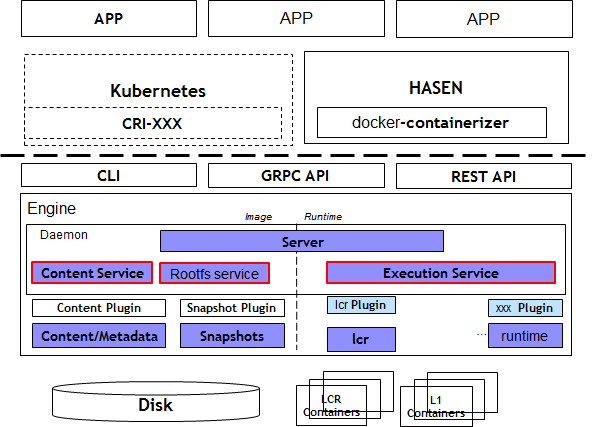
iSulad可以通过yum或rpm命令两种方式安装,由于yum会自动安装依赖,而rpm命令需要手动安装所有依赖,所以推荐使用yum安装。
[root@techhost ~]# yum install iSulad -y
修改容器镜像配置文件
[root@techhost ~]# vim etc/isulad/daemon.json[root@techhost ~]# cat etc/isulad/daemon.json....."registry-mirrors": ["docker.io"],.....
[root@techhost ~]# systemctl start isulad[root@techhost ~]# systemctl enable isulad[root@techhost ~]# systemctl status isulad
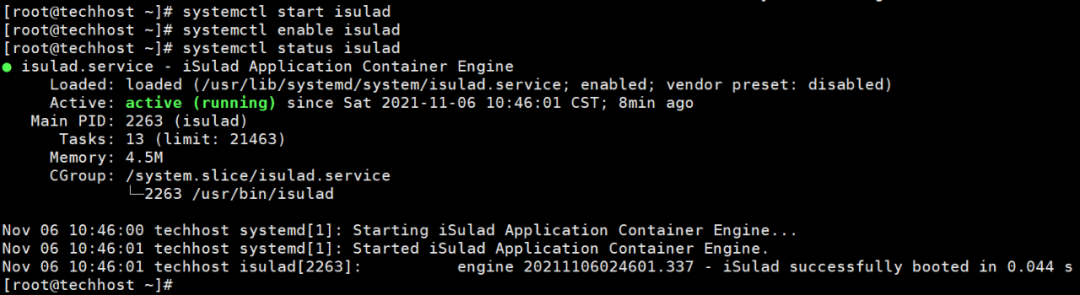
此处容器配置文件只是简单提及镜像仓库配置,更多更详细内容可查看安装与配置 (openeuler.org)官方文档;
查询服务版本信息
isula version 命令用于查询iSulad服务的版本信息。
[root@techhost ~]# isula versionClient:Version: 2.0.8Git commit: 9aa57ef27d3719729097f75c65125519497b8b66Built: 2021-03-30T03:38:01.891829863+00:00Server:Version: 2.0.8Git commit: 9aa57ef27d3719729097f75c65125519497b8b66Built: 2021-03-30T03:38:01.891829863+00:00OCI config:Version: 1.0.1Default file: etc/default/isulad/config.json[root@techhost ~]#
查询系统信息
isula info命令用于对系统级信息,以及容器和镜像数目等信息的查询。
[root@techhost ~]# isula infoContainers: 4Running: 1Paused: 0Stopped: 3Images: 2Server Version: 2.0.8Storage Driver: overlayBacking Filesystem: extfsSupports d_type: trueLogging Driver: json-fileCgroup Driver: cgroupfsHugetlb Pagesize: 2MBKernel Version: 5.10.0-4.17.0.28.oe1.x86_64Operating System: openEuler 21.03OSType: LinuxArchitecture: x86_64CPUs: 2Total Memory: 3 GBName: techhostiSulad Root Dir: var/lib/isulad[root@techhost ~]#
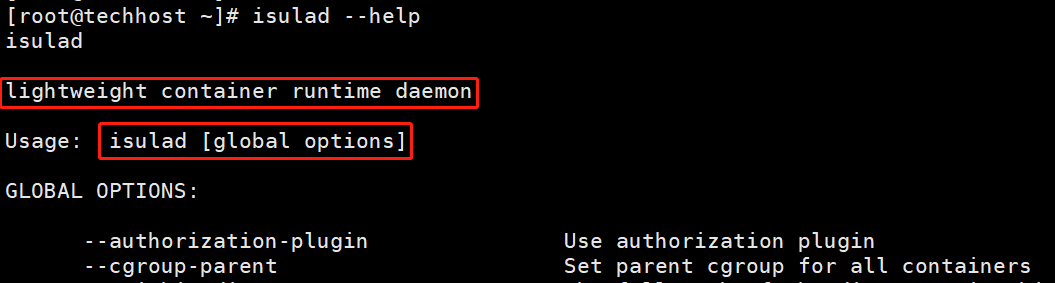
使用help指令查看帮助信息
[root@techhost ~]# isulad --help
列出环境中的容器
[root@techhost ~]# isula ps[root@techhost ~]# isula ps -a
创建容器
[root@techhost ~]# isula create -t -n test busyboxUnable to find image 'busybox' locallyImage "busybox" pullingImage "cabb9f684f8ba3edb303d578bfd7d709d853539ea1b420a3f6c81a08e85bb3d7" pulledf609bd54412da58dff4f6940e9c6f6d4829cbf2a120f6a32542c9cff0caf609c[root@techhost ~]# isula psCONTAINER ID IMAGE COMMAND CREATED STATUS PORTS NAMES[root@techhost ~]# isula ps -aCONTAINER ID IMAGE COMMAND CREATED STATUS PORTS NAMESf609bd54412d busybox "sh" 54 seconds ago Created test[root@techhost ~]#
启动容器“test”
[root@techhost ~]# isula start test#也可以通过容器id进行容器的启动[root@techhost ~]# isula start f609bd54412d
运行容器
isula run命令用于创建一个新的容器。会使用指定的容器镜像创建容器读写层,并且为运行指定的命令做好准备。创建完成后,使用指定的命令启动该容器。run命令相当于create然后start容器。
[root@techhost ~]# isula run -i busybox
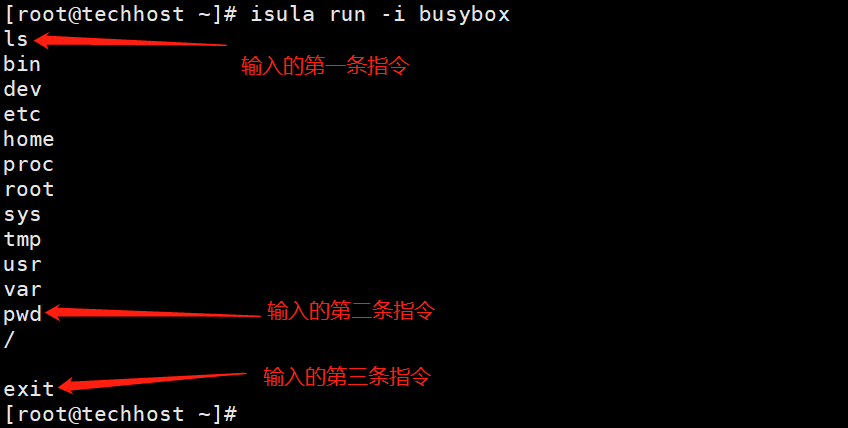
运行一个新容器
[root@techhost ~]# isula psCONTAINER ID IMAGE COMMAND CREATED STATUS PORTS NAMESf609bd54412d busybox "sh" 5 minutes ago Up 3 minutes test[root@techhost ~]#[root@techhost ~]#[root@techhost ~]# isula run -itd busyboxbe395cb0aecbe9504ac5e5d440f2c2397bc311e31604dea0da59bda54f5ca201[root@techhost ~]# isula psCONTAINER ID IMAGE COMMAND CREATED STATUS PORTS NAMESbe395cb0aecb busybox "sh" 9 seconds ago Up 8 seconds be395cb0aecbe9504ac5e5d440f2c2397bc311e31604dea0da59bda54f5ca201f609bd54412d busybox "sh" 6 minutes ago Up 4 minutes test[root@techhost ~]#

停止容器
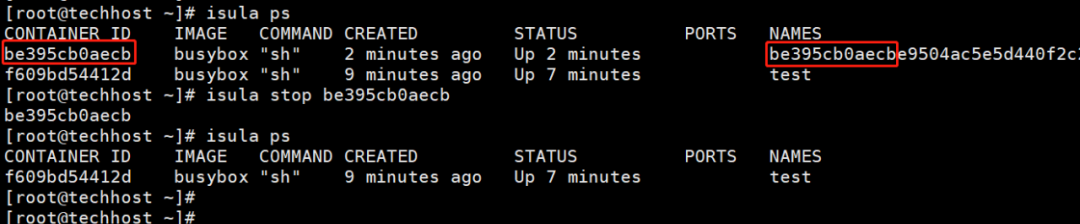
isula stop命令用于停止一个或多个运行中的容器。首先向容器中的首进程会发送SIGTERM信号,在指定时间(默认为10s)内容器未停止时,会发送SIGKILL。
[root@techhost ~]# isula psCONTAINER ID IMAGE COMMAND CREATED STATUS PORTS NAMESbe395cb0aecb busybox "sh" 2 minutes ago Up 2 minutes be395cb0aecbe9504ac5e5d440f2c2397bc311e31604dea0da59bda54f5ca201f609bd54412d busybox "sh" 9 minutes ago Up 7 minutes test[root@techhost ~]# isula stop be395cb0aecbbe395cb0aecb[root@techhost ~]# isula psCONTAINER ID IMAGE COMMAND CREATED STATUS PORTS NAMESf609bd54412d busybox "sh" 9 minutes ago Up 7 minutes test[root@techhost ~]#
强制停止容器
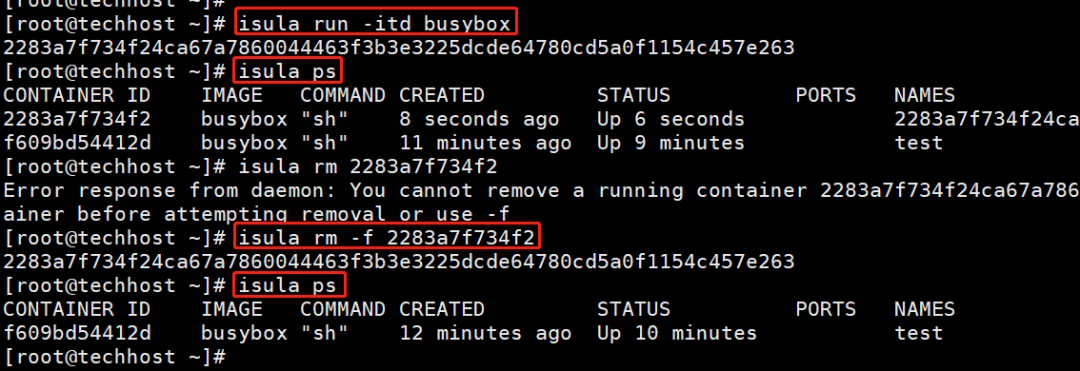
isula kill命令用于强制停止一个或多个运行中的容器。
[root@techhost ~]# isula run -itd busybox2283a7f734f24ca67a7860044463f3b3e3225dcde64780cd5a0f1154c457e263[root@techhost ~]# isula psCONTAINER ID IMAGE COMMAND CREATED STATUS PORTS NAMES2283a7f734f2 busybox "sh" 8 seconds ago Up 6 seconds 2283a7f734f24ca67a7860044463f3b3e3225dcde64780cd5a0f1154c457e263f609bd54412d busybox "sh" 11 minutes ago Up 9 minutes test[root@techhost ~]# isula rm 2283a7f734f2Error response from daemon: You cannot remove a running container 2283a7f734f24ca67a7860044463f3b3e3225dcde64780cd5a0f1154c457e263. Stop the container before attempting removal or use -f[root@techhost ~]# isula rm -f 2283a7f734f22283a7f734f24ca67a7860044463f3b3e3225dcde64780cd5a0f1154c457e263[root@techhost ~]# isula psCONTAINER ID IMAGE COMMAND CREATED STATUS PORTS NAMESf609bd54412d busybox "sh" 12 minutes ago Up 10 minutes test[root@techhost ~]#
接入容器
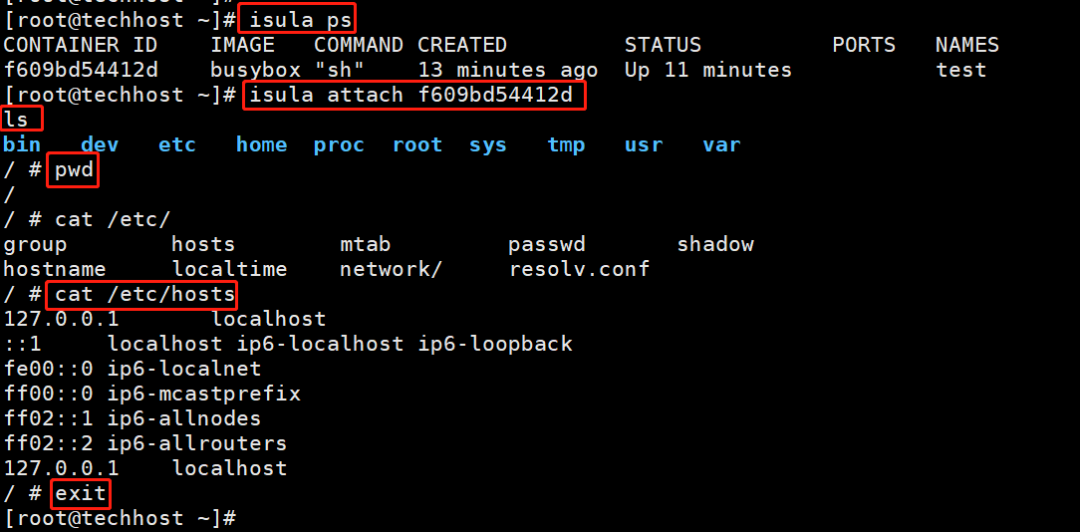
isula attach命令用于将当前终端的标准输入、标准输出和标准错误连接到正在运行的容器。仅支持runtime类型为lcr的容器。
[root@techhost ~]# isula psCONTAINER ID IMAGE COMMAND CREATED STATUS PORTS NAMESf609bd54412d busybox "sh" 13 minutes ago Up 11 minutes test[root@techhost ~]# isula attach f609bd54412dlsbin dev etc home proc root sys tmp usr var/ # pwd// # cat etc/group hosts mtab passwd shadowhostname localtime network/ resolv.conf/ # cat etc/hosts127.0.0.1 localhost::1 localhost ip6-localhost ip6-loopbackfe00::0 ip6-localnetff00::0 ip6-mcastprefixff02::1 ip6-allnodesff02::2 ip6-allrouters127.0.0.1 localhost/ # exit[root@techhost ~]#
查看容器中进程信息
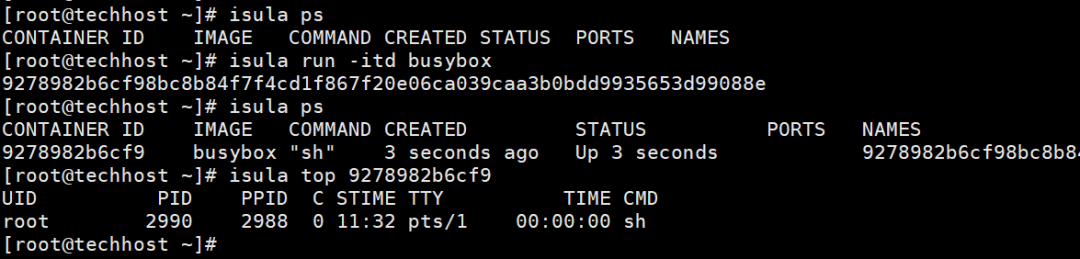
isula top用于查看容器中的进程信息。仅支持runtime类型为lcr的容器。
[root@techhost ~]# isula psCONTAINER ID IMAGE COMMAND CREATED STATUS PORTS NAMES[root@techhost ~]# isula run -itd busybox9278982b6cf98bc8b84f7f4cd1f867f20e06ca039caa3b0bdd9935653d99088e[root@techhost ~]# isula psCONTAINER ID IMAGE COMMAND CREATED STATUS PORTS NAMES9278982b6cf9 busybox "sh" 3 seconds ago Up 3 seconds 9278982b6cf98bc8b84f7f4cd1f867f20e06ca039caa3b0bdd9935653d99088e[root@techhost ~]# isula top 9278982b6cf9UID PID PPID C STIME TTY TIME CMDroot 2990 2988 0 11:32 pts/1 00:00:00 sh[root@techhost ~]#
重命名容器
isula rename命令用于重命名容器。
[root@techhost ~]# isula psCONTAINER ID IMAGE COMMAND CREATED STATUS PORTS NAMES9278982b6cf9 busybox "sh" 2 minutes ago Up 2 minutes 9278982b6cf98bc8b84f7f4cd1f867f20e06ca039caa3b0bdd9935653d99088e[root@techhost ~]# isula rename 9278982b6cf9 new_test[root@techhost ~]# isula psCONTAINER ID IMAGE COMMAND CREATED STATUS PORTS NAMES9278982b6cf9 busybox "sh" 2 minutes ago Up 2 minutes new_test[root@techhost ~]#

查看容器使用资源
isula stats用于实时显示资源使用的统计信息。仅支持runtime类型为lcr的容器。
[root@techhost ~]# isula psCONTAINER ID IMAGE COMMAND CREATED STATUS PORTS NAMES9278982b6cf9 busybox "sh" 4 minutes ago Up 4 minutes new_test[root@techhost ~]# isula stats --no-stream 9278982b6cf9CONTAINER CPU % MEM USAGE LIMIT MEM % BLOCK I O PIDS9278982b6cf9 0.00 56.00 KiB / 3.30 GiB 0.00 0.00 B / 0.00 B 1[root@techhost ~]#

容器与主机间的数据拷贝
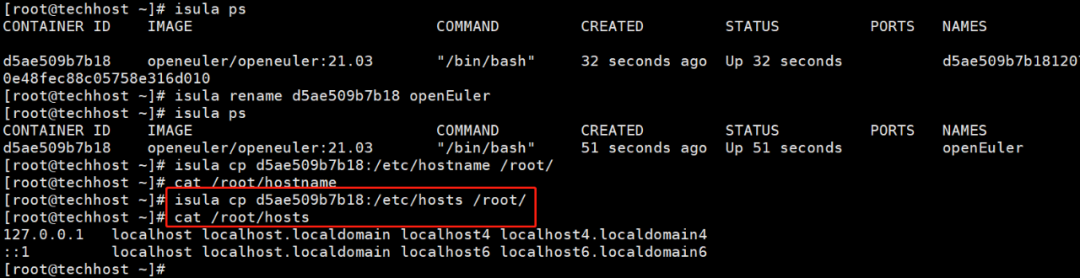
isula cp 用于容器与主机之间的数据拷贝,仅支持runtime类型为lcr的容器。
[root@techhost ~]# isula create -it openeuler/openeuler:21.03Unable to find image 'openeuler/openeuler:21.03' locallyImage "openeuler/openeuler:21.03" pullingImage "c9f72758f224d554c274c5505a9ec891f4be5dd57f8ad83871febec28043118f" pulled881177eec0caecdec52aae8b22493f528b3d499c4e44a347ecf39fecd40700cc[root@techhost ~]# isula psCONTAINER ID IMAGE COMMAND CREATED STATUS PORTS NAMES[root@techhost ~]# isula run -it openeuler/openeuler:21.03bash-5.0#bash-5.0# lsbin dev etc home lib lib64 media mnt opt proc root run sbin srv sys tmp usr varbash-5.0#bash-5.0# exitexit[root@techhost ~]# isula psCONTAINER ID IMAGE COMMAND CREATED STATUS PORTS NAMESd5ae509b7b18 openeuler/openeuler:21.03 "/bin/bash" 32 seconds ago Up 32 seconds d5ae509b7b1812073567f43dde31ce19a1cdab3b10e48fec88c05758e316d010[root@techhost ~]# isula rename d5ae509b7b18 openEuler[root@techhost ~]# isula psCONTAINER ID IMAGE COMMAND CREATED STATUS PORTS NAMESd5ae509b7b18 openeuler/openeuler:21.03 "/bin/bash" 51 seconds ago Up 51 seconds openEuler[root@techhost ~]# isula cp d5ae509b7b18:/etc/hostname /root/[root@techhost ~]# cat /root/hostname[root@techhost ~]# isula cp d5ae509b7b18:/etc/hosts /root/[root@techhost ~]# cat /root/hosts127.0.0.1 localhost localhost.localdomain localhost4 localhost4.localdomain4::1 localhost localhost.localdomain localhost6 localhost6.localdomain6[root@techhost ~]#
isula配置nginx服务
[root@techhost ~]# isula run -d --name nginx nginx220a7a1fa306e65930a14e2814c4145b8992e45c2cbbe62b3e92a9bd7fbb7df0[root@techhost ~]#[root@techhost ~]# isula psCONTAINER ID IMAGE COMMAND CREATED STATUS PORTS NAMES220a7a1fa306 nginx "/docker-entrypoin..." 4 seconds ago Up 4 seconds nginx[root@techhost ~]# curl 127.0.0.1curl: (7) Failed to connect to 127.0.0.1 port 80: Connection refused[root@techhost ~]# vim /etc/sysconfig/selinux[root@techhost ~]# isula exec -it nginx sh# curl localhost<!DOCTYPE html><html><head><title>Welcome to nginx!</title><style>html { color-scheme: light dark; }body { width: 35em; margin: 0 auto;font-family: Tahoma, Verdana, Arial, sans-serif; }</style></head><body><h1>Welcome to nginx!</h1><p>If you see this page, the nginx web server is successfully installed andworking. Further configuration is required.</p><p>For online documentation and support please refer to<a href="http://nginx.org/">nginx.org</a>.<br/>Commercial support is available at<a href="http://nginx.com/">nginx.com</a>.</p><p><em>Thank you for using nginx.</em></p></body></html># exit[root@techhost ~]#
注意此时nginx服务已在容器内部访问,isula未提供-p参数,需配置isula容器CNI管理,具体配置可参考以下两篇文章。
CNI网络插件实现iSula容器实例网络通信(https://bbs.huaweicloud.com/forum/forum.php?mod=viewthread&tid=92334) 鲲鹏论坛、华为云论坛;
支持 Cni网络 (https://docs.openeuler.org/zh/docs/20.03_LTS/docs/Container/%E6%94%AF%E6%8C%81CNI%E7%BD%91%E7%BB%9C.html)
关于isula容器管理的基本操作还有很多很多,各位读者可借鉴docker容器管理与iSula容器管理方法进行对比,查阅相关官方资料进行学习。

