



本文转载自公众号:SuperGopher
这是「 Istio 系列 」的第二篇文章。
前面的 Istio 系列篇一 | 服务网格和 Istio ,主要让大家对 服务网格和 Istio 有个大概的了解。
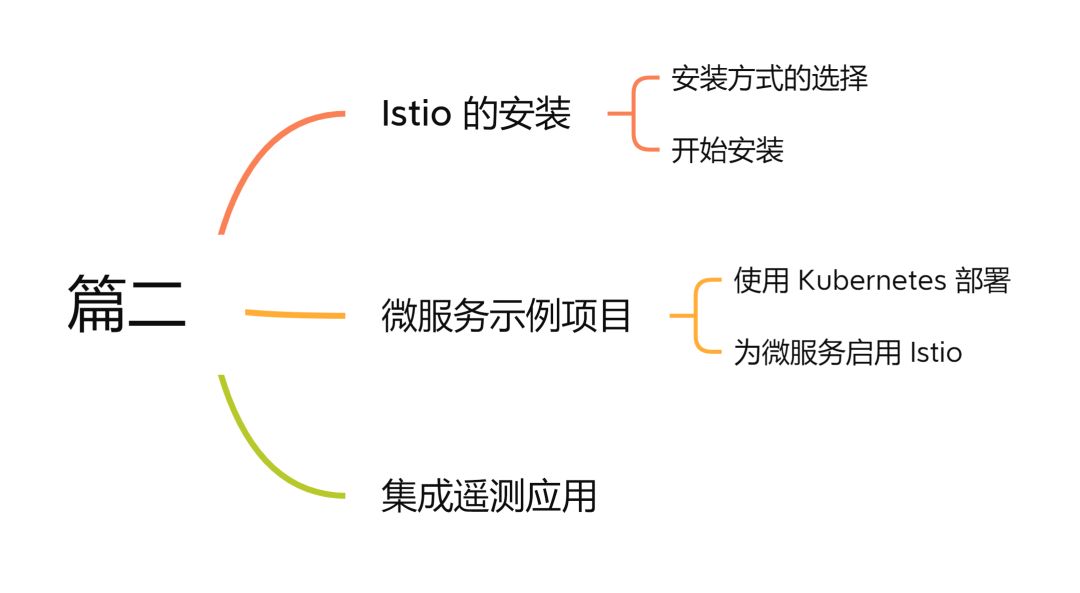
本篇我们将继续 Istio 的安装 以及通过一个微服务示例项目来 入门 Istio ,最后我们还会集成一些 遥测应用 来更好地观察服务网格。
Istio 的安装
学习的最好方式就是亲自动手实践,要想学 Istio ,就先把 Istio 给装起来!
安装方式的选择
Istio 为我们提供了多种可选的安装方式:
| 安装方式 | 说明 | 推荐度 | 源码位置 |
|---|---|---|---|
| Istioctl | Istio 提供的命令行工具 | ⭐⭐⭐⭐⭐ | istio/istioctl[1] |
| Istio Operator | Istio 提供的 Operator 控制器 | ⭐⭐ 直接使用 Operator 进行安装可能存在安全隐患,并且官方不会优先为其考虑新特性了 | istio/operator[2] |
| Helm | Kubernetes 的包管理器 | ⭐⭐⭐ 此特性目前(2022-02-03)仍处于 alpha 阶段 | istio/manifests/charts[3] |
使用 Istioctl 和 Istio Operator 安装 Istio 时,底层使用的都是相同的 IstioOperator API
。
它们区别在于当使用 istioctl install
命令时,操作运行于管理员用户的安全上下文中;而直接使用 Operator 时,操作运行于集群内 pod 自己的安全上下文中。 为了避免此漏洞,需要确保 Operator 自身部署的足够安全,所以一般不建议直接使用 Operator 。
而不论是使用 Helm chart ,或是 Istioctl 、 Operator 安装 Istio 时,它们使用的底层 chart
都是相同的。
接下来我们将使用 Istioctl 来进行 Istio 的安装。
开始安装
首先需要将 Istioctl 工具下载到服务器,可以自行到 Istio release[4] 页面下载对应的平台版本。
也有个简单的办法,直接使用 Istio 提供的 downloadIstio 脚本一键下载:
$ curl -L https://istio.io/downloadIstio | sh -
不过该方式默认下载的是最新版本,推荐大家指定一下具体版本,以 1.12.1
为例,可以通过传递 ISTIO_VERSION
参数:
$ curl -L https://istio.io/downloadIstio | ISTIO_VERSION=1.12.1 sh -
执行完成后会在当前位置生成 istio-1.12.1
目录,其中包括以下内容(具体版本可能存在差异):

bin
: 存放istioctl
二进制文件manifests
: istio 的内置chart
目录,默认使用这些内置 chart 生成安装清单,安装过程也可以自行设置--manifests=other_manifests/
参数来指定外部 chartsamples
: istio 提供的一些示例应用程序tools
: 一些工具,如certs
用于生成证书
为了方便使用 istioctl
,将 bin
目录添加到我们的环境变量中:
$ export PATH=$PWD/bin:$PATH
检查一下 istio 环境以及版本信息:
$ istioctl version
no running Istio pods in "istio-system"
1.12.1
到这,istioctl
的安装就完成了,我们还要继续借助 istioctl
来完成 Istio
的安装,这才是我们的最终目的。
在继续安装 Istio
之前,我们先要了解下 Istio 为我们提供的几个内置的配置文件,这些配置文件提供了对 Istio 控制平面和 Istio 数据平面 Sidecar 的定制内容。
要想知道有哪几个内置的配置文件,可以运行以下命令:
$ istioctl profile list
Istio configuration profiles:
    default
    demo
    empty
    external
    minimal
    openshift
    preview
    remote
其中几个主要的配置文件:
| 配置文件 | 核心组件 | 说明 |
|---|---|---|
| default | istio-ingressgateway、istiod | 根据 IstioOperator API 的默认设置启动组件。可用于生产部署。 |
| demo | istio-egressgateway、istio-ingressgateway、istiod | 旨在展示 Istio 的功能,启用了高级别的追踪和访问日志(需要具有适度的资源),适合学习使用。 |
| minimal | istiod | 与默认配置文件相同,但只安装了控制平面组件。 |
| remote | - | 配置 Multicluster Mesh 的 Remote Cluster。 |
| empty | - | 不部署任何东西。可以作为自定义配置的基本配置文件。 |
| preview | istio-ingressgateway、istiod | 实验性。用于探索 Istio 的新功能。不确保稳定性、安全性和性能。 |
当你足够熟悉 Istio 后,你可以自定义配置文件。但在此之前,我们还是先以 demo
来入门吧。
我们可以浏览一下 demo
的配置信息:
$ istioctl profile dump demo
apiVersion: install.istio.io/v1alpha1
kind: IstioOperator
spec:
  components:
    base:
      enabled: true
    cni:
      enabled: false
    egressGateways:
    - enabled: true
      k8s:
        resources:
          requests:
            cpu: 10m
            memory: 40Mi
      name: istio-egressgateway
    ingressGateways:
    - enabled: true
......
开始使用 demo
配置文件进行 Istio 安装,有两种方式:
1、直接通过在命令行传递配置名称
$ istioctl install --set profile=demo
2、通过 -f
传递配置文件(推荐方式)
$ vi my-demo-config.yaml
apiVersion: install.istio.io/v1alpha1
kind: IstioOperator
spec:
  profile: demo
$ istioctl install -f my-demo-config.yaml
完整的 API 记录可以参考 IstioOperator API 文档[5]。
耐心等待,出现如下结果:
This will install the Istio 1.12.1 demo profile with ["Istio core" "Istiod" "Ingress gateways" "Egress gateways"] components into the cluster. Proceed? (y/N) y
✔ Istio core installed
✔ Istiod installed
✔ Egress gateways installed
✔ Ingress gateways installed
✔ Installation complete
Making this installation the default for injection and validation.

Thank you for installing Istio 1.12.  Please take a few minutes to tell us about your install/upgrade experience!  https://forms.gle/xxx
到此,Istio
的安装就完成了。
再次检查一下 istio 环境以及版本信息:
$ istioctl version
client version: 1.12.1
control plane version: 1.12.1
data plane version: 1.12.1 (2 proxies)
也可以对其进行验证:
$ istioctl verify-install -f my-demo-config.yaml
......
Checked 14 custom resource definitions
Checked 3 Istio Deployments
✔ Istio is installed and verified successfully
查看 Istio
在 Kubernetes 部署了什么:
$ kubectl -n istio-system get deploy
NAME                   READY   UP-TO-DATE   AVAILABLE   AGE
istio-egressgateway    1/1     1            1           9m49s
istio-ingressgateway   1/1     1            1           9m49s
istiod                 1/1     1            1           10m
为了下面示例项目的演示,我们先准备一个命名空间 istio-app
,为其添加标签,指示在此命名空间部署应用时,Istio 自动给 Pod 注入 Envoy 边车代理:
$ kubectl create ns istio-app
namespace/istio-app created
$ kubectl label ns istio-app istio-injection=enabled
namespace/istio-app labeled
最后,如果你不需要 Istio
,你可以卸载掉(希望不会执行到这一步 😅):
$ istioctl manifest generate -f my-demo-config.yaml | kubectl delete --ignore-not-found=true -f -
$ kubectl delete ns istio-system
$ kubectl label ns istio-app istio-injection-
$ kubectl delete ns istio-app
微服务示例项目
本篇文章的微服务示例项目将选用:Online Boutique[6]
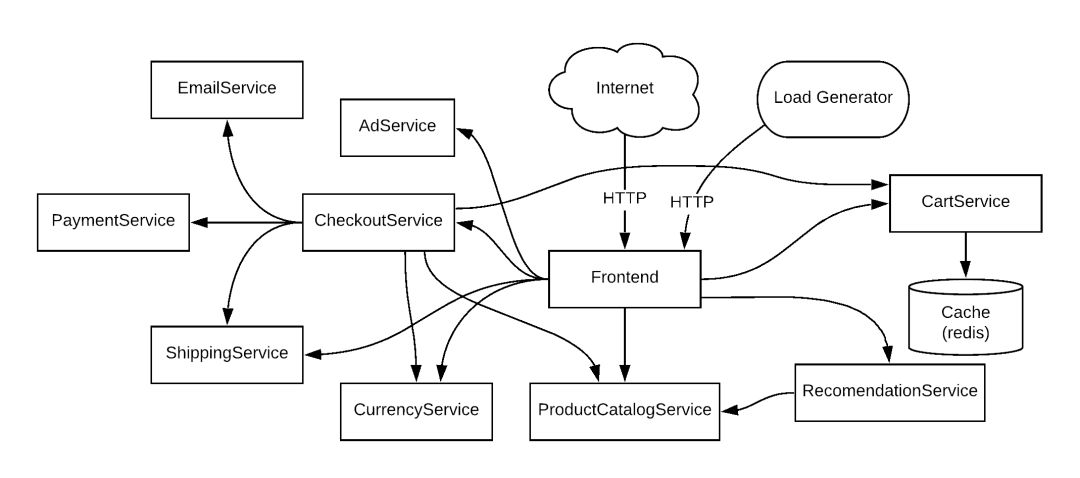
这是一个基于云原生微服务架构的 web 商城应用,由 11 个用不同语言编写的微服务组成,服务间通过 gRPC 相互通信。用户可以在其中进行浏览商品、添加购物车并购买等操作。
| 服务 | 语言 | 说明 |
|---|---|---|
| frontend | Go | 提供一个 HTTP 服务。实现不需要注册/登录并自动为所有用户生成会话 ID |
| cartservice | C# | 将用户购物车中的商品存储在 Redis 中并进行检索 |
| productcatalogservice | Go | 产品列表(来自 JSON 文件)、搜索产品以及获取单个产品 |
| currencyservice | Node.js | 将一种货币金额转换为另一种货币。 使用从欧洲中央银行获取的真实值。 这是最高的 QPS 服务 |
| paymentservice | Node.js | 用给定的金额向给定的信用卡信息(模拟)收取费用并返回交易 ID |
| shippingservice | Go | 根据购物车提供运费估算。 将物品运送到给定地址(模拟) |
| emailservice | Python | 向用户发送订单确认电子邮件(模拟) |
| checkoutservice | Go | 检索用户购物车、准备订单并协调付款、运输和电子邮件通知 |
| recommendationservice | Python | 根据购物车中给出的内容推荐其他产品 |
| adservice | Java | 根据给定的上下文词提供文字广告 |
| loadgenerator | Python/Locust | 不断向前端发送模仿真实用户购物流程的请求 |
使用 Kubernetes 部署
Online Boutique 的 Kubernetes 部署配置位于:https://raw.githubusercontent.com/GoogleCloudPlatform/microservices-demo/main/release/kubernetes-manifests.yaml[7]
建议先自行下载到本地,其中使用到的 gcr.io 镜像如果无法拉取,可以参考:无法拉取 gcr.io 镜像?用魔法来打败魔法
我们先为 Online Boutique 应用创建一个命名空间:
$ kubectl create ns microservices-demo
namespace/microservices-demo created
开始部署 Online Boutique 应用:
$ kubectl apply -n microservices-demo -f kubernetes-manifests.yaml
deployment.apps/emailservice created
service/emailservice created
deployment.apps/checkoutservice created
service/checkoutservice created
deployment.apps/recommendationservice created
service/recommendationservice created
deployment.apps/frontend created
service/frontend created
service/frontend-external created
deployment.apps/paymentservice created
service/paymentservice created
deployment.apps/productcatalogservice created
service/productcatalogservice created
deployment.apps/cartservice created
service/cartservice created
deployment.apps/loadgenerator created
deployment.apps/currencyservice created
service/currencyservice created
deployment.apps/shippingservice created
service/shippingservice created
deployment.apps/redis-cart created
service/redis-cart created
deployment.apps/adservice created
service/adservice created
等待所有 POD 启动完成:
$ kubectl get pod -n microservices-demo
NAME                                     READY   STATUS    RESTARTS   AGE
adservice-78c76f67d7-ssk2d               1/1     Running   0          68s
cartservice-7fb7c7bbcf-hcjvb             1/1     Running   0          69s
checkoutservice-7dc67d866f-fqx6g         1/1     Running   0          69s
currencyservice-86cbc887cf-9cs89         1/1     Running   0          69s
emailservice-5d4d698877-sg5rq            1/1     Running   0          69s
frontend-78756cdbb9-szdsg                1/1     Running   0          69s
loadgenerator-7ddcddf799-6bjr9           1/1     Running   0          69s
paymentservice-66697f866c-b7vjv          1/1     Running   0          69s
productcatalogservice-78b45fdb9f-58rq6   1/1     Running   0          69s
recommendationservice-58956f7f99-k9bgq   1/1     Running   0          69s
redis-cart-5b569cd47-96knk               1/1     Running   0          68s
shippingservice-5cbc5b7c4c-t2x79         1/1     Running   0          68s
查看 Service :
$ kubectl get svc -n microservices-demo
NAME                    TYPE           CLUSTER-IP       EXTERNAL-IP   PORT(S)        AGE
adservice               ClusterIP      10.104.91.120    <none>        9555/TCP       110s
cartservice             ClusterIP      10.100.229.227   <none>        7070/TCP       110s
checkoutservice         ClusterIP      10.97.11.220     <none>        5050/TCP       110s
currencyservice         ClusterIP      10.99.197.174    <none>        7000/TCP       110s
emailservice            ClusterIP      10.104.16.76     <none>        5000/TCP       110s
frontend                ClusterIP      10.105.83.87     <none>        80/TCP         110s
frontend-external       LoadBalancer   10.101.227.191   localhost     80:31057/TCP   110s
paymentservice          ClusterIP      10.105.219.247   <none>        50051/TCP      110s
productcatalogservice   ClusterIP      10.98.241.58     <none>        3550/TCP       110s
recommendationservice   ClusterIP      10.96.153.244    <none>        8080/TCP       110s
redis-cart              ClusterIP      10.107.73.80     <none>        6379/TCP       110s
shippingservice         ClusterIP      10.100.207.175   <none>        50051/TCP      110s
浏览器访问 frontend-external
服务,这是 Online Boutique 暴露的 LoadBalancer 前端服务。


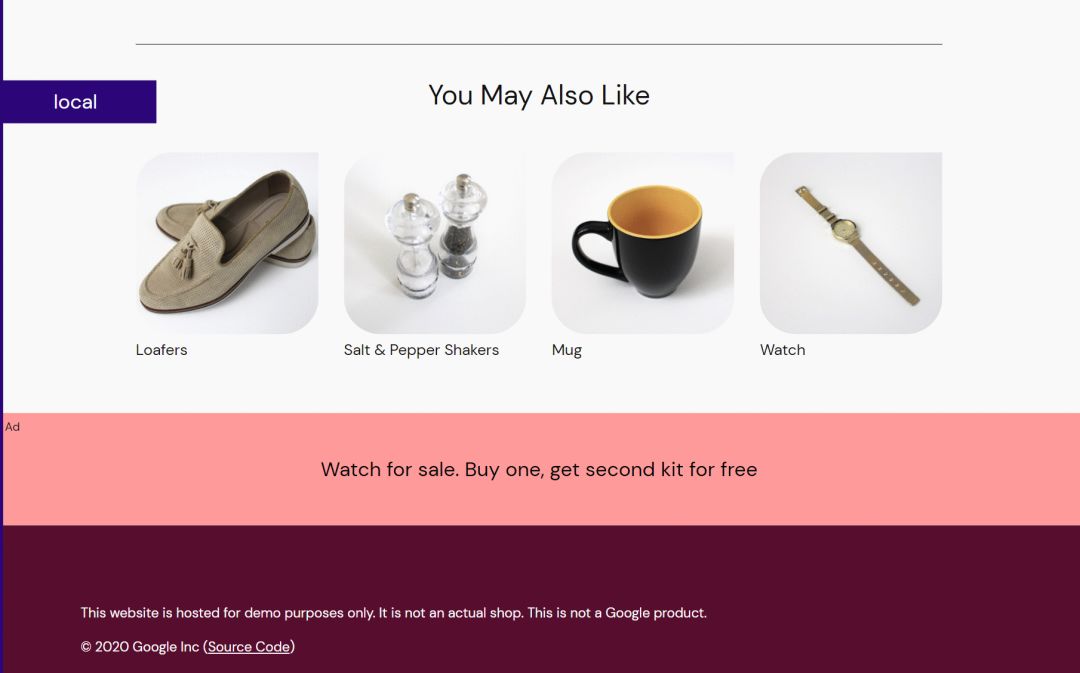
完整功能自行部署后进行体验。
为微服务启用 Istio
部署在 microservices-demo
命名空间中的 Online Boutique 是一个简单的基于 Kubernetes 的微服务架构应用,而在一些细化管理的需求上,如熔断、限流、监控、认证、授权、安全、负载均衡等,无法很好的得到满足。
所以,我们将为其升级到服务网格架构,为微服务启用 Istio 支持。
要启用 Istio 支持,只要为 POD 额外注入一个 SideCar 应用。
可以手动注入,也可以为整个命名空间添加 istio-injection=enabled
标签实现自动注入。
在安装 Istio 时,我们已经预先创建了一个 istio-app
命名空间并为其添加了 Istio 自动注入 SideCar 的标签。
重新在 istio-app
命名空间部署 Online Boutique 应用:
$ kubectl apply -n istio-app -f kubernetes-manifests.yaml
deployment.apps/emailservice created
service/emailservice created
deployment.apps/checkoutservice created
service/checkoutservice created
deployment.apps/recommendationservice created
service/recommendationservice created
deployment.apps/frontend created
service/frontend created
service/frontend-external created
deployment.apps/paymentservice created
service/paymentservice created
deployment.apps/productcatalogservice created
service/productcatalogservice created
deployment.apps/cartservice created
service/cartservice created
deployment.apps/loadgenerator created
deployment.apps/currencyservice created
service/currencyservice created
deployment.apps/shippingservice created
service/shippingservice created
deployment.apps/redis-cart created
service/redis-cart created
deployment.apps/adservice created
service/adservice created
同样的,等待所有 POD 启动完成:
$ kubectl get pod -n istio-app
NAME                                     READY   STATUS    RESTARTS   AGE
adservice-78c76f67d7-vgc8d               2/2     Running   0          59s
cartservice-7fb7c7bbcf-7xklw             2/2     Running   0          60s
checkoutservice-7dc67d866f-jh9vm         2/2     Running   0          60s
currencyservice-86cbc887cf-29v9n         2/2     Running   0          60s
emailservice-5d4d698877-vgvc8            2/2     Running   0          60s
frontend-78756cdbb9-xzm95                2/2     Running   0          60s
loadgenerator-7ddcddf799-9hrkj           2/2     Running   0          60s
paymentservice-66697f866c-k5qnj          2/2     Running   0          60s
productcatalogservice-78b45fdb9f-t7t8x   2/2     Running   0          60s
recommendationservice-58956f7f99-fxk6s   2/2     Running   0          60s
redis-cart-5b569cd47-7c48x               2/2     Running   0          59s
shippingservice-5cbc5b7c4c-5tb95         2/2     Running   0          59s
每个 POD 中都额外多了一个容器,即 SideCar 代理。
和之前不同的是,我们应该使用 Istio 的入口网关来访问应用,不再需要 frontend-external
服务了,可以把它删掉:
$ kubectl delete svc frontend-external -n istio-app
service "frontend-external" deleted
查看 Istio 的入口网关 istio-ingressgateway
暴露端口(80 或 443 映射的端口):
$ kubectl get svc -n istio-system
NAME                   TYPE        CLUSTER-IP      EXTERNAL-IP   PORT(S)                                                                      AGE
istio-egressgateway    ClusterIP   10.99.177.224   <none>        80/TCP,443/TCP                                                               25d
istio-ingressgateway   NodePort    10.98.188.6     <none>        15021:31783/TCP,80:30776/TCP,443:32456/TCP,31400:30022/TCP,15443:30548/TCP   25d
istiod                 ClusterIP   10.96.241.180   <none>        15010/TCP,15012/TCP,443/TCP,15014/TCP                                        25d
在访问之前,我们还需要为 Istio 声明一些配置,让其可以正确路由到 Online Boutique 应用:
$ kubectl apply -n istio-app -f https://raw.githubusercontent.com/GoogleCloudPlatform/microservices-demo/main/release/istio-manifests.yaml
gateway.networking.istio.io/frontend-gateway created
virtualservice.networking.istio.io/frontend-ingress created
serviceentry.networking.istio.io/allow-egress-googleapis created
serviceentry.networking.istio.io/allow-egress-google-metadata created
virtualservice.networking.istio.io/frontend created
$ kubectl delete serviceentry allow-egress-google-metadata -n istio-app
serviceentry.networking.istio.io "allow-egress-google-metadata" deleted
$ kubectl delete serviceentry allow-egress-googleapis -n istio-app
serviceentry.networking.istio.io "allow-egress-googleapis" deleted
关键配置说明:
# Istio Gateway 配置
apiVersion: networking.istio.io/v1alpha3
kind: Gateway
metadata:
  name: frontend-gateway
spec:
  selector:
    istio: ingressgateway # 使用 Istio 默认网关实现
  servers:
    - port:
        number: 80
        name: http
        protocol: HTTP
      hosts:
        - "*"
---
# 流量路由配置
apiVersion: networking.istio.io/v1alpha3
kind: VirtualService
metadata:
  name: frontend-ingress
spec:
  # 流量的目标主机
  hosts:
    - "*"
  # 与上面的网关绑定在一起,以接受来自该网关的流量
  gateways:
    - frontend-gateway
  http:
    - route:
        # 转发流量到实际目的地
        - destination:
            # 主机名
            host: frontend
            # 端口
            port:
              number: 80
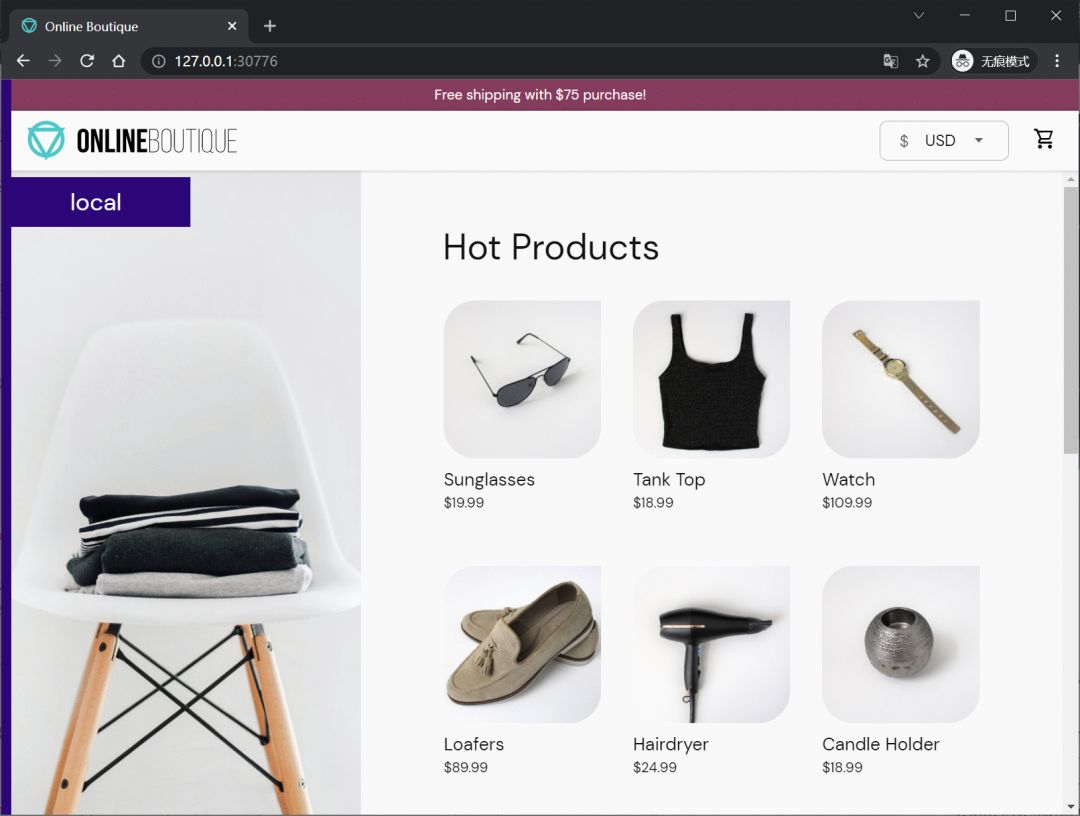
访问效果和之前一样,只是入口变成了 Istio 的网关:
集成遥测应用
在集成遥测应用之前,我们来体验一下 Istio 的金丝雀部署功能。
我们之前的 productcatalogservice
服务没有指定版本,可以将其删除并指定为 V1
版本:
$ kubectl delete deploy productcatalogservice -n istio-app
deployment.apps "productcatalogservice" deleted
V1
版本:
apiVersion: apps/v1
kind: Deployment
metadata:
  name: productcatalogservice
spec:
  selector:
    matchLabels:
      app: productcatalogservice
  template:
    metadata:
      labels:
        app: productcatalogservice
        # 指定为 v1 版本
        version: v1
    spec:
      serviceAccountName: default
      terminationGracePeriodSeconds: 5
      containers:
      - name: server
        image: gcr.io/google-samples/microservices-demo/productcatalogservice:v0.3.5
        ports:
        - containerPort: 3550
        env:
        - name: PORT
          value: "3550"
        - name: DISABLE_STATS
          value: "1"
        - name: DISABLE_TRACING
          value: "1"
        - name: DISABLE_PROFILER
          value: "1"
        # - name: JAEGER_SERVICE_ADDR
        #   value: "jaeger-collector:14268"
        readinessProbe:
          exec:
            command: ["/bin/grpc_health_probe", "-addr=:3550"]
        livenessProbe:
          exec:
            command: ["/bin/grpc_health_probe", "-addr=:3550"]
        resources:
          requests:
            cpu: 100m
            memory: 64Mi
          limits:
            cpu: 200m
            memory: 128Mi
$ kubectl apply -n istio-app -f productcatalog-v1.yaml
deployment.apps/productcatalogservice created
$ kubectl get deploy productcatalogservice -n istio-app
NAME                    READY   UP-TO-DATE   AVAILABLE   AGE
productcatalogservice   1/1     1            1           5s
V2
版本:
apiVersion: apps/v1
kind: Deployment
metadata:
  name: productcatalogservice-v2
spec:
  selector:
    matchLabels:
      app: productcatalogservice
  template:
    metadata:
      labels:
        app: productcatalogservice
        # 指定为 v2 版本
        version: v2
    spec:
      containers:
      - env:
        - name: PORT
          value: '3550'
        - name: EXTRA_LATENCY
          value: 3s
        image: gcr.io/google-samples/microservices-demo/productcatalogservice:v0.3.5
        livenessProbe:
          exec:
            command:
            - /bin/grpc_health_probe
            - -addr=:3550
        name: server
        ports:
        - containerPort: 3550
        readinessProbe:
          exec:
            command:
            - /bin/grpc_health_probe
            - -addr=:3550
        resources:
          limits:
            cpu: 200m
            memory: 128Mi
          requests:
            cpu: 100m
            memory: 64Mi
      terminationGracePeriodSeconds: 5
$ kubectl apply -n istio-app -f productcatalog-v2.yaml
deployment.apps/productcatalogservice-v2 created
$ kubectl get deploy productcatalogservice-v2 -n istio-app
NAME                       READY   UP-TO-DATE   AVAILABLE   AGE
productcatalogservice-v2   1/1     1            1           6s
V2 版本设置了 EXTRA_LATENCY
环境变量,让接口时延延长 3 秒。(很明显,这是一个有故障的升级)
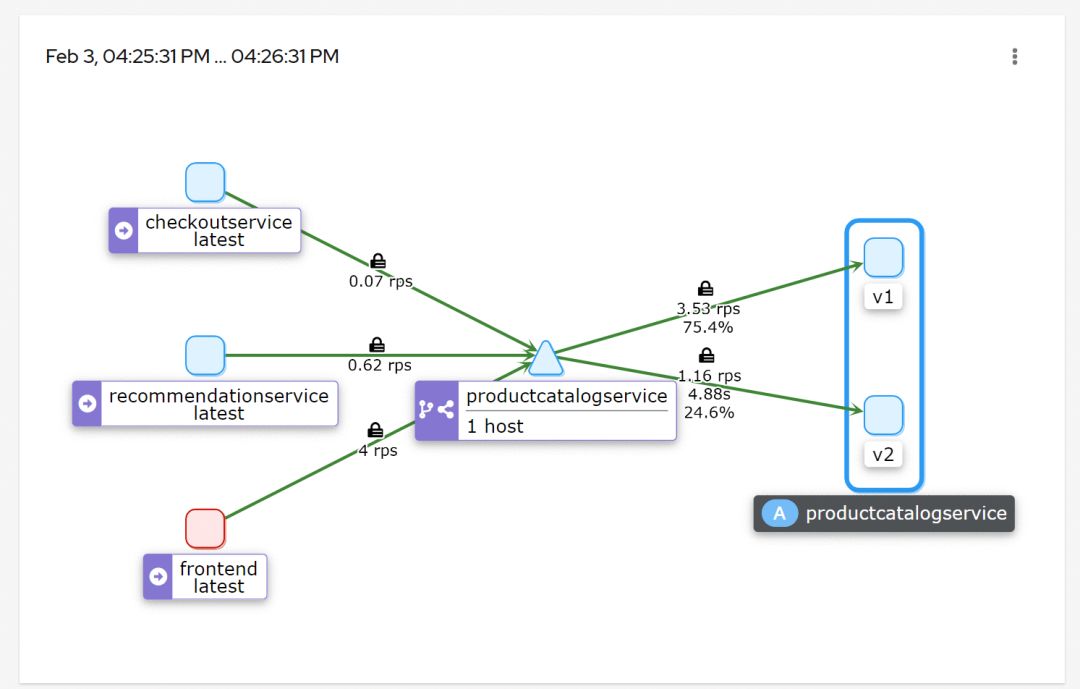
通过配置 Istio 使 75% 的流量流向 V1 , 25% 的流量流向 V2 :
apiVersion: networking.istio.io/v1alpha3
kind: VirtualService
metadata:
  name: productcatalogservice
spec:
  hosts:
  - productcatalogservice
  http:
  - route:
    - destination:
        host: productcatalogservice
        subset: v1
      weight: 75
    - destination:
        host: productcatalogservice
        subset: v2
      weight: 25
$ kubectl apply -n istio-app -f vs-split-traffic.yaml
virtualservice.networking.istio.io/productcatalogservice created
apiVersion: networking.istio.io/v1alpha3
kind: DestinationRule
metadata:
  name: productcatalogservice
spec:
  host: productcatalogservice
  subsets:
    - labels:
        app: productcatalogservice
        version: v1
      name: v1
    - labels:
        app: productcatalogservice
        version: v2
      name: v2
$ kubectl apply -n istio-app -f destinationrule.yaml
destinationrule.networking.istio.io/productcatalogservice created
多次刷新首页。前端加载速度应该会周期性的变较慢(3 秒)。
这个时候就可以让遥测应用上场观察了。
这些应用能够与 Istio 集成以提供额外功能。

我们在最开始下载 Istioctl 工具时,有一个 samples
文件夹,其中的 addons
目录就存放了这些遥测应用的部署配置。
直接部署 samples/addons
下所有的遥测应用:
$ kubectl apply -n istio-system -f samples/addons
serviceaccount/grafana created
configmap/grafana created
service/grafana created
deployment.apps/grafana created
configmap/istio-grafana-dashboards created
configmap/istio-services-grafana-dashboards created
deployment.apps/jaeger created
service/tracing created
service/zipkin created
service/jaeger-collector created
serviceaccount/kiali created
configmap/kiali created
clusterrole.rbac.authorization.k8s.io/kiali-viewer created
clusterrole.rbac.authorization.k8s.io/kiali created
clusterrolebinding.rbac.authorization.k8s.io/kiali created
role.rbac.authorization.k8s.io/kiali-controlplane created
rolebinding.rbac.authorization.k8s.io/kiali-controlplane created
service/kiali created
deployment.apps/kiali created
serviceaccount/prometheus created
configmap/prometheus created
clusterrole.rbac.authorization.k8s.io/prometheus created
clusterrolebinding.rbac.authorization.k8s.io/prometheus created
service/prometheus created
deployment.apps/prometheus created
使用 istioctl 访问 Kiali:
$ istioctl dashboard kiali
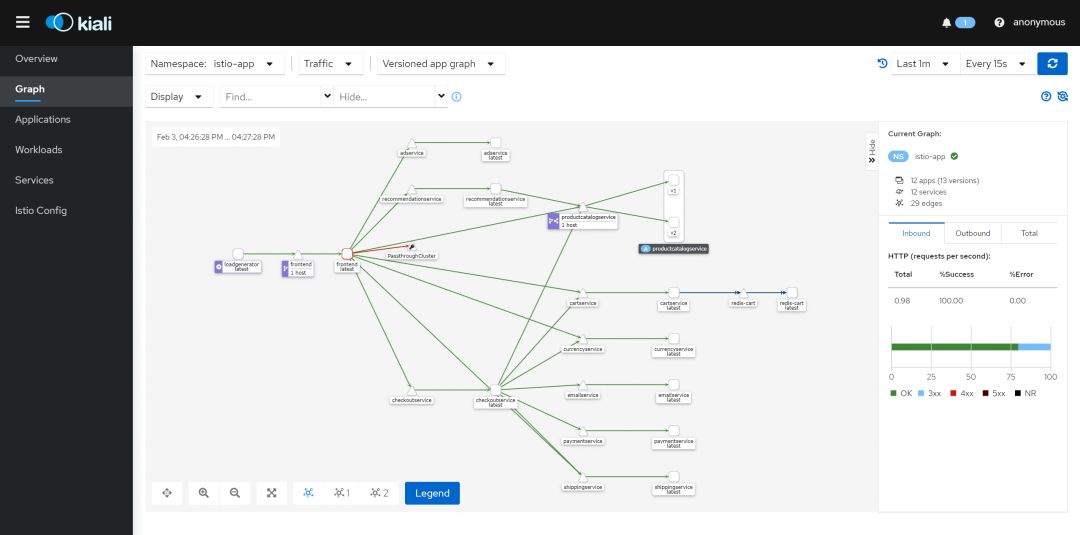
观察 productcatalogservice
看到大约 25% 的请求发送到 V2 :
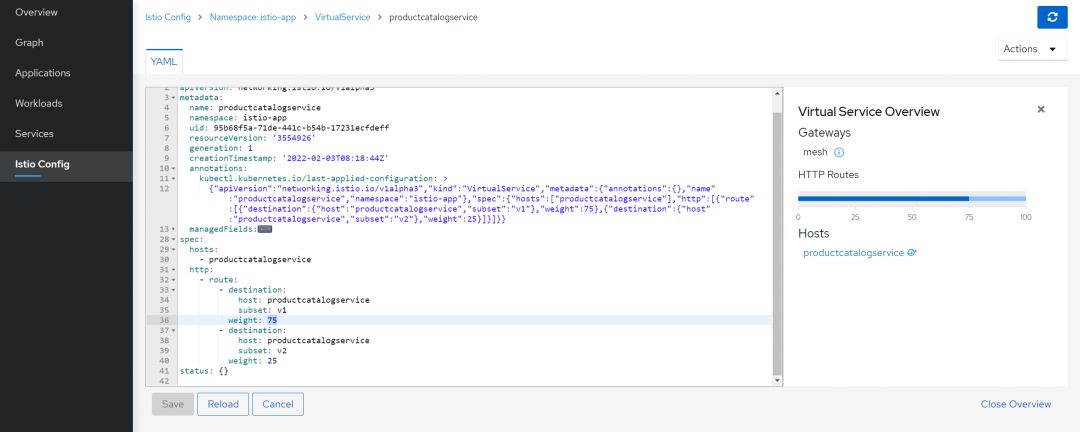
由于 V2 是一个故障升级,如果需要回滚,将 100% 的流量流向 V1 ,只需要更改 productcatalogservice
的 VirtualService
配置。
可以直接在 Kiali 中更改:
Kiali 还有很多的功能就不在这一一体现了。
最后
本篇主要偏向动手实践,关于 Istio 的更多内容,我也在持续学习中,有收获马上分享给大家。
感谢阅读到这里!关注我,下次见。

参考资料
istio/istioctl: https://github.com/istio/istio/tree/master/istioctl
[2]istio/operator: https://github.com/istio/istio/tree/master/operator
[3]istio/manifests/charts: https://github.com/istio/istio/tree/master/manifests/charts
[4]Istio Release: https://github.com/istio/istio/releases
[5]IstioOperator API 文档: https://istio.io/latest/zh/docs/reference/config/istio.operator.v1alpha1/
[6]Online Boutique: https://github.com/GoogleCloudPlatform/microservices-demo
[7]https://raw.githubusercontent.com/GoogleCloudPlatform/microservices-demo/main/release/kubernetes-manifests.yaml: https://raw.githubusercontent.com/GoogleCloudPlatform/microservices-demo/main/release/kubernetes-manifests.yaml
