



前言
因为公司的测试环境带有kerberos,而我经常需要本地连接测试集群上的hive,以进行源码调试。而本地认证远程集群的kerberos,并访问hive,和在服务器上提交Spark程序代码有些不同,所以专门研究了一下
并进行总结。
服务器上
在服务器上提交Spark程序认证kerberos比较简单,有两种方法:
使用kinit 缓存票据 kinit -kt etc/security/keytabs/hive.service.keytab hive/indata-192-168-44-128.indata.com@INDATA.COM,然后提交Spark程序即可
在spark-submit 中添加参数 --principal hive/indata-192-168-44-128.indata.com@INDATA.COM --keytab etc/security/keytabs/hive.service.keytab
本地
本地连接,稍微复杂点,首先要配好环境,比如Hadoop的环境变量、winutils等,然后需要配置hosts,将服务器上的/etc/hosts里面的内容拷贝出来,粘贴Windows上的hosts文件里即可
代码
首先需要将集群上的hive-site.xml,core-site.xml,yarn-site.xml,hdfs-site.xml拷贝到src/main/resources文件夹中,其中hive-site.xml是为了连接hive,core-site.xml、hdfs-site.xml和yarn-site.xml是为了认证kerberos
 1package com.dkl.blog.spark.hive
 2
 3import org.apache.hadoop.conf.Configuration
 4import org.apache.hadoop.security.UserGroupInformation
 5import org.apache.spark.sql.SparkSession
 6
 7/**
 8 * Created by dongkelun on 2021/5/18 19:29
 9 *
10 * Spark 本地连接远程服务器上带有kerberos认证的Hive
11 */
12object LocalSparkHiveWithKerberos {
13
14  def main(args: Array[String]): Unit = {
15
16    try {
17
18      //等同于把krb5.conf放在$JAVA_HOME\jre\lib\security,一般写代码即可
19      System.setProperty("java.security.krb5.conf", "D:\\conf\\inspur\\krb5.conf")
20
21      //下面的conf可以注释掉是因为在core-site.xml里有相关的配置,如果没有相关的配置,则下面的代码是必须的
22      //      val conf = new Configuration
23      //      conf.set("hadoop.security.authentication", "kerberos")
24      //      UserGroupInformation.setConfiguration(conf)
25      UserGroupInformation.loginUserFromKeytab("hive/indata-192-168-44-128.indata.com@INDATA.COM", "D:\\conf\\inspur\\hive.service.keytab")
26      println(UserGroupInformation.getCurrentUser, UserGroupInformation.getLoginUser)
27
28
29    } catch {
30      case e: Exception =>
31        e.printStackTrace()
32    }
33
34    val spark = SparkSession.builder()
35      .master("local[*]")
36      .appName("LocalSparkHiveWithKerberos")
37      //      .config("spark.kerberos.keytab", "hive/indata-192-168-44-128.indata.com@INDATA.COM")
38      //      .config("spark.kerberos.principal", "D:\\conf\\inspur\\hive.service.keytab")
39      .enableHiveSupport()
40      .getOrCreate()
41
42    spark.table("sjtt.trafficbase_cljbxx").show()
43
44    spark.stop()
45  }
46}
代码已提交到github: https://github.com/dongkelun/spark-scala/blob/master/src/main/scala/com/dkl/blog/spark/hive/LocalSparkHiveWithKerberos.scala
运行结果
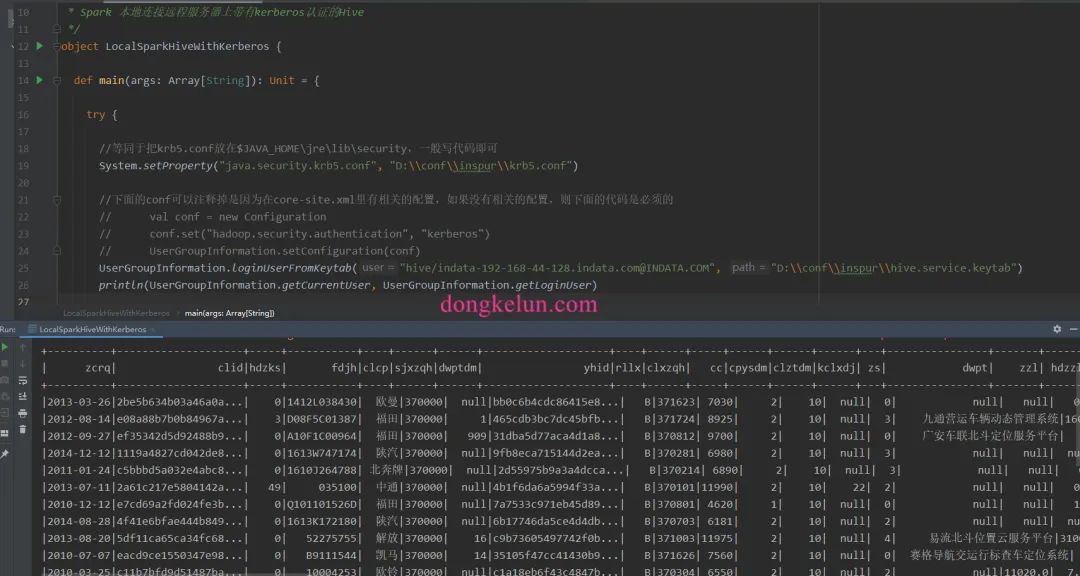
异常解决
异常信息
1org.apache.hadoop.security.AccessControlException: SIMPLE authentication is not enabled. Available:[TOKEN, KERBEROS]
异常解决过程
异常再现是将core-site.xml删除,然后将代码中注释的conf打开。
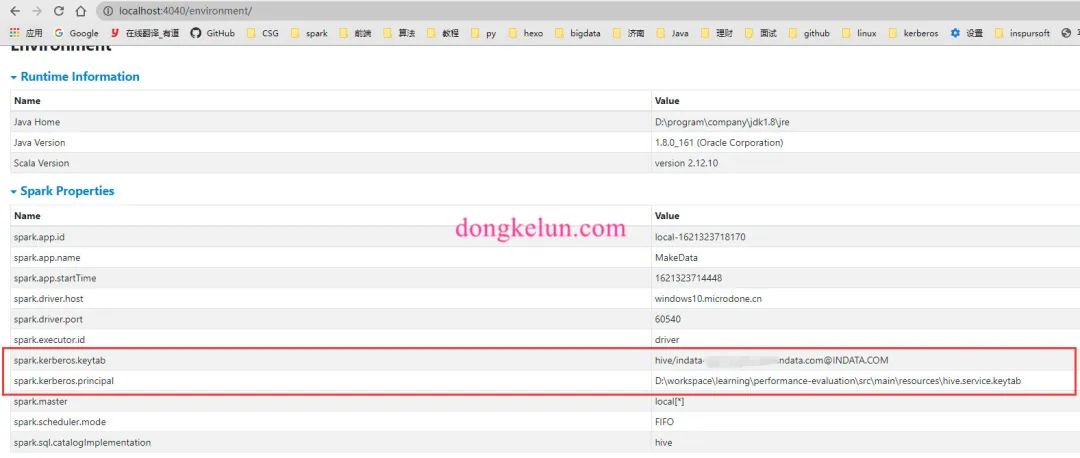
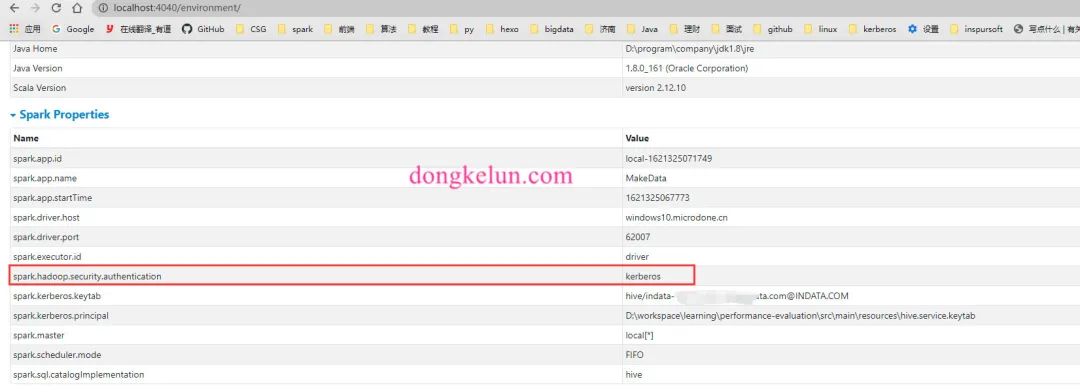
这样从打印的UserGroupInformation.getCurrentUser信息可以发现kerberos认证是成功的,而且代码中设置了hadoop.security.authentication为kerberos,但是依旧报authentication为SIMPLE的异常,网上查资料查了很久都没解决,只能自己进行研究,在本地的Spark UI 界面的environment中查看Spark的环境配置信息发现,虽然在Spark的代码中配置了.config("spark.kerberos.keytab", "hive/indata-192-168-44-128.indata.com@INDATA.COM")、.config("spark.kerberos.principal", "D:\conf\inspur\hive.service.keytab"),且在ui界面中也显示相同的配置,如下图
但是依旧报同样的异常信息,后来在界面上发现,除了Spark Properties还有Hadoop Properties,代码中的配置只是改变了Spark Properties,没有改变Hadoop Properties,而Hadoop Properties中的hadoop.security.authentication依旧为simple,这有可能是导致异常的原因。
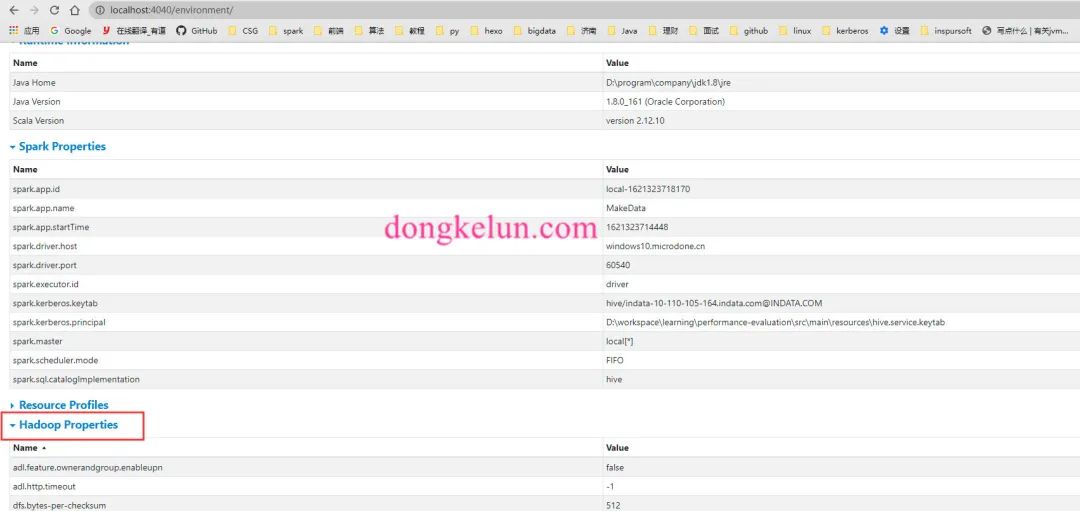
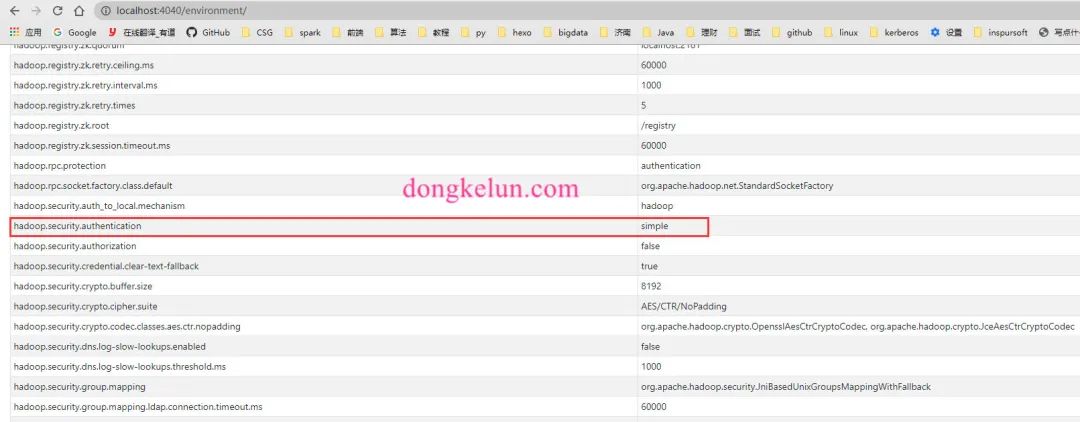
那么如何改变Hadoop Properties,在Spark源码搜索发现如下文档
 1# Custom Hadoop/Hive Configuration
 2
 3If your Spark application is interacting with Hadoop, Hive, or both, there are probably Hadoop/Hive
 4configuration files in Spark's classpath.
 5
 6Multiple running applications might require different Hadoop/Hive client side configurations.
 7You can copy and modify `hdfs-site.xml`, `core-site.xml`, `yarn-site.xml`, `hive-site.xml` in
 8Spark's classpath for each application. In a Spark cluster running on YARN, these configuration
 9files are set cluster-wide, and cannot safely be changed by the application.
10
11The better choice is to use spark hadoop properties in the form of `spark.hadoop.*`, and use
12spark hive properties in the form of `spark.hive.*`.
13For example, adding configuration "spark.hadoop.abc.def=xyz" represents adding hadoop property "abc.def=xyz",
14and adding configuration "spark.hive.abc=xyz" represents adding hive property "hive.abc=xyz".
15They can be considered as same as normal spark properties which can be set in `$SPARK_HOME/conf/spark-defaults.conf`
文档说最好的选择是在代码中设置Spark.hadoop.*,即.config("Spark.hadoop.security.authentication", "kerberos"),然后尝试了一下,发现这样仅仅是改变的Spark Properties,依旧是同样的异常,也可能是我理解的有问题。
异常解决方案
最后的解决方案是按文档上的将core-site.xml和hdfs-site.xml拷贝到Spark的classpath下,即上面提到的src/main/resources,但是这样依旧可能没效果,原因是,配置文件没有同步到target/classes,这里需要在idea里点Build-Rebuild Project,然后确认一下target/classes是否有了core-site.xml文件就可以了
