作者简介
罗铁锤,六年安卓踩坑经验,致力于底层平台、上层应用等多领域开发。文能静坐弹吉他,武能通宵写代码
1.简单分析 View.invalidate :
1.1 比如自定义 View 动画,通常都是根据属性动画进度计算出此时刻需要展示的效果,然后进行 invalidate 或者 postInvalidate 进行刷新。
anim.addUpdateListener {val percent: Float = it.animatedValue as FloatcurDistance = maxDistance * percentinvalidate()// 重绘}override fun onDraw(canvas: Canvas?) {canvas!!.drawLine(0F, paint.strokeWidth, curDistance, paint.strokeWidth, paint)}
<View.java>// invalidate 最终调用的是 invalidateInternalvoid invalidateInternal(int l, int t, int r, int b, boolean invalidateCache,boolean fullInvalidate) {if (mGhostView != null) {// 幽灵视图,可以理解为一个状态不可见 view 的拷贝,类似 overlay 图层概念mGhostView.invalidate(true);return;}if (skipInvalidate()) {// 不需要重绘,returnreturn;}// Reset content capture cachesmCachedContentCaptureSession = null;if ((mPrivateFlags & (PFLAG_DRAWN | PFLAG_HAS_BOUNDS)) == (PFLAG_DRAWN | PFLAG_HAS_BOUNDS)|| (invalidateCache && (mPrivateFlags & PFLAG_DRAWING_CACHE_VALID) == PFLAG_DRAWING_CACHE_VALID)|| (mPrivateFlags & PFLAG_INVALIDATED) != PFLAG_INVALIDATED|| (fullInvalidate && isOpaque() != mLastIsOpaque)) {if (fullInvalidate) {// 全局刷新mLastIsOpaque = isOpaque();mPrivateFlags &= ~PFLAG_DRAWN;}mPrivateFlags |= PFLAG_DIRTY;if (invalidateCache) {// 视图缓存相关标记mPrivateFlags |= PFLAG_INVALIDATED;mPrivateFlags &= ~PFLAG_DRAWING_CACHE_VALID;}// Propagate the damage rectangle to the parent view.final AttachInfo ai = mAttachInfo;// attachInfo 之前分析过,整个视图树共享final ViewParent p = mParent;// 父 Viewif (p != null && ai != null && l < r && t < b) {final Rect damage = ai.mTmpInvalRect;damage.set(l, t, r, b);p.invalidateChild(this, damage);// 通知父 ViewGroup 重绘自己}// 下面的 damageInParent 是新的 api,暂时还是分析上面 invalidateChild 方法的重绘流程,流程最终走向都是一致的// Damage the entire projection receiver, if necessary.if (mBackground != null && mBackground.isProjected()) {final View receiver = getProjectionReceiver();if (receiver != null) {receiver.damageInParent();}}}}
invalidate 最终调用 invalidateInternal ,内部会通知父 View 对自己进行重绘,看一下 ViewGroup.invalidateChild 方法
<ViewGroup.java>@Overridepublic final void invalidateChild(View child, final Rect dirty) {final AttachInfo attachInfo = mAttachInfo;if (attachInfo != null && attachInfo.mHardwareAccelerated) {// HW accelerated fast pathonDescendantInvalidated(child, child);// 硬件加速绘制return;}ViewParent parent = this;if (attachInfo != null) {// If the child is drawing an animation, we want to copy this flag onto// ourselves and the parent to make sure the invalidate request goes// throughfinal boolean drawAnimation = (child.mPrivateFlags & PFLAG_DRAW_ANIMATION) != 0;// Check whether the child that requests the invalidate is fully opaque// Views being animated or transformed are not considered opaque because we may// be invalidating their old position and need the parent to paint behind them.Matrix childMatrix = child.getMatrix();// Mark the child as dirty, using the appropriate flag// Make sure we do not set both flags at the same timeif (child.mLayerType != LAYER_TYPE_NONE) {mPrivateFlags |= PFLAG_INVALIDATED;mPrivateFlags &= ~PFLAG_DRAWING_CACHE_VALID;}// 计算需要重绘 view 的绘制区域final int[] location = attachInfo.mInvalidateChildLocation;location[CHILD_LEFT_INDEX] = child.mLeft;location[CHILD_TOP_INDEX] = child.mTop;if (!childMatrix.isIdentity() ||(mGroupFlags & ViewGroup.FLAG_SUPPORT_STATIC_TRANSFORMATIONS) != 0) {RectF boundingRect = attachInfo.mTmpTransformRect;boundingRect.set(dirty);Matrix transformMatrix;if ((mGroupFlags & ViewGroup.FLAG_SUPPORT_STATIC_TRANSFORMATIONS) != 0) {Transformation t = attachInfo.mTmpTransformation;boolean transformed = getChildStaticTransformation(child, t);if (transformed) {transformMatrix = attachInfo.mTmpMatrix;transformMatrix.set(t.getMatrix());if (!childMatrix.isIdentity()) {transformMatrix.preConcat(childMatrix);}} else {transformMatrix = childMatrix;}} else {transformMatrix = childMatrix;}transformMatrix.mapRect(boundingRect);dirty.set((int) Math.floor(boundingRect.left),(int) Math.floor(boundingRect.top),(int) Math.ceil(boundingRect.right),(int) Math.ceil(boundingRect.bottom));}// 循环向上遍历到视图树结构的根节点 ViewRootImpldo {View view = null;if (parent instanceof View) {view = (View) parent;}if (drawAnimation) {if (view != null) {view.mPrivateFlags |= PFLAG_DRAW_ANIMATION;} else if (parent instanceof ViewRootImpl) {((ViewRootImpl) parent).mIsAnimating = true;}}// If the parent is dirty opaque or not dirty, mark it dirty with the opaque// flag coming from the child that initiated the invalidateif (view != null) {if ((view.mPrivateFlags & PFLAG_DIRTY_MASK) != PFLAG_DIRTY) {view.mPrivateFlags = (view.mPrivateFlags & ~PFLAG_DIRTY_MASK) | PFLAG_DIRTY;}}parent = parent.invalidateChildInParent(location, dirty);if (view != null) {// Account for transform on current parentMatrix m = view.getMatrix();if (!m.isIdentity()) {RectF boundingRect = attachInfo.mTmpTransformRect;boundingRect.set(dirty);m.mapRect(boundingRect);dirty.set((int) Math.floor(boundingRect.left),(int) Math.floor(boundingRect.top),(int) Math.ceil(boundingRect.right),(int) Math.ceil(boundingRect.bottom));}}} while (parent != null);}}
如果是硬件加速,会直接进入绘制流程(其实最终走向也是一样的),否则会通过一系列计算出脏区,遍历到视图树的根节点,重点看这行代码 parent = parent.invalidateChildInParent(location, dirty); ,视图树的根节点,也就是 ViewRootImpl ,所以直接看 ViewRootImpl.invalidateChildInParent 方法。绘制细节不是本文重点分析,重点分析的是整个渲染流程,细节部门自行查看。
<ViewRootImpl.java>@Overridepublic ViewParent invalidateChildInParent(int[] location, Rect dirty) {checkThread();// 检测线程if (DEBUG_DRAW) Log.v(mTag, "Invalidate child: " + dirty);if (dirty == null) {// 脏区为 null,全局重绘invalidate();return null;} else if (dirty.isEmpty() && !mIsAnimating) {return null;}// 加入滚动,平移参数计算出真正的脏区if (mCurScrollY != 0 || mTranslator != null) {mTempRect.set(dirty);dirty = mTempRect;if (mCurScrollY != 0) {dirty.offset(0, -mCurScrollY);}if (mTranslator != null) {mTranslator.translateRectInAppWindowToScreen(dirty);}if (mAttachInfo.mScalingRequired) {dirty.inset(-1, -1);}}// 脏区重绘invalidateRectOnScreen(dirty);// 当前已经是根节点,return null 退出 ViewGroup 遍历循环return null;}// 全局重绘@UnsupportedAppUsagevoid invalidate() {mDirty.set(0, 0, mWidth, mHeight);if (!mWillDrawSoon) {scheduleTraversals();// 这就是渲染流程的真正开始}}// 脏区重绘(高效)private void invalidateRectOnScreen(Rect dirty) {final Rect localDirty = mDirty;// Add the new dirty rect to the current onelocalDirty.union(dirty.left, dirty.top, dirty.right, dirty.bottom);// Intersect with the bounds of the window to skip// updates that lie outside of the visible regionfinal float appScale = mAttachInfo.mApplicationScale;final boolean intersected = localDirty.intersect(0, 0,(int) (mWidth * appScale + 0.5f), (int) (mHeight * appScale + 0.5f));if (!intersected) {localDirty.setEmpty();}if (!mWillDrawSoon && (intersected || mIsAnimating)) {scheduleTraversals();// 这就是渲染流程的真正开始}}
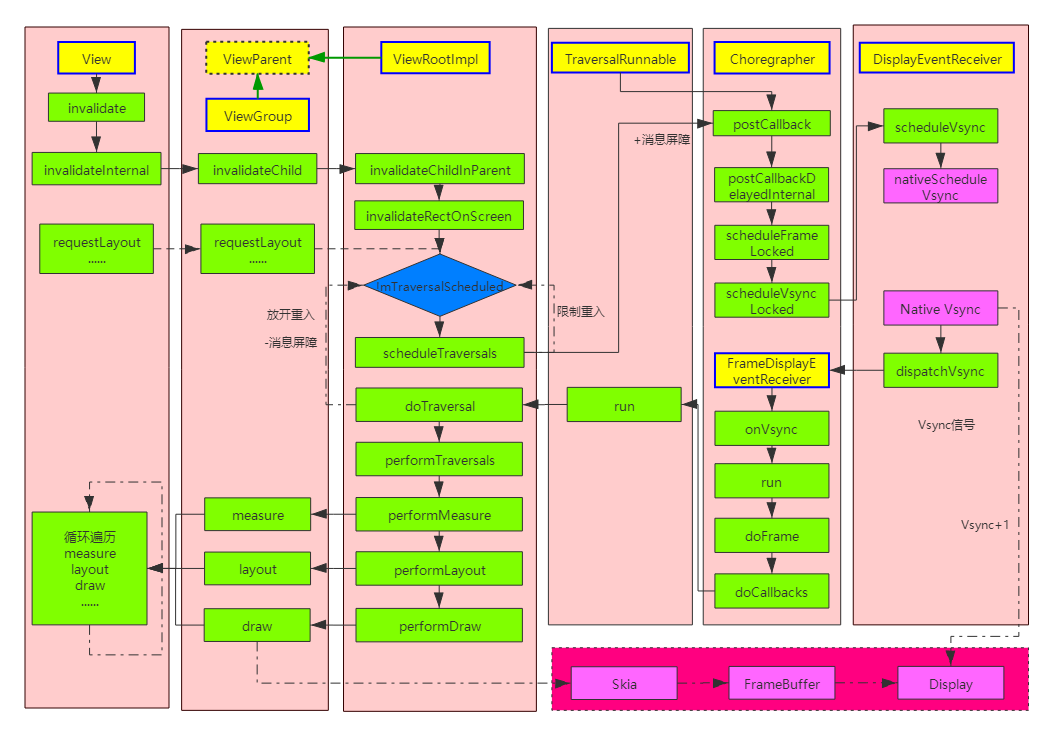
上面的流程很明了,不论是全局刷新还是局部刷新,最终都是走向 scheduleTraversals ,所以可以说 scheduleTraversals 方法是上层发起重绘的起点。(硬件加速其实也是一样走向 scheduleTraversals 方法,只是在底层绘制上有所区别)
2. View.requestLayout 流程
流程基本一致,也是通过向上遍历,最终调用视图树根节点的方法:
<ViewRootImpl.java>@Overridepublic void requestLayout() {if (!mHandlingLayoutInLayoutRequest) {checkThread();// 检测线程mLayoutRequested = true;scheduleTraversals();}}
到这里先暂停下,补充个知识点,面试常见的坑:为何只能主线程刷新 UI ?
上面不论是 invalidata 还是 requestLayout ,方法内部的第一行代码都是 checkThread ,这里面就有常见的异常打印:
void checkThread() {if (mThread != Thread.currentThread()) {// 熟悉的文字throw new CalledFromWrongThreadException("Only the original thread that created a view hierarchy can touch its views.");}}
Android 禁止主线程刷新 UI ,其实就是在 ViewRootImpl 中所有涉及UI操作方法中判断非当前线程主动抛出异常而已,典型的强制措施(其实也是为了能保证主线程的同步性可靠性,要是大家都在子线程刷新 UI,最终合成渲染图层岂不是画面凌乱了?)
所以本质上通过反射,或者在 ViewRootImpl 未初始化前,都是可以在子线程刷新 UI 。这也是为何在 Activity.onCreate 方法中可以子线程刷新 UI 不会崩溃的原因。当然,作为开发者,最好别搞这些的偏方,国内生态就是被这些钻漏洞的技术给搞乱的,阿里腾讯近几年热门的热修复,抑制 GC,联盟唤醒之类的黑科技,国外的微软,google,facebook 都是遵循严格规范,从不搞所谓的偏方技术,所以很明显的结果的就是国外大厂的产品在稳定性,隐私性,能耗比等都比国内的流氓生态圈高几个层次。
3.渲染流程:
3.1 Traversal 相关方法:
scheduleTraversals -> doTraversal -> performTraversals ,这几个方法的执行顺序是 schedule -> do -> perform ,可以理解为计划准备阶段->准备执行阶段->完成阶段
3.2 scheduleTraversals 分析:
<ViewRootImpl.java>@UnsupportedAppUsagevoid scheduleTraversals() {if (!mTraversalScheduled) {// 这里会限制重入,一般情况 16ms 你不论调用多少次 invalidate 或者 requestLayout,最终效果都是一样mTraversalScheduled = true;// 重入限制// 消息屏障,异步消息,之前 handler 章节分析过mTraversalBarrier = mHandler.getLooper().getQueue().postSyncBarrier();// 发送消息屏障,保证优先级mChoreographer.postCallback(// 请求下一次 Vsync 信号Choreographer.CALLBACK_TRAVERSAL, mTraversalRunnable, null);// 相关通知回调if (!mUnbufferedInputDispatch) {scheduleConsumeBatchedInput();}notifyRendererOfFramePending();pokeDrawLockIfNeeded();}}// 请求 Vsync 的时候传递了这个参数 mTraversalRunnablefinal TraversalRunnable mTraversalRunnable = new TraversalRunnable();// 非常简单的一个 runnablefinal class TraversalRunnable implements Runnable {@Overridepublic void run() {doTraversal();// 执行阶段,下面分析}}
内部通过一个 mTraversalScheduled 变量限制重入,所以一般情况 16ms 你不论调用多少次 invalidate 或者 requestLayout ,最终效果都是一样,并且你调用之后并不是立即就执行重绘,后面分析。这里还涉及到异步消息,之前分析过,不具体分析,简单来说就是往消息队列插入一条异步消息作为屏障,插入屏障之后消息队列的同步消息停止执行,直到该消息屏障移除后才恢复,主要就是为了保证优先级,毕竟交互响应是优先级最高的。这里还涉及到 Choreographer 编舞者的角色,主要是解决帧率不同步,掉帧问题,非本文重点,本文只分析下其内部对于 vsync 请求流程和回调时机。
<Choreographer.java>// 请求 Vsync 信号,postCallback 最终会走到这里private void postCallbackDelayedInternal(int callbackType,Object action, Object token, long delayMillis) {if (DEBUG_FRAMES) {Log.d(TAG, "PostCallback: type=" + callbackType+ ", action=" + action + ", token=" + token+ ", delayMillis=" + delayMillis);}synchronized (mLock) {final long now = SystemClock.uptimeMillis();final long dueTime = now + delayMillis;// 将 runnable 添加到缓存队列mCallbackQueues[callbackType].addCallbackLocked(dueTime, action, token);if (dueTime <= now) {// 分支 1:需要立即执行回调scheduleFrameLocked(now);} else {// 分支 2:还未到需要的执行时间,在指定的时间发送异步消息,保证回调执行的优先级Message msg = mHandler.obtainMessage(MSG_DO_SCHEDULE_CALLBACK, action);msg.arg1 = callbackType;msg.setAsynchronous(true);mHandler.sendMessageAtTime(msg, dueTime);// 指定了需要执行的时间}}}private void scheduleFrameLocked(long now) {if (!mFrameScheduled) {// 重入限制mFrameScheduled = true;if (USE_VSYNC) {// 默认 trueif (DEBUG_FRAMES) {Log.d(TAG, "Scheduling next frame on vsync.");}// If running on the Looper thread, then schedule the vsync immediately,// otherwise post a message to schedule the vsync from the UI thread// as soon as possible.if (isRunningOnLooperThreadLocked()) {// 当前如果是主线程scheduleVsyncLocked();// vsync 准备阶段} else {// 场景 1:线程切换,直接插入一条消息到队头Message msg = mHandler.obtainMessage(MSG_DO_SCHEDULE_VSYNC);msg.setAsynchronous(true);mHandler.sendMessageAtFrontOfQueue(msg);}} else { // 场景 2:发送消息final long nextFrameTime = Math.max(mLastFrameTimeNanos TimeUtils.NANOS_PER_MS + sFrameDelay, now);if (DEBUG_FRAMES) {Log.d(TAG, "Scheduling next frame in " + (nextFrameTime - now) + " ms.");}Message msg = mHandler.obtainMessage(MSG_DO_FRAME);msg.setAsynchronous(true);mHandler.sendMessageAtTime(msg, nextFrameTime);}}}// 上面的 mHandler 是 FrameHandler,属于主线程 handler,具体实例化过程不分析private final class FrameHandler extends Handler {public FrameHandler(Looper looper) {super(looper);}@Overridepublic void handleMessage(Message msg) {switch (msg.what) {case MSG_DO_FRAME:// scheduleFrameLocked 的场景 2doFrame(System.nanoTime(), 0);break;case MSG_DO_SCHEDULE_VSYNC:// scheduleFrameLocked 的场景 1doScheduleVsync();// 最终还是走到 scheduleVsyncLocked,场景 1 只是多了一步线程切换break;case MSG_DO_SCHEDULE_CALLBACK:// postCallbackDelayedInternal 的分支 2doScheduleCallback(msg.arg1);break;}}}// 使用 vsync 的场景 1void doScheduleVsync() {synchronized (mLock) {if (mFrameScheduled) {scheduleVsyncLocked();}}}// 最终流程和 postCallbackDelayedInternal 的分支 1 一致,只是消息延迟点执行而已void doScheduleCallback(int callbackType) {synchronized (mLock) {if (!mFrameScheduled) {final long now = SystemClock.uptimeMillis();if (mCallbackQueues[callbackType].hasDueCallbacksLocked(now)) {scheduleFrameLocked(now);}}}}// 请求vsync@UnsupportedAppUsageprivate void scheduleVsyncLocked() {mDisplayEventReceiver.scheduleVsync();}// doFrame 关键方法// 1.非使用 vsync 会直接执行该方法,也就是直接出发重绘回调// 2.使用 vsync 会等下一次 vsync 信号来到时,触发重绘回调@UnsupportedAppUsagevoid doFrame(long frameTimeNanos, int frame) {...// 后面分析}
ViewRootImpl 请求 vsync 信号的时候,会传入一个 runnable 消息, Choreographer 将这个消息存放到队列中,并且根据当前时间,决定是立即安排 vsync 计划还是延时 ( scheduleFrameLocked(now) 和 MSG_DO_SCHEDULE_CALLBACK ),本质上最终调用 scheduleFrameLocked(long now) 方法。
scheduleFrameLocked(long now) 中有两种分支,一种使用 vsync 机制,一种非使用 vsync 机制。他们的区别就是使用该同步机制,会在下一次 vsync 信号到来时进行刷新,否则立即刷新( doFrame 方法)。下面分析下请求 vsync 的流程:
<Choreographer.java>// 请求 vsync@UnsupportedAppUsageprivate void scheduleVsyncLocked() {mDisplayEventReceiver.scheduleVsync();// 请求 vsync 信号}<DisplayEventReceiver.java>public void scheduleVsync() {if (mReceiverPtr == 0) {Log.w(TAG, "Attempted to schedule a vertical sync pulse but the display event "+ "receiver has already been disposed.");} else {// native 请求 vsync 信号,当底层发送 vsync 信号时,java 层就能接收到通知nativeScheduleVsync(mReceiverPtr);}}// 当底层发送 vsync 信号时会调用这个 java 方法// Called from native code.@SuppressWarnings("unused")@UnsupportedAppUsageprivate void dispatchVsync(long timestampNanos, long physicalDisplayId, int frame) {// 回调 onVsync 方法onVsync(timestampNanos, physicalDisplayId, frame);}
其实请求 vsync 过程很简单,就是通过 jni 向底层注册一个回调(构造内会保存 c++ 层 Receiver 引用的指针地址),底层发送 vsync 时候,反向调用 java 方法( onVsync )通知上层。DisplayEventReceiver 是一个抽象类,在 Choreographer 中可以找到一个具体实现的内部类 FrameDisplayEventReceiver :
<Choreographer.java>private final class FrameDisplayEventReceiver extends DisplayEventReceiverimplements Runnable {private boolean mHavePendingVsync;private long mTimestampNanos;private int mFrame;public FrameDisplayEventReceiver(Looper looper, int vsyncSource) {super(looper, vsyncSource);}// TODO(b/116025192): physicalDisplayId is ignored because SF only emits VSYNC events for// the internal display and DisplayEventReceiver#scheduleVsync only allows requesting VSYNC// for the internal display implicitly.// 底层主动调用该方法@Overridepublic void onVsync(long timestampNanos, long physicalDisplayId, int frame) {// Post the vsync event to the Handler.// The idea is to prevent incoming vsync events from completely starving// the message queue. If there are no messages in the queue with timestamps// earlier than the frame time, then the vsync event will be processed immediately.// Otherwise, messages that predate the vsync event will be handled first.long now = System.nanoTime();if (timestampNanos > now) {Log.w(TAG, "Frame time is " + ((timestampNanos - now) * 0.000001f)+ " ms in the future! Check that graphics HAL is generating vsync "+ "timestamps using the correct timebase.");timestampNanos = now;}if (mHavePendingVsync) {Log.w(TAG, "Already have a pending vsync event. There should only be "+ "one at a time.");} else {mHavePendingVsync = true;}mTimestampNanos = timestampNanos;mFrame = frame;// 发送异步消息,因为自己实现了 runnable,所以是把自己当成消息发送出去,看下面的 run 方法Message msg = Message.obtain(mHandler, this);msg.setAsynchronous(true);mHandler.sendMessageAtTime(msg, timestampNanos TimeUtils.NANOS_PER_MS);}@Overridepublic void run() {// 执行 doFrame 方法进行重绘mHavePendingVsync = false;doFrame(mTimestampNanos, mFrame);}}
下面就到关键的方法 doFrame 了,这里你也会看到很多常见的 log 打印信息:
@UnsupportedAppUsagevoid doFrame(long frameTimeNanos, int frame) {final long startNanos;synchronized (mLock) {// 上锁if (!mFrameScheduled) {// 这个标记位就是最初 scheduleFrameLocked 开始限制重入那个return; // no work to do}if (DEBUG_JANK && mDebugPrintNextFrameTimeDelta) {mDebugPrintNextFrameTimeDelta = false;Log.d(TAG, "Frame time delta: "+ ((frameTimeNanos - mLastFrameTimeNanos) * 0.000001f) + " ms");}long intendedFrameTimeNanos = frameTimeNanos;// 本次 vsync 时间startNanos = System.nanoTime();// 开始执行 doFrame 时间final long jitterNanos = startNanos - frameTimeNanos;// jitterNanos = doFrame - Vsync 的时间差// mFrameIntervalNanos = (long)(1000000000 getRefreshRate());if (jitterNanos >= mFrameIntervalNanos) {// 假设帧率为 60fps,mFrameIntervalNanos 为通常所说的 16msfinal long skippedFrames = jitterNanos mFrameIntervalNanos;// 计算跳帧数if (skippedFrames >= SKIPPED_FRAME_WARNING_LIMIT) {// > 30fps// 熟悉的掉帧打印信息Log.i(TAG, "Skipped " + skippedFrames + " frames! "+ "The application may be doing too much work on its main thread.");}final long lastFrameOffset = jitterNanos % mFrameIntervalNanos;// doFrame 延迟 n 个周期后取余的时间if (DEBUG_JANK) {Log.d(TAG, "Missed vsync by " + (jitterNanos * 0.000001f) + " ms "+ "which is more than the frame interval of "+ (mFrameIntervalNanos * 0.000001f) + " ms! "+ "Skipping " + skippedFrames + " frames and setting frame "+ "time to " + (lastFrameOffset * 0.000001f) + " ms in the past.");}// 修正 vsync 的到来时间frameTimeNanos = startNanos - lastFrameOffset;// lastFrameOffset = jitterNanos % mFrameIntervalNanos// frameTimeNanos = startNanos - lastFrameOffset = startNanos - (jitterNanos % 16) = startNanos - (startNanos - frameTimeNanos) % 16// 所以 frameTimeNanos = 当前 doFrame 时间之前最近的一个 vsync 时间}// 避免下一帧提前渲染,如果本次 vsync 执行 doFrame 比上一帧计划的提交时间早,则将本帧放到下一个 vsync 进行渲染// mLastFrameTimeNanos 在修正过程可能出现这种场景// 提前渲染就会出现画面重叠重影现象if (frameTimeNanos < mLastFrameTimeNanos) {if (DEBUG_JANK) {Log.d(TAG, "Frame time appears to be going backwards. May be due to a "+ "previously skipped frame. Waiting for next vsync.");}// 重新请求下一次 vsync 信号,此刻 mFrameScheduled 没有重置 false,外部调用的 scheduleFrameLocked(now) 不再执行,也就是此时外部 postCallback 也是无效的// 请求下一次 vsync 信号 -> doFrame,如果还不满足条件,重复如此scheduleVsyncLocked();return;}// 默认 1,不用管if (mFPSDivisor > 1) {long timeSinceVsync = frameTimeNanos - mLastFrameTimeNanos;if (timeSinceVsync < (mFrameIntervalNanos * mFPSDivisor) && timeSinceVsync > 0) {scheduleVsyncLocked();return;}}// 记录当前帧的原始 vsync 时间 - 修正后的 vsync 时间mFrameInfo.setVsync(intendedFrameTimeNanos, frameTimeNanos);mFrameScheduled = false;// 重置标记位,可以再次进入 scheduleFrameLocked// 记录上一次 vsync 的时间mLastFrameTimeNanos = frameTimeNanos;}// 开始执行各种 callbacktry {Trace.traceBegin(Trace.TRACE_TAG_VIEW, "Choreographer#doFrame");AnimationUtils.lockAnimationClock(frameTimeNanos TimeUtils.NANOS_PER_MS);// 输入mFrameInfo.markInputHandlingStart();doCallbacks(Choreographer.CALLBACK_INPUT, frameTimeNanos);// 动画mFrameInfo.markAnimationsStart();doCallbacks(Choreographer.CALLBACK_ANIMATION, frameTimeNanos);doCallbacks(Choreographer.CALLBACK_INSETS_ANIMATION, frameTimeNanos);// 遍历:measure,layout,drawmFrameInfo.markPerformTraversalsStart();doCallbacks(Choreographer.CALLBACK_TRAVERSAL, frameTimeNanos);// 遍历完成提交,修复下一帧的提交时间,保证和 vsync 节奏同步doCallbacks(Choreographer.CALLBACK_COMMIT, frameTimeNanos);} finally {AnimationUtils.unlockAnimationClock();Trace.traceEnd(Trace.TRACE_TAG_VIEW);}if (DEBUG_FRAMES) {final long endNanos = System.nanoTime();Log.d(TAG, "Frame " + frame + ": Finished, took "+ (endNanos - startNanos) * 0.000001f + " ms, latency "+ (startNanos - frameTimeNanos) * 0.000001f + " ms.");}}
上面可以看到接收到了 vsync 信号后会先判断是否掉帧(执行 doFrame 时间比 Vsync 的时间延迟),打印出掉帧信息,再进行渲染刷新,之前 ViewRootImpl.scheduleTraversals 方法中通过 mChoreographer.postCallback(Choreographer.CALLBACK_TRAVERSAL, mTraversalRunnable, null) 明确这个 callback 的类型 Choreographer.CALLBACK_TRAVERSAL ,所以 doFrame 中我们重点分析该类型的回调:
<Choreographer.java>void doFrame(long frameTimeNanos, int frame) {......doCallbacks(Choreographer.CALLBACK_TRAVERSAL, frameTimeNanos);......}void doCallbacks(int callbackType, long frameTimeNanos) {CallbackRecord callbacks;// 单链表结构synchronized (mLock) {// We use "now" to determine when callbacks become due because it's possible// for earlier processing phases in a frame to post callbacks that should run// in a following phase, such as an input event that causes an animation to start.final long now = System.nanoTime();// 从队列中取出 callback 链表,包含我们之前 scheduleTraversals 传进来的 callback// CallbackQueue 为一个子元素为链表的数组队列,里面每一种 callback 类型都是一个 CallbackRecord 的单链表callbacks = mCallbackQueues[callbackType].extractDueCallbacksLocked(// 取出执行时间在当前时间之前的callbacknow TimeUtils.NANOS_PER_MS);if (callbacks == null) {return;}mCallbacksRunning = true;// Update the frame time if necessary when committing the frame.// We only update the frame time if we are more than 2 frames late reaching// the commit phase. This ensures that the frame time which is observed by the// callbacks will always increase from one frame to the next and never repeat.// We never want the next frame's starting frame time to end up being less than// or equal to the previous frame's commit frame time. Keep in mind that the// next frame has most likely already been scheduled by now so we play it// safe by ensuring the commit time is always at least one frame behind.if (callbackType == Choreographer.CALLBACK_COMMIT) {// 进入这个分支后,now = 执行完动画,绘制一系列操作之后的当前时间// 提交刷新,修正时间,同步 vsync 的节奏final long jitterNanos = now - frameTimeNanos;Trace.traceCounter(Trace.TRACE_TAG_VIEW, "jitterNanos", (int) jitterNanos);if (jitterNanos >= 2 * mFrameIntervalNanos) {// > 2*16 = 32ms(60fps 为例)final long lastFrameOffset = jitterNanos % mFrameIntervalNanos// frameTimeNanos = startNanos - lastFrameOffset,now 是执行玩 measure - layout - draw 的时间+ mFrameIntervalNanos;// mFrameIntervalNanos=16msif (DEBUG_JANK) {Log.d(TAG, "Commit callback delayed by " + (jitterNanos * 0.000001f)+ " ms which is more than twice the frame interval of "+ (mFrameIntervalNanos * 0.000001f) + " ms! "+ "Setting frame time to " + (lastFrameOffset * 0.000001f)+ " ms in the past.");mDebugPrintNextFrameTimeDelta = true;}// 修正时间 mLastFrameTimeNanos = frameTimeNanos = 从 now 往前最近的一个 vsync 时间frameTimeNanos = now - lastFrameOffset;mLastFrameTimeNanos = frameTimeNanos;}}// 大致总结下:在一帧处理过程,如果超过了 n >= 2 个 vsync 周期,则会在接下来 n 个 vsync 周期中不再处理任何帧,下一帧会在 n 个周期后对齐 vsync 信号时开始处理,相当于中途抛弃 n 帧画面,达到尽可能帧率平稳,与 vsync 同步}try {Trace.traceBegin(Trace.TRACE_TAG_VIEW, CALLBACK_TRACE_TITLES[callbackType]);// 循环执行 callback 的 run 方法for (CallbackRecord c = callbacks; c != null; c = c.next) {if (DEBUG_FRAMES) {Log.d(TAG, "RunCallback: type=" + callbackType+ ", action=" + c.action + ", token=" + c.token+ ", latencyMillis=" + (SystemClock.uptimeMillis() - c.dueTime));}c.run(frameTimeNanos);}} finally {// 资源释放synchronized (mLock) {mCallbacksRunning = false;do {final CallbackRecord next = callbacks.next;recycleCallbackLocked(callbacks);callbacks = next;} while (callbacks != null);}Trace.traceEnd(Trace.TRACE_TAG_VIEW);}}
至此已经分析完了 scheduleTraversals 请求 vsync 的过程。
3.3 渲染刷新 doTraversal->performTraversal :
<ViewRootImpl.java>void doTraversal() {if (mTraversalScheduled) {mTraversalScheduled = false;// 走到这里,放开了重入,这个时候外部调用 invalidate 之类请求重绘才会生效mHandler.getLooper().getQueue().removeSyncBarrier(mTraversalBarrier);// 移除消息屏障,主线程同步消息恢复运转if (mProfile) {Debug.startMethodTracing("ViewAncestor");}// 核心方法,View 的 layout,measure,draw 相关方法都是在这里面执行的,简单描述下流程,细节不展开了(否则没玩没了,这个方法巨长,800 多行代码)performTraversals();if (mProfile) {Debug.stopMethodTracing();mProfile = false;}}}private void performTraversals() {// cache mView since it is used so much below...final View host = mView;// 其实就是 DecorView......if (host == null || !mAdded)// DecorView 没初始化和添加到 window,直接 returnreturn;mIsInTraversal = true;// 标记正在执行遍历mWillDrawSoon = true;// 标记立即绘制......if (mFirst) {// 初始化第一次的时候......// OnAttachedToWindow 回调host.dispatchAttachedToWindow(mAttachInfo, 0);mAttachInfo.mTreeObserver.dispatchOnWindowAttachedChange(true);dispatchApplyInsets(host);} else {......}......// Execute enqueued actions on every traversal in case a detached view enqueued an action// 这个在之前 View.post 原理的文章中已经分析过getRunQueue().executeActions(mAttachInfo.mHandler);......if (mFirst || windowShouldResize || insetsChanged ||viewVisibilityChanged || params != null || mForceNextWindowRelayout) {......if (!mStopped || mReportNextDraw) {boolean focusChangedDueToTouchMode = ensureTouchModeLocally((relayoutResult&WindowManagerGlobal.RELAYOUT_RES_IN_TOUCH_MODE) != 0);if (focusChangedDueToTouchMode || mWidth != host.getMeasuredWidth()|| mHeight != host.getMeasuredHeight() || contentInsetsChanged ||updatedConfiguration) {int childWidthMeasureSpec = getRootMeasureSpec(mWidth, lp.width);int childHeightMeasureSpec = getRootMeasureSpec(mHeight, lp.height);......// 开始 view 的测量// Ask host how big it wants to beperformMeasure(childWidthMeasureSpec, childHeightMeasureSpec);// Implementation of weights from WindowManager.LayoutParams// We just grow the dimensions as needed and re-measure if// needs beint width = host.getMeasuredWidth();int height = host.getMeasuredHeight();boolean measureAgain = false;if (lp.horizontalWeight > 0.0f) {width += (int) ((mWidth - width) * lp.horizontalWeight);childWidthMeasureSpec = MeasureSpec.makeMeasureSpec(width,MeasureSpec.EXACTLY);measureAgain = true;}if (lp.verticalWeight > 0.0f) {height += (int) ((mHeight - height) * lp.verticalWeight);childHeightMeasureSpec = MeasureSpec.makeMeasureSpec(height,MeasureSpec.EXACTLY);measureAgain = true;}if (measureAgain) {if (DEBUG_LAYOUT) Log.v(mTag,"And hey let's measure once more: width=" + width+ " height=" + height);// 需要多次测量的话,再次进行 view 的测量,所以有的 viewgroup 会测量两次performMeasure(childWidthMeasureSpec, childHeightMeasureSpec);}layoutRequested = true;}}} else {// Not the first pass and no window/insets/visibility change but the window// may have moved and we need check that and if so to update the left and right// in the attach info. We translate only the window frame since on window move// the window manager tells us only for the new frame but the insets are the// same and we do not want to translate them more than once.maybeHandleWindowMove(frame);}if (surfaceSizeChanged) {updateBoundsSurface();}final boolean didLayout = layoutRequested && (!mStopped || mReportNextDraw);boolean triggerGlobalLayoutListener = didLayout|| mAttachInfo.mRecomputeGlobalAttributes;if (didLayout) {// ViewGroup 进行布局子 ViewperformLayout(lp, mWidth, mHeight);......}......boolean cancelDraw = mAttachInfo.mTreeObserver.dispatchOnPreDraw() || !isViewVisible;// 不可见或者正在绘制,就不需要绘制了if (!cancelDraw) {if (mPendingTransitions != null && mPendingTransitions.size() > 0) {for (int i = 0; i < mPendingTransitions.size(); ++i) {mPendingTransitions.get(i).startChangingAnimations();}mPendingTransitions.clear();}// 遍历绘制performDraw();} else {......}mIsInTraversal = false;}
总结一下, performTraversals 中调用了 performMeasure -> performLayout -> performDraw View 的三大流程,三大流程内部都是通过遍历子 view ,遍历调用我们熟悉的 onMeasure -> onLayout -> onDraw 回调,源码的逻辑很清晰,在此不分析了。
4.总结
doTraversal 和 performTraversals 分析完了。我们应用中的 draw 之类的api调用其实都是在操作底层 skia 引擎对应的 SkiaCanvas 画布,在 framework 层对应存在一块 buffer 保存图元数据,最终通过 SurfaceFlinger 进行图层合并处理,以及颜色矩阵运算( Android 原生的护眼模式就是这部分操作的,在最终渲染画面前通过颜色矩阵运算改变显示输出色温)等一系列操作,然后提交给GPU处理渲染到屏幕硬件上, SurfaceFlinger 是系统的图形管理服务(纯 c++ 服务,不像 AMS,PMS,WMS ),核心流程是下面几个方法,应用开发可以不需要过多关注,感兴趣的自行阅读。
<SurfaceFlinger.cpp>// SurfaceFlinge 中图层渲染合成关键流程方法void SurfaceFlinger::handleMessageRefresh() {ATRACE_CALL();preComposition();rebuildLayerStacks();setUpHWComposer();doDebugFlashRegions();doComposition();postComposition();}
5.流程图: