



和19c安装相关的历史文章,
《非Oracle Linux下Oracle 19c CDB数据库安装》
因为有个场景,需要用到Oracle 21c的环境中,打算在云主机上安装一个。看了一下官网的安装文件下载,目前提供了三个平台(Linux x86-64、HP-UX ia64和Windows x64)的介质,
https://www.oracle.com/database/technologies/oracle-database-software-downloads.html
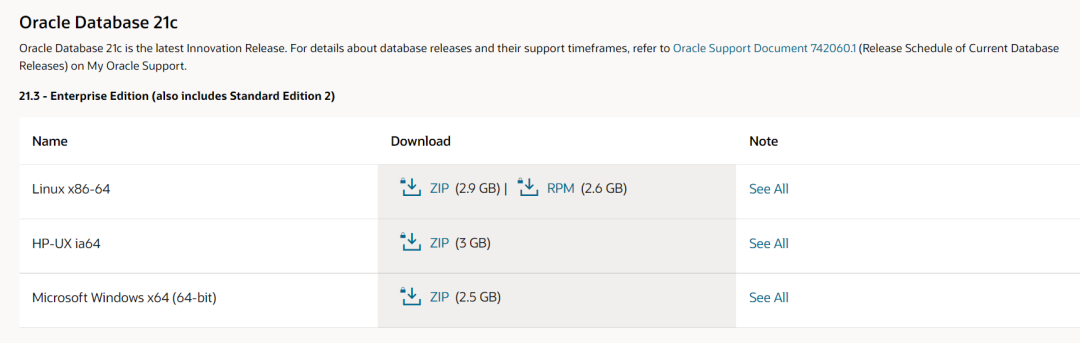
Linux平台,官网提供了rpm和home两种安装途径,这点和19c是相同的,因此安装过程,应该是相同的,
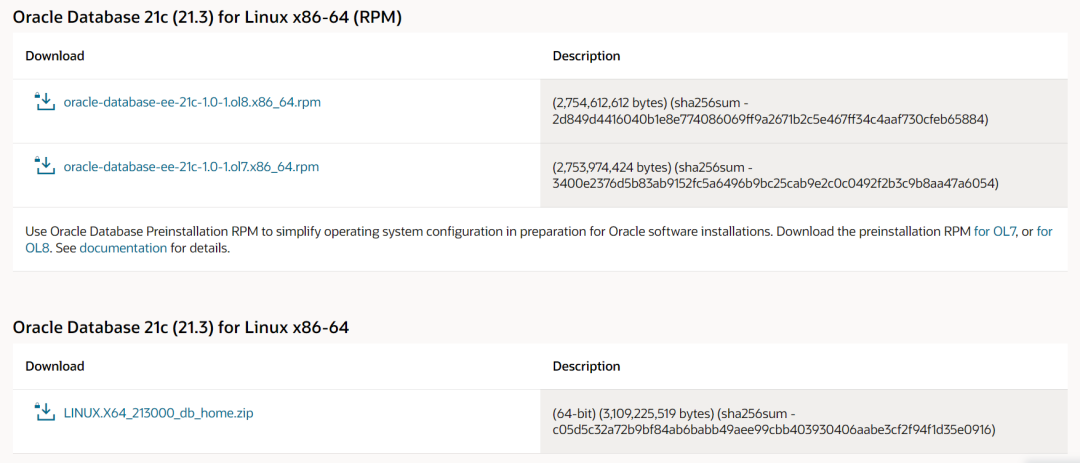
我们选择rpm安装,19c的rpm安装CDB和非CDB都做过测试,如下所示,
《非Oracle Linux下Oracle 19c CDB数据库安装》
参照19c的安装过程,尝试安装21c。
1. 安装preinstall
rpm安装的前奏,是通过安装preinstall来给环境做一些准备,如下是针对Oracle Linux 7和Oracle Linux 8的preinstall包下载地址,
https://yum.oracle.com/repo/OracleLinux/OL7/latest/x86_64/getPackage/oracle-database-preinstall-21c-1.0-1.el7.x86_64.rpm
https://yum.oracle.com/repo/OracleLinux/OL8/appstream/x86_64/getPackage/oracle-database-preinstall-21c-1.0-1.el8.x86_64.rpm
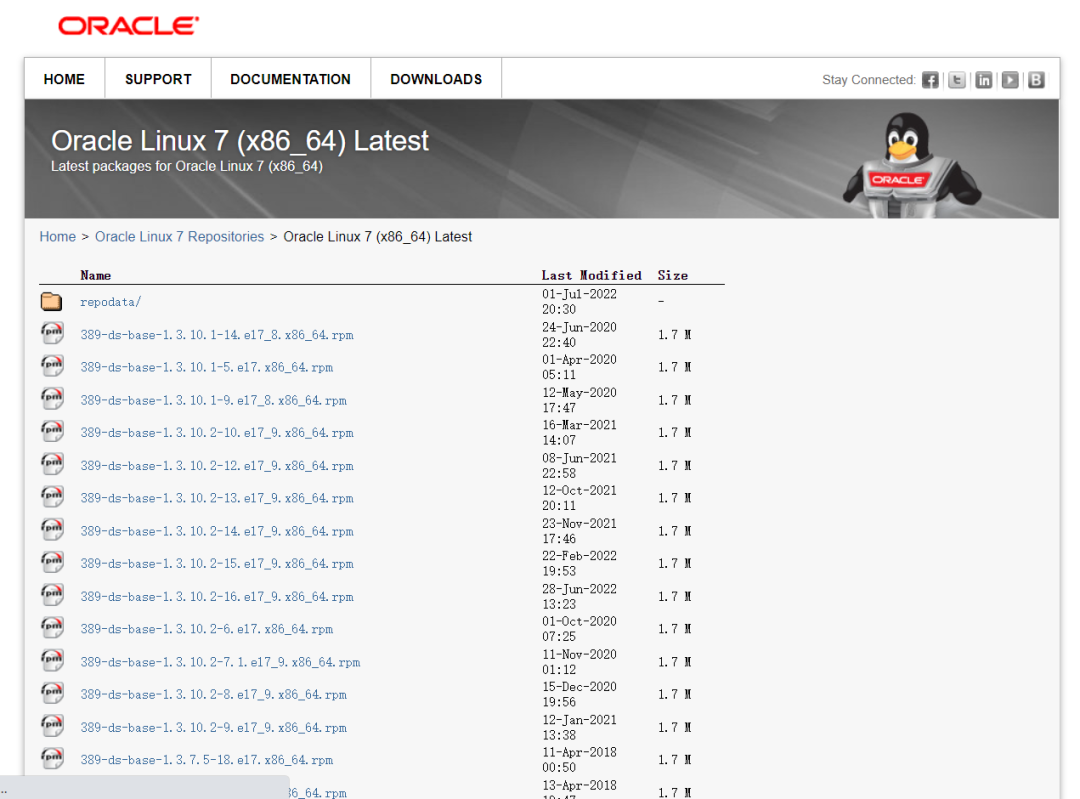
虽然此处说的都是针对Oracle Linux,但实际我这次安装的环境是CentOS 7.9,Linux内核的同样适用。
preinstall其实就是装了一些安装过程中需要的依赖包,之前版本中我们都是手工做的准备,从19c开始,集成到了preinstall中,便于自动化安装,降低安装难度,如果安装过程中提示少了一些辅助包,就得自行安装,
[root@VM-20-15-centos software]# rpm -ivh oracle-database-preinstall-21c-1.0-1.el7.x86_64.rpmwarning: oracle-database-preinstall-21c-1.0-1.el7.x86_64.rpm: Header V3 RSA/SHA256 Signature, key ID ec551f03: NOKEYerror: Failed dependencies:ksh is needed by oracle-database-preinstall-21c-1.0-1.el7.x86_64nfs-utils is needed by oracle-database-preinstall-21c-1.0-1.el7.x86_64policycoreutils-python is needed by oracle-database-preinstall-21c-1.0-1.el7.x86_64smartmontools is needed by oracle-database-preinstall-21c-1.0-1.el7.x86_64sysstat is needed by oracle-database-preinstall-21c-1.0-1.el7.x86_64xorg-x11-utils is needed by oracle-database-preinstall-21c-1.0-1.el7.x86_64xorg-x11-xauth is needed by oracle-database-preinstall-21c-1.0-1.el7.x86_64
安装这些缺少的依赖包,再次执行,
[root@VM-20-15-centos software]# rpm -ivh oracle-database-preinstall-21c-1.0-1.el7.x86_64.rpmwarning: oracle-database-preinstall-21c-1.0-1.el7.x86_64.rpm: Header V3 RSA/SHA256 Signature, key ID ec551f03: NOKEYPreparing... ################################# [100%]package oracle-database-preinstall-21c-1.0-1.el7.x86_64 is already installed
2. 安装21c数据库软件
CentOS 7.9用oracle-database-ee-21c-1.0-1.ol7.x86_64.rpm来安装。rpm安装Oracle默认的路径是/opt/oracle,安装前需要确认该路径的权限是oracle可用的,如果是root,执行安装时,就会提示错误,
[root@bisal software]# rpm -ivh oracle-database-ee-19c-1.0-1.x86_64.rpmwarning: oracle-database-ee-19c-1.0-1.x86_64.rpm: Header V3 RSA/SHA256 Signature, key ID ec551f03: NOKEYPreparing... ################################# [100%][SEVERE] The install cannot proceed because ORACLE_BASE directory (/opt/oracle)is not owned by "oracle" user. You must change the ownership of ORACLE_BASEdirectory to "oracle" user and retry the installation.error: %pre(oracle-database-ee-19c-1.0-1.x86_64) scriptlet failed, exit status 1error: oracle-database-ee-19c-1.0-1.x86_64: install failed
此时要改下权限,
chown -R oracle:oinstall opt/oracle
再次执行,就会正常安装,
[root@VM-20-15-centos software]# rpm -ivh oracle-database-ee-21c-1.0-1.ol7.x86_64.rpmwarning: oracle-database-ee-21c-1.0-1.ol7.x86_64.rpm: Header V3 RSA/SHA256 Signature, key ID ec551f03: NOKEYPreparing... ################################# [100%]Updating installing...1:oracle-database-ee-21c-1.0-1 ################################# [100%][INFO] Executing post installation scripts...[INFO] Oracle home installed successfully and ready to be configured.To configure a sample Oracle Database you can execute the following service configuration script as root: etc/init.d/oracledb_ORCLCDB-21c configure
此处碰到了坑,正常情况下,安装软件,/opt/oracle中应该至少包括这些文件夹,如果不是这些,很可能是有问题,关注控制台活着日志中有无错误,
cd opt/oracledrwxr-x--- 3 oracle oinstall 4096 Jul 1 23:50 cfgtoollogsdrwxr-x--- 2 oracle oinstall 4096 Jul 1 23:50 dbsdrwxrwxr-x 23 oracle oinstall 4096 Jul 1 23:50 diagdrwxr-x--- 3 oracle oinstall 4096 Jul 1 23:50 homesdrwxrwx--- 4 oracle oinstall 4096 Jul 1 23:50 oraInventorydrwxr-xr-x 3 oracle oinstall 4096 Jul 1 23:46 product
另外,可能由于我的路径权限问题,提示我很多文件权限错误,
[root@VM-20-15-centos init.d]# etc/init.d/oracledb_BISALCDB_21c configureConfiguring Oracle Database BISALCDB.[FATAL] [DBT-10011] Incorrect ownership/permissions detected for the file (/opt/oracle/product/21c/dbhome_1/bin/oradism).CAUSE: Following nodes does not have required file ownership/permissions: Node :vm-20-15-centosPRVG-11960 : Set user ID bit is not set for file "/opt/oracle/product/21c/dbhome_1/bin/oradism" on node "vm-20-15-centos".PRVG-2031 : Owner of file "/opt/oracle/product/21c/dbhome_1/bin/oradism" did not match the expected value on node "vm-20-15-centos". [Expected = "root(0)" ; Found = "oracle(54321)"]ACTION: Run the Oracle Home root script as the "root" user to fix the permissions.[FATAL] [DBT-05509] Failed to connect to the specified database (BISALCDB).CAUSE: OS Authentication might be disabled for this database (BISALCDB).ACTION: Specify a valid sysdba user name and password to connect to the database.Database configuration failed.
例如$ORACLE_HOME/bin中这个文件应该是个链接文件,
[root@VM-20-15-centos bin]# ll oradism-rwsr-x--- 1 root oinstall 1867552 Jul 28 2021 oradism
但是我安装的环境中该文件是个文件,
[root@VM-20-15-centos bin]# ll oradism-rwxr-x--- 1 root oinstall 1867552 Jul 28 2021 oradism
此时再通过chown调整文件夹时,可能还是有问题,一定要在执行configure前就调整好/opt/oracle的权限。
3. 安装21c数据库
和19c相同,21c可以通过配置oracledb_$ORACLE_SID_21c这个文件来安装数据库,
P.S. 如果改了原始的oracledb_ORCLCDB_21c名称为
oracledb_BISALCDB_21c,
则/etc/sysconfig的oracledb_ORCLCDB-21c.conf要改为
oracledb_BISALCDB-21c.conf,
[root@VM-20-15-centos init.d]# ./oracledb_BISALCDB_21c configureConfiguring Oracle Database BISALCDB.Prepare for db operation8% completeCopying database files31% complete100% complete[FATAL]Parsing command line arguments:Parameter "silent" = trueParameter "local" = trueParameter "inscomp" = serverParameter "insprtcl" = TCPParameter "orahome" = opt/oracle/product/21c/dbhome_1Parameter "instype" = customParameter "listener" = LISTENERParameter "lisport" = 1521Parameter "cfg" = localParameter "responsefile" = opt/oracle/product/21c/dbhome_1/network/install/netca_typ.rspDone parsing command line arguments.Oracle Net Services Configuration:LISTENER:No valid IP Address returned for the host VM-20-15-centos.Profile configuration complete.Check the trace file for details: opt/oracle/cfgtoollogs/netca/trace_OraDBHome21cEE-22070212AM1239.logOracle Net Services configuration failed. The exit code is 18% complete0% completeLook at the log file "/opt/oracle/cfgtoollogs/dbca/BISALCDB/BISALCDB.log" for further details.Database configuration failed.
此处报错了,看下提示,说的是配置Listener时,找不到主机名对应的有效IP地址,从netca日志,可以再次确认,
[main] [ 2022-07-02 00:12:40.913 CST ] [ConfigureListener.isPortFree:1330] InetAddress.getByName(127.0.0.1): 127.0.0.1[main] [ 2022-07-02 00:12:40.913 CST ] [ConfigureListener.isPortFree:1332] Local host IP address: VM-20-15-centos/127.0.0.1[main] [ 2022-07-02 00:12:40.913 CST ] [ConfigureListener.isPortFree:1334] Local host name: VM-20-15-centos[main] [ 2022-07-02 00:12:40.913 CST ] [ConfigureListener.isPortFree:1345] Address VM-20-15-centos[main] [ 2022-07-02 00:12:40.913 CST ] [ConfigureListener.isPortFree:1345] Address VM-20-15-centos[main] [ 2022-07-02 00:12:40.913 CST ] [ConfigureListener.isPortFree:1407] No IP address returned for host. VM-20-15-centos[main] [ 2022-07-02 00:12:40.913 CST ] [SilentConfigure.silentConfigureListener:398] oracle.net.ca.IllegalEndpointException: No valid IP Address returned for the host VM-20-15-centos.
这种情况下,需要配置/etc/hosts,增加主机名和当前内网IP的关系,
vi /etc/hostsx.x.x.x VM-20-15-centos
重新安装,就可以正常执行,
[root@VM-20-15-centos init.d]# ./oracledb_BISALCDB_21c configureConfiguring Oracle Database BISALCDB.Prepare for db operation8% completeCopying database files31% completeCreating and starting Oracle instance32% complete36% complete40% complete43% complete46% completeCompleting Database Creation51% complete54% completeCreating Pluggable Databases58% complete77% completeExecuting Post Configuration Actions100% completeDatabase creation complete. For details check the logfiles at:opt/oracle/cfgtoollogs/dbca/BISALCDB.Database Information:Global Database Name:BISALCDBSystem Identifier(SID):BISALCDBLook at the log file "/opt/oracle/cfgtoollogs/dbca/BISALCDB/BISALCDB0.log" for further details.Database configuration completed successfully. The passwords were auto generated, you must change them by connecting to the database using 'sqlplus as sysdba' as the oracle user.
4. 连接数据库
数据库安装完成,可以登录了,因为21c不支持非CDB,所以sqlplus as sysdba登录的就是CDB,我们安装时配置了一个PDB,可以通过alter session set container或者tns等方式登录到这个PDB,

此处又碰到了一个坑,我在$ORACLE_HOME/network/admin的tnsnames.ora中配置了,
BISALPDB = (DESCRIPTION =(ADDRESS = (PROTOCOL = TCP)(HOST = VM-20-15-centos)(PORT = 1521))(CONNECT_DATA =(SERVER = DEDICATED)(SERVICE_NAME = BISALPDB1)))
正常来讲,sqlplus user/password@bisalpdb就可以登陆,但是一直提示,
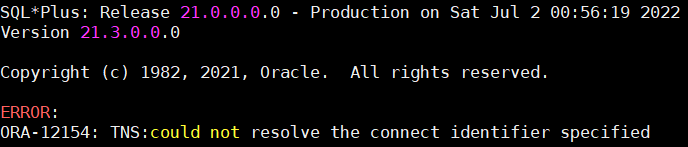
ORA-12514的错误就是TNS配置有误,但看了下文件,确实没什么错误。经过多次尝试,即使我删除了$ORACLE_HOME/network/admin/
tnsnames.ora的内容,都能执行tnsping BISALCDB,这就奇怪了。
"事出反常必有妖",对比了多次配置文件、监听配置等信息,发现一个疑点,lsnrctl status中的Listener Parameter File的路径是/opt/oracle/homes/,并不是/opt/oracle/product/...,
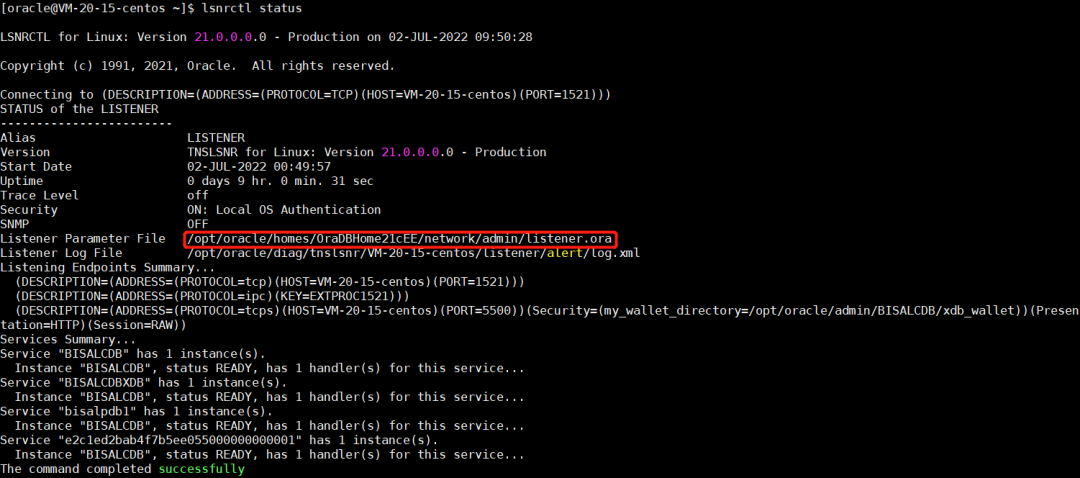
再看下/opt/oracle/homs/的tnsnames配置文件,确实只存在上述测试的BISALCDB,难怪删了/opt/oracle/product的tnsnames.ora内容,并未生效,原来改错了文件,但是为什么此处监听参数文件是这个,不太能考究了,很可能是初次安装的时候,配置有些问题,某个参数采用了默认的,
[oracle@VM-20-15-centos admin]$ cat tnsnames.ora# tnsnames.ora Network Configuration File: /opt/oracle/homes/OraDBHome21cEE/network/admin/tnsnames.ora# Generated by Oracle configuration tools.LISTENER_BISALCDB =(ADDRESS = (PROTOCOL = TCP)(HOST = VM-20-15-centos)(PORT = 1521))BISALCDB =(DESCRIPTION =(ADDRESS = (PROTOCOL = TCP)(HOST = VM-20-15-centos)(PORT = 1521))(CONNECT_DATA =(SERVER = DEDICATED)(SERVICE_NAME = BISALCDB)))
为了解决这个,我是删除了/opt/oracle/homes错误路径的tnsnames.ora、listener.ora,重启监听,就会找$ORACLE_HOME/network/admin的tnsnames.ora,
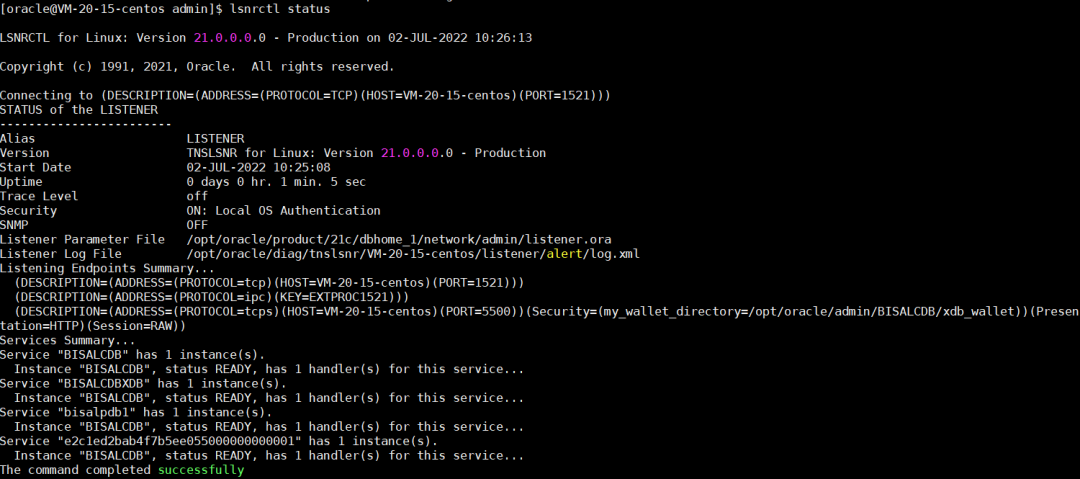
如果哪位朋友知道更准确地改Listener Parameter File值的方式,还请指教。
此时就可以用TNS正常登录到PDB,
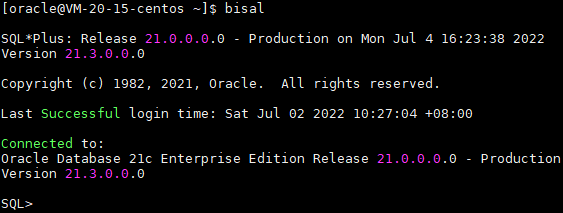
21c的整体使用操作上,和19c相差不太大,新特性的方面,还需要测试了解。
近期更新的文章:
《小白学习MySQL - 增量统计SQL的需求 - 开窗函数的方案》
近期的热文:
文章分类和索引:
