



1. 概述
本文主要介绍使用Flume日志采集工具,在Window Server 2019服务器进行日志采集的过程,整个过程从修改源码,到部署上线,所有经历的各种问题和解决过程。没有想到的是部署的时候居然出现问题,需要修改JVM参数。
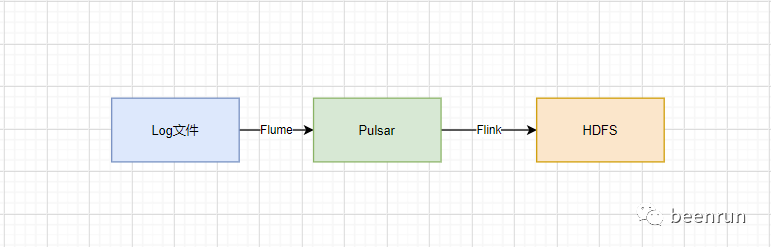
2. 源码修改
2.1修改原因
因为要在windows中进行采集日志到Pulsar中,所以需要修改源码才可以在windows中采集。
因为是其它系统的log4j的日志文件,并且只有一个文件,所以只需要配置指定日志文件就可以。
2.2修改源码
修改源码这部分是参考网上大神们做的,这里进行总结
flume源码下载:https://github.com/apache/flume
(1)修改代码
修改类
ReliableTaildirEventReader.java 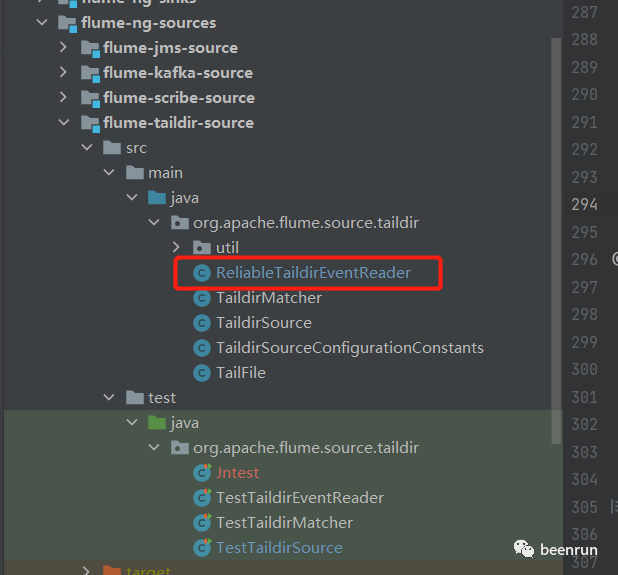
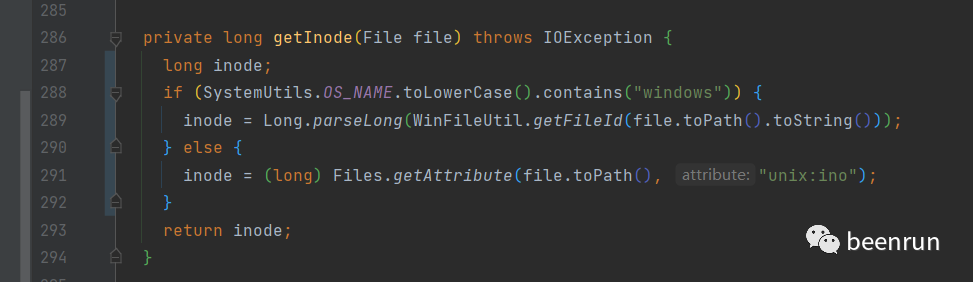
private long getInode(File file) throws IOException {long inode;if (SystemUtils.OS_NAME.toLowerCase().contains("windows")) {inode = Long.parseLong(WinFileUtil.getFileId(file.toPath().toString()));} else {inode = (long) Files.getAttribute(file.toPath(), "unix:ino");}return inode;}
(2)增加类
WinFileUtil.java
/** Licensed to the Apache Software Foundation (ASF) under one* or more contributor license agreements. See the NOTICE file* distributed with this work for additional information* regarding copyright ownership. The ASF licenses this file* to you under the Apache License, Version 2.0 (the* "License"); you may not use this file except in compliance* with the License. You may obtain a copy of the License at** http://www.apache.org/licenses/LICENSE-2.0** Unless required by applicable law or agreed to in writing,* software distributed under the License is distributed on an* "AS IS" BASIS, WITHOUT WARRANTIES OR CONDITIONS OF ANY* KIND, either express or implied. See the License for the* specific language governing permissions and limitations* under the License.*/package org.apache.flume.source.taildir.util;import org.slf4j.Logger;import org.slf4j.LoggerFactory;import com.sun.jna.platform.win32.Kernel32;import com.sun.jna.platform.win32.WinBase;import com.sun.jna.platform.win32.WinNT.HANDLE;import java.io.File;import java.nio.file.Files;/*** Created by Jiangning on 2022-05-18.*/public class WinFileUtil {public static WinFileUtil getWinFile(){return new WinFileUtil();}private static Logger logger = LoggerFactory.getLogger(WinFileUtil.class);public static String getFileId(String filepath) {final int FILE_SHARE_READ = (0x00000001);final int OPEN_EXISTING = (3);final int GENERIC_READ = (0x80000000);final int FILE_ATTRIBUTE_ARCHIVE = (0x20);WinBase.SECURITY_ATTRIBUTES attr = null;org.apache.flume.source.taildir.util.Kernel32.BY_HANDLE_FILE_INFORMATION lpFileInformation = new org.apache.flume.source.taildir.util.Kernel32.BY_HANDLE_FILE_INFORMATION();HANDLE hFile = null;hFile = Kernel32.INSTANCE.CreateFile(filepath, 0,FILE_SHARE_READ, attr, OPEN_EXISTING, FILE_ATTRIBUTE_ARCHIVE,null);String ret = "0";if (Kernel32.INSTANCE.GetLastError() == 0) {org.apache.flume.source.taildir.util.Kernel32.INSTANCE.GetFileInformationByHandle(hFile, lpFileInformation);ret = lpFileInformation.dwVolumeSerialNumber.toString()+ lpFileInformation.nFileIndexLow.toString();Kernel32.INSTANCE.CloseHandle(hFile);if (Kernel32.INSTANCE.GetLastError() == 0) {logger.debug("inode:" + ret);return ret;} else {logger.error("close file:{} cause exception", filepath);throw new RuntimeException("close file:" + filepath+" cause Exception");}} else {if (hFile != null) {Kernel32.INSTANCE.CloseHandle(hFile);}logger.error("open file:{} cause Exception", filepath);throw new RuntimeException("open file :" + filepath+" cause Exception");}}}
(3)增加类
Kernel32.java
/** Licensed to the Apache Software Foundation (ASF) under one* or more contributor license agreements. See the NOTICE file* distributed with this work for additional information* regarding copyright ownership. The ASF licenses this file* to you under the Apache License, Version 2.0 (the* "License"); you may not use this file except in compliance* with the License. You may obtain a copy of the License at** http://www.apache.org/licenses/LICENSE-2.0** Unless required by applicable law or agreed to in writing,* software distributed under the License is distributed on an* "AS IS" BASIS, WITHOUT WARRANTIES OR CONDITIONS OF ANY* KIND, either express or implied. See the License for the* specific language governing permissions and limitations* under the License.*/package org.apache.flume.source.taildir.util;import java.util.ArrayList;import java.util.Arrays;import java.util.HashMap;import java.util.List;import java.util.Map;import com.sun.jna.Library;import com.sun.jna.Native;import com.sun.jna.Structure;import com.sun.jna.platform.win32.WinBase.FILETIME;import com.sun.jna.platform.win32.WinDef.DWORD;import com.sun.jna.platform.win32.WinNT.HANDLE;import com.sun.jna.win32.StdCallLibrary;import com.sun.jna.win32.W32APIFunctionMapper;import com.sun.jna.win32.W32APITypeMapper;/*** Created by jiangning on 2022-05-18.*/public interface Kernel32 extends StdCallLibrary {final static Map WIN32API_OPTIONS = new HashMap() {private static final long serialVersionUID = 1L;{put(Library.OPTION_FUNCTION_MAPPER, W32APIFunctionMapper.UNICODE);put(Library.OPTION_TYPE_MAPPER, W32APITypeMapper.UNICODE);}};Kernel32 INSTANCE = (Kernel32) Native.loadLibrary("Kernel32",Kernel32.class, WIN32API_OPTIONS);int GetLastError();class BY_HANDLE_FILE_INFORMATION extends Structure {public DWORD dwFileAttributes;public FILETIME ftCreationTime;public FILETIME ftLastAccessTime;public FILETIME ftLastWriteTime;public DWORD dwVolumeSerialNumber;public DWORD nFileSizeHigh;public DWORD nFileSizeLow;public DWORD nNumberOfLinks;public DWORD nFileIndexHigh;public DWORD nFileIndexLow;public static class ByReference extends BY_HANDLE_FILE_INFORMATION implements Structure.ByReference {};public static class ByValue extends BY_HANDLE_FILE_INFORMATION implements Structure.ByValue {}@Overrideprotected List getFieldOrder() {List fields = new ArrayList();fields.addAll(Arrays.asList(new String[]{"dwFileAttributes","ftCreationTime", "ftLastAccessTime", "ftLastWriteTime","dwVolumeSerialNumber", "nFileSizeHigh", "nFileSizeLow","nNumberOfLinks", "nFileIndexHigh", "nFileIndexLow"}));return fields;};};boolean GetFileInformationByHandle(HANDLE hFile,BY_HANDLE_FILE_INFORMATION lpFileInformation);}
(4)修改pom,添加依赖
<dependency><groupId>net.java.dev.jna</groupId><artifactId>jna</artifactId><version>4.2.2</version></dependency><dependency><groupId>net.java.dev.jna</groupId><artifactId>jna-platform</artifactId><version>4.2.2</version></dependency>
(5)打包
重新编译打包flume-taildir-source工程,将生成的flume-taildir-source-1.9.0.jar包替换到flume的lib目录中,并且将jna-platform-4.2.2.jar和jna-4.2.2.jar 拷贝到flume的lib目录中。重新启动taildir 采集,问题得以解决。
在本地测试没有问题
3.部署上线
3.1文件传输问题解决
flume在windows上的部署可以参考网上,有好多信息
我这里要说的在部署的时候由于是在甲方,通过远程,再跳转,到windows服务
首先需要把安装包传到服务器,对方告诉向日葵地址后就什么都不管了,
(1)遇见问题
我们用文件共享的方式传输,发现传输1k小文件可以,但是超过300M就直接断掉,实验好几次都不行
(2)解决方法:在一台服务搭建Nginx服务,将文件传输到服务器,再从linux服务器下载windows的服务。问题解决
3.2无法申请内存
(1)检查环境JDK已经安装,并且检查了环境变量
(2)该机器已经部署了2个java应用,
(3)该机器内存为32G,使用了大概15G内存,还剩余17G
(4)安装好后直接启动
打开cmd输入:flume-ng version
错误信息如下:
WARN: Config directory not set. Defaulting to C:\module\apache-flume-1.9.0-bin\confSourcing environment configuration script C:\module\apache-flume-1.9.0-bin\conf\flume-env.ps1WARN: Did not find C:\module\apache-flume-1.9.0-bin\conf\flume-env.ps1WARN: HADOOP_PREFIX or HADOOP_HOME not foundWARN: HADOOP_PREFIX not set. Unable to include Hadoop's classpath & java.library.pathWARN: HBASE_HOME not foundWARN: HIVE_HOME not foundRunning FLUME version :class: org.apache.flume.tools.VersionInfoarguments:Error occurred during initialization of VMUnable to allocate 262144KB bitmaps for parallel garbage collection for the requested 8388608KB heap.Error: Could not create the Java Virtual Machine.Error: A fatal exception has occurred. Program will exit.
这个时候想到先看下java -version 是否可以执行
发现执行java -version 的时候出现下面错误
Error occurred during initialization of VMUnable to allocate 264768KB bitmaps for parallel garbage collection for the requested 8472576KB heap.Error: Could not create the Java Virtual Machine.Error: A fatal exception has occurred. Program will exit.
在这台机器上有别的java程序运行,所以java环境应该是没有问题的。
分析问题:应该是本机启动java其它程序,内存没有回收,可能有内存泄露的问题,猜测是Java8的内存回收默认没有执行,或者执行出现问题。
因为服务器已经部署2个应用,我们我不清楚这个机器上的原来应用是什么。
所以只好改下GC的垃圾回收器,看看是否可以执行。
修改flume配置文件
增加
-XX:+UseSerialGC
export JAVA_OPTS="-Xms2000m -Xmx2000m -XX:+UseSerialGC -Dcom.sun.management.jmxremote"
修改完后终于可以正常启动,pulsar中也接收到了消息
能够正常
4.总结
解决问题的方法有很多,不能轻易放弃,在遇见问题的时候要想各种不同的方法,类似数学中的一题多解。不断想出好的方法。
当然要想出好的方法,需要平时多学习更多的知识,才能在遇见问题的有思路。
Serial收集器是Java SE 5/6中默认的客户端虚拟机收集器。在Serial收集器中新生代和老年代都是通过线程过程(单个处理器)来收集垃圾。垃圾收集的过程是STW(Stop the World)事件,所以其它进程都必须暂停,直到结束。
使用场景:Serial收集器的特点,简单直接,适用于对于效率要求不高的客户端的虚拟机上,单个处理器的情况,Serial收集的效率是很高的,直到现在很多内存资源有限的嵌入式设备上使用的都是Serial收集器。此外如果物理机上有大量JVM运行,使用Serial收集器让单个处理器收集垃圾会效率更高,这样就可以减少多个JVM之间的协调,因为JVM的任务都停止了。然后进行垃圾回收。
5.后继
第二天发现,昨天晚上1点的时候开始,在一个消费Pulsar的客户端就没有消息。怎么回事呢?
当时心里一凉,完了,又有问题。
马上检查Pulsar中topic的消息,看到消息都正常,没有少,一切正常。增加日志信息准备明天再看下什么情况。
上午没有想到问题出在哪里,在中午吃完饭,遛弯的时候,和同事聊这个事情,突然想到公司由于网络不稳定,每天晚上我们会断网15分钟,线上环境其实是正常采集数据,只是我们本地的消费端断掉了。
终于破案。
意外一直会存在,只有不断分析问题的原因,才能找到真正的结果。
到此部署Flume采集数据到Pular终于彻底解决。
奇迹的出现往往就在再坚持一下的时候!
感谢阅读。
期待点赞、分享、关注!
