



1.Flink DataStream API学习方法
从今天开始学习Flink DataStream API,这里的学习方法主要如下
(1)通过官方文档
https://nightlies.apache.org/flink/flink-docs-release-1.15/docs/dev/datastream/overview/
(2)动手编写demo
(3)在编写demo的过程顺便看一下源码
(4)代码会上传到github地址为
git@github.com:johncodeit/flinkdemo.git
其它框架的学习也可以用该方法
2.Flink编程5步走
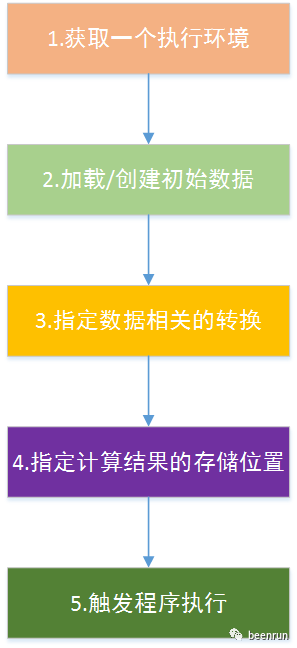
Flink的编写是按照一定框架进行编写,只要填空就可以了。
(1)Obtain an execution environment,获取一个执行环境;
(2)Load/create the initial data,加载/创建初始数据;
(3)Specify transformations on this data,指定数据相关的转换;
(4)Specify where to put the results of your computations,指定计算结果的存储位置;
(5)Trigger the program execution触发程序执行。
3.经典的WordCount
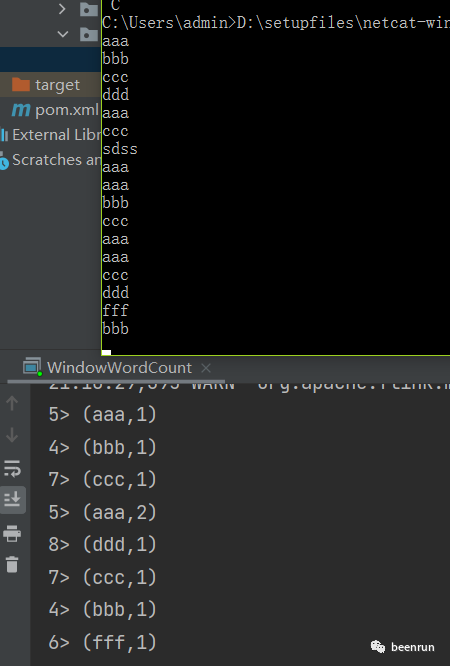
package run.been.flinkdemo.helloimport org.apache.flink.streaming.api.scala._import org.apache.flink.streaming.api.windowing.assigners.TumblingProcessingTimeWindowsimport org.apache.flink.streaming.api.windowing.time.Time/*** https://nightlies.apache.org/flink/flink-docs-release-1.15/docs/dev/datastream/overview/*/object WindowWordCount {def main(args: Array[String]) {//1.获取一个执行环境,上下文(execution environment);val env = StreamExecutionEnvironment.getExecutionEnvironment//2.source:加载/创建初始数据;val text = env.socketTextStream("localhost", 9999)//3.transform 指定数据相关的转换;val counts = text.flatMap { _.toLowerCase.split("\\W+") filter { _.nonEmpty } }.map { (_, 1) }.keyBy(_._1).window(TumblingProcessingTimeWindows.of(Time.seconds(5))).sum(1)//4.sink:指定计算结果的存储位置;counts.print()//5.触发程序执行。env.execute("Window Stream WordCount")}}
4.启动nc
linux
nc -lk 9000
windows下启动命令
nc -L -p 9000
代码地址
git@github.com:johncodeit/flinkdemo.git
感谢阅读。
期待点赞、分享、关注!
Many drops make a shower.
积少成多。
文章转载自beenrun,如果涉嫌侵权,请发送邮件至:contact@modb.pro进行举报,并提供相关证据,一经查实,墨天轮将立刻删除相关内容。
