



----环境准备
Master: 192.168.163.167 mysqltest01
Slave: 192.168.163.176 mysqltest02
##前期工作,主从节点安装PG并作初始化
----主库创建归档目录
mkdir -p pgbase/pgdata/pg_archive
----主库添加白名单
echo "host all all 192.168.163.167/32 trust" >> pgbase/pgdata/pg_hba.conf
echo "host replication replica 192.168.163.176/32 md5" >>/pgbase/pgdata/pg_hba.conf
----主库配置数据库参数
cat >> pgbase/pgdata/postgresql.conf << EOF
# -----------------------------
# PostgreSQL configuration file
# -----------------------------
listen_addresses = '*' # what IP address(es) to listen on;
#port = 5432 # (change requires restart)
max_connections = 100 # (change requires restart)
shared_buffers = 128MB # min 128kB
dynamic_shared_memory_type = posix # the default is the first option
max_wal_size = 1GB
min_wal_size = 80MB
log_timezone = 'Asia/Shanghai'
datestyle = 'iso, mdy'
timezone = 'Asia/Shanghai'
lc_messages = 'en_US.UTF-8' # locale for system error message
# strings
lc_monetary = 'en_US.UTF-8' # locale for monetary formatting
lc_numeric = 'en_US.UTF-8' # locale for number formatting
lc_time = 'en_US.UTF-8' # locale for time formatting
# default configuration for text search
default_text_search_config = 'pg_catalog.english'
archive_mode = on # 允许归档
archive_command = 'cp %p pgbase/pgdata/pg_archive/%f'
wal_level = hot_standby
max_wal_senders = 32 #
wal_sender_timeout = 60s
EOF
##如果以上参数涉及到重启才能生效的,则需要重启主库
----重启主库
pg_ctl -D pgbase/pgdata stop
pg_ctl -D pgbase/pgdata start
----从库删除从库data目录下所有内容
[postgres@mysqltest02 pgbase]$ cd pgdata
[postgres@mysqltest02 pgdata]$ pwd
/pgbase/pgdata
[postgres@mysqltest02 pgbase]$ rm -rf *
----在从库进行主库data目录复制
pg_basebackup -h 192.168.163.167 -U replica -D pgbase/pgdata -X stream -P
----复制recovery.conf文件并添加参数
cp recovery.conf.sample pgbase/pgdata/recovery.conf
echo "standby_mode = on" >>/pgbase/pgdata/recovery.conf
echo "primary_conninfo = 'host=192.168.163.167 port=5433 user=replica password=replica' #primary user and port info" >>/pgbase/pgdata/recovery.conf
----从库配置数据库参数
cat >> pgbase/pgdata/postgresql.conf <<EOF
# -----------------------------
# PostgreSQL configuration file
# -----------------------------
listen_addresses = '*' # what IP address(es) to listen on;
#port = 5433 # (change requires restart)
max_connections = 100 # (change requires restart)
shared_buffers = 128MB # min 128kB
dynamic_shared_memory_type = posix # the default is the first option
max_wal_size = 1GB
min_wal_size = 80MB
log_timezone = 'Asia/Shanghai'
datestyle = 'iso, mdy'
timezone = 'Asia/Shanghai'
lc_messages = 'en_US.UTF-8' # locale for system error message
# strings
lc_monetary = 'en_US.UTF-8' # locale for monetary formatting
lc_numeric = 'en_US.UTF-8' # locale for number formatting
lc_time = 'en_US.UTF-8' # locale for time formatting
# default configuration for text search
default_text_search_config = 'pg_catalog.english'
archive_mode = on
archive_command = 'cp %p pgbase/pgdata/pg_archive/%f'
wal_level = hot_standby
max_wal_senders = 32
wal_sender_timeout = 60s
hot_standby = on
max_standby_streaming_delay = 30s
wal_receiver_status_interval = 10s
hot_standby_feedback = on
EOF
----启动从库
pg_ctl -D pgbase/pgdata start
----检查同步
--进程查看
--主库查看walsender
[postgres@mysqltest01 ~]$ ps aux | grep postgres
root 2683 0.0 0.1 189612 2352 pts/0 S 01:15 0:00 su - postgres
postgres 2684 0.0 0.1 116040 2704 pts/0 S 01:15 0:00 -bash
root 3300 0.0 0.1 189612 2356 pts/1 S 02:01 0:00 su - postgres
postgres 3301 0.0 0.1 116040 2716 pts/1 S 02:01 0:00 -bash
postgres 3430 0.0 0.7 301324 14288 pts/0 S 02:09 0:00 pgbase/pg11/bin/postgres -D pgbase/pgdata
postgres 3432 0.0 0.1 301424 3144 ? Ss 02:09 0:00 postgres: checkpointer
postgres 3433 0.0 0.1 301324 2772 ? Ss 02:09 0:00 postgres: background writer
postgres 3434 0.0 0.3 301324 5672 ? Ss 02:09 0:00 postgres: walwriter
postgres 3435 0.0 0.1 301724 2532 ? Ss 02:09 0:00 postgres: autovacuum launcher
postgres 3436 0.0 0.0 156248 1420 ? Ss 02:09 0:00 postgres: archiver last was 000000010000000000000002.00000028.backup
postgres 3437 0.0 0.0 156248 1556 ? Ss 02:09 0:00 postgres: stats collector
postgres 3438 0.0 0.1 301724 1984 ? Ss 02:09 0:00 postgres: logical replication launcher
postgres 3487 0.0 0.1 156204 2888 pts/0 S+ 02:13 0:00 psql
postgres 3488 0.0 0.2 302284 3996 ? Ss 02:13 0:00 postgres: postgres postgres [local] idle
postgres 3821 0.0 0.1 301892 2996 ? Ss 02:45 0:00 postgres: walsender replica 192.168.163.176(33102) streaming 0/3000140
postgres 3831 0.0 0.0 151060 1832 pts/1 R+ 02:46 0:00 ps aux
postgres 3832 0.0 0.0 112652 964 pts/1 S+ 02:46 0:00 grep --color=auto postgres
[postgres@mysqltest01 ~]$
[postgres@mysqltest01 ~]$
--备库查看walreceiver
[postgres@mysqltest02 postgresql]$ ps aux | grep postgres
root 2455 0.0 0.1 189612 2352 pts/0 S 01:16 0:00 su - postgres
postgres 2456 0.0 0.1 116136 2924 pts/0 S 01:16 0:00 -bash
postgres 3687 0.2 0.7 301324 14176 pts/0 S 02:45 0:00 /pgbase/pg11/bin/postgres -D /pgbase/pgdata
postgres 3688 0.0 0.1 301472 2136 ? Ss 02:45 0:00 postgres: startup recovering 000000010000000000000003
postgres 3689 0.0 0.0 301324 1484 ? Ss 02:45 0:00 postgres: checkpointer
postgres 3690 0.3 0.0 301324 1752 ? Ss 02:45 0:00 postgres: background writer
postgres 3691 0.0 0.0 156248 1208 ? Ss 02:45 0:00 postgres: stats collector
postgres 3692 1.0 0.1 305724 2636 ? Ss 02:45 0:00 postgres: walreceiver streaming 0/3000140
postgres 3693 0.0 0.0 151060 1836 pts/0 R+ 02:45 0:00 ps aux
postgres 3694 0.0 0.0 112656 964 pts/0 S+ 02:45 0:00 grep --color=auto postgres
[postgres@mysqltest02 postgresql]$
[postgres@mysqltest02 postgresql]$
--主库数据字典查看同步
--select * from pg_stat_replication;
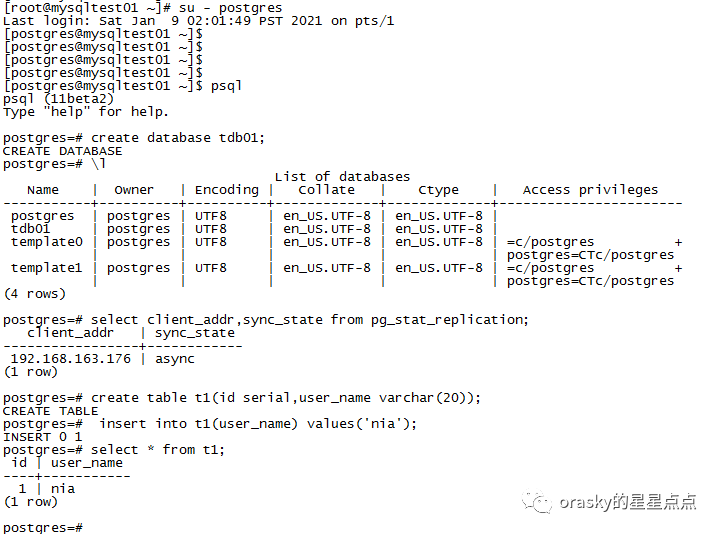
postgres=# select client_addr,sync_state from pg_stat_replication;
client_addr | sync_state
-----------------+------------
192.168.163.176 | async
(1 row)
----验证同步
--主库创建测试库与测试表
[postgres@mysqltest01 ~]$ psql
psql (11beta2)
Type "help" for help.
postgres=# create database tdb01;
CREATE DATABASE
--备库检查是否存在从主库同步过来的测试库和测试表
[postgres@mysqltest02 ~]$ psql
psql (11beta2)
Type "help" for help.
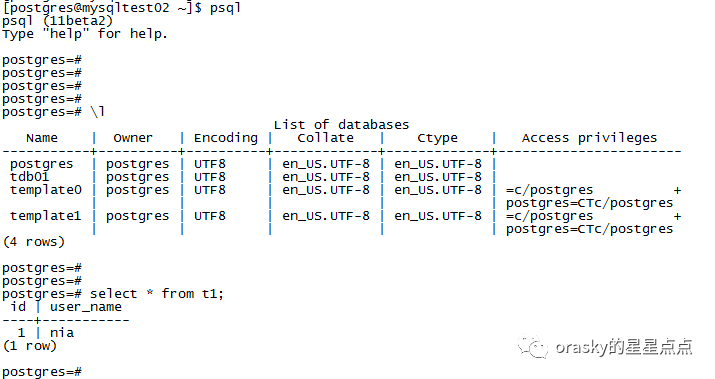
##简单的同步验证完成,可见主备同步正常。
