



学习任何一门应用型技术,动手操作是唯一的捷径,下面我们通过在自己的虚拟机中搭建的TiDB 4.0的测试环境。
TiDB官方提供了两种测试环境的安装方法:
- 使用 TiUP Playground 快速部署本地测试环境
- 使用 TiUP cluster 在单机上模拟生产环境
由于第二种部署方式可以体验TIDB最小的完整拓扑集群,更接近生产环境,所以这里使用TiUP cluster的部署方式。
(TiUP是TiDB4.0后推出的集群管理工具,可以替代3.x版本的TiDB Ansible。)
TiDB 集群拓扑:
| 实例 | 个数 | IP | 配置 |
|---|---|---|---|
| TiKV | 3 | 192.168.48.150 192.168.48.150 192.168.48.150 | 避免端口和目录冲突 |
| TiDB | 1 | 192.168.48.150 | 默认端口全局目录配置 |
| PD | 1 | 192.168.48.150 | 默认端口全局目录配置 |
| TiFlash | 1 | 192.168.48.150 | 默认端口全局目录配置 |
| Monitor | 1 | 192.168.48.150 | 默认端口全局目录配置 |
安装环境及系统要求:
操作系统:CentOS 7.3 及以上版本(TiDB目前不支持windows系统)
内存:8G(自测环境)
交换空间:8G(自测环境)
硬盘:100G(自测环境)
网络:可访问外网(用于下载 TiDB 及相关软件安装包)
部署步骤:
1. 关闭服务器防火墙
#systemctl stop firewalld.service 关闭防火墙
#systemctl disable firewalld.service 禁止防火墙开机启动
#systemctl disable firewalld.service 查看防火墙状态

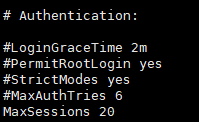
2. 调整 sshd 服务的连接数限制
由于模拟多机部署,需要通过 root 用户调大 sshd 服务的连接数限制。
1. 修改 /etc/ssh/sshd_config 将 MaxSessions 调至 20 。
2. 重启 sshd 服务:# systemctl restart sshd
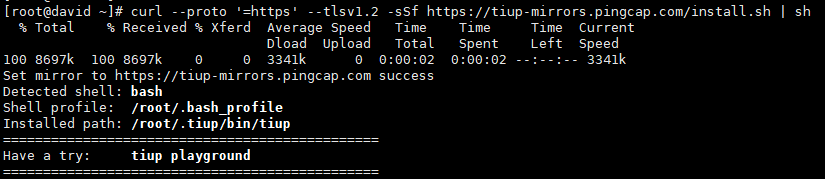
3. 下载并安装 TiUP
#curl --proto ‘=https’ --tlsv1.2 -sSf https://tiup-mirrors.pingcap.com/install.sh | sh
4. 安装 TiUP 的 cluster 组件
#tiup cluster
5. 创建并启动集群
- 按下面的配置模板,编辑配置文件,命名为 topo.yaml ,其中:
user: “tidb” :表示通过 tidb 系统用户(部署会自动创建)来做集群的内部管理,默认使用 22 端
口通过 ssh 登录目标机器
replication.enable-placement-rules :设置这个 PD 参数来确保 TiFlash 正常运行
host :设置为本部署主机的 IP
配置模板如下:
# # the deployments if a specific deployment value is missing.
global:
 user: "tidb"
 ssh_port: 22
 deploy_dir: "/usr/local/yunji/tidb"
 data_dir: "/usr/local/yunji/tidb/data"

# # Monitored variables are applied to all the machines.
monitored:
 node_exporter_port: 9100
 blackbox_exporter_port: 9115

server_configs:
 tidb:
   log.slow-threshold: 300
 tikv:
   readpool.storage.use-unified-pool: false
   readpool.coprocessor.use-unified-pool: true
 pd:
   replication.enable-placement-rules: true
   replication.location-labels: ["host"]
 tiflash:
   logger.level: "info"

pd_servers:
 - host: 192.168.48.150

tidb_servers:
 - host: 192.168.48.150

tikv_servers:
 - host: 192.168.48.150
   port: 20160
   status_port: 20180
   config:
     server.labels: { host: "logic-host-1" }

 - host: 192.168.48.150
   port: 20161
   status_port: 20181
   config:
     server.labels: { host: "logic-host-2" }

 - host: 192.168.48.150
   port: 20162
   status_port: 20182
   config:
     server.labels: { host: "logic-host-3" }

tiflash_servers:
 - host: 192.168.48.150

monitoring_servers:
 - host: 192.168.48.150

grafana_servers:
 - host: 192.168.48.150
如图已在TiUP安装目录创建topo.yaml文件

- 执行集群部署命令
#tiup cluster deploy cluster-name tidb-version ./topo.yaml --user root -p
通过 #tiup list tidb 命令来查看当前支持部署的TiDB 版本。这里选择v4.0.8版本,v4.0.9版本供后面演示升级。

如下图名为tidb-david的tidb集群安装完毕!
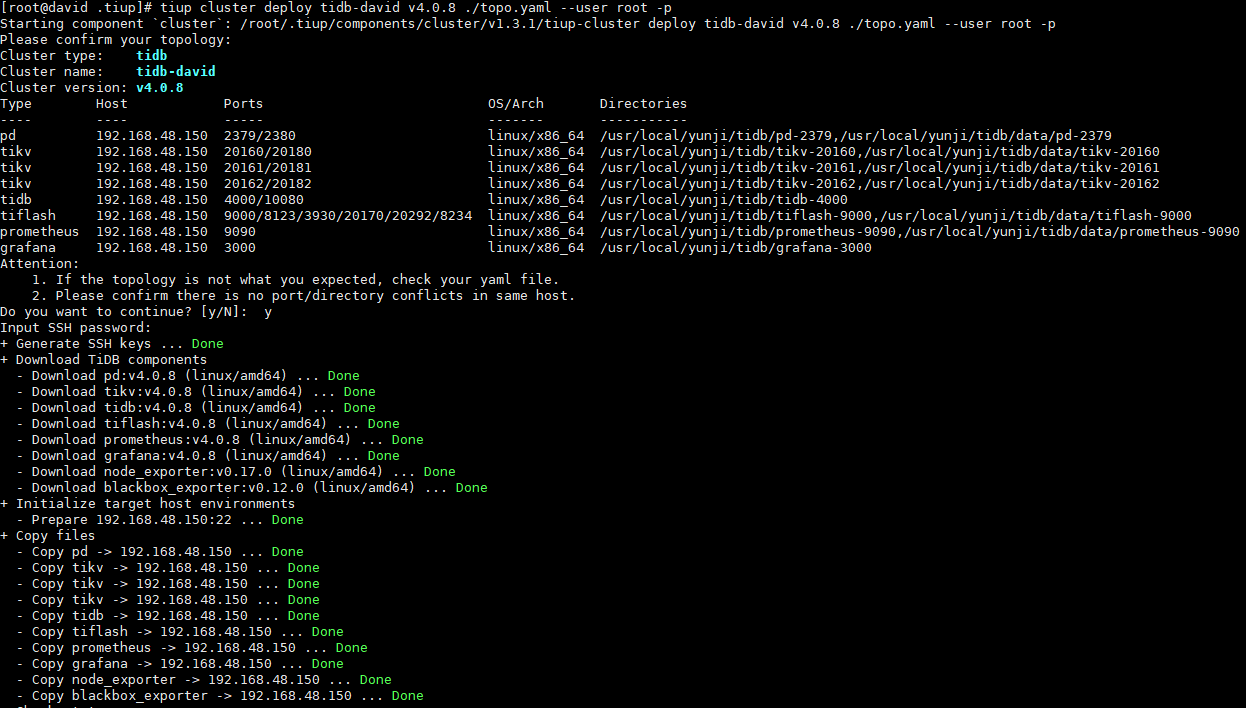
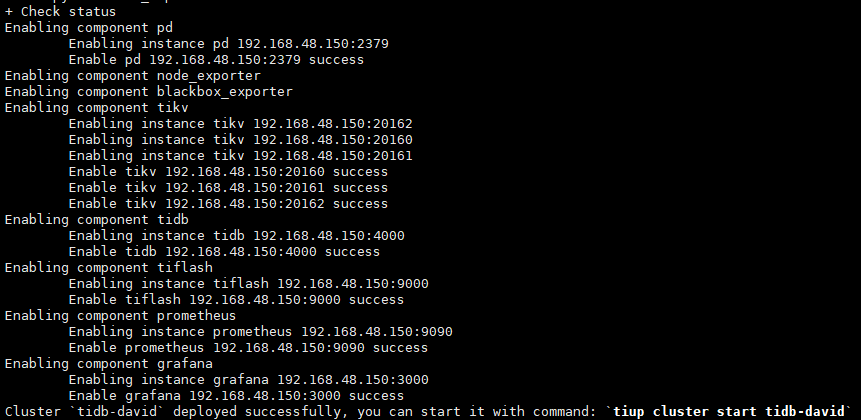
#注:copy files阶段可能会遇到报错,直接再次执行命令知道安装成功即可!
- 启动集群
#tiup cluster start tidb-david
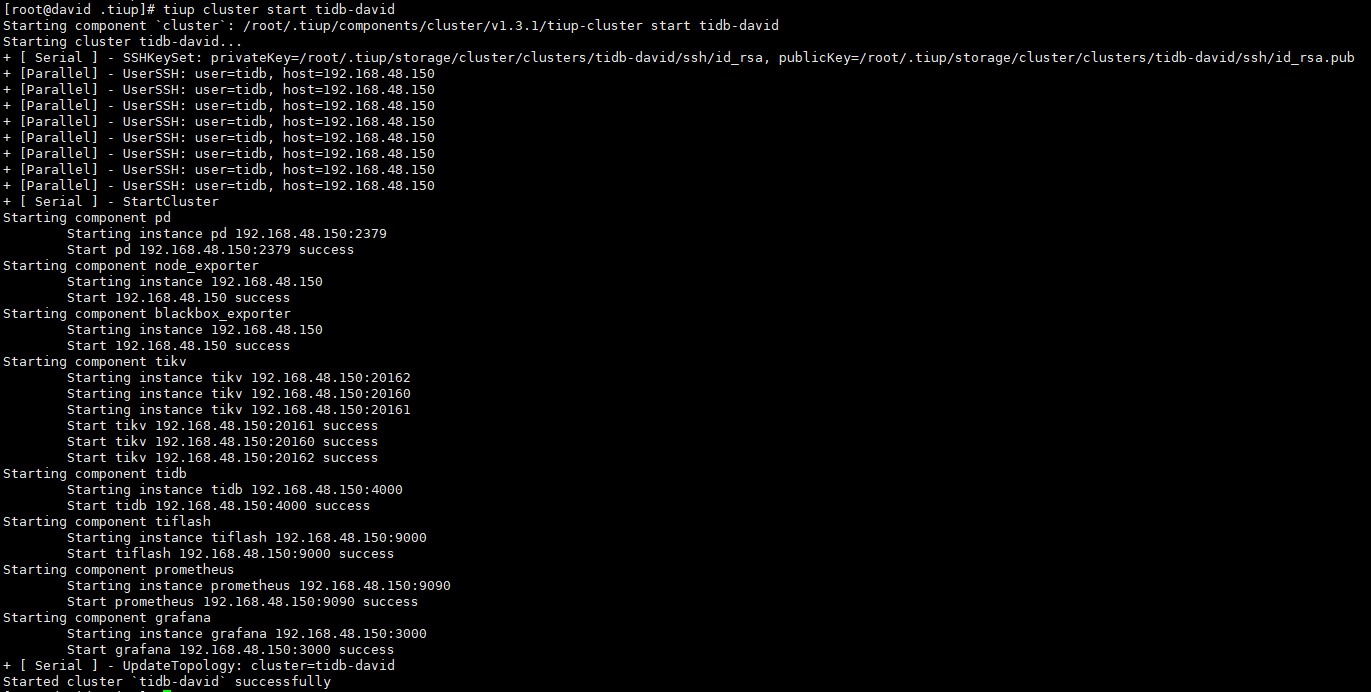
执行#tiup cluster display tidb-david查看集群拓扑结构和状态

-
登录数据库
#mysql -h 192.168.48.150 -P 4000 -u root (密码为空)
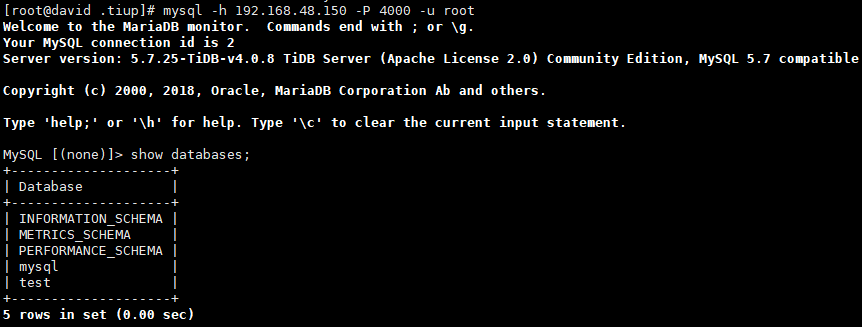
-
访问 TiDB 的 Grafana 监控:
通过 http://grafana-ip:3000 访问集群 Grafana 监控页面,默认用户名和密码均为 admin 。
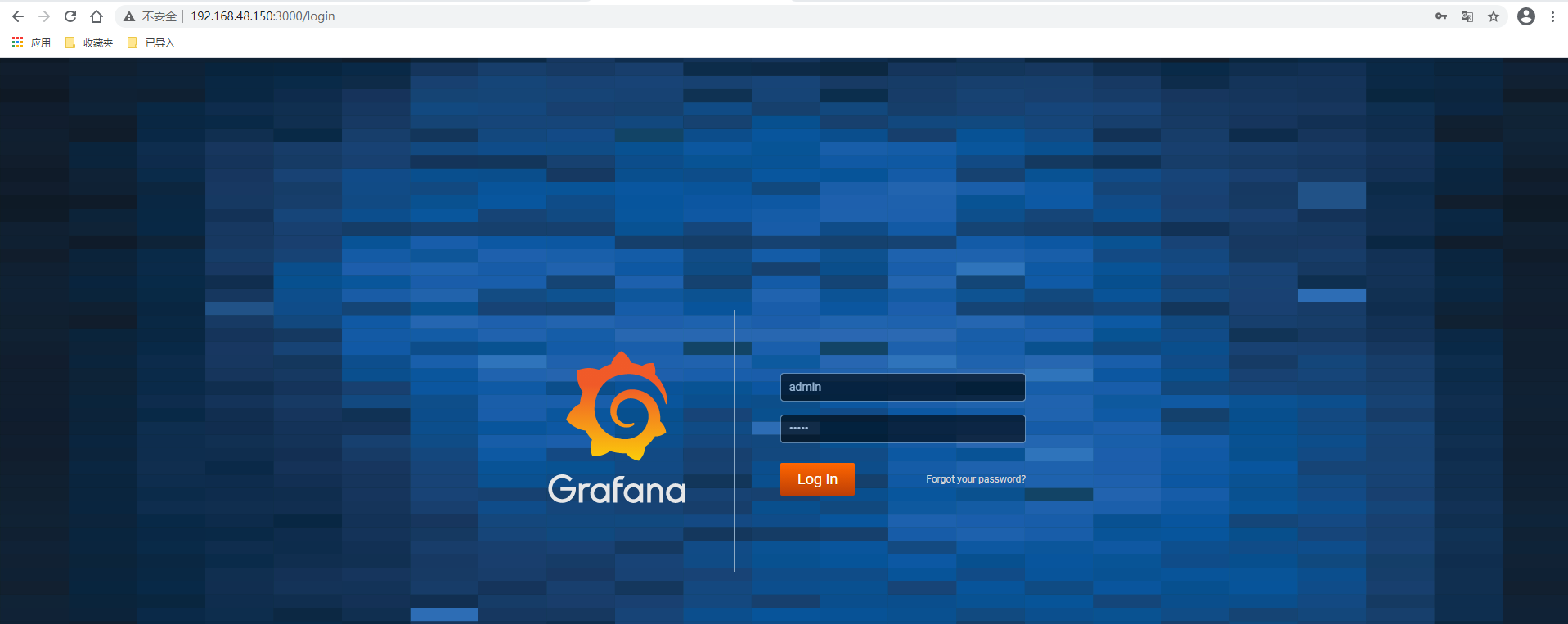
-
访问 TiDB 的 Dashboard :
通过 http://pd-ip:2379/dashboard 访问集群 TiDB Dashboard 监控页面,默认用户名为 root ,密码为空。
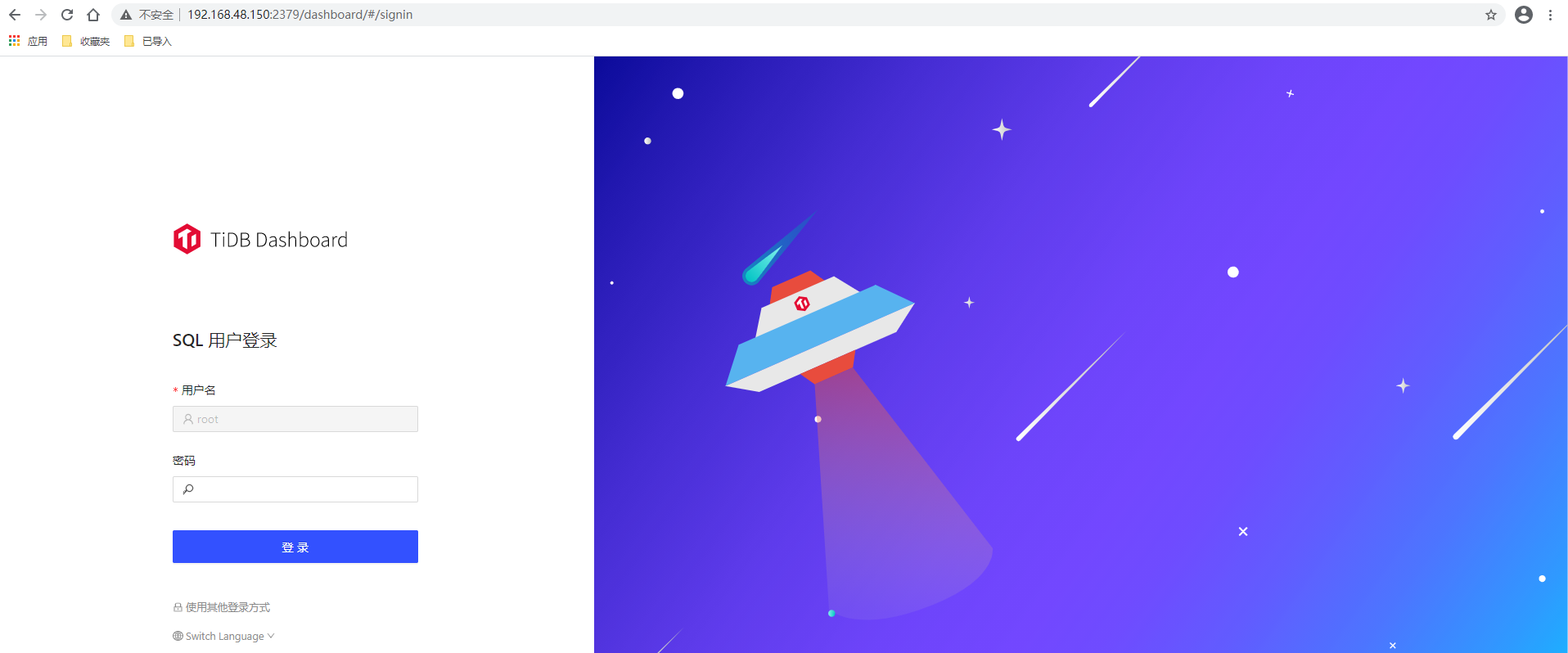
至此TIDB测试集群安装完毕!!!
6.滚动升级 TiDB 集群
- 将集群升级到指定版本
#tiup cluster upgrade cluster-name version
[root@david .tiup]# tiup cluster upgrade tidb-david v4.0.9
Starting component `cluster`: /root/.tiup/components/cluster/v1.3.1/tiup-cluster upgrade tidb-david v4.0.9
This operation will upgrade tidb v4.0.8 cluster tidb-david to v4.0.9.
Do you want to continue? [y/N]: y
Upgrading cluster...
+ [ Serial ] - SSHKeySet: privateKey=/root/.tiup/storage/cluster/clusters/tidb-david/ssh/id_rsa, publicKey=/root/.tiup/storage/cluster/clusters/tidb-david/ssh/id_rsa.pub
+ [Parallel] - UserSSH: user=tidb, host=192.168.48.150
+ [Parallel] - UserSSH: user=tidb, host=192.168.48.150
+ [Parallel] - UserSSH: user=tidb, host=192.168.48.150
+ [Parallel] - UserSSH: user=tidb, host=192.168.48.150
+ [Parallel] - UserSSH: user=tidb, host=192.168.48.150
+ [Parallel] - UserSSH: user=tidb, host=192.168.48.150
+ [Parallel] - UserSSH: user=tidb, host=192.168.48.150
+ [Parallel] - UserSSH: user=tidb, host=192.168.48.150
+ [ Serial ] - Download: component=grafana, version=v4.0.9, os=linux, arch=amd64
+ [ Serial ] - Download: component=tikv, version=v4.0.9, os=linux, arch=amd64
+ [ Serial ] - Download: component=tiflash, version=v4.0.9, os=linux, arch=amd64
+ [ Serial ] - Download: component=pd, version=v4.0.9, os=linux, arch=amd64
+ [ Serial ] - Download: component=tidb, version=v4.0.9, os=linux, arch=amd64
+ [ Serial ] - Download: component=prometheus, version=v4.0.9, os=linux, arch=amd64
+ [ Serial ] - BackupComponent: component=grafana, currentVersion=v4.0.8, remote=192.168.48.150:/usr/local/yunji/tidb/grafana-3000
+ [ Serial ] - BackupComponent: component=tikv, currentVersion=v4.0.8, remote=192.168.48.150:/usr/local/yunji/tidb/tikv-20161
+ [ Serial ] - BackupComponent: component=pd, currentVersion=v4.0.8, remote=192.168.48.150:/usr/local/yunji/tidb/pd-2379
+ [ Serial ] - BackupComponent: component=tiflash, currentVersion=v4.0.8, remote=192.168.48.150:/usr/local/yunji/tidb/tiflash-9000
+ [ Serial ] - BackupComponent: component=tikv, currentVersion=v4.0.8, remote=192.168.48.150:/usr/local/yunji/tidb/tikv-20160
+ [ Serial ] - BackupComponent: component=tidb, currentVersion=v4.0.8, remote=192.168.48.150:/usr/local/yunji/tidb/tidb-4000
+ [ Serial ] - BackupComponent: component=prometheus, currentVersion=v4.0.8, remote=192.168.48.150:/usr/local/yunji/tidb/prometheus-9090
+ [ Serial ] - BackupComponent: component=tikv, currentVersion=v4.0.8, remote=192.168.48.150:/usr/local/yunji/tidb/tikv-20162
+ [ Serial ] - CopyComponent: component=grafana, version=v4.0.9, remote=192.168.48.150:/usr/local/yunji/tidb/grafana-3000 os=linux, arch=amd64
+ [ Serial ] - CopyComponent: component=prometheus, version=v4.0.9, remote=192.168.48.150:/usr/local/yunji/tidb/prometheus-9090 os=linux, arch=amd64
+ [ Serial ] - CopyComponent: component=tiflash, version=v4.0.9, remote=192.168.48.150:/usr/local/yunji/tidb/tiflash-9000 os=linux, arch=amd64
+ [ Serial ] - CopyComponent: component=pd, version=v4.0.9, remote=192.168.48.150:/usr/local/yunji/tidb/pd-2379 os=linux, arch=amd64
+ [ Serial ] - CopyComponent: component=tidb, version=v4.0.9, remote=192.168.48.150:/usr/local/yunji/tidb/tidb-4000 os=linux, arch=amd64
+ [ Serial ] - CopyComponent: component=tikv, version=v4.0.9, remote=192.168.48.150:/usr/local/yunji/tidb/tikv-20162 os=linux, arch=amd64
+ [ Serial ] - CopyComponent: component=tikv, version=v4.0.9, remote=192.168.48.150:/usr/local/yunji/tidb/tikv-20161 os=linux, arch=amd64
+ [ Serial ] - CopyComponent: component=tikv, version=v4.0.9, remote=192.168.48.150:/usr/local/yunji/tidb/tikv-20160 os=linux, arch=amd64
+ [ Serial ] - InitConfig: cluster=tidb-david, user=tidb, host=192.168.48.150, path=/root/.tiup/storage/cluster/clusters/tidb-david/config-cache/pd-2379.service, deploy_dir=/usr/local/yunji/tidb/pd-2379, data_dir=[/usr/local/yunji/tidb/data/pd-2379], log_dir=/usr/local/yunji/tidb/pd-2379/log, cache_dir=/root/.tiup/storage/cluster/clusters/tidb-david/config-cache
+ [ Serial ] - InitConfig: cluster=tidb-david, user=tidb, host=192.168.48.150, path=/root/.tiup/storage/cluster/clusters/tidb-david/config-cache/tidb-4000.service, deploy_dir=/usr/local/yunji/tidb/tidb-4000, data_dir=[], log_dir=/usr/local/yunji/tidb/tidb-4000/log, cache_dir=/root/.tiup/storage/cluster/clusters/tidb-david/config-cache
+ [ Serial ] - InitConfig: cluster=tidb-david, user=tidb, host=192.168.48.150, path=/root/.tiup/storage/cluster/clusters/tidb-david/config-cache/prometheus-9090.service, deploy_dir=/usr/local/yunji/tidb/prometheus-9090, data_dir=[/usr/local/yunji/tidb/data/prometheus-9090], log_dir=/usr/local/yunji/tidb/prometheus-9090/log, cache_dir=/root/.tiup/storage/cluster/clusters/tidb-david/config-cache
+ [ Serial ] - InitConfig: cluster=tidb-david, user=tidb, host=192.168.48.150, path=/root/.tiup/storage/cluster/clusters/tidb-david/config-cache/tikv-20160.service, deploy_dir=/usr/local/yunji/tidb/tikv-20160, data_dir=[/usr/local/yunji/tidb/data/tikv-20160], log_dir=/usr/local/yunji/tidb/tikv-20160/log, cache_dir=/root/.tiup/storage/cluster/clusters/tidb-david/config-cache
+ [ Serial ] - InitConfig: cluster=tidb-david, user=tidb, host=192.168.48.150, path=/root/.tiup/storage/cluster/clusters/tidb-david/config-cache/grafana-3000.service, deploy_dir=/usr/local/yunji/tidb/grafana-3000, data_dir=[], log_dir=/usr/local/yunji/tidb/grafana-3000/log, cache_dir=/root/.tiup/storage/cluster/clusters/tidb-david/config-cache
+ [ Serial ] - InitConfig: cluster=tidb-david, user=tidb, host=192.168.48.150, path=/root/.tiup/storage/cluster/clusters/tidb-david/config-cache/tikv-20161.service, deploy_dir=/usr/local/yunji/tidb/tikv-20161, data_dir=[/usr/local/yunji/tidb/data/tikv-20161], log_dir=/usr/local/yunji/tidb/tikv-20161/log, cache_dir=/root/.tiup/storage/cluster/clusters/tidb-david/config-cache
+ [ Serial ] - InitConfig: cluster=tidb-david, user=tidb, host=192.168.48.150, path=/root/.tiup/storage/cluster/clusters/tidb-david/config-cache/tikv-20162.service, deploy_dir=/usr/local/yunji/tidb/tikv-20162, data_dir=[/usr/local/yunji/tidb/data/tikv-20162], log_dir=/usr/local/yunji/tidb/tikv-20162/log, cache_dir=/root/.tiup/storage/cluster/clusters/tidb-david/config-cache
+ [ Serial ] - InitConfig: cluster=tidb-david, user=tidb, host=192.168.48.150, path=/root/.tiup/storage/cluster/clusters/tidb-david/config-cache/tiflash-9000.service, deploy_dir=/usr/local/yunji/tidb/tiflash-9000, data_dir=[/usr/local/yunji/tidb/data/tiflash-9000], log_dir=/usr/local/yunji/tidb/tiflash-9000/log, cache_dir=/root/.tiup/storage/cluster/clusters/tidb-david/config-cache
+ [ Serial ] - UpgradeCluster
Restarting component tiflash
	Restarting instance 192.168.48.150
	Restart 192.168.48.150 success
Restarting component pd
	Restarting instance 192.168.48.150
	Restart 192.168.48.150 success
Restarting component tikv
	Evicting 6 leaders from store 192.168.48.150:20160...
	  Still waitting for 6 store leaders to transfer...
	  Still waitting for 6 store leaders to transfer...
	  Still waitting for 6 store leaders to transfer...
	  Still waitting for 6 store leaders to transfer...
	  Still waitting for 6 store leaders to transfer...
	  Still waitting for 6 store leaders to transfer...
	  Still waitting for 6 store leaders to transfer...
	  Still waitting for 6 store leaders to transfer...
	  Still waitting for 6 store leaders to transfer...
	  Still waitting for 6 store leaders to transfer...
	  Still waitting for 6 store leaders to transfer...
	  Still waitting for 6 store leaders to transfer...
	  Still waitting for 6 store leaders to transfer...
	  Still waitting for 6 store leaders to transfer...
	  Still waitting for 6 store leaders to transfer...
	  Still waitting for 6 store leaders to transfer...
	  Still waitting for 6 store leaders to transfer...
	  Still waitting for 4 store leaders to transfer...
	  Still waitting for 4 store leaders to transfer...
	  Still waitting for 4 store leaders to transfer...
	  Still waitting for 4 store leaders to transfer...
	  Still waitting for 4 store leaders to transfer...
	  Still waitting for 3 store leaders to transfer...
	  Still waitting for 3 store leaders to transfer...
	  Still waitting for 3 store leaders to transfer...
	  Still waitting for 3 store leaders to transfer...
	  Still waitting for 3 store leaders to transfer...
	  Still waitting for 1 store leaders to transfer...
	  Still waitting for 1 store leaders to transfer...
	  Still waitting for 1 store leaders to transfer...
	  Still waitting for 1 store leaders to transfer...
	  Still waitting for 1 store leaders to transfer...
	Restarting instance 192.168.48.150
	Restart 192.168.48.150 success
	Evicting 14 leaders from store 192.168.48.150:20161...
	  Still waitting for 14 store leaders to transfer...
	  Still waitting for 14 store leaders to transfer...
	  Still waitting for 14 store leaders to transfer...
	  Still waitting for 14 store leaders to transfer...
	Restarting instance 192.168.48.150
	Restart 192.168.48.150 success
	Evicting 20 leaders from store 192.168.48.150:20162...
	  Still waitting for 20 store leaders to transfer...
	  Still waitting for 20 store leaders to transfer...
	  Still waitting for 20 store leaders to transfer...
	  Still waitting for 20 store leaders to transfer...
	Restarting instance 192.168.48.150
	Restart 192.168.48.150 success
Restarting component tidb
	Restarting instance 192.168.48.150
	Restart 192.168.48.150 success
Restarting component prometheus
	Restarting instance 192.168.48.150
	Restart 192.168.48.150 success
Restarting component grafana
	Restarting instance 192.168.48.150
	Restart 192.168.48.150 success
Upgraded cluster `tidb-david` successfully
#注:升级中遇到报错,再次执行命令,直到成功为止。
- 查看集群版本

可以看到集群已升级至v4.0.9,集群升级成功!
