



《sqlplus登录缓慢的解决》文章中出现问题的场景,是配置了/etc/resolv.conf,但是未配置/etc/hosts,为此测试了两种方式。
方式1,
注释nameserver,不配置/etc/hosts,
[root@bisal ~]# vi etc/resolv.conf# Generated by NetworkManagersearch localdomain#nameserver 192.168.15.2
方式2,
配置/etc/resolv.conf,并且配置/etc/hosts增加本机IP地址映射关系,
[root@bisal ~]# vi etc/resolv.conf# Generated by NetworkManagersearch localdomainnameserver 192.168.15.2[root@bisal ~]# vi etc/hosts127.0.0.1 localhost localhost.localdomain localhost4 localhost4.localdomain4::1 localhost localhost.localdomain localhost6 localhost6.localdomain6192.168.15.128 bisal.com bisal
我们看下/etc/resolv.conf配置,
[root@bisal ~]# vi etc/resolv.conf# Generated by NetworkManagersearch localdomainnameserver 192.168.15.2~
其中,"search"和"nameserver"可同时存在,或者只存在一个,
(1) "search localdomain",表示当提供了一个不包括完全域名的主机名时,在该主机名后自动添加"localdomain"的后缀。
(2) "nameserver",表示解析域名时使用该地址指定的主机为域名服务器,此处可指定多个。
看了一些资料,Linux下还有个/etc/nsswitch.conf,nsswitch全称是network service switch,他是各种类型存储交互的公共实现,实现名称域名解析服务,nsswitch加载了各种存储的API接口,并以模块方式装载进nsswitch中,程序发起nsswitch的API调用时可自动完成到各存储中查找内容,他规定通过哪些途径以及按照什么顺序通过这些途径来查找特定类型的信息。还可以指定某个方法奏效或失效时系统将采取什么动作,文件如下所示,nsswitch.conf中的每一行配置都指明了如何搜索信息,每行配置的格式如下:Info: method[[action]] [method[[action]]…]
其中,info指定该行所描述的信息的类型,method为用来查找该信息的方法,action是对前面的method返回状态的响应。action要放在方括号里。
文件示例如下,
[root@bisal ~]# vi etc/nsswitch.conf## etc/nsswitch.conf## An example Name Service Switch config file. This file should be# sorted with the most-used services at the beginning.## The entry '[NOTFOUND=return]' means that the search for an# entry should stop if the search in the previous entry turned# up nothing. Note that if the search failed due to some other reason# (like no NIS server responding) then the search continues with the# next entry.## Valid entries include:## nisplus Use NIS+ (NIS version 3)# nis Use NIS (NIS version 2), also called YP# dns Use DNS (Domain Name Service)# files Use the local files# db Use the local database (.db) files# compat Use NIS on compat mode# hesiod Use Hesiod for user lookups# [NOTFOUND=return] Stop searching if not found so far## To use db, put the "db" in front of "files" for entries you want to be# looked up first in the databases## Example:#passwd: db files nisplus nis#shadow: db files nisplus nis#group: db files nisplus nispasswd: files sssshadow: files sssgroup: files sss#initgroups: files sss#hosts: db files nisplus nis dnshosts: files dns myhostname# Example - obey only what nisplus tells us...#services: nisplus [NOTFOUND=return] files#networks: nisplus [NOTFOUND=return] files#protocols: nisplus [NOTFOUND=return] files#rpc: nisplus [NOTFOUND=return] files#ethers: nisplus [NOTFOUND=return] files#netmasks: nisplus [NOTFOUND=return] filesbootparams: nisplus [NOTFOUND=return] filesethers: filesnetmasks: filesnetworks: filesprotocols: filesrpc: filesservices: files sssnetgroup: nisplus sss
nsswitch.conf文件通常控制着用户(passwd)、口令(shadow)、主机IP和组信息(在group中)的搜索,下图描述了nsswitch.conf文件控制搜索的大多数信息(Info项)的类型,
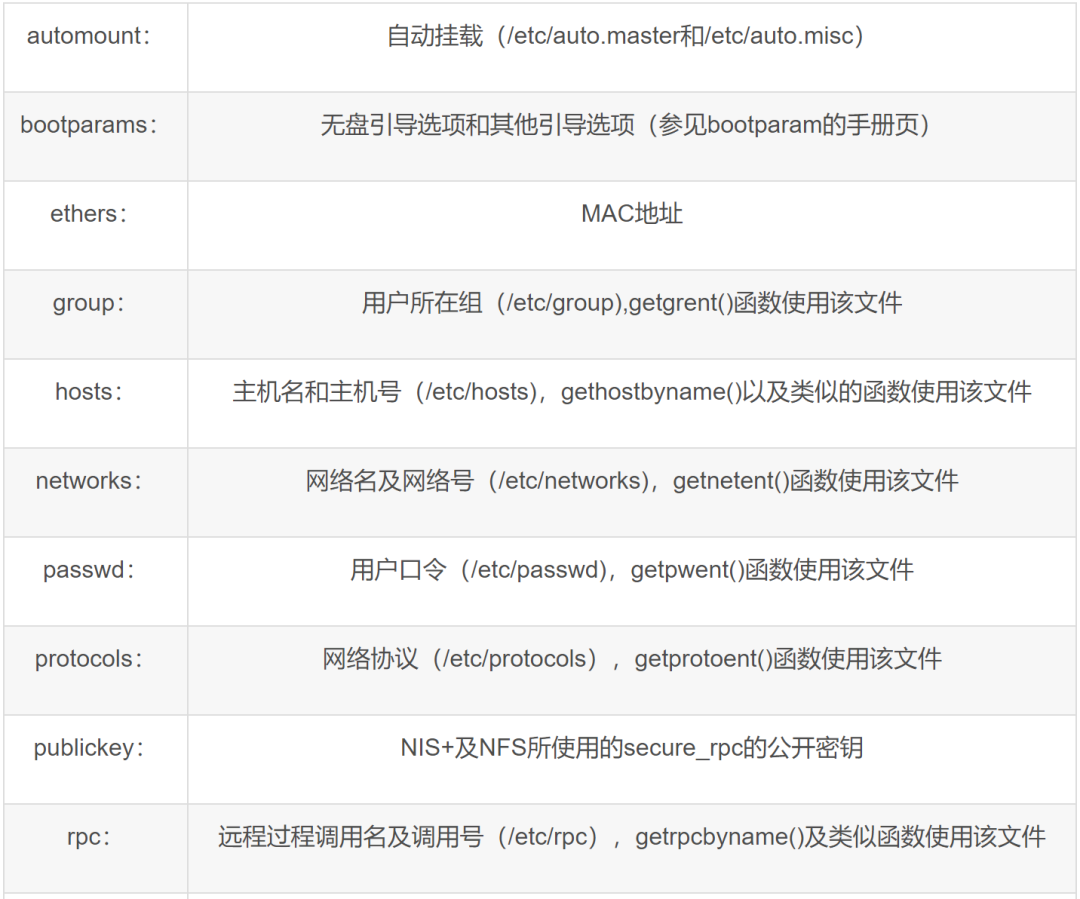
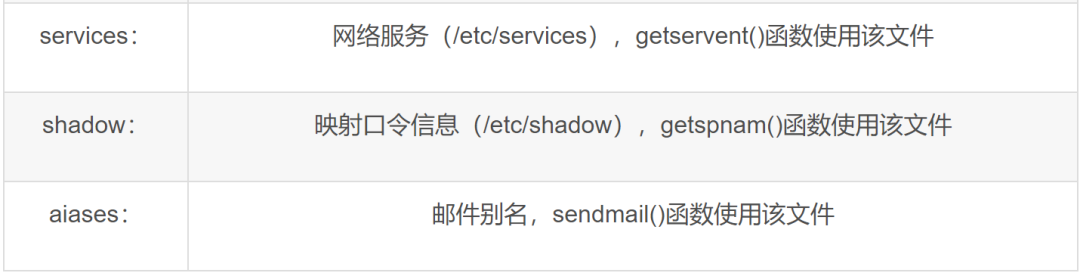
下图则列出了nsswich.conf文件控制搜索信息类型的方法,对于每一种信息类型,都可以指定下面的一种或多种方法,
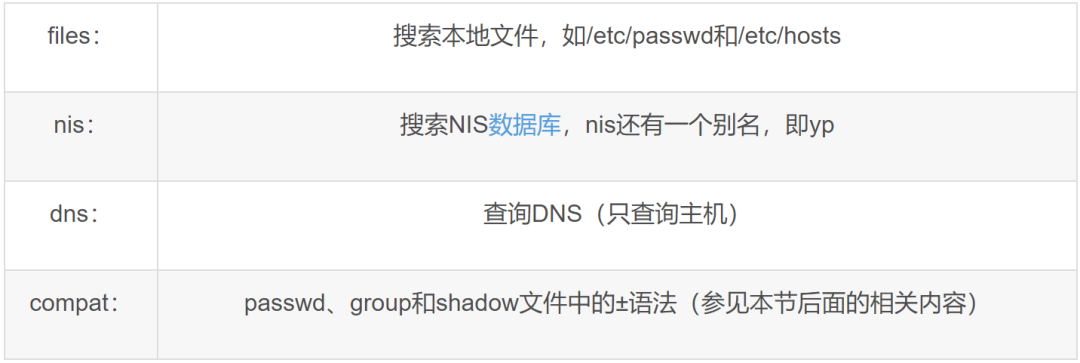
每行的搜索顺序是从左至右。两个或者更多方法所提供的信息可能会重叠。举例来说,files和nis可能都提供同一个用户的口令信息。如果出现信息重叠现象,就需要考虑将哪一种方法作为权威方法(优先考虑),并将该方法放在方法列表中靠左的位置上。默认nsswitch.conf文件列出的方法并没有动作项,并假设没有信息重叠(正常情况)。在这种情况下,搜索顺序无关紧要:当一种方法失败之后,系统就会尝试下一种方法,只是时间上受到一点损失。如果在方法之间设置了动作,或者重叠的项的内容不同,那么搜索顺序就变得重要起来。
例如,host nis files dns
(1) 使用NIS搜索。
(2) 如果失败的话,就搜索/etc/hosts文件。
(3) 如果再次失败的话,核对DNS以找出主机信息。
主机名相关项,
(1) hosts dns,表示只使用/etc/resolv.conf查询,不使用/etc/hosts。
(2) hosts files,表示只使用/etc/hosts查询。
我们再回顾下出问题的场景:
配置了/etc/resolv.conf,但是未配置/etc/hosts。
本机配置是,
...hosts: files dns myhostname...
按照hosts他先找的是files,即/etc/hosts,因为没配置,所以是空的,
[root@bisal ~]# cat etc/hosts127.0.0.1 localhost localhost.localdomain localhost4 localhost4.localdomain4::1 localhost localhost.localdomain localhost6 localhost6.localdomain6
接下来,他会找dns,即/etc/resolv.conf,
[root@bisal ~]# vi etc/resolv.conf# Generated by NetworkManagersearch localdomainnameserver 192.168.15.2~
myhostname,"localhost"与"localhost.localdomain"以及所有以".localhost"或".localhost.localdomain"结尾的主机名,都会被解析为127.0.0.1与 ::1,但是有个谜团,一直未解,结合如上的介绍,应该先读取/etc/hosts,然后才是/etc/resolv.conf,但实际从strace日志看,顺序恰恰相反,先读的是/etc/resolv.conf,然后读的/etc/hosts,难道是什么地方理解的有偏差了?还请高手指教,
928行,open("/etc/resolv.conf", O_RDONLY|O_CLOEXEC) = 9 <0.000032>...941行,open("/etc/hosts", O_RDONLY|O_CLOEXEC) = 9 <0.000032>1029行,open("/etc/hosts", O_RDONLY|O_CLOEXEC) = 9 <0.000013>
一位高人朋友,对登陆延迟的strace路径做了标注,不太理解的可能就是为什么一次批量发送两条DNS查询报文,单步出现超时,重试一次才成功,
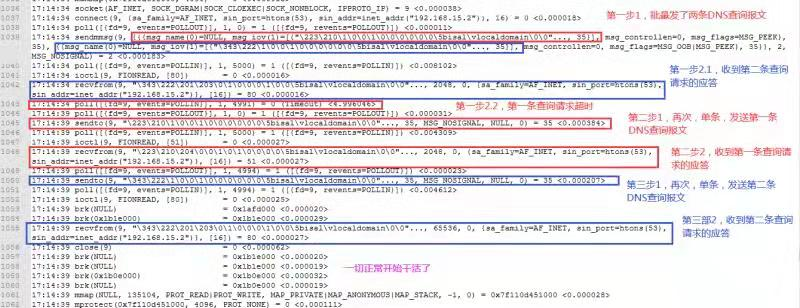
出问题的路径,
配置了/etc/resolv.conf,但是未配置/etc/hosts
因为顺序是files dns,files中没找到,dns找到了,但是调用超时,然后找到myhostname。
执行正确的两种路径,
1. 注释nameserver,不配置/etc/hosts
因为顺序是files dns,因此相当于都找不到,直接进入myhostname。
2. 配置/etc/resolv.conf,并且配置/etc/hosts增加本机IP地址映射关系
因为顺序是files dns,相当于在files,就找到了,没经过dns。
虽然这个问题还是存在一些疑问和困惑,但是排查的过程,确实接触到了很多对我来说新的知识,不懂的很多,一点一滴积累了。
参考,
https://blog.csdn.net/lcr_happy/article/details/59109163
http://www.jinbuguo.com/systemd/nss-myhostname.html
近期更新的文章:
《VMWare 11安装RedHat Linux 7过程中碰到的坑》
文章分类和索引:
