



鸿蒙的远程交互组件应用相对复杂,访问网络时,首先要配置网络权限,华为官方文档有问题,在此引用我老师配置的模板,见附件。


过程:
导入鸿蒙的网络请求模块 fetch。
发起对服务器的请求。(在这过程中需要用 JSON.parse 将括号中的数据转换成 json 数据格式,具体见代码中标注)
01
js 业务逻辑层
//导入鸿蒙的网络请求模块fetchimport fetch from '@system.fetch';export default { data: { title: 'World', currentTime:'', temperature1:'', text:'', }, onInit() { //发起对心知天气服务器的请求 fetch.fetch({ url:'https://api.seniverse.com/v3/weather/now.json?key=S0YbU_VLcvXz-4LZx&location=成都&language=zh-Hans&unit=c', responseType:'json', success:(resp)=>{ //JSON.parse(字符串)转换成json数据格式 let weatherInfo=JSON.parse(resp.data); this.currentTime=weatherInfo.results[0].last_update; this.text=weatherInfo.results[0].now.text; this.temperature1=weatherInfo.results[0].now.temperature; } }); }}
02
渲染层
<div class="container"> <text class="time"> {{currentTime}}{{temperature1}} </text> <text class="time"> {{temperature1}} </text> <text class="time"> {{text}} </text></div>
03
css 样式属性设置
.container { display: flex; justify-content: center; align-items: center; left: 0px; top: 0px; width: 454px; height: 454px;}.time { font-size: 50px; text-align: center; width: 200px; height: 1200px;}
最终效果呈现:
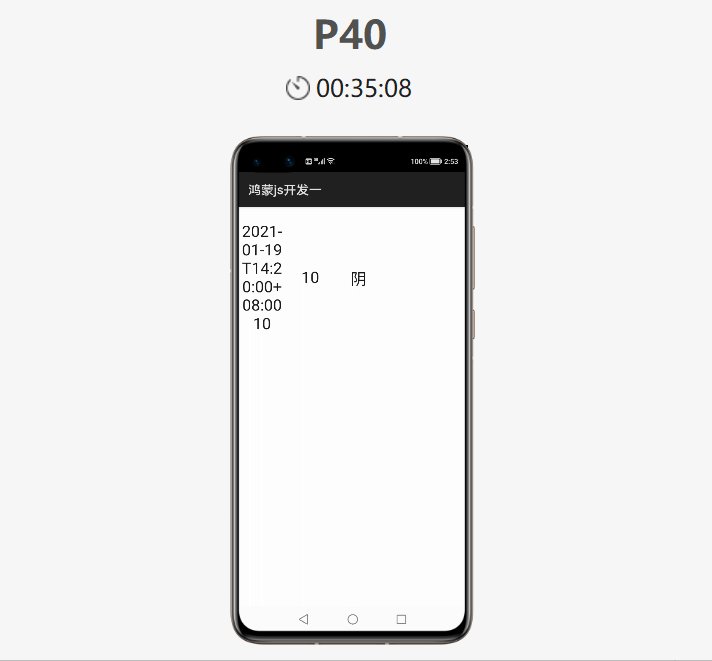
04
微信小程序的远程交互应用
// pages/images/weather/weather.jsPage({ /** * 页面的初始数据 */ data: { weatherInfo:{}, nextweatherInfo:{} }, /** * 生命周期函数--监听页面加载 */ onLoad: function (options) { //微信小程序请求天气 wx.request({ url: 'https://api.seniverse.com/v3/weather/now.json?key=S0YbU_VLcvXz-4LZx&location=成都&language=zh-Hans&unit=c', success:(resp)=>{ let info=resp.data; console.log(info); this.setData({weatherInfo:info}) } }) //微信小程序请求生活指数 wx.request({ url: 'https://api.seniverse.com/v3/life/suggestion.json?key=S0YbU_VLcvXz-4LZx&location=成都&language=zh-Hans', success:(resp )=>{ let live=resp.data console.log(live) } }) //微信请求未来三天气预报 wx.request({ url: 'https://api.seniverse.com/v3/weather/daily.json?key=S0YbU_VLcvXz-4LZx&location=成都&language=zh-Hans&unit=c&start=-1&days=5', success:(resp)=>{ let time=resp.data; console.log(time) this.setData({nextweatherInfo:time.results[0].daily}) } }) }, /** * 生命周期函数--监听页面初次渲染完成 */ onReady: function () { }, /** * 生命周期函数--监听页面显示 */ onShow: function () { }, /** * 生命周期函数--监听页面隐藏 */ onHide: function () { }, /** * 生命周期函数--监听页面卸载 */ onUnload: function () { }, /** * 页面相关事件处理函数--监听用户下拉动作 */ onPullDownRefresh: function () { }, /** * 页面上拉触底事件的处理函数 */ onReachBottom: function () { }, /** * 用户点击右上角分享 */ onShareAppMessage: function () { }})
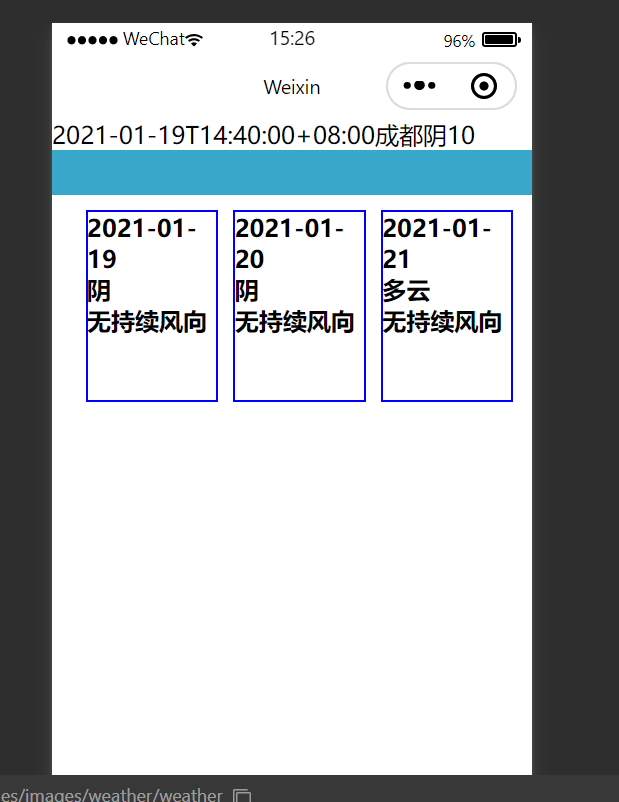
<!--pages/images/weather/weather.wxml--><text>{{weatherInfo.results[0].last_update}}{{weatherInfo.results[0].location.name}}{{weatherInfo.results[0].now.text}}{{weatherInfo.results[0].now.temperature}}</text><view class="margin"></view><view class="top"> <block wx:for="{{nextweatherInfo}}"> <view class="three"> <view> <text class="txt1">{{item.date}}</text> </view> <view> <text class="txt1">{{item.text_day}}</text> </view> <view > <text class="txt1">{{item.wind_direction}}</text> </view> </view> </block></view>
wxss 样式属性设置:
/* pages/images/weather/weather.wxss */.margin{ width: 100%; height: 30px; background-color: rgb(56, 168, 202);}.top{ width: 100%; height: 50vh; display: flex; flex-direction: row; justify-content: center; margin: 5px;}.three{ width: 27%; height: 50%; border: 1px solid blue; margin: 5px;}.txt1{ font-weight: bold; font: size 15px;}

专注开源技术,共建鸿蒙生态

点“阅读原文”了解更多
最后修改时间:2021-01-21 08:35:24
文章转载自51CTO技术栈,如果涉嫌侵权,请发送邮件至:contact@modb.pro进行举报,并提供相关证据,一经查实,墨天轮将立刻删除相关内容。
