



今天接到一个需求,需要清理服务器过期的目录,决定用Go开发脚本进行定期清理,但是每次升级代码都要重新打包成二进制文件放到服务器运行,刚好这段时间一直在研究Drone,所以想利用Drone来完成编译二进制文件,不用在本地编译,下面跟大家分享这个过程。


下面我贴出Go项目代码,文件名为main.go
package main//清理15天前目录/**引入扩展*/import ("time""os""io/ioutil")/**全局变量*/type Config struct {FileUrl string //清理目录地址}//空配置文件var configData Config //配置/**初始化函数*/func init() {configData.FileUrl = "/home/Records/"}/**脚本主函数*/func main() {//获取当前年份toDayYear := time.Now().Format("2006")//获取去年年份lastYear := time.Now().AddDate(-1, 0, 0).Format("2006")//获取最近15天日期startTime := time.Now().AddDate(0, 0, -15).Format("2006-01-02")endTime := time.Now().Format("2006-01-02")//获取最近15天所有日期【不删除数据】dateTimeList := getBetweenDates(startTime, endTime)//清理去年目录deleteFile(lastYear, dateTimeList)//清理今年的目录deleteFile(toDayYear, dateTimeList)//获取当前时间dateTime := time.Now().Format("2006-01-02 15:04:05")//输出println(dateTime + ":完成一次目录清理")}/**删除目录*/func deleteFile(yearValue string, dateTimeList []string) int {//获取当前月份toDayMonth := time.Now().Format("01")//获取当前年份toDayYear := time.Now().Format("2006")//打开年份目录fileUrl := configData.FileUrl + "/" + yearValuefileExitStatus := fileExitStatus(fileUrl)//判断是否存在目录,不存在不操作if fileExitStatus == 0 {return 0}//循环年份目录下所有目录files, _ := ioutil.ReadDir(fileUrl)//循环目录for _, f := range files {//文件路径【主目录/年份/月份】filePath := fileUrl + "/" + f.Name()//再循环一层【获取月份目录下日目录】filesMonth, _ := ioutil.ReadDir(filePath)for _, monthKey := range filesMonth {//组合文件key【年-月-日】fileKey := yearValue + "-" + f.Name() + "-" + monthKey.Name()//文件路径【主目录/年份/月份/日】filePathUrl := filePath + "/" + monthKey.Name()//判断该文件是否是否安全【不在最近15天日期】fileWhiteStatus := fileKeyStatus(fileKey, dateTimeList)//判断是否需要删除if fileWhiteStatus == 0 {os.RemoveAll(filePathUrl)}}//判断月份目录是否为空目录且月份不能大于当月【直接删除空目录】monthDir, _ := ioutil.ReadDir(filePath)if len(monthDir) == 0 && toDayMonth > f.Name() {os.RemoveAll(filePath)}}//判断年份目录是否为空目录yearDir, _ := ioutil.ReadDir(fileUrl)if len(yearDir) == 0 && toDayYear > yearValue {os.RemoveAll(fileUrl)}//返回return 1}/**获取最近15天日期*/func getBetweenDates(startDate, endDate string) []string {d := []string{}timeFormatTpl := "2006-01-02 15:04:05"if len(timeFormatTpl) != len(startDate) {timeFormatTpl = timeFormatTpl[0:len(startDate)]}date, err := time.Parse(timeFormatTpl, startDate)if err != nil {// 时间解析,异常return d}date2, err := time.Parse(timeFormatTpl, endDate)if err != nil {// 时间解析,异常return d}if date2.Before(date) {// 如果结束时间小于开始时间,异常return d}// 输出日期格式固定timeFormatTpl = "2006-01-02"date2Str := date2.Format(timeFormatTpl)d = append(d, date.Format(timeFormatTpl))for {date = date.AddDate(0, 0, 1)dateStr := date.Format(timeFormatTpl)d = append(d, dateStr)if dateStr == date2Str {break}}return d}/**判断目录是否存在*/func fileExitStatus(file string) int {_, err := os.Stat(file)if err == nil {return 1}if os.IsNotExist(err) {return 0}return 1}/**判断文件路径是否安全*/func fileKeyStatus(file string, fileList []string) int {//初始化状态status := 0//循环获取for _, value := range fileList {if value == file {status = 1}}//获取当前日期date := time.Now().Format("2006-01-02")//设置时区Loc, _ := time.LoadLocation("Asia/Shanghai")//日期转时间戳fileTime, _ := time.ParseInLocation("2006-01-02", file, Loc)limitTime, _ := time.ParseInLocation("2006-01-02", date, Loc)//判断文件日期是否大于最大截至日期【防止删错今天之后的目录】if fileTime.Unix() >= limitTime.Unix() {status = 1}//返回return status}

我们到Gitea管理后台获取API密钥,用于下一步将编译后的二进制文件上传到gitea仓库,操作如下
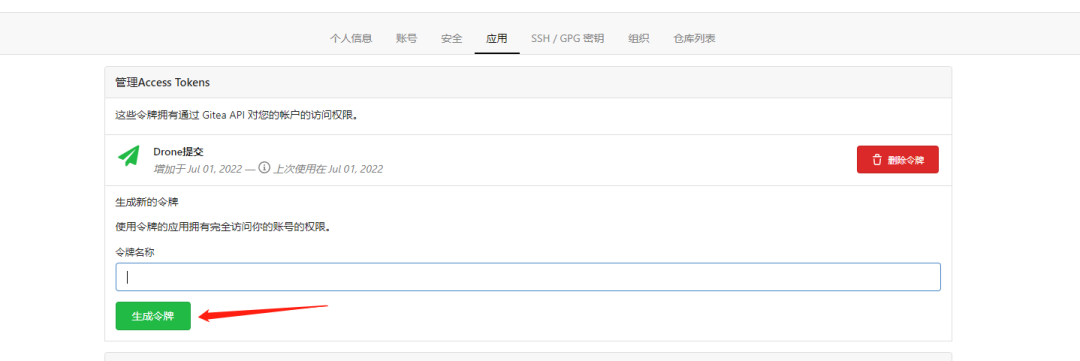
Drone提交那个是我刚刚生成的,大家记得保存好。

我们在项目目录下创建Drone构建文件.drone.yml,配置如下
kind: pipelinetype: dockername: clear-call-log#设置挂载volumes:#Docker环境- name: dockerhost:path: /var/run/docker.sock#Docker配置- name: docker-daemonhost:path: /etc/docker/daemon.json#构建步骤steps:#设置缓存- name: cleanimage: docker:19.03.1pull: if-not-existsnetwork_mode: host# 将宿主机的 docker和配置挂载到运行的 docker 容器中,那么在容器中运行 docker 命令时,等同于在宿主机中运行该docker 命令volumes:- name: dockerpath: /var/run/docker.sock- name: imagespath: /images- name: docker-daemonpath: /etc/docker/daemon.json#编译二进制文件- name: buildimage: golang:latestpull: if-not-existsenvironment:GOPROXY: "https://goproxy.cn,direct" # 懂的都懂commands:- CGO_ENABLED=0 go build -o clear-call-log#推送代码到仓库- name: pushimage: plugins/gitea-releasesettings:api_key: 【gitea密钥】base_url: 【gitea地址】files: clear-call-logwhen:event: tag#通知发到telegram- name: telegramimage: hongzhuangxian/telegram-drone-pluginpull: if-not-existssettings:token:from_secret: telegram_tokenchat_id:from_secret: telegram_chat_idwhen:event: tag#规定master分支branches: master
大家根据自己的情况,将gitea密钥替换成自己的、gitea地址替换成自己的gitea地址(地址不是仓库地址),通知那一步,大家根据自己的情况修改,我是通知到电报。

我们先提交一遍代码到仓库
git add .git commit -m '提交'git push origin master
确保代码最新后,执行编译
git tag v1.0.0git push origin v1.0.0
这样就会交给Drone去帮我们编译成二进制文件。

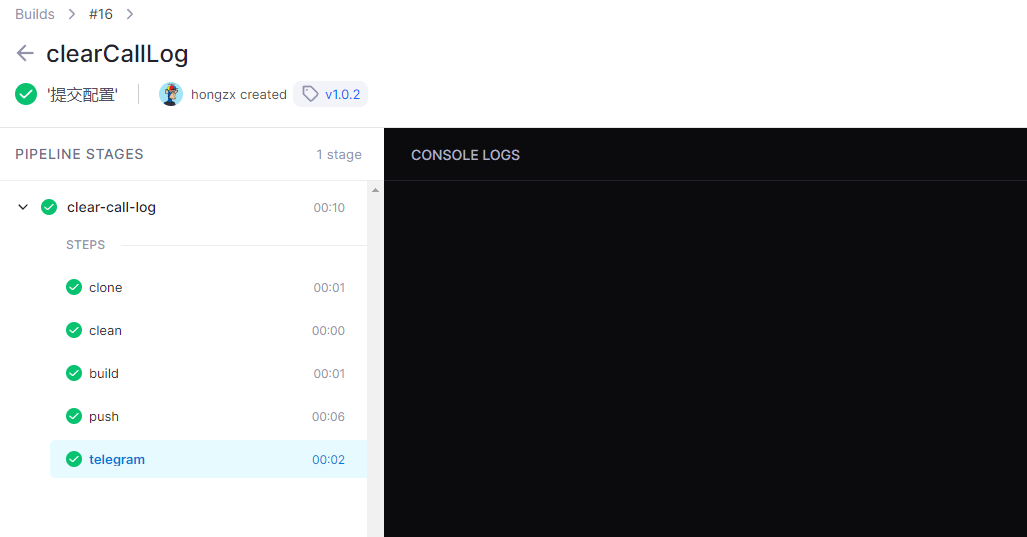
这是Drone打包二进制过程
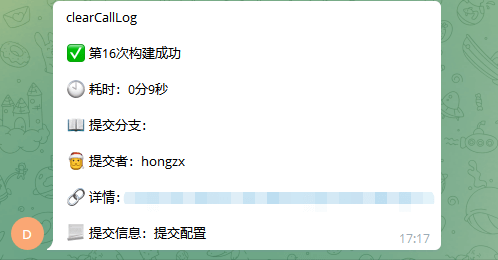
这是通知效果图
我们到Gitea仓库看看我们版本
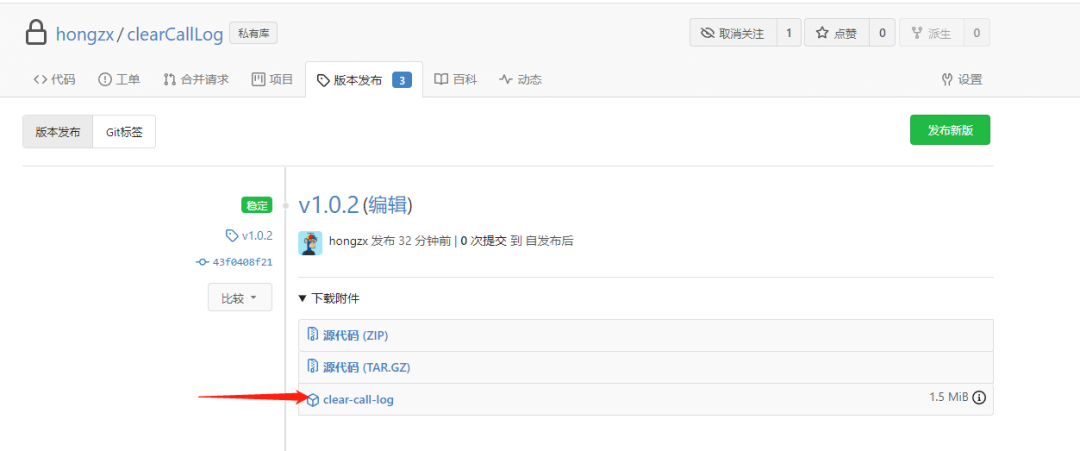
然后我们直接下载二进制文件丢到服务器运行就可以了,不用自己本地打包编译。

文章转载自程序员技术笔记,如果涉嫌侵权,请发送邮件至:contact@modb.pro进行举报,并提供相关证据,一经查实,墨天轮将立刻删除相关内容。
