



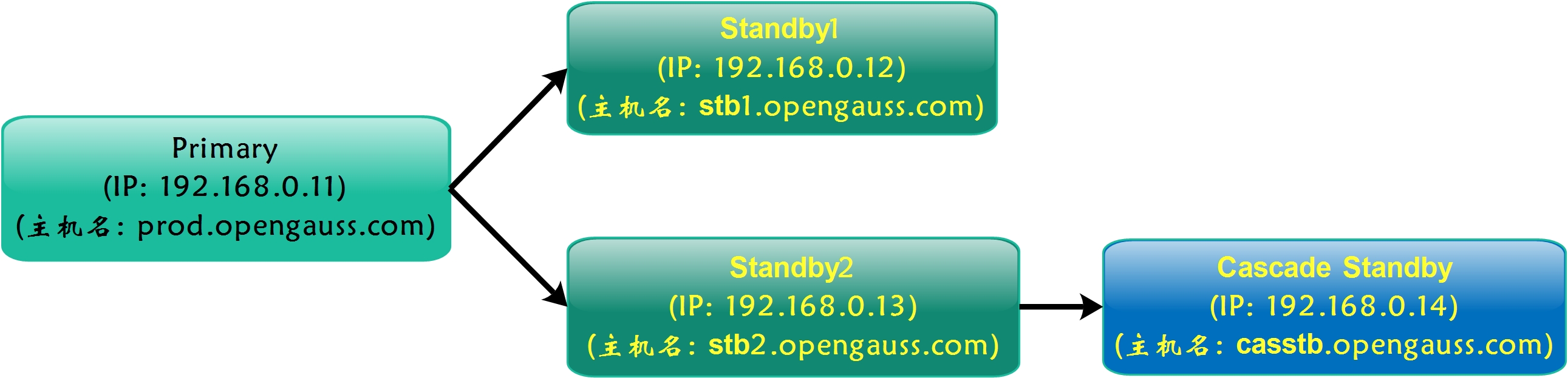
在上一篇文章《openGauss 1.1.0主备部署(1主+2备+1级联备)》中,我们已经搭建了常见于生产环境的数据库架构(1主2备1级联备),如下图所示:
本文将基于已搭建的主备环境进行集群节点的删除和添加操作,希望相关操作内容对大家有所帮助。
一、gs_dropnode删除集群备节点
拟删除192.168.0.12节点,该节点 目前负责将WAL日志传送给级联备192.168.0.14.
1. 前提条件
- 删除备节点的操作只能在主节点上执行;
- 执行删除操作前,需要确保主节点和备节点之间建立好omm用户(数据库管理用户)的互信;
- 需要使用数据库管理用户(比如omm)执行该命令;
- 如果数据库是分离环境,则需要先source导入分离的环境变量。
2. 注意事项
- 从主备数据库实例中移除当前仍可连通的备机时,会自动停止目标备机上正在运行的数据库服务,但是不会删除备机上的应用;
- 如果删除后数据库中只剩下一个主机时,会提示建议重启当前主机,此时建议用户根据当前业务运行环境重启主机;
- 如果目标备机在执行操作前处于不可连通的状态,需要用户在目标备机恢复后手动停止或删除目标备机的数据库服务;
- 仅支持使用om方式安装的主备数据库实例中移除备机,不支持使用编译方式安装组建的主备数据库实例;
- 当移除的备机处于同步复制模式时,如果执行删除命令的同时主机上存在事务操作,事务提交时会出现短暂卡顿,删除完成后事务处理可继续进行;
- 当目标备机被移除后,如果不再需要目标备机,请在目标备机上使用gs_uninstall --delete-data -L命令单点卸载openGauss,请注意务必添加-L选项;
- 当目标备机被移除后,如果暂时不确定是否需要目标备机,请删除目标备机的远程ssh文件,避免在目标备机上的误操作。
3. 操作示例
3.1 查询当前级联备日志接收状态
## 级联备节点操作192.168.0.14
postgres=# select * from pg_stat_get_wal_receiver();
-[ RECORD 1 ]--------------+----------------------------------------
receiver_pid               | 2090
local_role                 | Cascade Standby
peer_role                  | Standby
peer_state                 | Normal
state                      | Normal
sender_sent_location       | 0/70066C0
sender_write_location      | 0/70066C0
sender_flush_location      | 0/70066C0
sender_replay_location     | 0/70065A8
receiver_received_location | 0/70066C0
receiver_write_location    | 0/70066C0
receiver_flush_location    | 0/70066C0
receiver_replay_location   | 0/70066C0
sync_percent               | 100%
channel                    | 192.168.0.14:57492<--192.168.0.12:26001
3.2 移除备节点192.168.0.12【如果备节点故障,则需要等待连接超时才反馈操作提示,这个缺陷待优化】
## 在主节点操作192.168.0.11
[omm@prod ~]$ gs_dropnode -U omm -G dbgrp -h 192.168.0.12
The target node to be dropped is (['stb1.opengauss.com'])
Do you want to continue to drop the target node (yes/no)? yes
[gs_dropnode]Start to drop nodes of the cluster.
[gs_dropnode]Start to stop the target node stb1.opengauss.com.
[gs_dropnode]End of stop the target node stb1.opengauss.com.
[gs_dropnode]Start to backup parameter config file on prod.opengauss.com.
[gs_dropnode]End to backup parameter config file on prod.opengauss.com.
[gs_dropnode]The backup file of prod.opengauss.com is /tmp/gs_dropnode_backup20210122104627/parameter_prod.opengauss.com.tar
[gs_dropnode]Start to parse parameter config file on prod.opengauss.com.
[gs_dropnode]End to parse parameter config file on prod.opengauss.com.
[gs_dropnode]Start to parse backup parameter config file on prod.opengauss.com.
[gs_dropnode]End to parse backup parameter config file prod.opengauss.com.
[gs_dropnode]Start to set postgresql config file on prod.opengauss.com.
[gs_dropnode]End of set postgresql config file on prod.opengauss.com.
[gs_dropnode]Start to get repl slot on primary node.
[gs_dropnode]Start to set repl slot on primary node.
[gs_dropnode]End of set repl slot on primary node.
[gs_dropnode]Start to backup parameter config file on stb2.opengauss.com.
[gs_dropnode]End to backup parameter config file on stb2.opengauss.com.
[gs_dropnode]The backup file of stb2.opengauss.com is /tmp/gs_dropnode_backup20210122104629/parameter_stb2.opengauss.com.tar
[gs_dropnode]Start to parse parameter config file on stb2.opengauss.com.
[gs_dropnode]End to parse parameter config file on stb2.opengauss.com.
[gs_dropnode]Start to parse backup parameter config file on stb2.opengauss.com.
[gs_dropnode]End to parse backup parameter config file stb2.opengauss.com.
[gs_dropnode]Start to set postgresql config file on stb2.opengauss.com.
[gs_dropnode]End of set postgresql config file on stb2.opengauss.com.
[gs_dropnode]Start to get repl slot on primary node.
[gs_dropnode]Start to set repl slot on primary node.
[gs_dropnode]End of set repl slot on primary node.
[gs_dropnode]Start to backup parameter config file on casstb.opengauss.com.
[gs_dropnode]End to backup parameter config file on casstb.opengauss.com.
[gs_dropnode]The backup file of casstb.opengauss.com is /tmp/gs_dropnode_backup20210122104632/parameter_casstb.opengauss.com.tar
[gs_dropnode]Start to parse parameter config file on casstb.opengauss.com.
[gs_dropnode]End to parse parameter config file on casstb.opengauss.com.
[gs_dropnode]Start to parse backup parameter config file on casstb.opengauss.com.
[gs_dropnode]End to parse backup parameter config file casstb.opengauss.com.
[gs_dropnode]Start to set postgresql config file on casstb.opengauss.com.
[gs_dropnode]End of set postgresql config file on casstb.opengauss.com.
[gs_dropnode]Start to get repl slot on primary node.
[gs_dropnode]Start to set repl slot on primary node.
[gs_dropnode]End of set repl slot on primary node.
[gs_dropnode]Start of set pg_hba config file on prod.opengauss.com.
[gs_dropnode]End of set pg_hba config file on prod.opengauss.com.
[gs_dropnode]Start of set pg_hba config file on stb2.opengauss.com.
[gs_dropnode]End of set pg_hba config file on stb2.opengauss.com.
[gs_dropnode]Start of set pg_hba config file on casstb.opengauss.com.
[gs_dropnode]End of set pg_hba config file on casstb.opengauss.com.
[gs_dropnode]Start to modify the cluster static conf.
[gs_dropnode]End of modify the cluster static conf.
[gs_dropnode]Success to drop the target nodes.


## 如果备节点故障,则需要等待连接超时才反馈操作提示,如以下示例:3台节点故障做删除操作,等待约7分钟时间才反馈操作提示,这个缺陷待优化
[omm@prod ~]$ date
Mon Feb 22 16:32:13 CST 2021
[omm@prod ~]$ gs_dropnode -U omm -G dbgrp -h 192.168.0.12,192.168.0.13,192.168.0.14
 The target node to be dropped is (['stb1.opengauss.com', 'stb2.opengauss.com', 'casstb.opengauss.com'])
Do you want to continue to drop the target node (yes/no)? yes
Please type 'yes' or 'no': yes
The cluster will have only one standalone node left after the operation!
Do you want to continue to drop the target node (yes/no)? yes
[gs_dropnode]Start to drop nodes of the cluster.
[gs_dropnode]Start to backup parameter config file on prod.opengauss.com.
[gs_dropnode]End to backup parameter config file on prod.opengauss.com.
[gs_dropnode]The backup file of prod.opengauss.com is /tmp/gs_dropnode_backup20210222163937/parameter_prod.opengauss.com.tar
[gs_dropnode]Start to parse parameter config file on prod.opengauss.com.
[gs_dropnode]End to parse parameter config file on prod.opengauss.com.
[gs_dropnode]Start to parse backup parameter config file on prod.opengauss.com.
[gs_dropnode]End to parse backup parameter config file prod.opengauss.com.
[gs_dropnode]Start to set postgresql config file on prod.opengauss.com.
[gs_dropnode]End of set postgresql config file on prod.opengauss.com.
[gs_dropnode]Start to get repl slot on primary node.
[gs_dropnode]Start to set repl slot on primary node.
[gs_dropnode]End of set repl slot on primary node.
[gs_dropnode]Start of set pg_hba config file on prod.opengauss.com.
[gs_dropnode]End of set pg_hba config file on prod.opengauss.com.
[gs_dropnode]Start to modify the cluster static conf.
[gs_dropnode]End of modify the cluster static conf.
[gs_dropnode]Remove the dynamic conf.
Only one primary node is left.It is recommended to restart the node.     ## 由于仅剩一个Primary节点,建议重启该Primary节点实例
Do you want to restart the primary node now (yes/no)? yes
[gs_dropnode]Start to stop the target node prod.opengauss.com.
[gs_dropnode]End of stop the target node prod.opengauss.com.
[gs_dropnode]Start to start the target node.
[gs_dropnode]End of start the target node.
[gs_dropnode]Success to drop the target nodes.
[omm@prod ~]$
[omm@prod ~]$ date
Mon Feb 22 16:39:56 CST 2021
3.3 查询集群状态
[omm@prod ~]$ gs_om -t status --detail
[   Cluster State   ]

cluster_state   : Normal
redistributing  : No
current_az      : AZ_ALL

[  Datanode State   ]

node                    node_ip         instance                state         |
---------------------------------------------------------------------------------
1  prod.opengauss.com   192.168.0.11    6001 /gauss/data/db1 P Primary Normal |
3  stb2.opengauss.com   192.168.0.13    6003 /gauss/data/db1 S Standby Normal |
4  casstb.opengauss.com 192.168.0.14    6004 /gauss/data/db1 C Cascade Normal

## 查询级联备日志接收状态(级联备192.168.0.14上操作)    -- 自动切换同步源端
postgres=# select * from pg_stat_get_wal_receiver();
-[ RECORD 1 ]--------------+----------------------------------------
receiver_pid               | 3017
local_role                 | Cascade Standby
peer_role                  | Standby
peer_state                 | Normal
state                      | Normal
sender_sent_location       | 0/7006C38
sender_write_location      | 0/7006C38
sender_flush_location      | 0/7006C38
sender_replay_location     | 0/7006B20
receiver_received_location | 0/7006C38
receiver_write_location    | 0/7006C38
receiver_flush_location    | 0/7006C38
receiver_replay_location   | 0/7006C38
sync_percent               | 100%
channel                    | 192.168.0.14:35508<--192.168.0.13:26001
3.4 在已删除节点操作:关闭与原集群的SSH链接,避免后续误操作
## 删除SSH互信,并ssh连接测试
[root@stb1 ~]# mv /root/.ssh   /root/.ssh_bak
[root@stb1 ~]# mv /home/omm/.ssh   /home/omm/.ssh_bak
3.5 清理删除后的备机系统环境数据(必须添加 -L 参数)
[root@stb1 ~]# su - omm
[omm@stb1 ~]$ gs_uninstall --delete-data -L
Checking uninstallation.
Successfully checked uninstallation.
Stopping the cluster.
Successfully stopped cluster.
Successfully deleted instances.
Uninstalling application.
Successfully uninstalled application.
Uninstallation succeeded.
3.6 清理删除后的备机系统环境软件及目录(必须添加 -L 参数)
[root@stb1 ~]# cd /soft/openGauss/script/
[root@stb1 script]# scp 192.168.0.11:/soft/openGauss/script/*  .              ## 拷贝脚本至将清理的备机
[root@stb1 script]# scp 192.168.0.11:/soft/openGauss/cluster_config.xml  .    ## 拷贝集群配置文件至将清理的备机
[root@stb1 script]# ./gs_postuninstall -U omm -X /soft/openGauss/cluster_config.xml --delete-user --delete-group -L
Parsing the configuration file.
Successfully parsed the configuration file.
Check log file path.
Successfully checked log file path.
Checking unpreinstallation.
Successfully checked unpreinstallation.
Deleting the instance's directory.
Successfully deleted the instance's directory.
Deleting the temporary directory.
Successfully deleted the temporary directory.
Deleting software packages and environmental variables of the local node.
Successfully deleted software packages and environmental variables of the local nodes.
Deleting local OS user.
Successfully deleted local OS user.
Deleting local node's logs.
Successfully deleted local node's logs.
Successfully cleaned environment.
3.7 删除残留软件目录
[root@stb1 ~]# ll /gauss/
total 20
drwx------ 2 1000 1000 4096 Jan 22 11:19 app_392c0438
drwxr-x--- 2 1000 1000 4096 Jan  6 16:08 corefile
drwx------ 3 1000 1000 4096 Jan  6 16:08 data
drwxr-x--- 2 1000 1000 4096 Jan 22 11:24 log
drwx------ 2 1000 1000 4096 Jan 22 11:24 om

[root@stb1 ~]# rm -fr /gauss/*
二、gs_expansion增加集群备节点
openGauss提供了gs_expansion工具对数据库的备机进行扩容。
经过此次测试,个人认为当前版本的gs_expansion工具还不够成熟,很多必要的数据库参数并没有完成自动化配置和检查,后端开发反馈该工具有关级联备的兼容还在做进一步的开发调试,大家在测试过程中遇到问题时可以参考相关报错日志进行手动修复,也可以在开源社区提issue,当然也可以暂时忽略错误,期待下一个更完善的版本发布。
本文记录的扩容操作经过个人的实验环境测试,作为参考资料,希望对小伙伴们有所帮助。
1. 前提条件
- 数据库主机上存在openGauss镜像包,解压镜像包后,在script/目录下执行./gs_expansion命令进行扩容;
- 在新增的扩容备机上创建好与主机上相同的用户和用户组;
- 已存在的数据库节点和新增的扩容节点之间需要建立好root用户互信以及omm用户(数据库管理用户)的互信;
- 配置xml文件,在已安装数据库配置文件的基础上,添加需要扩容的备机信息;
- 只能使用root用户执行gs_expansion命令;
- 如果当前数据库是分离环境变量方式安装,则执行扩容命令前需要source导入主机数据库的分离环境变量。
2. 注意事项
- 从单机扩容到主备模式时,需要将单机数据库以Primary的方式启动,因此会对数据库进程进行重启操作。单机扩容时请规划好运行中的业务;
- 扩容后不会自动更新synchronous_standby_names参数。如果需要为该参数增加扩容的机器,请在扩容完成后手动更新;
- 主备机器安装的数据库需要使用相同的用户和用户组,分离环境变量路径也需要保持一样;
- 主备机器安装时候xml配置里面的gaussdbAppPath、gaussdbLogPath、gaussdbToolPath、corePath地址需要保持一致;
- 扩容备机上的数据必须使用om方式安装,使用编译方式启动的数据库不支持与主机扩容。
3. 操作示例
3.1 新备机操作:配置用户、用户组、Hosts文件(与Primary节点相同)
## 创建用户及用户组
[root@stb1 ~]# groupadd dbgrp
[root@stb1 ~]# useradd -g dbgrp omm
[root@stb1 ~]# echo "gauss@123"|passwd --stdin omm

## 创建必要的目录并授权(否则会提示权限不足)
[root@stb1 ~]# mkdir -p /gauss/log/omm
[root@stb1 ~]# chown -R omm:dbgrp /gauss

## 参考主机的hosts文件,配置新增备机的hosts文件
[root@standby1 ~]# ssh root@192.168.0.11 "cat /etc/hosts|grep opengauss.com"  >> /etc/hosts
Tips: 操作系统环境的初始化配置请参考官方文档,这里的操作系统环境已经配置完毕,不再复述。
3.2 Primary节点操作:建立新节点与所有数据节点的SSH互信
[root@prod ~]# cd /soft/openGauss/script/
[root@prod script]# vi hostfile     ## 添加整个集群的IP地址(包括新节点)
-----------------------
192.168.0.11
192.168.0.12
192.168.0.13
192.168.0.14
-----------------------
[root@prod script]# ./gs_sshexkey -f hostfile    ## 创建root用户互信
Please enter password for current user[root].
Password:
Checking network information.
All nodes in the network are Normal.
Successfully checked network information.
Creating SSH trust.
Creating the local key file.
Successfully created the local key files.
Appending local ID to authorized_keys.
Successfully appended local ID to authorized_keys.
Updating the known_hosts file.
Successfully updated the known_hosts file.
Appending authorized_key on the remote node.
Successfully appended authorized_key on all remote node.
Checking common authentication file content.
Successfully checked common authentication content.
Distributing SSH trust file to all node.
Successfully distributed SSH trust file to all node.
Verifying SSH trust on all hosts.
Successfully verified SSH trust on all hosts.
Successfully created SSH trust.

[root@prod ~]# su - omm                          ## 创建omm用户互信
Last login: Fri Jan 22 11:59:51 CST 2021 on pts/0
[omm@prod ~]$ cd /soft/openGauss/script/
[omm@prod script]$ ./gs_sshexkey -f hostfile
Please enter password for current user[omm].
Password:
Checking network information.
All nodes in the network are Normal.
Successfully checked network information.
Creating SSH trust.
Creating the local key file.
Successfully created the local key files.
Appending local ID to authorized_keys.
Successfully appended local ID to authorized_keys.
Updating the known_hosts file.
Successfully updated the known_hosts file.
Appending authorized_key on the remote node.
Successfully appended authorized_key on all remote node.
Checking common authentication file content.
Successfully checked common authentication content.
Distributing SSH trust file to all node.
Successfully distributed SSH trust file to all node.
Verifying SSH trust on all hosts.
Successfully verified SSH trust on all hosts.
Successfully created SSH trust.
3.3 Primary节点操作:修改XML配置文件,添加新节点信息
[omm@prod ~]$ cd /soft/openGauss/
[omm@prod openGauss]$ vi cluster_config.xml
--------------------------------------------------
## 新增:
        <DEVICE sn="stb1.opengauss.com">
            <!-- node2的hostname -->
            <PARAM name="name" value="stb1.opengauss.com"/>
            <!-- 节点所在的AZ及AZ优先级 -->
            <PARAM name="azName" value="AZ1"/>
            <PARAM name="azPriority" value="1"/>
            <!-- 若服务器仅有一个网卡,将backIP1和sshIP1配置成同一个IP -->
            <PARAM name="backIp1" value="192.168.0.12"/>
            <PARAM name="sshIp1" value="192.168.0.12"/>
        </DEVICE>
--------------------------------------------------
3.4 Primary节点操作:执行gs_expansion完成扩容操作
Tips: 内存太小(测试环境内存4GB) 会导致新节点实例无法启动,这个老问题依旧没有解决,即:内存太小会导致扩容失败
[GAUSS-51400] : Failed to execute the command: source /home/omm/.bashrc;python3 '/gauss/om/script/local/Install.py' -t start_cluster -U omm:dbgrp -X /tmp/gs_expansion_2021-01-22_15:23:29_362644/clusterconfig.xml -R /gauss/app -c dbCluster -l /gauss/log/omm/om/gs_local.log  --alarm=/opt/huawei/snas/bin/snas_cm_cmd  --time_out=300 .Error:
Using omm:dbgrp to install database.
Using installation program path : /gauss/app_392c0438
$GAUSSHOME points to /gauss/app_392c0438, no need to create symbolic link.
Traceback (most recent call last):
  File "/gauss/om/script/local/Install.py", line 680, in <module>
    functionDict[g_opts.action]()
  File "/gauss/om/script/local/Install.py", line 611, in startCluster
    dn.start(self.time_out)
  File "/gauss/om/script/local/../gspylib/component/Kernel/Kernel.py", line 96, in start
    "failure details." + "\n" + output)
Exception: [GAUSS-51607] : Failed to start instance. Error: Please check the gs_ctl log for failure details.
增加内存:4GB --> 8GB,再次执行扩容操作如下:
[root@prod ~]# cd /soft/openGauss/script/
[root@prod script]# ./gs_expansion -U omm -G dbgrp -X /soft/openGauss/cluster_config.xml -h 192.168.0.12
Start to preinstall database on the new standby nodes.
Successfully preinstall database on the new standby nodes.

Start to install database on the new standby nodes.

installing database on node 192.168.0.12:
Please enter the password of user [omm] on node [192.168.0.12]:  ## 输入初始用户omm的密码
Parsing the configuration file.
Check preinstall on every node.
Successfully checked preinstall on every node.
Creating the backup directory.
Successfully created the backup directory.
begin deploy..
Installing the cluster.
begin prepare Install Cluster..
Checking the installation environment on all nodes.
begin install Cluster..
Installing applications on all nodes.
Successfully installed APP.
begin init Instance..
encrypt cipher and rand files for database.
Please enter password for database:                            ## 输入数据库密码
Please repeat for database:
begin to create CA cert files
The sslcert will be generated in /gauss/app/share/sslcert/om
Cluster installation is completed.
Configuring.
Deleting instances from all nodes.
Successfully deleted instances from all nodes.
Checking node configuration on all nodes.
Initializing instances on all nodes.
Updating instance configuration on all nodes.
Check consistence of memCheck and coresCheck on database nodes.
Configuring pg_hba on all nodes.
Configuration is completed.
Successfully started cluster.
Successfully installed application.
end deploy..
Successfully install database on node ['192.168.0.12']
Database on standby nodes installed finished. Start to establish the primary-standby relationship.
Success to expansion standby nodes.
## 扩容操作成功完成
3.5 检查扩容后的集群状态
[omm@prod ~]$ gs_om -t status --detail
[   Cluster State   ]

cluster_state   : Degraded
redistributing  : No
current_az      : AZ_ALL

[  Datanode State   ]

node                    node_ip         instance                state         |
-------------------------------------------------------------------------------
1  prod.opengauss.com   192.168.0.11    6001 /gauss/data/db1 P Primary Normal |
2  stb1.opengauss.com   192.168.0.12    6002 /gauss/data/db1 S Down    Manually stopped |    ## 扩容节点成功,但未自启动
3  stb2.opengauss.com   192.168.0.13    6003 /gauss/data/db1 S Standby Normal |
4  casstb.opengauss.com 192.168.0.14    6004 /gauss/data/db1 C Cascade Normal
3.6 刷新动态配置文件,并启动新的备节点
## 刷新动态配置文件
[omm@prod ~]$ gs_om -t refreshconf
Generating dynamic configuration file for all nodes.
Successfully generated dynamic configuration file.

## 启动新的备节点
[omm@prod ~]$ gs_om -t start -h stb1.opengauss.com
Starting node.
=========================================
=========================================
Successfully started.

## 检查集群状态
[omm@prod ~]$ gs_om -t status --detail
[   Cluster State   ]

cluster_state   : Degraded
redistributing  : No
current_az      : AZ_ALL

[  Datanode State   ]

node                    node_ip         instance                state            |
----------------------------------------------------------------------------------
1  prod.opengauss.com   192.168.0.11    6001 /gauss/data/db1 P Primary Normal |
2  stb1.opengauss.com   192.168.0.12    6002 /gauss/data/db1 S Standby Need repair(Connecting) |    ## 新增的备节点需要重建
3  stb2.opengauss.com   192.168.0.13    6003 /gauss/data/db1 S Standby Normal |
4  casstb.opengauss.com 192.168.0.14    6004 /gauss/data/db1 C Cascade Normal
3.7 设置所有节点的synchronous_standby_names参数
-- 不需要修改初始用户的密码(否则,后面无法修改这个只读库的参数)
[omm@stb1 ~]$ gs_guc reload -N stb1.opengauss.com -I all -c "modify_initial_password=off"

-- 使用gsql进行参数修改(测试发现, 若使用gs_guc修改该参数会存在BUG: 设置仅部分生效)
alter system set synchronous_standby_names = 'ANY 1(dn_6002,dn_6003)';         --> Primary(在主节点配置)
alter system set synchronous_standby_names = 'ANY 1(dn_6001,dn_6003)';         --> stb1(在新增备节点配置)
alter system set synchronous_standby_names = 'ANY 1(dn_6001,dn_6002)';         --> stb2(在原有备节点配置)
alter system set synchronous_standby_names = 'ANY 1(dn_6001,dn_6002,dn_6003)'; --> casstb(在级联节点配置)
3.8 配置所有节点的pg_hba.conf条目
[omm@prod ~]$ gs_guc reload -N all -I all -h "host all all 192.168.0.11/32 trust"
[omm@prod ~]$ gs_guc reload -N all -I all -h "host all all 192.168.0.12/32 trust"
[omm@prod ~]$ gs_guc reload -N all -I all -h "host all all 192.168.0.13/32 trust"
[omm@prod ~]$ gs_guc reload -N all -I all -h "host all all 192.168.0.14/32 trust"
3.9 设置所有节点的复制参数
-- Primary示例:
alter system set replconninfo1 = 'localhost=192.168.0.11 localport=26001 localheartbeatport=26005 localservice=26004 remotehost=192.168.0.12 remoteport=26001 remoteheartbeatport=26005 remoteservice=26004';
alter system set replconninfo2 = 'localhost=192.168.0.11 localport=26001 localheartbeatport=26005 localservice=26004 remotehost=192.168.0.13 remoteport=26001 remoteheartbeatport=26005 remoteservice=26004';
alter system set replconninfo3 = 'localhost=192.168.0.11 localport=26001 localheartbeatport=26005 localservice=26004 remotehost=192.168.0.14 remoteport=26001 remoteheartbeatport=26005 remoteservice=26004';

-- Standby1示例:
alter system set replconninfo1 = 'localhost=192.168.0.12 localport=26001 localheartbeatport=26005 localservice=26004 remotehost=192.168.0.11 remoteport=26001 remoteheartbeatport=26005 remoteservice=26004';
alter system set replconninfo2 = 'localhost=192.168.0.12 localport=26001 localheartbeatport=26005 localservice=26004 remotehost=192.168.0.13 remoteport=26001 remoteheartbeatport=26005 remoteservice=26004';
alter system set replconninfo3 = 'localhost=192.168.0.12 localport=26001 localheartbeatport=26005 localservice=26004 remotehost=192.168.0.14 remoteport=26001 remoteheartbeatport=26005 remoteservice=26004';

-- Standby2示例:
alter system set replconninfo1 = 'localhost=192.168.0.13 localport=26001 localheartbeatport=26005 localservice=26004 remotehost=192.168.0.11 remoteport=26001 remoteheartbeatport=26005 remoteservice=26004';
alter system set replconninfo2 = 'localhost=192.168.0.13 localport=26001 localheartbeatport=26005 localservice=26004 remotehost=192.168.0.12 remoteport=26001 remoteheartbeatport=26005 remoteservice=26004';
alter system set replconninfo3 = 'localhost=192.168.0.13 localport=26001 localheartbeatport=26005 localservice=26004 remotehost=192.168.0.14 remoteport=26001 remoteheartbeatport=26005 remoteservice=26004';

-- Case Standby示例:
alter system set replconninfo1 = 'localhost=192.168.0.14 localport=26001 localheartbeatport=26005 localservice=26004 remotehost=192.168.0.11 remoteport=26001 remoteheartbeatport=26005 remoteservice=26004';
alter system set replconninfo2 = 'localhost=192.168.0.14 localport=26001 localheartbeatport=26005 localservice=26004 remotehost=192.168.0.12 remoteport=26001 remoteheartbeatport=26005 remoteservice=26004';
alter system set replconninfo3 = 'localhost=192.168.0.14 localport=26001 localheartbeatport=26005 localservice=26004 remotehost=192.168.0.13 remoteport=26001 remoteheartbeatport=26005 remoteservice=26004';
3.10 重建备节点
## 重建新增备机数据库
[omm@stb1 ~]$ gs_ctl build -D /gauss/data/db1
3.11 重启新增备机,检查集群状态
[omm@prod ~]$ gs_om -t start -h stb1.opengauss.com
[omm@prod db1]$ gs_om -t status --detail
[   Cluster State   ]

cluster_state   : Normal
redistributing  : No
current_az      : AZ_ALL

[  Datanode State   ]

node                    node_ip         instance                state            |
----------------------------------------------------------------------------------
1  prod.opengauss.com   192.168.0.11    6001 /gauss/data/db1 P Primary Normal |
2  stb1.opengauss.com   192.168.0.12    6002 /gauss/data/db1 S Standby Normal |
3  stb2.opengauss.com   192.168.0.13    6003 /gauss/data/db1 S Standby Normal |
4  casstb.opengauss.com 192.168.0.14    6004 /gauss/data/db1 C Cascade Normal
由于云实验环境主机已被回收,遗留以下问题还未来得及解决,如有大佬也碰到类似问题且已解决,欢迎在文章末尾评论处分享:
- 删除原备节点(192.168.0.13)后,级联备无法从新的备节点同步数据,提示备节点和级联备节点不在同一个AZ内,但实际检查确实在同一个AZ1内;
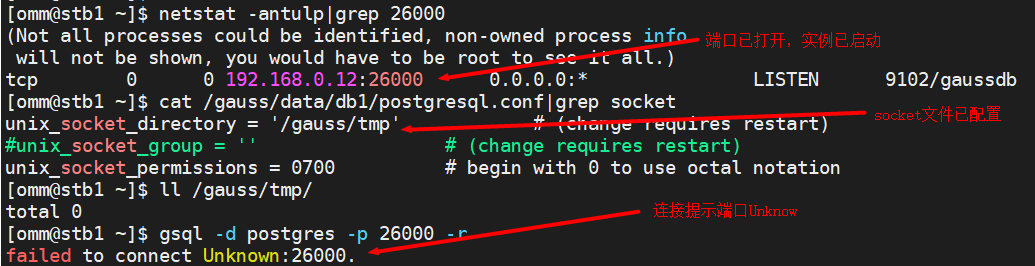
- 新的备节点重启后无法使用gsql进行本地连接,报错“failed to connect Unknown:26000.”,检查确认实例已正常启动,socket参数配置正确,如下图所示:
最后修改时间:2021-02-22 16:45:21
「喜欢这篇文章,您的关注和赞赏是给作者最好的鼓励」
关注作者
【版权声明】本文为墨天轮用户原创内容,转载时必须标注文章的来源(墨天轮),文章链接,文章作者等基本信息,否则作者和墨天轮有权追究责任。如果您发现墨天轮中有涉嫌抄袭或者侵权的内容,欢迎发送邮件至:contact@modb.pro进行举报,并提供相关证据,一经查实,墨天轮将立刻删除相关内容。
