



需要特别关注的地方我都用灰色背景和粉红色字体来表示,比如下边的例子中,thread 1的最大归档日志号为33,thread 2的最大归档日志号为43是需要特别关注的地方;而命令一般使用黄色背景和红色字体标注;对代码或代码输出部分的注释一般采用蓝色字体表示。
List of Archived Logs in backup set 11
Thrd Seq Low SCN Low Time Next SCN Next Time
---- ------- ---------- ------------------- ---------- ---------
1 32 1621589 2015-05-29 11:09:52 1625242 2015-05-29 11:15:48
1 33 1625242 2015-05-29 11:15:48 1625293 2015-05-29 11:15:58
2 42 1613951 2015-05-29 10:41:18 1625245 2015-05-29 11:15:49
2 43 1625245 2015-05-29 11:15:49 1625253 2015-05-29 11:15:53
[ZFXXDB1:root]:/>lsvg -o
T_XDESK_APP1_vg
rootvg
[ZFXXDB1:root]:/>
00:27:22 SQL> alter tablespace idxtbs read write;
====》2097152*512/1024/1024/1024=1G
本文如有错误或不完善的地方请大家多多指正,ITPUB留言或QQ皆可,您的批评指正是我写作的最大动力。
1.3 OEM安装维护总结
我安装过几次EM,出现过很多问题,几经周折,总结了如下的内容,实在不能解决就重新创建吧,重新创建可以解决99%的问题,这里把需要注意的一些前提列出来:
1. 数据库必须使用服务器模式的,不能使用客户端模式的,客户端模式有很多文件不存在(从$ORACLE_HOME的db_1或者client_1也可以识别)
2. 数据库服务器的ip地址必须是静态的,不能是dhcp动态获取,动态获取可能导致em运行缓慢,还可能导致服务器ip地址改变等问题,也可能导致em启动后又自动关闭等问题
3. 数据库服务器的hostname不能随便修改,修改后em肯定不能用了
4. 安装过程中出现问题的时候认真查看日志,安装日志路径:$ORACLE_HOME/cfgtoollogs\emca\
5. OEM运行日志:$ORACLE_HOME/$hostname_$oracle_sid/sysman/log
6. 建议重新创建,在oracle用户下:
单机: emca -config dbcontrol db -repos recreate
集群: emca -config dbcontrol db -repos recreate -cluster
若是集群环境,则在创建之前先在grid用户下执行如下代码:
-----sqlplus / as sysasm ASM实例 GRID 用户下执行
SYS@+ASM1> create user asmsnmp identified by xxx;
SYS@+ASM1> grant sysdba to asmsnmp;
SYS@+ASM1> alter user asmsnmp identified by xxx;
SYS@+ASM1> alter system set remote_listener='(DESCRIPTION=(ADDRESS_LIST=(ADDRESS=(PROTOCOL=TCP)(HOST=ZFXDESKDB-scan)(PORT=1521))))' sid='*';
SYS@+ASM1> alter system register;
7. 启动和关闭维护命令,oracle用户下:export ORACLE_UNQNAME=$DB_UNIQUE_NAME ,数据库唯一名,进程:ps -ef| grep em
启动: emctl stop dbconsole
关闭: emctl stop dbconsole
运行状态:emctl status dbconsole
8. Rac集群环境在其中一个节点上安装,其他节点也可以查询,为EM Daemon,如:
[ZFXDESKDB2:oracle]:/oracle>export ORACLE_UNQNAME=oraESKDB
[ZFXDESKDB2:oracle]:/oracle>emctl status dbconsole
Oracle Enterprise Manager 11g Database Control Release 11.2.0.4.0
Copyright (c) 1996, 2013 Oracle Corporation. All rights reserved.
https://ZFXDESKDB1:1158/em/console/aboutApplication
EM Daemon is running.
------------------------------------------------------------------
Logs are generated in directory /oracle/app/oracle/product/11.2.0/db/zfxdeskdb2_oraESKDB/sysman/log
1.4 OEM简介(网络摘抄)
Oracle 10g企业管理器(Oracle Enterprise Manager)简称OEM,是一个基于Java的框架系统,该系统集成了多个组件,为用户提供了一个功能强大的图形用户界面。
1. OEM的功能
(1) 管理完整的Oracle 10g环境,包括数据库、iAS服务器、应用程序和服务。
(2) 诊断、修改和优化多个数据库。
(3) 在多个系统上,按不同的时间间隔调度服务。
(4) 通过网络管理数据库的约束条件。
(5) 管理来自不同位置的多个网络节点和服务。
(6) 和其他管理员共享任务。
(7) 将相关的服务组合在一起,便于对任务的管理。
(8) 启动集成的Oracle10g第三方工具。
2. OEM的管理工具
(1) 例程管理。对数据库执行以下管理操作:
① 查看和编辑实例(Instance)参数值。
② 管理用户会话,查看当前运行的SQL及其解释计划。
③ 管理分布式Internet计算环境中没有及时解决的事务处理冲突。
④ 监视需要长时间运行的操作。
⑤ 通过资源计划控制处理资源。
⑥ 管理已存储配置。
⑦ 管理占用资源数量最多的锁和会话。
OEM的管理工具
(2) 方案管理。使用方案管理器来管理方案对象,如表、索引、视图和触发器等。利用它可以实现下列功能:
① 创建方案对象。
② 修改方案对象。
③ 删除方案对象。
④ 显示方案对象的相关性。
(3) 安全管理。DBA使用安全管理器可以完成以下操作:
① 创建用户、角色和概要文件。
② 修改用户、角色和概要文件。
③ 删除用户、角色和概要文件。
④ 向数据库用户授予权限和角色。
2. OEM的管理工具
(4) 存储管理。使用存储管理器可管理表空间、回滚段、数据文件和重做日
志等存储对象。利用它可以进行以下操作:
① 创建存储对象。
② 将数据文件和回滚段添加到表空间中。
③ 删除存储对象。
④ 将对象脱机或联机。
⑤ 显示对象的相关性。
1.5 OEM命令(网络摘抄)
创建一个EM资料库
emca -repos create
重建一个EM资料库
emca -repos recreate
删除一个EM资料库
emca -repos drop
配置数据库的 Database Control
emca -config dbcontrol db
删除数据库的 Database Control配置
emca -deconfig dbcontrol db
重新配置db control的端口,默认端口在1158
emca -reconfig ports
emca -reconfig ports -dbcontrol_http_port 1160
emca -reconfig ports -agent_port 3940
注:查看端口号可查如下路径。
配置dbconsole的步骤
emca -repos create
emca -config dbcontrol db
emctl start dbconsole
重新配置dbconsole的步骤
emca -repos drop
emca -repos create
emca -config dbcontrol db
emctl start dbconsole
emctl start dbconsole -----启动控制台服务
emctl stop dbconsole -----关闭控制台服务
emctl status dbconsole -----查看控制台服务状态
命令如下:
emca -config dbcontrol db -repos recreate ---建议重新创建
emca -config dbcontrol db -repos create
emca -repos drop
emca -deconfig dbcontrol db
drop user sysman cascade;
drop role MGMT_USER;
drop user MGMT_VIEW cascade;
1.6 启动OEM
先设置ORACLE_SID环境变量后,停止EM console服务
emctl stop dbconsole
先设置ORACLE_SID环境变量后,查看EM console服务的状态
emctl status dbconsole
[oracle@rhel_linux_asm ~]$ emctl status dbconsole
Oracle Enterprise Manager 11g Database Control Release 11.2.0.1.0
Copyright (c) 1996, 2009 Oracle Corporation. All rights reserved.
http://192.168.128.131:1158/em/console/aboutApplication
Oracle Enterprise Manager 11g is not running.
------------------------------------------------------------------
Logs are generated in directory /u01/app/oracle/product/11.2.0/dbhome_1/192.168.128.131_orclasm/sysman/log
[oracle@rhel_linux_asm ~]$
先设置ORACLE_SID环境变量后,启动EM console服务
emctl start dbconsole
[oracle@rhel_linux_asm ~]$ emctl start dbconsole
Oracle Enterprise Manager 11g Database Control Release 11.2.0.1.0
Copyright (c) 1996, 2009 Oracle Corporation. All rights reserved.
http://192.168.128.131:1158/em/console/aboutApplication
Starting Oracle Enterprise Manager 11g Database Control .................. started.
------------------------------------------------------------------
Logs are generated in directory /u01/app/oracle/product/11.2.0/dbhome_1/192.168.128.131_orclasm/sysman/log
[oracle@rhel_linux_asm ~]$
访问浏览器:http://192.168.128.131:1158/em/
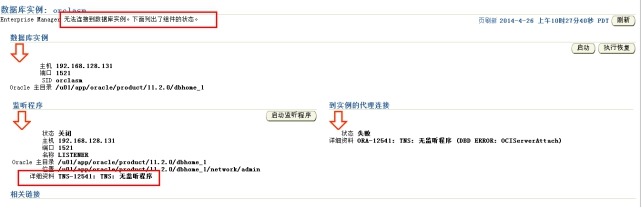
这个说明监听没有启动
1.7 其他问题解决(网络摘抄+个人案例)
1.7.1 Environment variable ORACLE_SID not defined.
1、 打开cmd,输入 emctl start dbconsole
将会有错误信息提示,如果没有设置ORACLE_SID 则提示
Environment variable ORACLE_SID not defined. Please define it.
(设置ORACLE_SID:打开cmd,输入set ORACLE_SID=orcl(实例名),即可)
1.7.2 oc4j configration issue--hostname 变动了
解决方案:
1. EM Configuration issue. c:\app\Administrator\product\11.2.0\dbhome_1/lhr_$oracle_unqname not found.
办法:set oracle_unqname=$oracle_sid
2. OC4JConfigurationissue.c:\app\Administrator\product\11.2.0\dbhome_1/oc4j/j2ee/OC4J_DBConsole_lhr_$oracle_sid not found.
办法:set oracle_sid=orcl
3. OC4JConfigurationissue.c:\app\Administrator\product\11.2.0\dbhome_1/oc4j/j2ee/OC4J_DBConsole_mcfg.sandai.net_orcl not found.
4. Environment variable ORACLE_UNQNAME not defined. Please set ORACLE_UNQNAME to database unique name
解决方法:
在启动的时候先设置一下: set oracle_unqname=$ORACLE_SID
1.7.3 OC4J Configuration issue. /u01/app/oracle/product/11.2.0/dbhome_1/oc4j/j2ee/OC4J_DBConsole_192.168.128.134_orclasm not found.
重建oem吧,可能你的oem根本就没有建立吧。。。。
1.7.4 Can't locate CompEMdbconsole.pm in @INC
该问题的意思就是不能加载CompEMdbconsole.pm 文件,去相应的目录看看有没有,没有的话就到其它地方拷贝文件过来吧。locate 就是 位于,查找。。。。的意思,,,,,英语呀
[oracle@lhr_linux ~]$ emctl
Can't locate CompEMdbconsole.pm in @INC (@INC contains: %s_javapOracleHome%/sysman/admin/scripts %s_javapOracleHome%/bin /u01/app/oracle/product/11.2.0/client_1/perl/lib/5.10.0/i686-linux-thread-multi /u01/app/oracle/product/11.2.0/client_1/perl/lib/5.10.0 /u01/app/oracle/product/11.2.0/client_1/perl/lib /u01/app/oracle/product/11.2.0/client_1/perl/lib/site_perl/5.10.0/i686-linux-thread-multi /u01/app/oracle/product/11.2.0/client_1/perl/lib/site_perl/5.10.0 /u01/app/oracle/product/11.2.0/client_1/perl/lib/site_perl /u01/app/oracle/product/11.2.0/client_1/perl/libwww-perl/lib /u01/app/oracle/product/11.2.0/client_1/perl/ext/POSIX /u01/app/oracle/product/11.2.0/client_1/perl/URI /u01/app/oracle/product/11.2.0/client_1/perl/HTML_Parser /u01/app/oracle/product/11.2.0/client_1/perl/HTML-Parser/lib /u01/app/oracle/product/11.2.0/client_1/sysman/admin/scripts /u01/app/oracle/product/11.2.0/client_1/bin /u01/app/oracle/product/11.2.0/client_1/sysman/admin/scripts/Net-DNS-0.48/lib/ /u01/app/oracle/product/11.2.0/client_1/sysman/admin/scripts/libnet-1.19/ .) at /u01/app/oracle/product/11.2.0/client_1/bin/EmctlCommon.pm line 638.
1. Can't locate CompEMdbconsole.pm in @INC造成的问题
Set the environment correctly for the Database ORACLE_HOME:
Unix:
export ORACLE_HOME=
export ORACLE_SID=
export PATH=$ORACLE_HOME/bin:$PATH
$ORACLE_HOME/bin: emctl start dbconsole
Windows:
set ORACLE_HOME=
set ORACLE_SID=
set PATH=$ORACLE_HOME\bin:$PATH
$ORACLE_HOME\bin: emctl start dbconsole
我看了下目录$ORACLE_HOME\bin文件 perl模块没有,可能解压出问题,由于perl是跨平台的语言,直接找个相应的版本复制一下,把comp和db开头的pm复制到$ORACLE_HOME\bin下,大约9个文件吧,或者把pm文件全部拷贝过去吧,大约34个文件
1.7.5 EM Configuration issue. /opt/oracle/product/11.2.0/db_1/localhost.localdomain_ocmdb not found.
2.由于ip地址改动的问题EM报
[oracle@localhost bin]$ emctl status
EM Configuration issue. /opt/oracle/product/11.2.0/db_1/localhost.localdomain_ocmdb not found.
1.7.6 SEVERE: Listener is not up or database service is not registered with it
问题表现如下:
[oracle@xbfye7l01 db_home]$ emca -config dbcontrol db
………………
-----------------------------------------------------------------
Do you wish to continue? [yes(Y)/no(N)]: Y
Aug 15, 2012 9:45:48 AM oracle.sysman.emcp.EMConfig perform
INFO: This operation is being logged at /apps/cfgtoollogs/emca/E7DEV/emca_2012_08_15_09_45_23.log.
Aug 15, 2012 9:45:49 AM oracle.sysman.emcp.EMConfig perform
SEVERE: Listener is not up or database service is not registered with it. Start the Listener and register database service and run EM Configuration Assistant again .
Refer to the log file at /apps/cfgtoollogs/emca/E7DEV/emca_2012_08_15_09_45_23.log for more details.
Could not complete the configuration. Refer to the log file at /apps/cfgtoollogs/emca/E7DEV/emca_2012_08_15_09_45_23.log for more details.
[oracle@xbfye7l01 db_home]$
查看日志:
[oracle@xbfye7l01 db_home]$ tail -100 /apps/cfgtoollogs/emca/E7DEV/emca_2012_08_15_09_45_23.log
g 15, 2012 9:45:49 AM oracle.sysman.emcp.util.GeneralUtil initSQLEngineLoacly
CONFIG: SQLEngine created successfully and connected
Aug 15, 2012 9:45:49 AM oracle.sysman.emcp.ParamsManager checkListenerStatusForDBControl
CONFIG: ORA-12541: TNS:no listener
oracle.sysman.assistants.util.sqlEngine.SQLFatalErrorException: ORA-12541: TNS:no listener
at oracle.sysman.assistants.util.sqlEngine.SQLEngine.executeImpl(SQLEngine.java:1650)
at oracle.sysman.assistants.util.sqlEngine.SQLEngine.executeSql(SQLEngine.java:1898)
at oracle.sysman.emcp.ParamsManager.checkListenerStatusForDBControl(ParamsManager.java:3230)
at oracle.sysman.emcp.EMReposConfig.unlockMGMTAccount(EMReposConfig.java:1000)
at oracle.sysman.emcp.EMReposConfig.invoke(EMReposConfig.java:345)
at oracle.sysman.emcp.EMReposConfig.invoke(EMReposConfig.java:157)
at oracle.sysman.emcp.EMConfig.perform(EMConfig.java:253)
at oracle.sysman.emcp.EMConfigAssistant.invokeEMCA(EMConfigAssistant.java:589)
at oracle.sysman.emcp.EMConfigAssistant.performConfiguration(EMConfigAssistant.java:1448)
at oracle.sysman.emcp.EMConfigAssistant.statusMain(EMConfigAssistant.java:573)
at oracle.sysman.emcp.EMConfigAssistant.main(EMConfigAssistant.java:521)
Aug 15, 2012 9:45:49 AM oracle.sysman.emcp.EMConfig perform
SEVERE: Listener is not up or database service is not registered with it. Start the Listener and register database service and run EM Configuration Assistant again .
Refer to the log file at /apps/cfgtoollogs/emca/E7DEV/emca_2012_08_15_09_45_23.log for more details.
Aug 15, 2012 9:45:49 AM oracle.sysman.emcp.EMConfig perform
CONFIG: Stack Trace:
oracle.sysman.emcp.exception.EMConfigException: Listener is not up or database service is not registered with it. Start the Listener and register database service and run EM Configuration Assistant again .
at oracle.sysman.emcp.ParamsManager.checkListenerStatusForDBControl(ParamsManager.java:3245)
at oracle.sysman.emcp.EMReposConfig.unlockMGMTAccount(EMReposConfig.java:1000)
at oracle.sysman.emcp.EMReposConfig.invoke(EMReposConfig.java:345)
at oracle.sysman.emcp.EMReposConfig.invoke(EMReposConfig.java:157)
at oracle.sysman.emcp.EMConfig.perform(EMConfig.java:253)
at oracle.sysman.emcp.EMConfigAssistant.invokeEMCA(EMConfigAssistant.java:589)
at oracle.sysman.emcp.EMConfigAssistant.performConfiguration(EMConfigAssistant.java:1448)
at oracle.sysman.emcp.EMConfigAssistant.statusMain(EMConfigAssistant.java:573)
at oracle.sysman.emcp.EMConfigAssistant.main(EMConfigAssistant.java:521)
Aug 15, 2012 9:45:49 AM oracle.sysman.emcp.EMConfig restoreOuiLoc
CONFIG: Restoring oracle.installer.oui_loc to /apps/product/11.2.0/db_home/oui
解决办法:
最后检查是因为修改Hostname,但hosts文件以及监听未及时修改所致,于是调整完各个参数,保持一至后,发现仍然报同样的错误,又检查发现数据库V$session中的机器名还是原来的hostname,所以重启数据库,机器后一样,但总的问题没有解决。于是重启了机器,该问题解决。但出现了第二个问题,在下面将进行解决。
1.7.7 SEVERE: Failed to unlock all EM-related accounts
问题表现1:
[oracle@xbfye7l01 ~]$ emca -config dbcontrol db
Do you wish to continue? [yes(Y)/no(N)]: Y
Aug 16, 2012 9:06:21 AM oracle.sysman.emcp.EMConfig perform
INFO: This operation is being logged at /apps/cfgtoollogs/emca/E7DEV/emca_2012_08_16_09_06_08.log.
Aug 16, 2012 9:06:23 AM oracle.sysman.emcp.EMReposConfig invoke
SEVERE: Failed to unlock all EM-related accounts
Aug 16, 2012 9:06:23 AM oracle.sysman.emcp.EMConfig perform
SEVERE: Failed to unlock all EM-related accounts
Refer to the log file at /apps/cfgtoollogs/emca/E7DEV/emca_2012_08_16_09_06_08.log for more details.
Could not complete the configuration. Refer to the log file at /apps/cfgtoollogs/emca/E7DEV/emca_2012_08_16_09_06_08.log for more details.
[oracle@xbfye7l01 ~]$
查看日志:
[root@xbfye7l01 ~]# tail -100 /apps/cfgtoollogs/emca/E7DEV/emca_2012_08_16_09_06_08.log
………………
CONFIG: Couldn't execute statement: ORA-01403: no data found
ORA-06512: at "SYSMAN.MGMT_VIEW_PRIV", line 41
ORA-06512: at line 1 (DBD NO_DATA: OCIStmtExecute) at /apps/product/11.2.0/db_home/sysman/admin/scripts/emca/emcaDbUtil.pl line 129, line 2.
Aug 16, 2012 9:06:23 AM oracle.sysman.emcp.util.PlatformInterface executeCommand
CONFIG: Error executing /apps/product/11.2.0/db_home/sysman/admin/scripts/emca/emcaDbUtil /apps/product/11.2.0/db_home/perl/lib:/apps/product/11.2.0/db_home/perl/lib/site_perl:/apps/product/11.2.0/db_home/sysman/admin/scripts:/apps/product/11.2.0/db_home/bin: /apps/product/11.2.0/db_home/perl/bin/perl /apps/product/11.2.0/db_home/sysman/admin/scripts/emca/emcaDbUtil.pl /apps/product/11.2.0/db_home (DESCRIPTION=(ADDRESS_LIST=(ADDRESS=(PROTOCOL=TCP)(HOST=xbfye7l01)(PORT=1521)))(CONNECT_DATA=(SERVICE_NAME=E7DEV))) SYS SYSDBA declare repos_pwd varchar2(30); view_user varchar2(30); view_user_pwd varchar2(30); view_user_acc_status varchar2(30); begin repos_pwd := ?; sysman.mgmt_view_priv.get_view_user(view_user); select account_status into view_user_acc_status from sys.dba_users where upper(username) = upper ( view_user ); IF view_user_acc_status like '%LOCKED%' THEN execute immediate 'alter user ' || view_user || ' account unlock'; END IF; IF view_user_acc_status like '%EXPIRED%' THEN sysman.mgmt_view_priv.set_view_user_creds ( repos_pwd ); sysman.mgmt_view_priv.GET_VIEW_USER_CREDS ( view_user, view_user_pwd ); execute immediate 'alter user ' || view_user || ' identified by ' || view_user_pwd || ''; END IF; end; E7DEV 1 SYSMAN_PWD
Aug 16, 2012 9:06:23 AM oracle.sysman.emcp.EMReposConfig unlockMGMTAccount
CONFIG: Failed to unlock mgmt_view account
Aug 16, 2012 9:06:23 AM oracle.sysman.emcp.EMReposConfig invoke
SEVERE: Failed to unlock all EM-related accounts
Aug 16, 2012 9:06:23 AM oracle.sysman.emcp.EMConfig perform
SEVERE: Failed to unlock all EM-related accounts
Refer to the log file at /apps/cfgtoollogs/emca/E7DEV/emca_2012_08_16_09_06_08.log for more details.
Aug 16, 2012 9:06:23 AM oracle.sysman.emcp.EMConfig perform
CONFIG: Stack Trace:
oracle.sysman.emcp.exception.EMConfigException: Failed to unlock all EM-related accounts
at oracle.sysman.emcp.EMReposConfig.invoke(EMReposConfig.java:348)
at oracle.sysman.emcp.EMReposConfig.invoke(EMReposConfig.java:157)
at oracle.sysman.emcp.EMConfig.perform(EMConfig.java:253)
at oracle.sysman.emcp.EMConfigAssistant.invokeEMCA(EMConfigAssistant.java:589)
at oracle.sysman.emcp.EMConfigAssistant.performConfiguration(EMConfigAssistant.java:1448)
at oracle.sysman.emcp.EMConfigAssistant.statusMain(EMConfigAssistant.java:573)
at oracle.sysman.emcp.EMConfigAssistant.main(EMConfigAssistant.java:521)
Aug 16, 2012 9:06:23 AM oracle.sysman.emcp.EMConfig restoreOuiLoc
CONFIG: Restoring oracle.installer.oui_loc to /apps/product/11.2.0/db_home/oui
[root@xbfye7l01 ~]#
1.7.8 SEVERE: Error creating the repository
[oracle@xbfye7l01 ~]$ emca -config dbcontrol db -repos create
Do you wish to continue? [yes(Y)/no(N)]: Y
Aug 16, 2012 9:12:57 AM oracle.sysman.emcp.EMConfig perform
INFO: This operation is being logged at /apps/cfgtoollogs/emca/E7DEV/emca_2012_08_16_09_12_41.log.
Aug 16, 2012 9:12:57 AM oracle.sysman.emcp.EMReposConfig createRepository
INFO: Creating the EM repository (this may take a while) ...
Aug 16, 2012 9:12:57 AM oracle.sysman.emcp.EMReposConfig invoke
SEVERE: Error creating the repository
Aug 16, 2012 9:12:57 AM oracle.sysman.emcp.EMReposConfig invoke
INFO: Refer to the log file at /apps/cfgtoollogs/emca/E7DEV/emca_repos_create_.log for more details.
Aug 16, 2012 9:12:57 AM oracle.sysman.emcp.EMConfig perform
SEVERE: Error creating the repository
Refer to the log file at /apps/cfgtoollogs/emca/E7DEV/emca_2012_08_16_09_12_41.log for more details.
Could not complete the configuration. Refer to the log file at /apps/cfgtoollogs/emca/E7DEV/emca_2012_08_16_09_12_41.log for more details.
[oracle@xbfye7l01 ~]$
查看日志:
[root@xbfye7l01 ~]# tail -50 /apps/cfgtoollogs/emca/E7DEV/emca_2012_08_16_09_12_41.log
Aug 16, 2012 9:12:57 AM oracle.sysman.emcp.util.GeneralUtil isLocalConnectionRequired
CONFIG: isLocalConnectionRequired: true
Aug 16, 2012 9:12:57 AM oracle.sysman.emcp.util.GeneralUtil initSQLEngine
CONFIG: isLocalConnectionRequired: true. Connecting to database instance locally.
Aug 16, 2012 9:12:57 AM oracle.sysman.emcp.util.GeneralUtil initSQLEngineLoacly
CONFIG: SQLEngine connecting with SID: E7DEV, oracleHome: /apps/product/11.2.0/db_home, and user: SYS
Aug 16, 2012 9:12:57 AM oracle.sysman.emcp.util.GeneralUtil initSQLEngineLoacly
CONFIG: SQLEngine created successfully and connected
Aug 16, 2012 9:12:57 AM oracle.sysman.emcp.EMReposConfig createRepository
CONFIG: Spooling to /apps/cfgtoollogs/emca/E7DEV/emca_repos_create_2012_08_16_09_12_57.log
Aug 16, 2012 9:12:57 AM oracle.sysman.emcp.EMReposConfig createRepository
INFO: Creating the EM repository (this may take a while) ...
Aug 16, 2012 9:12:57 AM oracle.sysman.emcp.EMReposConfig createRepository
CONFIG: ORA-20001: SYSMAN already exists..
ORA-06512: at line 17
oracle.sysman.assistants.util.sqlEngine.SQLFatalErrorException: ORA-20001: SYSMAN already exists..
ORA-06512: at line 17
at oracle.sysman.assistants.util.sqlEngine.SQLEngine.executeImpl(SQLEngine.java:1650)
at oracle.sysman.assistants.util.sqlEngine.SQLEngine.executeScript(SQLEngine.java:1000)
at oracle.sysman.assistants.util.sqlEngine.SQLPlusEngine.executeScript(SQLPlusEngine.java:339)
at oracle.sysman.assistants.util.sqlEngine.SQLPlusEngine.executeScript(SQLPlusEngine.java:380)
at oracle.sysman.emcp.EMReposConfig.createRepository(EMReposConfig.java:510)
at oracle.sysman.emcp.EMReposConfig.invoke(EMReposConfig.java:228)
at oracle.sysman.emcp.EMReposConfig.invoke(EMReposConfig.java:157)
at oracle.sysman.emcp.EMConfig.perform(EMConfig.java:253)
at oracle.sysman.emcp.EMConfigAssistant.invokeEMCA(EMConfigAssistant.java:589)
at oracle.sysman.emcp.EMConfigAssistant.performConfiguration(EMConfigAssistant.java:1448)
at oracle.sysman.emcp.EMConfigAssistant.statusMain(EMConfigAssistant.java:573)
at oracle.sysman.emcp.EMConfigAssistant.main(EMConfigAssistant.java:521)
Aug 16, 2012 9:12:57 AM oracle.sysman.emcp.EMReposConfig invoke
SEVERE: Error creating the repository
Aug 16, 2012 9:12:57 AM oracle.sysman.emcp.EMReposConfig invoke
INFO: Refer to the log file at /apps/cfgtoollogs/emca/E7DEV/emca_repos_create_.log for more details.
Aug 16, 2012 9:12:57 AM oracle.sysman.emcp.EMConfig perform
SEVERE: Error creating the repository
Refer to the log file at /apps/cfgtoollogs/emca/E7DEV/emca_2012_08_16_09_12_41.log for more details.
Aug 16, 2012 9:12:57 AM oracle.sysman.emcp.EMConfig perform
CONFIG: Stack Trace:
oracle.sysman.emcp.exception.EMConfigException: Error creating the repository
at oracle.sysman.emcp.EMReposConfig.invoke(EMReposConfig.java:240)
at oracle.sysman.emcp.EMReposConfig.invoke(EMReposConfig.java:157)
at oracle.sysman.emcp.EMConfig.perform(EMConfig.java:253)
at oracle.sysman.emcp.EMConfigAssistant.invokeEMCA(EMConfigAssistant.java:589)
at oracle.sysman.emcp.EMConfigAssistant.performConfiguration(EMConfigAssistant.java:1448)
at oracle.sysman.emcp.EMConfigAssistant.statusMain(EMConfigAssistant.java:573)
at oracle.sysman.emcp.EMConfigAssistant.main(EMConfigAssistant.java:521)
Aug 16, 2012 9:12:57 AM oracle.sysman.emcp.EMConfig restoreOuiLoc
CONFIG: Restoring oracle.installer.oui_loc to /apps/product/11.2.0/db_home/oui
[root@xbfye7l01 ~]#
再次尝试:
[oracle@xbfye7l01 ~]$ emca -repos create
STARTED EMCA at Aug 16, 2012 9:23:21 AM
EM Configuration Assistant, Version 11.2.0.0.2 Production
Copyright (c) 2003, 2005, Oracle. All rights reserved.
Enter the following information:
Database SID: E7DEV
Listener port number: 1521
Password for SYS user:
Password for SYSMAN user:
Do you wish to continue? [yes(Y)/no(N)]: Y
Aug 16, 2012 9:23:36 AM oracle.sysman.emcp.EMConfig perform
INFO: This operation is being logged at /apps/cfgtoollogs/emca/E7DEV/emca_2012_08_16_09_23_21.log.
Aug 16, 2012 9:23:36 AM oracle.sysman.emcp.EMReposConfig createRepository
INFO: Creating the EM repository (this may take a while) ...
Aug 16, 2012 9:23:36 AM oracle.sysman.emcp.EMReposConfig invoke
SEVERE: Error creating the repository
Aug 16, 2012 9:23:36 AM oracle.sysman.emcp.EMReposConfig invoke
INFO: Refer to the log file at /apps/cfgtoollogs/emca/E7DEV/emca_repos_create_.log for more details.
Aug 16, 2012 9:23:36 AM oracle.sysman.emcp.EMConfig perform
SEVERE: Error creating the repository
Refer to the log file at /apps/cfgtoollogs/emca/E7DEV/emca_2012_08_16_09_23_21.log for more details.
Could not complete the configuration. Refer to the log file at /apps/cfgtoollogs/emca/E7DEV/emca_2012_08_16_09_23_21.log for more details.
[oracle@xbfye7l01 ~]$
1.7.8.1 解决过程
1.执行下面的一系统删除命令:
这里其实可以用重建的命令,emca -config dbcontrol db -repos recreate ---建议重新创建,
这样就不会报这种错误了
由于之前操作过一次,所以部分报不存在,第一次删除时均正常
SQL> drop user sysman cascade;
User dropped.
SQL> drop role MGMT_USER;
Role dropped.
SQL> drop user MGMT_VIEW cascade;
drop user MGMT_VIEW cascade
*
ERROR at line 1:
ORA-01918: user 'MGMT_VIEW' does not exist
SQL> drop public synonym MGMT_TARGET_BLACKOUTS;
Synonym dropped.
SQL> drop public synonym SETEMVIEWUSERCONTEXT;
drop public synonym SETEMVIEWUSERCONTEXT
*
ERROR at line 1:
ORA-01432: public synonym to be dropped does not exist
2. 重建测试,问题依然存在。
[oracle@xbfye7l01 ~]$ emca -repos create
STARTED EMCA at Aug 16, 2012 9:30:15 AM
EM Configuration Assistant, Version 11.2.0.0.2 Production
Copyright (c) 2003, 2005, Oracle. All rights reserved.
Enter the following information:
Database SID: E7DEV
Listener port number: 1521
Password for SYS user:
Password for SYSMAN user:
Do you wish to continue? [yes(Y)/no(N)]: Y
Aug 16, 2012 9:30:24 AM oracle.sysman.emcp.EMConfig perform
INFO: This operation is being logged at /apps/cfgtoollogs/emca/E7DEV/emca_2012_08_16_09_30_15.log.
Aug 16, 2012 9:30:24 AM oracle.sysman.emcp.EMReposConfig createRepository
INFO: Creating the EM repository (this may take a while) ...
Aug 16, 2012 9:31:37 AM oracle.sysman.emcp.EMReposConfig invoke
SEVERE: Error creating the repository
Aug 16, 2012 9:31:37 AM oracle.sysman.emcp.EMReposConfig invoke
INFO: Refer to the log file at /apps/cfgtoollogs/emca/E7DEV/emca_repos_create_.log for more details.
Aug 16, 2012 9:31:37 AM oracle.sysman.emcp.EMConfig perform
SEVERE: Error creating the repository
Refer to the log file at /apps/cfgtoollogs/emca/E7DEV/emca_2012_08_16_09_30_15.log for more details.
Could not complete the configuration. Refer to the log file at /apps/cfgtoollogs/emca/E7DEV/emca_2012_08_16_09_30_15.log for more details.
[oracle@xbfye7l01 ~]$
3. 删除数据库的 Database Control配置
[oracle@xbfye7l01 ~]$ emca -deconfig dbcontrol db
STARTED EMCA at Aug 16, 2012 9:46:37 AM
EM Configuration Assistant, Version 11.2.0.0.2 Production
Copyright (c) 2003, 2005, Oracle. All rights reserved.
Enter the following information:
Database SID: E7DEV
Do you wish to continue? [yes(Y)/no(N)]: Y
Aug 16, 2012 9:46:42 AM oracle.sysman.emcp.EMConfig perform
INFO: This operation is being logged at /apps/cfgtoollogs/emca/E7DEV/emca_2012_08_16_09_46_36.log.
Aug 16, 2012 9:46:42 AM oracle.sysman.emcp.EMDBPreConfig performDeconfiguration
WARNING: EM is not configured for this database. No EM-specific actions can be performed.
Enterprise Manager configuration completed successfully
FINISHED EMCA at Aug 16, 2012 9:46:42 AM
[oracle@xbfye7l01 ~]$
4. 删除EM资料库
[oracle@xbfye7l01 ~]$ emca -repos drop
STARTED EMCA at Aug 16, 2012 9:47:09 AM
EM Configuration Assistant, Version 11.2.0.0.2 Production
Copyright (c) 2003, 2005, Oracle. All rights reserved.
Enter the following information:
Database SID: E7DEV
Listener port number: 1521
Password for SYS user:
Password for SYSMAN user:
Do you wish to continue? [yes(Y)/no(N)]: Y
Aug 16, 2012 9:47:18 AM oracle.sysman.emcp.EMConfig perform
INFO: This operation is being logged at /apps/cfgtoollogs/emca/E7DEV/emca_2012_08_16_09_47_09.log.
Aug 16, 2012 9:47:18 AM oracle.sysman.emcp.EMReposConfig invoke
INFO: Dropping the EM repository (this may take a while) ...
Aug 16, 2012 9:47:56 AM oracle.sysman.emcp.EMReposConfig invoke
INFO: Repository successfully dropped
Enterprise Manager configuration completed successfully
FINISHED EMCA at Aug 16, 2012 9:47:56 AM
[oracle@xbfye7l01 ~]$
5.对EM资料库和Database Control重新创建。
[oracle@xbfye7l01 ~]$ emca -config dbcontrol db -repos create
STARTED EMCA at Aug 16, 2012 9:48:35 AM
EM Configuration Assistant, Version 11.2.0.0.2 Production
Copyright (c) 2003, 2005, Oracle. All rights reserved.
Enter the following information:
Database SID: E7DEV
Listener port number: 1521
Listener ORACLE_HOME [ /apps/product/11.2.0/db_home ]:
Password for SYS user:
Password for DBSNMP user:
Password for SYSMAN user:
Email address for notifications (optional):
Outgoing Mail (SMTP) server for notifications (optional):
-----------------------------------------------------------------
You have specified the following settings
Database ORACLE_HOME ................ /apps/product/11.2.0/db_home
Local hostname ................ xbfye7l01
Listener ORACLE_HOME ................ /apps/product/11.2.0/db_home
Listener port number ................ 1521
Database SID ................ E7DEV
Email address for notifications ...............
Outgoing Mail (SMTP) server for notifications ...............
-----------------------------------------------------------------
Do you wish to continue? [yes(Y)/no(N)]: Y
Aug 16, 2012 9:48:54 AM oracle.sysman.emcp.EMConfig perform
INFO: This operation is being logged at /apps/cfgtoollogs/emca/E7DEV/emca_2012_08_16_09_48_35.log.
Aug 16, 2012 9:48:54 AM oracle.sysman.emcp.EMReposConfig createRepository
INFO: Creating the EM repository (this may take a while) ...
Aug 16, 2012 9:51:56 AM oracle.sysman.emcp.EMReposConfig invoke
INFO: Repository successfully created
Aug 16, 2012 9:51:58 AM oracle.sysman.emcp.EMReposConfig uploadConfigDataToRepository
INFO: Uploading configuration data to EM repository (this may take a while) ...
Aug 16, 2012 9:52:26 AM oracle.sysman.emcp.EMReposConfig invoke
INFO: Uploaded configuration data successfully
Aug 16, 2012 9:52:29 AM oracle.sysman.emcp.util.DBControlUtil configureSoftwareLib
INFO: Software library configured successfully.
Aug 16, 2012 9:52:29 AM oracle.sysman.emcp.EMDBPostConfig configureSoftwareLibrary
INFO: Deploying Provisioning archives ...
Aug 16, 2012 9:52:47 AM oracle.sysman.emcp.EMDBPostConfig configureSoftwareLibrary
INFO: Provisioning archives deployed successfully.
Aug 16, 2012 9:52:47 AM oracle.sysman.emcp.util.DBControlUtil secureDBConsole
INFO: Securing Database Control (this may take a while) ...
Aug 16, 2012 9:54:05 AM oracle.sysman.emcp.util.DBControlUtil secureDBConsole
INFO: Database Control secured successfully.
Aug 16, 2012 9:54:05 AM oracle.sysman.emcp.util.DBControlUtil startOMS
INFO: Starting Database Control (this may take a while) ...
Aug 16, 2012 9:54:26 AM oracle.sysman.emcp.EMDBPostConfig performConfiguration
INFO: Database Control started successfully
Aug 16, 2012 9:54:26 AM oracle.sysman.emcp.EMDBPostConfig performConfiguration
INFO: >>>>>>>>>>> The Database Control URL is https://xbfye7l01:1158/em <<<<<<<<<<<
Aug 16, 2012 9:54:28 AM oracle.sysman.emcp.EMDBPostConfig invoke
WARNING:
************************ WARNING ************************
Management Repository has been placed in secure mode wherein Enterprise Manager data will be encrypted. The encryption key has been placed in the file: /apps/product/11.2.0/db_home/xbfye7l01_E7DEV/sysman/config/emkey.ora. Please ensure this file is backed up as the encrypted data will become unusable if this file is lost.
***********************************************************
Enterprise Manager configuration completed successfully
FINISHED EMCA at Aug 16, 2012 9:54:28 AM
[oracle@xbfye7l01 ~]$
此次操作成功,问题得到解决,经测试https://xbfye7l01:1158/em登陆正常。
1.7.9 shell-init: error retrieving current directory
shell-init: error retrieving current directory: getcwd: cannot access parent directories: No such file or directory
OC4J Configuration issue. /u01/app/oracle/product/11.2.0/client_1/oc4j/j2ee/OC4J_DBConsole_Error occurred during initialization of VM
java.lang.Error: Properties init: Could not determine current working directory._orcllinux not found.
当前的操作目录已经不存在了或者已经删掉重建了,所以切换到任意一个存在的目录即可。。。。
1.7.10 Asm+11g+em
一次安装过程中我杀掉了进程后使用命令重建就报错了,这个时候手动清理一下相关用户和下边对象重建就可以了。
drop user sysman cascade;
drop role MGMT_USER;
drop user MGMT_VIEW cascade;
1.7.11 Accessibility Mode disable
OEM不能正常访问:

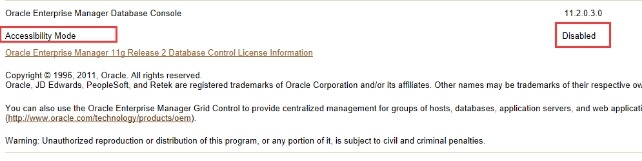
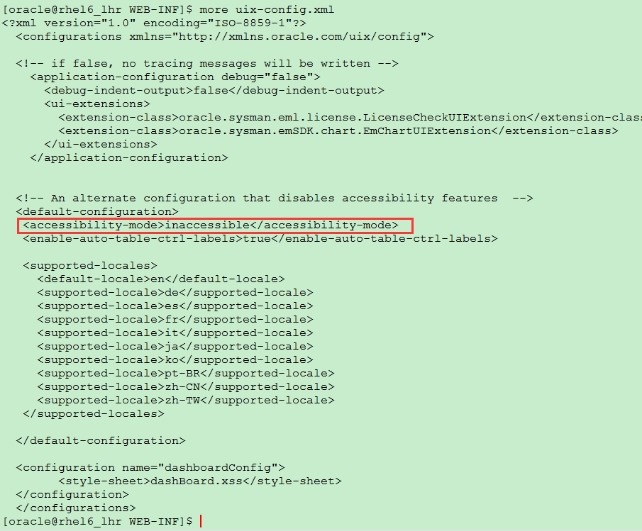
解决方案:
1. 修改$ORACLE_HOME/oc4j/j2ee/oc4j_applications/applications/em/em/WEB-INF/uix-config.xml文件,将inaccessible改成accessible
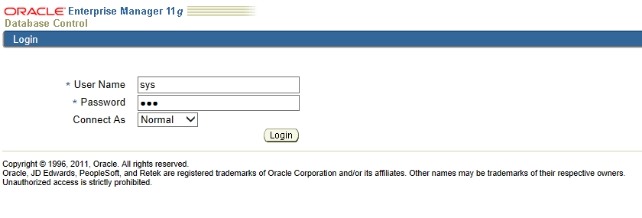
2. 然后重启EM就可以了;

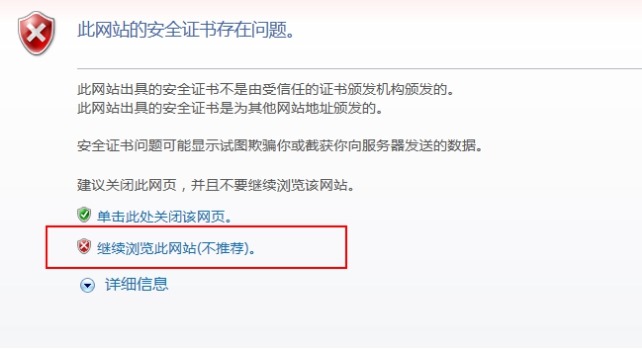
1.8 浏览器出现 此网站的安全证书有问题
网上有很多解决办法的,或者使用火狐浏览器就可以了。
1.9 浏览器界面乱码
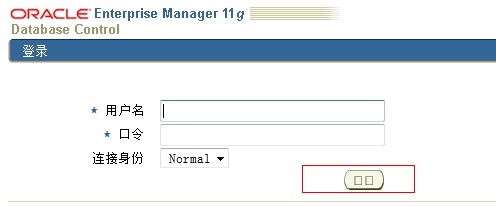
1.9.1 修改为英文
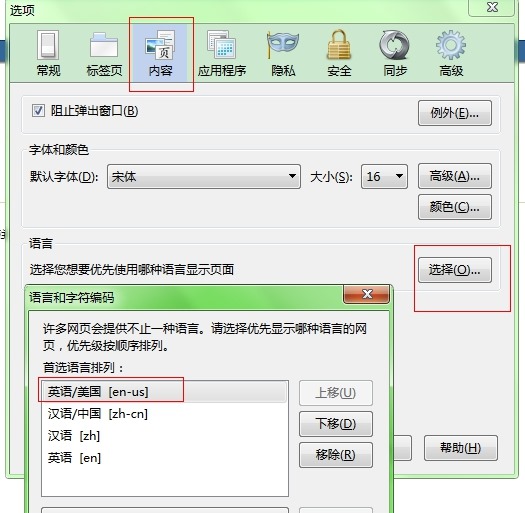
Internet-->常规-->语言,添加“英语(美国) [en_us]”,并将其移动到第一个,再访问em登陆界面,即可正常(英文)。
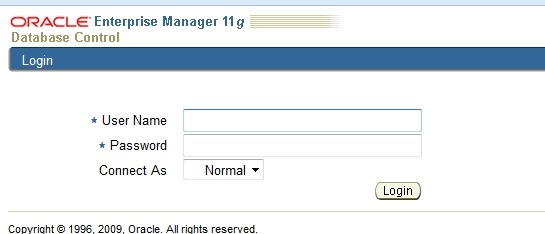
修改后:
1.9.2 让EM界面显示为英文
在实践过程中,发现oracle em控制台原先是中文的,菜单翻译的并不准确,不如英文的好对应管理,因此,需要修改linux系统的语言配置,将菜单改为英文,查到的参考网文如下:
http://www.blogjava.net/parable-myth/archive/2006/09/27/72331.html
http://www.linuxidc.com/Linux/2008-04/12265.htm
http://www.linuxsky.org/doc/newbie/200707/84.html
http://lavasoft.blog.51cto.com/62575/155329
实际的配置过程比较简单,为了减少对系统其他用户的影响,将/etc/sysconfig下面的i18n配置文件,拷贝到root用户目录下,命令是:cp /etc/sysconfig/i18n $root/.i18n
修改此文件,LANG="en_US.UTF-8",xwindow会显示英文界面,
经过此修改后,再重启系统,root用户的默认语言即为英语,打开em控制台也变成英文界面了。
1.9.3 修改字体
1.9.3.1 我试过了不行
em的乱码是由java引起的,em的按钮是由java生成的图,oracle 11g使用的是jdk1.5,jdk1.5以后有了一个简便方法来解决这个问题。
$ mkdir $ORACLE_HOME/jdk/jre/lib/fonts/fallback
把windows下的字体文件simsun.ttc复制到$ORACLE_HOME/jdk/jre/lib/fonts/fallback目录下 并改名 simsun.ttf(注意ms的simsun字体是有版权的,所以商用换其他字体),相应的权限改为oracle用户可用.
之后需要清理一下Cache,重启EM即可:
$ rm $ORACLE_HOME/oc4j/j2ee/oc4j_applications/applications/em/em/cabo/images/cache/zhs/*.gif
$ emctl stop dbconsole
$ emctl start dbconsole
登陆Web页面查看,EM显示就可以正常显示中文了
1.9.3.2 第二种
第一步和第二步我没找见相关的字体,但是后边的我做完后重启后就可以正常显示字体了。。。
1 修改jdk 下面的字体
[oracle@dbserver db_1]$ cd $ORACLE_HOME/jdk/jre/lib/
[oracle@dbserver lib]$ mv font.properties font.properties_bak
[oracle@racdbserver lib]$
[oracle@dbserver lib]$ cp font.properties.zh_CN.Redhat font.properties
[oracle@dbserver lib]$
2 修改jre 下面的字体
[oracle@dbserver lib]$ cd $ORACLE_HOME/jre/1.4.2/lib
[oracle@dbserver lib]$ mv font.properties font.properties_bak
[oracle@dbserver lib]$ cp font.properties.zh_CN.Redhat font.properties
3 添加简体中文字体库
在/usr/share/fonts目录下创建zh_CN/TrueType目录(如果目录不存在时),并将zysong.ttf文件复制到新目录下
[oracle@dbserver lib]$ cd /usr/share/fonts;
[oracle@dbserver lib]$ mkdir -p zh_CN/TrueType;
[oracle@dbserver lib]$ cp /opt/zysong.ttf /usr/share/fonts/zh_CN/TrueType;
没有这个文件的话,可以到http://download.csdn.net/download/luohu_aispace/2640175下载。将zysong.ttf文件属主授权给oracle用户和oinstall用户组
[oracle@dbserver lib]$ chown -R oracle:oinstall zysong.ttf;
4 清除em的cache
[oracle@dbserver lib]$ cd $ORACLE_HOME/oc4j/j2ee/oc4j_applications/applications/em/em/cabo/images/cache/zhs
[oracle@dbserver zhs]$ rm *.gif
5 重新启动em
[oracle@dbserver bin]$ cd $ORACLE_HOME/bin
[oracle@dbserver bin]$ emctl stop dbconsole
[oracle@dbserver bin]$ emctl start dbconsole
1.10 Linux的ip地址修改后如何继续使用EM
将 192.168.128.134 修改为:192.168.59.130
注意:
① 修改ip地址之后,还应该把/etc/hosts文件中的地址也修改了
② 重新启动linux
[oracle@rhel6_lhr ~]$ emctl status dbconsole
EM Configuration issue. /u01/app/oracle/product/11.2.0/dbhome_1/192.168.59.130_orclasm not found.
OC4J Configuration issue. /u01/app/oracle/product/11.2.0/dbhome_1/oc4j/j2ee/OC4J_DBConsole_192.168.59.130_orclasm not found.
解决办法:
第一步:
重新配置之前需要把正在运行的OEM停掉,执行emctl stop dbconsole,如果报错,就设置下环境变量:export ORACLE_HOSTNAME=192.168.128.134,这里的ip就是配置之前的老的ip地址。
第二步,执行:
mv /u01/app/oracle/product/11.2.0/dbhome_1/192.168.128.134_orclasm /u01/app/oracle/product/11.2.0/dbhome_1/192.168.59.130_orclasm
mv /u01/app/oracle/product/11.2.0/dbhome_1/oc4j/j2ee/OC4J_DBConsole_192.168.128.134_orclasm /u01/app/oracle/product/11.2.0/dbhome_1/oc4j/j2ee/OC4J_DBConsole_192.168.59.130_orclasm
最后还是没有解决,还是删掉重建吧:emca -config dbcontrol db -repos recreate
1.11 其他错误
1.11.1 ORA-28001: the password has expired (DBD ERROR: OCISessionBegin) EM无法登录
今天打开EM发现提示
ORA-28001: the password has expired (DBD ERROR: OCISessionBegin) |
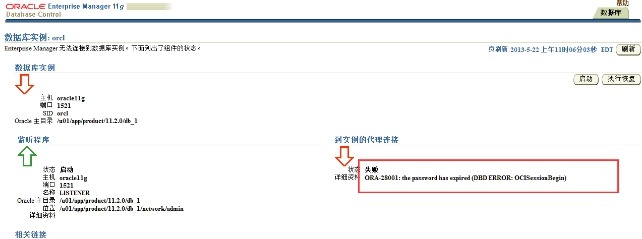
于是查找了一下资料,密码过期导致EM无法登录。ORACLE11G默认的口令期限是180天,为了永久解决这个问题只能修改配置文件。
1、查看目前数据库中的口令期限
SYS@ orcl>select * from dba_profiles where profile='DEFAULT'
2 and resource_name='PASSWORD_LIFE_TIME';
PROFILE RESOURCE_NAME RESOURCE LIMIT
------------------------------ -------------------------------- ------------------------------------------------
DEFAULT PASSWORD_LIFE_TIME PASSWORD 180
2、修改成无限制的
SYS@ orcl>alter profile default limit password_life_time unlimited;
3、查看em的两个账号状态sysman和dbsnmp
SYS@ orcl>select username,account_status from dba_users;
USERNAME ACCOUNT_STATUS
------------------------------ --------------------------------
TEST OPEN
TEST2 OPEN
SCOTT OPEN
HR OPEN
ORACLE_OCM EXPIRED & LOCKED
XS$NULL EXPIRED & LOCKED
BI EXPIRED & LOCKED
PM EXPIRED & LOCKED
MDDATA EXPIRED & LOCKED
IX EXPIRED & LOCKED
SH EXPIRED & LOCKED
USERNAME ACCOUNT_STATUS
------------------------------ --------------------------------
DIP EXPIRED & LOCKED
OE EXPIRED & LOCKED
APEX_PUBLIC_USER EXPIRED & LOCKED
SPATIAL_CSW_ADMIN_USR EXPIRED & LOCKED
SPATIAL_WFS_ADMIN_USR EXPIRED & LOCKED
DBSNMP EXPIRED
SYSMAN EXPIRED
4、2个账号都过期,于是修改密码
SYS@ orcl>alter user dbsnmp identified by oracle;
User altered.
SYS@ orcl>alter user sysman identified by oracle;
User altered.
5、再重新打开EM,能够正常使用了。在修改密码前我重新启动过数据库和EM
1.12 重建例子
1.12.1 Windows 下重建
命令如下:
emca -config dbcontrol db -repos recreate ---建议重新创建
emca -config dbcontrol db -repos create
然后会出现以下信息:
C:\Users\Administrator>emctl start dbconsole
Environment variable ORACLE_UNQNAME not defined. Please set ORACLE_UNQNAME to da
tabase unique name.
C:\Users\Administrator>emca -config dbcontrol db -repos recreate
EMCA 开始于 2012-3-12 16:28:39
EM Configuration Assistant, 11.2.0.0.2 正式版
版权所有 (c) 2003, 2005, Oracle。保留所有权利。
输入以下信息:
数据库 SID: orcl
监听程序端口号: 1521
监听程序 ORACLE_HOME [ c:\app\Administrator\product\11.2.0\dbhome_1 ]:
SYS 用户的口令:
DBSNMP 用户的口令:
SYSMAN 用户的口令:
SYSMAN 用户的口令: 通知的电子邮件地址 (可选):
通知的发件 (SMTP) 服务器 (可选):
-----------------------------------------------------------------
已指定以下设置
数据库 ORACLE_HOME ................ c:\app\Administrator\product\11.2.0\dbhome_1
本地主机名 ................ lhr
监听程序 ORACLE_HOME ................ c:\app\Administrator\product\11.2.0\dbhome
_1
监听程序端口号 ................ 1521
数据库 SID ................ orcl
通知的电子邮件地址 ...............
通知的发件 (SMTP) 服务器 ...............
-----------------------------------------------------------------
是否继续? [是(Y)/否(N)]: y
2012-3-12 16:31:41 oracle.sysman.emcp.EMConfig perform
信息: 正在将此操作记录到 c:\app\Administrator\cfgtoollogs\emca\orcl\emca_2012_03
_12_16_28_39.log。
2012-3-12 16:31:44 oracle.sysman.emcp.EMReposConfig invoke
信息: 正在删除 EM 资料档案库 (此操作可能需要一段时间)...
2012-3-12 16:35:22 oracle.sysman.emcp.EMReposConfig invoke
信息: 已成功删除资料档案库
2012-3-12 16:35:23 oracle.sysman.emcp.EMReposConfig createRepository
信息: 正在创建 EM 资料档案库 (此操作可能需要一段时间)...
2012-3-12 16:42:47 oracle.sysman.emcp.EMReposConfig invoke
信息: 已成功创建资料档案库
2012-3-12 16:42:58 oracle.sysman.emcp.EMReposConfig uploadConfigDataToRepository
信息: 正在将配置数据上载到 EM 资料档案库 (此操作可能需要一段时间)...
2012-3-12 16:45:05 oracle.sysman.emcp.EMReposConfig invoke
信息: 已成功上载配置数据
2012-3-12 16:45:25 oracle.sysman.emcp.util.DBControlUtil configureSoftwareLib
信息: 软件库已配置成功。
2012-3-12 16:45:25 oracle.sysman.emcp.EMDBPostConfig configureSoftwareLibrary
信息: 正在部署预配档案...
2012-3-12 16:46:42 oracle.sysman.emcp.EMDBPostConfig configureSoftwareLibrary
信息: 预配档案部署成功。
2012-3-12 16:46:42 oracle.sysman.emcp.util.DBControlUtil secureDBConsole
信息: 正在保护 Database Control (此操作可能需要一段时间)...
2012-3-12 16:46:56 oracle.sysman.emcp.util.DBControlUtil secureDBConsole
信息: 已成功保护 Database Control。
2012-3-12 16:46:56 oracle.sysman.emcp.util.DBControlUtil startOMS
信息: 正在启动 Database Control (此操作可能需要一段时间)...
2012-3-12 16:50:05 oracle.sysman.emcp.EMDBPostConfig performConfiguration
信息: 已成功启动 Database Control
2012-3-12 16:50:06 oracle.sysman.emcp.EMDBPostConfig performConfiguration
信息: >>>>>>>>>>> Database Control URL 为 https://lhr:5501/em <<<<<<<<<<<
2012-3-12 16:50:24 oracle.sysman.emcp.EMDBPostConfig invoke
警告:
************************ WARNING ************************
管理资料档案库已置于安全模式下, 在此模式下将对 Enterprise Manager 数据进行加密。
加密密钥已放置在文件 c:/app/Administrator/product/11.2.0/dbhome_1/lhr_orcl/sysma
n/config/emkey.ora 中。请务必备份此文件, 因为如果此文件丢失, 则加密数据将不可用
。
***********************************************************
已成功完成 Enterprise Manager 的配置
EMCA 结束于 2012-3-12 16:50:24
C:\Users\Administrator>
方法二是自己实验出来的,并不是一个正式的方法,但是比上一种方法简单,易于操作。
信息提示里找不到一个目录D:\oracle\product\10.1.0\db_1\oc4j\j2ee\OC4J_DBConsole_localhost_java, 到这个信息提示的上一层目录里一看,可以看到有个类似的目录, 形如OC4J_DBConsole_janes_java, 这里janes是我的机器名,把这个目录copy到当前目录下,改成信息提示里没有找到的目录名,比如 我这里就改成D:\oracle\product\10.1.0\db_1\oc4j\j2ee\OC4J_DBConsole_localhost_java
同时来到D:\oracle\product\10.1.0\db_1目录下,可以找到一个名字形如janes_ORCL的目录,
注意janes_ORCL,这里的janes是我的机器名,ORCL是我这里ORacle的SID,你可以根据你的具体情况,来找到类似的目录, 同样在当前copy到当前目录,并改名为localhost_ORCL.
还有第三方法,不过没有试过
有出现这样问题的帮着试试
set ORACLE_HOSTNAME=localhost
export ORACLE_HOSTNAME=192.168.225.130
然后通过emctl start dbconsole或者服务里的ORacleDBConsoleXXXX的服务就可以启动了。
在cmd里输入emctl start dbconsole后出现:
C:\Documents and Settings\Administrator>emctl start dbconsole
Oracle Enterprise Manager 10g Database Control Release 10.2.0.1.0
Copyright (c) 1996, 2005 Oracle Corporation. All rights reserved.
http://hexun1:1158/em/console/aboutApplication
Starting Oracle Enterprise Manager 10g Database Control ...OracleDBConsoleorcl
服务正在启动 ...............
OracleDBConsoleorcl 服务已经启动成功。
复制上面红色标记的网址就可以通过浏览器访问了。
如果还出现上述的错误:删除dbconsole重新配置
emca -deconfig dbconsole db -repos drop
如果删除失败,进入数据库删除dbconsole以前的用户,并且修改DBSNMP密码
sql>alter user dbsnmp identified by orcl;
删除早期DBCONSOLE创建的用户:
sql>drop role MGMT_USER;
sql>drop user MGMT_VIEW cascade;
sql>drop user sysman cascade;
删除早期DBCONSOLE创建的对象:
sql>drop PUBLIC SYNONYM MGMT_TARGET_BLACKOUTS;
sql>drop public synonym SETEMVIEWUSERCONTEXT;
重新创建DBCONSOLE:(如果是在windows下,要先到注册表删除DBCONSOLE的服务,重启电脑)
emca -config dbcontrol db -repos create
根据提示,先输入SID,再输入Y继续;
输入端口1521,输入SYS密码,输入DBSNMP密码,输入SYSMAN 密码,输入Y继续完成。
检查状态 emctl status dbconsole
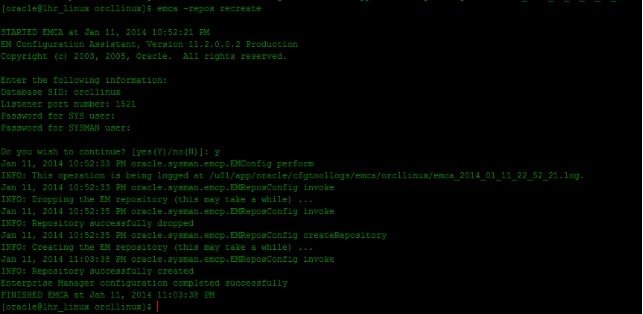
emca -repos recreate
1.12.2 Rac 下重建
[ZFXDESKDB1:oracle]:/oracle>emca -config dbcontrol db -repos recreate -cluster
STARTED EMCA at Mar 2, 2016 3:51:52 PM
EM Configuration Assistant, Version 11.2.0.3.0 Production
Copyright (c) 2003, 2011, Oracle. All rights reserved.
Enter the following information:
Database unique name: oraESKDB
Service name: oraESKDB
Listener port number: 1521
Listener ORACLE_HOME [ /oracle/app/11.2.0/grid ]:
Password for SYS user:
Password for DBSNMP user:
Password for SYSMAN user:
Cluster name: ZFXDESKDB-cluster ====》任意输入一个名称
Email address for notifications (optional):
Outgoing Mail (SMTP) server for notifications (optional):
ASM ORACLE_HOME [ /oracle/app/11.2.0/grid ]:
ASM port [ 1521 ]:
ASM username [ ASMSNMP ]:
ASM user password:
-----------------------------------------------------------------
You have specified the following settings
Database ORACLE_HOME ................ /oracle/app/oracle/product/11.2.0/db
Database instance hostname ................ Listener ORACLE_HOME ................ /oracle/app/11.2.0/grid
Listener port number ................ 1521
Cluster name ................ ZFXDESKDB-cluster
Database unique name ................ oraESKDB
Email address for notifications ...............
Outgoing Mail (SMTP) server for notifications ...............
ASM ORACLE_HOME ................ /oracle/app/11.2.0/grid
ASM port ................ 1521
ASM user role ................ SYSDBA
ASM username ................ ASMSNMP
-----------------------------------------------------------------
----------------------------------------------------------------------
WARNING : While repository is dropped the database will be put in quiesce mode.
----------------------------------------------------------------------
Do you wish to continue? [yes(Y)/no(N)]: Y
Mar 2, 2016 3:53:22 PM oracle.sysman.emcp.EMConfig perform
INFO: This operation is being logged at /oracle/app/oracle/cfgtoollogs/emca/oraESKDB/emca_2016_03_02_15_51_52.log.
Mar 2, 2016 3:53:26 PM oracle.sysman.emcp.EMReposConfig invoke
INFO: Dropping the EM repository (this may take a while) ...
Mar 2, 2016 3:56:23 PM oracle.sysman.emcp.EMReposConfig invoke
INFO: Repository successfully dropped
Mar 2, 2016 3:56:24 PM oracle.sysman.emcp.EMReposConfig createRepository
INFO: Creating the EM repository (this may take a while) ...
Mar 2, 2016 4:03:05 PM oracle.sysman.emcp.EMReposConfig invoke
INFO: Repository successfully created
Mar 2, 2016 4:03:13 PM oracle.sysman.emcp.EMReposConfig uploadConfigDataToRepository
INFO: Uploading configuration data to EM repository (this may take a while) ...
Mar 2, 2016 4:04:37 PM oracle.sysman.emcp.EMReposConfig invoke
INFO: Uploaded configuration data successfully
Mar 2, 2016 4:04:38 PM oracle.sysman.emcp.EMDBCConfig instantiateOC4JConfigFiles
INFO: Propagating /oracle/app/oracle/product/11.2.0/db/oc4j/j2ee/OC4J_DBConsole_zfxdeskdb1_oraESKDB to remote nodes ...
Mar 2, 2016 4:04:44 PM oracle.sysman.emcp.EMDBCConfig instantiateOC4JConfigFiles
INFO: Propagating /oracle/app/oracle/product/11.2.0/db/oc4j/j2ee/OC4J_DBConsole_zfxdeskdb2_oraESKDB to remote nodes ...
Mar 2, 2016 4:04:53 PM oracle.sysman.emcp.EMAgentConfig deployStateDirs
INFO: Propagating /oracle/app/oracle/product/11.2.0/db/zfxdeskdb1_oraESKDB to remote nodes ...
Mar 2, 2016 4:04:57 PM oracle.sysman.emcp.EMAgentConfig deployStateDirs
INFO: Propagating /oracle/app/oracle/product/11.2.0/db/zfxdeskdb2_oraESKDB to remote nodes ...
Mar 2, 2016 4:05:02 PM oracle.sysman.emcp.util.DBControlUtil secureDBConsole
INFO: Securing Database Control (this may take a while) ...
Mar 2, 2016 4:05:27 PM oracle.sysman.emcp.util.DBControlUtil startOMS
INFO: Starting Database Control (this may take a while) ...
Mar 2, 2016 4:06:29 PM oracle.sysman.emcp.EMDBPostConfig performConfiguration
INFO: Database Control started successfully
Mar 2, 2016 4:06:29 PM oracle.sysman.emcp.EMDBPostConfig performConfiguration
INFO: >>>>>>>>>>> The Database Control URL is https://ZFXDESKDB1:1158/em <<<<<<<<<<<
Mar 2, 2016 4:06:33 PM oracle.sysman.emcp.EMDBPostConfig showClusterDBCAgentMessage
INFO:
**************** Current Configuration ****************
INSTANCE NODE DBCONTROL_UPLOAD_HOST
---------- ---------- ---------------------
oraESKDB zfxdeskdb1 ZFXDESKDB1
oraESKDB zfxdeskdb2 ZFXDESKDB1
Mar 2, 2016 4:06:33 PM oracle.sysman.emcp.EMDBPostConfig invoke
WARNING:
************************ WARNING ************************
Management Repository has been placed in secure mode wherein Enterprise Manager data will be encrypted. The encryption key has been placed in the file: /oracle/app/oracle/product/11.2.0/db/zfxdeskdb1_oraESKDB/sysman/config/emkey.ora. Ensure this file is backed up as the encrypted data will become unusable if this file is lost.
***********************************************************
Enterprise Manager configuration completed successfully
FINISHED EMCA at Mar 2, 2016 4:06:33 PM
[ZFXDESKDB1:oracle]:/oracle>emctl status dbconsole
Environment variable ORACLE_UNQNAME not defined. Please set ORACLE_UNQNAME to database unique name.
[ZFXDESKDB1:oracle]:/oracle>export ORACLE_UNQNAME=oraESKDB
[ZFXDESKDB1:oracle]:/oracle>emctl status dbconsole
Oracle Enterprise Manager 11g Database Control Release 11.2.0.4.0
Copyright (c) 1996, 2013 Oracle Corporation. All rights reserved.
https://ZFXDESKDB1:1158/em/console/aboutApplication
Oracle Enterprise Manager 11g is running.
------------------------------------------------------------------
Logs are generated in directory /oracle/app/oracle/product/11.2.0/db/zfxdeskdb1_oraESKDB/sysman/log
1.12.2.1 Rac下建立EM的2个问题
一、 监听问题
Rac下必须配置asm的scan-listener,否则配置的时候报错:
Mar 2, 2016 11:10:11 AM oracle.sysman.emcp.util.GeneralUtil initSQLEngineRemotely
WARNING: Error during db connection : ORA-12514: TNS:listener does not currently know of service requested in connect descriptor
Mar 2, 2016 11:10:16 AM oracle.sysman.emcp.util.GeneralUtil initSQLEngineRemotely
WARNING: ORA-12541: TNS:no listener
Mar 2, 2016 11:10:17 AM oracle.sysman.emcp.util.GeneralUtil initSQLEngineRemotely
WARNING: Error during db connection : ORA-12514: TNS:listener does not currently know of service requested in connect descriptor
Mar 2, 2016 11:10:22 AM oracle.sysman.emcp.util.GeneralUtil initSQLEngineRemotely
WARNING: ORA-12541: TNS:no listener
Password validation failed. Some of the possible reasons may be:
1) Invalid username/password.
2) Database is not up.
3) Scan listener not up.
4) Database service is not registered with scan listener.
5) Password file may be missing or configured incorrectly.
解决方案:
SYS@+ASM1> alter system set remote_listener='(DESCRIPTION=(ADDRESS_LIST=(ADDRESS=(PROTOCOL=TCP)(HOST=ZFXDESKDB-scan)(PORT=1521))))' sid='*';
System altered.
SYS@+ASM1>
SYS@+ASM1>
SYS@+ASM1> alter system register;
二、 Asmsnmp用户密码不对
Mar 2, 2016 3:41:53 PM oracle.sysman.emcp.util.GeneralUtil initSQLEngineRemotely
WARNING: ORA-01017: invalid username/password; logon denied
Password validation failed. Some of the possible reasons may be:
1) Invalid username/password.
2) Database is not up.
3) Scan listener not up.
4) Database service is not registered with scan listener.
5) Password file may be missing or configured incorrectly.
ASM user password:
Mar 2, 2016 3:44:08 PM oracle.sysman.emcp.util.GeneralUtil initSQLEngineRemotely
WARNING: Error during db connection : ORA-01017: invalid username/password; logon denied
Mar 2, 2016 3:44:18 PM oracle.sysman.emcp.util.GeneralUtil initSQLEngineRemotely
WARNING: ORA-01017: invalid username/password; logon denied
null [ORA-01219: database not open: queries allowed on fixed tables/views only]
ASM user password:
[ZFXDESKDB2:grid]:/home/grid>asmcmd
ASMCMD> lsdg
State Type Rebal Sector Block AU Total_MB Free_MB Req_mir_free_MB Usable_file_MB Offline_disks Voting_files Name
MOUNTED EXTERN N 512 4096 1048576 131100 72444 0 72444 0 Y DATA/
ASMCMD> passwd sys
Enter old password (optional):
Enter new password: ******
----集群环境下修改
ASMCMD> orapwusr --modify --password sys
Enter password: ******
ASMCMD>
----解决方案:
[ZFXDESKDB2:grid]:/oracle/app/11.2.0/grid/dbs>sqlplus / as sysasm
SQL*Plus: Release 11.2.0.4.0 Production on Wed Mar 2 15:46:27 2016
Copyright (c) 1982, 2013, Oracle. All rights reserved.
Connected to:
Oracle Database 11g Enterprise Edition Release 11.2.0.4.0 - 64bit Production
With the Real Application Clusters and Automatic Storage Management options
SQL> create user asmsnmp identified by dulala;
create user asmsnmp identified by dulala
*
ERROR at line 1:
ORA-15306: ASM password file update failed on at least one node
SQL> grant sysdba to asmsnmp;
Grant succeeded.
SQL> alter user asmsnmp identified by dulala;
User altered.
SQL>
原文地址:企业管理器(OEM)介绍: Grid Control 和 Database Control 作者:君落尘
Oracle 自10g 以后,企业管理器(Oracle Enterprise Manager:OEM)变成了网页形式。 OEM 分两种:Grid Control(网格控制) 和 Database Control(数据库控制)。
Grid Control 是具有完整功能的全企业Oracle 生态系统管理工具。
Database Control是可以只作为数据库管理实用程序部署的OEM 版本。
Grid Control 和 Database Control 区别:
Grid Control 可以监控整个Oracle 生态环境,它具有一个中心存储仓库,用于收集有关多个计算机上的多个目标的数据,并且提供一个界面来显示所有已发现目标的共同信息。
Database Control 是Grid Control 功能的一个子集,Database Control 只监控一个数据库,并且不能用于监控多个数据库。 它只在数据库上运行。
从数据库管理的观点来看,两个使用程序的功能几乎是相同的,只不过网格控制提供了涉及多台计算机的操作的更多功能。 大师,两个使用程序的界面是相同的,底层代码也是相同的,并且只有很细微的区别。 从备份和恢复的观点来看,两个使用程序几乎相等。
一. Grid Control
OEM 是一个Web 应用程序,它具有Web应用程序自带的所有功能和限制。 OEM 控制台是运行在HTTP服务器上的web页面,该HTTP服务器将作为Grid Control 安装的一部分安装和配置,没有任何客户端安装。
Grid Control 部署在Oracle 应用服务器(Oracle Application Server:OAS)上。 当安装Grid Control时,同时也会安装OAS,然后Grid Control 应用程序作为Oracle Containers for J2EE(OC4J)应用程序部署在OAS上。Grid Control 可以监控许多不同类型的目标(当Grid Control调用它们时): 数据库,应用服务器,主机自身,甚至是存储设备。
Grid Control 它收集遍及企业的计算系统的相关信息,将这些信息合并到中心存储仓库中,然后通过它的Web控制台想DBA显示这些信息。 根据这些信息,DBA 可以让Grid Control 代表DBA 在这些计算系统中执行任务。
Grid Control 的体系结构
Grid Control 的体系结构从Oracle 管理服务(Oracle Management Serveice:OMS)开始,这是部署在应用服务器上的应用程序。 OMS通过中心代理程序(central agent)从注册的目标服务器中收集数据。 中心代理程序安装在目标服务器上,它收集信息并且将这些数据推入OMS。 OMS将数据加载到存储仓库数据库中,然后根据仓库中的信息构建Web页面,可以通过能够定位OMS 服务器URL 的任意浏览器检索该Web页面。
1. 中心代理程序
中心代理程序安装在使用Grid Control 监控的每台计算机上。 中心代理程序不可以独立作出任何决策。 它使用Perl 脚本收集数据,将这些数据通过HTTPS 推入OMS。 OMS 执行必须的任何智能,然后将操作发送给代理程序以执行该操作。
从存储的观点来看,中心代理程序占用相对较少的存储空间。 然而,由于其所做的工作,中心代理程序可能占用大量的CPU资源。
2. Oracle 管理服务(OMS)
OMS 是在Grid Control 体系结构的中间层上部署的Web应用程序,它不断从代理程序处以XML文件的形式接收信息,然后将这些信息加载到存储仓库表中。 它负责为提供控制台Web 页面的HTTP服务器构建Web内容,由此可能向中心代理程序要求特定的信息。 数据一般是从中心代理程序推入的。
3. 存储仓库数据库
OMS 使用Oracle 数据库作为它的数据源。 存储仓库数据库用于存储有关管理目标以及Grid Control 操作(如作业或通知)的信息。
在存储仓库中可以很好的利用高级的RDBMS特性;可以使用高级排队(Advanced Queuing:AQ)功能,大量使用分区技术,甚至是使用内部的DBMS_JOB.
二. 安装和配置 Grid Control
根据安装时的选择,Grid Control的安装过程可以有许多不同。 默认情况下,Grid Control的安装在提供给按组昂的服务器上创建3个ORACLE_HOME目录:OMS 目录,存储仓库数据库目录和中心代理程序目录。 可以选择将存储仓库安装在预先存在的数据库中,这些数据库位于与grid Control相同或不同的服务器上。
如果选择预先存在的数据库,则必须提供主机,侦听器端口,以及数据库的SID。 我们也需要提供dba凭证(如SYSTEM)。 Oracle 通过安装程序(Universal Installer)然后检查已有的数据库,查看它是否具有Grid control存储仓库的所需的所有数据包和特性。 如果检查通过,安装继续。 否则需要修改数据库或选择不同的选项。
在10.1版本的grid Control中,默认的数据库和OMS 位于相同的主目录中,但是由于添加补丁和升级的原因而将它们分离到不同的主目录中。 在 Grid Control 10.2中,3个主目录可以分别应用补丁。 当有时间方面的考虑时,这一点非常重要。 如果存在必须通过添加补丁解决的代理程序问题,就可以关闭Grid Control服务器上的代理程序,对代理程序ORACLE_HOME 添加补丁,同时OMS 和数据库保持运行和操作,并且继续监控其他已发现的服务器。
2.1 资源考虑事项
不要将Grid Control 随意安装到某个位置。 如果采用默认的存储仓库数据库,加上OMS 和它的底层OAS 以及以及中心代理程序,则需要使用1.5GB的存储空间,并且这只是Grid Control 占用的存储空间,还没有考虑运行在计算机上的其他内容。 因此,在安装Grid Control之前,要确保已经在服务器上至少有1.5GB的存储空间。 如果没有足够的空间,则需要进行大量的存储空间交换。
CPU 需求很难衡量。 这种需求取决与正在注册和监控的多少目标,以及作业和通知的活跃程度。
2.2 Oracle 通用安装程序
对于当前的任何Oracle 产品,其提供的安装界面的通用安装程序都是相同的。 通用安装程序是一个向导驱动的过程,它请求你定制安装的相关过程,且执行任意数量的系统检查以添加这些信息,这些系统检查可实际地确认用户请求的安装过程是否可行。
Oracle Grid Control 的下载地址:http://www.oracle.com/technology/software/products/oem/index.html
要先下载第一个版本的,比如:10.2.0.1, 安装之后在升级到其他版本,如10.2.0.5.
如果之前有安装的话,在安装之前要把之前的安装卸载干净. 不然可能会报错。
通过安装程序首先询问要安装哪些内容。 有4个选项:
Enterprise Manager 10g Grid Control Using a new Database
Using an Existing Database
Additional Management Service
Additional Management Agent
2.2.1 在新数据库中安装存储仓库
安装程序会构建3个ORACLE_HOME:
(1)db10g: 存储Oracle 数据库中预先构建的存储仓库
(2)Oms10g:存储Oracle应用服务器
(3)Agent10g:存储中心代理程序
2.2.2 在已有的数据库中安装存储仓库
如果希望使用自己的数据库,需要满足一下需求:
(1) SGA_TARGET 必须大于272MB.
(2) AQ_TM_PROCESSES 必须大于等于1.
(3) session_cached_cursors 参数值必须大于200
(4) 必须安装dbms_shared_pool, 安装方法是用sys用户运行如下脚本:
ORACLE_HOME/rdbms/admin/dbmspool.sql
ORACLE_HOME/rdbms/admin/prvtpool.plb
注意: Grid Control 存储仓库不可以与具有Database Control 存储仓库的系统共存(因为两者都需要以SYSMAN模式存在)。因此如果尝试使用已经被Database Control 监控的数据库,则需要删除SYSMAN用户,或者由通用安装程序来执行这项工作。
2.3 配置助手
安装软件后,通用程序会运行多个配置助手,这些助手会执行一系列配置操作以协调所有软件的运行。 配置助手进程分为3个程序段以匹配3个Oracle 主目录: 首先是数据库配置,其次是OMS 配置,最后是代理程序配置。
总之,如果运气好的话,就不需要了解关于这些助手的很多内容。 大多数助手都关注于配置和部署作为OMS 的OC4J应用程序。 如果任何时候产生故障,installActions.log(ORACLE_BASE/LOGS目录下)中有大量可提供的信息。
如果无法配置助手,可以在CliffsNotes中做如下工作:
(1)确保没有略过先决条件警告。
(2)为了保险起见,重新尝试配置助手。
(3)确保具有足够的存储空间(>512MB)
(4)抛弃所有内容并再次尝试。
2.4 安装中心代理程序
安装完Grid Control软件并且启动和运行OMS后,就可以准备开始监控企业中已有的目标。当然,一般必须现在希望被OEM 管理的所有计算机上安装OEM 代理程序。
中心代理程序是独立安装的软件,用于传递信息给OMS 以及从OMS处接收命令。 中心代理程序必须安装在所有要监控的目标主机的专用ORACLE_HOME目录中。 安装中心代理程序有两种方法:一是用Grid Control 软件来安装(最后一个选项),二是使用OMS 功能来将代理程序推到不同的服务器上。
用Grid Control 安装比较直观。 它要求提供OMS 服务器的主机名和端口。 默认情况下,上传HTTP 端口与Grid Control 控制台的端口相同:4889. 另外,我们也需要输入代理程序注册口令: 这是在Grid Control安装期间提供的口令,代理程序需要使用该口令来验证是否可以作为特定的OMS的有效数据源。
在其他服务器上安装代理之后,查询代理状态:
C:/Documents and Settings/Administrator.HFCC-IT-176613>emctl status agent
Oracle Enterprise Manager 10g Release 10.2.0.2.0.
Copyright (c) 1996, 2006 Oracle Corporation. All rights reserved.
---------------------------------------------------------------
Agent Version : 10.2.0.2.0
OMS Version : 10.2.0.2.0
Protocol Version : 10.2.0.2.0
Agent Home : F:/OracleHomes/agent10g
Agent binaries : F:/OracleHomes/agent10g
Agent Process ID : 4684
Agent URL : https://HFCC-IT-176613:3872/emd/main/ --- 输入该网址能看到agent is working
Repository URL : https://HFCC-KF-111111:1159/em/upload --- 在代理服务器上更新数据的
Started at : 2010-06-30 13:09:16
Started by user : SYSTEM
Last Reload : 2010-06-30 13:09:16
Last successful upload : (none)
Last attempted upload : (none)
Total Megabytes of XML files uploaded so far : 0.00
Number of XML files pending upload : 11
Size of XML files pending upload(MB) : 4.46
Available disk space on upload filesystem : 34.45%
Last attempted heartbeat to OMS : 2010-06-30 13:15:23
Last successful heartbeat to OMS : unknown
---------------------------------------------------------------
Agent is Running and Ready
注意:我们需要在服务器的端的IE里输入:https://HFCC-KF-111111:1159/em/upload
然后服务器会和客户端进行更新。更新完之后,就可以在服务器端的目录里看到其他的数据库了。
C:/Documents and Settings/Administrator.HFCC-IT-176613>emctl status agent
Oracle Enterprise Manager 10g Release 10.2.0.2.0.
Copyright (c) 1996, 2006 Oracle Corporation. All rights reserved.
---------------------------------------------------------------
Agent Version : 10.2.0.2.0
OMS Version : 10.2.0.2.0
Protocol Version : 10.2.0.2.0
Agent Home : F:/OracleHomes/agent10g
Agent binaries : F:/OracleHomes/agent10g
Agent Process ID : 4684
Agent URL : https://HFCC-IT-176613:3872/emd/main/
Repository URL : https://HFCC-KF-111111:1159/em/upload
Started at : 2010-06-30 13:09:16
Started by user : SYSTEM
Last Reload : 2010-06-30 13:09:16
Last successful upload : 2010-06-30 13:24:30
Total Megabytes of XML files uploaded so far : 4.48
Number of XML files pending upload : 0
Size of XML files pending upload(MB) : 0.00
Available disk space on upload filesystem : 34.46%
Last successful heartbeat to OMS : 2010-06-30 13:24:16
---------------------------------------------------------------
Agent is Running and Ready
2.5 启动和停止所有Grid Control 组件 示例
2.5.1 停止顺序
-- 停止中心代理程序
$ORACLE_HOME/bin/emctl stop agent
-- 停止OMS
$ORACLE_HOME/bin/emctl stop oms
-- 停止进程管理器
$ORACLE_HOME/bin/opmnctl stopall
-- 停止存储仓库数据库
Export ORACLE_SID=SID
Sqlplus /nolog
Shutdown immediate
-- 停止监听程序
Lsnrctl stop
2.5.2 启动顺序
-- 启动监听
Lsnrctl start
-- 启动存储仓库数据库
Export ORACLE_SID=SID
Sqlplus /nolog
Startup
-- 启动OMS
$ORACLE_HOME/bin/emctl start oms
-- 启动中心代理程序
$ORACLE_HOME/bin/emctl start agent
三. Database Control
Database Control 是Grid Control功能的一个子集,它只管理和监控一个数据库。Database Control 的功能是以数据库为中心,但又不完全限于数据库。由于会有一些为数据库所在的服务器收集的主机统计信息,因此主机(并非单独的“目标”)有一些报告信息。 此外,可以配置Database Control 以监控和管理自动存储管理(ASM)实例,目标数据库可以使用该ASM实例进行存储。
也可以配置Database Control以监控RAC 数据库。由此监控多个主机,多个实例和多个ASM实例。当然,它只可以监控一个数据库,因此Database Control的限制仍然是相同的。
3.1 Database Control的体系结构
Database Control 的体系结构非常类似与Grid Control的体系结构,但规模要小很多。 中心代理程序和OMS 合并到相同的OC4J应用程序,并且存储仓库驻留在目标数据库本身中。
Database Control的存储仓库位于它监控的目标数据库中,因此,如果目标数据库停机,Database Control就不能正常运行,除非启动该数据库。 在Windows系统上,Database Control进程是单独的进程,并且作为Services控制面板中单独的服务启动和停止。 在Linux 和 unix上,dbconsole作为单独的应用程序被停止和启动,但它仍然会产生单独的代理程序和Java进程。
Database Control与RDBMS 一起安装,并且它所在的ORACLE_HOME 目录与其目标数据库的相同。 在为数据库配置dbconsole 后,就会在ORACLE_HOME中创建名为host_sid的新子目录,其中host是计算机名,而sid是锁监控的实例的SID. 例如:服务名为DavidDai,监控的数据库为orcl, 则配置文件在$ORACLE_HOME/DavidDai_orcl中。
在RAC 环境中,一般根据集群中的每个节点命名多个目录,后面跟上RAC 数据库的globalname. 因此,如果有2个节点的RAC集群,两个节点分别为RAC1和 RAC2,并且数据库实例为orcl,则在每个节点的RDBMS主目录上有两个目录ORACLE_HOME/RAC1_orcl 和 ORACLE_HOME/RAC2_orcl. 在每个节点上,只有名称与节点对应的目录才会实际地拥有文件,而另一个目录则为空。 这种约定在RAC集群共享同一个位于共享驱动器上的$ORACLE_HOME软件树时也适用。
Database Control的启动和关闭命令:
Emctl start dbconsole
Emctl stop dbconsole
四. 安装和配置Database Control
Database Control 软件不需要进行任何特定的安装。 Database Control 默认与已有的RDBMS一起安装。 实际上,在安装实例时,会有个选项,是否配置Database Enterprise Manager. 选择后就自动安装了。
4.1 使用数据库配置助手配置Database Control
如果在安装实例的时候没有安装Database Control,那么我们也可以用Database configuration Assistant: DBCA 来配置。打开dbca后,有个配置数据库选项,在这里面就能添加Database Control了.
注意,dbca 不可以用于删除或者修改已经添加的Database Control,它只是一个用于添加Database Control的工具。 如果要删除Database Control,则需要使用命令行工具: emca.
4.2 使用企业管理器配置助手配置 Database Control
企业管理器配置助手(Enterprise Manager Configuration Assistant: emca) 的用法不是很直观,但是功能比较强大。
执行一条命令后,emca 以一种交互的模式提示以下信息: 配置数据库SID,连接emca与数据库的监听器端口,以及所需的用户口令。
4.2.1 使用emca 删除已有的dbcontrol 配置 和 dbconsole 存储仓库
Emca -deconfig dbcontrol db -repos drop
C:/Documents and Settings/user.HQ-TEXT>emca -deconfig dbcontrol db -repos drop
EMCA 开始于 2010-6-30 9:37:00
EM Configuration Assistant 10.2.0.1.0 正式版
版权所有 (c) 2003, 2005, Oracle。保留所有权利。
输入以下信息:
数据库 SID: dave
监听程序端口号: 1521
SYS 用户的口令:
SYSMAN 用户的口令:
是否继续? [yes(Y)/no(N)]: yes
2010-6-30 9:37:15 oracle.sysman.emcp.EMConfig perform
信息: 正在将此操作记录到 D:/oracle/product/10.2.0/db_1/cfgtoollogs/emca/dave/emc
a_2010-06-30_09-37-00-上午.log。
2010-6-30 9:37:18 oracle.sysman.emcp.util.DBControlUtil stopOMS
信息: 正在停止 Database Control (此操作可能需要一段时间)...
2010-6-30 9:38:02 oracle.sysman.emcp.EMReposConfig dropRepository
信息: 正在删除 EM 资料档案库 (此操作可能需要一段时间)...
2010-6-30 9:38:03 oracle.sysman.emcp.EMReposConfig invoke
信息: 已成功删除资料档案库
已成功完成 Enterprise Manager 的配置
EMCA 结束于 2010-6-30 9:38:04
4.2.2 使用emca 为数据库创建新的dbcontrol 配置
Emca -config dbcontrol db -repos create
C:/Documents and Settings/user.HQ-TEXT>emca -config dbcontrol db -repos create
EMCA 开始于 2010-6-30 9:44:01
EM Configuration Assistant 10.2.0.1.0 正式版
版权所有 (c) 2003, 2005, Oracle。保留所有权利。
输入以下信息:
数据库 SID: dave
监听程序端口号: 1521
SYS 用户的口令:
DBSNMP 用户的口令:
SYSMAN 用户的口令:
通知的电子邮件地址 (可选):
通知的发件 (SMTP) 服务器 (可选):
-----------------------------------------------------------------
已指定以下设置
数据库 ORACLE_HOME ................ D:/oracle/product/10.2.0/db_1
数据库主机名 ................ HFCC-KF-111111
监听程序端口号 ................ 1521
数据库 SID ................ dave
通知的电子邮件地址 ...............
通知的发件 (SMTP) 服务器 ...............
-----------------------------------------------------------------
是否继续? [yes(Y)/no(N)]: yes
2010-6-30 9:44:23 oracle.sysman.emcp.EMConfig perform
信息: 正在将此操作记录到 D:/oracle/product/10.2.0/db_1/cfgtoollogs/emca/dave/emc
a_2010-06-30_09-44-01-上午.log。
2010-6-30 9:44:32 oracle.sysman.emcp.EMReposConfig createRepository
信息: 正在创建 EM 资料档案库 (此操作可能需要一段时间)...
2010-6-30 9:46:18 oracle.sysman.emcp.EMReposConfig invoke
信息: 已成功创建资料档案库
2010-6-30 9:46:23 oracle.sysman.emcp.util.DBControlUtil startOMS
信息: 正在启动 Database Control (此操作可能需要一段时间)...
2010-6-30 9:47:04 oracle.sysman.emcp.EMDBPostConfig performConfiguration
信息: 已成功启动 Database Control
2010-6-30 9:47:04 oracle.sysman.emcp.EMDBPostConfig performConfiguration
警告: 无法创建 Database Control 快捷方式
2010-6-30 9:47:04 oracle.sysman.emcp.EMDBPostConfig performConfiguration
信息: >>>>>>>>>>> Database Control URL 为 http://HFCC-KF-111111:5500/em <<<<<<<<
<<<
已成功完成 Enterprise Manager 的配置
EMCA 结束于 2010-6-30 9:47:04
Oracle OEM 重建
http://blog.csdn.net/tianlesoftware/archive/2009/10/21/4702978.aspx
4.3 emca 命令帮助
C:/Users/Administrator.DavidDai>emca help
D:/app/Administrator/product/11.2.0/dbhome_1/bin/emca.bat [操作] [模式] [数据库
类型] [标记] [参数]
-h | --h | -help | --help: 打印此帮助消息
-version: 打印版本
-config dbcontrol db [-repos (create | recreate)] [-cluster] [-silent] [-backup]
[参数]: 配置数据库的 Database Control
-config centralAgent (db | asm) [-cluster] [-silent] [参数]: 配置中心代理管理
-config all db [-repos (create | recreate)] [-cluster] [-silent] [-backup] [参数
]: 配置 Database Control 和中心代理管理
-deconfig dbcontrol db [-repos drop] [-cluster] [-silent] [参数]: 取消配置 Datab
ase Control
-deconfig centralAgent (db | asm) [-cluster] [ -silent] [参数]: 取消配置中心代理
管理
-deconfig all db [-repos drop] [-cluster] [-silent] [参数]: 取消配置 Database Co
ntrol 和中心代理管理
-addNode (db | asm) [-silent] [参数]: 配置数据库的新添加节点的 EM
-deleteNode (db | asm) [-silent] [参数]: 取消为数据库 (位于要删除的节点上) 配置
EM
-addInst (db | asm) [-silent] [参数]: 为新的 RAC 实例配置 EM
-deleteInst (db | asm) [-silent] [参数]: 取消为指定的 RAC 实例配置 EM
-reconfig ports [-cluster] [参数]: 重新明确分配 Database Control 端口
-reconfig dbcontrol -cluster [-silent] [参数]: 重新配置 RAC Database Control 部
署
-displayConfig dbcontrol -cluster [-silent] [参数]: 显示有关 RAC Database Contro
l 配置的信息
-migrate -from dbcontrol -to centralAgent [-repos drop] [-cluster] [-silent] [
参数]: 将 EM 配置从 Database Control 移植到中心代理
-upgrade (db | asm | db_asm) [-cluster] [-silent] [参数]: 将较低版本的 EM 配置升
级到当前版本
-updateTargets crs [-silent] [参数]: 更新 CRS 升级时所有 dbcontrol 和中心代理的
新 CRS 主目录
-restore (db | asm | db_asm) [-cluster] [-silent] [参数]: 将当前版本的 EM 配置还
原到较低版本
参数和选项:
[参数]: [ -respFile fileName ] [ -paramName paramValue ]*
db: 对数据库 (包括使用 ASM 的数据库) 执行配置操作
asm: 仅对 ASM 实例执行配置操作
db_asm: 对数据库和 ASM 实例执行升级/还原操作
-repos create: 创建新的 Database Control 资料档案库
-repos drop: 删除当前的 Database Control 资料档案库
-repos recreate: 删除当前的 Database Control 资料档案库并重新创建一个
-cluster: 对 RAC 数据库执行配置操作
-silent: 在不提示参数的情况下执行配置操作
-backup: 配置数据库的自动备份
单实例数据库的参数
ORACLE_HOSTNAME: 本地主机名
SID: 数据库 SID
PORT: 监听程序端口号
ORACLE_HOME: 数据库 ORACLE_HOME
LISTENER_OH: 监听程序 ORACLE_HOME
HOST_USER: 自动备份的主机用户名
HOST_USER_PWD: 自动备份的主机用户口令
BACKUP_SCHEDULE: 自动备份调度 (HH:MM)
EMAIL_ADDRESS: 通知的电子邮件地址
MAIL_SERVER_NAME: 通知的发件 (SMTP) 服务器
ASM_OH: ASM ORACLE_HOME
ASM_SID: ASM SID
ASM_PORT: ASM 端口
ASM_USER_ROLE: ASM 用户角色
ASM_USER_NAME: ASM 用户名
ASM_USER_PWD: ASM 用户口令
SRC_OH: 要升级的数据库的 ORACLE_HOME
DBSNMP_PWD: DBSNMP 用户的口令
SYSMAN_PWD: SYSMAN 用户的口令
SYS_PWD: SYS 用户的口令
DBCONTROL_HTTP_PORT: Database Control HTTP 端口
AGENT_PORT: EM 代理端口
RMI_PORT: Database Control 的 RMI 端口
JMS_PORT: Database Control 的 JMS 端口
EM_SWLIB_STAGE_LOC: 软件库位置
PORTS_FILE: 用于指定要使用的端口的静态文件的路径 (默认值: ${ORACLE_HOME}
/install/staticports.ini)。
集群数据库的其他参数
CLUSTER_NAME: 集群名
DB_UNIQUE_NAME: 数据库的唯一名称
SERVICE_NAME: 服务名
EM_NODE: Database Control 节点名
EM_NODE_LIST: 代理节点列表 [以逗号分隔]
Note: For Desktop Class Install always pass parameter ORACLE_HOSTNAME
as "localhost" to any emca command
OEM 里面的东西,打开IE,自己研究下就ok了.
如: https://10.85.10.80:1158/em
这个端口可以在$ORACLE_HOME/instll/portlist.ini 文件里查看。
