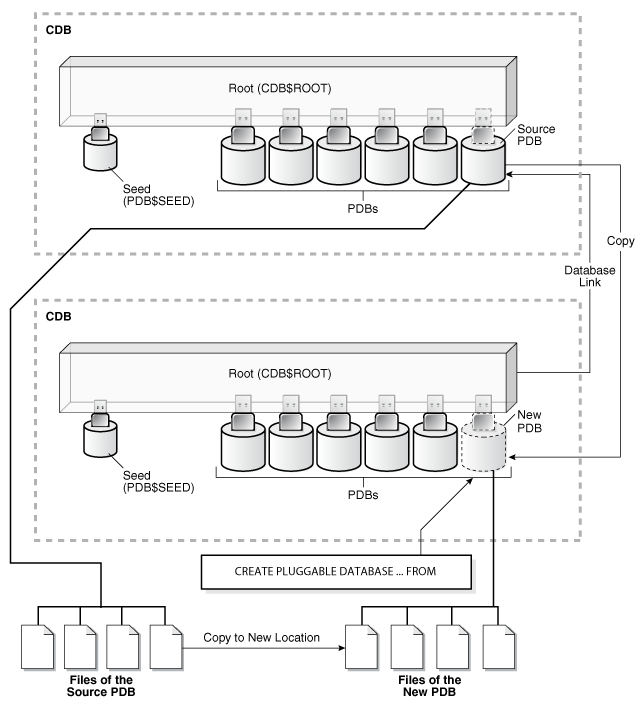
oracledatabase12c之后推出了多租户模式,这个功能也是云时代的一个需求,对于DBA来说更便捷和弹性。我们可以轻松的创建和迁移一个数据库,比跨平台传输表空间和datapump方便很多。这里我们介绍pdb迁移/升级的方法,总的来说分为在线和离线,其中在线是最省事的。
该方式对于相同版本的pdb之间的迁移没问题。如果是跨版本的,比如从12.1到19c也可以使用。在19c上clone完之后,需要运行dbupgrade脚本。
select 'alter user '||username|| ' account lock;' from dba_users where account_status='OPEN'; |
alter pluggable database pdb1 close immediate instances=all; alter pluggable database pdb1 open read only instances=all; |
在新的容器数据库上执行以下操作
create database link clone_link connect to system identified by oracle using '(description=(address=(protocol=tcp)(host=192.168.10.21)(port=1521))(connect_data=(service_name=pdb1)))'; |
create pluggable database pdb1 from pdb1@clone_link; |
下面是在通过dblink远程克隆时alert日志对应的输出
This instance was first to open pluggable database PDB1 (container=3) Database Characterset for PDB1 is ZHS16GBK Deleting old file#319 from file$ Deleting old file#320 from file$ Deleting old file#321 from file$ Deleting old file#325 from file$ Deleting old file#326 from file$ Deleting old file#327 from file$ Deleting old file#328 from file$ Deleting old file#329 from file$ Adding new file#73 to file$(old file#319) Adding new file#74 to file$(old file#320) Adding new file#75 to file$(old file#321) Adding new file#76 to file$(old file#325) Adding new file#77 to file$(old file#326) Adding new file#78 to file$(old file#327) Adding new file#79 to file$(old file#328) Adding new file#80 to file$(old file#329) Successfully created internal service pdb1 at open ALTER SYSTEM: Flushing buffer cache inst=1 container=3 local **************************************************************** Post plug operations are now complete. Pluggable database PPDBETC with pdb id - 3 is now marked as NEW. **************************************************************** Completed: create pluggable database pdb1 from pdb1@clone_link |
如果源端和目标端对应的patch不一致或者出现一些无效的组件等,PDB会处以restricted模式。
SQL> show pdbs CON_ID CON_NAME OPEN MODE RESTRICTED ---------- ------------------------------ ---------- ---------- 2 PDB$SEED READ ONLY NO 3 PDB1 READ WRITE YES |
用来检查补丁或冲突的SQL语句
select patch_id, patch_uid, version, status, description from dba_registry_sqlpatch; select inst_id,name,open_mode,restricted from gv$pdbs order by 1,2; select name,con_id,con_uid,open_mode,restricted,guid from v$pdbs order by 1,2; select status, message, action from pdb_plug_in_violations where status !='RESOLVED'; |
如果是补丁不一致,通过datapatch一般能解决大部分问题
oracle> ./datapatch -verbose -pdbs PDB1 |
如果datapatch成功执行后,数据库还处于restricted模式,那么大部分情况下,是因为一些无效对象导致的。在这个模式下,数据库时不正常的,千万不要切换和运行业务。
查询无效对象
SQL> select owner,object_name,object_type,status from dba_objects where status='INVALID' and OWNER IN ('PUBLIC','SYS','SYSTEM','XDB','ORDSYS','ORDPLUGINS','ORDDATA','MDSYS','CTXSYS'); OWNER OBJECT_NAME OBJECT_TYPE STATUS --------- ----------------- --------------- -------- XDB DBMS_XDBUTIL_INT PACKAGE BODY INVALID XDB DBMS_XDBT PACKAGE BODY INVALID CTXSYS DRILOAD PACKAGE BODY INVALID CTXSYS DRVDOC PACKAGE BODY INVALID MDSYS SDO_OLS PACKAGE BODY INVALID |
查询组件状态
select substr(comp_name,1,30) comp_name, substr(comp_id,1,10) comp_id,substr(version,1,12) version,status from dba_registry; |
查询后会发现,一些组件可能也是无效的,通过dba_errors去下钻出现问题的根本原因
SQL> select text from dba_errors where name='DBMS_XDBUTIL_INT' and owner='XDB'; TEXT ------------------------------------------------------------------------------ PLS-00201: identifier 'DBMS_SQL' must be declared PL/SQL: Statement ignored PLS-00201: identifier 'DBMS_SQL' must be declared PL/SQL: Statement ignored PLS-00201: identifier 'DBMS_SQL' must be declared PL/SQL: Statement ignored PLS-00201: identifier 'DBMS_SQL' must be declared PL/SQL: Statement ignored PLS-00201: identifier 'DBMS_SQL' must be declared PL/SQL: Statement ignored 10 rows selected. SQL> select text from dba_errors where name='DBMS_XDBT' and owner='XDB'; TEXT ------------------------------------------------------------------------ PLS-00201: identifier 'CTX_DOC' must be declared PL/SQL: Statement ignored 2 rows selected. SQL> select text from dba_errors where name='DRILOAD' and owner='CTXSYS'; TEXT ------------------------------------------------------------------------- PLS-00201: identifier 'DBMS_SQL' must be declared PL/SQL: Statement ignored PLS-00201: identifier 'DBMS_SQL' must be declared PL/SQL: Statement ignored 4 rows selected. SQL> select text from dba_errors where name='DRVDOC' and owner='CTXSYS'; TEXT ------------------------------------------------------------------------ PLS-00201: identifier 'DBMS_SQL' must be declared PL/SQL: Statement ignored PLS-00201: identifier 'DBMS_SQL' must be declared PL/SQL: Statement ignored PLS-00201: identifier 'DBMS_SQL' must be declared PL/SQL: Statement ignored PLS-00201: identifier 'DBMS_SQL' must be declared PL/SQL: Statement ignored PLS-00201: identifier 'DBMS_SQL' must be declared PL/SQL: Statement ignored 10 rows selected. SQL> select text from dba_errors where name='SDO_OLS' and owner='MDSYS'; TEXT ----------------------------------------------------------------------- PLS-00201: identifier 'UTL_HTTP' must be declared PL/SQL: Item ignored PLS-00201: identifier 'UTL_HTTP' must be declared PL/SQL: Item ignored PLS-00201: identifier 'UTL_HTTP' must be declared PL/SQL: Statement ignored PLS-00320: the declaration of the type of this expression is incomplete or malformed PL/SQL: Statement ignored 10 rows selected. |
通过以上,可以发现这些无效对象是因为权限的问题,导致无法正常编译。
SQL> grant execute on dbms_sql to XDB,CTXSYS; SQL> grant execute on CTX_DOC to XDB; SQL> grant execute on UTL_HTTP to MDSYS; |
授权后,可以通过这下面的命令进行编译
SQL> exec dbms_pdb.exec_as_oracle_script('alter package XDB.DBMS_XDBT compile body'); SQL> exec dbms_pdb.exec_as_oracle_script('alter package CTXSYS.DRVDOC compile body'); SQL> exec dbms_pdb.exec_as_oracle_script('alter package CTXSYS.DRILOAD compile body'); SQL> exec dbms_pdb.exec_as_oracle_script('alter package XDB.DBMS_XDBUTIL_INT compile body'); SQL> exec dbms_pdb.exec_as_oracle_script('alter package MDSYS.SDO_OLS compile body'); |
启动新数据库
alter pluggable database pdb1 open read write instances=all; |
解锁数据库用户
select 'alter user '||username|| ' account unlock;' from dba_users where account_status='LOCKED'; |
与原库进行对比
1.无效对象数: select count(*) from dba_objects where status = 'INVALID' and owner in ( 'TEST1', 'TEST2', 'TEST3', 'TEST4', 'TEST5'); 2.对象总数为: select count(*) from dba_objects where owner in ( 'TEST1', 'TEST2', 'TEST3', 'TEST4', 'TEST5'); 3.用户下对象所使用的表空间 select distinct TABLESPACE_NAME from dba_segments where owner in ( 'TEST1', 'TEST2', 'TEST3', 'TEST4', 'TEST5'); |
确认无误后,迁移完成。