



想必大家在开发项目的时候或多或少的遇到过,要求视频支持在线播放
那么这个怎么实现呢?
其实实现起来也很简单
我们只需要将各种格式的视频转化为mp4格式视频即可使用浏览器进行播放
如下我使用ffmpep插件做视频转化
转化分为windows 和 linux
本地测试使用windows版本插件
项目部署在linux服务器下 so要使用linux版本插件
我会将插件放出来:请放心!!!!!!
如下是转化代码:
/**
 * @Author dingyf
 * @Description //视屏转化
 * @Date 2021/1/19 14:35
 * @Param [model, id, userId]
 * @return java.lang.String
 **/
@RequestMapping("/convertVideo")
public String convertVideo(Model model,String filePath) {
    String suffix = filePath.substring(filePath.lastIndexOf(".") + 1);
    // 判断后缀
    if ("mp4".equals(suffix)){
        //不做转化
        model.addAttribute("filePath",filePath);
    }else{
        String fileName = filePath.substring(filePath.lastIndexOf("/") + 1);
        //真实地址
        String realile = uploadFolder + fileName;
        String name = fileName.substring(0, fileName.lastIndexOf("."));
        //在地址查询文件是否存在
        File file = new File(outputPath+name+".mp4");
        if (!file.exists()){
            ConvertVideo convertVideo = new ConvertVideo();
            Boolean aBoolean = convertVideo.convertVideo(realile, outputPath, ffmpegPath, name);
            if (aBoolean){
                //转化ok
                String filePath2 = filePath.substring(0, filePath.lastIndexOf("/")+1);
                String replace = filePath2.replace(url, productPathVideo);
                model.addAttribute("filePath",replace+name+".mp4");
            }else{
                model.addAttribute("msg","转化异常");
            }
        }else{
            //不做转化
            String filePath2 = filePath.substring(0, filePath.lastIndexOf("/")+1);
            String replace = filePath2.replace(url, productPathVideo);
            model.addAttribute("filePath",replace+name+".mp4");
        }
    }
    return "productList/video";
}
import java.io.File;
import java.io.IOException;
import java.util.ArrayList;
import java.util.List;
public class ConvertVideo {
    private static String inputPath = "";
    private static String outputPath = "";
    private static String ffmpegPath = "";
    private static String name = "";
    public Boolean convertVideo(String inputPath, String outputPath, String ffmpegPath, String name){
        this.inputPath = inputPath;
        this.outputPath = outputPath;
        this.ffmpegPath = ffmpegPath;
        this.name = name;
        getPath();
        if (!checkfile(inputPath)) {
            System.out.println(inputPath + " is not file");
            return false;
        }
        if (process()) {
            System.out.println("ok");
            return true;
        }

        return true;
    }


    public static void main(String args[]) throws IOException {

        getPath();
        if (!checkfile(inputPath)) {
            System.out.println(inputPath + " is not file");
            return;
        }
        if (process()) {
            System.out.println("ok");
        }
    }


    public static void getPath(){
        // 先获取当前项目路径,在获得源文件、目标文件、转换器的路径
        File diretory = new File("");
        try {
            String currPath = diretory.getAbsolutePath();
            //视频的地址
            //inputPath = "E:\\upload\\productUpload\\5.wmv";
            inputPath = inputPath;
            //视频转完格式存放地址
            //outputPath = "E:\\upload\\productUpload\\oss\\";
            outputPath = outputPath;
            //转换视频的插件
            //ffmpegPath = "E:\\upload\\ffmpeg-20171225-be2da4c-win64-static\\ffmpeg-20171225-be2da4c-win64-static\\bin\\";
            ffmpegPath = ffmpegPath;
            System.out.println(currPath);
        }
        catch (Exception e) {
            System.out.println("getPath出错");
        }
    }

    public static boolean process() {
        int type = checkContentType();
        boolean status = false;
        System.out.println("直接转成mp4格式");
        status = processMp4(inputPath);// 直接转成mp4格式
        return status;
    }


    private static int checkContentType() {
        String type = inputPath.substring(inputPath.lastIndexOf(".") + 1, inputPath.length())
                .toLowerCase();
        // ffmpeg能解析的格式:(asx,asf,mpg,wmv,3gp,mp4,mov,avi,flv等)
        if (type.equals("avi")) {
            return 0;
        } else if (type.equals("mpg")) {
            return 0;
        } else if (type.equals("wmv")) {
            return 0;
        } else if (type.equals("3gp")) {
            return 0;
        } else if (type.equals("mov")) {
            return 0;
        } else if (type.equals("mp4")) {
            return 0;
        } else if (type.equals("asf")) {
            return 0;
        } else if (type.equals("asx")) {
            return 0;
        } else if (type.equals("flv")) {
            return 0;
        }
        // 对ffmpeg无法解析的文件格式(wmv9,rm,rmvb等),
         可以先用别的工具(mencoder)转换为avi(ffmpeg能解析的)格式.
        else if (type.equals("wmv9")) {
            return 1;
        } else if (type.equals("rm")) {
            return 1;
        } else if (type.equals("rmvb")) {
            return 1;
        }
        return 9;
    }

    private static boolean checkfile(String path) {
        File file = new File(path);
        if (!file.isFile()) {
            return false;
        }
        return true;
    }

    // 对ffmpeg无法解析的文件格式(wmv9,rm,rmvb等), 可以先用别的工具(mencoder)转换为avi(ffmpeg能解析的)格式.
    private static String processAVI(int type) {
        List<String> commend = new ArrayList<String>();
        commend.add(ffmpegPath + "mencoder");
        commend.add(inputPath);
        commend.add("-oac");
        commend.add("lavc");
        commend.add("-lavcopts");
        commend.add("acodec=mp3:abitrate=64");
        commend.add("-ovc");
        commend.add("xvid");
        commend.add("-xvidencopts");
        commend.add("bitrate=600");
        commend.add("-of");
        commend.add("mp4");
        commend.add("-o");
        commend.add(outputPath + "a.AVI");
        try {
            ProcessBuilder builder = new ProcessBuilder();
            Process process = builder.command(commend).redirectErrorStream(true).start();
            new PrintStream(process.getInputStream());
            new PrintStream(process.getErrorStream());
            process.waitFor();
            return outputPath + "a.AVI";
        } catch (Exception e) {
            e.printStackTrace();
            return null;
        }
    }

    // ffmpeg能解析的格式:(asx,asf,mpg,wmv,3gp,mp4,mov,avi,flv等)
    private static boolean processFlv(String oldfilepath) {

        if (!checkfile(inputPath)) {
            System.out.println(oldfilepath + " is not file");
            return false;
        }
        List<String> command = new ArrayList<String>();
        command.add(ffmpegPath + "ffmpeg");
        command.add("-i");
        command.add(oldfilepath);
        command.add("-ab");
        command.add("56");
        command.add("-ar");
        command.add("22050");
        command.add("-qscale");
        command.add("8");
        command.add("-r");
        command.add("15");
        command.add("-s");
        command.add("600x500");
        command.add(outputPath + "a.flv");
        try {

            // 方案1
//            Process videoProcess = Runtime.getRuntime().exec(ffmpegPath + "ffmpeg -i " + oldfilepath
//                    + " -ab 56 -ar 22050 -qscale 8 -r 15 -s 600x500 "
//                    + outputPath + "a.flv");
             方案2
            Process videoProcess = new ProcessBuilder(command).redirectErrorStream(true).start();
            new PrintStream(videoProcess.getErrorStream()).start();
            new PrintStream(videoProcess.getInputStream()).start();
            videoProcess.waitFor();
            return true;
        } catch (Exception e) {
            e.printStackTrace();
            return false;
        }
    }
    private static boolean processMp4(String oldfilepath) {

        if (!checkfile(inputPath)) {
            System.out.println(oldfilepath + " is not file");
            return false;
        }
        List<String> command = new ArrayList<String>();
        command.add(ffmpegPath + "ffmpeg");
        command.add("-i");
        command.add(oldfilepath);
        command.add("-c:v");
        command.add("libx264");
        command.add("-mbd");
        command.add("0");
        command.add("-c:a");
        command.add("aac");
        command.add("-strict");
        command.add("-2");
        command.add("-pix_fmt");
        command.add("yuv420p");
        command.add("-movflags");
        command.add("faststart");
        command.add(outputPath + name+".mp4");
        try {

            // 方案1
                    Process videoProcess = Runtime.getRuntime().exec(ffmpegPath + "ffmpeg -i " + oldfilepath
                            + " -ab 56 -ar 22050 -qscale 8 -r 15 -s 600x500 "
                            + outputPath + "a.flv");
             方案2
            Process videoProcess = new ProcessBuilder(command).redirectErrorStream(true).start();
            new PrintStream(videoProcess.getErrorStream()).start();
            new PrintStream(videoProcess.getInputStream()).start();
            videoProcess.waitFor();
            return true;
        } catch (Exception e) {
            e.printStackTrace();
            return false;
        }
    }
}
class PrintStream extends Thread
{
    java.io.InputStream __is = null;
    public PrintStream(java.io.InputStream is)
    {
        __is = is;
    }

    public void run()
    {
        try
        {
            while(this != null)
            {
                int _ch = __is.read();
                if(_ch != -1)
                    System.out.print((char)_ch);
                else break;
            }
        }
        catch (Exception e)
        {
            e.printStackTrace();
        }
    }
}
将转化后的视频地址传给前台
前台视屏播放选择的是 ckplayer
参考地址:https://www.ckplayer.com/demo.html
引入ckplayer的相关资源
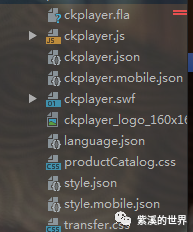
jsp展示如下
<%@ page contentType="text/html;charset=UTF-8" language="java" %><!DOCTYPE html>
<html>
<head>
    <meta charset="utf-8">
    <link rel="stylesheet" href="${pageContext.request.contextPath}/static/css/element-ui.css">
    <title></title>
</head>
<body>
<div id="app">
    <div class="video" style="width: 600px;height: 400px; margin: auto"></div>
</div>
</body>
<script src="${pageContext.request.contextPath}/static/js/vue.js"></script>
<script src="${pageContext.request.contextPath}/static/js/vue-resource.js"></script>
<script src="${pageContext.request.contextPath}/static/js/element-ui.js"></script>
<script type="text/javascript" src="${pageContext.request.contextPath}/static/css/productList/ckplayer.js" charset="utf-8" data-name="ckplayer"></script>
<script type="text/javascript">
    let { log } = console;
    let Main = new Vue({
        el: "#app",
        data() {
            return {
                msg:'',
                filePath:''
            }
        },
        computed: {

        },
        mounted() {
            this.video();
        },
        created() {
            this.msg = "${msg}";
            this.filePath = "${filePath}";
        },
        methods: {
            video(){
                if ("" != this.msg){
                    this.$message({
                        type: 'error',
                        message: '转化异常'
                    });
                } else{
                    var videoObject = {
                        container: '.video', //“#”代表容器的ID,“.”或“”代表容器的class
                        variable: 'player', //播放函数名称,该属性必需设置,值等于下面的new ckplayer()的对象
                        video:this.filePath
                    };
                    var player = new ckplayer(videoObject);//初始化播放器
               }
            },
        }
    })
</script>
看到这里基本上也就结束了
总结:web项目视频在线播放,其实就是将文件转化为mp4后在做预览
阿里云服务器不支持mp4视频在线播放(这是个坑,大家注意)
资源:
https://pan.baidu.com/s/1cRGPRhalBiq412ctpcjCgw
提取码:8888

文章转载自紫溪的世界,如果涉嫌侵权,请发送邮件至:contact@modb.pro进行举报,并提供相关证据,一经查实,墨天轮将立刻删除相关内容。
