



在绘制分面条形图过程中,分面条形图的顺序往往并不是按照变量大小顺序排列,图形视觉效果存在一定不足。因此,本文主要介绍如何利用tidytext包中reorder_within()
和scale_x_reordered()
函数解决ggplot2绘制分面条形图排序问题。绘制图形如下: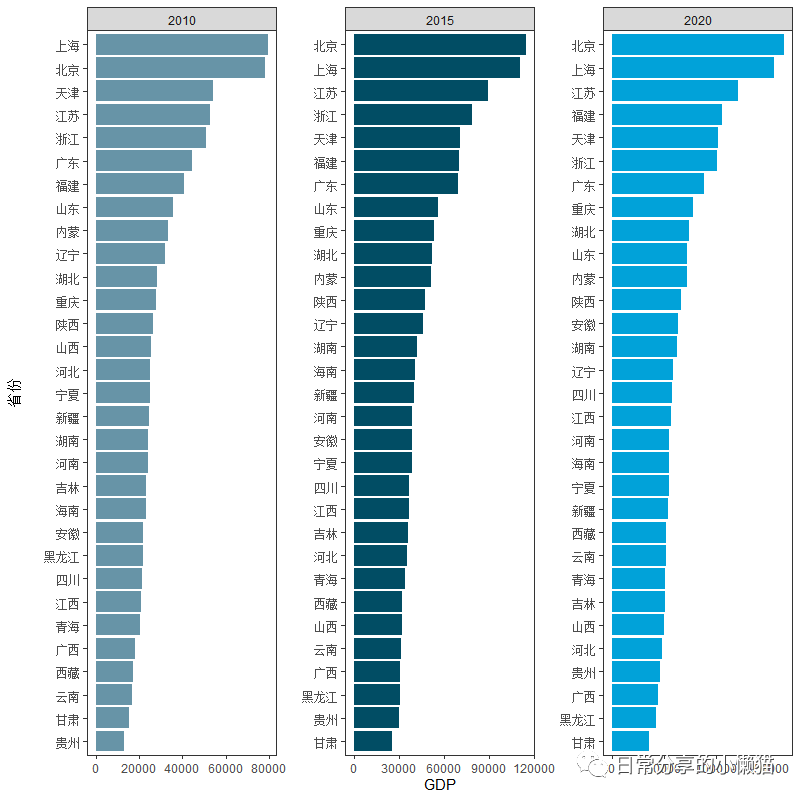
1、数据准备
以国家统计局[1]官网上2010、2015、2020年我国31个省份人均GDP(未包含港澳台数据)为例,展示分面条形图顺序调整过程。演示数据可在国家统计局官网获取。
library(tidyverse)
library(tidytext)
library(ggthemes)
library(reshape2)
my_data <- read.csv("C:\\Users\\Acer\\Desktop\\R学习\\常用数据\\人均GDP.csv")
head(my_data)
#  province  y2020  y2015 y2010
#1     北京 164889 114662 78307
#2     天津 101614  71021 54053
#3     河北  48564  35653 25308
#4     山西  50528  32375 25434
#5     内蒙  72062  51633 33262
#6     辽宁  58872  46069 31888
str(my_data)
#'data.frame': 31 obs. of  4 variables:
# $ province: chr  "北京" "天津" "河北" "山西" ...
# $ y2020   : int  164889 101614 48564 50528 72062 58872 50800 42635 155768 121231 ...
# $ y2015   : int  114662 71021 35653 32375 51633 46069 36391 30583 111081 89426 ...
# $ y2010   : int  78307 54053 25308 25434 33262 31888 23370 21694 79396 52787 ...
data <- reshape2::melt(my_data, id.vars = "province", value.name = "GDP" ,variable.name = "year")
data$year <- factor(data$year, levels = c("y2010", "y2015", "y2020"), labels = c("2010", "2015", "2020"))
str(data)
#'data.frame': 93 obs. of  3 variables:
# $ province: chr  "北京" "天津" "河北" "山西" ...
# $ year    : Factor w/ 3 levels "2010","2015",..: 3 3 3 3 3 3 3 3 3 3 ...
# $ GDP     : int  164889 101614 48564 50528 72062 58872 50800 42635 155768 121231 ...
2、图形绘制
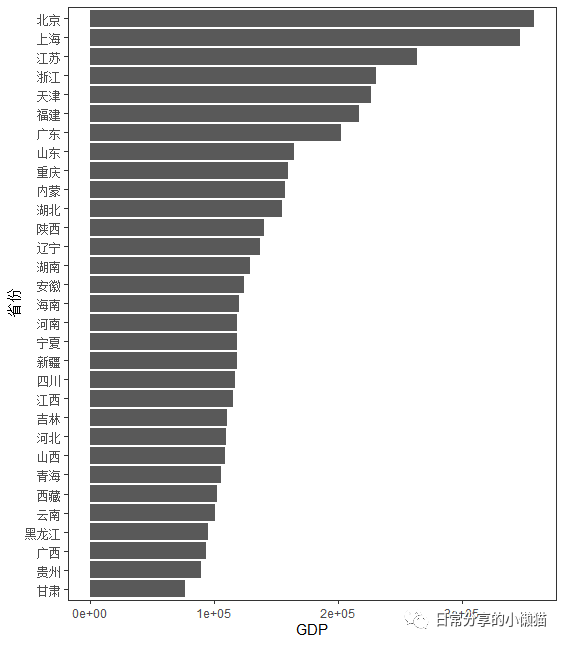
2.1 对GDP求和,绘制总的条形图
# 对3年GDP进行求和,按照顺序排列
data %>% group_by(province) %>% summarise(Total.GDP = sum(GDP)) %>%
  ggplot(aes(reorder(province, Total.GDP) , Total.GDP)) +
  geom_col() +
  coord_flip() +
  theme_bw() +
  theme(panel.grid = element_blank()) +
  labs(x = "省份", y = "GDP")
2.2 分面条形图,根据year进行分面
ggplot(data, aes(reorder(province, GDP), GDP, fill = factor(year))) +
  geom_col(show.legend = FALSE) +
  coord_flip() +
  facet_wrap(~year, scales = "free") +
  scale_fill_economist() +
  theme_bw() +
  theme(panel.grid = element_blank()) +
  labs(x = "省份", y = "GDP")
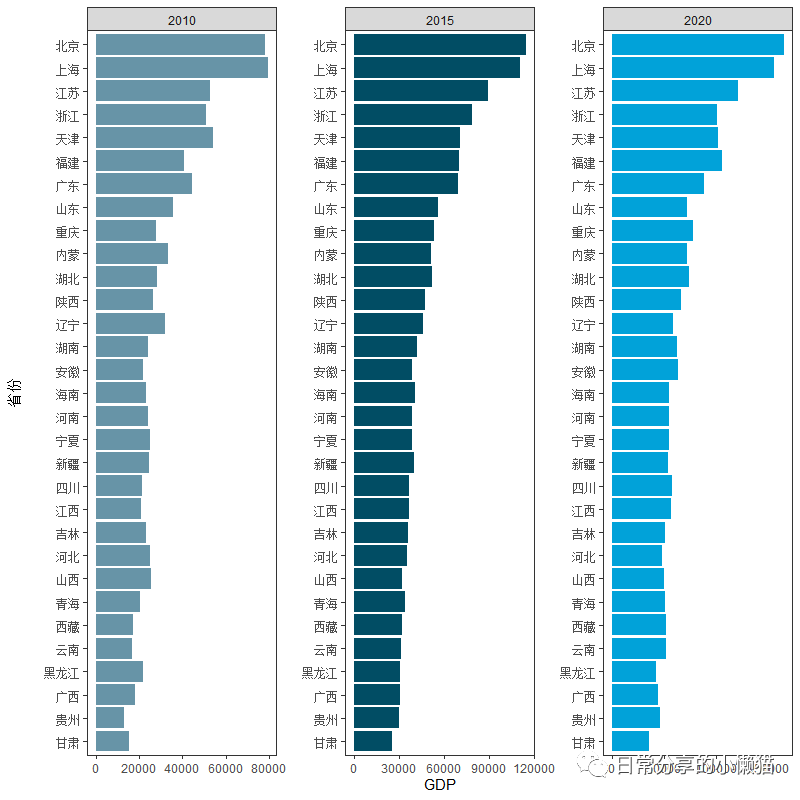 可以发现,该分面条形图中各省份GDP并不是按照大小顺序排列,而是与上图中总的GDP省份排序一致。接下来对分面条形图进行调整,让其按逆序或正序排列。
3、图形调整
使用tidytext包中的reorder_within()
函数和scale_x_reordered()
函数将条形图按照某个数值进行排列,本文按照GDP进行排列。
3.1 逆序排列
data %>% mutate(province = reorder_within(province, GDP, year)) %>%
  ggplot(aes(province, GDP, fill = factor(year))) +
  geom_col(show.legend = FALSE) +
  coord_flip() +
  facet_wrap(~year, scales = "free") +
  scale_x_reordered() +
  scale_fill_economist() +
  theme_bw() +
  theme(panel.grid = element_blank()) +
  labs(x = "省份", y = "Total.GDP")
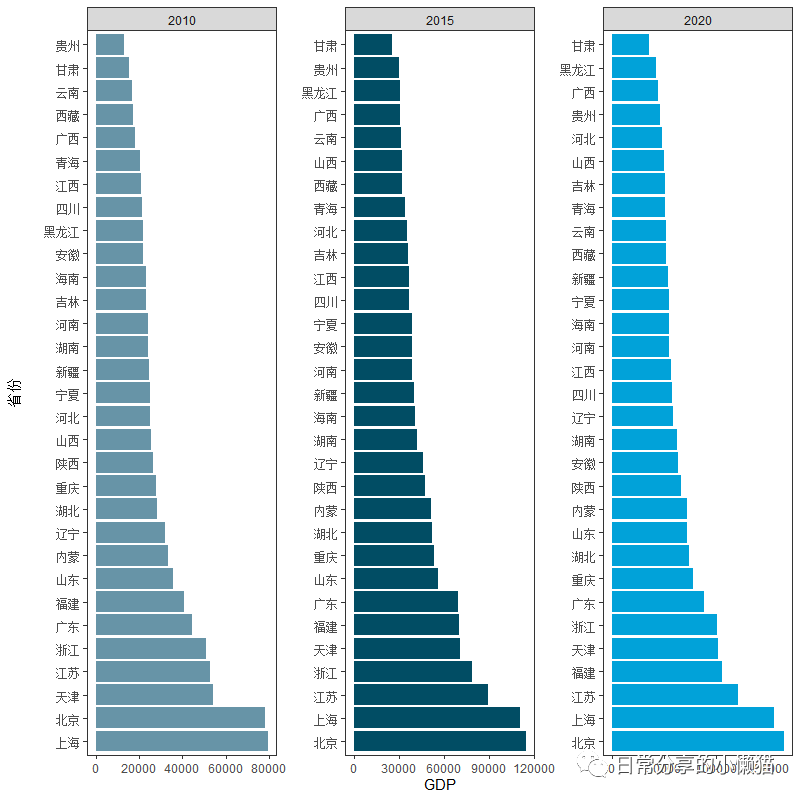
2.4 正序排列
data %>% mutate(province = reorder_within(province, -GDP, year)) %>%
  ggplot(aes(province, GDP, fill = factor(year))) +
  geom_col(show.legend = FALSE) +
  coord_flip() +
  facet_wrap(~year, scales = "free") +
  scale_x_reordered() +
  scale_fill_economist() +
  theme_bw() +
  theme(panel.grid = element_blank()) +
  labs(x = "省份", y = "Total.GDP")
3、其他
关于reorder_within()
函数和scale_x_reordered()
函数的更多用法可进一步参考tidytext参考手册[2]。关于如何利用ggplot2绘制条形图的可进一步阅读之前推文R语言绘图|条形图绘制。
参考资料
国家统计局: https://data.stats.gov.cn/index.htm
[2]tidytext: https://cran.r-project.org/web/packages/tidytext/tidytext.pdf,
文章转载自日常分享的小懒猫,如果涉嫌侵权,请发送邮件至:contact@modb.pro进行举报,并提供相关证据,一经查实,墨天轮将立刻删除相关内容。
