



Table of Contents
- DG的搭建
- 1.环境
- 2.搭建操作
- 1) 强制force logging -- 主库
- 2) 创建口令文件 -- 主库
- 3) 创建并修改pfile -- 主库
- 4) 开归档 -- 主库
- 5) 创建备库所需的控制文件 -- 主库
- 6) 备份数据库 -- 主库
- 7) 修改备库1的pfile -- 备库1
- 8) 修改备库2的pfile -- 备库2
- 9) 拷贝控制文件 -- 主库
- 10) 复制口令文件到备库 -- 主库
- 11) 在备库上创建spfile -- 备库
- 12) 启动备库到mount -- 备库
- 13) 主备库配置standby redo log -- 主备库
- 14) start redo apply -- 备库
- 3.测试
- 4.日常管理
- 主备切换
- 错误信息
DG的搭建
1.环境
Linux : CentOS 7.9(core)
Oracle : Oracle 11g release 2(11.2.0.1)
主库:
ip : 192.168.56.107
hostname : DG1
unique name : zzdb1
备库1:
ip : 192.168.56.105
hostname : DG11
unique name : zzdb1_st
备库2:
ip : 192.168.56.106
hostname : DG12
unique name : zzdb1_sd
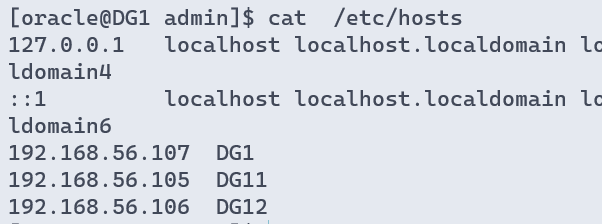
HOSTS :
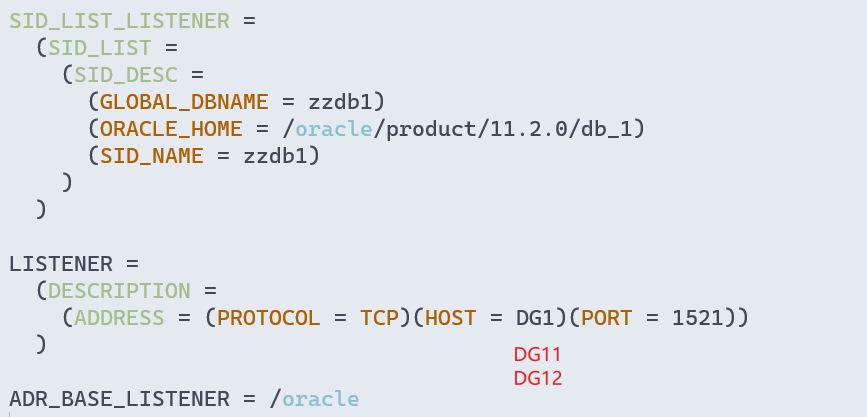
监听 :
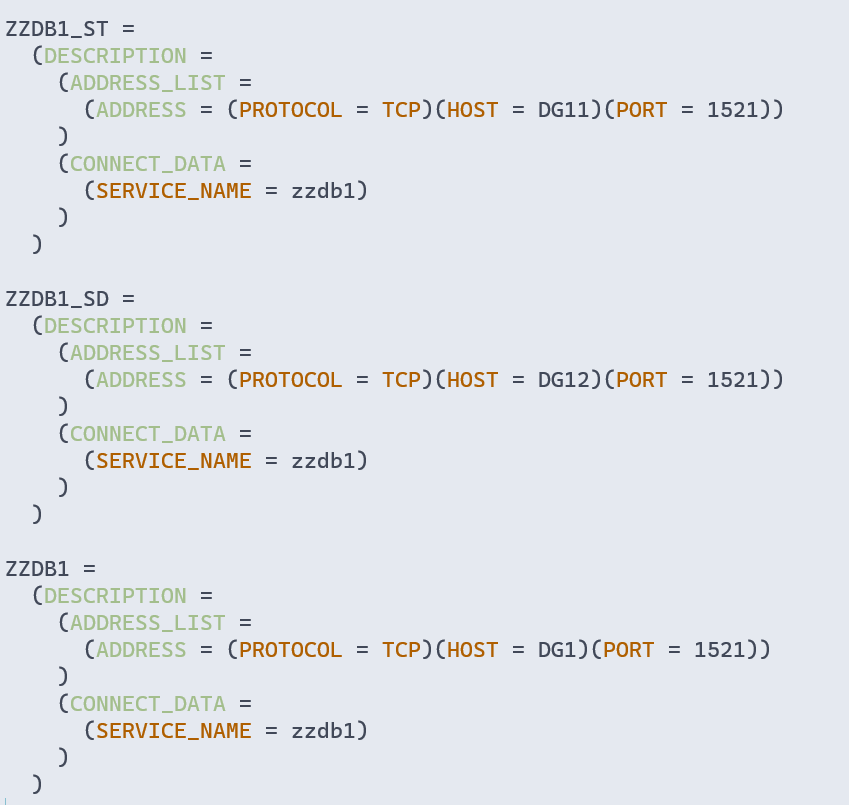
TNS :
2.搭建操作
1) 强制force logging – 主库
SQL> shutdown immediate
Database closed.
Database dismounted.
ORACLE instance shut down.
SQL> startup mount
ORACLE instance started.

Total System Global Area 1586708480 bytes
Fixed Size                  2213736 bytes
Variable Size             922749080 bytes
Database Buffers          654311424 bytes
Redo Buffers                7434240 bytes
Database mounted.
SQL> alter database force logging;
alter database force logging

Database altered.

SQL> alter database open;

Database altered.

SQL> select  FORCE_LOGGING  from  v$database;

FOR
---
YES
2) 创建口令文件 – 主库
[oracle@DG1 dbs]$ orapwd file=$ORACLE_HOME/dbs/orapwzzdb1 password=oracle entries=5
3) 创建并修改pfile – 主库
SQL> create pfile from spfile;

File created.
$ cd $ORACLE_HOME/dbs
$ vim initzzdb1.ora

# 在末尾添加以下内容:
# 当前库的unique name
DB_UNIQUE_NAME='ZZDB1'
# 需要发送和接收重做日志的目的地
LOG_ARCHIVE_CONFIG='DG_CONFIG=(ZZDB1,ZZDB1_ST,ZZDB1_SD)'

# 设置在zzdb1上的the fast recovery area 以及归档online redo log与standby redo log
LOG_ARCHIVE_DEST_1= 'LOCATION=/oracle/archive VALID_FOR=(ALL_LOGFILES,ALL_ROLES) DB_UNIQUE_NAME=ZZDB1'
# 设置采用LGWR的SYNC传输方式向zzdb1_st传送online redo log,并在zzdb1_st为主库时运行
LOG_ARCHIVE_DEST_2= 'SERVICE=ZZDB1_ST  LGWR SYNC VALID_FOR=(ONLINE_LOGFILES,PRIMARY_ROLE) DB_UNIQUE_NAME=ZZDB1_ST'
# 设置采用LGWR的SYNC传输方式向zzdb1_sd传送online redo log,并在zzdb1_sd为主库时运行
LOG_ARCHIVE_DEST_3= 'SERVICE=ZZDB1_SD  LGWR SYNC VALID_FOR=(ONLINE_LOGFILES,PRIMARY_ROLE) DB_UNIQUE_NAME=ZZDB1_SD'

# 指定对应的LOG_ARCHIVE_DEST_n参数可用
LOG_ARCHIVE_DEST_STATE_1=ENABLE
LOG_ARCHIVE_DEST_STATE_2=ENABLE
LOG_ARCHIVE_DEST_STATE_3=ENABLE

# 格式化归档日志命名
LOG_ARCHIVE_FORMAT=%t_%s_%r.arc

# 设置服务端自动向客户端辨别是否两方一致
FAL_SERVER='zzdb1_st,zzdb1_sd'
FAL_CLIENT='zzdb1'

# 开启standby file自动管理
STANDBY_FILE_MANAGEMENT=AUTO
# 从pfile启动数据库并创建spfile
SQL> shutdown immediate
Database closed.
Database dismounted.
ORACLE instance shut down.

SQL> startup pfile='/oracle/product/11.2.0/db_1/dbs/initzzdb1.ora'
ORACLE instance started.

Total System Global Area 1586708480 bytes
Fixed Size                  2213736 bytes
Variable Size             922749080 bytes
Database Buffers          654311424 bytes
Redo Buffers                7434240 bytes
Database mounted.
Database opened.
SQL> create spfile from pfile='/oracle/product/11.2.0/db_1/dbs/initzzdb1.ora';

File created.

SQL> shutdown immediate
Database closed.
Database dismounted.
ORACLE instance shut down.
SQL> startup
ORACLE instance started.

Total System Global Area 1586708480 bytes
Fixed Size                  2213736 bytes
Variable Size             922749080 bytes
Database Buffers          654311424 bytes
Redo Buffers                7434240 bytes
Database mounted.
Database opened.
SQL>
# 传送修改后的pfile到备库
[oracle@DG1 dbs]$ scp initzzdb1.ora  DG11:`pwd`
oracle@dg11's password:
initzzdb1.ora                       100% 1893     2.0MB/s   00:00
[oracle@DG1 dbs]$ scp initzzdb1.ora  DG12:`pwd`
oracle@dg12's password:
initzzdb1.ora                       100% 1893     2.2MB/s   00:00
4) 开归档 – 主库
SQL> shutdown immediate
Database closed.
Database dismounted.
ORACLE instance shut down.
SQL> startup mount
ORACLE instance started.

Total System Global Area 1586708480 bytes
Fixed Size                  2213736 bytes
Variable Size             922749080 bytes
Database Buffers          654311424 bytes
Redo Buffers                7434240 bytes
Database mounted.
SQL> alter database archivelog;

Database altered.

SQL> alter database open;

Database altered.

SQL> archive log list
Database log mode              Archive Mode
Automatic archival             Enabled
Archive destination            /oradata/archive
Oldest online log sequence     20
Next log sequence to archive   22
Current log sequence           22
5) 创建备库所需的控制文件 – 主库
SQL> shutdown immediate
Database closed.
Database dismounted.
ORACLE instance shut down.
SQL> startup mount
ORACLE instance started.

Total System Global Area 1586708480 bytes
Fixed Size                  2213736 bytes
Variable Size             922749080 bytes
Database Buffers          654311424 bytes
Redo Buffers                7434240 bytes
Database mounted.
SQL> ALTER  DATABASE  CREATE  STANDBY  CONTROLFILE  AS  '/oradata/control01.ctl';
shutdown abort;

Database altered.

SQL> alter database open;

Database altered.
6) 备份数据库 – 主库
#primary备份数据库
mkdir -p /oracle/db_backup
rman target / <<!
run {
configure device type disk parallelism 3;
backup database format '/oracle/db_backup/%d_%s_%p_%t.%T';
}
!

#standby节点,创建目录
mkdir -p /oracle/db_backup

# cp备份文件和控制文件到standby
cd /oracle/db_backup
[oracle@node1 db_backup]$ scp * DG11:/oracle/db_backup
[oracle@node1 db_backup]$ scp * DG12:/oracle/db_backup

#standby节点,通过rman进行恢复
rman target / <<!
allocate channel c1 type disk;
restore database;
!
7) 修改备库1的pfile – 备库1
$ cd $ORACLE_HOME/dbs
$ vim initzzdb1.ora

DB_UNIQUE_NAME='ZZDB1_ST'

LOG_ARCHIVE_CONFIG='DG_CONFIG=(ZZDB1_ST,ZZDB1,ZZDB1_SD)'
LOG_ARCHIVE_DEST_1='location=/oradata/archive'
LOG_ARCHIVE_DEST_2='SERVICE=ZZDB1 LGWR SYNC VALID_FOR=(ONLINE_LOGFILES,PRIMARY_ROLE) DB_UNIQUE_NAME=ZZDB1'
LOG_ARCHIVE_DEST_3='SERVICE=ZZDB1_SD  LGWR SYNC VALID_FOR=(ONLINE_LOGFILES,PRIMARY_ROLE) DB_UNIQUE_NAME=ZZDB1_SD'
LOG_ARCHIVE_DEST_STATE_1='ENABLE'
LOG_ARCHIVE_DEST_STATE_2='ENABLE'
LOG_ARCHIVE_DEST_STATE_3='ENABLE'

LOG_ARCHIVE_FORMAT=%t_%s_%r.arc

FAL_SERVER=ZZDB1_ST
FAL_CLIENT=ZZDB1,ZZDB1_SD

STANDBY_FILE_MANAGEMENT=AUTO
8) 修改备库2的pfile – 备库2
$ cd $ORACLE_HOME/dbs
$ vim initzzdb1.ora

DB_UNIQUE_NAME='ZZDB1_SD'

LOG_ARCHIVE_CONFIG='DG_CONFIG=(ZZDB1_SD,ZZDB1,ZZDB1_ST)'
LOG_ARCHIVE_DEST_1='location=/oradata/archive'
LOG_ARCHIVE_DEST_2='SERVICE=ZZDB1 LGWR SYNC VALID_FOR=(ONLINE_LOGFILES,PRIMARY_ROLE) DB_UNIQUE_NAME=ZZDB1'
LOG_ARCHIVE_DEST_3='SERVICE=ZZDB1_ST  LGWR SYNC VALID_FOR=(ONLINE_LOGFILES,PRIMARY_ROLE) DB_UNIQUE_NAME=ZZDB1_ST'
LOG_ARCHIVE_DEST_STATE_1='ENABLE'
LOG_ARCHIVE_DEST_STATE_2='ENABLE'
LOG_ARCHIVE_DEST_STATE_3='ENABLE'

LOG_ARCHIVE_FORMAT=%t_%s_%r.arc

FAL_SERVER=ZZDB1_SD
FAL_CLIENT=ZZDB1_ST,ZZDB1

STANDBY_FILE_MANAGEMENT=AUTO
9) 拷贝控制文件 – 主库
[oracle@DG1 oradata]$ scp control01.ctl DG11:/oradata/zzdb1/
oracle@dg11's password:
control01.ctl                       100% 9520KB  78.1MB/s   00:00
[oracle@DG1 oradata]$ scp control01.ctl DG12:/oradata/zzdb1/
oracle@dg12's password:
control01.ctl                       100% 9520KB  77.9MB/s   00:00

[oracle@DG1 oradata]$ scp control0.ctl DG11:/oracle/flash_recovery_area/zzdb1/
oracle@dg12's password:
control01.ctl                       100% 9520KB  80.2MB/s   00:00
[oracle@DG1 oradata]$ scp control01.ctl DG12:/oracle/flash_recovery_ar
ea/zzdb1/
oracle@dg11's password:
control01.ctl                       100% 9520KB  67.1MB/s   00:00
10) 复制口令文件到备库 – 主库
[oracle@DG1 ~]$ cd $ORACLE_HOME/dbs

[oracle@DG1 dbs]$ pwd
/oracle/product/11.2.0/db_1/dbs

[oracle@DG1 dbs]$ scp orapwzzdb1 DG11:`pwd`
oracle@dg11's password:
orapwzzdb1                                                                                                    100% 2048     2.0MB/s   00:00
[oracle@DG1 dbs]$ scp orapwzzdb1 DG12:`pwd`
oracle@dg12's password:
orapwzzdb1                                                                                                    100% 2048     2.4MB/s   00:00
[oracle@DG1 dbs]$ cat $ORACLE_SID
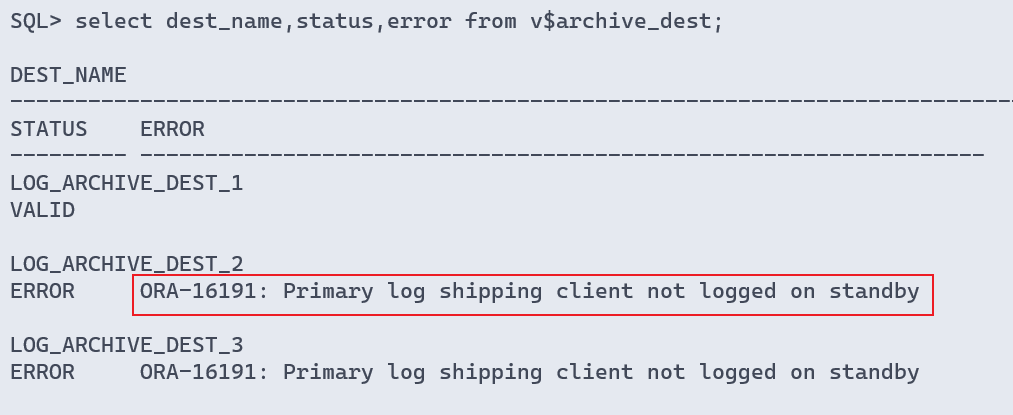
主备库的口令文件不一致会报错
11) 在备库上创建spfile – 备库
[oracle@DG11 ~]$ sqlplus / as sysdba

SQL*Plus: Release 11.2.0.1.0 Production on Fri Feb 18 13:10:19 2022

Copyright (c) 1982, 2009, Oracle.  All rights reserved.

Connected to an idle instance.

SQL> startup pfile='/oracle/product/11.2.0/db_1/dbs/initzzdb1.ora'
ORACLE instance started.

Total System Global Area 1586708480 bytes
Fixed Size                  2213736 bytes
Variable Size             922749080 bytes
Database Buffers          654311424 bytes
Redo Buffers                7434240 bytes
Database mounted.
Database opened.
SQL> create spfile from pfile='/oracle/product/11.2.0/db_1/dbs/initzzdb1.ora';

File created.

SQL> shutdown immediate
Database closed.
Database dismounted.
ORACLE instance shut down.
SQL> startup
ORACLE instance started.

Total System Global Area 1586708480 bytes
Fixed Size                  2213736 bytes
Variable Size             922749080 bytes
Database Buffers          654311424 bytes
Redo Buffers                7434240 bytes
Database mounted.
Database opened.
SQL>
12) 启动备库到mount – 备库
SQL> shutdown immediate
Database closed.
Database dismounted.
ORACLE instance shut down.
SQL> startup mount
ORACLE instance started.

Total System Global Area 1586708480 bytes
Fixed Size                  2213736 bytes
Variable Size             922749080 bytes
Database Buffers          654311424 bytes
Redo Buffers                7434240 bytes
Database mounted.
13) 主备库配置standby redo log – 主备库
# 查看
select group#,member from v$logfile order by 1;
# 添加
alter database add standby logfile
group 4 ('/oradata/zzdb1/standby_redo01.log') size 50m reuse,
group 5 ('/oradata/zzdb1/standby_redo02.log') size 50m reuse,
group 6 ('/oradata/zzdb1/standby_redo03.log') size 50m reuse,
group 7 ('/oradata/zzdb1/standby_redo04.log') size 50m reuse;
14) start redo apply – 备库
# 如果不使用ADG:
SQL> alter database mount;
SQL> recover managed standby database disconnect from session;

# 普通DG模式下,read only打开数据库:
SQL> recover managed standby database cancel ;
SQL> alter database open read only;
---从库接收主库发送过来的日志,但不进行apply,可以通过视图 v$dataguard_stats 查看到 apply lag从库比主库落后多少时间。

# 查看数据库模式
SQL> select db_unique_name,database_role,open_mode from v$database;
select protection_mode,protection_level from v$database;

# 在应用日志时处于只读打开状态
SQL> shutdown immediate;
startup; --READ ONLY
recover managed standby database using current logfile disconnect from session; --READ ONLY WITH APPLY
3.测试
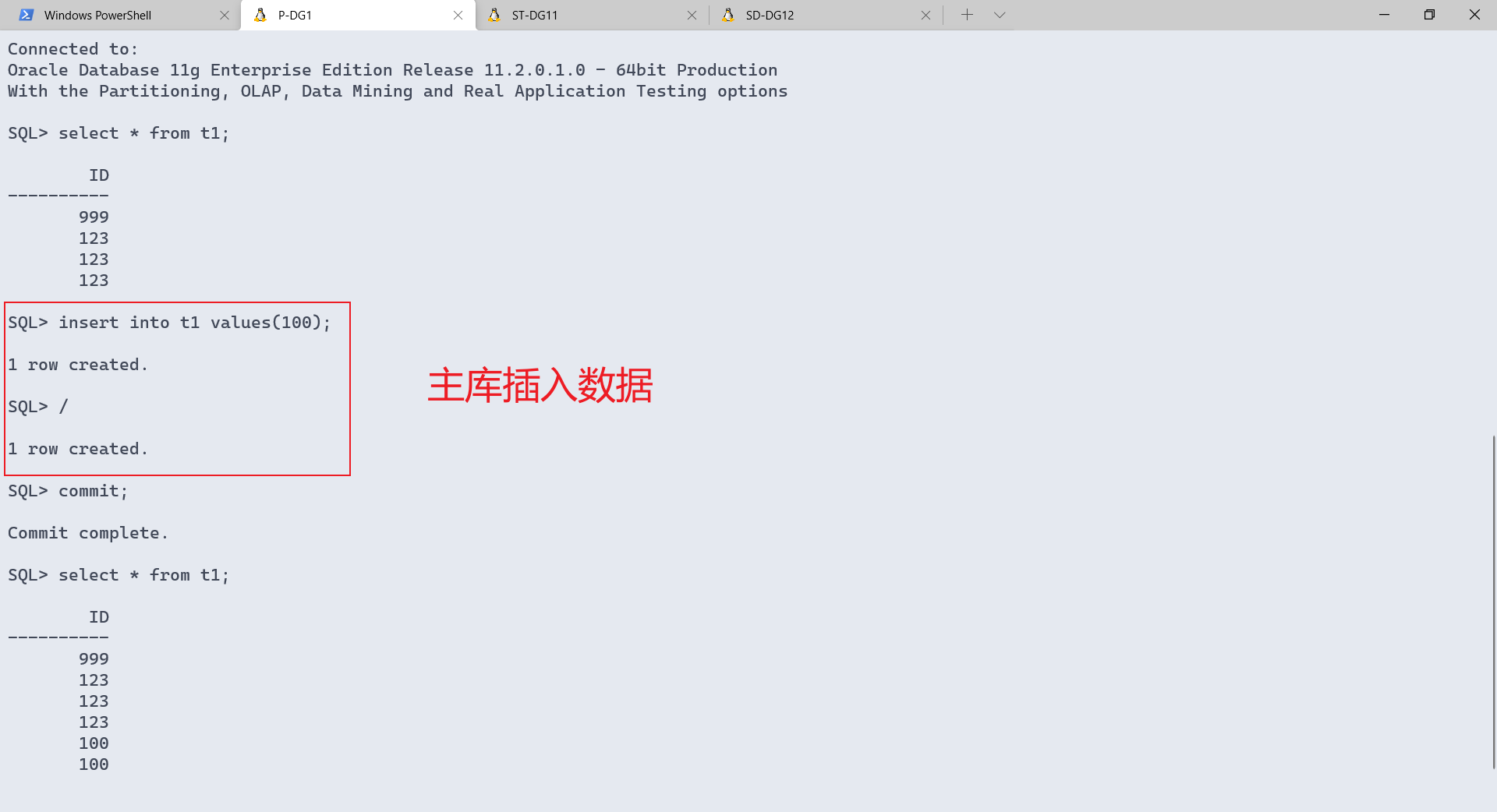
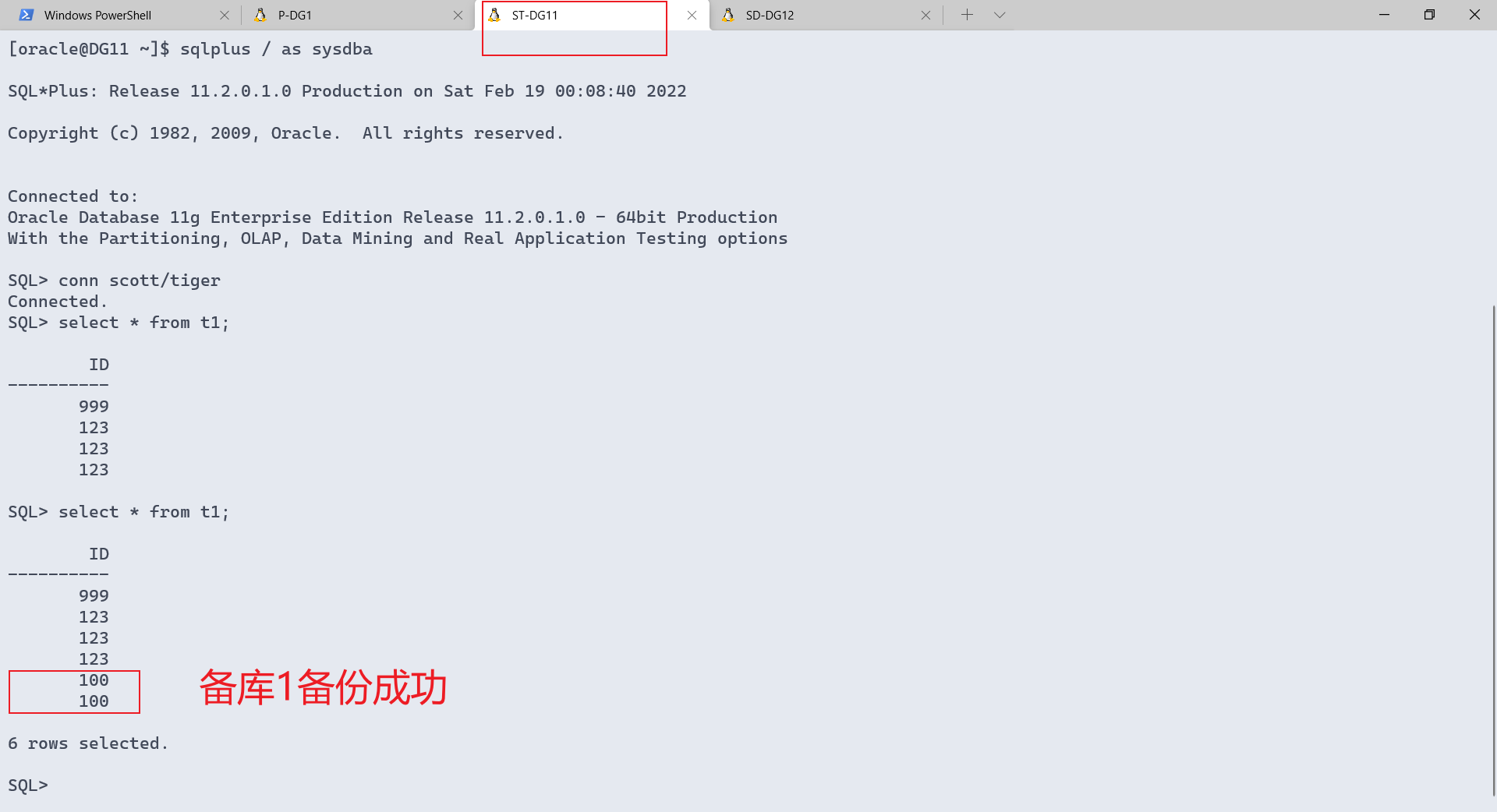
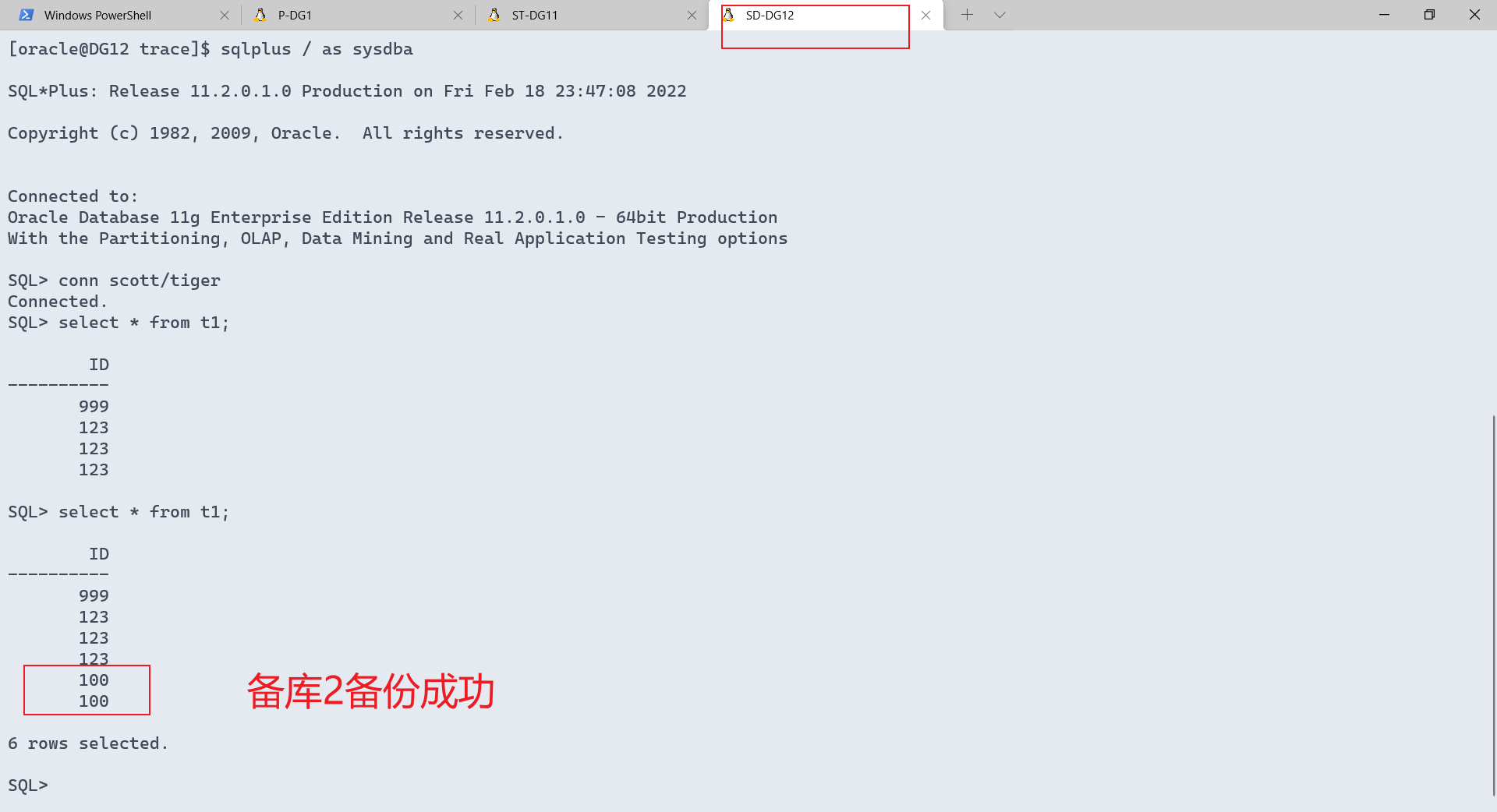
4.日常管理
三种保护模式的转换
三中保护模式的配置:
升级顺序:
最大性能 -> 最大可用 -> 最大保护
最大性能是默认的保护模式。
若从最大性能直接升级到最大保护,当出现 Destination LOG_ARCHIVE_DEST_2 is not SYNCHRONIZED时,无法升级。
解决办法:先升级到最大可用模式后,再升级为最大保护即可。
查询保护模式及打开模式
select db_unique_name, protection_mode, protection_level,open_mode from v$database;
最大保护模式下,备库无法正常关闭,只有主库关闭后才能关闭备库。
SQL> shutdown immediate;
ORA-01154: database busy. Open, close, mount, and dismount not allowed now
1、在主库上配置参数 LOG_ARCHIVE_DEST_n
alter system set log_archive_dest_2='service=zzdb1_st
optional lgwr sync affirm valid_for=(online_logfiles,primary_role)db_unique_name=zzdb1_st';
alter system set log_archive_dest_2='service=zzdb1_sd
optional lgwr sync affirm valid_for=(online_logfiles,primary_role)db_unique_name=zzdb1_sd';
2、要完成保护模式的升级,执行此步,例如从最大性能模式升到最大可用模式。
关闭数据库,重新启动到mount
shutdown immediate;
startup mount;
对于rac,在主库上只打开一个实例,其他的实例都要关闭
如果不进行升级,直接进行第3步
3、设置数据库的保护模式
在主库上指定数据保护模式使用sql语句 :
alter database set standby database to maximize {protection | availability | performance}

# 执行数据库为最大保护模式
alter database set standby database to maximize protection;
# 执行数据库为最大可用模式
alter database set standby database to maximize availability;
# 执行数据库为最大性能模式
alter database set standby database to maximize performance;
4、打开主库
alter database open;
5、在备库上配置参数 LOG_ARCHIVE_DEST_n
在备库上配置参数LOG_ARCHIVE_DEST_n是为了在switchover后能继续运行在新的保护模式
alter system set log_archive_dest_2='service=zzdb1
optional lgwr sync affirm valid_for=(online_logfiles,primary_role) db_unique_name=zzdb1';
6、确认在新的保护模式已经生效
select db_unique_name, protection_mode, protection_level,open_mode from v$database;
7、最大保护测试
在备库:
ifdown enp0s8
在主库:
create table t as select * from dept; ---------操作挂起
备库:
ifup enp0s8
主库create table操作成功完成
三种保护模式参数设置
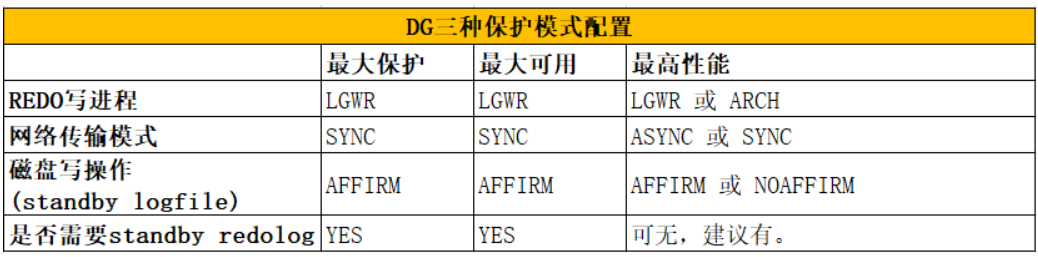
若未指定,ASYNC,NOAFFIRM是默认。
alter system set LOG_ARCHIVE_DEST_2='SERVICE=zzdb1_dg ARCH ASYNC NOAFFIRM
VALID_FOR=(ONLINE_LOGFILE, PRIMARY_ROLE) DB_UNIQUE_NAME=zzdb1_dg' scope=both ;
主库配置时service写tns配置文件中指向备库的
service_name, 备库中写指向主库的service_name
手动解决日志gap
1、自动解决
通过FAL_SERVER和FAL_CLIENT
2、手工解决
- 查看是否有日志GAP:
select sequence# ,applied from v$archived_log order by sequence# desc ;
select thread#, low_sequence#, high_sequence# from v$archive_gap;
- 如果有,则拷贝过来
- 手工的注册这些日志:
alter database register logfile '路径';
DG相关的视图
1、vDATABASE` displays information about the database from the control file.
select db_unique_name, name, database_role from v$database;
select db_unique_name, protection_mode, protection_level, open_mode from v$database;
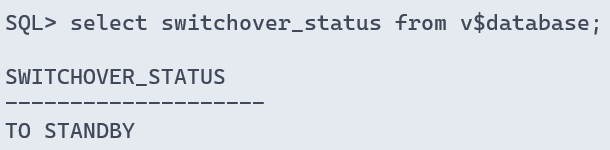
select db_unique_name, switchover_status from v$database;
主库:
备库:
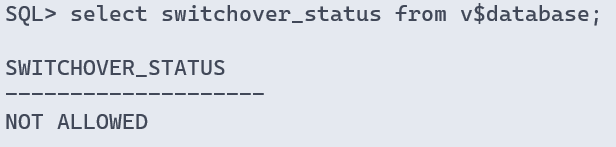
NOT ALLOWED
On a primary database, this status indicates that there are no valid and enabled standby databases.
On a standby database, this status indicates that a switchover request has not been received from the primary database.
2、vARCHIVE_DEST` displays, for the current instance, all of the destinations in the Data Guard configuration, including each destination’s current value, mode, and status.
select db_unique_name, dest_name, destination, status , target ,archiver ,valid_type ,valid_role
from v$archive_dest where db_unique_name like 'ZZDB1%';

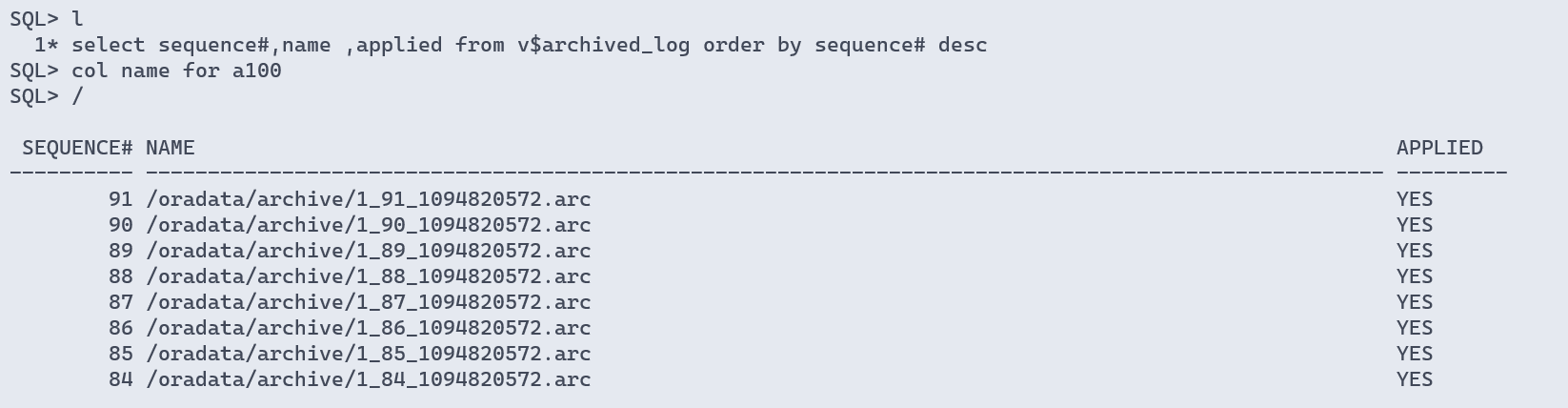
3、varchived_log 查看归档 `VARCHIVED_LOG` displays archived log information from the control file, including archive log names.
select sequence#,name ,applied from v$archived_log order by sequence# desc ;
在standby节点上查看,是否有归档未apply的日志。
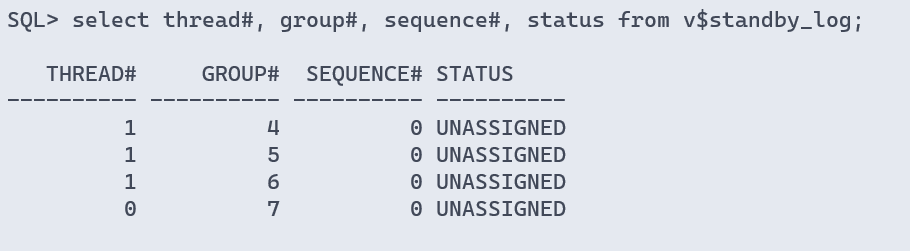
4、vSTANDBY_LOG` displays information about standby redo logs.
select thread#, group#, sequence#, status from v$standby_log;
ARCH 传输日志下,不使用:
5、vlog_history 查看备库最后应用的redo log `VLOG_HISTORY` displays log history information from the control file.
select thread#, max(sequence#) as "last_applied_log"
from v$log_history
group by thread#;

   THREAD# last_applied_log
---------- ----------------
         1               91
6、vDATAGUARD_STATS` displays information about Data Guard metrics when queried on a standby database. No rows are returned when queried on a primary database.
显示了主库生成的redo数据,在备库上没有应用的量。
还显示了如果主库崩溃,备库上丢失的数据量。
可在任何备库上查询,在主库上查询所有列的值都被清空。
字段:
apply finish time:
在备库上应用日志所花费的时间,如果日志文件存在裂缝,
这个参数表示从最低的scn开始恢复至完成所花的时间。
apply lag:
应用时延,在备用数据库上的应用重做数据落后于主数据库的重做数据的时间量。
transport lag:
传输时延,在备库上没有应用的或者不可用的日志量(以时间为单位)。
estimated startup time:
估计启动时间,估计物理standby启动时间,没有估计逻辑standby。
set lines 200 pages 200
col value for a30
col name for a25
select name,value from v$dataguard_stats;
图中表示,从库比主库延迟应用时间为:8分钟2秒,就是从库落后主库8分钟2秒了。
7、vdataguard_status 查看事件信息 `VDATAGUARD_STATUS` displays messages recently written to the alert log or server process trace files that concern physical standby databases or redo transport services for all standby database types.
col message for a80
select message_num, facility, message from v$dataguard_status order by 1 ;
8、vmanaged_standby 查看进程 `VMANAGED_STANDBY` displays current status information for some Oracle Database processes related to physical standby databases in the Data Guard environment. This view does not persist after an instance shutdown.
select process,client_process,sequence#,status from v$managed_standby;
主备切换
角色:
- 切换(Switchover)
允许主数据库切换角色到它的备数据库之一,在切换期间没有数据丢失,
在切换之后,每个数据库继续以其新的角色参与在Data Guard 配置中 - 故障转移(Failover)
更改备数据库到主角色响应主数据库的故障。切换后,需要重新搭建备库。
主备库 switchover
1、验证完成switchover的可能性
查询主库是否可以切换为备库:
select db_unique_name, switchover_status from v$database;
- 显示 TO STANDBY :表示可以把主库切换成备库
- 没有显示 TO STANDBY : 检查配置是否正确,比如
LOG_ARCHIVE_DEST_n设置是否正确 - 显示SESSIONS ACTIVE:
- 找出活动的进程:
select sid, process, program from v$session where type = 'USER' and sid <> (select distinct sid from v$mystat);- 找出没有退出的会话:
select sid, process, program from v$session;
或者:
alter database commit to switchover to physical standby with session shutdown ;
2、 primary节点 -> 切换为standby
步骤:
alter database commit to switchover to physical standby;
shutdown immediate;
startup;
open后:
备库的switchover_status : 从not allowd变成to primary
switchover_status 变为:recovery needed
open_mode 变为 read only
2.1、开启redo应用 ADG
recover managed standby database using current logfile disconnect from session;
select db_unique_name,database_role,protection_mode,protection_level,open_mode,switchover_status from v$database;
switchover_status 变为: not allowed
open_mode 变为 :read only with apply
3、standby 节点 -> 切换为primary
原primary节点切换为standby后,当前standby节点状态发生了变化:
1)switchover_status :从 not allowed 变为 To Primary,可以切换为 primary。
2)open_mode : 从 read only with apply 变为 read only 。
步骤:
--切换为主库
alter database commit to switchover to primary ;
shutdown immediate ;
startup ;
--查看是否切换成功:
alter system switch logfile;
select db_unique_name,database_role,protection_mode,
protection_level,open_mode,switchover_status
from v$database;
主备库 failover
Failover:
主库宕机,且无法打开,这时,应将备库切换为主库。但这是不可逆的过程,因为主库宕机了,不能想switchover那样操作。
--standby 节点检查状态
SQL> select db_unique_name,database_role,protection_mode,protection_level,open_mode,switchover_status from v$database;

--primary 节点 shutdown abort方式人工模拟primary奔溃。
SQL> shutdown abort

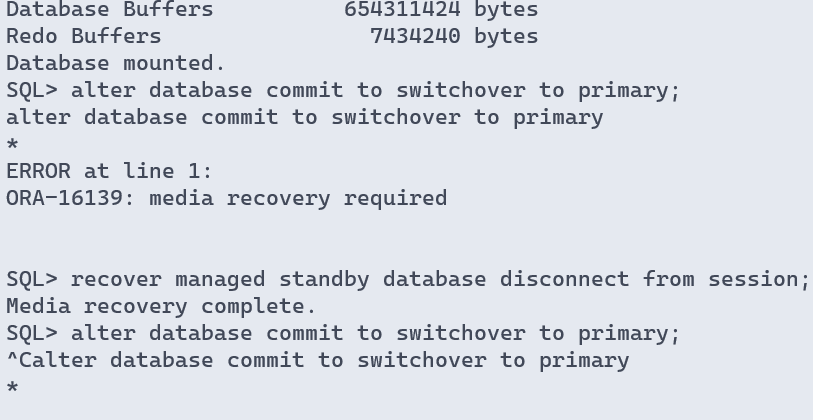
--standby 节点 尝试switchover,很大概率是失败的。【可不操作】
SQL> shutdown immediate
SQL> startup mount;
SQL> alter database commit to switchover to primary;
SQL> recover managed standby database disconnect from session;

--查看gap,如果没有发现明显的gap现象,说明此次的failover不会有数据损失情况。
SQL> select thread#, low_sequence#, high_sequence# from v$archive_gap;
1、最大保护模式下:
--进行Failover:其实就是结束recover managed standby ,然后switch to primary !
force : 将会停止当前活动的RFS进程,以便立刻执行failover.

SQL> alter database recover managed standby database finish force;
SQL> alter database commit to switchover to primary;
SQL> alter database open;
SQL> select db_unique_name,protection_level,open_mode,switchover_status from v$database;
SQL> archive log list;

Database log mode Archive Mode
Automatic archival Enabled
Archive destination /oradata/archive
Oldest online log sequence 1
Next log sequence to archive 1
Current log sequence 1
2、最大性能模式下:
最大保护模式,主库的日志是完全写到备库的,因此不会丢失。
在最高性能模式下,是有可能丢失的:
首先应检查从库是否缺失日志,若有,则拷贝主库的归档日志到从库,
并拷贝主库的当前redo日志(假设为/oradata/zzdb1/redo02.log)到从库。
假设:从 78到80归档缺失:
[oracle@node1 ~]$ scp /oradata/zzdb1/redo02.log node2:/tmp/

开始恢复:
SQL> alter database register logfile '/oradata/archive/1_142_987355129.dbf';
alter database register logfile '/oradata/archive/1_143_987355129.dbf';
alter database register logfile '/oradata/archive/1_144_987355129.dbf';

SQL> recover managed standby database cancel;
SQL> shutdown immediate;
SQL> startup mount;
SQL> recover standby database until cancel; ---类似RMAN恢复应用日志过程
/tmp/redo02.log --输入redo,进行apply
SQL> alter database activate standby database; --转为primary
SQL> alter database open ; --这样不丢失数据。
Failover完成!
redo文件是不能注册的
SQL> alter database register logfile '/tmp/redo01.log';
alter database register logfile '/tmp/redo01.log'
*
ERROR at line 1:
ORA-16088: archive log has not been completely archived

=============================================
SQL> recover standby database until cancel;
ORA-01093: ALTER DATABASE CLOSE only permitted with no sessions connected
重启到mount,然后recover
错误信息
ORA-16136: Managed Standby Recovery not active
解决:
启动mrp即可
SQL> recover managed standby database cancel ;
ORA-16136: Managed Standby Recovery not active

SQL> !oerr ora 16136
16136, 00000, "Managed Standby Recovery not active"
// *Cause:  An attempt was made to cancel a managed recovery session but
//          no managed recovery session was active.
// *Action: No action is necessary.

SQL> ALTER DATABASE RECOVER  managed standby database disconnect from session ;

Database altered.
LGWR (ospid: 7067): terminating the instance due to error 16072
情况:
switchover时原来主库已经切换为备库,但在备库1切换为主库startup时报错
原因:
备库的pfile中dest参数不完整,缺少其他备库的信息
解决:
补充完整即可
阻止switchover的进程,以及处理方法
1.CJQ0 : Job Queue Scheduler Process
修改参数为0:
alter system set JOB_QUEUE_PROCESSES =0 ;
2.QMN0: Advanced Queue Time Manager
修改参数为0:
alter system set AQ_TM_PROCESSES=0;
3.DBSNMP: Oracle Enterprise Manager Management Agent
emctl stop agent
FAL[client, ARC3]: Error 12154 connecting to ZZDB1,ZZDB1_SD for fetching gap sequence
详细信息:
FAL[client, ARC3]: Error 12154 connecting to ZZDB1,ZZDB1_SD for fetching gap sequence
ORA-12154: TNS:could not resolve the connect identifier specified
ORA-12154: TNS:could not resolve the connect identifier specified
问题:
切换到mount状态后,能接受主库的日志,但准备打开只读错误
解决:
重新启用mrp后重启,重启后主库断开与备库的连接,等待主库自动连接或者重启主库即可
SQL> recover managed standby database cancel ;
ORA-16136: Managed Standby Recovery not active

SQL> !oerr ora 16136
16136, 00000, "Managed Standby Recovery not active"
// *Cause:  An attempt was made to cancel a managed recovery session but
//          no managed recovery session was active.
// *Action: No action is necessary.

SQL> ALTER DATABASE RECOVER  managed standby database disconnect from session ;

Database altered.

SQL> recover managed standby database using current logfile disconnect from session;
ORA-01153: an incompatible media recovery is active


SQL> shutdown immediate
ORA-01109: database not open


Database dismounted.
ORACLE instance shut down.
SQL> startup
ORACLE instance started.

Total System Global Area 1586708480 bytes
Fixed Size                  2213736 bytes
Variable Size             922749080 bytes
Database Buffers          654311424 bytes
Redo Buffers                7434240 bytes
Database mounted.
Database opened.
SQL> select open_mode from v$database;

OPEN_MODE
--------------------
READ ONLY

SQL> recover managed standby database using current logfile disconnect from session;
Media recovery complete.
SQL> select open_mode from v$database;

OPEN_MODE
--------------------
READ ONLY WITH APPLY
