




大家好, 今天大表哥和大家分享的是 PG 复制的明星产品工具 REPMGR。
REPMGR 是一款 PG 复制的管理工具。 如果小伙伴们有ORACLE data guard 的经验, REPMGR 和 DG 的 broker 有功能上是十分类似的。
支持复制节点的创建和管理,手动switch over, fail over 的命令。
REPMGR 最早是 业界著名的 第二象限公司开发的, 后来第二象限公司被EDB (另一家业界著名的企业版公司)收购后,现在属于EDB的一个当家的产品。 EDB 会提供付费的 7* 24 的 online 技术支持。
官网网址是: https://repmgr.org/ 官网上提供了 软件的下载的链接和 文档的入口。

这里下载软件前,需要注意一下 repmgr 和 pg 数据库软件版本兼容如下图:
https://repmgr.org/docs/5.2/install-requirements.html#INSTALL-COMPATIBILITY-MATRIX
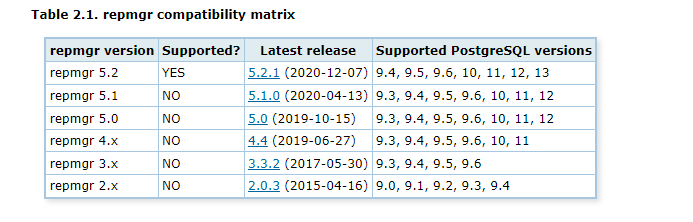
我们这里的PG 版是 PG 13, 我们选择 对应支持的 repmgr 5.2 版本。
1.下载软件 version 5.2
INFRA [postgres@wqdcsrv3352 ~]# wget https://repmgr.org/download/repmgr-5.2.0.tar.gz --no-check-certificate
--2022-08-08 17:32:25--  https://repmgr.org/download/repmgr-5.2.0.tar.gz
Resolving repmgr.org (repmgr.org)... 88.99.121.168, 2a01:4f8:c17:9eaf::1
Connecting to repmgr.org (repmgr.org)|88.99.121.168|:443... connected.
WARNING: cannot verify repmgr.org's certificate, issued by ‘/C=US/O=Let's Encrypt/CN=R3’:
Issued certificate has expired.
HTTP request sent, awaiting response... 200 OK
Length: 446137 (436K) [application/x-gzip]
Saving to: ‘repmgr-5.2.0.tar.gz’


100%[===================================================================================================================================================>] 446,137      472KB/s   in 0.9s


2022-08-08 17:32:26 (472 KB/s) - ‘repmgr-5.2.0.tar.gz’ saved [446137/446137]
2.源码编译安装
INFRA [postgres@wqdcsrv3352 postgreSQL]# tar -xvf repmgr-5.2.0.tar.gz
...
INFRA [postgres@wqdcsrv3352 repmgr-5.2.0]# ./configure
checking for a sed that does not truncate output... /bin/sed
checking for pg_config... /opt/postgreSQL/pg12/bin/pg_config
configure: building against PostgreSQL 12.3
checking for gnused... no
checking for gsed... no
checking for sed... yes
configure: creating ./config.status
config.status: creating Makefile
config.status: creating Makefile.global
config.status: creating config.h

INFRA [postgres@wqdcsrv3352 repmgr-5.2.0]# make install
...
/usr/bin/mkdir -p '/opt/postgreSQL/pg12/lib/postgresql'
/usr/bin/mkdir -p '/opt/postgreSQL/pg12/share/postgresql/extension'
/usr/bin/mkdir -p '/opt/postgreSQL/pg12/share/postgresql/extension'
/usr/bin/mkdir -p '/opt/postgreSQL/pg12/bin'
/usr/bin/install -c -m 755  repmgr.so '/opt/postgreSQL/pg12/lib/postgresql/repmgr.so'
/usr/bin/install -c -m 644 .//repmgr.control '/opt/postgreSQL/pg12/share/postgresql/extension/'
/usr/bin/install -c -m 644 .//repmgr--unpackaged--4.0.sql .//repmgr--unpackaged--5.1.sql .//repmgr--unpackaged--5.2.sql .//repmgr--4.0.sql .//repmgr--4.0--4.1.sql .//repmgr--4.1.sql .//repmgr--4.1--4.2.sql .//repmgr--4.2.sql .//repmgr--4.2--4.3.sql .//repmgr--4.3.sql .//repmgr--4.3--4.4.sql .//repmgr--4.4.sql .//repmgr--4.4--5.0.sql .//repmgr--5.0.sql .//repmgr--5.0--5.1.sql .//repmgr--5.1.sql .//repmgr--5.1--5.2.sql .//repmgr--5.2.sql  '/opt/postgreSQL/pg12/share/postgresql/extension/'
/usr/bin/install -c -m 755 repmgr repmgrd '/opt/postgreSQL/pg12/bin/'
3.测试安装软件的版本
INFRA [postgres@wqdcsrv3352 repmgr-5.2.0]# repmgr --version
repmgr 5.2.0
4.配置节点之间的SSH免密配置并进行测试:
我们实验的节点是3节点: 10.67.39.49, 10.67.39.149,10.67.38.50
INFRA [postgres@wqdcsrv3352 repmgr-5.2.0]# ssh 10.67.39.49  hostname -i
10.67.39.49
INFRA [postgres@wqdcsrv3352 repmgr-5.2.0]# ssh 10.67.39.149  hostname -i
10.67.39.149
INFRA [postgres@wqdcsrv3352 repmgr-5.2.0]# ssh 10.67.38.50  hostname -i
10.67.38.50
5.PG 实例复制集的规划

6.在节点10.67.38.50 初始化主库:
构建数据路径:
INFRA [postgres@wqdcsrv3352 repmgr-5.2.0]# mkdir -p /data/postgreSQL/1998/{data,backups,scripts,archive_wals}
INFRA [postgres@wqdcsrv3352 repmgr-5.2.0]# chown -R postgres:postgres /data/postgreSQL/1998
初始化数据库:
INFRA [postgres@wqdcsrv3352 repmgr-5.2.0]# /opt/postgreSQL/pg12/bin/initdb -D /data/postgreSQL/1998/data/ -W
The files belonging to this database system will be owned by user "postgres".
This user must also own the server process.


The database cluster will be initialized with locale "en_US.UTF-8".
The default database encoding has accordingly been set to "UTF8".
The default text search configuration will be set to "english".


Data page checksums are disabled.


Enter new superuser password:
Enter it again:


fixing permissions on existing directory /data/postgreSQL/1998/data ... ok
creating subdirectories ... ok
selecting dynamic shared memory implementation ... posix
selecting default max_connections ... 100
selecting default shared_buffers ... 128MB
selecting default time zone ... Asia/Shanghai
creating configuration files ... ok
running bootstrap script ... ok
performing post-bootstrap initialization ... ok
syncing data to disk ... ok


initdb: warning: enabling "trust" authentication for local connections
You can change this by editing pg_hba.conf or using the option -A, or
--auth-local and --auth-host, the next time you run initdb.


Success. You can now start the database server using:


   /opt/postgreSQL/pg12/bin/pg_ctl -D /data/postgreSQL/1998/data/ -l logfile start
修改参数文件 postgresql.conf (这里我们只修改一些必须的参数,非生产环境最优化的设置)
listen_addresses = '*'
port = 1998
max_connections = 2000
wal_level = replica
archive_mode = on
archive_command = 'test ! -f /data/postgreSQL/1998/data/%f && cp %p /data/postgreSQL/1998/archive_wals/%f'
max_wal_senders = 10
wal_keep_segments = 512
hot_standby = on
shared_preload_libraries = 'repmgr'
修改访问权限文件 pg_hba.conf , 假设我们将要创建的账号是 repmgr , 存放相关复制信息元数据的数据库也是叫 repmgr
pg_hba.conf 追加内容如下:
local   replication     repmgr                              trust
host    replication     repmgr      127.0.0.1/32            trust
host    replication     repmgr      10.67.38.50/32             trust
host    replication     repmgr      10.67.39.149/32             trust
host    replication     repmgr      10.67.39.49/32             trust
local   repmgr          repmgr                              trust
host    repmgr          repmgr      127.0.0.1/32            trust
host    repmgr          repmgr      10.67.38.50/32             trust
host    repmgr          repmgr      10.67.39.149/32             trust
host    repmgr          repmgr      10.67.39.49/32             trust
启动主库:
INFRA [postgres@wqdcsrv3352 data]# /opt/postgreSQL/pg12/bin/pg_ctl -D /data/postgreSQL/1998/data/ -l logfile start
waiting for server to start.... done
server started
7.在主库上,创建数据库repmgr 和相关的账户 repmgr
postgres@[local:/tmp]:1998=#83348 create user repmgr superuser  password 'repmgr';
CREATE ROLE
postgres@[local:/tmp]:1998=#83348 ALTER USER repmgr SET search_path TO repmgr, "$user", public;
ALTER ROLE
postgres@[local:/tmp]:1998=#83348 create database repmgr owner repmgr;
CREATE DATABASE
postgres@[local:/tmp]:1998=#83348 \l
                                 List of databases
  Name    |  Owner   | Encoding |   Collate   |    Ctype    |   Access privileges
-----------+----------+----------+-------------+-------------+-----------------------
postgres  | postgres | UTF8     | en_US.UTF-8 | en_US.UTF-8 |
repmgr    | repmgr   | UTF8     | en_US.UTF-8 | en_US.UTF-8 |
template0 | postgres | UTF8     | en_US.UTF-8 | en_US.UTF-8 | =c/postgres          +
          |          |          |             |             | postgres=CTc/postgres
template1 | postgres | UTF8     | en_US.UTF-8 | en_US.UTF-8 | =c/postgres          +
          |          |          |             |             | postgres=CTc/postgres
(4 rows)
8.创建repmgr 的配置文件: repmgr.conf
node_id=1
node_name=pg50
conninfo='host=10.67.38.50 port=1998 user=repmgr password=repmgr dbname=repmgr connect_timeout=5'
data_directory='/data/postgreSQL/1998/data'
pg_bindir='/opt/postgreSQL/pg12/bin'
9.注册主节点到 repmgr 的管理工具中
INFRA [postgres@wqdcsrv3352 postgreSQL]# repmgr -f /opt/postgreSQL/repmgr.conf primary register
INFO: connecting to primary database...
NOTICE: attempting to install extension "repmgr"
NOTICE: "repmgr" extension successfully installed
NOTICE: primary node record (ID: 1) registered
查看注册节点的状态:
INFRA [postgres@wqdcsrv3352 postgreSQL]# repmgr -f /opt/postgreSQL/repmgr.conf cluster show
ID | Name | Role    | Status    | Upstream | Location | Priority | Timeline | Connection string
----+------+---------+-----------+----------+----------+----------+----------+----------------------------------------------------------------------------------------
1  | pg50 | primary | * running |          | default  | 100      | 1        | host=10.67.38.50 port=1998 user=repmgr password=repmgr dbname=repmgr connect_timeout=5
我们也可以 metadata 的元数据库中 查看节点的信息:
repmgr@[local:/tmp]:1998=#94078 \x
Expanded display is on.
repmgr@[local:/tmp]:1998=#94078 SELECT * FROM repmgr.nodes;
-[ RECORD 1 ]----+---------------------------------------------------------------------------------------
node_id          | 1
upstream_node_id |
active           | t
node_name        | pg50
type             | primary
location         | default
priority         | 100
conninfo         | host=10.67.38.50 port=1998 user=repmgr password=repmgr dbname=repmgr connect_timeout=5
repluser         | repmgr
slot_name        |
config_file      | /opt/postgreSQL/repmgr.conf
10.克隆standby 节点 , 从节点克隆之前,我们同样需要:
a)安装repmgr 软件 : 同样的步骤,参考上面的部分
b)创建数据库实例的基本路径:
INFRA [postgres@wqdcsrv3353 ~]# mkdir -p /data/postgreSQL/1998/{data,backups,scripts,archive_wals}
INFRA [postgres@wqdcsrv3353 ~]# chown -R postgres:postgres /data/postgreSQL/1998
c)编辑repmgr的配置文件repmgr.conf,每个节点上添加各自的节点相关的信息
node_id=1
node_name=pg50
conninfo='host=10.67.38.50 port=1998 user=repmgr password=repmgr dbname=repmgr connect_timeout=5'
data_directory='/data/postgreSQL/1998/data'
pg_bindir='/opt/postgreSQL/pg12/bin'


node_id=2
node_name=pg49
conninfo='host=10.67.39.49 port=1998 user=repmgr password=repmgr dbname=repmgr connect_timeout=5'
data_directory='/data/postgreSQL/1998/data'
pg_bindir='/opt/postgreSQL/pg12/bin'


node_id=3
node_name=pg149
conninfo='host=10.67.39.149 port=1998 user=repmgr password=repmgr dbname=repmgr connect_timeout=5'
data_directory='/data/postgreSQL/1998/data'
pg_bindir='/opt/postgreSQL/pg12/bin'
d)执行clone 从节点的命令, 可以加上参数-- dry-run 测试一下命令
注意这条命令需要在从节点上运行: 我们可以看到 --dry-run 会进行一下extension 检查和一些必要的参数的检查:
全部符合条件会输出: INFO: all prerequisites for “standby clone” are met
INFRA [postgres@wqdcsrv3354 postgreSQL]# repmgr -h 10.67.38.50 -U repmgr -p 1998   -d repmgr -f /opt/postgreSQL/repmgr.conf standby clone --dry-run
NOTICE: destination directory "/data/postgreSQL/1998/data" provided
INFO: connecting to source node
DETAIL: connection string is: host=10.67.38.50 user=repmgr port=1998 dbname=repmgr
DETAIL: current installation size is 31 MB
INFO: "repmgr" extension is installed in database "repmgr"
INFO: replication slot usage not requested;  no replication slot will be set up for this standby
INFO: parameter "max_wal_senders" set to 10
NOTICE: checking for available walsenders on the source node (2 required)
INFO: sufficient walsenders available on the source node
DETAIL: 2 required, 10 available
NOTICE: checking replication connections can be made to the source server (2 required)
INFO: required number of replication connections could be made to the source server
DETAIL: 2 replication connections required
WARNING: data checksums are not enabled and "wal_log_hints" is "off"
DETAIL: pg_rewind requires "wal_log_hints" to be enabled
NOTICE: standby will attach to upstream node 1
HINT: consider using the -c/--fast-checkpoint option
INFO: all prerequisites for "standby clone" are met
我们去掉 – dry-run : 正式执行 clone 命令 repmgr -h 10.67.38.50 -U repmgr -p 1998 -d repmgr -f /opt/postgreSQL/repmgr.conf standby clone。
我们可以看到 clone 的过程:
a)测试主库的连接性
b)check 是否有 复制槽
c)check walsenders, replication connections
d)pg_rewind 提示我们需要打开参数 wal_log_hints
e)检查实例的文件夹权限: "/data/postgreSQL/1998/data
f)生成数据库的备份命令: /opt/postgreSQL/pg12/bin/pg_basebackup -l “repmgr base backup” -D /data/postgreSQL/1998/data -h 10.67.38.50 -p 1998 -U repmgr -X stream
g)提示数据库的命令: pg_ctl -D /data/postgreSQL/1998/data start
h)提示数据库启动之后,standby 注册到repmgr 的命令 :repmgr standby register
INFRA [postgres@wqdcsrv3354 postgreSQL]# repmgr -h 10.67.38.50 -U repmgr -p 1998   -d repmgr -f /opt/postgreSQL/repmgr.conf standby clone
NOTICE: destination directory "/data/postgreSQL/1998/data" provided
INFO: connecting to source node
DETAIL: connection string is: host=10.67.38.50 user=repmgr port=1998 dbname=repmgr
DETAIL: current installation size is 31 MB
INFO: replication slot usage not requested;  no replication slot will be set up for this standby
NOTICE: checking for available walsenders on the source node (2 required)
NOTICE: checking replication connections can be made to the source server (2 required)
WARNING: data checksums are not enabled and "wal_log_hints" is "off"
DETAIL: pg_rewind requires "wal_log_hints" to be enabled
INFO: checking and correcting permissions on existing directory "/data/postgreSQL/1998/data"
NOTICE: starting backup (using pg_basebackup)...
HINT: this may take some time; consider using the -c/--fast-checkpoint option
INFO: executing:
  /opt/postgreSQL/pg12/bin/pg_basebackup -l "repmgr base backup"  -D /data/postgreSQL/1998/data -h 10.67.38.50 -p 1998 -U repmgr -X stream
NOTICE: standby clone (using pg_basebackup) complete
NOTICE: you can now start your PostgreSQL server
HINT: for example: pg_ctl -D /data/postgreSQL/1998/data start
HINT: after starting the server, you need to register this standby with "repmgr standby register"
我们按照提示,启动standby 数据库实例 :
INFRA [postgres@wqdcsrv3354 postgreSQL]# /opt/postgreSQL/pg12/bin/pg_ctl -D /data/postgreSQL/1998/data -l logfile start
waiting for server to start.... done
server started
注册standby database 到 repmgr 的元数据库:
INFRA [postgres@wqdcsrv3354 postgreSQL]#  repmgr -f /opt/postgreSQL/repmgr.conf standby register
INFO: connecting to local node "pg149" (ID: 3)
INFO: connecting to primary database
WARNING: --upstream-node-id not supplied, assuming upstream node is primary (node ID 1)
INFO: standby registration complete
NOTICE: standby node "pg149" (ID: 3) successfully registered
11)查看集群的状态以及数据库中元数据
INFRA [postgres@wqdcsrv3352 data]# repmgr -f /opt/postgreSQL/repmgr.conf cluster show
ID | Name  | Role    | Status    | Upstream | Location | Priority | Timeline | Connection string
----+-------+---------+-----------+----------+----------+----------+----------+-----------------------------------------------------------------------------------------
1  | pg50  | primary | * running |          | default  | 100      | 1        | host=10.67.38.50 port=1998 user=repmgr password=repmgr dbname=repmgr connect_timeout=5
2  | pg49  | standby |   running | pg50     | default  | 100      | 1        | host=10.67.39.49 port=1998 user=repmgr password=repmgr dbname=repmgr connect_timeout=5
3  | pg149 | standby |   running | pg50     | default  | 100      | 1        | host=10.67.39.149 port=1998 user=repmgr password=repmgr dbname=repmgr connect_timeout=5

repmgr@[local:/tmp]:1998=#100555 SELECT * FROM repmgr.nodes;
node_id | upstream_node_id | active | node_name |  type   | location | priority |                                        conninfo                                         | repluser | slot_
name |         config_file
---------+------------------+--------+-----------+---------+----------+----------+-----------------------------------------------------------------------------------------+----------+------
-----+-----------------------------
       1 |                  | t      | pg50      | primary | default  |      100 | host=10.67.38.50 port=1998 user=repmgr password=repmgr dbname=repmgr connect_timeout=5  | repmgr   |
     | /opt/postgreSQL/repmgr.conf
       3 |                1 | t      | pg149     | standby | default  |      100 | host=10.67.39.149 port=1998 user=repmgr password=repmgr dbname=repmgr connect_timeout=5 | repmgr   |
     | /opt/postgreSQL/repmgr.conf
       2 |                1 | t      | pg49      | standby | default  |      100 | host=10.67.39.49 port=1998 user=repmgr password=repmgr dbname=repmgr connect_timeout=5  | repmgr   |
     | /opt/postgreSQL/repmgr.conf
(3 rows)
12)测试switch over 命令
我们假设主库需要进行存储级别的维护,需要关机。 我们需要把主节点切换到 10.67.39.49 这个节点上。
我们这个时候只需要在 10.67.39.49 执行 switch over 命令即可:
switch over 的大致流程许下:
1)关闭老的 primary pg50 :/opt/postgreSQL/pg12/bin/pg_ctl -D ‘/data/postgreSQL/1998/data’ -W -m fast stop
2)等待老的主库彻底关闭后,在 server “pg49” ,进行 pg_promote()
3)重启启动老的 primary pg50, 降级成 standby 数据库, 指向复制源 server “pg49”
4)sibling nodes 兄弟节点 同样进行了 重定向 复制源 server “pg49”
5)整个switch over 过程结束
INFRA [postgres@wqdcsrv3353 data]# repmgr -f /opt/postgreSQL/repmgr.conf  standby switchover --siblings-follow
NOTICE: executing switchover on node "pg49" (ID: 2)
NOTICE: local node "pg49" (ID: 2) will be promoted to primary; current primary "pg50" (ID: 1) will be demoted to standby
NOTICE: stopping current primary node "pg50" (ID: 1)
NOTICE: issuing CHECKPOINT on node "pg50" (ID: 1)
DETAIL: executing server command "/opt/postgreSQL/pg12/bin/pg_ctl  -D '/data/postgreSQL/1998/data' -W -m fast stop"
INFO: checking for primary shutdown; 1 of 60 attempts ("shutdown_check_timeout")
INFO: checking for primary shutdown; 2 of 60 attempts ("shutdown_check_timeout")
NOTICE: current primary has been cleanly shut down at location 0/6000028
NOTICE: promoting standby to primary
DETAIL: promoting server "pg49" (ID: 2) using pg_promote()
NOTICE: waiting up to 60 seconds (parameter "promote_check_timeout") for promotion to complete
NOTICE: STANDBY PROMOTE successful
DETAIL: server "pg49" (ID: 2) was successfully promoted to primary
INFO: local node 1 can attach to rejoin target node 2
DETAIL: local node's recovery point: 0/6000028; rejoin target node's fork point: 0/60000A0
NOTICE: setting node 1's upstream to node 2
WARNING: unable to ping "host=10.67.38.50 port=1998 user=repmgr password=repmgr dbname=repmgr connect_timeout=5"
DETAIL: PQping() returned "PQPING_NO_RESPONSE"
NOTICE: starting server using "/opt/postgreSQL/pg12/bin/pg_ctl  -w -D '/data/postgreSQL/1998/data' start"
NOTICE: NODE REJOIN successful
DETAIL: node 1 is now attached to node 2
NOTICE: node  "pg49" (ID: 2) promoted to primary, node "pg50" (ID: 1) demoted to standby
NOTICE: executing STANDBY FOLLOW on 1 of 1 siblings
INFO: STANDBY FOLLOW successfully executed on all reachable sibling nodes
NOTICE: switchover was successful
DETAIL: node "pg49" is now primary and node "pg50" is attached as standby
NOTICE: STANDBY SWITCHOVER has completed successfully
我们再次观察整个复制集的状态: pg49 promote 成为了 primary DB
INFRA [postgres@wqdcsrv3352 data]# repmgr -f /opt/postgreSQL/repmgr.conf cluster show
ID | Name  | Role    | Status    | Upstream | Location | Priority | Timeline | Connection string
----+-------+---------+-----------+----------+----------+----------+----------+-----------------------------------------------------------------------------------------
1  | pg50  | standby |   running | pg49     | default  | 100      | 1        | host=10.67.38.50 port=1998 user=repmgr password=repmgr dbname=repmgr connect_timeout=5
2  | pg49  | primary | * running |          | default  | 80       | 2        | host=10.67.39.49 port=1998 user=repmgr password=repmgr dbname=repmgr connect_timeout=5
3  | pg149 | standby |   running | pg49     | default  | 20       | 1        | host=10.67.39.149 port=1998 user=repmgr password=repmgr dbname=repmgr connect_timeout=5
13)测试 failover , 手动 promote 节点 。
当前复制集的状态:
INFRA [postgres@wqdcsrv3352 ~]# repmgr -f /opt/postgreSQL/repmgr.conf cluster show
ID | Name  | Role    | Status    | Upstream | Location | Priority | Timeline | Connection string
----+-------+---------+-----------+----------+----------+----------+----------+-----------------------------------------------------------------------------------------
1  | pg50  | standby |   running | pg49     | default  | 100      | 2        | host=10.67.38.50 port=1998 user=repmgr password=repmgr dbname=repmgr connect_timeout=5
2  | pg49  | primary | * running |          | default  | 100       | 2        | host=10.67.39.49 port=1998 user=repmgr password=repmgr dbname=repmgr connect_timeout=5
3  | pg149 | standby |   running | pg49     | default  | 100       | 2        | host=10.67.39.149 port=1998 user=repmgr password=repmgr dbname=repmgr connect_timeout=5
手动关闭 kill -9 掉 主节点的 进程, 模拟主库 crash
INFRA [postgres@wqdcsrv3353 ~]# kill -9 62513
再次查看复制集的状态: 这个时候 原来的主节点已经变成了 unreachable 的状态了。
INFRA [postgres@wqdcsrv3352 ~]# repmgr -f /opt/postgreSQL/repmgr.conf cluster show
ID | Name  | Role    | Status        | Upstream | Location | Priority | Timeline | Connection string
----+-------+---------+---------------+----------+----------+----------+----------+-----------------------------------------------------------------------------------------
1  | pg50  | standby |   running     | ? pg49   | default  | 100      | 2        | host=10.67.38.50 port=1998 user=repmgr password=repmgr dbname=repmgr connect_timeout=5
2  | pg49  | primary | ? unreachable | ?        | default  | 100       |          | host=10.67.39.49 port=1998 user=repmgr password=repmgr dbname=repmgr connect_timeout=5
3  | pg149 | standby |   running     | ? pg49   | default  | 100       | 2        | host=10.67.39.149 port=1998 user=repmgr password=repmgr dbname=repmgr connect_timeout=5


WARNING: following issues were detected
  - unable to connect to node "pg50" (ID: 1)'s upstream node "pg49" (ID: 2)
  - unable to determine if node "pg50" (ID: 1) is attached to its upstream node "pg49" (ID: 2)
  - unable to connect to node "pg49" (ID: 2)
  - node "pg49" (ID: 2) is registered as an active primary but is unreachable
  - unable to connect to node "pg149" (ID: 3)'s upstream node "pg49" (ID: 2)
  - unable to determine if node "pg149" (ID: 3) is attached to its upstream node "pg49" (ID: 2)


HINT: execute with --verbose option to see connection error messages
我们现在用 repmgr的 promote 命令来把 pg50 这个节点提升为 主节点:
INFRA [postgres@wqdcsrv3352 ~]# repmgr -f /opt/postgreSQL/repmgr.conf  standby promote --siblings-follow
NOTICE: promoting standby to primary
DETAIL: promoting server "pg50" (ID: 1) using pg_promote()
NOTICE: waiting up to 60 seconds (parameter "promote_check_timeout") for promotion to complete
NOTICE: STANDBY PROMOTE successful
DETAIL: server "pg50" (ID: 1) was successfully promoted to primary
NOTICE: executing STANDBY FOLLOW on 1 of 1 siblings
INFO: STANDBY FOLLOW successfully executed on all reachable sibling nodes
我们再次查看复制集的状态: pg50 已经被提升为 主库 , 原来的主库 pg49 已经标记为 failed 的转态
INFRA [postgres@wqdcsrv3352 ~]# repmgr -f /opt/postgreSQL/repmgr.conf cluster show
ID | Name  | Role    | Status    | Upstream | Location | Priority | Timeline | Connection string
----+-------+---------+-----------+----------+----------+----------+----------+-----------------------------------------------------------------------------------------
1  | pg50  | primary | * running |          | default  | 100      | 3        | host=10.67.38.50 port=1998 user=repmgr password=repmgr dbname=repmgr connect_timeout=5
2  | pg49  | primary | - failed  | ?        | default  | 100       |          | host=10.67.39.49 port=1998 user=repmgr password=repmgr dbname=repmgr connect_timeout=5
3  | pg149 | standby |   running | pg50     | default  | 100       | 2        | host=10.67.39.149 port=1998 user=repmgr password=repmgr dbname=repmgr connect_timeout=5
老的主库 pg49 我们可以通过命令: repmgr node rejoin
对于主库的 rejoin 的命令, 需要调用 pg_rewind(), 所以参数 wal_log_hints 必须要打开
否则会报错误:
ERROR: --force-rewind specified but pg_rewind cannot be used
DETAIL: “wal_log_hints” is set to “off” and data checksums are disabled
INFRA [postgres@wqdcsrv3353 data]# repmgr -f /opt/postgreSQL/repmgr.conf node rejoin -d 'host=10.67.38.50 dbname=repmgr user=repmgr password=repmgr port=1998' --force-rewind --dry-run
INFO: replication connection to the rejoin target node was successful
INFO: local and rejoin target system identifiers match
DETAIL: system identifier is 7129704771708963420
NOTICE: pg_rewind execution required for this node to attach to rejoin target node 1
DETAIL: rejoin target server's timeline 3 forked off current database system timeline 2 before current recovery point 0/70000A0
ERROR: --force-rewind specified but pg_rewind cannot be used
DETAIL: "wal_log_hints" is set to "off" and data checksums are disabled
我们主库开启 参数 wal_log_hints = on 后,再次执行rejoin 命令:
INFRA [postgres@wqdcsrv3353 data]# repmgr -f /opt/postgreSQL/repmgr.conf node rejoin -d 'host=10.67.38.50 dbname=repmgr user=repmgr password=repmgr port=1998' --force-rewind
NOTICE: pg_rewind execution required for this node to attach to rejoin target node 1
DETAIL: rejoin target server's timeline 3 forked off current database system timeline 2 before current recovery point 0/70000A0
NOTICE: executing pg_rewind
DETAIL: pg_rewind command is "/opt/postgreSQL/pg12/bin/pg_rewind -D '/data/postgreSQL/1998/data' --source-server='host=10.67.38.50 port=1998 user=repmgr password=repmgr dbname=repmgr connect_timeout=5'"
NOTICE: 0 files copied to /data/postgreSQL/1998/data
NOTICE: setting node 2's upstream to node 1
WARNING: unable to ping "host=10.67.39.49 port=1998 user=repmgr password=repmgr dbname=repmgr connect_timeout=5"
DETAIL: PQping() returned "PQPING_NO_RESPONSE"
NOTICE: starting server using "/opt/postgreSQL/pg12/bin/pg_ctl  -w -D '/data/postgreSQL/1998/data' start"
NOTICE: NODE REJOIN successful
DETAIL: node 2 is now attached to node 1
我们再次查看集群的状态: pg49 节点恢复了正常
INFRA [postgres@wqdcsrv3352 data]# repmgr -f /opt/postgreSQL/repmgr.conf cluster show
ID | Name  | Role    | Status    | Upstream | Location | Priority | Timeline | Connection string
----+-------+---------+-----------+----------+----------+----------+----------+-----------------------------------------------------------------------------------------
1  | pg50  | primary | * running |          | default  | 100      | 3        | host=10.67.38.50 port=1998 user=repmgr password=repmgr dbname=repmgr connect_timeout=5
2  | pg49  | standby |   running | pg50     | default  | 100       | 2        | host=10.67.39.49 port=1998 user=repmgr password=repmgr dbname=repmgr connect_timeout=5
3  | pg149 | standby |   running | pg50     | default  | 100       | 3        | host=10.67.39.149 port=1998 user=repmgr password=repmgr dbname=repmgr connect_timeout=5
14)repmgrd 自动 failover 测试
repmgr 同样支持自动的 failover 操作, 需要启动一个 repmgrd 的后台进程,需要在配置文件/opt/postgreSQL/repmgr.conf 中添加如下的参数:
location='default'
failover='automatic'
promote_command='/opt/postgreSQL/pg12/bin/repmgr standby promote -f /opt/postgreSQL/repmgr.conf --log-to-file'
follow_command='/opt/postgreSQL/pg12/bin/repmgr standby follow -f /opt/postgreSQL/repmgr.conf --log-to-file --upstream-node-id=%n'
log_file='/opt/postgreSQL/repmgrd.log'
monitoring_history=true
monitor_interval_secs=5
reconnect_attempts=6
reconnect_interval=5
启动 remgrd 进程:
INFRA [postgres@wqdcsrv3352 ~]# repmgrd -f /opt/postgreSQL/repmgr.conf  --pid-file /tmp/repmgrd.pid
[2022-08-10 13:46:31] [NOTICE] redirecting logging output to "/opt/postgreSQL/repmgrd.log"
查看后天进程:
INFRA [postgres@wqdcsrv3352 ~]# ps -ef | grep repmgrd
postgres  80814      1  0 13:46 ?        00:00:00 repmgrd -f /opt/postgreSQL/repmgr.conf --pid-file /tmp/repmgrd.pid
postgres  86653  74937  0 13:55 pts/1    00:00:00 grep --color=auto repmgrd
测试自动 fail over 的过程, 根据节点的优先级 priority来选择 提升的主节点。
我们手动的设置节点的优先级如下: pg149 priority = 20 , pg49 priority = 80
在配置文件中,添加参数 priority=20 。
node_id=3
node_name=pg149
conninfo='host=10.67.39.149 port=1998 user=repmgr password=repmgr dbname=repmgr connect_timeout=5'
data_directory='/data/postgreSQL/1998/data'
pg_bindir='/opt/postgreSQL/pg12/bin'
priority=20
对从节点进行重新注册操作(unregister | register)
INFRA [postgres@wqdcsrv3354 data]# repmgr -f /opt/postgreSQL/repmgr.conf standby unregister
INFO: connecting to local standby
INFO: connecting to primary database
NOTICE: unregistering node 3
INFO: standby unregistration complete

INFRA [postgres@wqdcsrv3354 data]# repmgr -f /opt/postgreSQL/repmgr.conf standby register  --upstream-node-id=1
INFO: connecting to local node "pg149" (ID: 3)
INFO: connecting to primary database
INFO: standby registration complete
我们再次查看 节点的 priority: 可以看到 10.67.39.49 的优先级是 80 , 10.67.39.149 的 优先级是20,
INFRA [postgres@wqdcsrv3352 data]# repmgr -f /opt/postgreSQL/repmgr.conf cluster show
ID | Name  | Role    | Status    | Upstream | Location | Priority | Timeline | Connection string
----+-------+---------+-----------+----------+----------+----------+----------+-----------------------------------------------------------------------------------------
1  | pg50  | primary | * running |          | default  | 100      | 1        | host=10.67.38.50 port=1998 user=repmgr password=repmgr dbname=repmgr connect_timeout=5
2  | pg49  | standby |   running | pg50     | default  | 80       | 1        | host=10.67.39.49 port=1998 user=repmgr password=repmgr dbname=repmgr connect_timeout=5
3  | pg149 | standby |   running | pg50     | default  | 20       | 1        | host=10.67.39.149 port=1998 user=repmgr password=repmgr dbname=repmgr connect_timeout=5
我们接下来,kill 掉主库的进程, 测试节点自动 fail over:
INFRA [postgres@wqdcsrv3352 ~]# kill -9 108471
这个时候,我们去访问 pg49 的节点查看复制集的状态, pg49 已经 提升为主库。
INFRA [postgres@wqdcsrv3353 postgreSQL]# repmgr -f /opt/postgreSQL/repmgr.conf cluster show
ID | Name  | Role    | Status    | Upstream | Location | Priority | Timeline | Connection string
----+-------+---------+-----------+----------+----------+----------+----------+-----------------------------------------------------------------------------------------
1  | pg50  | primary | - failed  | ?        | default  | 100      |          | host=10.67.38.50 port=1998 user=repmgr password=repmgr dbname=repmgr connect_timeout=5
2  | pg49  | primary | * running |          | default  | 80       | 4        | host=10.67.39.49 port=1998 user=repmgr password=repmgr dbname=repmgr connect_timeout=5
3  | pg149 | standby |   running | pg49     | default  | 20       | 3        | host=10.67.39.149 port=1998 user=repmgr password=repmgr dbname=repmgr connect_timeout=5


WARNING: following issues were detected
  - unable to connect to node "pg50" (ID: 1)


HINT: execute with --verbose option to see connection error messages
我们可以通过rejoin 命令, 把fail 掉的节点 再次加入到 复制集中:
INFRA [postgres@wqdcsrv3352 ~]# repmgr -f /opt/postgreSQL/repmgr.conf node rejoin -d 'host=10.67.39.49 dbname=repmgr user=repmgr password=repmgr port=1998' --force-rewind --dry-run
ERROR: database is not shut down cleanly
DETAIL: pg_rewind will not be able to run
HINT: database should be restarted then shut down cleanly after crash recovery completes
由于我们是 kill -9 杀掉数据库的进程,我们需要先启动/关闭一下数据库,进行必要的恢复。
INFRA [postgres@wqdcsrv3352 ~]# /opt/postgreSQL/pg12/bin/pg_ctl -D /data/postgreSQL/1998/data start -l logfile
pg_ctl: another server might be running; trying to start server anyway
waiting for server to start.... done
server started

INFRA [postgres@wqdcsrv3352 ~]# /opt/postgreSQL/pg12/bin/pg_ctl -D /data/postgreSQL/1998/data stop -m fast
waiting for server to shut down.... done
server stopped
再次执行 rejoin 命令
INFRA [postgres@wqdcsrv3352 ~]# repmgr -f /opt/postgreSQL/repmgr.conf node rejoin -d 'host=10.67.39.49 dbname=repmgr user=repmgr password=repmgr port=1998' --force-rewind
NOTICE: pg_rewind execution required for this node to attach to rejoin target node 2
DETAIL: rejoin target server's timeline 4 forked off current database system timeline 3 before current recovery point 0/8000028
NOTICE: executing pg_rewind
DETAIL: pg_rewind command is "/opt/postgreSQL/pg12/bin/pg_rewind -D '/data/postgreSQL/1998/data' --source-server='host=10.67.39.49 port=1998 user=repmgr password=repmgr dbname=repmgr connect_timeout=5'"
NOTICE: 0 files copied to /data/postgreSQL/1998/data
NOTICE: setting node 1's upstream to node 2
WARNING: unable to ping "host=10.67.38.50 port=1998 user=repmgr password=repmgr dbname=repmgr connect_timeout=5"
DETAIL: PQping() returned "PQPING_NO_RESPONSE"
NOTICE: starting server using "/opt/postgreSQL/pg12/bin/pg_ctl  -w -D '/data/postgreSQL/1998/data' start"
NOTICE: NODE REJOIN successful
DETAIL: node 1 is now attached to node 2
此时复制集的状态全部恢复正常:
ID | Name  | Role    | Status    | Upstream | repmgrd | PID   | Paused? | Upstream last seen
----+-------+---------+-----------+----------+---------+-------+---------+--------------------
1  | pg50  | standby |   running | pg49     | running | 80814 | no      | 2 second(s) ago
2  | pg49  | primary | * running |          | running | 46755 | no      | n/a
3  | pg149 | standby |   running | pg49     | running | 27960 | no      | 2 second(s) ago
15) 暂停 repmgrd 自动 failover 的操作:
现实的环境中,有这么一种情况:就是按照计划内可以down机进行维护,这个时候,我们是不希望发生 auto failover 的。
我们通过命令 repmgr -f /opt/postgreSQL/repmgr.conf service pause 把这个 auto failover 暂停掉:
INFRA [postgres@wqdcsrv3352 ~]# repmgr -f /opt/postgreSQL/repmgr.conf  service status
ID | Name  | Role    | Status    | Upstream | repmgrd | PID   | Paused? | Upstream last seen
----+-------+---------+-----------+----------+---------+-------+---------+--------------------
1  | pg50  | standby |   running | pg49     | running | 80814 | no      | 0 second(s) ago
2  | pg49  | primary | * running |          | running | 46755 | no      | n/a
3  | pg149 | standby |   running | pg49     | running | 27960 | no      | 4 second(s) ago

INFRA [postgres@wqdcsrv3352 ~]# repmgr -f /opt/postgreSQL/repmgr.conf  service pause
NOTICE: node 1 (pg50) paused
NOTICE: node 2 (pg49) paused
NOTICE: node 3 (pg149) paused

INFRA [postgres@wqdcsrv3352 ~]# repmgr -f /opt/postgreSQL/repmgr.conf  service status
ID | Name  | Role    | Status    | Upstream | repmgrd | PID   | Paused? | Upstream last seen
----+-------+---------+-----------+----------+---------+-------+---------+--------------------
1  | pg50  | standby |   running | pg49     | running | 80814 | yes     | 1 second(s) ago
2  | pg49  | primary | * running |          | running | 46755 | yes     | n/a
3  | pg149 | standby |   running | pg49     | running | 27960 | yes     | 0 second(s) ago
测试手动关闭一下主库:
INFRA [postgres@wqdcsrv3353 postgreSQL]# /opt/postgreSQL/pg12/bin/pg_ctl  -D /data/postgreSQL/1998/data stop -m fast
waiting for server to shut down.... done
server stopped
查看复制集状态: 2个standby 是正常的running , 没有新的提升的 primary 节点
INFRA [postgres@wqdcsrv3352 ~]# repmgr -f /opt/postgreSQL/repmgr.conf  service status
ID | Name  | Role    | Status        | Upstream | repmgrd | PID   | Paused? | Upstream last seen
----+-------+---------+---------------+----------+---------+-------+---------+--------------------
1  | pg50  | standby |   running     | ? pg49   | running | 80814 | yes     | 32 second(s) ago
2  | pg49  | primary | ? unreachable | ?        | n/a     | n/a   | n/a     | n/a
3  | pg149 | standby |   running     | ? pg49   | running | 27960 | yes     | 32 second(s) ago


WARNING: following issues were detected
  - unable to connect to node "pg50" (ID: 1)'s upstream node "pg49" (ID: 2)
  - unable to determine if node "pg50" (ID: 1) is attached to its upstream node "pg49" (ID: 2)
  - unable to  connect to node "pg49" (ID: 2)
  - node "pg49" (ID: 2) is registered as an active primary but is unreachable
  - unable to connect to node "pg149" (ID: 3)'s upstream node "pg49" (ID: 2)
  - unable to determine if node "pg149" (ID: 3) is attached to its upstream node "pg49" (ID: 2)


HINT: execute with --verbose option to see connection error messages
15)元数据库的一些表信息:
4张表和2张试图: 你可以利用这些表和试图中的信息,进行一些 trouble shutting 或者 定制一些监控的任务
repmgr@[local:/tmp]:1998=#24783 \d
              List of relations
Schema |        Name        | Type  | Owner
--------+--------------------+-------+--------
repmgr | events             | table | repmgr
repmgr | monitoring_history | table | repmgr
repmgr | nodes              | table | repmgr
repmgr | replication_status | view  | repmgr
repmgr | show_nodes         | view  | repmgr
repmgr | voting_term        | table | repmgr
(6 rows)


select * from events;  --一些重要的事件,包括一些手动的switch over, register, clone .. 等命令

repmgr@[local:/tmp]:1998=#24783 select * from events;
node_id |           event           | successful |        event_timestamp        |                                       details
---------+---------------------------+------------+-------------------------------+--------------------------------------------------------------------------------------
       1 | cluster_created           | t          | 2022-08-09 11:32:37.132352+08 |
       1 | primary_register          | t          | 2022-08-09 11:32:37.135251+08 |
       3 | standby_clone             | t          | 2022-08-09 14:21:05.635694+08 | cloned from host "10.67.38.50", port 1998; backup method: pg_basebackup; --force: N
       3 | standby_register          | t          | 2022-08-09 14:37:23.449443+08 | standby registration succeeded; upstream node ID is 1
       3 | standby_clone             | t          | 2022-08-09 14:42:37.715999+08 | cloned from host "10.67.38.50", port 1998; backup method: pg_basebackup; --force: N
       3 | standby_register          | t          | 2022-08-09 14:43:54.61979+08  | standby registration succeeded; upstream node ID is 1 (-F/--force option was used)
       3 | standby_unregister        | t          | 2022-08-09 14:47:36.042825+08 |
       3 | standby_register          | t          | 2022-08-09 14:53:44.67895+08  | standby registration succeeded; upstream node ID is 1
       2 | standby_register          | t          | 2022-08-09 14:55:23.007685+08 | standby registration succeeded; upstream node ID is 1
       2 | standby_unregister        | t          | 2022-08-09 15:17:55.424511+08 |
       2 | standby_register          | t          | 2022-08-09 15:18:00.450973+08 | standby registration succeeded; upstream node ID is 1
       3 | standby_unregister        | t          | 2022-08-09 15:18:11.450469+08 |
       3 | standby_register          | t          | 2022-08-09 15:18:33.773641+08 | standby registration succeeded; upstream node ID is 1
       2 | standby_promote           | t          | 2022-08-09 15:30:53.706084+08 | server "pg49" (ID: 2) was successfully promoted to primary
       2 | standby_switchover        | t          | 2022-08-09 15:30:53.926593+08 | node  "pg49" (ID: 2) promoted to primary, node "pg50" (ID: 1) demoted to standby
       3 | standby_follow            | t          | 2022-08-09 15:30:59.287742+08 | standby attached to upstream node "pg49" (ID: 2)
       1 | standby_promote           | t          | 2022-08-10 10:30:23.283646+08 | server "pg50" (ID: 1) was successfully promoted to primary
       3 | standby_follow            | t          | 2022-08-10 10:30:28.632501+08 | standby attached to upstream node "pg50" (ID: 1)
       2 | node_rejoin               | t          | 2022-08-10 11:11:29.473095+08 | node 2 is now attached to node 1
       1 | repmgrd_start             | t          | 2022-08-10 13:46:31.323124+08 | monitoring cluster primary "pg50" (ID: 1)
       2 | repmgrd_start             | t          | 2022-08-10 13:52:07.285655+08 | monitoring connection to upstream node "pg50" (ID: 1)
       3 | repmgrd_start             | t          | 2022-08-10 13:52:11.080653+08 | monitoring connection to upstream node "pg50" (ID: 1)
       2 | standby_promote           | t          | 2022-08-10 14:05:24.727227+08 | server "pg49" (ID: 2) was successfully promoted to primary
       2 | repmgrd_failover_promote  | t          | 2022-08-10 14:05:24.733076+08 | node "pg49" (ID: 2) promoted to primary; old primary "pg50" (ID: 1) marked as failed
       2 | repmgrd_reload            | t          | 2022-08-10 14:05:24.734995+08 | monitoring cluster primary "pg49" (ID: 2)
       3 | standby_follow            | t          | 2022-08-10 14:05:25.844297+08 | standby attached to upstream node "pg49" (ID: 2)
       3 | repmgrd_failover_follow   | t          | 2022-08-10 14:05:25.853657+08 | node "pg149" (ID: 3) now following new upstream node "pg49" (ID: 2)
       2 | child_node_new_connect    | t          | 2022-08-10 14:05:29.745089+08 | new standby "pg149" (ID: 3) has connected
       1 | node_rejoin               | t          | 2022-08-10 15:23:45.44888+08  | node 1 is now attached to node 2
       1 | repmgrd_standby_reconnect | t          | 2022-08-10 15:23:48.37959+08  | node restored as standby after 25 seconds, monitoring connection to upstream node 2
       2 | child_node_new_connect    | t          | 2022-08-10 15:23:48.472264+08 | new standby "pg50" (ID: 1) has connected
(31 rows)


repmgr@[local:/tmp]:1998=#24783 select * from monitoring_history; -- 各个节点监控的信息
primary_node_id | standby_node_id |       last_monitor_time       |        last_apply_time        | last_wal_primary_location | last_wal_standby_location | replication_lag | apply_lag
-----------------+-----------------+-------------------------------+-------------------------------+---------------------------+---------------------------+-----------------+-----------
               1 |               2 | 2022-08-10 13:52:07.552218+08 | 2022-08-10 13:52:07.28584+08  | 0/7023A50                 | 0/7023A50                 |               0 |         0
               1 |               3 | 2022-08-10 13:52:18.815005+08 | 2022-08-10 13:52:11.080848+08 | 0/70272E0                 | 0/70272E0                 |               0 |         0
               1 |               2 | 2022-08-10 13:52:12.560008+08 | 2022-08-10 13:52:11.084817+08 | 0/70273C0                 | 0/70273C0                 |               0 |         0
               1 |               3 | 2022-08-10 13:52:23.825027+08 | 2022-08-10 13:52:12.299763+08 | 0/70274A0                 | 0/70274A0                 |               0 |         0
               1 |               2 | 2022-08-10 13:52:17.566368+08 | 2022-08-10 13:52:16.094428+08 | 0/7027580                 | 0/7027580                 |               0 |         0
               1 |               3 | 2022-08-10 13:52:28.832021+08 | 2022-08-10 13:52:17.306121+08 | 0/7027660                 | 0/7027660                 |               0 |         0
               1 |               2 | 2022-08-10 13:52:22.573409+08 | 2022-08-10 13:52:21.101802+08 | 0/7027740                 | 0/7027740                 |               0 |         0


repmgr@[local:/tmp]:1998=#24783 select * from nodes; -- 各个节点的信息
node_id | upstream_node_id | active | node_name |  type   | location | priority |                                        conninfo                                         | repluser | slot_
name |         config_file
---------+------------------+--------+-----------+---------+----------+----------+-----------------------------------------------------------------------------------------+----------+------
-----+-----------------------------
       2 |                  | t      | pg49      | primary | default  |       80 | host=10.67.39.49 port=1998 user=repmgr password=repmgr dbname=repmgr connect_timeout=5  | repmgr   |
     | /opt/postgreSQL/repmgr.conf
       3 |                2 | t      | pg149     | standby | default  |       20 | host=10.67.39.149 port=1998 user=repmgr password=repmgr dbname=repmgr connect_timeout=5 | repmgr   |
     | /opt/postgreSQL/repmgr.conf
       1 |                2 | t      | pg50      | standby | default  |      100 | host=10.67.38.50 port=1998 user=repmgr password=repmgr dbname=repmgr connect_timeout=5  | repmgr   |
     | /opt/postgreSQL/repmgr.conf
(3 rows)

repmgr@[local:/tmp]:1998=#24783 select * from replication_status;  -- 各个节点的复制信息,可用于节点的延时监控
-[ RECORD 1 ]-------------+------------------------------
primary_node_id           | 2
standby_node_id           | 1
standby_name              | pg50
node_type                 | standby
active                    | t
last_monitor_time         | 2022-08-10 15:46:19.87505+08
last_wal_primary_location | 0/714CC28
last_wal_standby_location | 0/714CC28
replication_lag           | 0 bytes
replication_time_lag      | 00:00:00
apply_lag                 | 0 bytes
communication_time_lag    | 00:00:01.822418
-[ RECORD 2 ]-------------+------------------------------
primary_node_id           | 2
standby_node_id           | 3
standby_name              | pg149
node_type                 | standby
active                    | t
last_monitor_time         | 2022-08-10 15:46:28.107282+08
last_wal_primary_location | 0/714CD08
last_wal_standby_location | 0/714CD08
replication_lag           | 0 bytes
replication_time_lag      | 00:00:00
apply_lag                 | 0 bytes
communication_time_lag    | 00:00:01.822418
-[ RECORD 3 ]-------------+------------------------------
primary_node_id           | 1
standby_node_id           | 2
standby_name              | pg49
node_type                 | primary
active                    | t
last_monitor_time         | 2022-08-10 14:05:13.685229+08
last_wal_primary_location |
last_wal_standby_location | 0/7052030
replication_lag           |
replication_time_lag      |
apply_lag                 |
communication_time_lag    | 00:00:01.822418

repmgr@[local:/tmp]:1998=#24783 select * from show_nodes; -- 各个节点的信息与表nodes信息基本一致

repmgr@[local:/tmp]:1998=#24783 select * from voting_term; -- 投票选举的次数
term
------
    2
(1 row)
结束语的思考:
此时可能还会存在2个问题:
1)Standby 节点复制如果出现延时的情况下,auto fail over 就会发生数据丢失的情况。
这个时候我们可以设置优先级高的节点为 sync 模式, sync 模式保证了数据的强一致性, 但是牺牲了性能为代价。需要权衡你的业务数据的重要性,来看是否需要配置成 sync 模式 。
2) 在发生了 auto failover 之后, 应用是否能自动感知,是否支持 TAF (Transportation application failover) 应用自动故障转移? 如何支持VIP的漂移?
下一篇,我们将讨论一下 PG 的应用自动故障转移方案。
Have a fun 🙂 !
