



在上篇文章《Chrome神器Tampermonkey之自动显示公众号音频下载链接》中我们介绍了什么是Tampermonkey 、如何安装,并提供了一个实战教程。今天提供另一个实战的例子,借以介绍更多的指令用法。
需求
开发人员,或经常面向浏览器工作的人员,经常会打开某些特定的网页/网站。笨方法是,每次需要时,在浏览器地址栏中输入网站地址来访问这些网站;稍聪明些的方法是,将这些网站地址存到书签栏中,需要时点击书签即可。但当书签越来越多时,定位到想要的那个书签也将变得费神费时。
而我们要做的,是允许用户给chrome设置快捷键,按一下快捷键就能打开相应的网址。
比如我经常要访问 github,那么 我只需要打开chrome,按下字母 g 就能打开 https://github.com。是不是很酷?
上代码
关于如何安装这段代码,请复习开头提到的那篇文章。
// ==UserScript==// @name HotKeys// @version 0.2// @description try to take over the world!// @author Youmoo// @include *// @grant GM_openInTab// @grant GM_registerMenuCommand// @grant window.close// @grant GM_setValue// @grant GM_getValue// @grant GM_listValues// @require http://cdn.jsdelivr.net/npm/hotkeys-js@3.3.1/dist/hotkeys.min.js// @require http://cdn.jsdelivr.net/npm/sweetalert@2.1.0// ==/UserScript==(function () {'use strict';const key_prefix = 'HOTKEY_';GM_registerMenuCommand('Show HotKeys', (...args) => {console.log(args);}, 'h');const mapping = {'`': 'https://sogou.com',h() {const wrapper = document.createElement('div');wrapper.innerHTML = `<form style="display:block!important"><p style="margin:5px">Key: <input name='key'/></p><p>Val: <input type='url' name='val'/></p></form>`;const form = wrapper.firstChild;swal({title: "Add your own hot key!",buttons: ['Cancel', 'Save'],content: form}).then(save => {if (!save) {return;}const [key, val] = form.elements;if (!key.value.trim()) {return;}GM_setValue(key_prefix + key.value.trim(), val.value.trim());})},H() {const val = GM_getValue(key_prefix + 'k');swal(val);},l() {const storage = GM_listValues() || [];console.log(storage);const content = storage.map(key => [key.replace(key_prefix, ''), GM_getValue(key)].join(': ')).join('\n');swal(content);},'g': 'https://github.com/','y': 'https://yun.baidu.com/disk/home','t': 'https://twitter.com/','T': 'https://github.com/trending',w() {window.close()},'m': 'https://medium.com/',};hotkeys('*', (event) => {console.log(event);const {target, key} = event;const url = GM_getValue(key_prefix + key);if (!url && !mapping[key]) {return;}if ('value' in target) {return;}if (target.closest('[contenteditable]')) {return;}const val = url || mapping[key];if (typeof val === 'string' && /^https?:\/\/.+$/.test(val)) {return GM_openInTab(val, {active: true, setParent: true});}if (typeof val === 'function') {return val();}});// 也可以一个一个添加hotkeys('f3,n', function (event, handler) {// Prevent the default refresh event under WINDOWS systemGM_openInTab(location.href, {active: true, setParent: true});});})();
解释
第 7 行,申请一个打开新tab页的权限
第 8 行,申请一个菜单权限 ;第22行将注册菜单以及菜单处理函数。注意只是演示作用,我们没有用这个菜单做什么
第 9 行,申请关闭页面权限
第 10~12 行,申请存储权限
第 13~14 行,申请2个外部脚本,用于监听键盘事件及显示弹窗
第 26~67 行,配置默认的快捷键及对应的操作。如果用户在键盘上点击了 ` ,则自动打开搜狗搜索;点击 g ,则打开 github
第 68~91 行,监听键盘点击事件,并注册相关处理函数
第 94~97 行,当用户点击 n 或 f3 时,复制当前页面到新tab页打开
其它一些重要的内置快捷方式:
按 h 键,打开配置窗口,你可以设置自己的 字母到网址的映射
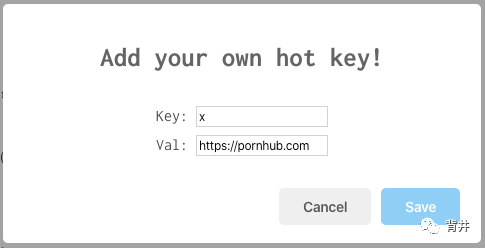
按 l 键,查看已有的快捷映射
按 w 键,关闭当前窗口
按 n 键,复制当前网页到新窗口中
注意,由于chrome限制,以上快捷操作只能在已打开的网页中进行;对一个空的新tab页是无效的。
还不错?点个「在看」吧!
