



数据库service概要
传统的TFA实现方式存在如下问题:
连接串通过VIP的顺序配置优先连接RAC的节点。 连接串通常不会配置备库的TNS,主备切换后需要调整TNS连接配置。 需要人工维护配置文件tnsnames.ora,客户端多的话,不利于维护。
简单理解就是原始的TFA(Transparent Application Failover)是在客户端的tnsnames.ora文件中配置,而数据库的service是在服务端已经配置好了,客户端无需维护tnsnames.ora文件。
service参数说明
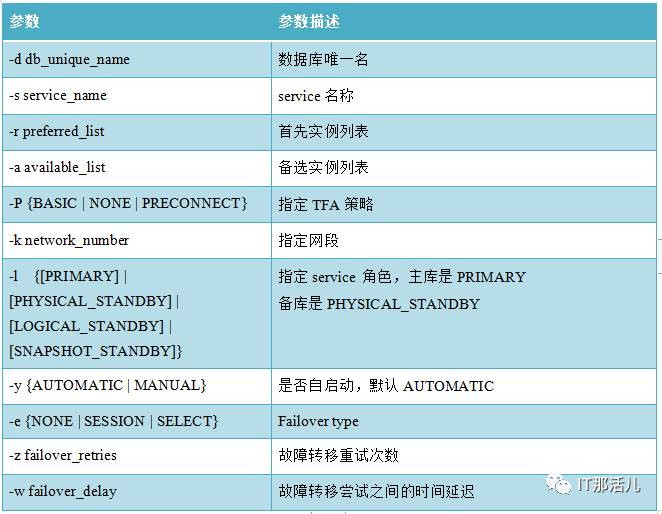
11G 版本 srvctl add service Options 常见参数:
srvctl add service -d db_unique_name -s service_name {-r "preferred_list"
[-a "available_list"] [-P {BASIC | NONE | PRECONNECT}] | -g server_pool
[-c {UNIFORM | SINGLETON]} [-k network_number]
[-l [PRIMARY | PHYSICAL_STANDBY | LOGICAL_STANDBY | SNAPSHOT_STANDBY]
[-y {AUTOMATIC | MANUAL}] [-q {TRUE | FALSE}] [-x {TRUE | FALSE}]
[-j {SHORT | LONG}][-B {NONE | SERVICE_TIME | THROUGHPUT}]
[-e {NONE | SESSION | SELECT}] [-m {NONE | BASIC}] [-z failover_retries]
[-w failover_delay]
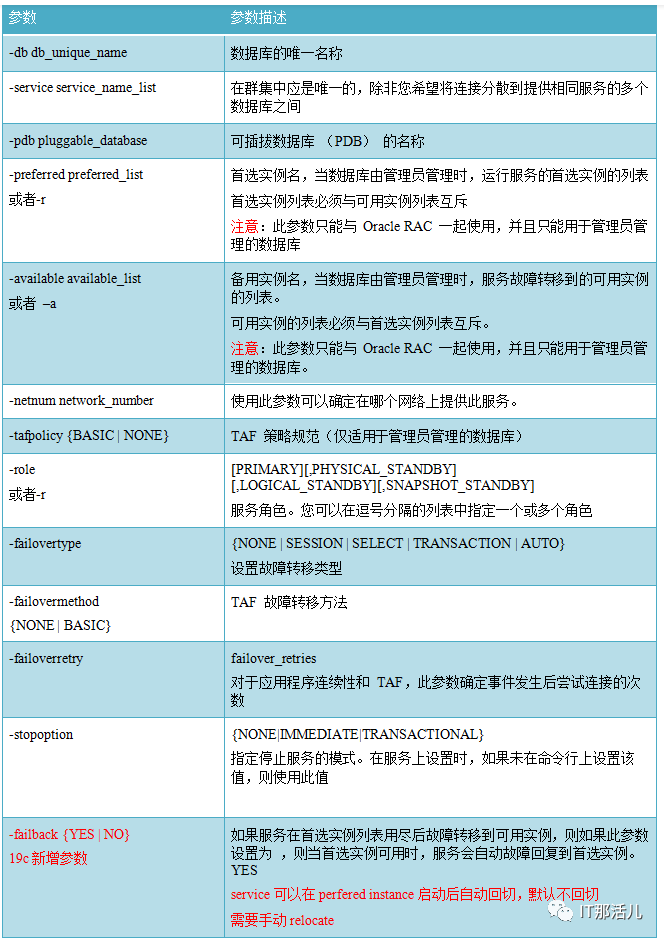
19C 版本部分参数稍有改动:
srvctl add service -database db_unique_name -service service_name_list
[-pdb pluggable_database] [-eval]
[-preferred preferred_list] [-available available_list] [-failback {YES | NO}]
[-netnum network_number] [-tafpolicy {BASIC | NONE}]
[-edition edition_name]
[-role "[PRIMARY][,PHYSICAL_STANDBY][,LOGICAL_STANDBY][,SNAPSHOT_STANDBY]"
[-policy {AUTOMATIC | MANUAL}] [-notification {TRUE | FALSE}]
[-clbgoal {SHORT | LONG}] [-failovertype {NONE|SESSION|SELECT|TRANSACTION|AUTO}]
[-rlbgoal {NONE | SERVICE_TIME | THROUGHPUT}] [-dtp {TRUE | FALSE}]
[-failovermethod {NONE | BASIC}] [-failoverretry failover_retries]
[-drain_timeout timeout] [-stopoption {NONE|IMMEDIATE|TRANSACTIONAL}]
[-failover_restore {NONE|LEVEL1|AUTO}] [-failoverdelay failover_delay]
[-sql_translation_profile sql_translation_profile]
[-global {TRUE | FALSE}] [-maxlag max_lag_time] [-commit_outcome {TRUE|FALSE}]
[-retention retention_time] [-replay_init_time replay_initiation_time]
[-session_state {STATIC|DYNAMIC|AUTO}] [-force] [-verbose]
service 创建模版 DB11G MAA
3.1 主库创建备库角色的两个service
Create the service resource in primary cluster, for example, add service1 and service2

$ $ORACLE_HOME/bin/srvctl add service -d <RAC DB_PRIMARY> -s
<service1> -l physical_standby -r "<RAC DB_PRIMARY1>,<RAC DB_PRIMARY2>"

$ $ORACLE_HOME/bin/srvctl add service -d <RAC DB_PRIMARY> -s
<service2> -l physical_standby -r "<RAC DB_PRIMARY1>,<RAC DB_PRIMARY2>"
在主库执行: RAC DB_PRIMARY 是主库的db_unique_name。
srvctl add service -d EMREP -s EMREP_RD_S1 -l physical_standby -r EMREP1 -a EMREP2
srvctl add service -d EMREP -s EMREP_RD_S2 -l physical_standby -r EMREP2 -a EMREP1
检查服务状态:
[oracle@emrep01 dbs]$ srvctl status service -d EMREP
Service EMREP_RD_S1 is not running.
Service EMREP_RD_S2 is not running.
3.2 主库启动service并注册到数据库
主库启动service并注册到数据库通过日志传输给备库:
$ $ORACLE_HOME/bin/srvctl start service -d <RAC DB_PRIMARY>
主库节点1 alert日志:
ALTER SYSTEM SET service_names='EMREP_RD_S1' SCOPE=MEMORY SID='EMREP1';
主库节点2 alert日志:
ALTER SYSTEM SET service_names='EMREP_RD_S2' SCOPE=MEMORY SID='EMREP2';
3.3 主库停止service
$ $ORACLE_HOME/bin/srvctl stop service -d <RAC DB_PRIMARY>
$ $ORACLE_HOME/bin/srvctl status service -d <RAC DB_PRIMARY>

Service service1 is not running.
Service service2 is not running.

srvctl stop service -d EMREP
这时候观察主库两个节点的alert日志发现如下语句:
ALTER SYSTEM SET service_names='EMREP' SCOPE=MEMORY SID='EMREP1';
ALTER SYSTEM SET service_names='EMREP' SCOPE=MEMORY SID='EMREP2';
3.4 确保备库已经同步
set lines 400 pages 1000
select thread#, max(sequence#) as "last_applied_log"
from v$log_history
group by thread#;
3.5 在备库创建服务
建议在MRP所在的启动service。
$ $ORACLE_HOME/bin/srvctl add service -d <RAC DB_STBY> -s <service1> -l physical_standby -r "<RAC DB_STBY1>,<RAC DB_STBY2>"
$ $ORACLE_HOME/bin/srvctl add service -d <RAC DB_STBY> -s <service2> -l physical_standby -r "<RAC DB_STBY1>,<RAC DB_STBY2>"

# 备库创建,注意db_unique_name是备库的
srvctl add service -d DGEMREP -s EMREP_RD_S1 -l physical_standby -r EMREP1 -a EMREP2
srvctl add service -d DGEMREP -s EMREP_RD_S2 -l physical_standby -r EMREP2 -a EMREP1
3.6 检查service状态
ora.dgEMREP.EMREP_rd_s1.svc
1   OFFLINE OFFLINE
ora.dgEMREP.EMREP_rd_s2.svc
1   OFFLINE OFFLINE
3.7 备库启动service
$ $ORACLE_HOME/bin/srvctl start service -d <RAC DB_STBY>

$ $ORACLE_HOME/bin/srvctl status service -d <RAC DB_STBY>

Service <service1> is running on instance(s) <RAC DB_STBY1>,<RAC DB_STBY2>
Service <service2> is running on instance(s) <RAC DB_STBY1>,<RAC DB_STBY2>
启动备库的service:
srvctl start service -d dgEMREP
这时候观察主库两个节点的alert日志发现如下语句:
ALTER SYSTEM SET service_names='EMREP_RD_S1' SCOPE=MEMORY SID='EMREP1';
ALTER SYSTEM SET service_names='EMREP_RD_S2' SCOPE=MEMORY SID='EMREP2';
检查服务状态:
ora.dgEMREP.EMREP_rd_s1.svc
1  ONLINE  ONLINE       emrep01
ora.dgEMREP.EMREP_rd_s2.svc
1  ONLINE  ONLINE       emrep02
检查service状态:
[oracle@emrep02 ~]$ srvctl status service -d dgEMREP
Service EMREP_RD_S1 is running on instance(s) EMREP1
Service EMREP_RD_S2 is running on instance(s) EMREP2
节点1
[grid@emrep01 ~]$ lsnrctl status

LSNRCTL for Linux: Version 11.2.0.4.0 - Production on 07-APR-2022 22:02:28

Copyright (c) 1991, 2013, Oracle. All rights reserved.

Connecting to (DESCRIPTION=(ADDRESS=(PROTOCOL=IPC)(KEY=LISTENER)))
STATUS of the LISTENER
------------------------
Alias LISTENER
Version TNSLSNR for Linux: Version 11.2.0.4.0 - Production
Start Date                07-APR-2022 20:33:54
Uptime 0 days 1 hr. 28 min. 34 sec
Trace Level               off
Security                  ON: Local OS Authentication
SNMP OFF
Listener Parameter File   /u01/11.2.0/grid/network/admin/listener.ora
Listener Log File         /u01/11.2.0/grid/log/diag/tnslsnr/emrep01/listener/alert/log.xml
Listening Endpoints Summary...
(DESCRIPTION=(ADDRESS=(PROTOCOL=ipc)(KEY=LISTENER)))
(DESCRIPTION=(ADDRESS=(PROTOCOL=tcp)(HOST=10.25.140.184)(PORT=1521)))
(DESCRIPTION=(ADDRESS=(PROTOCOL=tcp)(HOST=10.25.140.186)(PORT=1521)))
Services Summary...
Service "+ASM" has 1 instance(s).
Instance "+ASM1", status READY, has 1 handler(s) for this service...
Service "EMREP_RD_S1" has 1 instance(s).
Instance "EMREP1", status READY, has 1 handler(s) for this service...
Service "dgEMREP" has 1 instance(s).
Instance "EMREP1", status READY, has 1 handler(s) for this service...
Service "EMREPXDB" has 1 instance(s).
Instance "EMREP1", status READY, has 1 handler(s) for this service...
The command completed successfully
节点2
[grid@emrep02 ~]$ lsnrctl status

LSNRCTL for Linux: Version 11.2.0.4.0 - Production on 07-APR-2022 22:07:01

Copyright (c) 1991, 2013, Oracle. All rights reserved.

Connecting to (DESCRIPTION=(ADDRESS=(PROTOCOL=IPC)(KEY=LISTENER)))
STATUS of the LISTENER
------------------------
Alias LISTENER
Version TNSLSNR for Linux: Version 11.2.0.4.0 - Production
Start Date                07-APR-2022 20:34:14
Uptime 0 days 1 hr. 32 min. 47 sec
Trace Level               off
Security                  ON: Local OS Authentication
SNMP OFF
Listener Parameter File   /u01/11.2.0/grid/network/admin/listener.ora
Listener Log File         /u01/11.2.0/grid/log/diag/tnslsnr/emrep02/listener/alert/log.xml
Listening Endpoints Summary...
(DESCRIPTION=(ADDRESS=(PROTOCOL=ipc)(KEY=LISTENER)))
(DESCRIPTION=(ADDRESS=(PROTOCOL=tcp)(HOST=10.25.140.185)(PORT=1521)))
(DESCRIPTION=(ADDRESS=(PROTOCOL=tcp)(HOST=10.25.140.187)(PORT=1521)))
Services Summary...
Service "+ASM" has 1 instance(s).
Instance "+ASM2", status READY, has 1 handler(s) for this service...
Service "EMREP_RD_S2" has 1 instance(s).
Instance "EMREP2", status READY, has 1 handler(s) for this service...
Service "dgEMREP" has 1 instance(s).
Instance "EMREP2", status READY, has 1 handler(s) for this service...
Service "EMREPXDB" has 1 instance(s).
Instance "EMREP2", status READY, has 1 handler(s) for this service...
The command completed successfully
3.8 检查备库service是否随备库启动而启动
$ $ORACLE_HOME/bin/srvctl stop database -d <RAC DB_STBY>
$ $ORACLE_HOME/bin/srvctl start database -d <RAC DB_STBY>
$ $ORACLE_HOME/bin/srvctl status service -d <RAC DB_STBY>
Service <service1> is running on instance(s) <RAC DB_STBY1>,<RAC DB_STBY2>
Service <service2> is running on instance(s) <RAC DB_STBY1>,<RAC DB_STBY2>
srvctl start database -d dgEMREP
ora.dgEMREP.EMREP_rd_s1.svc
1  ONLINE  ONLINE       emrep01
ora.dgEMREP.EMREP_rd_s2.svc
1  ONLINE  ONLINE       emrep01
3.9 创建主库的service
主库写服务,在主库执行:
srvctl add service -d EMREP -s EMREP_R_S1 -l PRIMARY -r EMREP1 -a EMREP2
srvctl add service -d EMREP -s EMREP_R_S2 -l PRIMARY -r EMREP2 -a EMREP1
检查资源状态:
ora.EMREP.EMREP_r_s1.svc
     1 OFFLINE OFFLINE
ora.EMREP.EMREP_r_s2.svc
     1 OFFLINE OFFLINE
ora.EMREP.EMREP_rd_s1.svc
     1 OFFLINE OFFLINE
ora.EMREP.EMREP_rd_s2.svc
     1 OFFLINE OFFLINE
3.10 启动主库的service
只启动主库的service:
srvctl start service -d EMREP -s EMREP_r_s1
srvctl start service -d EMREP -s EMREP_r_s2
ora.EMREP.EMREP_r_s1.svc
1 ONLINE  ONLINE       emrep01
ora.EMREP.EMREP_r_s2.svc
1 ONLINE  ONLINE       emrep02
ora.EMREP.EMREP_rd_s1.svc
1 OFFLINE OFFLINE
ora.EMREP.EMREP_rd_s2.svc
1 OFFLINE OFFLINE
检查service状态:
srvctl config service -d EMREP -s EMREP_r_s1
Service name: EMREP_R_S1
Service is enabled
Server pool: EMREP_EMREP_R_S1
Cardinality: 1
Disconnect: false
Service role: PRIMARY
Management policy: AUTOMATIC
DTP transaction: false
AQ HA notifications: false
Failover type: NONE
Failover method: NONE
TAF failover retries: 0
TAF failover delay: 0
Connection Load Balancing Goal: LONG
Runtime Load Balancing Goal: NONE
TAF policy specification: NONE
Edition:
Preferred instances: EMREP1
Available instances: EMREP2

srvctl config service -d EMREP -s EMREP_r_s2
Service name: EMREP_R_S2
Service is enabled
Server pool: EMREP_EMREP_R_S2
Cardinality: 1
Disconnect: false
Service role: PRIMARY
Management policy: AUTOMATIC
DTP transaction: false
AQ HA notifications: false
Failover type: NONE
Failover method: NONE
TAF failover retries: 0
TAF failover delay: 0
Connection Load Balancing Goal: LONG
Runtime Load Balancing Goal: NONE
TAF policy specification: NONE
Edition:
Preferred instances: EMREP2
Available instances: EMREP1
节点1
Listening Endpoints Summary...
(DESCRIPTION=(ADDRESS=(PROTOCOL=ipc)(KEY=LISTENER)))
(DESCRIPTION=(ADDRESS=(PROTOCOL=tcp)(HOST=10.25.140.180)(PORT=1521)))
(DESCRIPTION=(ADDRESS=(PROTOCOL=tcp)(HOST=10.25.140.166)(PORT=1521)))
Services Summary...
Service "+ASM" has 1 instance(s).
Instance "+ASM1", status READY, has 1 handler(s) for this service...
Service "EMREP_R_S1" has 1 instance(s).
Instance "EMREP1", status READY, has 1 handler(s) for this service...
Service "EMREP" has 1 instance(s).
Instance "EMREP1", status READY, has 1 handler(s) for this service...
Service "EMREPXDB" has 1 instance(s).
Instance "EMREP1", status READY, has 1 handler(s) for this service...
The command completed successfully
节点2
Listening Endpoints Summary...
(DESCRIPTION=(ADDRESS=(PROTOCOL=ipc)(KEY=LISTENER)))
(DESCRIPTION=(ADDRESS=(PROTOCOL=tcp)(HOST=10.25.140.181)(PORT=1521)))
(DESCRIPTION=(ADDRESS=(PROTOCOL=tcp)(HOST=10.25.140.167)(PORT=1521)))
Services Summary...
Service "+ASM" has 1 instance(s).
Instance "+ASM2", status READY, has 1 handler(s) for this service...
Service "EMREP_R_S2" has 1 instance(s).
Instance "EMREP2", status READY, has 1 handler(s) for this service...
Service "EMREP" has 1 instance(s).
Instance "EMREP2", status READY, has 1 handler(s) for this service...
Service "EMREPXDB" has 1 instance(s).
Instance "EMREP2", status READY, has 1 handler(s) for this service...
The command completed successfully
3.11 备库添加主库的service
srvctl add service -d DGEMREP -s EMREP_R_S1 -l PRIMARY -r EMREP1 -a EMREP2
srvctl add service -d DGEMREP -s EMREP_R_S2 -l PRIMARY -r EMREP2 -a EMREP1
主库service
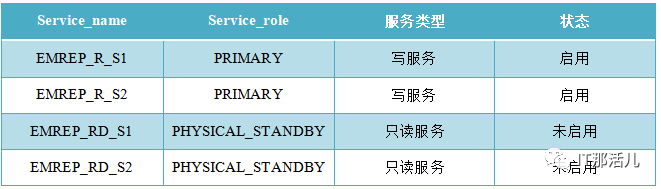
备库service
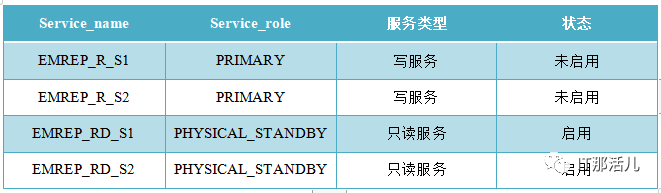
新主库service
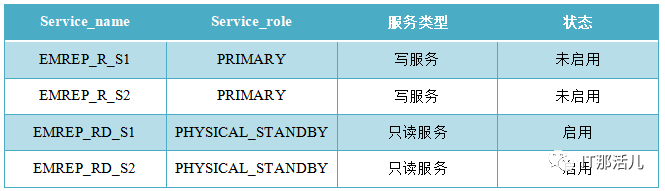
新备库service

建议:切换之前可以考虑把主备库的service先关闭,切换完成后再打开,不然原先连接备库的service可能连到了主库上面。
service 创建模版 DB19C MAA
4.1 主库创建备库的service
srvctl add service -db HBCMDB -pdb ORCL -service ORCL_RD_S1
-role physical_standby -preferred orcl1 -available orcl2

srvctl add service -db HBCMDB -pdb ORCL -service ORCL_RD_S2
-role physical_standby -preferred orcl2 -available orcl1
4.2 主库启动service并注册到数据库
主库启动service并注册到数据库通过日志传输给备库。
srvctl start service -d HBCMDB
srvctl stop service -d HBCMDB
4.4 确保备库已经同步
set lines 400 pages 1000
select thread#, max(sequence#) as "last_applied_log"
from v$log_history
group by thread#;
4.5 在备库中创建service
srvctl add service -db DGORCL -pdb ORCL -service ORCL_RD_S1
-role physical_standby -preferred orcl1 -available orcl2
srvctl add service -db DGORCL -pdb ORCL -service ORCL_RD_S2
-role physical_standby -preferred orcl1 -available orcl2
4.6 备库启动service
srvctl start service -d DGORCL
或者
srvctl start service -d DGORCL -s ORCL_rd_s1
srvctl start service -d DGORCL -s ORCL_rd_s2
4.7 备库检查service状态
[oracle@server01 admin]$ srvctl config service -d DGORCL
Service name: ORCL_R_S1
Server pool:
Cardinality: 1
Service role: PRIMARY
Management policy: AUTOMATIC
DTP transaction: false
AQ HA notifications: false
Global: false
Commit Outcome: false
Failover type:
Failover method:
Failover retries:
Failover delay:
Failover restore: NONE
Connection Load Balancing Goal: LONG
Runtime Load Balancing Goal: NONE
TAF policy specification: NONE
Edition:
Pluggable database name: ORCL
Hub service:
Maximum lag time: ANY
SQL Translation Profile:
Retention: 86400 seconds
Replay Initiation Time: 300 seconds
Drain timeout:
Stop option:
Session State Consistency: DYNAMIC
GSM Flags: 0
Service is enabled
Preferred instances: orcl1
Available instances: orcl2
CSS critical: no


Service name: ORCL_R_S2
Server pool:
Cardinality: 1
Service role: PRIMARY
Management policy: AUTOMATIC
DTP transaction: false
AQ HA notifications: false
Global: false
Commit Outcome: false
Failover type:
Failover method:
Failover retries:
Failover delay:
Failover restore: NONE
Connection Load Balancing Goal: LONG
Runtime Load Balancing Goal: NONE
TAF policy specification: NONE
Edition:
Pluggable database name: ORCL
Hub service:
Maximum lag time: ANY
SQL Translation Profile:
Retention: 86400 seconds
Replay Initiation Time: 300 seconds
Drain timeout:
Stop option:
Session State Consistency: DYNAMIC
GSM Flags: 0
Service is enabled
Preferred instances: orcl2
Available instances: orcl1
CSS critical: no

Service name: ORCL_RD_S1
Server pool:
Cardinality: 1
Service role: PHYSICAL_STANDBY
Management policy: AUTOMATIC
DTP transaction: false
AQ HA notifications: false
Global: false
Commit Outcome: false
Failover type:
Failover method:
Failover retries:
Failover delay:
Failover restore: NONE
Connection Load Balancing Goal: LONG
Runtime Load Balancing Goal: NONE
TAF policy specification: NONE
Edition:
Pluggable database name: ORCL
Hub service:
Maximum lag time: ANY
SQL Translation Profile:
Retention: 86400 seconds
Replay Initiation Time: 300 seconds
Drain timeout:
Stop option:
Session State Consistency: DYNAMIC
GSM Flags: 0
Service is enabled
Preferred instances: orcl1
Available instances: orcl2
CSS critical: no
Service uses Java: false

Service name: ORCL_RD_S2
Server pool:
Cardinality: 1
Service role: PHYSICAL_STANDBY
Management policy: AUTOMATIC
DTP transaction: false
AQ HA notifications: false
Global: false
Commit Outcome: false
Failover type:
Failover method:
Failover retries:
Failover delay:
Failover restore: NONE
Connection Load Balancing Goal: LONG
Runtime Load Balancing Goal: NONE
TAF policy specification: NONE
Edition:
Pluggable database name: ORCL
Hub service:
Maximum lag time: ANY
SQL Translation Profile:
Retention: 86400 seconds
Replay Initiation Time: 300 seconds
Drain timeout:
Stop option:
Session State Consistency: DYNAMIC
GSM Flags: 0
Service is enabled
Preferred instances: orcl1
Available instances: orcl2
CSS critical: no
Service uses Java: false
4.8 主库创建主库的service
srvctl add service -db HBCMDB -pdb ORCL -service ORCL_R_S1 -
role primary -preferred orcl1 -available orcl2
srvctl add service -db HBCMDB -pdb ORCL -service ORCL_R_S2 -
role primary -preferred orcl2 -available orcl1
4.9 启动主库的service
srvctl start service -d HBCMDB -s ORCL_R_S1
srvctl start service -d HBCMDB -s ORCL_R_S2
4.10 备库添加主库的service
srvctl add service -db DGORCL -pdb ORCL -service ORCL_R_S1 -
role primary -preferred orcl1 -available orcl2
srvctl add service -db DGORCL -pdb ORCL -service ORCL_R_S2 -
role primary -preferred orcl2 -available orcl1

本文作者:王尔贵(上海新炬王翦团队)
本文来源:“IT那活儿”公众号

文章转载自IT那活儿,如果涉嫌侵权,请发送邮件至:contact@modb.pro进行举报,并提供相关证据,一经查实,墨天轮将立刻删除相关内容。
