目录
一、Orchestrator简介二、快速搭建Orchestrator环境三、添加主从环境四、修改集群别名五、拖动界面修改主从关系六、自动failover
一、Orchestrator简介
Orchestrator是一款开源,对MySQL复制提供高可用、拓扑的可视化管理工具,采用go语言编写,它能够主动发现当前拓扑结构和主从复制状态,支持MySQL主从复制拓扑关系的调整、支持MySQL主库故障自动切换(failover)、手动主从切换(switchover)等功能。
Orchestrator后台依赖于MySQL或者SQLite存储元数据,能够提供Web界面展示MySQL集群的拓扑关系及实例状态,通过Web界面可更改MySQL实例的部分配置信息,同时也提供命令行和api接口,以便更加灵活的自动化运维管理。Orchestrator 对MySQL主库的故障切换分为自动切换和手动切换。手动切换又分为recover、force-master-failover、force-master-takeover以及graceful-master-takeover。
相比于MHA,Orchestrator更加偏重于复制拓扑关系的管理,能够实现MySQL任一复制拓扑关系的调整,并在此基础上,实现MySQL高可用。另外,Orchestrator自身也可以部署多个节点,通过raft分布式一致性协议,保证自身的高可用。
Orchestrator主要有以下几个特征:
自动监测数据库复制的结构及其状态
提供了GUI,CLI,API等接口来检查复制拓扑的状态以及做一些调整的操作
支持自动的master failover,当复制结构的server挂掉以后(不管手动还是自动的),能够重新形成复制的拓扑结构
不依赖于特定的server版本或分支(MySQL, Percona Server, MariaDB or even MaxScale binlog servers)
支持多种类型的拓扑结构,不管是单个的主从还是成百上千个server组成的多级复制都不在话下
它的GUI不只是向你report拓扑状态,还可以在Orchestrator web页面通过拖拽或者删除节点来改变复制拓扑(CLI和API也能做)
Orchestrator的GitHub地址:
https://github.com/openark/orchestrator
https://github.com/outbrain/orchestrator/wiki/Orchestrator-Manual
https://github.com/github/orchestrator/tree/master/docs
Orchestrator的所有参数:
https://github.com/github/orchestrator/blob/master/go/config/config.go
官方建议的生产配置示例:
https://github.com/github/orchestrator/blob/master/docs/configuration-sample.md
二、快速搭建Orchestrator环境
 1-- 拉取小麦苗的镜像
 2docker pull registry.cn-hangzhou.aliyuncs.com/lhrbest/lhrorchestrator:1.0
 3
 4-- 创建容器
 5docker run -d --name lhrorchestrator -h lhrorchestrator \
 6  -p 233:22 -p 3087:3389 -p 3000:3000 \
 7  --privileged=true lhrbest/lhrorchestrator:1.0 \
 8  /usr/sbin/init
 9
10
11-- 进入容器
12docker exec -it lhrorchestrator bash
13
14-- 启动后端存储MySQL库
15systemctl status mysqld
16MySQL用户名和密码:root/lhr
17
18-- 启动orchestrator
19systemctl start orchestrator
20systemctl status orchestrator
21
22
23-- web访问:
24http://192.168.66.35:3000
25用户名和密码:lhr/lhr
26
27-- 日志:
28tailf /var/log/messages
29
30-- 参数文件
31/usr/local/orchestrator/orchestrator.conf.json
web界面如下所示:

三、添加主从环境
把配置好的复制实例加入到orchestrator,因为orch可以自动发现整个拓扑的所有实例,所以只需要添加任意一台实例即可。
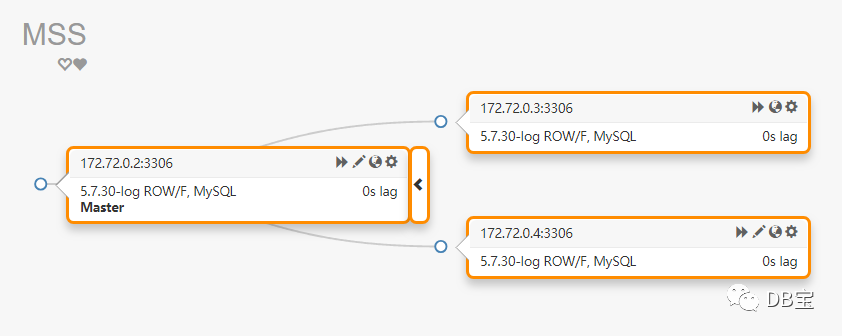
这里,我有一套1主2从的环境,拓扑图如下所示:
 1[root@docker35 log]# mysqlrplshow --master=root:lhr@172.72.0.2:3306 --discover-slaves-login=root:lhr --verbose
 2WARNING: Using a password on the command line interface can be insecure.
 3# master on 172.72.0.2: ... connected.
 4# Finding slaves for master: 172.72.0.2:3306
 5
 6# Replication Topology Graph
 7172.72.0.2:3306 (MASTER)
 8   |
 9   +--- 172.72.0.3:3306 [IO: Yes, SQL: Yes] - (SLAVE)
10   |
11   +--- 172.72.0.4:3306 [IO: Yes, SQL: Yes] - (SLAVE)
下面开始把这套环境添加到orchestrator中:
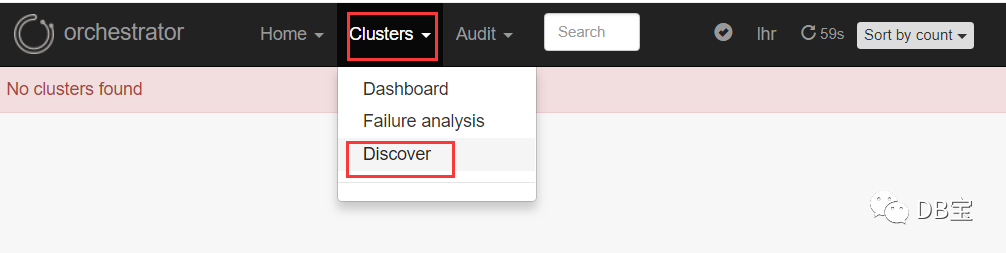
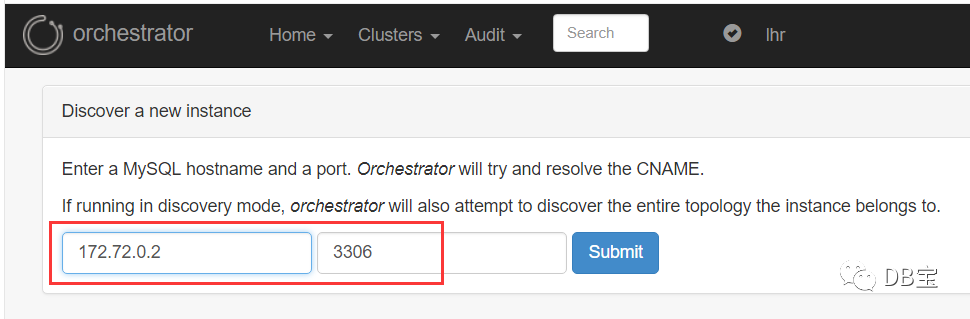
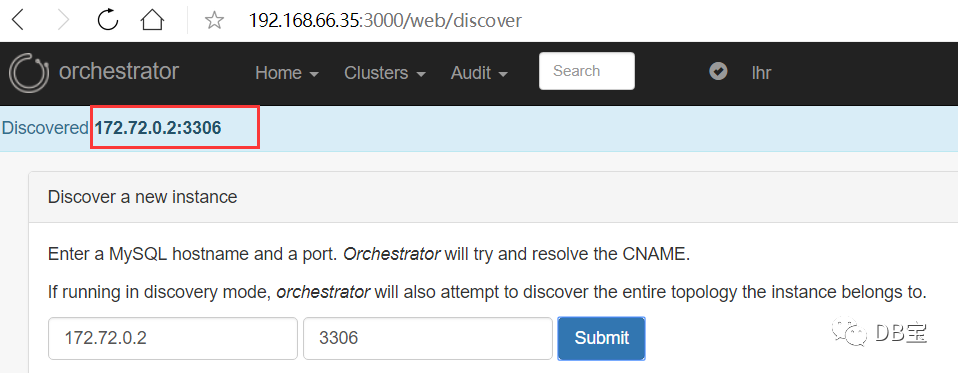
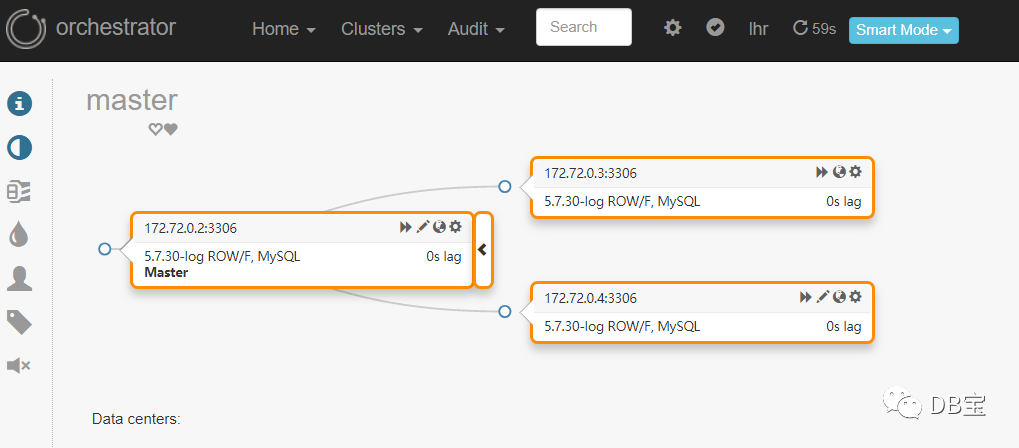
添加成功。
我们再添加一套双主双从的环境:
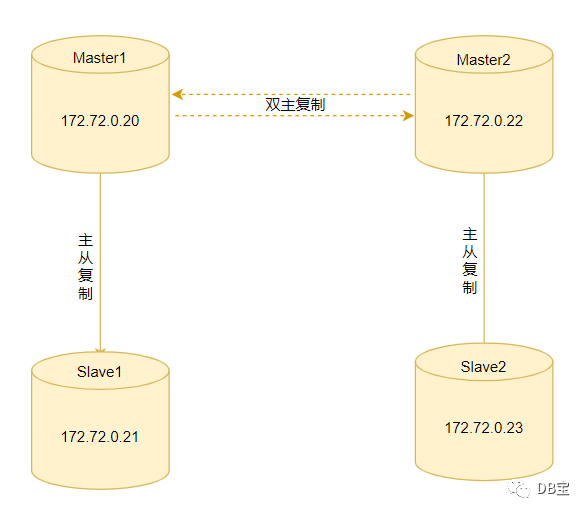
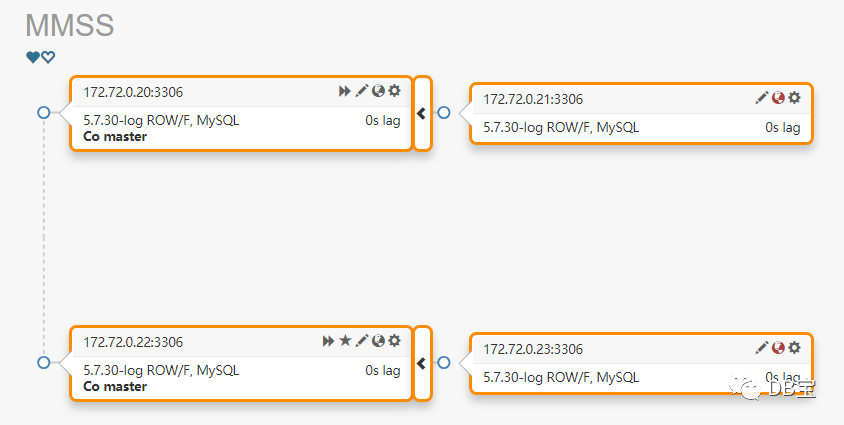
选择任意一台MySQL服务器进行Discover操作,添加完成后,刷新页面如下:
四、修改集群别名
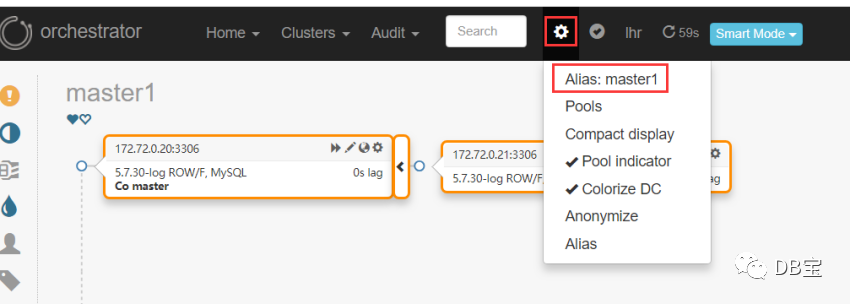
修改完成后,刷新页面:
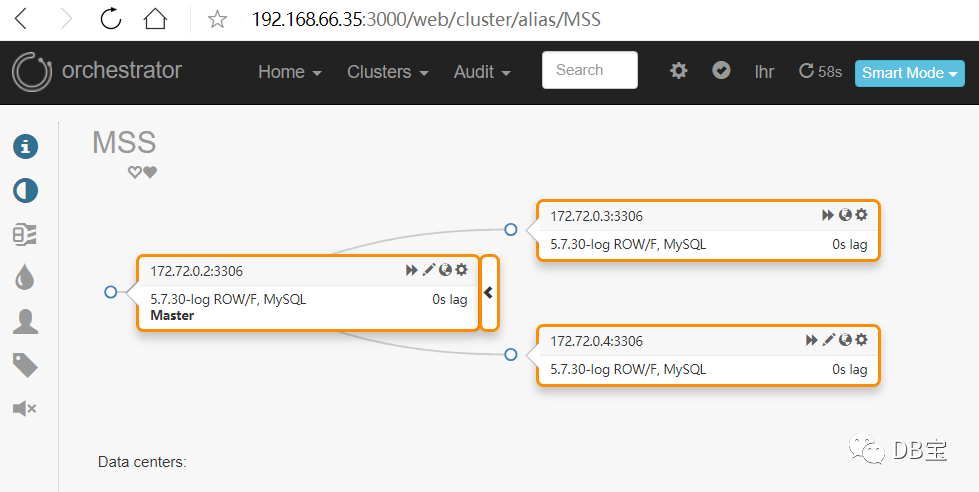
注意:集群别名不支持中文。
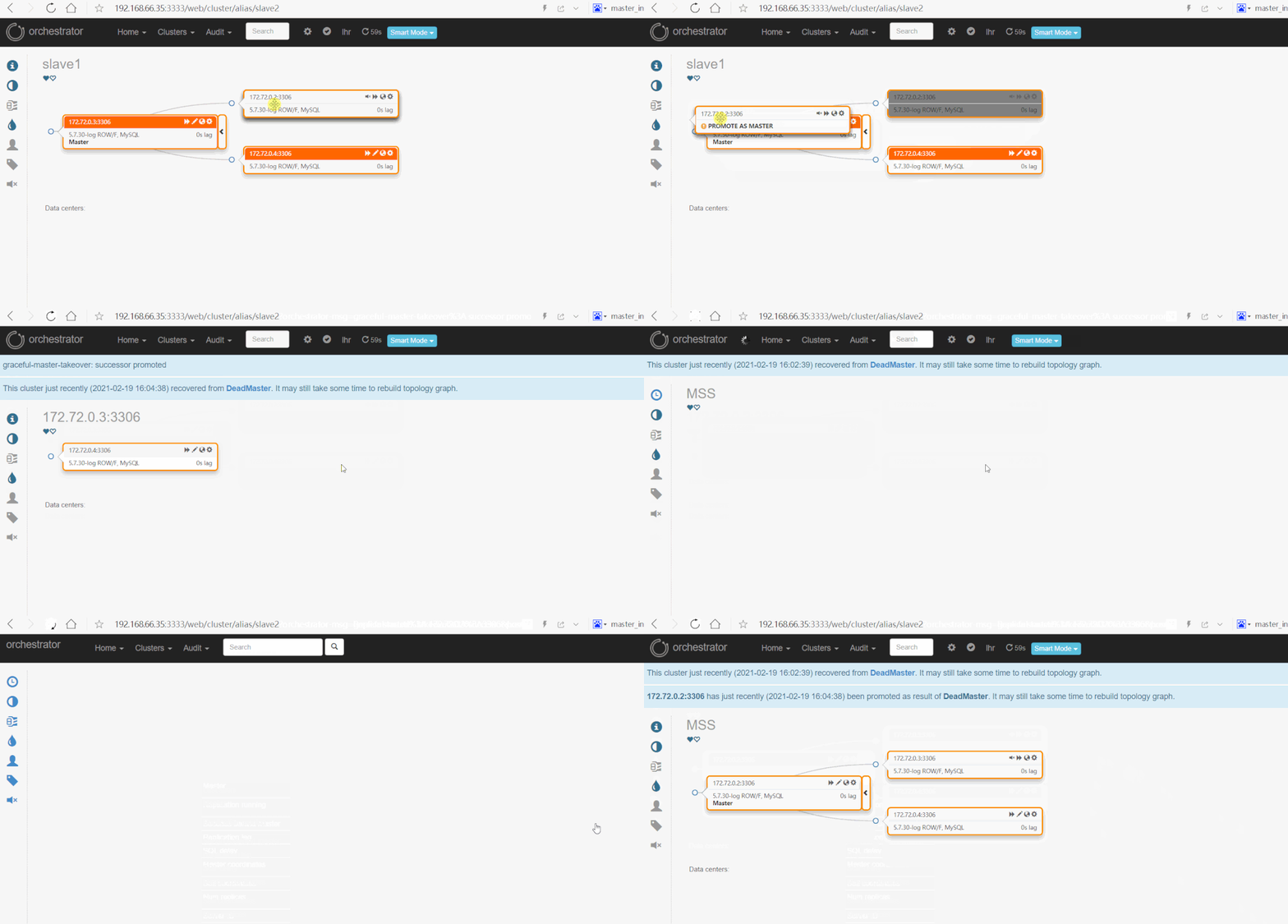
五、拖动界面修改主从关系
手动修改主从关系:
六、自动failover
要实现自动failover,需要修改2个参数:
1[root@lhrorchestrator orchestrator]# more orchestrator.conf.json | grep  ClusterFilters
2  "RecoverMasterClusterFilters": ["*"],
3  "RecoverIntermediateMasterClusterFilters": ["*"],
这2个参数表示定义哪些集群可以自动failover和recover。
自动failover之前:
宕掉主库:
 1[root@lhrorchestrator /]# mysql -uroot -plhr -h172.72.0.2 -P3306
 2mysql: [Warning] Using a password on the command line interface can be insecure.
 3Welcome to the MySQL monitor.  Commands end with ; or \g.
 4Your MySQL connection id is 11357
 5Server version: 5.7.30-log MySQL Community Server (GPL)
 6
 7Copyright (c) 2000, 2020, Oracle and/or its affiliates. All rights reserved.
 8
 9Oracle is a registered trademark of Oracle Corporation and/or its
10affiliates. Other names may be trademarks of their respective
11owners.
12
13Type 'help;' or '\h' for help. Type '\c' to clear the current input statement.
14
15mysql> shutdown ;
16Query OK, 0 rows affected (0.00 sec)
刷新页面:
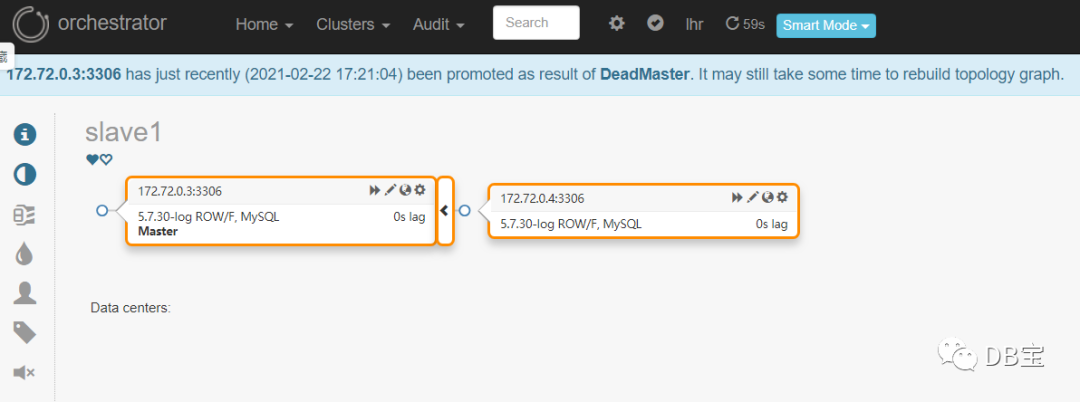
172.72.0.2自动被剔除,新主库变为172.72.0.3。
172.72.0.4指向了新的主库172.72.0.3。
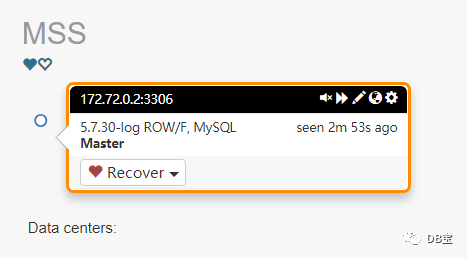
172.72.0.2已宕机,边框为黑色:
接下来启动172.72.0.2,启动完成后:
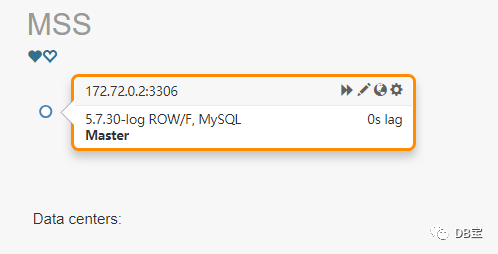
需要我们手动加入集群:
 1[root@docker35 log]#  mysql -uroot -plhr -h172.72.0.2 -P3306
 2mysql: [Warning] Using a password on the command line interface can be insecure.
 3Welcome to the MySQL monitor.  Commands end with ; or \g.
 4Your MySQL connection id is 13
 5Server version: 5.7.30-log MySQL Community Server (GPL)
 6
 7Copyright (c) 2000, 2020, Oracle and/or its affiliates. All rights reserved.
 8
 9Oracle is a registered trademark of Oracle Corporation and/or its
10affiliates. Other names may be trademarks of their respective
11owners.
12
13Type 'help;' or '\h' for help. Type '\c' to clear the current input statement.
14
15mysql> show slave hosts;
16Empty set (0.00 sec)
17
18mysql> show slave status;
19Empty set (0.00 sec)
20
21mysql> change master to
22    -> master_host='172.72.0.3',
23    -> master_port=3306,
24    -> master_user='repl',
25    -> master_password='lhr',
26    -> master_auto_position=1;
27show slave status \G;
28Query OK, 0 rows affected, 1 warning (0.02 sec)
29
30mysql>
31mysql> start slave;
32Query OK, 0 rows affected (0.01 sec)
33
34mysql> show slave status \G;
35*************************** 1. row ***************************
36               Slave_IO_State: Checking master version
37                  Master_Host: 172.72.0.3
38                  Master_User: repl
39                  Master_Port: 3306
40                Connect_Retry: 60
41              Master_Log_File:
42          Read_Master_Log_Pos: 4
43               Relay_Log_File: master-relay-bin.000001
44                Relay_Log_Pos: 4
45        Relay_Master_Log_File:
46             Slave_IO_Running: Yes
47            Slave_SQL_Running: Yes
48              Replicate_Do_DB:
49          Replicate_Ignore_DB:
50           Replicate_Do_Table:
51       Replicate_Ignore_Table:
52      Replicate_Wild_Do_Table:
53  Replicate_Wild_Ignore_Table:
54                   Last_Errno: 0
55                   Last_Error:
56                 Skip_Counter: 0
57          Exec_Master_Log_Pos: 0
58              Relay_Log_Space: 154
59              Until_Condition: None
60               Until_Log_File:
61                Until_Log_Pos: 0
62           Master_SSL_Allowed: No
63           Master_SSL_CA_File:
64           Master_SSL_CA_Path:
65              Master_SSL_Cert:
66            Master_SSL_Cipher:
67               Master_SSL_Key:
68        Seconds_Behind_Master: 0
69Master_SSL_Verify_Server_Cert: No
70                Last_IO_Errno: 0
71                Last_IO_Error:
72               Last_SQL_Errno: 0
73               Last_SQL_Error:
74  Replicate_Ignore_Server_Ids:
75             Master_Server_Id: 0
76                  Master_UUID:
77             Master_Info_File: mysql.slave_master_info
78                    SQL_Delay: 0
79          SQL_Remaining_Delay: NULL
80      Slave_SQL_Running_State: Slave has read all relay log; waiting for more updates
81           Master_Retry_Count: 86400
82                  Master_Bind:
83      Last_IO_Error_Timestamp:
84     Last_SQL_Error_Timestamp:
85               Master_SSL_Crl:
86           Master_SSL_Crlpath:
87           Retrieved_Gtid_Set:
88            Executed_Gtid_Set: bacfcde8-69dc-11eb-b240-0242ac480002:1-70574,
89bc6d26f0-69dc-11eb-bfa7-0242ac480003:1-5
90                Auto_Position: 1
91         Replicate_Rewrite_DB:
92                 Channel_Name:
93           Master_TLS_Version:
941 row in set (0.00 sec)
95
96ERROR:
97No query specified
98
99mysql>
刷新页面:
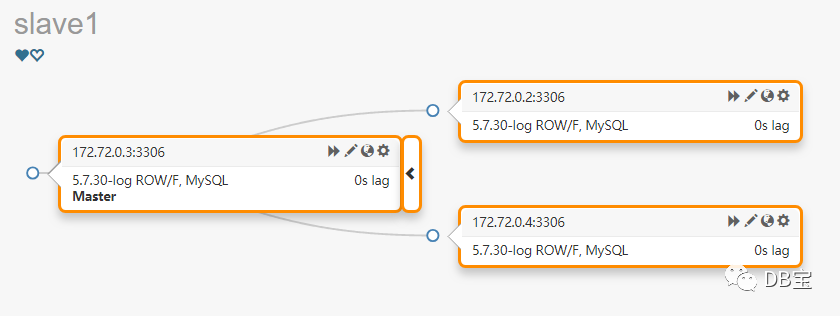
可以看到,又回到了一主2从的环境。
本文结束。

• 微信公众号:DB宝,作者:小麦苗
• 作者博客地址:www.xmmup.com
• 作者微信:db_bao• 作者QQ:646634621,QQ群:230161599、618766405
• 提供Oracle OCP、OCM、高可用(rac+dg+ogg)、MySQL DBA、PostgreSQL DBA培训
• 版权所有,欢迎分享本文,转载请保留出处• 若有侵权请联系小麦苗删除
★DB宝分享的IT资料:https://mp.weixin.qq.com/s/Iwsy-zkzwgs8nYkcMz29ag★DB宝笔试面试详解:https://mp.weixin.qq.com/s/Vm5PqNcDcITkOr9cQg6T7w
长按下图识别二维码,关注小麦苗的微信公众号:DB宝,学习最实用的数据库技术。