



DG PDB是Oracle数据库21c(21.7)中引入的一项新功能,它允许PDB级数据保护。本文描述了DG PDB的基本设置。
感谢费尔南多·西蒙,他发现了一些问题,这节省了我很多时间和头痛。你应该在这里读他的这篇文章。
- Assumptions
- Prerequisites
- DG PDB Configuration
- Switchover PDB
- Failover PDB
- Thoughts
相关文章
- Data Guard : The PREPARE DATABASE FOR DATA GUARD Command in Oracle Database 21c
- Read-Only Oracle Homes in Oracle Database 18c
- Data Guard Quick Links : 11gR2, 12cR1, 12cR2, 18c, 19c, 21c, All Articles
假设
本文假设在启动之前,以下基础设施已经就绪。
-
我们有两台安装了Oracle 21.7的服务器(物理或虚拟机)。Oracle安装必须修补到21.7,否则此功能将无法运行。
-
来源CDB:在ol8-21-dgpdb1上运行的cdb1。
-
备用CDB:在ol8-21-dgpdb2上运行的cdb2。
-
源PDB:cdb1内部运行的pdb1。
-
备用PDB:在此过程中,我们将在cdb2中创建pdb1_。我们可以在两个实例上使用相同的PDB名称,但是对于一篇文章来说,如果两个实例之间的PDB名不同,则更容易描述它
-
两个CDB都可能包含未受DG PDB保护的其他PDB,或具有单独的DG PDB配置。在本例中,我们通过排除额外的PDB来保持设置的简单性。
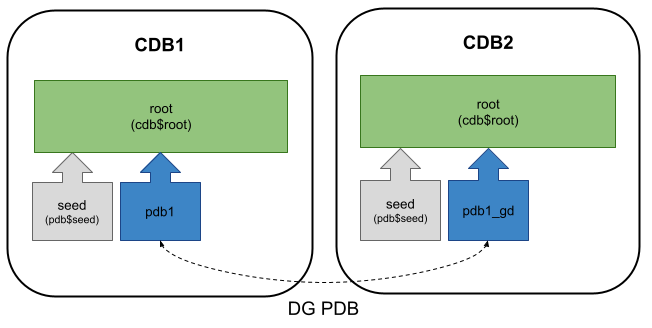
除了正常的数据库先决条件外,我们还安装了sshpass包。
dnf install -y sshpass
这些环境变量将用于许多设置脚本。观察他们的价值观可能有助于理解我们在这里所做的事情。根据需要进行调整,但保持一致。
# Hosts
export DOMAIN_NAME=localdomain

export NODE1_HOSTNAME=ol8-21-dgpdb1
export NODE2_HOSTNAME=ol8-21-dgpdb2
export NODE1_FQ_HOSTNAME=${NODE1_HOSTNAME}.${DOMAIN_NAME}
export NODE2_FQ_HOSTNAME=${NODE2_HOSTNAME}.${DOMAIN_NAME}

# Paths
export ORACLE_BASE=/u01/app/oracle
export ORA_INVENTORY=/u01/app/oraInventory
export ORACLE_HOME_EXT=product/21.0.0/dbhome_1
export READONLY_HOME=${ORACLE_BASE}/homes/OraDB21Home1
export DATA_DIR=/u01/oradata

# Databases
export NODE1_ORACLE_SID=cdb1
export NODE1_DB_NAME=${NODE1_ORACLE_SID}
export NODE1_PDB_NAME=pdb1
export NODE1_DB_UNIQUE_NAME=${NODE1_ORACLE_SID}
export NODE2_ORACLE_SID=cdb2
export NODE2_DB_NAME=${NODE2_ORACLE_SID}
export NODE2_PDB_NAME=pdb1_dg
export NODE2_DB_UNIQUE_NAME=${NODE2_ORACLE_SID}

# Passwords
export ORACLE_PASSWORD=oracle
export SYS_PASSWORD="SysPassword1"
export PDB_PASSWORD="PdbPassword1"
export DGPDB_INT_PASSWORD="DgpdbIntPassword1"
下面的一些必备脚本引用了这些环境变量,这些变量在随后的命令和配置文件中展开。如果要手动运行命令,而不是作为脚本运行,请记住在运行命令之前使用相关值手动展开命令。
这里有一个Vagrant构建,包括服务器构建、数据库软件安装、数据库创建和附加功能,因此您可以直接跳到DG PDB配置部分。
先决条件
在两个实例上启用Oracle托管文件(OMF)。
下面的一些必备脚本引用了这些环境变量,这些变量在随后的命令和配置文件中展开。如果要手动运行命令,而不是作为脚本运行,请记住在运行命令之前使用相关值手动展开命令。
这里有一个Vagrant构建,包括服务器构建、数据库软件安装、数据库创建和附加功能,因此您可以直接跳到DG PDB配置部分。
先决条件
在两个实例上启用Oracle托管文件(OMF)。
sqlplus / as sysdba <<EOF
alter system set db_create_file_dest='${DATA_DIR}';
alter system set db_create_online_log_dest_1='${DATA_DIR}';
-- Do addition log destination for multiplexing.
--alter system set db_create_online_log_dest_2='${DATA_DIR}';
exit;
EOF
两个实例的“tnsnames.ora”文件都包含以下条目。
CDB1.WORLD =
  (DESCRIPTION =
    (ADDRESS_LIST =
      (ADDRESS = (PROTOCOL = TCP)(HOST = ol8-21-dgpdb1.localdomain)(PORT = 1521))
    )
    (CONNECT_DATA =
      (SERVER = DEDICATED)
      (SID = cdb1)
    )
  )

CDB2.WORLD =
  (DESCRIPTION =
    (ADDRESS = (PROTOCOL = TCP)(HOST = ol8-21-dgpdb2.localdomain)(PORT = 1521))
    (CONNECT_DATA =
      (SERVER = DEDICATED)
      (SERVICE_NAME = cdb2.world)
    )
  )
为Data Guard准备两个实例。这将设置所有必要的初始化参数,设置各种数据库状态,并启用代理。你可以在这里看到它的功能。
# Node 1
dgmgrl / <<EOF
prepare database for data guard
  with db_unique_name is ${NODE1_DB_UNIQUE_NAME}
  db_recovery_file_dest is "${ORACLE_BASE}/fast_recovery_area"
  db_recovery_file_dest_size is 20g;
exit;
EOF

# Node 2
dgmgrl / <<EOF
prepare database for data guard
  with db_unique_name is ${NODE2_DB_UNIQUE_NAME}
  db_recovery_file_dest is "${ORACLE_BASE}/fast_recovery_area"
  db_recovery_file_dest_size is 20g;
exit;
EOF
一些数据保护配置将失败,除非我们使用钱包来保存凭据,从而允许我们在不必手动指定凭据的情况下进行连接。将钱包位置添加到两个节点上的“sqlnet.ora”文件中。
cat >> ${READONLY_HOME}/network/admin/sqlnet.ora <<EOF

NAMES.DIRECTORY_PATH= (TNSNAMES, EZCONNECT)
SQLNET.WALLET_OVERRIDE = true
WALLET_LOCATION =
(
   SOURCE =
      (METHOD = FILE)
      (METHOD_DATA =
         (DIRECTORY = ${READONLY_HOME}/wallet)
      )
)
EOF
在两个节点上重新启动侦听器。
lsnrctl stop
lsnrctl start
在源数据库上创建钱包。
mkdir -p ${READONLY_HOME}/wallet
mkstore -wrl ${READONLY_HOME}/wallet -createALO
mkstore -wrl ${READONLY_HOME}/wallet -createCredential ${NODE1_ORACLE_SID} sys ${SYS_PASSWORD}
mkstore -wrl ${READONLY_HOME}/wallet -createCredential ${NODE2_ORACLE_SID} sys ${SYS_PASSWORD}
mkstore -wrl ${READONLY_HOME}/wallet -listCredential
将钱包复制到第二个节点。这些命令从第二个节点运行。
mkdir -p ${READONLY_HOME}/wallet

ssh-keyscan -H ${NODE1_FQ_HOSTNAME} >> ~/.ssh/known_hosts
ssh-keyscan -H ${NODE2_FQ_HOSTNAME} >> ~/.ssh/known_hosts

echo ${ORACLE_PASSWORD} > /tmp/temp1.txt
sshpass -f /tmp/temp1.txt scp ${NODE1_FQ_HOSTNAME}:${READONLY_HOME}/wallet/* ${READONLY_HOME}/wallet
rm /tmp/temp1.txt
检查是否可以从每个节点连接到源数据库和目标数据库,而无需密码。如果这不起作用,就没有必要继续努力。
sqlplus /@cdb1 as sysdba
sqlplus /@cdb2 as sysdba
DG PDB配置
为每个实例创建一个配置。
# Node 1
dgmgrl /@cdb1 <<EOF
create configuration my_dg_config1 as primary database is cdb1 connect identifier is cdb1;
exit;
EOF

# Node 2
dgmgrl /@cdb2 <<EOF
create configuration my_dg_config2 as primary database is cdb2 connect identifier is cdb2;
exit;
EOF
将备用数据库的配置添加到源数据库配置中。
dgmgrl /@cdb1 <<EOF
add configuration my_dg_config2 connect identifier is cdb2;
exit;
EOF
在两个节点上启用配置。
# Node 1
dgmgrl /@cdb1 <<EOF
enable configuration all;
exit;
EOF

# Node 2
dgmgrl /@cdb2 <<EOF
enable configuration all;
exit;
EOF
连接到备用CDB,并将我们要保护的可插拔数据库添加到第二个节点上的配置中。它将提示输入DGPDB_ INT数据库用户密码。第一次调用该命令时,它将在备用节点上失败,但第二次发出该命令时它会工作。
dgmgrl /@cdb2


DGMGRL> add pluggable database pdb1_dg at cdb2 source is pdb1 at cdb1 pdbfilenameconvert is "'/CDB1/pdb1/','/CDB2/pdb1_dg/'";
Connected to "cdb1"
Enter password for DGPDB@cdb1:
Connected to "cdb2"
Enter password for DGPDB@cdb2:
ORA-17628: Oracle error 11402 returned by remote Oracle server
ORA-11402: Oracle Data Guard site entry not found

DGMGRL>


DGMGRL> add pluggable database pdb1_dg at cdb2 source is pdb1 at cdb1 pdbfilenameconvert is "'/CDB1/pdb1/','/CDB2/pdb1_dg/'";
Connected to "cdb1"
Connected to "cdb2"

Pluggable Database "PDB1_DG" added
DGMGRL>
显示两个节点上PDB的配置。
DGMGRL> show pluggable database pdb1 at cdb1;
Connected to "cdb1"

Pluggable database 'pdb1' at database 'cdb1'

  Data Guard Role:     Primary
  Con_ID:              3
  Active Target:       con_id 4 at cdb2

Pluggable Database Status:
SUCCESS


DGMGRL> show pluggable database pdb1_dg at cdb2;

Pluggable database 'pdb1_dg' at database 'cdb2'

  Data Guard Role:     Physical Standby
  Con_ID:              4
  Source:              con_id 3 at cdb1
  Transport Lag:       (unknown)
  Intended State:      APPLY-ON
  Apply State:         Not Running

Pluggable Database Status:
DGM-5103: one or more data files were not found
ORA-16766: Redo Apply is stopped

DGMGRL>
请注意,备用PDB当前没有数据文件。我们必须在服务器之间手动复制这些数据。有多种方法可以做到这一点,包括RMAN数据文件副本、DBMS_FILE_TRANSFER包和SCP。在本例中,我们将使用SCP。
以下命令将pdb1数据文件复制到pdb1_dg数据库第二个节点上的正确位置。
mkdir -p /u01/oradata/CDB2/pdb1_dg/
echo ${ORACLE_PASSWORD} > /tmp/temp1.txt
sshpass -f /tmp/temp1.txt scp ${NODE1_FQ_HOSTNAME}:/u01/oradata/CDB1/pdb1/* /u01/oradata/CDB2/pdb1_dg/
rm /tmp/temp1.txt
ls /u01/oradata/CDB2/pdb1_dg/
我们在第二个节点上再次启用配置。
dgmgrl /@cdb2 <<EOF
enable configuration all;
exit;
EOF
现在我们可以看到pdb1_ dg具有正常待机状态。
dgmgrl /@cdb2


DGMGRL> show pluggable database pdb1_dg at cdb2;

Pluggable database 'pdb1_dg' at database 'cdb2'

  Data Guard Role:     Physical Standby
  Con_ID:              4
  Source:              con_id 3 at cdb1
  Transport Lag:       (unknown)
  Intended State:      APPLY-ON
  Apply State:         Running
  Apply Instance:      cdb2
  Average Apply Rate:  (unknown)
  Real Time Query:     OFF

Pluggable Database Status:
SUCCESS

DGMGRL>
切换PDB
切换是主PDB和备用PDB之间的受控角色切换。主PDB没有问题,但我们希望将备用PDB转换为主PDB。
连接到当前主数据库并切换可插拔数据库。
dgmgrl /@cdb1


DGMGRL> switchover to pluggable database pdb1_dg at cdb2;
Verifying conditions for Switchover...

Connected to "cdb2"
Connected to "cdb1"
  Source pluggable database is 'PDB1' at database 'cdb1'

Performing switchover NOW, please wait...

  Closing pluggable database 'PDB1'...
  Switching 'PDB1' to standby role...
Connected to "cdb2"
  Waiting for 'PDB1_DG' to recover all redo data...
  Stopping recovery at 'PDB1_DG'...
  Converting 'PDB1_DG' to primary role...
  Opening new primary 'PDB1_DG'...
Connected to "cdb1"
  Waiting for redo data from new primary 'PDB1_DG'...
  Starting recovery at new standby 'PDB1'...

Switchover succeeded, new primary is "PDB1_DG"
DGMGRL>
检查这两种配置的状态,我们会发现角色发生了变化。
DGMGRL> show pluggable database pdb1 at cdb1;

Pluggable database 'pdb1' at database 'cdb1'

  Data Guard Role:     Physical Standby
  Con_ID:              3
  Source:              con_id 4 at cdb2
  Transport Lag:       (unknown)
  Intended State:      APPLY-ON
  Apply State:         Running
  Apply Instance:      cdb1
  Average Apply Rate:  (unknown)
  Real Time Query:     OFF

Pluggable Database Status:
SUCCESS

DGMGRL>


DGMGRL> show pluggable database pdb1_dg at cdb2;
Connected to "cdb2"

Pluggable database 'pdb1_dg' at database 'cdb2'

  Data Guard Role:     Primary
  Con_ID:              4
  Active Target:       con_id 3 at cdb1

Pluggable Database Status:
SUCCESS

DGMGRL>
我们可以进行切换以将角色返回到其原始设置。
dgmgrl /@cdb2


DGMGRL> switchover to pluggable database pdb1 at cdb1;
Verifying conditions for Switchover...

Connected to "cdb1"
Connected to "cdb2"
  Source pluggable database is 'PDB1_DG' at database 'cdb2'

Performing switchover NOW, please wait...

  Closing pluggable database 'PDB1_DG'...
  Switching 'PDB1_DG' to standby role...
Connected to "cdb1"
  Waiting for 'PDB1' to recover all redo data...
  Stopping recovery at 'PDB1'...
  Converting 'PDB1' to primary role...
  Opening new primary 'PDB1'...
Connected to "cdb2"
  Waiting for redo data from new primary 'PDB1'...
  Starting recovery at new standby 'PDB1_DG'...

Switchover succeeded, new primary is "PDB1"
DGMGRL>
有时切换将挂起,等待重做传输。有时,可以通过强制在发出切换命令时作为主数据库的数据库上切换日志文件来修复此问题。但有时候这不管用。
# Node 1
sqlplus /@cdb1 as sysdba <<EOF
alter system archive log current;
exit;
EOF

# Node 2
sqlplus /@cdb2 as sysdba <<EOF
alter system archive log current;
exit;
EOF
始终使用{cdb名称}处的“显示可插入数据库{pdb名称}”检查重做应用状态命令您可能需要手动打开相关节点上备用数据库的重做应用程序。
# Node 1
dgmgrl /@cdb1 <<EOF
edit pluggable database pdb1 at cdb1 set state=apply-on;
exit;
EOF

# Node 2
dgmgrl /@cdb2 <<EOF
edit pluggable database pdb1_dg at cdb2 set state=apply-on;
exit;
EOF
故障转移PDB
只有当主PDB出现问题并且我们需要强制备用PDB成为主PDB时,才会执行故障切换。
连接到备用数据库并对可插拔数据库进行故障切换。
dgmgrl /@cdb2


DGMGRL> failover to pluggable database pdb1_dg AT cdb2;
Verifying conditions for Failover...

Connected to "cdb2"
Connected to "cdb1"
  Source pluggable database is 'PDB1' at database 'cdb1'

Performing failover NOW, please wait...

  Closing pluggable database 'PDB1'...
  Converting 'PDB1' to standby role...
Connected to "cdb2"
  Waiting for 'PDB1_DG' to recover all redo data...
  Stopping recovery at 'PDB1_DG'...
  Converting 'PDB1_DG' to primary role...
  Opening new primary 'PDB1_DG'...

Failover succeeded, new primary is "PDB1_DG".
DGMGRL>
原始主PDB不会作为备用PDB自动启动。假设PDB没有什么根本性的问题,这首先导致了故障转移,我们可以通过启用“重做应用”将其转换为备用。
DGMGRL> edit pluggable database pdb1 at cdb1 set state=apply-on;
Succeeded.
DGMGRL>
想法
-
这是一个新的功能,我觉得有点不对劲。你可能需要等待几个版本,然后才能使用它来实现真正的功能。
-
与为PDB执行数据保护相比,我更希望拥有包含必须由数据保护保护的PDB的实例,以及包含不需要数据保护的PDBs的单独实例。这样我就可以使用常规数据保护。
-
在启动切换或故障切换之前,始终检查备用PDB的重做应用状态。如果重做应用程序出现问题,您可能会在没有工作主应用程序的情况下陷入困境。
-
与CDB级别的故障切换不同,PDB的故障切换似乎仅在两个PDB都正常工作时才起作用。如果关闭主实例并尝试故障切换到备用PDB,“验证故障切换条件”部分将失败。在故障转移命令的末尾添加“immediate”关键字是为了强制进行故障转移,但尽管它不再存在连接错误,但仍可能会抱怨缺少重做应用。它感觉没有CDB data guard强大。
有关更多信息,请参阅:
- Scenarios for Using DGMGRL with a DG PDB Configuration
- Data Guard : The PREPARE DATABASE FOR DATA GUARD Command in Oracle Database 21c
- Read-Only Oracle Homes in Oracle Database 18c
- Data Guard Quick Links : 11gR2, 12cR1, 12cR2, 18c, 19c, 21c, All Articles
希望对你有所帮助。
原文标题:DG PDB : Oracle Data Guard per Pluggable Database in Oracle Database 21c (21.7 Onward)
原文作者:Tim Hall
原文链接:2、https://oracle-base.com/articles/21c/dg-pdb-21c
