



 点亮 ⭐️ Star · 照亮开源之路
GitHub:https://github.com/apache/dolphinscheduler

作者简介

张柏强,ApacheDolphinscheduler Contributor,大数据开发工程师,主要研究方向为实时计算、元数据治理、大数据基础组件。
1
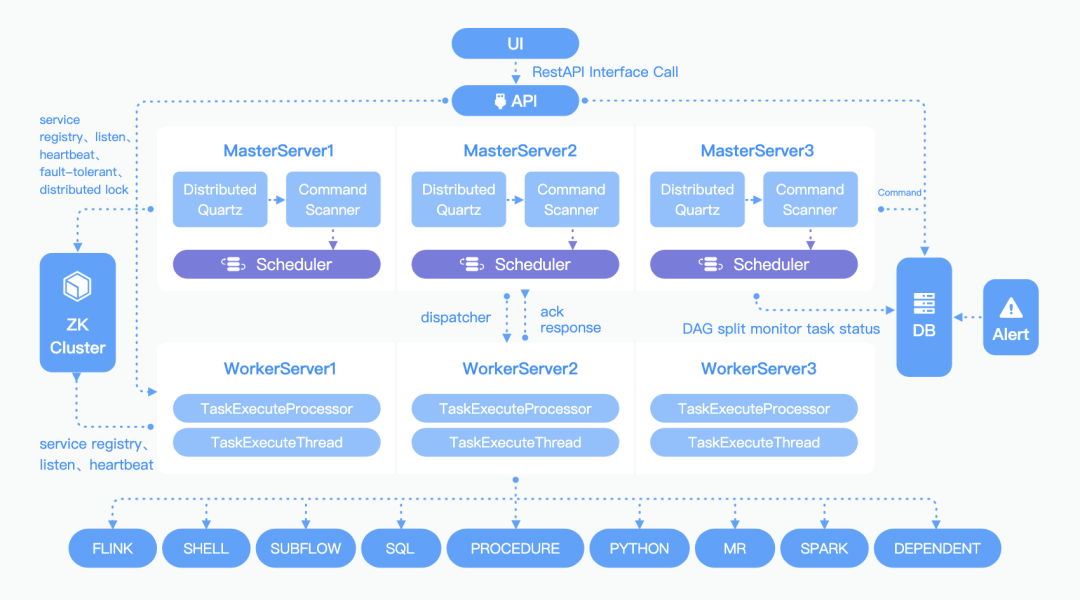
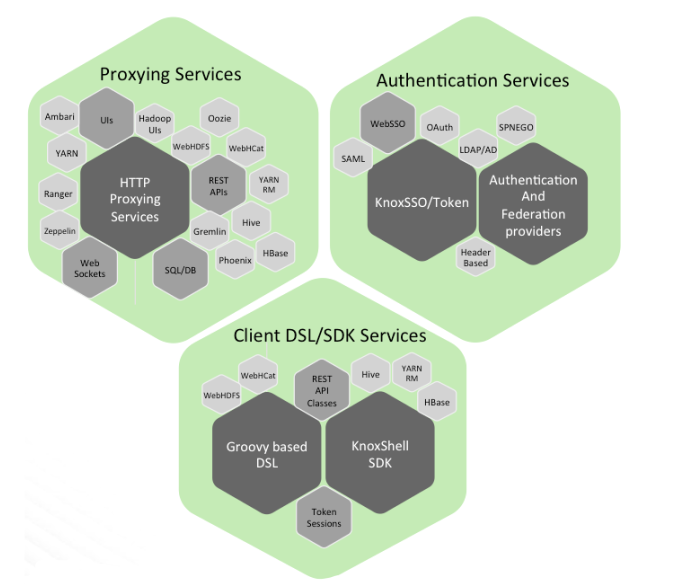
概述
2
为什么要用Knox而不用Nginx
3
定义规则
3.1
UI 规则
service.xml<?xml version="1.0" encoding="UTF-8" standalone="yes"?><!--Licensed to the Apache Software Foundation (ASF) under one or morecontributor license agreements. See the NOTICE file distributed withthis work for additional information regarding copyright ownership.The ASF licenses this file to You under the Apache License, Version 2.0(the "License"); you may not use this file except in compliance withthe License. You may obtain a copy of the License athttp://www.apache.org/licenses/LICENSE-2.0Unless required by applicable law or agreed to in writing, softwaredistributed under the License is distributed on an "AS IS" BASIS,WITHOUT WARRANTIES OR CONDITIONS OF ANY KIND, either express or implied.See the License for the specific language governing permissions andlimitations under the License.--><service role="DOLPHINSCHEDULERUI" name="dolphinscheduler" version="3.0.0"><metadata><type>UI</type><context>/dolphinscheduler/</context><shortDesc>Dolphinscheduler ui</shortDesc><description>YARN Resource Manager Web interface (v1)</description></metadata><routes><route path="/dolphinscheduler/"><rewrite apply="DOLPHINSCHEDULERUI/dolphinscheduler/inbound/root" to="request.body"/></route><route path="/dolphinscheduler/ui/*/*/*"><rewrite apply="DOLPHINSCHEDULERUI/dolphinscheduler/inbound/style" to="request.body"/></route><route path="/dolphinscheduler/ui/*/*"><rewrite apply="DOLPHINSCHEDULERUI/dolphinscheduler/inbound/statis" to="request.body"/></route></routes><dispatch classname="org.apache.knox.gateway.dispatch.DefaultDispatch" ha-classname="org.apache.knox.gateway.rm.dispatch.RMUIHaDispatch"/></service>
rewrite.xml<?xml version="1.0" encoding="UTF-8" standalone="yes"?><!--Licensed to the Apache Software Foundation (ASF) under one or morecontributor license agreements. See the NOTICE file distributed withthis work for additional information regarding copyright ownership.The ASF licenses this file to You under the Apache License, Version 2.0(the "License"); you may not use this file except in compliance withthe License. You may obtain a copy of the License athttp://www.apache.org/licenses/LICENSE-2.0Unless required by applicable law or agreed to in writing, softwaredistributed under the License is distributed on an "AS IS" BASIS,WITHOUT WARRANTIES OR CONDITIONS OF ANY KIND, either express or implied.See the License for the specific language governing permissions andlimitations under the License.--><rules><rule dir="IN" name="DOLPHINSCHEDULERUI/dolphinscheduler/inbound/root" pattern="*://*:*/**/dolphinscheduler/"><rewrite template="{$serviceUrl[DOLPHINSCHEDULERUI]}/view/login/index.html"/></rule><rule dir="IN" name="DOLPHINSCHEDULERUI/dolphinscheduler/inbound/style" pattern="*://*:*/**/dolphinscheduler/ui/{**}/{**}/{**}"><rewrite template="{$serviceUrl[DOLPHINSCHEDULERUI]}/{**}"/></rule><rule dir="OUT" name="DOLPHINSCHEDULERUI/dolphinscheduler/outbound/style" pattern="/dolphinscheduler/ui/{**}/{**}/{**}"><rewrite template="dolphinscheduler/ui/{**}"/></rule><rule dir="IN" name="DOLPHINSCHEDULERUI/dolphinscheduler/inbound/statis" pattern="*://*:*/**/dolphinscheduler/ui/{**}/{**}"><rewrite template="{$serviceUrl[DOLPHINSCHEDULERUI]}/{**}"/></rule><rule dir="OUT" name="DOLPHINSCHEDULERUI/dolphinscheduler/outbound/statis" pattern="/dolphinscheduler/ui/{**}/{**}"><rewrite template="dolphinscheduler/ui/{**}"/></rule></rules>
3.2
API 规则
rewrite.xml<rules><!-- KNOX-1918 prevent global HDFS rules from triggering --><rule dir="OUT" name="DOLPHINSCHEDULER-API/dolphinscheduler/outbound" pattern="hdfs://{host}/{path=**}?{**}"><rewrite template="hdfs://{host}/{path=**}?{**}"/></rule><rule dir="IN" name="DOLPHINSCHEDULER-API/dolphinscheduler/inbound" pattern="*://*:*/**/dolphinscheduler/api/{path=**}?{**}"><rewrite template="{$serviceUrl[DOLPHINSCHEDULER-API]}/api/{path=**}?{**}"/></rule></rules>
service.xml<service role="DOLPHINSCHEDULER-API" name="dolphinscheduler-api" version="3.0.0"><metadata><type>API</type><context>/dolphinscheduler/api</context><shortDesc>dolphinscheduler API</shortDesc><description>Dolphinscheduler the provided scheduling system UI supports fast scheduling of DAG by dragging and dragging</description><samples><sample><description>Retrieve data for the specified attribute search query</description><method>POST</method><path>dolphinscheduler/login</path></sample><sample><description>If you want to learn more api for dolphinscheduler, please refer here</description><value>https://dolphinscheduler.apache.org/en-us/docs/latest/user_doc/guide/open-api.html</value></sample></samples></metadata><routes><route path="/dolphinscheduler/api/**"/></routes><dispatch classname="org.apache.knox.gateway.dispatch.DefaultDispatch"/></service>
4
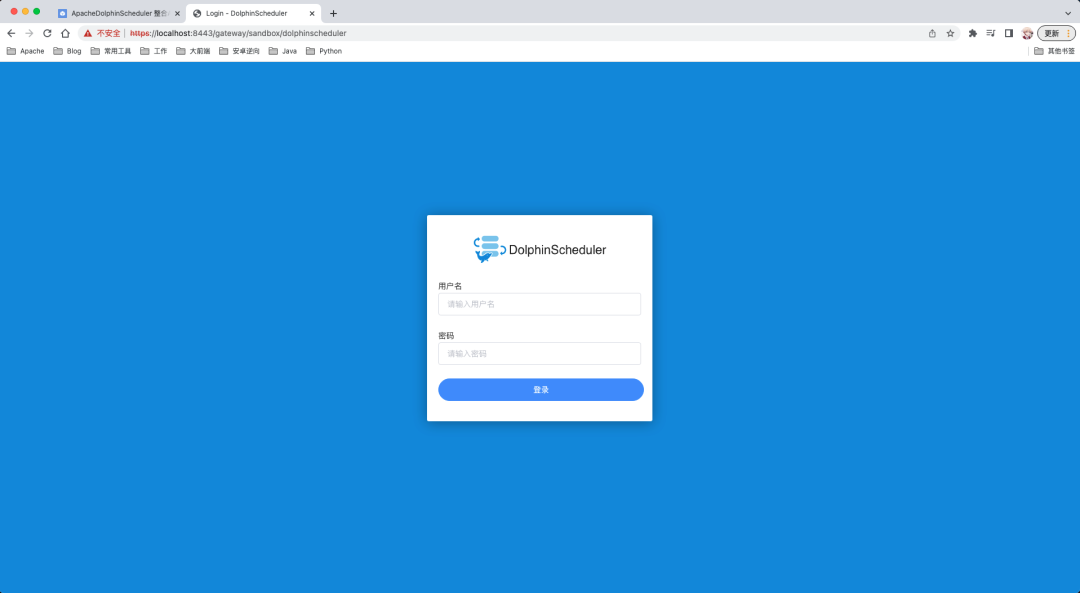
代理测试
sandbox.xml<?xml version="1.0" encoding="utf-8"?><!--Licensed to the Apache Software Foundation (ASF) under one or morecontributor license agreements. See the NOTICE file distributed withthis work for additional information regarding copyright ownership.The ASF licenses this file to You under the Apache License, Version 2.0(the "License"); you may not use this file except in compliance withthe License. You may obtain a copy of the License athttp://www.apache.org/licenses/LICENSE-2.0Unless required by applicable law or agreed to in writing, softwaredistributed under the License is distributed on an "AS IS" BASIS,WITHOUT WARRANTIES OR CONDITIONS OF ANY KIND, either express or implied.See the License for the specific language governing permissions andlimitations under the License.--><topology><gateway><provider><role>authentication</role><name>ShiroProvider</name><enabled>true</enabled><param><!--session timeout in minutes, this is really idle timeout,defaults to 30mins, if the property value is not defined,,current client authentication would expire if client idles contiuosly for more than this value--><name>sessionTimeout</name><value>30</value></param><param><name>main.ldapRealm</name><value>org.apache.knox.gateway.shirorealm.KnoxLdapRealm</value></param><param><name>main.ldapContextFactory</name><value>org.apache.knox.gateway.shirorealm.KnoxLdapContextFactory</value></param><param><name>main.ldapRealm.contextFactory</name><value>$ldapContextFactory</value></param><param><name>main.ldapRealm.userDnTemplate</name><value>uid={0},ou=people,dc=hadoop,dc=apache,dc=org</value></param><param><name>main.ldapRealm.contextFactory.url</name><value>ldap://localhost:33389</value></param><param><name>main.ldapRealm.contextFactory.authenticationMechanism</name><value>simple</value></param><param><name>urls./**</name><value>authcBasic</value></param></provider><provider><role>identity-assertion</role><name>Default</name><enabled>true</enabled></provider><provider><role>hostmap</role><name>static</name><enabled>true</enabled><param><name>localhost</name><value>sandbox,sandbox.hortonworks.com</value></param></provider></gateway><service><role>DOLPHINSCHEDULER</role><url>http://127.0.0.1:12345</url><version>3.0.0</version></service><service><role>DOLPHINSCHEDULER-API</role><url>http://127.0.0.1:12345</url><version>3.0.0</version></service>........</topology>
5
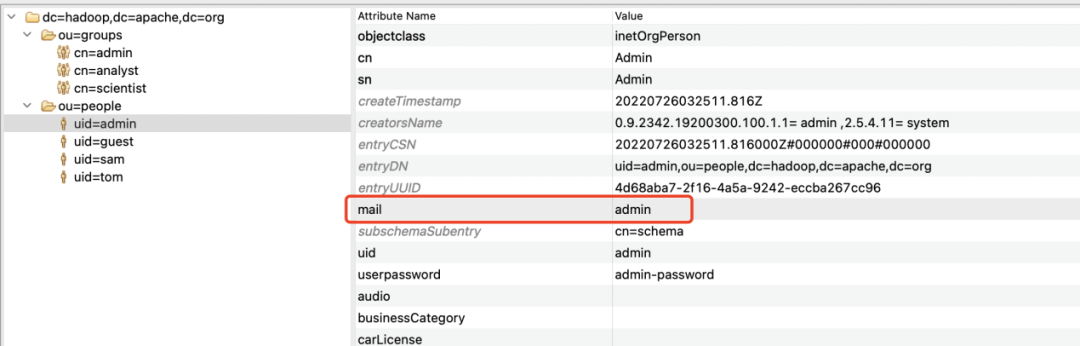
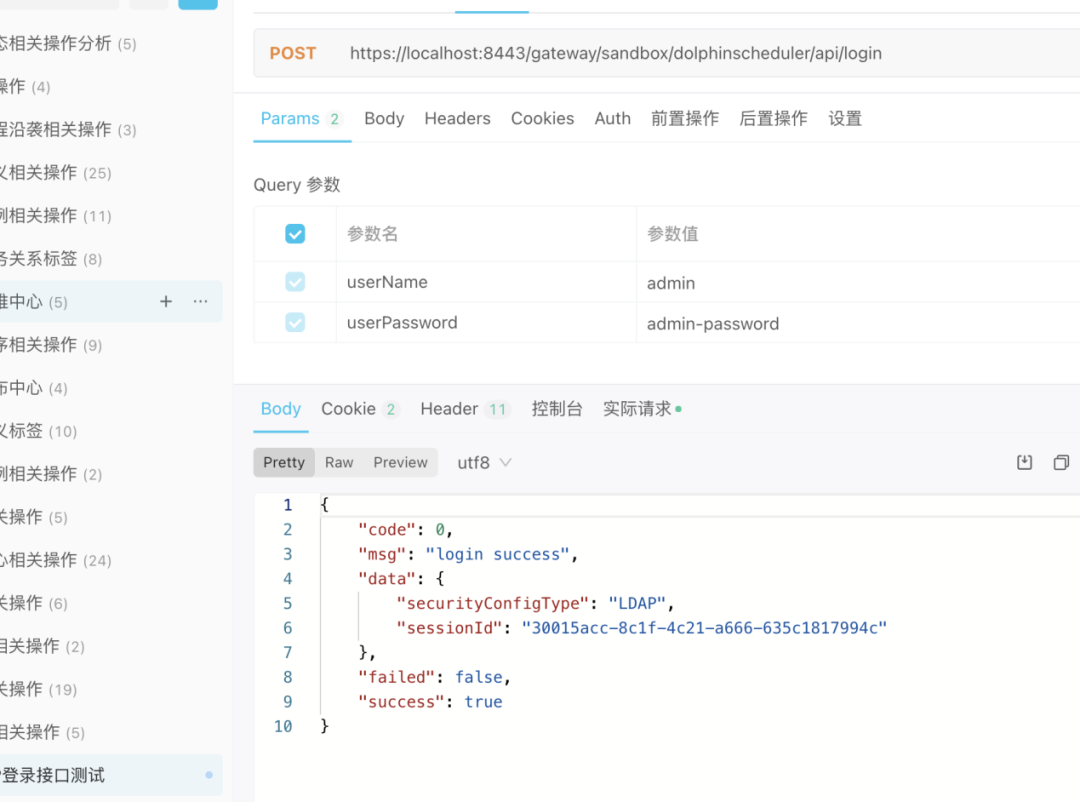
LDAP 整合
application.yamlsecurity:authentication:# Authentication types (supported types: PASSWORD,LDAP)type: LDAP# IF you set type `LDAP`, below config will be effectiveldap:# ldap server configurls: ldap://localhost:33389/base-dn: dc=hadoop,dc=apache,dc=orgusername: uid=admin,ou=people,dc=hadoop,dc=apache,dc=orgpassword: admin-passworduser:# admin userId when you use LDAP loginadmin: adminidentity-attribute: uidemail-attribute: mail# action when ldap user is not exist (supported types: CREATE,DENY)not-exist-action: DENY
6
总结
参与贡献
随着国内开源的迅猛崛起,Apache DolphinScheduler 社区迎来蓬勃发展,为了做更好用、易用的调度,真诚欢迎热爱开源的伙伴加入到开源社区中来,为中国开源崛起献上一份自己的力量,让本土开源走向全球。

参与 DolphinScheduler 社区有非常多的参与贡献的方式,包括:

贡献第一个PR(文档、代码) 我们也希望是简单的,第一个PR用于熟悉提交的流程和社区协作以及感受社区的友好度。
社区汇总了以下适合新手的问题列表:https://github.com/apache/dolphinscheduler/issues/5689
非新手问题列表:https://github.com/apache/dolphinscheduler/issues?q=is%3Aopen+is%3Aissue+label%3A%22volunteer+wanted%22
如何参与贡献链接:https://dolphinscheduler.apache.org/zh-cn/community/development/contribute.html
来吧,DolphinScheduler开源社区需要您的参与,为中国开源崛起添砖加瓦吧,哪怕只是小小的一块瓦,汇聚起来的力量也是巨大的。
参与开源可以近距离与各路高手切磋,迅速提升自己的技能,如果您想参与贡献,我们有个贡献者种子孵化群,可以添加社区小助手微信(Leonard-ds) ,手把手教会您( 贡献者不分水平高低,有问必答,关键是有一颗愿意贡献的心 )。
添加小助手微信时请说明想参与贡献。
来吧,开源社区非常期待您的参与。
< 🐬🐬 >
更多精彩推荐
☞Apache DolphinScheduler 3.0.0 正式版发布!
☞开源星「001号」落地 Apache DolphinScheduler,欢迎你登陆赢神秘大礼包!
☞名额已排到10月 | Apache DolphinScheduler Meetup分享嘉宾继续火热招募中
☞小海豚“变身”全新智能调度引擎,深入浅出在DDS的实践开发应用
☞对话 Contributor| 中国团队贡献的开源项目, 当然要支持
☞自动更新选股模型,实时监控,基于 Apache DolphinSchedule 打造机器学习智能选股系统
☞开源大数据 Studio 应用开发: Apache Dolphinscheduler + Notebook
我知道你在看哟
