




大家好, 今天大表哥和大家分享的是REPMGR + PGBouncer 实现应用自动故障转移。
之前的文章中,我们分享过 REPMGR + VIP 实现了实现应用自动故障转移的功能 https://www.modb.pro/db/464511 , 同时我们也留下了疑问?
如何规避脑裂的问题? 老的primary 由于某种原因(network partition)短暂离开集群, 最后又恢复正常, 对应用系统 如何fence (隔离)老的主库的连接?
REPMGR + PGBouncer 是官方提供的一种规避脑裂的一种方案: https://github.com/EnterpriseDB/repmgr/blob/master/doc/repmgrd-node-fencing.md
核心原理就是 通过更新连接池的配置信息,来达到应用系统对于老的主库的隔离的作用。
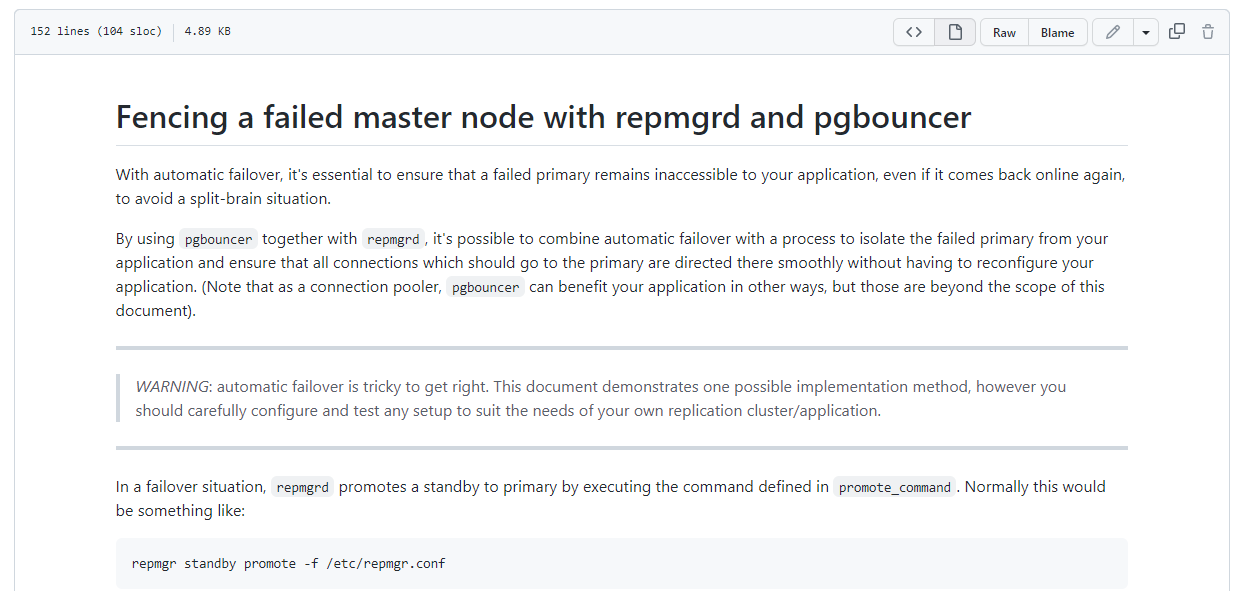
repmgr 官方的 github 上还提供了 脚本的模板:
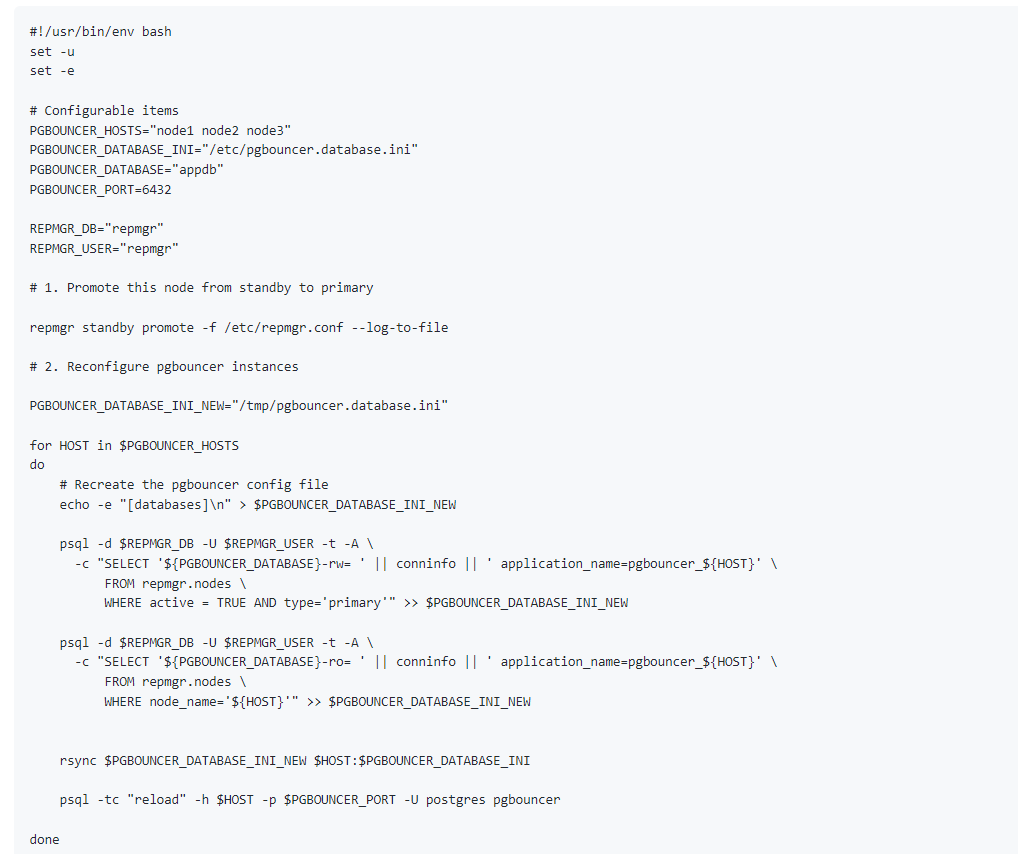
下面我们来测试一下官方提供的这个方案:
架构如图(截图来自业界著名厂商EDB)
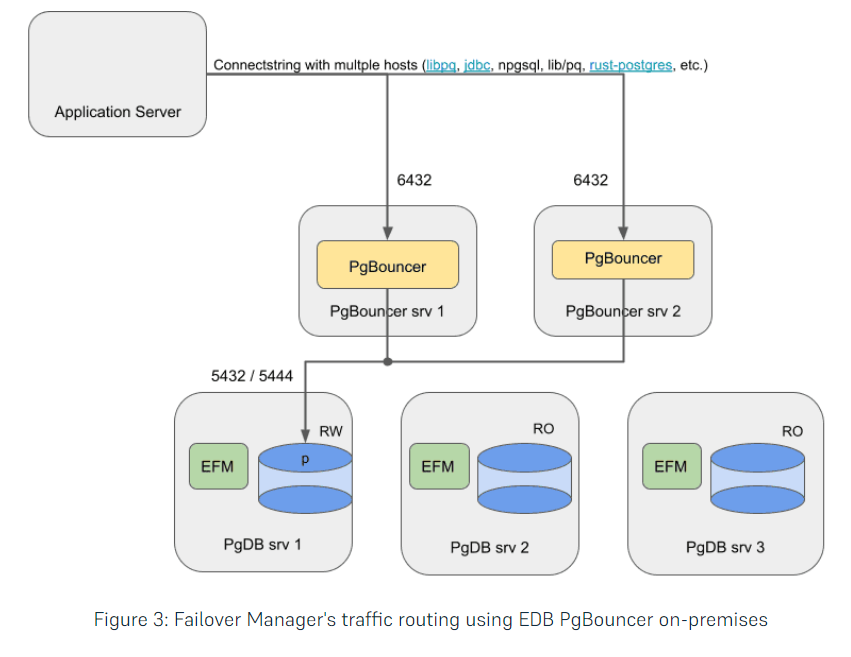
根据EBD 提供的架构图 我们选择 部署一主2从节点 , 3 个节点上 全部安装启动 pgbouncer 的连接池。

我们的promte_standby_pgbouncer.sh 逻辑如下:
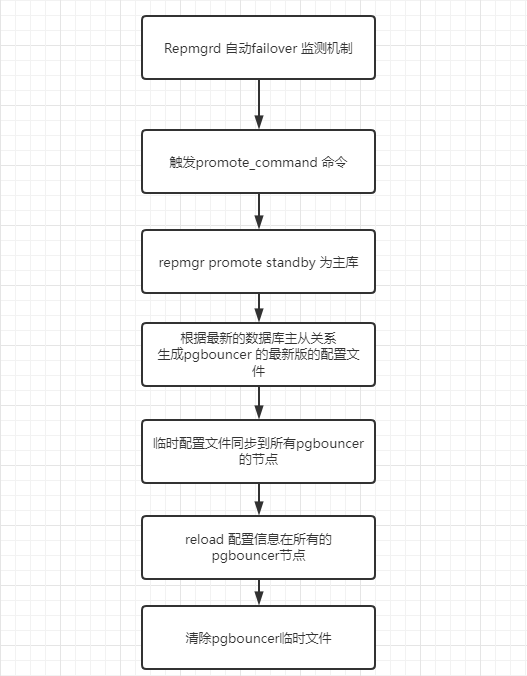
测试脚本: promte_standby_pgbouncer.sh
#!/usr/bin/env bash
set -u
#set -e
set -o xtrace
# Configurable items
PGBOUNCER_HOSTS="10.67.38.50 10.67.39.149 10.67.39.49"
PGBOUNCER_DATABASE_INI="/opt/postgreSQL/pgbouncer/pgbouncer.ini"
PGBOUNCER_DATABASE="pgbouncer_db"
PGBOUNCER_DATABASE_ADMIN_DB="pgbouncer"
PGBOUNCER_DATABASE_USER="postgres"
PGBOUNCER_PORT=6432
PORT=1998
DBNAME="postgres"
PG_HOME=/opt/postgreSQL/pg12
HOSTNAME=`hostname -i`
REPMGR_DB="repmgr"
REPMGR_USER="repmgr"
REPMGR_PASSWD="repmgr"
STEP1="Promote ${HOSTNAME} from standby to primary"
STEP2="Recreate the pgbouncer config file on node ${HOSTNAME}"
STEP3="Resync the pgbouncer config file"
STEP4="Reload the pgbouncer config file"
#STEP5="Clear temporary pgbouncer confg file"
PGBOUNCER_DATABASE_INI_NEW="/tmp/pgbouncer.database.ini"
PGBOUNCER_DATABASE_INI_TEMPLATE='/opt/postgreSQL/pgbouncer/pgbouncer.ini_template'
# 1. Promote this node from standby to primary
/opt/postgreSQL/pg12/bin/repmgr standby promote -f /opt/postgreSQL/repmgr.conf --log-to-file
if [ $? -ne 0 ]; then
   echo promte_standby_pgbounce.sh: ${STEP1} on ${HOSTNAME} failed !!!
   exit 1
fi
standby_flg=`${PG_HOME}/bin/psql -p ${PORT} -U ${REPMGR_USER} -w ${REPMGR_PASSWD} -h localhost -At -c "SELECT pg_is_in_recovery();"`
if [ ${standby_flg} == 'f' ]; then
  echo promte_standby_pgbounce.sh: ${STEP1} on ${HOSTNAME} successfully !!!
elif [ ${standby_flg} == 't' ]; then
  echo promte_standby_pgbounce.sh: ${STEP1} on ${HOSTNAME} failed !!!
  exit 1
fi
# 2. Reconfigure pgbouncer instances


for HOST in $PGBOUNCER_HOSTS
do
   # Recreate the pgbouncer config file
   echo -e "[databases]\n" > $PGBOUNCER_DATABASE_INI_NEW


   ${PG_HOME}/bin/psql -p ${PORT} -U ${REPMGR_USER} -w ${REPMGR_PASSWD}  -h localhost \
   -At -c "SELECT '${PGBOUNCER_DATABASE} = '||  split_part(conninfo,' ',1) ||' port=${PORT}'||' dbname=${DBNAME} ' ||' application_name=pgbouncer_${HOST}' \
         FROM repmgr.nodes \
         WHERE active = TRUE AND type='primary'" >> $PGBOUNCER_DATABASE_INI_NEW


   #${PG_HOME}/bin/psql -p ${PORT} -U ${REPMGR_USER} -w ${REPMGR_PASSWD} -h localhost \
   #  -c "SELECT '${PGBOUNCER_DATABASE}-ro= ' || conninfo || ' application_name=pgbouncer_${HOST}' \
   #      FROM repmgr.nodes \
   #      WHERE node_name='${HOST}'" >> $PGBOUNCER_DATABASE_INI_NEW


   cat $PGBOUNCER_DATABASE_INI_TEMPLATE >> $PGBOUNCER_DATABASE_INI_NEW
   rsync $PGBOUNCER_DATABASE_INI_NEW $HOST:$PGBOUNCER_DATABASE_INI
   if [ $? -ne 0 ]; then
       echo promte_standby_pgbounce.sh: ${STEP3} on ${HOSTNAME} failed !!!
   fi


   ${PG_HOME}/bin/psql -tc "reload" -h $HOST -p $PGBOUNCER_PORT -d ${PGBOUNCER_DATABASE_ADMIN_DB} -U ${PGBOUNCER_DATABASE_USER} -w
   if [ $? -ne 0 ]; then
       echo promte_standby_pgbounce.sh: ${STEP4} on ${HOSTNAME} failed !!!
   fi


done


# Clean up generated file
rm $PGBOUNCER_DATABASE_INI_NEW


echo "Reconfiguration of pgbouncer complete"
我们把repmgr 暂停一下,参数 promote_command 的命令替换为 promte_standby_pgbouncer.sh
promote_command='/opt/postgreSQL/promte_standby_pgbouncer.sh >> /opt/postgreSQL/repmgrd.log'
目前的一主2从的复制集的状态:
INFRA [postgres@wqdcsrv3353 ~]# repmgr -f /opt/postgreSQL/repmgr.conf cluster show
ID | Name  | Role    | Status    | Upstream | Location | Priority | Timeline | Connection string
----+-------+---------+-----------+----------+----------+----------+----------+-----------------------------------------------------------------------------------------
1  | pg50  | standby |   running | pg49     | default  | 100      | 9        | host=10.67.38.50 port=1998 user=repmgr password=repmgr dbname=repmgr connect_timeout=5
2  | pg49  | primary | * running |          | default  | 80       | 10       | host=10.67.39.49 port=1998 user=repmgr password=repmgr dbname=repmgr connect_timeout=5
3  | pg149 | standby |   running | pg49     | default  | 20       | 10       | host=10.67.39.149 port=1998 user=repmgr password=repmgr dbname=repmgr connect_timeout=5
我们还是用springboot 的测试程序来测试一下 REPMGR + PGBouncer 的应用故障自动转移的功能。
应用端数据库连接池的配置:这里我们配置了3个PGBOUNCER 连接池的IP地址(本次脚本里没有涉及到VIP)
//数据库的地址以及端口号
spring.datasource.url=jdbc:postgresql://10.67.38.50:6432,10.67.39.49:6432,10.67.39.149:6432/pgbouncer_db
spring.datasource.username=app_ha_user
spring.datasource.password=app_ha_user
spring.datasource.driverClassName=org.postgresql.Driver
spring.jpa.properties.hibernate.dialect=org.hibernate.dialect.PostgreSQLDialect
spring.jpa.properties.hibernate.temp.use_jdbc_metadata_defaults=false
spring.jpa.properties.hibernate.hbm2ddl.auto=update
spring.datasource.maximum-pool-size=200
spring.datasource.min-idle=10
测试程序还是 我们的老朋友 打印简单的数据库连接的IP 地址信息 : select inet_server_addr()
@RestController
public class TestController {


    @Autowired
    JdbcTemplate jdbcTemplate;
    //@Autowired
    //UserMapper usermapper;
    @RequestMapping(value="/", method=RequestMethod.GET)
    public String index() {
          String sql = "select inet_server_addr()";
        // 通过jdbcTemplate查询数据库
        String hostname = (String)jdbcTemplate.queryForObject(
                sql, String.class);
     return "Hello ,you are connecting to " + hostname;

    }
}
启动程序后,检查PGBouncer 连接池信息:
pgbouncer@[local:/tmp]:6432=#624495975 show pools;
   database   |    user     | cl_active | cl_waiting | cl_cancel_req | sv_active | sv_idle | sv_used | sv_tested | sv_login | maxwait | maxwait_us | pool_mode
--------------+-------------+-----------+------------+---------------+-----------+---------+---------+-----------+----------+---------+------------+-----------
pgbouncer    | pgbouncer   |         1 |          0 |             0 |         0 |       0 |       0 |         0 |        0 |       0 |          0 | statement
pgbouncer_db | app_ha_user |        10 |          0 |             0 |        10 |       0 |       0 |         0 |        0 |       0 |          0 | session
(2 rows)
查看客户端建立的连接:
pgbouncer@[local:/tmp]:6432=#624495975 show servers;
type |    user     |   database   | state  |    addr     | port |  local_addr  | local_port |      connect_time       |      request_time       | wait | wait_us | close_needed |    ptr
|   link    | remote_pid | tls
------+-------------+--------------+--------+-------------+------+--------------+------------+-------------------------+-------------------------+------+---------+--------------+-----------
+-----------+------------+-----
S    | app_ha_user | pgbouncer_db | active | 10.67.39.49 | 1998 | 10.67.39.200 |      58836 | 2022-08-24 13:24:15 CST | 2022-08-24 14:59:12 CST |    0 |       0 |            0 | 0x23a9a10
| 0x23a1db0 |      22336 |
S    | app_ha_user | pgbouncer_db | active | 10.67.39.49 | 1998 | 10.67.39.200 |      58824 | 2022-08-24 13:24:15 CST | 2022-08-24 14:59:12 CST |    0 |       0 |            0 | 0x23a8850
| 0x23a2690 |      22329 |
S    | app_ha_user | pgbouncer_db | active | 10.67.39.49 | 1998 | 10.67.39.200 |      58844 | 2022-08-24 13:24:15 CST | 2022-08-24 14:59:12 CST |    0 |       0 |            0 | 0x23a97d8
| 0x23a28c8 |      22339 |
S    | app_ha_user | pgbouncer_db | active | 10.67.39.49 | 1998 | 10.67.39.200 |      58830 | 2022-08-24 13:24:15 CST | 2022-08-24 14:59:12 CST |    0 |       0 |            0 | 0x23a9c48
| 0x23a2220 |      22332 |
S    | app_ha_user | pgbouncer_db | active | 10.67.39.49 | 1998 | 10.67.39.200 |      58832 | 2022-08-24 13:24:15 CST | 2022-08-24 14:59:12 CST |    0 |       0 |            0 | 0x23a9130
| 0x23a2f70 |      22333 |
S    | app_ha_user | pgbouncer_db | active | 10.67.39.49 | 1998 | 10.67.39.200 |      58828 | 2022-08-24 13:24:15 CST | 2022-08-24 14:59:12 CST |    0 |       0 |            0 | 0x23a8a88
| 0x23a1940 |      22331 |
S    | app_ha_user | pgbouncer_db | active | 10.67.39.49 | 1998 | 10.67.39.200 |      58826 | 2022-08-24 13:24:15 CST | 2022-08-24 14:59:12 CST |    0 |       0 |            0 | 0x23a8cc0
| 0x23a2d38 |      22330 |
S    | app_ha_user | pgbouncer_db | active | 10.67.39.49 | 1998 | 10.67.39.200 |      44780 | 2022-08-24 14:59:12 CST | 2022-08-24 14:59:12 CST |    0 |       0 |            0 | 0x23a8ef8
| 0x23a1fe8 |      86787 |
S    | app_ha_user | pgbouncer_db | active | 10.67.39.49 | 1998 | 10.67.39.200 |      44782 | 2022-08-24 14:59:12 CST | 2022-08-24 14:59:12 CST |    0 |       0 |            0 | 0x23a9368
| 0x23a1b78 |      86788 |
S    | app_ha_user | pgbouncer_db | active | 10.67.39.49 | 1998 | 10.67.39.200 |      44784 | 2022-08-24 14:59:12 CST | 2022-08-24 14:59:12 CST |    0 |       0 |            0 | 0x23a95a0
| 0x23a2458 |      86789 |
(10 rows)
测试访问网页: http://127.0.0.1:8066/
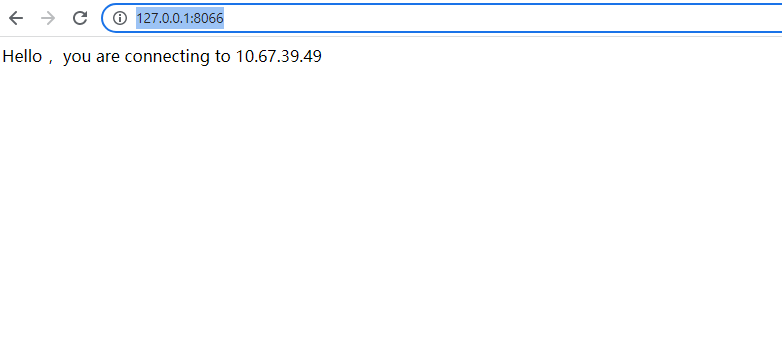
这个时候我们进行 failover 测试, 关闭主库:
INFRA [postgres@wqdcsrv3353 ~]# /opt/postgreSQL/pg12/bin/pg_ctl stop -D /data/postgreSQL/1998/data -m fast
waiting for server to shut down.... done
server stopped
再次访问网页: http://127.0.0.1:8066/
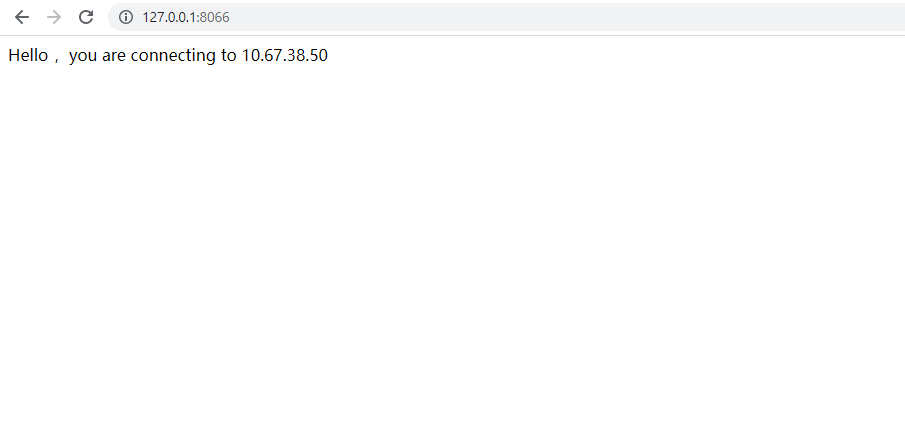
从应用端的日志中,可以看到连接池中的session 已经进行了重置
2022-08-24 15:11:55,597 WARN (PoolBase.java:184)- HikariPool-1 - Failed to validate connection org.postgresql.jdbc.PgConnection@4d4cef2e (This connection has been closed.). Possibly consider using a shorter maxLifetime value.
2022-08-24 15:11:55,598 WARN (PoolBase.java:184)- HikariPool-1 - Failed to validate connection org.postgresql.jdbc.PgConnection@6872d3d (This connection has been closed.). Possibly consider using a shorter maxLifetime value.
2022-08-24 15:11:55,598 WARN (PoolBase.java:184)- HikariPool-1 - Failed to validate connection org.postgresql.jdbc.PgConnection@2c18875c (This connection has been closed.). Possibly consider using a shorter maxLifetime value.
2022-08-24 15:11:55,599 WARN (PoolBase.java:184)- HikariPool-1 - Failed to validate connection org.postgresql.jdbc.PgConnection@35dba77d (This connection has been closed.). Possibly consider using a shorter maxLifetime value.
2022-08-24 15:11:55,600 WARN (PoolBase.java:184)- HikariPool-1 - Failed to validate connection org.postgresql.jdbc.PgConnection@1c89d912 (This connection has been closed.). Possibly consider using a shorter maxLifetime value.
2022-08-24 15:11:55,600 WARN (PoolBase.java:184)- HikariPool-1 - Failed to validate connection org.postgresql.jdbc.PgConnection@2358f17b (This connection has been closed.). Possibly consider using a shorter maxLifetime value.
2022-08-24 15:11:55,601 WARN (PoolBase.java:184)- HikariPool-1 - Failed to validate connection org.postgresql.jdbc.PgConnection@4b12b02b (This connection has been closed.). Possibly consider using a shorter maxLifetime value.
2022-08-24 15:11:55,601 WARN (PoolBase.java:184)- HikariPool-1 - Failed to validate connection org.postgresql.jdbc.PgConnection@231a167b (This connection has been closed.). Possibly consider using a shorter maxLifetime value.
2022-08-24 15:11:55,602 WARN (PoolBase.java:184)- HikariPool-1 - Failed to validate connection org.postgresql.jdbc.PgConnection@71090a43 (This connection has been closed.). Possibly consider using a shorter maxLifetime value.
2022-08-24 15:11:55,602 WARN (PoolBase.java:184)- HikariPool-1 - Failed to validate connection org.postgresql.jdbc.PgConnection@153eee30 (This connection has been closed.). Possibly consider using a shorter maxLifetime value.
写到最后:
1)我们采用的是 配置多个IP的方式, 有的系统像是 PHP 或者其他的语言开发的程序可能不支持连接串写多个IP, 这个时候可以在 promte_standby_pgbouncer.sh 中
添加/删除VIP的步骤,注意每次对VIP的步骤进行操作后,要及时清除ARP的缓存,否则VIP不会生效。
2)为了更安全的避免脑裂问题, 可以在repmgr 的文件中的参数 child_nodes_disconnect_command , 自己写一个脚本,如果确定节点离开集群的话, 卸载VIP, 彻底关闭干净PG实例。
本文只是提供了PG HA 应用故障自动转移的基础方案, 需要根据你的系统特点进行测试, 万无一失后,才可以上线运营。
Have a fun 🙂 !
