



概述
本文记录PostgreSQL 14在线安装过程,PostgreSQL 15的二进制编译安装过程。
在线安装
根据服务器硬件及操作系统在如下网址选择对应安装包。https://www.postgresql.org/download/
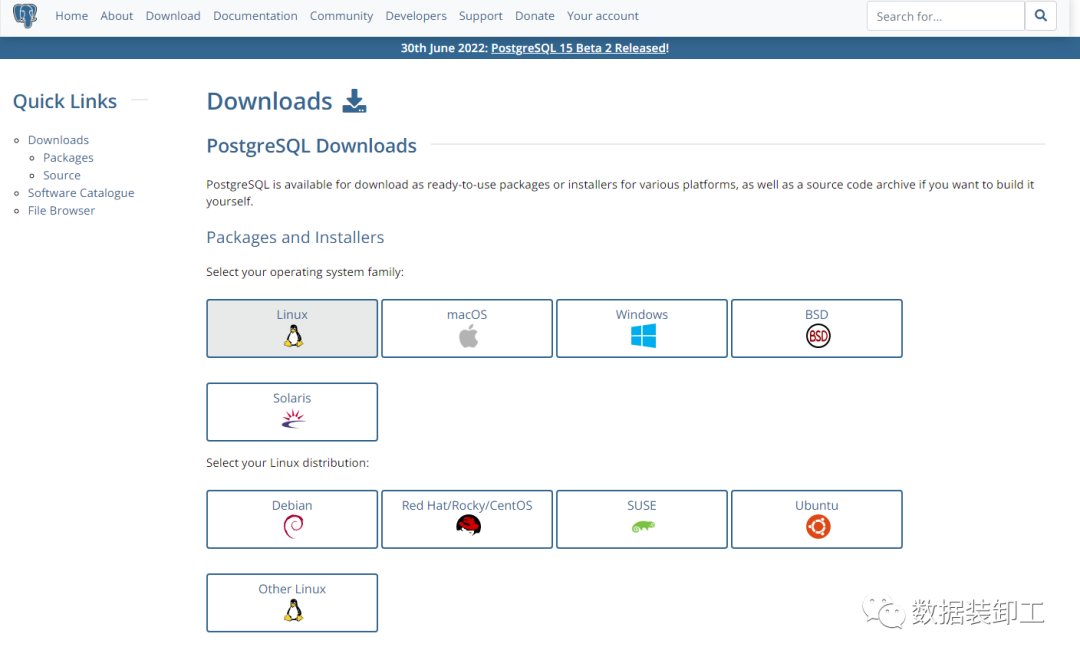
选择操作系统版本后,跳转页面选择PostgreSQL版本,选择完PostgreSQL版本后,会出现在线安装步骤,根据步骤执行。
https://www.postgresql.org/download/linux/redhat/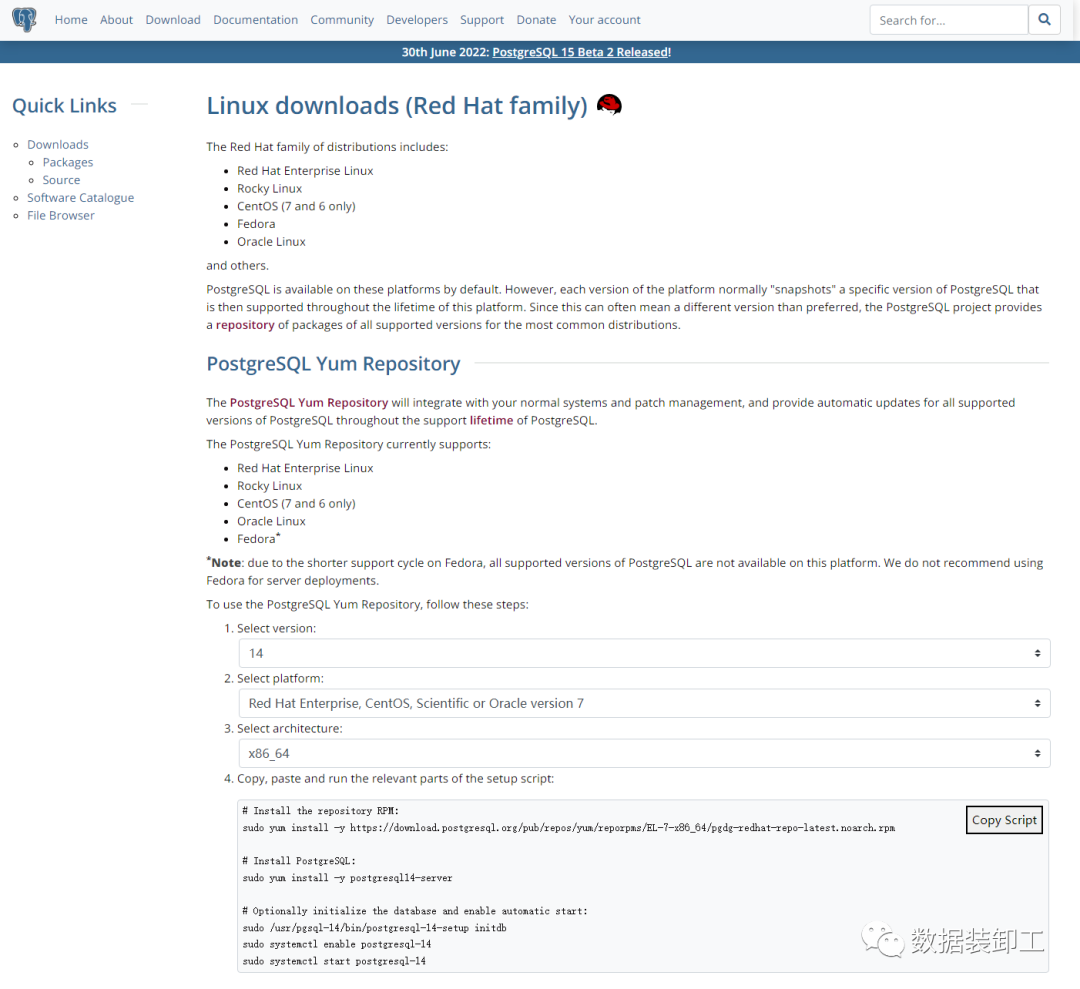
1.更新yum安装PostgreSQL的源地址
[root@node6 ~]# yum install -y https://download.postgresql.org/pub/repos/yum/reporpms/EL-7-x86_64/pgdg-redhat-repo-latest.noarch.rpm
Loaded plugins: fastestmirror
pgdg-redhat-repo-latest.noarch.rpm                                                                                                                                                | 8.1 kB  00:00:00
Examining /var/tmp/yum-root-DlcJMJ/pgdg-redhat-repo-latest.noarch.rpm: pgdg-redhat-repo-42.0-24.noarch
Marking /var/tmp/yum-root-DlcJMJ/pgdg-redhat-repo-latest.noarch.rpm to be installed
Resolving Dependencies
--> Running transaction check
---> Package pgdg-redhat-repo.noarch 0:42.0-24 will be installed
--> Finished Dependency Resolution

Dependencies Resolved

=========================================================================================================================================================================================================
 Package                                          Arch                                   Version                                   Repository                                                       Size
=========================================================================================================================================================================================================
Installing:
 pgdg-redhat-repo                                 noarch                                 42.0-24                                   /pgdg-redhat-repo-latest.noarch                                  11 k

Transaction Summary
=========================================================================================================================================================================================================
Install  1 Package

Total size: 11 k
Installed size: 11 k
Downloading packages:
Running transaction check
Running transaction test
Transaction test succeeded
Running transaction
Warning: RPMDB altered outside of yum.
  Installing : pgdg-redhat-repo-42.0-24.noarch                                                                                                                                                       1/1
  Verifying  : pgdg-redhat-repo-42.0-24.noarch                                                                                                                                                       1/1

Installed:
  pgdg-redhat-repo.noarch 0:42.0-24

Complete!
2.在线安装PostgreSQL 14数据库服务
[root@node6 ~]# yum install -y postgresql14-server
Loaded plugins: fastestmirror
Determining fastest mirrors
* base: mirrors.aliyun.com
* extras: mirrors.aliyun.com
* updates: mirrors.aliyun.com
base | 3.6 kB 00:00:00
extras | 2.9 kB 00:00:00
pgdg-common/7/x86_64/signature | 198 B 00:00:00
Retrieving key from file:///etc/pki/rpm-gpg/RPM-GPG-KEY-PGDG
Importing GPG key 0x442DF0F8:
Userid : "PostgreSQL RPM Building Project <pgsql-pkg-yum@postgresql.org>"
Fingerprint: 68c9 e2b9 1a37 d136 fe74 d176 1f16 d2e1 442d f0f8
Package : pgdg-redhat-repo-42.0-24.noarch (installed)
From : /etc/pki/rpm-gpg/RPM-GPG-KEY-PGDG
pgdg-common/7/x86_64/signature | 2.9 kB 00:00:00 !!!
pgdg10/7/x86_64/signature | 198 B 00:00:00
Retrieving key from file:///etc/pki/rpm-gpg/RPM-GPG-KEY-PGDG
Importing GPG key 0x442DF0F8:
Userid : "PostgreSQL RPM Building Project <pgsql-pkg-yum@postgresql.org>"
Fingerprint: 68c9 e2b9 1a37 d136 fe74 d176 1f16 d2e1 442d f0f8
Package : pgdg-redhat-repo-42.0-24.noarch (installed)
From : /etc/pki/rpm-gpg/RPM-GPG-KEY-PGDG
pgdg10/7/x86_64/signature | 3.6 kB 00:00:00 !!!
pgdg11/7/x86_64/signature | 198 B 00:00:00
Retrieving key from file:///etc/pki/rpm-gpg/RPM-GPG-KEY-PGDG
Importing GPG key 0x442DF0F8:
Userid : "PostgreSQL RPM Building Project <pgsql-pkg-yum@postgresql.org>"
Fingerprint: 68c9 e2b9 1a37 d136 fe74 d176 1f16 d2e1 442d f0f8
Package : pgdg-redhat-repo-42.0-24.noarch (installed)
From : /etc/pki/rpm-gpg/RPM-GPG-KEY-PGDG
pgdg11/7/x86_64/signature | 3.6 kB 00:00:00 !!!
pgdg12/7/x86_64/signature | 198 B 00:00:00
Retrieving key from file:///etc/pki/rpm-gpg/RPM-GPG-KEY-PGDG
Importing GPG key 0x442DF0F8:
Userid : "PostgreSQL RPM Building Project <pgsql-pkg-yum@postgresql.org>"
Fingerprint: 68c9 e2b9 1a37 d136 fe74 d176 1f16 d2e1 442d f0f8
Package : pgdg-redhat-repo-42.0-24.noarch (installed)
From : /etc/pki/rpm-gpg/RPM-GPG-KEY-PGDG
pgdg12/7/x86_64/signature | 3.6 kB 00:00:00 !!!
pgdg13/7/x86_64/signature | 198 B 00:00:00
Retrieving key from file:///etc/pki/rpm-gpg/RPM-GPG-KEY-PGDG
Importing GPG key 0x442DF0F8:
Userid : "PostgreSQL RPM Building Project <pgsql-pkg-yum@postgresql.org>"
Fingerprint: 68c9 e2b9 1a37 d136 fe74 d176 1f16 d2e1 442d f0f8
Package : pgdg-redhat-repo-42.0-24.noarch (installed)
From : /etc/pki/rpm-gpg/RPM-GPG-KEY-PGDG
pgdg13/7/x86_64/signature | 3.6 kB 00:00:00 !!!
pgdg14/7/x86_64/signature | 198 B 00:00:00
Retrieving key from file:///etc/pki/rpm-gpg/RPM-GPG-KEY-PGDG
Importing GPG key 0x442DF0F8:
Userid : "PostgreSQL RPM Building Project <pgsql-pkg-yum@postgresql.org>"
Fingerprint: 68c9 e2b9 1a37 d136 fe74 d176 1f16 d2e1 442d f0f8
Package : pgdg-redhat-repo-42.0-24.noarch (installed)
From : /etc/pki/rpm-gpg/RPM-GPG-KEY-PGDG
pgdg14/7/x86_64/signature | 3.6 kB 00:00:00 !!!
updates | 2.9 kB 00:00:00
(1/12): pgdg11/7/x86_64/group_gz | 245 B 00:00:02
(2/12): pgdg12/7/x86_64/group_gz | 245 B 00:00:00
(3/12): pgdg10/7/x86_64/group_gz | 245 B 00:00:03
(4/12): pgdg13/7/x86_64/group_gz | 246 B 00:00:00
(5/12): pgdg-common/7/x86_64/primary_db | 163 kB 00:00:16
(6/12): pgdg14/7/x86_64/group_gz | 244 B 00:00:00
(7/12): pgdg13/7/x86_64/primary_db | 198 kB 00:00:16
(8/12): pgdg12/7/x86_64/primary_db | 295 kB 00:00:18
(9/12): updates/7/x86_64/primary_db | 16 MB 00:00:01
(10/12): pgdg14/7/x86_64/primary_db | 117 kB 00:00:06
(11/12): pgdg11/7/x86_64/primary_db | 414 kB 00:00:37
(12/12): pgdg10/7/x86_64/primary_db | 384 kB 00:00:46
Resolving Dependencies
--> Running transaction check
---> Package postgresql14-server.x86_64 0:14.4-1PGDG.rhel7 will be installed
--> Processing Dependency: postgresql14-libs(x86-64) = 14.4-1PGDG.rhel7 for package: postgresql14-server-14.4-1PGDG.rhel7.x86_64
--> Processing Dependency: postgresql14(x86-64) = 14.4-1PGDG.rhel7 for package: postgresql14-server-14.4-1PGDG.rhel7.x86_64
--> Processing Dependency: libpq.so.5()(64bit) for package: postgresql14-server-14.4-1PGDG.rhel7.x86_64
--> Running transaction check
---> Package postgresql14.x86_64 0:14.4-1PGDG.rhel7 will be installed
---> Package postgresql14-libs.x86_64 0:14.4-1PGDG.rhel7 will be installed
--> Finished Dependency Resolution
Dependencies Resolved
=========================================================================================================================================================================================================
Package Arch Version Repository Size
=========================================================================================================================================================================================================
Installing:
postgresql14-server x86_64 14.4-1PGDG.rhel7 pgdg14 5.5 M
Installing for dependencies:
postgresql14 x86_64 14.4-1PGDG.rhel7 pgdg14 1.5 M
postgresql14-libs x86_64 14.4-1PGDG.rhel7 pgdg14 268 k
Transaction Summary
=========================================================================================================================================================================================================
Install 1 Package (+2 Dependent packages)
Total download size: 7.2 M
Installed size: 31 M
Downloading packages:
warning: /var/cache/yum/x86_64/7/pgdg14/packages/postgresql14-libs-14.4-1PGDG.rhel7.x86_64.rpm: Header V4 DSA/SHA1 Signature, key ID 442df0f8: NOKEY ] 19 kB/s | 511 kB 00:06:02 ETA
Public key for postgresql14-libs-14.4-1PGDG.rhel7.x86_64.rpm is not installed
(1/3): postgresql14-libs-14.4-1PGDG.rhel7.x86_64.rpm | 268 kB 00:00:26
(2/3): postgresql14-14.4-1PGDG.rhel7.x86_64.rpm | 1.5 MB 00:02:25
(3/3): postgresql14-server-14.4-1PGDG.rhel7.x86_64.rpm | 5.5 MB 00:08:14
---------------------------------------------------------------------------------------------------------------------------------------------------------------------------------------------------------
Total 14 kB/s | 7.2 MB 00:08:41
Retrieving key from file:///etc/pki/rpm-gpg/RPM-GPG-KEY-PGDG
Importing GPG key 0x442DF0F8:
Userid : "PostgreSQL RPM Building Project <pgsql-pkg-yum@postgresql.org>"
Fingerprint: 68c9 e2b9 1a37 d136 fe74 d176 1f16 d2e1 442d f0f8
Package : pgdg-redhat-repo-42.0-24.noarch (installed)
From : /etc/pki/rpm-gpg/RPM-GPG-KEY-PGDG
Running transaction check
Running transaction test
Transaction test succeeded
Running transaction
Installing : postgresql14-libs-14.4-1PGDG.rhel7.x86_64 1/3
Installing : postgresql14-14.4-1PGDG.rhel7.x86_64 2/3
Installing : postgresql14-server-14.4-1PGDG.rhel7.x86_64 3/3
Verifying : postgresql14-server-14.4-1PGDG.rhel7.x86_64 1/3
Verifying : postgresql14-14.4-1PGDG.rhel7.x86_64 2/3
Verifying : postgresql14-libs-14.4-1PGDG.rhel7.x86_64 3/3
Installed:
postgresql14-server.x86_64 0:14.4-1PGDG.rhel7
Dependency Installed:
postgresql14.x86_64 0:14.4-1PGDG.rhel7 postgresql14-libs.x86_64 0:14.4-1PGDG.rhel7
Complete!
3.初始化PostgreSQL数据库服务
[root@node6 ~]# /usr/pgsql-14/bin/postgresql-14-setup initdb
Initializing database ... OK
4.添加PostgreSQL数据库服务自启动
[root@node6 ~]# systemctl enable postgresql-14Created symlink from /etc/systemd/system/multi-user.target.wants/postgresql-14.service to /usr/lib/systemd/system/postgresql-14.service.5.启动PostgreSQL数据库,查看状态并连接测试。
[root@node6 ~]# systemctl start postgresql-14[root@node6 ~]# systemctl status postgresql-14● postgresql-14.service - PostgreSQL 14 database server   Loaded: loaded (/usr/lib/systemd/system/postgresql-14.service; enabled; vendor preset: disabled)   Active: active (running) since Fri 2022-07-22 12:23:55 CST; 1min 26s ago     Docs: https://www.postgresql.org/docs/14/static/  Process: 9207 ExecStartPre=/usr/pgsql-14/bin/postgresql-14-check-db-dir ${PGDATA} (code=exited, status=0/SUCCESS) Main PID: 9212 (postmaster)   CGroup: /system.slice/postgresql-14.service           ├─9212 /usr/pgsql-14/bin/postmaster -D /var/lib/pgsql/14/data/           ├─9214 postgres: logger            ├─9216 postgres: checkpointer            ├─9217 postgres: background writer            ├─9218 postgres: walwriter            ├─9219 postgres: autovacuum launcher            ├─9220 postgres: stats collector            └─9221 postgres: logical replication launcher
Jul 22 12:23:55 node6 systemd[1]: Starting PostgreSQL 14 database server...Jul 22 12:23:55 node6 postmaster[9212]: 2022-07-22 12:23:55.892 CST [9212] LOG:  redirecting log output to logging collector processJul 22 12:23:55 node6 postmaster[9212]: 2022-07-22 12:23:55.892 CST [9212] HINT:  Future log output will appear in directory "log".Jul 22 12:23:55 node6 systemd[1]: Started PostgreSQL 14 database server.[root@node6 ~]# su - postgres-bash-4.2$ psqlpsql (14.4)Type "help" for help.
postgres-# \l                                  List of databases   Name    |  Owner   | Encoding |   Collate   |    Ctype    |   Access privileges   -----------+----------+----------+-------------+-------------+----------------------- postgres  | postgres | UTF8     | en_US.UTF-8 | en_US.UTF-8 |  template0 | postgres | UTF8     | en_US.UTF-8 | en_US.UTF-8 | =c/postgres          +           |          |          |             |             | postgres=CTc/postgres template1 | postgres | UTF8     | en_US.UTF-8 | en_US.UTF-8 | =c/postgres          +           |          |          |             |             | postgres=CTc/postgres(3 rows)
源码安装
1.创建安装用户及规划安装目录
创建安装用户:useradd postgres
创建PostgreSQL软件安装目录:mkdir -p /opt/postgres/pgsql15.2
创建PostgreSQL数据文件目录:mkdir -p /opt/postgres/pgdata
创建PostgreSQL数据库日志目录:mkdir -p /opt/postgres/logs
修改目录所属用户:chown postgres:postgres /opt/postgres -R
[root@node1 ~]# useradd postgres
[root@node1 opt]# mkdir -p /opt/postgres/pgsql15.2
[root@node1 opt]# mkdir -p /opt/postgres/pgdata
[root@node1 opt]# mkdir -p /opt/postgres/logs
[root@node1 opt]# chown postgres:postgres /opt/postgres -R
[root@node1 opt]# cd /opt/postgres/
[root@node1 postgres]# ll
总用量 0
drwxr-xr-x 2 postgres postgres 6 7月  22 14:48 logs
drwxr-xr-x 2 postgres postgres 6 7月  22 14:48 pgdata
drwxr-xr-x 2 postgres postgres 6 7月  22 14:48 pgsql15.2
2.安装依赖软件包
yum install -y zlib-devel readline-devel python perl perl-ExtUtils-Embed
[root@node1 ~]# yum install -y zlib-devel readline-devel python perl perl-ExtUtils-Embed
Loaded plugins: fastestmirror, langpacks
Loading mirror speeds from cached hostfile
 * base: mirrors.tuna.tsinghua.edu.cn
 * extras: mirrors.aliyun.com
 * updates: mirrors.aliyun.com
base                                                                                                                                                                              | 3.6 kB  00:00:00
extras                                                                                                                                                                            | 2.9 kB  00:00:00
percona-release-noarch                                                                                                                                                            | 1.5 kB  00:00:00
percona-release-x86_64                                                                                                                                                            | 2.9 kB  00:00:00
prel-release-noarch                                                                                                                                                               | 1.5 kB  00:00:00
updates                                                                                                                                                                           | 2.9 kB  00:00:00
Package zlib-devel-1.2.7-20.el7_9.x86_64 already installed and latest version
Package readline-devel-6.2-11.el7.x86_64 already installed and latest version
Package 4:perl-5.16.3-299.el7_9.x86_64 already installed and latest version
Resolving Dependencies
--> Running transaction check
---> Package perl-ExtUtils-Embed.noarch 0:1.30-299.el7_9 will be installed
---> Package python.x86_64 0:2.7.5-90.el7 will be updated
---> Package python.x86_64 0:2.7.5-92.el7_9 will be an update
--> Processing Dependency: python-libs(x86-64) = 2.7.5-92.el7_9 for package: python-2.7.5-92.el7_9.x86_64
--> Running transaction check
---> Package python-libs.x86_64 0:2.7.5-90.el7 will be updated
---> Package python-libs.x86_64 0:2.7.5-92.el7_9 will be an update
--> Finished Dependency Resolution

Dependencies Resolved

=========================================================================================================================================================================================================
 Package                                                 Arch                                       Version                                            Repository                                   Size
=========================================================================================================================================================================================================
Installing:
 perl-ExtUtils-Embed                                     noarch                                     1.30-299.el7_9                                     updates                                      51 k
Updating:
 python                                                  x86_64                                     2.7.5-92.el7_9                                     updates                                      96 k
Updating for dependencies:
 python-libs                                             x86_64                                     2.7.5-92.el7_9                                     updates                                     5.6 M

Transaction Summary
=========================================================================================================================================================================================================
Install  1 Package
Upgrade  1 Package (+1 Dependent package)

Total size: 5.8 M
Total download size: 51 k
Downloading packages:
perl-ExtUtils-Embed-1.30-299.el7_9.noarch.rpm                                                                                                                                     |  51 kB  00:00:00
Running transaction check
Running transaction test
Transaction test succeeded
Running transaction
  Updating   : python-libs-2.7.5-92.el7_9.x86_64                                                                                                                                                     1/5
  Updating   : python-2.7.5-92.el7_9.x86_64                                                                                                                                                          2/5
  Installing : perl-ExtUtils-Embed-1.30-299.el7_9.noarch                                                                                                                                             3/5
  Cleanup    : python-2.7.5-90.el7.x86_64                                                                                                                                                            4/5
  Cleanup    : python-libs-2.7.5-90.el7.x86_64                                                                                                                                                       5/5
  Verifying  : python-libs-2.7.5-92.el7_9.x86_64                                                                                                                                                     1/5
  Verifying  : perl-ExtUtils-Embed-1.30-299.el7_9.noarch                                                                                                                                             2/5
  Verifying  : python-2.7.5-92.el7_9.x86_64                                                                                                                                                          3/5
  Verifying  : python-2.7.5-90.el7.x86_64                                                                                                                                                            4/5
  Verifying  : python-libs-2.7.5-90.el7.x86_64                                                                                                                                                       5/5

Installed:
  perl-ExtUtils-Embed.noarch 0:1.30-299.el7_9

Updated:
  python.x86_64 0:2.7.5-92.el7_9

Dependency Updated:
  python-libs.x86_64 0:2.7.5-92.el7_9

Complete!
3.如下网址下载PostgreSQL 15.2源码包
https://www.postgresql.org/ftp/source/
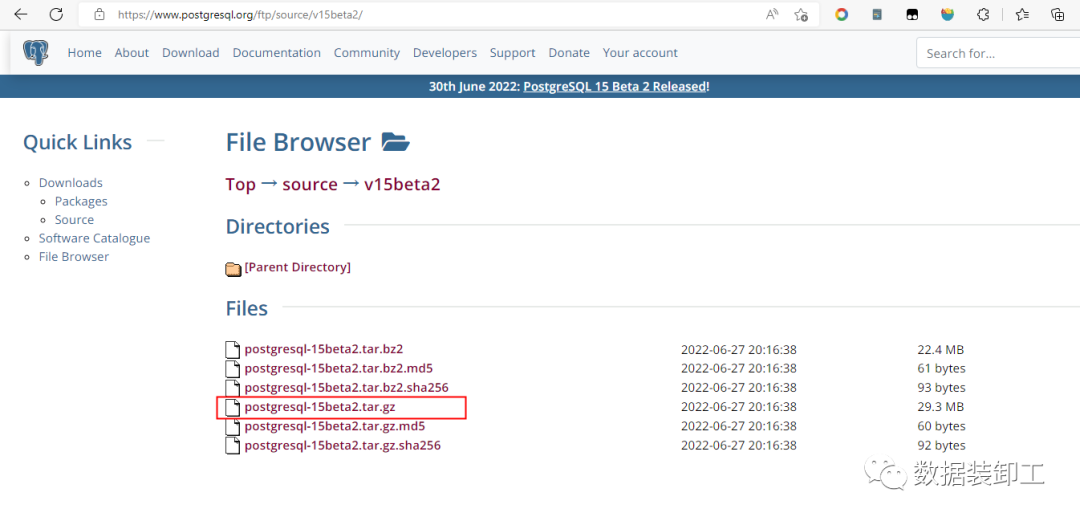
使用postgres用户上传到服务器/opt/postgres目录下,并解压
[root@node1 tmp]# su - postgres
Last login: Fri Jul 22 13:55:15 CST 2022 on pts/0
[postgres@node1 ~]$ cd /opt/postgres/
[postgres@node1 postgres]$ ls -lh
[postgres@node1 postgres]$ ls -lh
total 30M
drwxrwxr-x  2 postgres postgres   86 Jul 22 14:30 logs
drwx------ 19 postgres postgres 4.0K Jul 22 14:30 pgdata
drwxrwxr-x  6 postgres postgres   56 Jul 22 14:08 pgsql15.2
-rwxrwxr-x  1 postgres postgres  30M Jul 22 13:56 postgresql-15beta2.tar.gz
[postgres@node1 postgres]$ tar -zxvf postgresql-15beta2.tar.gz
postgresql-15beta2/
postgresql-15beta2/.dir-locals.el
postgresql-15beta2/contrib/
postgresql-15beta2/contrib/tcn/
postgresql-15beta2/contrib/tcn/tcn.control
.
.
.
.
postgresql-15beta2/.gitattributes
postgresql-15beta2/aclocal.m4
postgresql-15beta2/INSTALL
[postgres@node1 postgres]$ ls -l
total 30052
drwxrwxr-x  2 postgres postgres       86 Jul 22 14:30 logs
drwx------ 19 postgres postgres     4096 Jul 22 14:30 pgdata

drwxrwxr-x  6 postgres postgres       56 Jul 22 14:08 pgsql15.2
drwxrwxr-x  6 postgres postgres     4096 Jul 22 14:02 postgresql-15beta2
-rwxrwxr-x  1 postgres postgres 30763008 Jul 22 13:56 postgresql-15beta2.tar.gz
4.编译安装PostgreSQL数据库软件
./configure --prefix=/opt/postgres/pgsql15.2 --with-perl --with-python
--prefix指定安装软件目录,--with-perl支持perl语言自定义函数, --with-python支持python语言自定义函数。
[postgres@node1 postgresql-15beta2]$ ./configure --prefix=/opt/postgres/pgsql15.2 --with-perl --with-python
checking build system type... x86_64-pc-linux-gnu
checking host system type... x86_64-pc-linux-gnu
checking which template to use... linux
.
.
.
config.status: creating GNUmakefile
config.status: creating src/Makefile.global
config.status: creating src/include/pg_config.h
config.status: creating src/include/pg_config_ext.h
config.status: creating src/interfaces/ecpg/include/ecpg_config.h
config.status: linking src/backend/port/tas/dummy.s to src/backend/port/tas.s
config.status: linking src/backend/port/posix_sema.c to src/backend/port/pg_sema.c
config.status: linking src/backend/port/sysv_shmem.c to src/backend/port/pg_shmem.c
config.status: linking src/include/port/linux.h to src/include/pg_config_os.h
config.status: linking src/makefiles/Makefile.linux to src/Makefile.port
make命令编译安装检查
[postgres@node1 postgresql-15beta2]$ make
make -C ./src/backend generated-headers
make[1]: Entering directory `/opt/postgres/postgresql-15beta2/src/backend'
make -C catalog distprep generated-header-symlinks
make[2]: Entering directory `/opt/postgres/postgresql-15beta2/src/backend/catalog'
make[2]: Nothing to be done for `distprep'.
prereqdir=`cd './' >/dev/null && pwd` && \
cd '../../../src/include/catalog/' && for file in pg_proc_d.h pg_type_d.h pg_attribute_d.h pg_class_d.h pg_attrdef_d.h pg_constraint_d.h pg_inherits_d.h pg_index_d.h pg_operator_d.h pg_opfamily_d.h pg_opclass_d.h pg_am_d.h pg_amop_d.h pg_amproc_d.h pg_language_d.h pg_largeobject_metadata_d.h pg_largeobject_d.h pg_aggregate_d.h pg_statistic_d.h pg_statistic_ext_d.h pg_statistic_ext_data_d.h pg_rewrite_d.h pg_trigger_d.h pg_event_trigger_d.h pg_description_d.h pg_cast_d.h pg_enum_d.h pg_namespace_d.h pg_conversion_d.h pg_depend_d.h pg_database_d.h pg_db_role_setting_d.h pg_tablespace_d.h pg_authid_d.h pg_auth_members_d.h pg_shdepend_d.h pg_shdescription_d.h pg_ts_config_d.h pg_ts_config_map_d.h pg_ts_dict_d.h pg_ts_parser_d.h pg_ts_template_d.h pg_extension_d.h pg_foreign_data_wrapper_d.h pg_foreign_server_d.h pg_user_mapping_d.h pg_foreign_table_d.h pg_policy_d.h pg_replication_origin_d.h pg_default_acl_d.h pg_init_privs_d.h pg_seclabel_d.h pg_shseclabel_d.h pg_collation_d.h pg_parameter_acl_d.h pg_partitioned_table_d.h pg_range_d.h pg_transform_d.h pg_sequence_d.h pg_publication_d.h pg_publication_namespace_d.h pg_publication_rel_d.h pg_subscription_d.h pg_subscription_rel_d.h schemapg.h system_fk_info.h; do \
  rm -f $file && ln -s "$prereqdir/$file" . ; \
done
touch ../../../src/include/catalog/header-stamp
.
.
.
make[1]: Entering directory `/opt/postgres/postgresql-15beta2/contrib/ltree_plpython'
gcc -std=gnu99 -Wall -Wmissing-prototypes -Wpointer-arith -Wdeclaration-after-statement -Werror=vla -Wendif-labels -Wmissing-format-attribute -Wformat-security -fno-strict-aliasing -fwrapv -fexcess-precision=standard -O2 -fPIC -I/usr/include/python3.6m -DPLPYTHON_LIBNAME='"plpython3"' -I../../src/pl/plpython -I../../contrib -I. -I. -I../../src/include  -D_GNU_SOURCE   -c -o ltree_plpython.o ltree_plpython.c
gcc -std=gnu99 -Wall -Wmissing-prototypes -Wpointer-arith -Wdeclaration-after-statement -Werror=vla -Wendif-labels -Wmissing-format-attribute -Wformat-security -fno-strict-aliasing -fwrapv -fexcess-precision=standard -O2 -fPIC -shared -o ltree_plpython3.so  ltree_plpython.o -L../../src/port -L../../src/common    -Wl,--as-needed -Wl,-rpath,'/usr/lib64',--enable-new-dtags   -L/usr/lib64 -lpython3.6m -lpthread -ldl  -lutil -lm
make[1]: Leaving directory `/opt/postgres/postgresql-15beta2/contrib/ltree_plpython'
make install 编译安装
[postgres@node1 contrib]$ make install
make -C ../src/backend generated-headers
make[1]: Entering directory `/opt/postgres/postgresql-15beta2/src/backend'
make -C catalog distprep generated-header-symlinks
make[2]: Entering directory `/opt/postgres/postgresql-15beta2/src/backend/catalog'
make[2]: Nothing to be done for `distprep'.
make[2]: Nothing to be done for `generated-header-symlinks'.
make[2]: Leaving directory `/opt/postgres/postgresql-15beta2/src/backend/catalog'
make -C utils distprep generated-header-symlinks
make[2]: Entering directory `/opt/postgres/postgresql-15beta2/src/backend/utils'
make[2]: Nothing to be done for `distprep'.
make[2]: Nothing to be done for `generated-header-symlinks'.
make[2]: Leaving directory `/opt/postgres/postgresql-15beta2/src/backend/utils'
make[1]: Leaving directory `/opt/postgres/postgresql-15beta2/src/backend'
make -C adminpack install
.
.
.
make[1]: Entering directory `/opt/postgres/postgresql-15beta2/contrib/ltree_plpython'
/bin/mkdir -p '/opt/postgres/pgsql15.2/lib'
/bin/mkdir -p '/opt/postgres/pgsql15.2/share/extension'
/bin/mkdir -p '/opt/postgres/pgsql15.2/share/extension'
/bin/install -c -m 755  ltree_plpython3.so '/opt/postgres/pgsql15.2/lib/ltree_plpython3.so'
/bin/install -c -m 644 ./ltree_plpython3u.control '/opt/postgres/pgsql15.2/share/extension/'
/bin/install -c -m 644 ./ltree_plpython3u--1.0.sql  '/opt/postgres/pgsql15.2/share/extension/'
make[1]: Leaving directory `/opt/postgres/postgresql-15beta2/contrib/ltree_plpython'
以上源码编译安装已经完成。
5.为pgsql15.2目录做软连接文件夹
为了方便以后对数据库升级,可以做一个pgsql15.2文件夹的软连接pgsql,配置文件可以直接用pgsql目录
[postgres@node1 postgres]$ ln -sf pgsql15.2 pgsql
[postgres@node1 postgres]$ ls -lh
total 30M
drwxrwxr-x  2 postgres postgres   86 Jul 22 14:30 logs
drwx------ 19 postgres postgres 4.0K Jul 22 14:30 pgdata
lrwxrwxrwx  1 postgres postgres    9 Jul 22 14:09 pgsql -> pgsql15.2
drwxrwxr-x  6 postgres postgres   56 Jul 22 14:08 pgsql15.2
drwxrwxr-x  6 postgres postgres 4.0K Jul 22 14:02 postgresql-15beta2
-rwxrwxr-x  1 postgres postgres  30M Jul 22 13:56 postgresql-15beta2.tar.gz
6.在/etc/profile使用root用户添加环境变量
添加内容如下,使所有操作系统用户都可以使用PostgreSQL数据库
[postgres@node1 postgres]$ cat /etc/profile
.
.
.
#postgres
export PATH=/opt/postgres/pgsql/bin:$PATH
export LD_LIBRARY_PATH=/opt/postgres/pgsql/lib:$LD_LIBRARY_PATH
export PGDATA=/opt/postgres/pgdata
7.使用initdb命令创建数据库实例
[postgres@node1 ~]$ initdb
The files belonging to this database system will be owned by user "postgres".
This user must also own the server process.

The database cluster will be initialized with locale "en_US.UTF-8".
The default database encoding has accordingly been set to "UTF8".
The default text search configuration will be set to "english".

Data page checksums are disabled.

fixing permissions on existing directory /opt/postgres/pgdata ... ok
creating subdirectories ... ok
selecting dynamic shared memory implementation ... posix
selecting default max_connections ... 100
selecting default shared_buffers ... 128MB
selecting default time zone ... PRC
creating configuration files ... ok
running bootstrap script ... ok
performing post-bootstrap initialization ... ok
syncing data to disk ... ok

initdb: warning: enabling "trust" authentication for local connections
initdb: hint: You can change this by editing pg_hba.conf or using the option -A, or --auth-local and --auth-host, the next time you run initdb.

Success. You can now start the database server using:

    pg_ctl -D /opt/postgres/pgdata -l logfile start
8.安装contrib目录下的工具
[postgres@node1 ~]$ cd /opt/postgres/postgresql-15beta2
[postgres@node1 postgresql-15beta2]$ ls
aclocal.m4  config.log     configure     contrib    doc          GNUmakefile.in  INSTALL   README
config      config.status  configure.ac  COPYRIGHT  GNUmakefile  HISTORY         Makefile  src

[postgres@node1 postgresql-15beta2]$ cd contrib/
[postgres@node1 contrib]$ make
make -C ../src/backend generated-headers
.
.
.
make[1]: Leaving directory `/opt/postgres/postgresql-15beta2/contrib/ltree_plpython'
[postgres@node1 contrib]$ make install
make -C ../src/backend generated-headers
.
.
.
make[1]: Leaving directory `/opt/postgres/postgresql-15beta2/contrib/ltree_plpython'
9.修改配置文件pg_hba.conf
数据库实例创建后pg_hba.conf在/opt/postgres/pgdata目录下,添加相应配置项,允许任何用户远程连接本数据库,在pg_hba.conf最尾加如下内容|:

10.修改postgresql.conf配置文件
logging_collector=on打开日志,
log_directory = '/opt/postgres/logs'指定日志目录,
log_filename = 'postgresql-%Y-%m-%d_%H%M%S.log'日志命名规则,
log_rotation_size = 50MB日志最大50M后自动切换。
listen_addresses='*'表示在本地服务器的所有IP地址上监听
11.重启数据库并登录验证
[postgres@node1 pgdata]$ pg_ctl start -D $PGDATA -l logfile
waiting for server to start.... done
server started
[postgres@node1 pgdata]$ cd ../logs/
[postgres@node1 logs]$ ls
postgresql-2022-07-22_142817.log
[postgres@node1 logs]$ ls -lh
total 4.0K
-rw------- 1 postgres postgres 607 Jul 22 14:28 postgresql-2022-07-22_142817.log
[postgres@node1 pgdata]$ pg_ctl stop
waiting for server to shut down.... done
server stopped
[postgres@node1 pgdata]$ pg_ctl start
waiting for server to start....2022-07-22 14:30:03.074 CST [19197] LOG:  redirecting log output to logging collector process
2022-07-22 14:30:03.074 CST [19197] HINT:  Future log output will appear in directory "/opt/postgres/logs".
 done
server started
[postgres@node1 pgdata]$ psql
psql (15beta2)
Type "help" for help.

postgres=# \l
                                                 List of databases
   Name    |  Owner   | Encoding |   Collate   |    Ctype    | ICU Locale | Locale Provider |   Access privileges
-----------+----------+----------+-------------+-------------+------------+-----------------+-----------------------
 postgres  | postgres | UTF8     | en_US.UTF-8 | en_US.UTF-8 |            | libc            |
 template0 | postgres | UTF8     | en_US.UTF-8 | en_US.UTF-8 |            | libc            | =c/postgres          +
           |          |          |             |             |            |                 | postgres=CTc/postgres
 template1 | postgres | UTF8     | en_US.UTF-8 | en_US.UTF-8 |            | libc            | =c/postgres          +
           |          |          |             |             |            |                 | postgres=CTc/postgres
(3 rows)

postgres=#
报错解决
在源码安装./config编译时报错如下:
configure: error: could not determine flags for linking embedded Perl.
This probably means that ExtUtils::Embed or ExtUtils::MakeMaker is not
installed.
解决方法:安装perl-ExtUtils-Embed依赖包
[root@node1 postgresql-15beta2]# yum install perl-ExtUtils-Embed
Loaded plugins: fastestmirror
Loading mirror speeds from cached hostfile
 * base: mirrors.aliyun.com
 * extras: mirrors.aliyun.com
 * updates: mirror.lzu.edu.cn
Resolving Dependencies
--> Running transaction check
---> Package perl-ExtUtils-Embed.noarch 0:1.30-299.el7_9 will be installed
--> Finished Dependency Resolution

Dependencies Resolved

=============================================================================================================================================
 Package                                  Arch                        Version                             Repository                    Size
=============================================================================================================================================
Installing:
 perl-ExtUtils-Embed                      noarch                      1.30-299.el7_9                      updates                       51 k

Transaction Summary
=============================================================================================================================================
Install  1 Package

Total download size: 51 k
Installed size: 17 k
Is this ok [y/d/N]: y
Downloading packages:
perl-ExtUtils-Embed-1.30-299.el7_9.noarch.rpm                                                                         |  51 kB  00:00:00
Running transaction check
Running transaction test
Transaction test succeeded
Running transaction
  Installing : perl-ExtUtils-Embed-1.30-299.el7_9.noarch                                                                                 1/1
  Verifying  : perl-ExtUtils-Embed-1.30-299.el7_9.noarch                                                                                 1/1

Installed:
  perl-ExtUtils-Embed.noarch 0:1.30-299.el7_9

Complete!
总结
在线安装比较简单,只需要更新yum安装源,添加自启动即可;二进制安装需要注意一些依赖的开发包安装,不然编译会报错。
